
SocialBee and Sendible are both mid-range social media management tools, but they solve fundamentally different problems. SocialBee organizes content into categories with evergreen recycling to keep feeds active on autopilot. Sendible organizes client workflows with an inbox, approval gates, and reporting dashboards. The tool that fits you depends on whether you need content automation or client management.
SocialBee's content categories and evergreen recycling help solopreneurs keep feeds active with minimal effort. Sendible's inbox management, approval workflows, and client dashboards help agencies scale their operations. Two mid-range tools, two very different philosophies — we compare features, pricing, and real user reviews to find the better fit. Comparing the full market? Browse all social media scheduling alternatives.
The decision between these two platforms comes down to how you work. If you spend most of your time creating and organizing content, SocialBee's structured approach will save you hours each week. If you spend most of your time managing client relationships and team approvals, Sendible's workflow tools will prove their value quickly.
SocialBee vs Sendible at a Glance
| Feature | SocialBee | Sendible |
|---|---|---|
| Starting Price | $29/mo (5 profiles, 1 workspace) | $29/mo (6 profiles, 1 user) |
| Free Plan | No (14-day trial) | No (14-day trial) |
| Platforms | 9 | 10 |
| AI Tools | AI post generator (all plans) | AI Assist (OpenAI-powered) |
| Unique Strength | Content categories + evergreen recycling | Priority Inbox + client dashboards |
| Team Features | Accelerate+ ($49/mo) | Traction+ ($89/mo) |
| G2 Rating | 4.8/5 (435 reviews) | 4.5/5 (899 reviews) |
| Best For | Solopreneurs and content creators | Agencies and teams |
SocialBee Overview

SocialBee is a content-focused social media management platform designed for solopreneurs, small businesses, and content creators who want to keep their social feeds consistently active. It supports 9 platforms — Facebook, Instagram, X/Twitter, LinkedIn, Pinterest, Google Business, TikTok, YouTube, and Bluesky.
The standout feature is SocialBee's content category system, which lets you organize posts by topic or type and schedule them in rotating sequences. Combined with evergreen recycling, this means your best content automatically re-enters the queue — reducing the constant pressure to create new posts. Additional features include an AI post generator on all plans, Canva, Unsplash, and GIPHY integrations, RSS feed imports, a URL shortener, and team collaboration with approval workflows starting on the Accelerate plan.
SocialBee also includes a URL shortener for tracking link clicks, and its RSS feed import allows you to automatically pull content from blogs or news sources into your scheduling queue. The Pro plan at $99/month supports 25 profiles across 5 workspaces, making it viable for small agencies or freelancers managing a handful of clients.
The Canva, Unsplash, and GIPHY integrations let you create and source visuals without leaving the SocialBee interface, which speeds up the content creation process when you are batching posts across multiple categories.
SocialBee is best suited for solopreneurs and content creators who want a structured, category-based approach to scheduling. Read real user reviews of SocialBee from G2 and Trustpilot. Check out our SocialBee alternatives page for more options.
Sendible Overview

Sendible is a social media management platform engineered for agencies and multi-person marketing teams. It supports 10 platforms — Facebook, Instagram, TikTok, X/Twitter, LinkedIn, Google Business, YouTube, WordPress, Threads, and Bluesky — but does not support Pinterest.
Core features include unlimited scheduling on all plans, AI Assist powered by OpenAI, a Priority Inbox with sentiment analysis for managing comments and messages across accounts, approval workflows starting on the Traction plan, and white-label capabilities as a paid add-on on Advanced plans. The platform also offers Canva, Google Drive, Pexels, and Giphy integrations, bulk scheduling via CSV, Smart Queues, RSS auto-posting, over 250 report modules, and client dashboards for agency use.
Sendible enforces daily sending limits per platform to prevent accounts from being flagged for spam-like behavior, which is particularly useful for agencies posting on behalf of multiple clients. All plans include unlimited scheduling into the future — the daily limits only govern how many posts are published per day.
The Priority Inbox with sentiment analysis is a standout Sendible feature. It automatically flags negative comments and urgent messages, letting agencies respond to potential issues before they escalate — something SocialBee's content-focused design does not address.
Sendible is best for agencies and teams that need centralized inbox management, client dashboards, and scalable approval workflows. Read real user reviews of Sendible from G2 and Trustpilot. See our full Sendible alternatives overview for additional options.
Both platforms approach social media management from distinct angles, which becomes even more apparent when you look at their pricing structures and what you get at each tier.
Pricing Comparison
SocialBee Pricing
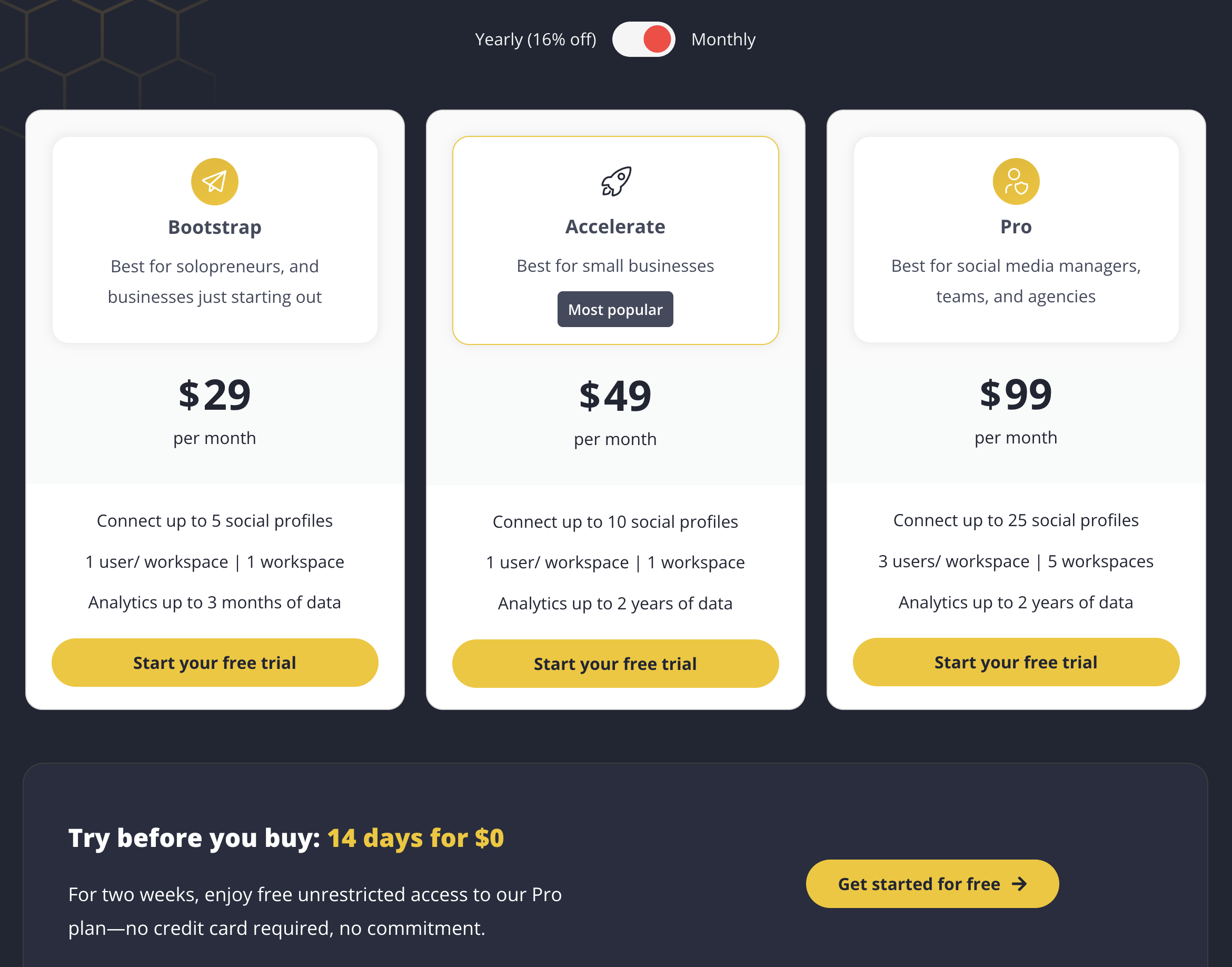
| Plan | Price | Profiles | Workspaces |
|---|---|---|---|
| Bootstrap | $29/mo | 5 | 1 |
| Accelerate | $49/mo | 10 | 1 |
| Pro | $99/mo | 25 | 5 |
SocialBee keeps its pricing straightforward with three tiers. The Bootstrap plan at $29/month covers 5 profiles and includes the content category system and AI post generator. Team collaboration and approval workflows unlock at the Accelerate tier. All plans include a 14-day free trial to test the platform before committing. See the full SocialBee pricing breakdown for details.
Sendible Pricing
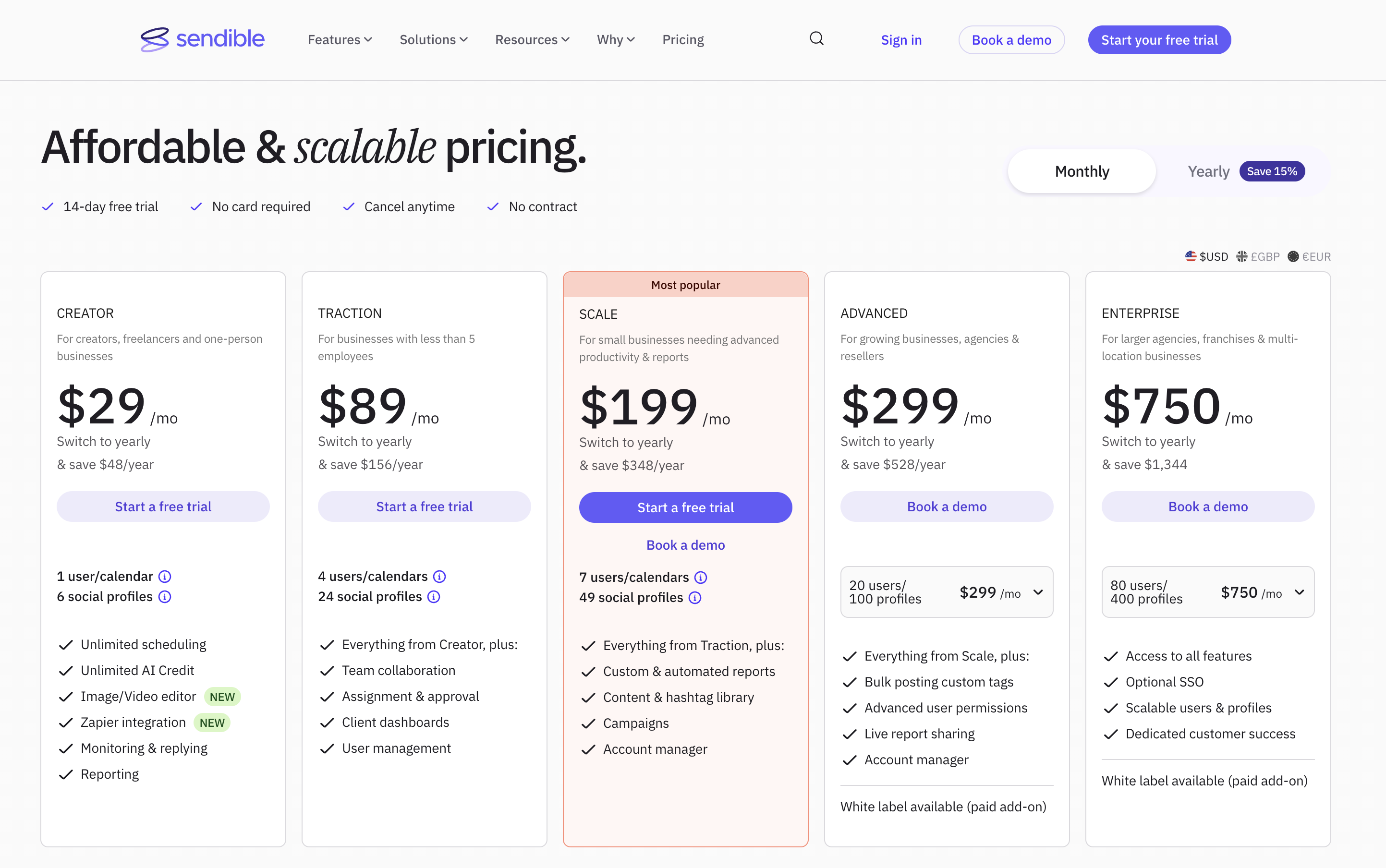
| Plan | Price | Profiles | Users |
|---|---|---|---|
| Creator | $29/mo | 6 | 1 |
| Traction | $89/mo | 24 | 4 |
| Scale | $199/mo | 49 | 7 |
| Advanced | $299/mo | 100 | 20 |
| Enterprise | $750/mo | 400 | 80 |
Sendible's pricing includes user seats within each tier. The Creator plan starts at $29/month for a single user, matching SocialBee's entry point. However, team features require the Traction plan at $89/month — significantly more than SocialBee's Accelerate plan at $49/month for collaboration. The white-label add-on at $240/month on Advanced plans raises the effective cost further for agencies needing branded client experiences. See the full Sendible pricing breakdown for details.
Price Verdict
Winner: SocialBee for team access. Both tools start at $29/month for solo users, but SocialBee unlocks team collaboration at $49/month versus Sendible's $89/month — a $40/month savings. Sendible offers more profiles per tier (24 on Traction vs 10 on Accelerate), so agencies managing a large volume of accounts may find its bundling more cost-effective at scale despite the higher monthly cost.
Both tools offer 14-day free trials, so you can test each platform before committing. The pricing gap between team tiers ($49/month for SocialBee vs $89/month for Sendible) is the most important financial difference to consider.
Keep in mind that neither tool offers a permanent free plan. If budget is a primary concern and you need free access, alternatives like Publer or Metricool provide free tiers with functional scheduling capabilities.
 PostPlanify
Manage All Your Social Accounts Without the Chaos
Schedule posts, track performance, and collaborate with your team.


Feature Comparison
Scheduling & Publishing
| Feature | SocialBee | Sendible |
|---|---|---|
| Unlimited Scheduling | All plans | All plans |
| Content Categories | Yes (all plans) | No |
| Evergreen Recycling | Yes | No |
| Bulk Scheduling | RSS import | CSV upload |
| Smart Queues | No | Yes |
| RSS Auto-Posting | Yes | Yes |
Winner: SocialBee. The content category system with evergreen recycling is genuinely unique and saves significant time for creators who want to keep feeds active without constant manual effort. You can set up categories like "tips," "promotions," and "behind the scenes," then let SocialBee rotate through them automatically. Sendible's Smart Queues are useful for time-slot optimization but do not replicate this content rotation capability.
AI Tools
| Feature | SocialBee | Sendible |
|---|---|---|
| AI Content Generator | Yes (all plans) | Yes (OpenAI, all plans) |
| AI Image Generation | No | No |
| AI Availability | All plans | All plans |
Winner: Tie. Both platforms include AI content generation on all plans. Neither offers AI image generation. The quality of suggestions varies, but both provide similar core functionality for generating post ideas and captions.
Analytics & Reporting
| Feature | SocialBee | Sendible |
|---|---|---|
| Built-in Analytics | Yes | Yes |
| Report Modules | Standard | 250+ |
| Client Dashboards | No | Traction+ ($89/mo) |
| Custom Reports | Limited | Yes |
Winner: Sendible. With over 250 report modules and dedicated client dashboards, Sendible offers far more comprehensive and customizable reporting. SocialBee includes basic analytics across all plans but does not match the depth, flexibility, or client-facing presentation options that agencies need for professional client reporting.
Team Collaboration
| Feature | SocialBee | Sendible |
|---|---|---|
| Team Access | Accelerate+ ($49/mo) | Creator+ ($29/mo) |
| Approval Workflows | Accelerate+ ($49/mo) | Traction+ ($89/mo) |
| Client Dashboards | No | Traction+ ($89/mo) |
| White-Label | No | Advanced+ (add-on $240/mo) |
| Workspaces | Pro (5 workspaces) | Profile-based |
Winner: Sendible for agencies. SocialBee for small teams. Sendible wins on the depth of collaboration features — client dashboards, white-label, and inbox management are unmatched. But SocialBee offers approval workflows at $49/month versus Sendible's $89/month, making it more accessible for small teams.
Platform Support
| Platform | SocialBee | Sendible |
|---|---|---|
| Yes | Yes | |
| Yes | Yes | |
| X/Twitter | Yes | Yes |
| Yes | Yes | |
| TikTok | Yes | Yes |
| YouTube | Yes | Yes |
| Yes | No | |
| Google Business | Yes | Yes |
| Bluesky | Yes | Yes |
| WordPress | No | Yes |
| Threads | No | Yes |
Winner: Tie. SocialBee supports 9 platforms including Pinterest. Sendible supports 10 platforms including WordPress and Threads but lacks Pinterest. Both cover the major networks, so the deciding factor is whether Pinterest or WordPress and Threads matter more for your content strategy.
Across all five feature categories, the pattern is consistent: SocialBee wins on content-focused features and entry-level pricing, while Sendible wins on agency infrastructure and reporting depth. The tie in platform support and AI means those categories will not be deciding factors for most users.
One shared limitation: neither tool offers AI image generation. Both include AI for text content but rely on integrations with Canva and similar tools for visual creation. If AI-generated visuals are important to your workflow, you will need to look at third-party solutions or alternative platforms.
What Real Users Say
SocialBee Reviews
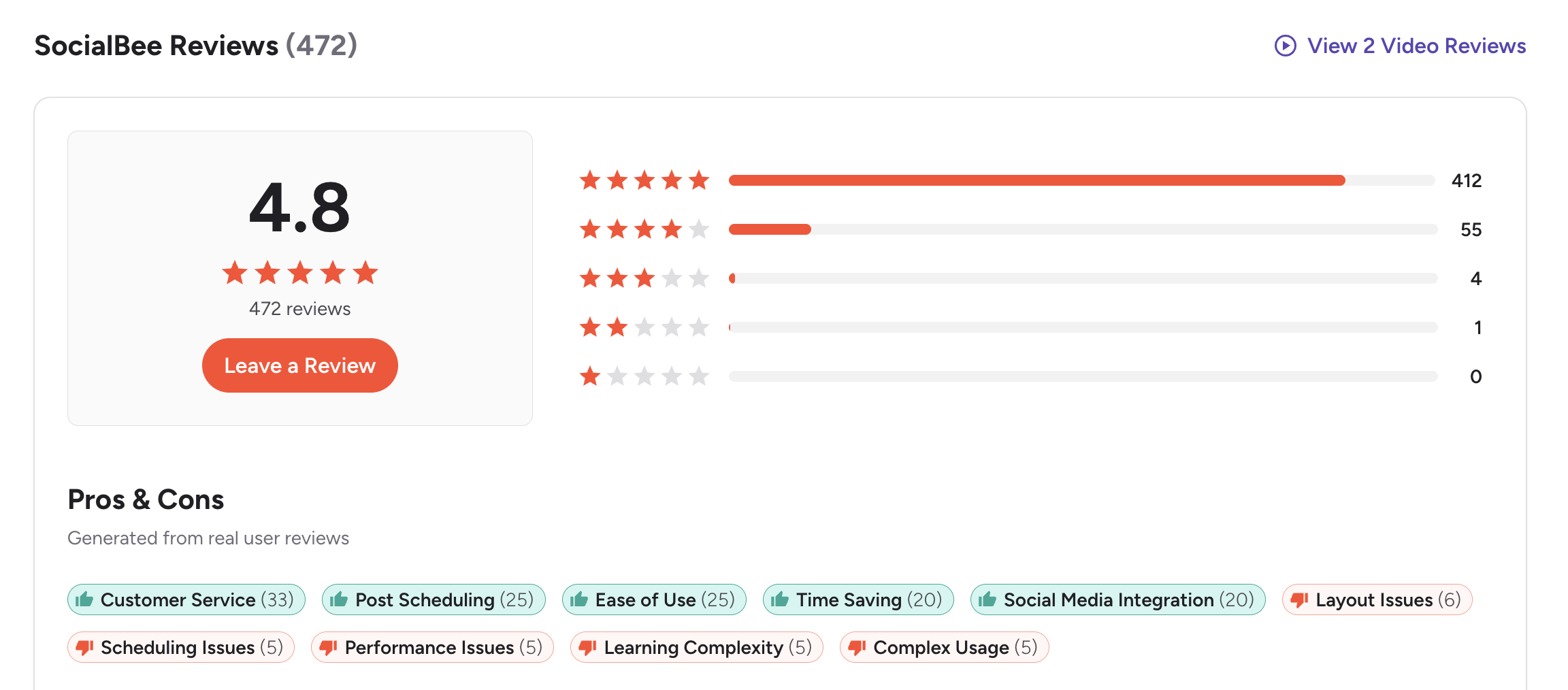
- G2: 4.8/5 (435 reviews) — Users love the content category system, evergreen recycling, and the simplicity of the scheduling interface. Some mention the initial learning curve around setting up categories and understanding how the rotation logic works.
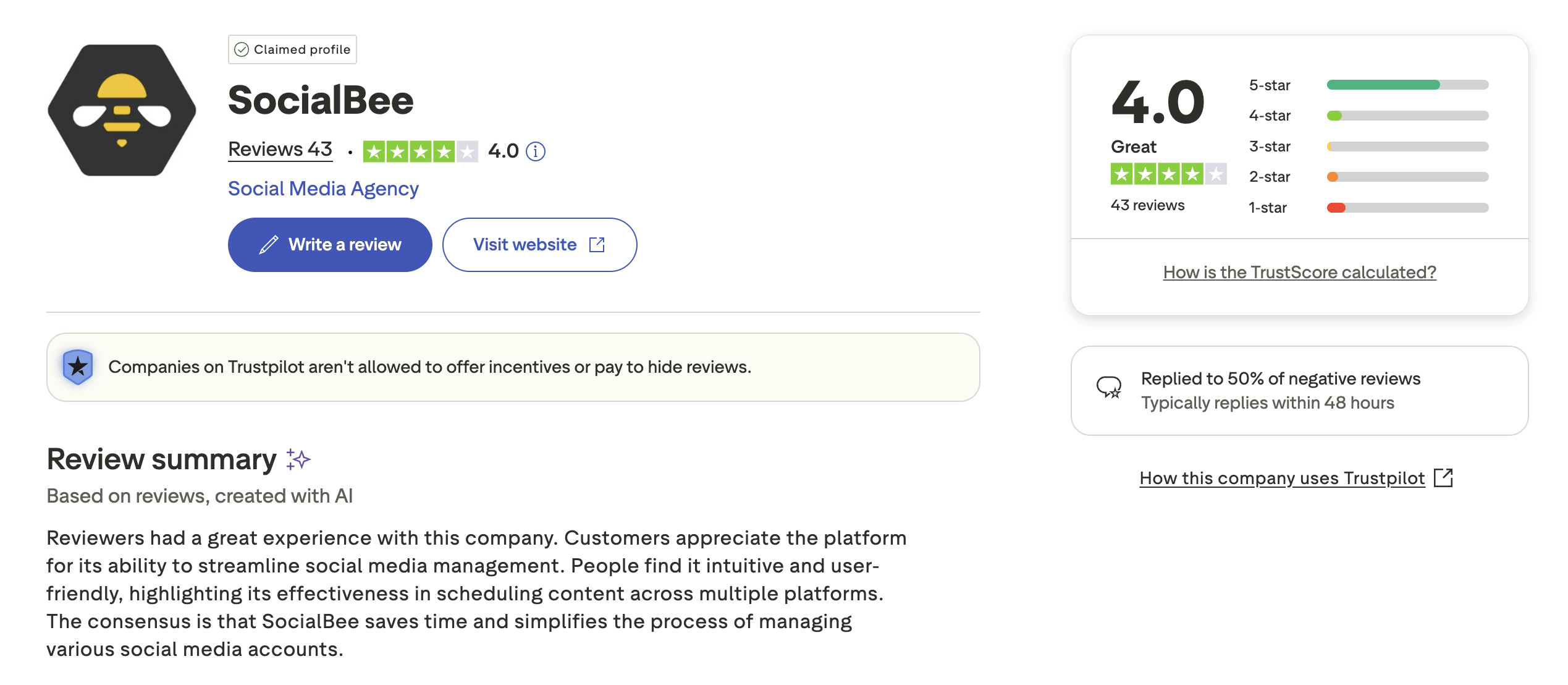
- Trustpilot: 3.8/5 (62 reviews) — A moderate sample size with solid scores that reinforce the G2 sentiment. Users praise the scheduling features and content recycling but some note limitations in analytics depth and third-party integrations compared to larger competitors.
Sendible Reviews
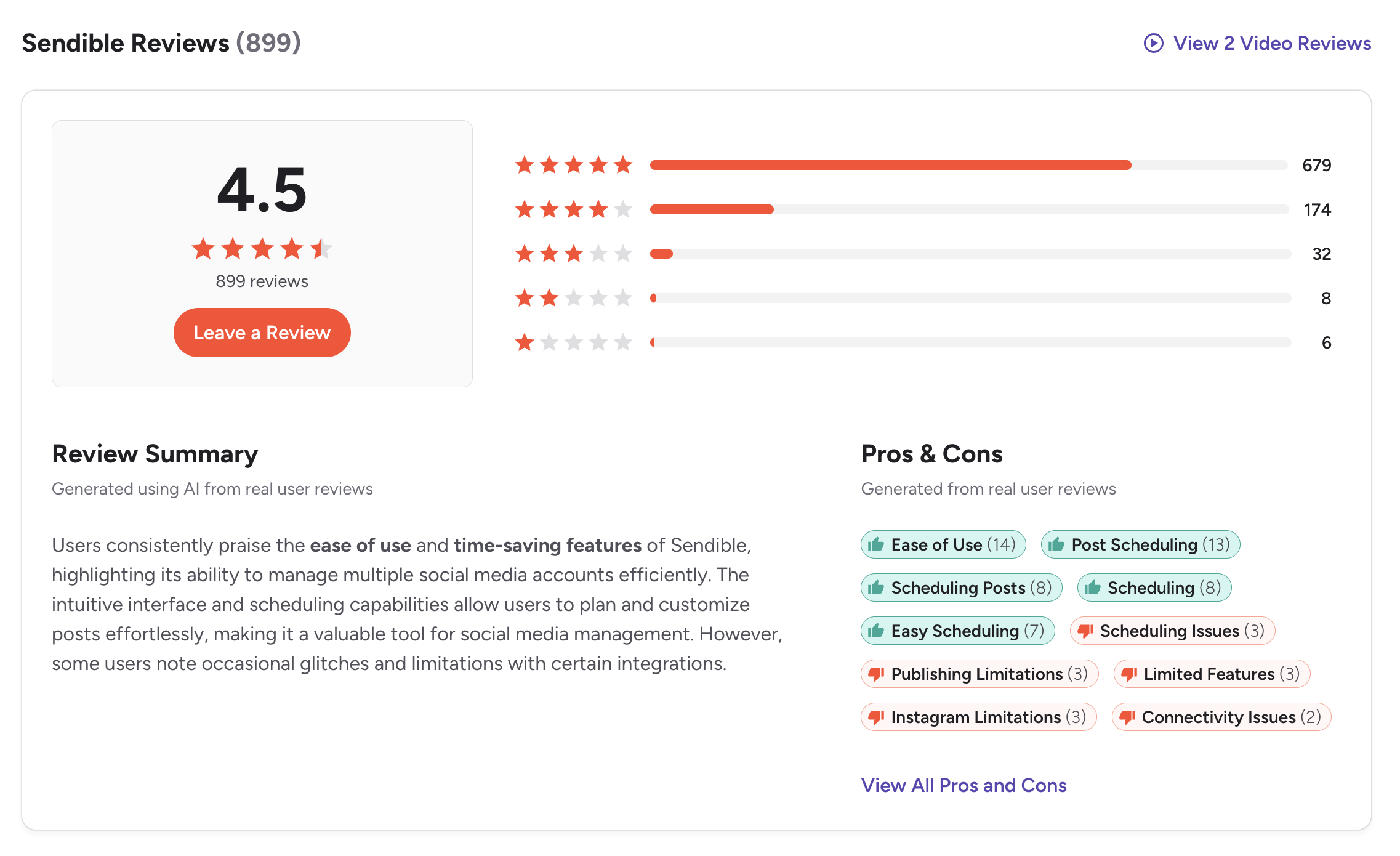
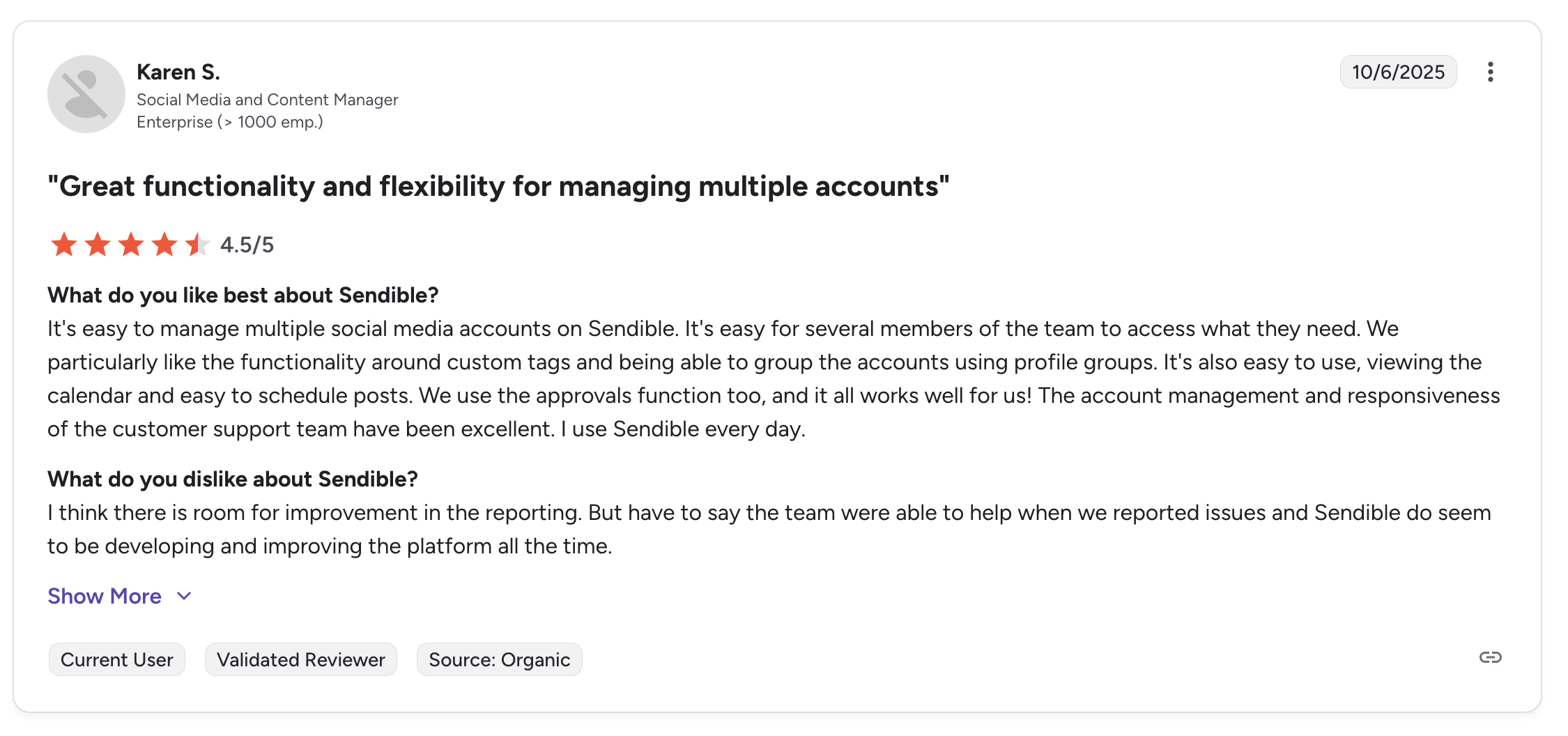
- G2: 4.5/5 (899 reviews) — Consistently praised for agency features, inbox management, and scheduling reliability. The larger review count of nearly 900 reviews adds significant credibility to this score and makes it one of the more trustworthy ratings in the category.
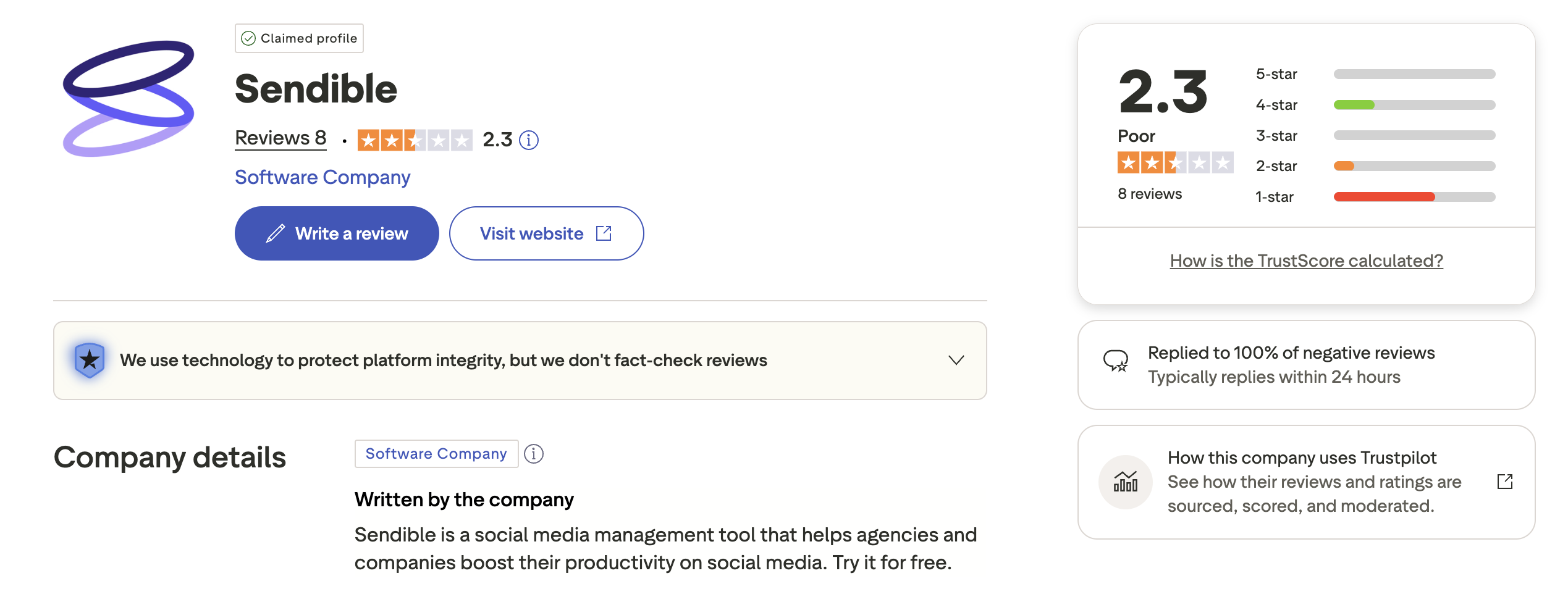
- Trustpilot: 2.3/5 (8 reviews) — With only 8 reviews, this score carries very little weight. The sample is far too small to be considered a reliable indicator of user satisfaction.
Review Verdict
Winner: SocialBee. SocialBee scores higher on both G2 (4.8 vs 4.5) and Trustpilot (3.8 vs 2.3). While Sendible's Trustpilot score is based on just 8 reviews and should be taken with a grain of salt, SocialBee's consistently higher ratings across both platforms suggest stronger overall user satisfaction.
Real user feedback aligns with the feature analysis: SocialBee earns higher satisfaction scores from individual creators, while Sendible earns loyalty from agency teams who rely on its inbox and client tools daily.
It is worth noting that SocialBee's 4.8/5 G2 rating is among the highest in the entire social media management category, suggesting exceptionally strong product-market fit for its target audience of solopreneurs and small content teams.
PostPlanifyManage All Your Social Accounts Without the Chaos
Schedule posts, track performance, and collaborate with your team.
Who Should Use SocialBee?
- You are a solopreneur or content creator who wants to keep feeds active with minimal effort
- You like organizing content by category and recycling evergreen posts automatically
- You want team collaboration features without paying $89/month or more
- You need Pinterest support as part of your social strategy
- You prefer a structured scheduling system over manual calendar management
- You want an AI post generator included from the entry-level plan
Explore more alternatives: Buffer vs SocialBee, Hootsuite vs SocialBee, Later vs SocialBee, Metricool vs SocialBee, or browse all SocialBee alternatives.
Who Should Use Sendible?
- You run an agency managing social media for multiple clients
- You need a unified inbox with sentiment analysis to manage community engagement
- You want client-facing dashboards and white-label reporting options
- You need approval workflows integrated with client management tools
- You publish content to WordPress alongside social platforms
- You want over 250 reporting modules for deep performance analysis
Explore more alternatives: Buffer vs Sendible, Hootsuite vs Sendible, Agorapulse vs Sendible, Loomly vs Sendible, or browse all Sendible alternatives.
If you find yourself torn between SocialBee's content-first approach and Sendible's agency tools, a third option might offer the flexibility you need without the trade-offs inherent in choosing one over the other.
Content Workflows Without the Complexity
SocialBee's category system keeps content organized. Sendible's inbox and dashboards keep agencies organized. Both solve real problems — but both also come with trade-offs. PostPlanify simplifies the workflow with unlimited scheduling, AI captions, and team collaboration starting at $29/month, without requiring you to learn a complex category system or pay agency-tier pricing.

| Feature | SocialBee | Sendible | PostPlanify |
|---|---|---|---|
| Starting Price | $29/mo | $29/mo | $29/mo |
| Unlimited Scheduling | All plans | All plans | All paid plans |
| AI Caption Generation | Yes (all plans) | Yes (OpenAI) | Yes (unlimited) |
| AI Image Generation | No | No | Yes |
| Canva Integration | Yes | Yes | Yes |
| Google Drive Import | No | Yes | Yes |
| Content Categories | Yes | No | No |
| Approval Workflows | $49/mo (Accelerate) | $89/mo (Traction) | $99/mo (Premium) |
| Analytics | Yes | 250+ modules | $49/mo (Growth) |
| Social Inbox | No | Yes (Priority Inbox) | Yes |
| Platforms | 9 | 10 | 10 |
| Team Members | No | No | 5 (Premium $99/mo), unlimited (Enterprise) |
PostPlanify gives you the core features that matter most — unlimited scheduling and AI-powered content creation — at the same entry price as SocialBee and Sendible. AI image generation is included, which neither competitor offers. The Canva integration and Google Drive import streamline asset management without requiring additional subscriptions. When you need to scale, analytics are included from the Growth plan ($49/month, 10 accounts, unlimited posts). The Premium plan at $99/month adds 25 accounts, 5 team members, and approval workflows in a single flat price with no hidden add-ons or per-user charges.
See all plans on the PostPlanify pricing page.
Try PostPlanify free for 7 days and simplify your social media workflow.

The three-way comparison shows that PostPlanify provides a simpler path to the features most users actually need, without requiring you to choose between content automation and team collaboration.
Related Guides
- Best Time to Post on Social Media
- Content Batching Guide
- How to Automate Social Media Posts
- Best SocialBee Alternatives
- Best Sendible Alternatives
FAQ
Is SocialBee better than Sendible?
It depends on your needs. SocialBee is better for solopreneurs and content creators who want category-based scheduling with evergreen recycling to keep feeds active with minimal ongoing effort. Sendible is better for agencies that need client dashboards, a unified inbox with sentiment analysis, and white-label reporting. Neither is universally superior — they target fundamentally different user types.
Do both tools offer free plans?
No. Both SocialBee and Sendible offer 14-day free trials but do not have permanent free plans. If you need a free tier, consider alternatives like Publer or Metricool.
Which tool is better for content recycling?
SocialBee is the clear winner for content recycling. Its category-based system automatically re-queues evergreen posts into rotating time slots, keeping your feed active without manual intervention. You can mark posts as evergreen or set expiration dates for time-sensitive content. Sendible does not have a comparable content recycling feature and requires manual re-scheduling for repeated content.
Can SocialBee handle client management like Sendible?
No. SocialBee offers workspaces and approval workflows, but it lacks client dashboards, white-label reporting, and a unified inbox — all features that Sendible provides for agency use. If client management is your primary need, Sendible is the better tool.
Which tool supports more platforms?
Sendible supports 10 platforms including WordPress and Threads. SocialBee supports 9 platforms including Pinterest. Sendible does not support Pinterest, while SocialBee does not support WordPress or Threads. Both cover the core social networks.
How do user ratings compare between SocialBee and Sendible?
SocialBee has higher ratings overall: 4.8/5 on G2 (435 reviews) versus Sendible's 4.5/5 (899 reviews). On Trustpilot, SocialBee scores 3.8/5 (62 reviews) compared to Sendible's 2.3/5, though Sendible's score is based on only 8 reviews and should not be considered reliable.
Is there a tool that combines SocialBee's simplicity with Sendible's team features?
PostPlanify offers unlimited scheduling and AI tools at $29/month for 5 accounts with a straightforward interface, plus team collaboration features including approval workflows and 5 team members on the $99/month Premium plan. It avoids SocialBee's category complexity and Sendible's agency-tier pricing.
Does SocialBee offer white-label options?
No. SocialBee does not offer white-label features. Sendible offers white-label as a paid add-on at $240/month on its Advanced plan and above. If white-label branding is essential to your business, Sendible is the only option between these two.







