
Sprout Social and Sendible both serve teams that need more than basic scheduling. Social inboxes, approval workflows, analytics dashboards, and multi-user collaboration are table stakes for both platforms. But the way they price and package these features creates a significant gap that matters for budget-conscious teams and agencies.
Two team-oriented platforms with social inboxes and analytics, but wildly different economics. Sprout Social starts at $199/seat while Sendible starts at $29/month. We map the feature gap to the price gap so you can judge which investment actually pays off for your team size. Comparing the full market? Browse all social media scheduling alternatives.
Sprout Social vs Sendible at a Glance
| Category | Sprout Social | Sendible |
|---|---|---|
| Starting Price | $199/mo per seat | $29/mo (Creator) |
| Free Plan | No (30-day trial) | No (14-day free trial) |
| Platforms Supported | 10+ | 10 |
| Unlimited Scheduling | Professional+ | All plans |
| AI Tools | AI Assist | AI Assist (OpenAI-powered) |
| AI Image Generation | No | No |
| Bulk Scheduling | Yes | CSV bulk scheduling |
| Team Collaboration | All plans (per-seat) | Traction+ ($89/mo) |
| Approval Workflows | All plans | Traction+ ($89/mo) |
| Analytics | All plans | All plans (250+ modules) |
| G2 Rating | 4.4/5 (3,827 reviews) | 4.5/5 (899 reviews) |
| Trustpilot Rating | 1.2/5 (71 reviews) | 2.3/5 (8 reviews) |
| Best For | Large teams needing CRM and social listening | Agencies needing client management |
Sprout Social Overview

Sprout Social is a premium social media management platform designed for large teams and enterprises that need deep analytics, CRM capabilities, and social listening. It supports 10+ platforms including Instagram, Facebook, LinkedIn, X/Twitter, TikTok, YouTube, Pinterest, Threads, Google Business, and WhatsApp.
Key features include the Smart Inbox for unified message management, social listening on Professional plans and above, AI Assist for content creation, a built-in CRM for tracking conversation history, competitive reports, employee advocacy tools, Salesforce integration, and sentiment analysis. Sprout Social positions itself as a comprehensive platform where social media data connects directly to business intelligence.
Sprout Social offers a 30-day free trial across all plans, giving teams ample time to evaluate its capabilities. The Professional plan at $299/seat unlocks unlimited profiles and social listening, while the Advanced plan at $399/seat adds automation and chatbot features.
The trade-off is cost. At $199/month per seat, adding team members gets expensive fast. A 5-person team on the Standard plan costs $995/month before any add-ons. For a deeper look, visit our Sprout Social review and alternatives. Read real user reviews of Sprout Social from G2 and Trustpilot.
Sendible Overview

Sendible is an agency-focused social media management platform that bundles scheduling, inbox management, and client tools into tiered plans. It supports 10 platforms: Facebook, Instagram, TikTok, X/Twitter, LinkedIn, Google Business, YouTube, WordPress, Threads, and Bluesky. Notably, Sendible does not support Pinterest.
Key features include unlimited scheduling on every plan, AI Assist powered by OpenAI, a Priority Inbox with sentiment analysis, approval workflows on Traction and above, white-label dashboards as an Advanced plan add-on ($240/mo), Canva/Google Drive/Pexels/Giphy integrations, CSV bulk scheduling, Smart Queues, RSS auto-posting, over 250 report modules, and client dashboards starting at the Traction tier. Daily sending limits help protect account health.
Sendible offers a 14-day free trial on every plan. The jump from Creator ($29/mo) to Traction ($89/mo) is where Sendible's real value unlocks — 4 users, 24 profiles, approval workflows, and client dashboards. For agencies scaling beyond that, the Advanced plan at $299/month supports 20 users and 100 profiles.
Sendible appeals to agencies and teams that want robust features without per-seat pricing. For more details, check our Sendible review and alternatives. Read real user reviews of Sendible from G2 and Trustpilot.
Pricing Comparison
Sprout Social Pricing
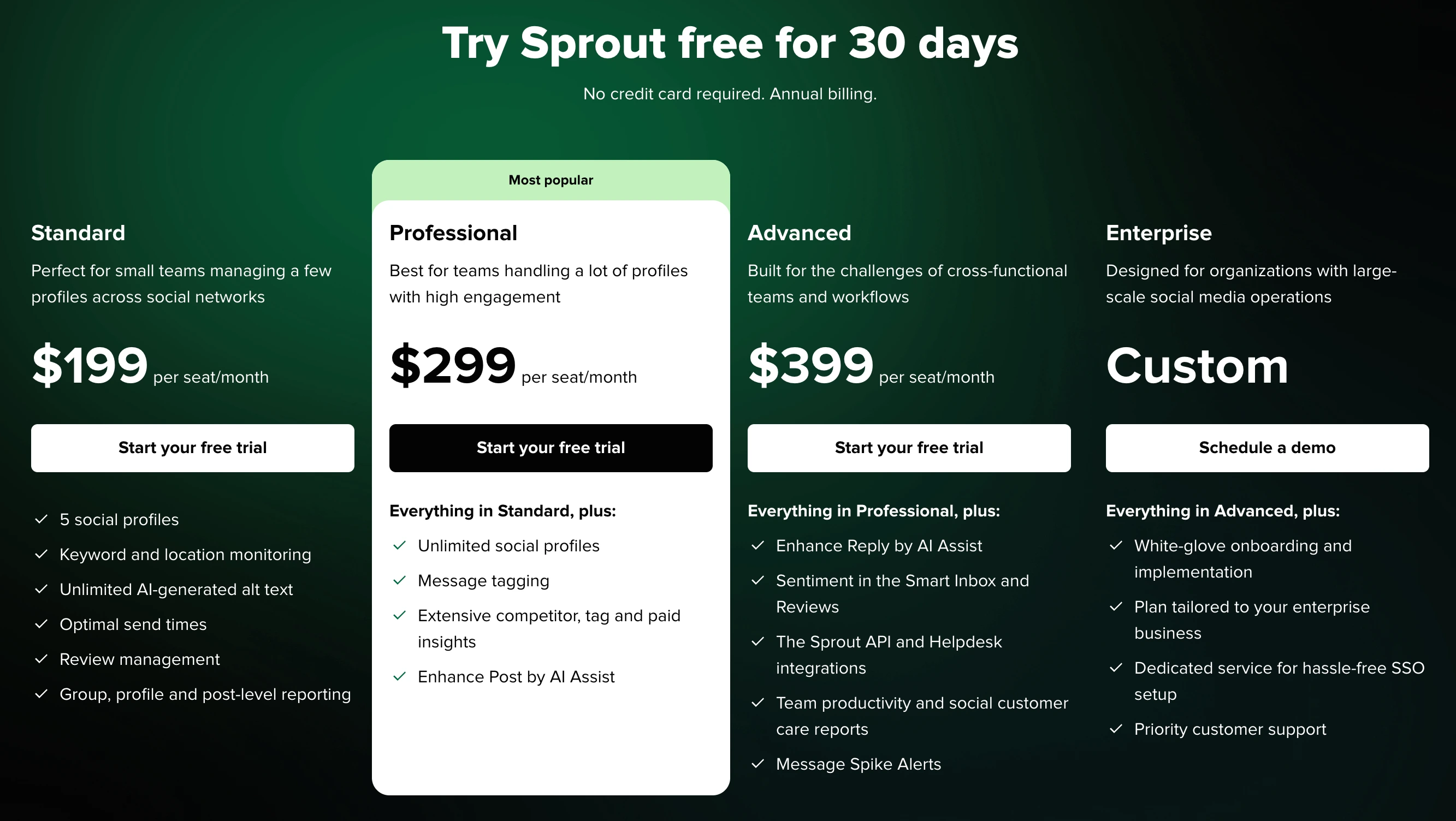
See the full Sprout Social pricing breakdown for details.
| Plan | Price | Profiles | Users |
|---|---|---|---|
| Standard | $199/mo per seat | 5 | 1 |
| Professional | $299/mo per seat | Unlimited | 1 |
| Advanced | $399/mo per seat | Unlimited | 1 |
| Enterprise | Custom | Custom | Custom |
Sprout Social charges per seat, meaning every additional team member multiplies the base cost. A 3-person team on the Professional plan costs $897/month. For larger teams of 5 or more on the Standard plan, costs exceed $995/month — approaching the annual budget of many small businesses for marketing tools alone.
Sendible Pricing
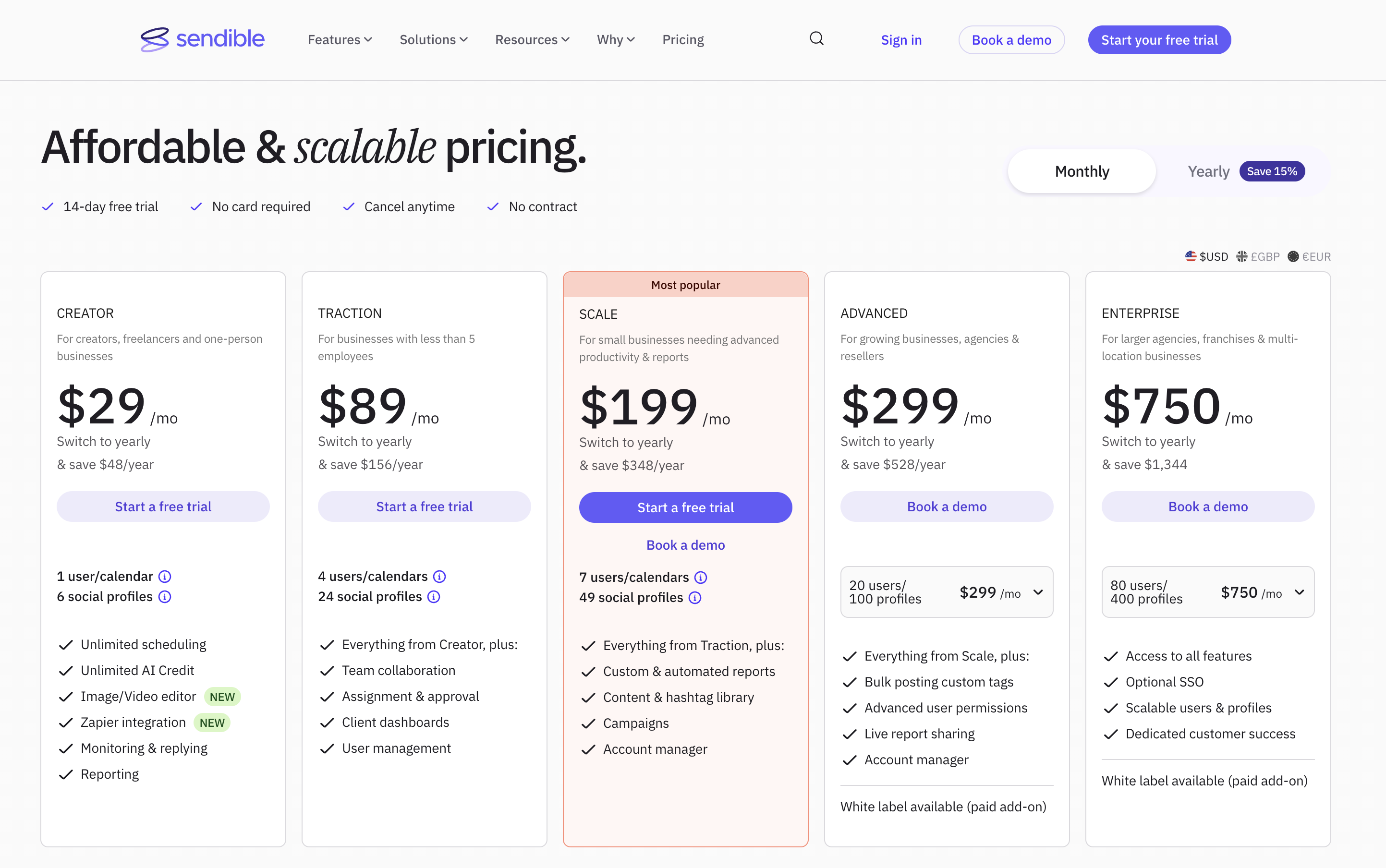
See the full Sendible pricing breakdown for details.
| Plan | Price | Profiles | Users |
|---|---|---|---|
| Creator | $29/mo | 6 | 1 |
| Traction | $89/mo | 24 | 4 |
| Scale | $199/mo | 49 | 7 |
| Advanced | $299/mo | 100 | 20 |
| Enterprise | $750/mo | 400 | 80 |
Sendible bundles multiple users into each tier. The Scale plan at $199/month includes 7 users and 49 profiles — the same price as a single Sprout Social Standard seat with only 5 profiles.
Price Verdict
Sendible is significantly cheaper at every level. Sendible's Scale plan ($199/mo) provides 7 users and 49 profiles for the same price as one Sprout Social Standard seat with 5 profiles. Even Sendible's Enterprise plan at $750/month for 80 users costs less than four Sprout Social Standard seats. Unless you specifically need Sprout Social's CRM or social listening capabilities, Sendible offers dramatically better value.
 PostPlanify
Manage All Your Social Accounts Without the Chaos
Schedule posts, track performance, and collaborate with your team.


Feature Comparison
We evaluated both platforms across five core areas to determine where each tool excels and where it falls short.
Scheduling & Publishing
| Feature | Sprout Social | Sendible |
|---|---|---|
| Unlimited Scheduling | Professional+ | All plans |
| Bulk Scheduling | Yes | CSV bulk scheduling |
| Content Calendar | Yes | Yes |
| Smart Queues | ViralPost timing | Smart Queues |
| RSS Auto-Posting | No | Yes |
| First Comment | Yes | Yes |
| Asset Library | Yes | Yes |
Winner: Sendible. Unlimited scheduling on all plans and RSS auto-posting give Sendible an edge. Sprout Social reserves unlimited scheduling for Professional ($299/seat) and above, which is a steep price for a feature many competitors include by default.
AI Tools
| Feature | Sprout Social | Sendible |
|---|---|---|
| AI Caption Generation | AI Assist | AI Assist (OpenAI-powered) |
| AI Image Generation | No | No |
| AI Sentiment Analysis | Yes | Yes (Priority Inbox) |
| AI Content Suggestions | Yes | No |
| Included On | All plans | All plans |
Winner: Sprout Social. While both offer AI caption generation and sentiment analysis, Sprout Social adds AI-driven content suggestions and deeper integration of AI across its analytics suite. However, neither tool offers AI image generation, which limits the creative utility of both platforms.
Analytics & Reporting
| Feature | Sprout Social | Sendible |
|---|---|---|
| Post Analytics | All plans | All plans |
| Report Modules | Custom builder | 250+ modules |
| Competitive Reports | Yes | No |
| Social Listening | Professional+ | No |
| Client Dashboards | No | Traction+ |
| CRM Data | Yes | No |
| Export Options | PDF, CSV | PDF, CSV |
Winner: Sprout Social for intelligence, Sendible for client reporting. Sprout Social's social listening, competitive reports, and CRM integration provide deeper business intelligence. Sendible's 250+ report modules and client dashboards are better for agency deliverables.
Team Collaboration
| Feature | Sprout Social | Sendible |
|---|---|---|
| Multi-User Access | All plans (per-seat) | Traction+ (bundled) |
| Approval Workflows | All plans | Traction+ |
| Task Assignment | Yes | Yes |
| Employee Advocacy | Yes | No |
| White-Label | No | Advanced+ ($240/mo add-on) |
| Unified Inbox | Smart Inbox | Priority Inbox |
| CRM | Yes | No |
Winner: Depends on use case. Sprout Social wins for internal teams needing CRM and employee advocacy. Sendible wins for agencies needing white-label and client management at a lower cost per user. If you are an in-house social team at a corporation, Sprout Social's collaboration model fits. If you are an agency serving external clients, Sendible is purpose-built for that workflow.
Platform Support
| Platform | Sprout Social | Sendible |
|---|---|---|
| Yes | Yes | |
| Yes | Yes | |
| X/Twitter | Yes | Yes |
| Yes | Yes | |
| TikTok | Yes | Yes |
| YouTube | Yes | Yes |
| Yes | No | |
| Threads | Yes | Yes |
| Google Business | Yes | Yes |
| Bluesky | No | Yes |
| WordPress | No | Yes |
| Yes | No |
Winner: Sprout Social by a slim margin. Sprout Social supports 10+ platforms including Pinterest and WhatsApp. Sendible supports 10 platforms with WordPress and Bluesky but lacks Pinterest and WhatsApp. Both cover the core social networks.
What Real Users Say
We analyzed ratings on both G2 (a B2B review platform) and Trustpilot (a consumer review site) for a complete picture of user satisfaction.
Sprout Social Reviews
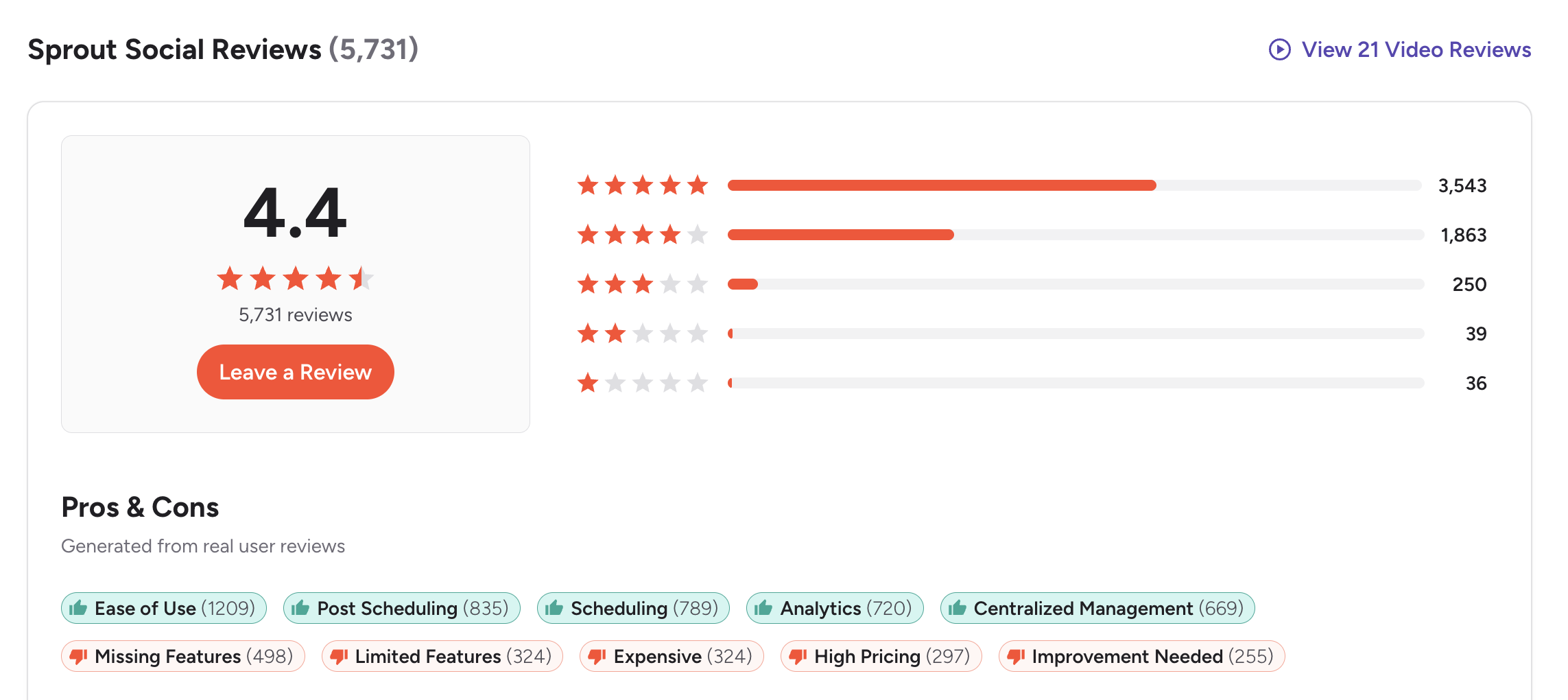
G2: 4.4/5 (3,827 reviews) — Sprout Social is highly rated on G2, with users praising its Smart Inbox, analytics depth, and polished interface. The most common criticism is pricing — many reviewers feel the per-seat model is too expensive for the features provided at each tier.
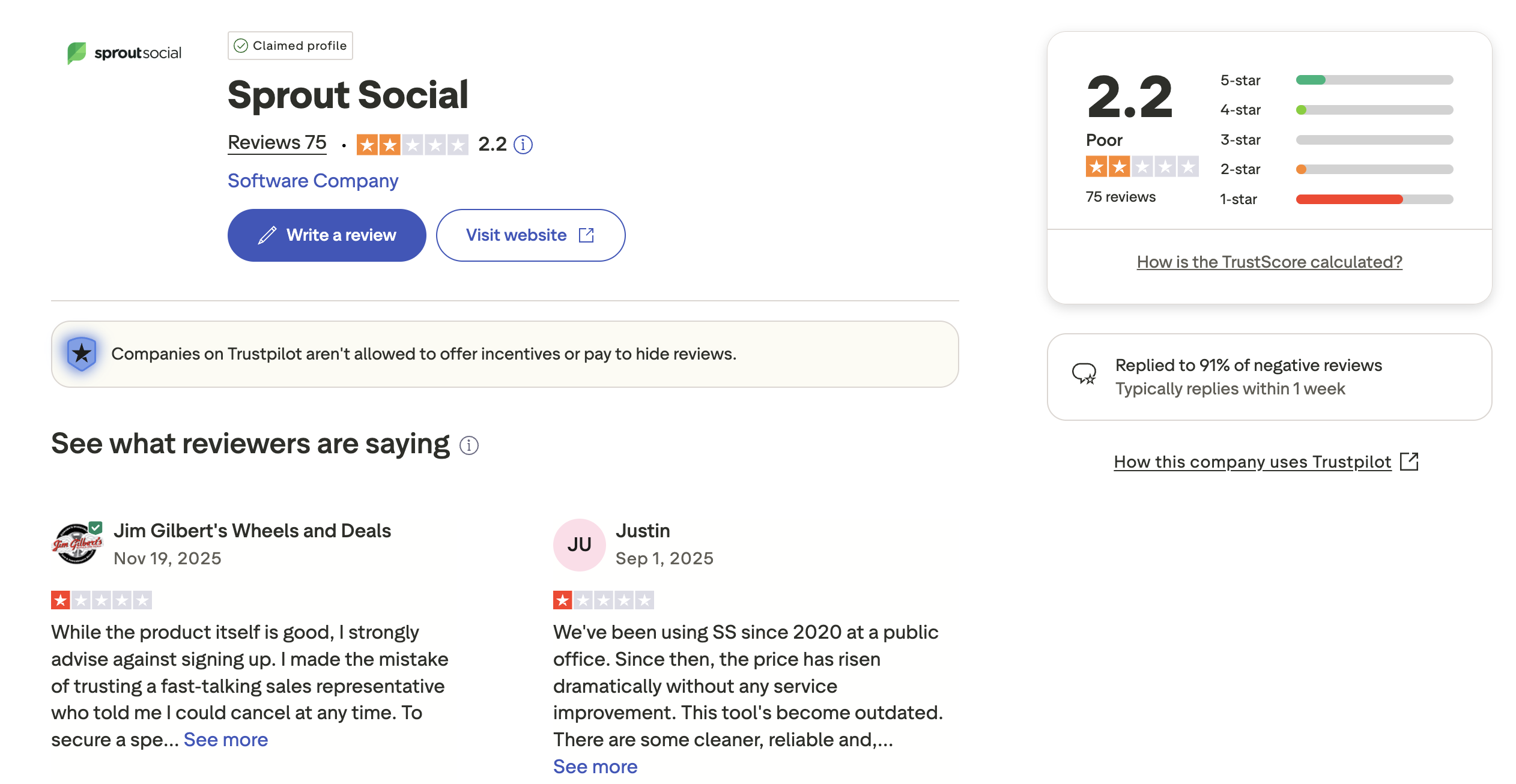
Trustpilot: 1.2/5 (71 reviews) — Sprout Social's Trustpilot score is alarmingly low. Reviews frequently cite billing disputes, auto-renewal frustrations, and difficulty canceling subscriptions. This is one of the lowest Trustpilot scores among major social media management tools.
Sendible Reviews
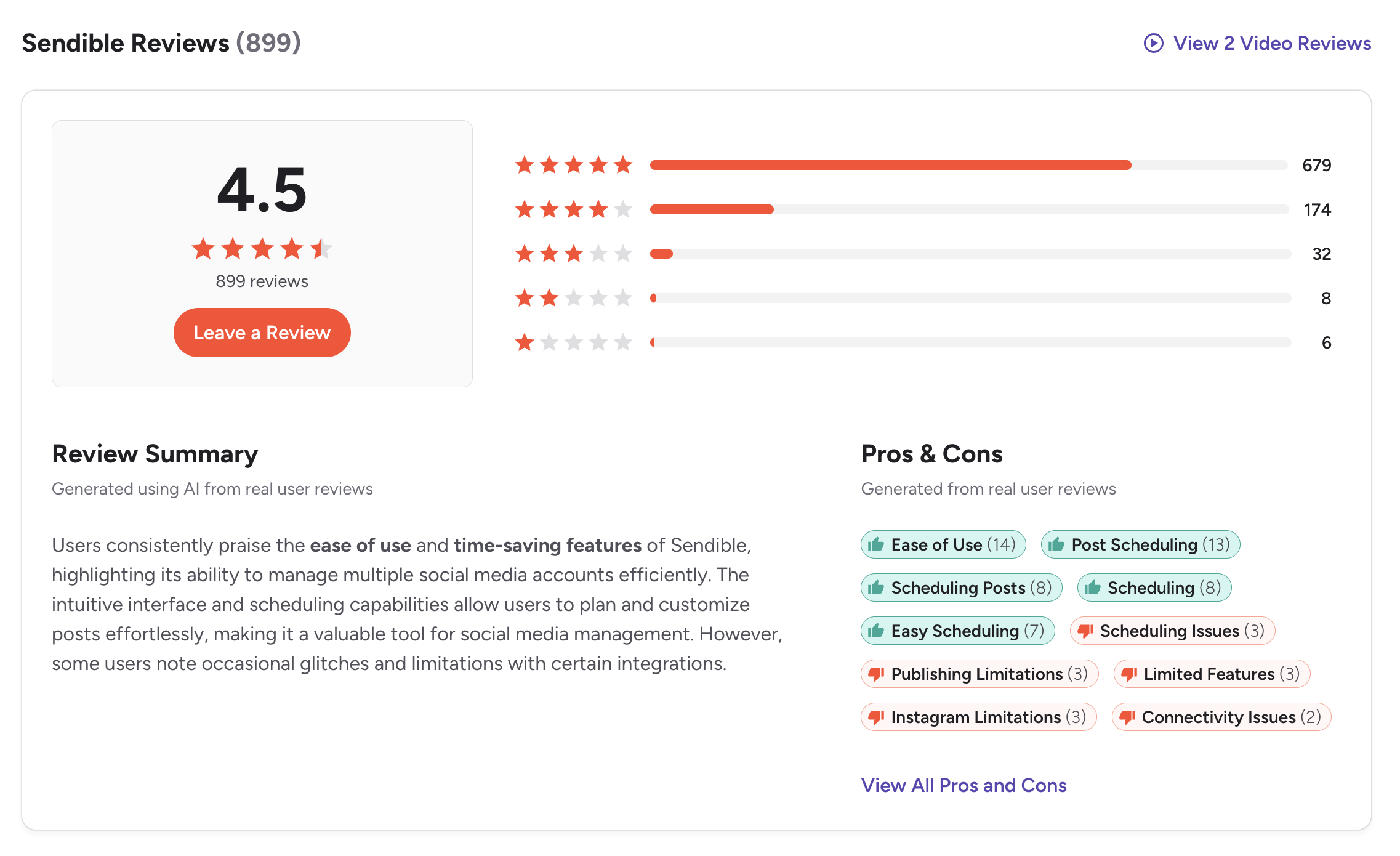
G2: 4.5/5 (899 reviews) — Sendible outscores Sprout Social on G2 with praise for its agency features, reporting flexibility, and value for money. Users appreciate the bundled pricing model and Priority Inbox functionality.
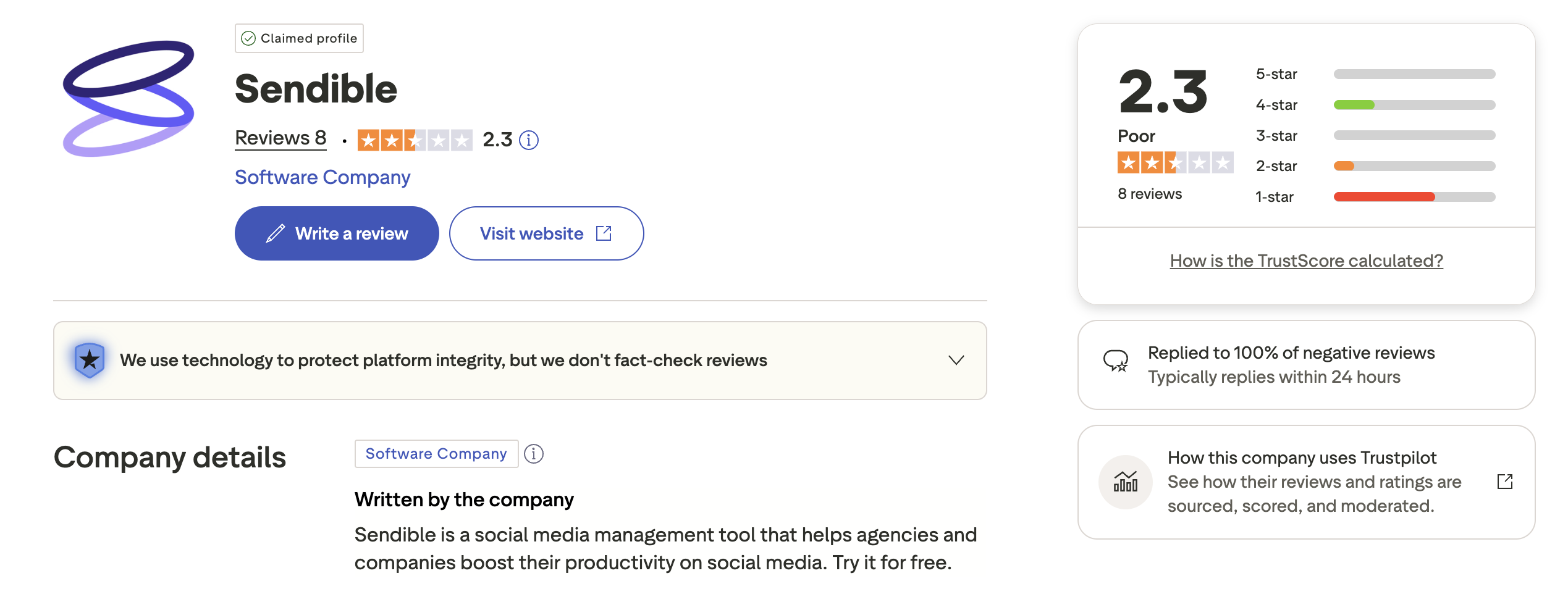
Trustpilot: 2.3/5 (8 reviews) — With a mere 8 reviews on Trustpilot, this score is not statistically meaningful. The extremely small sample size means individual reviews disproportionately affect the rating.
Review Verdict
Sendible leads on G2 (4.5 vs 4.4) and dramatically on Trustpilot (2.3 vs 1.2), though Sendible's Trustpilot sample of 8 reviews is too small to be definitive. Sprout Social's 1.2 Trustpilot rating with 71 reviews is concerning and suggests real issues with billing and customer service. Both tools have strong G2 ratings, but Sendible's better value proposition shows in user sentiment.
A recurring theme in Sprout Social's negative reviews is the difficulty of canceling subscriptions and unexpected auto-renewals. Sendible's G2 feedback, by contrast, tends to focus on minor platform connectivity issues rather than billing friction. For teams evaluating both options, it is worth requesting clear cancellation terms upfront.
PostPlanifyManage All Your Social Accounts Without the Chaos
Schedule posts, track performance, and collaborate with your team.
Who Should Use Sprout Social?
If you are considering Sprout Social, also explore our Sprout Social alternatives page and see how Sprout Social compares to Buffer, Hootsuite, Later, and Metricool.
- Large teams with dedicated social media departments and substantial budgets
- Organizations that need built-in CRM for tracking customer interactions
- Businesses requiring social listening and competitive intelligence
- Companies with Salesforce that want native CRM integration
- Enterprises that need employee advocacy programs
- Teams that prioritize WhatsApp as a communication channel
Who Should Use Sendible?
If you are considering Sendible, also explore our Sendible alternatives page and see how Sendible compares to Buffer, Hootsuite, Later, and SocialPilot.
- Agencies managing 10+ client accounts that need consolidated dashboards
- Teams that want approval workflows without per-seat pricing
- Businesses needing white-label reports for client deliverables
- Organizations that rely on WordPress publishing alongside social media
- Teams looking for 250+ analytics report modules
- Budget-conscious teams that need team features under $200/month
Skip the Per-Seat Math
Sprout Social's $199/seat and Sendible's tiered plans both add up fast as teams grow. PostPlanify takes a different approach — flat monthly pricing with 5 team members on the Premium plan (unlimited on Enterprise). No per-seat multipliers, no hidden costs.

| Feature | Sprout Social | Sendible | PostPlanify |
|---|---|---|---|
| Starting Price | $199/mo per seat | $29/mo | $29/mo |
| Unlimited Scheduling | $299/mo per seat | All plans | All paid plans |
| AI Caption Generation | AI Assist | AI Assist (OpenAI) | Yes (unlimited) |
| AI Image Generation | No | No | Yes |
| Canva Integration | Yes | Yes | Yes |
| Google Drive Import | No | Yes | Yes |
| Approval Workflows | All plans (per-seat) | $89/mo (Traction) | $99/mo (Premium) |
| Analytics | All plans (per-seat) | All plans | $49/mo (Growth) |
| Social Inbox | Yes (Smart Inbox) | Yes (Priority Inbox) | Yes |
| Platforms Supported | 10+ | 10 | 10 |
PostPlanify includes analytics starting on the Growth plan ($49/month), with the Premium plan at $99/month adding 25 accounts, 5 team members, approval workflows, AI captions, and AI image generation. Compare that to Sprout Social's $199/month for a single seat or Sendible's $89/month Traction plan for 4 users. The math speaks for itself — especially for growing teams that cannot predict exactly how many seats they will need next quarter.
PostPlanify removes the guesswork entirely with flat pricing that does not penalize growth. See all plans on the PostPlanify pricing page. Start your free trial today.
Try PostPlanify free for 7 days

Related Guides
- Manage Multiple Social Media Accounts
- Content Batching Guide
- How to Create a Social Media Content Calendar
- Best Sprout Social Alternatives
- Best Sendible Alternatives
FAQ
Is Sprout Social worth the price over Sendible?
For most teams, no. Sendible offers similar scheduling, inbox, and reporting capabilities at a fraction of the cost. Sprout Social is worth the premium only if you specifically need its CRM, social listening, or Salesforce integration.
Does Sprout Social have a free plan?
No. Sprout Social offers a 30-day free trial but no permanent free plan. Its Standard plan starts at $199/month per seat, making it one of the most expensive tools in the category.
Which tool is better for agency client management?
Sendible is better for agencies due to its client dashboards (Traction+), white-label option (Advanced+), and bundled user pricing. Sprout Social does not offer white-label capabilities and charges per seat, which makes it prohibitively expensive for agencies managing multiple clients.
Can Sendible match Sprout Social's social listening?
No. Sendible does not offer social listening features. Sprout Social includes social listening on Professional plans and above ($299/seat). If monitoring brand mentions, industry conversations, and competitive landscape is critical, Sprout Social or a dedicated listening tool is necessary. Some teams opt to pair Sendible with a standalone listening tool to achieve similar coverage at a lower combined cost.
How many users can each tool support?
Sprout Social allows unlimited seats but charges per seat ($199-$399/seat). Sendible bundles users into tiers: Creator (1 user), Traction (4 users), Scale (7 users), Advanced (20 users), and Enterprise (80 users).
Which platform has better analytics?
Both offer strong analytics, but with different focuses. Sprout Social excels at competitive intelligence, social listening data, and CRM-connected insights. Sendible excels at client-facing reports with 250+ modules and dedicated client dashboards. Your choice should depend on whether you need business intelligence or client deliverables.
Does Sendible integrate with Salesforce?
No. Sendible does not offer Salesforce integration. Sprout Social has a native Salesforce integration that connects social data to CRM records, which is a major differentiator for sales-driven organizations.
Which tool has better customer support?
Based on G2 reviews, both tools receive positive marks for support. However, Sprout Social's Trustpilot reviews (1.2/5 with 71 reviews) frequently cite billing and cancellation issues, suggesting potential friction in account management.
Do Sprout Social and Sendible offer annual discounts?
Yes. Both platforms typically offer discounts for annual billing commitments. Sprout Social's annual plans can save around 10-25% compared to monthly pricing, which is meaningful given its high per-seat costs. Sendible also offers annual plans at reduced rates. Check each platform's current pricing page for the latest annual discount percentages.







