
Sprout Social and CoSchedule solve fundamentally different problems. Sprout Social is an enterprise social CRM built for engagement teams that need listening, sentiment analysis, and customer care workflows — starting at $199/seat/month. CoSchedule is a content marketing calendar designed for editorial teams that coordinate blog posts, campaigns, and social publishing — starting at $19/user/month.
Both tools target teams — but at very different price points and for very different workflows. We unpack the real differences, from per-seat costs to feature coverage, so you can invest in the right platform. Weighing more options? See all social media scheduling alternatives.
Sprout Social vs CoSchedule at a Glance
Here's a quick side-by-side overview before we dive deeper:
| Category | Sprout Social | CoSchedule |
|---|---|---|
| Starting Price | $199/seat/month | $19/user/month |
| Free Plan | No (30-day trial) | Yes (1 profile, 15 posts) |
| Platforms Supported | 8+ | 11 |
| Unlimited Scheduling | Yes (all plans) | Yes (paid plans) |
| AI Tools | AI Assist (text generation + replies) | Hire Mia AI, 1,600+ AI templates |
| AI Image Generation | No | No |
| Bulk Scheduling | No native bulk import | Yes (Social Calendar+) |
| Team Collaboration | All plans (per-seat) | Agency Calendar+ ($59/user/mo) |
| Approval Workflows | All plans | Agency Calendar+ |
| Social Inbox | Full unified inbox | Facebook & Instagram only (Social Calendar) |
| Social Listening | Yes (all plans) | No |
| Analytics | Advanced (all plans) | Basic social analytics |
| G2 Rating | 4.4/5 (5,731 reviews) | 4.3/5 (152 reviews) |
| Trustpilot Rating | 2.2/5 (75 reviews) | 2.8/5 (3 reviews) |
| Best For | Social engagement & customer care teams | Content marketing & editorial teams |
Sprout Social Overview

Sprout Social is a premium, enterprise-grade social media management platform built for mid-size to large teams. It goes well beyond scheduling, offering a full social CRM with engagement tools, social listening, sentiment analysis, customer care workflows, and deep analytics.
Sprout Social supports 8+ platforms: Instagram, Facebook, LinkedIn, X/Twitter, TikTok, YouTube, Pinterest, and Threads.
Key features:
- Full unified inbox for messages, comments, and DMs
- Social listening and brand monitoring
- Sentiment analysis (Advanced+)
- AI Assist for text generation and reply enhancement
- Advanced analytics with competitor benchmarking
- Customer care and helpdesk integrations
- Team approval workflows on all plans
- Review management
Sprout Social is built for social media teams that treat social as a customer engagement channel — not just a publishing tool. For a deeper look, see what users say about Sprout Social on G2 and Trustpilot.
CoSchedule Overview
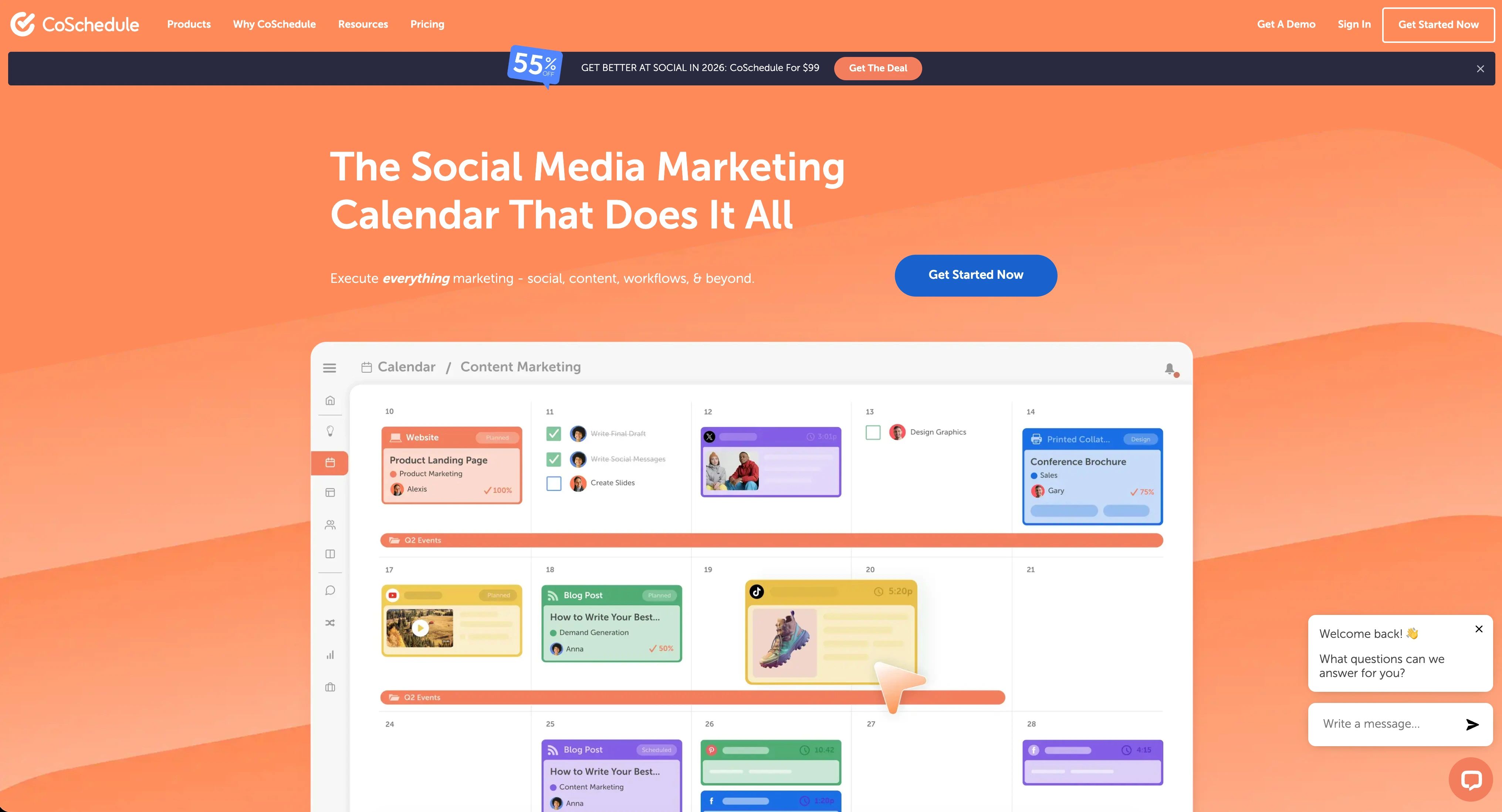
CoSchedule is a marketing suite and content calendar platform designed to help marketing teams plan campaigns, coordinate editorial workflows, and schedule social posts as part of a broader content strategy. It integrates deeply with WordPress and positions itself as the organizational hub for content marketing.
CoSchedule supports 11 platforms: Instagram, Facebook, LinkedIn, X/Twitter (Agency Calendar+), TikTok, YouTube, Pinterest, Threads, and more.
Key features:
- Marketing calendar with drag-and-drop scheduling
- ReQueue for automated social resharing
- WordPress integration for blog-to-social workflows
- Hire Mia AI assistant and 1,600+ AI project templates
- White label features (Agency Calendar)
- Unlimited client calendars (Agency Calendar)
- Approval workflows (Agency Calendar+)
- Campaign planning and project management (Marketing Suite)
CoSchedule appeals to content marketing teams that need a centralized calendar to organize blog posts, social campaigns, and editorial workflows in one place. For a deeper look, see what users say about CoSchedule on G2 and Trustpilot.
Pricing Comparison
Pricing reveals the core difference between these platforms. Sprout Social charges enterprise rates for a social CRM. CoSchedule charges marketing-team rates for a content calendar.
Sprout Social Pricing
Sprout Social uses per-seat pricing with high base costs. Each team member you add multiplies the monthly bill. See the full Sprout Social pricing breakdown for details.
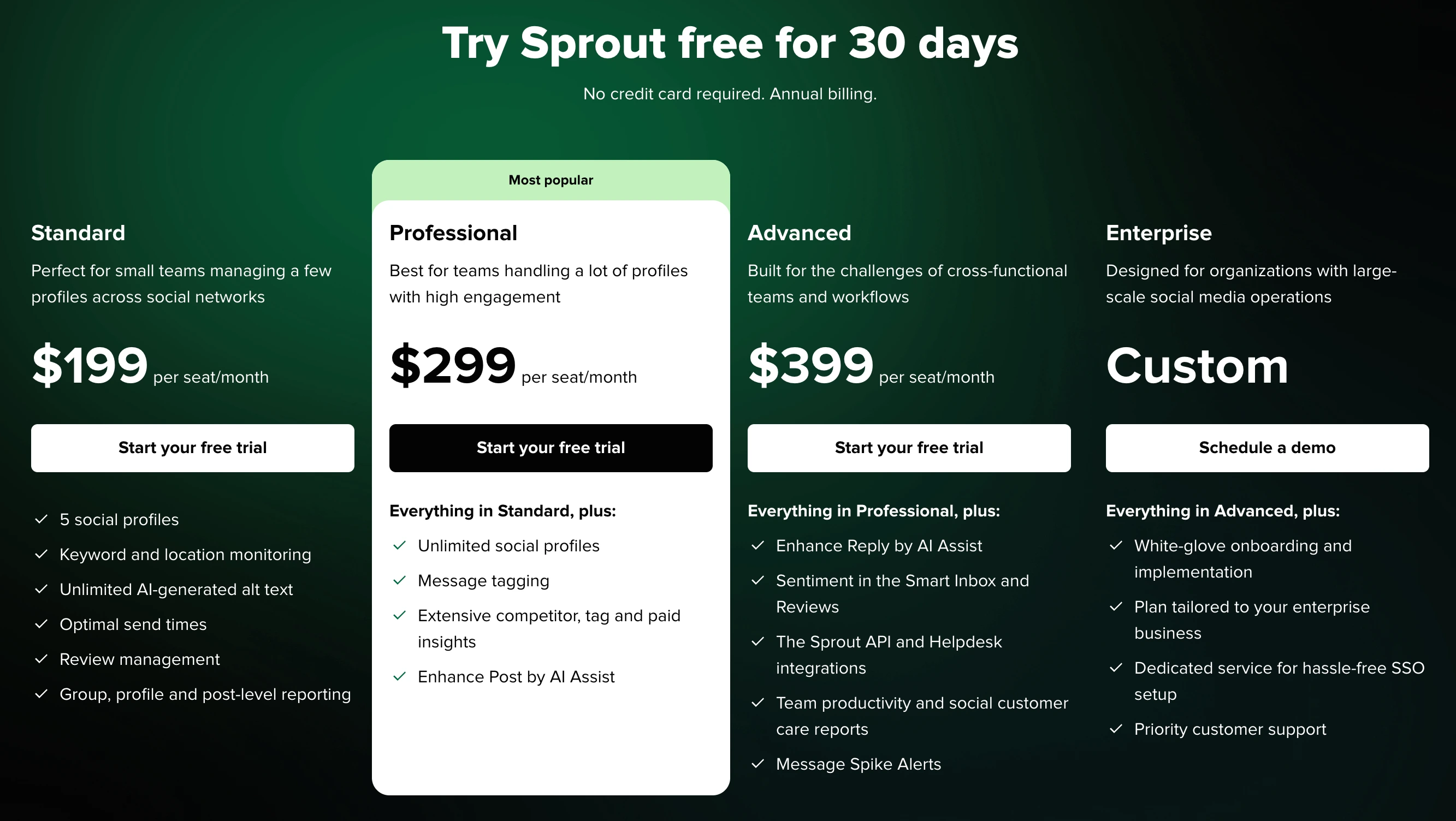
| Plan | Price | Social Profiles | Key Features |
|---|---|---|---|
| Standard | $199/seat/month | 5 | Publishing, engagement inbox, monitoring, reporting |
| Professional | $299/seat/month | Unlimited | Competitor insights, message tagging, AI Assist |
| Advanced | $399/seat/month | Unlimited | Sentiment analysis, API access, helpdesk integrations |
| Enterprise | Custom | Unlimited | White-glove onboarding, SSO, priority support |
Example costs:
- 1 user on Standard = $199/month
- 3 users on Professional = $897/month
- 5 users on Advanced = $1,995/month
CoSchedule Pricing
CoSchedule uses per-user pricing with much lower base costs but strict profile limits. See the full CoSchedule pricing breakdown for details.
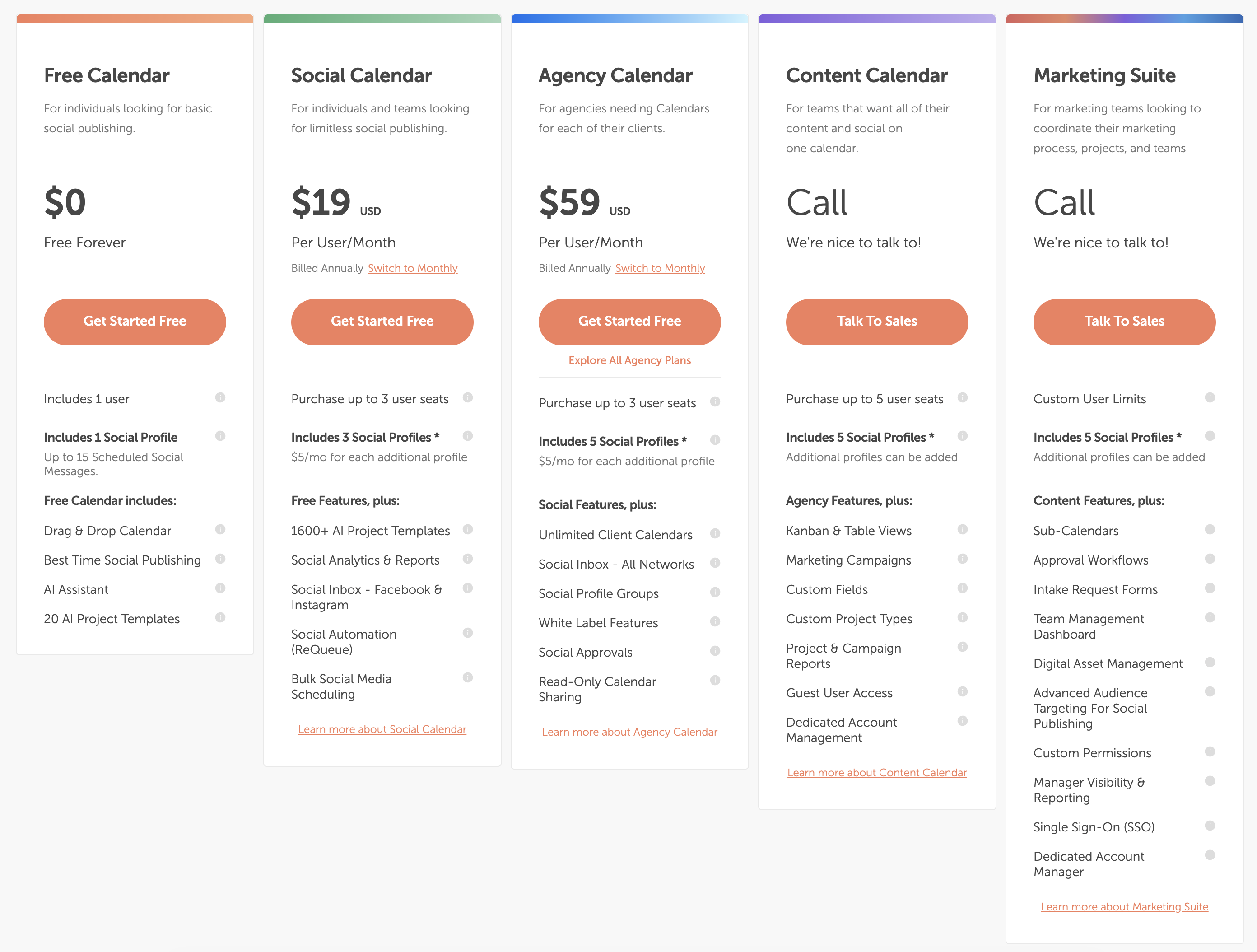
| Plan | Price | Social Profiles | Key Features |
|---|---|---|---|
| Free Calendar | $0/month | 1 (15 posts) | Basic calendar, AI assistant, 1 user |
| Social Calendar | $19/user/month | 3 | ReQueue, bulk scheduling, analytics, AI templates |
| Agency Calendar | $59/user/month | 5 | Client calendars, white label, X/Twitter, approvals |
| Marketing Suite | Custom | Unlimited | Sub-calendars, SSO, digital asset management |
Example costs:
- 1 user on Social Calendar = $19/month
- 3 users on Social Calendar = $57/month
- 3 users on Agency Calendar = $177/month
- Additional profiles cost $5/month each on all plans
Price Verdict
CoSchedule is dramatically cheaper for most use cases. A solo user pays $19/month on CoSchedule vs $199/month on Sprout Social — a 10x difference. Even a 3-person team on CoSchedule's Agency Calendar ($177/month) pays less than a single Sprout Social Standard seat ($199/month).
However, CoSchedule's per-user pricing and profile caps can add up for larger teams. And if you need social listening, sentiment analysis, or a full engagement inbox, Sprout Social is the only option here — you simply cannot get those features from CoSchedule at any price.
 PostPlanify
Manage All Your Social Accounts Without the Chaos
Schedule posts, track performance, and collaborate with your team.


Feature Comparison
Scheduling & Publishing
Both tools handle scheduling, but their approaches reflect different priorities.
| Feature | Sprout Social | CoSchedule |
|---|---|---|
| Unlimited scheduling | Yes (all plans) | Yes (paid plans) |
| Bulk scheduling | No native bulk import | Yes (CSV, Social Calendar+) |
| Optimal send times | Yes | Yes (Best Time publishing) |
| Content calendar | Yes | Yes (drag-and-drop) |
| Post queue management | Yes | Yes (ReQueue auto-resharing) |
| Draft saving | Yes | Yes |
| WordPress integration | No | Yes (native) |
| Editorial workflow | No | Yes (Marketing Suite) |
Winner: CoSchedule for content-focused publishing. ReQueue automates resharing, WordPress integration ties blog and social together, and the editorial calendar is purpose-built for content teams. Sprout Social focuses on engagement rather than editorial workflows.
AI Tools
| Feature | Sprout Social | CoSchedule |
|---|---|---|
| AI text generation | Yes (AI Assist) | Yes (Hire Mia AI) |
| AI reply enhancement | Yes (Advanced plan) | No |
| AI image generation | No | No |
| AI project templates | No | Yes (1,600+ templates) |
| AI content ideas | Yes | Yes |
Winner: Sprout Social for engagement AI (reply enhancement, sentiment-aware responses). CoSchedule for content planning AI (1,600+ project templates for campaigns, blogs, and social). Different strengths for different workflows.
Analytics & Reporting
| Feature | Sprout Social | CoSchedule |
|---|---|---|
| Basic analytics | All plans | Social Calendar+ |
| Advanced analytics | All plans | No |
| Custom reports | Professional+ | No |
| Competitor benchmarking | Professional+ | No |
| Sentiment analysis | Advanced plan | No |
| Campaign reports | Yes | Marketing Suite only |
| Export reports | Yes | Limited |
Winner: Sprout Social — and it is not close. Sprout Social offers enterprise-grade analytics with competitor benchmarking, custom reports, sentiment tracking, and customer care metrics. CoSchedule provides basic social analytics sufficient for measuring post performance but nothing approaching Sprout's depth.
Team Collaboration
| Feature | Sprout Social | CoSchedule |
|---|---|---|
| Multiple users | All plans (per-seat) | Social Calendar (up to 3) |
| Approval workflows | All plans | Agency Calendar+ |
| User permissions | All plans | Marketing Suite |
| DM assignment | Yes | No |
| Client calendars | No | Yes (Agency Calendar) |
| White label | No | Yes (Agency Calendar) |
| Guest access | No | Yes (Content Calendar+) |
Winner: Depends on your workflow. Sprout Social wins for social engagement teams with DM assignment and structured permissions across all plans. CoSchedule wins for agencies with client calendars, white label features, and guest access for content approvals.
Social Inbox & Engagement
| Feature | Sprout Social | CoSchedule |
|---|---|---|
| Unified inbox | Full (all platforms) | Facebook & Instagram only |
| Social listening | Yes (all plans) | No |
| Sentiment analysis | Yes (Advanced+) | No |
| Brand monitoring | Yes | No |
| Message spike alerts | Yes (Advanced) | No |
| Customer care tools | Yes (helpdesk integrations) | No |
Winner: Sprout Social. This is Sprout Social's core strength. If your team handles inbound social messages, monitors brand mentions, and needs social listening or sentiment analysis, Sprout Social is purpose-built for this. CoSchedule has a basic social inbox limited to Facebook and Instagram — it is not designed for engagement management.
Platform Support
| Platform | Sprout Social | CoSchedule |
|---|---|---|
| Yes | Yes | |
| Yes | Yes | |
| X/Twitter | Yes | Agency Calendar+ only |
| Yes | Yes | |
| TikTok | Yes | Yes |
| YouTube | Yes | Yes |
| Yes | Yes | |
| Threads | Yes | Yes |
| Bluesky | No | No |
| Google Business | No | No |
Winner: Sprout Social — supports X/Twitter on all plans. CoSchedule restricts X/Twitter to the Agency Calendar plan ($59/user/month) and above, which is a significant limitation for teams on the Social Calendar plan.
What Real Users Say
Sprout Social Reviews
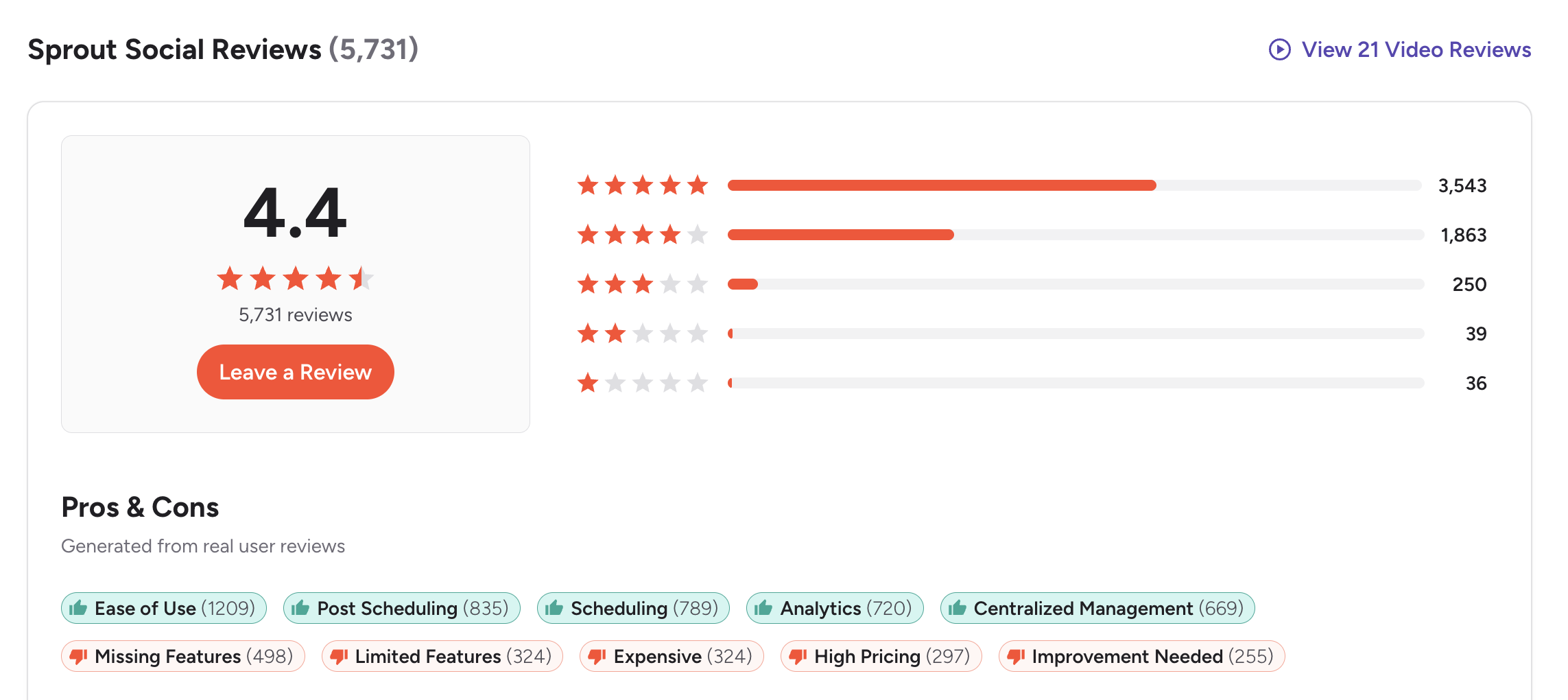
G2: 4.4/5 (5,731 reviews) — Users praise the ease of use, scheduling workflow, analytics capabilities, and centralized management. Common complaints include expensive per-seat pricing, missing features on lower plans, and high costs that scale aggressively with team size.
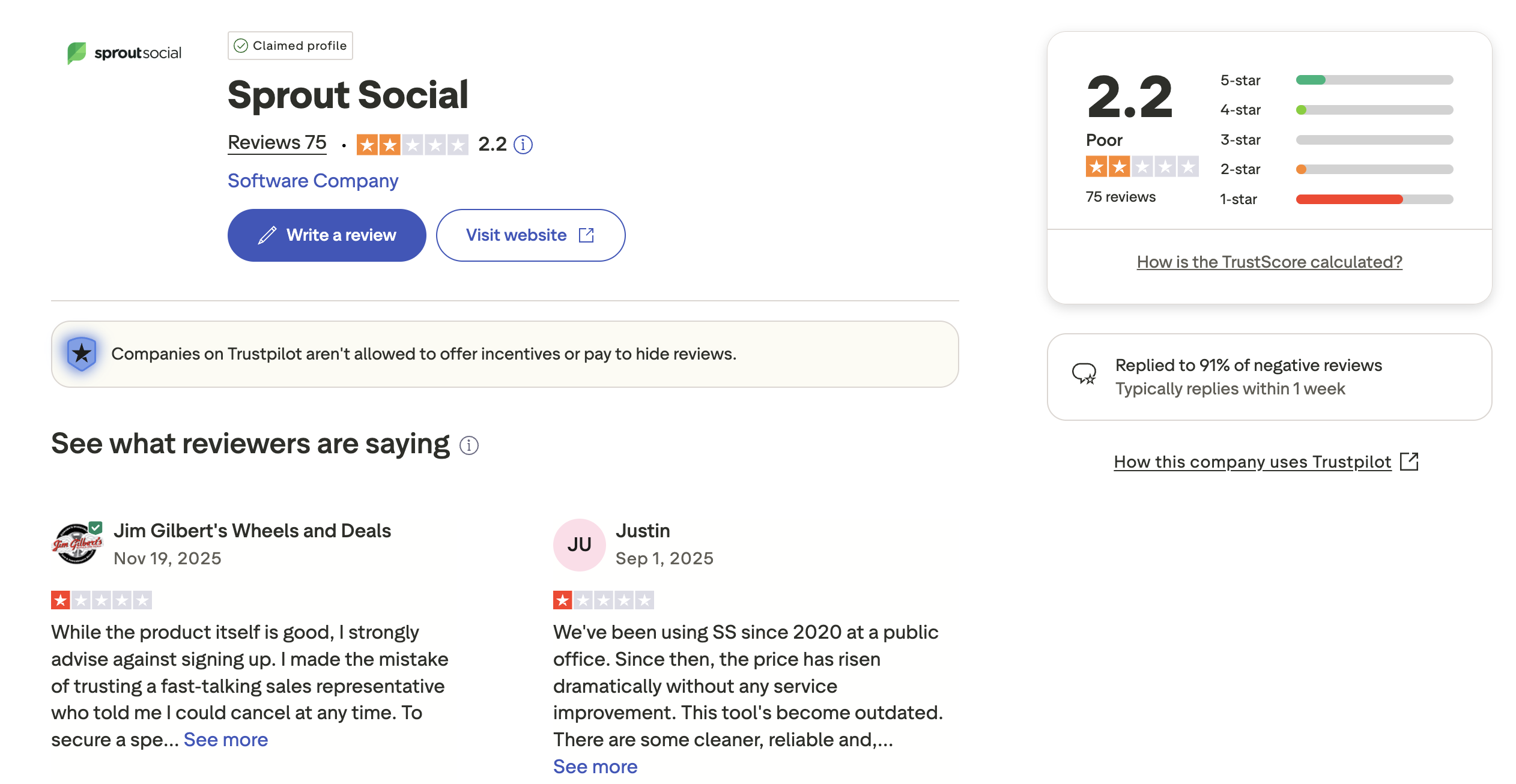
Trustpilot: 2.2/5 (75 reviews) — Lower rating driven by complaints about unexpected price increases, difficult cancellation processes, sales pressure, and slow customer support.
CoSchedule Reviews
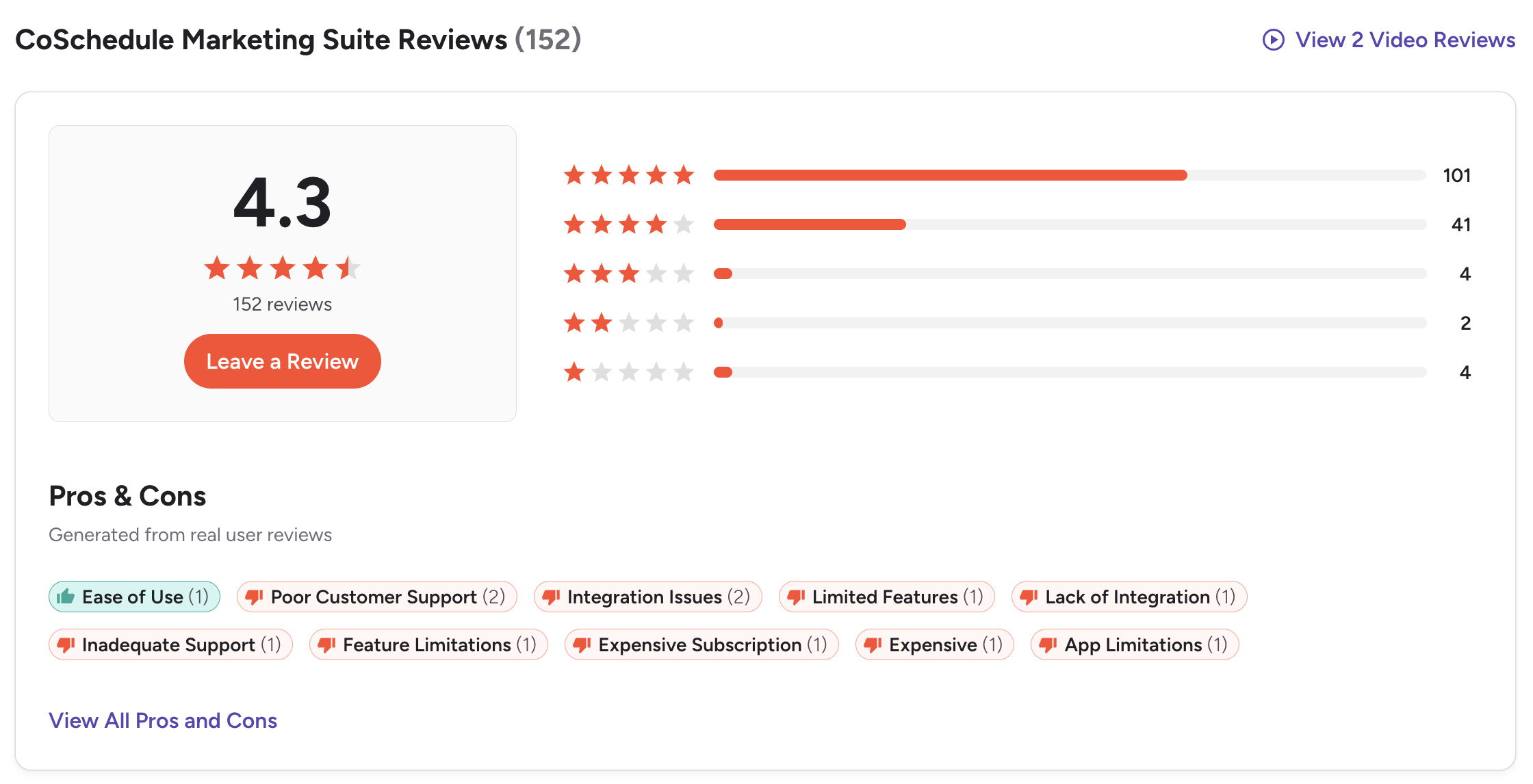
G2: 4.3/5 (152 reviews) — Users value the marketing calendar organization and ease of use. Common complaints include terrible customer support, outdated platform features, subscription cancellation difficulties, and limited social media capabilities compared to dedicated social tools.
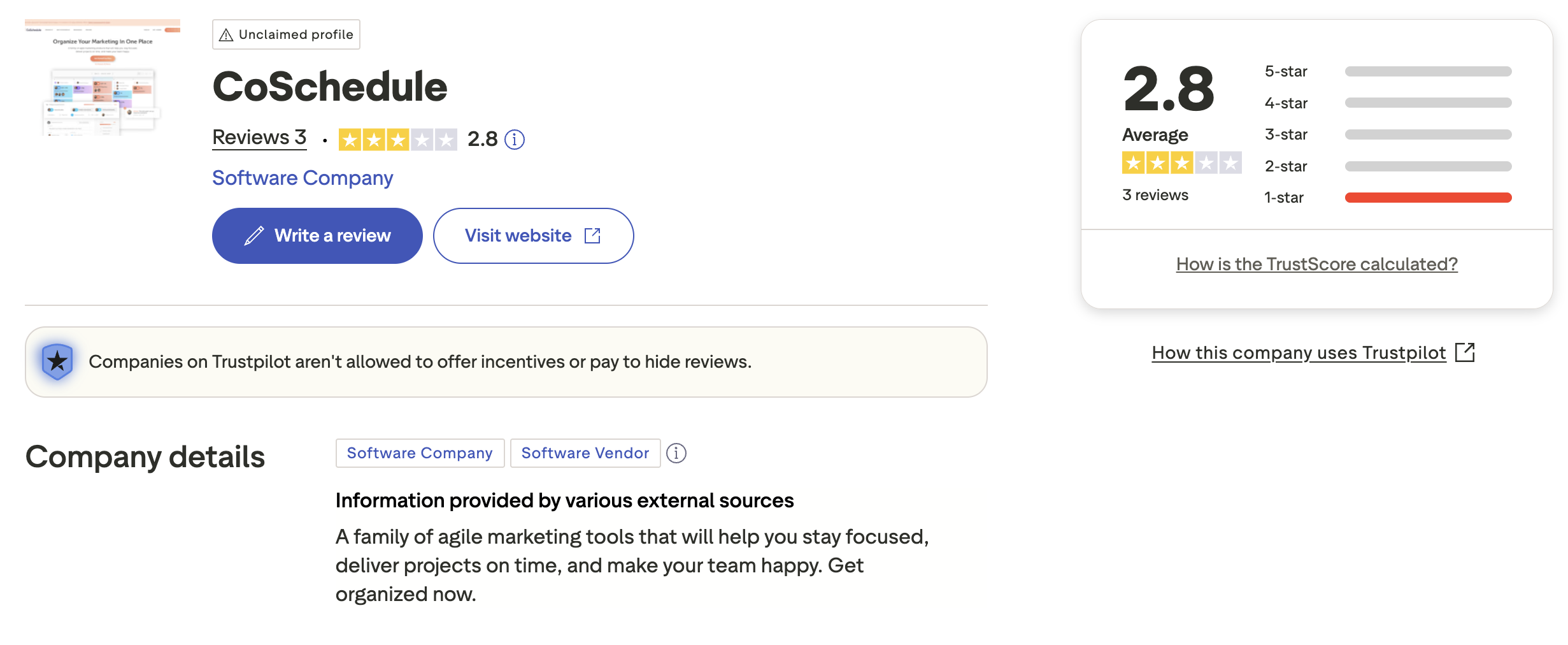
Trustpilot: 2.8/5 (3 reviews) — Very limited sample size with an unclaimed profile. The few reviews available show a mix of positive and negative feedback, but the small number makes it difficult to draw meaningful conclusions.
Review Verdict
Sprout Social has a stronger review profile overall — a 4.4/5 on G2 from 5,731 reviews compared to CoSchedule's 4.3/5 from just 152 reviews. Sprout's much larger review base gives its rating significantly more statistical weight. On Trustpilot, both score poorly (2.2 and 2.8 respectively), with shared complaints about pricing, cancellation difficulties, and customer support. The common thread: both platforms face criticism for aggressive pricing and unresponsive support when users want to leave.
PostPlanifyManage All Your Social Accounts Without the Chaos
Schedule posts, track performance, and collaborate with your team.
Who Should Use Sprout Social?
If Sprout Social is on your shortlist, you may also want to see our top alternatives to Sprout Social before committing. Also compare Sprout Social with Hootsuite, Buffer, Agorapulse, and SocialBee.
Sprout Social is the better choice if you:
- Are an enterprise or mid-size team with a dedicated social media department
- Need a full social CRM with unified inbox, DM assignment, and customer care workflows
- Require social listening and sentiment analysis to monitor brand health
- Want advanced analytics with competitor benchmarking and custom reports
- Need helpdesk integrations (Salesforce, Zendesk, HubSpot)
- Have the budget for $199-$399+/month per seat
Who Should Use CoSchedule?
If CoSchedule interests you, check out our top alternatives to CoSchedule first. Also compare CoSchedule with Buffer, Hootsuite, Later, and SocialBee.
CoSchedule is the better choice if you:
- Are a content marketing team that plans blog posts, campaigns, and social together
- Need a centralized editorial calendar with drag-and-drop scheduling
- Use WordPress and want native blog-to-social integration
- Want ReQueue to automatically reshare evergreen content
- Run an agency that needs client calendars and white label features
- Prefer lower per-user pricing starting at $19/month
- Need AI project templates for campaign planning and content ideation
Team Scheduling Without the Complexity Tax
Sprout Social charges $199+/seat for a social CRM most teams don't need. CoSchedule charges $19-59/user for a marketing suite most social teams won't use. If your team's priority is scheduling, publishing, and collaborating on social content, PostPlanify does exactly that — with AI tools, approval workflows, and unlimited team members at $99/month total. No per-seat multiplication.

| Feature | Sprout Social | CoSchedule | PostPlanify |
|---|---|---|---|
| Starting Price | $199/seat/month | $19/user/month | $29/mo flat |
| Unlimited Accounts | $299/seat/month | Custom (Marketing Suite) | $99/mo (Premium) |
| AI Caption Generation | Yes | Yes | Yes |
| AI Image Generation | No | No | Yes |
| Canva Integration | No | No | Yes |
| Google Drive Import | No | No | Yes |
| Approval Workflows | All plans (per-seat) | $59/user/month | $99/mo (Premium) |
| X/Twitter Support | All plans | Agency Calendar+ only | All plans |
| Social Inbox | Full unified inbox | Facebook & Instagram only | Yes |
| Platforms Supported | 8+ | 11 | 10 |
| Unlimited Scheduling | All plans | Paid plans | All paid plans |
PostPlanify starts at $29/month for 5 accounts with 200 posts/mo and AI tools included. Analytics are included from the Growth plan ($49/month). The Premium plan at $99/month adds unlimited accounts, unlimited team members, and approval workflows — features that cost $299+/seat on Sprout Social or require CoSchedule's Agency Calendar at $59/user with profile caps. See all plans on the PostPlanify pricing page.
Build your team workflow — try free

Related Guides
- Manage Multiple Social Media Accounts
- Social Media Content Calendar Examples
- How to Create a Social Media Content Calendar
- Best Sprout Social Alternatives
- Best CoSchedule Alternatives
FAQ
Is Sprout Social better than CoSchedule?
It depends on your needs. Sprout Social is better for social engagement, listening, and customer care. CoSchedule is better for content marketing coordination, editorial calendars, and WordPress-based workflows. They solve different problems.
Is CoSchedule cheaper than Sprout Social?
Yes, significantly. CoSchedule starts at $19/user/month (with a free plan available). Sprout Social starts at $199/seat/month. For a single user, CoSchedule is 10x cheaper. However, CoSchedule's profile caps and per-profile fees can increase costs for teams managing many accounts.
Does Sprout Social have a free plan?
No. Sprout Social offers a 30-day free trial but no ongoing free plan. CoSchedule offers a free forever plan with 1 profile and up to 15 scheduled messages.
Does CoSchedule have social listening?
No. CoSchedule does not offer social listening, sentiment analysis, or brand monitoring. If these features are critical, Sprout Social includes them on all plans, or you can use a dedicated listening tool alongside a more affordable scheduler like PostPlanify.
Can CoSchedule replace Sprout Social?
Only if you don't need social engagement features. CoSchedule can handle scheduling and editorial planning, but it cannot replace Sprout Social's unified inbox, social listening, sentiment analysis, or customer care workflows. They serve different use cases.
Does CoSchedule support X/Twitter?
Yes, but not on the base Social Calendar plan ($19/user/month). X/Twitter profiles are only available on the Agency Calendar ($59/user/month) and higher plans. Sprout Social supports X/Twitter on all plans.
Which has better analytics — Sprout Social or CoSchedule?
Sprout Social has far more advanced analytics including custom reports, competitor benchmarking, sentiment tracking, and customer care metrics. CoSchedule provides basic social analytics and campaign reports on higher plans, but nothing close to Sprout Social's reporting depth.
Which is easier to use — Sprout Social or CoSchedule?
Both are praised for ease of use on G2, but they feel different. Sprout Social has a polished interface oriented around social engagement. CoSchedule has a calendar-first interface oriented around content planning. CoSchedule generally has a lower learning curve for teams that primarily need scheduling, while Sprout Social's broader feature set requires more onboarding.







