
Choosing between SocialBee and CoSchedule comes down to one question: do you need a social-first scheduling tool, or a full marketing calendar platform? Both offer content recycling, but they take very different approaches — and serve very different users.
Category queues versus editorial calendars — two approaches to content organization that reflect very different workflows. We compare SocialBee and CoSchedule on what matters for social media teams: cost, scheduling features, AI tools, content recycling, and user satisfaction. Exploring all options? Browse all social media scheduling alternatives.
SocialBee vs CoSchedule at a Glance
Here's a quick side-by-side overview before we dive deeper:
| Category | SocialBee | CoSchedule |
|---|---|---|
| Starting Price | $29/mo flat | Free/$19/mo per user |
| Free Plan | No (14-day trial) | Yes (1 profile, 15 posts) |
| Platforms Supported | 10 | 11 |
| Unlimited Scheduling | Yes (all plans) | Yes (paid plans) |
| AI Tools | AI text + DALL-E 3 image generation | Hire Mia AI + 1,600 templates |
| AI Image Generation | Yes (DALL-E 3) | No |
| Bulk Scheduling | CSV import | Yes (Social Calendar+) |
| Team Collaboration | Pro plan ($99/mo) | Agency Calendar ($59/user/mo) |
| Approval Workflows | Pro plan only | Agency Calendar+ |
| Content Recycling | Category queues + evergreen recycling | ReQueue automation |
| WordPress Integration | No | Yes (native) |
| Analytics | 3 months to 2 years | Basic to custom reports |
| G2 Rating | 4.8/5 (472 reviews) | 4.3/5 (152 reviews) |
| Trustpilot Rating | 4.0/5 (43 reviews) | 2.8/5 (3 reviews) |
| Best For | Social-focused creators, small businesses | WordPress bloggers, marketing teams |
SocialBee Overview

SocialBee is a social media scheduling and content management tool built around category-based posting. It lets you organize content into themed categories (e.g., promotional, educational, curated) and automatically cycle through them on a set schedule — making it one of the strongest tools for evergreen content recycling.
SocialBee supports 10 platforms: Instagram, Facebook, LinkedIn, X/Twitter, TikTok, Pinterest, YouTube, Google Business Profile, Threads, and Bluesky.
Key features:
- Category-based posting queues
- Evergreen content recycling
- AI text assistant + DALL-E 3 image generation
- Canva integration
- RSS feed import
- Bulk CSV scheduling
- Multi-workspace management (Pro plan)
- Analytics with up to 2 years of history
SocialBee is popular among solo creators, small businesses, and agencies who want a structured, automation-first approach to social media scheduling. For a deeper look, see what users say about SocialBee on G2 and Trustpilot.
CoSchedule Overview
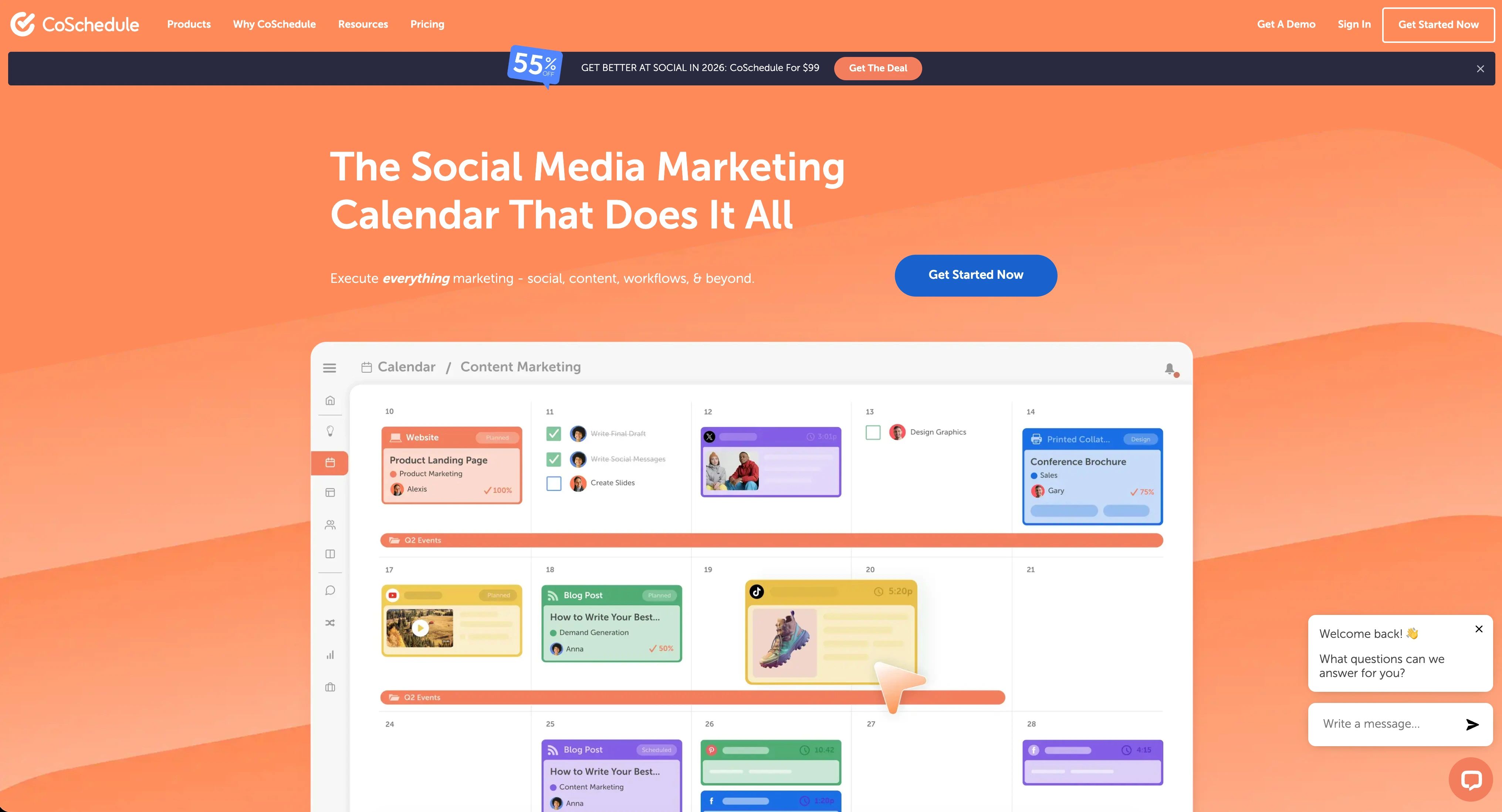
CoSchedule is a marketing suite that combines social media scheduling with editorial calendars, project management, and campaign planning. It's designed for marketing teams that need to coordinate blog publishing, social promotion, and team workflows in one place — with a strong emphasis on WordPress integration.
CoSchedule supports 11 platforms: Instagram, Facebook, LinkedIn, X/Twitter (Agency Calendar+ only), TikTok, Pinterest, YouTube, Google Business Profile, Threads, WordPress, and more.
Key features:
- Editorial marketing calendar with drag & drop
- ReQueue social automation (content recycling)
- Native WordPress integration
- Hire Mia AI assistant + 1,600 project templates
- White label features (Agency Calendar)
- Bulk social media scheduling
- Campaign planning and tracking
- Approval workflows (higher plans)
CoSchedule is positioned for WordPress bloggers, content marketers, and marketing teams that want their social scheduling tightly integrated with editorial planning and blog workflows. Read real user reviews of CoSchedule from G2 and Trustpilot.
Pricing Comparison
Pricing is where SocialBee and CoSchedule diverge significantly. SocialBee uses flat-rate pricing while CoSchedule charges per user.
SocialBee Pricing
SocialBee uses flat monthly pricing based on the number of social profiles you need. We break this down further in our SocialBee pricing guide.
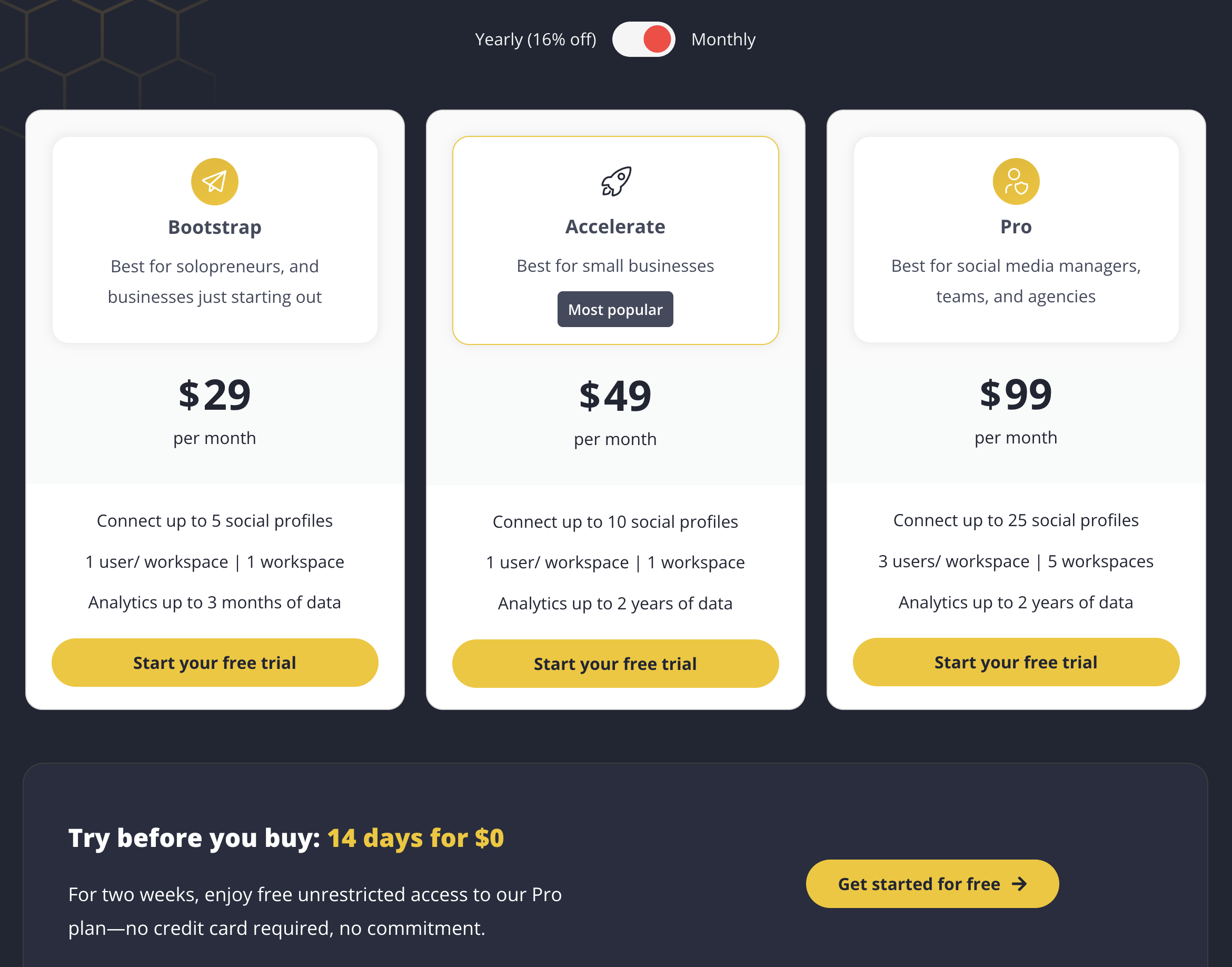
| Plan | Price | Profiles | Users | Key Features |
|---|---|---|---|---|
| Bootstrap | $29/mo | 5 | 1 | Category queues, AI tools, 3-month analytics |
| Accelerate | $49/mo | 10 | 1 | Everything in Bootstrap, 2-year analytics |
| Pro | $99/mo | 25 | 3 per workspace | 5 workspaces, team collaboration, 2-year analytics |
Example costs:
- Solo creator with 5 profiles = $29/month
- Small business with 10 profiles = $49/month
- Agency with 25 profiles = $99/month
CoSchedule Pricing
CoSchedule uses per-user pricing with strict profile limits. See the full CoSchedule pricing breakdown for details.
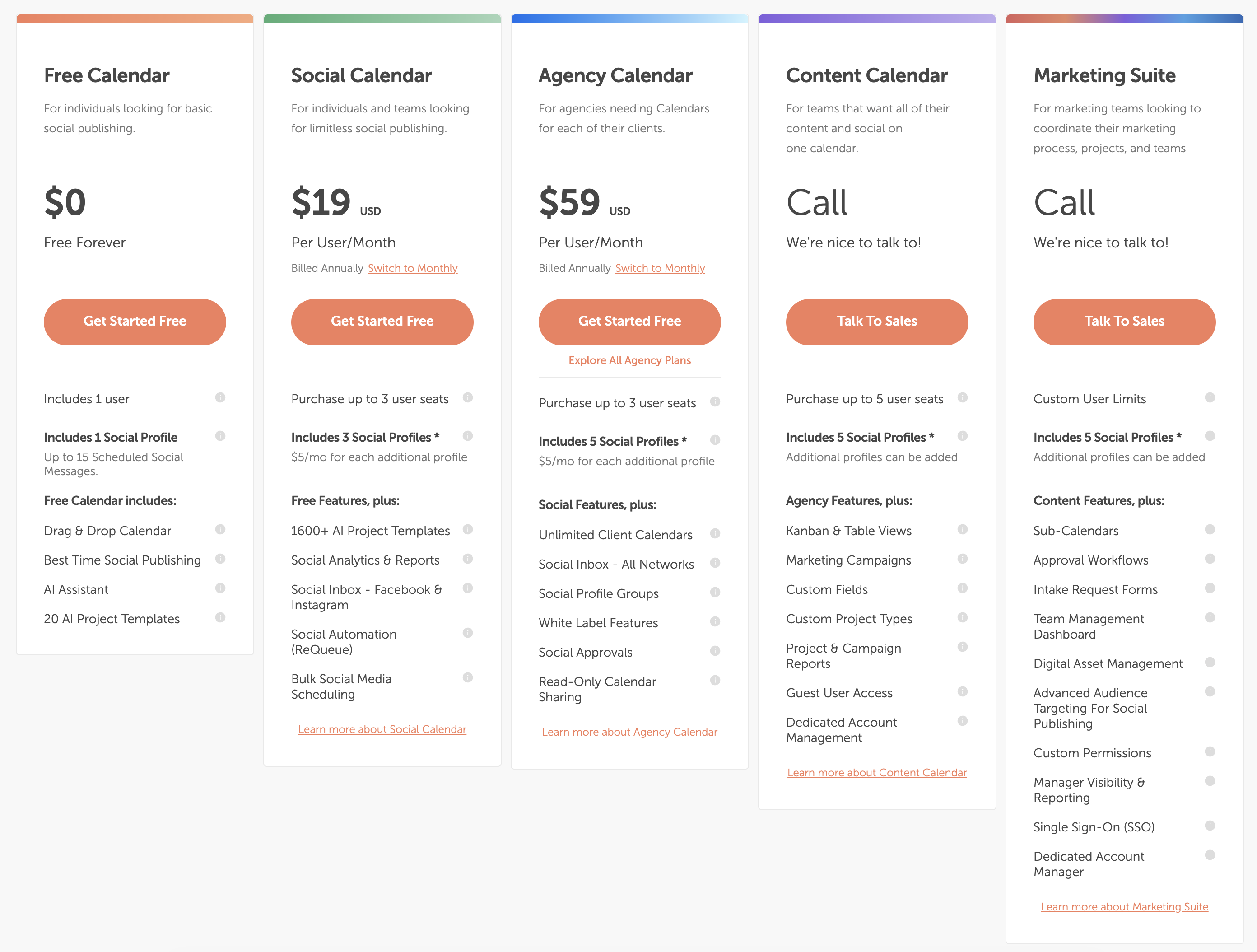
| Plan | Price | Profiles | Key Features |
|---|---|---|---|
| Free Calendar | $0/mo | 1 (15 posts) | Basic calendar, AI assistant |
| Social Calendar | $19/user/mo | 3 (+$5/mo each) | ReQueue, analytics, bulk scheduling |
| Agency Calendar | $59/user/mo | 5 (+$5/mo each) | White label, client calendars, X/Twitter |
| Marketing Suite | Custom | Custom | Full marketing suite, SSO, approval workflows |
Example costs:
- 1 user on Social Calendar = $19/month
- 3 users on Social Calendar with 5 profiles = $67/month
- 3 users on Agency Calendar = $177/month
Price Verdict
SocialBee offers more predictable pricing for most social media use cases. Its flat-rate model means no surprise per-user costs. A solo creator pays $29/month for 5 profiles on SocialBee vs $19/month for 3 profiles (without X/Twitter) on CoSchedule — and once you add a second team member on CoSchedule, the cost doubles.
CoSchedule's free plan is appealing for testing, but the per-user pricing and profile limits make it expensive for growing teams. A 3-person team on CoSchedule's Agency Calendar pays $177/month minimum, while SocialBee's Pro plan covers 3 users and 25 profiles for $99/month flat.
 PostPlanify
Manage All Your Social Accounts Without the Chaos
Schedule posts, track performance, and collaborate with your team.


Feature Comparison
Scheduling & Publishing
Both tools offer post scheduling, but their approaches differ fundamentally. SocialBee is built around category queues; CoSchedule is built around a marketing calendar.
| Feature | SocialBee | CoSchedule |
|---|---|---|
| Unlimited scheduling | Yes (all plans) | Yes (paid plans) |
| Category-based queues | Yes | No |
| Content calendar | Yes | Yes (editorial calendar) |
| Bulk scheduling | CSV import | Yes (Social Calendar+) |
| RSS feed import | Yes | No |
| Best time to post | Yes | Yes |
| Evergreen recycling | Yes (category queues) | Yes (ReQueue) |
| WordPress integration | No | Yes (native) |
| Draft saving | Yes | Yes |
Winner: Depends on your workflow. SocialBee wins for social-first automation with category queues, RSS import, and CSV bulk scheduling. CoSchedule wins if you need WordPress integration and editorial calendar planning.
AI Tools
| Feature | SocialBee | CoSchedule |
|---|---|---|
| AI caption generation | Yes | Yes (Hire Mia AI) |
| AI image generation | Yes (DALL-E 3) | No |
| AI project templates | No | Yes (1,600+) |
| AI content rewriting | Yes | Yes |
| Canva integration | Yes | No |
Winner: SocialBee. SocialBee offers both AI text and DALL-E 3 image generation, plus Canva integration for design. CoSchedule has Hire Mia AI and a large template library, but no AI image generation or design integration.
Analytics & Reporting
| Feature | SocialBee | CoSchedule |
|---|---|---|
| Basic analytics | All plans | Social Calendar+ |
| Analytics history | 3 months to 2 years | Varies by plan |
| Social reports | Yes | Yes |
| Campaign reports | No | Yes (Content Calendar+) |
| Project reports | No | Yes (Content Calendar+) |
| Export reports | Yes | Yes |
Winner: Tie. SocialBee offers deeper analytics history (up to 2 years) for social media performance. CoSchedule provides campaign and project-level reporting that SocialBee lacks — but these require expensive higher-tier plans.
Team Collaboration
| Feature | SocialBee | CoSchedule |
|---|---|---|
| Multiple users | Pro plan (3/workspace) | All paid plans |
| Approval workflows | Pro plan | Agency Calendar+ |
| Workspaces | Pro plan (5) | All paid plans |
| Client calendars | No | Agency Calendar (unlimited) |
| White label | No | Agency Calendar+ |
| Guest access | No | Content Calendar+ |
Winner: CoSchedule for team features and agency workflows. White label capabilities, unlimited client calendars, and guest access make CoSchedule stronger for agencies managing multiple clients. But SocialBee's workspaces are simpler and cheaper for small teams.
Content Recycling
This is where both tools shine — but they take different approaches.
| Feature | SocialBee | CoSchedule |
|---|---|---|
| Content recycling | Category queues (evergreen) | ReQueue automation |
| Category organization | Yes (core feature) | No |
| Evergreen posting | Yes (automatic) | Yes (ReQueue fills gaps) |
| Content expiration | Yes | Yes |
| Queue management | Yes (category-based) | Yes (calendar-based) |
Winner: SocialBee. Category-based evergreen recycling is SocialBee's core strength. You organize posts into themed categories, and SocialBee automatically cycles through them — keeping your feed active without manual effort. CoSchedule's ReQueue is useful for filling calendar gaps, but it's less structured and less central to the platform.
Platform Support
| Platform | SocialBee | CoSchedule |
|---|---|---|
| Yes | Yes | |
| Yes | Yes | |
| X/Twitter | Yes | Agency Calendar+ only |
| Yes | Yes | |
| TikTok | Yes | Yes |
| YouTube | Yes | Yes |
| Yes | Yes | |
| Threads | Yes | Yes |
| Bluesky | Yes | No |
| Google Business | Yes | Yes |
| WordPress | No | Yes (native) |
Winner: SocialBee for social media platforms. SocialBee includes X/Twitter on all plans and supports Bluesky. CoSchedule restricts X/Twitter to Agency Calendar and higher plans ($59/user/mo) — a significant limitation for a social scheduling tool. CoSchedule wins for WordPress integration if blog publishing is central to your workflow.
What Real Users Say
SocialBee Reviews
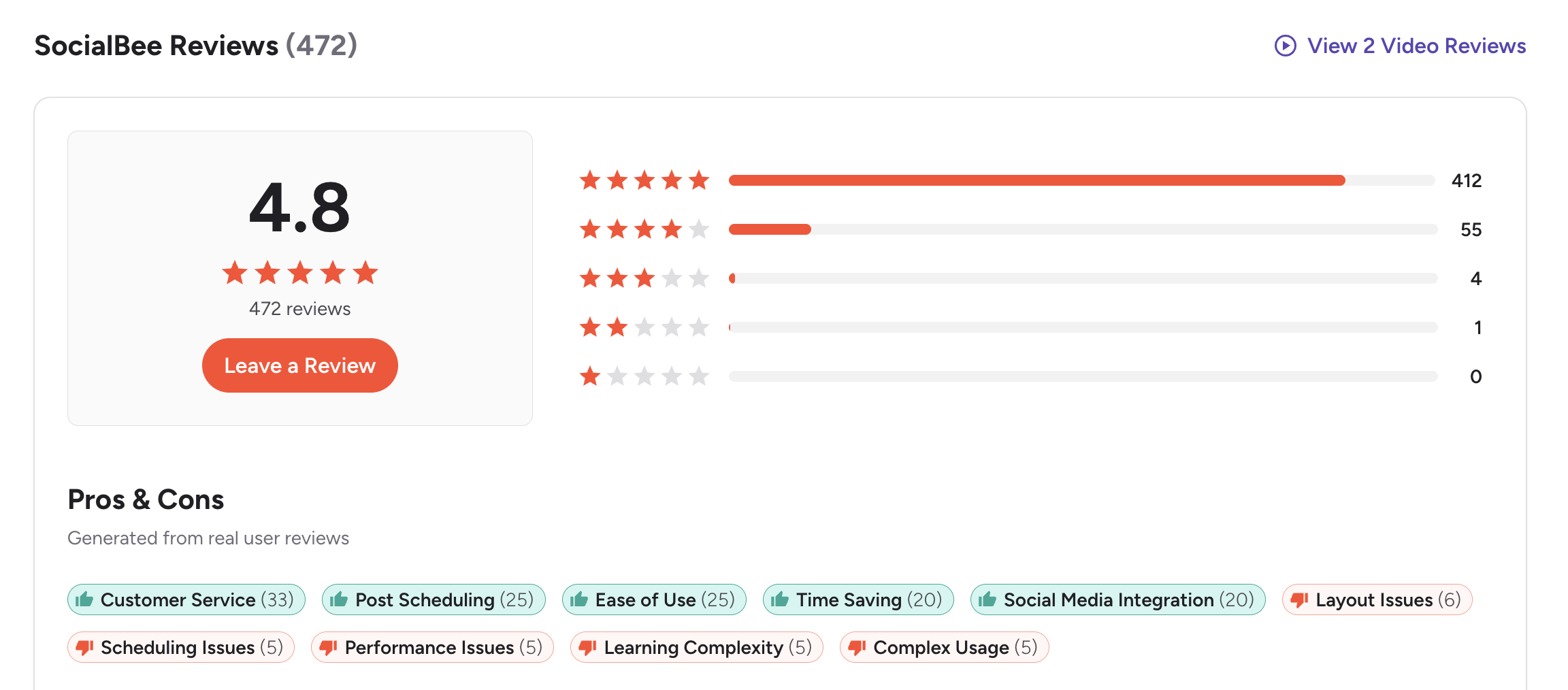
G2: 4.8/5 (472 reviews) — SocialBee has an overwhelmingly positive G2 rating with 412 five-star reviews. Users praise the customer service (33 mentions), post scheduling (25), ease of use (25), and time-saving capabilities (20). Common complaints include layout issues, occasional scheduling problems, and a learning curve for some features.
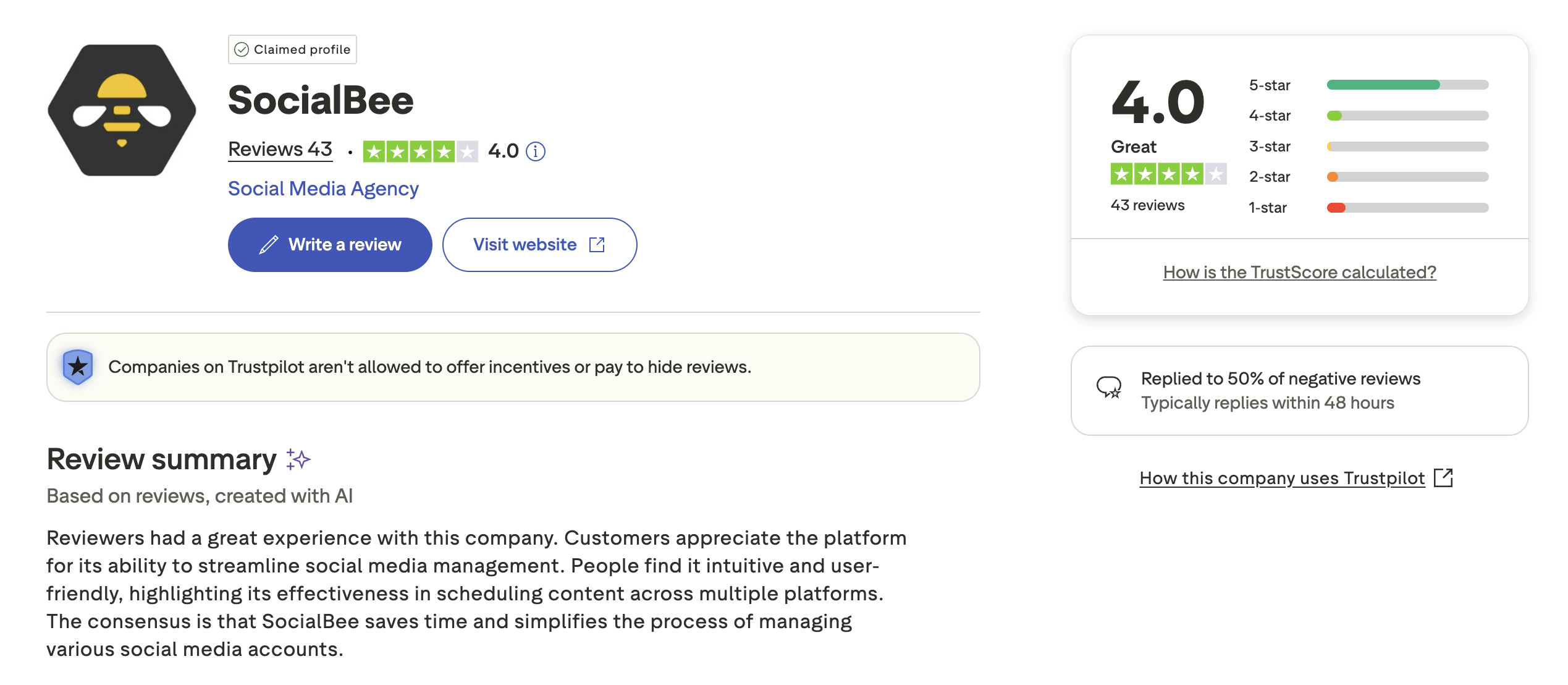
Trustpilot: 4.0/5 (43 reviews) — Solid rating with users highlighting helpful customer support, easy setup, and intuitive workflows. A smaller number mention occasional technical issues and limited analytics compared to larger tools.
CoSchedule Reviews
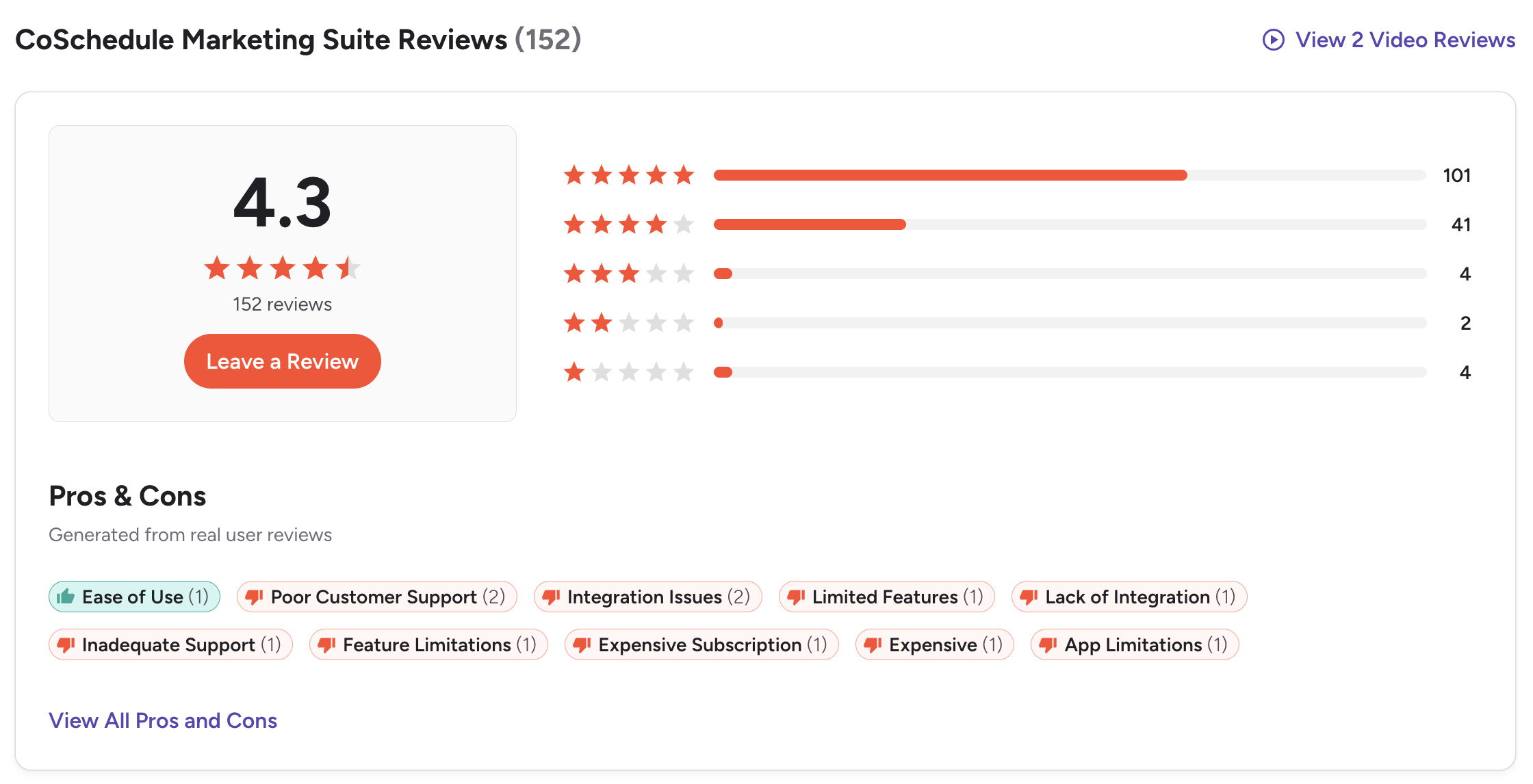
G2: 4.3/5 (152 reviews) — Users value the marketing calendar and content planning organization. However, consistent complaints emerge about terrible customer support, subscription cancellation difficulties, outdated platform features, and expensive pricing. One detailed 0-star review highlighted months of ignored cancellation requests.
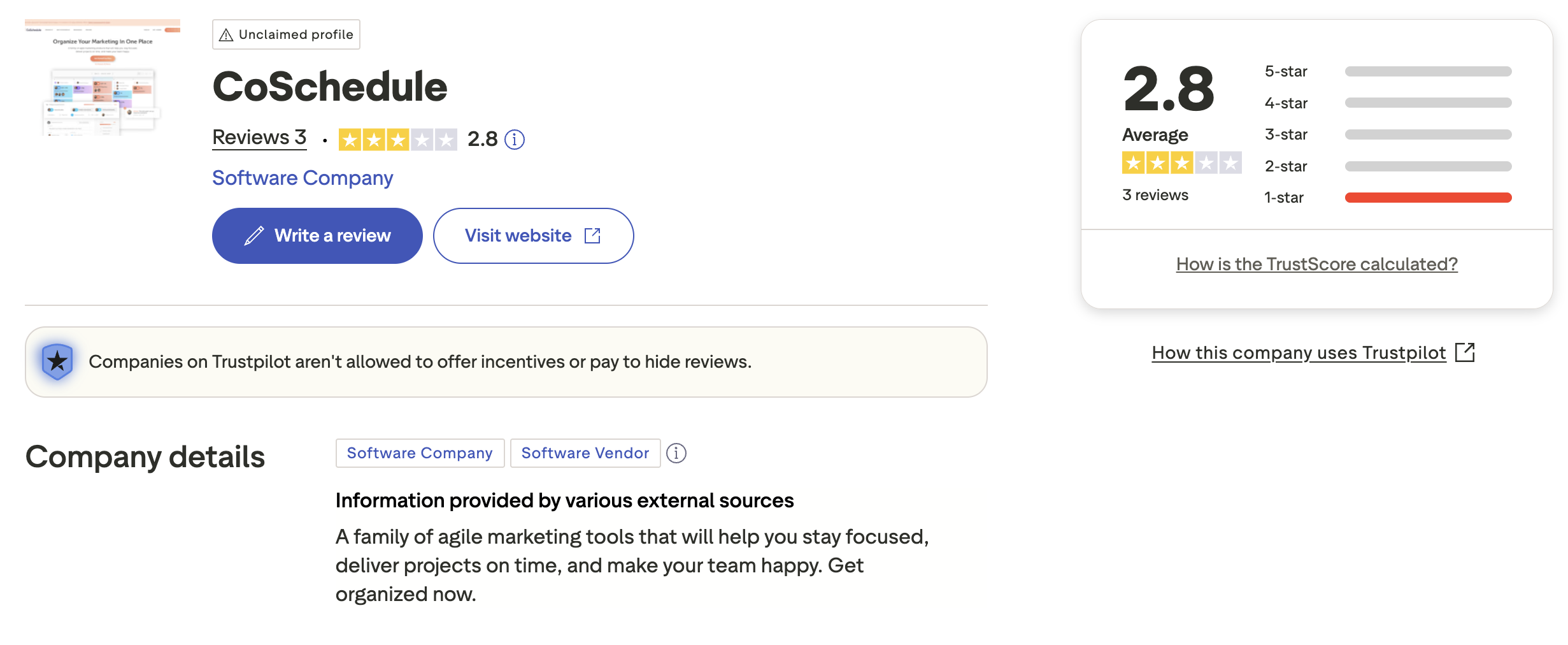
Trustpilot: 2.8/5 (3 reviews) — Very limited review sample with a mix of positive and negative feedback. The unclaimed Trustpilot profile suggests CoSchedule is not actively monitoring customer feedback on this platform.
Review Verdict
SocialBee clearly wins on user sentiment. Its G2 rating (4.8/5 from 472 reviews) is significantly higher than CoSchedule's (4.3/5 from 152 reviews). On Trustpilot, SocialBee scores 4.0/5 vs CoSchedule's 2.8/5. Users consistently praise SocialBee's customer support, while CoSchedule faces serious complaints about support responsiveness and difficult cancellation processes.
PostPlanifyManage All Your Social Accounts Without the Chaos
Schedule posts, track performance, and collaborate with your team.
Who Should Use SocialBee?
If SocialBee sounds right for you but you want to explore other options first, check out our best alternatives to SocialBee. You can also see how SocialBee stacks up against Buffer, Hootsuite, Later, and Agorapulse.
SocialBee is the better choice if you:
- Are a social-focused creator or small business that wants automation-first scheduling
- Want category-based content queues to keep your feed organized and evergreen
- Need AI image generation (DALL-E 3) and Canva integration for visual content
- Prefer flat-rate pricing without per-user fees ($29-$99/month)
- Want X/Twitter support on all plans including the entry-level plan
- Need RSS feed import and bulk CSV scheduling for high-volume content
Who Should Use CoSchedule?
If CoSchedule is on your shortlist, you may also want to see our top alternatives to CoSchedule before committing. Also compare CoSchedule with Buffer, Hootsuite, Later, and Agorapulse.
CoSchedule is the better choice if you:
- Are a WordPress blogger or content marketer who needs native blog integration
- Want an editorial marketing calendar for coordinating campaigns, not just social posts
- Need white label features and unlimited client calendars for agency work
- Require project management tools alongside social scheduling
- Want a free plan to test basic scheduling before committing
- Have a marketing team that needs campaign planning, Kanban views, and custom fields
Your Content Workflow, Without Someone Else's Framework
SocialBee requires you to think in categories. CoSchedule requires you to think in campaigns. Both impose a specific workflow on how you create and schedule content. PostPlanify gives you a flexible content calendar, AI-powered creation tools, and team collaboration — without forcing you into a rigid framework. Schedule your way, from $29/month.

| Feature | SocialBee | CoSchedule | PostPlanify |
|---|---|---|---|
| Starting Price | $29/mo flat | $19/user/mo | $29/mo flat |
| Unlimited Accounts | $99/mo (25 profiles) | Custom pricing | $99/mo (Premium) |
| AI Caption Generation | Yes | Yes (Hire Mia) | Yes |
| AI Image Generation | Yes (DALL-E 3) | No | Yes |
| Canva Integration | Yes | No | Yes |
| Google Drive Import | No | No | Yes |
| Approval Workflows | $99/mo (Pro) | $59/user/mo (Agency) | $99/mo (Premium) |
| X/Twitter Support | All plans | Agency Calendar+ only | All plans |
| Content Recycling | Category queues | ReQueue | Yes |
| Platforms Supported | 10 | 11 | 10 |
| Unlimited Scheduling | All plans | Paid plans | All paid plans |
PostPlanify starts at $29/month for 5 accounts with 200 posts/mo and AI tools included. Analytics are included from the Growth plan ($49/month, 10 accounts, unlimited posts). The Premium plan at $99/month adds 25 accounts, 5 team members, and approval workflows — features that cost $177+/month on CoSchedule or require SocialBee's top tier. See all plans on the PostPlanify pricing page.
Work your way — try PostPlanify free

Related Guides
- Content Batching Guide
- Social Media Content Calendar Examples
- Social Media Analytics for Business
- Best SocialBee Alternatives
- Best CoSchedule Alternatives
FAQ
Is SocialBee cheaper than CoSchedule?
For solo users, CoSchedule's Social Calendar ($19/user/mo) is cheaper than SocialBee's Bootstrap ($29/mo). However, SocialBee includes more profiles (5 vs 3), X/Twitter support on all plans, and no per-user fees. Once you add a second team member, SocialBee becomes significantly cheaper — $99/month for 3 users on Pro vs $177/month for 3 users on CoSchedule's Agency Calendar.
Does CoSchedule have a free plan?
Yes. CoSchedule offers a Free Calendar plan with 1 user, 1 social profile, and up to 15 scheduled messages. SocialBee does not have a free plan but offers a 14-day free trial with full Pro plan access.
Which has better content recycling — SocialBee or CoSchedule?
SocialBee's category-based evergreen recycling is more structured and central to its platform. You organize posts into themed categories that automatically cycle. CoSchedule's ReQueue fills gaps in your calendar with previously published content. For dedicated content recycling, SocialBee is stronger.
Does CoSchedule support X/Twitter?
Yes, but NOT on the Free Calendar or Social Calendar plans. X/Twitter profiles are only available on Agency Calendar ($59/user/mo) and higher. SocialBee includes X/Twitter on all plans, including the $29/month Bootstrap plan.
Which supports more social media platforms?
CoSchedule supports 11 platforms including native WordPress integration. SocialBee supports 10 platforms including Bluesky. However, CoSchedule restricts X/Twitter to higher-tier plans, while SocialBee includes all platforms on every plan.
Can I switch from CoSchedule to SocialBee?
Yes. You can reconnect your social accounts to SocialBee and use CSV bulk import to migrate scheduled content. SocialBee's 14-day free trial lets you test the platform before committing. The transition typically takes less than an hour.
Which has better customer support?
SocialBee has significantly better customer support ratings. On G2, customer service is the most mentioned positive theme (33 mentions). CoSchedule faces serious complaints about support responsiveness, with multiple users reporting months of ignored cancellation requests and refund issues.
Is CoSchedule worth it for social media scheduling only?
For most users who only need social media scheduling, CoSchedule is overcomplicated and expensive. Its strength is as a marketing suite with editorial calendars, project management, and campaign planning. If you only need social scheduling, SocialBee or PostPlanify offer better value with simpler workflows.







