
Choosing between SocialBee and Planable comes down to how you organize your content: through category-based scheduling with evergreen recycling, or through visual previews with multi-level approval chains. Both tools emphasize content organization, but they take completely different approaches.
SocialBee organizes content through category-based scheduling and evergreen recycling. Planable organizes content through visual previews and multi-level approval chains. Both emphasize content organization — but with completely different systems. We compare which approach works better for different team sizes and workflows. Comparing the full market? Browse all social media scheduling alternatives.
SocialBee vs Planable at a Glance
Here's a quick side-by-side overview before we dive deeper:
| Category | SocialBee | Planable |
|---|---|---|
| Starting Price | $29/mo (5 profiles) | $39/workspace/mo |
| Free Plan | No (14-day trial) | Yes (50 lifetime posts) |
| Platforms Supported | 9 | 9 |
| Unlimited Scheduling | Yes (all plans) | No (60-150 posts/mo on paid) |
| AI Tools | AI post generator | AI caption/hashtag generator |
| AI Image Generation | No | No |
| Bulk Scheduling | CSV import | No |
| Team Collaboration | Pro plan ($99/mo, 5 workspaces) | All plans (unlimited users) |
| Approval Workflows | No | All paid plans |
| Social Inbox | No | No (Engagement inbox $9/mo add-on) |
| Analytics | All plans | Add-on ($14/workspace/mo) |
| G2 Rating | 4.8/5 (435 reviews) | 4.6/5 (937 reviews) |
| Trustpilot Rating | 3.8/5 (62 reviews) | 4.5/5 (69 reviews) |
| Best For | Solopreneurs, evergreen content strategies | Teams needing content approvals, agency collaboration |
SocialBee Overview

SocialBee is a content-organization-first social media scheduling platform built for solopreneurs and small businesses. Its defining feature is category-based scheduling — you organize posts into content categories (promotions, tips, quotes, blog posts) and SocialBee automatically rotates through them on a set schedule. Evergreen content can be recycled indefinitely.
SocialBee supports 9 platforms: Instagram, Facebook, X/Twitter, LinkedIn, TikTok, YouTube, Pinterest, Google Business Profile, and Threads.
Key features:
- Category-based content scheduling
- Evergreen post recycling
- AI post generator for captions and variations
- Canva, Unsplash, and GIPHY integration
- Content calendar with drag-and-drop
- RSS feed import
- URL shortening and UTM tracking
- Workspace management (Pro plan)
SocialBee is popular among solopreneurs, coaches, and small businesses who want to maintain a consistent posting schedule without creating new content every day. Read real user reviews of SocialBee from G2 and Trustpilot.
Planable Overview

Planable is a collaboration-first social media management platform designed for teams that need structured content review. Its standout features are unlimited users on all plans, multi-level approval workflows, pixel-perfect mockup previews, and shareable client review links.
Planable supports 9 platforms: Facebook, Instagram, X/Twitter (paid plans only), LinkedIn, TikTok, YouTube, Pinterest, Google Business Profile, and Threads.
Key features:
- Unlimited users on all plans (including Free)
- Multi-level approval workflows
- Mockup previews for every platform
- Universal Content for cross-platform publishing
- AI caption and hashtag generator
- Canva integration
- Shareable client review links
- Unlimited media storage
- Mobile app
Planable is best for agencies, marketing teams, and brands that prioritize content review, client approvals, and visual collaboration over evergreen content strategies. Read real user reviews of Planable from G2 and Trustpilot.
Pricing Comparison
SocialBee uses per-profile pricing with workspace tiers; Planable uses per-workspace pricing with post limits and paid add-ons. Both target different buyer profiles.
SocialBee Pricing
SocialBee uses tiered pricing based on the number of social profiles and workspaces. See the full SocialBee pricing breakdown for details.
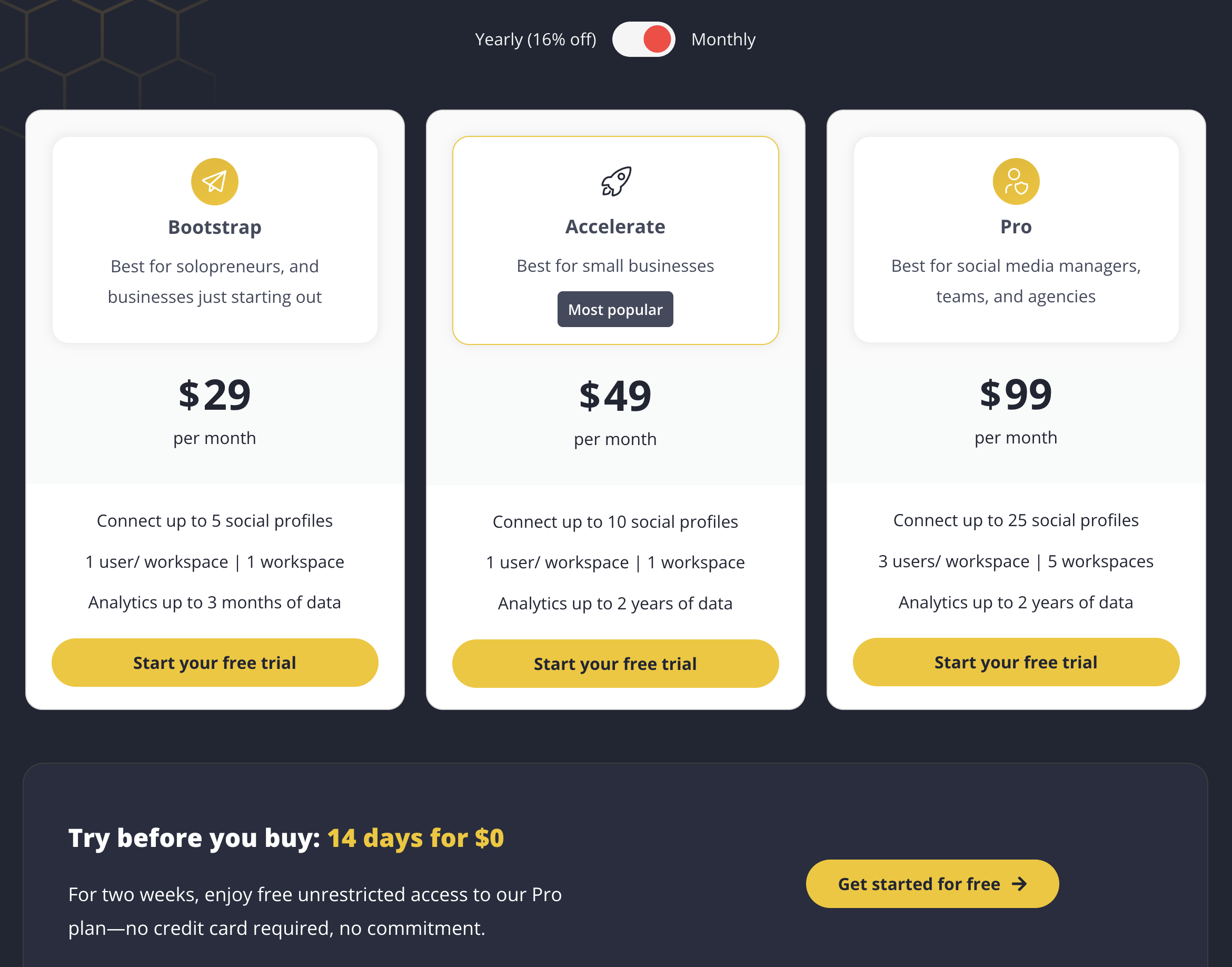
| Plan | Price | Profiles | Workspaces | Key Features |
|---|---|---|---|---|
| Bootstrap | $29/mo | 5 | 1 | Category scheduling, evergreen recycling, AI generator |
| Accelerate | $49/mo | 10 | 1 | All Bootstrap features, more profiles |
| Pro | $99/mo | 25 | 5 | Team collaboration, multiple workspaces |
Example costs:
- Solopreneur on Bootstrap = $29/month
- Growing business on Accelerate = $49/month
- Agency on Pro = $99/month
Planable Pricing
Planable uses per-workspace pricing with monthly post limits. Analytics and engagement inbox are separate add-ons. See the full Planable pricing breakdown for details.
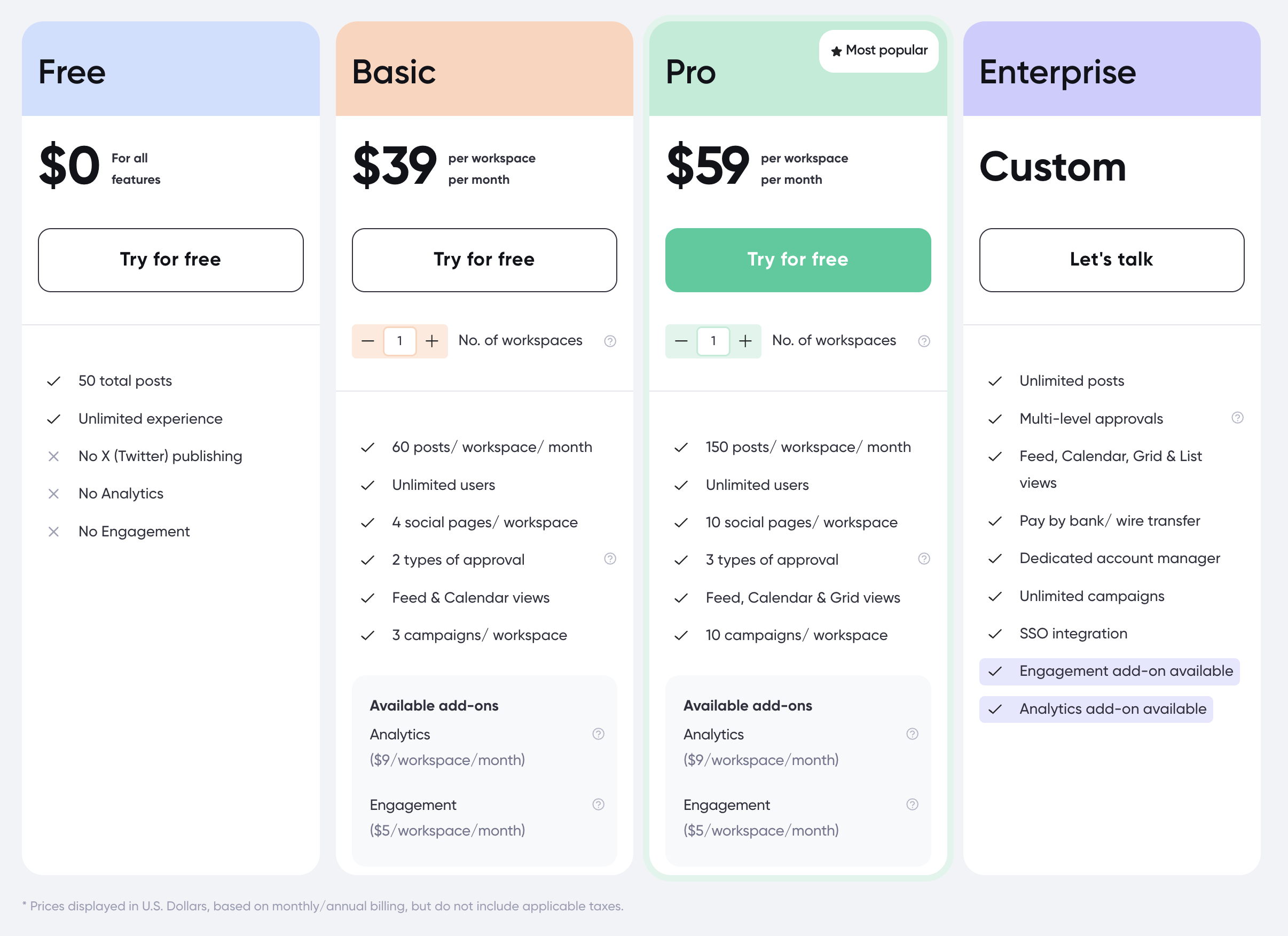
| Plan | Price | Posts | Pages | Key Features |
|---|---|---|---|---|
| Free | $0/mo | 50 lifetime | 4 | Unlimited users, no X/Twitter |
| Basic | $39/workspace/mo | 60/mo | 4 | Unlimited users, approval workflows |
| Pro | $59/workspace/mo | 150/mo | 10 | Unlimited users, all features |
| Enterprise | Custom | Unlimited | Custom | Custom onboarding, dedicated support |
Add-ons:
- Analytics: $14/workspace/mo
- Engagement inbox: $9/workspace/mo
Example costs:
- 1 workspace on Basic = $39/month
- 1 workspace on Pro + Analytics = $73/month
- 3 workspaces on Pro + both add-ons = $246/month
Price Verdict
SocialBee offers more features per dollar for most individual users and small teams. At $29/month, SocialBee includes 5 profiles, unlimited scheduling, built-in analytics, and category-based content management. Planable at $39/month gives you 4 pages with only 60 posts/month and no analytics unless you pay $14/month extra. However, for large teams, Planable's unlimited users on all plans can be more cost-effective than SocialBee's Pro plan ($99/month) which is the only tier with team collaboration.
 PostPlanify
Manage All Your Social Accounts Without the Chaos
Schedule posts, track performance, and collaborate with your team.


Feature Comparison
Scheduling & Publishing
| Feature | SocialBee | Planable |
|---|---|---|
| Unlimited scheduling | Yes (all plans) | No (60-150 posts/mo) |
| Category-based scheduling | Yes | No |
| Evergreen recycling | Yes | No |
| Bulk scheduling | CSV import | No |
| RSS feed import | Yes | No |
| Mockup previews | No | Yes (pixel-perfect) |
| Universal Content | No | Yes |
| Content calendar | Yes (drag-and-drop) | Yes (drag-and-drop) |
Winner: SocialBee for publishing power, Planable for visual previews. SocialBee's category system and evergreen recycling give you more publishing automation. Planable gives you better visual control over how posts look before they go live.
AI Tools
| Feature | SocialBee | Planable |
|---|---|---|
| AI caption generation | Yes (AI post generator) | Yes (AI generator) |
| AI post variations | Yes | No |
| AI hashtag generation | No | Yes |
| AI image generation | No | No |
| Canva integration | Yes | Yes |
| Unsplash/GIPHY | Yes | No |
Winner: Tie. SocialBee offers AI post variations for content recycling. Planable offers AI hashtag generation. Both include AI captions and Canva integration. Neither offers AI image generation.
Analytics & Reporting
| Feature | SocialBee | Planable |
|---|---|---|
| Built-in analytics | All plans | Add-on ($14/workspace/mo) |
| Category performance | Yes | No |
| Post-level analytics | Yes | Add-on only |
| Custom reports | No | No |
| Competitor tracking | No | No |
Winner: SocialBee. Analytics are included on all SocialBee plans with category-level performance tracking. Planable charges $14/workspace/month as an add-on.
Team Collaboration
| Feature | SocialBee | Planable |
|---|---|---|
| Unlimited users | No | Yes (all plans) |
| Multiple workspaces | Pro only ($99/mo) | All plans (per-workspace pricing) |
| Approval workflows | No | All paid plans |
| Client review links | No | Yes (shareable) |
| Mockup previews | No | Yes |
| Media storage | Limited | Unlimited |
Winner: Planable. This is where Planable shines. Unlimited users, approval workflows, shareable client review links, and mockup previews are available on all paid plans. SocialBee has no approval workflows and limits team collaboration to the Pro plan.
Platform Support
| Platform | SocialBee | Planable |
|---|---|---|
| Yes | Yes | |
| Yes | Yes | |
| X/Twitter | Yes | Paid plans only |
| Yes | Yes | |
| TikTok | Yes | Yes |
| YouTube | Yes | Yes |
| Yes | Yes | |
| Google Business | Yes | Yes |
| Threads | Yes | Yes |
Winner: SocialBee — includes X/Twitter on all plans. Planable restricts X/Twitter to paid plans. Platform count is otherwise identical at 9 each.
What Real Users Say
SocialBee Reviews
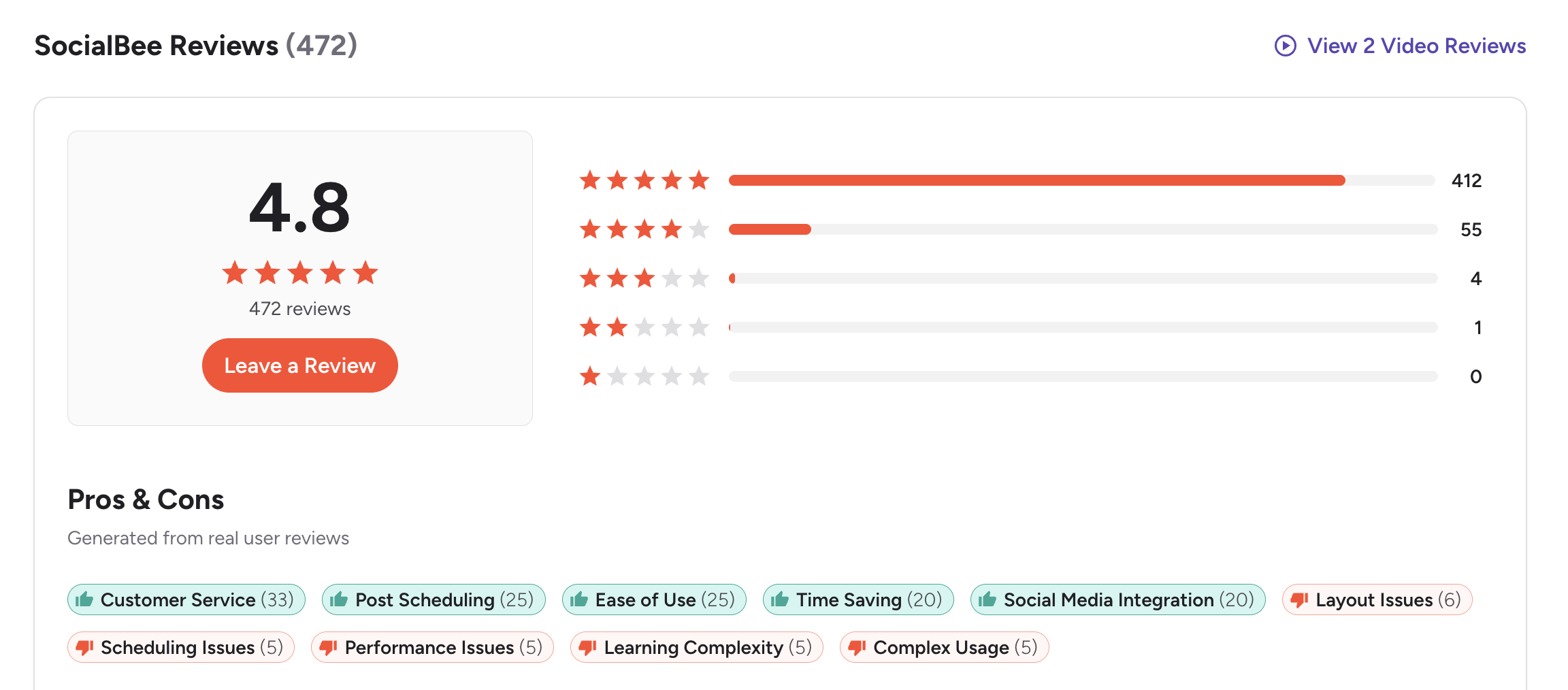
G2: 4.8/5 (435 reviews) — Users praise the category-based system, evergreen recycling, and ease of maintaining a consistent posting schedule. Common complaints include a learning curve for the category model and limited team features on lower plans.
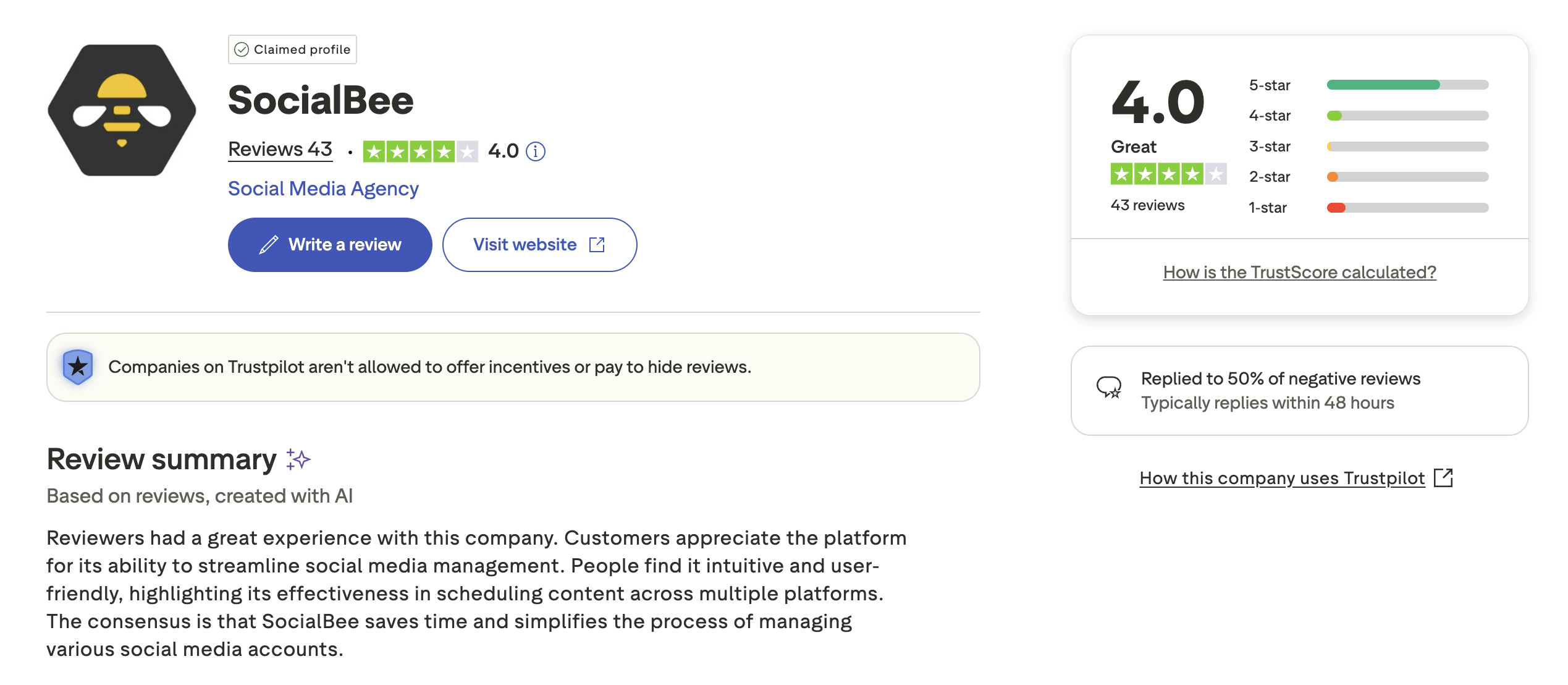
Trustpilot: 3.8/5 (62 reviews) — Mixed reviews with praise for scheduling reliability and criticism around customer support response times and occasional technical issues.
Planable Reviews
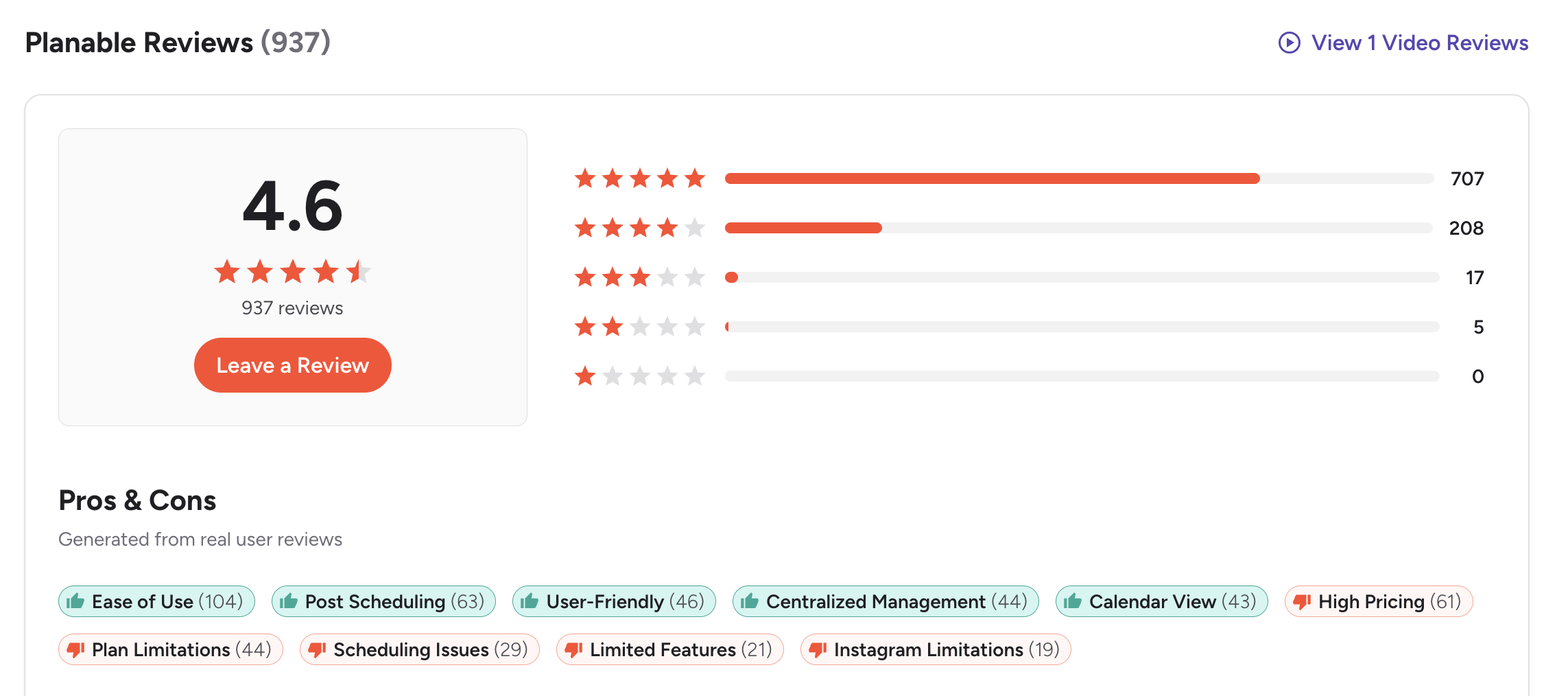
G2: 4.6/5 (937 reviews) — Users consistently praise the approval workflows, visual previews, and ease of collaboration. Common complaints include post limits on paid plans and the cost of add-ons for analytics.
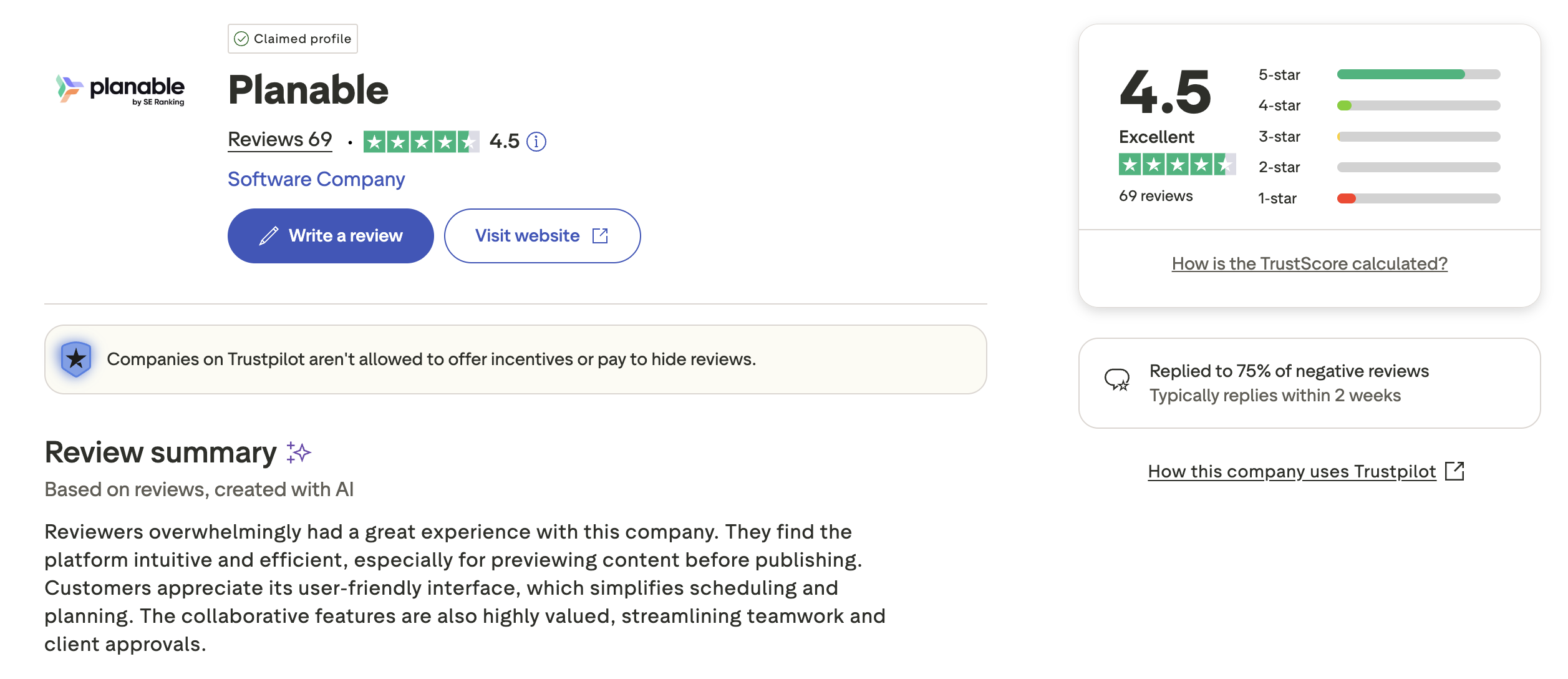
Trustpilot: 4.5/5 (69 reviews) — Strong positive sentiment around team collaboration features and customer support. Users appreciate the visual interface and client-friendly review links.
Review Verdict
SocialBee leads on G2 with 4.8/5 (435 reviews) vs Planable's 4.6/5 (937 reviews), one of the highest ratings among social media tools. On Trustpilot, Planable leads with 4.5/5 vs SocialBee's 3.8/5. SocialBee's G2 strength reflects individual user satisfaction with its content system. Planable's Trustpilot strength reflects team and agency satisfaction with collaboration features. Both are well-regarded overall.
PostPlanifyManage All Your Social Accounts Without the Chaos
Schedule posts, track performance, and collaborate with your team.
Who Should Use SocialBee?
If SocialBee sounds right for you but you want to explore other options first, check out our best alternatives to SocialBee. You can also see how SocialBee stacks up against Buffer, Hootsuite, Later, and Sendible.
SocialBee is the better choice if you:
- Are a solopreneur or small business that needs consistent posting
- Want category-based scheduling to organize different content types
- Need evergreen recycling to keep top content in rotation
- Prefer built-in analytics without paying for add-ons
- Want Canva, Unsplash, and GIPHY integrations for content creation
- Do not need approval workflows or team collaboration features
Who Should Use Planable?
If Planable is on your shortlist, you may also want to see our top alternatives to Planable before committing. Also compare Planable with Buffer, Loomly, Agorapulse, and Sendible.
Planable is the better choice if you:
- Are an agency or marketing team that needs structured approval workflows
- Need unlimited users without per-seat pricing
- Want shareable client review links for external stakeholders
- Prefer pixel-perfect mockup previews before publishing
- Value visual collaboration over content categorization
- Need a mobile app for on-the-go content reviews
Organized Content Without the Complexity
SocialBee's category system requires learning a new content model. Planable's per-workspace pricing adds up with analytics add-ons. PostPlanify keeps scheduling simple with unlimited posts, AI tools, and Canva integration from $29/month — no categories to configure, no workspace fees to calculate.

| Feature | SocialBee | Planable | PostPlanify |
|---|---|---|---|
| Starting Price | $29/mo (5 profiles) | $39/workspace/mo | $29/mo flat |
| Unlimited Scheduling | Yes (all plans) | No (60-150 posts/mo) | All paid plans |
| AI Caption Generation | Yes | Yes | Yes (unlimited) |
| AI Image Generation | No | No | Yes |
| Canva Integration | Yes | Yes | Yes |
| Google Drive Import | No | No | Yes |
| Approval Workflows | No | Basic ($39/workspace/mo) | $99/mo (Premium) |
| Analytics | All plans | Add-on ($14/workspace/mo) | $49/mo (Growth) |
| Unlimited Users | No | Yes | $99/mo (Premium) |
| Platforms Supported | 9 | 9 | 10 |
PostPlanify starts at $29/month for 5 accounts with unlimited scheduling and AI tools included. Analytics are included from the Growth plan ($49/month). The Premium plan at $99/month adds 25 accounts, 5 team members, approval workflows, and white-label reports — matching SocialBee's scheduling power and Planable's collaboration features in one flat-rate plan. See all plans on the PostPlanify pricing page.
Try PostPlanify free for 7 days

Related Guides
- How to Measure Social Media ROI
- Social Media Analytics for Business
- How to Create a Social Media Content Calendar
- Best SocialBee Alternatives
- Best Planable Alternatives
FAQ
Is SocialBee cheaper than Planable?
Yes, for individuals and small teams. SocialBee starts at $29/month with 5 profiles, unlimited scheduling, and built-in analytics. Planable starts at $39/workspace/month with only 60 posts/month and charges extra for analytics. However, for large teams, Planable's unlimited users on all plans may be more cost-effective.
Does SocialBee have a free plan?
No. SocialBee offers a 14-day free trial but no permanent free plan. Planable offers a free plan with 50 lifetime posts, 4 social pages, and unlimited users (no X/Twitter support).
What is category-based scheduling?
SocialBee's category-based system lets you organize posts into categories (tips, promotions, quotes, blog posts, etc.) and assign each category a posting schedule. SocialBee then automatically rotates through posts in each category, keeping your content mix balanced without manual scheduling of every individual post.
Does Planable have content recycling?
No. Planable does not offer evergreen content recycling. Each post is a one-time publish. If you need content recycling, SocialBee is purpose-built for it, or consider PostPlanify for unlimited scheduling without complex category systems.
Which is better for agencies?
Planable is better for agencies that need client-facing approval workflows, unlimited collaborators, and visual previews. SocialBee is better for agencies where one person manages multiple client accounts and needs category-based content organization. SocialBee's team features are limited to the Pro plan ($99/month).
Can I switch from SocialBee to Planable?
Yes. You can reconnect your social accounts to Planable and begin scheduling. However, you will lose SocialBee's category-based system and evergreen recycling. You will also need to recreate your content organization within Planable's workspace model.
Which has better analytics?
SocialBee includes analytics on all plans with category-level performance tracking. Planable charges $14/workspace/month for analytics as an add-on. Neither offers competitor tracking or advanced reporting. For built-in analytics at a lower price, SocialBee wins.
Does SocialBee have approval workflows?
No. SocialBee does not offer content approval workflows. If your team requires structured content review and client sign-off before publishing, Planable is the better choice. PostPlanify also includes approval workflows on the Premium plan at $99/month.







