
SocialBee and Tailwind both excel at keeping content flowing consistently, but they do it through very different systems. SocialBee uses category-based scheduling to rotate content types on a set cadence across 9 platforms. Tailwind uses SmartSchedule and SmartLoop to optimize posting times and reshare evergreen content on just 3 visual platforms. Both automate your content calendar — but for different audiences and different channels.
SocialBee is built for solopreneurs who want a structured content system across major social networks. Tailwind is built for visual creators and e-commerce sellers who live on Pinterest and Instagram. The overlap is small — both recycle evergreen content — but the platforms they serve and the workflows they optimize barely intersect. We compare their scheduling models, pricing, and niche strengths to help you pick the right fit. Comparing the full market? Browse all social media scheduling alternatives.
SocialBee vs Tailwind at a Glance
| Category | SocialBee | Tailwind |
|---|---|---|
| Starting Price | $29/mo (5 profiles) | Free (5 posts/mo, 3 accounts) |
| Free Plan | No (14-day trial) | Yes |
| Platforms Supported | 9 | 3 (Pinterest, Instagram, Facebook) |
| Unlimited Scheduling | Yes (all plans) | Max plan ($99.99/mo) |
| AI Tools | AI post generator | Ghostwriter AI |
| AI Image Generation | No | No (Tailwind Create for templates) |
| Bulk Scheduling | CSV import | Bulk uploads |
| Team Collaboration | Pro plan ($99/mo, 5 workspaces) | Max plan (5 users) |
| Approval Workflows | No | No |
| Social Inbox | No | No |
| Analytics | All plans | Basic (all plans) |
| G2 Rating | 4.8/5 (435 reviews) | 4.3/5 (141 reviews) |
| Best For | Solopreneurs, evergreen content strategies | Pinterest-focused creators, e-commerce sellers |
SocialBee Overview

SocialBee is a content-organization-first social media scheduling platform built for solopreneurs and small businesses. Its defining feature is category-based scheduling — you organize posts into content categories (promotions, tips, quotes, blog posts) and SocialBee automatically rotates through them on a set schedule. Evergreen content can be recycled indefinitely.
SocialBee supports 9 platforms: Instagram, Facebook, X/Twitter, LinkedIn, TikTok, YouTube, Pinterest, Google Business Profile, and Threads.
Key features:
- Category-based content scheduling
- Evergreen post recycling
- AI post generator for captions and variations
- Canva, Unsplash, and GIPHY integration
- Content calendar with drag-and-drop
- RSS feed import
- URL shortening and UTM tracking
- Workspace management (Pro plan)
SocialBee is popular among solopreneurs, coaches, and small businesses who want to maintain a consistent posting schedule without creating new content every day. Read real user reviews of SocialBee from G2 and Trustpilot.
Tailwind Overview

Tailwind is a visual marketing platform built specifically for Pinterest, Instagram, and Facebook. It specializes in tools that help visual content creators and e-commerce sellers maximize engagement on image-heavy platforms — SmartSchedule identifies optimal posting windows, Tailwind Create generates branded designs from templates, and Tailwind Communities connect creators for collaborative content promotion.
Tailwind supports 3 platforms: Pinterest, Instagram, and Facebook. It does not support X/Twitter, LinkedIn, TikTok, YouTube, Threads, Bluesky, Google Business, WordPress, or Mastodon.
Key features:
- SmartSchedule for optimal posting times
- Ghostwriter AI for captions and descriptions
- Tailwind Create (design tool with templates)
- Tailwind Communities for collaborative sharing
- Smart.bio (link-in-bio tool)
- SmartLoop for evergreen content resharing
- Canva integration (paid plans)
- E-commerce integrations (Shopify, WooCommerce, Squarespace)
- Browser extensions and mobile app
Tailwind is best suited for Pinterest-focused creators, e-commerce sellers on visual platforms, and marketers who need design tools alongside scheduling. Read real user reviews of Tailwind from G2 and Trustpilot.
Pricing Comparison
SocialBee Pricing
SocialBee uses tiered pricing based on the number of social profiles and workspaces. See the full SocialBee pricing breakdown for details.
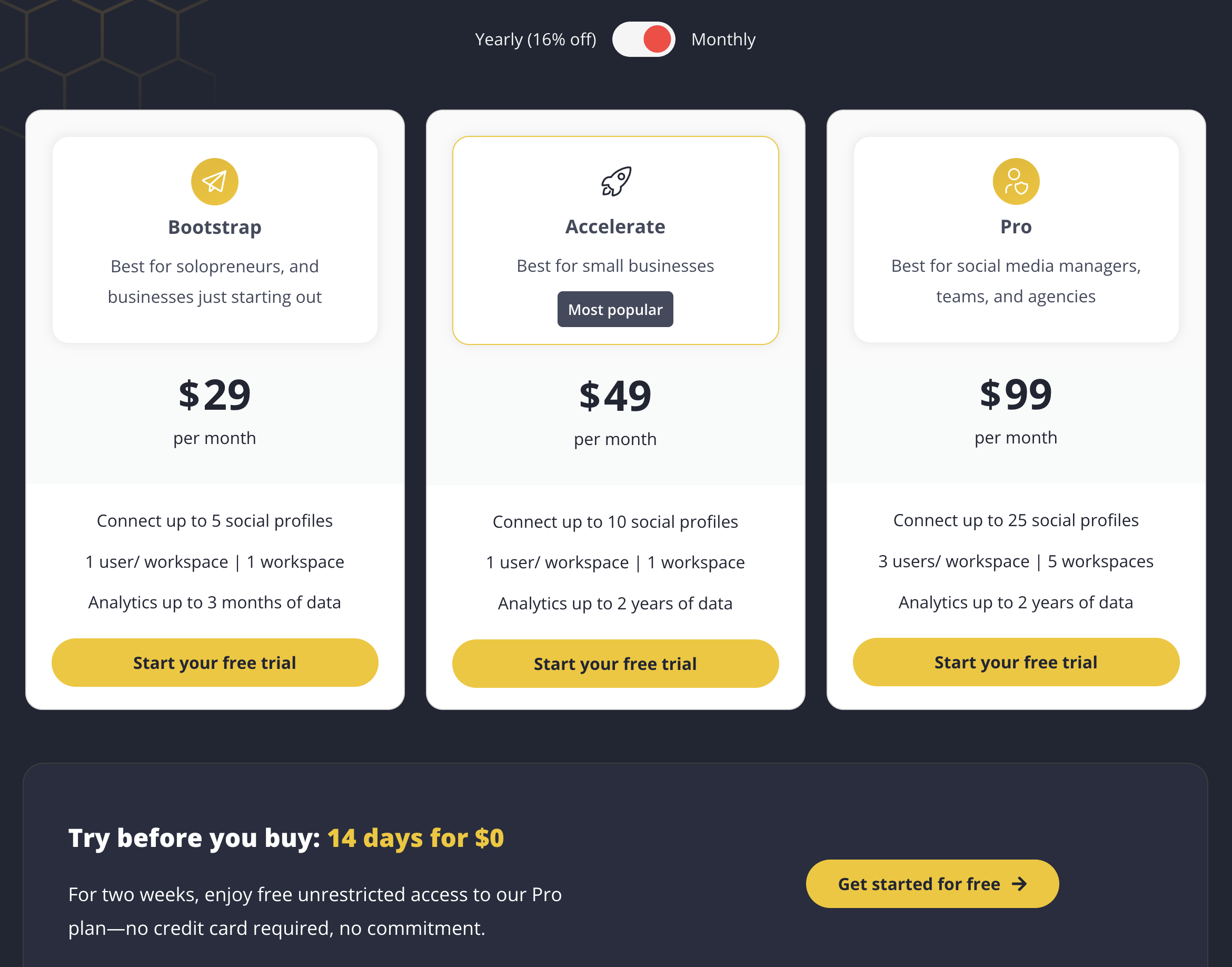
| Plan | Price | Profiles | Workspaces | Key Features |
|---|---|---|---|---|
| Bootstrap | $29/mo | 5 | 1 | Category scheduling, evergreen recycling, AI generator |
| Accelerate | $49/mo | 10 | 1 | All Bootstrap features, more profiles |
| Pro | $99/mo | 25 | 5 | Team collaboration, multiple workspaces |
Example costs:
- Solopreneur on Bootstrap = $29/month
- Growing business on Accelerate = $49/month
- Agency on Pro = $99/month
Tailwind Pricing
Tailwind uses tiered pricing with post limits and account caps. Introductory pricing is available for the first billing cycle, after which renewal rates apply. See the full Tailwind pricing breakdown for details.
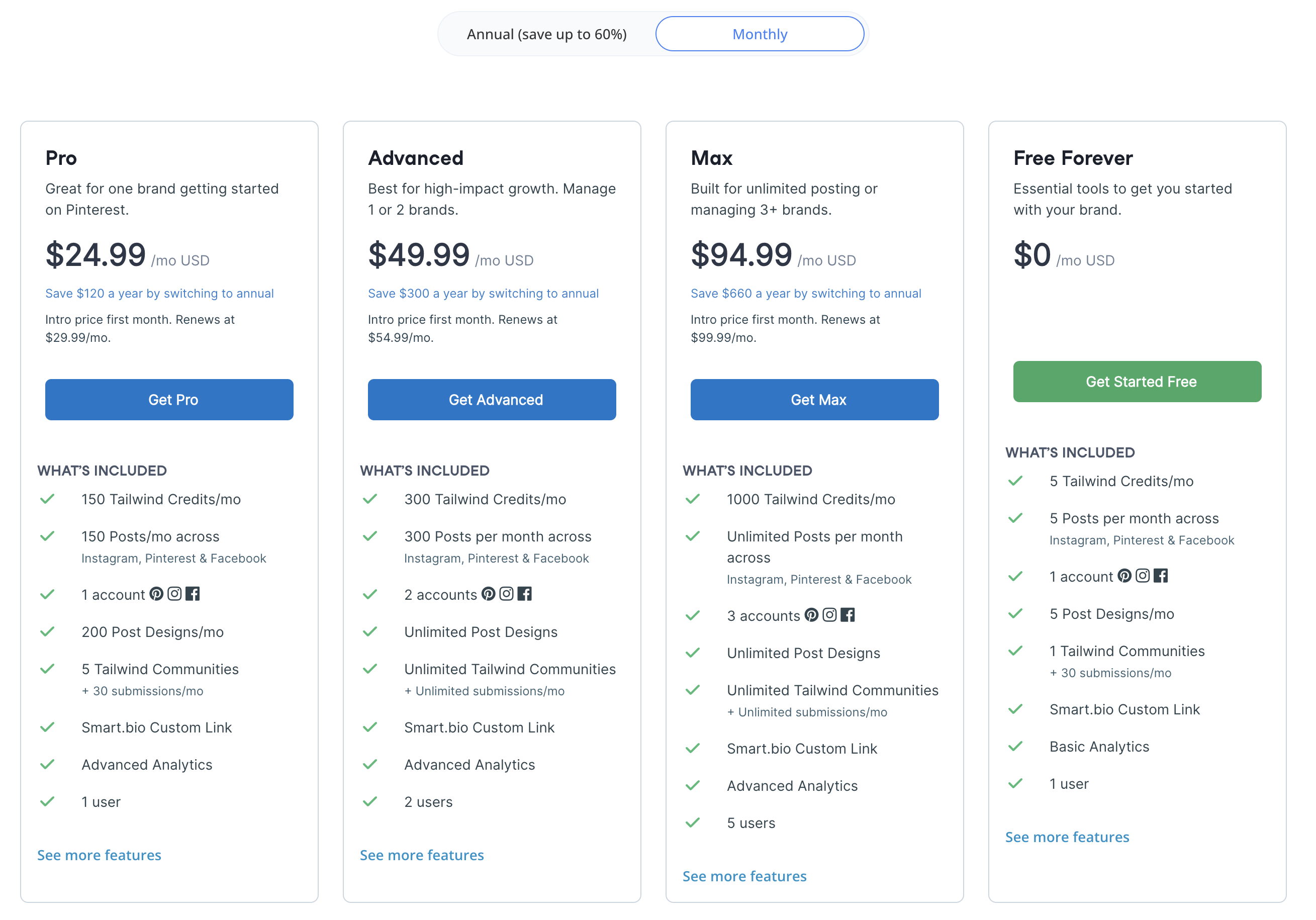
| Plan | Price (Renewal) | Posts/Month | Accounts | Users |
|---|---|---|---|---|
| Free | $0/mo | 5 | 3 (1 per platform) | 1 |
| Pro | $29.99/mo | 150 | 3 | 1 |
| Advanced | $54.99/mo | 300 | 6 | 2 |
| Max | $99.99/mo | Unlimited | 9 | 5 |
Intro pricing is available at $24.99 (Pro), $49.99 (Advanced), and $94.99 (Max) for the first billing cycle. The free plan includes 5 posts/month, 5 AI credits, 5 designs, 1 community, and basic analytics.
Price Verdict
Winner: SocialBee for scheduling value. SocialBee's Bootstrap plan at $29/month includes 5 profiles across 9 platforms with unlimited scheduling and built-in analytics. Tailwind Pro at $29.99/month gives you 3 accounts across only 3 platforms with 150 posts/month. SocialBee delivers triple the platform coverage and unlimited posts at essentially the same price. Tailwind's free plan is an advantage for users who only need 5 posts/month, but SocialBee's 14-day trial lets you test the full feature set before paying.
 PostPlanify
Manage All Your Social Accounts Without the Chaos
Schedule posts, track performance, and collaborate with your team.


Feature Comparison
Scheduling & Publishing
| Feature | SocialBee | Tailwind |
|---|---|---|
| Unlimited scheduling | Yes (all plans) | Max plan only ($99.99/mo) |
| Category-based scheduling | Yes | No |
| Evergreen recycling | Yes | SmartLoop |
| SmartSchedule | No | Yes (optimal times) |
| Bulk scheduling | CSV import | Bulk uploads |
| RSS feed import | Yes | No |
| Content calendar | Yes (drag-and-drop) | Yes |
Winner: SocialBee for content organization, Tailwind for timing optimization. SocialBee's category system and unlimited scheduling give you more control over content structure and volume. Tailwind's SmartSchedule optimizes posting times based on audience data, and SmartLoop handles evergreen resharing — but only across 3 platforms.
AI Tools
| Feature | SocialBee | Tailwind |
|---|---|---|
| AI caption generation | Yes (AI post generator) | Ghostwriter AI |
| AI post variations | Yes | No |
| AI image generation | No | No |
| Design tool | No (Canva integration) | Tailwind Create (built-in) |
| Unsplash/GIPHY | Yes | No |
Winner: Tie with different strengths. SocialBee's AI generator creates post variations for content recycling. Tailwind's Ghostwriter generates captions and descriptions, while Tailwind Create produces branded designs from templates. Neither offers AI image generation. SocialBee is better for text content; Tailwind is better for visual content creation.
Analytics & Reporting
| Feature | SocialBee | Tailwind |
|---|---|---|
| Built-in analytics | All plans | Basic (all plans) |
| Category performance | Yes | No |
| Best time insights | No | SmartSchedule data |
| Post-level analytics | Yes | Yes |
| Competitor tracking | No | No |
Winner: SocialBee. Analytics are included on all SocialBee plans with category-level performance tracking that ties directly into the scheduling system. Tailwind includes basic analytics on all plans with SmartSchedule timing data, but lacks the depth of SocialBee's category performance insights.
Team Collaboration
| Feature | SocialBee | Tailwind |
|---|---|---|
| Multi-user support | Pro plan ($99/mo) | Max plan (5 users, $99.99/mo) |
| Approval workflows | No | No |
| Workspace management | Pro plan (5 workspaces) | No |
| Tailwind Communities | No | Yes |
| Client dashboards | No | No |
Winner: SocialBee. SocialBee's Pro plan offers workspace management with up to 5 workspaces and 25 profiles for team use. Tailwind caps users at 5 on the Max plan with no workspace separation. Neither tool offers approval workflows. Tailwind Communities enable collaborative content sharing but are not a substitute for team management features.
Platform Support
| Platform | SocialBee | Tailwind |
|---|---|---|
| Yes | Yes | |
| Yes | Yes | |
| Yes | Yes | |
| X/Twitter | Yes | No |
| Yes | No | |
| TikTok | Yes | No |
| YouTube | Yes | No |
| Google Business | Yes | No |
| Threads | Yes | No |
Winner: SocialBee. With 9 platforms compared to Tailwind's 3, SocialBee covers the full range of major social networks. Tailwind misses X/Twitter, LinkedIn, TikTok, YouTube, Google Business, and Threads — all platforms that most social media managers need.
What Real Users Say
SocialBee Reviews
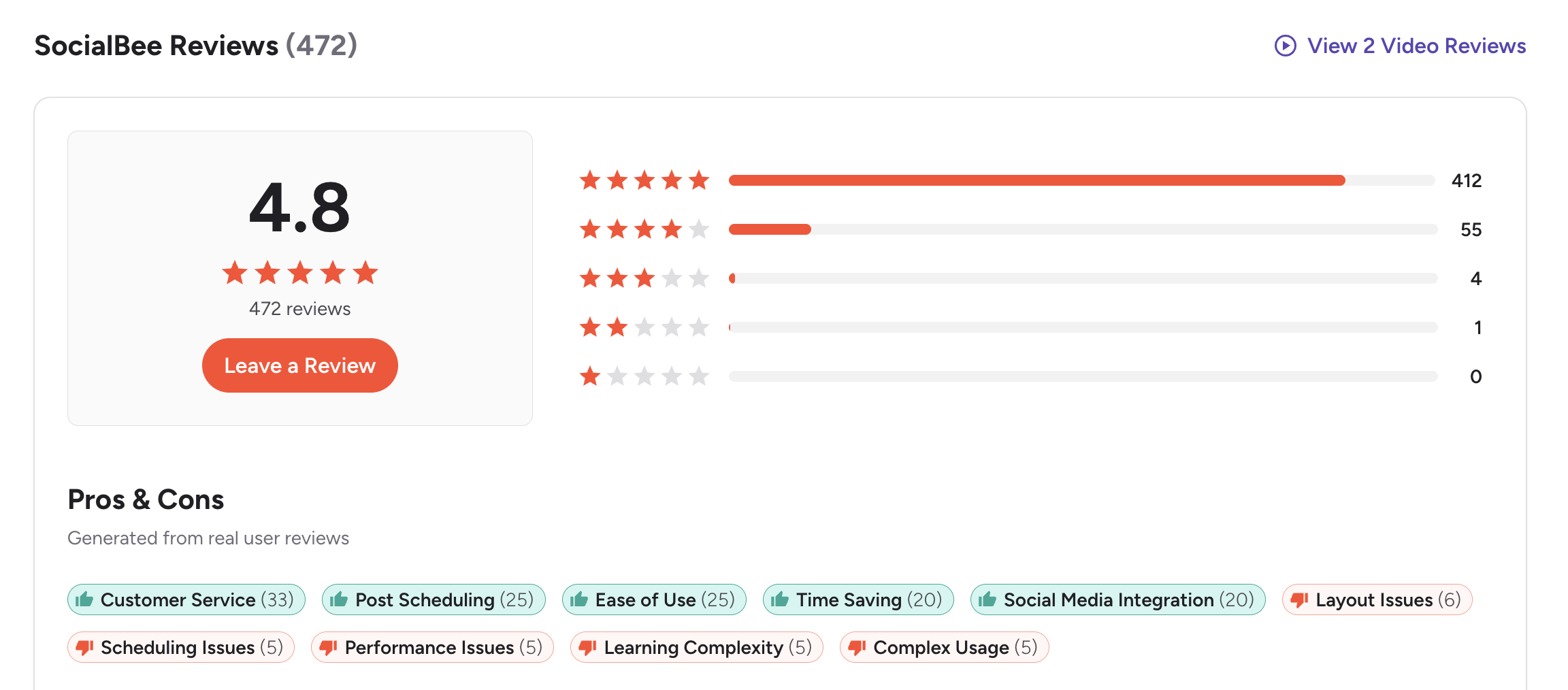
- G2: 4.8/5 (435 reviews) — Users praise the category-based system, evergreen recycling, and ease of maintaining a consistent posting schedule. Common complaints include a learning curve for the category model and limited team features on lower plans.
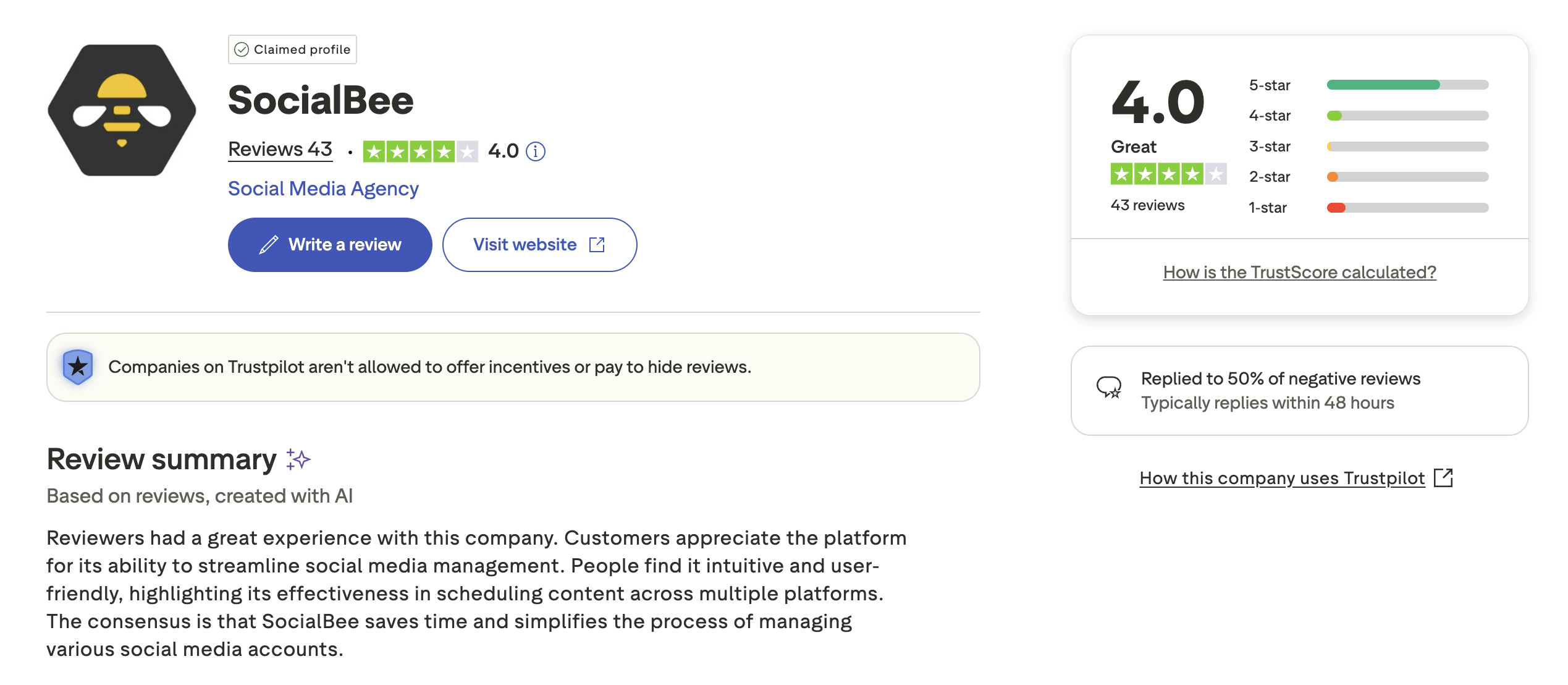
- Trustpilot: 3.8/5 (62 reviews) — Mixed reviews with praise for scheduling reliability and criticism around customer support response times and occasional technical issues.
Tailwind Reviews
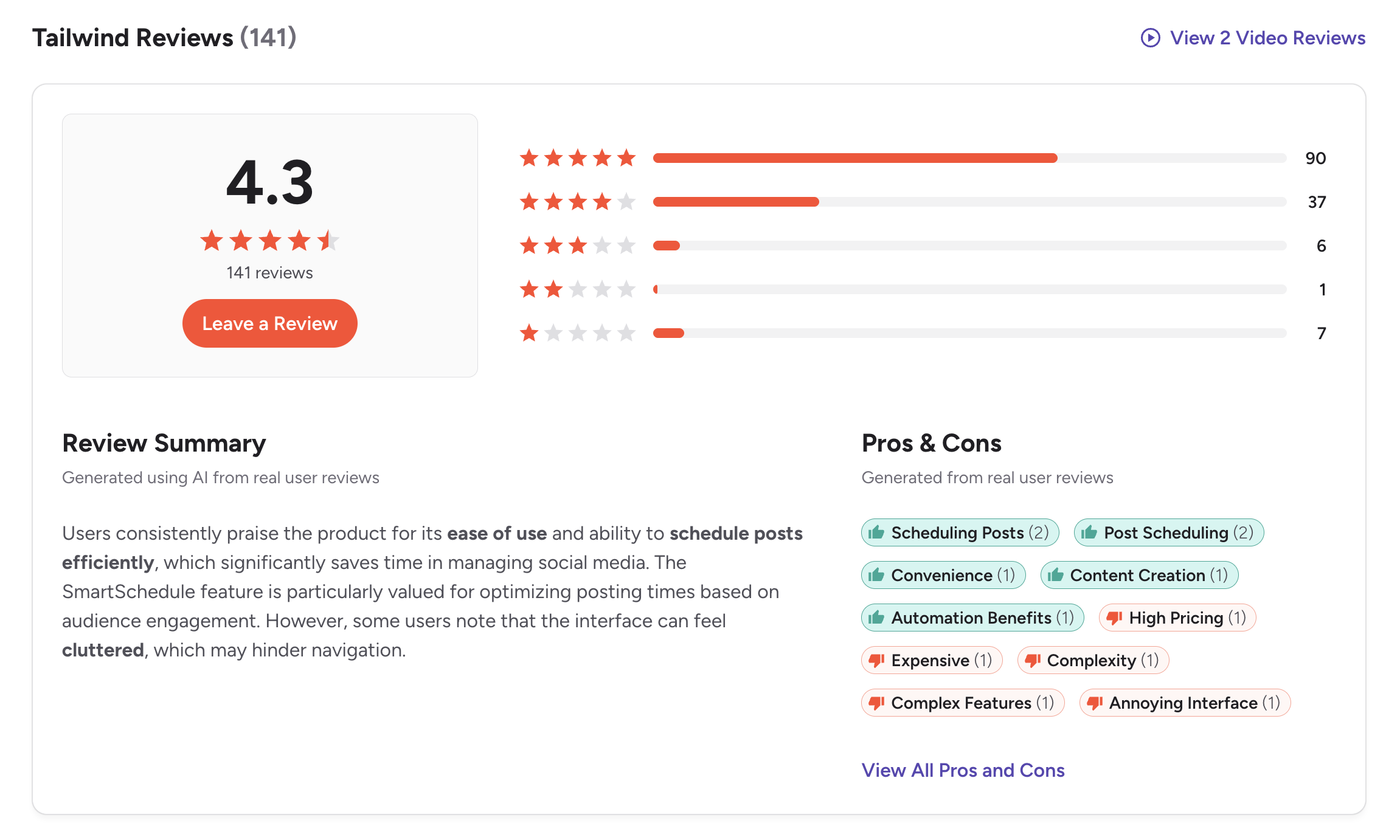
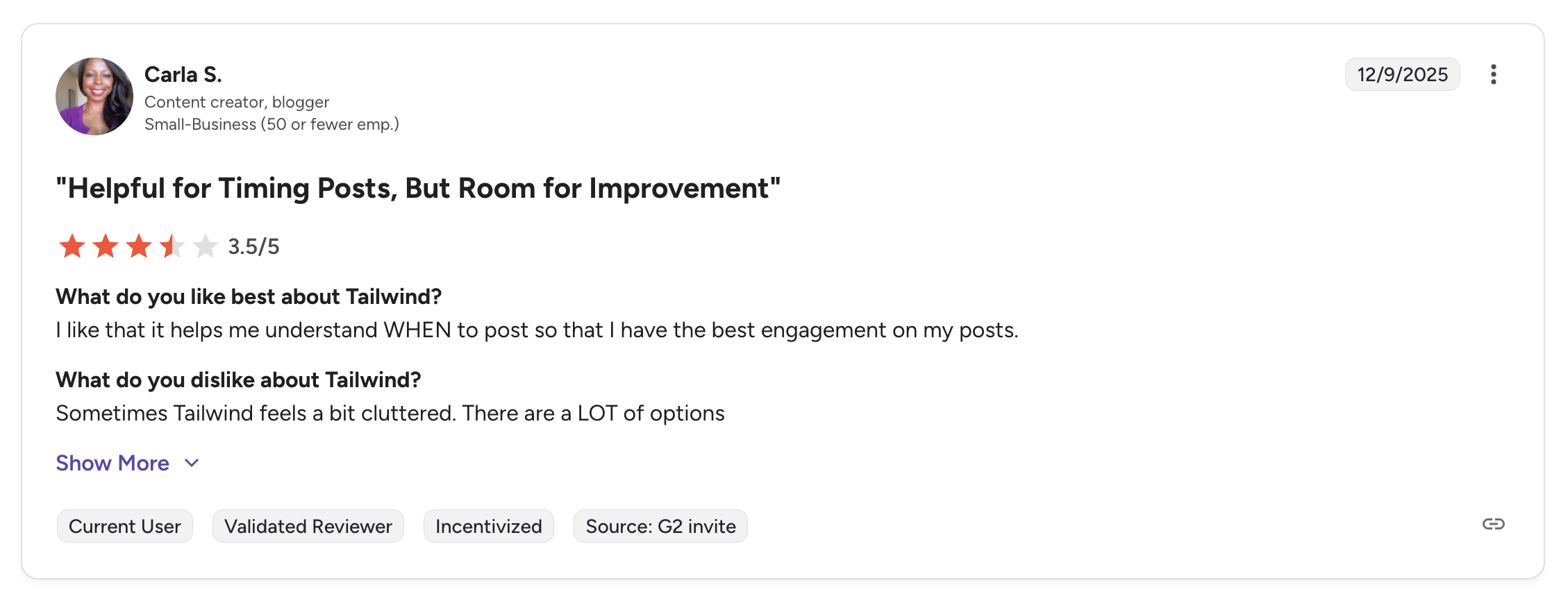
- G2: 4.3/5 (141 reviews) — Users appreciate Tailwind's Pinterest scheduling, SmartSchedule, and design tools. Common complaints include limited platform support, post caps on lower plans, and the pricing jump after introductory rates.
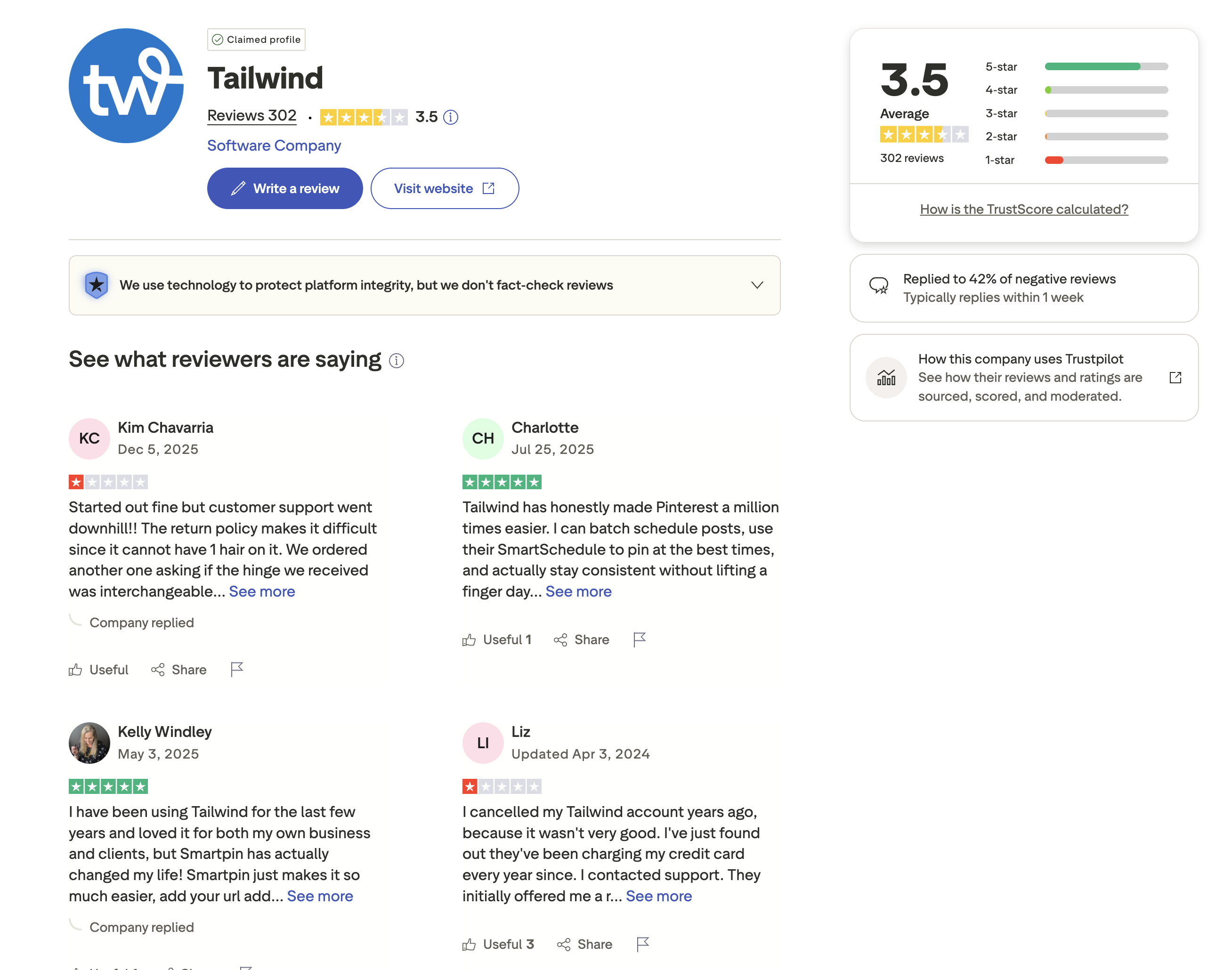
- Trustpilot: 3.5/5 (302 reviews) — A mixed score with a substantial review base. Positive reviews highlight Pinterest tools and design features. Negative reviews cite limited platform coverage and concerns about renewal pricing after intro rates expire.
Review Verdict
SocialBee leads convincingly on G2 with 4.8/5 (435 reviews) vs Tailwind's 4.3/5 (141 reviews) — one of the highest G2 ratings among social media tools. On Trustpilot, both score in the mid-range: SocialBee at 3.8/5 (62 reviews) and Tailwind at 3.5/5 (302 reviews). SocialBee's G2 strength reflects deep satisfaction with its category-based content system. Tailwind's larger Trustpilot sample provides more statistical weight but a lower score, suggesting mixed sentiment around platform limitations and pricing.
PostPlanifyManage All Your Social Accounts Without the Chaos
Schedule posts, track performance, and collaborate with your team.
Who Should Use SocialBee?
If SocialBee sounds right for you but you want to explore other options first, check out our best alternatives to SocialBee. You can also see how SocialBee stacks up against Buffer, Hootsuite, Later, and Metricool.
SocialBee is the better choice if you:
- Are a solopreneur or small business that needs consistent posting across 9 platforms
- Want category-based scheduling to organize and rotate different content types
- Need evergreen recycling to keep top-performing content in rotation indefinitely
- Prefer built-in analytics included on all plans without add-on costs
- Need CSV import and RSS feeds for bulk content management
- Want Canva, Unsplash, and GIPHY integrations for content creation
Who Should Use Tailwind?
If Tailwind is on your shortlist, you may also want to see our top alternatives to Tailwind before committing. Also compare Tailwind with Sprout Social, Later, Hootsuite, and Buffer.
Tailwind is the better choice if you:
- Are a Pinterest-focused creator who needs SmartSchedule and pin-optimized tools
- Run an e-commerce store on Shopify or WooCommerce and drive sales through Pinterest
- Want built-in design tools (Tailwind Create) without needing external design software
- Need SmartLoop to automatically reshare evergreen pins and Instagram content
- Value Tailwind Communities for collaborative content promotion within your niche
- Only publish to Pinterest, Instagram, and Facebook and do not need other platforms
Evergreen Content Without the Category Complexity
SocialBee's category model requires setup time and a learning curve. Tailwind only covers 3 platforms. PostPlanify offers unlimited scheduling across 10 platforms with AI tools and Canva integration from $29/month — no content categories to configure, no platform restrictions to work around.

| Feature | SocialBee | Tailwind | PostPlanify |
|---|---|---|---|
| Starting Price | $29/mo (5 profiles) | Free (5 posts/mo) | $29/mo flat |
| Unlimited Scheduling | Yes (all plans) | $99.99/mo (Max) | All paid plans |
| AI Caption Generation | Yes | Ghostwriter AI | Yes (unlimited) |
| AI Image Generation | No | No | Yes |
| Canva Integration | Yes | Paid plans | Yes |
| Google Drive Import | No | No | Yes |
| Approval Workflows | No | No | $99/mo (Premium) |
| Analytics | All plans | Basic (all plans) | $49/mo (Growth) |
| Unlimited Team Members | No | No (5 max) | $99/mo (Premium, 5 members) |
| Platforms Supported | 9 | 3 | 10 |
PostPlanify starts at $29/month for 5 accounts with unlimited scheduling and AI tools included. Analytics are included from the Growth plan ($49/month). The Premium plan at $99/month adds 25 accounts, 5 team members, approval workflows, and white-label reports — features neither SocialBee nor Tailwind offer at any price. Unlike SocialBee, there are no categories to configure. Unlike Tailwind, you get 10 platforms instead of 3. See all plans on the PostPlanify pricing page.
Try PostPlanify free for 7 days and discover a smarter way to manage your social media.

Related Guides
- Best Social Media Management Platforms
- How to Measure Social Media ROI
- Social Media Content Calendar Examples
- Best SocialBee Alternatives
- Best Tailwind Alternatives
FAQ
Is SocialBee better than Tailwind for Pinterest?
Not necessarily. Tailwind was purpose-built for Pinterest with SmartSchedule, SmartLoop, Tailwind Communities, and pin-optimized analytics. SocialBee supports Pinterest but treats it the same as every other platform — no Pinterest-specific tools. For dedicated Pinterest marketing, Tailwind is the stronger choice.
Does Tailwind support X/Twitter or LinkedIn?
No. Tailwind only supports Pinterest, Instagram, and Facebook. If you need X/Twitter, LinkedIn, TikTok, YouTube, or any other platform, SocialBee or PostPlanify are better options.
Which has better content recycling?
Both recycle evergreen content but differently. SocialBee uses category-based recycling where posts rotate through content categories on a set schedule. Tailwind uses SmartLoop to automatically reshare pins and Instagram posts at optimal times. SocialBee's system covers more platforms; Tailwind's system is more optimized for visual content engagement.
Can Tailwind replace SocialBee?
Only if you exclusively post to Pinterest, Instagram, and Facebook. Tailwind cannot schedule to X/Twitter, LinkedIn, TikTok, YouTube, Google Business, or Threads. If your strategy spans multiple platforms, SocialBee covers 9 while Tailwind covers 3.
Which is cheaper?
At the same price point (~$29/month), SocialBee offers 5 profiles with unlimited scheduling across 9 platforms. Tailwind Pro gives 3 accounts across 3 platforms with 150 posts/month. SocialBee delivers significantly more value per dollar for multi-platform scheduling. Tailwind is only cheaper if you use the free plan.
Does SocialBee have a free plan?
No. SocialBee offers a 14-day free trial but no permanent free plan. Tailwind has a free plan with 5 posts/month, 3 accounts (1 per platform), 5 AI credits, and basic analytics — useful for testing but very limited for ongoing use.
What are Tailwind Communities?
Tailwind Communities are collaborative content sharing groups where creators in the same niche share and reshare each other's content. This increases reach by exposing your pins and posts to other community members' audiences. It is unique to Tailwind and not available on SocialBee or most other schedulers.
Is there a tool that combines both approaches?
PostPlanify supports 10 platforms with unlimited scheduling and AI-powered content creation from $29/month. It does not use category-based scheduling like SocialBee or offer Pinterest-specific tools like Tailwind, but it provides a simpler approach with broader reach and AI image generation that neither competitor offers.







