
Choosing between Buffer or SocialBee comes down to how you think about content. Buffer keeps things minimal with per-channel pricing and a clean queue, while SocialBee builds its entire workflow around content categories and evergreen recycling. This Buffer vs SocialBee 2026 comparison breaks down pricing, features, and real user reviews so you can pick the right social media management platform for your workflow.
Buffer keeps things minimal. SocialBee goes all-in on automation. The right choice depends on how much structure you want in your content workflow — and how much you're willing to pay for it.
We compared current published pricing, tested both platforms, and analyzed 1,600+ user reviews across G2 and Trustpilot to give you an unbiased breakdown.
What actually matters when choosing between these two? Whether you need content recycling, how many profiles you manage, and how much automation you want in your workflow. We cover all of that below with real pricing tables and verified user reviews. Exploring other options? Browse all social media scheduling alternatives.
Buffer vs SocialBee at a Glance
Here's a quick side-by-side overview before we dive deeper:
| Category | Buffer | SocialBee |
|---|---|---|
| Starting Price | $6/mo per channel | $29/mo (5 profiles) |
| Free Plan | Yes (3 channels) | No (14-day free trial) |
| Platforms Supported | 11 | 10 |
| Unlimited Scheduling | Yes (paid plans) | Yes (all plans) |
| AI Tools | AI Assistant (captions) | AI Copilot + AI image generation (DALL-E 3) |
| AI Image Generation | No | Yes (DALL-E 3) |
| Bulk Scheduling | CSV import | CSV bulk import |
| Team Collaboration | Team plan ($12/mo/channel) | Pro plan ($99/mo) |
| Approval Workflows | Team plan only | Pro plan only |
| Content Recycling | No | Yes (evergreen recycling) |
| Analytics | Basic to Advanced | Basic to 2-year history |
| G2 Rating | 4.3/5 (1,023 reviews) | 4.8/5 (472 reviews) |
| Trustpilot Rating | 2.1/5 (93 reviews) | 4.0/5 (43 reviews) |
| Best For | Solo creators, simple scheduling | Organized creators, content recycling |
Buffer Overview

Buffer is one of the oldest scheduling tools, launched in 2010. It focuses on simplicity — a clean interface for scheduling posts, managing a basic content calendar, and viewing analytics.
Buffer supports 11 platforms: Instagram, Facebook, LinkedIn, Pinterest, X/Twitter, TikTok, YouTube, Google Business Profile, Threads, Bluesky, and Mastodon.
Key features:
- Post scheduling with queue management
- AI Assistant for generating captions and post ideas
- Hashtag manager and first comment scheduling
- Basic community inbox
- Start Page (link-in-bio builder)
- Content calendar
Buffer is popular among solo creators and freelancers who want a no-frills scheduling experience without a steep learning curve. For a deeper look, see what users say about Buffer on G2 and Trustpilot.
SocialBee Overview

SocialBee is a social media scheduling and content management tool built around a category-based posting system. Instead of a simple queue, you organize content into categories (like tips, promotions, blog posts) and SocialBee rotates through them on a schedule you define.
SocialBee supports 10 platforms: Instagram, Facebook, X/Twitter, LinkedIn, Pinterest, TikTok, YouTube, Google Business Profile, Threads, and Bluesky.
Key features:
- Category-based scheduling with content queues
- Evergreen content recycling (auto-repost top content)
- AI Copilot for captions and content suggestions
- AI image generation via DALL-E 3
- Canva integration for in-app design
- RSS feeds for automated content sourcing
- CSV bulk import
- Best time to post suggestions
- Approval workflows (Pro plan)
SocialBee is designed for creators and small businesses who want to automate social media with a structured, repeatable content system — especially those who recycle evergreen posts regularly. Read real user reviews of SocialBee from G2 and Trustpilot.
Pricing Comparison
Pricing is where these two tools take very different approaches. Buffer charges per channel, while SocialBee uses tiered plans with profile caps.
Buffer Pricing
Buffer uses per-channel pricing. Each social account you connect adds to your monthly cost. We break this down further in our Buffer pricing guide.
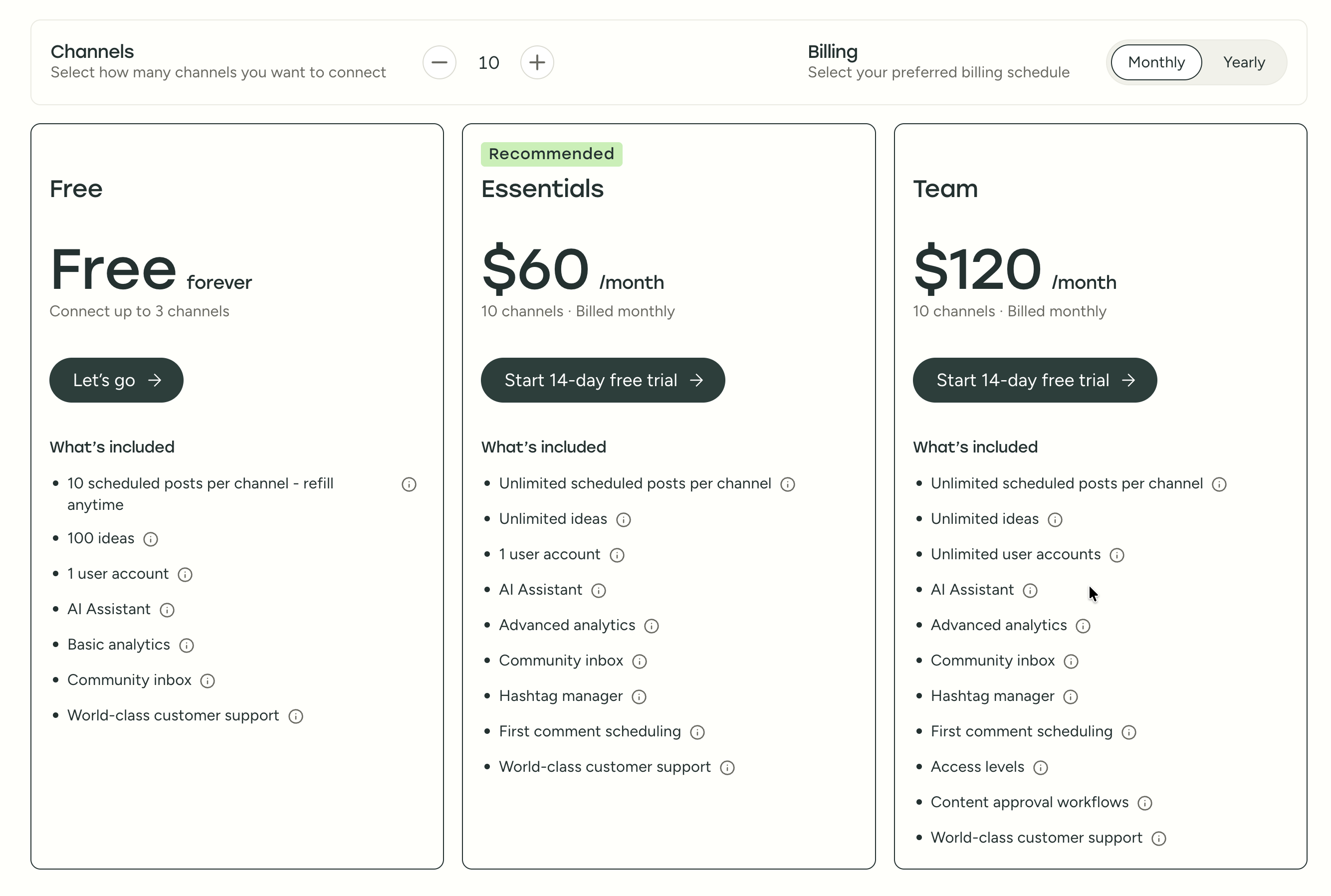
| Plan | Price | Channels | Users | Key Features |
|---|---|---|---|---|
| Free | $0/mo | 3 | 1 | 10 posts/channel, basic analytics |
| Essentials | $6/mo per channel | Unlimited | 1 | Unlimited posts, advanced analytics, hashtag manager |
| Team | $12/mo per channel | Unlimited | Unlimited | Approval workflows, permissions, team collaboration |
Example costs:
- 5 channels on Essentials = $30/month
- 10 channels on Essentials = $60/month
- 10 channels on Team = $120/month
SocialBee Pricing
SocialBee uses tiered pricing with profile caps per plan. See the full SocialBee pricing breakdown for details.
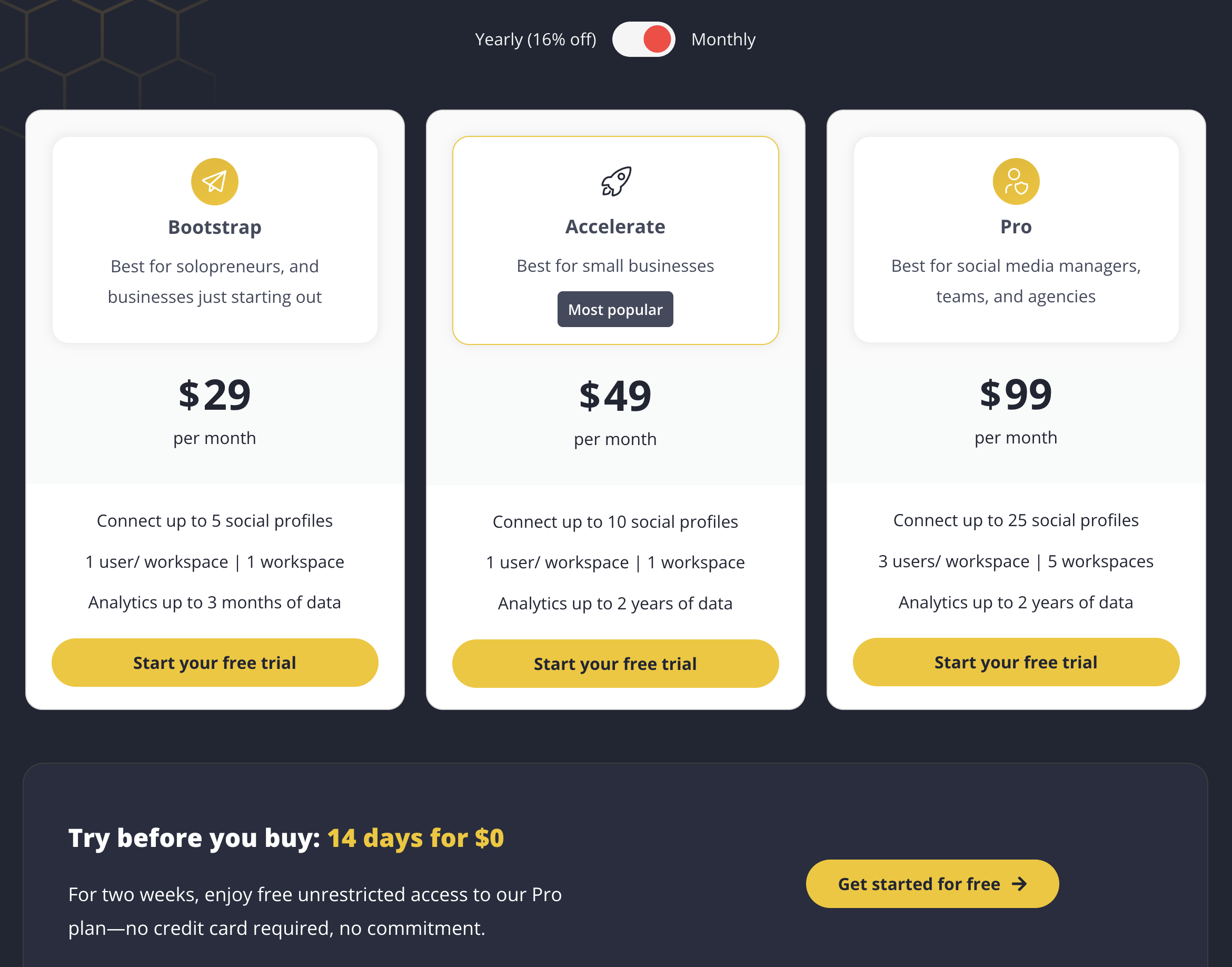
| Plan | Price | Profiles | Users | Workspaces | Key Features |
|---|---|---|---|---|---|
| Bootstrap | $29/mo | 5 | 1 | 1 | Category scheduling, AI Copilot, 3-month analytics |
| Accelerate | $49/mo | 10 | 1 | 1 | Everything in Bootstrap + 2-year analytics |
| Pro | $99/mo | 25 | 3 | 5 | Everything in Accelerate + approval workflows, team collaboration |
Add-ons: $15/mo per 5 extra profiles, $10/mo per extra user, $10/mo per extra workspace.
Example costs:
- 5 profiles on Bootstrap = $29/month
- 10 profiles on Accelerate = $49/month
- 25 profiles with 3 users on Pro = $99/month
- 15 profiles on Accelerate (10 included + 5 extra) = $64/month
Price Verdict
It depends on how many channels you manage. For a solo creator with 5 social profiles, Buffer Essentials costs $30/month vs SocialBee Bootstrap at $29/month — virtually identical. But the math diverges quickly at scale.
At 10 profiles, Buffer Essentials costs $60/month while SocialBee Accelerate is $49/month. At that same tier with team features, Buffer Team jumps to $120/month while SocialBee Pro covers 25 profiles with 3 users for $99/month.
Buffer wins if you only manage 1-3 channels (the free plan is genuinely useful). SocialBee wins for anyone managing 10+ profiles or needing team features — the flat pricing is more predictable, and you get content recycling and AI image generation included at every tier.
What You'll Actually Pay: Real-World Scenarios
Buffer charges per channel, SocialBee charges per plan tier with profile caps. Here's how real costs compare:
Solo creator managing 5 social accounts:
- Buffer Essentials: 5 × $6 = $30/month (analytics included, no AI image gen)
- SocialBee Bootstrap: $29/month (content recycling, AI image gen, best time to post included)
- Nearly identical price, but SocialBee includes more features at this tier.
Small team managing 10 accounts with approvals:
- Buffer Team: 10 × $12 = $120/month (unlimited users, approval workflows)
- SocialBee Pro: $99/month (25 profiles, 3 users, 5 workspaces, approvals)
- SocialBee is $21/month cheaper with 15 spare profile slots. But adding users beyond 3 costs $10/mo each.
Agency managing 25 profiles across 5 clients:
- Buffer Team: 25 × $12 = $300/month (unlimited users, no workspaces)
- SocialBee Pro: $99/month (25 profiles, 3 users, 5 workspaces)
- SocialBee is 3× cheaper with dedicated workspaces for each client. Buffer has no workspace concept, so managing 5 clients means all accounts live in one flat list.
 PostPlanify
Manage All Your Social Accounts Without the Chaos
Schedule posts, track performance, and collaborate with your team.


Feature Comparison
Scheduling & Publishing
Both tools handle scheduling well, but their philosophies differ. Buffer uses a straightforward queue; SocialBee organizes everything into content categories.
| Feature | Buffer | SocialBee |
|---|---|---|
| Unlimited scheduling | Yes (paid plans) | Yes (all plans) |
| Bulk scheduling | CSV import | CSV bulk import |
| Best time to post | No | Yes |
| First comment scheduling | Yes (Essentials+) | No |
| Content calendar | Yes | Yes (no drag-and-drop) |
| Post queue management | Yes | Yes (category-based) |
| Draft saving | Yes | Yes |
| RSS feed import | No | Yes |
Winner: SocialBee. The category-based system, best time to post suggestions, and RSS feeds give SocialBee more scheduling depth. SocialBee's approach lets you create content buckets (tips, promotions, blog posts, testimonials) and automatically rotate through them — ensuring your feed stays balanced without manual planning. Buffer's calendar is more flexible with drag-and-drop, and first comment scheduling is a genuine advantage for Instagram hashtag strategies. But for anyone who wants a structured, repeatable posting system rather than a manual queue, SocialBee's scheduling engine is more capable overall.
AI Tools
This is where SocialBee has a clear edge.
| Feature | Buffer | SocialBee |
|---|---|---|
| AI caption generation | Yes (AI Assistant) | Yes (AI Copilot) |
| AI image generation | No | Yes (DALL-E 3) |
| AI post ideas | Yes (100 free, unlimited paid) | Yes |
| AI content rewriting | Yes | Yes |
| Canva integration | No | Yes |
Winner: SocialBee. Both tools generate captions with AI, but SocialBee adds AI image generation via DALL-E 3 and a built-in Canva integration for designing visuals directly in the composer. This means you can go from idea to published post without leaving the platform. Buffer has no AI image generation and no design tool integration, which means you need to create visuals in a separate tool, download them, and upload them manually — extra steps that add up when publishing daily content.
Analytics & Reporting
| Feature | Buffer | SocialBee |
|---|---|---|
| Basic analytics | All plans | All plans |
| Advanced analytics | Essentials+ | Accelerate+ (2-year history) |
| Custom reports | No | No |
| Export reports | Yes | Yes |
| Analytics history | Plan-dependent | 3 months (Bootstrap), 2 years (Accelerate+) |
Winner: Tie. Neither tool is an analytics powerhouse. Buffer provides solid per-post analytics across all paid plans starting at $6/month — no feature gates. SocialBee offers deeper historical data (up to 2 years on Accelerate+), which is useful for long-term trend analysis and seasonal content planning. Neither offers custom report generation, competitor benchmarking, or client-facing branded reports. If analytics depth is a priority, both tools may leave you wanting — consider tools like Metricool or platforms with built-in analytics across all platforms.
Team Collaboration
| Feature | Buffer | SocialBee |
|---|---|---|
| Multiple users | Team plan ($12/channel) | Pro plan ($99/mo, 3 users) |
| Approval workflows | Team plan | Pro plan |
| User permissions | Team plan | Pro plan |
| Extra user add-ons | Included in Team (unlimited) | $10/mo per extra user |
| Multiple workspaces | No | Pro plan (5 workspaces) |
Winner: SocialBee for multi-brand agencies thanks to workspaces. Buffer wins on user flexibility — the Team plan includes unlimited users, while SocialBee's Pro plan caps at 3 users (extras cost $10/mo each). For a team of 5 managing 10 channels, Buffer Team costs $120/month; SocialBee Pro costs $119/month ($99 + $20 for 2 extra users). Close, but SocialBee's workspace system gives it the edge for agencies juggling multiple brands.
Content Recycling & Automation
This is SocialBee's signature feature and Buffer's biggest gap.
| Feature | Buffer | SocialBee |
|---|---|---|
| Evergreen content recycling | No | Yes |
| Category-based scheduling | No | Yes |
| Content expiration dates | No | Yes |
| Post variations | No | Yes |
| RSS feed automation | No | Yes |
| Hashtag collections | Yes (Hashtag Manager) | Yes |
Winner: SocialBee. This is not close. SocialBee's evergreen recycling system automatically reposts your best content on a schedule, and the category-based system ensures your feed stays balanced across topics. Buffer has no content recycling — once a post is published, it is done. For anyone with a library of evergreen content (tips, testimonials, product features), SocialBee saves hours of manual re-scheduling.
Platform Support
| Platform | Buffer | SocialBee |
|---|---|---|
| Yes | Yes | |
| Yes | Yes | |
| X/Twitter | Yes | Yes |
| Yes | Yes | |
| TikTok | Yes | Yes |
| YouTube | Yes | Yes |
| Yes | Yes | |
| Threads | Yes | Yes |
| Bluesky | Yes | Yes |
| Google Business | Yes | Yes |
| Mastodon | Yes | No |
Winner: Buffer — supports 11 platforms vs SocialBee's 10. The only difference is Mastodon support. If Mastodon is part of your strategy, Buffer is your only option here. For most users, this is a negligible difference since both cover all major platforms including Bluesky and Threads.
What Real Users Say
Buffer Reviews
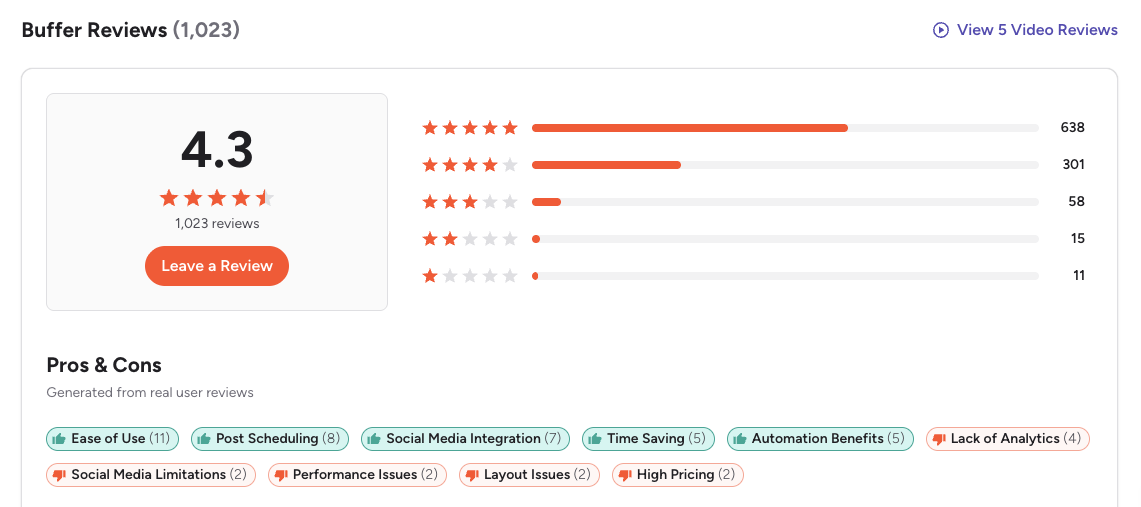
G2: 4.3/5 (1,023 reviews) — Users consistently praise Buffer for being the easiest scheduling tool to learn. The most common positive themes are the clean interface, simple queue-based workflow, and reliable publishing. On the negative side, G2 reviewers frequently mention that analytics feel basic compared to competitors, per-channel pricing adds up quickly, and the feature set hasn't evolved much in recent years. For more detail, see our full Buffer reviews breakdown.
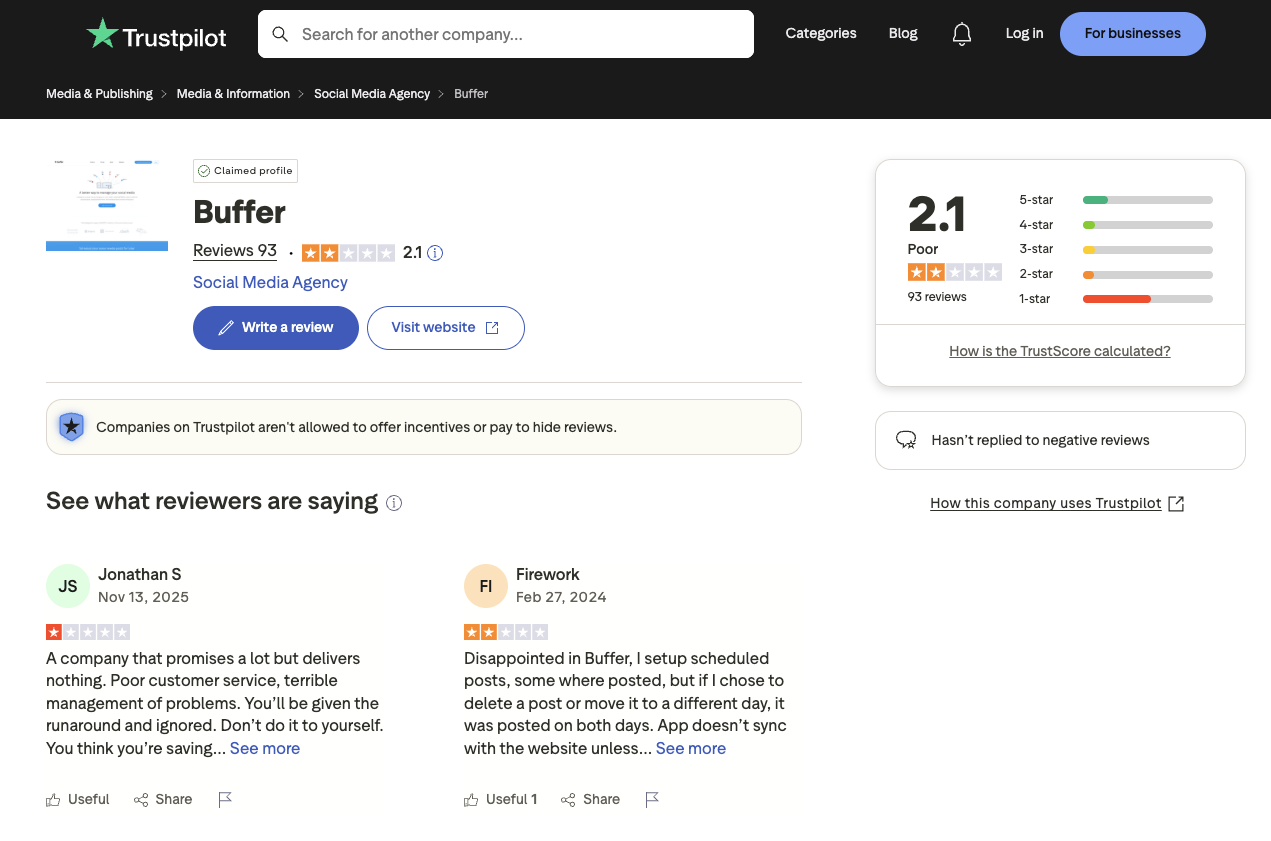
Trustpilot: 2.1/5 (93 reviews) — A notably lower rating, driven by complaints about customer support response times, scheduled posts failing to publish or duplicating, and sync issues with connected social accounts.
SocialBee Reviews
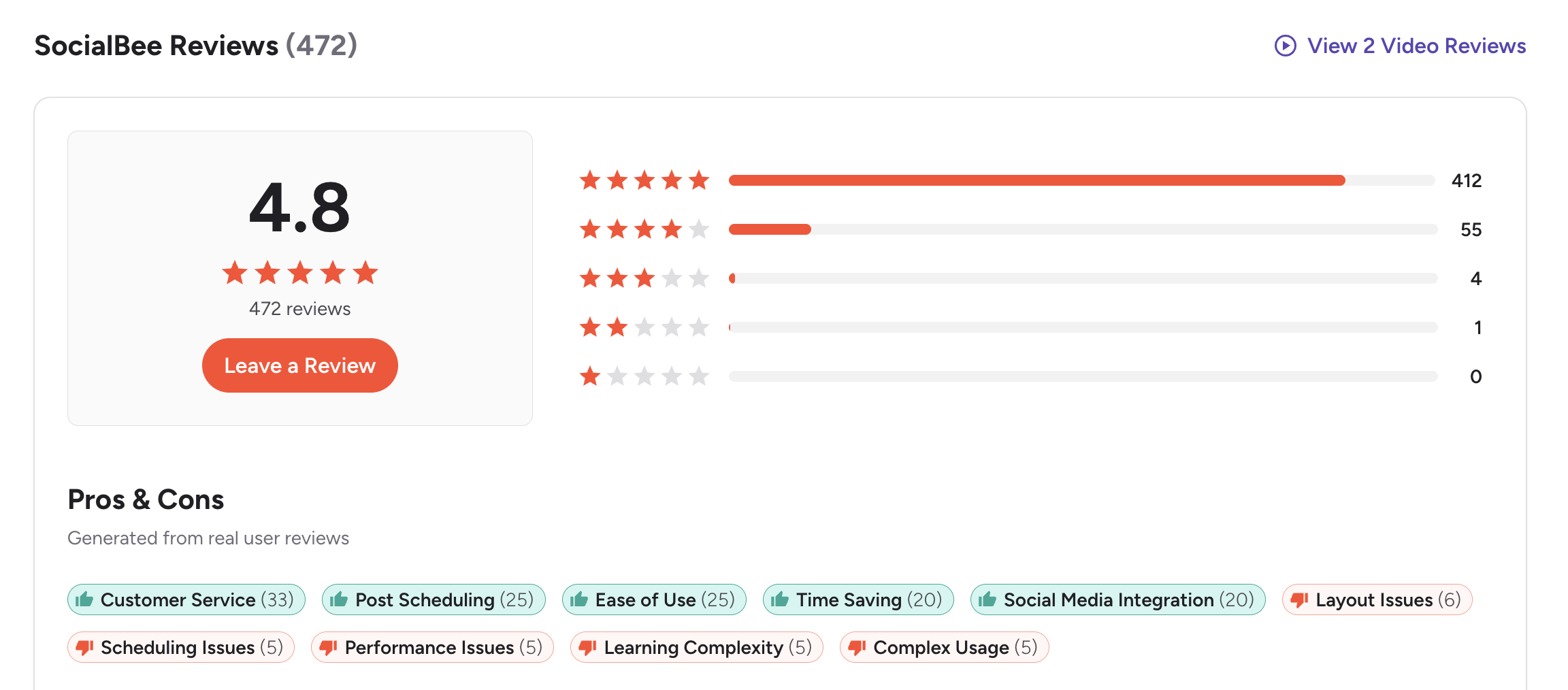
G2: 4.8/5 (472 reviews) — An impressive rating with 412 out of 472 reviews at 5 stars (87%). Users consistently highlight excellent customer service (33 mentions), ease of use (25 mentions), and time-saving scheduling features (25 mentions). Complaints focus on layout issues, occasional performance problems, and a learning curve around the category system. One featured reviewer noted: "Publer works well for basic scheduling, but lacks more advanced features for complex team needs." For more detail, see our full SocialBee reviews breakdown.
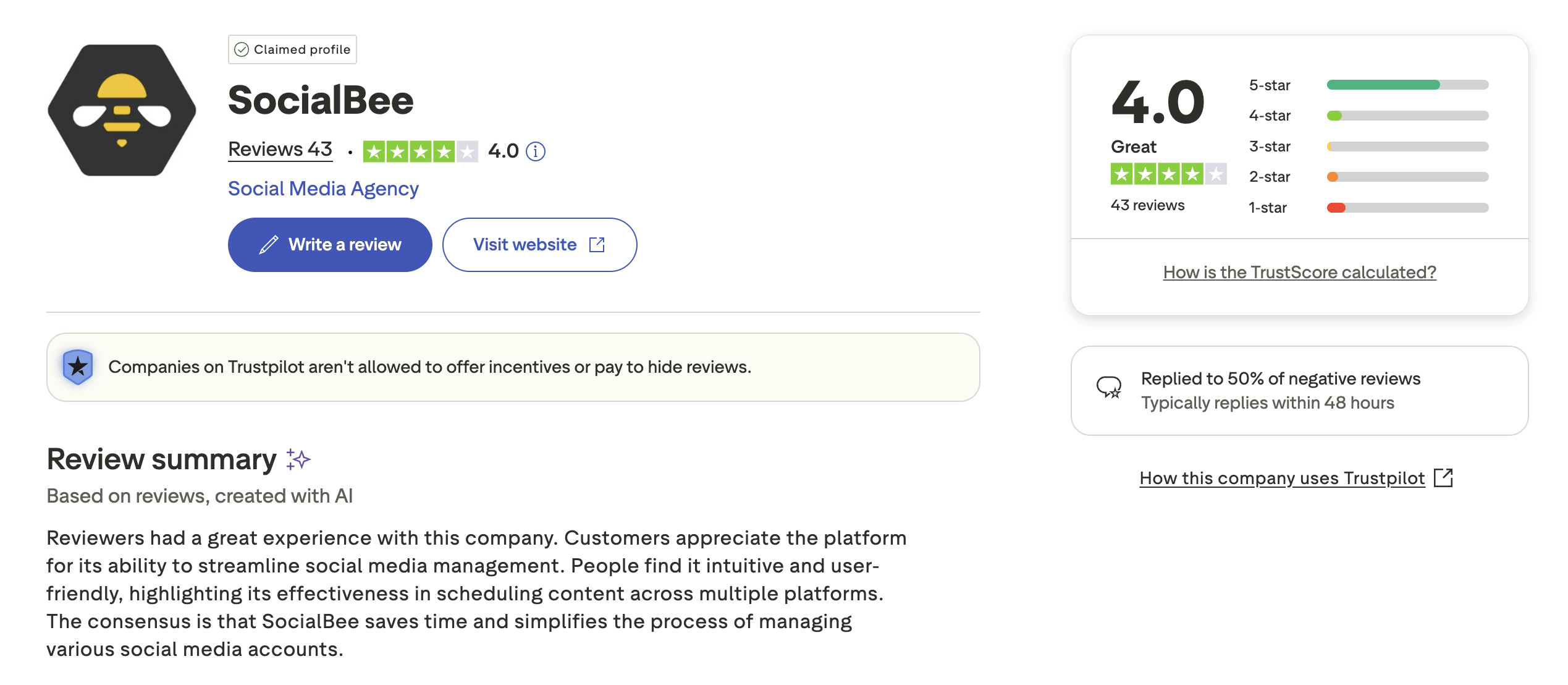
Trustpilot: 4.0/5 (43 reviews) — Solid rating with users praising helpful customer support, easy setup, and intuitive workflows. The review count is small (43 reviews), which makes the rating less statistically reliable than Buffer's or larger competitors'. A few reviewers mention occasional technical issues and analytics that feel basic compared to enterprise tools.
Review Verdict
SocialBee wins the review battle convincingly. On G2, SocialBee scores 4.8/5 vs Buffer's 4.3/5 — and 87% of SocialBee's reviews are 5-star. On Trustpilot, the gap is even wider: SocialBee holds 4.0/5 while Buffer sits at 2.1/5. The recurring theme is that SocialBee's customer service is genuinely exceptional, while Buffer users frequently report support issues and scheduling glitches. Both tools are praised for ease of use, but SocialBee earns significantly more trust from its user base.
Review counts are as of February 2026 and are updated periodically.
PostPlanifyManage All Your Social Accounts Without the Chaos
Schedule posts, track performance, and collaborate with your team.
Who Should Use Buffer?
Buffer works best when you want the fastest path from "I have a post" to "it's scheduled." There's no category system to configure, no content buckets to set up — just drop your post in the queue and move on. If you manage a personal brand or a handful of accounts and don't need content recycling or AI image generation, Buffer's simplicity is its greatest strength. If Buffer sounds right but you want to explore other options first, check out our best alternatives to Buffer. You can also see how Buffer stacks up against Hootsuite, Later, Metricool, Publer, and Sprout Social.
Buffer is the better choice if you:
- Are a solo creator or freelancer who needs a dead-simple scheduling interface with zero learning curve
- Want a free plan to get started — genuinely useful for up to 3 channels with basic analytics
- Need to post on Mastodon (SocialBee does not support it)
- Prefer per-channel pricing that starts at just $6/month — cheaper than SocialBee for 1-4 channels
- Use first comment scheduling on Instagram regularly for hashtag strategies
- Want a straightforward tool to manage multiple accounts without configuring content categories
- Don't need content recycling, AI image generation, or category-based scheduling
Who Should Use SocialBee?
SocialBee shines when you have a content library you want to keep working for you. If you've built a collection of evergreen posts — tips, testimonials, product highlights, educational content — SocialBee's category-based recycling system automatically keeps them in rotation without manual re-scheduling. The initial setup takes more effort than Buffer, but the long-term time savings are significant for content-heavy workflows. If SocialBee is on your shortlist, you may also want to see our top alternatives to SocialBee before committing. Also compare SocialBee with Hootsuite, Later, Metricool, Publer, and Sprout Social.
SocialBee is the better choice if you:
- Want evergreen content recycling to keep your best posts in rotation automatically — SocialBee's signature feature
- Prefer a category-based scheduling system that keeps your feed balanced across topics (tips, promos, blogs, testimonials)
- Need AI image generation (DALL-E 3) and Canva integration built in for visual content creation
- Manage 10+ social profiles and want predictable flat-rate pricing instead of per-channel costs
- Run an agency with multiple brands and need workspaces (up to 5 on Pro) to organize client accounts
- Value top-tier customer support — SocialBee's G2 rating of 4.8/5 with 87% 5-star reviews speaks for itself
- Need a tool that helps you create a content calendar with structured, repeatable categories
Final Verdict: Buffer vs SocialBee in 2026
Buffer and SocialBee serve different types of social media users, and the best choice depends on whether you prioritize simplicity or automation.
Buffer wins on: ease of use, free plan availability, per-channel flexibility for small accounts, Mastodon support, first comment scheduling for Instagram, and analytics on every paid plan.
SocialBee wins on: content recycling, category-based scheduling, AI image generation (DALL-E 3), Canva integration, best time to post suggestions, customer support ratings (4.8/5 on G2), and value at scale for 10+ profiles.
The gap between them is philosophical. Buffer believes scheduling should be simple and fast — queue your post and move on. SocialBee believes scheduling should be structured and automated — organize once, recycle forever. Neither approach is wrong, but they serve very different workflows. The challenge is when you need elements of both: the simplicity of Buffer AND the automation depth of SocialBee, plus features neither offers well like advanced analytics, social inbox, or white-label reporting. That's where tools like PostPlanify fit — bridging that gap with intuitive scheduling, AI-powered content creation, and team collaboration in one flat-rate plan.
The bottom line: If you want the simplest possible scheduling tool with a great free plan, Buffer is the safer pick. If you want structured automation with evergreen recycling and AI-powered content creation, SocialBee delivers more power per dollar. And if neither feels quite right, explore other social media scheduling alternatives to find your best fit.
What If You Could Get Simplicity and Automation?
Love Buffer's clean interface but want more features? Drawn to SocialBee's automation but wish it came with deeper analytics and a social inbox? PostPlanify combines intuitive scheduling with advanced analytics, AI-powered content creation, and team collaboration — all on a flat-rate plan that doesn't scale per channel or per profile.

| Feature | Buffer | SocialBee | PostPlanify |
|---|---|---|---|
| Starting Price | $6/mo/channel | $29/mo (5 profiles) | $29/mo flat |
| Analytics | Basic (paid plans) | 3mo–2yr history | Advanced (10 platforms, best time to post) |
| Social Inbox | Basic | No | Yes (AI-assisted replies) |
| AI Caption Generation | Yes | Yes (AI Copilot) | Yes (vision-powered) |
| AI Image Generation | No | Yes (DALL-E 3) | Yes (7 models) |
| Content Calendar | Yes (drag-and-drop) | Yes (no drag-and-drop) | Yes (drag-and-drop, bulk scheduling) |
| Team Collaboration | $12/mo/channel | $99/mo (Pro, 3 users) | 5 members (Premium), unlimited (Enterprise) |
| Approval Workflows | Team plan | Pro plan | Premium $99/mo (multi-approver) |
| White-Label PDF Reports | No | No | Yes (Premium+ $99/mo) |
| Canva Integration | No | Yes | Yes |
| Google Drive Import | No | No | Yes |
| Link in Bio | Yes (Start Page) | No | Yes (8 themes, click analytics) |
| Content Recycling | No | Yes | No |
| Platforms Supported | 11 | 10 | 10 |
| Unlimited Scheduling | Paid plans | All plans | Growth+ ($49/mo) |
PostPlanify starts at $29/month for 5 social accounts with 200 posts/month and AI tools included. The Growth plan ($49/month, 10 accounts) adds analytics across all 10 platforms, social inbox with AI-assisted replies, best time to post suggestions, 1st comments & threads, bulk scheduling, and unlimited scheduled posts. The Premium plan ($99/month, 25 accounts) includes white-label PDF reports, multi-approver workflows, 5 team members, shared calendars, and roles & permissions. The Enterprise plan (custom pricing) adds custom social accounts, unlimited team members, and 1:1 onboarding. See all plans on the PostPlanify pricing page.
Try PostPlanify free for 7 days

Making the Switch
Switching from Buffer to SocialBee requires more setup than switching between most tools, because SocialBee uses a category-based system instead of a simple queue. Export your scheduled content from Buffer as CSV, create your content categories in SocialBee, and import. Plan for 1-2 hours to configure your categories and posting schedule. If you're moving to PostPlanify, the process is simpler — connect your accounts, import your content, and start scheduling with a familiar drag-and-drop calendar. PostPlanify's 7-day free trial lets you test the full platform before committing.
Related Guides
- PostPlanify Pricing Breakdown
- Buffer Pricing Guide
- SocialBee Pricing Guide
- Buffer Reviews
- SocialBee Reviews
- Best Buffer Alternatives
- Best SocialBee Alternatives
- Best Social Media Management Platform
- Social Media Scheduling Tools
- How to Automate Social Media Posts
- Content Repurposing Strategies
- How to Create a Social Media Content Calendar
- Social Media Analytics for Business
PostPlanifyManage All Your Social Accounts Without the Chaos
Schedule posts, track performance, and collaborate with your team.
FAQ
Is Buffer cheaper than SocialBee?
It depends on how many channels you manage. For 1-3 channels, Buffer is cheaper (free plan or $6-$18/month vs SocialBee's $29/month minimum). At 5 channels, they cost roughly the same ($30 vs $29). At 10+ channels, SocialBee is cheaper — $49/month for 10 profiles vs $60/month on Buffer Essentials. SocialBee also includes AI image generation and content recycling at every tier, which Buffer does not offer at any price.
Does SocialBee have a free plan?
No, SocialBee does not offer a permanent free plan. However, it does provide a 14-day free trial with no credit card required, giving you full access to Pro-level features so you can test everything — including category-based scheduling, AI tools, and content recycling — before committing. There is also a 30-day money-back guarantee if you are not satisfied. By comparison, Buffer offers a permanent free plan with 3 channels and 10 scheduled posts per channel, which is genuinely useful for solo creators just getting started with scheduling posts.
Which has better AI tools — Buffer or SocialBee?
SocialBee has the stronger AI suite. Both tools offer AI-powered caption generation, but SocialBee adds AI image generation via DALL-E 3 and a built-in Canva integration for designing visuals. Buffer's AI Assistant handles captions and rewrites, but there is no image generation or design tool integration.
Can I switch from Buffer to SocialBee?
Yes, switching from Buffer to SocialBee is straightforward. Export your scheduled content from Buffer as a CSV file and import it into SocialBee using the bulk upload feature. You will need to reconnect your social accounts and set up your content categories — this is where the biggest adjustment happens, since SocialBee organizes posts into content buckets rather than a simple queue. Plan for an hour or two to configure your categories and posting schedule. Once set up, SocialBee's automation and evergreen recycling features often save more time than Buffer's simpler approach.
Which supports more social media platforms?
Buffer supports 11 platforms while SocialBee supports 10. Both tools cover all the major networks: Instagram, Facebook, X/Twitter, LinkedIn, Pinterest, TikTok, YouTube, Google Business Profile, Threads, and Bluesky. The only difference is that Buffer also supports Mastodon, which SocialBee does not. For the vast majority of users, this is a negligible difference. If you need to manage multiple accounts across all major platforms, both tools have you covered — but Buffer has the slight edge for Mastodon-focused communities.
Is SocialBee's category system hard to learn?
There is a learning curve. Instead of dropping posts into a simple queue like Buffer, you create categories (e.g., "Tips," "Promotions," "Blog Posts") and SocialBee rotates through them on a schedule. Once set up, it saves significant time — but the initial configuration takes more effort than Buffer's plug-and-play approach. Some users also note that the calendar lacks drag-and-drop functionality, which can feel limiting.
Which tool is better for agencies?
SocialBee is better for agencies. The Pro plan ($99/month) includes 5 workspaces for organizing different clients, 25 profiles, and 3 users — with add-ons available for more. Buffer has no workspace concept, so managing multiple clients means all accounts live in one flat list. That said, Buffer's Team plan includes unlimited users, which is an advantage for larger internal teams working on a single brand.
Which has better user reviews — Buffer or SocialBee?
SocialBee has significantly better reviews across both major platforms. On G2, SocialBee scores 4.8/5 (472 reviews) vs Buffer's 4.3/5 (1,023 reviews). On Trustpilot, SocialBee holds 4.0/5 (43 reviews) vs Buffer's 2.1/5 (93 reviews). SocialBee's customer service is consistently praised as a standout, while Buffer users frequently report support issues and scheduling glitches. If customer support matters to your decision, SocialBee has the clear advantage.
Is Buffer or SocialBee better for Instagram?
Both tools support Instagram scheduling, but they serve different Instagram workflows. Buffer offers first comment scheduling, which is valuable for posting hashtags cleanly without cluttering your caption — a feature SocialBee lacks. SocialBee, on the other hand, provides AI image generation via DALL-E 3 and evergreen recycling, which is useful for keeping your best Instagram posts in rotation automatically. If you rely heavily on hashtag strategies and clean captions, Buffer has the edge. If you want to schedule Instagram posts with automated content recycling, SocialBee is the stronger choice.
What if I need both scheduling simplicity and content automation?
That's the core trade-off in this comparison — Buffer excels at simple scheduling, SocialBee excels at content recycling and automation. PostPlanify bridges part of that gap with intuitive drag-and-drop scheduling, AI-powered content creation including image generation, analytics across 10 platforms and social inbox on the Growth plan ($49/month), and white-label PDF reports on the Team plan ($99/month). For content recycling specifically, SocialBee remains the strongest option. Browse the full list of social media scheduling alternatives to compare features and pricing side by side.
Can I use Buffer or SocialBee to repurpose content across platforms?
SocialBee is the better choice for content repurposing. Its category-based system and post variations feature let you create multiple versions of the same content and rotate them across different platforms automatically. Evergreen recycling means your best-performing posts keep circulating without manual re-scheduling. Buffer takes a more manual approach — you can customize posts per platform, but there is no built-in system for creating variations or recycling content. If repurposing is central to your strategy, SocialBee saves significantly more time.







