


If you're bouncing between Instagram, Facebook, TikTok, X, and LinkedIn, pasting captions into spreadsheets, and building reports by hand at the end of the week, you don't have a content system. You have a patchwork of tasks that keeps breaking.
That setup fails for the same reason over and over. Planning lives in one place, assets live somewhere else, approvals happen in email or chat, comments get missed in native apps, and reporting happens after the fact when it's too late to fix anything. The more accounts you manage, the worse it gets.
A social media management dashboard fixes that when it's treated as an operating system, not just a posting tool. It gives you one place to plan content, queue it, publish it, monitor engagement, and see what moved the needle. That matters even more when you're managing multiple brands, multiple approvers, or multiple regions with different content rules.
The difference is practical. Instead of asking "Did we publish everything?" and "Where are the numbers?", you start asking better questions. Which posts need approval today? Which platform is lagging? Which content format is producing clicks or conversations? Which client needs a simpler report, and which internal stakeholder needs the raw detail?

Your Social Media Needs a Command Center Not More Chaos
Manual social media management usually looks manageable right up until it doesn't.
One person starts with a few scheduled posts. Then another teammate needs access. Then a client asks for approvals in advance. Then someone wants performance by platform. Then support messages start arriving through comments and DMs. By that point, you're juggling logins, tabs, folders, and screenshots.
The core problem isn't posting volume. It's fragmentation.
Why the chaos happens
Teams often create the mess accidentally:
- Planning is disconnected from publishing: The content calendar lives in Google Sheets, but the post gets built later in a native app.
- Approvals happen in the wrong place: Feedback sits in Slack threads, emails, or comments on docs, so no one knows which version is final.
- Assets are scattered: Videos are in Drive, brand graphics are in Canva, captions are in docs, and hashtags are saved in random notes.
- Analytics are an afterthought: Teams pull numbers only when someone asks for a report.
- Platform behavior is inconsistent: What works on LinkedIn often needs different copy, formatting, or media handling on Instagram or TikTok.
That creates real operational problems. Posts go out late. Wrong creative gets attached. Team members duplicate work. Clients ask for status updates because they can't see the pipeline.
Practical rule: If your team has to ask "Where does this live?" more than once a day, your workflow is too fragmented.
What changes when you use a real dashboard
A dashboard becomes the single place where work moves forward. Not just where posts get scheduled.
That means:
- Content gets planned visually
- Assets stay attached to the post
- Approvals happen against the scheduled item
- Publishing status is visible
- Replies and monitoring don't depend on someone checking five native apps
- Reports are built from the same system the work came from
For teams handling several brands or regions, that structure is what restores control. If you're dealing with the daily mess of cross-platform publishing, this guide on how to manage multiple social media accounts is a useful companion because the account sprawl is usually where dashboard problems start.
What not to do
A lot of teams buy a scheduler and expect the chaos to disappear. It doesn't.
A scheduler only solves one slice of the workflow. If it doesn't cover approvals, engagement, analytics, and role-based access, you still end up with the same broken process. You've just moved one task into a nicer interface.
What a Social Media Management Dashboard Is
A social media management dashboard is a central operating layer for your social work. It isn't just a calendar. It isn't just analytics. It isn't just a scheduler.
Consider it a cockpit. You don't want one tool for navigation, another for engine status, another for warnings, and another for communications if they don't talk to each other. Social has the same problem when planning, publishing, replies, and reporting all happen in separate tools.

It grew out of a real platform problem
The need for dashboards didn't appear because marketers wanted prettier reports. It appeared because social platforms split into separate ecosystems with separate logins, separate metrics, and separate workflows.
Hootsuite launched its first dashboard in 2008, and by 2012 dashboards had become essential as global social media users reached 1.49 billion. The reason was simple: teams needed one place to centralize metrics like follower growth, engagement rate, and link clicks instead of checking each network separately, as described in Hootsuite's history of the social media dashboard.
Modern dashboards have evolved past the per-seat licensing model that legacy tools still use. Where Hootsuite charges $249/user/month and Sprout Social $249/seat, newer platforms charge a flat monthly rate regardless of how many people on your team use them — which is why agencies and growing teams have been moving away from seat-based pricing. If you're comparing legacy tools to modern alternatives, see our roundup of the best Hootsuite alternatives.
What a true dashboard includes
A real social media management dashboard connects several functions that are often separated in smaller tools.
Planning and scheduling
This is the part many recognize first. You need a calendar, post composer, platform selection, previews, and scheduling controls.
But the useful part isn't just timing a post. It's seeing campaigns across days, weeks, and channels so you can spot overlap, gaps, and content fatigue before you publish.
Engagement monitoring
If comments, mentions, and messages are handled elsewhere, the dashboard is incomplete.
A good dashboard helps your team catch incoming interactions without relying on someone to manually check Instagram, Facebook, LinkedIn, X, and TikTok one by one. This matters even more for brands that use social for support, community, or lead qualification.
Performance tracking
Dashboards should surface the numbers that help you act. That usually includes follower movement, impressions, reach, engagement, clicks, and post-level results.
The key is context. A standalone metric in a native app doesn't tell you much. A dashboard lets you compare by platform, format, date range, campaign, or content type.
Reporting
A dashboard becomes operational when reporting is built into the workflow. You shouldn't need to export screenshots from five tools and rebuild the story in slides every month.
What it isn't
A social media management dashboard is not:
- Just a publisher: If it only schedules posts, it's a scheduler.
- Just a report view: If it only shows numbers, it's an analytics tool.
- Just a social inbox: If it only captures conversations, it's an engagement tool.
The value comes from the loop. Plan, publish, monitor, measure, adjust.
If you're comparing platforms and trying to separate true dashboards from lighter tools, this roundup of the best social media management platform options can help clarify the differences in workflow coverage.
A dashboard is useful when it removes handoffs. Every time your team has to leave the system to finish a routine task, friction comes back.
 PostPlanify
All your social media in one simple dashboard
Schedule posts, track analytics, and reply to comments/DMs without switching tabs.

Engagement
+18%
Views
52.8k
The 6 Essential Features Your Dashboard Must Have
The easiest way to evaluate a social media management dashboard is to stop looking at feature lists and start looking at failure points. What usually breaks in your current workflow? Scheduling, approvals, asset access, reporting, engagement coverage, or account permissions?
Those breakdowns map directly to the features that matter.

1. A visual content calendar that reflects reality
If the calendar is weak, everything downstream gets messy.
You need to see planned posts by day, week, and month. You also need drag-and-drop rescheduling, status visibility, and enough filtering to separate brands, channels, campaigns, or team members. A flat queue is not enough once more than one person touches the workflow.
What good looks like:
- Clear publishing status: Draft, scheduled, awaiting approval, failed, published
- Multi-channel visibility: One view across Instagram, Facebook, LinkedIn, X, TikTok, and others
- Fast rescheduling: Drag a post without rebuilding it
- Campaign grouping: Launches, promos, webinars, UGC, product drops
Common failure point: calendars that look neat but don't show approval status or platform-specific variations. Then teams think a post is ready when it still needs copy changes for LinkedIn or a different asset ratio for Instagram.
2. Cross-platform publishing with honest platform handling
Scheduling is never as simple as "write once, post everywhere." Each network has quirks.
Instagram may require business or creator account connections for certain publishing workflows. Facebook permissions can break if the connected page role changes. LinkedIn formatting often needs cleaner line breaks and less casual hashtag clutter. TikTok and X have their own media and post behavior limitations depending on account setup and API support.
So the dashboard needs more than a composer. It needs platform-aware previews and validation.
Look for:
- Per-platform editing inside one post workflow
- Media previews before scheduling
- Post failure alerts
- Re-queue or retry options
- Account connection health visibility
The technical backend matters here. Dashboards rely on ETL and API connections to sync with networks, and that process is more fragile than teams realize. According to Improvado's breakdown of the social media dashboard, 70-80% of in-house projects fail because of issues like API rate limits, token refresh problems, and schema inconsistencies. The same source notes Instagram can enforce limits such as 200 calls per hour per user, and managed solutions can save teams 1-2 hours per day by automating that maintenance.
If a tool hides connection errors until publish time, it's not saving you time. It's delaying failure.
3. An inbox that centralizes engagement work
A dashboard without an engagement layer pushes your team right back into native apps.
A unified inbox matters because comments and messages aren't just community tasks. They affect response time, customer experience, moderation, and sales follow-up. They also create handoff problems when marketing, support, and client teams all touch the same account.
Useful inbox features include:
- Assignment controls: Route messages to the right teammate
- Labels or tags: Separate leads, support issues, spam, and brand mentions
- Reply history: See who answered and when
- Approval options: Helpful for regulated or client-sensitive accounts
AI assistance can also be useful here if it's constrained properly. Drafting a reply is fine. Auto-sending generic responses usually isn't.
Later in your evaluation process, it's worth comparing dashboard reporting depth with dedicated automated reporting dashboards so you can tell whether a platform reduces manual work or just repackages exports.
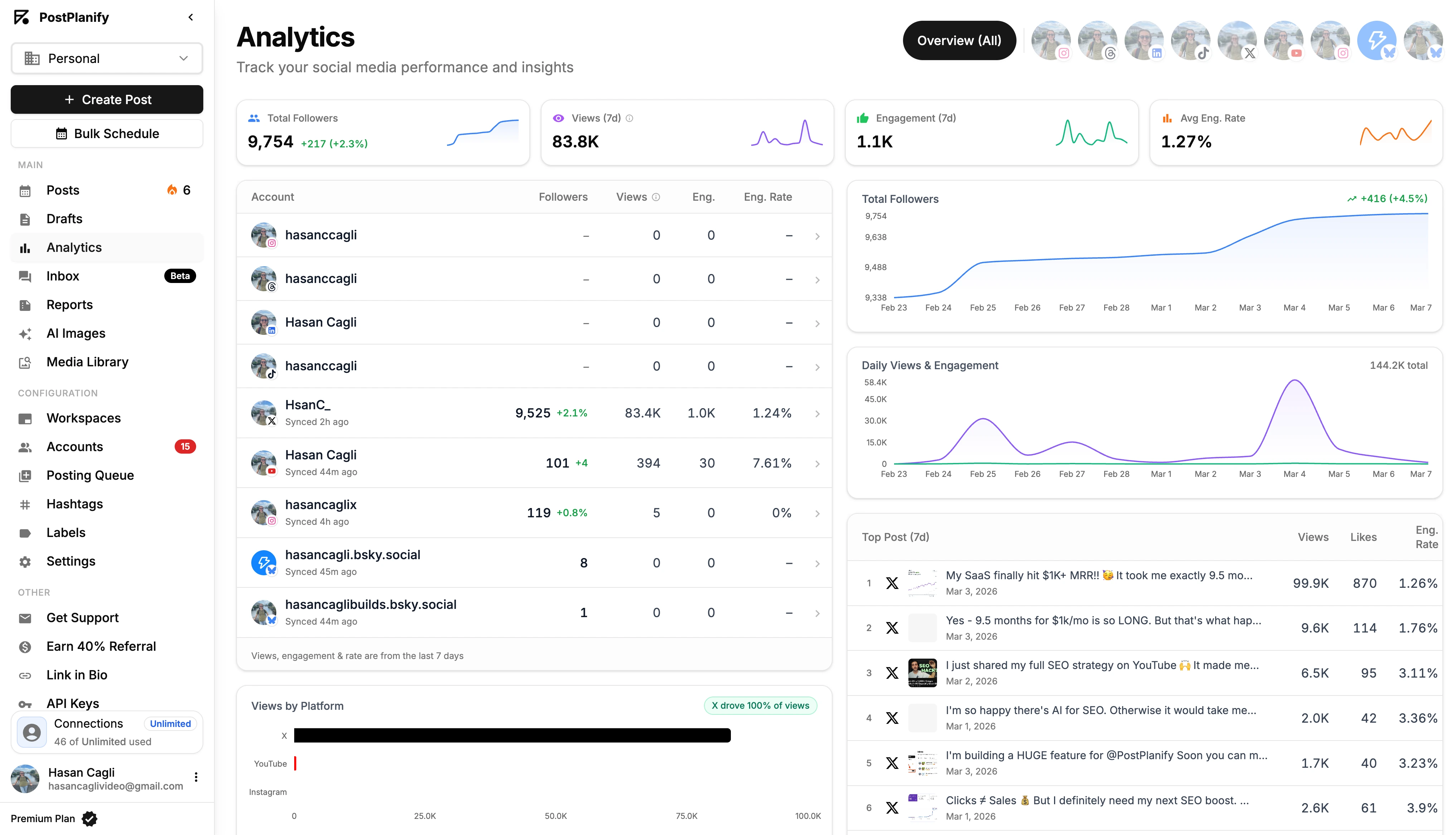
4. Analytics that support decisions, not vanity screenshots
A weak dashboard shows a pile of metrics. A strong one helps you make choices.
You want post-level performance, account trends, and cross-platform views that answer practical questions. Which format is getting attention? Which publishing windows are underperforming? Are your click-oriented posts reaching people but failing to convert interest into action?
The analytics view should help with:
- Channel comparison
- Content ranking
- Trend analysis over time
- Organic and paid separation where relevant
- Report sharing without rebuilding everything manually
A lot of tools stop short here. They show totals but make comparison hard. Or they provide polished charts but no way to filter by campaign, content type, or team.
5. Collaboration and permissions that match your org structure
Many tools fall apart here for agencies and larger teams.
A solo creator can tolerate a rough workflow. A multi-person team can't. If interns, freelancers, account managers, designers, clients, and approvers all need different access, the dashboard has to support that cleanly.
Good collaboration includes a mix of process and control:
| Need | Why it matters |
|---|---|
| Role-based access | Prevents the wrong person from publishing or disconnecting accounts |
| Approval workflow | Keeps client or brand review attached to the scheduled item |
| Shared asset access | Reduces duplicate uploads and version confusion |
| Commenting on drafts | Keeps feedback out of email chains |
This is one area where product design affects adoption more than teams expect. If people can't tell what they're allowed to do, they avoid the tool or work around it.
6. Reporting that works for different audiences
The dashboard has to serve different readers.
An internal social manager may want platform-level detail, post breakdowns, and exception tracking. A client often wants a simpler summary. A founder or executive usually wants fewer metrics and clearer business context.
That means reports should be customizable, shareable, and easy to simplify without destroying the underlying detail.
One practical example is PostPlanify, which combines analytics across all 10 supported platforms (with best-time-to-post suggestions), a unified social inbox for Instagram, Facebook, and LinkedIn, a vision-powered AI assistant for caption generation, multi-approver workflows for team collaboration, and white-label PDF reporting — all from $29/month with flat-rate pricing instead of per-seat fees. For agencies and teams, that combination matters because it keeps planning, approvals, engagement, and reporting inside one workflow instead of splitting them across separate tools, and the pricing scales without punishing you for adding collaborators.
If you want to see what this looks like in a planning layer, review the kind of workflow supported by a content calendar. The calendar isn't the whole dashboard, but it's where the operational system becomes visible.
KPIs That Matter: Measuring What Drives Growth
Dashboard problems are often not reporting problems. They're selection problems.
Teams track what is easy to pull instead of what helps them decide. That usually means too many top-line numbers, not enough context, and no link between content performance and business outcomes.

Start with a small KPI set
A dashboard should not lead with everything it can measure.
Klipfolio recommends blending 3-5 core KPIs with supporting business metrics such as website traffic or sales uplift, and reports that marketers see an average ROI of 5.78x on optimized social campaigns when dashboards are used to link performance to revenue. The same source notes social drives 31% of referral traffic in major markets, which is why dashboard metrics need to connect social activity to site behavior and outcomes, not just engagement totals, according to Klipfolio's guide to social media performance.
Awareness KPIs
Awareness metrics tell you whether people are seeing your content at all.
Use these when the goal is visibility, reach expansion, or share of attention:
- Reach: Unique people who saw the content
- Impressions: Total displays of the content
- Follower growth: Net audience movement over time
- Mentions: Useful for brand visibility and conversation volume
The mistake here is treating reach as proof of success by itself. High reach with weak downstream interaction usually means the topic, hook, or creative format drew attention but didn't create enough interest to continue.
Engagement KPIs
Engagement metrics tell you whether the content resonated enough to get a response.
Watch:
- Engagement rate: Interactions relative to followers
- Likes, comments, shares, saves, clicks: The interaction mix matters more than the total
- Post clicks: Useful when a post is supposed to move someone deeper into the funnel
One useful benchmark: Instagram engagement rates in e-commerce typically sit between 0.50% and 1.20% depending on follower count. That doesn't mean every account should judge success the same way. It means your dashboard should show engagement as a rate, not just a raw total, so you can compare posts fairly across accounts of different sizes. For more on benchmarking, see our social media analytics and reporting guide.
What to ask: Did the audience only acknowledge the post, or did they do what the post asked them to do?
Conversion KPIs
Dashboards demonstrate credibility with leadership.
If your content is supposed to generate visits, sign-ups, demos, or sales, track the actions that connect social to those outcomes:
- CTR, or clicks divided by impressions
- Link clicks
- Sign-ups or leads
- CPA where paid social is involved
Low CTR with high reach often points to a weak call to action, a mismatch between the creative and the offer, or platform-native behavior where users consume but don't leave the app easily.
Build a KPI stack, not a single number
The most useful social media management dashboard tells a story from top to bottom:
| Goal | Primary KPI | Supporting signal |
|---|---|---|
| Awareness | Reach | Follower growth |
| Engagement | Engagement rate | Shares, comments, saves |
| Traffic | CTR | Link clicks |
| Conversion | CPA or sign-ups | Landing page behavior |
If you're building reports for stakeholders and need a better way to connect platform data with outcomes, this guide to social media analytics and reporting is a practical next step.
PostPlanifyAll your social media in one simple dashboard
Schedule posts, track analytics, and reply to comments/DMs without switching tabs.
Engagement
+18%
Views
52.8k
How to Choose the Right Dashboard for Your Needs
The right dashboard depends less on marketing claims and more on your operating model. A solo creator, an in-house team, and an agency do not need the same thing, even if they all publish on the same platforms.
A lot of buying mistakes happen because teams compare feature lists without looking at workflow fit.

The hidden decision factor is role complexity
Dashboard complexity breaks trust when the wrong people see the wrong level of detail. A 2023 HubSpot survey found 62% of marketers struggle with stakeholder alignment due to mismatched dashboard complexity, which is why role-specific views matter so much for clients, managers, and internal operators, as summarized in this Whatagraph resource on social media dashboard.
That problem shows up in real buying decisions:
- Clients don't want to read dense operator dashboards
- Social managers do want post-level detail
- Executives want a short KPI view with business context
- Agencies need both at the same time
If you're a solo creator
A solo setup should stay lean.
You probably don't need heavy approval layers or complex permissions yet. But you do need a calendar, a reliable scheduler, reusable asset storage, and simple analytics that answer "what should I make more of?"
Focus on:
- Fast drafting and scheduling
- Platform previews
- A lightweight inbox if you respond often
- Simple reporting without setup overhead
Avoid paying for enterprise workflow features you won't use. But don't choose a tool so basic that you outgrow it the moment you add a contractor or second brand.
If you're an in-house marketing team
Internal teams usually have a different problem. The issue isn't posting. It's coordination.
Brand, demand gen, design, leadership, and sometimes support all need visibility into what social is doing. That means your dashboard should handle collaboration and reporting without burying casual stakeholders in detail.
Prioritize:
- Role-based permissions
- Approval workflow
- Asset library access
- Cross-platform reporting
- Clear campaign views
LinkedIn often matters more here because internal teams are frequently publishing employer brand, executive, product, or B2B content that has stricter messaging review. That makes approvals and post comments inside the drafting flow more important than they are for solo publishing.
If you're an agency
Agencies need separation and standardization at the same time.
You need separate workspaces or brand boundaries, client-safe approvals, repeatable reporting, and enough control to keep team members from publishing to the wrong account. White-label reporting may matter. Unlimited or flexible team access may matter even more if you use contractors or specialists.
Your checklist should include:
- Multi-client account structure
- Approval visibility by client
- Custom report views for client versus internal team
- Shared but controlled media access
- Connection health across many accounts
- Pricing model that won't punish you for adding collaborators
If you're comparing vendors, this external guide to social media management tools comparison is useful because it helps surface differences that sales pages tend to blur together.
Questions to ask during a free trial
Don't judge a dashboard by the demo. Judge it by friction.
Use a short practical test:
| Test question | Why it matters |
|---|---|
| Can I schedule one post with platform-specific edits? | Reveals whether the tool respects channel differences |
| Can I see approval status without opening every post? | Shows whether workflow is visible or hidden |
| Can a client view only what they should see? | Tests role separation |
| What happens when a connection expires? | Exposes account maintenance quality |
| Can I build a simple report and a detailed one from the same data? | Tests reporting flexibility |
Buy for the workflow you repeat every week, not the rare feature you'll use twice a quarter.
For a more focused shortlist of tools built around scheduling and operational control, review these social media scheduling tools. It's easier to compare dashboards once you know whether your bottleneck is publishing, collaboration, reporting, or all three.
Practical Workflows and Your Migration Checklist
A dashboard only helps when your team changes its habits with it. If the old spreadsheet, old Drive folder structure, and old approval chain stay in place, the new tool becomes one more tab.
The switch works best when you redesign the workflow at the same time.
Workflow for an agency onboarding a new client
The cleanest agency onboarding process keeps setup, approvals, and reporting tied together from day one.
A useful target is fast onboarding. Hashmeta notes that features like drag-and-drop calendars, shared media libraries, and REST API support can reduce agency onboarding and setup time to under one hour, and that best-time-to-post heatmaps can produce a 30% uplift in interactions when teams use them to schedule more deliberately, according to its analysis of data-driven social media dashboards.
A practical agency sequence
-
Create the client workspace Keep accounts, assets, and approvals separate from the start. Don't mix brands in shared draft queues.
-
Connect only the required channels Verify Facebook page access, Instagram business or creator setup where needed, LinkedIn page permissions, TikTok account connection, and any X profile access before planning content.
-
Import brand assets Pull logos, approved templates, recurring CTA language, and content categories into one shared library.
-
Build a private approval view Clients should see what they need to review, not every internal note, rejected draft, or test post.
-
Set reporting expectations early Decide whether the client wants a high-level KPI summary or a deeper post-performance report. This avoids rebuilding report formats later.
-
Schedule a small test batch first Don't load a full month before you validate publishing, previews, and approval flow.
Workflow for an in-house team batching a month of content
Internal teams usually benefit more from batching than from constant daily posting.
A practical monthly production flow
- Step one: Lock content themes first. Product launches, campaigns, seasonal moments, webinars, hiring pushes, and thought leadership should all have assigned slots.
- Step two: Build channel variants together. Write the core post once, then adapt for LinkedIn tone, Instagram caption length, TikTok framing, and X brevity while the idea is still fresh.
- Step three: Attach assets immediately. Don't leave placeholders that someone has to fix later.
- Step four: Send approvals in batches, not one by one.
- Step five: Use best-time insights as a final scheduling layer, not as a replacement for content quality.
This workflow works because it reduces context switching. Designers know what assets are needed. Approvers see grouped work. The social lead can review gaps in the calendar before anything goes live.
Batch creation saves time only if your approval and asset process is already inside the dashboard. Otherwise you just batch confusion.
Migration checklist for moving from manual work or another tool
Use this before you switch systems.
-
Audit connected accounts List every Facebook page, Instagram account, LinkedIn page, TikTok profile, X account, and YouTube channel you need.
-
Check permissions Confirm who owns each account and who has publishing rights. Missing admin access is one of the most common migration blockers.
-
Map your current workflow Identify where planning, assets, approvals, publishing, community management, and reporting currently happen.
-
Clean up assets Archive outdated creatives, rename files consistently, and separate evergreen assets from campaign-specific ones.
-
Review recurring content types Note queues, weekly series, UGC formats, product updates, and campaigns that should be rebuilt first.
-
Recreate approval stages Decide who drafts, who reviews, who can publish, and who only comments.
-
Test each platform with a low-risk post Validate previews, scheduling, and publishing before migrating your whole calendar.
-
Set report templates Build at least one internal report and one stakeholder-facing report.
-
Turn off the old scheduler carefully Prevent duplicate posting by checking queued content in the previous tool before the new system goes live.
-
Train the team on exceptions Show what to do when posts fail, tokens expire, metrics lag, or platform formatting breaks.
Troubleshooting Common Dashboard Problems
Most dashboard issues come down to three things. Permissions, API limitations, and timing.
Why are scheduled posts failing to publish
Start with the basics:
- Check account connection status: Tokens expire, permissions change, and page access gets revoked.
- Check media requirements: Wrong aspect ratio, unsupported file type, or missing thumbnail fields can block publishing on some platforms.
- Check account type restrictions: Instagram workflows can differ depending on account type and connected Facebook setup.
- Check platform-side interruptions: A native platform issue can delay third-party publishing even when your dashboard is fine.
If the tool doesn't show a failure reason, that's a problem with the tool.
Why don't dashboard numbers match native platform analytics
They often won't match exactly at the same moment.
Common reasons include:
- Data refresh delays
- Different attribution logic
- Metric definition differences
- Late-arriving platform data
Use the dashboard for operational trend analysis and recurring reporting. Use native analytics when you need to inspect a single post or verify a platform-specific discrepancy.
What are the limitations with Instagram Stories and other formats
Third-party tools are limited by platform APIs. That affects what can be auto-published, what needs a mobile push step, and which interactive elements don't carry over the same way as native publishing.
The practical fix is simple. Treat Stories, interactive stickers, and certain native-first features as exceptions in your workflow. Your dashboard should support the main publishing system, but some formats still need native handling.
What should you do when comments or messages seem incomplete
Check whether the platform supports full inbox coverage through the API. Then confirm the connected permissions. Some dashboards capture more than others, and not every message type is equally available across every network.
If your workflow depends heavily on community management, test inbox coverage before you commit to a tool.
What's New in 2026: AI, Best Time to Post, and White-Label Reports
The dashboard category has shifted in three meaningful ways since 2024. If you're evaluating tools today, these are the capabilities that separate modern platforms from legacy ones.
AI assistants for content creation
AI is no longer a novelty bolt-on. Modern dashboards bake it into the post composer, the caption editor, and the asset workflow. Vision-powered AI can describe images, suggest captions tuned to platform tone, generate hashtag sets, and even rewrite a single post variant for each network.
The practical test: can the AI assistant see your image and suggest caption copy that matches the platform you're publishing to? If it just does generic text-to-text rewriting, it's behind the curve.
Best-time-to-post intelligence
Native platforms surface limited timing data, and most dashboards either copy that data or guess. The newer approach is to analyze your specific account's historical engagement patterns and recommend windows that consistently outperform your average.
This matters because generic "best times" charts don't reflect how your audience actually behaves. A B2B account in Europe and a creator account in California shouldn't follow the same posting schedule. A modern dashboard surfaces your peak windows, not industry averages.
White-label reporting for agencies
Agencies have always needed white-label reports, but legacy tools often charge extra for branding controls or limit them to enterprise tiers. Newer dashboards include white-label PDF reporting on mid-tier plans and let you remove platform branding, swap in your client's logo, and customize the report sections per client.
The practical impact: instead of exporting screenshots and rebuilding reports in slides every month, you generate a branded PDF in two clicks. For agencies running 5+ clients, this alone can save several hours per week.
Social Media Management Dashboard FAQ
What is a social media management dashboard?
A social media management dashboard is a centralized platform that lets you plan, publish, monitor, analyze, and report on social media content across multiple networks from one interface. Unlike a basic scheduler, a true dashboard combines a content calendar, cross-platform publisher, social inbox, analytics, approval workflows, and reporting in a single workflow — so your team doesn't have to switch between five tools to complete a single campaign.
What's the difference between a social media dashboard and a scheduler?
A scheduler only handles posting — you write a post, pick a time, and it publishes. A social media management dashboard covers the full lifecycle: planning, publishing, engagement (replying to comments and DMs), analytics (tracking what worked), reporting (sharing results with stakeholders), and team collaboration (approvals, role-based access). If a tool only schedules posts, it's a scheduler. If it handles the work before and after publishing too, it's a dashboard.
How much does a social media management dashboard cost?
Pricing varies widely. Legacy tools like Hootsuite charge $249/user/month and Sprout Social starts at $249/seat/month, which adds up fast for teams. Modern platforms use flat-rate pricing — for example, PostPlanify starts at $29/month for up to 5 social accounts, $49/month for 10 accounts with full analytics and social inbox, and $99/month for 25 accounts with team collaboration and white-label PDF reports. Custom enterprise plans are available for agencies needing unlimited accounts and team members.
Can I use a social media management dashboard for free?
Most dashboards offer a free trial (typically 7-14 days) so you can test the workflow before committing. Genuinely free dashboards exist but are limited in features, supported platforms, and number of accounts. For serious team or agency use, you'll outgrow free options within weeks. For an overview of free options, see our guide to the best social media management tools.
Which social media management dashboard is best for agencies?
Agencies need three things most: multi-client workspace separation, role-based permissions with client-safe approval views, and white-label reporting. Legacy tools handle this but charge per seat, which becomes expensive as you add team members. Modern flat-rate platforms like PostPlanify support agency workflows (multi-brand workspaces, multi-approver workflows, white-label PDF reports) without per-seat penalties. See our best social media management platform breakdown for a side-by-side comparison.
How many social platforms can I manage from one dashboard?
It depends on the tool. Smaller schedulers cover 3-5 platforms; modern dashboards cover 9-12. PostPlanify supports 10 platforms: Instagram, Facebook, LinkedIn, X (Twitter), TikTok, YouTube, Threads, Pinterest, Google Business Profile, and Bluesky. Make sure your dashboard supports the networks where your audience actually lives, including newer platforms like Bluesky and Threads if your content strategy includes them.
Does a social media management dashboard support analytics and a social inbox?
A true dashboard does — and this is one of the clearest tests for whether a tool is a "scheduler" or a "dashboard." Look for cross-platform analytics that show post-level performance, follower trends, and engagement rate by content type. For inbox, look for unified comment and DM management across the platforms you use. PostPlanify covers analytics across all 10 supported platforms and a social inbox for Instagram, Facebook, and LinkedIn.
Do dashboards work with Instagram Stories, Reels, and Carousels?
Yes, modern dashboards fully support all major Instagram content types including feed posts, Reels, Stories, and carousels (up to 20 slides). Stories and Reels are often handled through Instagram's Graph API, which requires a Professional account (Business or Creator). Older tools sometimes only send a push notification reminder for Stories instead of true automated publishing — verify direct publishing during your trial if Stories are important to your workflow.
Can a social media management dashboard replace my team or workflow?
No. A dashboard is an operating system for the work your team is already doing — it doesn't replace strategy, content creation, or judgment. What it does is remove the friction of switching between tools, manually checking platforms, and rebuilding reports from scratch. Teams that adopt dashboards typically report saving 1-2 hours per day on coordination and reporting work, freeing that time for higher-value activities like content quality and audience research.
PostPlanifyAll your social media in one simple dashboard
Schedule posts, track analytics, and reply to comments/DMs without switching tabs.
Engagement
+18%
Views
52.8k
Key Takeaways
- A social media management dashboard is a centralized operating system for your social work — it covers planning, publishing, engagement, analytics, reporting, and collaboration in one interface, not just scheduling
- The 6 must-have features are: a visual content calendar, cross-platform publishing with platform-aware previews, a unified social inbox, decision-grade analytics, role-based collaboration with approvals, and customizable reporting for different audiences
- Track 3-5 core KPIs rather than dozens of vanity metrics — focus on awareness (reach, follower growth), engagement (rate, shares, saves), and conversion (CTR, sign-ups, CPA)
- Solo creators, in-house teams, and agencies need different things — match the dashboard to your operating model, not just the feature list
- Modern dashboards use flat-rate pricing instead of per-seat licensing, which makes them significantly more cost-effective for teams of 3+ compared to legacy tools like Hootsuite ($249/user/month) or Sprout Social ($249/seat/month)
- Expect AI assistants, best-time-to-post intelligence, and white-label reporting as standard in 2026 — not premium add-ons
- Test your dashboard during a free trial with realistic workflow questions, not feature checklists — what happens when a connection expires, can a client see only what they should, can you reschedule with drag-and-drop?
Ready to Run Social as a System?
If your current process still depends on spreadsheets, native apps, and manual reports, start your free 7-day trial of PostPlanify to centralize planning, scheduling, engagement, analytics, approvals, and reporting in one dashboard — across all 10 supported platforms, with flat-rate pricing starting at $29/month and no per-seat fees. Run social as a system instead of a stack of disconnected tasks.
Related Reading
- Best Social Media Management Platform: 2026 Comparison
- Social Media Analytics and Reporting: Complete Guide
- Best Social Media Scheduling Tools
- How to Manage Multiple Social Media Accounts
- Best Hootsuite Alternatives
- Best Buffer Alternatives
- Best Later Alternatives
- Best Sprout Social Alternatives
- Best Free Social Media Management Tools
- Best Social Media Management Tools for Creators
- PostPlanify Content Calendar
- Best Social Media Management Tools for Teams
- PostPlanify Pricing
PostPlanifyAll your social media in one simple dashboard
Schedule posts, track analytics, and reply to comments/DMs without switching tabs.
Engagement
+18%
Views
52.8k
About the Author

Hasan Cagli
Founder of PostPlanify, a content and social media scheduling platform. He focuses on building systems that help businesses, agencies, and teams plan, publish, and manage content and social media more efficiently across platforms.


