


Every agency has been there. You spend an hour pulling screenshots from Instagram Insights, copying numbers into a Google Slides template, aligning logos, and triple-checking that the engagement rate formula is right. Then the client glances at it for two minutes during the call and says, "Looks good."
White-label social media reports fix this. Instead of building a social media report template from scratch every month, you get branded social media reports for clients that pull live data from every platform, wrap it in your agency's branding, and generate a polished PDF in under two minutes. No Canva templates, no manual math, no tool logos your client never asked to see.
This guide walks through what white-label reports are, what they should include, how to generate them step by step, and which tools actually offer the feature (with honest pricing).
TL;DR: A white-label social media report is a branded PDF with your agency's logo — not the tool's. The lowest-priced tools with full white-label reports are SocialPilot ($100/mo) and PostPlanify Scale ($239/mo billed yearly or $299/mo monthly). Sendible offers the most complete white-label platform at $240/mo. Most tools (Buffer, Later, Loomly, Hootsuite) don't offer true white-label. See the full comparison table.
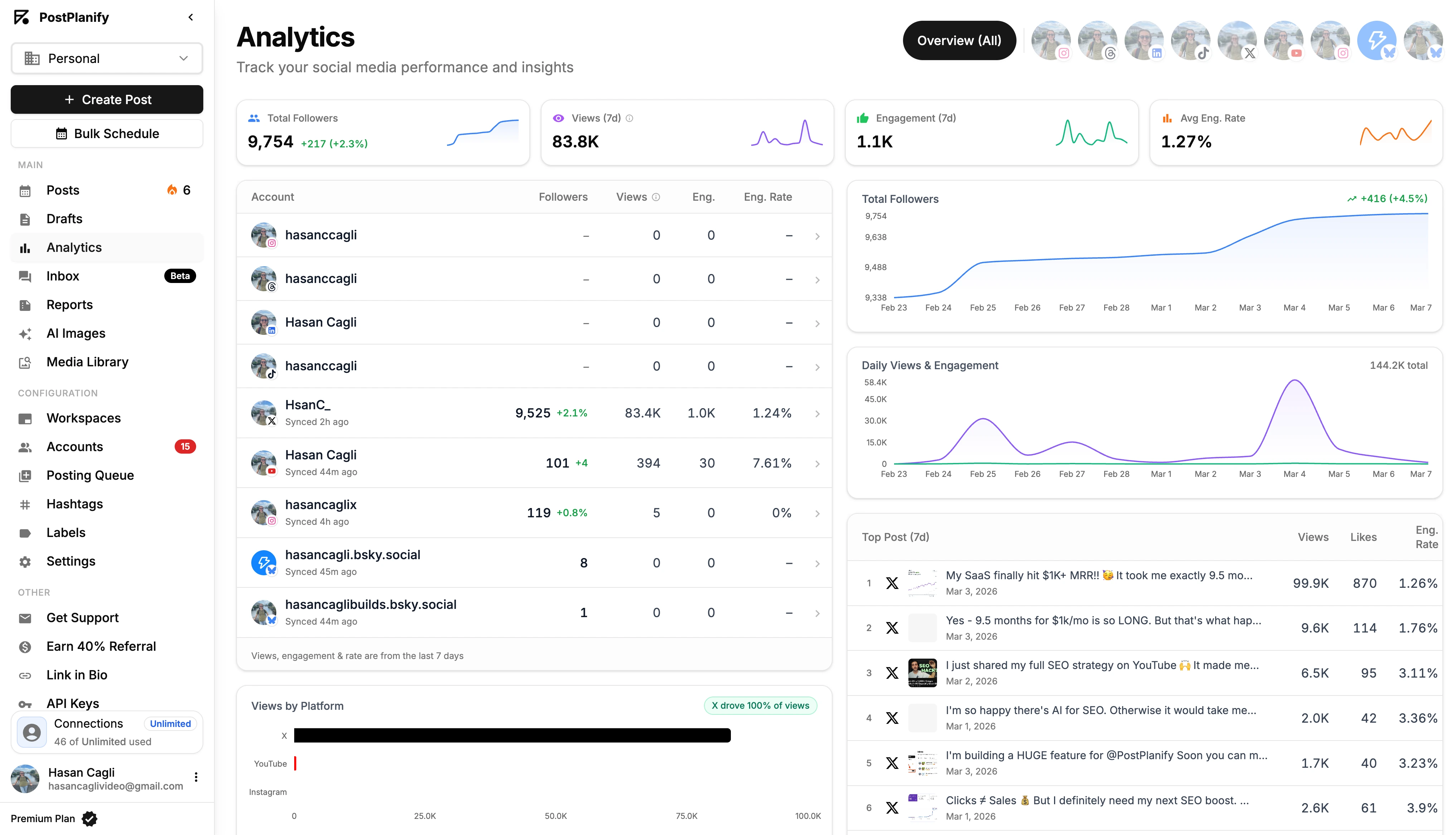
What Is a White-Label Social Media Report?
A white-label social media report is a branded analytics document that displays your agency's logo, name, and colors instead of the reporting tool's branding. When the client opens the PDF or clicks the shareable link, they see your brand, not Hootsuite's or Sprout Social's.
This matters more than most agencies realize. Sending a report stamped with another company's logo subtly tells the client, "I pay for a tool that does the work." A white-label report says, "Here is the professional deliverable my team prepared for you."
The distinction comes down to trust and perceived value. According to HubSpot's State of Marketing report, 78% of marketers say demonstrating ROI is their biggest challenge — and branded reports are how agencies prove it. If you charge $500/month for analytics and send a PDF with "Powered by [Tool Name]" in the footer, you are undermining your own positioning.
White-label means your brand is the only brand visible. Tool-branded means the software's logo, color scheme, or watermark appears somewhere in the report. Some tools offer partial white-labeling (you can add your logo, but their branding still shows in headers or footers), while others offer full white-labeling where every trace of the tool is removed.
What Should a White-Label Social Media Report Include?
Not all reports are created equal. A PDF full of raw numbers with no context is barely more useful than a screenshot. Here is what agencies should include in every client-facing social media report.
Account Overview Metrics
Start with the big picture. Clients want to know: are we growing? Include total followers, follower growth percentage, total views, total engagement actions (likes, comments, shares), and overall engagement rate. These set the tone before you get into details.
Platform-by-Platform Breakdown
Most clients are active on multiple platforms. Break the data down so they can see which channels are performing and which are lagging. A table showing followers, views, engagement, and engagement rate per platform makes this scannable.
Post Performance and Top Content
Highlight the top-performing posts by views, engagement, or whatever metric matters most to the client. Include a thumbnail, caption preview, and key stats (views, likes, comments, shares, engagement rate). This helps clients understand what content resonates and informs future strategy.
Trends Over Time
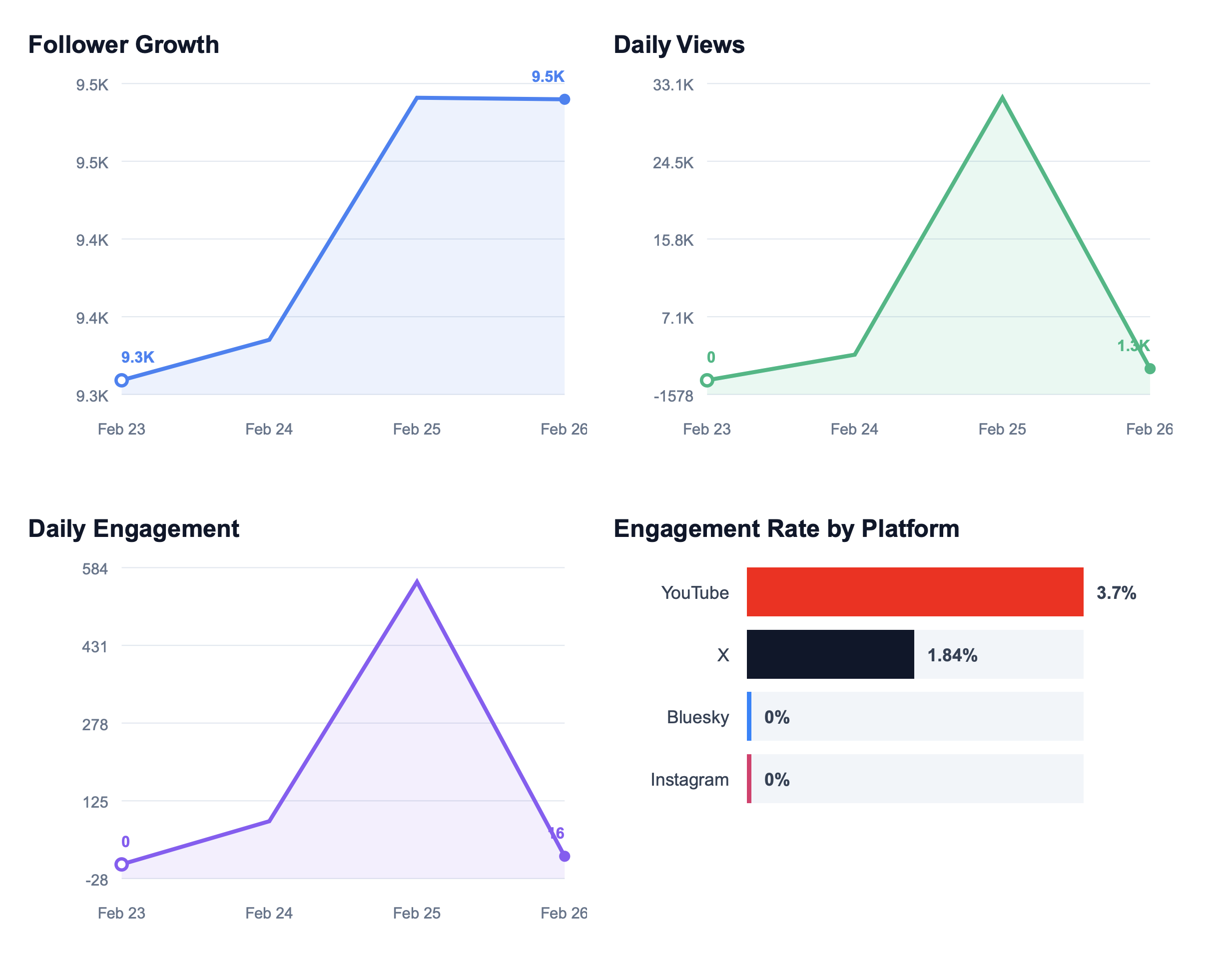
A single snapshot tells you where you are. Trends tell you where you are heading. Include line charts for follower growth, daily views, daily engagement, and engagement rate over the reporting period. This is where clients actually extract strategic value.
Period-Over-Period Comparisons
"Your engagement was 4.2% this month" means nothing without context. "Your engagement was 4.2% this month, up from 3.1% last month" tells a story. Always include period-over-period deltas so clients can see momentum.
Visual Charts, Not Just Data Tables
Raw data tables are for internal analysis. Client reports need bar charts, line charts, and progress indicators that communicate performance at a glance. If someone needs more than five seconds to understand a data point, the report needs better visualization.
Your Branding
Your agency logo, name, and color palette should appear in the report header. No third-party tool logos. No "Powered by" footers. This is the entire point of white-labeling.
For a deeper walkthrough on structuring reports, see our guide on how to create a social media report. If you need help choosing which metrics to highlight, check out client engagement metrics that actually matter.
How to Send White-Label Reports to Clients Using PostPlanify
PostPlanify generates white-label PDF reports that display your brand logo and brand name in the header, with no PostPlanify branding visible to clients. Reports are one part of its broader white-label social media management platform, which also brands the dashboard and client notifications. Comparing vendors? See best white label social media management tools for real cost-to-white-label across 9 platforms. Here is the full agency reporting workflow, step by step.
Step 1: Connect Your Client's Social Accounts
Link all of the client's social accounts to their brand in PostPlanify. The platform supports 10 networks: Instagram, TikTok, X, YouTube, Facebook, LinkedIn, Pinterest, Threads, Bluesky, and Google Business. Every connected account will be included in the report automatically.
Step 2: Set the Reporting Period
Choose a custom start and end date for the report. The default is the last 30 days, but you can set any date range. PostPlanify automatically calculates the equivalent previous period for comparison, so a 30-day report includes deltas against the prior 30 days.
Step 3: Generate the Report
Click generate. PostPlanify aggregates data from all connected accounts and builds a 3-page PDF with embedded charts from actual analytics data. There is no manual chart building or data entry.
Step 4: Review the 3-Page PDF
The report is structured in three pages:
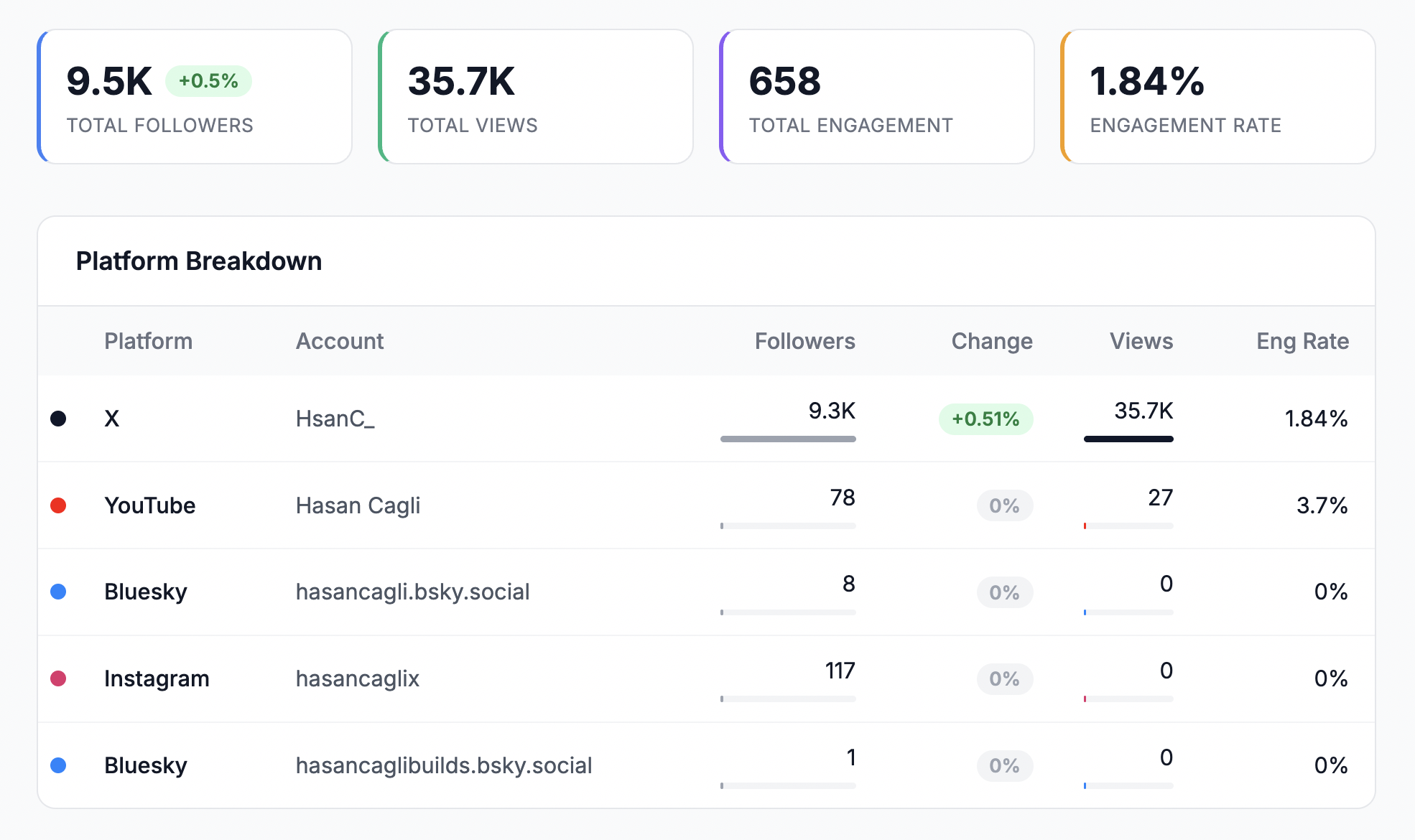
Page 1 — Overview: Summary stats for followers, views, engagement, and engagement rate with period-over-period delta chips showing growth or decline. A platform breakdown table lists per-account metrics with mini progress bars for quick comparison.
Page 2 — Trends: Follower growth chart, daily views chart, daily engagement chart, engagement rate by platform, followers by platform, and posts by platform bar charts. This is where clients see trajectory, not just a snapshot.
Page 3 — Top Posts: The top 10 posts ranked by view growth during the selected period. Each post shows a thumbnail, caption preview, views, likes, comments, shares, and engagement rate. This page answers the client's most common question: "Which posts worked best?"
Step 5: Share With Your Client
You have two options:
- Download as PDF: Save the file and attach it to an email or upload it to your client portal. The PDF is print-ready and looks polished in any viewer.
- Generate a shareable link: Create a public link that requires no login. Clients open it in any browser and see the full report with a dark mode option. Links expire after 30 days.
Both options display your brand logo and brand name. No PostPlanify branding is visible to the client.
What PostPlanify Does Not Have (Yet)
Transparency matters. Here is what the reporting feature currently does not include:
- No automated/scheduled report delivery. You generate and send reports manually. Scheduled delivery is on the roadmap and coming soon.
- No custom domain for report links. Shareable links use PostPlanify's domain, not a custom agency domain.
- No custom email sender. Reports are shared via PDF download or link, not sent from a branded email address.
- No live dashboards. Reporting is PDF and shareable link only. There is no always-on client dashboard.
Reports are available from Premium upward, but full white-label PDF reports are available on Scale ($239/mo billed yearly or $299/mo monthly) and Enterprise. Growth does not include reporting, and Premium includes standard reports before Scale unlocks the full white-label PDF tier.
For a full look at what the reporting feature covers, see the PostPlanify reporting features page.
 PostPlanify
All your social media in one simple dashboard
Schedule posts, track analytics, and reply to comments/DMs without switching tabs.

Engagement
+18%
Views
52.8k
White-Label Reporting Tools Compared
Not every social media management tool offers white-label reporting, and among those that do, the feature set and pricing vary significantly. Here is how the major tools stack up.
| Tool | White-Label Reports | Plan Required | Monthly Cost | PDF Export | Shareable Link | Custom Domain | Scheduled Delivery |
|---|---|---|---|---|---|---|---|
| PostPlanify | Yes (full) | Scale | $299/mo ($239/mo billed yearly) | Yes | Yes (30-day expiry) | No | No (coming soon) |
| Sendible | Yes (full) | White Label | $240/mo | Yes | Yes | Yes | Yes |
| SocialPilot | Yes (full) | Premium | $100/mo | Yes | Yes | No | Yes |
| Agorapulse | Yes (full) | Advanced | $199/user/mo | Yes | Yes | No | Yes |
| Vista Social | Yes (full) | Agency/Enterprise | Varies | Yes | Yes | Yes (add-on) | Yes |
| Sprout Social | Partial | Professional | $299/seat/mo | Yes | No | No | Yes |
| Hootsuite | Limited | Standard+ | $249/user/mo | Yes (PDF/CSV/PPTX) | No | No | Yes |
| Buffer | No (branded only) | Team | $12/channel/mo | Yes | No | No | No |
| Later | No white-label | — | — | Basic export | No | No | No |
| Loomly | No white-label | — | — | PDF/CSV export | No | No | Highest tier only |
Sendible

Sendible offers the most complete white-label reporting solution in this space. Their dedicated White Label tier ($240/mo for 10 users and 60 profiles) includes custom branding, logos, colors, custom domain, and custom email sender. The White Label+ tier ($750/mo) scales to 100 users and 300 profiles. If you need a fully branded client experience with your own domain and automated email delivery, Sendible is the strongest option. The tradeoff is price: $240/mo is the entry point, and it climbs fast.
For detailed pricing, see our Sendible pricing breakdown. You can also check Sendible reviews on G2 for user feedback on their reporting features.
SocialPilot
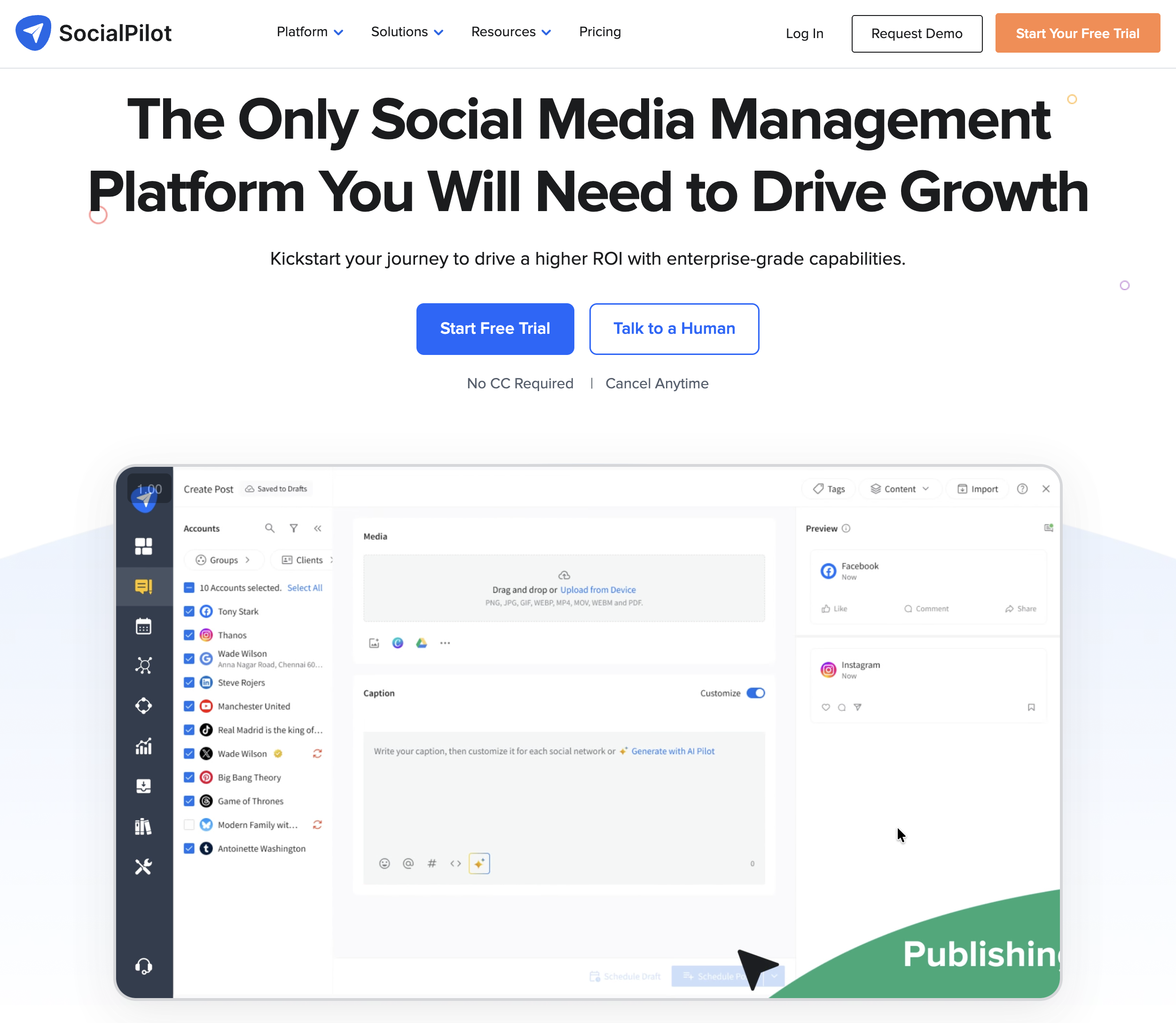
SocialPilot includes white-label reports on their Premium plan ($100/mo) and above. You can add custom logos and colors, and they offer client-facing dashboards. Scheduled report delivery is available. It is materially cheaper than PostPlanify's white-label entry point, but PostPlanify's Scale plan bundles 100 accounts, 50 workspaces, and 12 users rather than just the reporting layer.
See our SocialPilot pricing breakdown for plan details.
Agorapulse
Agorapulse restricts white-label reporting to their Advanced plan at $199/user/month ($149/user/month on annual billing). The Standard and Professional plans do not include it. This per-user pricing means costs escalate quickly for teams. If you have three team members on the Advanced plan, you are paying $597/month before any other expenses.
See our Agorapulse pricing breakdown for more details, or read Agorapulse reviews on G2.
Vista Social

Vista Social offers full white-label reporting on their Agency and Enterprise tiers. Custom domain is available as an add-on, and scheduled delivery is included. Their pricing structure varies, so you will need to check their site for current rates. If custom domain branding is a priority and Sendible's pricing is too high, Vista Social is worth evaluating.
Sprout Social

Sprout Social supports custom branding on PDF exports for their Professional ($299/seat/month) and Advanced ($399/seat/month) plans. However, it is not full white-label. Some Sprout branding may still appear in reports. They do offer live dashboards and scheduled delivery, which are genuine advantages for agencies that need real-time client access. The per-seat pricing makes Sprout one of the most expensive options on this list.
Hootsuite

Hootsuite can export reports as PDF, CSV, or PPTX with some custom branding options on their Standard ($249/user/month) and Advanced ($499/user/month) plans. This is not a true white-label platform. Hootsuite branding is still present in the output. For the price, the reporting customization is limited compared to dedicated white-label tools.
Buffer

Buffer offers branded analytics on their Team plan ($12/channel/month) with PDF export. This is not white-label. Reports carry Buffer branding. It works for freelancers who need simple, inexpensive reporting but is not suitable for agencies billing for white-label deliverables.
Later and Loomly
Neither Later nor Loomly offers white-label reporting. Later provides basic analytics export only. Loomly can export analytics as PDF/CSV and offers scheduled reports on their highest tier, but there is no white-label customization. If white-label reporting is a requirement, these tools do not meet it.
How to Choose a White-Label Reporting Tool
With several options on the table, here is a framework for narrowing down the right fit.
Budget
This is usually the deciding factor. Here is what white-label reporting costs across tools for a 3-person agency team:
| Tool | Plan with White-Label | Cost (1 user) | Cost (3 users) | Accounts Included |
|---|---|---|---|---|
| PostPlanify | Scale | $299/mo | $299/mo (flat) | 100 |
| SocialPilot | Premium | $100/mo | $100/mo (flat) | 25 |
| Sendible | White Label | $240/mo | $240/mo (10 users included) | 60 |
| Agorapulse | Advanced | $199/mo | $597/mo ($199/user) | 10/user |
| Sprout Social | Professional | $299/mo | $897/mo ($299/seat) | Unlimited |
| Vista Social | Agency/Enterprise | Varies | Varies | Varies |
SocialPilot is the cheapest flat-price option at $100/month. PostPlanify Scale starts higher at $299/month ($239/month billed yearly), but it includes 100 social accounts, 50 workspaces, and 12 users alongside white-label reporting. Sendible starts at $240/month and includes 10 users and 60 profiles. Per-user tools like Agorapulse and Sprout Social escalate fast — a 3-person team on Sprout Professional pays $897/month for reporting.
Number of Clients and Accounts
PostPlanify's Scale plan includes 100 social accounts. Sendible's White Label tier covers 60 profiles. SocialPilot's Premium covers 50 accounts. If you manage 15 clients with 3-4 accounts each, you need 45-60 accounts. Check whether the plan's account limit fits your roster before comparing price.
Do You Need a Custom Domain?
If you want report links to live on reports.youragency.com instead of the tool's domain, your options narrow to Sendible and Vista Social. PostPlanify, SocialPilot, and Agorapulse do not offer custom domains for report links. For most agencies, this is a nice-to-have, not a dealbreaker. But if your branding standards are strict, it matters.
Do You Need Automated Delivery?
If you want reports to be emailed to clients automatically on a schedule (e.g., the first Monday of every month), Sendible, SocialPilot, Agorapulse, Vista Social, and Sprout Social all offer this. PostPlanify does not have automated delivery yet (it is on the roadmap). If manual generation and sending is acceptable, this is not a blocker. If you manage 30+ clients and cannot afford to generate reports individually, automated delivery becomes essential.
PDF Snapshots vs. Live Dashboards
Most tools on this list generate static PDF reports. Sprout Social and some others offer live dashboards where clients can log in and view data in real time. Live dashboards are more impressive but also more complex to manage (client logins, permissions, etc.). PDF reports are simpler, more controlled, and work well for monthly or bi-weekly check-ins.
For more on choosing the right agency tool, read our guide on best social media management tools for agencies.
PostPlanifyAll your social media in one simple dashboard
Schedule posts, track analytics, and reply to comments/DMs without switching tabs.
Engagement
+18%
Views
52.8k
Common Mistakes in Client Social Media Reporting
White-label branding is only part of the equation. The content of the report matters just as much. Here are the most common mistakes agencies make.
Sending Raw Data Without Context
A spreadsheet of numbers is not a report. Every metric needs context: what it measures, whether it is trending up or down, and what it means for the client's goals. If your report says "Engagement: 2,847" without explaining whether that is good, bad, or average, you have delivered data, not insight.
Using the Tool's Branding Instead of Your Own
This is the entire premise of this article, but it is worth repeating. If you charge for reporting as a service, sending tool-branded output undermines your value. Invest in a tool that removes its own branding from client-facing deliverables.
Reporting Vanity Metrics Only
Follower count and impressions look good in isolation but rarely connect to business outcomes. Include engagement rate, click-through rate, and conversion metrics where available. Clients who understand their audience's behavior make better decisions than clients who just know their follower count went up.
For more on choosing meaningful metrics, see our social media analytics for business guide.
Not Including Period-Over-Period Comparisons
A report that shows current-month data without comparing it to the previous month is missing half the story. Period-over-period deltas show momentum: is engagement accelerating, plateauing, or declining? This is what clients use to evaluate whether the strategy is working.
Sending Reports Too Infrequently
Quarterly reports are too rare for most clients. By the time you present Q1 data in April, two months of that data are stale. Monthly reporting is the minimum cadence for active social accounts. More frequent reporting is better for high-spend or campaign-heavy clients.
Not Explaining What the Data Means
Numbers without interpretation are just noise. Every report should include a brief summary — even two or three sentences — explaining what happened, why it matters, and what you recommend doing next. This is what separates a report from a dashboard screenshot.
For a deeper look at analytics strategy, read our social media analytics and reporting guide.
How Often Should You Send Reports to Clients?
Reporting cadence depends on the client, the scope of work, and how much is happening on their social channels. Here are general guidelines.
Monthly (Minimum for All Clients)
Every client should receive at least one report per month. Monthly reports capture enough data to show meaningful trends while keeping the workload manageable. This is the standard cadence for retainer clients with steady-state social accounts.
Bi-Weekly for Active Campaigns
If you are running a product launch, seasonal campaign, or paid social push, bi-weekly reports help clients track performance mid-flight. This cadence gives you a checkpoint to adjust strategy before the campaign ends. It also demonstrates proactive management.
Weekly for High-Spend or Enterprise Clients
Enterprise clients and those with significant ad spend often expect weekly reporting. These reports can be lighter (a one-page summary instead of a full three-page report) but should still include key metrics, period-over-period changes, and a brief interpretation.
Quarterly for Strategy Reviews
Quarterly reports serve a different purpose. They are not operational updates; they are strategic reviews. Use them to zoom out, analyze 90-day trends, assess channel performance at a macro level, and recommend shifts in strategy. Pair quarterly reports with a live call or presentation for maximum impact.
The ideal setup for most agencies: monthly reports as the default, bi-weekly during active campaigns, and quarterly strategic reviews for your largest accounts.
Frequently Asked Questions
What is white-label reporting in social media?
White-label reporting means generating social media analytics reports that display your agency's branding (logo, name, colors) instead of the reporting tool's branding. The client sees a professional document from your agency, not a third-party software export. This is standard practice for agencies that position reporting as part of their service offering.
Which social media tools offer white-label reports?
Tools that offer full white-label reports include PostPlanify (Scale plan, $239/mo billed yearly or $299/mo monthly), Sendible (White Label tier, $240/mo), SocialPilot (Premium, $100/mo), Agorapulse (Advanced, $199/user/mo), and Vista Social (Agency/Enterprise tiers). Sprout Social offers partial white-labeling with some tool branding still visible. Hootsuite, Buffer, Later, and Loomly do not offer true white-label reporting.
How do you brand a social media report with your agency logo?
In most white-label tools, you upload your agency logo and set your brand name in the settings or brand profile. When you generate a report, the tool automatically places your logo and name in the report header. In PostPlanify, this is configured at the brand level — set your brand logo and name, and every generated report uses them automatically.
What metrics should agencies include in client reports?
At a minimum: follower count and growth, total views, engagement rate, top-performing posts, platform-by-platform breakdown, and period-over-period comparisons. Avoid reporting raw numbers without context. Include trends over time (charts, not just tables) and a brief summary of what the data means for the client's goals.
How often should you send social media reports to clients?
Monthly is the minimum for all clients. Bi-weekly during active campaigns or product launches. Weekly for enterprise or high-spend clients. Quarterly for strategic reviews that inform long-term direction. Consistency matters more than frequency — pick a cadence and stick to it.
Is white-label reporting included in PostPlanify?
Yes. White-label PDF reports are available on PostPlanify's Scale plan ($239/mo billed yearly or $299/mo monthly) and Enterprise plan (custom pricing). Reports display your brand logo and name with no PostPlanify branding visible to clients. Growth does not include reporting, and Premium adds reports before Scale unlocks the full white-label PDF tier.
What is the cheapest tool with white-label social media reports?
SocialPilot ($100/mo on Premium) is the cheapest mainstream option with full white-label reporting. PostPlanify starts at $239/mo billed yearly or $299/mo monthly on Scale, but includes substantially higher account, workspace, and user limits than most lower-priced plans. Sendible's white-label tier starts at $240/mo. Agorapulse starts at $199/user/mo. Sprout Social starts at $299/seat/mo with only partial white-labeling.
Can you automate social media reporting?
Several tools offer automated/scheduled report delivery, including Sendible, SocialPilot, Agorapulse, Vista Social, and Sprout Social. PostPlanify does not yet support automated delivery (it is on the roadmap), so reports are currently generated and shared manually. If you manage a large number of clients, automated delivery can save significant time.
What format should client social media reports be in?
PDF is the most common and professional format for client reports. It is portable, printable, and looks consistent across devices. Some tools also offer shareable web links (PostPlanify's links are public and require no login), PPTX for presentations, or live dashboards. For most agencies, PDF is the default, with shareable links as a convenient supplement.
How do you present social media results to clients?
Send the white-label report ahead of the meeting so the client can review it. During the call, walk through the highlights: what grew, what declined, which posts performed best, and why. Focus on actionable insights, not just numbers. End with recommendations for the next period. The report is the artifact; the conversation is where the value lives.
Related Reading
- How to Create a Social Media Report
- Social Media Analytics and Reporting Guide
- Client Engagement Metrics
- How to Start a Social Media Marketing Agency
- Best Social Media Management Tools for Agencies
- Best Social Media Tools with White-Label Reports
- Social Media Tools With No Per-Seat Fees
- Sendible Pricing Breakdown
- SocialPilot Pricing Breakdown
- Agorapulse Pricing Breakdown
- PostPlanify Reporting Features
- PostPlanify Pricing
PostPlanifyAll your social media in one simple dashboard
Schedule posts, track analytics, and reply to comments/DMs without switching tabs.
Engagement
+18%
Views
52.8k
About the Author

Hasan Cagli
Founder of PostPlanify, a content and social media scheduling platform. He focuses on building systems that help businesses, agencies, and teams plan, publish, and manage content and social media more efficiently across platforms.


