


A 6-person team on Sprout Social pays $1,494/month. On Hootsuite, $1,494/month. On a tool that doesn't charge per seat, those same six people are included at no extra cost, starting as low as $49/month. The difference isn't a rounding error — it's tens of thousands of dollars per year that could go toward content, ads, or hiring.
This guide breaks down 10 social media management tools with no per-seat fees, with real pricing math at 3, 6, and 12 users so you can see exactly what you'd pay. Per-seat costs bite just as hard in the PM layer, which our marketing planning software comparison prices out. If you're looking for social media tools without per-user pricing — or social media scheduling at a flat rate — this is the list.
Quick Answer: Best Flat-Rate Social Media Tools
If your team is 3+ people and you're tired of per-seat math, switch to a flat-rate tool. These are the top-ranked options that don't charge per user:
- PostPlanify — unlimited team members on every plan, analytics across 10 platforms, social inbox, AI assistant, and approval workflows included. Priced per client workspace, starting at $49/mo.
- Planable — unlimited users on every plan, best-in-class approval workflows, but charges per workspace ($39–$59/workspace/mo).
- HeyOrca — unlimited users with a client approval portal, charges per calendar.
- SocialPilot — unlimited users on the Ultimate plan ($200/mo) for larger teams.
- Buffer — unlimited users on the Team plan, but charges per channel instead of per seat.
Per-seat tools to avoid at scale: Hootsuite ($249–$499/user/mo), Sprout Social ($249–$499/seat/mo), and Agorapulse ($99+/user/mo) multiply every new hire into your bill.
How I Evaluated These Tools
To rank flat-rate social media management tools for agencies and teams, I evaluated each platform against five criteria, verified against vendor pricing pages as of September 2026:
- Pricing model — Does it charge per seat, per channel, per workspace, per calendar, or is it flat-rate with bundled users? I excluded tools where the base model is per-seat (Hootsuite, Sprout Social, Agorapulse) but included tools where per-seat is optional or a small add-on (Publer at $2/member/mo).
- Total cost at 3, 6, and 12 users — Calculated side-by-side on each vendor's current public pricing, using annual billing where discounted.
- Feature depth per dollar — Analytics across all platforms, social inbox, AI assistant, approval workflows, white-label PDF reports, bulk scheduling, and content calendar.
- Agency-specific capabilities — Multiple workspaces, client approval portals, role-based permissions, and brand separation.
- Pricing transparency — Public pricing pages vs. "contact sales" walls. Tools that hide pricing for core tiers were ranked lower.
Sources checked: Hootsuite pricing, Sprout Social pricing, Agorapulse pricing, Buffer pricing, Later pricing, Loomly pricing, Sendible pricing, SocialPilot pricing, Planable pricing, HeyOrca pricing, Publer pricing, Vista Social pricing, and PostPlanify pricing. I re-verify quarterly.
Pricing Model Glossary: The 6 Ways Social Media Tools Charge
Before comparing tools, it helps to understand the pricing models in play. Most social media management platforms use one of these six models — or a combination.
| Pricing Model | How It Works | Example Tools | What It Costs at Scale |
|---|---|---|---|
| Per-seat / Per-user | Each person with login access = one paid license | Hootsuite, Sprout Social, Agorapulse | Linear increase: 6 users = 6× the base price |
| Per-channel | Each connected social account = one paid unit | Buffer | Scales with platforms × brands (not team size) |
| Per-workspace | Each separate workspace/client area is billed separately | PostPlanify, Planable | Scales with number of clients, not team size |
| Per-calendar | Each content calendar (usually = one client) is billed | HeyOrca | Scales with client count |
| Per-account | Pay by number of social accounts; team members are low-cost add-ons | Publer ($2/member) | Moderate — both accounts and members factor in |
| Flat-rate tiered | One monthly price bundles a set number of users, accounts, and features | SocialPilot, Loomly, Sendible, Later, Vista Social | Fixed per tier; you pick the bundle that fits |
The short version: per-seat is the most punishing for growing teams, because the bill tracks headcount. Every other model shifts the cost to a different axis — channels, workspaces, calendars or accounts — so the right choice depends on which of those you add fastest. If you hire more often than you win clients, per-workspace and per-calendar models stay flat where per-seat does not.
Why Per-Seat Pricing Costs More Than You Think
If you're researching social media management pricing, the model matters as much as the sticker price. Social media tools for teams typically use one of three models: per-seat, per-channel, or flat-rate.
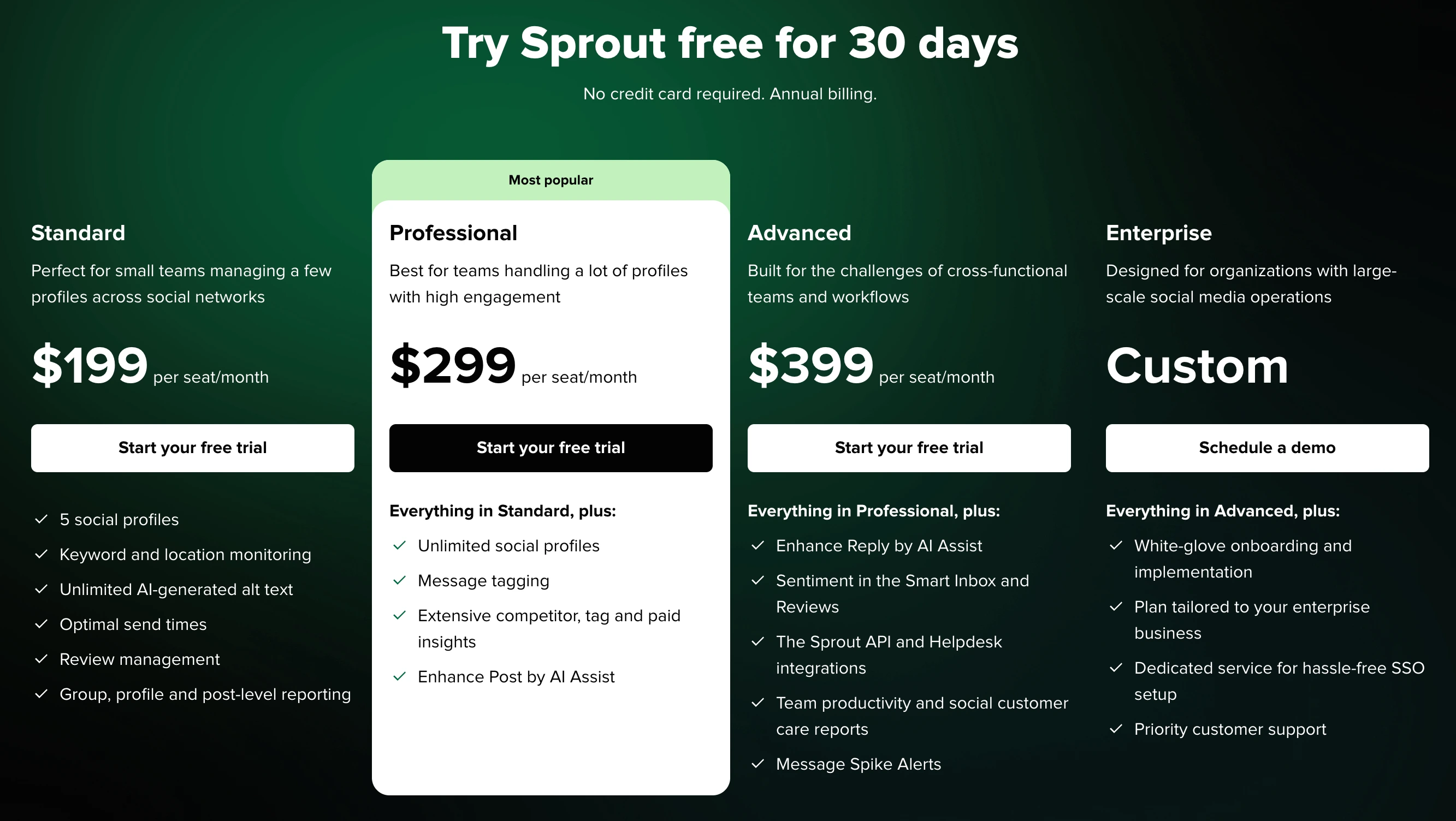
Per-seat (or per-user) pricing means every person who needs access to the tool gets their own license — and you pay for each one. It sounds fair until you do the math. Adding your content writer, designer, social media manager, client, and VP of marketing means multiplying the base price by five. On enterprise tools, that's a mortgage payment.
Flat-rate pricing bundles a set number of users (or unlimited users) into one monthly fee. Your cost stays the same whether two people log in or twenty.
Here's how the numbers play out across the most common per-seat tools versus a flat-rate option:
| Users | Sprout Social (Standard, $249/seat) | Hootsuite (Standard, $249/user) | Agorapulse (Standard, $99/user) | PostPlanify (2 client workspaces) |
|---|---|---|---|---|
| 1 user | $249/mo | $249/mo | $99/mo | $88/mo |
| 3 users | $747/mo | $747/mo | $297/mo | $88/mo |
| 6 users | $1,494/mo | $1,494/mo | $594/mo | $88/mo |
| 12 users | $2,988/mo | $2,988/mo | $1,188/mo | $88/mo |
At 12 users, Sprout Social and Hootsuite each cost ~34× more than PostPlanify, because PostPlanify's bill doesn't move with headcount at all. Even Agorapulse — the most reasonably priced per-seat tool in this comparison — costs 5–7× more at the same team size. The gap widens with every hire, contractor, or client you add.
The total cost of ownership goes beyond the subscription fee. Per-seat tools also carry seat management overhead — auditing inactive licenses, negotiating seat counts at renewal, and the organizational friction of restricting access to control costs. Teams often limit who can use the tool to keep expenses down, creating bottlenecks in content workflows. Flat-rate social media tools eliminate this overhead entirely: everyone who needs access gets it, with no per-seat fees.
For full pricing breakdowns, see our guides on Sprout Social pricing, Hootsuite pricing, and Agorapulse pricing.
 PostPlanify
All your social media in one simple dashboard
Schedule posts, track analytics, and reply to comments/DMs without switching tabs.

Engagement
+18%
Views
52.8k
Quick Comparison: 10 Tools Without Per-Seat Fees
| Tool | Starting Price | Flat-Rate Plan | Team Members Included | Platforms | Best For |
|---|---|---|---|---|---|
| PostPlanify | $49/workspace/mo | Per-workspace | Unlimited on every plan | 10 | Analytics, AI, social inbox, and team collaboration with no seat counter |
| Planable | $39/workspace/mo | Per-workspace | Unlimited on all paid plans | 8 | Approval workflows and content collaboration |
| SocialPilot | $30/mo | Ultimate: $200/mo | Ultimate: Unlimited | 9 | Bulk scheduling for large teams |
| Buffer | $6/channel/mo | Per-channel | Team: Unlimited | 11 | Simple scheduling with unlimited collaborators |
| Statusbrew | $89/mo | Tiered | 1 → 3 → 6 → Unlimited | 7 | Agencies wanting Sprout-level depth at a flat price |
| Vista Social | $79/mo | Tiered | 3 → 6 → 10 → Unlimited | 15+ | Platform coverage and DM automations |
| Sendible | $29/mo | Tiered | 1 → 4 → 7 → 20 → 80 | 10 | Agencies that need white-label reports |
| Loomly | $65/mo | Tiered | Starter: 3, Beyond: Unlimited | 10 | Teams that want approvals from day one |
| Publer | $12/mo (3 accounts) | Per-account | Add members at $2/mo each | 12+ | Wide platform support on a budget |
| HeyOrca | $59/mo | Per-calendar | Unlimited on all plans | 7 | Agencies with client approval needs |
What "Unlimited Users" Actually Means (Read the Fine Print)
"Unlimited users" is one of the most common marketing claims in social media software — and one of the most misleading. Every "unlimited" claim trades off on a different axis. Here's the unvarnished version:
| Tool | Unlimited Users? | The Real Caveat |
|---|---|---|
| Planable Pro ($59/workspace/mo) | Yes, per workspace | Unlimited users within one workspace. 10 clients = 10 workspaces = $590/mo — effectively a per-client fee |
| HeyOrca | Yes, per calendar | Unlimited users within one calendar (usually = one client). 10 calendars on Pro = $790/mo |
| Buffer Team ($12/channel/mo) | Yes, on Team plan | Unlimited users but you pay per channel — 10 channels = $120/mo, 25 = $300/mo |
| SocialPilot Ultimate ($200/mo) | Yes, on Ultimate tier | Lower tiers cap at 1–6 users; "unlimited" only kicks in at the $200/mo plan |
| Loomly Beyond ($332/mo) | Yes, on Beyond tier | Starter capped at 3 users; "unlimited" only kicks in at $332/mo — a 410% jump |
| PostPlanify | Yes, on every plan | Genuinely unlimited at any price point — you pay per client workspace, never per person |
| Hootsuite Enterprise | Technically yes | Custom pricing only; Standard ($249/user) and Advanced ($499/user) are strictly per-seat |
Takeaway: truly unlimited users without a higher-tier paywall, workspace cap, or channel fee is rare. Most "unlimited user" plans substitute one pricing axis for another. Always calculate the all-in cost at your actual team size, client count, and channel mix — not the advertised base price.
1. PostPlanify — Unlimited Team Members, Priced Per Client
PostPlanify is a social media management platform that gives you full analytics across all 10 supported platforms, a social inbox for Instagram, Facebook, LinkedIn, Google Business, and YouTube, a vision-powered AI assistant, team collaboration with approval workflows, and white-label reports available as an account-wide add-on. You don't pay per user, per channel, or per add-on seat: team members are unlimited on every plan.
Because team members are unlimited rather than charged per seat, the cost is identical whether 3 or 30 people log in — a 6-person team managing two client brands pays $88/mo, instead of the ~$1,494/mo a per-seat enterprise tool would charge for the same headcount. You pay per client workspace instead, so the bill tracks how many brands you manage rather than how many people you hire. It's the most feature-complete option on this list, bundling analytics, the social inbox, AI, and approvals into every workspace.

Pricing
| Client Workspaces | Rate Per Workspace | Monthly Total | Social Accounts | Team Members |
|---|---|---|---|---|
| 1st | $49/mo | $49/mo | 5 | Unlimited |
| 2nd–5th | $39/mo each | $205/mo at 5 | 25 at 5 | Unlimited |
| 6th–10th | $29/mo each | $350/mo at 10 | 50 at 10 | Unlimited |
| 11th and beyond | $19/mo each | $540/mo at 20 | 5 more each | Unlimited |
Yearly billing saves 20%. Every workspace includes the same thing: full analytics across all 10 platforms, the social inbox, the AI assistant, the content calendar, media library, link in bio, best-time-to-post suggestions, first comments, bulk scheduling, and approval workflows. Nothing is held back for a higher tier. White-label reporting is included on the Scale plan covering every workspace at once. Enterprise adds 1:1 onboarding, priority features, and private WhatsApp support.
Team Features
- Team members are unlimited on every plan — there is no seat limit to stay within
- Role-based permissions (admin, editor, viewer) across all team plans
- Multi-approver workflows: assign multiple reviewers to sign off on a single post
- Shared content calendar across team members and workspaces
- Comment-level collaboration on drafts with internal notes
- Workspace isolation: each client or brand can live in a separate workspace
The Catch
The bill scales with client count rather than headcount, so an agency running 15 brands pays more than a team running one, even with the same staff. Each workspace covers 5 social accounts, so a client with 7 profiles needs a second workspace. There's no free plan — only a 7-day trial with a 14-day money-back guarantee.
Best for:
Teams and agencies that want analytics across every platform, a social inbox, an AI assistant, and approval workflows without a per-seat counter running in the background — especially teams that expect to add people faster than they add clients.
Explore PostPlanify pricing for a full breakdown of every plan, or compare PostPlanify head-to-head against Buffer, Hootsuite, Sprout Social, Later, Sendible, and more alternatives.
2. Planable — Unlimited Users, Best Approval Workflows
Planable is built around content collaboration and approvals. Every paid plan includes unlimited team members, which makes it one of the few tools where adding your entire team — including clients — costs nothing extra.
For teams where approval is the workflow, that unlimited-user model is a genuine bargain — clients, executives, and freelance writers all join as reviewers without touching your bill, and feed-style previews show exactly how each post will render before sign-off. It's the tool to beat when getting content approved, not raw scheduling volume, is your bottleneck.

Pricing
| Plan | Price | Posts/Month | Social Pages |
|---|---|---|---|
| Free | $0 | 50 total (lifetime) | 4 per workspace |
| Basic | $39/workspace/mo | 60 | 4 per workspace |
| Pro | $59/workspace/mo | 150 | 10 per workspace |
| Enterprise | Custom | Unlimited | Unlimited |
Team Features
- Unlimited users on every plan, including Free
- Four approval workflow types: None, Optional, Required, Multi-level
- Role-based permissions (admin, approver, writer)
- Real-time collaboration with comments and annotations
The Catch
Planable charges per workspace. If you manage 5 clients and each needs their own workspace, you're paying $195–$295/month — not the $39–$59 sticker price. Analytics and engagement features are available as paid add-ons, not included by default. And the free plan's 50-post limit is a lifetime cap, not monthly.
Best for:
Agencies and teams where content approval is the primary workflow and everyone on the team needs access without per-seat fees.
For more details, see Planable pricing, Planable reviews, and best Planable alternatives.
3. SocialPilot — Unlimited Users on Ultimate Plan
SocialPilot is a team-oriented scheduling tool that scales from solo use to unlimited team members on its top-tier plan. The Ultimate plan at $200/month is one of the most cost-effective options for teams with 10+ members.
For a 10+ person agency, that flat $200/mo ceiling is dramatically cheaper than any per-seat enterprise tool at the same headcount, and you still get 500-post bulk CSV scheduling, client approvals, and white-label reports. Smaller teams can start on a lower tier and only jump to Ultimate once unlimited seats actually pay off.

Pricing
| Plan | Price | Social Accounts | Users |
|---|---|---|---|
| Essentials | $30/mo | 7 | 1 |
| Standard | $50/mo | 15 | 3 |
| Premium | $100/mo | 25 | 6 |
| Ultimate | $200/mo | 50 | Unlimited |
| Enterprise | Custom | Custom | Unlimited |
Annual billing saves 15% across all plans.
Team Features
- Unlimited users on Ultimate and Enterprise
- Client approval workflows
- Team member roles and permissions
- Bulk scheduling up to 500 posts at once
- White-label reports on Premium and above
The Catch
The lower-tier plans cap users heavily — Essentials is single-user only, and Standard allows just 3. If you need unlimited users, you're committing to $200/month. The jump from Premium (6 users, $100/mo) to Ultimate (unlimited, $200/mo) is a significant step up. There's no social inbox on any plan.
Best for:
Larger teams and agencies that need bulk scheduling for 50+ accounts with unlimited team members at a predictable monthly cost.
For more details, see SocialPilot pricing, SocialPilot reviews, and best SocialPilot alternatives.
4. Buffer — Unlimited Users on Team Plan
Buffer keeps things simple: a free plan with 3 channels, and two paid tiers that charge per channel rather than per user. The Team plan ($12/channel/month) includes unlimited team members, making it a solid pick for collaborative teams.
Where Buffer shines is ease of use — an AI assistant, clean queues, and the gentlest learning curve in the category — and the genuinely useful free tier makes it the easiest on-ramp once you outgrow a native scheduler. Just remember to forecast your bill by channels (platforms × brands), not by people.

Pricing
| Plan | Price | Channels | Users |
|---|---|---|---|
| Free | $0 | 3 | 1 |
| Essentials | $6/channel/mo | Unlimited | 1 |
| Team | $12/channel/mo | Unlimited | Unlimited |
Annual billing saves roughly 17%.
Team Features
- Unlimited team members on Team plan
- Approval workflows and draft collaboration
- Access levels and permissions
- Community inbox for engagement
- 11 platform connections including Google Business
The Catch
Buffer charges per channel, not per seat — which sounds great until you count your channels. A brand on Instagram, Facebook, LinkedIn, X, and TikTok is 5 channels. Two brands across those platforms is 10 channels. At $12/channel on the Team plan, 10 channels costs $120/month, and 25 channels costs $300/month. The per-channel model can sneak up on multi-brand teams.
Best for:
Teams managing a moderate number of channels who want unlimited collaborators without per-seat pricing.
For more details, see Buffer pricing, Buffer reviews, and best Buffer alternatives.
5. Statusbrew — Flat-Rate Plans, Bundled Users
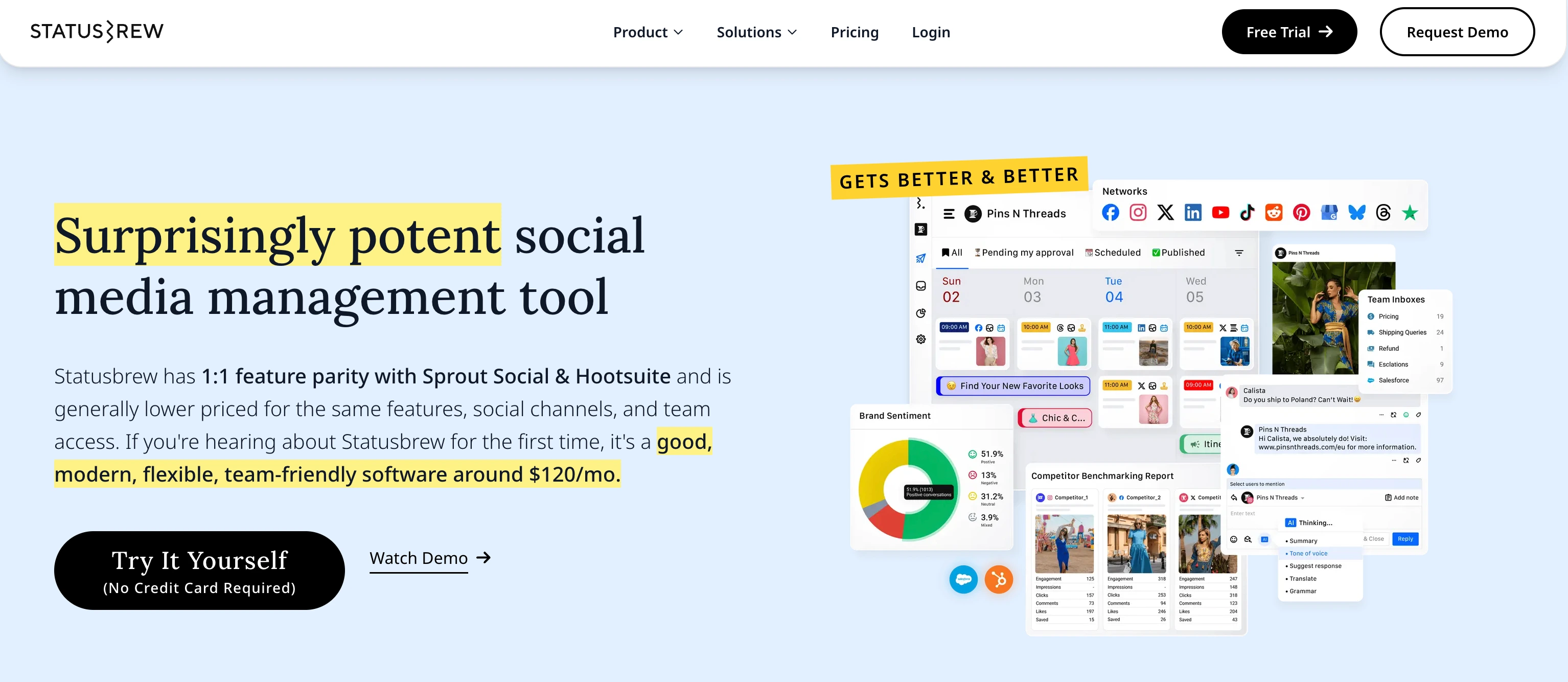
Statusbrew is a social media management platform for teams and agencies, bundling publishing, a unified inbox, approval workflows, reporting, and social listening into one plan-based price. Unlike per-seat tools such as Sprout Social or Hootsuite, you pick a tier that includes a set number of users and profiles rather than paying for every login.
Each client or brand can live in its own Workspace with Profile Groups, so agencies separate work without a per-user meter running in the background.
Pricing
| Plan | Price | Social Profiles | Users |
|---|---|---|---|
| Lite | $89/mo | 5 | 1 |
| Standard | $179/mo | 10 | 3 |
| Premium (Recommended) | $299/mo | 15 (can add more) | 6 (can add more) |
| Enterprise | Custom | Unlimited | Unlimited |
Annual billing brings the tiers down to roughly $69 / $129 / $229 per month. All plans include a 14-day free trial with no credit card required.
Team Features
- Users bundled per plan, no per-seat within your tier
- Multi-step approval workflows for internal and client sign-off
- Workspaces and Profile Groups to isolate each client or brand
- Unified inbox for comments, DMs, mentions, and reviews (organic + ads)
- Role-based permissions (admin, editor, viewer)
The Catch
No free-forever plan, only a 14-day trial. The feature depth (social listening, automation, 250+ report metrics) can be more than a solo creator needs, and the entry tier caps at 3 users, so larger teams move up a tier.
Best for:
Agencies and growing teams that want Sprout-level features (unified inbox, approvals, reporting) at a predictable, plan-based price without per-seat fees.
For more details, see Statusbrew pricing, Statusbrew reviews, and best Statusbrew alternatives.
6. Vista Social — Tiered Plans With Scaling Users
Vista Social supports 15+ platforms (including review sites) and offers a full feature set: scheduling, analytics, social inbox, DM automations, and social listening. Users scale by plan tier rather than per seat.
Its appeal for flat-rate teams is breadth: a unified inbox, DM automations, listening, and review management across more networks than almost anything else here (including Google Business and review sites), with users bundled by tier instead of charged per seat. For teams whose channel mix runs well beyond the big four, it covers ground most flat-rate tools don't.

Pricing
| Plan | Price | Social Profiles | Users |
|---|---|---|---|
| Professional | $79/mo | 15 | 3 |
| Advanced | $149/mo | 30 | 6 |
| Scale | $379/mo | 70 | 10 |
| Enterprise | Custom | Unlimited | Unlimited |
Annual billing saves 20%. All plans include a 14-day free trial.
Team Features
- Users scale with plan tier (3 → 6 → 10 → Unlimited)
- Approval workflows on all plans
- Role-based permissions
- Social inbox and DM automations
- Employee advocacy tools (paid add-on)
The Catch
X (Twitter) support is not included in any plan — it's a paid add-on with undisclosed pricing. Advanced social listening is a $75/month add-on. If X is a core platform for your brand, factor that into the total cost. The Scale plan at $379/month is a steep jump from Advanced at $149/month.
Best for:
Teams that need broad platform coverage, DM automations, and review management without paying per user.
For more details, see Vista Social pricing, Vista Social reviews, and best Vista Social alternatives.
PostPlanifyAll your social media in one simple dashboard
Schedule posts, track analytics, and reply to comments/DMs without switching tabs.
Engagement
+18%
Views
52.8k
7. Sendible — Tiered Plans With White-Label Reports
Sendible is an agency-focused platform with tiered pricing that bundles users and profiles together. It supports 10 platforms and includes scheduling, a priority inbox, analytics, and approval workflows.
Sendible leans agency: client dashboards, a priority inbox, and approval workflows are built in, and white-label reports arrive on Scale. Because the tiers bundle users and profiles together, a small agency can cover several clients on one flat plan — though the full white-label dashboard is a separate add-on (see The Catch below).

Pricing
| Plan | Price | Social Profiles | Users |
|---|---|---|---|
| Creator | $29/mo | 6 | 1 |
| Traction | $89/mo | 24 | 4 |
| Scale | $199/mo | 49 | 7 |
| Advanced | $299/mo | 100 | 20 |
| Enterprise | $750/mo | 400 | 80 |
Annual billing saves 15%. All plans include a 14-day free trial.
Team Features
- Users bundled into each tier (no per-seat charges within a plan)
- Approval workflows and content approval queues
- Priority Inbox for managing engagement
- White-label reports and dashboards
- Client-facing reporting
The Catch
White-label functionality is a premium add-on — the full white-label setup costs $240/month on top of your plan price. The jump from Creator (1 user, $29/mo) to Traction (4 users, $89/mo) is a 3x price increase for 3 extra users. If you need between 7 and 20 users, you're paying $299/month whether you use all 20 seats or not.
Best for:
Agencies that need white-label reporting and want users bundled into plan tiers rather than charged individually.
For more details, see Sendible pricing, Sendible reviews, and best Sendible alternatives.
8. Loomly — Approval Workflows on Every Paid Plan
Loomly bundles users and accounts into fixed tiers. Every paid plan includes approval workflows, analytics, and engagement tools — making it a good option if approvals are non-negotiable for your team.
The draw is a polished, calendar-first interface with approval workflows on every paid plan — handy for teams where sign-off is mandatory from day one. Users and accounts are bundled per tier rather than charged per seat, so it fits small teams that value a clean planning UX, with the caveat that the jump from Starter to Beyond is steep (see The Catch).

Pricing
| Plan | Price | Social Accounts | Users |
|---|---|---|---|
| Free | $0/mo | 3 | 1 |
| Starter | $65/mo | 12 | 3 |
| Beyond | $332/mo | 60 | Unlimited |
| Enterprise | Custom | 61+ | Unlimited |
Annual billing saves roughly 25%.
Team Features
- Approval workflows on all paid plans
- AI caption suggestions
- Hashtag manager
- Engagement tools for responding to comments
- Advanced analytics and exportable reports
- Supports 10 platforms including Threads
The Catch
Loomly's pricing structure has a massive gap. If you need 4 users instead of 3, or 13 accounts instead of 12, you jump from $65/month to $332/month — a 410% increase with no middle tier. Reports from 2025 indicate Loomly overhauled its pricing with 600–900% increases on some legacy plans. The free plan is limited to 1 user and 5 scheduled posts per month.
Best for:
Small teams (3 or fewer members) that need built-in approval workflows at a reasonable price point.
For more details, see Loomly pricing, Loomly reviews, and best Loomly alternatives.
9. Publer — 12+ Platforms, Per-Account Pricing
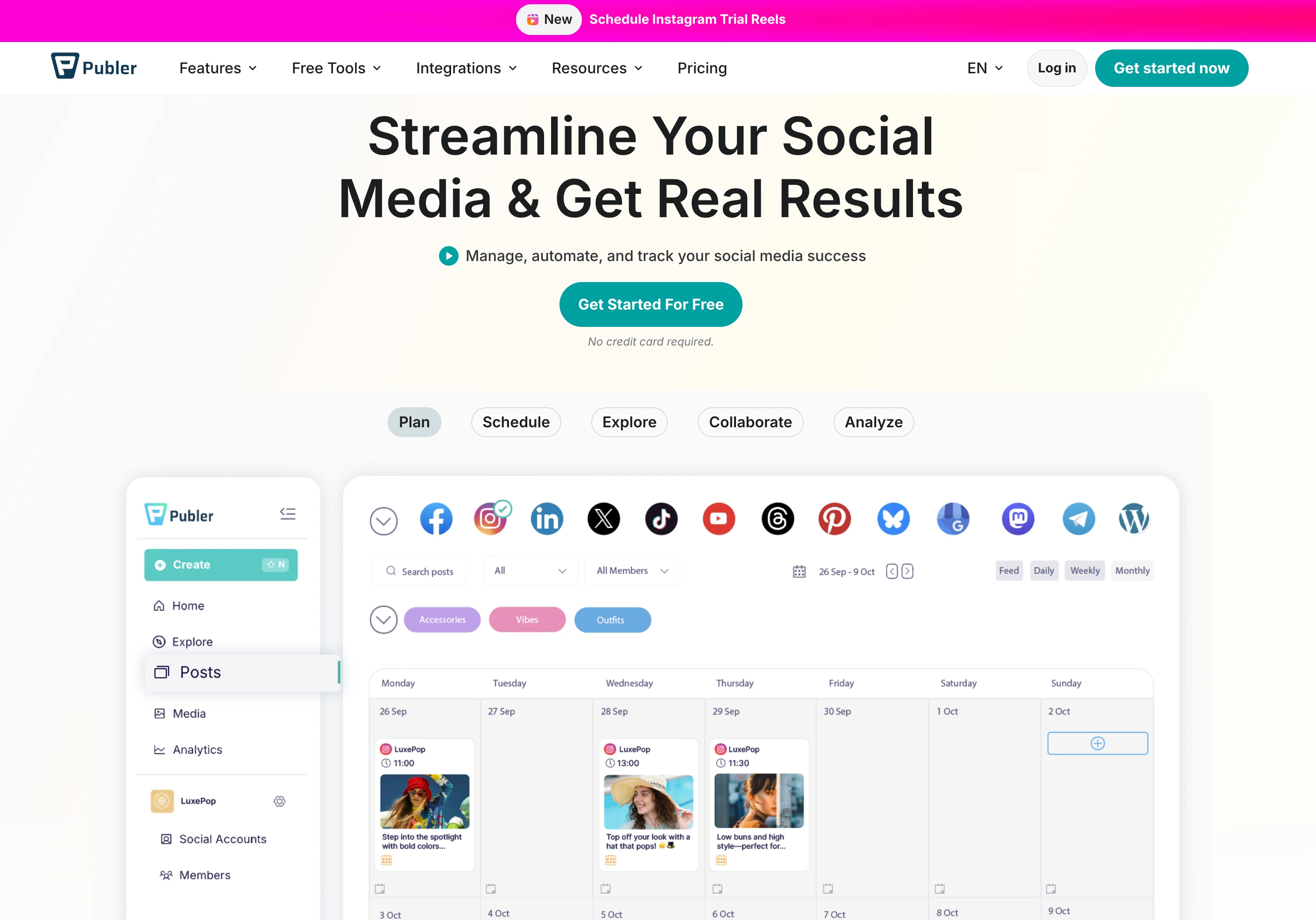
Publer supports 12+ social platforms and uses a per-account pricing model where you pay based on how many social accounts you connect. Team members can be added for $2/month each.
That per-account model is the cheapest entry point on this list — $12/mo for three accounts, members at just $2/mo each — so a solo operator or small team gets modern features (AI captions and images on Business, bulk scheduling, RSS auto-posting) across 12+ platforms without per-seat enterprise pricing. Cost scales with accounts and members rather than punishing team growth.
Pricing
| Plan | Base Price (3 accounts) | 10 Accounts | Users |
|---|---|---|---|
| Free | $0/mo | N/A (3 max) | 1 |
| Professional | $12/mo | $36/mo | Add at $2/mo each |
| Business | $21/mo | $63/mo | Add at $2/mo each |
| Enterprise | Custom | Custom | Custom |
Every 10th account (or team member) is free. Annual billing gives 2 months free.
Team Features
- Add team members for $2/month each (not per-seat in the traditional sense)
- Workspace-based organization
- Bulk scheduling and auto-scheduling
- RSS auto-posting
- AI captions (GPT-4) and AI image generation (DALL-E 3) on Business plan
The Catch
Analytics and AI features are locked behind the Business plan. The Professional plan gives you scheduling but no performance data. Team members cost $2/month each, which is minimal, but it does mean Publer isn't truly flat-rate. X (Twitter) is not available on the free plan.
Best for:
Teams that publish across many platforms and want to keep costs low by paying per account rather than per user.
For more details, see Publer pricing, Publer reviews, and best Publer alternatives.
10. HeyOrca — Unlimited Users With Client Portal
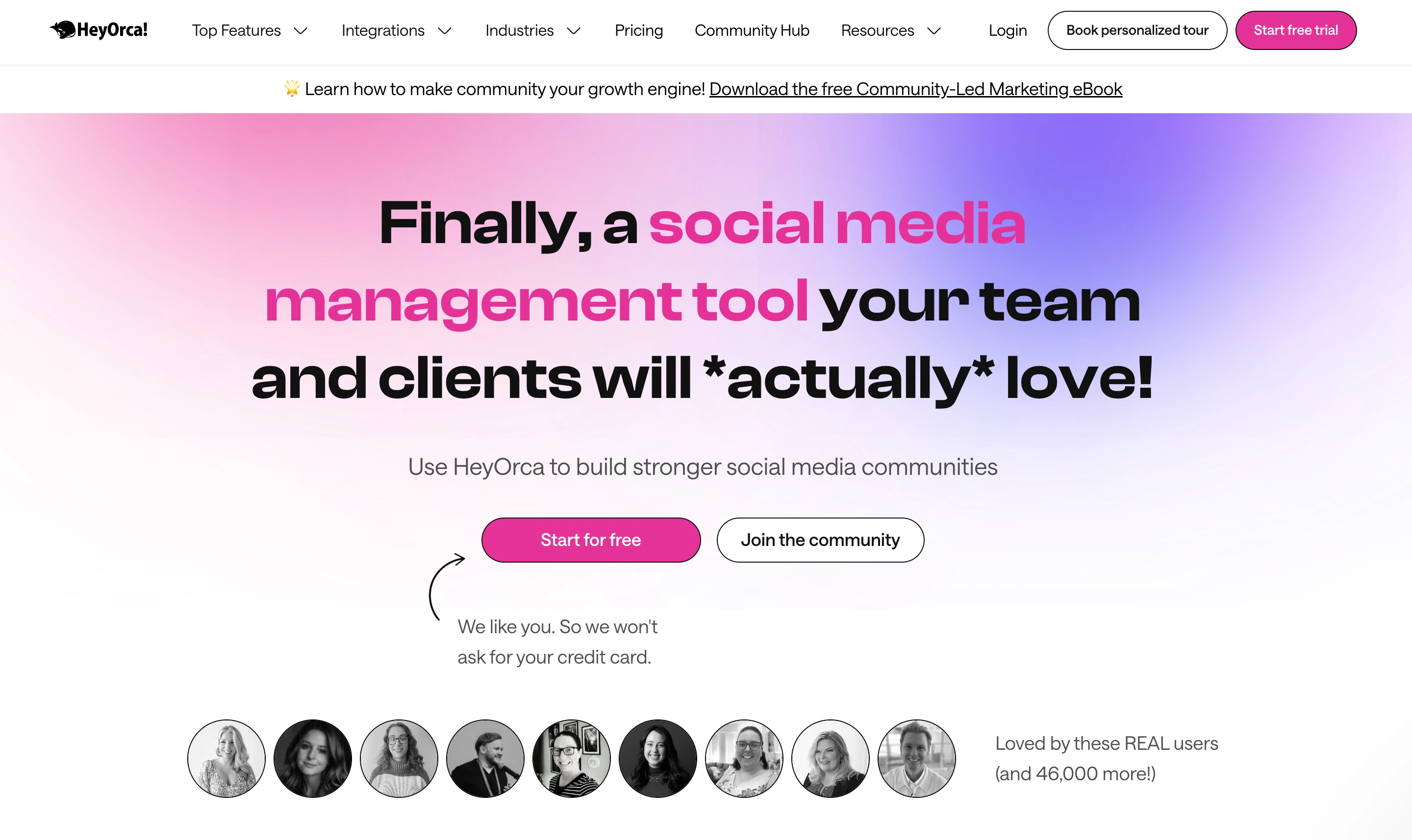
HeyOrca is a social media management platform designed for agencies, with unlimited users on every plan. It charges per calendar (essentially per client) rather than per user, which makes it particularly suited to agency workflows with client approvals.
Every client gets their own calendar with a clean approval portal and unlimited collaborators, so a brand or client team can review and sign off without per-seat fees. Because billing is per calendar, the cost scales with client count — great if you run many users per client, pricier if you have many clients with only a few users each.
Pricing
| Plan | Price (Teams) | Price (Agencies) | Features |
|---|---|---|---|
| Basic | $59/mo | $35/calendar/mo | Scheduling, publishing, basic analytics |
| Standard | $99/mo | $59/calendar/mo | + Reporting, social listening |
| Pro | $149/mo | $79/calendar/mo | + Social inbox, advanced reporting |
Annual billing saves 15%. Additional social accounts cost $10/month each.
Team Features
- Unlimited users on every plan — no per-seat charges
- Client approval portal for agencies
- Role-based permissions
- Visual content calendar
- Post approval workflows
The Catch
HeyOrca supports only 7 social platforms, which is fewer than most competitors on this list. Reporting and social inbox are locked behind higher tiers (Standard and Pro respectively). For agencies, the per-calendar model can scale up — 10 clients on the Pro plan costs $790/month. Platform coverage is narrower than tools like Vista Social or Publer.
Best for:
Agencies that need a client-facing approval portal with unlimited team members and don't require niche platform support.
Per-Seat Tools to Avoid If You're Scaling
Not every social media tool has embraced flat-rate pricing. If your team is growing — or you plan to add contractors, clients, or freelancers — these tools will cost significantly more:
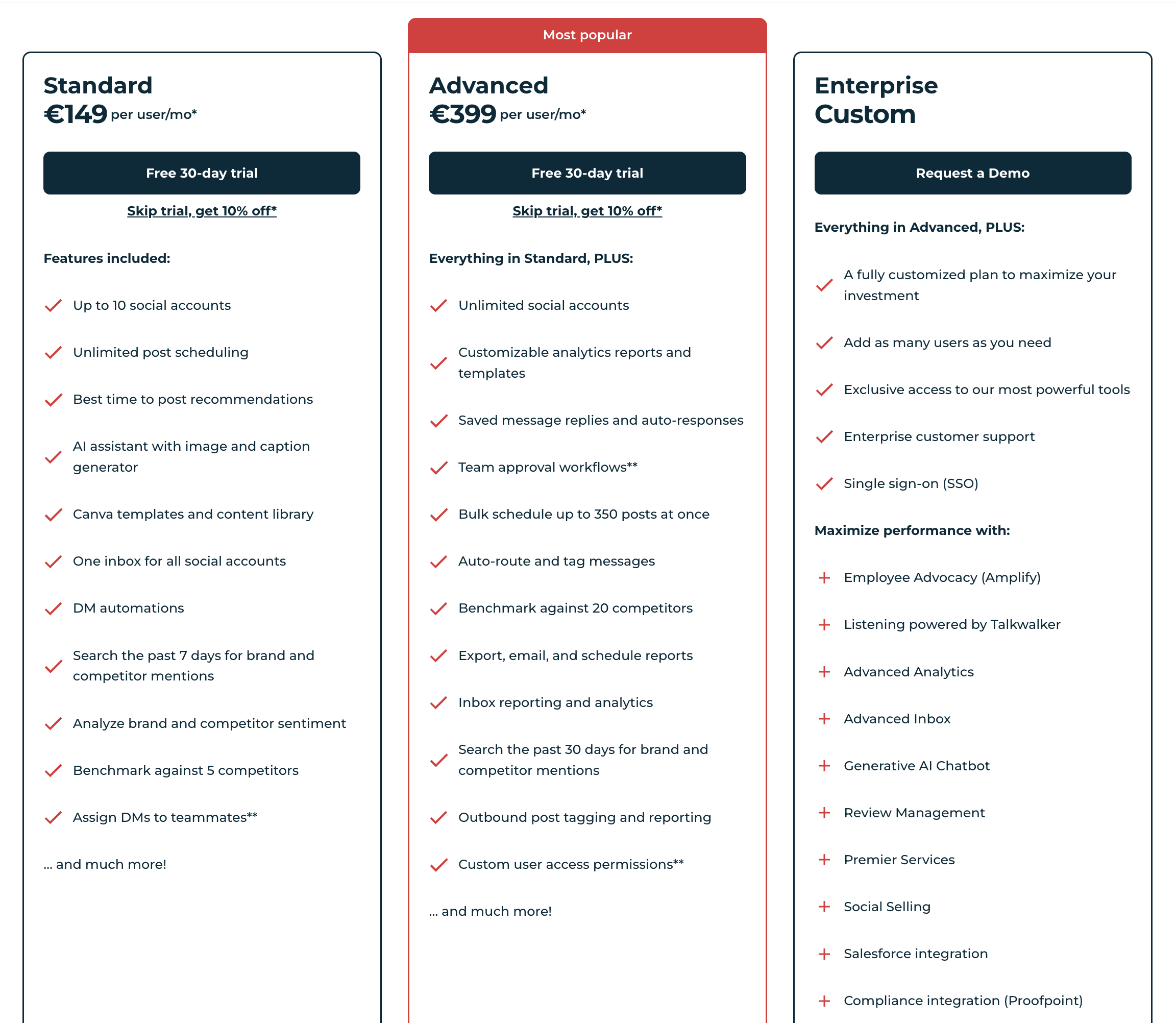
| Tool | Per-Seat Price | 5-User Cost | 10-User Cost | Notes |
|---|---|---|---|---|
| Hootsuite | $249/user/mo | $1,245/mo | $2,490/mo | Enterprise-only for teams; single Standard plan available |
| Sprout Social | $199/seat/mo | $995/mo | $1,990/mo | Powerful analytics but punishing at scale |
| Agorapulse | $99/user/mo | $495/mo | $990/mo | Social inbox strength, but per-user pricing erodes the value |
These tools aren't bad — they offer strong feature sets, enterprise integrations, and deep analytics. But their per-user pricing models are built for organizations with large software budgets, not growing teams watching every dollar. If your team has 3+ members and social media management with unlimited users matters to you, the flat-rate tools above will save you significantly.
For alternatives, see:
- Best Hootsuite alternatives | Hootsuite pricing breakdown
- Best Sprout Social alternatives | Sprout Social pricing breakdown
- Best Agorapulse alternatives | Agorapulse pricing breakdown
Hidden Costs and Contract Red Flags
The sticker price on a vendor's pricing page almost never reflects what you'll actually pay. Watch for these traps — especially on per-seat tools and enterprise sales calls:
- Annual-only billing on higher tiers. Hootsuite Enterprise and Sprout Social Enterprise quote only annual contracts, with no month-to-month option — you're locked in for 12 months even if the tool doesn't fit your workflow.
- "Per active user" vs "per named user" clauses. Some contracts charge for any user who logs in during a billing period (active), others charge per provisioned seat (named). "Per named user" can double your bill if you forget to deactivate former employees.
- Minimum seat commitments. Several enterprise tools require a minimum of 5 or 10 seats even if you have fewer users — you pay for unused seats every month.
- Onboarding and training fees. Enterprise plans often tack on $1,000–$10,000 one-time implementation fees (especially Sprout Social, Hootsuite Enterprise, and Sendible Enterprise) that aren't advertised on pricing pages.
- API overage charges. Advanced listening (Hootsuite's Talkwalker add-on, Sprout Social's Advanced Listening) can charge per API call above a monthly limit — a viral moment can trigger unexpected overages.
- "Unlimited" with asterisks. "Unlimited users" but limited to one workspace. "Unlimited posts" but rate-limited per platform. "Unlimited analytics" but capped at 30 days of history. Always check the footnotes.
- Price increases at renewal. Per-seat tools routinely raise prices 10–20% at renewal — budget for renewal inflation, especially on multi-year contracts.
- Paid add-ons sales won't mention upfront. Sendible's full white-label dashboard is $240/mo extra, Vista Social's Advanced Listening is $75/mo extra, and Hootsuite's Employee Advocacy is a separate SKU. Always ask: "What are the add-on fees for a team my size?"
- Auto-enrollment at end of trial. Some "free trial" tools quietly roll you onto a paid plan the day the trial ends unless you cancel — read the trial terms before connecting accounts.
- Feature downgrades on legacy plans. When vendors restructure pricing, existing customers sometimes lose access to features they paid for. Document what your plan includes at signup.
Real Cost Scenarios: 3 Agencies Compared
Here's how the math plays out for three realistic agency sizes — same feature needs (scheduling, analytics, social inbox, approvals, white-label reports), different team sizes.
Scenario 1: Small agency (3 internal + 2 client collaborators)
You have 3 full-time team members and want to invite 2 client stakeholders for approval. Total team size: 5 users.
| Tool | Cost/Month | 12-Month Total | Notes |
|---|---|---|---|
| Hootsuite Standard | $1,245/mo | $14,940/yr | $249/user × 5 |
| Sprout Social Standard | $1,245/mo | $14,940/yr | $249/seat × 5 |
| Agorapulse Standard | $495/mo | $5,940/yr | $99/user × 5 |
| Sendible Traction | $89/mo | $1,068/yr | 4 users included (client = 5th user not supported) |
| PostPlanify (2 workspaces) | $88/mo | $1,056/yr | Unlimited team members, 10 accounts, approval workflows, reports |
PostPlanify saves ~$13,884/yr vs. Hootsuite Standard, ~$4,884/yr vs. Agorapulse — and hiring a sixth, tenth or twentieth person doesn't change that number at all.
Scenario 2: Mid-size agency (6 internal + 4 clients)
You have 6 team members and need to route approvals to 4 clients — 10 users total with access.
| Tool | Cost/Month | 12-Month Total | Notes |
|---|---|---|---|
| Hootsuite Standard | $2,490/mo | $29,880/yr | $249/user × 10 |
| Sprout Social Standard | $2,490/mo | $29,880/yr | $249/seat × 10 |
| Agorapulse Standard | $990/mo | $11,880/yr | $99/user × 10 |
| Planable Pro (5 clients) | $295/mo | $3,540/yr | $59/workspace × 5 workspaces, unlimited users each |
| HeyOrca Pro (5 calendars) | $395/mo | $4,740/yr | $79/calendar × 5, unlimited users each |
| PostPlanify (4 client workspaces) | $166/mo | $1,992/yr | Unlimited team members and unlimited client approvers, 20 accounts, one workspace per client |
PostPlanify saves ~$27,888/yr vs. Hootsuite Standard, ~$9,888/yr vs. Agorapulse — and the four client approvers cost nothing, because approvers are just team members.
Scenario 3: Large agency (12 internal + 10 clients = 22 users)
12 team members, 10 clients with approval access — 22 users total.
| Tool | Cost/Month | 12-Month Total | Notes |
|---|---|---|---|
| Hootsuite Standard | $5,478/mo | $65,736/yr | $249/user × 22 |
| Sprout Social Standard | $5,478/mo | $65,736/yr | $249/seat × 22 |
| Agorapulse Standard | $2,178/mo | $26,136/yr | $99/user × 22 |
| Planable Pro (10 clients) | $590/mo | $7,080/yr | $59/workspace × 10 workspaces |
| SocialPilot Ultimate | $200/mo | $2,400/yr | Unlimited users, 50 accounts |
| PostPlanify (10 client workspaces) | $400/mo | $4,800/yr | Unlimited team members, 50 accounts, one workspace per client — all 22 people included |
| PostPlanify Enterprise | Custom | Custom | 1:1 onboarding, priority features, WhatsApp support |
At this scale, PostPlanify saves ~$60,936/yr vs. Hootsuite — and all 22 people are included, because PostPlanify never counts users. SocialPilot Ultimate is cheaper still at $2,400/yr, though it has a weaker feature set (no social inbox, narrower platform support).
Multi-Brand and Multi-Workspace Support by Tool
If you manage multiple clients or brands, workspace isolation matters as much as user count. Here's how each tool handles it:
| Tool | Workspace Model | Workspaces Included | Extra Workspace Cost |
|---|---|---|---|
| PostPlanify | Per-workspace billing | 1st workspace $49 | $39/each to 10, then $29, then $19 |
| Planable Basic | Per-workspace billing | 1 workspace | $39/workspace/mo |
| Planable Pro | Per-workspace billing | 1 workspace | $59/workspace/mo |
| HeyOrca Pro | Per-calendar billing | 1 calendar | $79/calendar/mo |
| Buffer Team | No workspaces (flat) | N/A | Pays per channel instead |
| Sendible Traction | Included in plan | 4 groups (client folders) | Tier upgrade required |
| SocialPilot | Included in plan | Shared brand groups | Tier upgrade required |
| Hootsuite Standard | Included in plan | 10 accounts total | Advanced plan ($499/user) for unlimited |
| Sprout Social Standard | Included in plan | 10 profiles total | Professional plan ($399/seat) for more |
The takeaway for agencies: at 10+ clients, PostPlanify ($400/mo for 10 workspaces) and Planable Pro ($590/mo for 10) are the two strongest options. Both bill per client and both give unlimited users, so it comes down to price and feature depth rather than seat math.
Free Tier Reality Check for Agencies
Several tools on this list offer a free plan. Can you actually run an agency on any of them?
| Tool | Free Plan Offered? | Free Tier Limit | Agency-Viable? |
|---|---|---|---|
| Buffer Free | Yes | 3 channels, 10 scheduled posts per channel | No — 3 channels won't cover 1 client |
| Publer Free | Yes | 3 accounts, basic scheduling | Maybe for solo freelancer with 1 client |
| Planable Free | Yes | 50 posts total (lifetime cap), 4 pages | No — 50-post lifetime ceiling |
| Loomly Free | Yes | 1 user, 5 scheduled posts/mo | No — 5 posts/mo is barely anything |
| Hootsuite | No | 30-day trial only | No free option |
| Sprout Social | No | 30-day trial only | No free option |
| PostPlanify | No (7-day trial) | Full platform access | No free option — but the first workspace is $49/mo |
| Agorapulse | No (30-day trial) | Full features during trial | No free option |
| Sendible | No (14-day trial) | Full features during trial | No free option |
Reality: free tiers on social media tools are designed for solo creators or hobby accounts, not agencies. By the time you need approval workflows, client separation, or white-label reports, you're on a paid plan. Use trials strategically — most paid tools give 7–30 days of full access before you commit.
Pricing Transparency Rankings
Not all vendors publish their full pricing. Some force you into a sales call for anything beyond the entry tier. Here's the transparency ranking:
| Tool | All Tiers Public? | Sales Call Required? |
|---|---|---|
| PostPlanify | Per-workspace rates public; Enterprise demo-only | Only for Enterprise |
| Buffer | Yes, all tiers public | No |
| Publer | Yes, all tiers public | No |
| Later | Yes, all tiers public | No |
| SocialPilot | Yes, all tiers public | No |
| Loomly | Yes, all tiers public | No |
| Planable | Yes, all tiers public | No |
| HeyOrca | Yes, all tiers public | No |
| Sendible | Yes, most tiers public | Enterprise-tier requires sales |
| Vista Social | Yes, most tiers public | Enterprise + X (Twitter) add-on pricing hidden |
| Agorapulse | Yes, all tiers public | No |
| Hootsuite | Standard and Advanced public | Enterprise requires sales call |
| Sprout Social | Standard, Professional, Advanced public | Enterprise requires sales call |
Tools that publish all pricing publicly — including enterprise — tend to be agency-friendly. Tools that hide pricing behind sales calls often do so because their enterprise pricing scales per-user at rates they don't want in public comparisons.
How to Choose the Right Flat-Rate Tool
With nine options on the table, the right tool depends on your specific workflow. Use this decision framework:
How many team members do you need?
- Any size: PostPlanify charges nothing per person, so team count never enters the decision. Price it by client brands instead: $49 for one, $88 for two, $400 for ten.
- 4–6 members on a per-seat tool: SocialPilot Premium ($100/mo, 6 users) is the closest fixed-price competitor.
- 7–12 members: Loomly Beyond or SocialPilot Ultimate if you prefer a single flat fee.
- Unlimited users: Planable, HeyOrca, Buffer Team, or SocialPilot Ultimate.
See our guide on team collaboration features for a deeper comparison.
Do you need approval workflows? If content approval is critical, Planable has the most advanced workflow system (four approval types). PostPlanify, Loomly, and Vista Social also include approvals on paid plans — PostPlanify supports multi-approver workflows where several reviewers must sign off before publish. Buffer requires the Team plan ($12/channel). Read more in our guide to social media tools with approval workflows.
Which platforms do you publish to? Platform coverage varies widely. Vista Social leads with 15+ platforms. Buffer and Publer support 11–12. PostPlanify covers 10 (Instagram, Facebook, X, LinkedIn, TikTok, YouTube, Threads, Pinterest, Bluesky, Google Business). HeyOrca only supports 7. If you publish to niche platforms like Threads, Google Business, or Bluesky, check compatibility before committing.
Do you need white-label reports? PostPlanify and Sendible both offer white-label reports. Sendible's full white-label dashboard costs $240/month extra on top of your plan. PostPlanify's is included on the Scale plan that covers every client workspace at once rather than being tied to a tier. SocialPilot includes white-label reports on Premium and above. See our reporting features breakdown and our guide on sending white-label social media reports to clients.
What's your monthly budget? Here's a quick budget guide:
| Monthly Budget | Best Options |
|---|---|
| Under $50/mo | Buffer Essentials (per-channel), Publer Professional, Sendible Creator |
| $50–100/mo | PostPlanify (1–2 client workspaces, $49–$88), SocialPilot Standard, Loomly Starter |
| $100–200/mo | PostPlanify (3–5 workspaces, $127–$205, unlimited members + approvals), SocialPilot Premium, Vista Social Advanced, Sendible Scale |
| $200+/mo | PostPlanify (6+ workspaces, from $234), SocialPilot Ultimate, Vista Social Scale, Loomly Beyond |
Migration Guide: Switching From Per-Seat to Flat-Rate
Migrating from a per-seat tool to a flat-rate platform is less painful than you might expect. Here's a four-step process:
1. Export your content and data. Most per-seat tools (Hootsuite, Sprout Social, Agorapulse) let you export scheduled posts, analytics history, and contact lists as CSV files. Do this before your subscription ends.
2. Set up your new tool and connect accounts. Create your workspace, connect your social accounts, and configure your posting schedule. Tools like PostPlanify, Buffer, and SocialPilot support quick onboarding with OAuth connections for all major platforms.
3. Invite your team. This is where the savings kick in. On a flat-rate tool, adding your full team costs nothing extra. Set up roles, permissions, and approval workflows to match your current process.
4. Run both tools in parallel for one billing cycle. Overlap for 2–4 weeks to make sure everything works — scheduled posts are publishing, analytics are tracking, and your team is comfortable with the new workflow. Then cancel the old tool.
PostPlanifyAll your social media in one simple dashboard
Schedule posts, track analytics, and reply to comments/DMs without switching tabs.
Engagement
+18%
Views
52.8k
Frequently Asked Questions
What's the best social media tool with no per-seat fees?
For most teams and agencies, the best no-per-seat tool is PostPlanify — it gives unlimited team members on every plan and prices per client workspace instead (from $49/mo), with analytics across 10 platforms, a social inbox, an AI assistant, and approval workflows included, and never charges per user, per channel, or per add-on. The best alternative depends on your model: Planable and HeyOrca give unlimited users (per-workspace and per-calendar respectively), SocialPilot offers unlimited users on its $200/mo Ultimate plan, and Buffer has unlimited users but charges per channel.
What is per-seat pricing in social media tools?
Per-seat pricing means you pay a separate license fee for every user who accesses the tool. If a tool costs $99/seat/month and you have 5 team members, your monthly bill is $495. This model is common in enterprise social media tools like Sprout Social and Hootsuite.
Which social media management tools offer unlimited users?
Planable, HeyOrca, and Buffer (Team plan) offer unlimited users on their paid plans. SocialPilot offers unlimited users on its Ultimate ($200/mo) and Enterprise plans. Loomly's Beyond plan ($332/mo) also includes unlimited users.
What's the cheapest social media tool for large teams?
For teams of 10–12 users, PostPlanify costs the same as it does for one person, because members are unlimited — you pay per client brand instead, from $49/month. SocialPilot Ultimate at $200/month offers unlimited users for larger teams. Planable's unlimited users are compelling, but per-workspace pricing can add up with multiple clients.
Is Hootsuite worth the per-seat price?
Hootsuite offers strong enterprise features, integrations, and compliance tools. But at $249/user/month, a 6-person team pays $1,494/month. Most teams can get comparable scheduling, analytics, and collaboration features from tools that don't charge per seat, at a fraction of the cost — PostPlanify covers the same 6-person team from $49/mo, since it never charges for people. See our Hootsuite alternatives guide.
Does PostPlanify charge per user?
No. Team members are unlimited on every plan, at every size. PostPlanify bills per client workspace instead: $49 for the first, $39 each for workspaces 2 to 5, $29 to 10, then $19. Adding a person never changes your bill. See full details on the PostPlanify pricing page.
What's the difference between per-seat and per-channel pricing?
Per-seat pricing charges for each user (person). Per-channel pricing charges for each social media account connected. Buffer uses per-channel pricing ($6–12/channel/month), which means your cost scales with the number of platforms you manage, not the number of people on your team.
Are flat-rate tools less powerful than per-seat tools?
Not necessarily. Per-seat pricing is a business model, not a feature indicator. PostPlanify includes analytics across 10 platforms, a social inbox, a vision-powered AI assistant, approval workflows, and white-label reporting as an add-on. Vista Social covers 15+ platforms with DM automations. The feature gap between flat-rate and per-seat tools has narrowed significantly — in many cases, flat-rate tools now outpace per-seat tools on modern features like AI image generation, multi-approver workflows, and unified cross-platform analytics.
What are the hidden costs of per-seat social media tools?
Beyond the obvious per-user fees: onboarding costs for each new user, annual price increases that apply per seat, overage charges for exceeding account limits, and the organizational friction of limiting access to save money. Teams often restrict access to control costs, which creates bottlenecks.
Can I switch from Sprout Social to a flat-rate tool?
Yes. Export your scheduled content and analytics from Sprout Social, set up your new tool, reconnect your social accounts, and invite your team. Most migrations take less than a day. For alternatives, see our Sprout Social alternatives guide.
Which flat-rate tool is best for agencies managing 10+ clients?
For agencies, the answer depends on whether you need white-label reports and client approval portals. HeyOrca offers unlimited users with a client portal but charges per calendar. Sendible offers white-label reports but charges $240/month extra for the full white-label dashboard. PostPlanify gives one workspace per client from $49/month with unlimited team members, approval workflows and AI included, and white-label reporting on the Scale plan. SocialPilot Ultimate gives you 50 accounts with unlimited users for $200/month. Compare options in our best social media tools for agencies guide.
Is flat-rate pricing always cheaper than per-seat?
Not at every team size. For a single user, a per-seat tool like Agorapulse ($99/user) can cost similar to a flat-rate plan. The savings kick in at 3+ users and become dramatic at 6–12+. At 6 users, Agorapulse costs $594/month; on PostPlanify those six people cost nothing extra. At 12 users, Agorapulse is $1,188/mo while PostPlanify is unchanged. Flat-rate pricing is almost always cheaper for teams, but solo users should compare feature-for-feature rather than pricing model alone.
What is per-workspace pricing?
Per-workspace pricing charges for each separate workspace or client project rather than each user. PostPlanify and Planable both use this model — unlimited users, with PostPlanify at $49 for the first workspace and $39 each thereafter, and Planable at $39–$59 per workspace per month. If you manage 5 clients in separate workspaces, that's $195–$295/month. It avoids per-seat fees but can scale up similarly for agencies managing many clients. It's a middle ground between per-seat and true flat-rate.
How much should I budget for social media management software?
On PostPlanify, budget by client brands rather than headcount: $49/month for one, $88 for two, $205 for five. For per-seat alternatives, mid-size teams (4–6 people) run $159–$200/month on SocialPilot Premium, and larger teams (7–12) run $200–$300/month on SocialPilot Ultimate. Enterprise teams with 10+ users on per-seat tools like Sprout Social or Hootsuite often spend $1,500–$3,000/month — switching to a flat-rate tool can cut that by 85–92%.
What is the best social media tool for agencies without per-seat pricing?
For agencies, the strongest option is PostPlanify: one workspace per client from $49/mo (dropping to $39, $29 and $19 as you add more), unlimited team members, approval workflows included, and white-label reporting as a single account-wide add-on. Agencies that prefer unlimited team members can also look at SocialPilot Ultimate or HeyOrca — though HeyOrca charges per calendar and SocialPilot Ultimate caps platform coverage lower than PostPlanify. Planable is strong for approval-heavy workflows but per-workspace pricing can scale up with many clients.
Do any social media tools offer truly unlimited users?
Yes — Planable, HeyOrca, Buffer Team plan, SocialPilot Ultimate, and Loomly Beyond all bundle unlimited users into their pricing. PostPlanify includes unlimited team members on every plan, not just at the top, and Enterprise adds custom social accounts and 1:1 onboarding. The tradeoff is usually in a different dimension — per workspace (Planable), per calendar (HeyOrca), per channel (Buffer), or at a higher tier price point (SocialPilot Ultimate $200/mo, Loomly Beyond $332/mo).
Why is per-seat pricing bad for agencies?
Agencies grow through hiring contractors, adding junior team members, and inviting client stakeholders into the workflow. Per-seat pricing taxes every one of those moves. A 6-person agency on Sprout Social Standard pays $1,494/mo — adding a freelance designer for a 2-week project means buying another $249 seat or sharing credentials (which breaks permissions and audit trails). Flat-rate tools eliminate that friction entirely.
Key Takeaways
- Per-seat pricing multiplies fast. A 6-user team on Hootsuite or Sprout Social costs ~$1,494/mo; the same team on PostPlanify costs from $49/mo — roughly 97% less.
- Flat-rate is not the same as unlimited users. Most flat-rate tools bundle a fixed number of seats per tier (e.g., Statusbrew: 1 / 3 / 6, Vista Social: 3 / 6 / 10). Only a handful (PostPlanify, Planable, HeyOrca, Buffer Team, SocialPilot Ultimate, Loomly Beyond) bundle unlimited users — and those often trade off in workspace or channel pricing.
- Per-channel pricing (Buffer) causes similar pain. 10 channels on Buffer Team = $120/mo; 25 channels = $300/mo. Flat-rate tools don't penalize multi-brand workflows the same way.
- PostPlanify is the best value for teams that keep hiring. Unlimited members at every price point, approval workflows included, and a bill that tracks client count rather than headcount.
- Planable has the best approval workflows but per-workspace pricing can scale up similarly for agencies with many clients.
- Migrate during an overlap period. Export content and analytics from your per-seat tool, set up the new tool, invite your full team, and run both in parallel for 2–4 weeks before cancelling.
- Don't optimize for price alone. Check platform coverage, white-label reports, approval workflows, and social inbox support before committing — feature gaps cost more than pricing gaps over 12 months.
Making the Switch: Flat-Rate Social Media Management
If you're paying per seat and the math no longer makes sense, PostPlanify gives you the full stack in one platform, with no seat counter:
- Unified analytics across all 10 platforms (Instagram, Facebook, X, LinkedIn, TikTok, YouTube, Threads, Pinterest, Bluesky, Google Business) with best-time-to-post suggestions
- Social inbox for Instagram, Facebook, and LinkedIn comments and DMs
- Vision-powered AI assistant for captions, hashtags, and content ideas from your uploaded media
- Team collaboration with multi-approver workflows, shared calendars, and role-based permissions — unlimited members on every plan
- White-label reports for client deliverables (included on the Scale plan)
- Bulk scheduling via CSV, content calendar, media library, and link in bio
- A workspace per client — isolate each client or brand in its own space, added one at a time
Plans start at $99/mo with a 7-day free trial.
Try PostPlanify free for 7 days →
Related Reading
- Best Social Media Management Tools for Agencies
- Best Social Media Management Tools for Teams
- Best Social Media Tools With Approval Workflows
- Best Free Social Media Management Tools
- Best Social Media Management Platform
- Social Media Scheduling Tools Guide
- Best Hootsuite Alternatives | Hootsuite Pricing Breakdown
- Best Sprout Social Alternatives | Sprout Social Pricing Breakdown
- Best Agorapulse Alternatives | Agorapulse Pricing Breakdown
- Best Buffer Alternatives | Buffer Pricing Breakdown
- Best Planable Alternatives | Planable Pricing Breakdown
- Best Sendible Alternatives | Sendible Pricing Breakdown
- Best Loomly Alternatives | Loomly Pricing Breakdown
- White-Label Social Media Reports for Clients
- How to Plan Social Media Content
- PostPlanify Pricing
- Best Marketing Planning Software
- Best Social Media Tools for Franchises and Multi-Location Brands
- Best Social Media Tools with White-Label Reports
- 11 Best Kontentino Alternatives in 2026
PostPlanifyAll your social media in one simple dashboard
Schedule posts, track analytics, and reply to comments/DMs without switching tabs.
Engagement
+18%
Views
52.8k
About the Author

Hasan Cagli
Founder of PostPlanify, a content and social media scheduling platform. He focuses on building systems that help businesses, agencies, and teams plan, publish, and manage content and social media more efficiently across platforms.


