


If you're tired of walking into client meetings with follower counts and impression numbers, only to get a blank stare and a "But what does this mean for my business?", you're in the right place. Answering that question is the key to proving your agency's value, and it all comes down to tracking the right client engagement metrics. These metrics are the vital signs of your client's brand health and the clearest way to show your strategy is working. This guide will show you exactly which metrics to track, what they mean, and how to use them to keep your clients happy and your retainers secure.
Quick Answer: The Client Engagement Metrics That Matter Most
The most important client engagement metrics to track are:
- Engagement Rate by Reach — (Total Engagements / Post Reach) * 100. The most honest measure of content quality.
- Amplification Rate — Shares relative to reach. Shows how often your audience spreads the content.
- Conversation Rate — Comments relative to reach. Measures community health and direct brand interaction.
- Customer Lifetime Value (CLV) — Total revenue expected from a single customer relationship.
- Net Promoter Score (NPS) — How likely customers are to recommend the brand.
These metrics connect social media work to real business outcomes — not just vanity numbers. Here's a full overview:
| Metric | What It Measures | Formula | Best For |
|---|---|---|---|
| Engagement Rate by Reach | Content quality | (Engagements / Reach) * 100 | A/B testing, honest performance |
| Amplification Rate | Content shareability | (Shares / Reach) * 100 | Brand awareness goals |
| Applause Rate | Audience sentiment | (Likes / Reach) * 100 | Quick sentiment checks |
| Conversation Rate | Community health | (Comments / Reach) * 100 | Relationship building |
| CLV | Long-term customer value | Total expected revenue per customer | Proving ROI |
| NPS | Customer loyalty | Promoters % - Detractors % | Retention strategy |
| Churn Rate | Customer loss | (Cancelled / Total) * 100 | SaaS/subscription clients |
| CSAT | Customer satisfaction | Average survey score (1-10) | Service quality tracking |
This guide breaks down each metric in detail, with formulas, platform-specific nuances, and a step-by-step playbook for turning these numbers into a compelling client report.
Why You Need to Look Beyond Vanity Metrics
Let's be direct: your clients want results that lead to business growth. Follower counts and impressions are just noise if they don't connect to something tangible like sales, leads, or customer loyalty. True client engagement metrics tell a powerful story of community, trust, and future revenue.
When you frame engagement correctly, it stops being a "nice-to-have" metric and becomes the core proof of your agency's value. It’s the data that shows your strategy is building a real, dedicated audience that trusts your client—and eventually, buys from them.
What Happens When You Track the Right Metrics?
Focusing on meaningful engagement isn't just about looking good in a report. It's about preventing those tough client conversations before they even start. It’s about building undeniable proof that connects your day-to-day work to their bottom line.
Shifting your focus to real engagement helps you:
- Prove Your Value: Show exactly how your work is building a stronger, more profitable customer base for your client.
- Prevent Client Churn: Get ahead of performance questions with data-backed insights, proving you're a strategic partner, not just a line item on their budget.
- Unlock Upsell Opportunities: When you can draw a straight line from engagement to business results, asking for a bigger budget for that next big campaign becomes a no-brainer.
- Lead Strategic Conversations: Stop reporting on what happened and start discussing what it means for your client's long-term growth.
Focusing on meaningful client engagement metrics allows you to stop defending your cost and start demonstrating your worth. It’s the single most effective way to build trust and lock in those long-term retainers. Learning how to connect your work to a framework, like this 7-metric framework that proves marketing impact, gives you the hard evidence you need to reinforce your value.
Ultimately, mastering these numbers changes the entire client-agency relationship. You’re no longer just executing tasks; you become an indispensable partner in their growth. For a deeper look at the specific numbers you should be tracking, check out our complete guide on social media analytics and reporting.

Think of it like this: every like, comment, and share is a small vote of confidence from the audience. When you track the right metrics, you can connect those small actions directly to the big-picture goals your clients actually care about: keeping customers loyal, turning them into advocates, and driving sales.
The Core Social Media Engagement Metrics You Need to Track
If you want to prove your agency's work is actually working, you have to get comfortable with the numbers that matter. Forget vanity metrics like follower count. We're talking about the real client engagement metrics that show how an audience is truly interacting with a brand's content. These are the numbers that let you fine-tune your strategy and walk into client meetings with total confidence.
The Most Honest Metric: Engagement Rate by Reach
For years, agencies calculated engagement rate based on follower count. The problem? It's a flawed model. Social media algorithms don't show a post to every single follower, so basing your success on a number that's mostly irrelevant is just bad math.
A far more honest and useful metric is Engagement Rate by Reach. This tells you how compelling your content was to the people who actually saw it.
The formula is simple:
Engagement Rate by Reach = (Total Engagements / Post Reach) * 100
This is your secret weapon for A/B testing content. Because it focuses only on the people who saw the post, it removes the variable of unpredictable algorithmic reach. When you show this number to a client, you're not just showing them how big their audience is—you're proving how good your content really is.
Breaking Down the Core Engagement Actions
Beyond that one key rate, a few other metrics give you a much richer picture of how people are engaging. These help you understand the difference between someone passively "liking" a post and someone actively sharing it with their network.
-
Amplification Rate: This is all about the shares. It shows you how many people loved your content enough to pass it along, effectively turning them into brand evangelists. A high amplification rate means your content is hitting a nerve.
- Formula: (Total Shares / Post Reach) * 100
-
Applause Rate: Think of this as the "nod of approval" metric. It tracks passive actions like likes and reactions. While not as powerful as a share, it’s a quick and easy way to gauge audience sentiment at a glance.
- Formula: (Total Likes or Reactions / Post Reach) * 100
-
Conversation Rate: This one’s all about the comments. It shows how many people were so moved by your post that they had to stop and say something. It's a goldmine for understanding community health and direct brand interaction.
- Formula: (Total Comments / Post Reach) * 100
You could spend hours digging through each platform’s native analytics to find these numbers. Or, a tool like PostPlanify can pull all these client engagement metrics into a single dashboard automatically, letting you spend less time in spreadsheets and more time on strategy. If you want to dive deeper into the formulas, check out our guide on how to use a social media engagement rate calculator.
Platform-Specific Metrics: Why a "Like" Isn't Just a "Like"
Not all engagement is created equal. A "like" is nice, but it's not the same as a "save" or a "share." The value of each action changes dramatically from one platform to the next, and knowing these nuances is what separates the pros from the amateurs.
-
Instagram:
- What to Watch: Likes, Comments, Shares (to Stories or DMs), and especially Saves.
- Why it Matters: A "Save" is a super-signal to the Instagram algorithm. It tells the platform your content isn't just entertaining, it's valuable. When someone saves a post, they're bookmarking it for later, which means you created something genuinely useful.
-
Facebook:
- What to Watch: Reactions (Love, Haha, etc.), Comments, and Shares.
- Why it Matters: On Facebook, the "Share" is king. It's the most powerful action for expanding your reach beyond your existing audience. A post with a high share count has a real shot at going viral within the Facebook ecosystem.
-
TikTok:
- What to Watch: Likes, Comments, Shares, Favorites (the TikTok version of a "Save"), and Watch Time.
- Why it Matters: Forget everything else—watch time and completion rate are what truly matter here. The algorithm is obsessed with keeping people on the app, so a video that holds a viewer's attention to the end is gold.
-
LinkedIn:
- What to Watch: Reactions, Comments, and Reposts.
- Why it Matters: Comments carry incredible weight on LinkedIn. A thoughtful comment can ignite a professional discussion, which the algorithm loves, pushing your post into the feeds of second and third-degree connections. If you're serious about your B2B strategy, you need to be Mastering Your LinkedIn Engagement Rate.
Looking at industry benchmarks, we're seeing the average engagement rate across platforms sit somewhere between 1.4% and 2.8%. TikTok continues to lead, with an organic engagement rate of 2.5% per post that can climb as high as 7.5% for smaller accounts. Instagram has settled to a more modest 0.50%, proving that quality now matters far more than quantity. For B2B clients, LinkedIn is a powerhouse where multi-image posts are hitting a 6.6% engagement rate.
Related: Social Media Engagement Rate Calculator Guide | How to Measure Social Media ROI | Social Media Analytics and Reporting
 PostPlanify
All your social media in one simple dashboard
Schedule posts, track analytics, and reply to comments/DMs without switching tabs.

Engagement
+18%
Views
52.8k
Tracking Engagement Beyond the Social Feed

Likes are nice, but they don't pay the bills. While social media metrics are a great starting point, the client engagement metrics that truly define success often happen far away from the public feed.
For your SaaS, e-commerce, or service-based clients, the moments that matter are when a user logs into their product, interacts with customer support, or makes a repeat purchase. Connecting your agency’s work to these core business results is how you graduate from being just another service provider to an essential strategic partner.
Essential Product Engagement Metrics (For SaaS Clients)
If your client has a SaaS platform or an app, user activity inside the product is the ultimate measure of value. Your social content and community efforts have a direct line to these numbers by driving sign-ups, educating users, and getting them excited about new features.
Here are the product metrics you need to be tracking:
- Daily Active Users (DAU) and Monthly Active Users (MAU): This is the pulse of the product—how many unique users are logging in daily or monthly. A healthy DAU/MAU ratio signals a "sticky" product people can't live without. Your content can boost this by announcing new features or sharing tips that bring people back.
- Feature Adoption Rate: This tracks the percentage of users who actually try a new feature after it launches. Your social campaigns are the perfect megaphone, creating buzz and walking users through new functionality with tutorials and demos.
- Customer Churn Rate: This is the percentage of customers who cancel their subscription in a given period. High churn is a leaky bucket. Proactive community management and helpful content can plug the holes by addressing pain points and reminding users of the product's value. Boosting retention by just 5% can increase profits by a staggering 25–95%.
By tying your social media campaigns to these product-level KPIs, you are demonstrating a direct link between your marketing efforts and the client's core business health. You're no longer just "managing social media"; you're actively helping to build a better, stickier product experience. For more on this, check out our guide on how to measure social media ROI.
Crucial Service and Business Metrics (For All Clients)
For e-commerce and service-based clients, what happens after the sale is everything. Customer satisfaction and long-term loyalty are where the real money is made, and your work in building a community and managing brand perception has a direct, measurable impact.
Focus on these key business-level metrics:
- Customer Satisfaction (CSAT): This is usually measured with a simple survey: "How satisfied were you with your recent experience?" on a 1-5 or 1-10 scale. Quick, helpful support on social media can dramatically lift CSAT scores by showing the brand is listening and cares.
- Net Promoter Score (NPS): This classic metric gauges loyalty by asking how likely a customer is to recommend the brand. A positive community turns neutral customers ("Passives") into loud, loyal advocates ("Promoters"), and your social efforts are the engine for that transformation.
- Customer Lifetime Value (CLV): This is the total revenue a business expects to earn from a single customer over their entire relationship. By fostering loyalty and encouraging repeat business through engaging content, you're not just getting likes—you're directly increasing your client's CLV.
When you start reporting on these deeper client engagement metrics, you change the conversation. You’re no longer just talking about short-term campaign results; you’re talking about long-term value and sustainable growth. This is what solidifies your role as a partner, not just a vendor.
Related: Social Media Analytics for Business | Best Social Media Management Tools for SaaS | How to Create a Social Media Report
An Actionable Playbook for Boosting Client Engagement
Knowing your numbers is the easy part. The real work—and where you prove your agency’s value—is turning those numbers around. This isn't just theory. It's a playbook of field-tested strategies for fixing the most common engagement problems, from a silent community to tanking reach. Each tactic is designed to kickstart real conversations and forge a stronger connection between your client’s brand and their audience.
Problem: Your Client's Comment Section is a Ghost Town
Why it happens: This is a classic sign of a one-way conversation. It means your content is broadcasting at people, not talking with them. The audience feels like they are being lectured, not included.
The Fix: Use Interactive Content to Start a Conversation
Your goal is to make responding feel effortless and natural. Stop making statements and start asking questions with content that practically begs for a reply.
- Use Instagram Stories Stickers: Instead of just showing a new product, use the Poll, Quiz, and Question stickers to ask, "Which feature are you most excited about?" It's a low-effort way for followers to engage and gives you immediate feedback.
- Run LinkedIn Polls: Get a professional debate going. Ask a question about a common industry pain point like, "What’s the biggest challenge your team is facing in Q3?" Then, keep the conversation going by discussing the results in the comments.
- Create "This or That" Posts on Facebook: Design a simple graphic that forces a choice. It works for any brand—from "Coffee or Tea?" for a local cafe to "Remote or Hybrid?" for a B2B software company.
A silent community isn't a sign of a bad audience; it's a sign of a one-sided conversation. Interactive content turns your audience from passive viewers into active participants, signaling to algorithms that your posts are worth showing to more people. Once those replies start coming in, you can manage them all from one dashboard using a tool like PostPlanify’s unified social inbox to ensure no interaction slips through the cracks.
Problem: Your Organic Reach is Dropping
Why it happens: A sudden drop in reach is often a sign that your content format is out of sync with what platform algorithms want to push. Algorithms are constantly being updated to favor certain types of content (e.g., short-form video), and if you're not adapting, you'll be left behind.
The Fix: Pivot to High-Impact Formats
The only solution is to lean into the formats that are practically built for discovery.
| Platform | Highest-Impact Content Format | Actionable Pro-Tip for Higher Engagement |
|---|---|---|
| Reels | Use trending audio and keep it under 15 seconds. The algorithm heavily favors short, attention-grabbing videos for discovery. | |
| Carousels (PDFs) | Turn a blog post or case study into a 5-10 slide carousel. This increases dwell time, which LinkedIn's algorithm loves. | |
| TikTok | Short-form Educational Videos | Show a "behind-the-scenes" process or give a quick tip. Authenticity and value almost always outperform polished ads. |
| "This or That" Graphics | Create a simple visual poll. It's a low-effort way for your audience to participate and boosts immediate interaction signals. | |
| X (Twitter) | Threads with a Strong Hook | Start your thread with a controversial take or a bold promise. Each reply in the thread gets re-surfaced by the algorithm. |
Using the right format on the right platform is non-negotiable for organic reach. You can map out this multi-format strategy using a tool with a drag-and-drop calendar, like PostPlanify, to schedule different content types and hit the optimal posting times. For even more ideas, check out our guide on how to improve social media engagement.
Problem: You Lack Social Proof and Authentic Content
Why it happens: Relying solely on branded, polished content can feel impersonal and untrustworthy to modern consumers. They want to see real people using and loving a brand.
The Fix: Launch a User-Generated Content (UGC) Campaign
A UGC campaign is your secret weapon for boosting engagement while collecting a treasure trove of authentic social proof.
- Create a Simple Prompt and a Branded Hashtag: Give your audience a clear mission. For a coffee shop, it could be as simple as, "Share a photo of your morning coffee moment with #MyBrandBrew."
- Offer a Small Incentive: You don’t need a massive prize. Simply featuring the best posts on your client's page or offering a small discount code is usually more than enough to get people involved.
- Engage and Amplify: This is the most important step. Actively like, comment on, and reshare every single entry. It shows you're paying attention and encourages others to join in.
This strategy does more than just fill your client’s feed with positive content. It directly boosts key client engagement metrics like comments, shares, and brand mentions. It’s a true win-win that builds both community and your content library at the same time.
Related: How to Improve Social Media Engagement | Best Time to Post on Social Media | Content Repurposing Strategies
PostPlanifyAll your social media in one simple dashboard
Schedule posts, track analytics, and reply to comments/DMs without switching tabs.
Engagement
+18%
Views
52.8k
How to Build a Client Report That Tells a Compelling Story

Your monthly report is your single best tool for keeping clients happy and proving your value. A great report doesn't just list numbers—it tells a story. It’s how you shift the conversation from, "So, what did you do last month?" to "Wow, look what we accomplished together."
The biggest mistake agencies make is flooding clients with every metric imaginable. A powerful report is all about clarity. It connects your day-to-day work directly to the big-picture goals that your client actually cares about.
The Anatomy of a High-Impact Client Report
A report that actually gets read follows a simple narrative. You start with the conclusion, show the data that backs it up, and then outline the plan for what's next. This respects a busy client's time while still giving them all the details they need.
Here's a simple, three-part structure that works every time:
- The Executive Summary: Lead with the "so what?" right at the top. This is a one-page snapshot that boils down the most important wins and outcomes.
- The Performance Deep Dive: This is where you bring in the core client engagement metrics. You don't just list them; you visualize the data and explain what it means in plain English.
- Recommendations and Next Steps: You finish by laying out your strategy for the next month, built on the insights you just shared.
This turns your report from a boring document into the starting point for a strategic conversation, cementing your role as a true partner.
Start with a Powerful Executive Summary
Clients are busy. They need the bottom line, and they need it fast. Your executive summary should be a single, concise page that they can absorb in 60 seconds.
Your summary must include:
- Key Wins and Highlights: Call out 2-3 major accomplishments. Did a post go viral? Did you hit a new high for engagement rate? Did a campaign drive a huge number of qualified leads?
- Progress Against Goals: Show how you're tracking against the KPIs you both agreed on. Simple visuals like progress bars or green up-arrows work perfectly here.
- Top-Line Insights: What's the single most important thing you learned this month? For example: "We discovered that video content on LinkedIn is driving 3x more qualified leads than static images."
A strong executive summary gives your client immediate confidence that you're delivering. It frames the rest of the report in a positive light, making them actually want to dig into the details.
Visualize Data to Add Context and Meaning
Numbers in a spreadsheet are boring and easy to ignore. Charts and graphs are your best friends for turning complex data into something digestible and impactful. The goal isn't just to show data—it's to help your client see the story behind it.
Here’s how to do it right:
- Use Line Charts for showing trends over time (e.g., follower growth, reach, engagement rate month-over-month).
- Use Bar Charts for comparing performance (e.g., video vs. image vs. carousel or platform vs. platform).
- Use Pie Charts for breaking down proportions (e.g., audience demographics or traffic sources).
For every chart you include, add a short sentence that answers two questions: "What am I looking at?" and "Why does it matter?" Never make the client guess.
To make this process faster, PostPlanify’s white-label reporting automates the heavy lifting by pulling key metrics into clean, professional charts. For more tips on what to include, check out our guide on how to create a social media report.
Related: How to Plan Social Media Content | Social Media Content Calendar Examples | Best Social Media Management Tools for Agencies
Troubleshooting & FAQs: Answering Tough Client Questions
Even with the best reports, clients will have questions. Being ready to answer them with confidence and data is what separates good agencies from great ones. Here’s how to handle the most common curveballs about client engagement metrics.
"Why did our engagement suddenly drop?"
We’ve all been there. The monthly report is open, and a big red arrow is pointing down.
The worst thing you can do is hide it or make excuses. Your best move is to get out in front of it—proactively and with a plan.
- Acknowledge It Directly: "You'll see we had a dip in our overall engagement rate this month. Social media performance fluctuates, and this is a normal part of the cycle."
- Provide a Data-Backed Cause: "We dug in, and it looks like platform-wide reach for static images dropped last month, which lines up with the latest algorithm updates favoring video. Since our content mix was 70% static images, we felt that shift directly."
- Present an Actionable Solution: "Because of this, we're reallocating 20% of our content creation time to produce short-form videos for next month. We'll monitor performance closely to see if this reverses the trend."
This turns a negative into a moment of strategic brilliance and shows you’re already on top of it.
"Which engagement rate formula should we be using?"
This question is a golden opportunity to show your expertise. The "best" formula depends on what story you're trying to tell.
For the most honest look at content quality, you should always use Engagement Rate by Reach.
Formula: (Total Engagements / Reach per Post) * 100
Explain to your client that this formula measures how many people who actually saw your post cared enough to interact. It strips away the chaos of algorithmic reach, giving you a pure signal on whether your creative is hitting the mark. It’s perfect for A/B testing.
That said, Engagement Rate by Followers isn't useless. It’s a good long-term health metric for the community. If it's holding steady or growing, it’s a sign your follower base is loyal. Be clear with your client which formula you’re using and why it's the right one for their goals.
"How often should you report on these metrics?"
Monthly reporting is the industry standard, and for a good reason. A month gives you enough data to identify real trends and make smart decisions, without getting bogged down by meaningless daily ups and downs. It gives your strategies enough time to breathe and produce results.
However, the cadence can change based on need:
- Weekly "Pulse" Reports: Perfect during a big product launch, a high-stakes campaign, or a PR crisis.
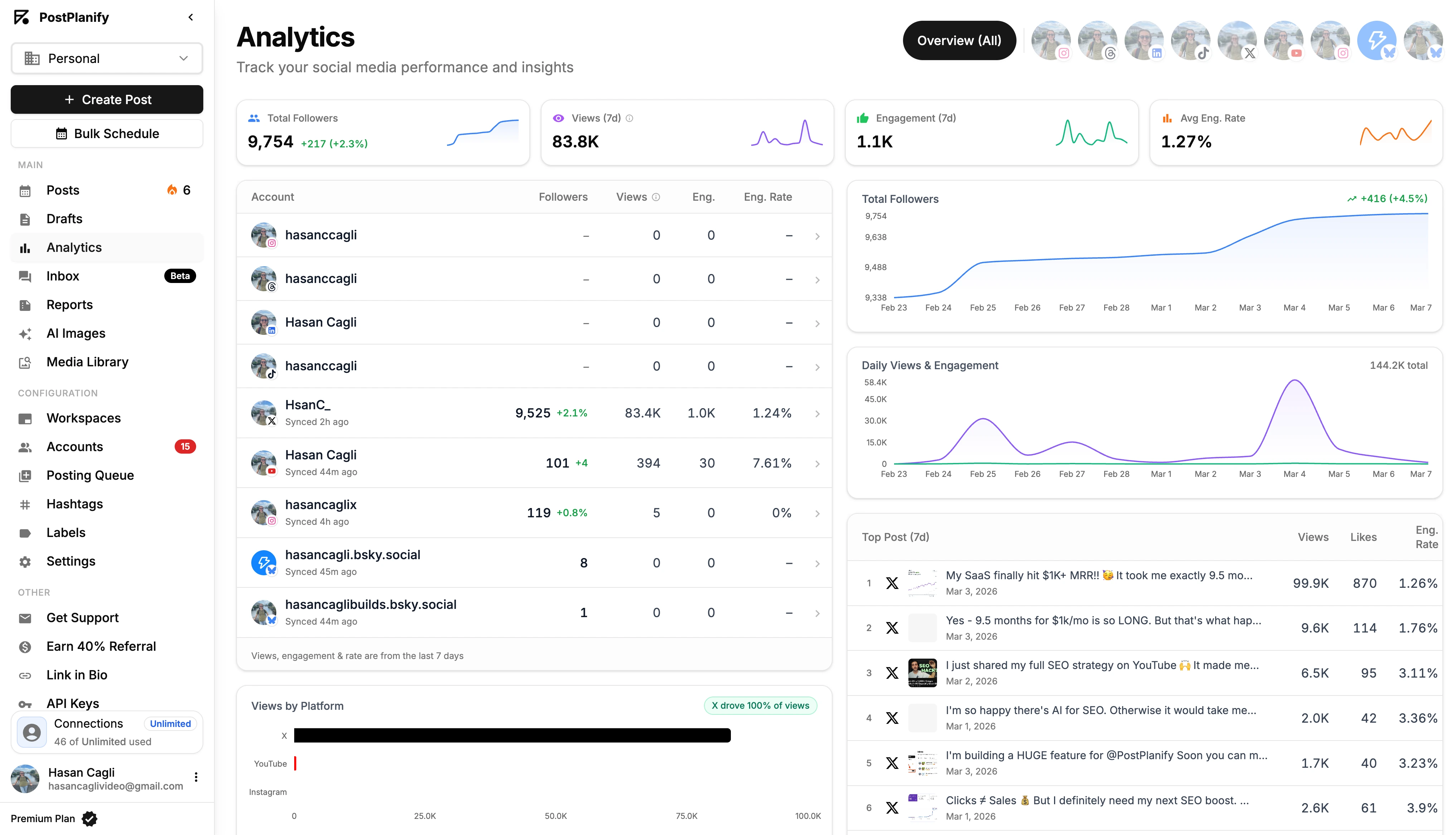
- Real-Time Dashboards: For clients who want more visibility, providing access to a live dashboard can build a huge amount of trust.
Tools like PostPlanify make this easy by letting you share a live client dashboard. They can peek at performance anytime, but you should still frame your official analysis and recommendations in that comprehensive monthly report.
"What are realistic engagement goals for a new client?"
Setting expectations right from the start is critical. Avoid promising specific numbers right out of the gate. The first 90 days are about one thing: discovery and benchmarking.
Your initial goals should be about process and consistency, not outcomes.
Examples of strong 90-day goals:
- "Increase posting frequency by 50% across all platforms to gather solid baseline data."
- "Establish and document a consistent brand voice and visual identity."
- "Implement a 24-hour response time for all customer comments and direct messages."
Once the 90-day discovery phase is over, you’ll have the client’s own historical data. You can then use that baseline, combined with industry benchmarks (like aiming for a 1-3% engagement rate on reach), to set realistic and exciting growth targets for the next quarter.
What is a good engagement rate for client reporting?
It depends on the platform. Industry benchmarks show average engagement rates between 1.4% and 2.8% across platforms. TikTok leads with an average organic engagement rate of 2.5%, reaching up to 7.5% for smaller accounts. Instagram averages around 0.50%, while LinkedIn multi-image posts can hit 6.6%. However, the most important benchmark is your client’s own historical data. A "good" rate is one that shows consistent improvement over their baseline. Always compare against their own past performance first, then layer in industry benchmarks for context.
How do you calculate engagement rate by reach vs. by followers?
These are two different formulas that tell different stories:
- Engagement Rate by Reach = (Total Engagements / Post Reach) * 100. This measures how compelling your content was to people who actually saw it. It’s the more honest metric because algorithms don’t show every post to every follower.
- Engagement Rate by Followers = (Total Engagements / Total Followers) * 100. This measures overall community health over time. It’s useful as a long-term trend indicator but can be misleading for individual post performance.
For client reports, lead with Engagement Rate by Reach for content performance analysis. Use the follower-based rate as a supplementary metric to show long-term community health trends. For a full breakdown of engagement formulas, see our social media engagement rate calculator guide.
What tools can automate client engagement reporting?
You have two options. The manual route involves logging into each platform’s native analytics (Meta Business Suite, TikTok Analytics, LinkedIn Analytics, X Analytics), exporting CSVs, and stitching them together in a spreadsheet. This works but is time-consuming and error-prone. The faster route is using a centralized platform like PostPlanify that pulls data from all connected accounts into one dashboard, generates white-label PDF reports with your agency’s branding, and lets you build custom reports mixing metrics from different platforms. For agencies managing multiple clients, the time savings alone typically justify the investment. See our guide on social media analytics and reporting for a deeper comparison.
How do I benchmark my client’s engagement against competitors?
Competitor benchmarking adds valuable context to your client reports. A 3% engagement rate might look average in isolation, but if direct competitors average 1.5%, it’s a strong result. To benchmark effectively: identify 2-3 direct competitors, track their public engagement metrics (likes, comments, shares) on the same platforms, and calculate their engagement rates using the same formula you use for your client. Keep competitor sections brief in your reports — a simple comparison table is usually enough. The goal is to provide context, not to let competitor data dominate the narrative.
PostPlanifyAll your social media in one simple dashboard
Schedule posts, track analytics, and reply to comments/DMs without switching tabs.
Engagement
+18%
Views
52.8k
Client Engagement Metrics: A Quick Summary
- Focus on the Right Metrics: Ditch vanity metrics like follower count. Focus on Engagement Rate by Reach, Amplification Rate, and Conversation Rate.
- Connect to Business Goals: Tie your social media efforts to bottom-line metrics like Customer Lifetime Value (CLV), Churn Rate, and Net Promoter Score (NPS).
- Use the Right Content for the Right Platform: A Reel on Instagram, a Carousel on LinkedIn, and a short video on TikTok all serve different purposes.
- Tell a Story with Your Reports: Start with an executive summary, visualize your data with charts, and always provide clear next steps.
- Answer Tough Questions with Data: Be transparent about dips in performance and always come prepared with an action plan.
Ready to take control of your client reporting and turn metrics into a story of success? With PostPlanify, you can track all your key performance indicators in one place, generate professional white-label reports, and save hours of manual work. Stop chasing numbers in spreadsheets and start delivering insights that retain clients. Start your free 7-day trial today.
Also read: Best Social Media Analytics Tools | How to Create a Social Media Report | Social Media Analytics and Reporting | Best Social Media Management Tools for Agencies | How to Improve Social Media Engagement | Social Media Best Practices
PostPlanifyAll your social media in one simple dashboard
Schedule posts, track analytics, and reply to comments/DMs without switching tabs.
Engagement
+18%
Views
52.8k
About the Author

Hasan Cagli
Founder of PostPlanify, a content and social media scheduling platform. He focuses on building systems that help businesses, agencies, and teams plan, publish, and manage content and social media more efficiently across platforms.


