
Choosing between Hootsuite or CoSchedule comes down to what kind of tool you actually need. One is built for enterprise social media management; the other is built around editorial calendars and content marketing workflows. In this 2026 comparison, we break down exactly where each platform excels.
Enterprise social management versus editorial marketing calendar — same industry, completely different tools. We compare both on the areas where they do overlap: social scheduling, AI tools, team workflows, and platform support. Here's what matters. More tools to consider? Browse all social media scheduling alternatives.
Hootsuite vs CoSchedule at a Glance
Here's a quick side-by-side overview before we dive deeper:
| Category | Hootsuite | CoSchedule |
|---|---|---|
| Starting Price | $249/mo per user | $19/mo per user (annual) |
| Free Plan | No (30-day trial) | Yes (1 user, 1 profile) |
| Platforms Supported | 8+ | 11 |
| Unlimited Scheduling | Yes (all plans) | No (15 posts on Free) |
| AI Tools | OwlyWriter AI (captions + images) | Hire Mia AI + 1,600 templates |
| AI Image Generation | No | No |
| Bulk Scheduling | Up to 350 posts (Advanced) | Yes (Social Calendar+) |
| Team Collaboration | Advanced plan ($499/mo/user) | Agency Calendar ($59/mo/user) |
| Approval Workflows | Advanced plan only | Agency Calendar+ |
| Social Inbox | Full unified inbox | Facebook & Instagram only |
| Social Listening | Yes (Advanced+) | No |
| Analytics | Standard to Custom reports | Social analytics & reports |
| G2 Rating | 4.3/5 (6,615 reviews) | 4.3/5 (152 reviews) |
| Trustpilot Rating | 1.8/5 (511 reviews) | 2.8/5 (3 reviews) |
| Best For | Enterprises, large agencies | Content marketers, editorial teams |
Hootsuite Overview

Hootsuite is an enterprise-grade social media management platform, founded in 2008. It offers a broad feature set including scheduling, a unified social inbox, analytics, social listening, team collaboration, and paid ad management.
Hootsuite supports 8+ platforms: Instagram, Facebook, LinkedIn, X/Twitter, TikTok, YouTube, Pinterest, and Threads.
Key features:
- Unified inbox for messages, comments, and DMs
- OwlyWriter AI for caption and image generation
- Social listening and brand monitoring
- Advanced analytics with custom reports
- Team approval workflows and DM assignment
- Employee advocacy tools (Amplify)
- Competitor benchmarking
Hootsuite is positioned for larger teams, agencies, and enterprise organizations that need social listening, advanced reporting, and structured team workflows. Read real user reviews of Hootsuite from G2 and Trustpilot.
CoSchedule Overview
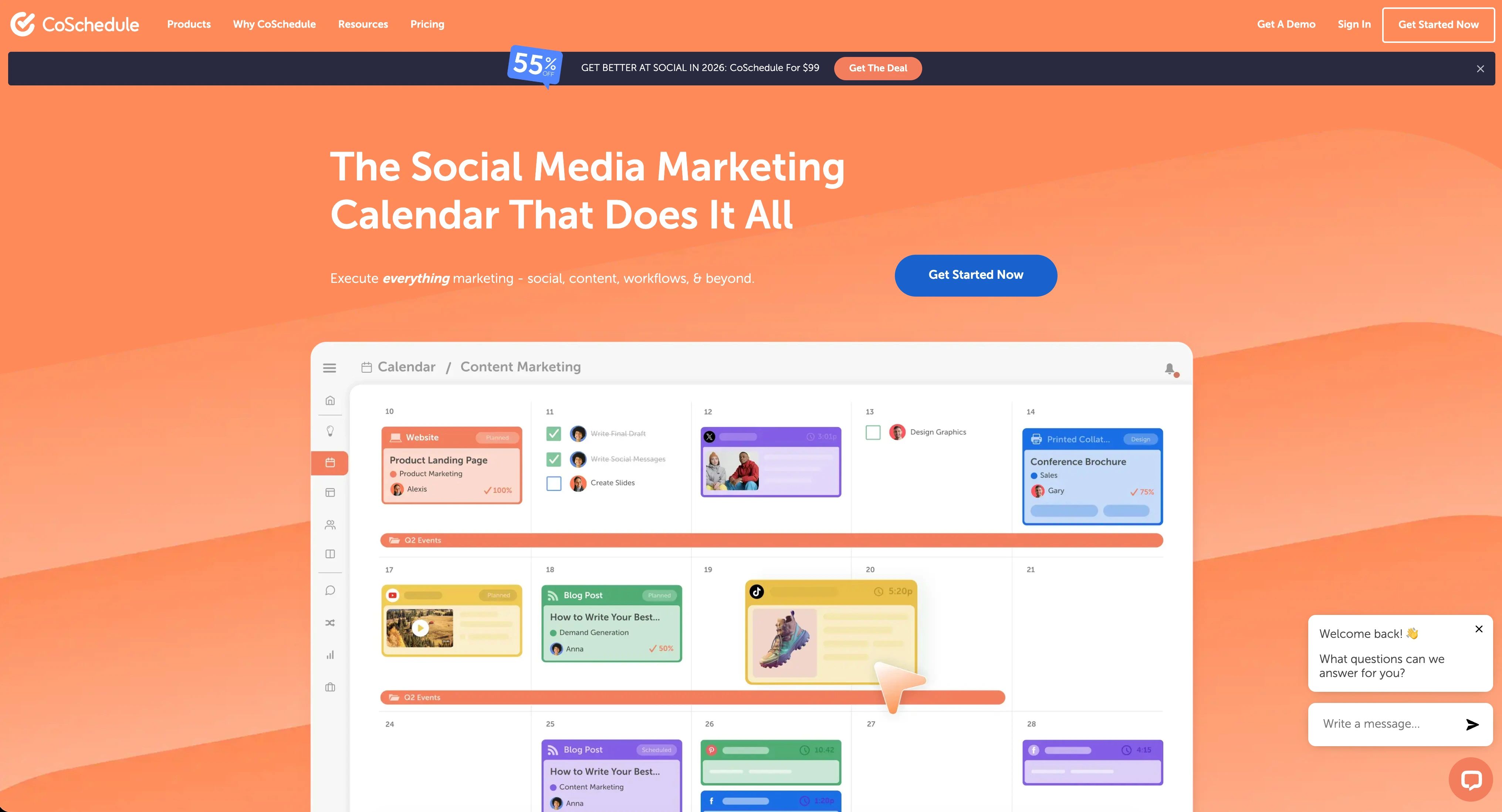
CoSchedule is a marketing suite and social media management platform built around editorial calendars and content planning. It combines marketing calendars, social scheduling, project management, and team collaboration to coordinate publishing workflows.
CoSchedule supports 11 platforms through its various plans, though X/Twitter is only available on Agency Calendar and higher tiers.
Key features:
- Drag-and-drop editorial calendar
- ReQueue for automated social recycling
- WordPress integration for blog publishing
- Hire Mia AI assistant with 1,600+ project templates
- Bulk social media scheduling
- White label features and client calendars (Agency)
- Approval workflows (Agency+)
- Social inbox (Facebook & Instagram)
CoSchedule is popular among content marketers, bloggers, and editorial teams who want to plan campaigns, coordinate content, and manage publishing — not just social media posts. If you rely heavily on content planning, our guide to building a social media content calendar covers best practices. For a deeper look, see what users say about CoSchedule on G2 and Trustpilot.
Pricing Comparison
Pricing is a significant differentiator. Hootsuite charges enterprise-level rates for social management, while CoSchedule prices itself as an editorial calendar tool with social features attached.
Hootsuite Pricing
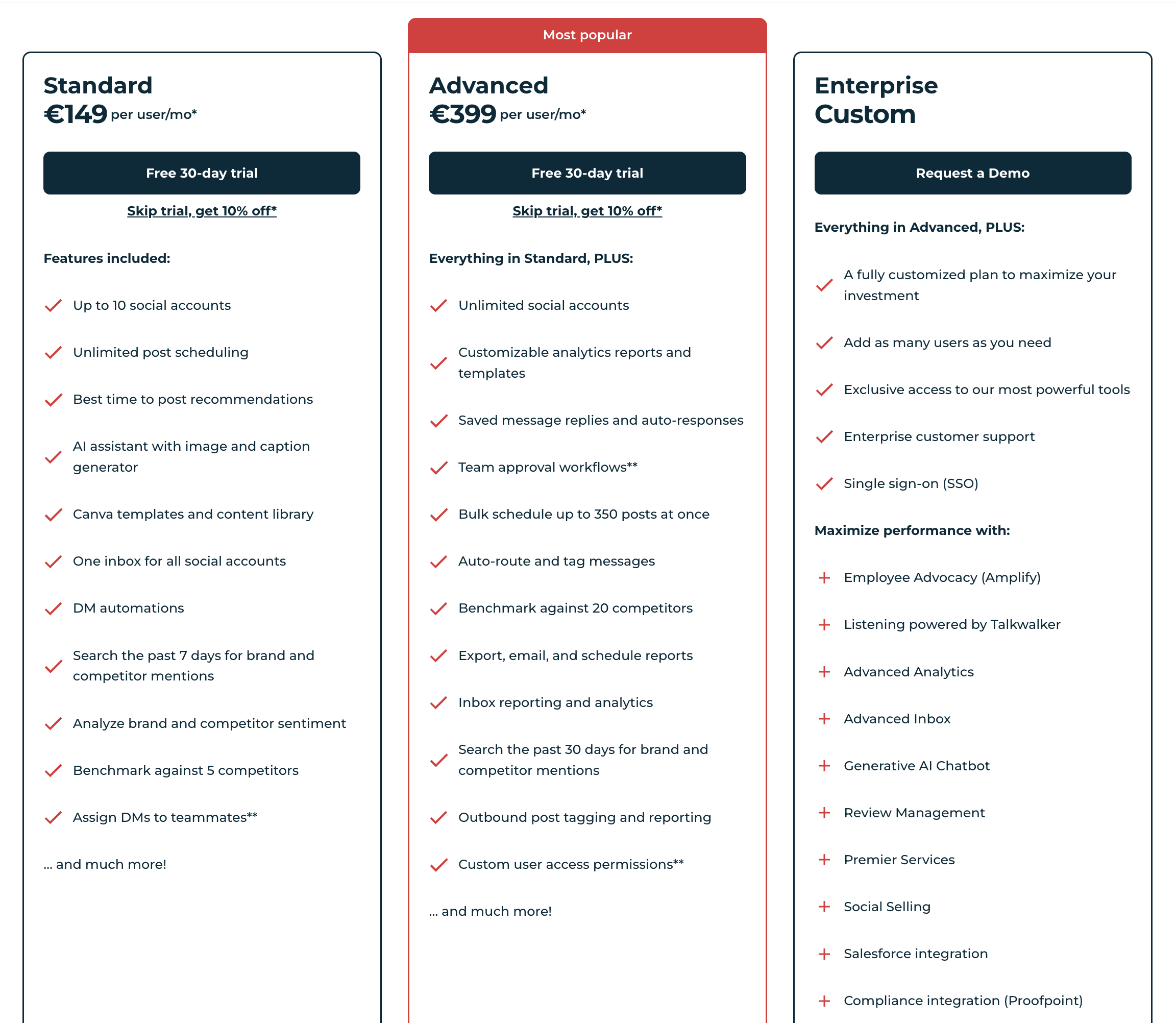
Hootsuite uses per-user pricing with high base costs. See the full Hootsuite pricing breakdown for details.
| Plan | Price | Accounts | Key Features |
|---|---|---|---|
| Standard | $249/mo per user | 10 | Scheduling, basic analytics, 7-day monitoring |
| Advanced | $499/mo per user | 50 | Custom reports, approval workflows, 30-day monitoring, bulk scheduling |
| Enterprise | Custom | Custom | SSO, unlimited users, dedicated support |
Example costs:
- 1 user on Standard = $249/month
- 3 users on Advanced = $1,497/month
- 5 users on Standard = $1,245/month
CoSchedule Pricing
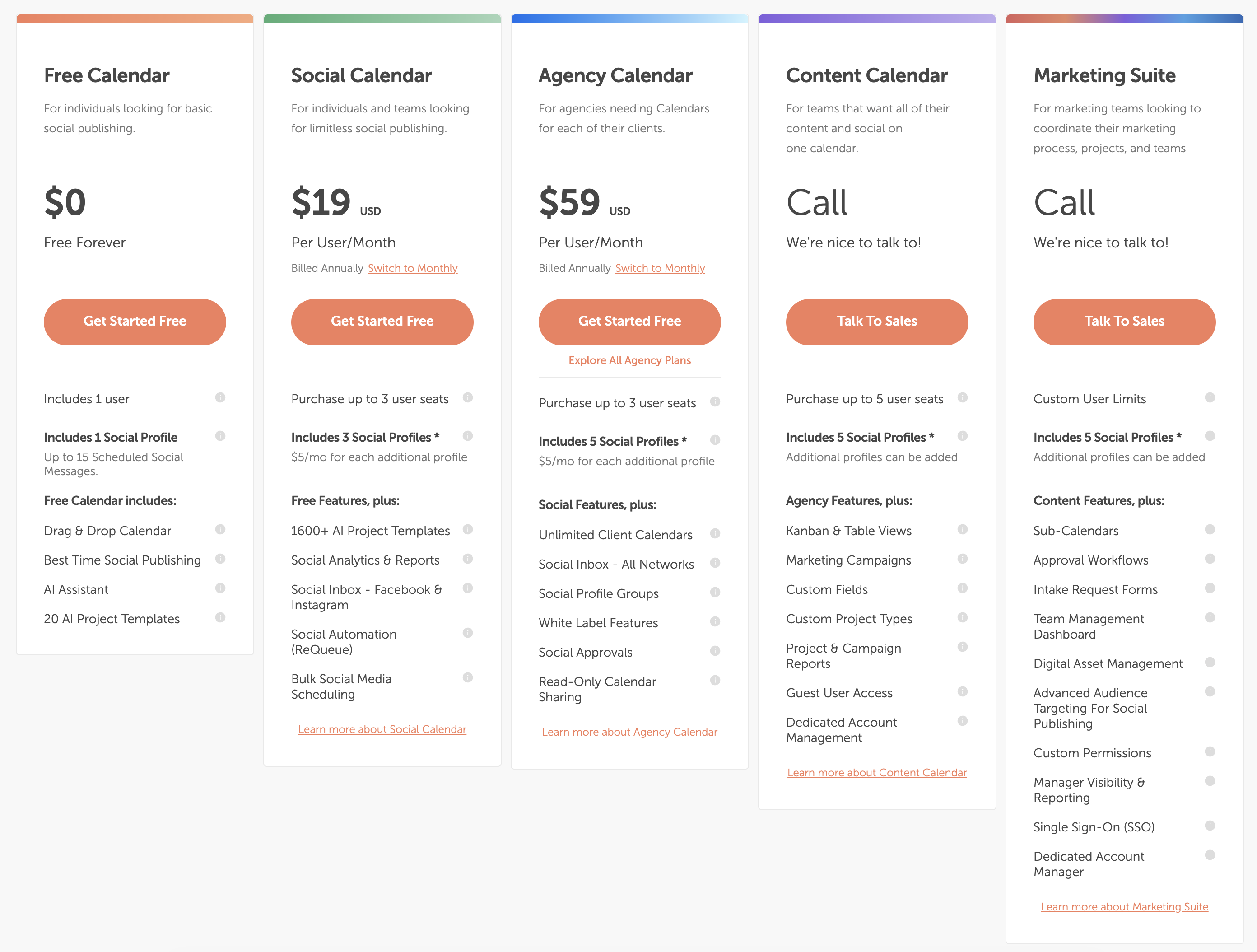
CoSchedule uses per-user pricing with lower base costs but strict profile limits. See the full CoSchedule pricing breakdown for details.
| Plan | Price | Profiles | Key Features |
|---|---|---|---|
| Free Calendar | $0/mo | 1 (15 posts) | Drag & drop calendar, basic AI, 1 user |
| Social Calendar | $19/mo per user | 3 (+$5/mo each) | ReQueue, bulk scheduling, social analytics, social inbox |
| Agency Calendar | $59/mo per user | 5 (+$5/mo each) | White label, client calendars, social approvals, X/Twitter |
| Marketing Suite | Custom | Custom | Approval workflows, SSO, digital asset management |
Example costs:
- 1 user on Social Calendar = $19/month
- 3 users on Agency Calendar = $177/month
- 3 users on Social Calendar + 2 extra profiles = $67/month
Important: CoSchedule's Social Calendar plan does NOT include X/Twitter. You must upgrade to Agency Calendar ($59/user/mo) or higher for X/Twitter support. Additional profiles cost $5/month each on all plans.
Price Verdict
CoSchedule is significantly cheaper at the entry level. A solo user pays $19/month on CoSchedule vs $249/month on Hootsuite. However, CoSchedule's costs climb quickly when you add users and profiles — and the lack of X/Twitter on the base plan forces many users to the $59/user/month Agency tier.
For teams that need X/Twitter and multiple profiles, CoSchedule's effective price narrows the gap with Hootsuite. But for pure social media management at enterprise scale, Hootsuite's pricing reflects the depth of its inbox, listening, and analytics features.
 PostPlanify
Manage All Your Social Accounts Without the Chaos
Schedule posts, track performance, and collaborate with your team.


Feature Comparison
Scheduling & Publishing
Both tools offer post scheduling, but with different strengths and limitations:
| Feature | Hootsuite | CoSchedule |
|---|---|---|
| Unlimited scheduling | Yes (all plans) | No (15 posts on Free, unlimited on paid) |
| Bulk scheduling | Up to 350 posts (Advanced) | Yes (Social Calendar+) |
| Best time to post | Yes | Yes |
| First comment scheduling | No | No |
| Content calendar | Yes | Yes (editorial-focused) |
| Post queue management | Yes | Yes (ReQueue auto-recycling) |
| Draft saving | Yes | Yes |
| WordPress integration | No | Yes |
Winner: Depends on your workflow. Hootsuite has more powerful bulk scheduling and unlimited posts on all plans. CoSchedule wins for content marketers with its WordPress integration and ReQueue automated recycling, which keeps evergreen content circulating without manual effort. For tips on optimizing your publishing cadence, see our guide on how to schedule social media posts.
AI Tools
| Feature | Hootsuite | CoSchedule |
|---|---|---|
| AI caption generation | Yes (OwlyWriter AI) | Yes (Hire Mia AI) |
| AI image generation | No | No |
| AI post ideas | Yes | Yes |
| AI project templates | No | Yes (1,600+ templates) |
| AI content rewriting | Yes | Yes |
Winner: Tie. Both offer AI-powered caption generation and content assistance. CoSchedule has a larger template library through Hire Mia. Neither offers AI image generation. Explore more options in our roundup of AI social media tools.
Analytics & Reporting
| Feature | Hootsuite | CoSchedule |
|---|---|---|
| Basic analytics | All plans | Social Calendar+ |
| Advanced analytics | Standard+ | No |
| Custom reports | Advanced only | No |
| Competitor benchmarking | Yes (5-20 competitors) | No |
| Export reports | Advanced only | No |
| Campaign reports | No | Content Calendar+ |
Winner: Hootsuite — by a wide margin for social media analytics. Hootsuite offers custom reports, competitor benchmarking, and exportable analytics. CoSchedule provides basic social analytics but focuses its reporting on marketing campaign performance rather than social media metrics. For a broader look at reporting options, check out our guide to social media analytics tools.
Team Collaboration
| Feature | Hootsuite | CoSchedule |
|---|---|---|
| Multiple users | All paid plans | Social Calendar (up to 3) |
| Approval workflows | Advanced plan | Agency Calendar+ |
| User permissions | Advanced plan | Marketing Suite |
| DM assignment | Yes | No |
| Saved replies | Advanced plan | No |
| Client calendars | No | Yes (Agency Calendar) |
| White label | No | Yes (Agency Calendar) |
Winner: Depends on use case. Hootsuite wins for social-focused team features like DM assignment, saved replies, and inbox routing. CoSchedule wins for agency workflows with white label features and separate client calendars — useful if you manage multiple brands as an agency. Learn more about streamlining team reviews in our social media approval workflow guide.
Social Inbox & Engagement
| Feature | Hootsuite | CoSchedule |
|---|---|---|
| Unified inbox | Full unified inbox | Facebook & Instagram only |
| Social listening | Yes (Advanced+) | No |
| Sentiment analysis | Yes | No |
| Brand monitoring | Yes (7-30 day lookback) | No |
| Auto-responses | Advanced plan | No |
Winner: Hootsuite. This is where the tools diverge most sharply. Hootsuite is built around social engagement with a full unified inbox, social listening via Talkwalker, and sentiment analysis. CoSchedule's social inbox is limited to Facebook and Instagram on the Social Calendar plan and does not offer listening or monitoring.
Platform Support
| Platform | Hootsuite | CoSchedule |
|---|---|---|
| Yes | Yes | |
| Yes | Yes | |
| X/Twitter | Yes | Agency Calendar+ only |
| Yes | Yes | |
| TikTok | Yes | Yes |
| YouTube | Yes | Yes |
| Yes | Yes | |
| Threads | Yes | Yes |
| Bluesky | No | No |
| Mastodon | No | No |
| Google Business | No | Yes |
Winner: Hootsuite — because X/Twitter is included on all plans. CoSchedule claims 11 platform connections but locks X/Twitter behind the $59/user/month Agency Calendar plan, which is a deal-breaker for many social media managers. If you need X/Twitter on a budget, CoSchedule's base plan does not deliver.
What Real Users Say
Hootsuite Reviews
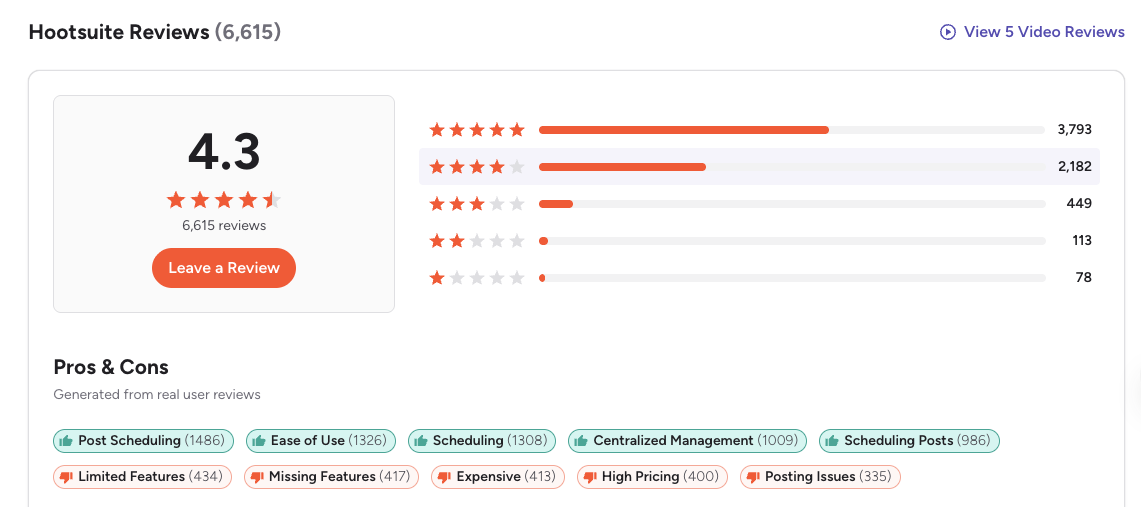
G2: 4.3/5 (6,615 reviews) — Users praise Hootsuite's centralized management and scheduling tools. Common complaints include expensive pricing, missing features on lower plans, posting issues, and slow customer support.
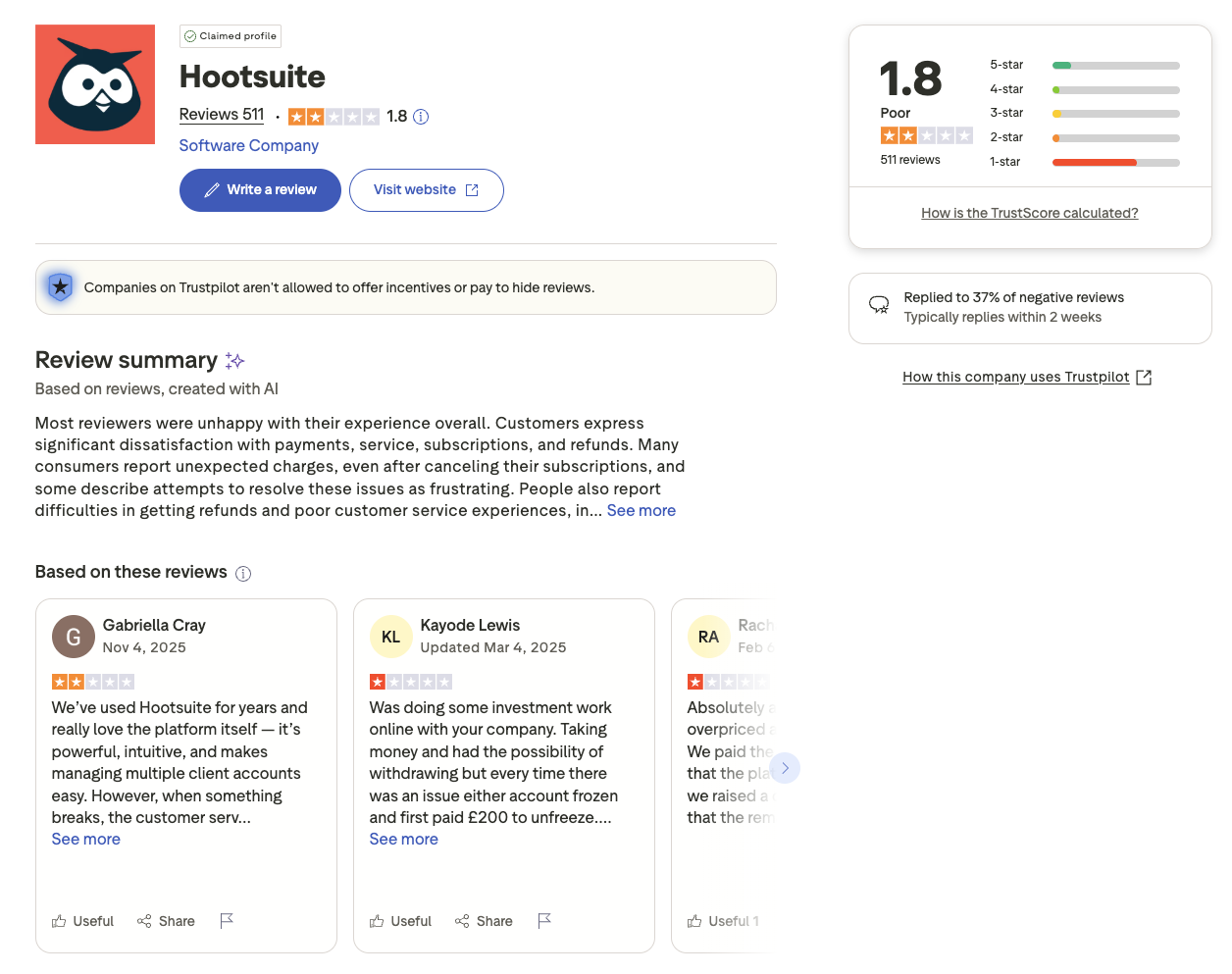
Trustpilot: 1.8/5 (511 reviews) — Significantly lower rating with widespread complaints about billing issues, unexpected charges, difficult cancellation processes, and poor customer support.
CoSchedule Reviews
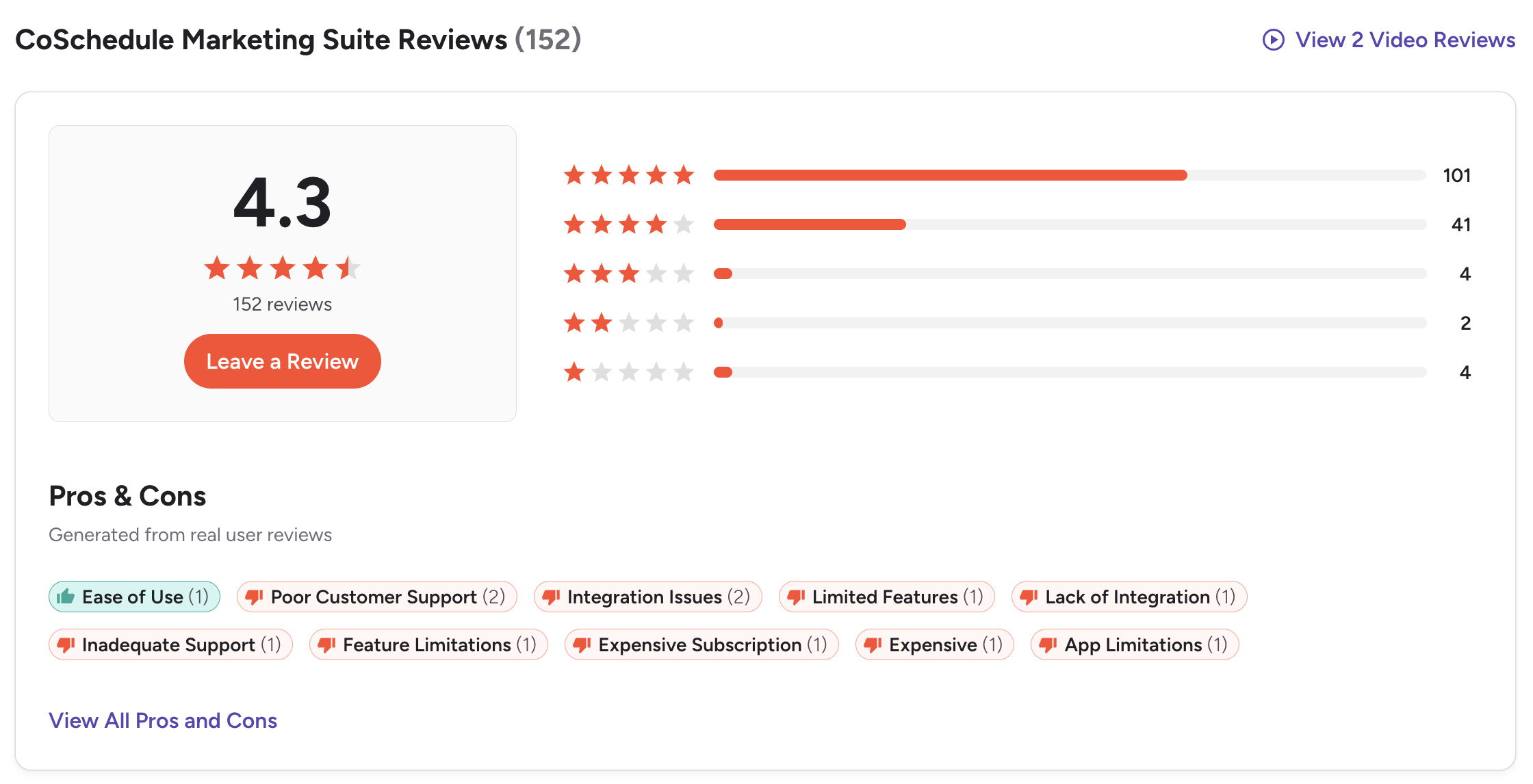
G2: 4.3/5 (152 reviews) — Users praise CoSchedule's marketing calendar and ease of use for organizing campaigns. Common complaints include outdated platform features, terrible customer support, subscription cancellation difficulties, and limited social media functionality.
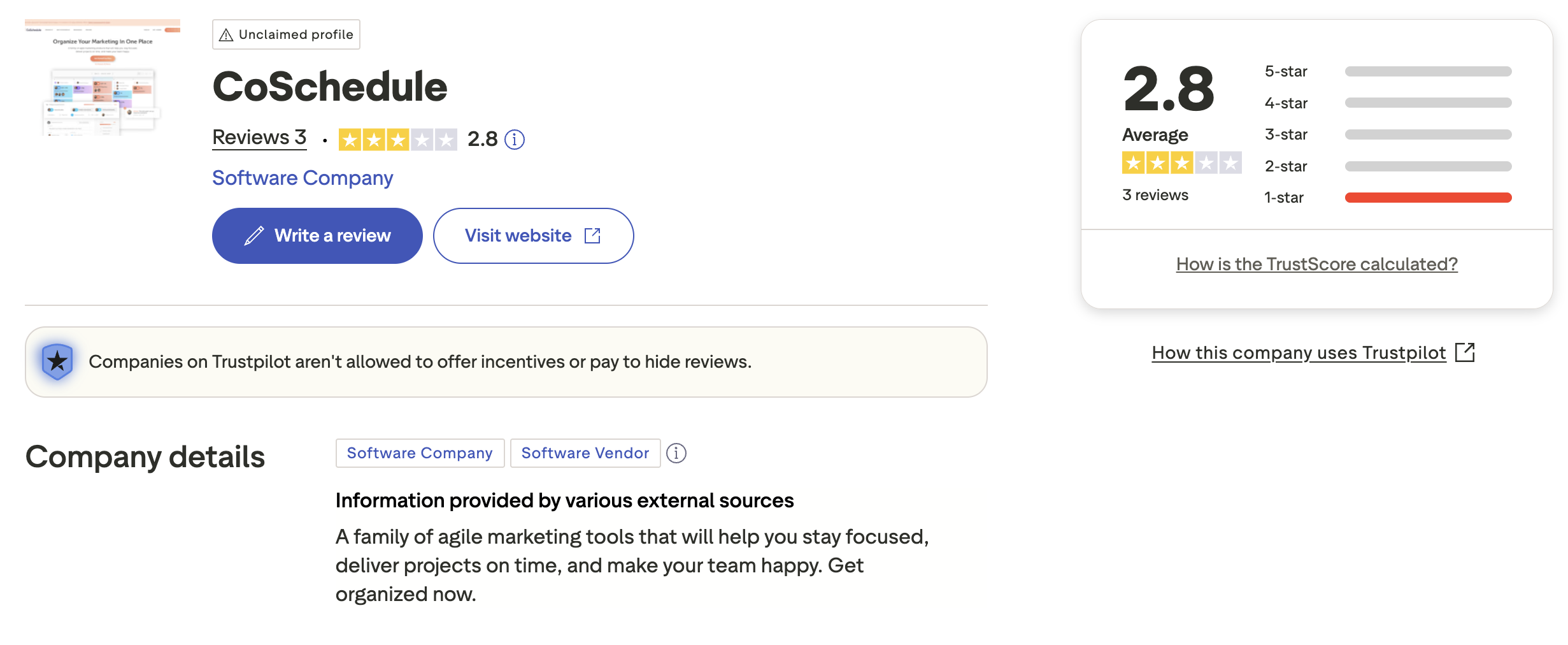
Trustpilot: 2.8/5 (3 reviews) — Very limited sample size with an unclaimed profile. The few reviews available show a mix of positive and negative feedback, but the small number makes it difficult to draw meaningful conclusions.
Review Verdict
Both tools share identical G2 ratings (4.3/5), but Hootsuite's review base is far larger (6,615 vs 152), giving it more statistical reliability. On Trustpilot, both score poorly — Hootsuite at 1.8/5 and CoSchedule at 2.8/5 — though CoSchedule's score is based on just 3 reviews. Both platforms receive complaints about customer support and cancellation difficulties, which is a concern for either choice. Review counts and ratings are as of February 2026 and are updated periodically.
PostPlanifyManage All Your Social Accounts Without the Chaos
Schedule posts, track performance, and collaborate with your team.
Who Should Use Hootsuite?
If Hootsuite is on your shortlist, you may also want to see our top alternatives to Hootsuite before committing. Also compare Hootsuite with Buffer, Sprout Social, Agorapulse, SocialBee, Sendible, and Later. For enterprise social media management in 2026, Hootsuite remains a top contender if budget is not the primary concern. Our guide to social media management for agencies can also help you evaluate whether Hootsuite fits your team structure.
Hootsuite is the better choice if you:
- Are an enterprise or large agency with dedicated social media teams
- Need a unified social inbox with DM assignment and auto-responses
- Require social listening and brand monitoring for reputation management
- Want competitor benchmarking and custom analytics reports
- Have the budget for $249-$499+/month per user
- Need Salesforce integration, SSO, or compliance tools
Who Should Use CoSchedule?
If CoSchedule interests you, explore our top alternatives to CoSchedule to see all your options. Also compare CoSchedule with Buffer, Later, SocialBee, Agorapulse, and Sprout Social. As a content marketing calendar tool, CoSchedule suits teams that need editorial planning alongside social scheduling. If you are building out a content calendar workflow, our social media content calendar guide covers proven strategies.
CoSchedule is the better choice if you:
- Are a content marketer or editorial team that publishes blogs and social posts together
- Need a drag-and-drop editorial calendar to plan campaigns visually
- Use WordPress and want direct blog-to-social publishing integration
- Want ReQueue to automatically recycle evergreen content
- Need white label and client calendars for agency work
- Prefer a lower starting price ($19/user/month) and can work without X/Twitter on the base plan
Final Verdict
Hootsuite is the better choice if you need enterprise-grade social media management with a unified inbox, social listening, competitor benchmarking, and advanced analytics for large teams.
CoSchedule is the better choice if you are a content marketer or editorial team that needs a drag-and-drop calendar, WordPress integration, and automated content recycling at a lower price point.
For most small to mid-size teams, neither tool is a perfect fit — Hootsuite is overpriced for what most teams use, and CoSchedule bundles editorial features many social-only teams do not need. If neither tool fully meets your needs, PostPlanify offers AI-powered scheduling, image generation, and team workflows starting at $29/month flat with no per-user fees — see how it compares.
A Social-First Tool (Not a Suite You'll Never Fully Use)
Hootsuite bundles social listening, advocacy, and compliance tools you probably don't need at $249+/user. CoSchedule bundles project management, Kanban boards, and content calendars that go way beyond social. If what you actually need is excellent social scheduling with AI tools and team features, PostPlanify focuses on exactly that — from $29/month flat.

| Feature | Hootsuite | CoSchedule | PostPlanify |
|---|---|---|---|
| Starting Price | $249/mo/user | $19/mo/user | $29/mo flat |
| Unlimited Accounts | $499/mo/user | $5/mo per extra profile | $99/mo (Premium) |
| AI Caption Generation | Yes | Yes | Yes |
| AI Image Generation | No | No | Yes |
| Canva Integration | Yes | No | Yes |
| Google Drive Import | No | No | Yes |
| Approval Workflows | $499/mo/user | $59/mo/user | $99/mo (Premium) |
| X/Twitter Included | Yes (all plans) | Agency plan only ($59/mo/user) | Yes (all plans) |
| Social Inbox | Yes (full) | Limited (FB & IG only) | Yes |
| Platforms Supported | 8+ | 11 | 10 |
| Unlimited Scheduling | All plans | Paid plans | All paid plans |
PostPlanify starts at $29/month for 5 accounts with 200 posts/mo and AI tools included. Analytics are included from the Growth plan ($49/month). The Premium plan at $99/month adds unlimited accounts, unlimited team members, and approval workflows — features that cost $499+/month on Hootsuite or require CoSchedule's $59/user/month Agency plan with per-profile add-ons. See all plans on the PostPlanify pricing page.
Cut the bloat — try PostPlanify free

Related Guides
- Best Time to Post on Social Media
- How to Measure Social Media ROI
- How to Create a Social Media Content Calendar
- Best Hootsuite Alternatives
- Best CoSchedule Alternatives
FAQ
Is CoSchedule cheaper than Hootsuite?
Yes. CoSchedule starts at $19/month per user with a free plan available. Hootsuite starts at $249/month per user with no free plan. However, CoSchedule's costs increase with per-user and per-profile pricing, and X/Twitter requires the $59/user/month Agency plan — so the gap narrows for teams needing full platform support.
Does CoSchedule have a free plan?
Yes. CoSchedule offers a Free Calendar plan with 1 user, 1 social profile, and up to 15 scheduled messages per month. It includes basic drag-and-drop calendar functionality and limited AI features through Hire Mia. Hootsuite does not offer a free plan — only a 30-day free trial that requires a credit card. If you need a permanently free option, CoSchedule's Free Calendar is one of the few available among major social media management platforms, though the 15-post limit is restrictive for active accounts.
Which has better analytics — Hootsuite or CoSchedule?
Hootsuite has significantly more advanced social media analytics with custom reports, competitor benchmarking (5-20 competitors), and scheduled report delivery on the Advanced plan. CoSchedule provides basic social analytics and focuses more on campaign-level reporting for marketing teams.
Can I use CoSchedule just for social media scheduling?
Yes, but CoSchedule is designed as a marketing suite first and a social scheduler second. Its core strengths — editorial calendars, WordPress integration, and campaign management — go well beyond social scheduling. If you only need social media scheduling without editorial calendar and campaign planning features, you may be paying for functionality you will not use. The Free Calendar plan limits you to 15 posts, and the Social Calendar plan at $19/user/month still bundles marketing calendar features. A dedicated social media scheduler built specifically for scheduling may be a better and more affordable fit.
Does CoSchedule support X/Twitter?
Not on the base plan. X/Twitter profiles are only available on CoSchedule's Agency Calendar ($59/user/month) and higher tiers. This is a major limitation compared to Hootsuite, which includes X/Twitter on all plans.
Which is better for agencies — Hootsuite or CoSchedule?
It depends on the agency type. CoSchedule's Agency Calendar offers white label features and separate client calendars, which are useful for content marketing agencies. Hootsuite offers deeper social listening, unified inbox, and analytics — better for agencies focused on social media management and community engagement. Both are expensive for agencies at scale.
Which is easier to use — Hootsuite or CoSchedule?
CoSchedule is generally considered easier to set up for content planning and editorial workflows. Hootsuite has a steeper learning curve due to its broader enterprise feature set, including social listening, inbox management, and advanced analytics. Neither is considered particularly simple compared to newer, more focused scheduling tools.
Can I switch from Hootsuite to CoSchedule?
Yes, but keep in mind these are fundamentally different tools. Hootsuite is built for social media management (inbox, listening, engagement). CoSchedule is built for content marketing workflows (editorial calendar, WordPress, campaigns). Switching makes sense if your primary need shifted from social engagement to content planning — not the other way around. You will need to reconnect all social accounts, recreate any scheduled content, and rebuild your workflows from scratch since there is no direct migration path between the two platforms.
Is Hootsuite worth it in 2026?
Hootsuite remains a powerful platform, but its value depends on whether you actually use its enterprise features. If your team relies on social listening, competitor benchmarking, unified inbox management, and advanced custom reports, Hootsuite delivers capabilities that few competitors match. However, if you primarily need scheduling and basic analytics, paying $249/month or more per user is difficult to justify when tools like PostPlanify, Buffer, or Sendible offer comparable scheduling at a fraction of the cost. Evaluate whether you are paying for features your team actively uses before committing.
What is the best alternative to CoSchedule?
The best alternative depends on what you use CoSchedule for. If you need an editorial calendar with WordPress integration, few tools replicate that exact workflow. For pure social media scheduling, PostPlanify offers AI-powered scheduling, image generation, and team collaboration starting at $29/month flat. Buffer is a simpler option for individuals, while SocialBee offers category-based scheduling and content recycling similar to CoSchedule's ReQueue. For a complete list, see our best social media management tools roundup.
Does CoSchedule offer a free trial?
Yes. CoSchedule offers two ways to try the platform: a permanently free plan (Free Calendar) and free trials on paid plans. The Free Calendar plan gives you 1 user, 1 social profile, and up to 15 scheduled posts per month at no cost, indefinitely. For the paid Social Calendar and Agency Calendar plans, CoSchedule offers a 14-day free trial so you can test premium features like ReQueue, bulk scheduling, and team collaboration before committing. No credit card is required to start the free plan, making it easy to evaluate whether CoSchedule fits your workflow.







