
Choosing between Later and CoSchedule means deciding between two very different approaches to social media management. Later is a visual-first Instagram planner built for creators, while CoSchedule is an editorial calendar designed for content marketers and blog-driven teams.
A visual Instagram planner versus an editorial marketing calendar — they couldn't be more different. But if you're choosing between them, you likely need a mix of visual content planning and scheduling structure. We compare both to help you find the right fit. More to explore? Browse all social media scheduling alternatives.
Later vs CoSchedule at a Glance
Here's a quick side-by-side overview before we dive deeper:
| Category | Later | CoSchedule |
|---|---|---|
| Starting Price | $25/mo (Starter) | Free / $19/user/mo (Social Calendar) |
| Free Plan | Limited free plan | Yes (Free Calendar) |
| Platforms Supported | 8 (visual-first) | 11 |
| Unlimited Scheduling | Scale plan only | No (message limits per plan) |
| AI Tools | AI content tools (credit-based) | Hire Mia AI + 1,600 templates |
| AI Image Generation | No | No |
| Bulk Scheduling | No | Yes (Social Calendar+) |
| Team Collaboration | Growth plan ($50/mo) | Social Calendar ($19/user/mo) |
| Approval Workflows | Growth plan+ | Agency Calendar ($59/user/mo) |
| Social Inbox | Growth plan+ | Social Calendar+ (Facebook & Instagram) |
| WordPress Integration | No | Yes (native) |
| Analytics | Basic to Custom (plan-dependent) | Social analytics & reports |
| G2 Rating | 4.5/5 (347 reviews) | 4.3/5 (152 reviews) |
| Trustpilot Rating | 1.3/5 (329 reviews) | 2.8/5 (3 reviews) |
| Best For | Visual creators, Instagram-focused brands | Content marketers, bloggers, WordPress teams |
Later Overview

Later is a visual-first social media management platform originally built for Instagram. It focuses on a drag-and-drop content calendar, media library, and visual grid planner that lets creators see exactly how their Instagram feed will look before posting.
Later supports 8 platforms: Instagram, Facebook, LinkedIn, X/Twitter, TikTok, Pinterest, YouTube, and Threads.
Key features:
- Visual planner and drag-and-drop content calendar
- Media library with image management
- Link in Bio landing pages
- AI content tools with monthly credit system
- User-generated content (UGC) collection
- Social sets for organizing profiles
- Smart Scheduling with Future Trends
Later is especially popular among visual creators, Instagram-focused brands, and influencers who prioritize aesthetic feed planning and Link in Bio functionality. For a deeper look, see what users say about Later on G2 and Trustpilot.
CoSchedule Overview
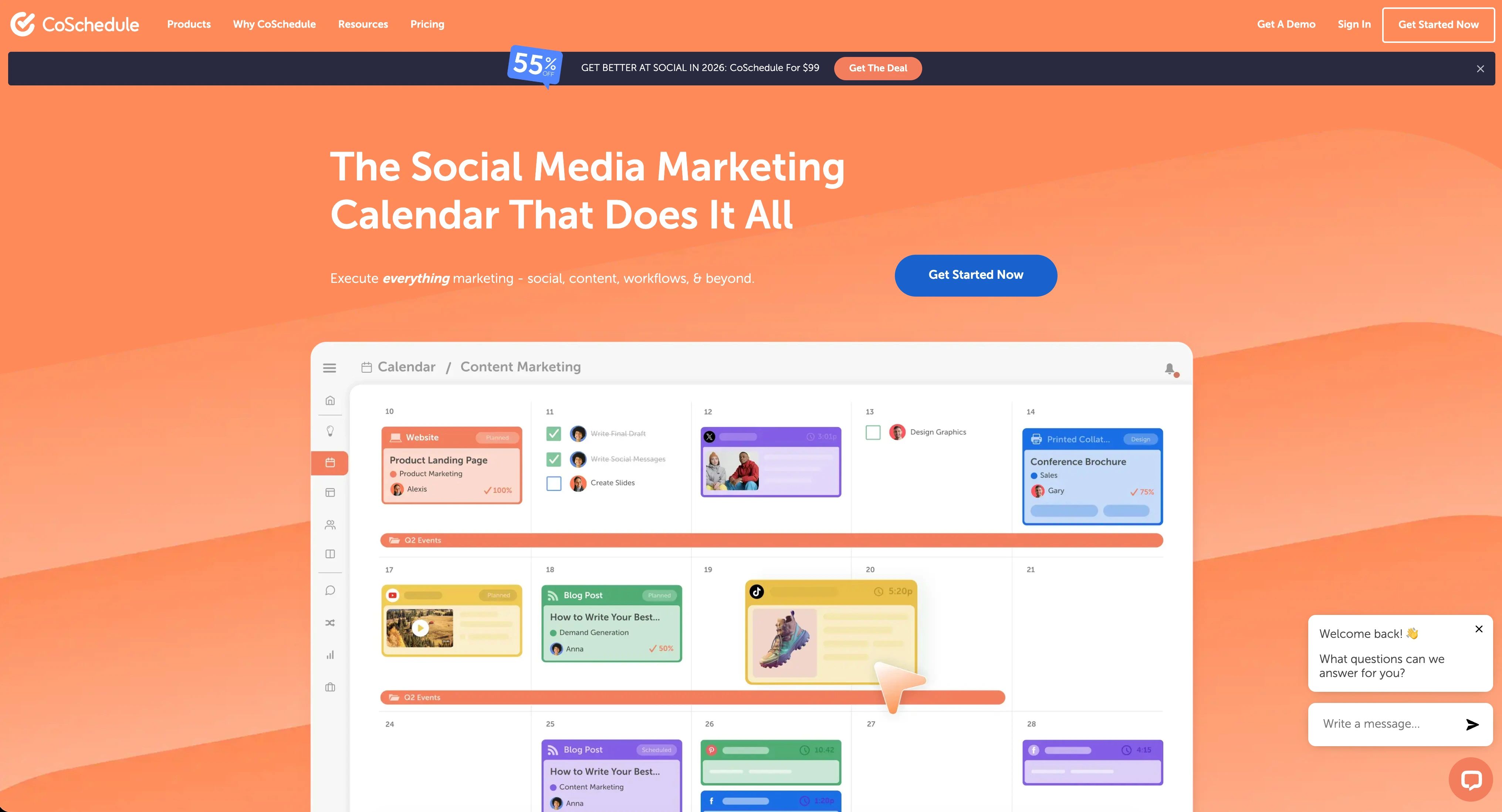
CoSchedule is a marketing suite and editorial calendar platform designed for content marketing teams. It combines social media scheduling with project management, campaign planning, and WordPress blog integration — making it a hub for teams that publish content across blogs and social channels.
CoSchedule supports 11 platforms including major social networks and integrates natively with WordPress for blog content coordination.
Key features:
- Marketing calendar and editorial planning
- ReQueue automated social recycling
- WordPress and blog integration
- Hire Mia AI assistant with 1,600+ project templates
- Campaign planning and project management
- White label features (Agency Calendar)
- Approval workflows and team collaboration
- Bulk social media scheduling
CoSchedule is positioned for content marketers, bloggers, and marketing teams who need to coordinate blog posts, email campaigns, and social media from a single editorial calendar. Read real user reviews of CoSchedule from G2 and Trustpilot.
Pricing Comparison
Pricing is where Later and CoSchedule differ substantially. Later charges per plan with social set limits, while CoSchedule uses per-user pricing with profile caps.
Later Pricing
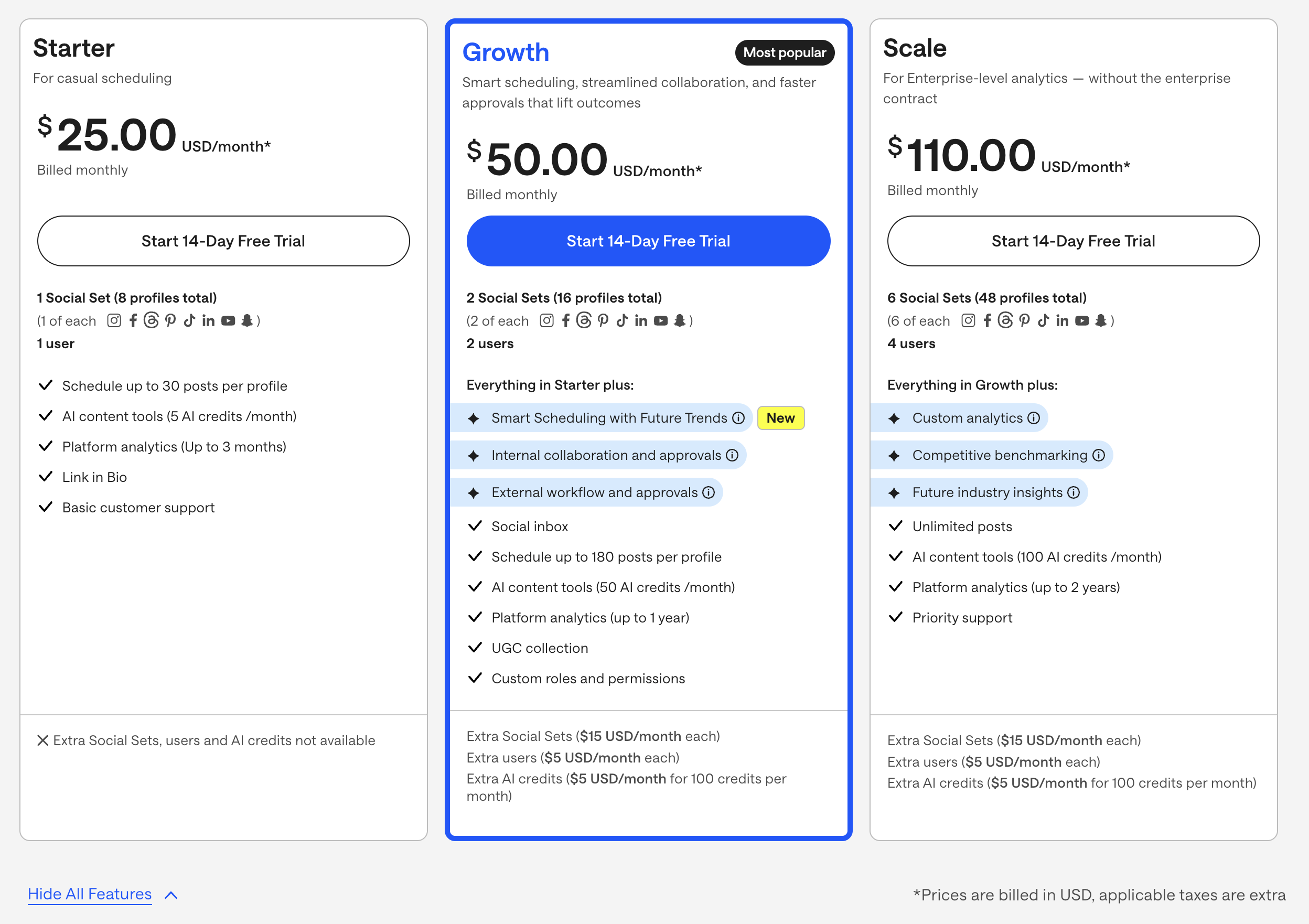
Later uses social set-based pricing. Each plan includes a set number of social sets (bundles of profiles across platforms), with post limits on lower tiers. We break this down further in our Later pricing guide.
| Plan | Price | Social Sets | Users | Key Features |
|---|---|---|---|---|
| Starter | $25/mo | 1 (8 profiles) | 1 | 20 posts/profile, 5 AI credits, 3-month analytics |
| Growth | $50/mo | 2 (16 profiles) | 2 | 180 posts/profile, 50 AI credits, social inbox, approvals |
| Scale | $110/mo | 6 (48 profiles) | 4 | Unlimited posts, 100 AI credits, custom analytics, benchmarking |
Example costs:
- Solo creator on Starter = $25/month
- Small team on Growth + 1 extra social set = $65/month
- Agency on Scale + 2 extra social sets = $140/month
CoSchedule Pricing
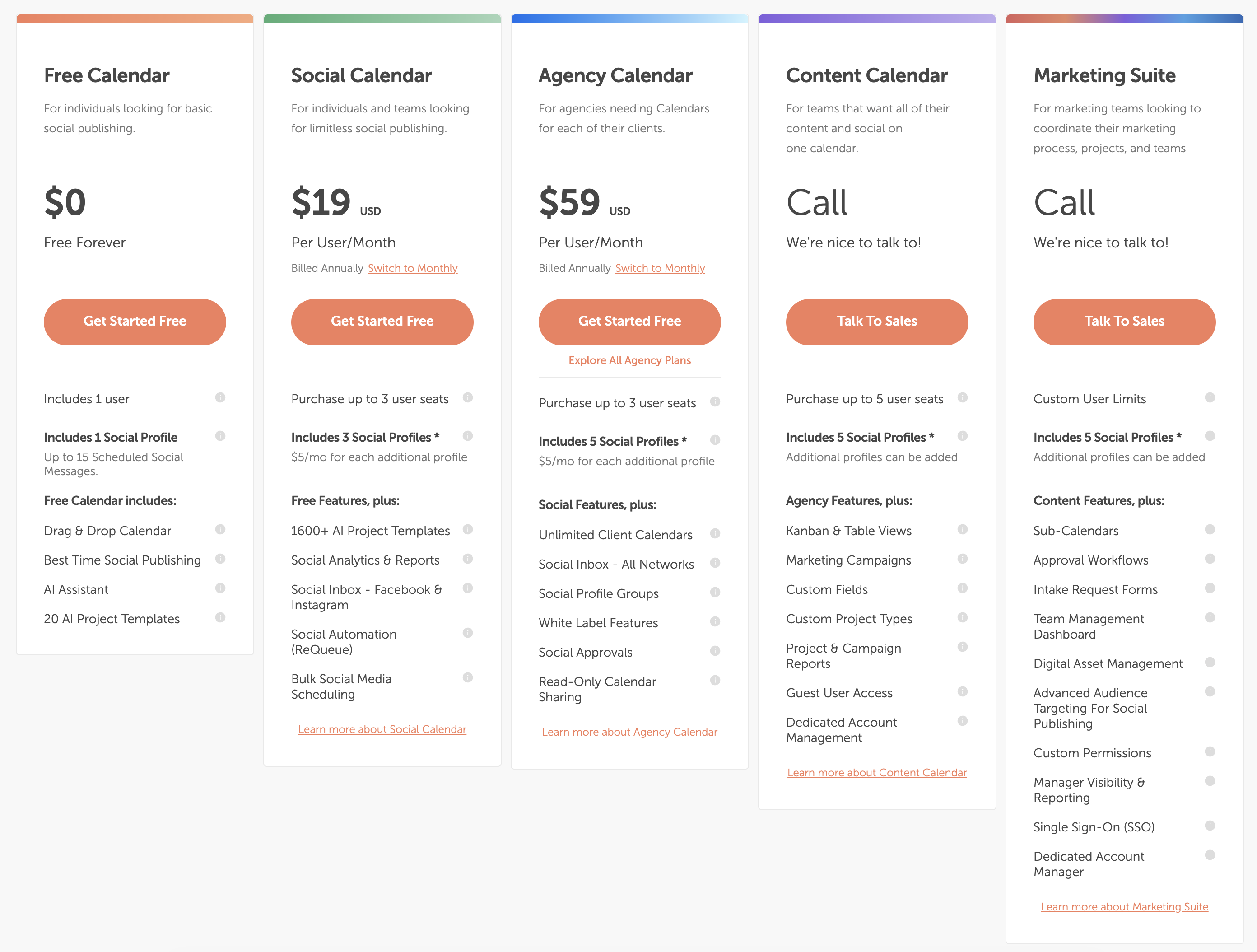
CoSchedule uses per-user pricing with limited social profiles per plan. See the full CoSchedule pricing breakdown for details.
| Plan | Price | Profiles | Key Features |
|---|---|---|---|
| Free Calendar | $0/mo | 1 (15 messages) | Basic scheduling, AI assistant, drag & drop |
| Social Calendar | $19/user/mo | 3 | ReQueue, bulk scheduling, analytics, social inbox |
| Agency Calendar | $59/user/mo | 5 | Unlimited client calendars, white label, X/Twitter, approvals |
| Content Calendar | Custom | 5+ | Kanban views, campaigns, custom fields, guest access |
| Marketing Suite | Custom | Custom | Sub-calendars, approval workflows, SSO, asset management |
Example costs:
- Solo user on Social Calendar = $19/month
- 3-person team on Social Calendar = $57/month
- 3-person agency on Agency Calendar = $177/month
Price Verdict
CoSchedule starts cheaper with a free plan and a $19/user/month Social Calendar, but per-user pricing adds up fast for teams. Later starts higher at $25/month but includes more profiles per plan without per-user fees on Starter.
For a solo user focused on social scheduling, CoSchedule's Social Calendar ($19/mo) is cheaper than Later's Starter ($25/mo). But CoSchedule's Social Calendar lacks X/Twitter support, and once you add team members, CoSchedule's per-user model can exceed Later's flat plan pricing. A 3-person team on CoSchedule's Social Calendar pays $57/month vs $50/month on Later's Growth plan — and Later includes more profiles and a social inbox at that tier.
 PostPlanify
Manage All Your Social Accounts Without the Chaos
Schedule posts, track performance, and collaborate with your team.


Feature Comparison
Scheduling & Publishing
Both tools offer social media scheduling, but their approaches differ significantly:
| Feature | Later | CoSchedule |
|---|---|---|
| Visual grid planner | Yes (Instagram focus) | No |
| Drag-and-drop calendar | Yes | Yes |
| Bulk scheduling | No | Yes (Social Calendar+) |
| Best time to post | Yes (Smart Scheduling) | Yes (Best Time Publishing) |
| Post limits | 20-unlimited (plan-dependent) | 15+ (plan-dependent) |
| ReQueue (auto-recycling) | No | Yes |
| First comment scheduling | No | No |
| WordPress integration | No | Yes (native) |
| Content calendar | Yes (visual) | Yes (editorial) |
Winner: Depends on your workflow. Later wins for visual content planning with its Instagram grid planner and media library. CoSchedule wins for editorial workflows with ReQueue automation, bulk scheduling, and native WordPress integration.
AI Tools
| Feature | Later | CoSchedule |
|---|---|---|
| AI caption generation | Yes (credit-based) | Yes (Hire Mia AI) |
| AI image generation | No | No |
| AI project templates | No | Yes (1,600+) |
| AI credits/limits | 5-100/month (plan-dependent) | Included in plans |
| AI content rewriting | Yes | Yes |
Winner: CoSchedule. Hire Mia AI is included without credit limits on paid plans, and CoSchedule offers 1,600+ AI project templates. Later's credit-based system (5 credits on Starter) feels restrictive by comparison.
Analytics & Reporting
| Feature | Later | CoSchedule |
|---|---|---|
| Basic analytics | All plans | Social Calendar+ |
| Analytics lookback | 3 months to 2 years | Plan-dependent |
| Custom analytics | Scale plan only | Content Calendar+ |
| Competitive benchmarking | Scale plan only | No |
| Social reports | Growth+ | Social Calendar+ |
| Export reports | Yes | Yes |
Winner: Later — offers deeper social analytics with competitive benchmarking and longer lookback windows on the Scale plan. CoSchedule's analytics are more basic and focused on campaign-level reporting rather than social performance.
Team Collaboration
| Feature | Later | CoSchedule |
|---|---|---|
| Multiple users | Growth+ (2-4 users) | All plans (per-user pricing) |
| Approval workflows | Growth+ | Agency Calendar+ |
| Custom roles/permissions | Growth+ | Marketing Suite |
| Client calendars | No | Yes (Agency Calendar) |
| White label | No | Yes (Agency Calendar) |
| Guest access | No | Content Calendar+ |
Winner: CoSchedule for agency and team collaboration features like client calendars, white label, and guest access. Later covers basic approvals and roles but lacks agency-specific tools.
Social Inbox & Engagement
| Feature | Later | CoSchedule |
|---|---|---|
| Social inbox | Growth+ | Social Calendar+ (FB & IG only) |
| UGC collection | Growth+ | No |
| All-network inbox | Growth+ | Agency Calendar+ |
| Social listening | No | No |
| Auto-responses | No | No |
Winner: Later. Later's social inbox on the Growth plan covers more networks, and the UGC collection feature is a unique advantage for visual brands. CoSchedule's inbox is limited to Facebook and Instagram on the Social Calendar.
Platform Support
| Platform | Later | CoSchedule |
|---|---|---|
| Yes | Yes | |
| Yes | Yes | |
| X/Twitter | Yes | Agency Calendar+ only |
| Yes | Yes | |
| TikTok | Yes | Yes |
| YouTube | Yes | Yes |
| Yes | Yes | |
| Threads | Yes | Yes |
| WordPress | No | Yes (native) |
| Google Business | No | Yes |
| Bluesky | No | No |
Winner: Tie with caveats. CoSchedule technically supports more platforms (11 vs 8) and offers native WordPress integration. But CoSchedule's base Social Calendar plan excludes X/Twitter — a major limitation. Later includes X/Twitter on all plans. If X/Twitter matters to you and you want the cheapest plan, Later wins. If WordPress integration is critical, CoSchedule wins.
What Real Users Say
Later Reviews
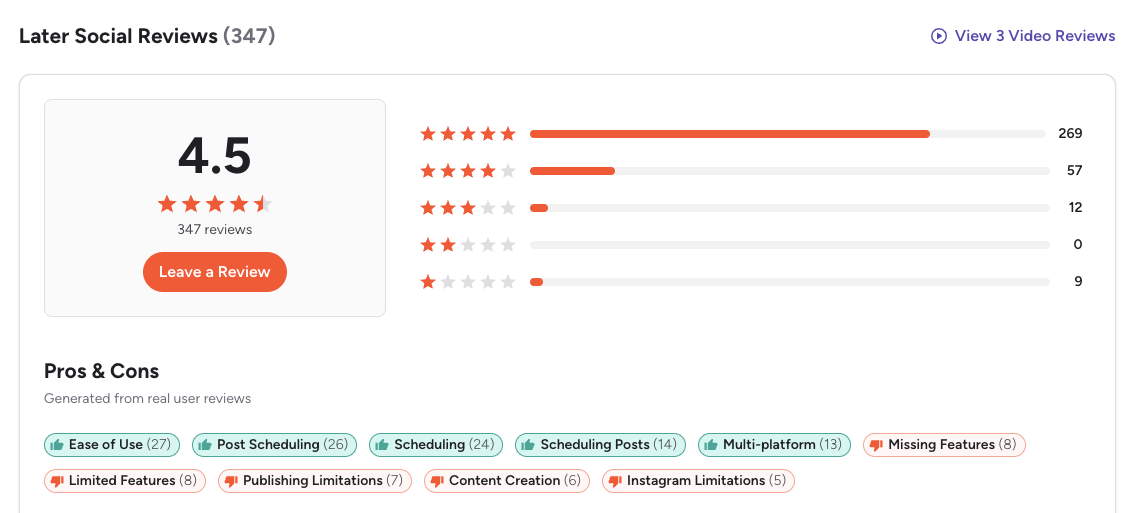
G2: 4.5/5 (347 reviews) — Users praise Later's visual interface, ease of use, and smooth post scheduling. Common complaints include limited analytics on lower plans, publishing limitations, and Instagram-specific restrictions.
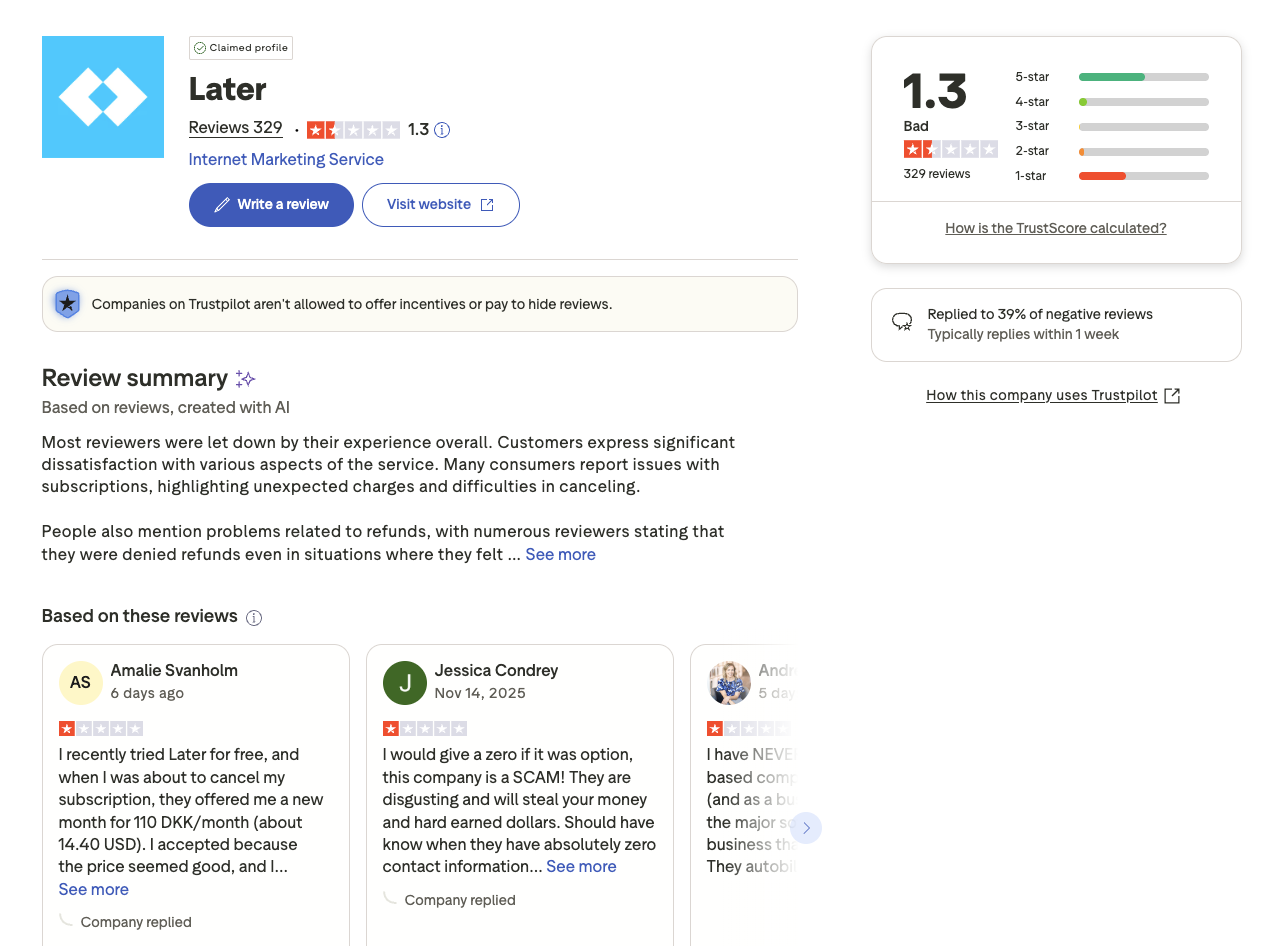
Trustpilot: 1.3/5 (329 reviews) — Significantly lower rating driven by widespread complaints about unexpected billing charges, difficult cancellation processes, refund issues, and poor customer support responsiveness.
CoSchedule Reviews
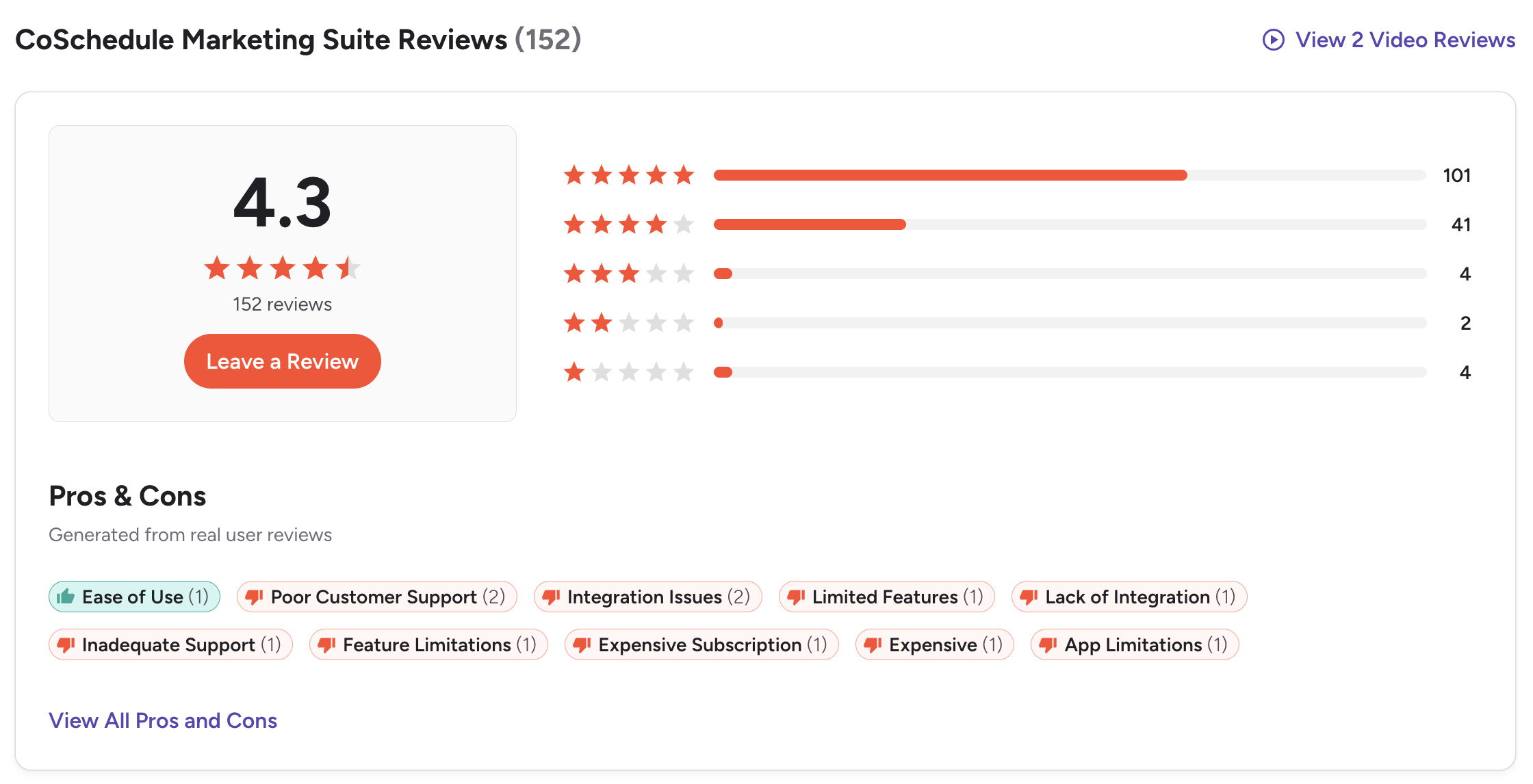
G2: 4.3/5 (152 reviews) — Users value the marketing calendar and content planning features. Common complaints include terrible customer support, subscription cancellation difficulties, outdated platform with limited social features, and expensive pricing for what it offers.
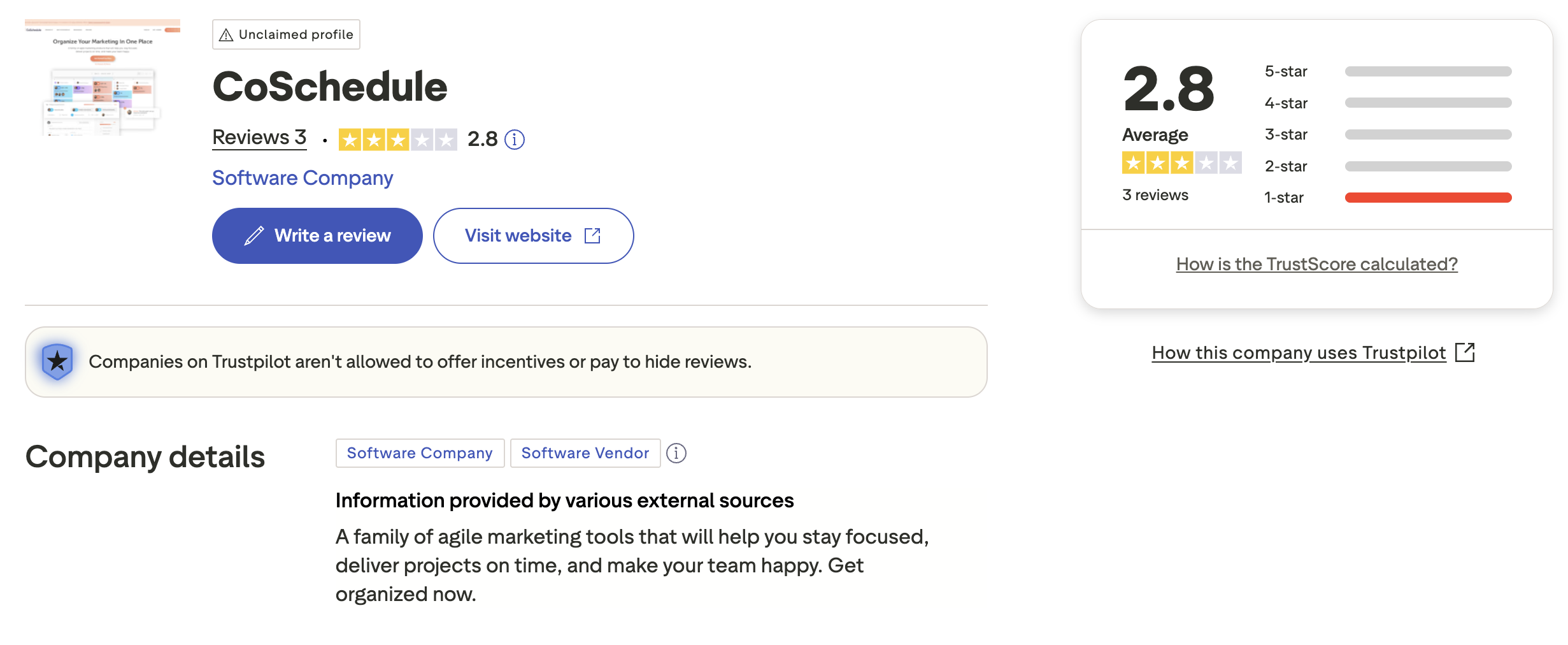
Trustpilot: 2.8/5 (3 reviews) — Very limited review sample. CoSchedule's Trustpilot profile is unclaimed, suggesting the company does not actively monitor or respond to feedback there. The few available reviews show a mix of very positive and very negative experiences.
Review Verdict
Later has the higher G2 rating (4.5/5 vs 4.3/5) with more than double the reviews, giving it more statistical weight. However, Later's Trustpilot score (1.3/5) is much worse than CoSchedule's (2.8/5), though CoSchedule only has 3 reviews there. Both platforms share a troubling pattern of customer support and subscription cancellation complaints — a red flag worth considering before committing to either tool.
PostPlanifyManage All Your Social Accounts Without the Chaos
Schedule posts, track performance, and collaborate with your team.
Who Should Use Later?
If Later sounds right for you but you want to explore other options first, check out our best alternatives to Later. You can also see how Later stacks up against Buffer, Hootsuite, Metricool, and SocialBee.
Later is the better choice if you:
- Are a visual creator or Instagram-focused brand that values aesthetic feed planning
- Need a drag-and-drop grid planner to preview your Instagram layout before posting
- Want a built-in Link in Bio page to drive traffic from social profiles
- Prefer a media library with UGC collection for visual content management
- Need straightforward scheduling across 8 platforms including X/Twitter on all plans
- Don't need WordPress integration, blog coordination, or editorial project management
Who Should Use CoSchedule?
If CoSchedule is on your shortlist, you may also want to see our top alternatives to CoSchedule before committing. Also compare CoSchedule with Buffer, Hootsuite, SocialBee, and Agorapulse.
CoSchedule is the better choice if you:
- Are a content marketer or blogger who needs to coordinate blog posts and social media
- Need native WordPress integration to publish and promote blog content from one calendar
- Want ReQueue automation to automatically recycle your best-performing social posts
- Require editorial calendar features like Kanban views, campaign tracking, and project management
- Need agency features like white label, client calendars, and guest access
- Have a team that manages content marketing campaigns beyond just social media posting
Visual Content Planning Meets Structured Scheduling
Later gives you a beautiful grid planner but charges for basic features like approvals. CoSchedule gives you editorial structure but buries social scheduling behind marketing suite complexity. PostPlanify combines visual content previews with an organized scheduling calendar — plus AI content creation, Canva integration, and team workflows — from $29/month.

| Feature | Later | CoSchedule | PostPlanify |
|---|---|---|---|
| Starting Price | $25/mo | $19/user/mo | $29/mo flat |
| Max Accounts | $110/mo (Scale) | Custom pricing | 25 accounts ($99/mo Premium) |
| AI Caption Generation | Yes (credit-limited) | Yes (Hire Mia) | Yes |
| AI Image Generation | No | No | Yes |
| Canva Integration | No | No | Yes |
| Google Drive Import | No | No | Yes |
| Approval Workflows | $50/mo (Growth) | $59/user/mo (Agency) | $99/mo (Premium) |
| X/Twitter Support | All plans | Agency Calendar+ only | All plans |
| Social Inbox | Growth+ (basic) | Limited (FB & IG only) | Yes |
| Platforms Supported | 8 | 11 | 10 |
| Unlimited Scheduling | Scale only ($110/mo) | No (message limits) | All paid plans |
| Per-User Fees | No (user limits per plan) | Yes ($19-$59/user/mo) | No |
PostPlanify starts at $29/month for 5 accounts with unlimited scheduling and AI tools included. Analytics are included from the Growth plan ($49/month). The Premium plan at $99/month adds 25 accounts, 5 team members, and approval workflows — features that cost $110+/month on Later or $177+/month for a 3-person team on CoSchedule's Agency Calendar. See all plans on the PostPlanify pricing page.
Plan and publish better — try PostPlanify free

Related Guides
- Best Social Media Management Platforms
- How to Schedule Social Media Posts
- Best Time to Post on Social Media
- Best Later Alternatives
- Best CoSchedule Alternatives
FAQ
Is Later cheaper than CoSchedule?
It depends on team size. For a solo user, CoSchedule's Social Calendar ($19/mo) is cheaper than Later's Starter ($25/mo). But CoSchedule charges per user, so a 3-person team on Social Calendar costs $57/month vs $50/month on Later's Growth plan. Later also includes more profiles and X/Twitter on all plans.
Does CoSchedule have a free plan?
Yes. CoSchedule offers a Free Calendar plan with 1 user, 1 social profile, and up to 15 scheduled messages. It's useful for testing the platform but very limited for real social media management.
Which has better analytics — Later or CoSchedule?
Later has stronger social media analytics with competitive benchmarking, longer lookback windows (up to 2 years on Scale), and custom analytics. CoSchedule's analytics focus more on campaign-level reporting and are better suited for editorial and content marketing metrics.
Can I use CoSchedule just for social media scheduling?
Yes, the Social Calendar plan ($19/user/mo) focuses on social scheduling. However, it only includes 3 profiles, lacks X/Twitter support, and charges per user — making it less cost-effective than dedicated social schedulers for teams that don't need the marketing suite features.
Does Later integrate with WordPress?
No. Later does not have native WordPress integration. If coordinating blog content with social media is important to your workflow, CoSchedule's native WordPress integration is a significant advantage. Alternatively, PostPlanify offers a streamlined social-first approach without the marketing suite complexity.
Which supports more social media platforms?
CoSchedule supports 11 platforms including native WordPress integration, while Later supports 8 platforms. However, CoSchedule's base Social Calendar plan excludes X/Twitter — you need the Agency Calendar ($59/user/mo) for X/Twitter access. Later includes X/Twitter on all plans.
Is CoSchedule good for agencies?
CoSchedule's Agency Calendar ($59/user/mo) offers white label features, unlimited client calendars, and approval workflows. However, per-user pricing makes it expensive for larger teams. A 3-person agency pays $177/month minimum before adding extra profiles at $5/month each.
Which is easier to use — Later or CoSchedule?
Later is generally considered easier to use for social media scheduling, with a visual, drag-and-drop interface built for creators. CoSchedule has a steeper learning curve because it's designed as a full marketing suite with project management, campaign planning, and editorial calendar features that go beyond social scheduling.







