
CoSchedule and Tailwind are both niche-focused tools that chose depth over breadth. CoSchedule is a marketing calendar designed for content marketers and bloggers who tie social posts to blog publishing through WordPress and HubSpot integrations. Tailwind is a visual marketing platform built for Pinterest, Instagram, and Facebook creators who need design tools and community-based content promotion. Both tools deliberately limit their platform coverage to serve their core audiences better.
What makes this comparison interesting is that both tools deliberately sacrifice platform coverage to serve a specific workflow. CoSchedule supports 6 platforms and integrates with WordPress and HubSpot for content marketing. Tailwind supports 3 platforms and integrates with Shopify and WooCommerce for e-commerce. If you are a blogger who promotes content on social media, CoSchedule was made for you. If you sell products through Pinterest, Tailwind was made for you. We compare their pricing, feature sets, and niche strengths to help you decide. Comparing the full market? Browse all social media scheduling alternatives.
CoSchedule vs Tailwind at a Glance
| Category | CoSchedule | Tailwind |
|---|---|---|
| Starting Price | $0/mo (Free Calendar) | Free (5 posts/mo, 3 accounts) |
| Free Plan | Yes (1 user, 2 profiles, 15 posts/mo) | Yes |
| Platforms Supported | 6 | 3 (Pinterest, Instagram, Facebook) |
| Unlimited Scheduling | Social Calendar+ | Max plan ($99.99/mo) |
| AI Tools | Headline Analyzer | Ghostwriter AI |
| AI Image Generation | No | No (Tailwind Create for templates) |
| Bulk Scheduling | No | Bulk uploads |
| Team Collaboration | Social Calendar ($19/mo per user) | Max plan (5 users) |
| Approval Workflows | Agency Calendar ($49/mo per user) | No |
| Social Inbox | No | No |
| Analytics | Basic (paid plans) | Basic (all plans) |
| Content Integrations | WordPress, HubSpot | Shopify, WooCommerce, Squarespace |
| G2 Rating | 4.4/5 (251 reviews) | 4.3/5 (141 reviews) |
| Best For | Content marketers, bloggers | Pinterest-focused creators, e-commerce sellers |
CoSchedule Overview

CoSchedule is a marketing calendar platform that includes social media scheduling as part of a broader content marketing workflow. It integrates with WordPress and HubSpot, making it popular with content marketers and bloggers who want to plan blog posts and social promotions in one place.
CoSchedule supports 6 platforms: Facebook, Instagram, X/Twitter, LinkedIn, Pinterest, and Threads. It does not support TikTok, YouTube, Google Business, or Bluesky.
Key features:
- Marketing calendar with drag-and-drop scheduling
- ReQueue for automated social resharing
- Headline Analyzer for optimizing post and blog titles
- WordPress and HubSpot integrations
- Task management and team assignments
- Social campaign templates
CoSchedule is best suited for content marketers and bloggers who need a centralized marketing calendar that ties blog publishing to social promotion. Read real user reviews of CoSchedule on G2.
Tailwind Overview

Tailwind is a visual marketing platform built specifically for Pinterest, Instagram, and Facebook. It provides specialized tools for visual content creators and e-commerce sellers — SmartSchedule determines the best posting times based on audience engagement data, Tailwind Create produces branded designs from customizable templates, and Tailwind Communities enable content sharing among creators in related niches.
Tailwind supports 3 platforms: Pinterest, Instagram, and Facebook. It does not support X/Twitter, LinkedIn, TikTok, YouTube, Threads, Bluesky, Google Business, WordPress, or Mastodon.
Key features:
- SmartSchedule for optimal posting times
- Ghostwriter AI for captions and descriptions
- Tailwind Create (design tool with templates)
- Tailwind Communities for collaborative sharing
- Smart.bio (link-in-bio tool)
- SmartLoop for evergreen content resharing
- Canva integration (paid plans)
- E-commerce integrations (Shopify, WooCommerce, Squarespace)
- Browser extensions and mobile app
Tailwind is best suited for Pinterest-focused creators, e-commerce sellers on visual platforms, and marketers who need design and scheduling tools in one place. Read real user reviews of Tailwind from G2 and Trustpilot.
Pricing Comparison
CoSchedule Pricing
CoSchedule uses per-user pricing with plan tiers that add features and profile limits. See the full CoSchedule pricing breakdown for details.
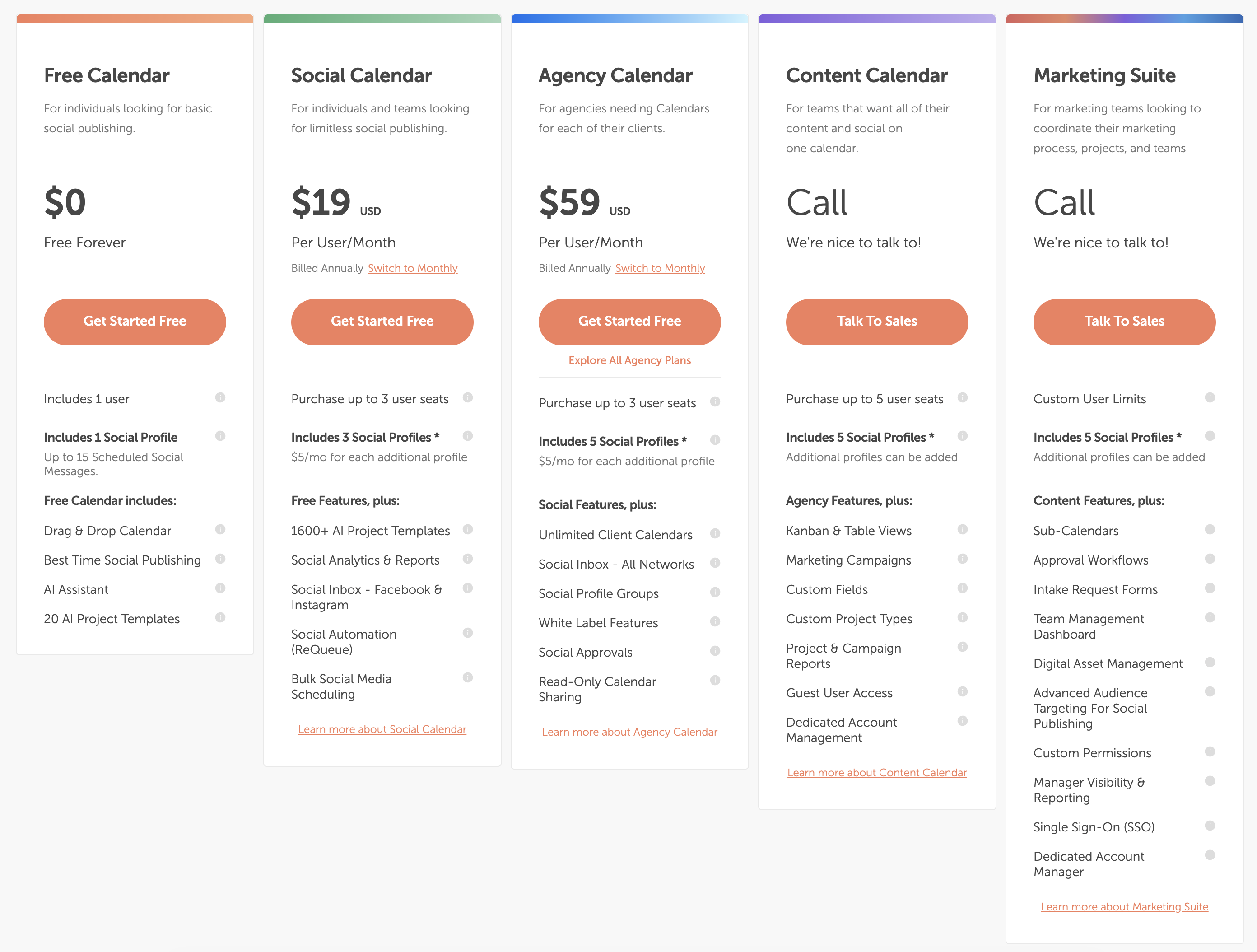
| Plan | Price | Profiles | Users | Key Features |
|---|---|---|---|---|
| Free Calendar | $0/mo | 2 | 1 | 15 posts/mo, basic calendar |
| Social Calendar | $19/mo per user | 5 | Per user | Unlimited posts, ReQueue, analytics |
| Agency Calendar | $49/mo per user | 10 | Per user | Approval workflows, client calendars, team assignments |
Example costs:
- Solo marketer on Social Calendar = $19/month
- 3-person team on Social Calendar = $57/month
- 5-person agency on Agency Calendar = $245/month
Tailwind Pricing
Tailwind uses tiered pricing with post limits and account caps. Introductory pricing is available for the first billing cycle, after which renewal rates apply. See the full Tailwind pricing breakdown for details.
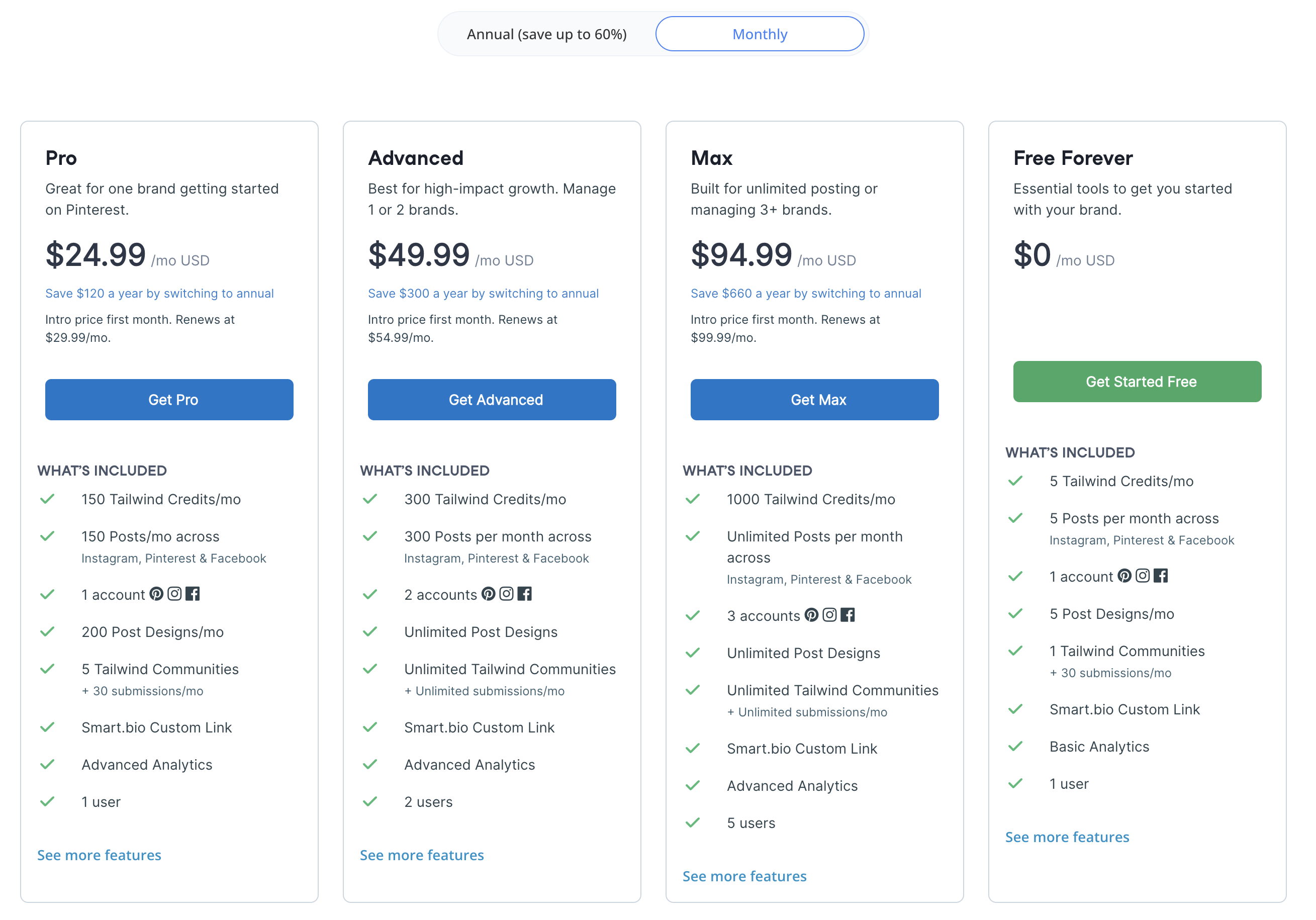
| Plan | Price (Renewal) | Posts/Month | Accounts | Users |
|---|---|---|---|---|
| Free | $0/mo | 5 | 3 (1 per platform) | 1 |
| Pro | $29.99/mo | 150 | 3 | 1 |
| Advanced | $54.99/mo | 300 | 6 | 2 |
| Max | $99.99/mo | Unlimited | 9 | 5 |
Intro pricing is available at $24.99 (Pro), $49.99 (Advanced), and $94.99 (Max) for the first billing cycle. The free plan includes 5 posts/month, 5 AI credits, 5 designs, 1 community, and basic analytics.
Price Verdict
Winner: CoSchedule for solo users, Tailwind for free access. CoSchedule's Social Calendar at $19/month is cheaper than Tailwind's Pro at $29.99/month and includes unlimited scheduling across 6 platforms vs Tailwind's 150 posts across 3 platforms. Tailwind's free plan is more generous for ongoing use (5 posts/month forever) compared to CoSchedule's free plan (15 posts/month, 1 user, 2 profiles). For teams, CoSchedule's per-user pricing adds up fast — a 5-person agency on Agency Calendar costs $245/month, while Tailwind's Max plan serves 5 users for $99.99/month.
 PostPlanify
Manage All Your Social Accounts Without the Chaos
Schedule posts, track performance, and collaborate with your team.


Feature Comparison
Scheduling & Publishing
| Feature | CoSchedule | Tailwind |
|---|---|---|
| Unlimited scheduling | Social Calendar+ | Max plan only ($99.99/mo) |
| Marketing calendar | Yes | No |
| SmartSchedule | No | Yes (optimal times) |
| ReQueue (auto-reshare) | Yes | SmartLoop |
| WordPress integration | Yes | No |
| HubSpot integration | Yes | No |
| Bulk uploads | No | Yes |
Winner: CoSchedule for content marketing, Tailwind for visual scheduling. CoSchedule's marketing calendar, WordPress/HubSpot integrations, and ReQueue make it the better choice for blog-to-social workflows. Tailwind's SmartSchedule and SmartLoop are optimized for Pinterest and Instagram engagement specifically.
AI Tools
| Feature | CoSchedule | Tailwind |
|---|---|---|
| AI caption generation | No | Ghostwriter AI |
| Headline Analyzer | Yes | No |
| AI image generation | No | No |
| Design tool | No | Tailwind Create (built-in) |
| Canva integration | No | Paid plans |
Winner: Tailwind. Tailwind offers Ghostwriter AI for caption generation and Tailwind Create for design — both content creation tools that CoSchedule lacks. CoSchedule's Headline Analyzer optimizes titles but does not generate social content. For producing social media posts, Tailwind provides more creative assistance.
Analytics & Reporting
| Feature | CoSchedule | Tailwind |
|---|---|---|
| Built-in analytics | Paid plans | Basic (all plans) |
| Report exports | Yes | No |
| Best time insights | No | SmartSchedule data |
| Social inbox | No | No |
Winner: Tie. CoSchedule includes analytics on paid plans with report exports. Tailwind includes basic analytics on all plans with SmartSchedule timing data. Neither offers advanced reporting, competitor tracking, or ROI measurement. Both provide basic performance visibility without excelling at it.
Team Collaboration
| Feature | CoSchedule | Tailwind |
|---|---|---|
| Multi-user support | All paid plans (per-user) | Max plan (5 users, $99.99/mo) |
| Approval workflows | Agency Calendar ($49/user/mo) | No |
| Task assignments | Yes | No |
| Client calendars | Agency Calendar | No |
| Tailwind Communities | No | Yes |
Winner: CoSchedule. Approval workflows, task assignments, and client calendars on the Agency Calendar make CoSchedule the stronger team tool. Tailwind limits users to 5 on the Max plan with no approval workflows and no task management. Tailwind Communities are collaborative but focused on content sharing, not team workflow management.
Platform Support
| Platform | CoSchedule | Tailwind |
|---|---|---|
| Yes | Yes | |
| Yes | Yes | |
| Yes | Yes | |
| X/Twitter | Yes | No |
| Yes | No | |
| Threads | Yes | No |
| TikTok | No | No |
| YouTube | No | No |
| Google Business | No | No |
Winner: CoSchedule. With 6 platforms vs Tailwind's 3, CoSchedule covers X/Twitter, LinkedIn, and Threads — three platforms Tailwind does not support. Both miss TikTok, YouTube, and Google Business. Neither has particularly broad coverage, but CoSchedule doubles Tailwind's platform count.
What Real Users Say
CoSchedule Reviews
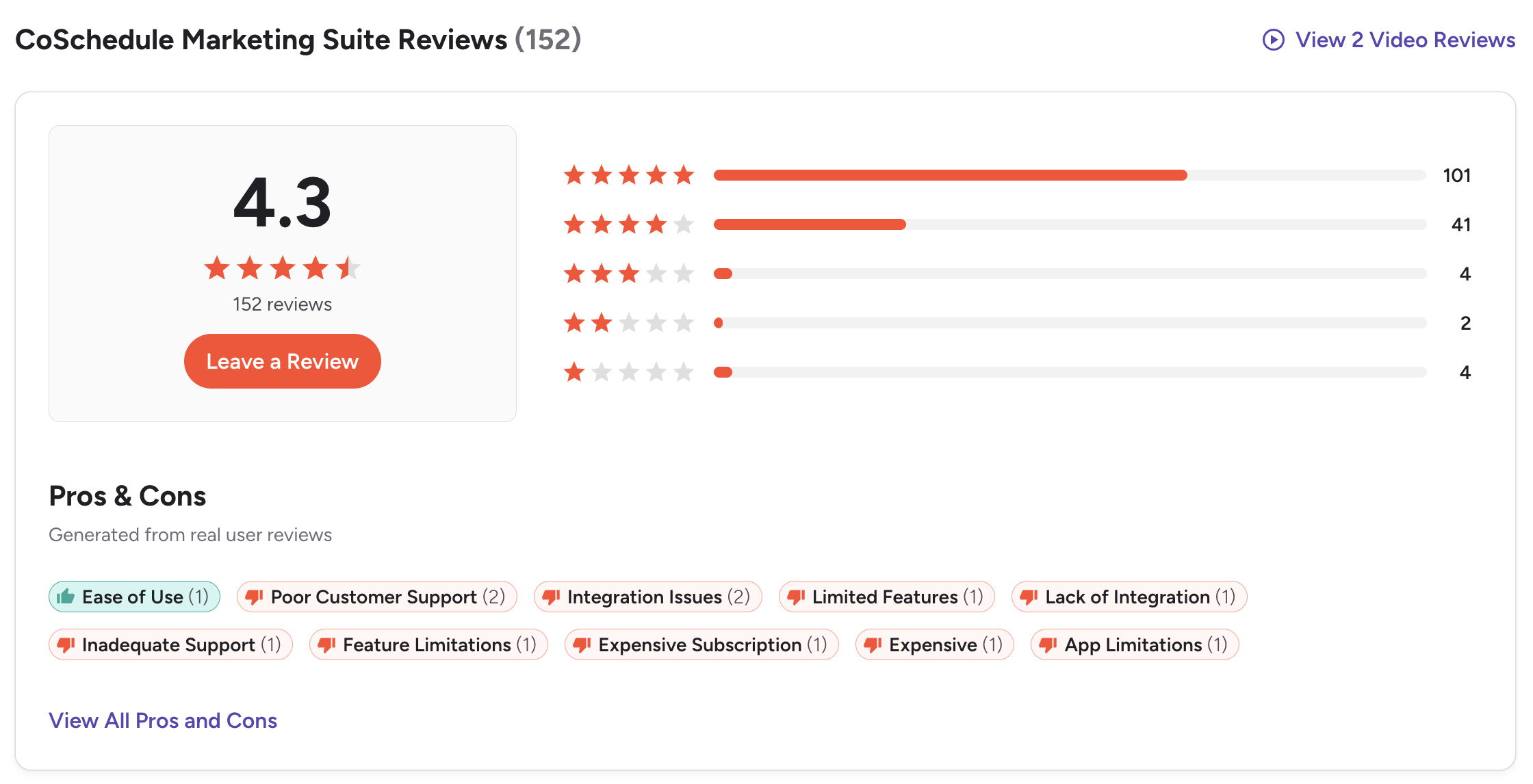
- G2: 4.4/5 (251 reviews) — Users praise the marketing calendar, ReQueue automation, and WordPress integration. Common complaints include limited social platform support, a dated UI, and per-user pricing that gets expensive for teams.
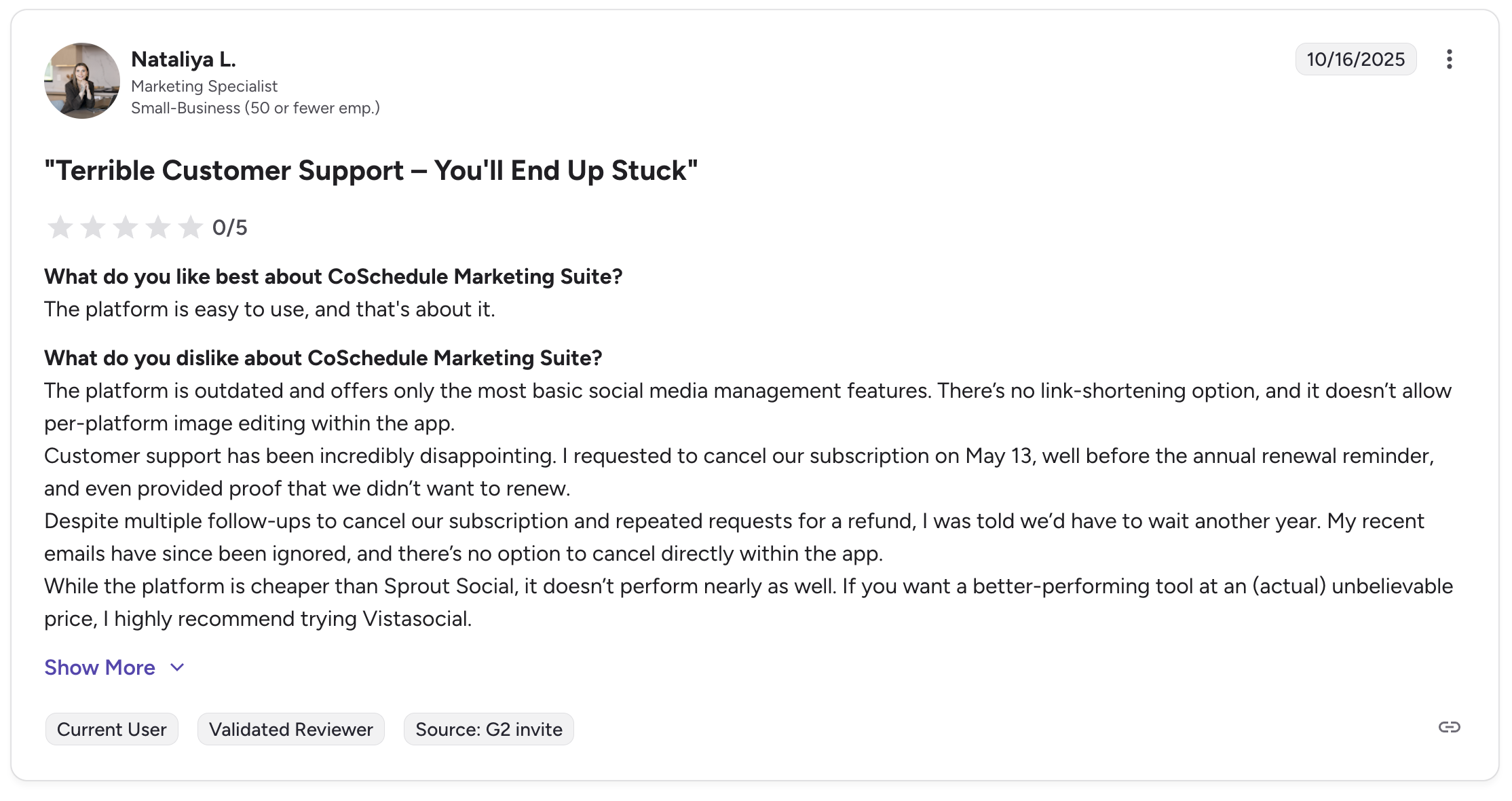
CoSchedule does not have a Trustpilot presence, so there are no Trustpilot reviews to reference for this tool.
Tailwind Reviews
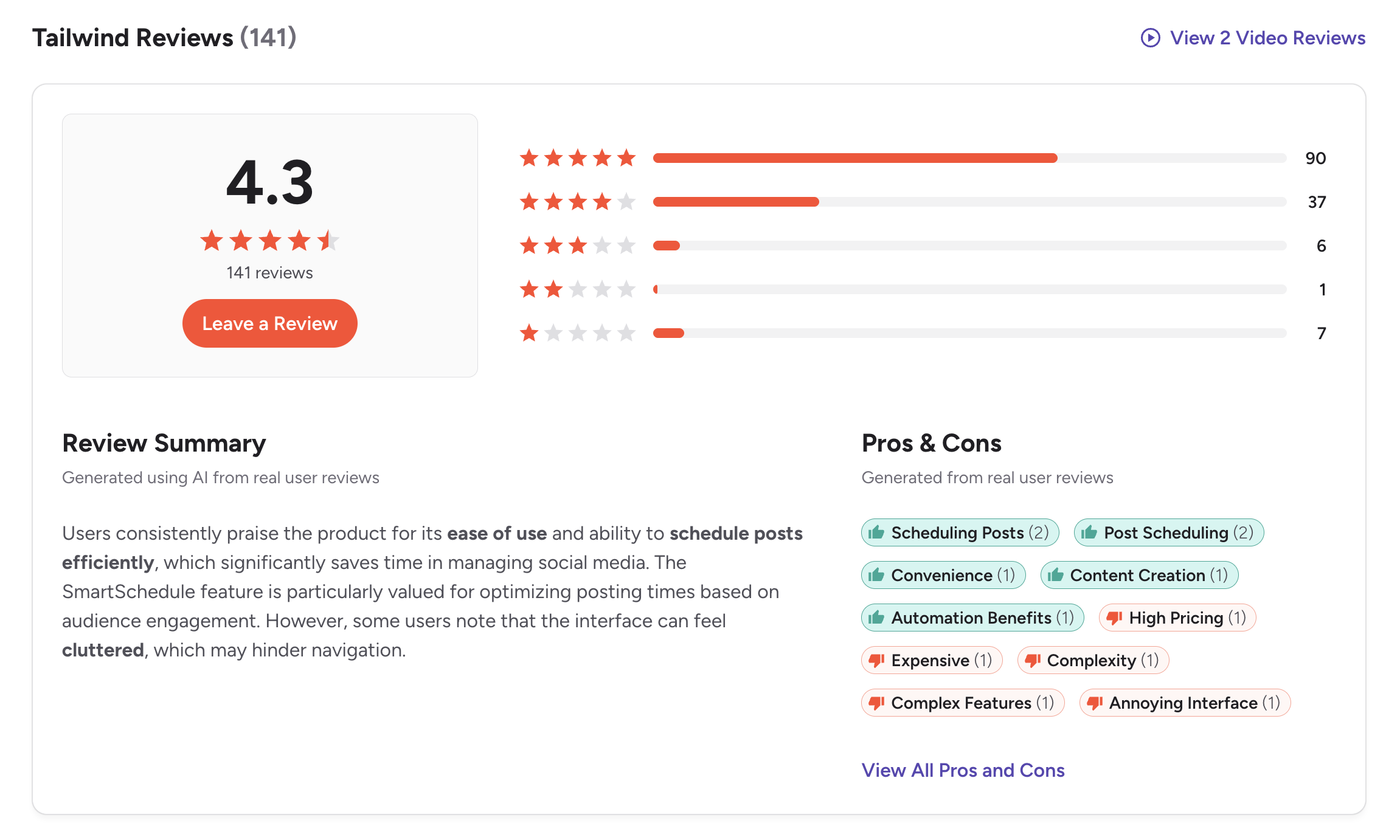
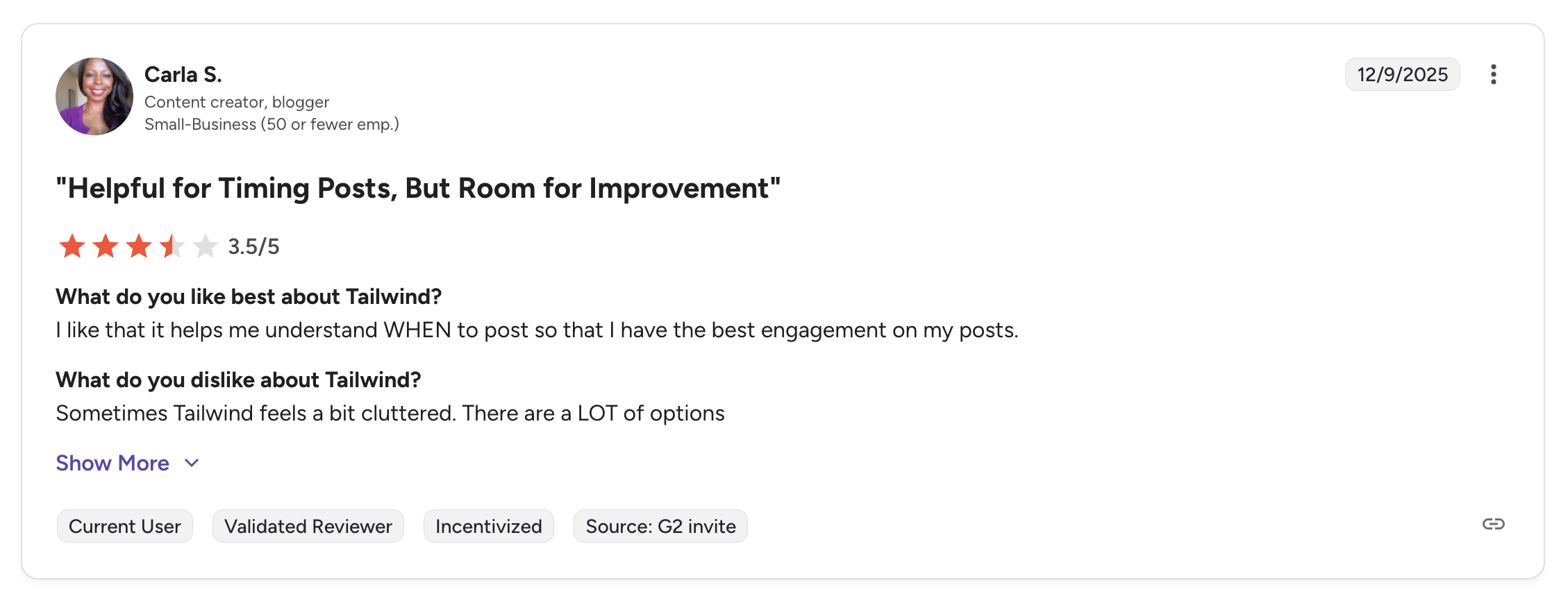
- G2: 4.3/5 (141 reviews) — Users appreciate SmartSchedule, Pinterest tools, and Tailwind Create. Common complaints include the 3-platform limitation, post caps on lower plans, and pricing increases after introductory rates.
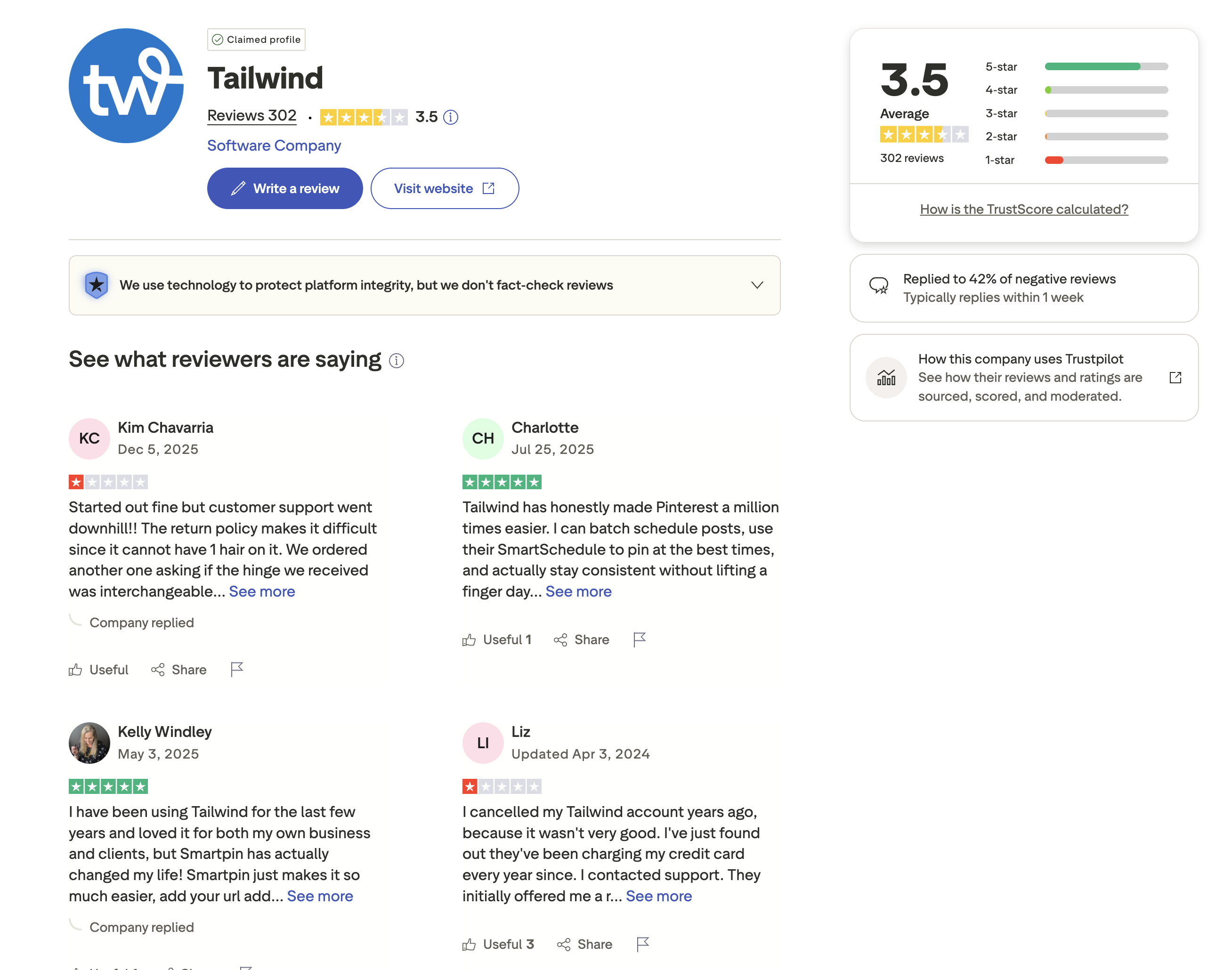
- Trustpilot: 3.5/5 (302 reviews) — A mixed score from a substantial review base. Positive reviews praise Pinterest scheduling and design features. Negative reviews cite platform limitations, renewal pricing surprises, and limited capabilities beyond Pinterest marketing.
Review Verdict
CoSchedule edges ahead on G2 with 4.4/5 (251 reviews) vs Tailwind's 4.3/5 (141 reviews). On Trustpilot, CoSchedule has no presence at all, while Tailwind holds a mixed 3.5/5 from 302 reviews. The absence of a CoSchedule Trustpilot profile makes a direct comparison impossible on that platform. Both tools have relatively modest G2 review volumes compared to larger competitors, and both score in a similar range reflecting solid but not exceptional user satisfaction.
PostPlanifyManage All Your Social Accounts Without the Chaos
Schedule posts, track performance, and collaborate with your team.
Who Should Use CoSchedule?
If CoSchedule is on your shortlist, you may also want to see our top alternatives to CoSchedule before committing. Also compare CoSchedule with Buffer, Hootsuite, Later, and Loomly.
CoSchedule is the better choice if you:
- Are a content marketer or blogger who ties social posts to blog publishing schedules
- Need WordPress or HubSpot integration for a unified content marketing workflow
- Want ReQueue to automatically reshare evergreen blog promotions on social media
- Use the Headline Analyzer to optimize blog titles and social headlines
- Need approval workflows and task assignments for team content management
- Post primarily to Facebook, Instagram, X/Twitter, LinkedIn, Pinterest, and Threads
Who Should Use Tailwind?
If Tailwind is on your shortlist, you may also want to see our top alternatives to Tailwind before committing. Also compare Tailwind with Hootsuite, Later, Metricool, and Sprout Social.
Tailwind is the better choice if you:
- Are a Pinterest-focused creator who needs SmartSchedule and pin-optimized tools
- Run an e-commerce store on Shopify, WooCommerce, or Squarespace and sell via Pinterest
- Want Tailwind Create for generating branded designs without external design software
- Need SmartLoop to automatically reshare evergreen pins and Instagram content
- Value Tailwind Communities for organic reach through collaborative content promotion
- Only publish to Pinterest, Instagram, and Facebook and do not need X/Twitter or LinkedIn
Simple Scheduling That Covers More Ground
CoSchedule supports 6 platforms but charges per user. Tailwind supports 3 platforms with post caps on most plans. PostPlanify covers 10 platforms with unlimited scheduling, AI tools, and Canva integration from $29/month — more platforms than both tools combined, without per-user fees or post limits.

| Feature | CoSchedule | Tailwind | PostPlanify |
|---|---|---|---|
| Starting Price | $19/mo per user | Free (5 posts/mo) | $29/mo flat |
| Unlimited Scheduling | Social Calendar+ | $99.99/mo (Max) | All paid plans |
| AI Caption Generation | No | Ghostwriter AI | Yes (unlimited) |
| AI Image Generation | No | No | Yes |
| Canva Integration | No | Paid plans | Yes |
| Google Drive Import | No | No | Yes |
| Approval Workflows | $49/mo per user | No | $99/mo (Premium) |
| Analytics | Paid plans | Basic (all plans) | $49/mo (Growth) |
| Unlimited Team Members | No (per-user) | No (5 max) | $99/mo (Premium) |
| Platforms Supported | 6 | 3 | 10 |
PostPlanify starts at $29/month for 5 accounts with 200 posts/mo and AI tools included. Analytics are included from the Growth plan ($49/month). The Premium plan at $99/month adds unlimited accounts, unlimited team members, and approval workflows — team features that cost $245/month for a 5-person CoSchedule agency team and are unavailable on Tailwind entirely. PostPlanify supports 10 platforms, covering TikTok, YouTube, and Google Business that both CoSchedule and Tailwind miss. See all plans on the PostPlanify pricing page.
Try PostPlanify free for 7 days and discover a smarter way to manage your social media.

Related Guides
- Best Social Media Management Platforms
- How to Schedule Social Media Posts
- How to Measure Social Media ROI
- Best CoSchedule Alternatives
- Best Tailwind Alternatives
FAQ
Is CoSchedule cheaper than Tailwind?
For solo users, yes. CoSchedule's Social Calendar costs $19/month per user with unlimited scheduling across 6 platforms. Tailwind Pro costs $29.99/month for 150 posts across 3 platforms. For teams of 5+, Tailwind's Max plan at $99.99/month is cheaper than CoSchedule's Agency Calendar at $245/month for 5 users.
Does CoSchedule have a Trustpilot page?
No. CoSchedule does not have a Trustpilot presence. Its primary review platform is G2, where it holds a 4.4/5 rating from 251 reviews. Tailwind has both G2 (4.3/5, 141 reviews) and Trustpilot (3.5/5, 302 reviews) profiles.
Which is better for bloggers?
CoSchedule is significantly better for bloggers. Its WordPress and HubSpot integrations let you plan blog posts and social promotions in the same calendar. ReQueue automatically reshares blog content on social media. Tailwind has no blog-related integrations and focuses exclusively on visual content for Pinterest, Instagram, and Facebook.
Does Tailwind support X/Twitter or LinkedIn?
No. Tailwind only supports Pinterest, Instagram, and Facebook. CoSchedule supports X/Twitter and LinkedIn in addition to Facebook, Instagram, Pinterest, and Threads. If you need X/Twitter or LinkedIn, CoSchedule is the better choice, or consider PostPlanify for 9-platform coverage.
Can I use both CoSchedule and Tailwind together?
Yes. Some marketers use CoSchedule for blog-to-social workflows and Tailwind for Pinterest optimization, since the tools serve different purposes. However, managing two schedulers increases complexity and cost. PostPlanify covers 10 platforms in a single tool starting at $29/month.
What is Tailwind Create?
Tailwind Create is a built-in design tool that generates custom visuals from templates. You input your brand colors, fonts, and photos, and it produces ready-to-post designs for Pinterest and Instagram. It is included on paid plans with 5 designs on the free tier. CoSchedule has no equivalent design feature.
Which has better content recycling?
Both recycle content but for different channels. CoSchedule's ReQueue automatically reshares evergreen blog and social posts on a schedule across 6 platforms. Tailwind's SmartLoop reshares pins and Instagram posts at optimal engagement times on 3 platforms. CoSchedule's recycling covers more platforms; Tailwind's is more optimized for visual content engagement.
Is there a tool that covers more platforms than both?
PostPlanify supports 10 platforms including TikTok, YouTube, and Google Business — channels that both CoSchedule and Tailwind miss. It includes unlimited scheduling, AI caption and image generation, and Canva integration from $29/month. The Premium plan at $99/month adds unlimited team members and approval workflows.







