
Choosing between CoSchedule and Loomly comes down to what matters most: marketing project management or social-focused team publishing. CoSchedule bundles an editorial calendar, project management tools, and WordPress integration into a marketing suite. Loomly focuses squarely on social media scheduling with a visual calendar, approval workflows, and post idea inspiration.
Marketing calendar versus social calendar — CoSchedule bundles project management and editorial planning, while Loomly focuses squarely on social media scheduling and team approvals. We compare them on the features that overlap and help you decide which approach fits your team. Want more options? Browse all social media scheduling alternatives.
CoSchedule vs Loomly at a Glance
Here's a quick side-by-side overview before we dive deeper:
| Category | CoSchedule | Loomly |
|---|---|---|
| Starting Price | $0/mo (Free) / $19/user/mo | $0/mo (Free) / $65/mo (Starter) |
| Free Plan | Yes (1 profile, 15 posts) | Yes (3 accounts, 1 user, 5 posts/mo) |
| Platforms Supported | 6 | 11 |
| Unlimited Scheduling | Yes (paid plans) | Yes (paid plans) |
| AI Tools | Hire Mia AI + 1,600 templates | AI caption suggestions only |
| AI Image Generation | No | No |
| Bulk Scheduling | Yes (Social Calendar+) | Yes |
| Team Collaboration | Social Calendar+ (per-user) | Starter plan ($65/mo, 3 users) |
| Approval Workflows | Agency Calendar ($49/user/mo) | Yes (all paid plans) |
| WordPress Integration | Yes (native) | No |
| Social Inbox | No | Yes |
| Analytics | Basic to custom reports | Basic analytics |
| G2 Rating | 4.4/5 (255 reviews) | 4.6/5 (1,793 reviews) |
| Trustpilot Rating | No presence | 1.7/5 (26 reviews) |
| Best For | WordPress bloggers, content marketing teams | Small-mid size teams, visual social planning |
CoSchedule Overview
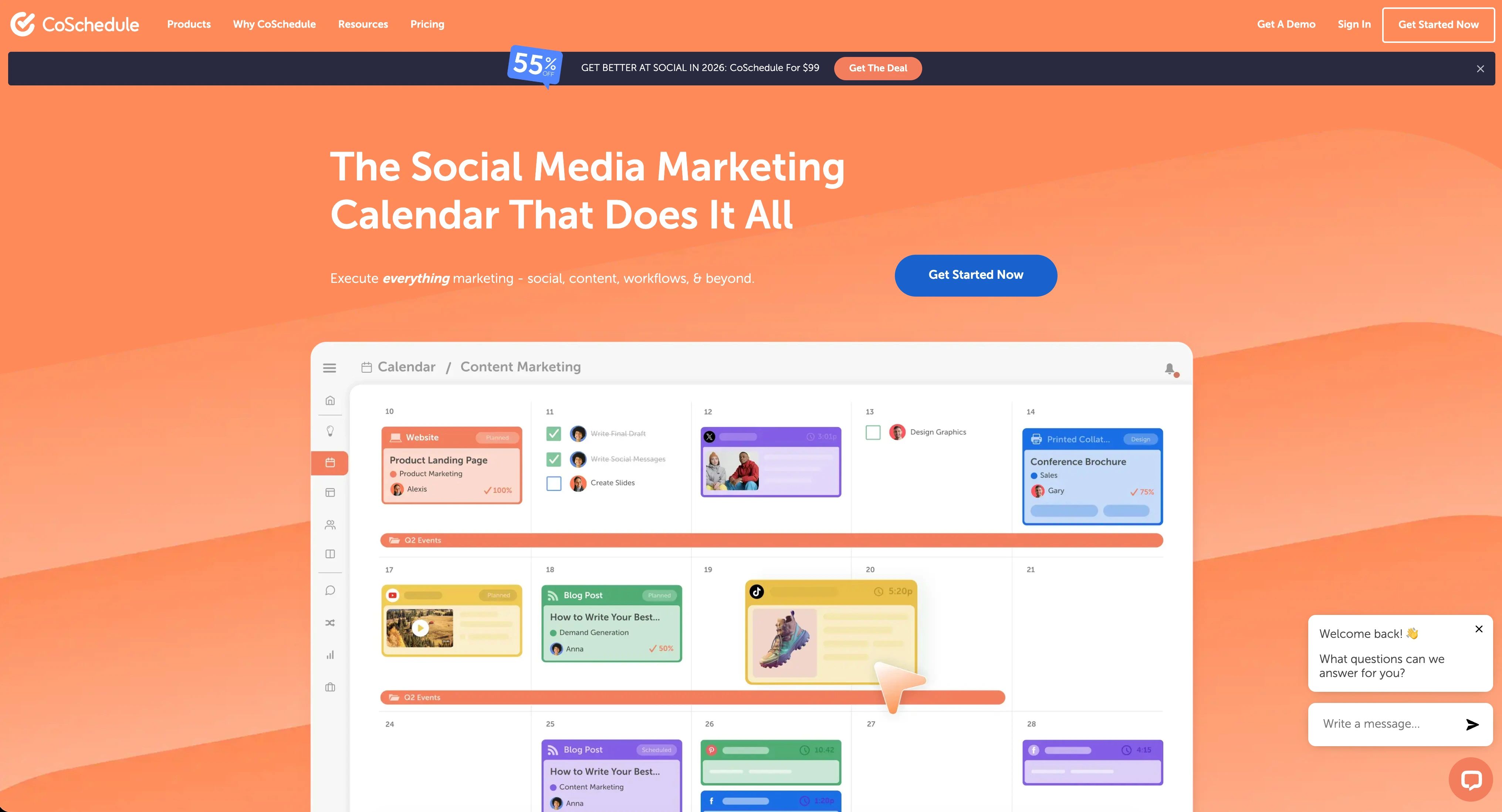
CoSchedule is a marketing suite that combines social media scheduling with editorial calendars, project management, and campaign planning. It's designed for marketing teams that need to coordinate blog publishing, social promotion, and team workflows in one place — with a strong emphasis on WordPress integration.
CoSchedule supports 6 platforms: Facebook, Instagram, X/Twitter, LinkedIn, Pinterest, and Threads.
Key features:
- Editorial marketing calendar with drag-and-drop scheduling
- ReQueue social automation (content recycling)
- Native WordPress integration for blog-to-social publishing
- Hire Mia AI assistant with 1,600+ project templates
- Kanban boards and task management
- Bulk social media scheduling
- Approval workflows (higher plans)
CoSchedule is positioned for WordPress bloggers and marketing teams that want social scheduling integrated with editorial planning. Read real user reviews of CoSchedule from G2.
Loomly Overview

Loomly is a social media management platform designed around a visual content calendar and team approval workflows. It helps marketing teams plan, create, approve, and publish content with built-in collaboration tools and post inspiration features.
Loomly supports 11 platforms: Facebook, Instagram, X/Twitter, LinkedIn, Pinterest, Google Business, YouTube, TikTok, Snapchat, Threads, and Bluesky.
Key features:
- Visual content calendar with drag-and-drop scheduling
- Approval workflows with custom roles
- AI caption suggestions
- Post ideas and trending content suggestions
- Hashtag manager
- Social inbox for engagement management
- Canva, Google Drive, and Unsplash integration
- Link shortener with analytics
- Best time to post suggestions
- Bulk scheduling
Loomly is popular among small-to-mid size marketing teams that need structured approval processes and a visual way to plan content. For more details, see what users say about Loomly on G2 and Trustpilot.
Pricing Comparison
CoSchedule Pricing
CoSchedule uses per-user pricing with strict profile limits. See the full CoSchedule pricing breakdown for details.
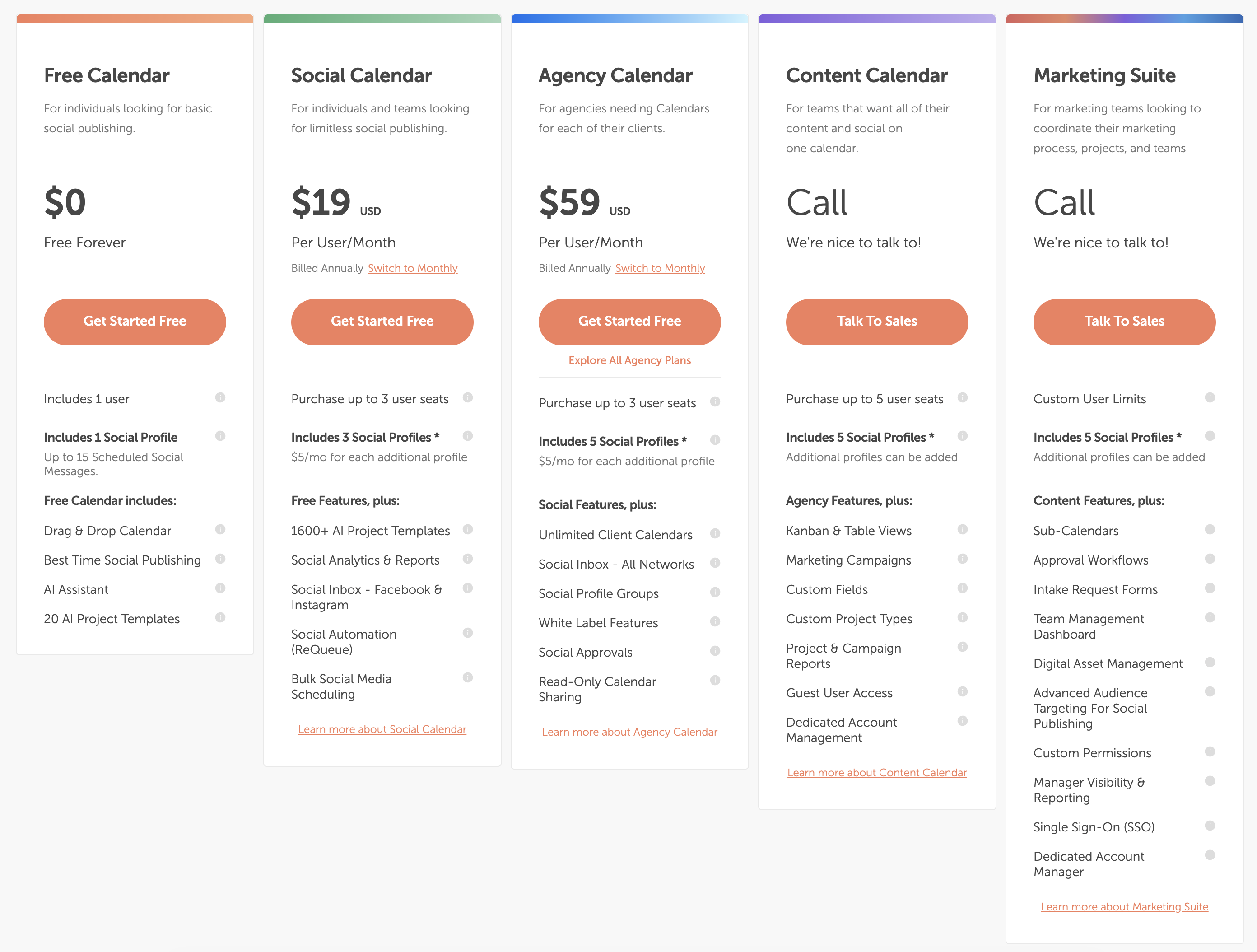
| Plan | Price | Profiles | Key Features |
|---|---|---|---|
| Free Calendar | $0/mo | Limited | 1 user, 15 posts, basic calendar |
| Social Calendar | $19/user/mo | 5 | Bulk scheduling, ReQueue, analytics |
| Agency Calendar | $49/user/mo | 10 | White label, client calendars, approval workflows |
| Content Calendar | Custom | Custom | Kanban, marketing campaigns, custom fields |
Example costs:
- 1 user on Social Calendar = $19/month
- 3 users on Social Calendar = $57/month
- 3 users on Agency Calendar = $147/month
Loomly Pricing
Loomly uses tiered pricing based on social accounts and team size. Annual billing saves approximately 25%.
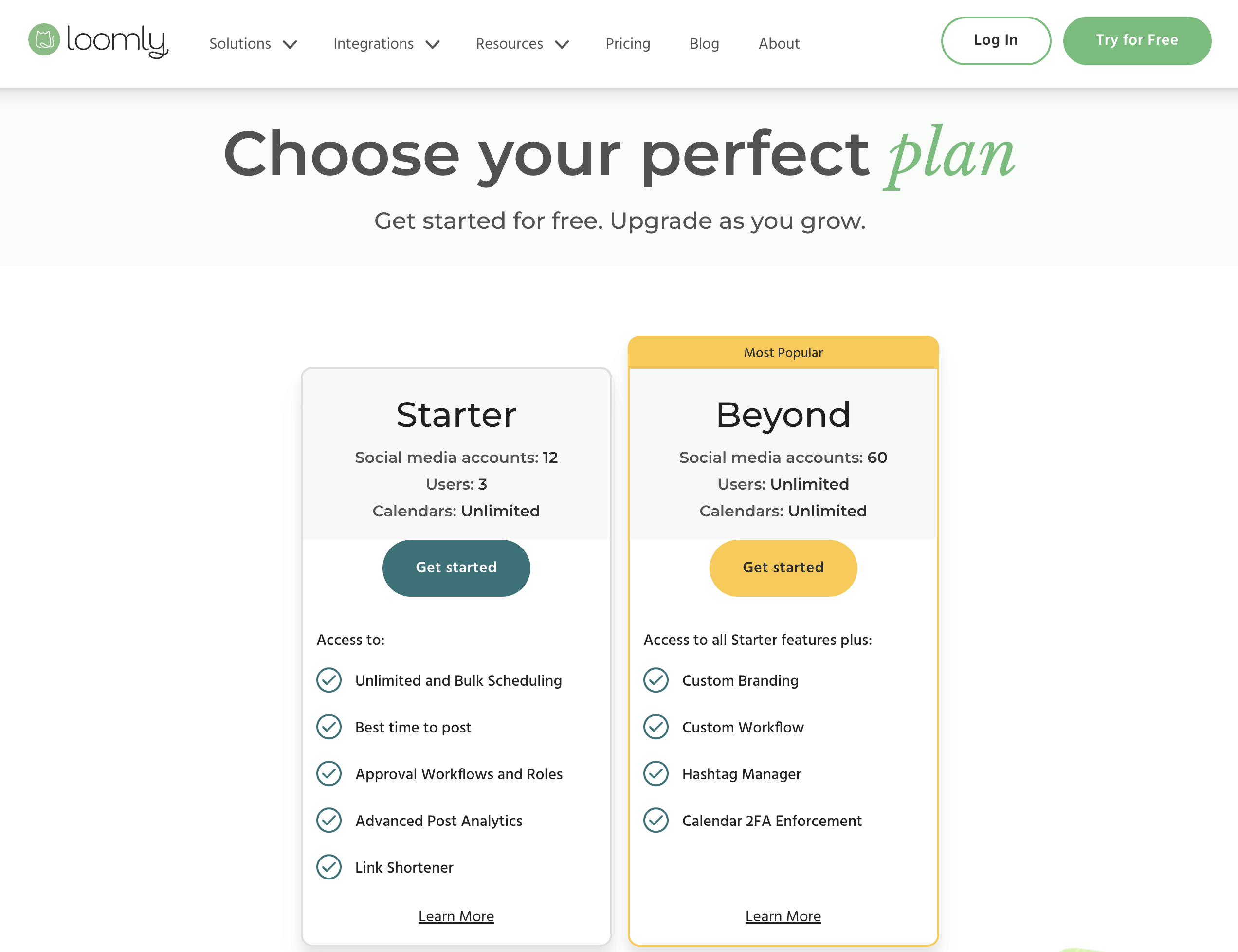
| Plan | Price | Accounts | Users | Key Features |
|---|---|---|---|---|
| Free | $0/mo | 3 | 1 | 5 posts/month, basic calendar |
| Starter | $65/mo | 12 | 3 | Unlimited posts, approval workflows, social inbox |
| Beyond | $332/mo | 60 | Unlimited | Advanced features, custom roles, priority support |
| Enterprise | Custom | Custom | Custom | Custom integrations, dedicated support |
Example costs:
- Solo user testing the platform = $0/month (Free)
- Small team with 12 accounts = $65/month
- Large team with 60 accounts = $332/month
Price Verdict
CoSchedule is cheaper for solo users — $19/month vs Loomly's $65/month Starter. But per-user pricing adds up for teams: 3 users on CoSchedule's Agency Calendar costs $147/month, while Loomly's Starter covers 3 users with approvals for $65/month. Both tools have pricing cliffs — CoSchedule's jump from Social to Agency, and Loomly's $267 gap between Starter and Beyond.
 PostPlanify
Manage All Your Social Accounts Without the Chaos
Schedule posts, track performance, and collaborate with your team.


Feature Comparison
Scheduling & Publishing
Both tools offer visual calendars, but their broader publishing philosophies differ. CoSchedule is built around editorial marketing workflows; Loomly is built around social-first content planning.
| Feature | CoSchedule | Loomly |
|---|---|---|
| Unlimited scheduling | Yes (paid plans) | Yes (paid plans) |
| Visual content calendar | Yes (editorial calendar) | Yes (social calendar) |
| Bulk scheduling | Yes (Social Calendar+) | Yes |
| Best time to post | Yes | Yes |
| Content recycling | Yes (ReQueue) | No |
| Post ideas/trends | No | Yes |
| Hashtag manager | No | Yes |
| Link shortener | No | Yes (with analytics) |
| WordPress integration | Yes (native) | No |
| Kanban boards | Yes (Content Calendar+) | No |
Winner: Depends on your workflow. CoSchedule wins for content marketers with WordPress integration, ReQueue content recycling, and Kanban project views. Loomly wins for social-focused teams with post ideas, hashtag management, and a built-in link shortener.
AI Tools
| Feature | CoSchedule | Loomly |
|---|---|---|
| AI caption generation | Yes (Hire Mia AI) | Yes (AI caption suggestions) |
| AI image generation | No | No |
| AI project templates | Yes (1,600+) | No |
| AI content rewriting | Yes | No |
| AI content ideas | No | Yes (post ideas/trends) |
| AI hashtag suggestions | No | Yes (hashtag manager) |
Winner: CoSchedule. Hire Mia AI with 1,600+ templates and content rewriting gives CoSchedule more AI capabilities. Loomly's AI is limited to captions, post ideas, and hashtags.
Analytics & Reporting
| Feature | CoSchedule | Loomly |
|---|---|---|
| Basic analytics | Social Calendar+ | Paid plans |
| Social analytics | Yes | Yes |
| Campaign reports | Yes (Content Calendar+) | No |
| Link click tracking | No | Yes (link shortener) |
| Project reports | Yes (Content Calendar+) | No |
| Custom reports | Marketing Suite only | No |
| Export reports | Yes | Yes |
Winner: CoSchedule for marketing teams. Campaign and project-level reporting give CoSchedule an edge. Loomly's analytics are basic, though its link shortener provides click tracking. Neither tool excels at social analytics.
Team Collaboration
| Feature | CoSchedule | Loomly |
|---|---|---|
| Multiple users | All paid plans (per-user) | Starter (3 users), Beyond (unlimited) |
| Approval workflows | Agency Calendar ($49/user/mo) | All paid plans ($65/mo+) |
| Custom roles | Content Calendar+ | Yes |
| White label | Agency Calendar ($49/user/mo) | No |
| Client calendars | Agency Calendar (unlimited) | No |
| Post comments/feedback | Yes | Yes |
| Task management | Yes (Content Calendar+) | No |
| Unlimited users | Custom pricing | Beyond plan ($332/mo) |
Winner: Depends on team type. CoSchedule wins for agencies needing white label features, client calendars, and task management. Loomly wins for teams that need affordable approvals — $65/month total vs $147/month for 3 users on CoSchedule's Agency Calendar.
Content & Creative Tools
| Feature | CoSchedule | Loomly |
|---|---|---|
| Canva integration | No | Yes |
| Unsplash integration | No | Yes |
| Google Drive integration | No | Yes |
| AI image generation | No | No |
| Link shortener | No | Yes (with analytics) |
| Post templates/ideas | Yes (1,600+ AI templates) | Yes (post ideas) |
| WordPress integration | Yes (native) | No |
Winner: Loomly for creative integrations. Canva, Unsplash, and Google Drive give Loomly a clear edge for visual content creation. CoSchedule's strength is WordPress integration — valuable for content marketers, but not social-first teams.
Platform Support
| Platform | CoSchedule | Loomly |
|---|---|---|
| Yes | Yes | |
| Yes | Yes | |
| X/Twitter | Yes | Yes |
| Yes | Yes | |
| Yes | Yes | |
| Threads | Yes | Yes |
| TikTok | No | Yes |
| YouTube | No | Yes |
| Google Business | No | Yes |
| Snapchat | No | Yes |
| Bluesky | No | Yes |
Winner: Loomly. Loomly supports 11 platforms vs CoSchedule's 6. CoSchedule is missing TikTok, YouTube, Google Business, Snapchat, and Bluesky — significant gaps for teams managing a full social presence.
What Real Users Say
CoSchedule Reviews
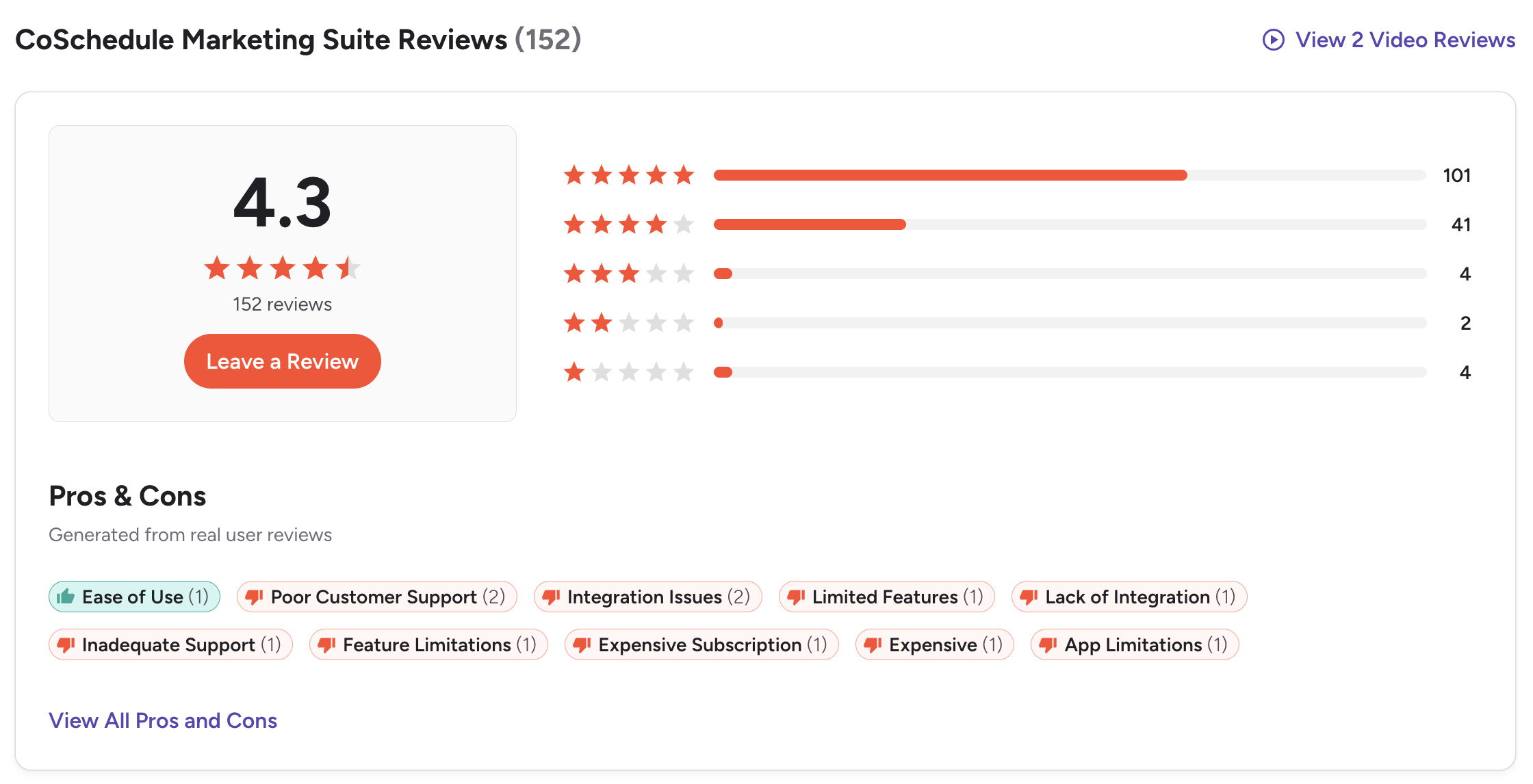
G2: 4.4/5 (255 reviews) — Users value the marketing calendar and content planning organization. However, consistent complaints emerge about customer support responsiveness, subscription cancellation difficulties, and expensive per-user pricing. CoSchedule does not have a Trustpilot page.
Loomly Reviews
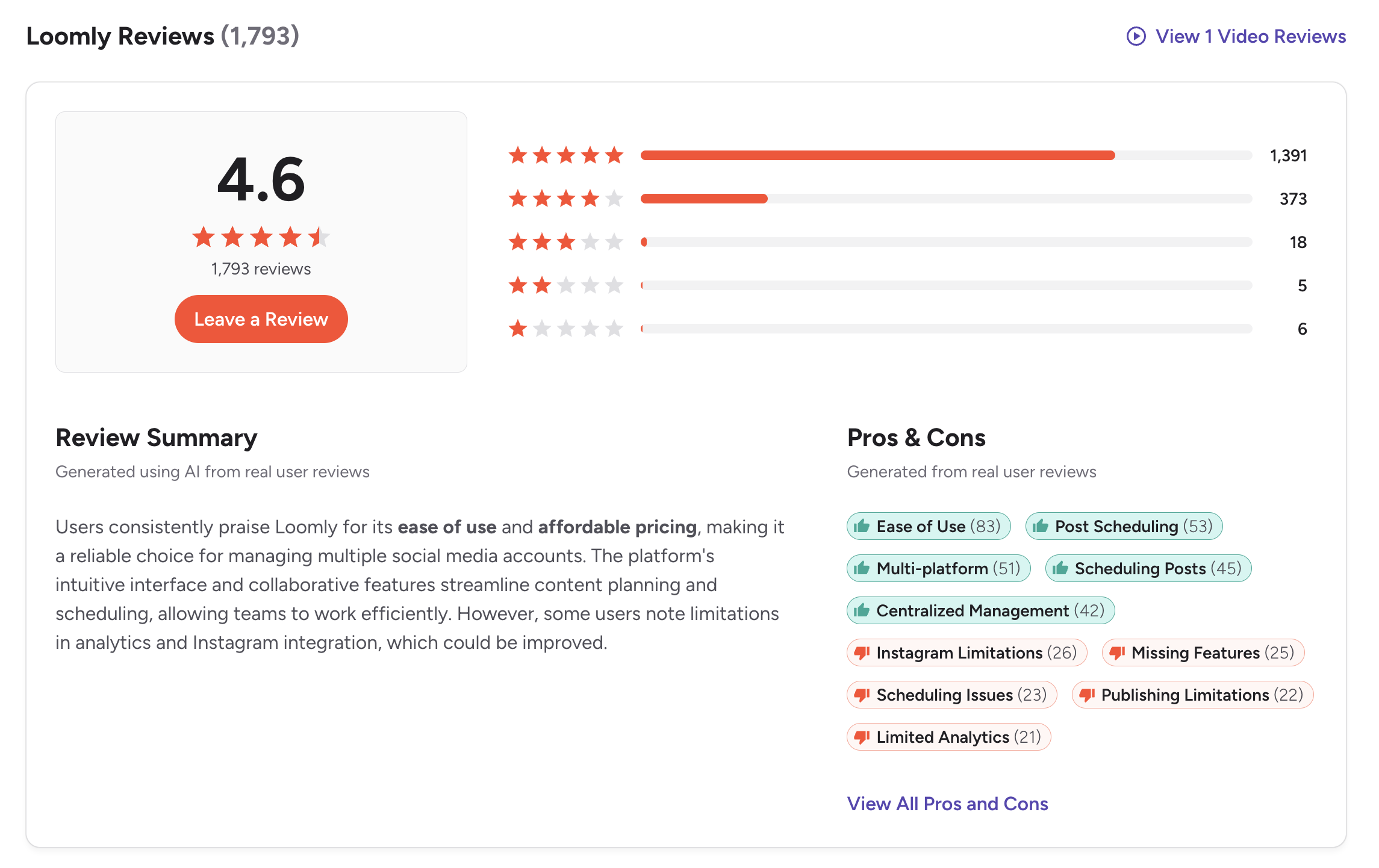
G2: 4.6/5 (1,793 reviews) — A strong G2 rating with a very large review base. Users praise the visual calendar, approval workflows, ease of use, and content organization. Common complaints include the pricing gap between plans, basic analytics, and limited automation features.
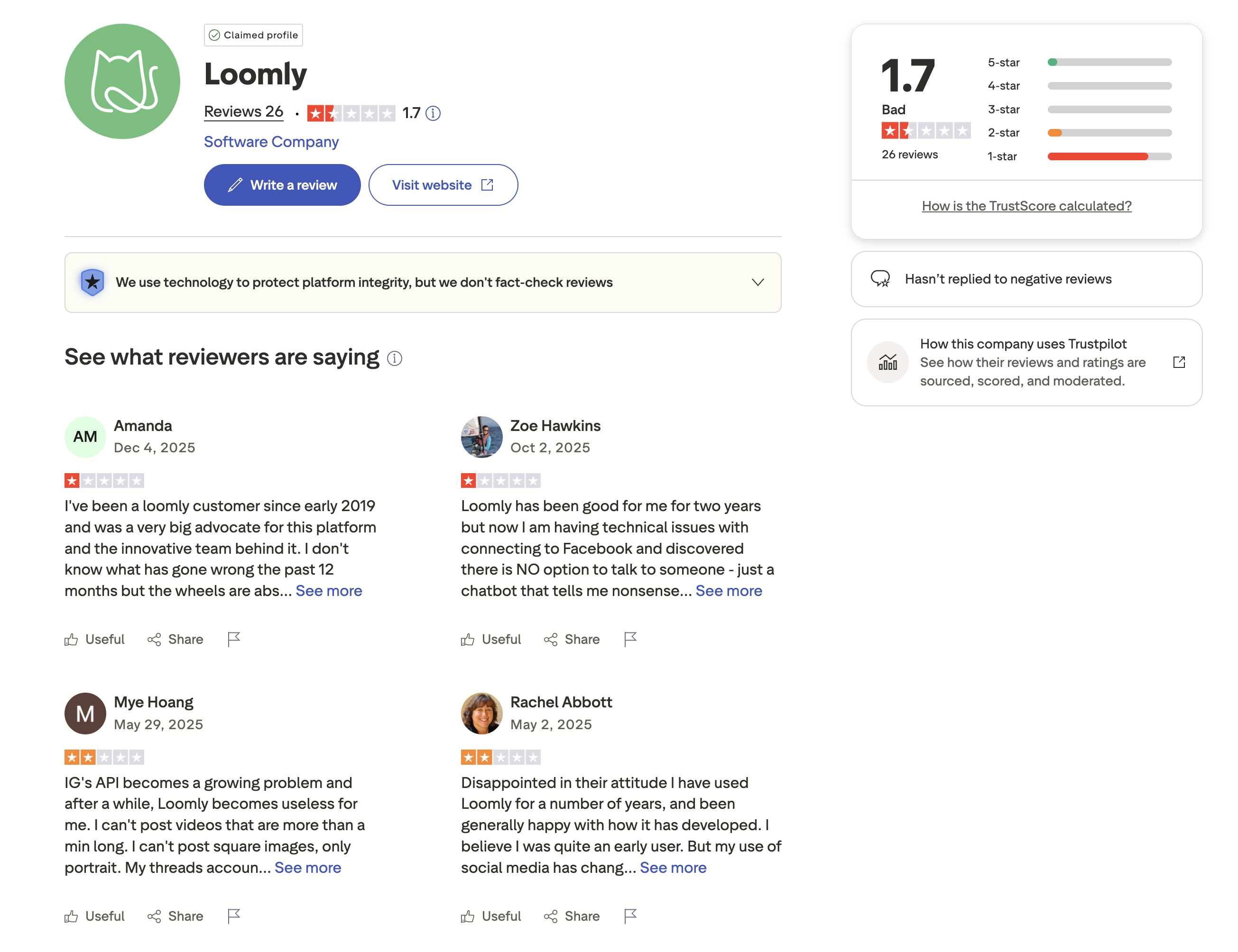
Trustpilot: 1.7/5 (26 reviews) — A concerning Trustpilot score. Negative reviewers report billing issues, difficult cancellation processes, and unresponsive customer support. The significant gap between the G2 and Trustpilot ratings is worth noting.
Review Verdict
Loomly has stronger G2 ratings (4.6/5 from 1,793 reviews vs 4.4/5 from 255 reviews) with 7x more reviews. Both tools face customer support complaints: CoSchedule users report cancellation difficulties on G2, while Loomly users report similar issues on Trustpilot. CoSchedule has no Trustpilot presence, making a full cross-platform comparison impossible. Overall, Loomly has broader user satisfaction based on available data.
PostPlanifyManage All Your Social Accounts Without the Chaos
Schedule posts, track performance, and collaborate with your team.
Who Should Use CoSchedule?
If CoSchedule is on your shortlist, you may also want to see our top alternatives to CoSchedule before committing. Also compare CoSchedule with Buffer, Hootsuite, SocialBee, and Agorapulse.
CoSchedule is the better choice if you:
- Are a WordPress blogger or content marketer who needs native blog integration
- Want an editorial marketing calendar for coordinating campaigns, not just social posts
- Need white label features and unlimited client calendars for agency work
- Require project management tools like Kanban boards alongside social scheduling
- Want ReQueue content recycling to automate evergreen post resharing
Who Should Use Loomly?
If Loomly is on your shortlist, you may also want to see our top alternatives to Loomly before committing. Also compare Loomly with Buffer, Hootsuite, Sprout Social, and Publer.
Loomly is the better choice if you:
- Need approval workflows on a budget — Loomly includes them from $65/month
- Want a visual social content calendar focused on social media, not editorial
- Support 11 platforms including TikTok, YouTube, Snapchat, and Bluesky
- Need Canva, Google Drive, and Unsplash integrations for visual content creation
- Want post idea suggestions and a hashtag manager for content inspiration
- Are a small-to-mid size marketing team that values structured collaboration over project management
Pure Social Scheduling, Perfectly Executed
CoSchedule's marketing suite goes far beyond social scheduling — which is great if you need it, but overkill if you don't. Loomly keeps things social-focused but the pricing cliff between plans is harsh. PostPlanify is built exclusively for social media teams: AI content creation, visual scheduling, team approvals, and analytics — from $29/month flat.

| Feature | CoSchedule | Loomly | PostPlanify |
|---|---|---|---|
| Starting Price | $19/user/mo | $65/mo (Starter) | $29/mo flat |
| Unlimited Accounts | Custom pricing | $332/mo (60 accounts) | $99/mo (Premium, 25 accounts) |
| Per-User Fees | Yes ($19-$49/user) | No (tiered plans) | No |
| AI Caption Generation | Yes (Hire Mia) | Yes | Yes |
| AI Image Generation | No | No | Yes |
| Canva Integration | No | Yes | Yes |
| Google Drive Import | No | Yes | Yes |
| Approval Workflows | Agency ($49/user/mo) | Starter ($65/mo) | $99/mo (Premium) |
| Content Recycling | Yes (ReQueue) | No | Yes |
| Social Inbox | No | Yes | Yes |
| Platforms Supported | 6 | 11 | 10 |
| Unlimited Scheduling | Paid plans | Paid plans | All paid plans |
PostPlanify starts at $29/month for 5 accounts with unlimited scheduling and AI tools included. Analytics are included from the Growth plan ($49/month). The Premium plan at $99/month adds 25 accounts, 5 team members, approval workflows, and white-label reports — features that require custom pricing on CoSchedule or the $332/month Beyond plan on Loomly. See all plans on the PostPlanify pricing page.
Social scheduling, done right — try PostPlanify free

Related Guides
- Best Time to Post on Social Media
- How to Automate Social Media Posts
- Social Media Analytics for Business
- Best CoSchedule Alternatives
- Best Loomly Alternatives
FAQ
Is CoSchedule cheaper than Loomly?
For a solo user, yes. CoSchedule's Social Calendar starts at $19/user/month vs Loomly's $65/month Starter. But for teams, Loomly is often cheaper — a 3-person team with approvals pays $65/month on Loomly vs $147/month on CoSchedule's Agency Calendar.
Does Loomly have content recycling?
No. Loomly does not offer evergreen content recycling or automated reposting. If content recycling is important to your workflow, CoSchedule's ReQueue feature or PostPlanify are better options.
Does CoSchedule support TikTok or YouTube?
No. CoSchedule supports 6 platforms: Facebook, Instagram, X/Twitter, LinkedIn, Pinterest, and Threads. It does not support TikTok, YouTube, Google Business, Snapchat, or Bluesky. Loomly supports all of these with 11 platforms total.
Which has better approval workflows?
Both offer approvals, but Loomly includes them on all paid plans starting at $65/month for 3 users. CoSchedule requires the Agency Calendar at $49/user/month — $147/month for a 3-person team. Loomly is more accessible for teams needing approvals on a budget.
Does Loomly integrate with WordPress?
No. Loomly is a social-focused platform without WordPress integration. If blog-to-social publishing is a core workflow, CoSchedule is the better choice with native WordPress support. If you only need social scheduling, Loomly offers broader platform support.
Which has better AI tools?
CoSchedule has deeper AI with Hire Mia AI, 1,600+ templates, and content rewriting. Loomly's AI is limited to caption suggestions and post ideas. Neither offers AI image generation — for that, consider PostPlanify.
Why doesn't CoSchedule have a Trustpilot page?
CoSchedule has no Trustpilot presence, so no independent Trustpilot rating is available. Loomly does have a Trustpilot page but scores 1.7/5 from 26 reviews, reflecting billing and cancellation complaints.
Can I switch from CoSchedule to Loomly?
Yes. Reconnect your social accounts to Loomly and begin scheduling. Loomly's free plan lets you test before committing. Note that you'll lose CoSchedule's WordPress integration, ReQueue recycling, and project management features.







