
Choosing between CoSchedule and Sendible means deciding what role social media plays in your marketing stack. Both platforms help you schedule posts and manage teams, but they approach the problem from completely different angles — and understanding those differences matters before you commit.
CoSchedule thinks of social media as part of a broader marketing calendar — not the whole story. Sendible thinks of social as the main event, with inbox management and client dashboards at the center. Two different starting points that lead to very different tools. We compare features, pricing, and user ratings to help you choose. Comparing the full market? Browse all social media scheduling alternatives.
CoSchedule vs Sendible at a Glance
| Feature | CoSchedule | Sendible |
|---|---|---|
| Starting Price | Free (limited) | $29/mo |
| Free Plan | Yes (1 user, 2 profiles, 15 posts/mo) | No (14-day trial) |
| Platforms | 6 | 10 |
| AI Tools | AI Social Assistant | AI Assist (OpenAI-powered) |
| Approval Workflows | Yes (paid plans) | Yes (Traction+ at $89/mo) |
| White-Label | No | Yes (Advanced+ add-on) |
| Unified Inbox | No | Yes (Priority Inbox) |
| G2 Rating | 4.4/5 (251 reviews) | 4.5/5 (899 reviews) |
CoSchedule Overview
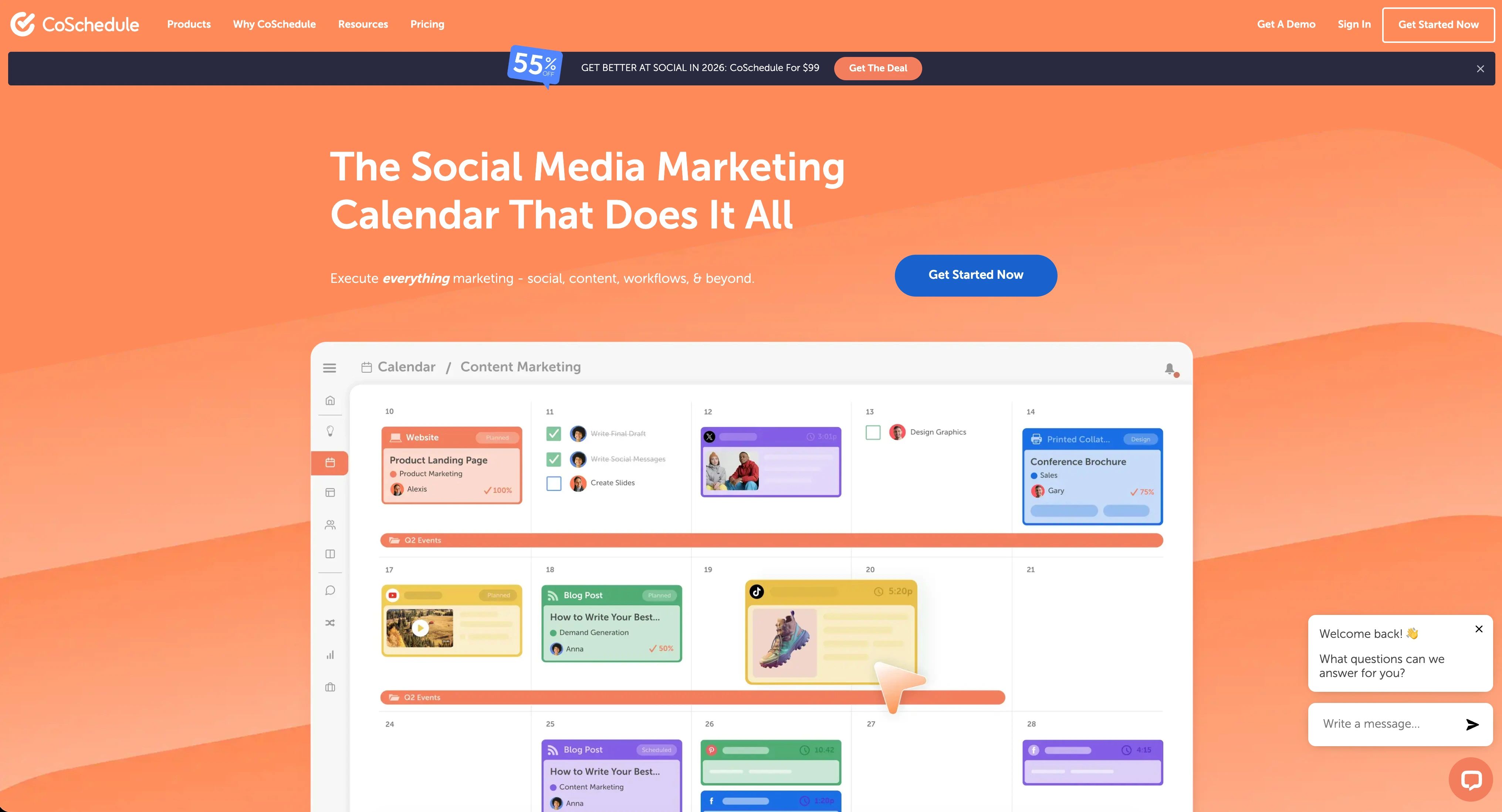
CoSchedule is a marketing calendar platform that includes social media scheduling as one piece of a broader content planning system. It is built for marketers who manage blog posts, email campaigns, and social promotions from a single drag-and-drop calendar.
Supported Platforms (6): Facebook, Instagram, X/Twitter, LinkedIn, Pinterest, Threads
CoSchedule does not support TikTok, YouTube, Google Business, or Bluesky.
Key Features:
- Marketing calendar with drag-and-drop scheduling
- ReQueue for automated content recycling
- Headline Analyzer for optimizing post titles
- AI Social Assistant for generating captions
- WordPress and HubSpot integrations
- Campaign organizer and project management tools
- Team workflows and task assignments
CoSchedule is best for content marketers who want a marketing calendar with social scheduling built in. It shines when social media is one part of a larger content operation rather than the primary focus. Read real user reviews of CoSchedule on G2.
See our full CoSchedule alternatives page for more options.
Sendible Overview

Sendible is a social media management platform built for agencies and teams that need client management, inbox tools, and reporting under one roof. It supports 10 platforms and offers unlimited scheduling on every plan.
Supported Platforms (10): Facebook, Instagram, TikTok, X/Twitter, LinkedIn, Google Business, YouTube, WordPress, Threads, Bluesky
Sendible does not support Pinterest.
Key Features:
- Unlimited scheduling on all plans
- AI Assist powered by OpenAI on all plans
- Priority Inbox with sentiment analysis
- Approval workflows (Traction plan and above)
- White-label dashboards (Advanced+ with $240/mo add-on)
- Canva, Google Drive, Pexels, and Giphy integrations
- Bulk scheduling via CSV and Smart Queues
- RSS auto-posting and 250+ report modules
- Client dashboards (Traction plan and above)
Sendible is best for agencies and teams needing client management, white-label branding, and inbox tools. Read real user reviews of Sendible from G2 and Trustpilot. See our full Sendible alternatives page for more options.
Pricing Comparison
CoSchedule Pricing
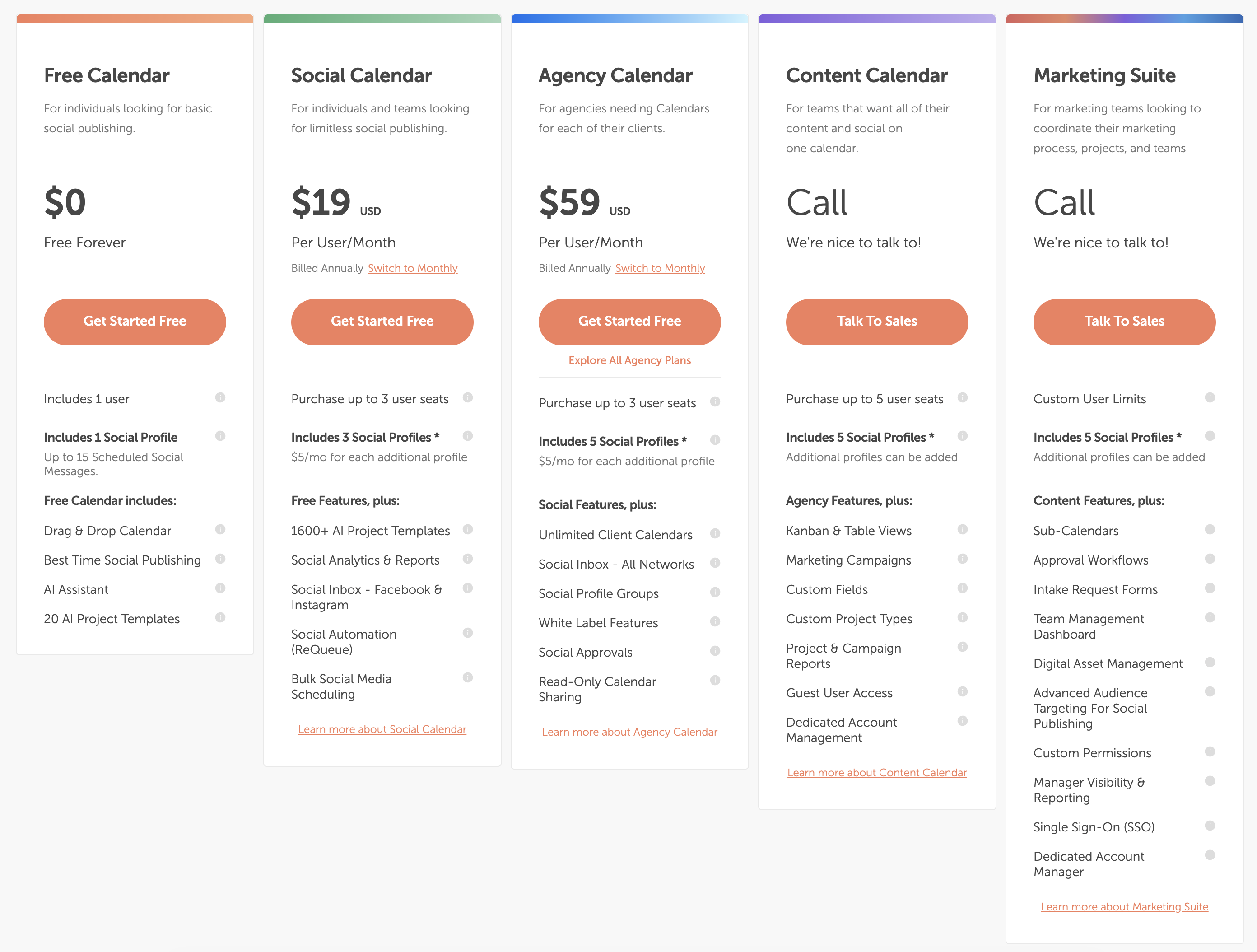
| Plan | Price | Users | Profiles | Posts |
|---|---|---|---|---|
| Free Calendar | $0/mo | 1 | 2 | 15/month |
| Social Calendar | $19/mo per user | 1 | 5 | Unlimited |
| Agency Calendar | $49/mo per user | 1 | 10 | Unlimited |
| Content Calendar | Custom | Custom | Custom | Unlimited |
CoSchedule's per-user pricing adds up quickly for teams. A 4-person team on the Social Calendar plan costs $76/month. The same team on Agency Calendar costs $196/month. See the full CoSchedule pricing breakdown for details.
Sendible Pricing
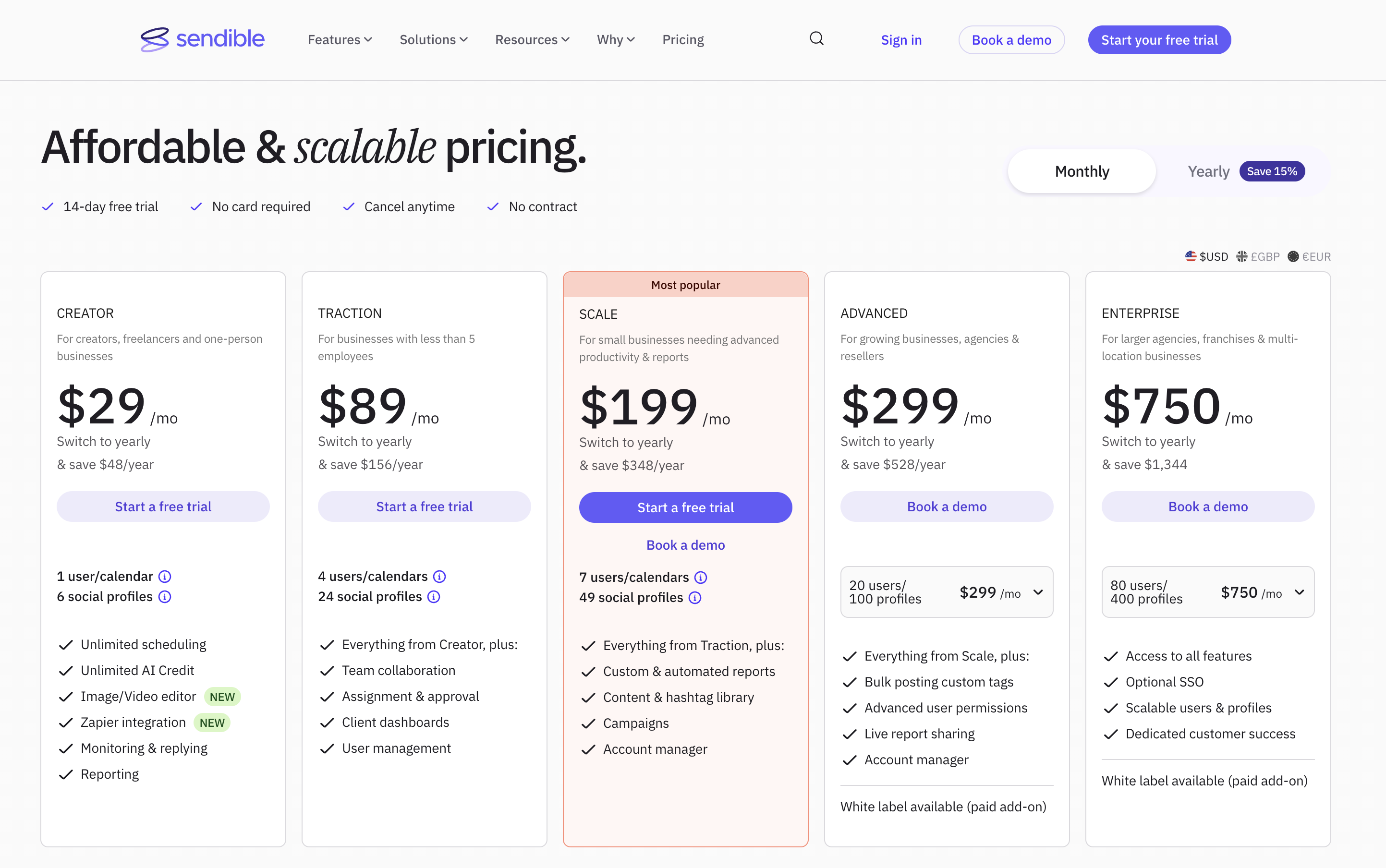
| Plan | Price | Users | Profiles |
|---|---|---|---|
| Creator | $29/mo | 1 | 6 |
| Traction | $89/mo | 4 | 24 |
| Scale | $199/mo | 7 | 49 |
| Advanced | $299/mo | 20 | 100 |
| Enterprise | $750/mo | 80 | 400 |
Sendible bundles users and profiles into each plan, so a 4-person team gets Traction at $89/month flat — no per-user math. See the full Sendible pricing breakdown for details.
Price Verdict
CoSchedule is cheaper for solo users with the free plan. Sendible is more cost-effective for teams of 3+ users since CoSchedule's per-user pricing escalates faster. For a 4-user team, Sendible Traction ($89/mo) beats CoSchedule Agency Calendar ($196/mo) while offering more platforms and features.
 PostPlanify
Manage All Your Social Accounts Without the Chaos
Schedule posts, track performance, and collaborate with your team.


Feature Comparison
Scheduling & Publishing
| Feature | CoSchedule | Sendible |
|---|---|---|
| Unlimited Scheduling | Paid plans only | All plans |
| Bulk Scheduling | No | Yes (CSV upload) |
| Content Recycling | ReQueue | Smart Queues |
| RSS Auto-Posting | No | Yes |
| Post Preview | Yes | Yes |
| Optimal Timing | Yes | Yes |
Winner: Sendible. Unlimited scheduling on all plans, bulk CSV uploads, and RSS auto-posting give Sendible a clear advantage for high-volume publishing.
AI Tools
| Feature | CoSchedule | Sendible |
|---|---|---|
| AI Caption Generation | AI Social Assistant | AI Assist (OpenAI) |
| AI Image Generation | No | No |
| Headline Analyzer | Yes | No |
| AI on All Plans | Paid plans only | Yes (all plans) |
Winner: Tie. CoSchedule's Headline Analyzer is unique and valuable for content marketers. Sendible includes AI Assist on every plan. Neither offers AI image generation.
Analytics & Reporting
| Feature | CoSchedule | Sendible |
|---|---|---|
| Social Analytics | Basic | 250+ report modules |
| Client Reports | No | Yes (Traction+) |
| Custom Dashboards | No | Yes |
| Campaign Tracking | Yes | Yes |
Winner: Sendible. With 250+ report modules and client dashboards, Sendible's analytics are significantly deeper than CoSchedule's basic reporting.
Team Collaboration
| Feature | CoSchedule | Sendible |
|---|---|---|
| Approval Workflows | Yes (paid plans) | Yes (Traction+) |
| Task Management | Yes | No |
| Client Dashboards | No | Yes (Traction+) |
| White-Label | No | Yes ($240/mo add-on) |
Winner: Sendible for agency teams needing client-facing tools. CoSchedule wins for internal teams that need task management alongside social scheduling.
Platform Support
| Platform | CoSchedule | Sendible |
|---|---|---|
| Yes | Yes | |
| Yes | Yes | |
| X/Twitter | Yes | Yes |
| Yes | Yes | |
| Yes | No | |
| TikTok | No | Yes |
| YouTube | No | Yes |
| Google Business | No | Yes |
| Threads | Yes | Yes |
| Bluesky | No | Yes |
| WordPress | No | Yes |
Winner: Sendible. Ten platforms versus six. CoSchedule supports Pinterest, which Sendible lacks, but Sendible covers TikTok, YouTube, Google Business, Bluesky, and WordPress — all absent from CoSchedule.
What Real Users Say
CoSchedule Reviews
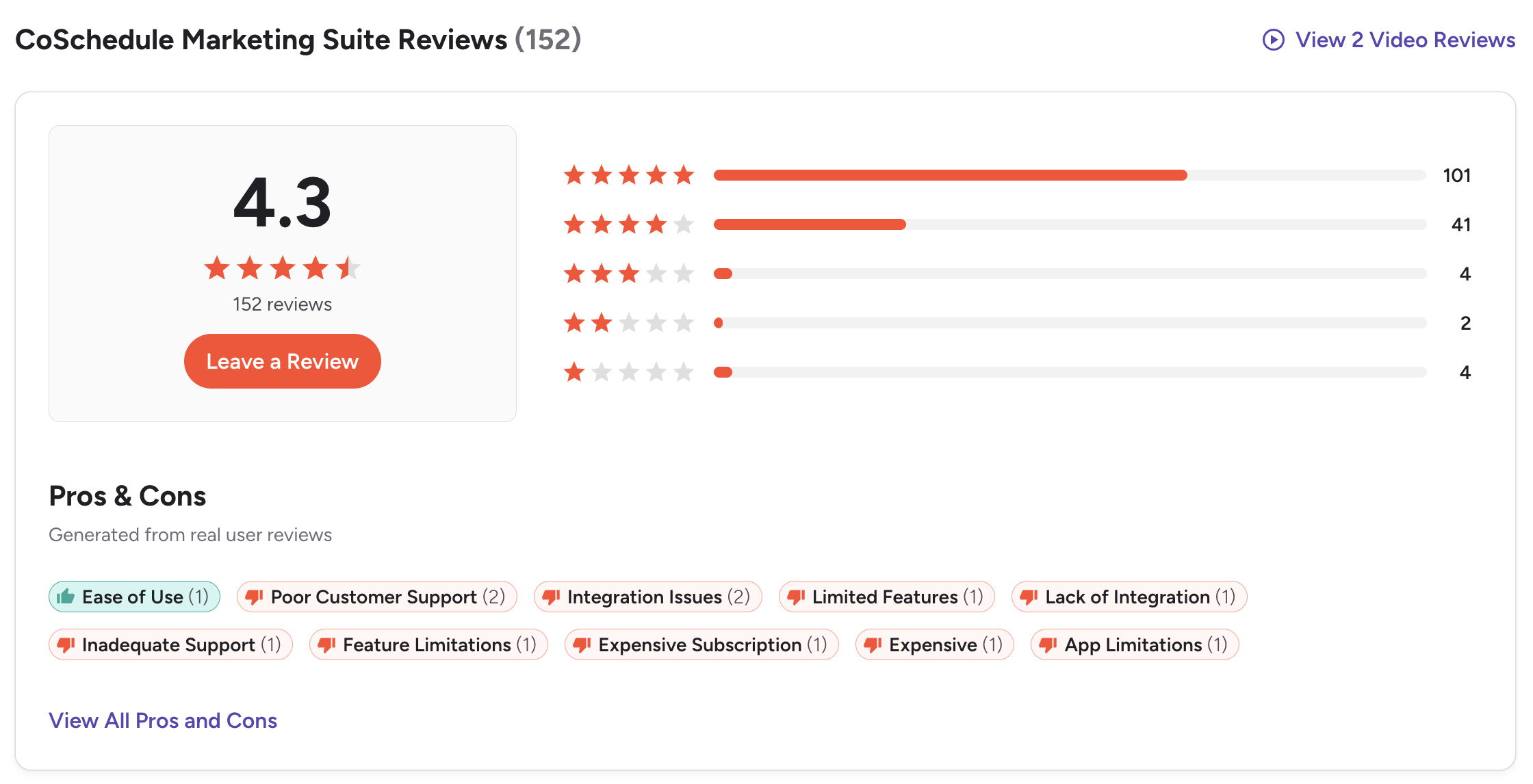
G2: 4.4/5 (251 reviews)
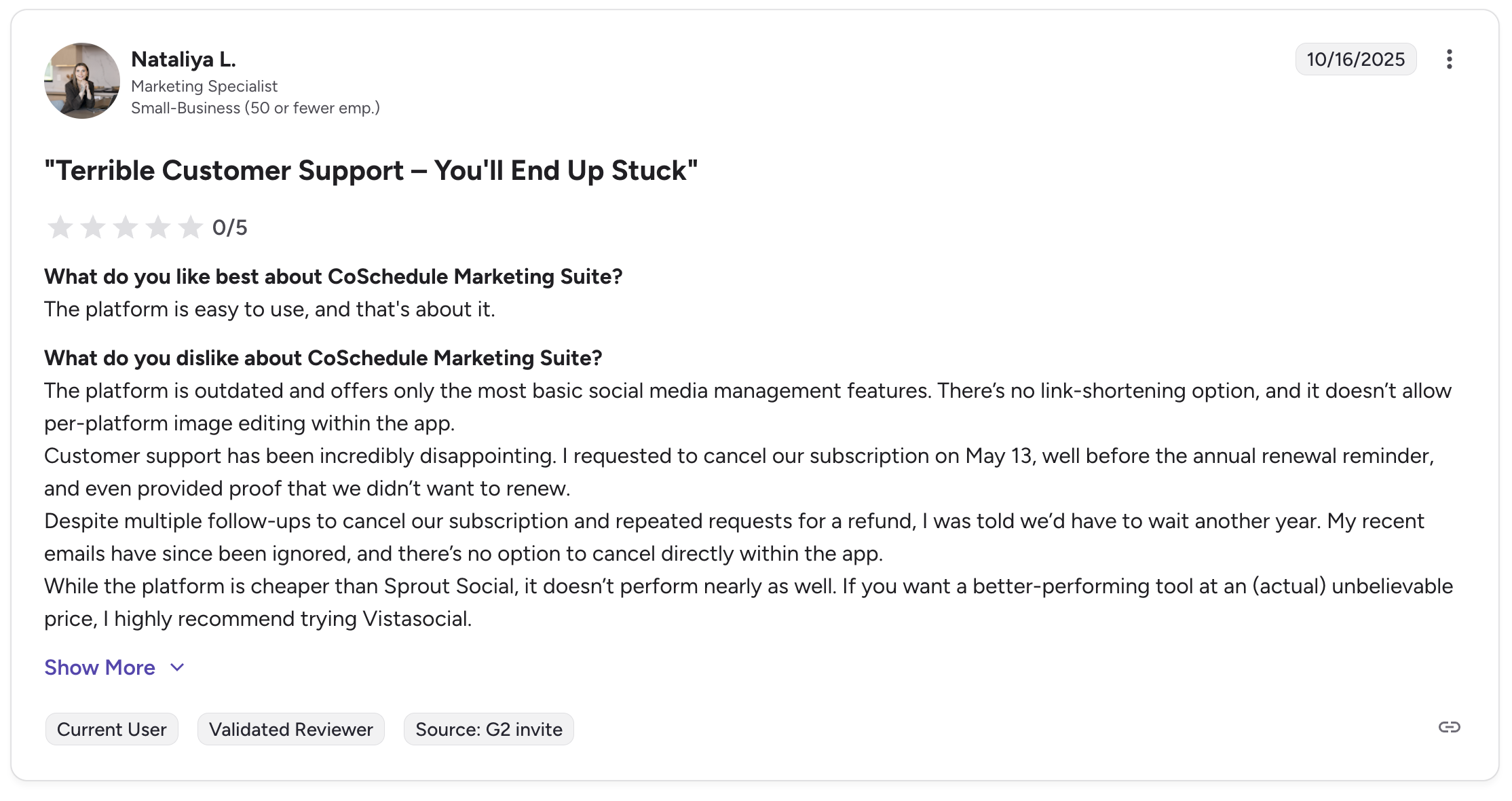
Users praise CoSchedule's marketing calendar and drag-and-drop interface. Common complaints include limited social platform support and the per-user pricing model that makes scaling expensive.
CoSchedule does not have a Trustpilot presence.
Sendible Reviews
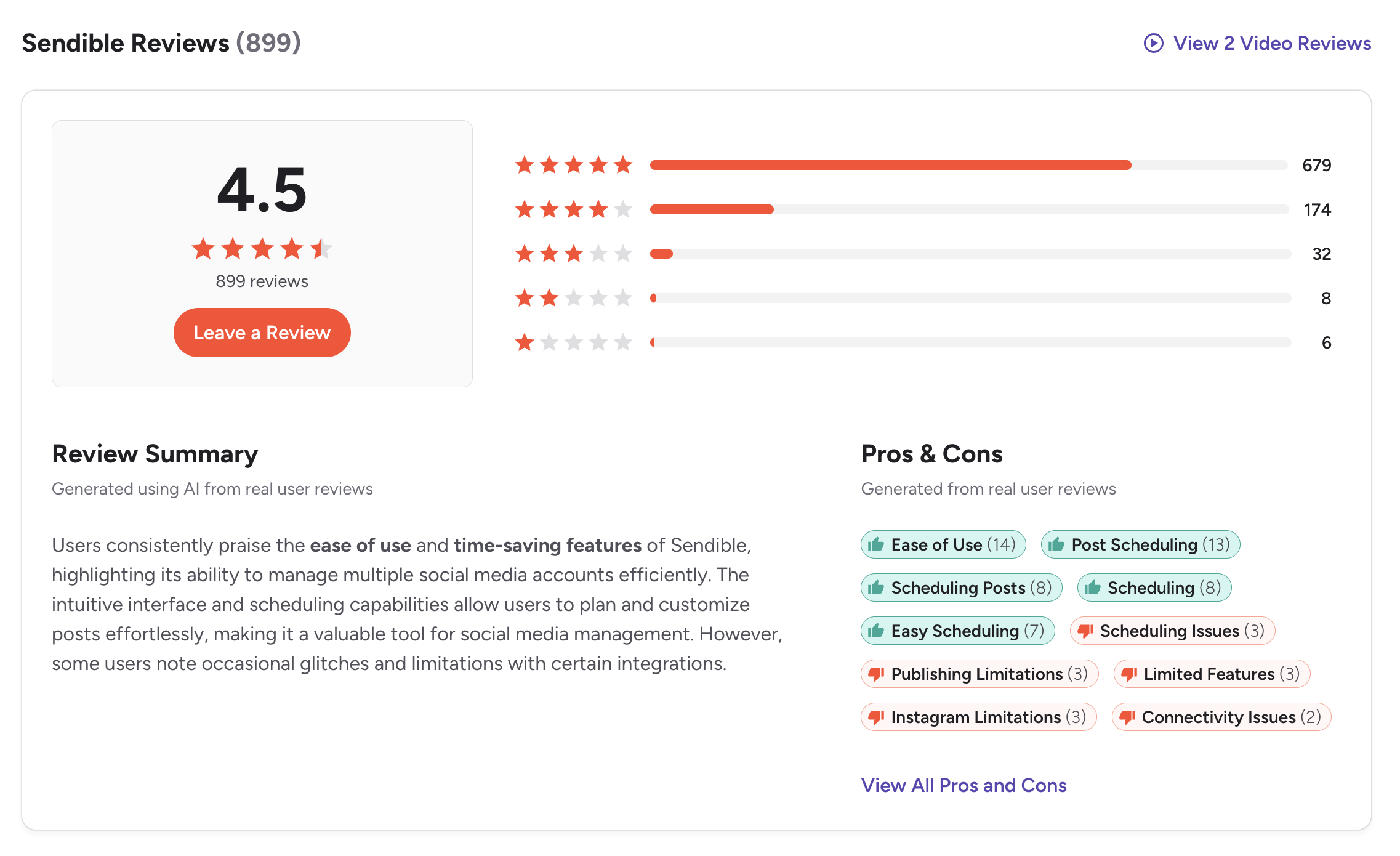
G2: 4.5/5 (899 reviews)
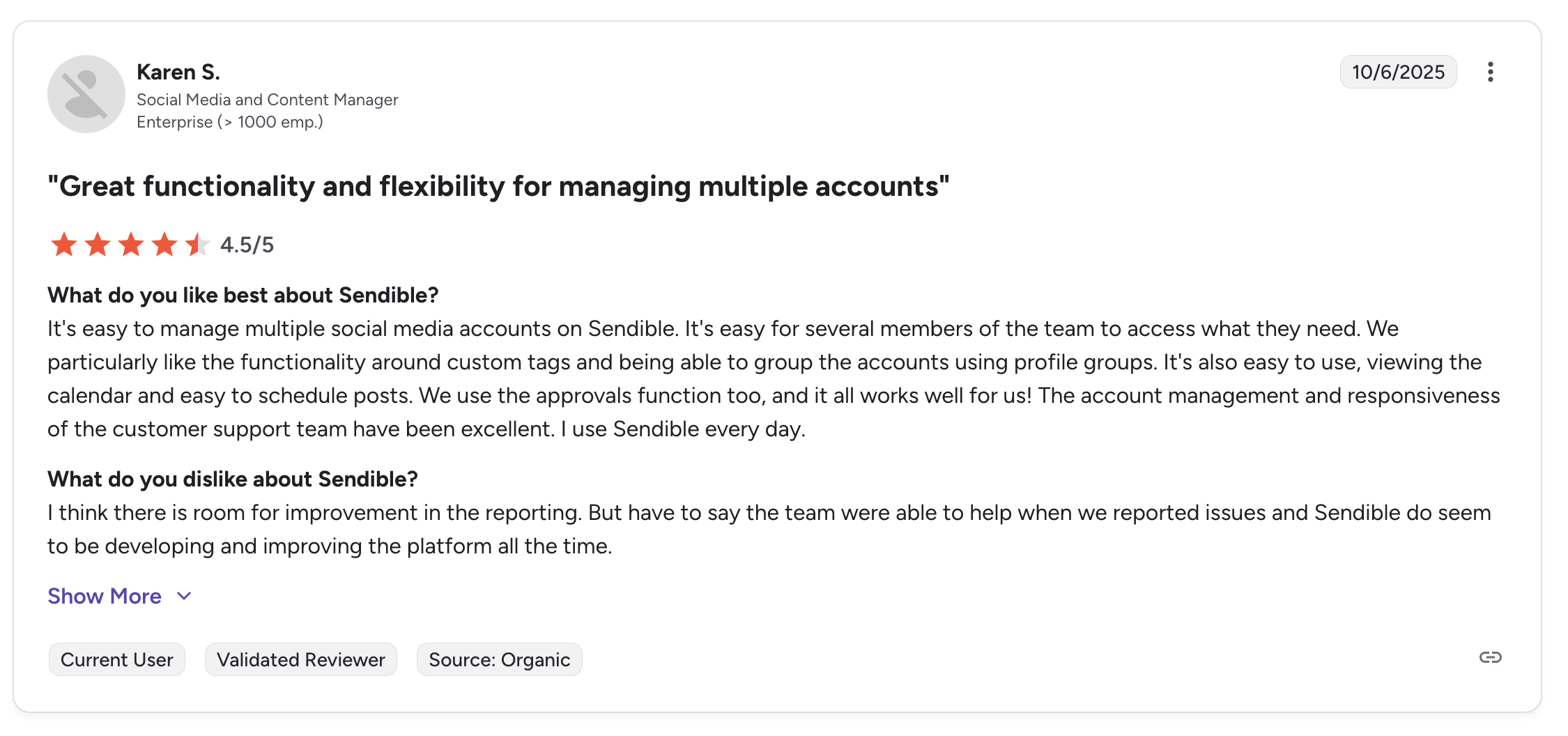
Users highlight Sendible's Priority Inbox, client dashboards, and broad platform coverage. Some note daily sending limits and occasional UI complexity.
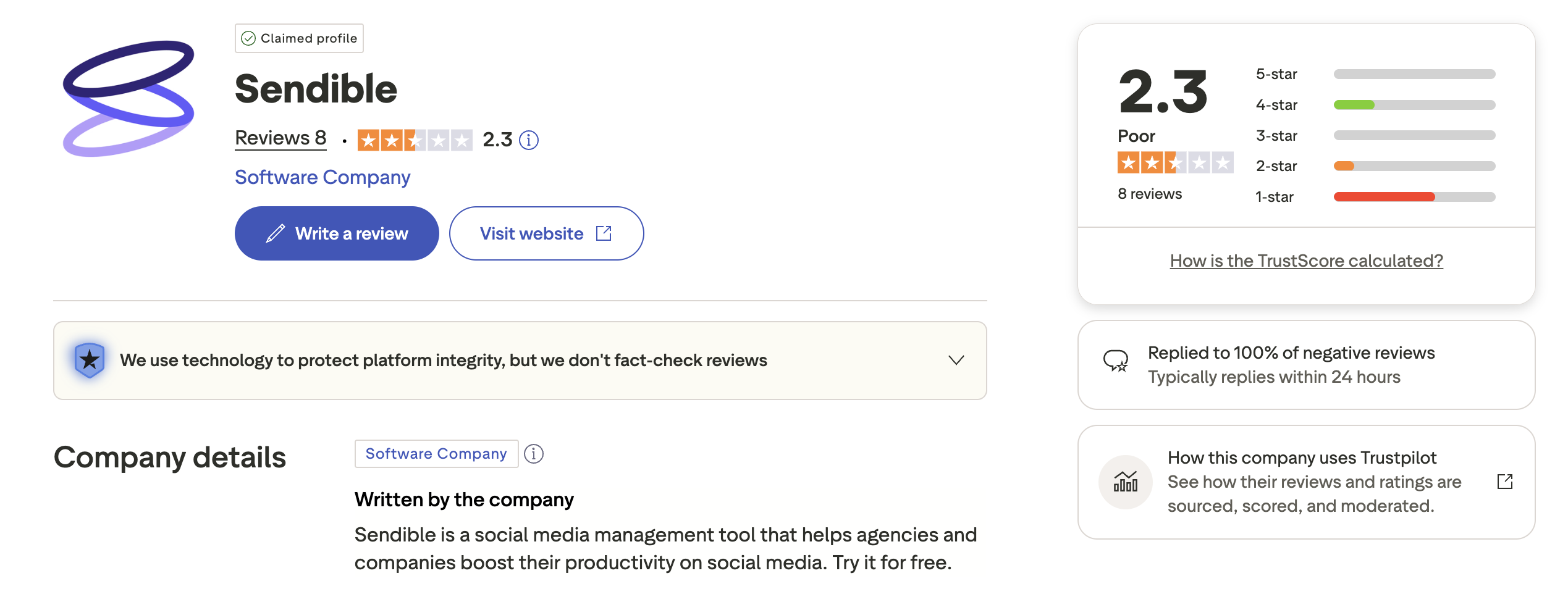
Trustpilot: 2.3/5 (8 reviews) — very small sample size, not statistically significant.
Review Verdict
Both tools receive solid G2 scores. Sendible has more than 3x the reviews, suggesting broader adoption. CoSchedule's lack of Trustpilot presence and Sendible's tiny Trustpilot sample make G2 the more reliable comparison point. Sendible edges ahead with a 4.5 vs 4.4 rating across a larger review base.
PostPlanifyManage All Your Social Accounts Without the Chaos
Schedule posts, track performance, and collaborate with your team.
Who Should Use CoSchedule?
- Content marketers who need a marketing calendar that goes beyond social media
- Solo creators who want a free plan to start with basic scheduling
- Teams that rely on WordPress or HubSpot integrations for blog-to-social workflows
- Marketers who value the Headline Analyzer for optimizing content titles
- Organizations that need task management alongside social scheduling
See how CoSchedule compares to other tools: Buffer vs CoSchedule, Hootsuite vs CoSchedule, Later vs CoSchedule, Metricool vs CoSchedule.
Who Should Use Sendible?
- Agencies managing multiple clients who need separate dashboards and reports
- Teams that need a unified inbox to handle comments and messages across platforms
- Businesses publishing to TikTok, YouTube, and Google Business alongside standard social channels
- Organizations that require white-label branding for client-facing reports
- Teams that need bulk scheduling via CSV for high-volume publishing
- Marketers who rely on detailed analytics with 250+ report modules
See how Sendible compares to other tools: Buffer vs Sendible, Hootsuite vs Sendible, Agorapulse vs Sendible, SocialPilot vs Sendible.
Calendar + Social Management, One Price
CoSchedule handles content planning and marketing calendars. Sendible handles social inbox management and client dashboards. Why pay for two specialized tools? PostPlanify combines a visual calendar, unlimited scheduling, AI tools, and team workflows starting at $29/month — covering the essentials of both.

| Feature | CoSchedule | Sendible | PostPlanify |
|---|---|---|---|
| Starting Price | Free (limited) | $29/mo | $29/mo |
| Unlimited Scheduling | Paid plans | All plans | All paid plans |
| AI Caption Generation | Paid plans | All plans | Yes (unlimited) |
| AI Image Generation | No | No | Yes |
| Canva Integration | No | Yes | Yes |
| Google Drive Import | No | Yes | Yes |
| Approval Workflows | Paid plans | $89/mo (Traction) | $99/mo (Premium) |
| Analytics | Basic | 250+ modules | $49/mo (Growth) |
| Social Inbox | Limited (FB & IG only) | Yes (Priority Inbox) | Yes |
| Platforms | 6 | 10 | 10 |
| Unlimited Team Members | No (per-user) | No (plan-based) | 5 members ($99/mo Premium) |
PostPlanify gives you unlimited scheduling, AI caption and image generation, and Canva integration at $29/month. Analytics are included starting on the Growth plan at $49/month. When you need approval workflows and team collaboration, the Premium plan at $99/month covers the rest — no per-user fees, no add-on charges.
See all plans on the PostPlanify pricing page.
Try PostPlanify free for 7 days and see why teams are switching from complex, expensive tools to a simpler approach.

Related Guides
- Best Time to Post on Social Media
- How to Automate Social Media Posts
- How to Create a Social Media Content Calendar
- Best CoSchedule Alternatives
- Best Sendible Alternatives
FAQ
Is CoSchedule better than Sendible for agencies?
No. Sendible is the better choice for agencies thanks to client dashboards, white-label options, and a unified inbox. CoSchedule is designed more for internal marketing teams managing content calendars.
Does CoSchedule support TikTok?
No. CoSchedule supports 6 platforms: Facebook, Instagram, X/Twitter, LinkedIn, Pinterest, and Threads. TikTok, YouTube, Google Business, and Bluesky are not available.
Does Sendible have a free plan?
No. Sendible offers a 14-day free trial but no permanent free plan. CoSchedule offers a free calendar plan with 1 user, 2 profiles, and 15 posts per month.
Why is Sendible's Trustpilot rating so low?
Sendible has a 2.3/5 on Trustpilot, but with only 8 reviews this is not a statistically meaningful sample. Their G2 rating of 4.5/5 across 899 reviews is a more reliable indicator of user satisfaction.
Can I use CoSchedule just for social media scheduling?
Yes, but CoSchedule is designed as a marketing calendar first. If you only need social scheduling, tools like Sendible or PostPlanify offer more social-specific features at comparable or lower prices.
Does Sendible support Pinterest?
No. Sendible supports 10 platforms but Pinterest is notably absent. If Pinterest is critical to your strategy, consider CoSchedule (which supports Pinterest) or PostPlanify.
Which tool has better AI features?
Both offer AI caption generation. CoSchedule includes a unique Headline Analyzer. Sendible's AI Assist is powered by OpenAI and available on all plans. Neither offers AI image generation — PostPlanify is the only option here that includes both AI captions and AI image generation.
How does per-user pricing affect CoSchedule's cost for teams?
CoSchedule charges per user on paid plans. A 5-person team on Social Calendar costs $95/month, while Agency Calendar costs $245/month. Sendible's Traction plan covers 4 users for $89/month flat, making it more predictable for growing teams. For even better team pricing, PostPlanify's Premium plan offers 5 team members at $99/month (unlimited on Enterprise).







