
Choosing between Buffer or CoSchedule comes down to what kind of tool you actually need. Buffer is a straightforward social media scheduler built for creators and small teams. CoSchedule is an editorial calendar and content marketing platform designed for WordPress bloggers and marketing departments.
We compared current published pricing, tested both platforms, and analyzed 1,200+ user reviews across G2 and Trustpilot to give you an unbiased breakdown.
In this 2026 comparison, we put a simple social scheduler against a full marketing suite — these tools barely overlap. We compare them anyway, because understanding the differences helps you avoid paying for features you don't need (or missing ones you do). Here's the full analysis. Want more options? Browse all social media scheduling alternatives.
Buffer vs CoSchedule at a Glance
Here's a quick side-by-side overview before we dive deeper:
| Category | Buffer | CoSchedule |
|---|---|---|
| Starting Price | $6/mo per channel | $19/mo per user (annual) |
| Free Plan | Yes (3 channels) | Yes (1 user, 1 profile, 15 messages) |
| Platforms Supported | 11 | 11 (X/Twitter costs extra) |
| Unlimited Scheduling | Yes (paid plans) | Yes (paid plans) |
| AI Tools | AI Assistant (captions) | Hire Mia AI (1,600+ templates, image gen) |
| AI Image Generation | No | Yes |
| Bulk Scheduling | CSV import | Yes (Social Calendar+) |
| Team Collaboration | Team plan ($12/mo/channel) | Social Calendar ($19/mo/user) |
| Approval Workflows | Team plan only | Agency Calendar ($59/mo/user) |
| Social Inbox | Basic (Community Inbox) | FB/IG on Social, all networks on Agency+ |
| Social Listening | No | No |
| Analytics | Basic to Advanced | Basic social analytics |
| Content Marketing Calendar | No | Yes (Content Calendar+) |
| WordPress Integration | No | Yes |
| G2 Rating | 4.3/5 (1,023 reviews) | 4.3/5 (152 reviews) |
| Trustpilot Rating | 2.1/5 (93 reviews) | 2.8/5 (3 reviews) |
| Best For | Solo creators, simple scheduling | WordPress bloggers, content marketing teams |
Buffer Overview

Buffer is one of the oldest social media scheduling tools, launched in 2010. It focuses on simplicity — a clean interface for scheduling posts, managing a basic content calendar, and viewing analytics.
Buffer supports 11 platforms: Instagram, Facebook, LinkedIn, Pinterest, X/Twitter, TikTok, YouTube, Google Business Profile, Threads, Bluesky, and Mastodon.
Key features:
- Post scheduling with queue management
- AI Assistant for generating captions and post ideas
- Hashtag manager and first comment scheduling
- Basic community inbox
- Start Page (link-in-bio builder)
- Content calendar
Buffer is popular among solo creators and freelancers who want a no-frills social media scheduling experience without a steep learning curve. For a deeper look, see what users say about Buffer on G2 and Trustpilot.
CoSchedule Overview

CoSchedule is a marketing suite and editorial calendar platform that combines social media scheduling with content marketing planning. Unlike pure schedulers, CoSchedule is designed around a marketing calendar that coordinates blog posts, campaigns, and social publishing in one place.
CoSchedule supports 11 platforms: Facebook, Instagram, LinkedIn, Pinterest, TikTok, YouTube, Threads, Bluesky, Mastodon, Google Business Profile, and X/Twitter — though X/Twitter requires a paid add-on ($8-25/profile/month) and is not available on the base Social Calendar plan.
Key features:
- Editorial/marketing calendar with drag-and-drop
- ReQueue for evergreen content recycling
- WordPress integration for blog post scheduling
- Hire Mia AI with 1,600+ templates and image generation
- Bulk social media scheduling
- White label features (Agency Calendar+)
- Approval workflows and social inbox
CoSchedule is positioned for WordPress bloggers, content marketers, and marketing teams who need to coordinate their social media content calendar alongside editorial content. Read real user reviews of CoSchedule from G2 and Trustpilot.
Pricing Comparison
Pricing is where Buffer and CoSchedule take different approaches. Buffer charges per channel, while CoSchedule charges per user — and both models scale differently depending on your setup.
Buffer Pricing
Buffer uses per-channel pricing. Each social account you connect adds to your monthly cost. We break this down further in our Buffer pricing guide.
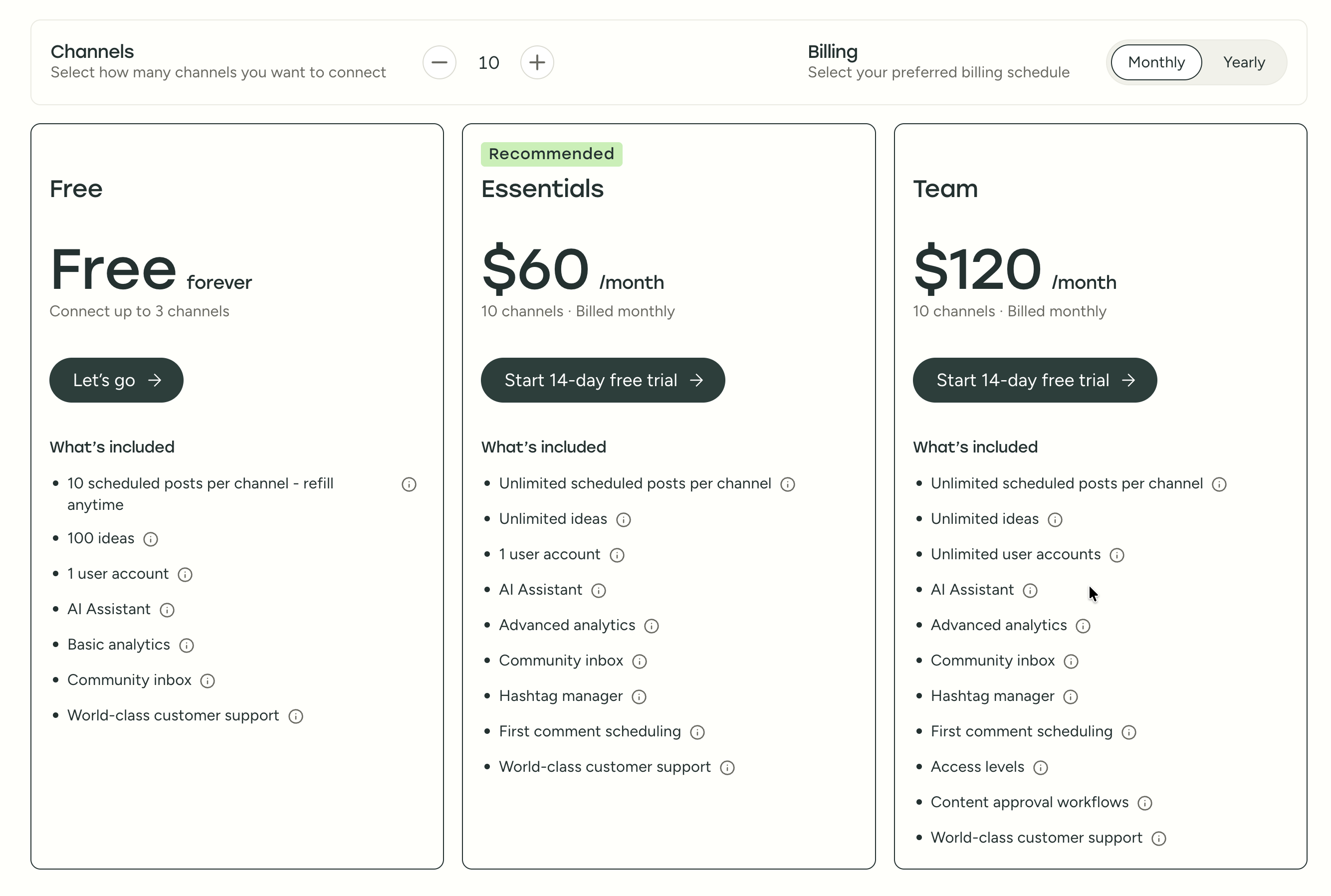
| Plan | Price | Channels | Users | Key Features |
|---|---|---|---|---|
| Free | $0/mo | 3 | 1 | 10 posts/channel, basic analytics |
| Essentials | $6/mo per channel | Unlimited | 1 | Unlimited posts, advanced analytics, hashtag manager |
| Team | $12/mo per channel | Unlimited | Unlimited | Approval workflows, permissions, team collaboration |
Example costs:
- 5 channels on Essentials = $30/month
- 10 channels on Team = $120/month
- 25 channels on Team = $300/month
CoSchedule Pricing
CoSchedule uses per-user pricing with profile limits. Additional profiles cost $5/month each, and X/Twitter requires a separate paid add-on. See the full CoSchedule pricing breakdown for details.
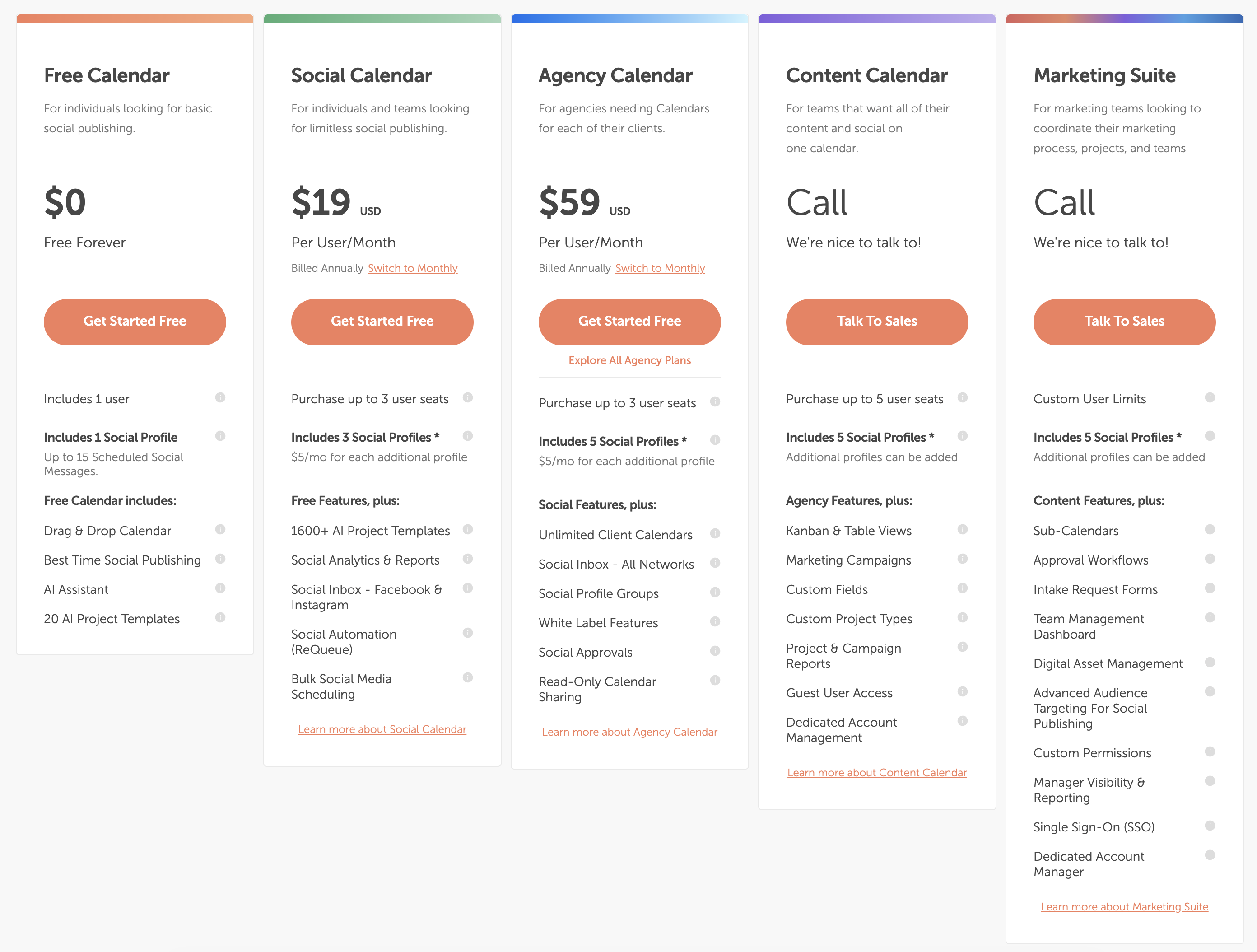
| Plan | Price | Profiles | Users | Key Features |
|---|---|---|---|---|
| Free Calendar | $0/mo | 1 | 1 | 15 messages, basic calendar, AI assistant |
| Social Calendar | $19/user/mo (annual) | 3 | Up to 3 | ReQueue, bulk scheduling, social inbox (FB/IG) |
| Agency Calendar | $59/user/mo (annual) | 5 | Up to 3 | White label, all-network inbox, client calendars |
| Content Calendar | Custom | 5+ | Up to 5 | Kanban views, campaigns, custom fields |
| Marketing Suite | Custom | Custom | Custom | SSO, approval workflows, digital asset management |
Example costs:
- 1 user on Social Calendar = $19/month (annual) or $29/month (monthly)
- 3 users on Social Calendar = $57/month (annual)
- 3 users on Agency Calendar = $177/month (annual)
- X/Twitter add-on = $8-25/profile/month extra
Price Verdict
Buffer is cheaper for pure social scheduling. A solo creator pays $6/month per channel on Buffer vs $19/month per user on CoSchedule. For someone managing 5 social channels alone, Buffer costs $30/month on Essentials, while CoSchedule costs $19/month plus $10/month for 2 extra profiles ($29 total) — roughly comparable. But the moment you need X/Twitter on CoSchedule, the add-on fee ($8-25/profile/month) tips the balance.
CoSchedule's pricing makes more sense if you need the full editorial calendar, WordPress integration, and content marketing features. If you only need social scheduling, Buffer gives you more platforms for less money.
What You'll Actually Pay: Real-World Scenarios
Buffer charges per channel, CoSchedule charges per user with profile caps. Here's how real costs compare in practice:
Solo creator managing 5 social accounts (including X/Twitter):
- Buffer Essentials: 5 x $6 = $30/month (analytics included, no AI image gen)
- CoSchedule Social Calendar: $19/month + $10/month for 2 extra profiles = $29/month — but no X/Twitter. Add the X/Twitter add-on ($8-25/profile) and you are at $37-54/month for the same 5 profiles.
- Buffer is cheaper and includes all platforms out of the box.
Small team (3 users) managing 10 accounts with approvals:
- Buffer Team: 10 x $12 = $120/month (unlimited users, approval workflows)
- CoSchedule Agency Calendar: 3 x $59 = $177/month + $25/month for 5 extra profiles = $202/month — and that is before the X/Twitter add-on.
- Buffer saves $80+/month and includes X/Twitter on every channel.
Agency managing 15 profiles across 3 clients with white label:
- Buffer Team: 15 x $12 = $180/month (no white label, no client calendars)
- CoSchedule Agency Calendar: 3 x $59 = $177/month + $50/month for 10 extra profiles = $227/month — but you get white label and unlimited client calendars.
- CoSchedule costs more but delivers agency-specific features Buffer cannot match.
 PostPlanify
Manage All Your Social Accounts Without the Chaos
Schedule posts, track performance, and collaborate with your team.


Feature Comparison
Scheduling & Publishing
Both tools offer unlimited post scheduling on paid plans, but their approaches differ. Buffer is built purely around social post queues, while CoSchedule centers on an editorial calendar.
| Feature | Buffer | CoSchedule |
|---|---|---|
| Unlimited scheduling | Yes (paid plans) | Yes (paid plans) |
| Bulk scheduling | CSV import | Yes (Social Calendar+) |
| Best time to post | No | Yes |
| First comment scheduling | Yes (Essentials+) | No |
| Content calendar | Yes | Yes (editorial calendar) |
| Post queue management | Yes | Yes |
| Evergreen content recycling | No | Yes (ReQueue) |
| WordPress integration | No | Yes |
| Draft saving | Yes | Yes |
Winner: CoSchedule — CoSchedule's editorial calendar with ReQueue evergreen recycling and native WordPress integration makes it the stronger publishing platform for content-driven teams. ReQueue automatically recycles your top-performing posts on a schedule you control, which is a genuine time-saver for teams that produce evergreen content. Buffer wins on simplicity and first comment scheduling for Instagram, which CoSchedule does not offer at all.
AI Tools
| Feature | Buffer | CoSchedule |
|---|---|---|
| AI caption generation | Yes (AI Assistant) | Yes (Hire Mia AI) |
| AI image generation | No | Yes |
| AI post ideas | Yes (100 free, unlimited paid) | Yes (1,600+ templates) |
| AI content rewriting | Yes | Yes |
| Collaborative AI editor | No | Yes |
Winner: CoSchedule. Hire Mia AI offers significantly more with 1,600+ project templates, AI image generation, and a collaborative editor that lets teams work with AI together in real time. Buffer's AI Assistant handles basic caption generation and rewrites, but the lack of image creation and the much smaller template library puts it well behind CoSchedule's AI suite. For a broader look at how AI is shaping social media tools, see our guide on AI social media tools.
Analytics & Reporting
| Feature | Buffer | CoSchedule |
|---|---|---|
| Basic analytics | All plans | Social Calendar+ |
| Advanced analytics | Essentials+ | No |
| Custom reports | No | No |
| Competitor benchmarking | No | No |
| Export reports | Yes | Limited |
| Campaign reports | No | Content Calendar+ (custom) |
Winner: Buffer — Buffer provides more actionable social media analytics with post-level performance data, channel-level insights, and engagement tracking on every paid plan starting at $6/month. CoSchedule's analytics are limited to basic social metrics on the Social Calendar plan and only expand to campaign-level reporting on the custom-priced Content Calendar tier. Neither tool offers deep analytics comparable to enterprise platforms — see our roundup of social media analytics tools for more robust options.
Team Collaboration
| Feature | Buffer | CoSchedule |
|---|---|---|
| Multiple users | Team plan | Social Calendar (up to 3) |
| Approval workflows | Team plan | Agency Calendar+ |
| User permissions | Team plan | Marketing Suite |
| White label | No | Agency Calendar+ |
| Client calendars | No | Agency Calendar+ (unlimited) |
| Read-only sharing | No | Agency Calendar+ |
Winner: CoSchedule for agency workflows — white label branding, unlimited client calendars, and read-only calendar sharing are powerful differentiators for agencies that need to present work professionally to clients. CoSchedule also offers social approval workflows on the Agency Calendar tier, though at $59/user/month the cost adds up quickly. Buffer covers basic team needs (approvals, permissions) at $12/channel/month with unlimited users, which is simpler and more predictable for internal teams that do not need agency features.
Content Marketing Integration
| Feature | Buffer | CoSchedule |
|---|---|---|
| WordPress integration | No | Yes |
| Blog post scheduling | No | Yes |
| Marketing campaigns | No | Content Calendar+ |
| Kanban project views | No | Content Calendar+ |
| Custom project types | No | Content Calendar+ |
| Digital asset management | No | Marketing Suite |
Winner: CoSchedule. This is CoSchedule's core differentiator and the primary reason content marketing teams choose it over pure schedulers. The WordPress integration lets you plan, write, and publish blog posts alongside your social promotion in a single calendar view. Campaign coordination across blog, social, and email channels is something Buffer simply cannot do. If you publish blog content on WordPress and want to coordinate social promotion alongside blog posts, CoSchedule is purpose-built for this workflow.
Platform Support
| Platform | Buffer | CoSchedule |
|---|---|---|
| Yes | Yes | |
| Yes | Yes | |
| X/Twitter | Yes | Paid add-on ($8-25/mo) |
| Yes | Yes | |
| TikTok | Yes | Yes |
| YouTube | Yes | Yes |
| Yes | Yes | |
| Threads | Yes | Yes |
| Bluesky | Yes | Yes |
| Mastodon | Yes | Yes |
| Google Business | Yes | Yes |
Winner: Buffer. Both support 11 platforms, but Buffer includes all of them at no extra cost. CoSchedule charges $8-25/profile/month to add X/Twitter, and it is not available on the base Social Calendar plan at all. For teams that rely on X/Twitter as a core channel, this is a significant hidden cost that changes the pricing math considerably.
What Real Users Say
Buffer Reviews
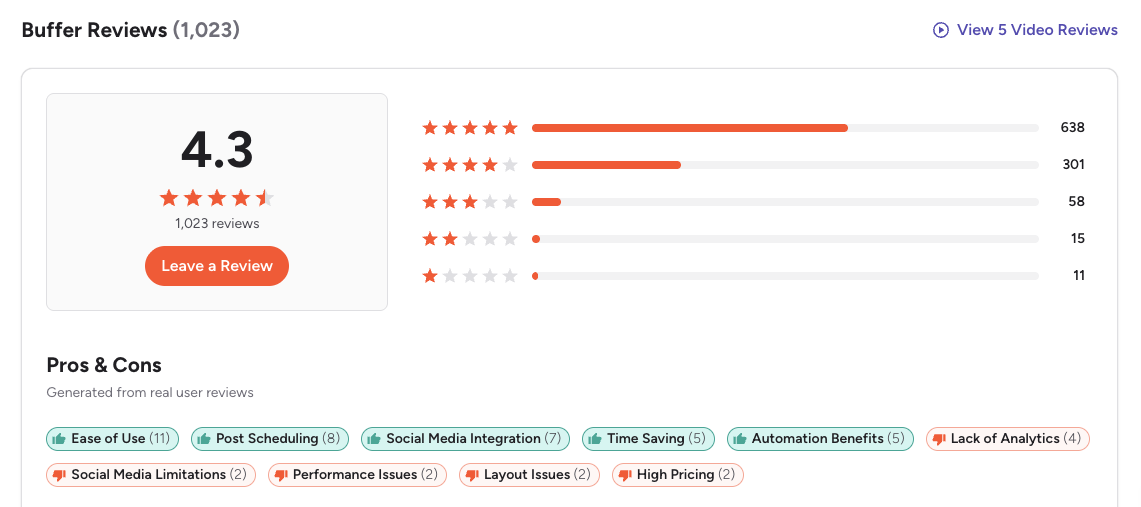
G2: 4.3/5 (1,023 reviews) — Users consistently praise Buffer's clean interface, minimal learning curve, and efficient post scheduling. The most common positive theme is ease of use — many reviewers describe Buffer as the simplest scheduling tool they have tried. On the negative side, recurring complaints include limited analytics depth, rising per-channel costs at scale, and an interface that some long-time users describe as feeling outdated compared to newer competitors.
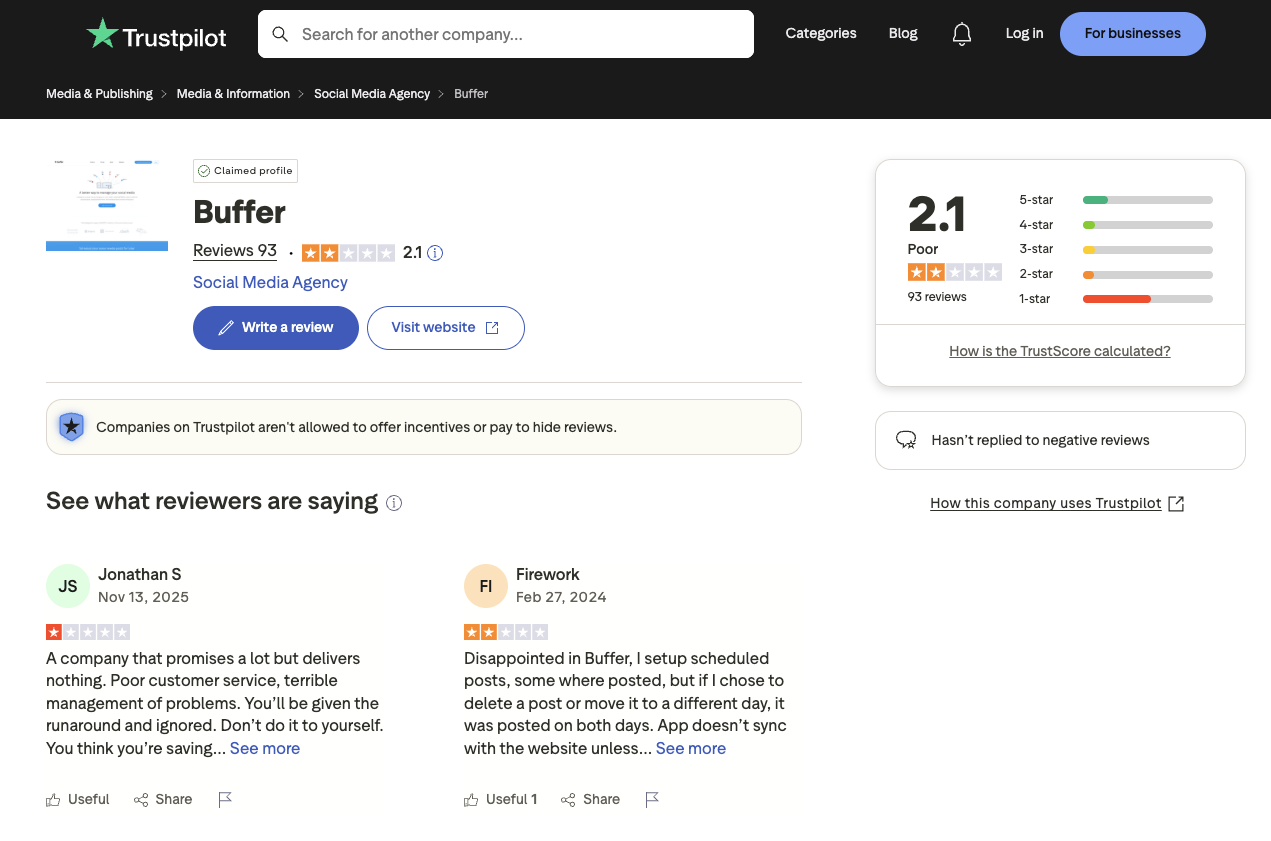
Trustpilot: 2.1/5 (93 reviews) — The significantly lower Trustpilot rating is driven by complaints about customer support responsiveness, scheduling glitches where posts fail to publish, and persistent sync issues with social platforms. Multiple reviewers describe situations where scheduled posts silently failed without notification, leading to gaps in their publishing calendar.
CoSchedule Reviews
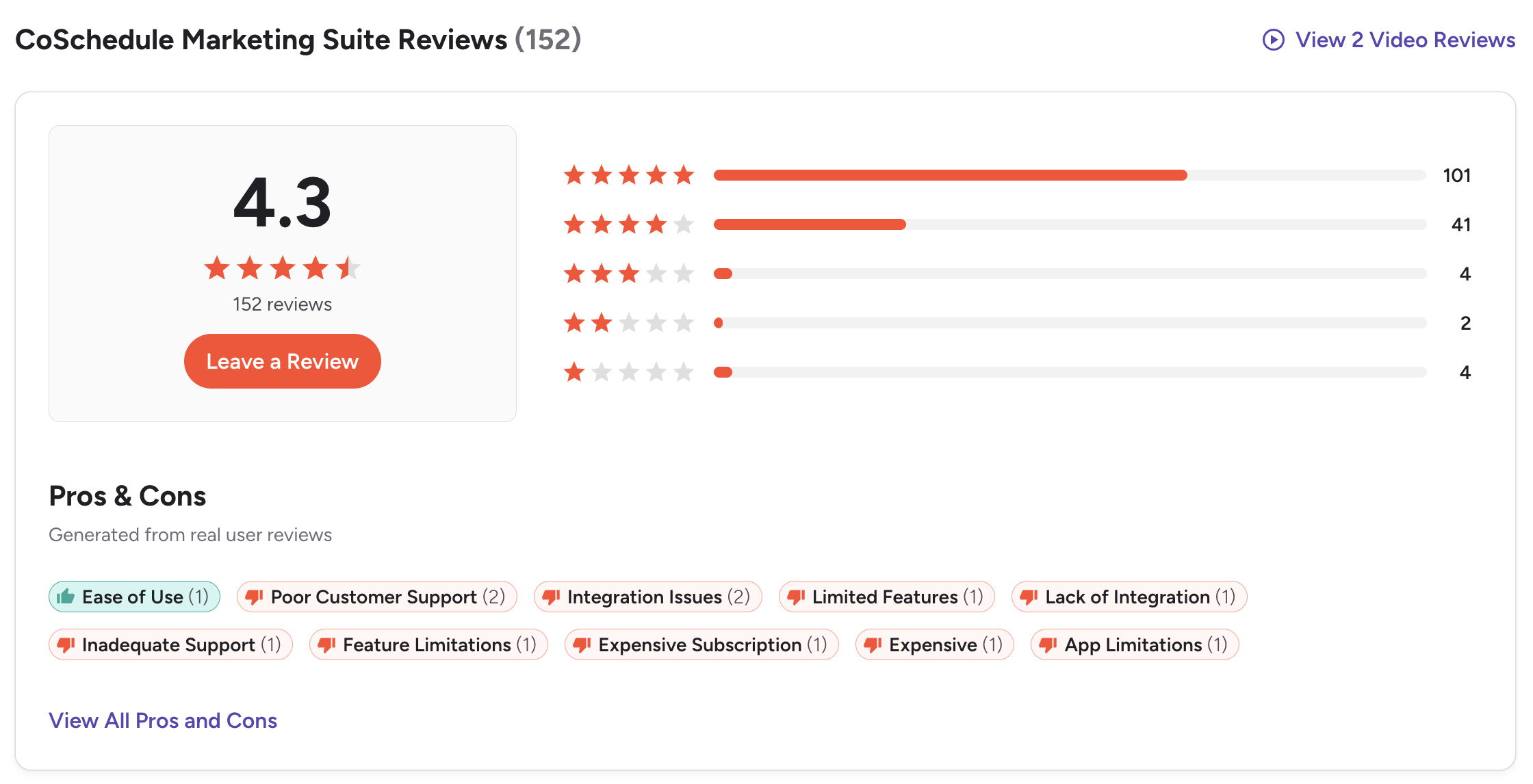
G2: 4.3/5 (152 reviews) — Users value the marketing calendar organization and ease of use for content planning. The strongest positive theme is the editorial calendar's drag-and-drop interface for coordinating blog and social content. However, CoSchedule receives consistent criticism for several issues: outdated platform features, terrible customer support, and subscription cancellation nightmares. One Marketing Specialist at a small business (October 2025) titled their 0-star review "Terrible Customer Support — You'll End Up Stuck," describing months of ignored cancellation requests and unanswered refund emails. Common complaint tags on G2 include Poor Customer Support, Integration Issues, Limited Features, and Expensive Subscription.
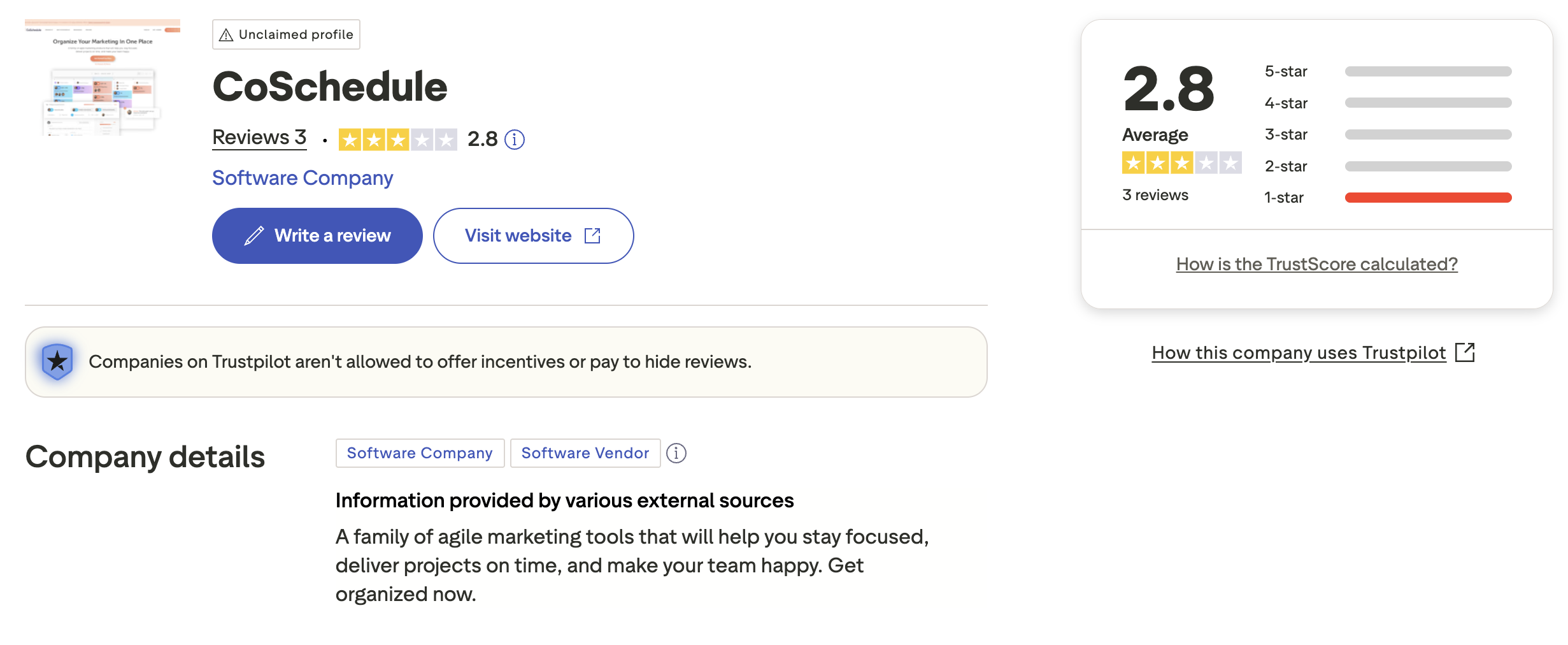
Trustpilot: 2.8/5 (3 reviews) — Very limited review sample with an unclaimed profile. The unclaimed Trustpilot presence suggests CoSchedule is not actively monitoring customer feedback on this platform, which aligns with the G2 complaints about poor customer support responsiveness.
Review Verdict
Both tools share identical G2 ratings (4.3/5), but Buffer has a much larger review base (1,023 vs 152), giving its score more statistical weight. On Trustpilot, both score poorly — Buffer at 2.1/5 and CoSchedule at 2.8/5 — though CoSchedule's score is based on only 3 reviews. A recurring theme in CoSchedule reviews is difficulty canceling subscriptions and poor customer support responsiveness — multiple G2 reviewers describe being locked into annual renewals despite requesting cancellations well in advance. Buffer reviews more commonly cite scheduling glitches, posts failing to publish, and rising per-channel costs that make the tool expensive at scale.
Review counts and ratings are based on 1,271 combined reviews across G2 and Trustpilot as of February 2026 and are updated periodically.
PostPlanifyManage All Your Social Accounts Without the Chaos
Schedule posts, track performance, and collaborate with your team.
Who Should Use Buffer?
Buffer appeals to people who want social media scheduling to feel invisible — set it up in five minutes, queue your posts, and move on. There is no learning curve to speak of, no complex feature trees to navigate, and no marketing suite bloat getting in the way. If your workflow is "write post, schedule post, check analytics occasionally," Buffer does that better than almost any tool on the market. If Buffer sounds right for you but you want to explore other options first, check out our best alternatives to Buffer. You can also see how Buffer stacks up against Hootsuite, Later, SocialBee, Agorapulse, Sendible, and Publer.
Buffer is the better choice if you:
- Are a solo creator or freelancer who needs simple social scheduling
- Want a clean, minimal interface with almost no learning curve
- Need to schedule posts across 11 platforms including X/Twitter at no extra cost
- Prefer per-channel pricing that starts low ($6/mo)
- Don't need WordPress integration, editorial calendars, or content marketing tools
- Want first comment scheduling for Instagram engagement
- Are a small business looking for a straightforward entry point into social scheduling
Who Should Use CoSchedule?
CoSchedule is not really a social media scheduler — it is a marketing command center that happens to include social scheduling. If you run a content marketing operation where blog posts, email campaigns, and social promotion all need to happen in sync, CoSchedule's editorial calendar puts everything in one view. The trade-off is complexity: you are paying for (and navigating around) project management, campaign tracking, and team coordination features that pure social schedulers skip entirely. If CoSchedule is on your shortlist, you may also want to see our top alternatives to CoSchedule before committing. Also compare CoSchedule with Hootsuite, Later, Metricool, SocialBee, and Sprout Social.
CoSchedule is the better choice if you:
- Are a WordPress blogger who needs to coordinate blog and social publishing
- Run a content marketing team that needs editorial calendars and campaign planning
- Need ReQueue for evergreen content recycling to keep top posts in rotation
- Want agency features like white label, client calendars, and approval workflows
- Need AI image generation alongside caption creation
- Have the budget for $19-59/user/month plus profile add-on fees
Final Verdict: Buffer vs CoSchedule in 2026
Buffer and CoSchedule serve fundamentally different needs, and the best choice depends on whether you are managing social media or managing an entire content marketing operation.
Buffer wins on: ease of use, free plan, per-channel flexibility for small accounts, full X/Twitter support at no extra cost, first comment scheduling for Instagram, and more detailed social analytics on paid plans.
CoSchedule wins on: editorial calendar, WordPress integration, evergreen content recycling (ReQueue), AI image generation, marketing campaign coordination, and agency features (white label, client calendars, approval workflows).
The gap between them is less about quality and more about category. Buffer is a social media scheduler. CoSchedule is a marketing suite that includes social scheduling. Most of their features do not overlap at all — Buffer has no editorial calendar, no WordPress integration, and no content marketing tools. CoSchedule has no first comment scheduling, charges extra for X/Twitter, and locks agency features behind a $59/user/month tier. The challenge comes when you need solid social scheduling AND team collaboration AND analytics — but without the marketing suite overhead or per-channel/per-user pricing models. That is where tools like PostPlanify fit, offering a flat-rate approach with features from both worlds.
The bottom line: If you want the simplest possible scheduling tool with broad platform support and a free plan, Buffer is the safer pick. If you are a WordPress-centric content marketing team that needs editorial coordination alongside social publishing, CoSchedule delivers value that Buffer cannot match. And if neither tool fully meets your needs, explore other social media scheduling alternatives to find your best fit.
Built for Social Teams, Not Marketing Suites
Buffer is clean but basic — no AI images, no approval workflows on the base plan, no bulk scheduling. CoSchedule is powerful but loaded with marketing suite features most social teams never touch. PostPlanify is built for the modern social media workflow: AI-generated captions and images, social inbox with AI-assisted replies, team approvals, and analytics across 10 platforms — without project management features you do not need.

| Feature | Buffer | CoSchedule | PostPlanify |
|---|---|---|---|
| Starting Price | $6/mo/channel | $19/mo/user | $29/mo flat |
| Analytics | Basic (paid plans) | Basic social analytics | Advanced (10 platforms, best time to post) |
| Social Inbox | Basic (Community Inbox) | FB/IG on Social, all on Agency+ | Yes (AI-assisted replies) |
| AI Caption Generation | Yes | Yes (Hire Mia AI) | Yes (vision-powered) |
| AI Image Generation | No | Yes | Yes (7 models) |
| Content Calendar | Yes | Yes (editorial calendar) | Yes (drag-and-drop, bulk scheduling) |
| Team Collaboration | $12/mo/channel (Team) | $19/mo/user (Social Calendar) | 5 members (Premium), unlimited (Enterprise) |
| Approval Workflows | Team plan only | $59/mo/user (Agency) | Premium $99/mo (multi-approver) |
| White-Label PDF Reports | No | No | Yes (Premium+ $99/mo) |
| Canva Integration | No | No | Yes |
| Google Drive Import | No | No | Yes |
| Link in Bio | Yes (Start Page) | No | Yes (8 themes, click analytics) |
| First Comment Scheduling | Yes (Essentials+) | No | Yes (Growth+) |
| X/Twitter Included | Yes | Paid add-on ($8-25/mo) | Yes |
| Platforms Supported | 11 | 11 (X/Twitter extra) | 10 |
PostPlanify starts at $29/month for 5 social accounts with 200 posts/mo and AI tools included. The Growth plan ($49/month, 10 accounts) adds analytics across all 10 platforms, social inbox with AI-assisted replies, best time to post suggestions, 1st comments & threads, bulk scheduling, and unlimited scheduled posts. The Premium plan ($99/month, 25 accounts) includes white-label PDF reports, multi-approver workflows, 5 team members, shared calendars, and roles & permissions. The Enterprise plan (custom pricing) adds custom social accounts, unlimited team members, and 1:1 onboarding. See all plans on the PostPlanify pricing page.
To put it in perspective: a 3-person team with approval workflows costs $177/month on CoSchedule's Agency Calendar (before extra profiles), $120/month on Buffer Team (10 channels), and just $99/month on PostPlanify Premium with 25 accounts, multi-approver workflows, and 5 team members included.
Try PostPlanify free for 7 days

Making the Switch
Switching from Buffer or CoSchedule to another tool is straightforward for scheduling — reconnect your social accounts, import any saved content, and start scheduling. If you are leaving CoSchedule, the biggest adjustment is losing the editorial calendar and WordPress integration, so make sure your new tool covers your content coordination needs or that you have a separate workflow for blog publishing. If you are leaving Buffer, the transition is even simpler since Buffer's feature set is minimal. Moving to PostPlanify from either tool takes about 15 minutes — connect your accounts, explore the content calendar and AI assistant, and start scheduling. PostPlanify's 7-day free trial lets you test the full platform before committing.
Related Guides
- PostPlanify Pricing Breakdown
- Buffer Pricing Guide
- CoSchedule Pricing Guide
- Buffer Reviews
- CoSchedule Reviews
- Best Buffer Alternatives
- Best CoSchedule Alternatives
- Best Social Media Management Platform
- Social Media Scheduling Tools
- How to Create a Social Media Content Calendar
- Social Media Analytics for Business
- How to Automate Social Media Posts
- Best Time to Post on Social Media
PostPlanifyManage All Your Social Accounts Without the Chaos
Schedule posts, track performance, and collaborate with your team.
FAQ
Is Buffer cheaper than CoSchedule?
For pure social scheduling, yes. Buffer starts at $6/month per channel with all platforms included. CoSchedule starts at $19/month per user with only 3 profiles and no X/Twitter support on the base plan. However, for small setups (1 user, 3 profiles), CoSchedule's $19/month is comparable to Buffer's cost for 3 channels ($18/month on Essentials).
Does CoSchedule include X/Twitter?
Not on the Social Calendar plan. X/Twitter profiles require the Agency Calendar ($59/user/month) or a paid add-on costing $8-25 per profile per month. This is a significant hidden cost that many users overlook when comparing base prices. Buffer includes X/Twitter on all plans, including the free tier, making it the more straightforward option if X/Twitter is a key part of your social media strategy.
Which has better analytics — Buffer or CoSchedule?
Buffer offers more detailed social media analytics on paid plans, including post-level performance and channel insights. CoSchedule's analytics are more limited and focused on campaign-level reporting on higher-tier plans. Neither matches enterprise-level analytics platforms like Sprout Social or Hootsuite.
Can I use CoSchedule just for social scheduling?
Yes, but it may be overkill. CoSchedule is built as a marketing suite with editorial calendars, project management, and campaign planning. If you only need social scheduling, you are paying for features you will not use. Buffer or PostPlanify are simpler and more cost-effective for pure social scheduling.
Does Buffer integrate with WordPress?
No. Buffer is a standalone social media scheduler with no WordPress integration. CoSchedule is purpose-built for WordPress users with direct blog post scheduling and social promotion coordination. If WordPress integration is essential for coordinating blog content and social media publishing in a unified calendar, CoSchedule is the better choice. Alternatively, tools like PostPlanify pair well with WordPress through their content calendar and scheduling workflows.
Which is easier to use — Buffer or CoSchedule?
Buffer is widely considered easier to use. Its minimal interface requires almost no learning curve. CoSchedule has a steeper learning curve because it is a full marketing suite with editorial calendars, project management, and campaign tools. Users who only need social scheduling often find CoSchedule overcomplicated.
Is CoSchedule good for agencies?
CoSchedule's Agency Calendar ($59/user/month) includes white label features, unlimited client calendars, and approval workflows, which are useful for agencies. However, the per-user pricing means a 3-person agency team pays $177/month minimum before adding extra profiles. Agencies managing many clients may find flat-rate alternatives like PostPlanify more cost-effective.
Which supports more social media platforms?
Both support 11 platforms, but Buffer includes all of them at no extra charge. CoSchedule charges $8-25/profile/month for X/Twitter as an add-on, and it is not available on the base Social Calendar plan. For full platform coverage without hidden fees, Buffer has the advantage.
Is CoSchedule worth it in 2026?
CoSchedule is worth it if you actively use its editorial calendar, WordPress integration, and content marketing features. For WordPress bloggers and content marketing teams who need to coordinate blog posts, campaigns, and social publishing in one place, CoSchedule delivers genuine value that pure social schedulers cannot match. However, if you only need social media scheduling, CoSchedule's $19-59/user/month pricing is hard to justify when simpler tools like Buffer or PostPlanify offer scheduling at a lower cost without the marketing suite overhead.
What if I need both simple scheduling and content marketing coordination?
The best alternative to Buffer depends on what you need. If you want more AI features and Canva integration at a flat rate, PostPlanify is a strong option. For agency-level features like white label and client management, Sendible or CoSchedule's Agency Calendar are worth considering. If you need advanced analytics and social listening, Hootsuite or Sprout Social offer more depth. See our full list of social media management tools for a comprehensive breakdown.
Does CoSchedule offer a free trial?
Yes. CoSchedule offers a free Forever Calendar plan that includes 1 user, 1 social profile, and up to 15 scheduled messages. This is more of a permanent free tier than a time-limited trial, but it is quite restricted. There is no free trial for the paid Social Calendar, Agency Calendar, or Marketing Suite plans — you need to commit to a subscription or request a demo. Buffer's free plan is more generous with 3 channels and no message cap beyond 10 queued posts per channel.
What if I need AI image generation and team approvals in one tool?
Buffer does not offer AI image generation at any tier, and approval workflows require the Team plan at $12/channel/month. CoSchedule offers AI image generation via Hire Mia on paid plans, but approval workflows require the Agency Calendar at $59/user/month. If you need both capabilities without paying agency-tier prices, PostPlanify includes AI image generation (7 models) from the Starter plan and multi-approver workflows from the Premium plan ($99/month) — with no per-user or per-channel fees.







