
Choosing the right social media management tool can make or break your content strategy. Whether you are deciding between Buffer or Sendible, these two popular options target different users with different needs. In this 2026 comparison, we put them head to head on pricing, features, platform support, and real user reviews so you can make an informed decision.
We compared current published pricing, tested both platforms, and analyzed 2,023+ user reviews across G2 and Trustpilot to give you an unbiased breakdown.
Buffer keeps scheduling simple with per-channel pricing and a clean interface. Sendible bundles scheduling, an inbox, and client management into agency-ready tiers. We break down whether Buffer's approachable simplicity or Sendible's operational depth is the better fit — and what each actually costs as you grow. Comparing the full market? Browse all social media scheduling alternatives.
Buffer vs Sendible at a Glance
| Category | Buffer | Sendible |
|---|---|---|
| Starting Price | Free (3 channels, 10 posts/channel) | $29/mo (Creator) |
| Free Plan | Yes (limited) | No (14-day free trial) |
| Platforms Supported | 11 | 10 |
| Unlimited Scheduling | Essentials ($6/mo per channel) | All plans |
| AI Tools | AI Assistant (captions) | AI Assist (OpenAI-powered, all plans) |
| AI Image Generation | No | No |
| Bulk Scheduling | CSV import | CSV bulk scheduling |
| Team Collaboration | Team plan ($12/mo per channel) | Traction+ ($89/mo) |
| Approval Workflows | Team plan | Traction+ ($89/mo) |
| Analytics | Essentials+ | All plans (250+ report modules) |
| G2 Rating | 4.3/5 (1,023 reviews) | 4.5/5 (899 reviews) |
| Trustpilot Rating | 2.1/5 (93 reviews) | 2.3/5 (8 reviews) |
| Best For | Solo creators and freelancers | Agencies and teams |
Buffer Overview

Buffer is one of the longest-running social media scheduling tools on the market, known for its clean, no-frills interface. It supports 11 platforms including Instagram, Facebook, LinkedIn, Pinterest, X/Twitter, TikTok, YouTube, Google Business, Threads, Bluesky, and Mastodon — one of the widest platform lists available.
Key features include an AI Assistant for generating captions, a hashtag manager, first comment scheduling, Start Page (a link-in-bio tool), a visual content calendar, and CSV bulk import. Buffer's strength lies in its simplicity: you pick your channels, queue your posts, and let the tool handle the rest.
Buffer's free plan is a genuine differentiator — you can schedule content to three channels without entering a credit card. The Essentials plan unlocks unlimited posts at $6/month per channel, and the Team plan adds approval workflows at $12/month per channel. This per-channel model keeps costs low for users with just a few accounts, but the math shifts quickly as you add more channels.
Buffer is best suited for solo creators, freelancers, and small businesses that want a straightforward social media management tool without the complexity of agency features. For a deeper look, check out our Buffer review and alternatives. Read real user reviews of Buffer from G2 and Trustpilot.
Sendible Overview

Sendible is a social media management platform built with agencies and teams in mind. It supports 10 platforms: Facebook, Instagram, TikTok, X/Twitter, LinkedIn, Google Business, YouTube, WordPress, Threads, and Bluesky. Notably, Sendible does not support Pinterest.
Key features include unlimited scheduling on all plans, AI Assist powered by OpenAI, a Priority Inbox with sentiment analysis, approval workflows (Traction and above), white-label dashboards (Advanced+ with a $240/mo add-on), Canva/Google Drive/Pexels/Giphy integrations, bulk scheduling via CSV, Smart Queues, RSS auto-posting, over 250 report modules, and client dashboards. Sendible also enforces daily sending limits to protect account health.
Sendible's pricing structure bundles profiles and users into each tier, so you do not pay per channel or per user until you exceed your plan's caps. The Creator plan ($29/mo) covers a single user with 6 profiles, while the Traction plan ($89/mo) jumps to 4 users and 24 profiles with team collaboration features included.
Sendible is best suited for agencies and teams that need client management, white-label reporting, and unified inbox tools. For more details, see our Sendible review and alternatives. Read real user reviews of Sendible from G2 and Trustpilot.
Pricing Comparison
Buffer Pricing
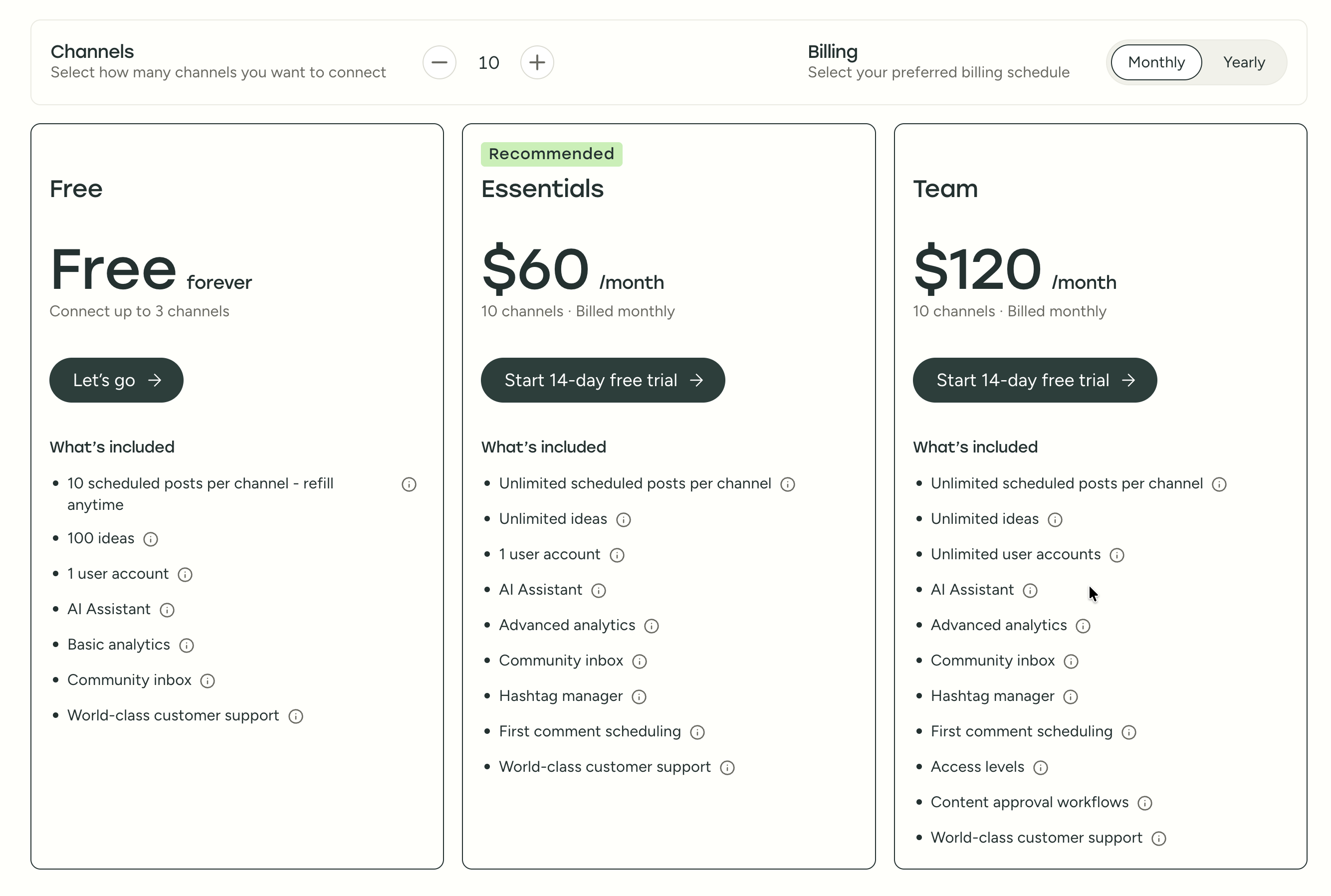
See the full Buffer pricing breakdown for details.
| Plan | Price | Channels | Key Limits |
|---|---|---|---|
| Free | $0/mo | 3 channels | 10 posts per channel |
| Essentials | $6/mo per channel | Unlimited | Unlimited posts, 1 user |
| Team | $12/mo per channel | Unlimited | Unlimited posts, approval workflows |
Buffer uses per-channel pricing, which starts cheap but scales up fast. Managing 10 channels on the Team plan costs $120/month. The free plan is limited to 10 scheduled posts per channel at any given time, which may feel restrictive for businesses posting daily.
Sendible Pricing
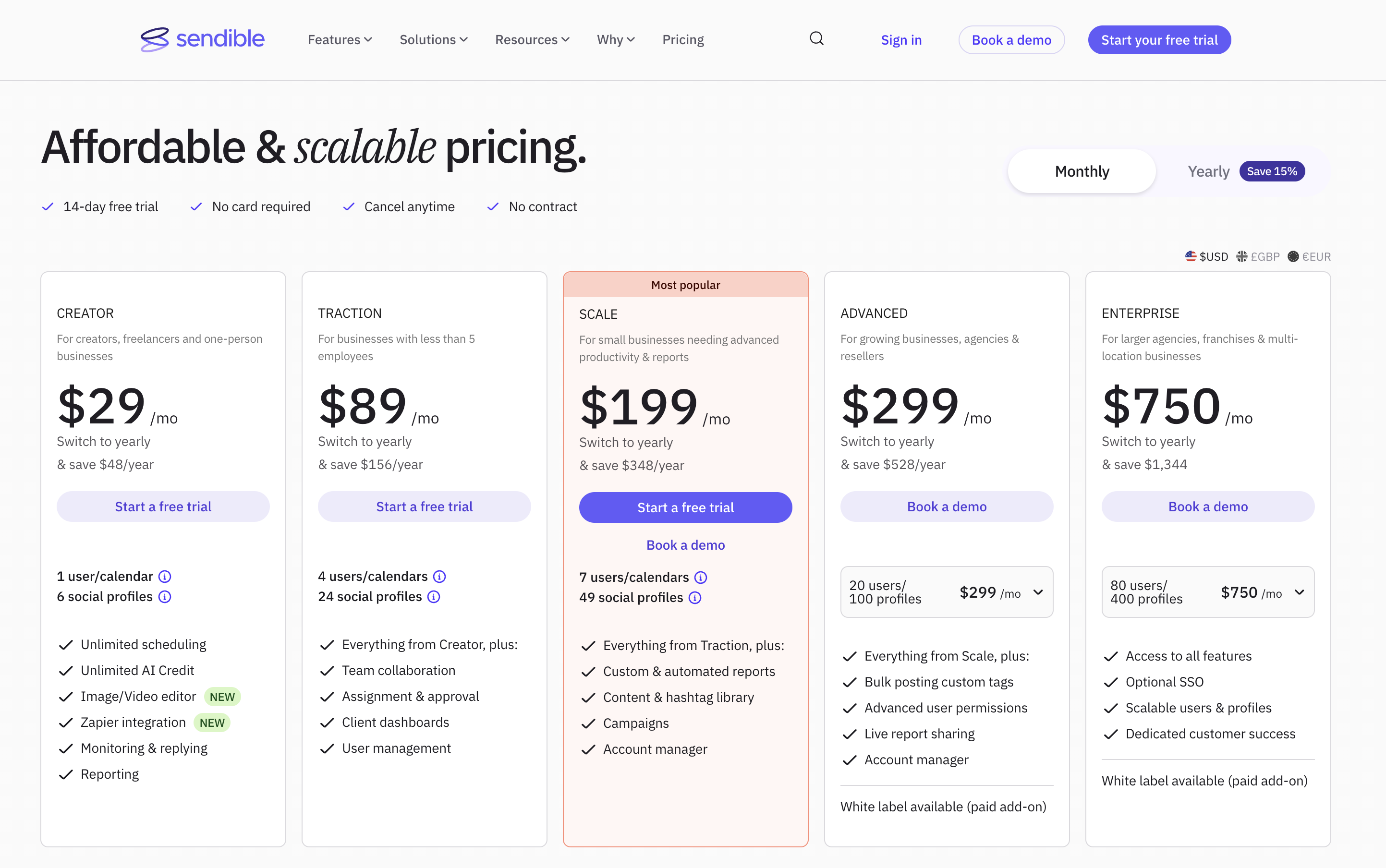
See the full Sendible pricing breakdown for details.
| Plan | Price | Profiles | Users |
|---|---|---|---|
| Creator | $29/mo | 6 | 1 |
| Traction | $89/mo | 24 | 4 |
| Scale | $199/mo | 49 | 7 |
| Advanced | $299/mo | 100 | 20 |
| Enterprise | $750/mo | 400 | 80 |
Sendible uses tiered pricing that bundles multiple profiles and users into each plan. The jump from Creator to Traction is significant ($29 to $89) but includes team collaboration and client dashboards.
All Sendible plans include unlimited scheduling and AI Assist, so even the entry-level Creator plan offers more publishing power than Buffer's free tier.
Price Verdict
Buffer is cheaper for individuals and small setups. The free plan and low per-channel pricing make it accessible for solo users. However, once you manage more than a handful of channels with team features, Buffer's per-channel model adds up quickly. At the 10-channel mark on the Team plan, you are paying $120/month — more than Sendible's Traction plan with 4 users and 24 profiles at $89/month. Sendible offers better value for teams managing multiple client accounts, since profiles and users are bundled together rather than priced individually.
What You'll Actually Pay: Real-World Scenarios
Buffer charges per channel, Sendible charges per plan tier with profile and user caps. Here is how real costs compare:
Solo creator managing 5 social accounts:
- Buffer Essentials: 5 x $6 = $30/month (analytics included, no inbox)
- Sendible Creator: $29/month (6 profiles, 1 user, Priority Inbox, 100 sends/day)
- Nearly identical price. Sendible includes a Priority Inbox and unlimited scheduling; Buffer includes a free plan to test with first.
Small team managing 10 accounts with approvals:
- Buffer Team: 10 x $12 = $120/month (unlimited users, approval workflows)
- Sendible Traction: $89/month (24 profiles, 4 users, client dashboards, approvals)
- Sendible is $31/month cheaper and includes client dashboards plus 14 spare profile slots. Buffer's unlimited user count is an advantage if you have more than 4 team members.
Agency managing 25 profiles across 5 clients:
- Buffer Team: 25 x $12 = $300/month (unlimited users, no client dashboards)
- Sendible Scale: $199/month (49 profiles, 7 users, custom reports, campaigns)
- Sendible is $101/month cheaper with client dashboards, custom reports, and 24 spare profile slots. Buffer has no client management concept, so all accounts live in one flat list.
 PostPlanify
Manage All Your Social Accounts Without the Chaos
Schedule posts, track performance, and collaborate with your team.


Feature Comparison
We tested both tools across five core categories. Here is how they compare feature by feature.
Scheduling & Publishing
| Feature | Buffer | Sendible |
|---|---|---|
| Unlimited Scheduling | Essentials+ | All plans |
| Bulk Scheduling | CSV import | CSV bulk scheduling |
| Content Calendar | Yes | Yes |
| Smart Queues | No | Yes |
| RSS Auto-Posting | No | Yes |
| First Comment | Yes | Yes |
| Post Recycling | No | Smart Queues |
Winner: Sendible. Smart Queues, RSS auto-posting, and unlimited scheduling on every plan give Sendible more publishing flexibility out of the box. Buffer covers the basics well — queue, schedule, publish — but power users who need evergreen recycling, RSS automation, or Smart Queue rotation will quickly feel the limits. For more on scheduling strategies, see our guide on how to schedule social media posts.
AI Tools
| Feature | Buffer | Sendible |
|---|---|---|
| AI Caption Generation | AI Assistant | AI Assist (OpenAI-powered) |
| AI Image Generation | No | No |
| AI-Powered Analytics | No | No |
| Included On | All plans | All plans |
Winner: Tie. Both offer AI-powered caption generation on all plans, and neither provides AI image generation or AI-driven analytics. Sendible's OpenAI integration may produce slightly more nuanced output for longer captions, but in practice both tools generate serviceable captions for most use cases. If AI image generation or vision-powered content suggestions matter to your workflow, neither tool delivers — consider alternatives that include those capabilities.
Analytics & Reporting
| Feature | Buffer | Sendible |
|---|---|---|
| Post Analytics | Essentials+ | All plans |
| Report Modules | Basic | 250+ modules |
| Custom Reports | Limited | Yes (Scale+) |
| Client Dashboards | No | Traction+ |
| Export Options | CSV | PDF, CSV |
Winner: Sendible. With 250+ report modules, dedicated client dashboards, and PDF export, Sendible's analytics are far more comprehensive than Buffer's basic reporting. Buffer's analytics work for tracking individual post engagement, but they fall short for campaign-level, cross-channel, or client-facing social media reporting. Note that custom and automated reports require Sendible's Scale plan ($199/mo) — the Traction plan includes only standard reporting.
Team Collaboration
| Feature | Buffer | Sendible |
|---|---|---|
| Multi-User Access | Team plan | Traction+ (4 users) |
| Approval Workflows | Team plan | Traction+ |
| Client Management | No | Traction+ |
| White-Label | No | Advanced+ ($240/mo add-on) |
| Unified Inbox | No | Priority Inbox (all plans) |
Winner: Sendible. Approval workflows, client management, white-label options, and a Priority Inbox with sentiment analysis make Sendible the clear choice for team and agency workflows. Buffer's Team plan adds basic approvals but lacks client dashboards, role-based permissions, and white-label branding — the operational features agencies typically require. Keep in mind that Sendible's white-label add-on starts at $240/month on top of the Advanced plan ($299/mo), bringing the total to at least $539/month.
Platform Support
| Platform | Buffer | Sendible |
|---|---|---|
| Yes | Yes | |
| Yes | Yes | |
| X/Twitter | Yes | Yes |
| Yes | Yes | |
| TikTok | Yes | Yes |
| YouTube | Yes | Yes |
| Yes | No | |
| Threads | Yes | Yes |
| Bluesky | Yes | Yes |
| Google Business | Yes | Yes |
| Mastodon | Yes | No |
| WordPress | No | Yes |
Winner: Buffer. Buffer supports 11 platforms including Pinterest and Mastodon, while Sendible covers 10 with WordPress but lacks Pinterest — a notable gap for visual brands and e-commerce businesses that rely on Pinterest for discovery and traffic. If your strategy is platform-diverse, Buffer gives you more reach. If WordPress auto-publishing matters, Sendible has the edge there.
What Real Users Say
We looked at both G2 (a professional review platform) and Trustpilot (a consumer review platform) to get a balanced picture of user sentiment for each tool.
Buffer Reviews
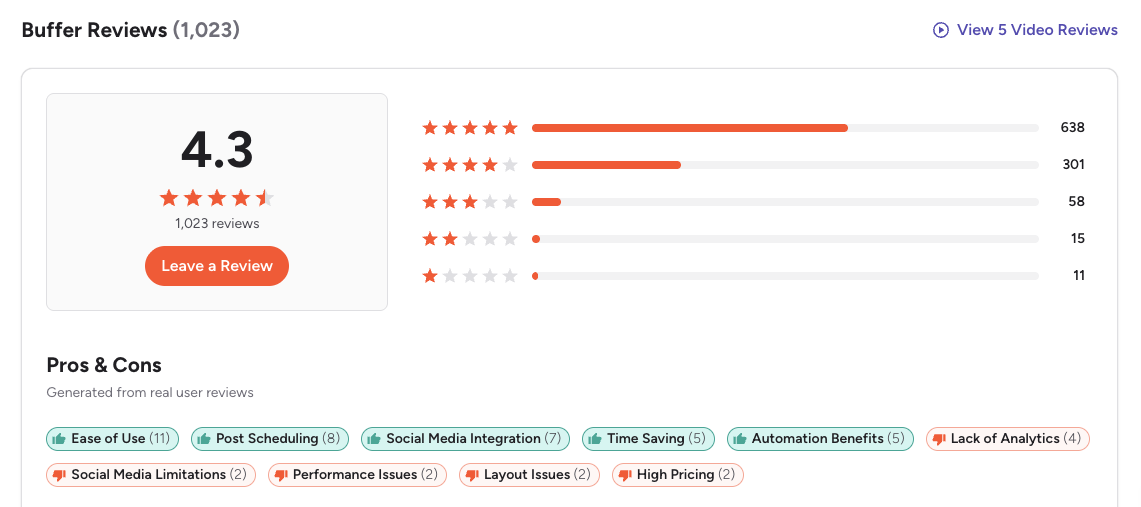
G2: 4.3/5 (1,023 reviews) — Users consistently praise Buffer's simplicity and clean interface. The most common theme is ease of use — reviewers describe Buffer as one of the most intuitive scheduling tools available. However, some reviewers note the lack of advanced features like social listening and inbox management. A common critique is that Buffer removes features over time, leaving long-term users feeling they are getting less for the same price.
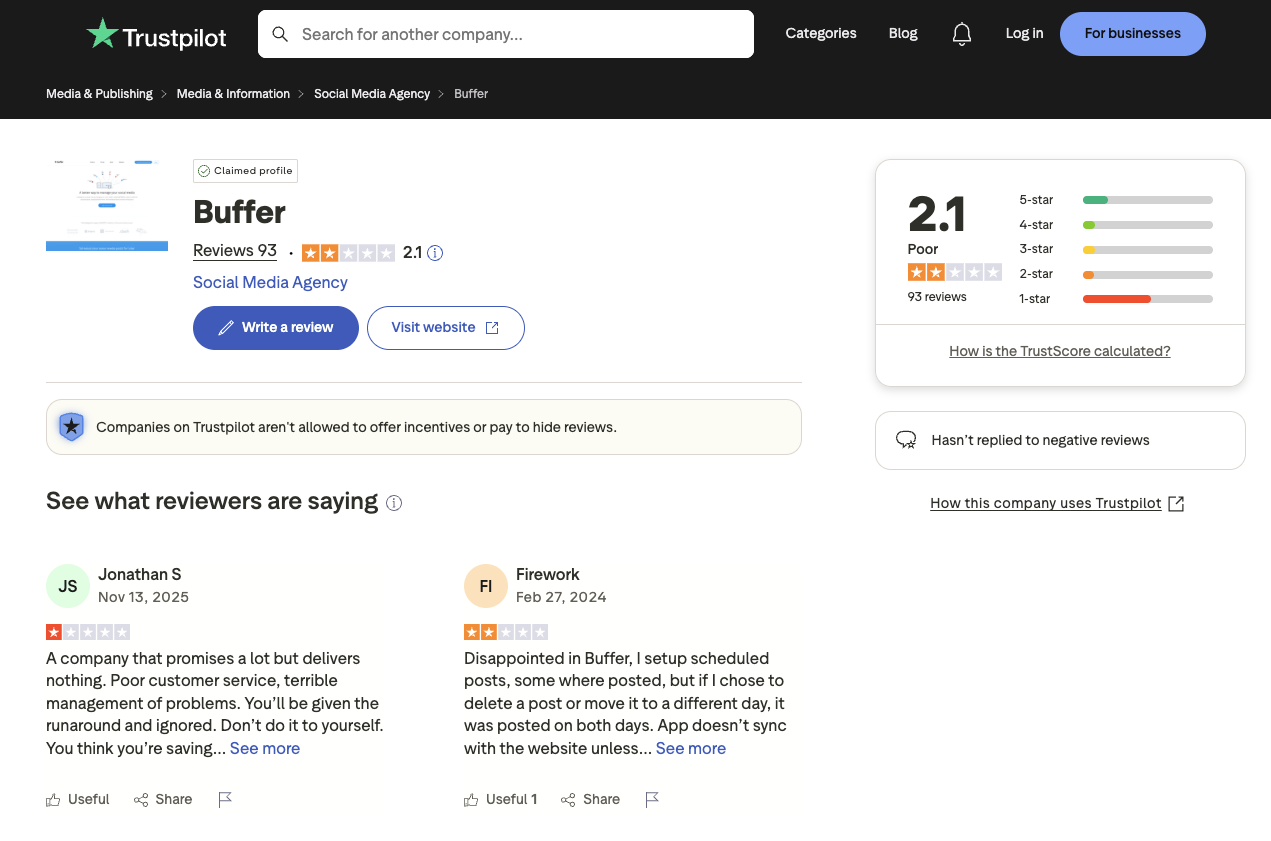
Trustpilot: 2.1/5 (93 reviews) — The Trustpilot score is notably lower, with complaints about customer support responsiveness and limitations on the free plan. Some users report frustration with feature removals over time and scheduling glitches that cause posts to fail silently.
Sendible Reviews
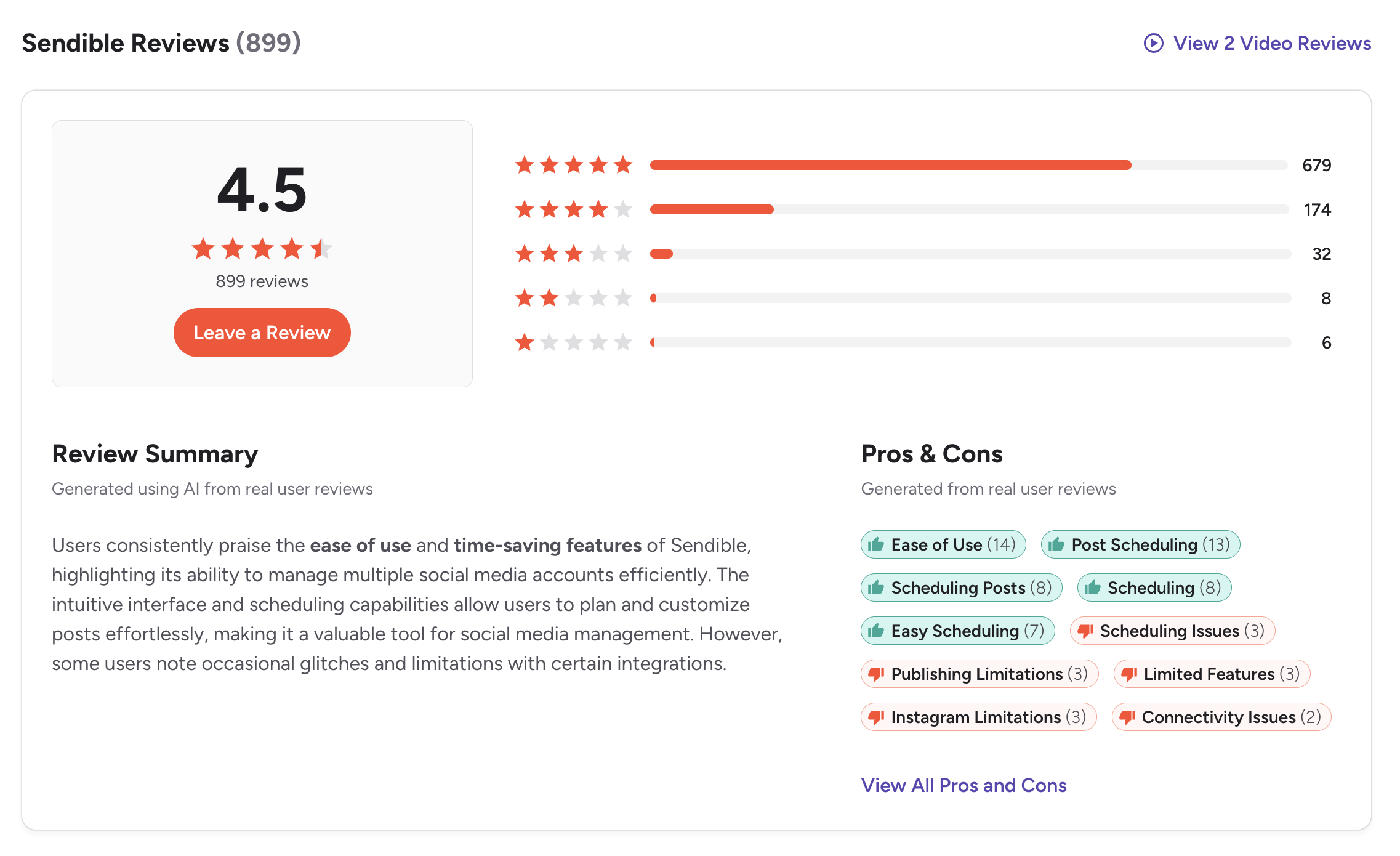
G2: 4.5/5 (899 reviews) — Sendible earns strong marks for its agency features, client management, and reporting. The most frequently mentioned pros are ease of use (14 mentions), post scheduling (13 mentions), and easy scheduling (7 mentions). Users highlight the Priority Inbox and approval workflows as standout capabilities. A featured review titled "Great functionality and flexibility for managing multiple accounts" praised team access, custom tags, and profile grouping, noting that "it's easy for several members of the team to access what they need." The most cited cons include scheduling issues (3 mentions), publishing limitations (3 mentions), and Instagram limitations (3 mentions), with some users noting room for improvement in reporting.
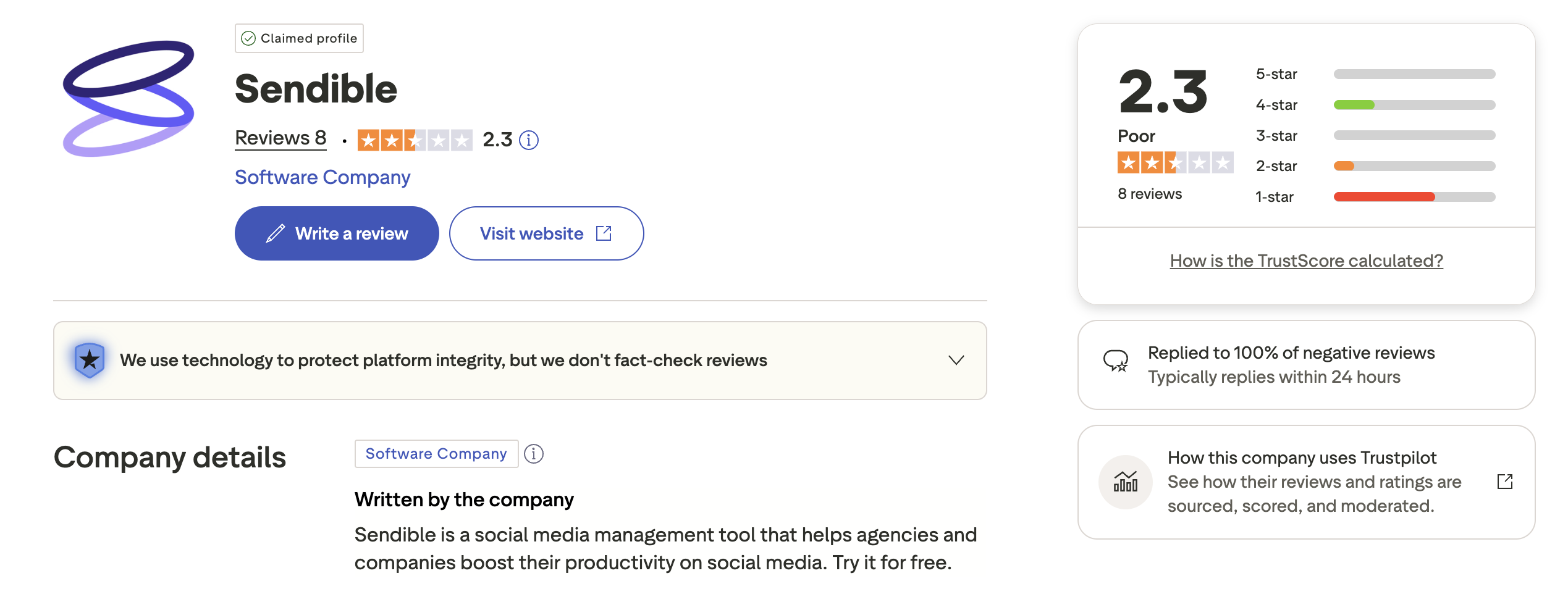
Trustpilot: 2.3/5 (8 reviews) — With only 8 reviews, this is too small a sample to draw meaningful conclusions. The review distribution shows a spread across 5-star, 4-star, 2-star, and 1-star ratings with no clear consensus. Notably, Sendible has replied to 100% of negative reviews within 24 hours, showing their support team actively monitors feedback. The limited Trustpilot presence may simply reflect that Sendible's user base skews toward agencies who rely on G2 for reviews.
Review Verdict
Sendible leads on G2 with a 4.5 rating versus Buffer's 4.3, backed by substantial review counts on both sides. Trustpilot scores are low for both tools, though Sendible's 8-review sample makes its score statistically unreliable. Overall, Sendible's reviews reflect satisfaction among agency users — particularly around scheduling ease and team management — while Buffer's reviews reflect appreciation for simplicity with some frustration about depth and feature removals.
It is worth noting that both platforms have very different user bases reviewing them. Buffer's reviews come primarily from solo users and small teams, while Sendible's reviews come from agency professionals. The context behind each review matters as much as the score itself.
Review counts and ratings are based on 2,023 total reviews across G2 and Trustpilot as of February 2026 and are updated periodically.
PostPlanifyManage All Your Social Accounts Without the Chaos
Schedule posts, track performance, and collaborate with your team.
Who Should Use Buffer?
Buffer appeals to users who want the shortest possible path from "I have a post" to "it is scheduled." If your workflow is straightforward — write, schedule, publish — and you do not need client dashboards, white-label reports, or a unified inbox, Buffer delivers exactly what you need without the complexity tax. Its free plan also makes it the lowest-risk entry point in the social media scheduling space.
If you are considering Buffer, also explore our Buffer alternatives page and see how Buffer stacks up against Hootsuite, Later, Metricool, Publer, CoSchedule, and SocialBee.
Buffer is an ideal social media scheduler for users who value simplicity over feature depth:
- Solo creators who want a dead-simple scheduling tool
- Freelancers managing a small number of social channels
- Users who need Pinterest or Mastodon support
- Small businesses on a tight budget who can start with the free plan
- Content creators who value a clean, distraction-free interface
- Anyone who wants to start free and pay only for what they use
Who Should Use Sendible?
Sendible is built for teams that have outgrown basic schedulers and need operational infrastructure — client dashboards, approval chains, white-label branding, and a unified inbox that consolidates engagement across every connected profile. If your workflow involves multiple clients, multiple team members, and monthly reporting deliverables, Sendible's bundled approach means you pay one price for profiles and users together, rather than watching costs climb per channel.
If you are considering Sendible, also explore our Sendible alternatives page and see how Sendible compares to Hootsuite, Sprout Social, Later, Agorapulse, and SocialBee.
Sendible is the stronger social media management platform for teams that need operational depth and client-facing features:
- Agencies managing multiple client accounts from one dashboard
- Teams that need approval workflows and role-based permissions
- Businesses requiring white-label reports for client deliverables
- Users who want a unified inbox with sentiment analysis
- Organizations that rely on RSS feeds and social media automation
- Teams that need 250+ analytics report modules
Final Verdict: Buffer vs Sendible in 2026
Buffer and Sendible serve fundamentally different types of social media users, and the best choice depends on whether you prioritize simplicity or operational depth.
Buffer is the better choice if you are a solo creator, freelancer, or small business that needs a simple scheduler with broad platform support and a free plan to get started.
Sendible is the better choice if you are an agency or growing team that needs client management, white-label reporting, a unified inbox with sentiment analysis, and 250+ analytics modules.
The gap between these two tools leaves a middle ground that neither covers well. Buffer lacks a social inbox, advanced analytics, AI image generation, and team workflows beyond basic approvals. Sendible delivers those agency features but locks custom reports behind the $199/month Scale plan, charges $240/month extra for white-labeling, and does not offer AI image generation at any tier. If you need more than Buffer's basics but find Sendible's pricing steep for what you actually use, that middle ground is where tools like PostPlanify fit — offering analytics across 10 platforms, a social inbox with AI-assisted replies, AI image generation, and team collaboration without per-channel or per-user pricing.
The bottom line: If you want the simplest possible scheduling tool with a great free plan, Buffer is the safer pick. If you need agency-grade client management and reporting, Sendible delivers more operational depth. And if neither feels quite right, explore other social media scheduling alternatives to find your best fit.
Scheduling Power Without Agency Pricing
Buffer is refreshingly simple — but too basic once you need team workflows, analytics, and a social inbox. Sendible's agency features start at $89/month and scale to $539+ with white-labeling. PostPlanify gives you unlimited scheduling, AI tools including image generation, analytics across 10 platforms, social inbox, and team collaboration — all on a flat-rate plan with no per-channel or per-user fees.

| Feature | Buffer | Sendible | PostPlanify |
|---|---|---|---|
| Starting Price | Free (limited) | $29/mo | $29/mo flat |
| Analytics | Basic (paid plans) | All plans (250+ modules) | Advanced (10 platforms, best time to post) |
| Social Inbox | Yes | Yes (Priority Inbox) | Yes (AI-assisted replies) |
| AI Caption Generation | Yes | Yes (OpenAI) | Yes (vision-powered) |
| AI Image Generation | No | No | Yes (7 models) |
| Content Calendar | Yes (drag-and-drop) | Yes (drag-and-drop) | Yes (drag-and-drop, bulk scheduling) |
| Team Collaboration | $12/mo/channel | $89/mo (Traction, 4 users) | 5 members (Premium), unlimited (Enterprise) |
| Approval Workflows | Team plan | Traction+ | Premium $99/mo (multi-approver) |
| White-Label PDF Reports | No | Advanced+ ($240/mo add-on) | Yes (Premium+ $99/mo) |
| Canva Integration | No | Yes | Yes |
| Google Drive Import | No | Yes | Yes |
| Link in Bio | Yes (Start Page) | No | Yes (8 themes, click analytics) |
| Smart Queues / RSS | No | Yes | No |
| Platforms Supported | 11 | 10 | 10 |
| Unlimited Scheduling | Paid plans | All plans | Growth+ ($49/mo) |
PostPlanify starts at $29/month for 5 social accounts with 200 posts/mo and AI tools included. The Growth plan ($49/month, 10 accounts) adds analytics across all 10 platforms, social inbox with AI-assisted replies, best time to post suggestions, 1st comments & threads, bulk scheduling, and unlimited scheduled posts. The Premium plan ($99/month, 25 accounts) includes white-label PDF reports, multi-approver workflows, 5 team members, shared calendars, and roles & permissions. The Enterprise plan (custom pricing) adds custom social accounts, unlimited team members, and 1:1 onboarding. See all plans on the PostPlanify pricing page.
Try PostPlanify free for 7 days

Making the Switch
Switching between Buffer and Sendible is relatively straightforward since both support CSV import and export. Export your scheduled content from your current tool, reconnect your social accounts on the new platform, and import. If you are moving from Buffer to Sendible, plan for 1-2 hours to configure Smart Queues, the Priority Inbox, and reporting dashboards. If you are moving from Sendible to Buffer, keep in mind that you will lose client dashboards, the unified inbox, and Smart Queues. If you are moving to PostPlanify, the process is simple — connect your accounts, import your content, and start scheduling with a familiar drag-and-drop calendar. PostPlanify's 7-day free trial lets you test the full platform before committing.
Related Guides
- PostPlanify Pricing Breakdown
- Buffer Pricing Guide
- Sendible Pricing Guide
- Buffer Reviews
- Sendible Reviews
- Best Buffer Alternatives
- Best Sendible Alternatives
- Best Social Media Management Platform
- Social Media Scheduling Tools
- How to Automate Social Media Posts
- Social Media Content Calendar Examples
- How to Create a Social Media Content Calendar
- Social Media Analytics and Reporting
PostPlanifyManage All Your Social Accounts Without the Chaos
Schedule posts, track performance, and collaborate with your team.
FAQ
Is Buffer or Sendible better for small businesses?
Buffer is generally better for small businesses due to its free plan, low per-channel pricing, and simple interface. Sendible's features are built for agencies and teams, making it overkill for a one-person operation. If you only manage a few social profiles, Buffer's free or Essentials plan will cover your needs at a lower cost.
Does Sendible have a free plan?
No. Sendible does not offer a permanent free plan, but it does provide a 14-day free trial on all tiers so you can test the platform before committing. Buffer, on the other hand, offers a free plan with 3 channels and 10 posts per channel that you can use indefinitely. If you want to start managing social media without any financial commitment, Buffer is the more accessible option. For teams that need more features than Buffer's free plan, Sendible's trial period lets you evaluate whether the upgrade is worthwhile.
Can Buffer handle multiple clients?
Buffer does not have dedicated client management features. While you can manage multiple channels, there are no client dashboards, white-label reports, or client-specific workspaces. If you manage social accounts for other businesses, Sendible is the better choice for client management workflows.
Does Sendible support Pinterest?
No. Sendible does not support Pinterest, which is a notable gap for brands that rely on visual discovery platforms. Buffer supports Pinterest on all plans, including the free tier. If Pinterest is a meaningful part of your social strategy, this is a dealbreaker for Sendible.
Which tool has better analytics?
Sendible offers significantly more robust analytics with 250+ report modules, client dashboards, and custom reporting (Scale plan and above). Buffer's analytics are basic and best suited for tracking individual post performance. If generating monthly client reports is part of your workflow, Sendible will save you significant manual effort.
Is Buffer cheaper than Sendible?
For individuals, yes. Buffer's free plan and $6/month per channel pricing is more affordable for small setups. However, managing 10+ channels on Buffer's Team plan can exceed Sendible's Traction plan cost. At the 10-channel mark on the Team plan, you are already paying $120/month — more than Sendible's Traction plan at $89/month with 4 users and 24 profiles.
Which platform has better AI features?
Both tools offer AI-powered caption generation on all plans, and neither offers AI image generation. Sendible uses OpenAI for its AI Assist feature, which may produce slightly more nuanced output, while Buffer's AI Assistant is built in-house and focuses on caption drafting and post ideas. In practice, the AI capabilities are comparable for everyday social media content creation. If AI image generation is important to your workflow, neither tool delivers — consider alternatives like PostPlanify that include AI-generated images alongside captions.
Can I switch from Buffer to Sendible easily?
Both tools support CSV import and export, which makes migration manageable. However, you will need to reconnect all social accounts manually and rebuild any saved content queues or hashtag groups. Plan for a transition period of a few days to fully configure Sendible's Priority Inbox, Smart Queues, and reporting dashboards.
Does Buffer offer white-label reporting?
No. Buffer does not offer any white-label or client branding options. If you need to present reports under your own brand to clients, Sendible's Advanced plan and above includes a white-label add-on for $240/month. This is a key differentiator for agencies choosing between the two platforms.
Is Sendible worth it in 2026?
Sendible is worth it if you are an agency or team managing multiple client accounts and need robust reporting, a unified inbox, and client dashboards. The Traction plan at $89/month bundles 4 users and 24 profiles, which is strong value compared to paying per channel or per user on competing platforms. However, if you are a solo creator or small business with only a few social profiles, Sendible's feature set is overkill and its lack of a free plan makes it less accessible. For solo users, Buffer or PostPlanify offer better starting points.
What is the best alternative to Sendible?
The best alternative to Sendible depends on what drew you to it. For agency features like white-label reporting and client management, Agorapulse and Sprout Social are strong competitors. For a more affordable option with AI tools and Canva integration, PostPlanify offers team collaboration starting at $29/month. If you primarily need simple scheduling without agency overhead, Buffer is a lighter and cheaper option. See our complete list of social media management tools for a full comparison.
Does Sendible offer a free trial?
Yes. Sendible offers a 14-day free trial on all plans, giving you access to the full feature set of whichever tier you choose. No credit card is required to start the trial. This is more generous than many competitors that restrict trial access to lower-tier features. However, Sendible does not offer a permanent free plan, so you will need to subscribe after the trial ends. If you want a tool you can use free indefinitely, Buffer's free plan with 3 channels is the better option.







