
Loomly and Sendible both target marketing teams that need structured workflows and multi-platform publishing. Both include approval systems, content calendars, and integrations with design tools. But beneath the surface, they serve different needs — and the pricing gap between them may surprise you.
Loomly streamlines content creation with post ideas, approval workflows, and a polished content calendar. Sendible adds unified inbox management and white-label branding on top of scheduling and approvals. Both serve teams — we compare pricing tiers, collaboration features, and what real users report to find the better fit for your workflow. Comparing the full market? Browse all social media scheduling alternatives.
Loomly vs Sendible at a Glance
| Feature | Loomly | Sendible |
|---|---|---|
| Starting Price | Free (very limited) | $29/mo |
| Free Plan | Yes (3 accounts, 1 user, 5 posts/mo) | No (14-day trial) |
| Platforms | 11 | 10 |
| AI Tools | Hashtag suggestions, post ideas | AI Assist (OpenAI-powered) |
| Approval Workflows | All paid plans | Traction+ ($89/mo) |
| White-Label | No | Yes (Advanced+ add-on) |
| Unified Inbox | Interaction tracking | Priority Inbox with sentiment |
| G2 Rating | 4.6/5 (1,793 reviews) | 4.5/5 (899 reviews) |
| Trustpilot Rating | 1.7/5 (26 reviews) | 2.3/5 (8 reviews) |
Loomly Overview

Loomly is a content calendar and social media management platform designed for teams that need structured approval workflows. It guides users through the content creation process with post ideas, optimization tips, and preview tools before anything goes live.
Supported Platforms (11): Facebook, Instagram, X/Twitter, LinkedIn, Pinterest, Google Business, YouTube, TikTok, Snapchat, Threads, Bluesky
Key Features:
- Content calendar with automated post ideas and inspiration
- Approval workflows on all paid plans
- Interaction tracking for comments and mentions
- Canva, Unsplash, and Giphy integrations
- Audience targeting and UTM tracking
- Post preview across all platforms before publishing
- Hashtag suggestions and optimization tips
- Brand asset management library
- Analytics and performance reporting
Loomly is best for marketing teams wanting structured content approval workflows and a guided content creation experience. Read real user reviews of Loomly from G2 and Trustpilot. See our full Loomly alternatives page for more options.
Sendible Overview

Sendible is a social media management platform built for agencies and teams that need client management, unified inbox tools, and in-depth reporting. It supports 10 platforms and includes unlimited scheduling on every plan.
Supported Platforms (10): Facebook, Instagram, TikTok, X/Twitter, LinkedIn, Google Business, YouTube, WordPress, Threads, Bluesky
Sendible does not support Pinterest or Snapchat.
Key Features:
- Unlimited scheduling on all plans
- AI Assist powered by OpenAI on all plans
- Priority Inbox with sentiment analysis
- Approval workflows (Traction plan and above)
- White-label dashboards (Advanced+ with $240/mo add-on)
- Canva, Google Drive, Pexels, and Giphy integrations
- Bulk scheduling via CSV and Smart Queues
- RSS auto-posting and 250+ report modules
- Client dashboards and daily sending limits
Sendible is best for agencies and teams needing client management, white-label branding, and inbox tools. Read real user reviews of Sendible from G2 and Trustpilot. See our full Sendible alternatives page for more options.
Pricing Comparison
Loomly Pricing
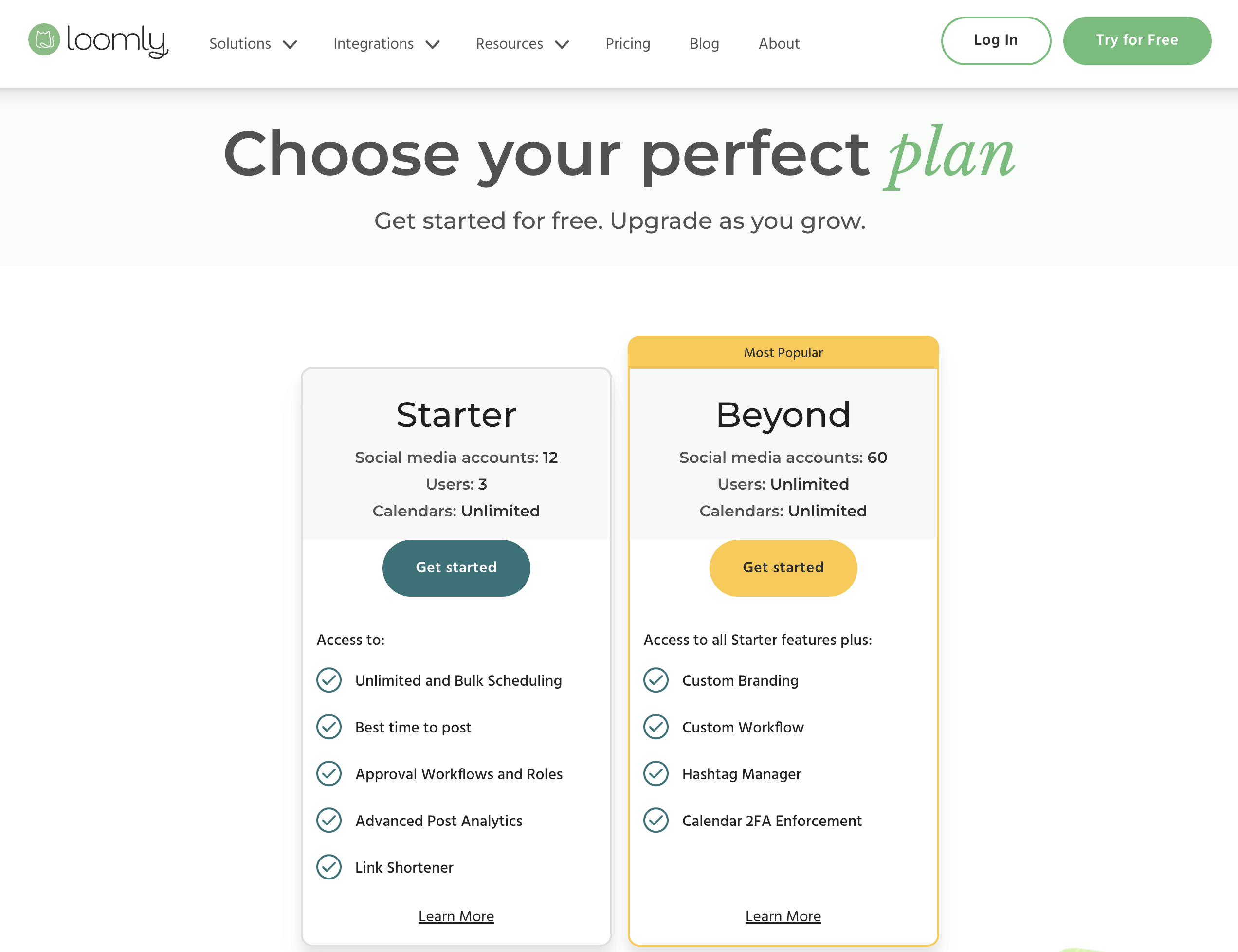
| Plan | Price | Users | Accounts | Notes |
|---|---|---|---|---|
| Free | $0/mo | 1 | 3 | 5 posts/month |
| Standard | $79/mo | 6 | 20 | Entry paid plan |
| Advanced | $172/mo | 14 | 35 | |
| Premium | $369/mo | 30 | 50 | |
| Enterprise | Custom | Custom | Custom |
Note: Loomly's Base plan has been discontinued for new users. The Standard plan at $79/month is now the entry-level paid option. See the full Loomly pricing breakdown for details.
Sendible Pricing
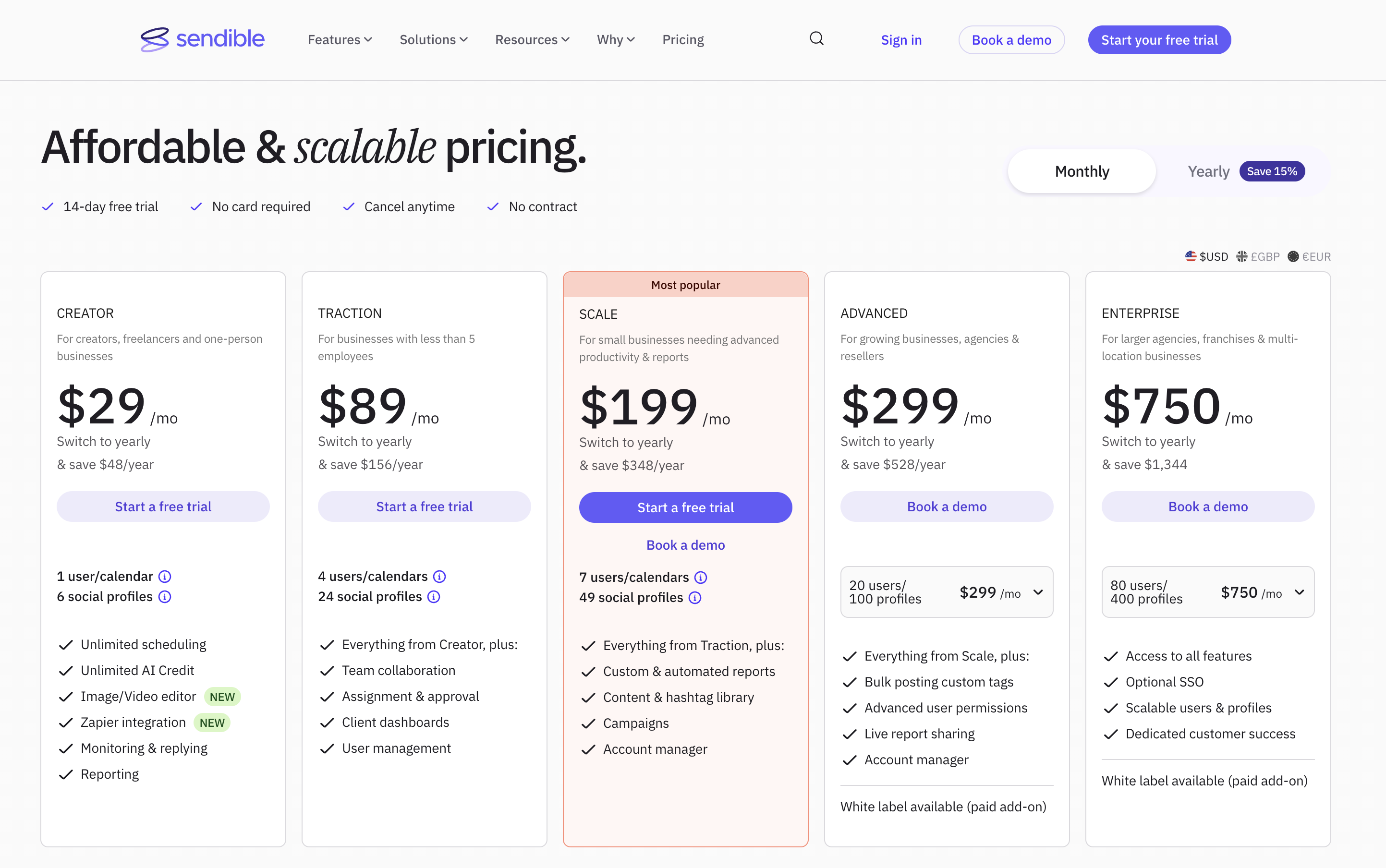
| Plan | Price | Users | Profiles |
|---|---|---|---|
| Creator | $29/mo | 1 | 6 |
| Traction | $89/mo | 4 | 24 |
| Scale | $199/mo | 7 | 49 |
| Advanced | $299/mo | 20 | 100 |
| Enterprise | $750/mo | 80 | 400 |
See the full Sendible pricing breakdown for details.
Price Verdict
Sendible's Creator plan at $29/month is significantly cheaper for solo users than Loomly's Standard at $79/month. However, Loomly's free plan — even with its 5-post limit — gives users a way to test the platform without a time constraint. For mid-size teams, Sendible Traction ($89/mo for 4 users) and Loomly Standard ($79/mo for 6 users) are closely priced, but Loomly includes more users per dollar at that tier. At scale, Sendible's Enterprise plan supports far more profiles.
 PostPlanify
Manage All Your Social Accounts Without the Chaos
Schedule posts, track performance, and collaborate with your team.


Feature Comparison
Scheduling & Publishing
| Feature | Loomly | Sendible |
|---|---|---|
| Unlimited Scheduling | Paid plans | All plans |
| Bulk Scheduling | No | Yes (CSV upload) |
| Post Ideas & Inspiration | Yes | No |
| RSS Auto-Posting | No | Yes |
| Post Preview | Yes (all platforms) | Yes |
| Optimal Timing | Yes | Yes |
| Content Library | Yes (brand assets) | Yes |
Winner: Sendible. Bulk scheduling via CSV and RSS auto-posting give Sendible the edge for high-volume publishing. Loomly's post ideas feature is unique and helpful for content inspiration, but Sendible covers more publishing workflows.
AI Tools
| Feature | Loomly | Sendible |
|---|---|---|
| AI Caption Generation | Post ideas/suggestions | AI Assist (OpenAI) |
| AI Image Generation | No | No |
| Hashtag Suggestions | Yes | No |
| AI on All Plans | Paid plans | Yes (all plans) |
Winner: Tie. Loomly offers hashtag suggestions and post ideas that help with content creation. Sendible's OpenAI-powered AI Assist generates full captions. Different strengths, neither clearly dominant.
Analytics & Reporting
| Feature | Loomly | Sendible |
|---|---|---|
| Social Analytics | Yes | 250+ report modules |
| Client Reports | No | Yes (Traction+) |
| UTM Tracking | Yes | Yes |
| Custom Dashboards | No | Yes |
Winner: Sendible. With 250+ report modules, client-specific dashboards, and custom reporting, Sendible offers significantly deeper analytics. Loomly covers the basics well but cannot match Sendible's reporting depth.
Team Collaboration
| Feature | Loomly | Sendible |
|---|---|---|
| Approval Workflows | All paid plans | Traction+ ($89/mo) |
| Brand Asset Management | Yes | No |
| Client Dashboards | No | Yes (Traction+) |
| White-Label | No | Yes ($240/mo add-on) |
| Interaction Tracking | Yes | Priority Inbox |
Winner: Depends on your team. Loomly includes approval workflows on all paid plans and adds brand asset management. Sendible wins for agencies with client dashboards and white-label branding. Internal teams lean Loomly; agencies lean Sendible.
Platform Support
| Platform | Loomly | Sendible |
|---|---|---|
| Yes | Yes | |
| Yes | Yes | |
| X/Twitter | Yes | Yes |
| Yes | Yes | |
| Yes | No | |
| TikTok | Yes | Yes |
| YouTube | Yes | Yes |
| Google Business | Yes | Yes |
| Threads | Yes | Yes |
| Bluesky | Yes | Yes |
| Snapchat | Yes | No |
| WordPress | No | Yes |
Winner: Loomly. Eleven platforms versus ten. Loomly covers Snapchat and Pinterest, both missing from Sendible. Sendible uniquely supports WordPress. Loomly has the broader reach overall.
What Real Users Say
Loomly Reviews
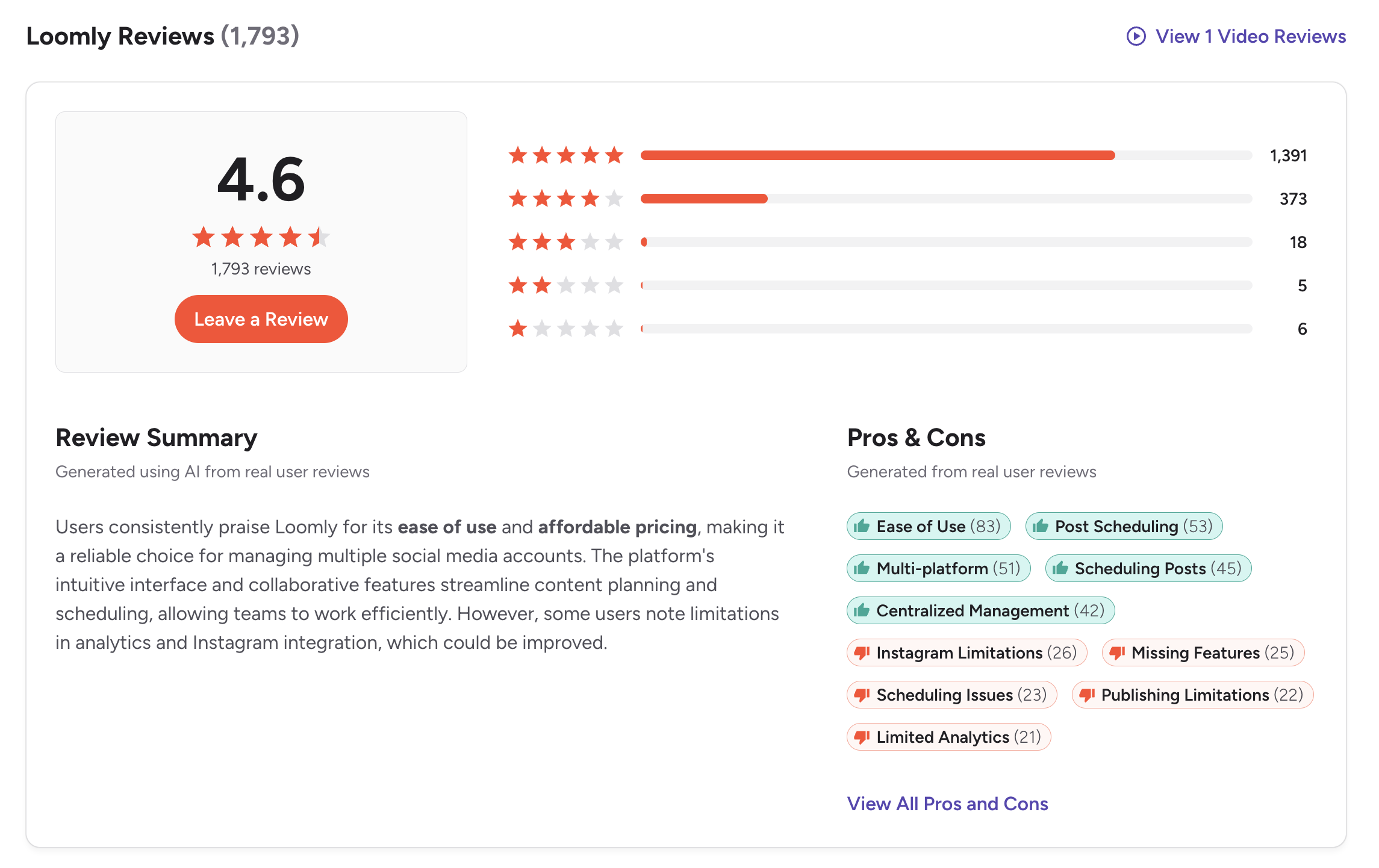
G2: 4.6/5 (1,793 reviews)
Users consistently praise Loomly's intuitive content calendar, post ideas feature, and approval workflow system. Common complaints include limited analytics depth and the recent discontinuation of the Base plan forcing users to higher tiers.
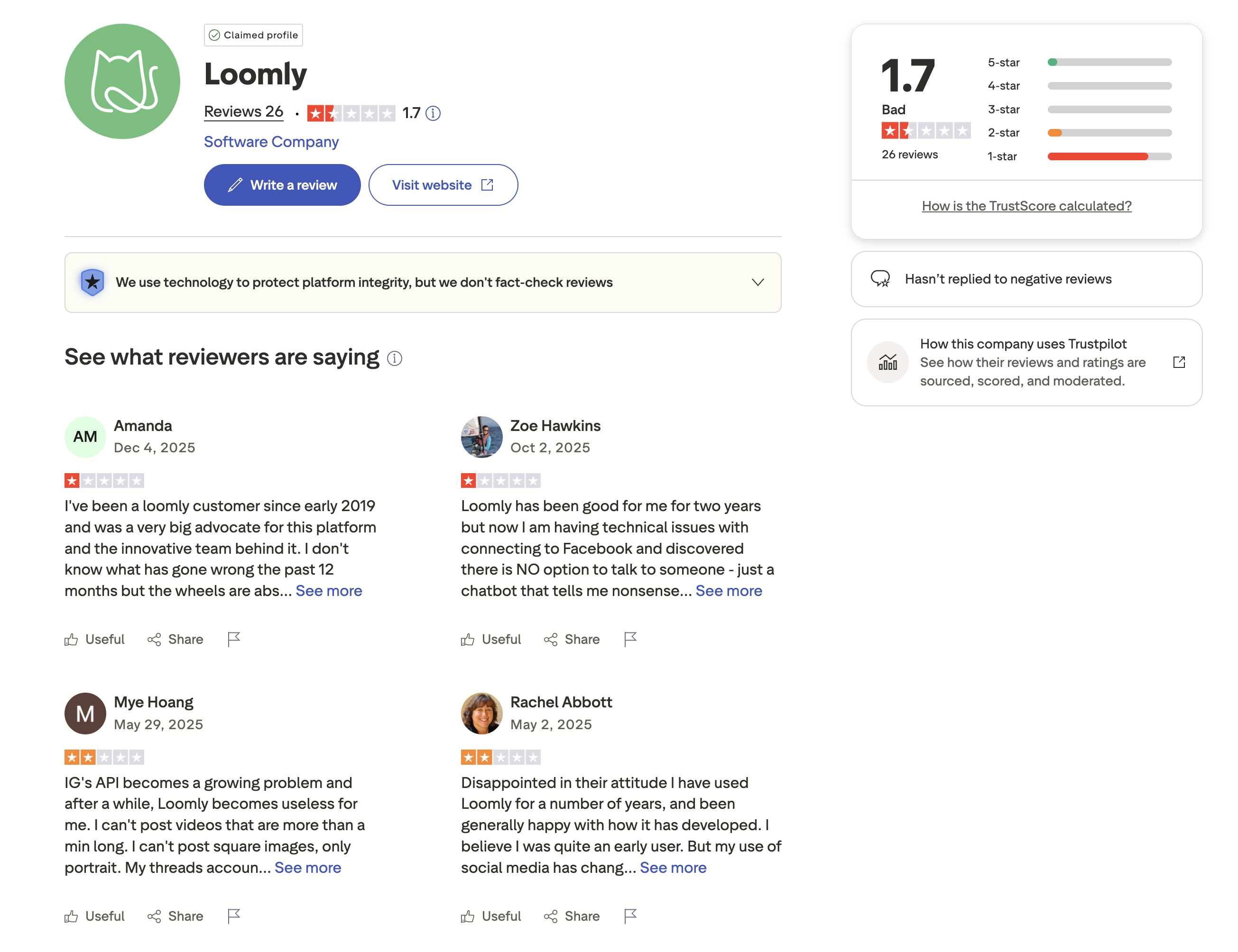
Trustpilot: 1.7/5 (26 reviews) — a small sample that contrasts sharply with Loomly's strong G2 presence. Trustpilot complaints tend to focus on billing and customer support rather than product features.
Sendible Reviews
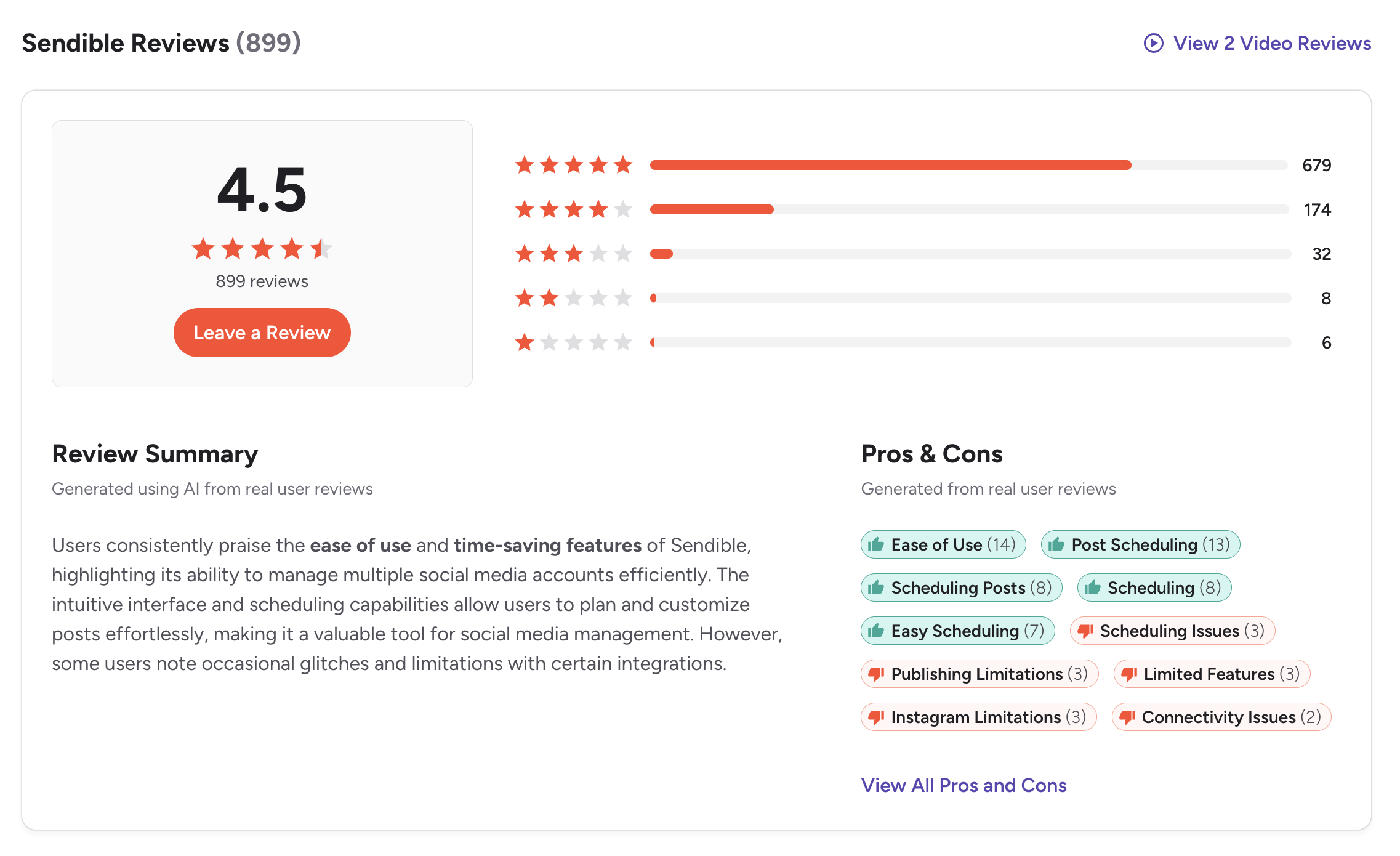
G2: 4.5/5 (899 reviews)
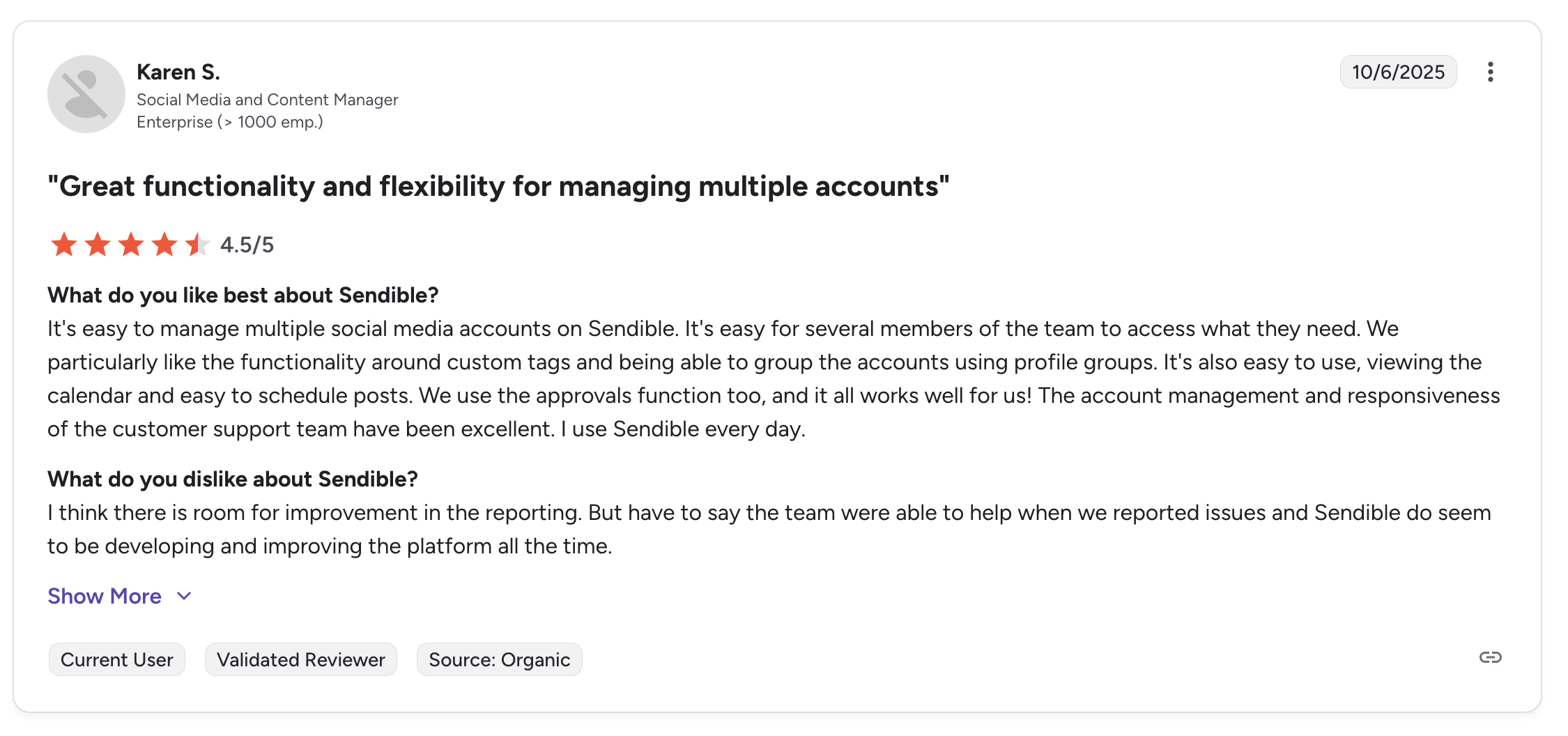
Users highlight Sendible's Priority Inbox, client dashboards, and broad platform coverage. Some mention daily sending limits and a learning curve for new users.
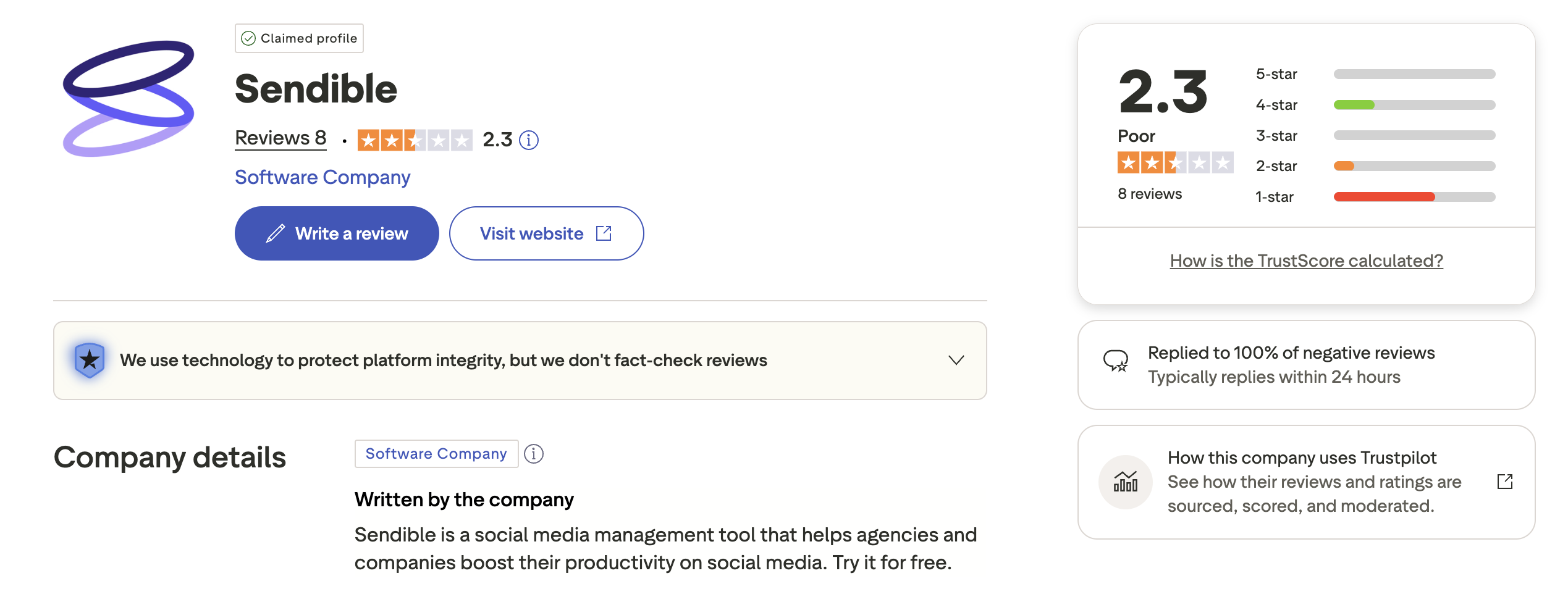
Trustpilot: 2.3/5 (8 reviews) — very small sample size, not statistically significant.
Review Verdict
Loomly leads on G2 with a 4.6 rating across nearly 1,800 reviews — double Sendible's review count. Both tools have low Trustpilot scores, but neither has enough Trustpilot reviews to draw meaningful conclusions. G2 data suggests Loomly has higher overall user satisfaction, though Sendible's slightly lower score still reflects a well-regarded product.
PostPlanifyManage All Your Social Accounts Without the Chaos
Schedule posts, track performance, and collaborate with your team.
Who Should Use Loomly?
- Marketing teams that need approval workflows included on every paid plan
- Content creators who benefit from automated post ideas and inspiration
- Brands that publish to Pinterest and Snapchat alongside other platforms
- Teams that want brand asset management to keep visuals consistent
- Organizations looking for a guided content creation experience with previews and tips
See how Loomly compares to other tools: Buffer vs Loomly, Hootsuite vs Loomly, Later vs Loomly, SocialBee vs Loomly.
Who Should Use Sendible?
- Agencies managing multiple clients who need separate dashboards and reporting
- Teams that need a unified inbox with sentiment analysis across all platforms
- Businesses that require white-label branding for client-facing deliverables
- Marketers who need bulk scheduling via CSV for high-volume content
- Teams relying on 250+ report modules for detailed performance analysis
- Organizations publishing to WordPress directly from their social tool
See how Sendible compares to other tools: Buffer vs Sendible, Hootsuite vs Sendible, Agorapulse vs Sendible, Sprout Social vs Sendible.
Approvals and Publishing, Simplified
Loomly's approval workflows start at $79/month. Sendible's team features start at $89/month. Both tools make you pay a premium for collaboration. PostPlanify includes approval workflows on the Premium plan at $99/month — with 25 accounts and 5 team members included, making it the better value as your team grows.

| Feature | Loomly | Sendible | PostPlanify |
|---|---|---|---|
| Starting Price | Free (limited) | $29/mo | $29/mo |
| Unlimited Scheduling | Paid plans | All plans | All paid plans |
| AI Caption Generation | Post ideas | AI Assist (OpenAI) | Yes (unlimited) |
| AI Image Generation | No | No | Yes |
| Canva Integration | Yes | Yes | Yes |
| Google Drive Import | No | Yes | Yes |
| Approval Workflows | $79/mo (Standard) | $89/mo (Traction) | $99/mo (Premium) |
| Analytics | Yes (basic) | 250+ modules | $49/mo (Growth) |
| Social Inbox | Yes | Yes (Priority Inbox) | Yes |
| Platforms | 11 | 10 | 10 |
| Team Members | No (plan-based) | No (plan-based) | 5 (Premium $99/mo), unlimited (Enterprise) |
PostPlanify gives you unlimited scheduling, AI caption and image generation, and Canva integration at $29/month for 5 accounts with 200 posts/mo. Full analytics are included on the Growth plan ($49/mo, 10 accounts, unlimited posts). Need approvals and team collaboration? The Premium plan at $99/month includes 25 accounts, 5 team members, and approval workflows. The Enterprise plan (custom pricing) adds unlimited team members.
See all plans on the PostPlanify pricing page.
Try PostPlanify free for 7 days and simplify your team's social media workflow.

Related Guides
- How to Measure Social Media ROI
- Manage Multiple Social Media Accounts
- Social Media Content Calendar Examples
- Best Loomly Alternatives
- Best Sendible Alternatives
FAQ
Is Loomly better than Sendible for small teams?
For small teams that need approval workflows, Loomly offers better value since approvals are included on all paid plans. Sendible requires the Traction plan at $89/month for approval features. However, Sendible's Creator plan at $29/month is cheaper for solo users who do not need approvals.
Does Loomly have a unified inbox?
Loomly offers interaction tracking that lets you view and respond to comments, but it is not a full unified inbox. Sendible's Priority Inbox consolidates messages across all platforms with sentiment analysis, making it more powerful for community management.
Why do both tools have low Trustpilot scores?
Loomly has 1.7/5 on Trustpilot (26 reviews) and Sendible has 2.3/5 (8 reviews). Both samples are too small to be statistically reliable. Their G2 ratings — 4.6 and 4.5 respectively, across thousands of combined reviews — are far more representative of actual user sentiment.
Does Sendible support Pinterest?
No. Sendible supports 10 platforms but does not include Pinterest. Loomly supports Pinterest along with 10 other platforms. If Pinterest is essential, Loomly or PostPlanify are better options.
Can Loomly replace Sendible for agency work?
Not easily. Loomly lacks client-specific dashboards, white-label branding, and the depth of reporting that agencies typically need. Sendible is purpose-built for agency workflows with client management features on the Traction plan and above.
Which tool has better content creation features?
Loomly leads in content creation with automated post ideas, hashtag suggestions, and a guided workflow. Sendible focuses more on publishing efficiency with bulk scheduling and RSS auto-posting. For inspiration-driven content creation, Loomly wins.
How does Loomly's free plan compare to Sendible's trial?
Loomly's free plan is permanent but very limited — 1 user, 3 accounts, and 5 posts per month. Sendible offers a 14-day free trial with full feature access. Loomly's free plan is better for long-term casual use, while Sendible's trial is better for evaluating the full platform.
Does PostPlanify offer approval workflows?
Yes. PostPlanify includes approval workflows on the Premium plan at $99/month, which also comes with 25 accounts and 5 team members. This makes it competitive with both Loomly Standard ($79/mo for 6 users) and Sendible Traction ($89/mo for 4 users).







