
Later and Loomly both help teams plan and publish social media content, but they come at it from different angles. Later is a visual-first platform built around Instagram and TikTok content planning, while Loomly is a collaboration-focused tool centered on approval workflows and a visual content calendar.
Two visual-first platforms that approach content planning differently — Later through an Instagram-centric media library, Loomly through a collaborative content calendar. We compare them on the things that actually matter: what you pay, what you get, and what users say after using them daily. Looking for more? Browse all social media scheduling alternatives.
Later vs Loomly at a Glance
Here's a quick side-by-side overview before we dive deeper:
| Category | Later | Loomly |
|---|---|---|
| Starting Price | $25/mo (1 Social Set) | $0/mo (Free plan) |
| Free Plan | No (14-day trial) | Yes (3 accounts, 1 user, 5 posts/mo) |
| Platforms Supported | 8 | 11 |
| Unlimited Scheduling | Scale plan only ($110/mo) | Beyond plan ($332/mo) |
| AI Tools | AI content tools (credit-based: 5-100/mo) | AI caption suggestions |
| AI Image Generation | No | No |
| Bulk Scheduling | No | Yes |
| Team Collaboration | Growth plan ($50/mo) | Starter plan ($65/mo) |
| Approval Workflows | Growth plan | All paid plans |
| Analytics | 3 months to 2 years | Basic |
| Canva Integration | No | Yes |
| G2 Rating | 4.5/5 (347 reviews) | 4.6/5 (1,793 reviews) |
| Trustpilot Rating | 1.3/5 (329 reviews) | 1.7/5 (26 reviews) |
| Best For | Visual-first Instagram/TikTok creators | Teams needing approval workflows and visual calendar |
Later Overview

Later is a visual-first social media platform built around content planning and scheduling. Originally focused on Instagram, it has expanded to support multiple platforms while keeping its visual calendar and media library at the core.
Later supports 8 platforms: Instagram, Facebook, LinkedIn, Pinterest, X/Twitter, TikTok, YouTube, and Threads.
Key features:
- Visual content calendar and media library
- AI content tools with monthly credit system (5-100 credits)
- Link in Bio page
- Social inbox (Growth+)
- UGC collection (Growth+)
- Smart Scheduling with Future Trends
- Competitive benchmarking (Scale)
Later targets creators and brands that prioritize visual content planning, especially on Instagram and TikTok. Read real user reviews of Later from G2 and Trustpilot.
Loomly Overview

Loomly is a social media management platform built around team collaboration and content approval workflows. It combines a visual content calendar with post ideas, trend suggestions, and built-in creative integrations to help marketing teams plan, review, and publish content together.
Loomly supports 11 platforms: Facebook, Instagram, X/Twitter, LinkedIn, Pinterest, Google Business, YouTube, TikTok, Snapchat, Threads, and Bluesky.
Key features:
- Visual content calendar with post ideas and trends
- Approval workflows on all paid plans
- AI caption suggestions
- Bulk scheduling
- Social inbox
- Canva, Google Drive, and Unsplash integration
- Link shortener with analytics
- Best time to post recommendations
- Hashtag manager and custom roles
Loomly targets small to mid-size businesses and marketing teams that need structured approval workflows and collaborative content planning. Read real user reviews of Loomly from G2 and Trustpilot.
Pricing Comparison
Later and Loomly take very different pricing approaches. Later uses Social Set pricing (bundles of profiles), while Loomly charges per plan tier with fixed account and user limits. Loomly has a free plan; Later does not.
Later Pricing
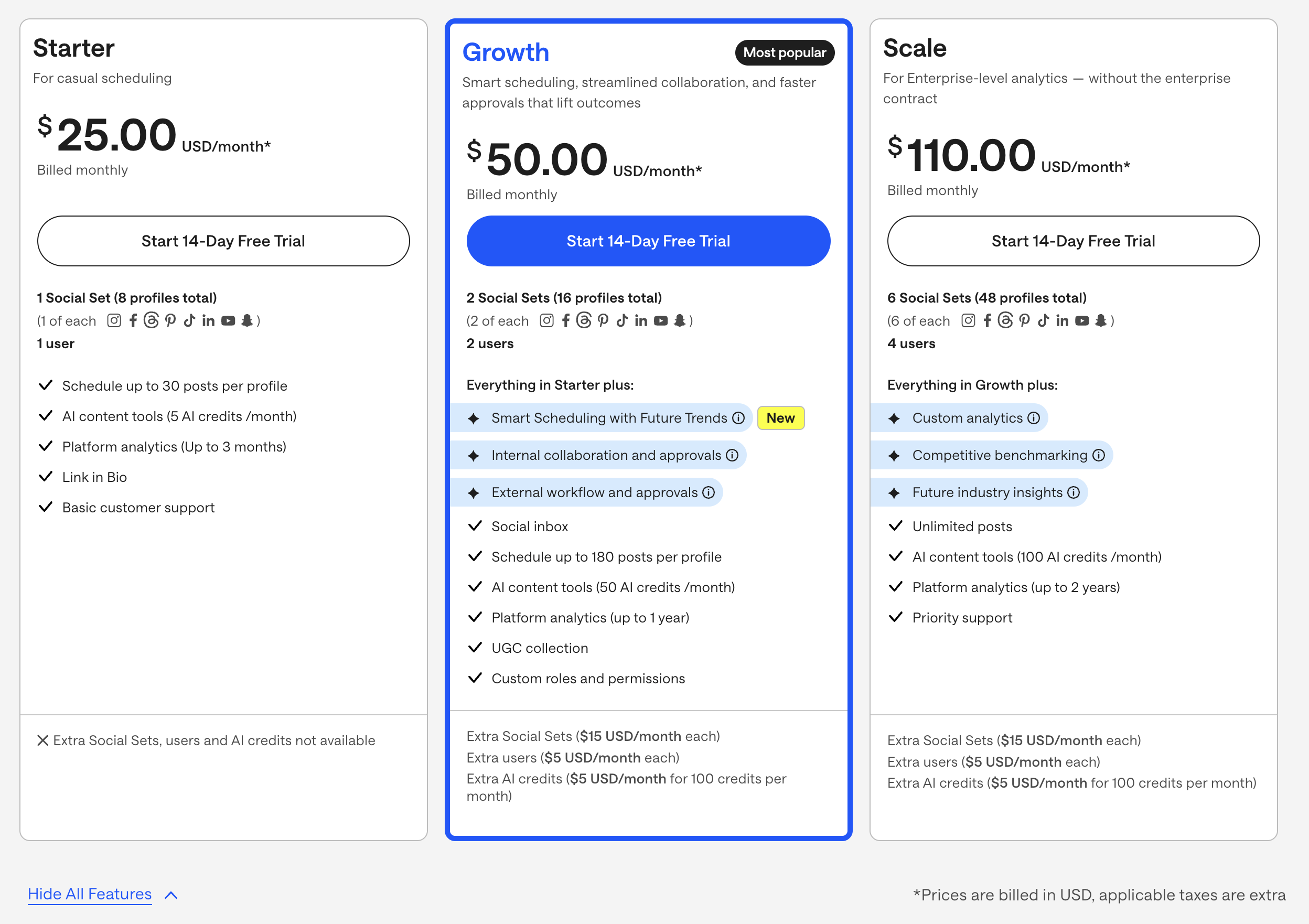
Later uses Social Set pricing — each set bundles one profile per platform. See the full Later pricing breakdown for details.
| Plan | Price | Social Sets | Users | Key Features |
|---|---|---|---|---|
| Starter | $25/mo | 1 (8 profiles) | 1 | 30 posts/profile, 5 AI credits, 3-month analytics |
| Growth | $50/mo | 2 (16 profiles) | 2 | 180 posts/profile, 50 AI credits, approvals, inbox |
| Scale | $110/mo | 6 (48 profiles) | 4 | Unlimited posts, 100 AI credits, custom analytics |
Example costs:
- 1 Social Set on Starter = $25/month
- 2 Social Sets on Growth = $50/month
- Extra Social Sets = $15/month each
- Extra AI credits = $5/month per 100
Loomly Pricing
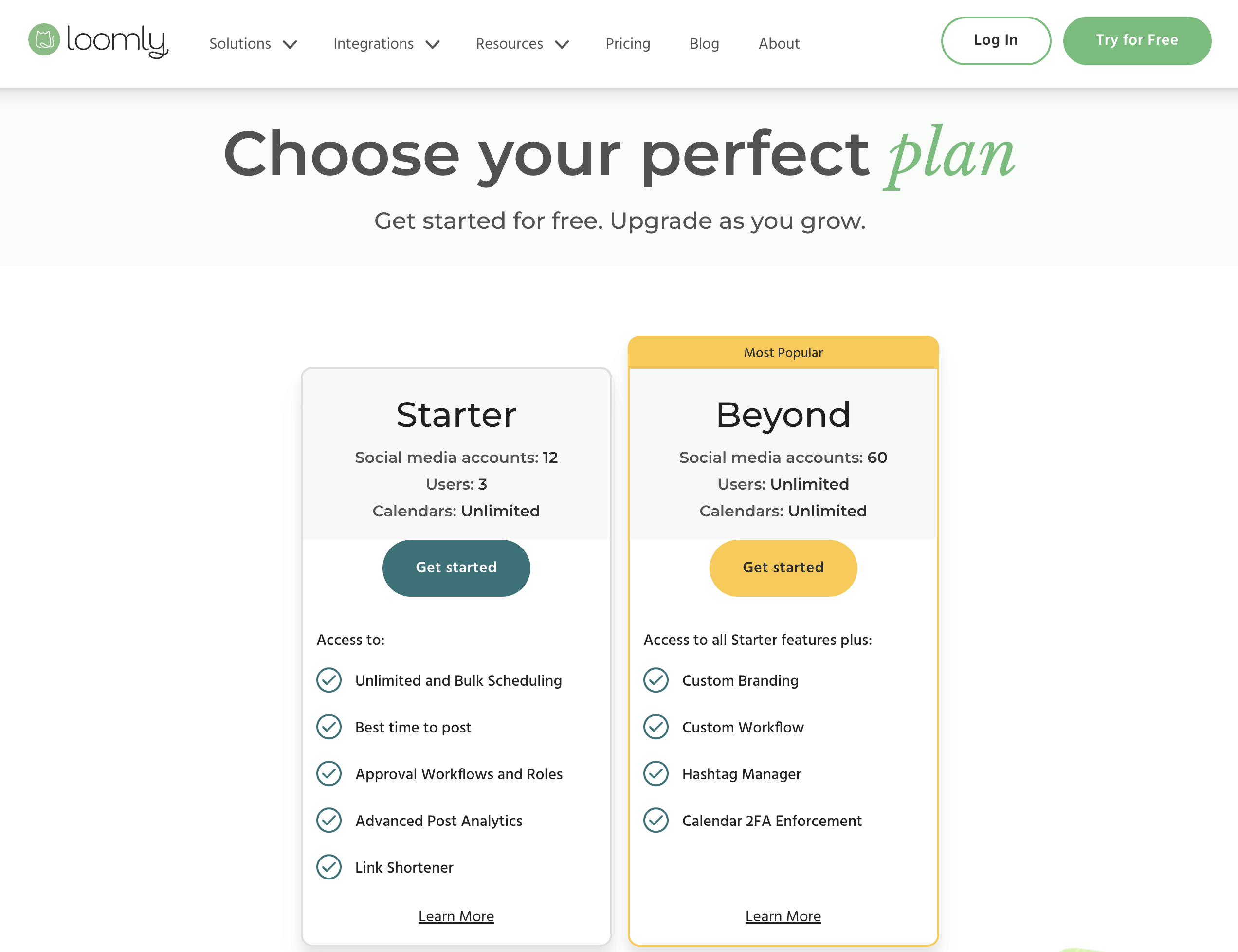
Loomly uses tiered pricing with fixed account and user limits per plan. Approximately 25% discount available on annual billing. See the full Loomly pricing breakdown for details.
| Plan | Price | Accounts | Users | Key Features |
|---|---|---|---|---|
| Free | $0/mo | 3 | 1 | 5 posts/month, basic calendar |
| Starter | $65/mo | 12 | 3 | Full calendar, approval workflows, AI captions |
| Beyond | $332/mo | 60 | Unlimited | Advanced features, custom roles, priority support |
| Enterprise | Custom | Custom | Custom | Dedicated account manager, custom integrations |
Example costs:
- Free plan = $0/month (3 accounts, 5 posts/month)
- Starter = $65/month (12 accounts, 3 users)
- Beyond = $332/month (60 accounts, unlimited users)
Price Verdict
Later is cheaper for small teams, but both have significant pricing jumps. Later's Starter plan at $25/month is more affordable than Loomly's first paid plan at $65/month. However, Loomly includes a free plan (Later does not) and supports more platforms. The biggest issue with Loomly is the $267 gap between Starter ($65) and Beyond ($332) — teams that outgrow 12 accounts or 3 users face a steep upgrade. Later's pricing scales more gradually with extra Social Sets at $15/month each.
 PostPlanify
Manage All Your Social Accounts Without the Chaos
Schedule posts, track performance, and collaborate with your team.


Feature Comparison
Scheduling & Publishing
| Feature | Later | Loomly |
|---|---|---|
| Unlimited scheduling | Scale plan only ($110/mo) | Beyond plan ($332/mo) |
| Post limits | 30-180 per profile | 5 (free) to unlimited (paid) |
| Best time to post | Yes (Smart Scheduling) | Yes |
| Bulk scheduling | No | Yes |
| Content calendar | Yes (visual) | Yes (visual) |
| Post ideas/trends | Limited | Yes |
| Draft saving | Yes | Yes |
| Hashtag manager | No | Yes |
Winner: Loomly — bulk scheduling, post ideas with trend suggestions, and a built-in hashtag manager give Loomly more scheduling depth. Later's Smart Scheduling with Future Trends is valuable, but the lack of bulk scheduling and hashtag management tools limits efficiency for teams managing high content volumes.
AI Tools
| Feature | Later | Loomly |
|---|---|---|
| AI caption generation | Yes (credit-based) | Yes (AI suggestions) |
| AI image generation | No | No |
| AI post ideas | Limited by credits | No (manual post ideas) |
| AI credits system | 5-100 credits/month | No credit limits |
Winner: Later — while both tools offer AI caption generation, Later provides a more developed AI system with dedicated credits for content creation. Loomly's AI is limited to caption suggestions. However, neither tool offers AI image generation, and Later's credit system can feel restrictive on lower plans.
Analytics & Reporting
| Feature | Later | Loomly |
|---|---|---|
| Basic analytics | All plans | Basic on all plans |
| Analytics history | 3 months to 2 years | Limited |
| Competitor analysis | Scale only ($110/mo) | No |
| Custom reports | Scale only | No |
| Link shortener analytics | No | Yes |
Winner: Later — analytics are available on all plans with up to 2 years of history and competitive benchmarking on Scale. Loomly includes basic analytics and link shortener tracking, but lacks the depth, custom reporting, and competitor analysis that Later offers on higher tiers.
Team Collaboration
| Feature | Later | Loomly |
|---|---|---|
| Multiple users | Growth+ (2-4 users) | Starter (3 users), Beyond (unlimited) |
| Approval workflows | Growth plan ($50/mo) | All paid plans ($65/mo+) |
| Custom roles | Growth plan | Yes |
| External approvals | Growth plan | No |
| Social inbox | Growth+ | Yes |
Winner: Loomly — approval workflows are Loomly's core strength, available on all paid plans with custom roles and a collaborative calendar built for team review. Later offers external approvals on Growth, which is useful for agencies, but Loomly's approval system is more deeply integrated into the content creation workflow.
Content & Creative Tools
| Feature | Later | Loomly |
|---|---|---|
| Link in Bio | Yes | No |
| Media library | Yes (visual-first) | Basic |
| UGC collection | Growth+ | No |
| Canva integration | No | Yes |
| Google Drive integration | No | Yes |
| Unsplash integration | No | Yes |
| Link shortener | No | Yes (with analytics) |
Winner: Tie. Later has the stronger visual media library, UGC collection, and Link in Bio. Loomly has Canva, Google Drive, and Unsplash integration plus a link shortener with analytics. The winner depends on whether you prioritize visual content management or creative tool integrations.
Platform Support
| Platform | Later | Loomly |
|---|---|---|
| Yes | Yes | |
| Yes | Yes | |
| X/Twitter | Yes | Yes |
| Yes | Yes | |
| TikTok | Yes | Yes |
| YouTube | Yes | Yes |
| Yes | Yes | |
| Threads | Yes | Yes |
| Google Business | No | Yes |
| Snapchat | No | Yes |
| Bluesky | No | Yes |
Winner: Loomly — supports 11 platforms vs Later's 8. Loomly includes Google Business, Snapchat, and Bluesky, none of which Later supports. For teams that need to publish across a wider range of channels, Loomly has the clear advantage.
What Real Users Say
Later Reviews
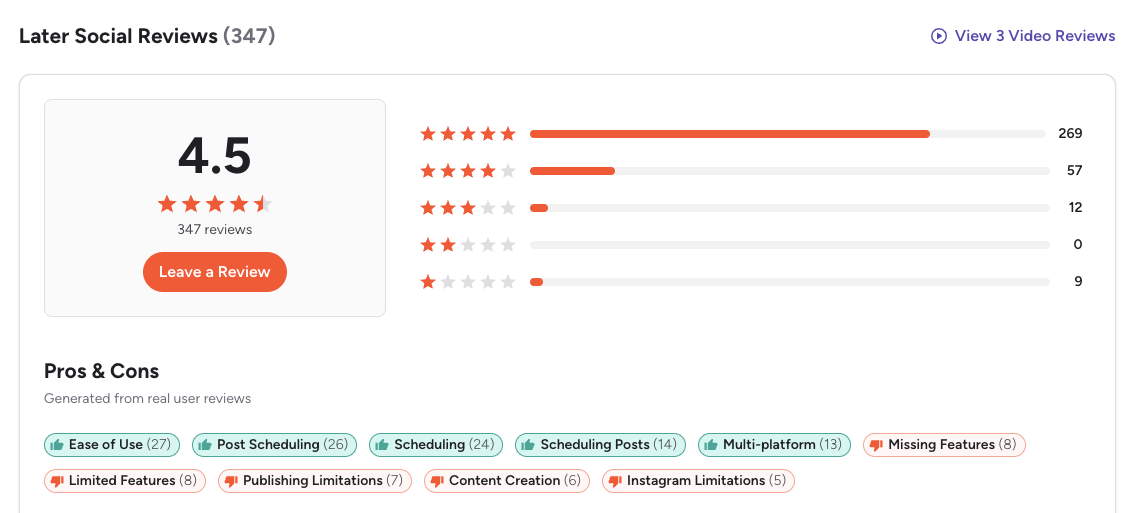
G2: 4.5/5 (347 reviews) — Users appreciate the ease of use, scheduling features, and multi-platform support. Top complaints include limited features, publishing limitations, and Instagram-specific restrictions.
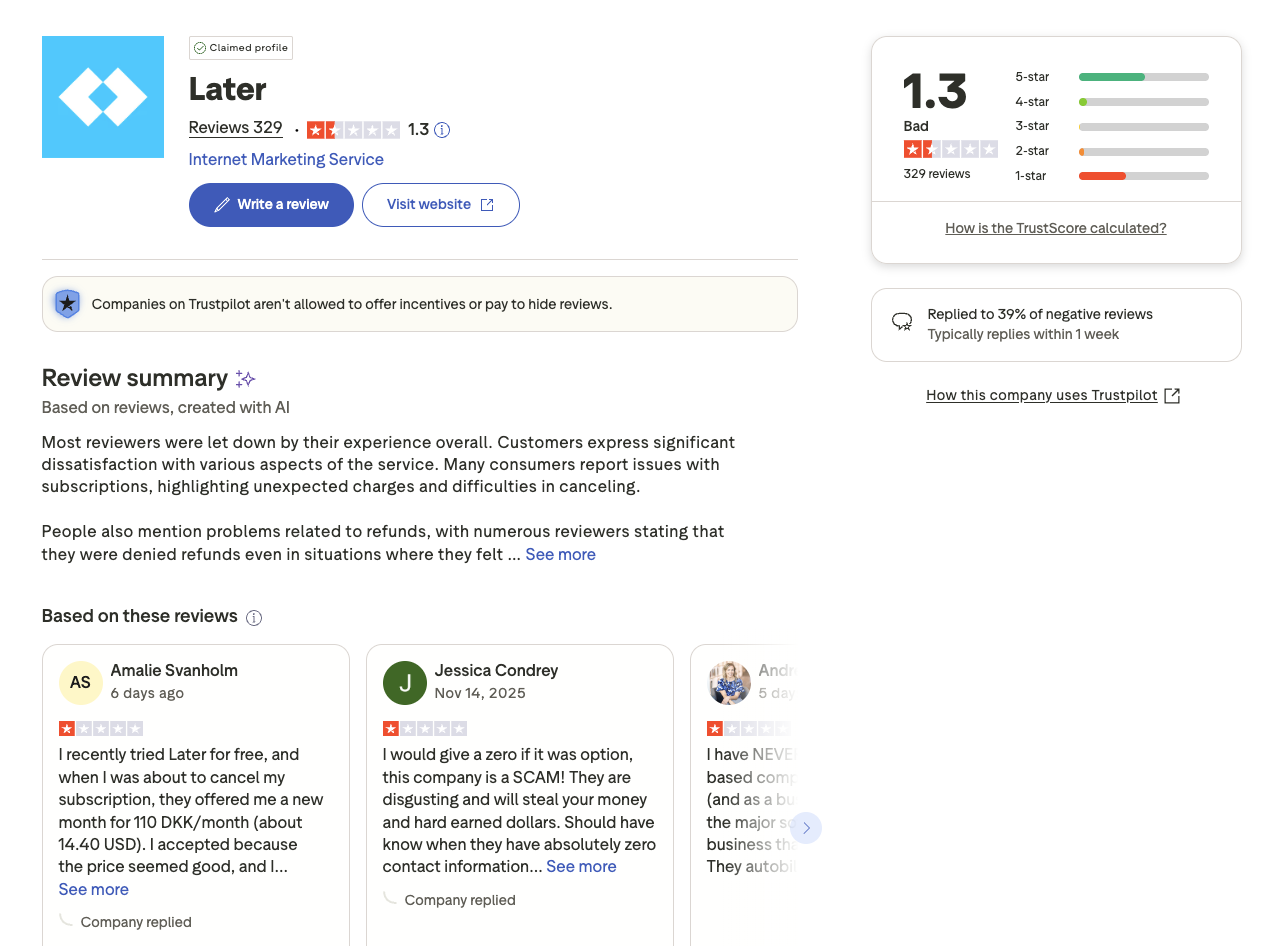
Trustpilot: 1.3/5 (329 reviews) — Very low rating with widespread complaints about unexpected charges, difficulty canceling subscriptions, and denied refunds.
Loomly Reviews
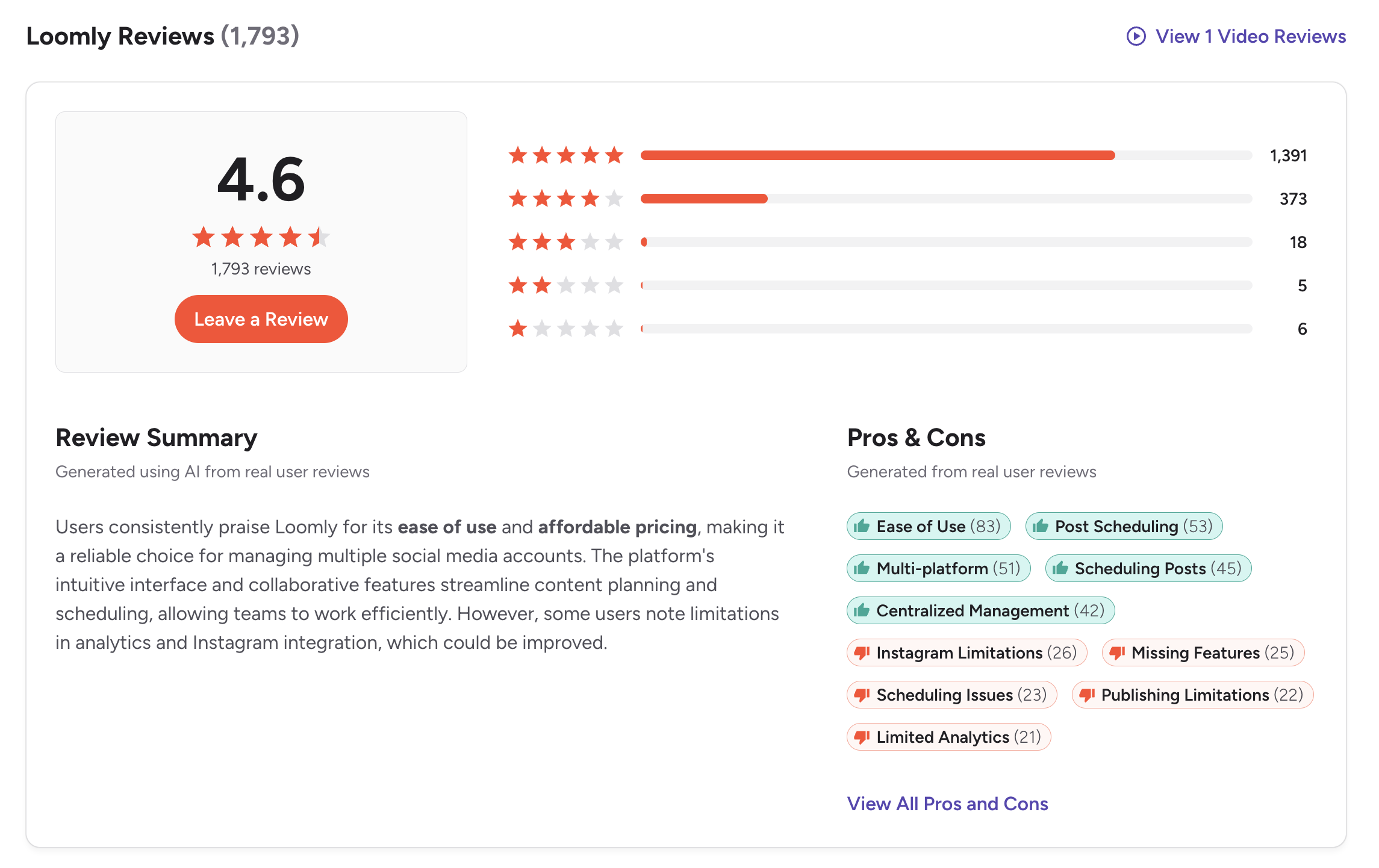
G2: 4.6/5 (1,793 reviews) — Users praise the intuitive content calendar, approval workflows, and post idea suggestions. Loomly has a significantly larger review base than most competitors, indicating broad adoption. Common complaints include basic analytics and the pricing gap between tiers.
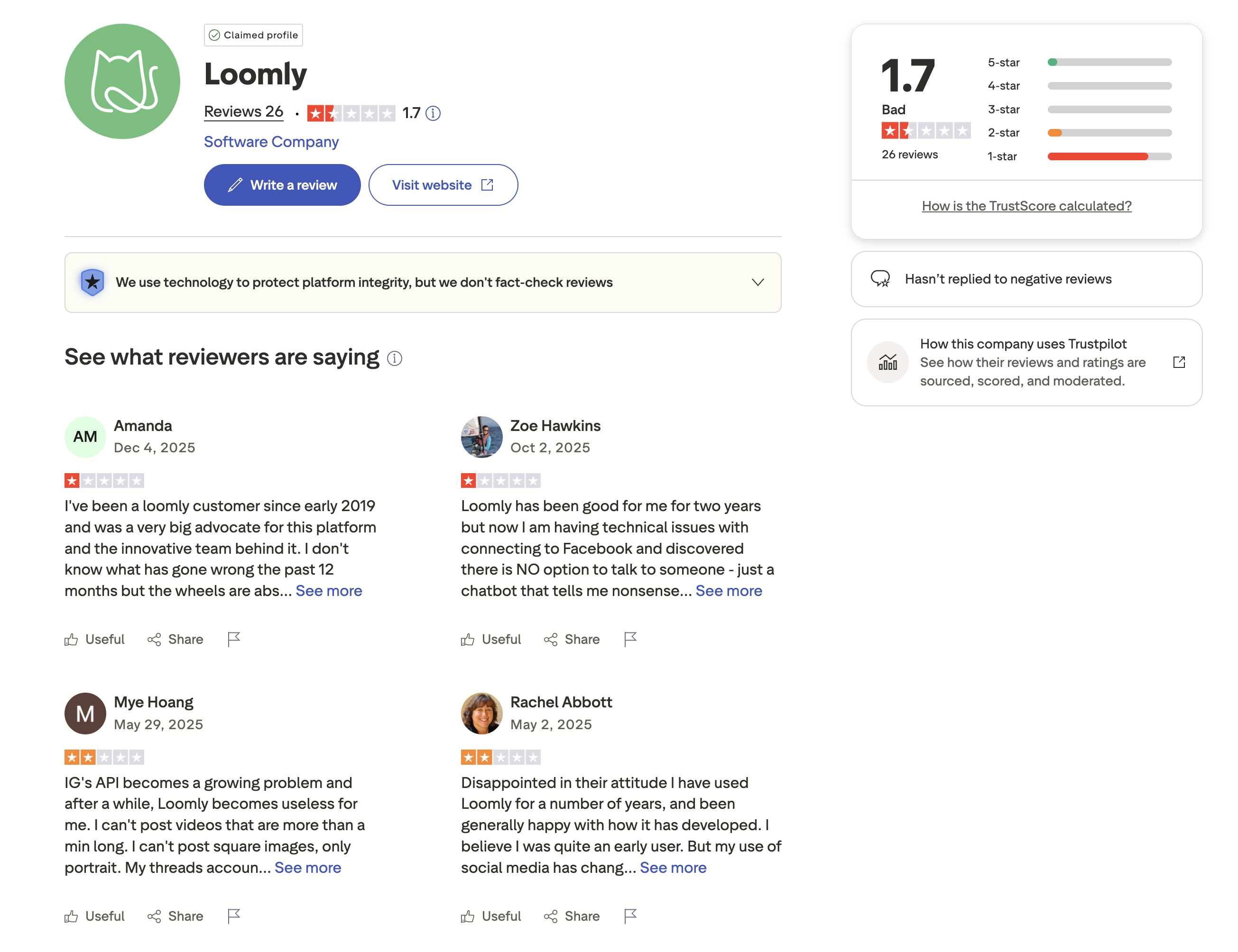
Trustpilot: 1.7/5 (26 reviews) — Low rating, though based on a very small sample of only 26 reviews. Complaints focus on billing issues and customer support responsiveness. The small review count makes this less statistically reliable than G2.
Review Verdict
Loomly wins on G2 with a 4.6/5 from 1,793 reviews — a significantly larger and higher-rated sample than Later's 4.5/5 from 347 reviews. On Trustpilot, both tools score poorly (Later 1.3/5, Loomly 1.7/5), though Loomly's score comes from just 26 reviews compared to Later's 329. G2 is the more reliable indicator here, and Loomly's lead with five times the review volume is meaningful.
PostPlanifyManage All Your Social Accounts Without the Chaos
Schedule posts, track performance, and collaborate with your team.
Who Should Use Later?
If Later is on your shortlist, you may also want to see our top alternatives to Later before committing. You can also see how Later stacks up against Buffer, Hootsuite, Metricool, and Sprout Social.
Later is the better choice if you:
- Are a visual-first creator focused on Instagram and TikTok
- Need a visual content calendar and media library
- Want UGC collection tools built in
- Need external approval workflows for client work
- Prefer Smart Scheduling with trend-based timing suggestions
- Want Link in Bio functionality included
- Need deeper analytics with competitive benchmarking
Who Should Use Loomly?
If Loomly sounds right but you want to explore other options, check out our best alternatives to Loomly. You can also see how Loomly compares to Buffer, Hootsuite, Sprout Social, and SocialBee.
Loomly is the better choice if you:
- Are a marketing team that needs structured approval workflows
- Want a visual content calendar with built-in post ideas and trends
- Need to publish across 11 platforms including Snapchat and Bluesky
- Want Canva, Google Drive, and Unsplash integration in one tool
- Need bulk scheduling to manage high content volumes
- Want a free plan to test before committing
- Need a hashtag manager for organized hashtag strategies
Visual Scheduling Without the Credit Limits
Later limits your AI to a credit system and charges per Social Set. Loomly has a $267 gap between its mid-tier and top-tier plans. Neither gives you full AI tools at an affordable price. PostPlanify includes unlimited AI captions, AI image generation, and visual scheduling on every paid plan — starting at $29/month.

| Feature | Later | Loomly | PostPlanify |
|---|---|---|---|
| Starting Price | $25/mo | $0/mo (free) | $29/mo flat |
| Unlimited Scheduling | $110/mo plan only | $332/mo plan only | All paid plans |
| AI Caption Generation | Yes (credit-based) | Yes (suggestions) | Yes (unlimited) |
| AI Image Generation | No | No | Yes |
| Canva Integration | No | Yes | Yes |
| Google Drive Import | No | Yes | Yes |
| Approval Workflows | $50/mo | $65/mo | $99/mo (Premium) |
| Analytics | All plans | Basic | $49/mo (Growth) |
| Social Inbox | Growth+ (basic) | Yes | Yes |
| Platforms Supported | 8 | 11 | 10 |
| Link in Bio | Yes | No | No |
PostPlanify starts at $29/month for 5 accounts with 200 posts/mo and AI tools included. Analytics are included from the Growth plan ($49/month). The Premium plan at $99/month adds unlimited accounts, unlimited team members, and approval workflows — without the credit limits of Later or the pricing gaps of Loomly. See all plans on the PostPlanify pricing page.
Schedule visually, create with AI — try PostPlanify free

Related Guides
- How to Measure Social Media ROI
- Manage Multiple Social Media Accounts
- How to Automate Social Media Posts
- Best Later Alternatives
- Best Loomly Alternatives
FAQ
Is Later cheaper than Loomly?
Yes, for paid plans. Later's Starter plan costs $25/month vs Loomly's Starter at $65/month. However, Loomly offers a free plan that Later does not. For teams needing multiple users and approval workflows, Later Growth ($50/mo for 2 users) is cheaper than Loomly Starter ($65/mo for 3 users), but the feature sets differ.
Does Loomly have a free plan?
Yes. Loomly offers a free plan with 3 social accounts, 1 user, and 5 posts per month. It is limited but useful for testing the platform before committing to a paid plan. Later does not have a free plan — only a 14-day trial.
Which has better AI tools — Later or Loomly?
Later has more developed AI tools with a dedicated credit system (5-100 credits/month). Loomly offers AI caption suggestions but no credit system and no AI image generation. Neither tool offers AI image generation. If AI-powered content creation is important, consider PostPlanify which includes unlimited AI captions and image generation on all paid plans.
Can I switch from Later to Loomly?
Yes. You can reconnect your social accounts to Loomly and start scheduling. The biggest changes you will notice are Loomly's stronger approval workflows and post idea suggestions, but a less visual media library and more basic analytics. Loomly also supports 3 more platforms than Later.
Which is better for teams — Later or Loomly?
Loomly is generally better for teams. Approval workflows are available on all paid plans, and the content calendar is designed for collaborative review. Later offers team features on Growth ($50/mo) with external approvals for agencies, but Loomly's collaboration tools are more deeply integrated into the platform.
Which supports more social media platforms?
Loomly supports 11 platforms (including Google Business, Snapchat, and Bluesky). Later supports 8 platforms. Loomly has wider coverage, which is important for businesses that need to maintain a presence on niche or emerging platforms.
Why is there such a big price jump in Loomly's plans?
Loomly's Starter plan costs $65/month (12 accounts, 3 users) and the Beyond plan costs $332/month (60 accounts, unlimited users) — a $267 increase. There is no mid-tier option. Teams that outgrow 12 accounts or 3 users must make a significant financial jump. This is one of Loomly's most cited limitations.
Does Later have bulk scheduling?
No. Later does not support bulk scheduling or CSV import. Loomly does offer bulk scheduling. If uploading content in batches is important to your workflow, Loomly has the advantage here.







