
Later and Planable target different audiences with different philosophies. One is built for visual content creators who care about grid aesthetics; the other is built for teams that care about structured content approvals.
Later is a visual-first scheduler for Instagram and TikTok creators who want to plan grid aesthetics and use Link in Bio. Planable is a collaboration-first platform for teams that need structured approval chains and client-facing content previews. Two different philosophies built for two different audiences — we compare features, pricing, and what real users report. Comparing the full market? Browse all social media scheduling alternatives.
Later vs Planable at a Glance
Here's a quick side-by-side overview before we dive deeper:
| Category | Later | Planable |
|---|---|---|
| Starting Price | $25/mo | $39/workspace/mo |
| Free Plan | No | Yes (50 lifetime posts) |
| Platforms Supported | 8 | 9 |
| Unlimited Scheduling | Scale plan ($110/mo) | No (60-150 posts/mo on paid plans) |
| AI Tools | AI credits (limited) | AI writer, AI hashtag generator |
| AI Image Generation | No | No |
| Canva Integration | No | Yes (native) |
| Link in Bio | Yes (Linkin.bio) | No |
| Team Collaboration | Growth+ (limited users) | All plans (unlimited users) |
| Approval Workflows | No | Basic+ (multi-level on Enterprise) |
| Analytics | All plans | Paid add-on ($14/workspace/mo) |
| G2 Rating | 4.5/5 (347 reviews) | 4.6/5 (937 reviews) |
| Trustpilot Rating | 1.3/5 (329 reviews) | 4.5/5 (69 reviews) |
| Best For | Instagram/TikTok creators | Teams needing content approvals |
Later Overview

Later is a visual-first social media scheduling platform originally built around Instagram. It has since expanded to support other platforms, but its strengths remain in visual content planning, grid previews, and its popular Linkin.bio tool.
Later supports 8 platforms: Instagram, Facebook, LinkedIn, X/Twitter, TikTok, YouTube, Pinterest, and Threads.
Key features:
- Visual content calendar with drag-and-drop
- Instagram grid preview for aesthetic planning
- Linkin.bio (link-in-bio landing page builder)
- AI-powered caption and hashtag suggestions (credit-based)
- Best time to post recommendations
- Media library with labels and notes
- Content collection from UGC and brand mentions
- Analytics on all plans
Later is popular with Instagram and TikTok creators, influencers, and small businesses that prioritize visual content and want a link-in-bio tool built into their scheduler. Read real user reviews of Later from G2 and Trustpilot.
Planable Overview

Planable is a content collaboration and approval platform built for marketing teams and agencies. While it offers visual previews like Later, its core focus is on structured workflows — getting content from draft to approved and published with full team visibility.
Planable supports 9 platforms: Facebook, Instagram, X/Twitter (paid plans only), LinkedIn, TikTok, YouTube, Pinterest, Google Business, and Threads.
Key features:
- Feed, Calendar, Grid, and List content views
- Drag-and-drop content calendar
- Approval workflows (2-3 types, multi-level on Enterprise)
- Real-time commenting and version history
- Client review via shareable link (no login needed)
- Native Canva integration
- AI writer/caption generator and AI hashtag generator
- Mockup previews showing content across platforms
- Universal Content for blogs and newsletters
- Unlimited media storage and mobile app
Planable's value proposition centers on eliminating email chains and spreadsheet approvals by giving teams a single place to create, review, and approve content. Read real user reviews of Planable from G2 and Trustpilot.
Pricing Comparison
Later and Planable use different pricing structures — Later prices by Social Sets and post limits, while Planable prices by workspace with its own post limits.
Later Pricing
Later uses a tiered model based on Social Sets and post limits, with AI credits on lower tiers. See the full Later pricing breakdown for details.
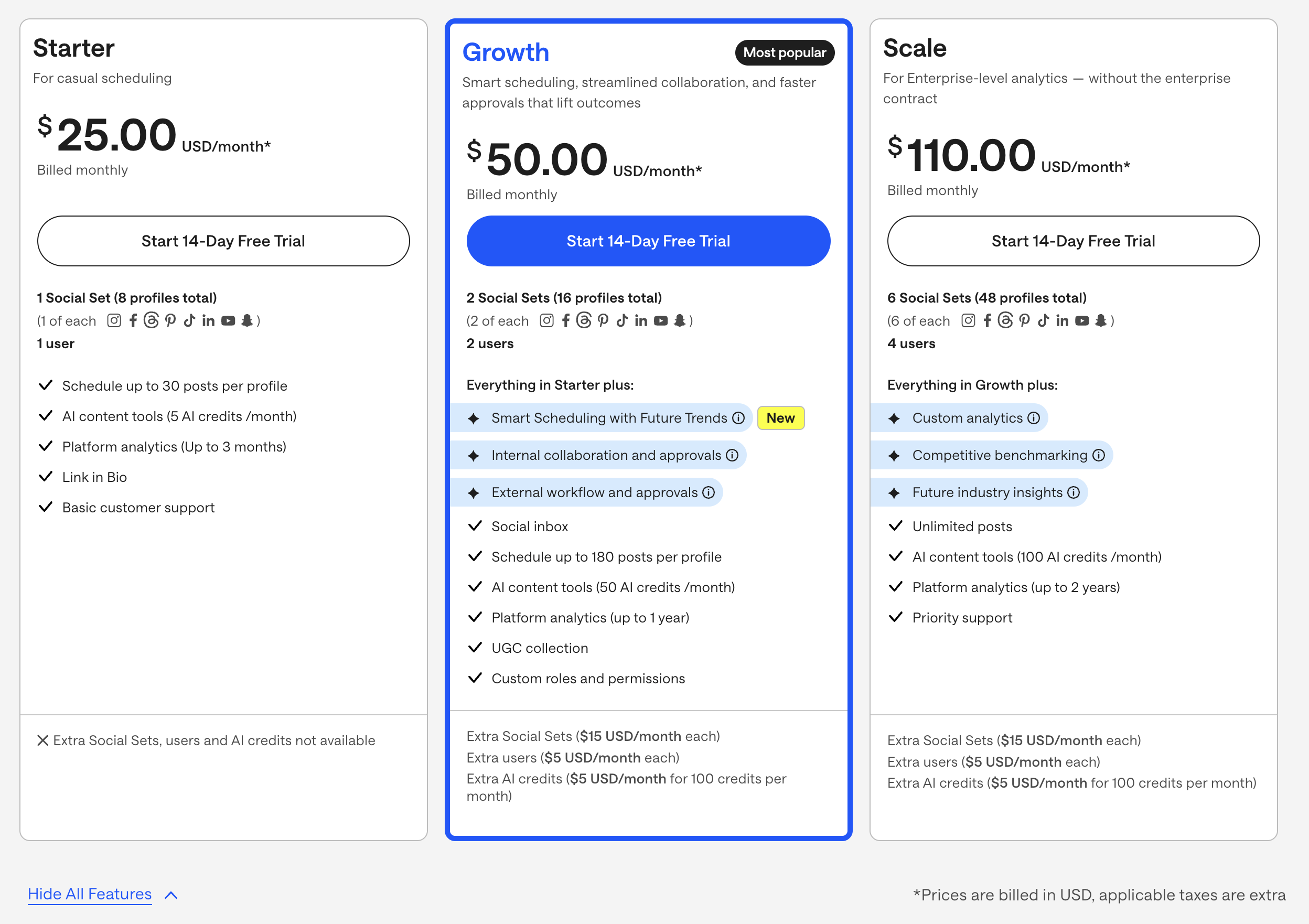
| Plan | Price | Social Sets | Posts per Profile | AI Credits | Key Features |
|---|---|---|---|---|---|
| Starter | $25/mo | 1 | 30/profile | 5 | Visual planner, Linkin.bio, analytics |
| Growth | $50/mo | 2 | 180/profile | Unlimited | Multi-user, best time to post |
| Scale | $110/mo | 6 | Unlimited | Unlimited | Team workflows, brand collaboration |
Example costs:
- Starter plan = $25/month (1 Social Set, 30 posts/profile, 5 AI credits)
- Growth plan = $50/month (2 Social Sets, 180 posts/profile)
- Scale plan = $110/month (6 Social Sets, unlimited posts)
Planable Pricing
Planable charges per workspace with unlimited users included. See the full Planable pricing breakdown for details.
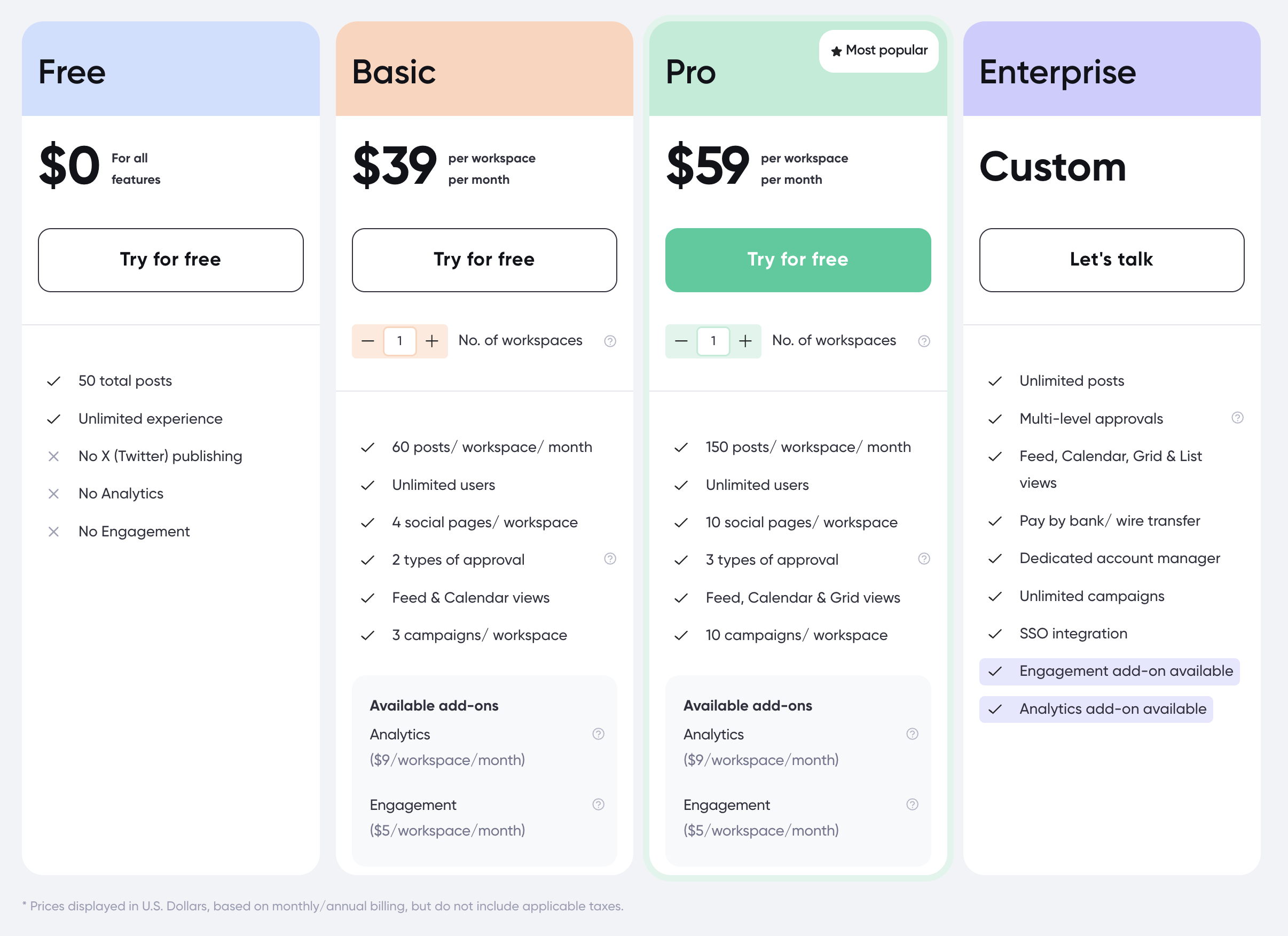
| Plan | Price | Posts | Social Pages | Users | Key Features |
|---|---|---|---|---|---|
| Free | $0 | 50 lifetime | 4 | Unlimited | Basic features, no X/Twitter publishing |
| Basic | $39/workspace/mo | 60/mo | 4 | Unlimited | Approval workflows, all platforms |
| Pro | $59/workspace/mo | 150/mo | 10 | Unlimited | More posts, expanded pages |
| Enterprise | Custom | Unlimited | Unlimited | Unlimited | Multi-level approvals, custom features |
Add-ons: Analytics $14/workspace/mo, Engagement inbox $9/workspace/mo
Example costs:
- 1 workspace on Basic = $39/month (+ $14 for analytics = $53)
- 1 workspace on Pro with both add-ons = $82/month
- 3 workspaces on Pro with analytics = $219/month
Price Verdict
Later is cheaper for solo creators starting at $25/month with analytics included. Planable starts at $39/workspace/month without analytics (an additional $14/month). However, Planable includes unlimited users on every plan, while Later limits user access to Growth and Scale plans. For teams, Planable's unlimited users make it more cost-effective. Both tools impose post limits on lower tiers, which restricts high-volume publishers.
 PostPlanify
Manage All Your Social Accounts Without the Chaos
Schedule posts, track performance, and collaborate with your team.


Feature Comparison
Scheduling & Publishing
| Feature | Later | Planable |
|---|---|---|
| Unlimited scheduling | Scale plan only ($110/mo) | No (60-150 posts/mo) |
| Content calendar | Yes (visual drag-and-drop) | Yes (drag-and-drop) |
| Multiple views | Calendar, Grid preview | Feed, Calendar, Grid, List |
| Instagram grid preview | Yes (core feature) | No |
| Best time to post | Yes (Growth+) | No |
| Mockup previews | No | Yes (platform-specific) |
| Media library | Yes (with labels/notes) | Yes (unlimited storage) |
Winner: Later for visual-first scheduling with Instagram grid previews, best time to post, and a robust media library. Planable wins for content view flexibility with four distinct view types and platform mockup previews.
AI Tools
| Feature | Later | Planable |
|---|---|---|
| AI caption generation | Yes (credit-based on Starter) | Yes (AI writer) |
| AI hashtag suggestions | Yes | Yes |
| AI image generation | No | No |
| AI credits system | Yes (5 on Starter, unlimited Growth+) | No (included) |
| AI content rewriting | Limited | Yes |
Winner: Planable. Both offer AI captions and hashtags, but Later's Starter plan restricts AI to just 5 credits per month. Planable includes AI tools without a credit system on paid plans.
Analytics & Reporting
| Feature | Later | Planable |
|---|---|---|
| Basic analytics | All plans | Paid add-on ($14/workspace/mo) |
| Post performance | Yes | Add-on only |
| Best time to post | Yes (Growth+) | No |
| Audience insights | Yes | No |
| Linkin.bio analytics | Yes | N/A |
| Export reports | Yes | Add-on only |
Winner: Later. Analytics are included on all Later plans with post performance, audience insights, and Linkin.bio tracking. Planable charges $14/workspace/month for analytics as an add-on, with no audience insights or optimal timing recommendations.
Team Collaboration
| Feature | Later | Planable |
|---|---|---|
| Unlimited users | No (plan-dependent) | All plans (including free) |
| Approval workflows | No | Basic+ (2-3 types) |
| Multi-level approvals | No | Enterprise only |
| Real-time commenting | No | Yes |
| Client review links | No | Yes (no login needed) |
| Version history | No | Yes |
| User permissions | Growth+ | All plans |
Winner: Planable. Later has minimal team collaboration features — no approval workflows, no commenting, no client review links. Planable's entire product is built around team collaboration with unlimited users, structured approvals, and client-facing review links.
Creator & Visual Tools
| Feature | Later | Planable |
|---|---|---|
| Instagram grid preview | Yes | No |
| Link in Bio | Yes (Linkin.bio) | No |
| Canva integration | No | Yes (native) |
| UGC content collection | Yes | No |
| Media labels/notes | Yes | No |
| Universal Content | No | Yes (blogs/newsletters) |
Winner: Later for Instagram-specific creator tools with grid preview, Linkin.bio, and UGC collection. Planable wins for design integration with native Canva and Universal Content for blogs/newsletters.
What Real Users Say
Later Reviews
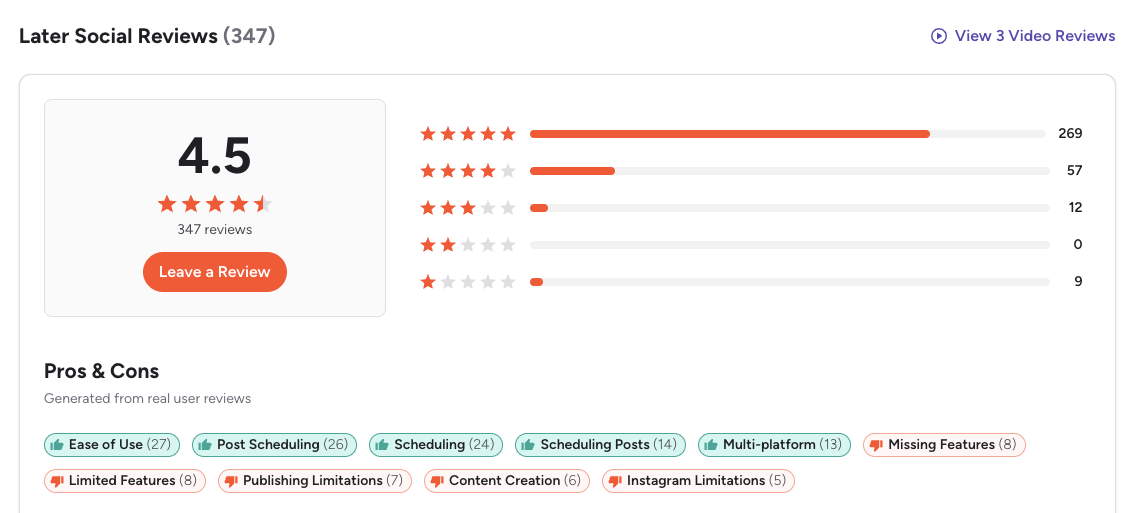
G2: 4.5/5 (347 reviews) — Users appreciate the visual content calendar, Instagram grid preview, and Linkin.bio tool. Common complaints include limited AI credits on lower plans, post limits, and occasional bugs with auto-publishing.
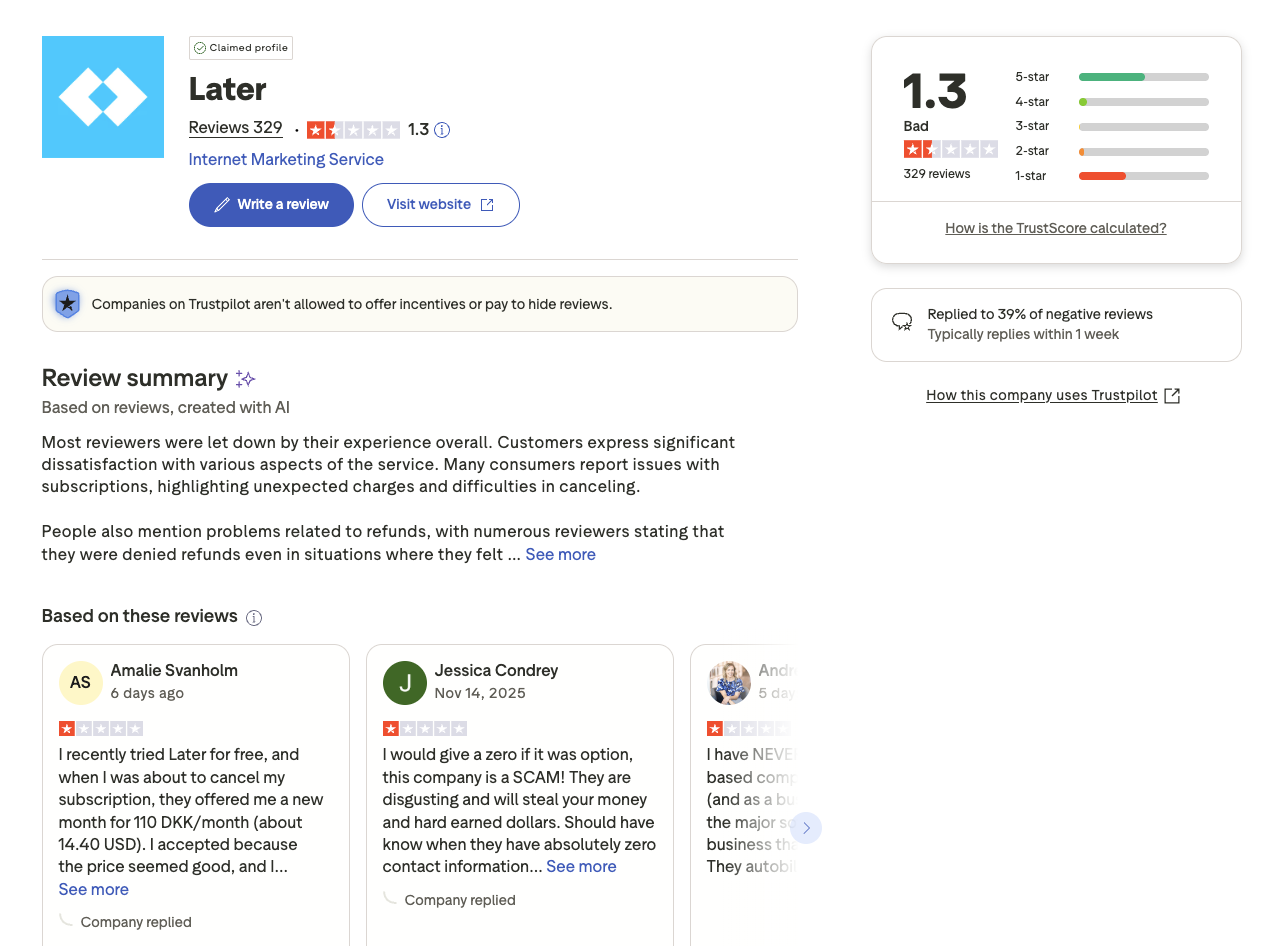
Trustpilot: 1.3/5 (329 reviews) — Very low rating with widespread complaints about billing issues, unexpected charges after trial periods, difficult cancellation, and unresponsive customer support.
Planable Reviews
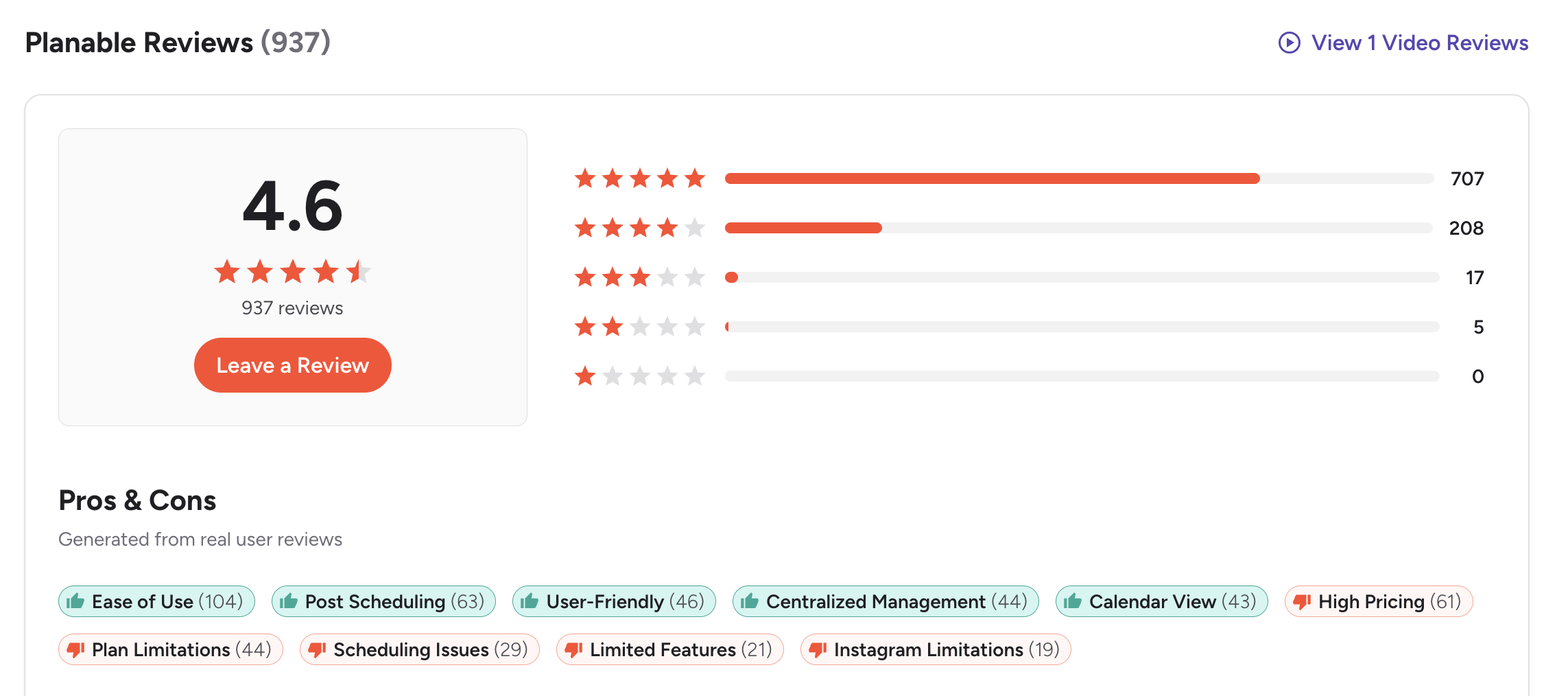
G2: 4.6/5 (937 reviews) — Users highlight the visual previews, collaboration tools, and intuitive approval workflows. Common concerns include post limits on lower tiers and analytics costing extra.
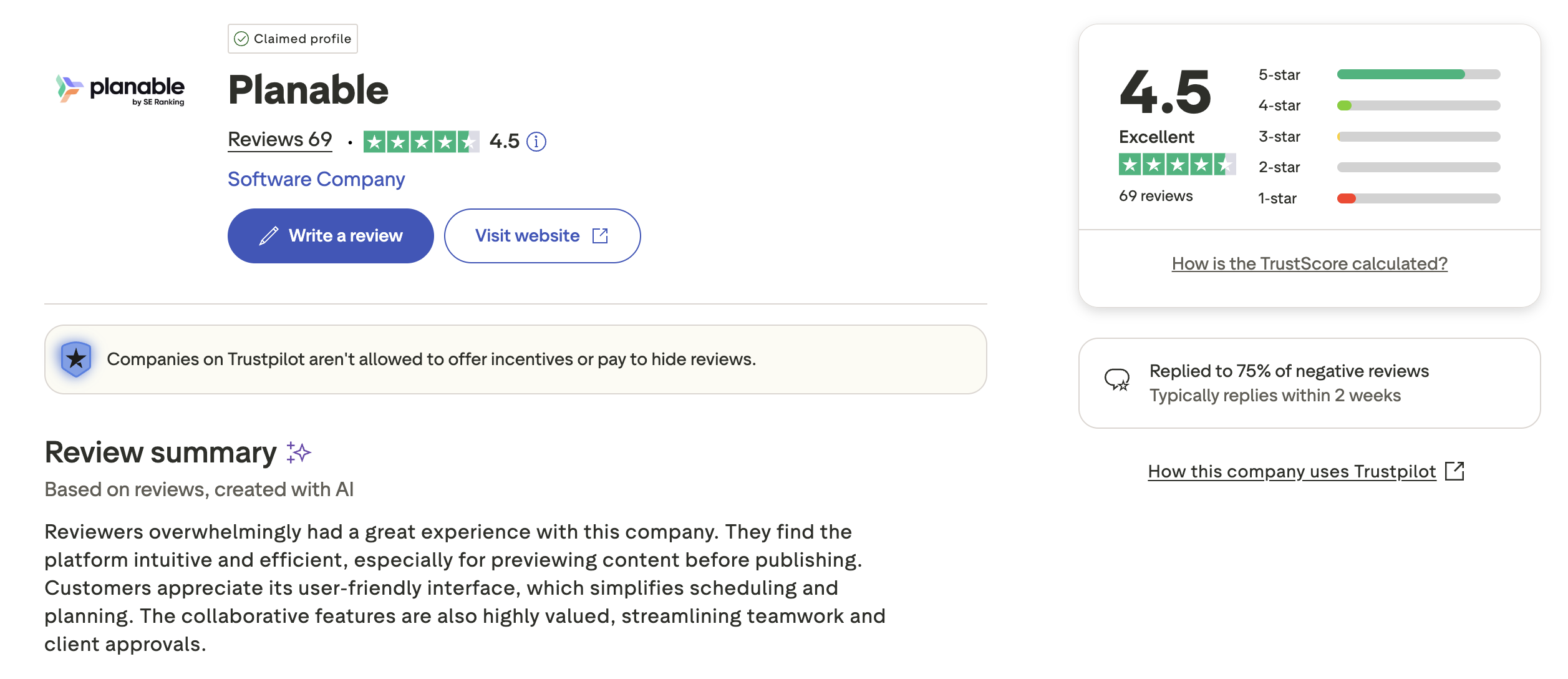
Trustpilot: 4.5/5 (69 reviews) — Strong positive rating with users praising collaboration features and customer support. Some note that per-workspace pricing scales expensively for multi-brand agencies.
Review Verdict
Both tools score well on G2 — Later at 4.5/5 and Planable at 4.6/5. But the Trustpilot gap is dramatic: Planable's 4.5/5 vs Later's 1.3/5. Later's low Trustpilot score (329 reviews) points to consistent billing complaints and cancellation difficulties that prospective users should consider seriously.
PostPlanifyManage All Your Social Accounts Without the Chaos
Schedule posts, track performance, and collaborate with your team.
Who Should Use Later?
If Later is on your radar, see our best alternatives to Later for more options. Also compare Later against Buffer, Hootsuite, Metricool, and Sendible.
Later is the better choice if you:
- Are an Instagram or TikTok creator who prioritizes visual grid planning
- Need a built-in Link in Bio tool (Linkin.bio) for driving traffic
- Want analytics included on every plan without paying add-on fees
- Need best time to post recommendations based on audience data
- Prefer a media library with labels, notes, and UGC collection
- Work primarily as a solo creator without approval workflow needs
Who Should Use Planable?
If Planable interests you, browse all social media scheduling alternatives to see the full landscape. Also compare Planable with Buffer, Hootsuite, Loomly, and Metricool.
Planable is the better choice if you:
- Run a marketing team or agency that needs structured approval workflows
- Want unlimited users on every plan without per-seat pricing
- Need client-facing review links where clients approve content without logging in
- Value native Canva integration for in-platform content design
- Need real-time commenting and version history for content iteration
- Publish Universal Content beyond social media (blogs, newsletters)
Visual Planning Meets Unlimited Scheduling
Later limits your posts and AI credits. Planable charges per workspace with analytics as an add-on. PostPlanify includes unlimited scheduling, AI captions, AI image generation, and Canva integration on every paid plan starting at $29/month — no credit systems, no workspace fees.

| Feature | Later | Planable | PostPlanify |
|---|---|---|---|
| Starting Price | $25/mo | $39/workspace/mo | $29/mo flat |
| Unlimited Scheduling | Scale plan ($110/mo) | No (60-150 posts/mo) | All paid plans |
| AI Caption Generation | Yes (credit-based) | Yes (AI writer) | Yes (unlimited) |
| AI Image Generation | No | No | Yes |
| Canva Integration | No | Yes (native) | Yes |
| Google Drive Import | No | No | Yes |
| Approval Workflows | No | Basic+ ($39+/mo) | $99/mo (Premium) |
| Analytics | Included (all plans) | Add-on ($14/workspace/mo) | $49/mo (Growth) |
| Team Members | No (plan-dependent) | All plans | 5 (Premium $99/mo), unlimited (Enterprise) |
| Social Inbox | Growth+ (basic) | Add-on ($9/mo) | Yes |
| Platforms Supported | 8 | 9 | 10 |
PostPlanify starts at $29/month for 5 accounts with 200 posts/mo and AI tools — no credit systems. Analytics are included from the Growth plan ($49/month, 10 accounts, unlimited posts). The Premium plan at $99/month adds 25 accounts, 5 team members, and approval workflows. You get Later's visual simplicity and Planable's collaboration features in one platform without the restrictions. See all plans on the PostPlanify pricing page.
Try PostPlanify free for 7 days

Related Guides
- Best Social Media Management Platforms
- Manage Multiple Social Media Accounts
- How to Automate Social Media Posts
- Best Later Alternatives
- Best Planable Alternatives
FAQ
Is Later or Planable better for Instagram creators?
Later is better for Instagram creators. Its Instagram grid preview, Linkin.bio tool, UGC content collection, and best time to post features are specifically designed for visual content creators. Planable's strengths lie in team collaboration and approvals, which solo creators typically do not need.
Does Later have approval workflows?
No. Later does not offer approval workflows on any plan. If your team needs structured content approvals, Planable includes 2-3 approval types starting on the Basic plan ($39/workspace/month), or PostPlanify offers approval workflows on the Premium plan at $99/month.
Which has better AI tools — Later or Planable?
Planable has more accessible AI tools. Both offer AI caption and hashtag generation, but Later restricts AI to just 5 credits per month on the Starter plan ($25/month). Planable includes AI tools without a credit system on paid plans. Neither offers AI image generation — PostPlanify does.
Can Planable replace Later for visual planning?
Planable offers a Grid view and mockup previews, but it lacks Later's Instagram grid preview for planning feed aesthetics. If grid layout planning is critical to your workflow, Later remains the better choice. Planable's Grid view is more about content organization than visual aesthetic planning.
Does Later include analytics on all plans?
Yes. Later includes analytics on all plans including the Starter tier ($25/month), with post performance data, audience insights, and Linkin.bio tracking. Planable charges $14/workspace/month for analytics as a paid add-on.
Which is cheaper for solo users?
Later is cheaper for solo users at $25/month (Starter) with analytics included. Planable's Basic plan costs $39/workspace/month without analytics. Adding analytics brings Planable to $53/month — more than double Later's starting price for a solo user.
Does Planable support Link in Bio?
No. Planable does not offer a Link in Bio tool. Later's Linkin.bio is one of its signature features, providing a customizable landing page linked from your Instagram bio. If Link in Bio is essential, Later is the better choice.
Which tool has better user reviews?
Both score well on G2 — Later at 4.5/5 (347 reviews) and Planable at 4.6/5 (937 reviews). On Trustpilot, the difference is stark: Planable has 4.5/5 (69 reviews) while Later has 1.3/5 (329 reviews). Later's low Trustpilot score reflects recurring billing complaints and cancellation difficulties.







