
Publer and Loomly are both popular choices for small teams, but they sit at opposite ends of the pricing spectrum. Publer is a budget-friendly scheduling tool with 13 platforms and AI image generation starting at $5/month, while Loomly is a collaboration-focused platform with approval workflows and a visual calendar starting at $65/month.
A budget champion versus a calendar specialist — Publer and Loomly both serve small teams, but at wildly different price points. Publer starts at $5/month with 13 platforms; Loomly starts at $65/month with approval workflows. We compare what you actually get for the money. See all options at social media scheduling alternatives.
Publer vs Loomly at a Glance
Here's a quick side-by-side overview before we dive deeper:
| Category | Publer | Loomly |
|---|---|---|
| Starting Price | $5/mo (Professional) | $0/mo (Free plan) |
| Free Plan | Yes (3 accounts, no X/Twitter) | Yes (3 accounts, 1 user, 5 posts/mo) |
| Platforms Supported | 13 | 11 |
| Unlimited Scheduling | Yes (Professional+) | Beyond plan ($332/mo) |
| AI Tools | AI Assist (GPT-4 + DALL-E 3, Business only) | AI caption suggestions |
| AI Image Generation | Yes (DALL-E 3, Business only) | No |
| Bulk Scheduling | Yes (CSV import) | Yes |
| Team Collaboration | Business plan | Starter plan ($65/mo) |
| Approval Workflows | Business plan | All paid plans |
| Analytics | Business plan only | Basic |
| Canva Integration | Yes | Yes |
| G2 Rating | 4.7/5 (486 reviews) | 4.6/5 (1,793 reviews) |
| Trustpilot Rating | 4.8/5 (863 reviews) | 1.7/5 (26 reviews) |
| Best For | Budget-conscious multi-platform schedulers | Teams needing approval workflows and visual calendar |
Publer Overview

Publer is an affordable social media scheduling tool built for creators and small teams who need wide platform support without high costs. It covers 13 platforms and includes automation features like RSS feeds, bulk scheduling via CSV, and AI-powered content creation with GPT-4 and DALL-E 3.
Publer supports 13 platforms: Facebook, Instagram, X/Twitter (paid only), LinkedIn, Pinterest, Google Business, YouTube, TikTok, WordPress, Telegram, Mastodon, Threads, and Bluesky.
Key features:
- Bulk scheduling via CSV import
- RSS feed automations
- AI Assist with GPT-4 and DALL-E 3 (Business only, unlimited)
- Canva and VistaCreate integration
- Auto-scheduling and watermarks
- Analytics and competitor analysis (Business only)
- 13 platform support including WordPress, Telegram, and Bluesky
Publer targets budget-conscious creators and small businesses who need multi-platform scheduling with automations at an affordable price. Read real user reviews of Publer from G2 and Trustpilot.
Loomly Overview

Loomly is a social media management platform built around team collaboration and content approval workflows. It combines a visual content calendar with post ideas, trend suggestions, and built-in creative integrations to help marketing teams plan, review, and publish content together.
Loomly supports 11 platforms: Facebook, Instagram, X/Twitter, LinkedIn, Pinterest, Google Business, YouTube, TikTok, Snapchat, Threads, and Bluesky.
Key features:
- Visual content calendar with post ideas and trends
- Approval workflows on all paid plans
- AI caption suggestions
- Bulk scheduling
- Social inbox
- Canva, Google Drive, and Unsplash integration
- Link shortener with analytics
- Best time to post recommendations
- Hashtag manager and custom roles
Loomly targets small to mid-size businesses and marketing teams that need structured approval workflows and collaborative content planning. Read real user reviews of Loomly from G2 and Trustpilot.
Pricing Comparison
The pricing gap between Publer and Loomly is significant. Publer uses per-account pricing starting at $5/month, while Loomly's first paid plan costs $65/month. Both have free plans, but the paid tiers tell a very different story.
Publer Pricing
Publer uses per-account pricing with a low base cost and add-on fees per additional social account. See the full Publer pricing breakdown for details.
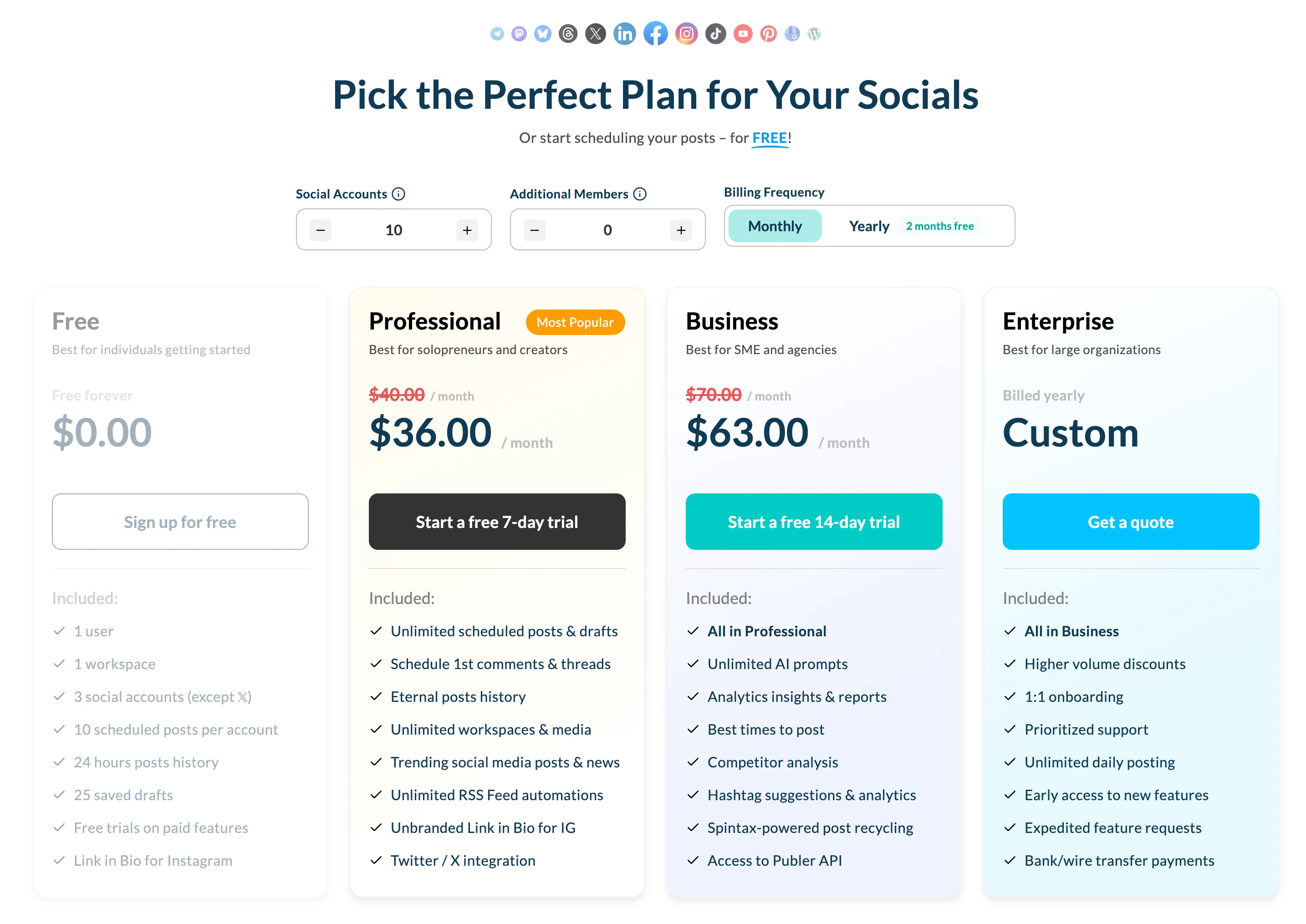
| Plan | Price | Accounts | Key Features |
|---|---|---|---|
| Free | $0/mo | 3 (no X/Twitter) | 10 pending posts/account, basic scheduling |
| Professional | From $5/mo (+$4/acct) | Scales per account | All platforms, auto-scheduling, bulk scheduling |
| Business | From $10/mo (+$7/acct) | Scales per account | AI Assist unlimited, analytics, competitor analysis |
Example costs (3 accounts):
- Free = $0/month (no X/Twitter, 10 pending posts each)
- Professional = ~$12/month
- Business = ~$21/month
Loomly Pricing
Loomly uses tiered pricing with fixed account and user limits per plan. Approximately 25% discount available on annual billing. See the full Loomly pricing breakdown for details.
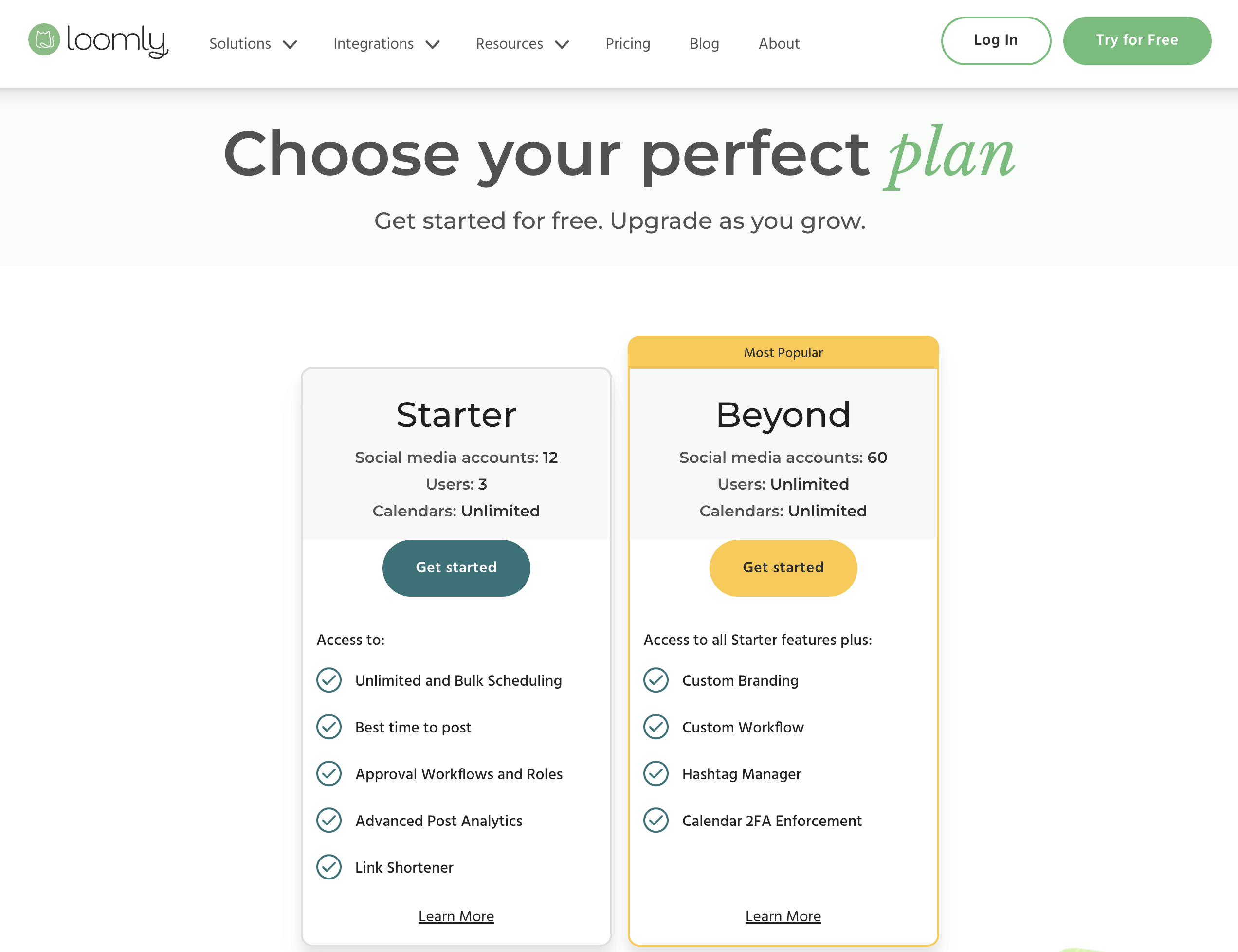
| Plan | Price | Accounts | Users | Key Features |
|---|---|---|---|---|
| Free | $0/mo | 3 | 1 | 5 posts/month, basic calendar |
| Starter | $65/mo | 12 | 3 | Full calendar, approval workflows, AI captions |
| Beyond | $332/mo | 60 | Unlimited | Advanced features, custom roles, priority support |
| Enterprise | Custom | Custom | Custom | Dedicated account manager, custom integrations |
Example costs:
- Free plan = $0/month (3 accounts, 5 posts/month)
- Starter = $65/month (12 accounts, 3 users)
- Beyond = $332/month (60 accounts, unlimited users)
Price Verdict
Publer is dramatically cheaper. For 3 accounts, Publer Business costs ~$21/month with unlimited AI (GPT-4 + DALL-E 3) and analytics — Loomly's comparable Starter plan costs $65/month without AI image generation and with basic analytics. Even with 12 accounts on Publer Business, you would pay around $80/month — still cheaper than Loomly's $332/month Beyond plan. The $267 gap between Loomly's Starter and Beyond is the platform's most cited pricing weakness.
Publer's free plan is also more useful for actual scheduling (10 pending posts per account vs Loomly's 5 posts total per month), though Loomly's free plan includes X/Twitter while Publer's does not.
 PostPlanify
Manage All Your Social Accounts Without the Chaos
Schedule posts, track performance, and collaborate with your team.


Feature Comparison
Scheduling & Publishing
| Feature | Publer | Loomly |
|---|---|---|
| Unlimited scheduling | Yes (Professional+) | Beyond plan ($332/mo) |
| Post limits (free) | 10 pending/account | 5 posts/month total |
| Best time to post | Yes (auto-scheduling) | Yes |
| Bulk scheduling | Yes (CSV import) | Yes |
| Content calendar | Yes | Yes (visual, collaborative) |
| Post ideas/trends | No | Yes |
| RSS automations | Yes | No |
| Hashtag manager | No | Yes |
| Watermarks | Yes | No |
Winner: Tie. Both tools offer strong scheduling features. Publer has RSS automations, CSV bulk scheduling, and watermarks. Loomly has post ideas, a hashtag manager, and a best-time-to-post feature. Publer's unlimited scheduling starts at $5/month; Loomly's requires the $332/month Beyond plan. For raw scheduling power at a low cost, Publer wins — but Loomly's creative inspiration tools add value for teams that need content ideas.
AI Tools
| Feature | Publer | Loomly |
|---|---|---|
| AI caption generation | Yes (Business, GPT-4, unlimited) | Yes (AI suggestions) |
| AI image generation | Yes (Business, DALL-E 3, unlimited) | No |
| AI post ideas | Yes (Business, GPT-4) | No |
| AI credits/limits | Unlimited (Business) | No credit limits |
Winner: Publer — unlimited GPT-4 caption generation and DALL-E 3 image generation on the Business plan (~$21/month for 3 accounts). Loomly's AI is limited to caption suggestions with no image generation at any price tier. If AI-powered content creation matters to your workflow, Publer offers significantly more.
Analytics & Reporting
| Feature | Publer | Loomly |
|---|---|---|
| Basic analytics | Business only | Basic on all plans |
| Competitor analysis | Business only | No |
| Custom reports | No | No |
| Link shortener analytics | No | Yes |
| Export reports | No | No |
Winner: Tie. Neither tool excels at analytics. Publer offers analytics and competitor analysis on the Business plan. Loomly includes basic analytics on all plans plus link shortener tracking. Neither offers custom reports or data exports. If deep analytics are important, consider Metricool or a dedicated analytics platform.
Team Collaboration
| Feature | Publer | Loomly |
|---|---|---|
| Multiple users | Business plan | Starter (3 users), Beyond (unlimited) |
| Approval workflows | Business plan | All paid plans ($65/mo+) |
| Custom roles | No | Yes |
| Social inbox | No | Yes |
| External approvals | No | No |
Winner: Loomly — approval workflows are Loomly's core strength, available on all paid plans with custom roles and a social inbox for managing engagement. Publer offers basic team features on Business but lacks custom roles and a social inbox. For teams that need structured content review and approval processes, Loomly is clearly ahead.
Content & Creative Tools
| Feature | Publer | Loomly |
|---|---|---|
| Canva integration | Yes | Yes |
| VistaCreate integration | Yes | No |
| Google Drive integration | No | Yes |
| Unsplash integration | No | Yes |
| Link shortener | No | Yes (with analytics) |
| Post ideas/trends | No | Yes |
| Watermarks | Yes | No |
| RSS automations | Yes | No |
Winner: Tie. Publer has VistaCreate integration, watermarks, and RSS automations. Loomly has Google Drive, Unsplash, a link shortener, and post idea suggestions. Both integrate with Canva. The better tool depends on whether you need automation features (Publer) or content inspiration tools (Loomly).
Platform Support
| Platform | Publer | Loomly |
|---|---|---|
| Yes | Yes | |
| Yes | Yes | |
| X/Twitter | Paid only | Yes |
| Yes | Yes | |
| TikTok | Yes | Yes |
| YouTube | Yes | Yes |
| Yes | Yes | |
| Threads | Yes | Yes |
| Google Business | Yes | Yes |
| Bluesky | Yes | Yes |
| Snapchat | No | Yes |
| WordPress | Yes | No |
| Telegram | Yes | No |
| Mastodon | Yes | No |
Winner: Publer — supports 13 platforms vs Loomly's 11. Publer includes WordPress, Telegram, and Mastodon, which Loomly does not. Loomly includes Snapchat, which Publer does not. The main caveat is that Publer locks X/Twitter behind paid plans, while Loomly includes it on all plans including free.
What Real Users Say
Publer Reviews
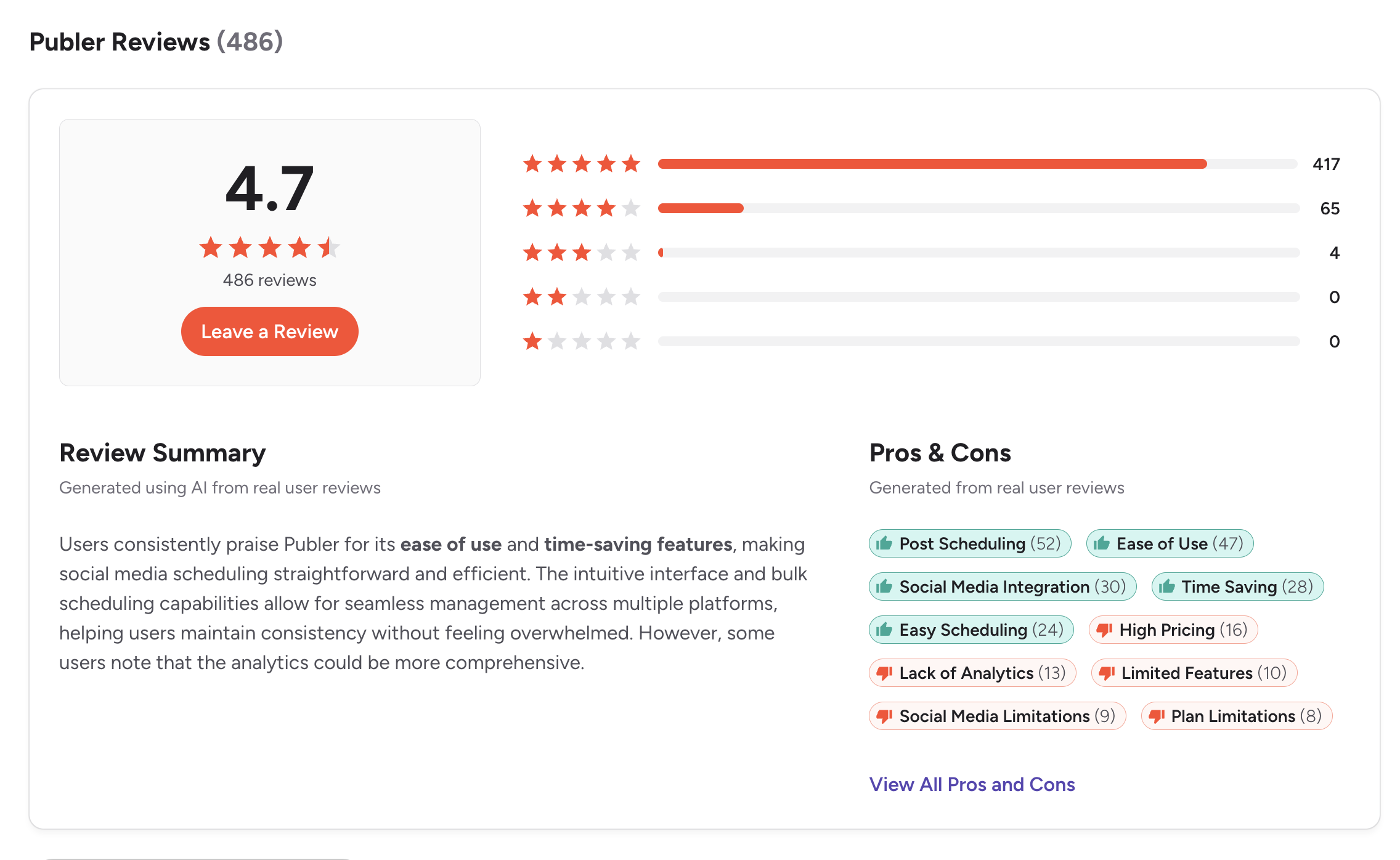
G2: 4.7/5 (486 reviews) — Users praise the affordable pricing, ease of use, bulk scheduling, and wide platform support. Publer consistently scores high for value for money. Complaints mention occasional bugs, limited analytics on lower plans, and the learning curve for automations.
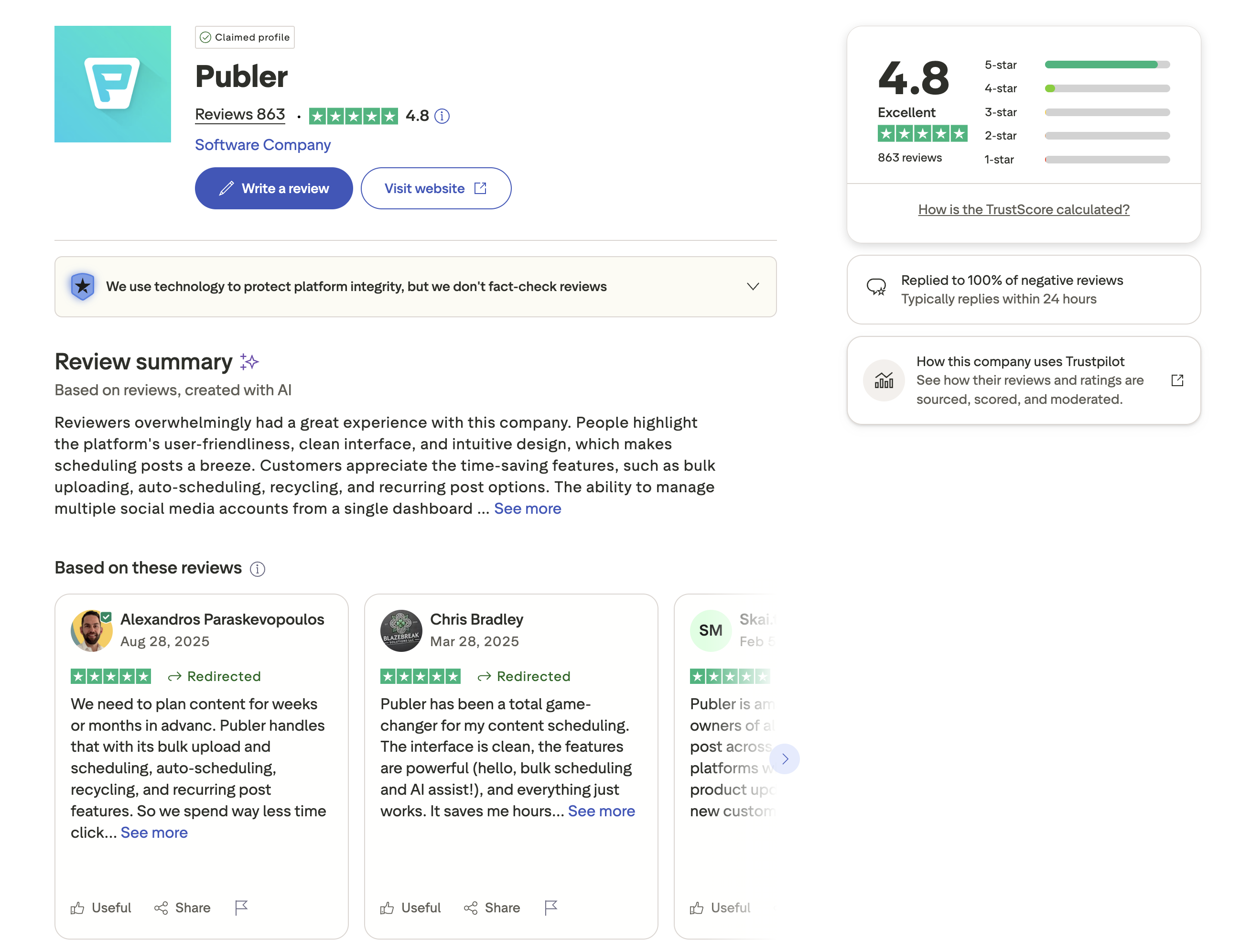
Trustpilot: 4.8/5 (863 reviews) — Exceptionally high rating from a large review base. Users highlight outstanding customer support, regular feature updates, and great value for money. Publer is one of the highest-rated social media tools on Trustpilot.
Loomly Reviews
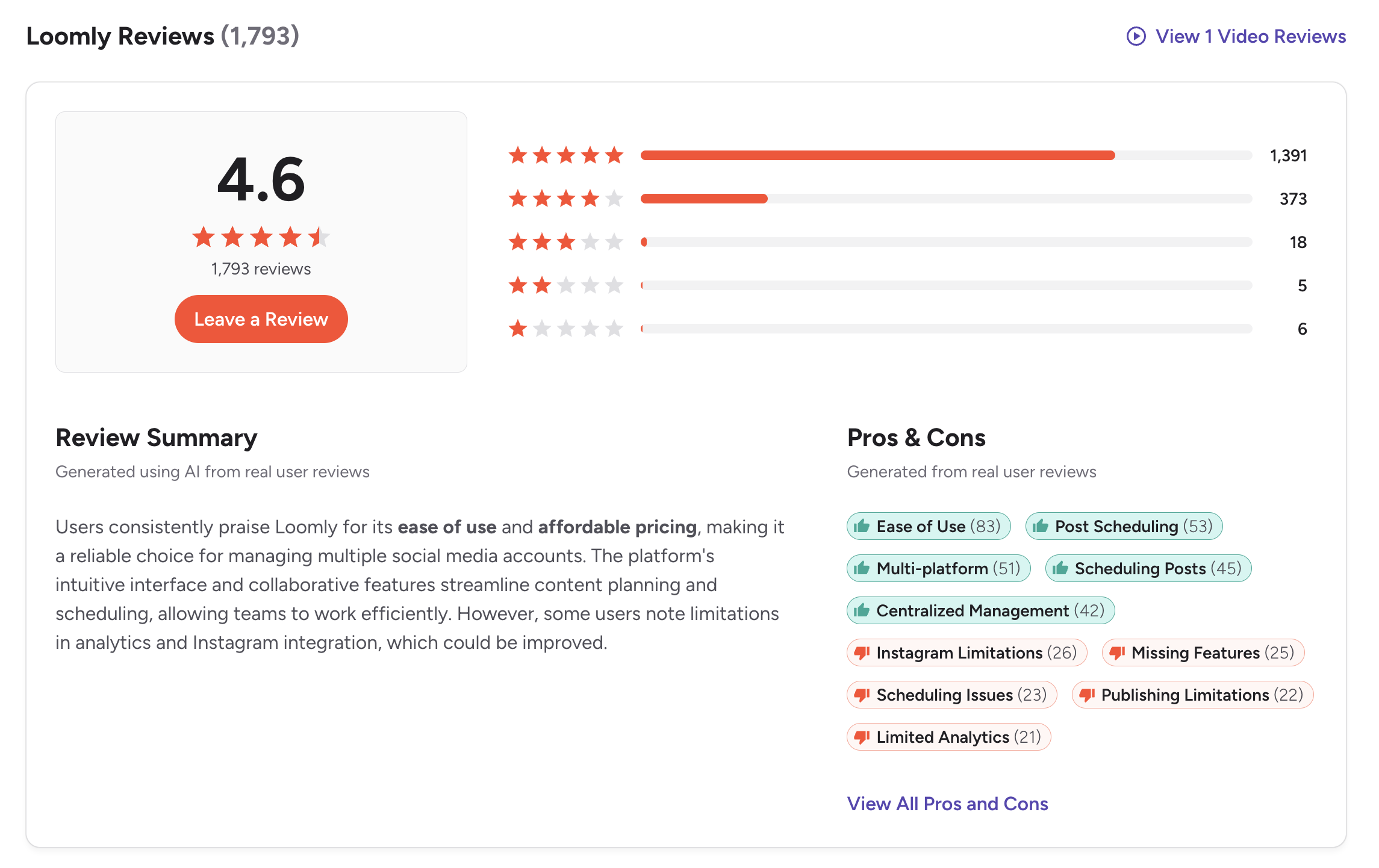
G2: 4.6/5 (1,793 reviews) — Users praise the intuitive content calendar, approval workflows, and post idea suggestions. Loomly has one of the largest review bases in the category, indicating broad adoption. Common complaints include basic analytics and the steep pricing jump between Starter and Beyond tiers.
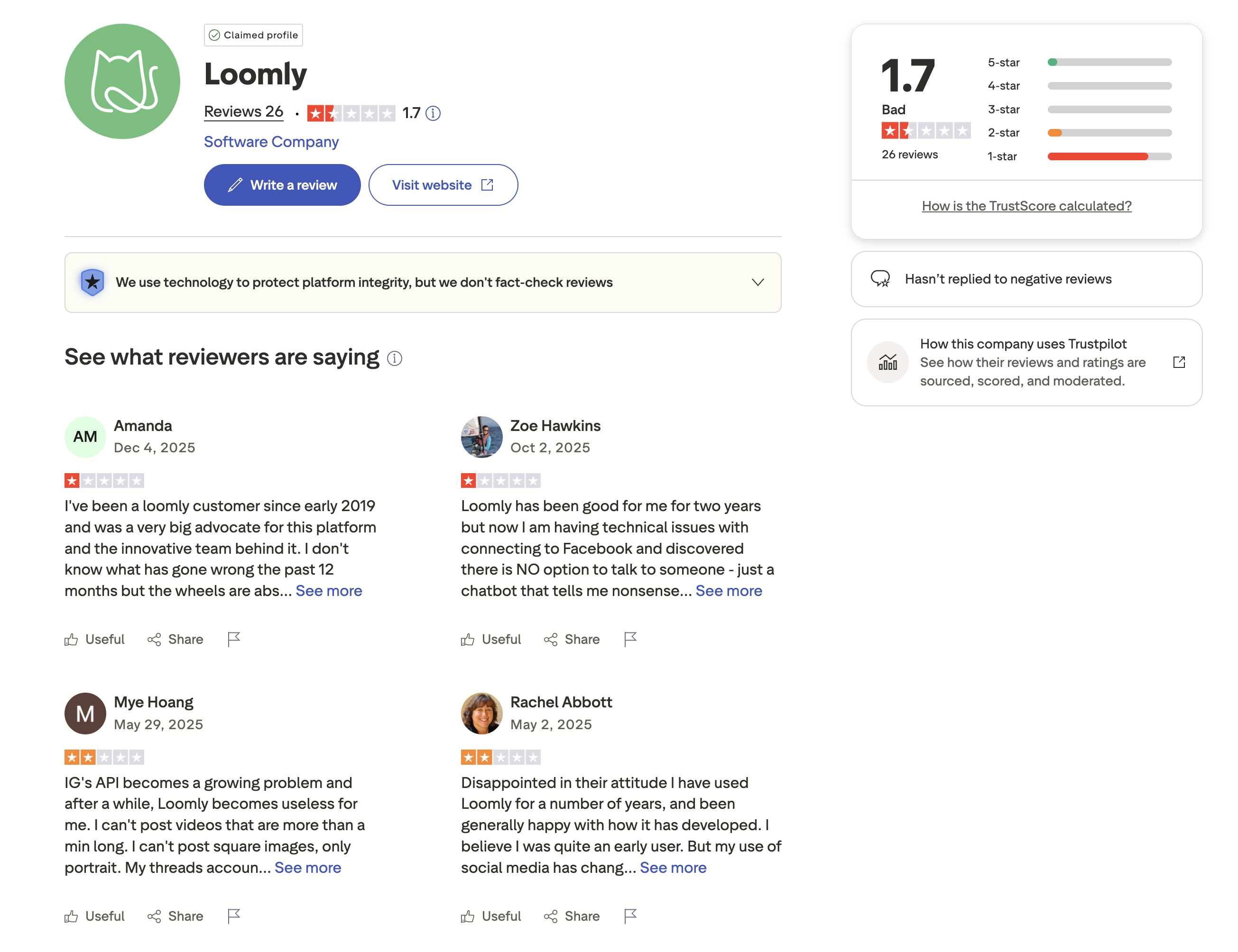
Trustpilot: 1.7/5 (26 reviews) — Low rating from a very small sample of only 26 reviews. Complaints focus on billing issues and customer support responsiveness. The small review count makes this less statistically reliable than the G2 data.
Review Verdict
The picture is mixed depending on the platform. Loomly leads on G2 with a 4.6/5 from 1,793 reviews — nearly four times Publer's review count of 486 at 4.7/5. On Trustpilot, the gap is dramatic in the opposite direction: Publer scores 4.8/5 from 863 reviews vs Loomly's 1.7/5 from just 26 reviews. Publer is one of the best-reviewed tools in the entire space on Trustpilot, while Loomly has too few Trustpilot reviews to draw conclusions. Overall, both tools have strong user satisfaction — Publer for value and support, Loomly for workflows and ease of use.
PostPlanifyManage All Your Social Accounts Without the Chaos
Schedule posts, track performance, and collaborate with your team.
Who Should Use Publer?
If Publer is on your shortlist, you may also want to see our top alternatives to Publer before committing. You can also see how Publer compares to Buffer, Hootsuite, Sprout Social, and Later.
Publer is the better choice if you:
- Are a budget-conscious creator or small team who needs the lowest cost possible
- Need to schedule across 13 platforms including WordPress, Telegram, and Mastodon
- Want bulk scheduling via CSV and RSS automations
- Need AI image generation with DALL-E 3 alongside caption writing
- Want Canva and VistaCreate integration built in
- Prefer per-account pricing that starts at just $5/month
- Need a free plan that allows real scheduling (10 pending posts per account)
Who Should Use Loomly?
If Loomly sounds right but you want to explore other options, check out our best alternatives to Loomly. You can also see how Loomly compares to Buffer, Hootsuite, Sprout Social, and CoSchedule.
Loomly is the better choice if you:
- Are a marketing team that needs structured approval workflows
- Want a visual content calendar with built-in post ideas and trends
- Need custom roles for team members with different permission levels
- Want a social inbox to manage comments and messages
- Need Snapchat support (Publer does not support it)
- Want Google Drive and Unsplash integration for content sourcing
- Prefer a hashtag manager for organized posting strategies
The Best of Both: Affordable and Collaborative
Publer wins on price and platform count but lacks approval workflows and advanced team features. Loomly has strong team tools but charges $65-332/month. PostPlanify combines Publer's affordability with Loomly's team features: AI tools, approval workflows, and unlimited scheduling from $29/month. Premium ($99/month) adds 25 accounts and team members.

| Feature | Publer | Loomly | PostPlanify |
|---|---|---|---|
| Starting Price | $5/mo | $0/mo (free) | $29/mo flat |
| Unlimited Scheduling | Professional+ ($5/mo) | $332/mo plan only | All paid plans |
| AI Caption Generation | Business only (GPT-4) | Yes (suggestions) | Yes (unlimited) |
| AI Image Generation | Business only (DALL-E 3) | No | Yes |
| Canva Integration | Yes | Yes | Yes |
| Google Drive Import | No | Yes | Yes |
| Approval Workflows | Business plan | $65/mo (Starter) | $99/mo (Premium) |
| Analytics | Business only | Basic | $49/mo (Growth) |
| Platforms Supported | 13 | 11 | 10 |
| Social Inbox | No | Yes | Yes |
PostPlanify starts at $29/month for 5 accounts with unlimited scheduling and AI tools included. Analytics are included from the Growth plan ($49/month). The Premium plan at $99/month adds 25 accounts, 5 team members, and approval workflows — bridging the gap between Publer's affordability and Loomly's team features. See all plans on the PostPlanify pricing page.
Affordable team scheduling — try PostPlanify free

Related Guides
- Content Batching Guide
- How to Automate Social Media Posts
- Social Media Analytics for Business
- Best Publer Alternatives
- Best Loomly Alternatives
FAQ
Is Publer cheaper than Loomly?
Yes, significantly. Publer's free plan offers 10 pending posts per account across 3 accounts. Publer Business costs ~$21/month for 3 accounts with unlimited AI and analytics. Loomly's first paid plan (Starter) costs $65/month, and the next tier (Beyond) jumps to $332/month. Publer is the clear winner on price at every comparable tier.
Does Loomly have AI image generation?
No. Loomly offers AI caption suggestions but no AI image generation at any plan level. Publer includes DALL-E 3 image generation on the Business plan (~$21/month for 3 accounts). If AI-generated images are important to your workflow, Publer or PostPlanify are better options.
Which has better approval workflows — Publer or Loomly?
Loomly has significantly better approval workflows. They are available on all paid plans ($65/mo+) with custom roles, a collaborative calendar, and a social inbox. Publer offers basic team collaboration on the Business plan but lacks custom roles and a dedicated social inbox. Loomly is built around team approval processes.
Can I switch from Loomly to Publer?
Yes. You can reconnect your social accounts to Publer and start scheduling. You will gain much lower pricing, AI image generation, RSS automations, and wider platform support (13 vs 11). You will lose Loomly's approval workflows, social inbox, post ideas, and hashtag manager. The switch makes sense if budget is your primary concern; less so if team collaboration is critical.
Which supports more social media platforms?
Publer supports 13 platforms (including WordPress, Telegram, and Mastodon). Loomly supports 11 platforms (including Snapchat). Publer has wider platform coverage, but X/Twitter requires a paid plan on Publer while Loomly includes it on all plans including the free tier.
Does Publer have a free plan?
Yes. Publer's free plan includes 3 social accounts with 10 pending posts per account. X/Twitter is not available on the free plan. Loomly also has a free plan with 3 accounts but limits you to 5 posts per month total. For free-tier scheduling volume, Publer is more generous.
Why is Loomly so much more expensive than Publer?
Loomly's pricing reflects its focus on team collaboration — approval workflows, custom roles, social inbox, and a visual collaborative calendar are included on all paid plans. Publer is scheduling-focused with a leaner feature set on lower tiers. The $65/month Starter price includes team features that Publer only offers on its Business plan. However, the $267 gap between Loomly Starter and Beyond remains hard to justify.
Which has better user reviews — Publer or Loomly?
On G2, both are highly rated: Publer at 4.7/5 (486 reviews) and Loomly at 4.6/5 (1,793 reviews). Loomly has far more reviews, suggesting wider adoption. On Trustpilot, Publer dominates with 4.8/5 from 863 reviews vs Loomly's 1.7/5 from just 26 reviews. Publer is one of the highest-rated tools on Trustpilot across the entire social media management category.







