
Loomly and Planable are the two most collaboration-focused tools in the social media scheduling space. Both are built around content calendars and team approval workflows, and both target marketing teams that need structure before publishing.
Loomly and Planable are the two most collaboration-focused tools in the social media scheduling space. Both emphasize content calendars and approval workflows, but they differ on pricing models, analytics access, and user limits. We compare these two head-to-head to find which collaboration platform deserves your team's commitment. Comparing the full market? Browse all social media scheduling alternatives.
Loomly vs Planable at a Glance
Here's a quick side-by-side overview before we dive deeper:
| Category | Loomly | Planable |
|---|---|---|
| Starting Price | $0/mo (Free) / $79/mo (Standard) | $0 (Free, 50 lifetime posts) |
| Free Plan | Yes (3 accounts, 1 user, 5 posts/mo) | Yes (50 lifetime posts, 4 pages) |
| Platforms Supported | 11 | 9 |
| Unlimited Scheduling | Yes (paid plans) | Enterprise only |
| AI Tools | AI caption suggestions | AI caption/hashtag generator |
| AI Image Generation | No | No |
| Bulk Scheduling | Yes | No |
| Team Collaboration | Standard ($79/mo, 6 users) | Free plan (unlimited users) |
| Approval Workflows | All paid plans | All plans |
| Social Inbox | Yes (Standard+) | $9/workspace/mo add-on |
| Analytics | Yes (Standard+) | $14/workspace/mo add-on |
| Content Integrations | Canva, Unsplash, Giphy | Canva |
| G2 Rating | 4.6/5 (1,793 reviews) | 4.6/5 (937 reviews) |
| Trustpilot Rating | 1.7/5 (26 reviews) | 4.5/5 (69 reviews) |
| Best For | Marketing teams wanting approval workflows | Teams needing unlimited users + approvals |
Loomly Overview

Loomly is a social media management platform centered around a visual content calendar and team approval workflows. It helps marketing teams plan, create, approve, and publish content with built-in collaboration tools, post preview, and content inspiration features.
Loomly supports 11 platforms: Facebook, Instagram, X/Twitter, LinkedIn, Pinterest, Google Business, YouTube, TikTok, Snapchat, Threads, and Bluesky.
Key features:
- Visual content calendar with drag-and-drop scheduling
- Approval workflows on all paid plans
- AI caption suggestions
- Interaction tracking for engagement monitoring
- Canva, Unsplash, and Giphy integrations
- Post preview across platforms
- Analytics and reporting
- Hashtag manager and post ideas
Loomly is popular among small-to-mid size marketing teams that need structured approval processes and a visual way to plan content. Read real user reviews of Loomly from G2 and Trustpilot.
Planable Overview

Planable is a social media collaboration platform built around visual content previews, structured approval workflows, and unlimited team members on every plan. It focuses on making the content review and approval process seamless for teams and agencies.
Planable supports 9 platforms: Facebook, Instagram, X/Twitter (paid plans only), LinkedIn, TikTok, YouTube, Pinterest, Google Business, and Threads.
Key features:
- Unlimited users on all plans (including Free)
- Approval workflows with multi-level review chains
- Mockup previews showing exactly how posts will appear
- AI caption and hashtag generator
- Canva integration for in-app design
- Universal Content for non-social content planning
- Shareable client review links
- Mobile app and unlimited media storage
Planable is designed for marketing teams and agencies that need structured content approval workflows with visual previews before publishing. Read real user reviews of Planable from G2 and Trustpilot.
Pricing Comparison
Loomly uses tiered pricing with user caps per plan. Planable charges per workspace with unlimited users on every tier. The pricing model difference is the single biggest differentiator between these two.
Loomly Pricing
Loomly uses tiered pricing that bundles accounts and users together. See the full Loomly pricing breakdown for details.
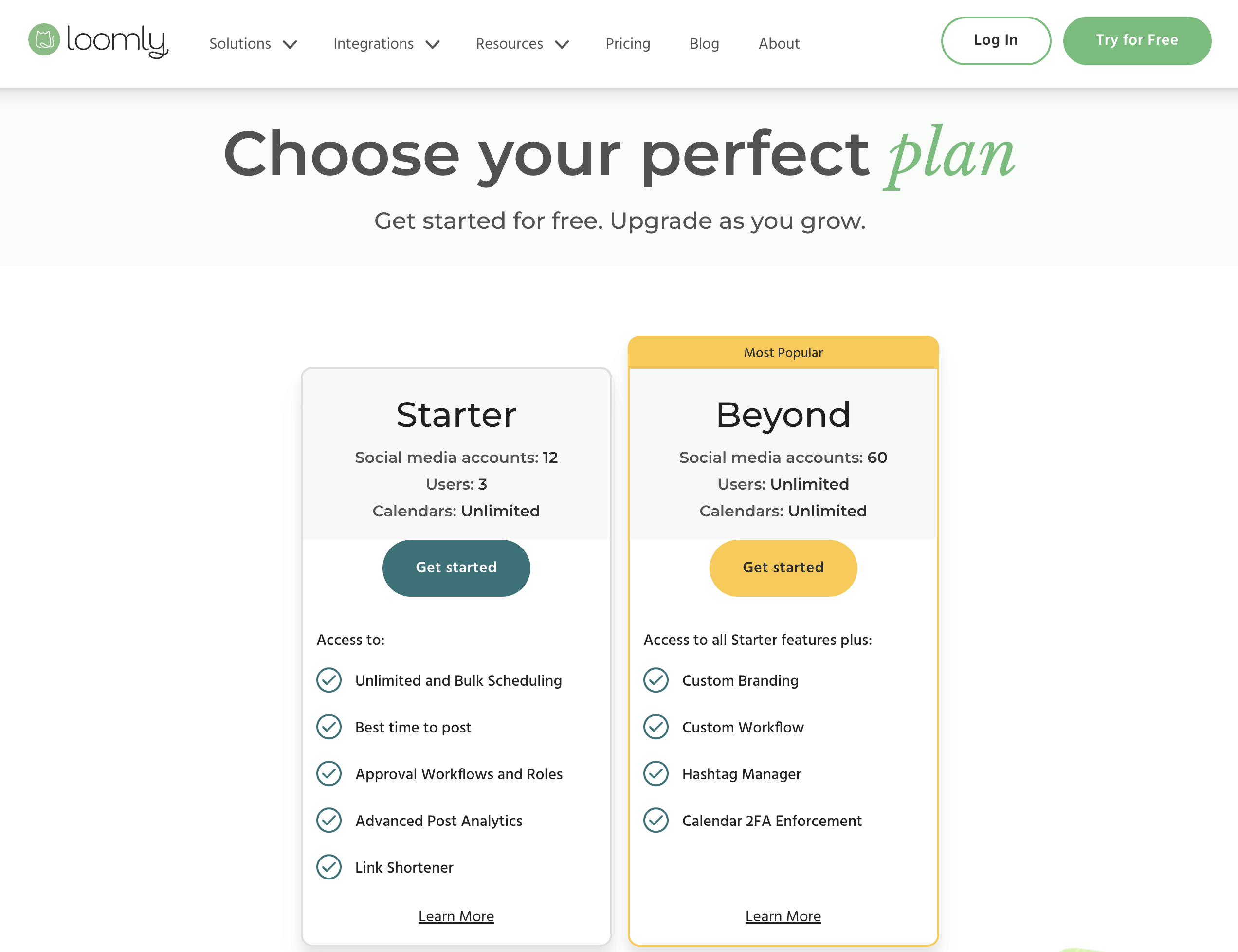
| Plan | Price | Accounts | Users | Key Features |
|---|---|---|---|---|
| Free | $0/mo | 3 | 1 | 5 posts/month, basic calendar |
| Standard | $79/mo | 20 | 6 | Unlimited posts, approvals, interaction tracking, analytics |
| Advanced | $172/mo | 35 | 14 | Advanced features, custom roles |
| Premium | $369/mo | 50 | 30 | All features, priority support |
Example costs:
- Solo user on free plan = $0/month
- Small team (6 users, 20 accounts) = $79/month
- Mid-size team (14 users, 35 accounts) = $172/month
- Large team (30 users, 50 accounts) = $369/month
Planable Pricing
Planable uses per-workspace pricing with unlimited users included on every plan. See the full Planable pricing breakdown for details.
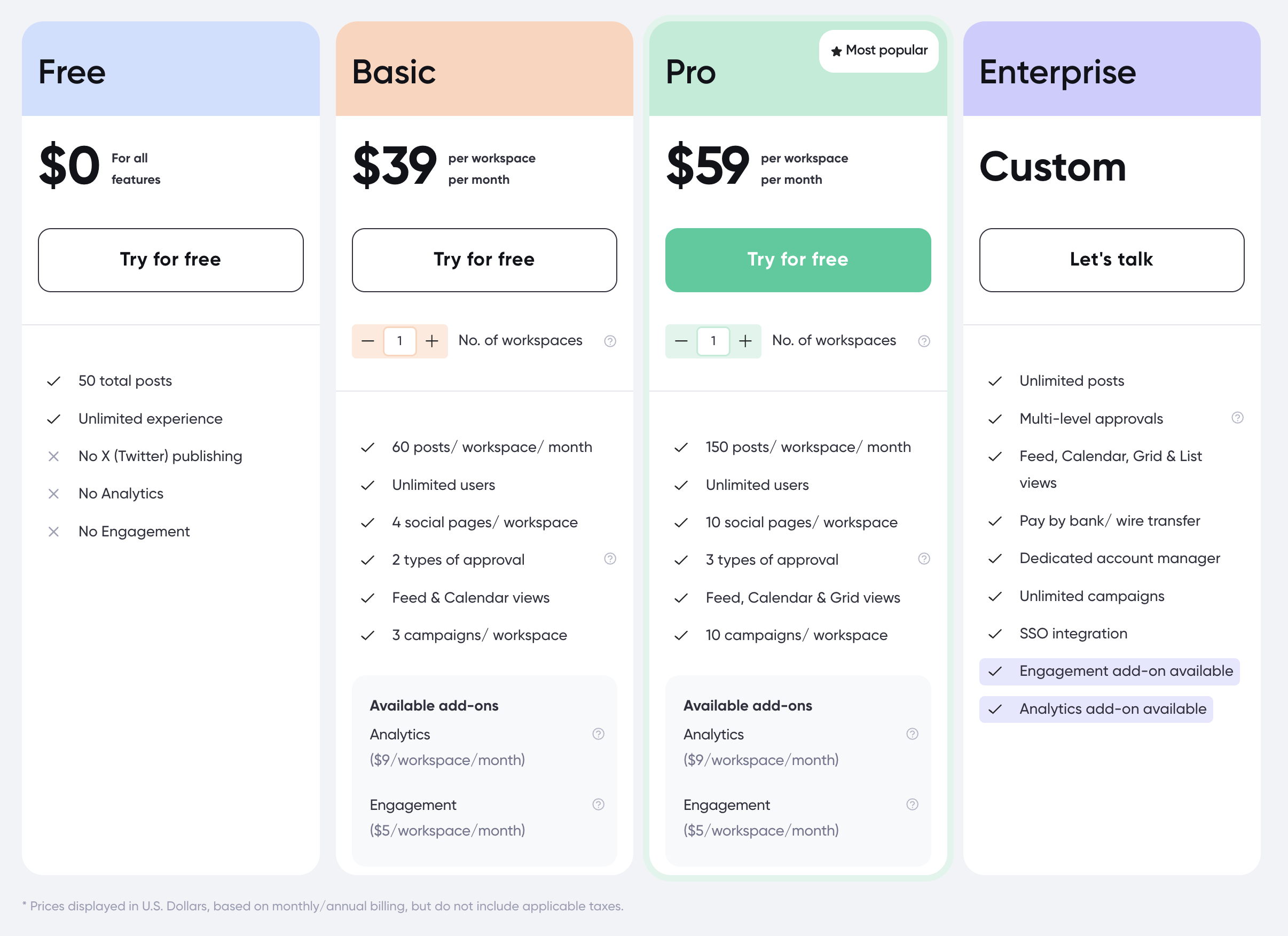
| Plan | Price | Posts | Pages | Users | Key Features |
|---|---|---|---|---|---|
| Free | $0 | 50 lifetime | 4 | Unlimited | Basic scheduling, no X/Twitter |
| Basic | $39/workspace/mo | 60/mo | 4 | Unlimited | All platforms, approval workflows |
| Pro | $59/workspace/mo | 150/mo | 10 | Unlimited | More pages, priority support |
| Enterprise | Custom | Unlimited | Custom | Unlimited | Custom onboarding, dedicated support |
Add-ons:
- Analytics: $14/workspace/mo
- Engagement inbox: $9/workspace/mo
Example costs:
- 1 workspace on Basic = $39/month (unlimited users)
- 1 workspace on Pro with analytics = $73/month
- 2 workspaces on Pro with all add-ons = $164/month
Price Verdict
It depends on what you need. For a team of 6 needing analytics and an inbox, Loomly Standard at $79/month includes both features. Planable Basic at $39/month is cheaper but analytics ($14/mo) and the engagement inbox ($9/mo) are add-ons — bringing the total to $62/month for comparable features. Planable wins on user limits (unlimited vs 6) and loses on post caps (60/mo vs unlimited on Loomly). For large teams, Planable's unlimited user model is significantly cheaper than Loomly's tiered user caps.
 PostPlanify
Manage All Your Social Accounts Without the Chaos
Schedule posts, track performance, and collaborate with your team.


Feature Comparison
Scheduling & Publishing
| Feature | Loomly | Planable |
|---|---|---|
| Unlimited scheduling | Yes (paid plans) | Enterprise only |
| Post limits | Unlimited (paid) | 60-150/mo (Basic-Pro) |
| Content calendar | Yes (visual, drag-and-drop) | Yes (visual calendar) |
| Bulk scheduling | Yes | No |
| Post preview | Yes | Yes (mockup previews) |
| Universal Content | No | Yes |
| Best time to post | Yes | No |
Winner: Loomly for scheduling volume — unlimited posts on all paid plans vs Planable's 60-150/month caps. Planable wins for content preview quality with platform-specific mockups and Universal Content for non-social planning.
AI Tools
| Feature | Loomly | Planable |
|---|---|---|
| AI caption generation | Yes (suggestions) | Yes (AI generator) |
| AI hashtag generation | Yes (hashtag manager) | Yes |
| AI image generation | No | No |
| Post idea inspiration | Yes | No |
Winner: Tie. Both offer AI caption generation and hashtag tools. Loomly adds post idea inspiration. Neither offers AI image generation.
Analytics & Reporting
| Feature | Loomly | Planable |
|---|---|---|
| Built-in analytics | Standard+ (included) | $14/workspace/mo add-on |
| Interaction tracking | Yes (Standard+) | No |
| Export reports | Yes | Yes |
| Social inbox | Yes (Standard+) | $9/workspace/mo add-on |
Winner: Loomly. Analytics and the social inbox are included in Loomly's Standard plan. Planable charges $14/month and $9/month respectively as add-ons — costs that accumulate across multiple workspaces.
Team Collaboration
| Feature | Loomly | Planable |
|---|---|---|
| Unlimited users | Premium ($369/mo, 30 users) | Yes (all plans) |
| Approval workflows | All paid plans | All plans |
| Client review links | No | Yes (shareable links) |
| Mockup previews | Basic post preview | Platform-specific mockups |
| User caps | 1-30 by plan | Unlimited |
Winner: Planable. Unlimited users on every plan is Planable's defining advantage. Shareable client review links and platform-specific mockup previews add further collaboration value. Loomly caps users per plan (6 on Standard, 14 on Advanced, 30 on Premium).
Content & Creative Tools
| Feature | Loomly | Planable |
|---|---|---|
| Canva integration | Yes | Yes |
| Unsplash integration | Yes | No |
| Giphy integration | Yes | No |
| Universal Content | No | Yes |
| Media storage | Plan-dependent | Unlimited |
Winner: Loomly for creative integrations with Canva, Unsplash, and Giphy combined. Planable wins for media storage (unlimited on all plans) and Universal Content planning.
Platform Support
| Platform | Loomly | Planable |
|---|---|---|
| Yes | Yes | |
| Yes | Yes | |
| X/Twitter | Yes | Yes (paid only) |
| Yes | Yes | |
| TikTok | Yes | Yes |
| YouTube | Yes | Yes |
| Yes | Yes | |
| Google Business | Yes | Yes |
| Threads | Yes | Yes |
| Bluesky | Yes | No |
| Snapchat | Yes | No |
Winner: Loomly. With 11 platforms vs Planable's 9, Loomly covers Bluesky and Snapchat. Note that Planable restricts X/Twitter to paid plans only.
What Real Users Say
Loomly Reviews
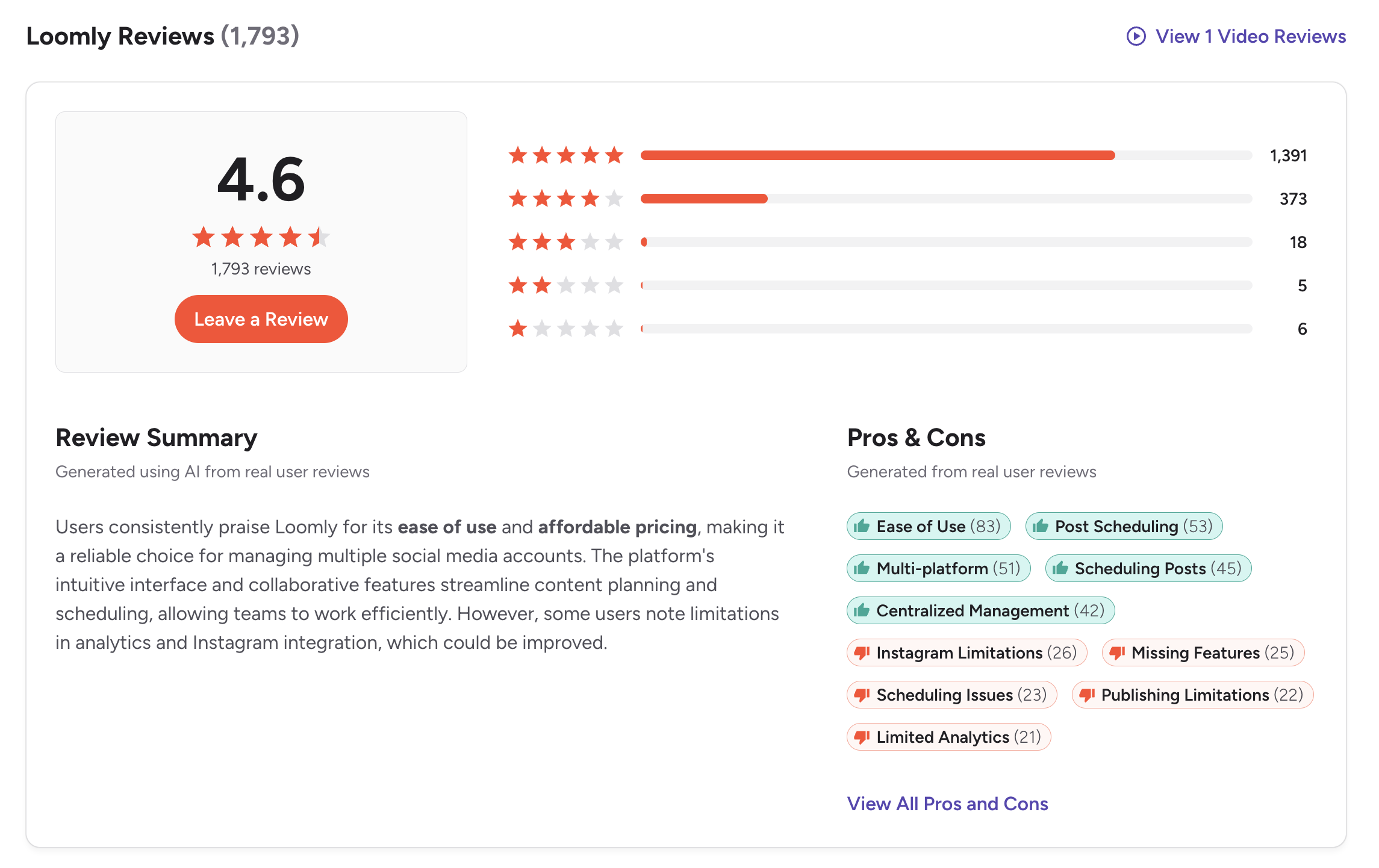
G2: 4.6/5 (1,793 reviews) — A strong rating with a very large review base. Users praise the visual calendar, approval workflows, ease of use, and content organization. Common complaints include the pricing gap between plans and basic analytics.
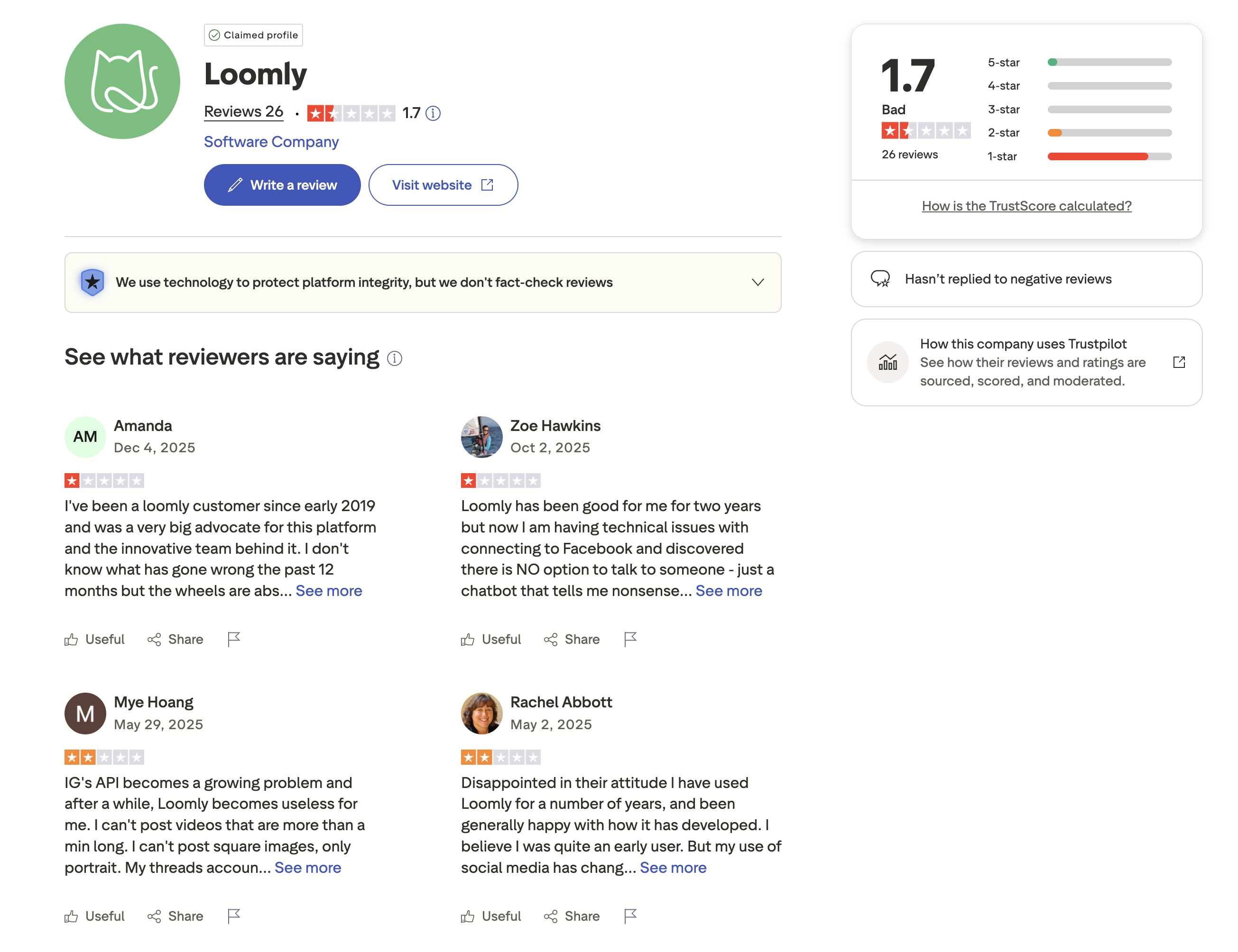
Trustpilot: 1.7/5 (26 reviews) — A concerning Trustpilot score. Negative reviewers report billing issues, difficult cancellation processes, and unresponsive customer support.
Planable Reviews
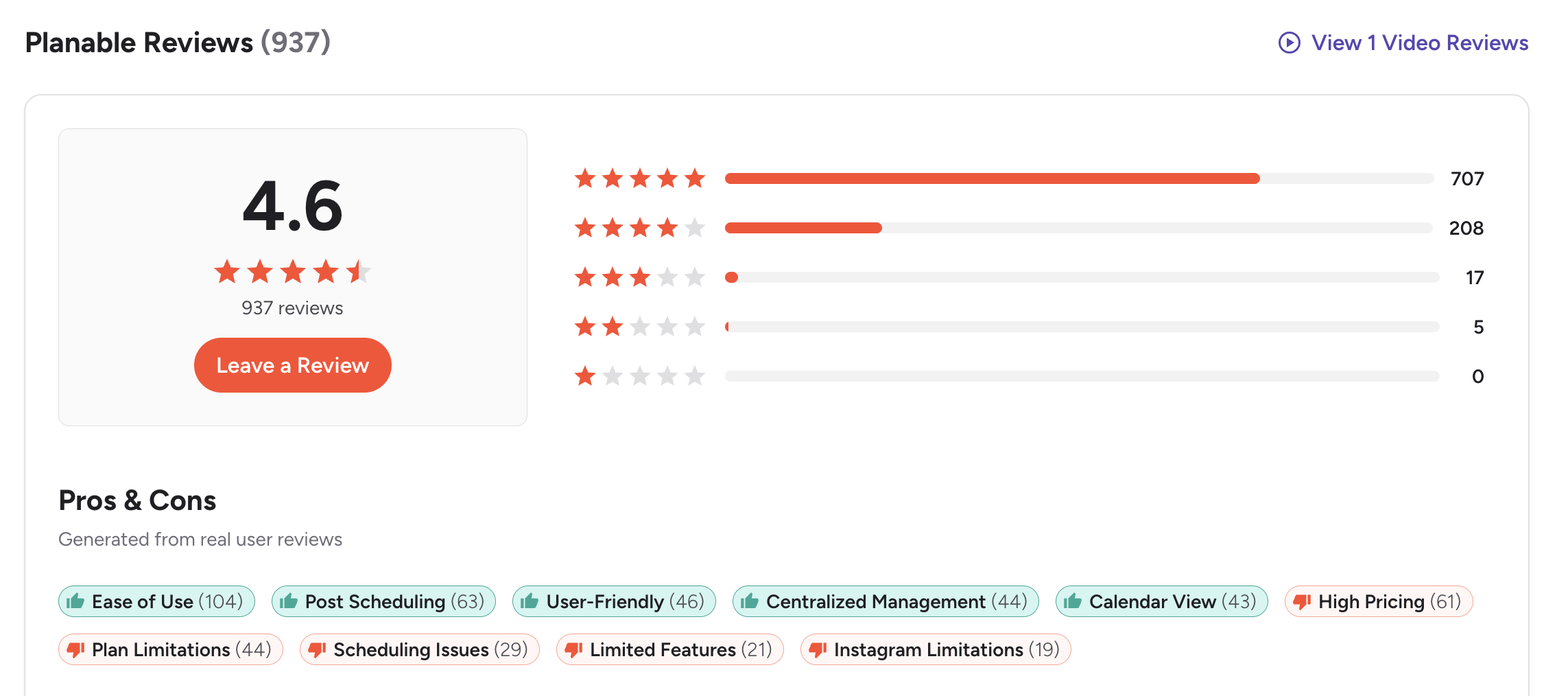
G2: 4.6/5 (937 reviews) — Users highlight the visual content previews, approval workflows, unlimited users, and clean interface. Common complaints include post limits on lower plans, analytics being an add-on, and the 50-post lifetime cap on the free plan.
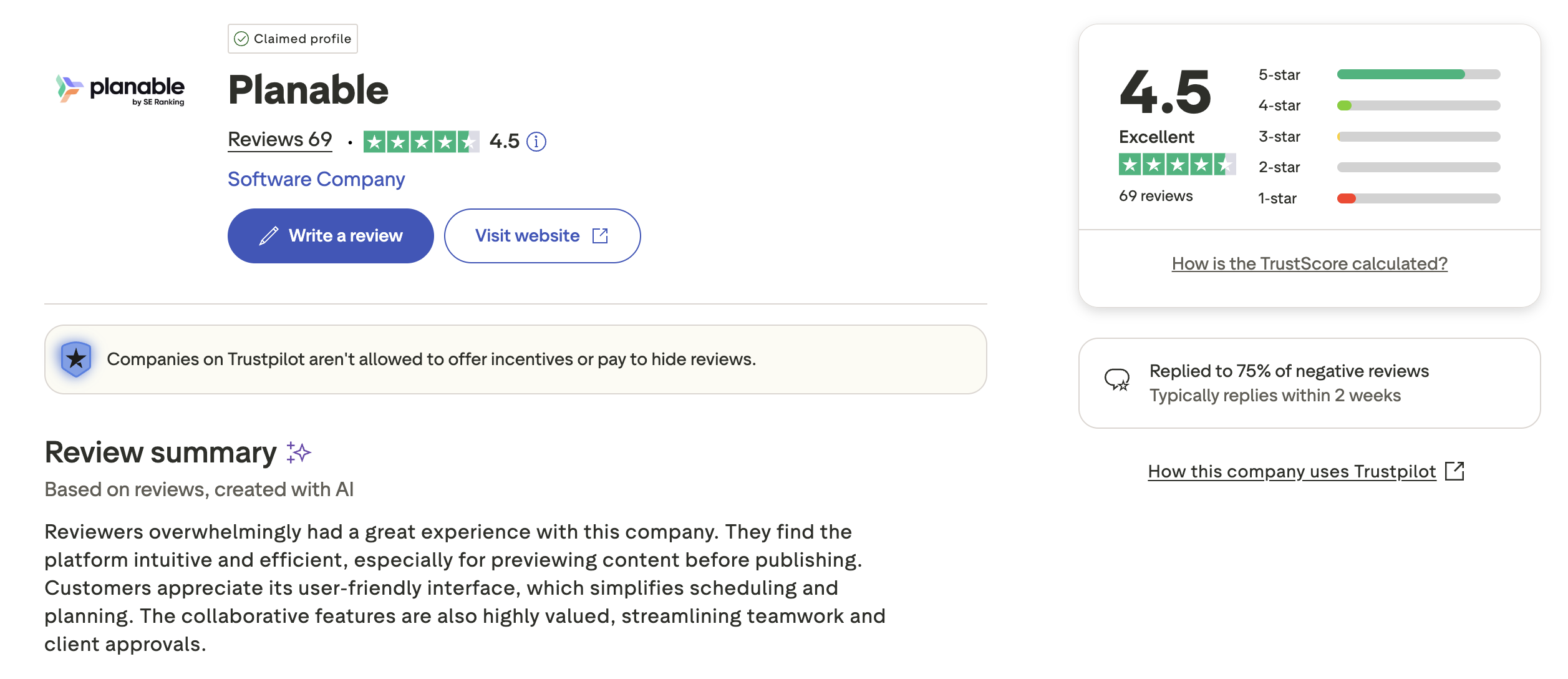
Trustpilot: 4.5/5 (69 reviews) — An unusually strong Trustpilot rating for a social media tool. Positive reviews praise the collaboration features and customer support quality.
Review Verdict
Both tools share an identical G2 rating of 4.6/5, though Loomly has nearly 2x the review volume (1,793 vs 937). The real difference is on Trustpilot: Planable scores 4.5/5 (69 reviews) vs Loomly's 1.7/5 (26 reviews). This is a massive gap — Planable's Trustpilot score is among the highest in the social media tool category, while Loomly's is among the lowest. Planable has the stronger overall review profile.
PostPlanifyManage All Your Social Accounts Without the Chaos
Schedule posts, track performance, and collaborate with your team.
Who Should Use Loomly?
If Loomly is on your shortlist, you may also want to see our top alternatives to Loomly before committing. Also compare Loomly with Buffer, Hootsuite, Later, and SocialBee.
Loomly is the better choice if you:
- Need unlimited scheduling on paid plans without monthly post caps
- Want analytics and a social inbox included without add-on fees
- Use Unsplash and Giphy integrations for creative content creation
- Need Bluesky or Snapchat support (Planable does not cover these)
- Prefer post idea suggestions and a best-time-to-post feature
- Have a team of 6 or fewer where Loomly's Standard plan stays cost-effective
Who Should Use Planable?
If Planable is on your shortlist, you may also want to see our top alternatives to Planable before committing. Also compare Planable with Buffer, Hootsuite, Agorapulse, and Sendible.
Planable is the better choice if you:
- Need unlimited users on every plan without per-seat costs
- Require visual mockup previews showing exactly how posts appear on each platform
- Want shareable client review links for external stakeholder feedback
- Need Universal Content planning for non-social content alongside social posts
- Prefer unlimited media storage for large content libraries
- Are an agency or large team where user-based pricing would be prohibitive
Approval Workflows Without the Add-On Fees
Loomly's approval workflows start at $79/month with user limits. Planable charges per workspace with analytics as an extra. PostPlanify includes analytics on the Growth plan ($49/mo) and approval workflows on the Premium plan at $99/month with 25 accounts and 5 team members — making it the better value as your team scales.

| Feature | Loomly | Planable | PostPlanify |
|---|---|---|---|
| Starting Price | $79/mo (Standard) | $39/workspace/mo | $29/mo flat |
| Team Members | $369/mo (30 users) | Yes (all plans) | 5 (Premium $99/mo), unlimited (Enterprise) |
| Unlimited Scheduling | Yes (paid plans) | Enterprise only | All paid plans |
| AI Caption Generation | Yes | Yes | Yes |
| AI Image Generation | No | No | Yes |
| Canva Integration | Yes | Yes | Yes |
| Google Drive Import | Yes | No | Yes |
| Approval Workflows | All paid plans | All plans | $99/mo (Premium) |
| Analytics | Included (Standard+) | $14/workspace/mo | $49/mo (Growth) |
| Social Inbox | Yes | Add-on ($9/mo) | Yes |
| Platforms Supported | 11 | 9 | 10 |
PostPlanify starts at $29/month for 5 accounts with 200 posts/mo and AI tools included. Analytics are included from the Growth plan ($49/month, 10 accounts, unlimited posts). The Premium plan at $99/month adds 25 accounts, 5 team members, and approval workflows — features that cost $369/month on Loomly Premium or require add-ons across multiple Planable workspaces. See all plans on the PostPlanify pricing page.
Try PostPlanify free for 7 days

Related Guides
- Content Batching Guide
- Social Media Analytics for Business
- How to Create a Social Media Content Calendar
- Best Loomly Alternatives
- Best Planable Alternatives
FAQ
Is Planable cheaper than Loomly?
For teams with many users, yes. Planable includes unlimited users on every plan starting at $39/month per workspace. Loomly caps users per plan — 6 on Standard ($79/mo), 14 on Advanced ($172/mo), 30 on Premium ($369/mo). For small teams under 6 users who need analytics included, Loomly Standard may be the better value.
Does Loomly have a free plan?
Yes. Loomly offers a free plan with 3 social accounts, 1 user, and 5 posts per month. Planable's free plan includes 50 lifetime posts, 4 social pages, and unlimited users — but posts are capped at 50 total, not monthly.
Which has better approval workflows?
Both include approval workflows on all paid plans. Planable adds visual mockup previews and shareable client review links, making it stronger for external approvals. Loomly includes interaction tracking and analytics on Standard, making it stronger for internal team review processes.
Does Planable include analytics?
Not by default. Planable offers analytics as an add-on at $14/workspace/month. Loomly includes analytics on the Standard plan ($79/mo) and above. If built-in analytics matter to your workflow, Loomly provides more value without add-on fees.
Which supports more platforms?
Loomly supports 11 platforms including Bluesky and Snapchat. Planable supports 9 platforms — it does not cover Bluesky or Snapchat, and X/Twitter is only available on paid plans. For most major platforms (Facebook, Instagram, LinkedIn, TikTok, YouTube), both tools have coverage.
Can I use Planable's free plan for a team?
Yes. Planable's free plan includes unlimited users, making it the only social scheduling tool with team access on the free tier. However, you are limited to 50 lifetime posts and 4 social pages, and X/Twitter is not included. Loomly's free plan limits you to 1 user.
Which has better user reviews?
Both share a 4.6/5 rating on G2. Loomly has more G2 reviews (1,793 vs 937). On Trustpilot, the difference is dramatic: Planable scores 4.5/5 (69 reviews) vs Loomly's 1.7/5 (26 reviews). Planable has the stronger overall review profile.
Can I switch from Loomly to Planable?
Yes. Reconnect your social accounts in Planable and begin scheduling. You will gain unlimited users and mockup previews. You will lose Unsplash/Giphy integrations, Bluesky/Snapchat support, built-in analytics, and unlimited scheduling on lower plans. Planable's free plan lets you test the platform with your team before committing.







