
Choosing between Buffer or Planable depends on one fundamental question: do you need simple solo scheduling, or structured team collaboration with approval workflows? Both tools handle social media publishing, but they approach it from completely different angles. In this 2026 comparison, we lay out the differences so you can make a confident decision.
This comparison draws on 2,122 verified user reviews across G2 and Trustpilot, current pricing pages, and hands-on feature testing as of February 2026.
Buffer is a per-channel scheduler built for solo creators who want simplicity above all else. Planable is a per-workspace collaboration platform designed for teams that need structured content approvals and visual previews. We break down where simplicity ends and collaboration begins — and what each approach actually costs. Comparing the full market? Browse all social media scheduling alternatives.
Buffer vs Planable at a Glance
Here's a quick side-by-side overview before we dive deeper:
| Category | Buffer | Planable |
|---|---|---|
| Starting Price | $6/mo per channel | $39/workspace/mo |
| Free Plan | Yes (3 channels, 10 posts/channel) | Yes (50 lifetime posts) |
| Platforms Supported | 11 | 9 |
| Unlimited Scheduling | Yes (paid plans) | No (60-150 posts/mo on paid plans) |
| AI Tools | AI Assistant (captions) | AI writer, AI hashtag generator |
| AI Image Generation | No | No |
| Canva Integration | No | Yes (native) |
| Team Collaboration | Team plan ($12/mo/channel) | All plans (unlimited users) |
| Approval Workflows | Team plan only | Basic+ (multi-level on Enterprise) |
| Analytics | Basic to Advanced | Paid add-on ($14/workspace/mo) |
| G2 Rating | 4.3/5 (1,023 reviews) | 4.6/5 (937 reviews) |
| Trustpilot Rating | 2.1/5 (93 reviews) | 4.5/5 (69 reviews) |
| Best For | Solo creators, freelancers | Teams and agencies needing approvals |
Buffer Overview

Buffer launched in 2010 as one of the first social media scheduling tools and has maintained its reputation for simplicity. It uses a per-channel pricing model where each social account you connect adds to your monthly cost.
Buffer supports 11 platforms: Instagram, Facebook, LinkedIn, Pinterest, X/Twitter, TikTok, YouTube, Google Business Profile, Threads, Bluesky, and Mastodon.
Key features:
- Post scheduling with queue management
- AI Assistant for generating captions and post ideas
- Hashtag manager and first comment scheduling
- Basic community inbox
- Start Page (link-in-bio builder)
- Content calendar
Buffer remains popular with solo creators and freelancers who want a clean interface without enterprise complexity. If you are exploring the broader landscape, see our guide to the best social media scheduling tools. Read real user reviews of Buffer from G2 and Trustpilot.
Planable Overview

Planable is a content collaboration platform built around visual previews and approval workflows. Unlike most scheduling tools, Planable includes unlimited users on every plan — even the free tier — making it a strong fit for teams and agencies.
Planable supports 10 platforms: Facebook, Instagram, X/Twitter (paid plans only), LinkedIn, TikTok, YouTube, Pinterest, Google Business, and Threads.
Key features:
- Feed, Calendar, Grid, and List content views
- Drag-and-drop content calendar
- Approval workflows (2-3 types, multi-level on Enterprise)
- Real-time commenting and version history
- Client review via shareable link (no login needed)
- Native Canva integration
- AI writer/caption generator and AI hashtag generator
- Mockup previews and Universal Content (blogs/newsletters)
- Unlimited media storage and mobile app
Planable excels at content collaboration and client-facing workflows where visual sign-off matters. Read real user reviews of Planable from G2 and Trustpilot.
Pricing Comparison
Buffer and Planable use fundamentally different pricing models — per-channel vs per-workspace — which means the cost comparison shifts depending on your team size and account count.
Buffer Pricing
Buffer charges per channel with a generous free tier. See the full Buffer pricing breakdown for details.
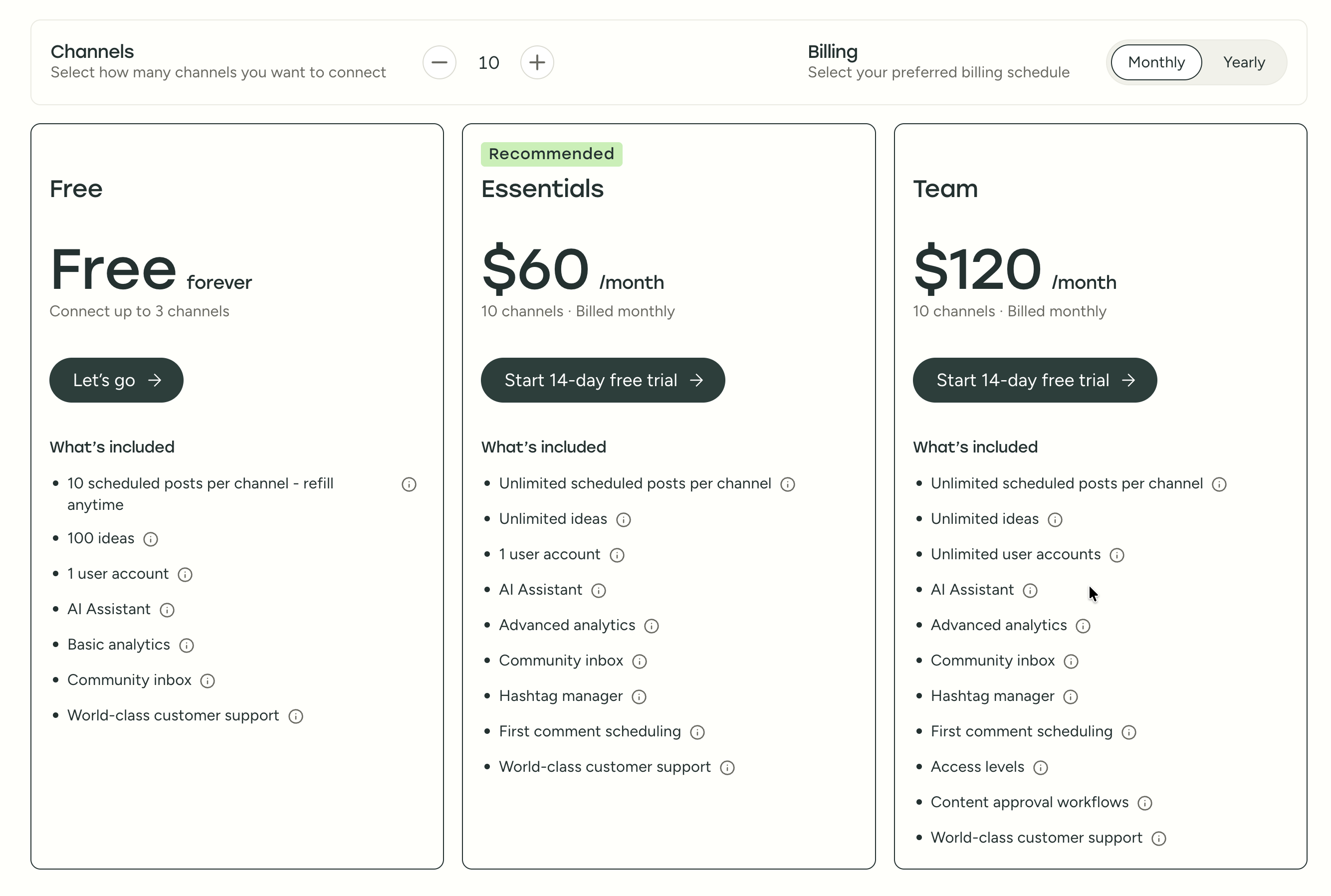
| Plan | Price | Channels | Users | Key Features |
|---|---|---|---|---|
| Free | $0/mo | 3 | 1 | 10 posts/channel, basic analytics |
| Essentials | $6/mo per channel | Unlimited | 1 | Unlimited posts, advanced analytics, hashtag manager |
| Team | $12/mo per channel | Unlimited | Unlimited | Approval workflows, permissions, collaboration |
Example costs:
- 5 channels on Essentials = $30/month
- 10 channels on Team = $120/month
- 20 channels on Team = $240/month
Planable Pricing
Planable charges per workspace with post limits on each tier. See the full Planable pricing breakdown for details.
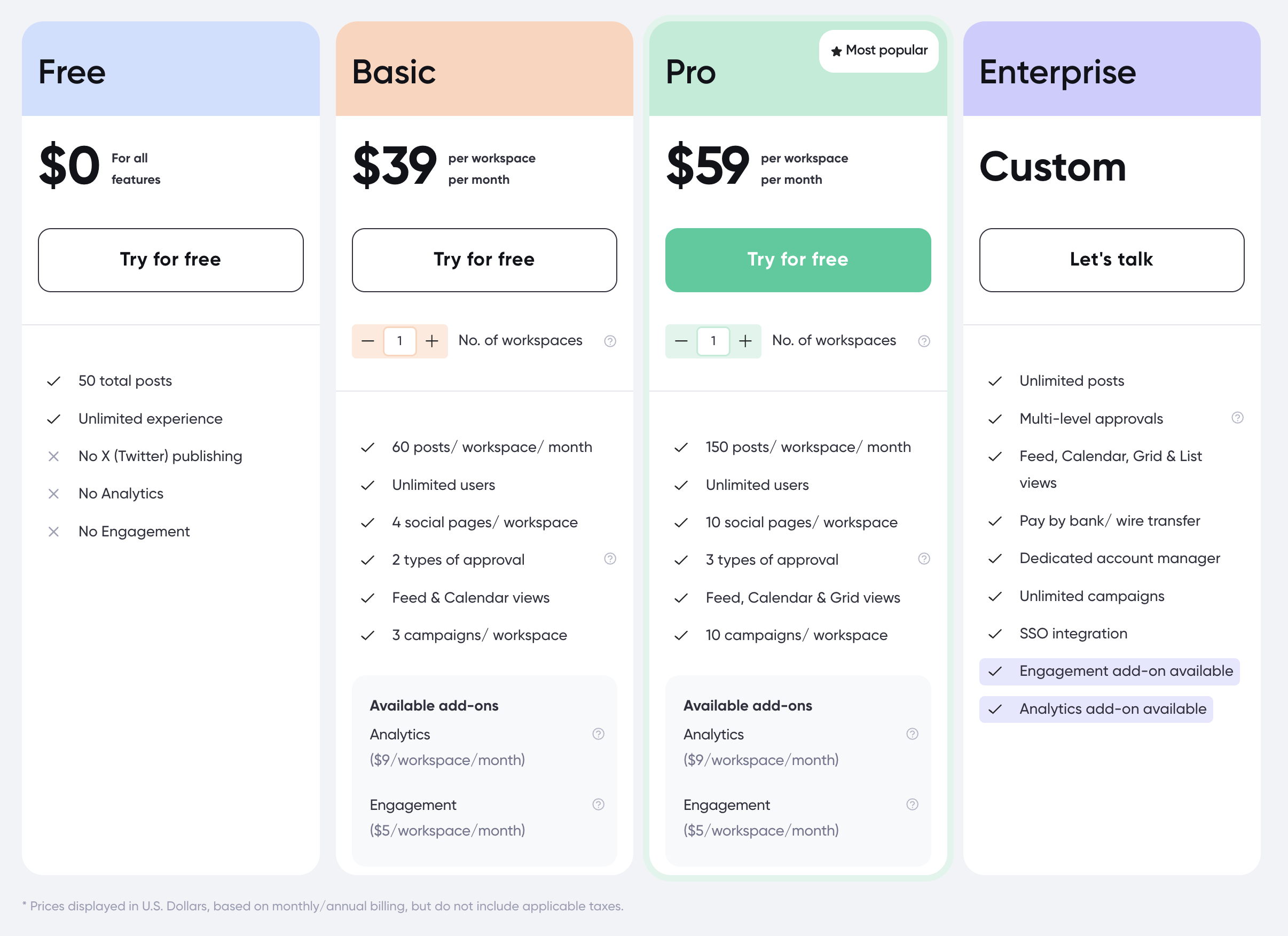
| Plan | Price | Posts | Social Pages | Users | Key Features |
|---|---|---|---|---|---|
| Free | $0 | 50 lifetime | 4 | Unlimited | Basic features, no X/Twitter publishing |
| Basic | $39/workspace/mo | 60/mo | 4 | Unlimited | Approval workflows, all platforms |
| Pro | $59/workspace/mo | 150/mo | 10 | Unlimited | More posts, more pages |
| Enterprise | Custom | Unlimited | Unlimited | Unlimited | Multi-level approvals, custom features |
Add-ons: Analytics $14/workspace/mo, Engagement inbox $9/workspace/mo
Example costs:
- 1 workspace on Basic = $39/month (+ $14 for analytics = $53)
- 2 workspaces on Pro = $118/month (+ $28 for analytics = $146)
- 3 workspaces on Pro with both add-ons = $177/month (+ $69 for add-ons = $246)
Price Verdict
Buffer is cheaper for solo users and small accounts. A freelancer managing 5 channels pays $30/month on Buffer vs $39/month minimum on Planable. However, Planable includes unlimited users on every plan, while Buffer charges $12/channel for team features. For teams managing 10+ channels needing collaboration, costs converge quickly. Planable's post limits (60-150/mo) and paid analytics add-on add hidden costs that Buffer avoids.
What You'll Actually Pay
Dollar-for-dollar comparisons only make sense in context. Here are three real-world scenarios:
Scenario 1 — Freelancer managing 5 channels, no team: Buffer Essentials at $6/channel = $30/month. Planable Basic at $39/workspace = $39/month (capped at 60 posts). Buffer is cheaper and includes unlimited posts plus analytics. Planable's collaboration features go unused by a solo user.
Scenario 2 — Small agency, 10 channels, 3 team members, needs approvals: Buffer Team at $12/channel = $120/month. Planable Pro (2 workspaces) = $118/month — but add analytics ($28) and you're at $146/month. Buffer includes analytics; Planable includes unlimited users but charges extra for data. Costs are comparable, and the choice hinges on whether you need Planable's visual approvals or Buffer's unlimited posting.
Scenario 3 — Growing brand, 15 channels, 5 team members, analytics required: Buffer Team at $12/channel = $180/month. Planable Pro (3 workspaces) + analytics = $219/month. Buffer is cheaper here, but lacks real-time commenting, client review links, and version history. Teams that rely on structured content sign-off may find Planable's premium worth paying.
 PostPlanify
Manage All Your Social Accounts Without the Chaos
Schedule posts, track performance, and collaborate with your team.


Feature Comparison
Scheduling & Publishing
| Feature | Buffer | Planable |
|---|---|---|
| Unlimited scheduling | Yes (paid plans) | No (60-150 posts/mo) |
| Content calendar | Yes | Yes (drag-and-drop) |
| Multiple views | Calendar only | Feed, Calendar, Grid, List |
| Bulk scheduling | CSV import | No |
| First comment scheduling | Yes (Essentials+) | No |
| Post queue management | Yes | No |
| Mockup previews | No | Yes |
Winner: Planable for visual content planning with four view types and mockup previews. The feed view lets teams see exactly how posts will look on each platform before publishing, which reduces revision cycles. Buffer wins on unlimited post volume and bulk scheduling via CSV import — critical for high-frequency publishers who queue dozens of posts weekly.
AI Tools
| Feature | Buffer | Planable |
|---|---|---|
| AI caption generation | Yes (AI Assistant) | Yes (AI writer) |
| AI image generation | No | No |
| AI hashtag generation | No | Yes |
| AI post ideas | Yes | No |
| AI content rewriting | Yes | Yes |
Winner: Tie. Both provide AI caption generation, but they diverge in secondary capabilities. Planable adds AI hashtag generation that saves research time, while Buffer offers AI post ideas for creators who need content inspiration. Neither includes AI image generation, which means teams still need external tools like Canva or Midjourney for visuals.
Analytics & Reporting
| Feature | Buffer | Planable |
|---|---|---|
| Basic analytics | All paid plans | Paid add-on ($14/workspace/mo) |
| Post performance | Yes | Add-on only |
| Export reports | Yes | Add-on only |
| Competitor benchmarking | No | No |
Winner: Buffer. Analytics are included in Buffer's paid plans at no extra cost, while Planable charges an additional $14/workspace/month. For teams needing performance data, this add-on cost compounds across workspaces — three workspaces means $42/month just for analytics. Neither tool offers competitor benchmarking, which limits strategic insight. Explore our guide to social media analytics tools for more options.
Team Collaboration
| Feature | Buffer | Planable |
|---|---|---|
| Unlimited users | Team plan ($12/channel) | All plans (including free) |
| Approval workflows | Team plan | Basic+ (2-3 types) |
| Multi-level approvals | No | Enterprise only |
| Real-time commenting | No | Yes |
| Client review links | No | Yes (no login needed) |
| Version history | No | Yes |
| User permissions | Team plan | All plans |
Winner: Planable. This is Planable's core strength and the primary reason teams choose it over Buffer. Unlimited users on every plan, real-time commenting, client review links without login, and version history make it the clear winner for team and agency workflows. Buffer's collaboration is limited to the Team plan and lacks the visual review layer that agencies need for client approvals. Learn more about setting up an effective social media approval workflow.
Platform Support
| Platform | Buffer | Planable |
|---|---|---|
| Yes | Yes | |
| Yes | Yes | |
| X/Twitter | Yes | Paid plans only |
| Yes | Yes | |
| TikTok | Yes | Yes |
| YouTube | Yes | Yes |
| Yes | Yes | |
| Google Business | Yes | Yes |
| Threads | Yes | Yes |
| Bluesky | Yes | No |
| Mastodon | Yes | No |
Winner: Buffer — supports 11 platforms vs Planable's 9. Buffer includes Bluesky and Mastodon, which matter for brands building presence on decentralized networks. X/Twitter publishing works on all Buffer plans including free, while Planable restricts it to paid plans — a meaningful limitation for teams that rely heavily on X/Twitter.
What Real Users Say
Buffer Reviews
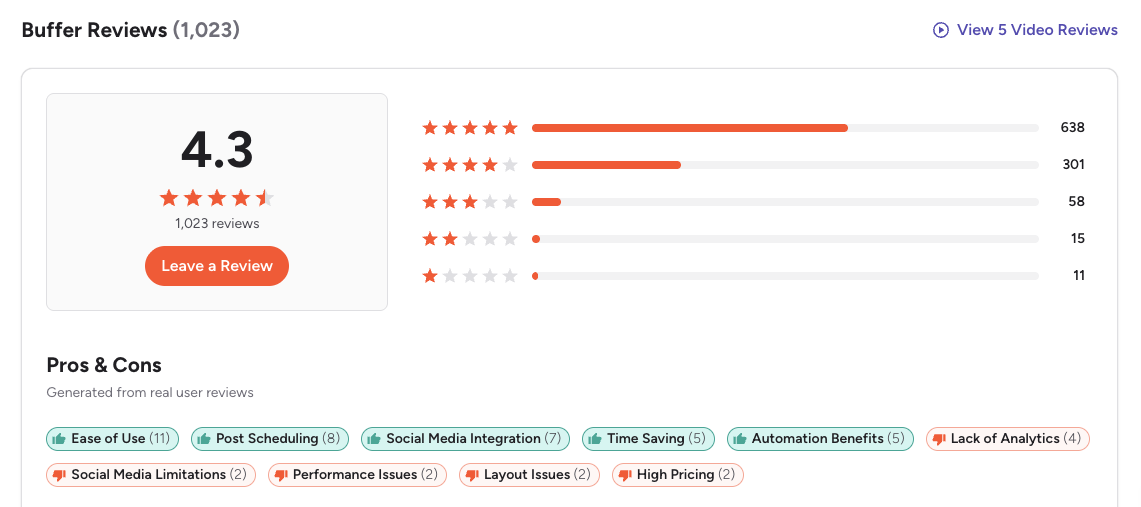
G2: 4.3/5 (1,023 reviews) — Users consistently praise Buffer's clean interface and ease of use. The most common positive themes include efficient bulk scheduling, intuitive layout, and time-saving workflow automation. On the negative side, reviewers frequently cite limited engagement and listening capabilities, restricted analytics depth, rising per-channel costs at scale, and occasional scheduling glitches. One recurring G2 theme: Buffer's simplicity is both its greatest asset and its biggest limitation — teams outgrow it once they need approvals or deeper reporting.
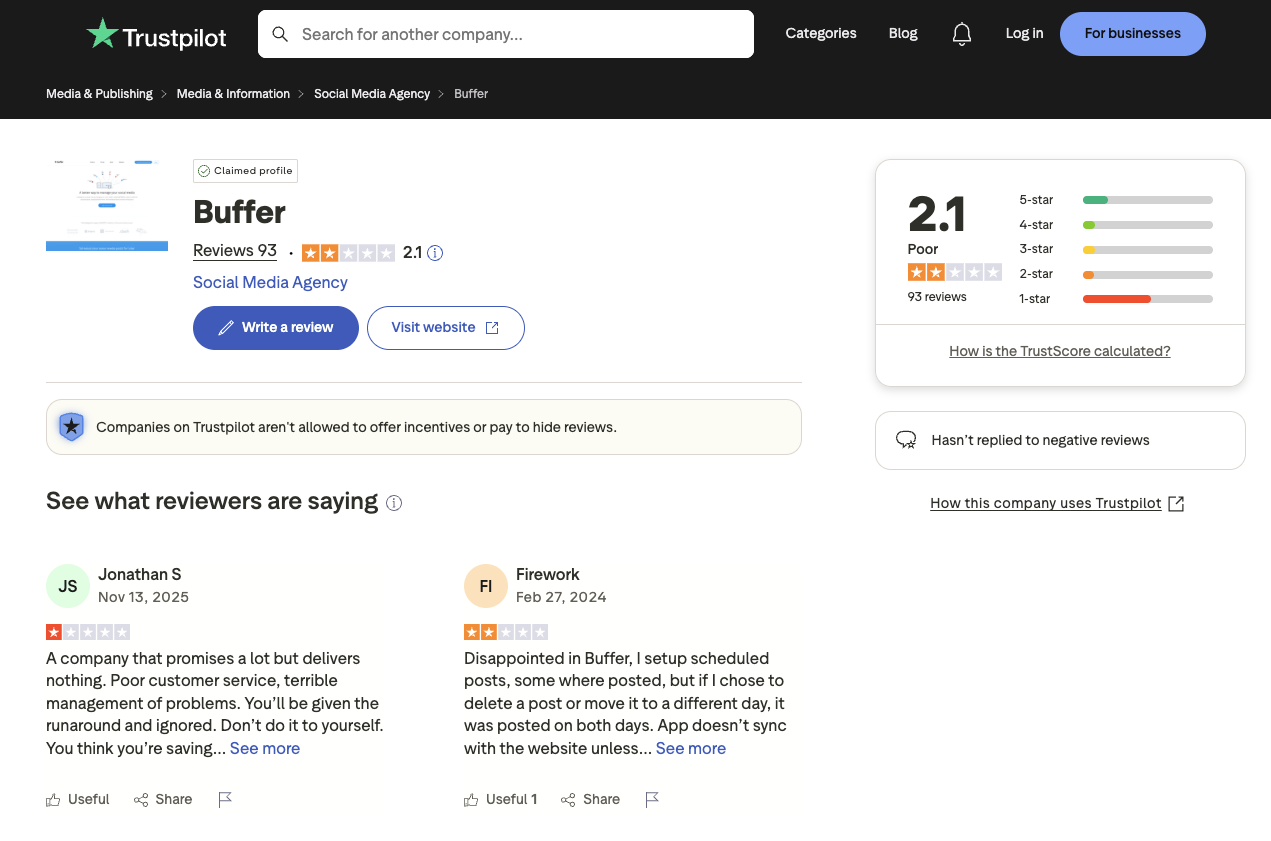
Trustpilot: 2.1/5 (93 reviews) — The significantly lower Trustpilot rating is driven by complaints about customer support response times, posts failing to publish or duplicating, and persistent sync issues with connected social accounts. Multiple reviewers report that support does not respond in a timely manner and that scheduled posts behave inconsistently. The gap between Buffer's G2 and Trustpilot scores suggests that users who encounter technical issues find resolution difficult.
Planable Reviews
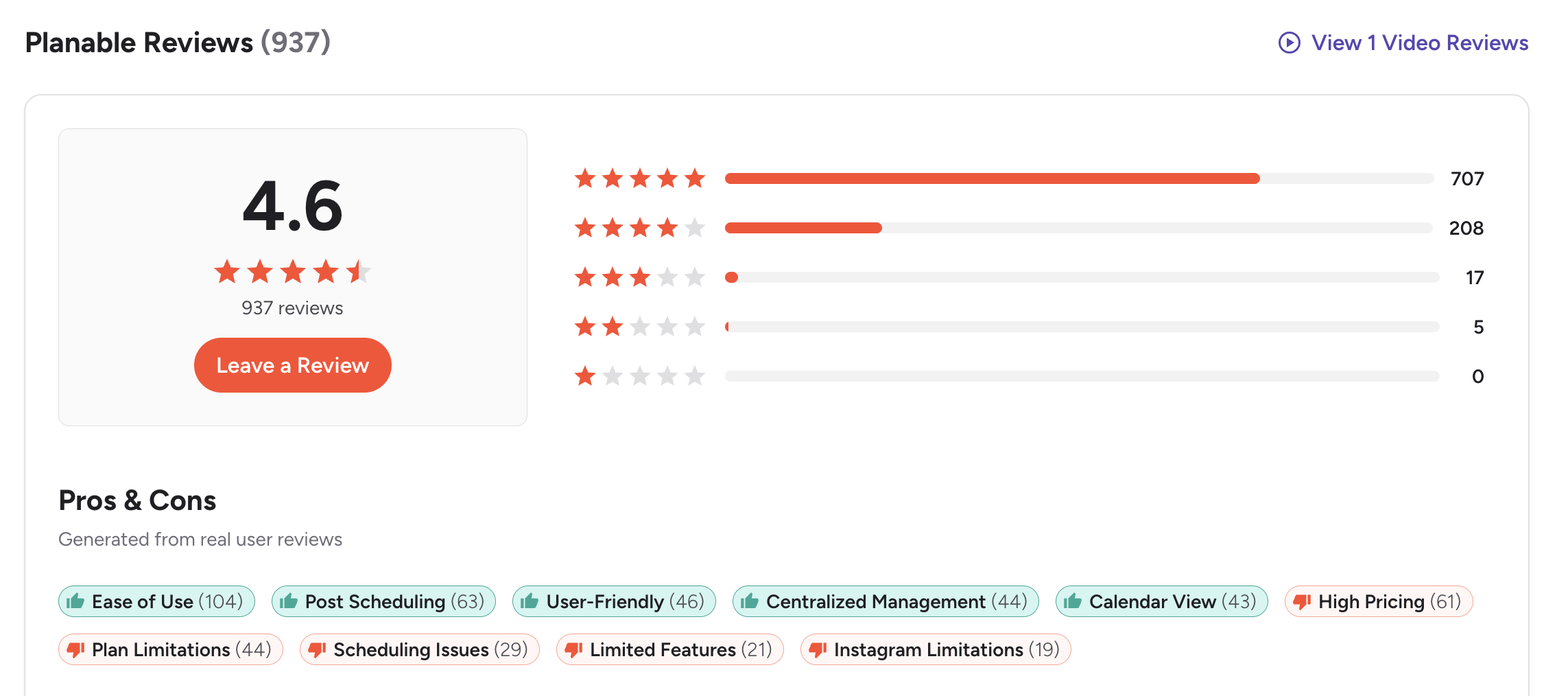
G2: 4.6/5 (937 reviews) — Users highlight ease of use (104 mentions), post scheduling (63 mentions), user-friendly interface (46 mentions), centralized management (44 mentions), and calendar view (43 mentions) as top strengths. The most common G2 complaints include high pricing (61 mentions), plan limitations (44 mentions), scheduling issues (29 mentions), limited features (21 mentions), and Instagram-specific restrictions (19 mentions). The overarching G2 theme: Planable excels at collaboration and visual planning but lacks depth in scheduling, analytics, and platform-specific capabilities — pushing teams to supplement it with additional tools.
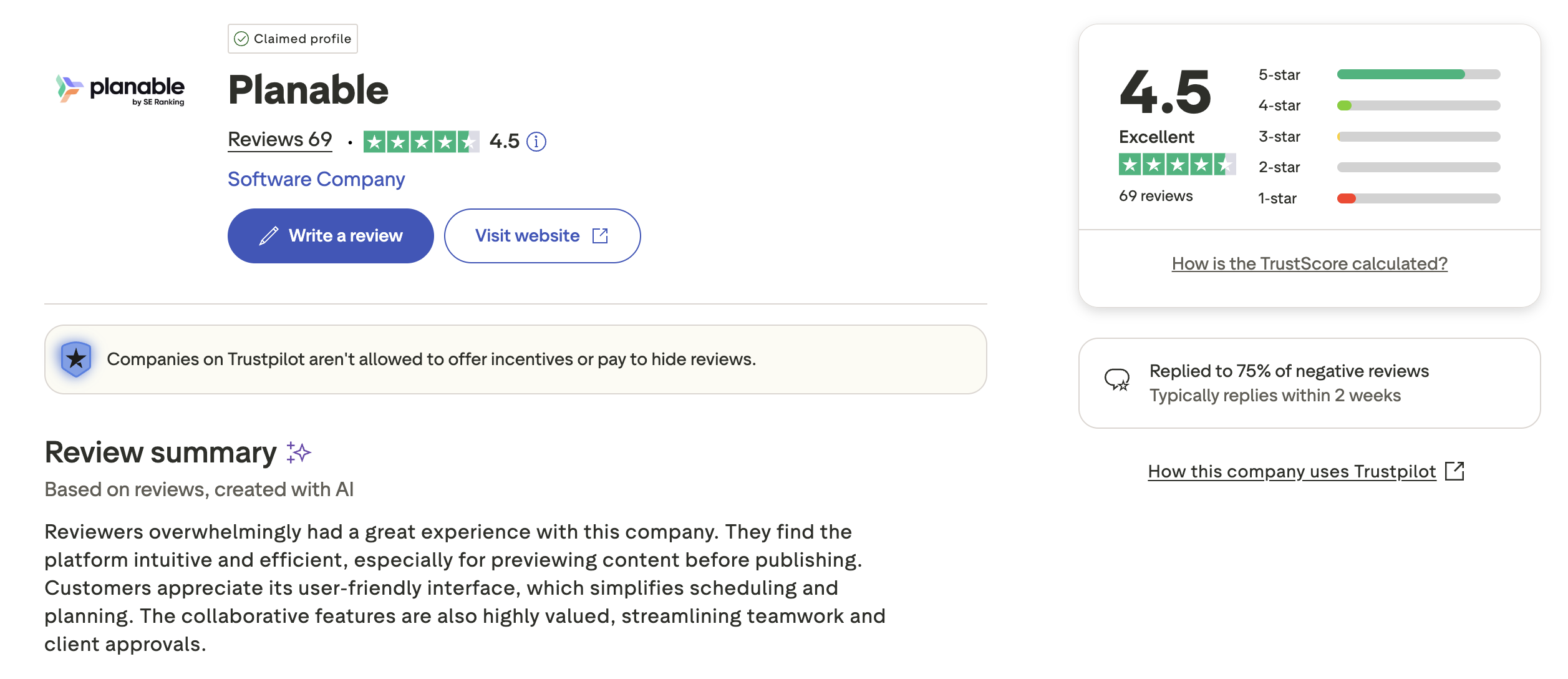
Trustpilot: 4.5/5 (69 reviews) — Strong rating with users praising the intuitive user experience, efficient content previewing, streamlined client approvals, and helpful collaboration features. Trustpilot reviewers appreciate Planable's ability to simplify scheduling and planning workflows. Some mention feature limitations, occasional scheduling inconsistencies, and pricing concerns for scaling teams. Planable responds to approximately 75% of negative reviews, typically within two weeks — indicating moderate but consistent support engagement.
Review Verdict
Planable leads on both platforms — 4.6/5 on G2 vs Buffer's 4.3/5, and 4.5/5 on Trustpilot vs Buffer's 2.1/5. The gap on Trustpilot is particularly notable, suggesting Planable delivers a more consistent user experience and better support. Buffer's G2 reviews praise simplicity but flag limitations that appear once teams scale; Planable's reviews praise collaboration depth but flag analytics gaps and per-workspace cost pressure.
Review counts and ratings reflect 2,122 combined reviews across G2 and Trustpilot as of February 2026 and are updated periodically.
PostPlanifyManage All Your Social Accounts Without the Chaos
Schedule posts, track performance, and collaborate with your team.
Who Should Use Buffer?
Buffer works best for individuals and lean teams who value speed and simplicity over structured collaboration. If your social media workflow is straightforward — draft, schedule, publish — and you do not need client-facing approvals or real-time commenting, Buffer's clean interface keeps things moving without friction. It is especially strong for creators who publish across many platforms, including newer networks like Bluesky and Mastodon that most competitors have not yet added.
If Buffer sounds right but you want to explore alternatives, check our best alternatives to Buffer. See how Buffer compares against Hootsuite, Later, Metricool, Sendible, and Tailwind. For small business owners evaluating their options, our guide to social media management for small business covers what to look for in a scheduling tool.
Buffer is the better choice if you:
- Are a solo creator or freelancer who doesn't need team features
- Want the simplest possible scheduling interface with minimal learning curve
- Need to publish on Bluesky or Mastodon (Planable doesn't support these)
- Prefer unlimited post scheduling without monthly caps
- Want analytics included in your plan without paying add-on fees
- Need a low starting price ($6/mo per channel)
- Value broad platform coverage over deep collaboration features in a Buffer or Planable decision
Who Should Use Planable?
Planable is built for teams and agencies where content goes through multiple people before it goes live. If your workflow involves writers drafting, designers reviewing visuals, managers approving copy, and clients signing off — Planable's visual approval layers and real-time commenting eliminate the back-and-forth of email threads and shared docs. The unlimited-users-on-every-plan model means you never pay extra to bring a new stakeholder into the review process.
If Planable interests you but you want to compare more options, browse all social media scheduling alternatives. Also see how Planable compares with Hootsuite, Later, Loomly, Sendible, and Sprout Social. Agencies managing multiple clients should also read our guide to social media management for agencies.
Planable is the better choice if you:
- Run a team or agency that needs structured approval workflows
- Want unlimited users on every plan including the free tier
- Need client-facing review links where clients can approve without creating an account
- Value visual content previews with mockup views across multiple formats
- Prefer a native Canva integration for designing posts without leaving the platform
- Need real-time commenting and version history on every piece of content
- Prioritize team collaboration over broad platform reach in this Planable vs Buffer comparison
Final Verdict
Buffer is the better choice if you are a solo creator or freelancer who needs simple scheduling across many platforms without team complexity.
Planable is the better choice if you run a team or agency that relies on structured approval workflows, real-time collaboration, and client-facing content reviews.
The gap neither tool fills: Both Buffer and Planable leave meaningful holes. Buffer lacks approval workflows, real-time commenting, and visual content previews — the features teams need once they grow past one person. Planable lacks unlimited scheduling, built-in analytics, AI image generation, and broad platform support — the features publishers need once volume and data matter. Neither tool offers AI image generation, social inbox with AI-assisted replies, white-label PDF reports, or link-in-bio builders with multiple themes. Teams that need both collaboration depth and publishing power often end up paying for two tools or compromising on one side.
For most small-to-mid-size teams, the decision comes down to whether collaboration or cost efficiency matters more. Buffer keeps things lean and broad; Planable goes deep on teamwork but charges per workspace with analytics as an add-on. If neither tool fully meets your needs, PostPlanify offers unlimited scheduling (Growth+ at $49/mo), AI tools, and team collaboration at a flat monthly rate with no per-channel or per-workspace fees -- see how it compares.
Scheduling + Collaboration Without Workspace Fees — Try PostPlanify
Buffer is too basic for teams needing approvals. Planable charges per workspace with analytics as a paid add-on. PostPlanify bridges both gaps with unlimited scheduling (Growth+ at $49/mo), built-in analytics, AI-powered content creation, and team collaboration — all at a flat monthly rate with no per-channel or per-workspace fees.

| Feature | Buffer | Planable | PostPlanify |
|---|---|---|---|
| Starting Price | $6/mo/channel | $39/workspace/mo | $29/mo flat |
| Unlimited Scheduling | Paid plans | No (60-150 posts/mo) | Growth+ ($49/mo) |
| AI Caption Generation | Yes | Yes | Yes (unlimited) |
| AI Image Generation | No | No | Yes (7 models) |
| Canva Integration | No | Yes (native) | Yes |
| Google Drive Import | No | No | Yes |
| Social Inbox | No | Paid add-on ($9/workspace/mo) | Yes (AI-assisted replies, Growth+) |
| Analytics (All Platforms) | Included (paid plans) | Add-on ($14/workspace/mo) | Yes (10 platforms, Growth+) |
| Best Time to Post | No | No | Yes (Growth+) |
| Approval Workflows | $12/mo/channel | Basic+ ($39+/mo) | $99/mo (Team) |
| Multi-Approver Workflows | No | Enterprise only | $99/mo (Team) |
| Unlimited Users | $12/mo/channel | All plans | Enterprise (custom pricing) |
| White-Label PDF Reports | No | No | Yes (Premium+ $99/mo) |
| Link in Bio | Yes (Start Page) | No | Yes (8 themes) |
| Platforms Supported | 11 | 9 | 10 |
PostPlanify offers four flat-rate plans with no per-channel or per-workspace fees:
- Starter ($29/mo): 5 social accounts, 200 posts/mo, AI assistant with vision-powered content creation, content calendar, media library with Canva and Google Drive integration, link in bio
- Growth ($49/mo): 10 social accounts, everything in Starter plus unlimited scheduled posts, analytics across all 10 platforms, social inbox with AI-assisted replies, best time to post suggestions, 1st comments & threads, bulk scheduling
- Premium ($99/mo): 25 social accounts, everything in Growth plus white-label PDF reports, multi-approver approval workflows, 5 team members, shared calendars, roles & permissions
- Enterprise (custom pricing): Custom social accounts, unlimited team members, everything in Premium plus 1:1 onboarding and priority support
All plans include a 7-day free trial. See the full breakdown on the PostPlanify pricing page.
Try PostPlanify free for 7 days

Making the Switch
Switching from Buffer or Planable to a new platform does not require starting from scratch. Most social media tools — including PostPlanify — let you reconnect your social accounts in minutes and begin scheduling immediately. Your historical posts remain on each social platform regardless of which tool you use.
If you are currently on Buffer, the transition is straightforward: reconnect your channels, recreate any queued posts (Buffer does not support bulk export of scheduled content), and start using the new platform's calendar. If you are on Planable, export any workspace content you want to preserve and reconnect your social pages. In both cases, the switch typically takes less than an hour for teams with fewer than 20 accounts.
Before switching, consider running both tools in parallel for one week. Schedule the same posts through both platforms, compare the publishing experience, and confirm that analytics tracking picks up correctly. This overlap period costs nothing if you use a free trial and helps your team build confidence before fully committing.
FAQ
Is Buffer or Planable better for solo creators?
Buffer is better for solo creators. Its per-channel pricing starts at $6/month, it includes unlimited scheduling on paid plans, and analytics are built in without add-on charges. Planable's collaboration features — approval workflows, client review links, real-time commenting — are designed for teams and are overkill for a single user. The $39/workspace/month starting price is harder to justify without a team to share the workload, especially when Buffer covers more platforms at a lower cost.
Does Planable have a free plan?
Yes, but it is limited. Planable's free plan allows 50 total lifetime posts — not monthly — which means you will burn through the allowance quickly if you manage multiple channels. It supports 4 social pages and unlimited users, but does not include X/Twitter publishing. Once you hit 50 posts, you must upgrade to a paid plan to continue publishing. The free tier is best used as a trial to test Planable's collaboration and preview features before committing.
Which has better approval workflows — Buffer or Planable?
Planable is significantly stronger for approvals. It offers 2-3 approval workflow types on paid plans, multi-level approvals on Enterprise, real-time commenting, and client review links that require no login. Buffer's approval workflows are limited to the Team plan and lack commenting or client-facing features.
Can Planable replace Buffer for scheduling?
Planable can handle scheduling, but it imposes post limits — 60/month on Basic and 150/month on Pro. If you publish frequently across multiple channels, Buffer's unlimited scheduling on paid plans may be more practical. Planable's strength is collaboration, not high-volume publishing.
Does Buffer support Canva integration?
No. Buffer does not have native Canva integration. Planable includes a built-in Canva integration that lets you design visuals without leaving the platform. PostPlanify also offers Canva integration on all paid plans.
Which tool has better user reviews?
Planable has stronger reviews overall — 4.6/5 on G2 (937 reviews) and 4.5/5 on Trustpilot (69 reviews). Buffer scores 4.3/5 on G2 (1,023 reviews) but only 2.1/5 on Trustpilot (93 reviews). Planable users report higher satisfaction with collaboration features and support.
Is Planable worth it for agencies?
Planable is worth considering for agencies that need approval workflows and client collaboration. However, per-workspace pricing adds up quickly — three workspaces on Pro with analytics costs $246/month. Agencies should compare this against flat-rate options like PostPlanify that include analytics, approvals, and unlimited scheduling without per-workspace fees.
Which supports more social media platforms?
Buffer supports 11 platforms including Bluesky, Mastodon, and Google Business Profile. Planable supports 9 platforms and restricts X/Twitter to paid plans only. Neither supports WordPress. Buffer has the wider platform reach.
Is Planable worth it in 2026?
Planable is worth it in 2026 if your workflow depends on team collaboration, visual content approvals, and client review links. The unlimited-users-on-every-plan model makes it cost-effective for agencies with large teams. However, the per-workspace pricing and paid analytics add-on can push costs higher than expected. Solo users and small teams with straightforward scheduling needs will generally find better value with Buffer or a flat-rate alternative like PostPlanify.
What is the best alternative to Buffer?
The best alternative to Buffer depends on your priorities. If you need team collaboration and approval workflows, Planable is a strong option. If you want a flat-rate tool with unlimited scheduling, AI image generation, and Canva integration, PostPlanify starts at $29/month. For Pinterest-focused strategies, Tailwind is worth exploring. See our full list of Buffer alternatives for a detailed comparison of each option.
Does Buffer offer a free trial?
Buffer offers a free plan rather than a time-limited trial. The free plan includes 3 channels and up to 10 scheduled posts per channel at any time, with basic analytics and access to the AI Assistant. This lets you test Buffer indefinitely without a credit card. If you need unlimited scheduling, the Essentials plan starts at $6/month per channel. Planable also has a free tier, but it caps you at 50 lifetime posts total.
Related Guides
- Buffer Pricing Breakdown
- Planable Pricing Breakdown
- Buffer Reviews: What Users Really Think
- Planable Reviews: What Users Really Think
- PostPlanify Pricing
- Best Buffer Alternatives
- Best Planable Alternatives
- Best Social Media Management Platform in 2026
- Best Social Media Scheduling Tools
- How to Schedule Social Media Posts
- How to Automate Social Media Posts
- How to Create a Social Media Content Calendar
- Social Media Analytics & Reporting: What to Track
PostPlanifyManage All Your Social Accounts Without the Chaos
Schedule posts, track performance, and collaborate with your team.







