


Your bio link is a bottleneck. You publish a post, story, short, or thread that finally gets attention, then send everyone to one lonely URL. On Instagram, TikTok, and X, that single-link setup forces your audience to hunt for the product, article, booking page, or video you mentioned — and a lot of them won't bother. It gets worse across platforms: you update your bio for one campaign, forget to swap it back, and traffic leaks out in small, annoying ways.
A dedicated link in bio tool fixes that by turning one static bio link into a simple mobile landing page that routes people to several destinations, updates fast, matches your branding, and tracks what gets clicked.
The tricky part is choosing the right type of tool. Some are standalone bio-page builders, some are creator storefronts, some are built for DMs and lead capture — and some live inside your social media scheduler, which matters more than many realize if you manage multiple brands or publish every day.
When your link page lives in the same place as your content calendar, analytics, and inbox, updating it becomes part of the posting workflow instead of another tab to remember. Below are the 10 best link in bio tools I'd consider, with the trade-offs that matter day to day.
Quick Answer: What Is the Best Link in Bio Tool in 2026?
For agencies, teams, and businesses that already publish on a schedule, the best link in bio tool is PostPlanify. Its bio page lives inside the same dashboard as your calendar, analytics, and inbox, so campaign links update as part of the posting workflow — no separate tool, no per-seat fee, and it's included on every plan.
Quick picks by use case:
- Linktree — the safest, most familiar standalone default for beginners.
- Beacons — best for creators monetizing with digital products, tipping, and email.
- Later Linkin.bio — best for Instagram/TikTok-first brands that want a shoppable grid.
- Shorby — best for paid traffic and DM-driven funnels.
- Lnk.Bio — best low-cost, low-maintenance option.
- Milkshake — best for mobile-first creators building on their phone.
How I Evaluated These Link in Bio Tools
I scored each tool on the dimensions that actually decide which one you should run — not feature counts. The biggest split is standalone vs integrated: whether the bio page lives where you already schedule and report. For each tool, I looked at:
| Evaluation area | What I checked |
|---|---|
| Workflow fit (25%) | Standalone vs integrated — does the bio page live where you already schedule and report? |
| Page building & design (20%) | Themes, custom domains, layout flexibility, and the mobile editor. |
| Analytics (20%) | Page views, link-level clicks, device/referrer data, and whether it connects to post performance. |
| Monetization & commerce (15%) | Digital product sales, tipping, shoppable grids, and lead capture. |
| Team & multi-brand (10%) | Multiple profiles, per-brand slugs, permissions, and approvals. |
| Value (10%) | Free-tier quality and how fast pricing escalates. |
Quick Comparison: Best Link in Bio Tools at a Glance
| Tool | Best For | Pricing | Free Plan | Standout |
|---|---|---|---|---|
| PostPlanify | Agencies & teams with a publishing workflow | Included on every plan (from $99/mo) | No (7-day trial) | Bio page unified with scheduler, analytics & inbox |
| Linktree | Safest familiar default | Freemium | Yes | Largest ecosystem + built-in digital sales |
| Beacons | Creator monetization | Freemium (txn fees on free) | Yes | Media kits, email & digital product sales |
| Later Linkin.bio | Shoppable visual grids | Included in Later plans | Limited | Post-level shoppable grid |
| Buffer Start Page | Simple free page | Free + paid (per channel) | Yes | Clean pages inside an established scheduler |
| Campsite.bio | Polished standalone builder | Freemium (analytics add-on) | Yes | Custom domains + collaborator controls |
| Lnk.Bio | Budget option | Very affordable; free tier | Yes | Unlimited links free, fast pages |
| Shorby | Paid traffic & DM funnels | Paid only (no free) | No | Retargeting pixels + messenger CTAs |
| Pallyy Bio Link | Pallyy users | Included with Pallyy | Yes (limited) | Bio page inside an all-in-one suite |
| Milkshake | Mobile-first creators | Freemium | Yes | Card-based, phone-native editor |
1. PostPlanify — Best Integrated Link in Bio Tool
A common agency problem looks like this: the post is scheduled, the campaign is live, and someone still has to open a separate bio tool to swap the link — a step that gets missed more often than teams admit. PostPlanify solves it by keeping the bio page inside the same product you already use for publishing, reporting, and day-to-day social work. It isn't a standalone builder with scheduling nearby; it's an integrated bio page built for teams that want link updates tied to the content workflow.

For anyone handling multiple social accounts across brands or clients, the person scheduling the post can also update the destination, check clicks, and spot stale campaign links without bouncing between tools. You set up a branded page per client or brand, give each its own slug, restyle it quickly, and reorder links without a long setup process.
At a glance
- Best for: Agencies, teams, and businesses with a publishing workflow — when the real problem is coordination, approvals, and keeping campaign links current.
- Pricing: Included on every PostPlanify plan (from $99/mo); 7-day trial + 14-day money-back guarantee, with no per-seat fees.
- Standout: A bio page unified with scheduling, analytics, inbox, and AI — page views, link clicks, device type, and referrers sit right next to your post performance.
- Watch out: Less suited if your bio page needs to act as a full storefront with direct payments; a monetization-first tool may fit better.
The useful parts are simple: each brand gets its own custom slug, pre-built themes plus color and button controls match brand standards without design work, drag-and-drop ordering and active/inactive toggles make campaign swaps fast, pasted URLs get the right social icon automatically, and reporting context is shared so you review what was published, what got clicked, and what needs updating in one place. If you're specifically after social media management tools built for agencies, that integrated approach saves even more time at scale — and for a closer look at the full platform, see the best social media management platform comparison. A useful gap backs this up: reviews still focus heavily on solo creators while team collaboration inside link-in-bio tools remains poorly addressed, as noted in ReferralCandy's write-up on link in bio tools for ecommerce.
 PostPlanify
All your social media in one simple dashboard
Schedule posts, track analytics, and reply to comments/DMs without switching tabs.

Engagement
+18%
Views
52.8k
2. Linktree — Best Standalone Default
Ask which tool most people recognize and it's Linktree — and that familiarity matters, because audiences know what they're clicking and beginners can get a page live in minutes. It's also the market leader by a wide margin, holding 79.95% share among 31 million Instagram users of link-in-bio tools (24.7 million users) in a category with 62 identified tools, per the 2025 Influencers Club market report.

The catch isn't quality — it's that Linktree is separate. You schedule in one place, report in another, update the bio elsewhere, and then chase down who changed what. For solo use that's fine; for teams managing many profiles it's usually where people start looking at integrated options or better workflows for managing multiple social media accounts. Pricing also creeps as you add advanced branding, analytics, and monetization.
At a glance
- Best for: Beginners, creators, and brands that want the safest, most familiar default and don't mind a standalone tool.
- Pricing: Freemium; premium tiers for advanced commerce and analytics.
- Standout: The largest ecosystem in the category plus built-in digital product sales.
- Watch out: Lives outside your scheduler, and pricing creeps on higher tiers.
3. Beacons — Best for Creator Monetization
Beacons is the pick when a creator says, "I don't just need links — I need a small business hub." It pairs a bio page with creator tools like email capture, media kits, digital product sales, tipping, and analytics, which makes it a stronger fit for monetization-heavy solo brands than for pure content teams. For the broader revenue picture, our guide on how to monetize social media covers the strategy side.
The trade-off is weight and focus. If your only goal is "send people to three places," Beacons can feel like a lot of features you don't need — and a platform that does many jobs is rarely the best at each one. If email is your main engine, a dedicated email platform goes deeper; if your scheduler is central, an integrated suite stays smoother. It's a strong creator business tool, not the cleanest answer for a small team that just wants a branded page and simple click tracking.
At a glance
- Best for: Creators, coaches, educators, and influencer-led brands selling products or services directly from social.
- Pricing: Freemium; transaction fees on the free plan; paid plans for commerce.
- Standout: All-in-one creator business tools — media kits, email, tipping, and digital sales in one place.
- Watch out: Can feel heavy for a simple link list; less ideal for agencies that need shared workflow control.
4. Later Linkin.bio — Best for Shoppable Visual Grids
Later's Linkin.bio works best when your strategy is visual and post-driven — if your Instagram or TikTok feed does the selling, a clickable grid makes immediate sense. Instead of a plain button list, you mirror your post layout and attach destinations to individual pieces of content, which feels more natural for fashion, beauty, food, travel, and product-led brands. Someone sees a product in a reel, taps your bio, and lands where that exact creative points.

The grid is excellent for some brands and awkward for others — podcasts, consultancies, newsletters, and B2B services often convert better from a plain list with stronger CTA copy. You also need to want the Later ecosystem enough for the plan cost to make sense; if you're weighing it mainly on scheduler value, it's worth checking some Later alternatives for social teams.
At a glance
- Best for: Instagram-first and TikTok-first brands that want viewers to tap from a specific post to a specific destination.
- Pricing: Included in Later plans; commerce and product tagging on higher tiers.
- Standout: Post-level shoppable grid with tight scheduler integration (Shopify + product tagging, UTM analytics).
- Watch out: The grid format suits visual brands far more than text/offer/lead-form flows.
5. Buffer Start Page — Best Simple Free Page
Buffer's Start Page is one of the cleaner options for people who don't want fuss — simple blocks, clean pages, minimal setup. That simplicity is also the limit: it's a lightweight extension of Buffer rather than a tool that tries to out-feature specialists. You can build a mobile-friendly page with links, text, and images without a separate product just for bio traffic.

The ceiling shows up as needs grow. Buffer's deeper analytics and broader features sit behind paid, per-channel plans, so costs can climb in a way that catches teams off guard when they manage many client accounts. You also won't get the creator-commerce focus of Beacons. For scheduler-first teams this usually becomes part of the bigger Buffer vs PostPlanify decision rather than a pure bio-link comparison.
At a glance
- Best for: Small teams, solo marketers, and creators already using Buffer who want a simple integrated page.
- Pricing: Included with Buffer (free and paid); deeper features require paid, per-channel plans.
- Standout: Fast, clean drag-and-drop pages inside an established scheduler — free to start.
- Watch out: Per-channel pricing scales with brand count, and collaboration depth is limited.
6. Campsite.bio — Best Polished Standalone Builder
Campsite.bio sits in a useful middle ground — more polished and flexible than bare-bones budget tools, but without trying to become a full creator business suite. That makes it appealing for freelancers, small businesses, and some agencies that want multiple profiles under one umbrella without a cluttered interface. You can create organized pages with links, embeds, contact forms, and custom themes.
The friction is packaging. Analytics is an add-on, which can make pricing feel fragmented — some users think they're buying a complete setup, then find the reporting they need is separate — and custom-domain access depends on higher tiers, which matters if your branding standards are strict.
At a glance
- Best for: Freelancers, consultants, and SMBs that want a polished standalone builder with some team support.
- Pricing: Freemium; affordable Pro tier; analytics is a paid add-on.
- Standout: Brandable pages with custom domains plus collaborator/org controls.
- Watch out: Analytics and custom domains aren't included by default.
7. Lnk.Bio — Best Budget Option
Lnk.Bio is the tool for budget-conscious users who want to set something up and stop thinking about it. It isn't flashy, and that's the appeal: pages load fast, setup is simple, and the free tier is generous enough for a lot of basic use — including unlimited links. If your link page exists mainly to route people cleanly, it does that well.
The trade-off is polish and depth. Next to Linktree, Beacons, or integrated scheduler options it can feel utilitarian, and it isn't the right pick if the bio page needs to double as a serious commerce or reporting asset. For many users, though, "good enough" is exactly the right buying decision.
At a glance
- Best for: Individuals, side projects, and smaller creator accounts that want a low-cost, low-maintenance page.
- Pricing: Very affordable; generous free tier; occasional lifetime deals.
- Standout: Unlimited links on the free tier with fast-loading pages.
- Watch out: Lighter design control, UX, and analytics than premium tools.
PostPlanifyAll your social media in one simple dashboard
Schedule posts, track analytics, and reply to comments/DMs without switching tabs.
Engagement
+18%
Views
52.8k
8. Shorby — Best for Paid Traffic & DM Funnels
Shorby is more marketer than creator. If your main goal is lead capture, retargeting, and DM-based conversion, it's one of the more useful specialist options — the page structure and widgets push people toward contact actions, messenger apps, and campaign tracking instead of browsing a list of links.
It fits paid traffic and funnel-heavy setups because it supports retargeting pixels, UTM tracking, messenger buttons, branded short links, and click insights. If your audience often converts through DMs instead of checkout, that can beat a pretty but passive page. The catches: there's no permanent free plan, the design side is less flexible than some competitors, and it isn't a creator storefront. Teams running paid campaigns may also want to connect bio clicks to broader social media analytics for business.
At a glance
- Best for: Marketers, consultants, and service businesses running ads or DM-driven funnels.
- Pricing: Paid plans only (no permanent free); higher entry price.
- Standout: Retargeting pixels and messenger CTAs built for paid-traffic campaigns.
- Watch out: No free plan, less design flexibility, and no creator-commerce tools.
9. Pallyy Bio Link — Best for Pallyy Users
Pallyy follows the same idea that makes integrated tools attractive: the bio link lives alongside scheduling, analytics, and inbox instead of standing alone — useful for agencies and small teams that want one subscription covering several daily social tasks. Its Bio Link supports customizable pages with buttons, grids, embeds, short links, and tracking.
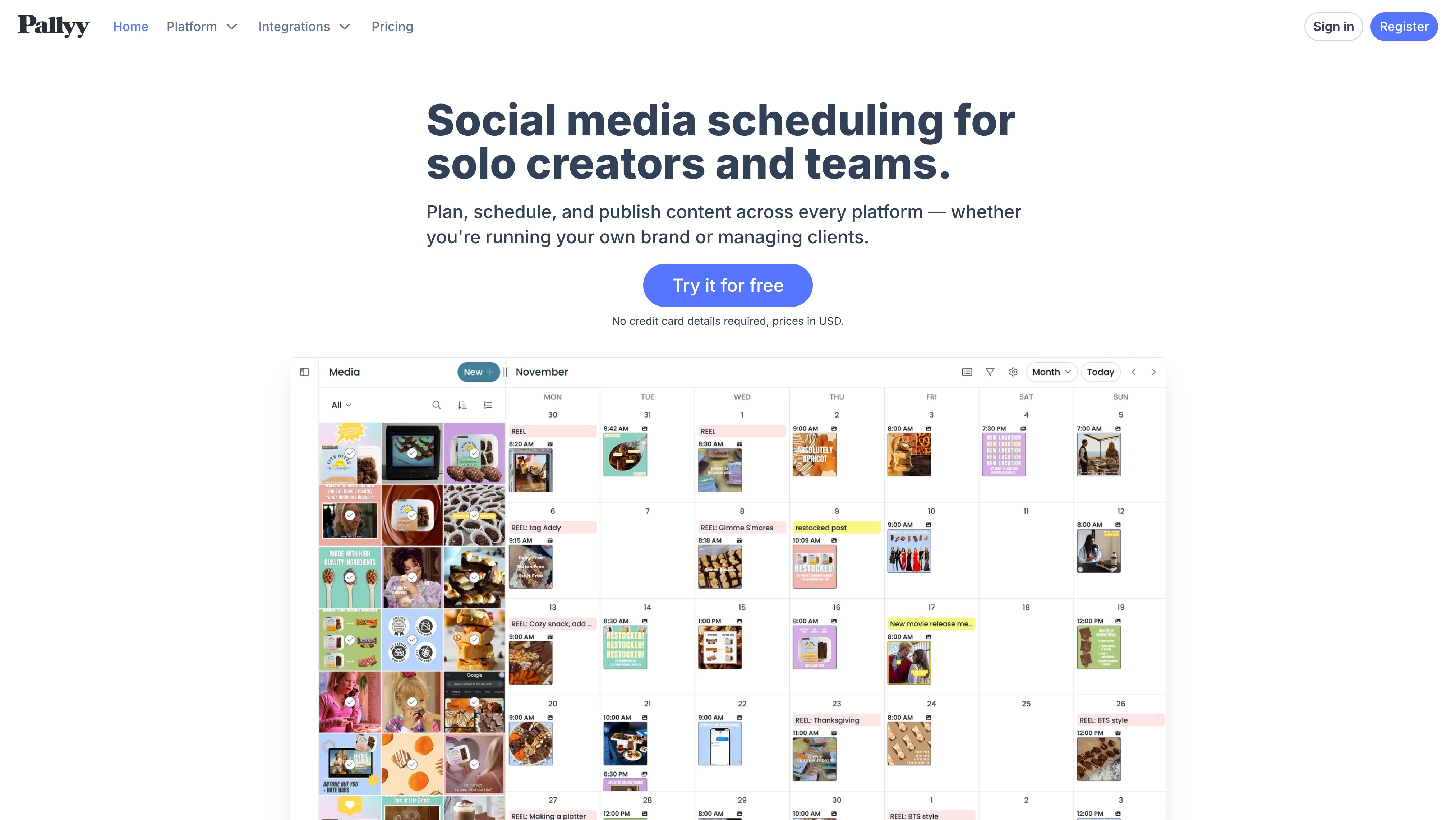
It isn't trying to be the deepest standalone builder, and its feature set is simpler than creator-commerce platforms — if your page needs to act like a mini storefront, Beacons fits better. If you're weighing scheduler-based platforms more broadly (approvals, collaboration, reporting), it's worth reviewing Pallyy alternatives for agency workflows. And the category matters: creators using dedicated link-in-bio tools with analytics report 30% to 50% sales increases tied to click-data optimization, per AstroLink's analysis of top link in bio tools — integrated tools make that optimization easier because the data sits close to publishing.
At a glance
- Best for: Agencies, freelancers, and small teams that want a practical all-in-one social setup.
- Pricing: Included with the Pallyy suite; best value if you use the full platform.
- Standout: A bio page inside an all-in-one social suite with multi-brand support.
- Watch out: Simpler bio feature set; no real storefront capabilities.
10. Milkshake — Best Mobile-First Builder
Milkshake is for people who build on their phone and want the bio page to feel more like a mini website than a utility — card-based pages created in an app, published quickly, and updated without opening a laptop. It feels more visual and editorial than a basic link list, with galleries, about sections, and showcase content styled for mobile browsing. For personal brands, artists, and lifestyle creators, that workflow can be more natural than a desktop dashboard.
The same mobile-only editing that makes it appealing to solo creators makes it weak for teams — it isn't great for approvals, shared workflows, or bigger campaigns — and analytics and commerce are lighter than desktop-first tools. As Stan's roundup of link in bio platforms notes, analytics maturity is a key divider between basic and premium tools, and ecosystem fit is often the deciding factor for teams. If you're a creator mapping your full toolkit, our list of social media management tools for creators pairs well with this one.
At a glance
- Best for: Solo creators, artists, and personal brands who prefer editing on mobile and want a stylish page fast.
- Pricing: Freemium; app-store subscriptions for premium features.
- Standout: A card-based, phone-native editor for bold, image-led pages.
- Watch out: Mobile-only editing, lighter analytics and commerce, and not built for teams.
Other Link in Bio Tools Worth a Look
A few tools didn't make the top 10 but are worth knowing if your use case is specific. Stan Store is a creator-storefront-first option that turns the bio link into a one-page shop for digital products, courses, and bookings — strong for creators whose page is the business. Linkpop, Shopify's own link-in-bio tool, is the natural pick if your store already runs on Shopify and you want shoppable links tied to your catalog. And Carrd is the budget power-user choice — it builds full one-page sites (not just link lists) with custom domains for a few dollars a year, if you're comfortable doing a little more setup yourself.
PostPlanifyAll your social media in one simple dashboard
Schedule posts, track analytics, and reply to comments/DMs without switching tabs.
Engagement
+18%
Views
52.8k
The Link in Bio Tool Buyer's Checklist
A campaign goes live on Monday. By Wednesday, Instagram points to the wrong promo, TikTok still uses last month's page, and the client asks for results that sit across separate tools. That's the point where link in bio software stops being a design choice and becomes an operations choice.
The buying decision comes down to one question: do you need the best standalone page builder for one profile, or do you need the bio page to work inside the same system as scheduling, approvals, and reporting? That split matters more than feature count.
Standalone tools usually win on page flexibility — Beacons for creator monetization, Shorby for paid campaigns and message-led funnels, Milkshake for phone-first editing. If the bio page itself is part of the offer, a specialist often earns its place. Integrated tools usually win on team efficiency: social managers and agencies save time when the link page updates alongside scheduled content and performance tracking, with fewer handoffs, fewer stale links, and fewer reporting gaps at month-end.
Use this checklist before you commit:
- Start with the traffic goal: Product discovery, lead generation, bookings, and content recirculation need different page structures.
- Choose based on workflow location: If your team already lives in a scheduler every day, adding a separate bio tool creates more admin work.
- Check update speed: Campaign pages change fast — the right tool makes edits easy for the person managing posts.
- Review permissions carefully: Agencies need client-safe access, multi-brand separation, and approval controls.
- Look at reporting depth: Simple creator pages can get by with click counts; teams running campaigns need link-level performance that matches publishing activity.
- Check branding options early: Custom domains, page structure, and visual consistency matter more for brands than for personal profiles.
- Read the plan limits: Collaboration, analytics, and branded domains are often paid features.
- Test it on the device you use most: Mobile-first creators and desktop-first teams often prefer very different editors.
The most expensive mistake I see is buying for appearance first, then discovering the true cost sits in extra logins, manual updates, and analytics that never line up cleanly with the content calendar. For a solo creator, the right answer is often a lightweight standalone tool that fits the business model. For an agency or in-house team, it's usually the tool that sits inside the publishing stack already in use — PostPlanify is worth shortlisting if you want the bio page, scheduler, and reporting in one place.
Link in Bio Tools FAQ
What is the best link in bio tool in 2026?
It depends on whether you work solo or in a team. For agencies, teams, and businesses that already publish on a schedule, PostPlanify is the best overall pick because its bio page is built into the same dashboard as your calendar, analytics, and inbox — so links update as part of the posting workflow, with no separate tool or per-seat fee. For pure familiarity, Linktree is the safest standalone default; for creator monetization, Beacons; for shoppable visual feeds, Later's Linkin.bio; and for paid-traffic funnels, Shorby.
What's the best link in bio tool for agencies?
For agencies managing multiple client brands, the deciding factor is workflow, not page design. PostPlanify is the strongest fit because the bio page lives in the same dashboard as scheduling, approvals, analytics, and the social inbox — each client gets its own branded page and slug, and the person scheduling posts can update links and check clicks without a separate tool or per-seat fee. Sendible and Pallyy also bundle a bio page into broader agency suites, while standalone tools like Linktree or Campsite.bio work but add another login and another place for campaign links to go stale.
What's the best link in bio tool for ecommerce?
For ecommerce, the best fit ties products to content or checkout. Later's Linkin.bio leads here — its shoppable grid mirrors your Instagram or TikTok feed and supports Shopify product tagging, so viewers tap a post and land on the right product. Beacons works well if you sell digital products or downloads directly from the page, and Shopify's own Linkpop is worth a look if your store already runs on Shopify. For teams that also need to schedule the content driving that traffic, PostPlanify keeps the bio page, publishing, and click analytics in one place.
What is a link in bio tool?
A link in bio tool turns the single URL slot in your Instagram, TikTok, or X profile into a mini landing page with multiple clickable links. Instead of sending followers to one destination, you can list products, articles, booking pages, social profiles, and more on one branded page. Most tools also include click tracking so you know what your audience cares about.
Are link in bio tools free?
Several tools offer free plans with basic features. Linktree, Beacons, Buffer Start Page, and Lnk.Bio all have free tiers that let you create a page and add links. However, advanced features like custom domains, detailed analytics, retargeting pixels, and commerce integrations usually require a paid plan. If your social scheduling tool already includes a bio page (like PostPlanify), you may not need a separate subscription at all.
Which link in bio tool is best for Instagram?
It depends on your content style. If your Instagram feed is product-driven and visual, Later's Linkin.bio with its clickable grid format works well. If you need a simple, recognizable page, Linktree is the safe default. If you schedule Instagram content daily and want the bio page inside the same dashboard as your calendar and analytics, an integrated tool like PostPlanify saves time. For a broader comparison, see our Instagram post scheduler tools guide.
Can I use a link in bio tool on multiple platforms?
Yes. Most link in bio tools generate a single URL that works in any platform's bio field — Instagram, TikTok, X, YouTube, LinkedIn, Pinterest, Threads, and more. You copy the same link into each profile. Some tools also let you create separate pages per brand or platform if you want different link sets for different audiences.
Do link in bio tools affect Instagram reach or algorithm?
No. Instagram does not penalize profiles for using a third-party bio link. The algorithm ranks content based on engagement, relevance, and recency — not on what URL sits in your bio. Using a bio link tool has no negative impact on reach, impressions, or follower growth.
What is the best free Linktree alternative?
Buffer Start Page and Lnk.Bio are two strong free alternatives. Buffer Start Page integrates with its scheduler and offers clean page designs. Lnk.Bio provides unlimited links on its free plan with fast-loading pages. For teams already using a social media management platform, PostPlanify includes a link-in-bio builder as part of every plan, which eliminates the need for a separate tool entirely.
How do I track clicks on my link in bio page?
Most link in bio tools include built-in analytics. You can typically see total page views, individual link clicks, top-performing links, device types (mobile vs desktop), and referral sources. Some tools like Shorby also support retargeting pixels and UTM parameters for deeper campaign tracking. The level of analytics detail varies by tool and plan tier.
Can I use a custom domain with a link in bio tool?
Yes, but usually only on paid plans. Tools like Linktree, Campsite.bio, and Lnk.Bio offer custom domain support on their premium tiers. This lets your bio page appear under your own brand URL instead of the tool's domain. If brand consistency matters to your business, check which plan tier includes this feature before signing up.
What is the difference between Linktree and a social media scheduler with a built-in bio page?
Linktree is a standalone bio page builder — you manage it separately from your publishing tools. A scheduler with a built-in bio page (like PostPlanify or Pallyy) keeps your link page, content calendar, analytics, and social inbox in one product. The standalone approach gives you more page design options. The integrated approach saves time for teams because link updates happen alongside content scheduling, with no extra logins or tools to maintain.
How many links should I put on my link in bio page?
There is no hard limit, but less is usually more. Pages with 5 to 7 focused links tend to get better click-through rates than pages with 20+ options. Too many choices create decision fatigue. Prioritize your most important destinations — your latest campaign, top product, newsletter signup, or booking page — and remove or deactivate links that are no longer relevant. Most tools let you toggle links on and off without deleting them.
Making the Switch
If you are currently using a standalone link in bio tool and considering an integrated option, the switch is straightforward. Export your current link list (most tools let you copy URLs manually or export), set up your new page, and update the URL in your social profiles. The whole process takes under 15 minutes per platform.
The biggest benefit shows up over time. When your bio page lives inside the same tool as your content calendar, you stop forgetting to update it. Campaign links stay current, stale promos get removed faster, and click data sits next to your post performance — no more jumping between dashboards.
If your team handles multiple social media accounts across brands or clients, that consolidation matters even more. One fewer tool means one fewer login, one fewer billing cycle, and one fewer place where things can fall out of sync.
Ready to see all your links, content, and analytics in one place? PostPlanify gives you a branded bio page, scheduling across 10 platforms, AI-powered captions, social inbox, and team collaboration — all in one dashboard. Try it free for 7 days.
Key Takeaways
- A link in bio tool turns your single profile URL into a mini landing page with multiple clickable destinations — essential for Instagram, TikTok, and X where you only get one link.
- Standalone tools (Linktree, Beacons, Lnk.Bio) are best for solo creators who need quick setup and don't mind managing a separate product.
- Integrated tools (PostPlanify, Later, Buffer, Pallyy) save time for teams because the bio page updates alongside your content calendar, analytics, and inbox.
- Monetization-focused creators should look at Beacons (digital sales, media kits) or Later Linkin.bio (shoppable grid for ecommerce).
- Marketers running paid traffic benefit most from Shorby's retargeting pixels, UTM tracking, and messenger-based CTAs.
- The most common mistake is buying for page design first and then realizing the real cost is in extra logins, manual updates, and disconnected analytics.
- For agencies and multi-brand teams, the right tool is usually the one that reduces handoffs — fewer tools means fewer places where campaign links go stale.
Related Reading
- Best Social Media Management Platform
- Best Social Media Management Tools for Agencies
- Best Social Media Management Tools for Creators
- Best Social Media Management Tools for Teams
- How to Monetize Social Media
- How to Build a Social Media Presence
- Social Media Scheduling Tools
- Social Media Analytics for Business
- Manage Multiple Social Media Accounts
- Social Media Bio Generator Guide
- Best Buffer Alternatives
- Best Later Alternatives
- Best Pallyy Alternatives
- Buffer vs PostPlanify
PostPlanifyAll your social media in one simple dashboard
Schedule posts, track analytics, and reply to comments/DMs without switching tabs.
Engagement
+18%
Views
52.8k
About the Author

Hasan Cagli
Founder of PostPlanify, a content and social media scheduling platform. He focuses on building systems that help businesses, agencies, and teams plan, publish, and manage content and social media more efficiently across platforms.


