
Choosing between Buffer or Tailwind depends on where your audience lives. Both tools handle social media scheduling, but they serve very different content strategies and platform ecosystems. In this 2026 comparison, we examine pricing, features, platform support, and real user reviews to help you decide.
Buffer is a general-purpose scheduler that covers 11 platforms with per-channel pricing. Tailwind is a Pinterest and Instagram specialist with built-in design tools, SmartSchedule optimization, and e-commerce integrations. If your strategy revolves around visual discovery platforms, the choice is not as obvious as it seems — we break down where each tool delivers real value. Comparing the full market? Browse all social media scheduling alternatives.
This comparison draws on 1,559 verified reviews across G2 and Trustpilot for both tools (Buffer: 1,116 reviews; Tailwind: 443 reviews). Ratings and review counts are as of February 2026.
Buffer vs Tailwind at a Glance
| Category | Buffer | Tailwind |
|---|---|---|
| Starting Price | Free (3 channels, 10 posts/channel) | Free (5 posts/mo, 3 accounts) |
| Free Plan | Yes (limited) | Yes (very limited) |
| Platforms Supported | 11 | 3 (Pinterest, Instagram, Facebook) |
| Unlimited Scheduling | Essentials ($6/mo per channel) | Max plan ($99.99/mo) |
| AI Tools | AI Assistant (captions) | Ghostwriter AI (captions, descriptions) |
| AI Image Generation | No | No |
| Design Tools | No | Tailwind Create (templates) |
| Team Collaboration | Team plan ($12/mo per channel) | Max plan (up to 5 users) |
| Approval Workflows | Team plan | No |
| Analytics | Essentials+ | Basic (paid plans) |
| G2 Rating | 4.3/5 (1,023 reviews) | 4.3/5 (141 reviews) |
| Trustpilot Rating | 2.1/5 (93 reviews) | 3.5/5 (302 reviews) |
| Best For | Solo creators and freelancers | Pinterest-focused creators and e-commerce sellers |
Buffer Overview

Buffer is one of the longest-running social media scheduling tools on the market, known for its clean, no-frills interface. It supports 11 platforms including Instagram, Facebook, LinkedIn, Pinterest, X/Twitter, TikTok, YouTube, Google Business, Threads, Bluesky, and Mastodon — one of the widest platform lists available.
Key features include an AI Assistant for generating captions, a hashtag manager, first comment scheduling, Start Page (a link-in-bio tool), a visual content calendar, and CSV bulk import. Buffer's strength lies in its simplicity: you pick your channels, queue your posts, and let the tool handle the rest.
Buffer's free plan lets you schedule content to three channels without a credit card. The Essentials plan unlocks unlimited posts at $6/month per channel, and the Team plan adds approval workflows at $12/month per channel. The per-channel model keeps costs low for users with a few accounts but scales up fast as you add more.
Buffer is best suited for solo creators, freelancers, and small businesses that want a straightforward scheduling tool across many platforms. If you are new to scheduling, our guide on how to schedule social media posts walks through the basics. Read real user reviews of Buffer from G2 and Trustpilot.
Tailwind Overview

Tailwind is a social media scheduling and design platform built specifically for Pinterest, Instagram, and Facebook. Unlike general-purpose schedulers, Tailwind focuses on visual content creation and optimization for discovery-based platforms.
Key features include SmartSchedule for optimal posting times, Ghostwriter AI for captions and descriptions, Tailwind Create (a design tool with customizable templates), Tailwind Communities for collaborative content sharing, Smart.bio (link-in-bio), SmartPin, SmartLoop for evergreen content resharing, Canva integration on paid plans, bulk uploads, and e-commerce integrations with Shopify, WooCommerce, Squarespace, and WordPress. Browser extensions and a mobile app round out the toolset.
Tailwind's pricing uses tiered plans with post limits. The Free plan includes 5 posts per month, 5 AI credits, and 5 designs. The Pro plan costs $29.99/month (with a $24.99 introductory rate) for 150 posts, 3 accounts, and 1 user. The Advanced plan is $54.99/month for 300 posts, 6 accounts, and 2 users. The Max plan is $99.99/month for unlimited posts, 9 accounts, and 5 users.
Tailwind is best suited for Pinterest-focused creators, e-commerce sellers, and visual content marketers who want scheduling paired with design tools. For Instagram-specific needs, see our list of Instagram scheduling tools. Read real user reviews of Tailwind from G2 and Trustpilot.
Pricing Comparison
Buffer Pricing
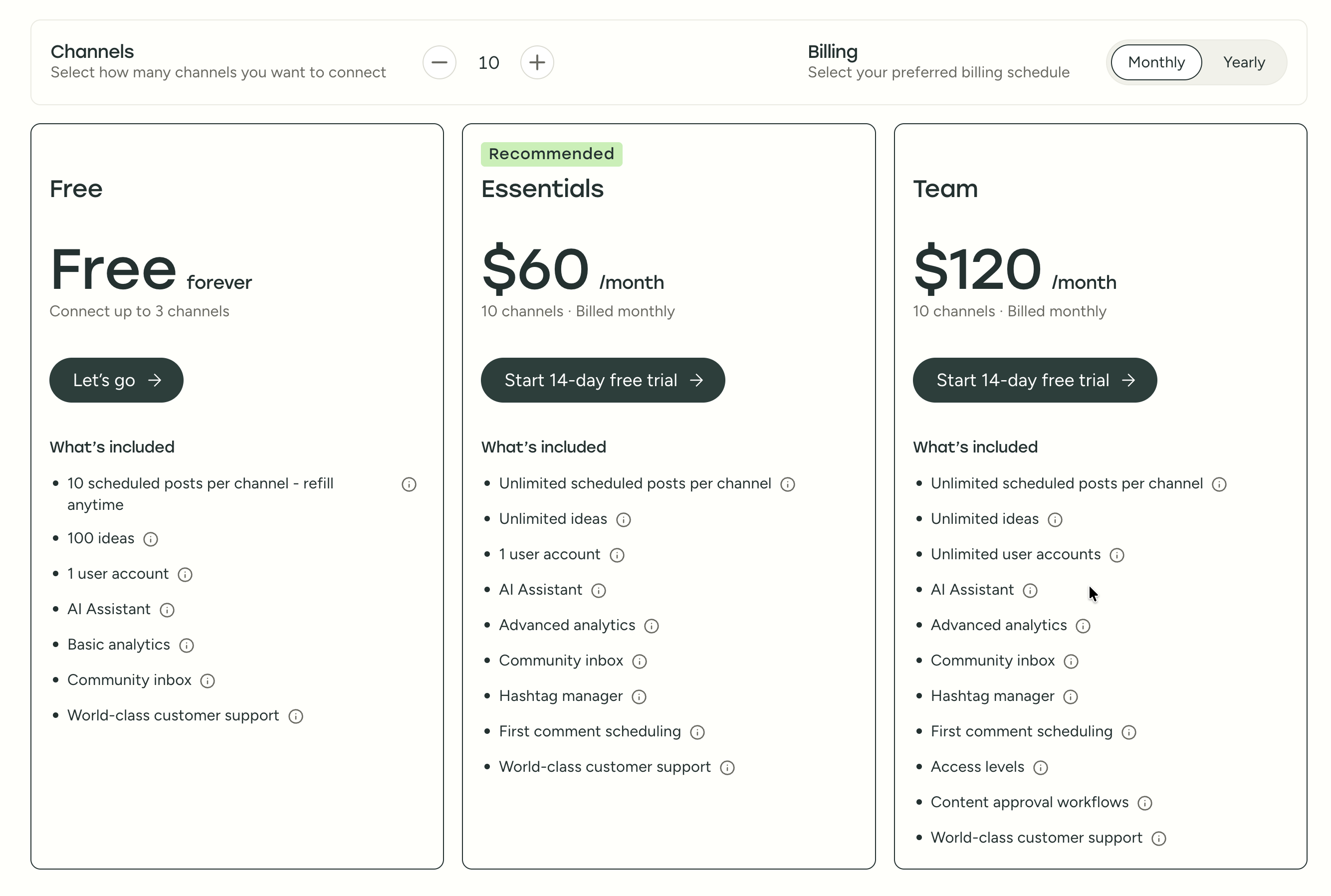
See the full Buffer pricing breakdown for details.
| Plan | Price | Channels | Key Limits |
|---|---|---|---|
| Free | $0/mo | 3 channels | 10 posts per channel |
| Essentials | $6/mo per channel | Unlimited | Unlimited posts, 1 user |
| Team | $12/mo per channel | Unlimited | Unlimited posts, approval workflows |
Buffer uses per-channel pricing, which starts cheap but scales up fast. Managing 10 channels on the Team plan costs $120/month. The free plan is limited to 10 scheduled posts per channel at any given time, which may feel restrictive for businesses posting daily. Annual billing is available for a discount on paid plans.
Tailwind Pricing
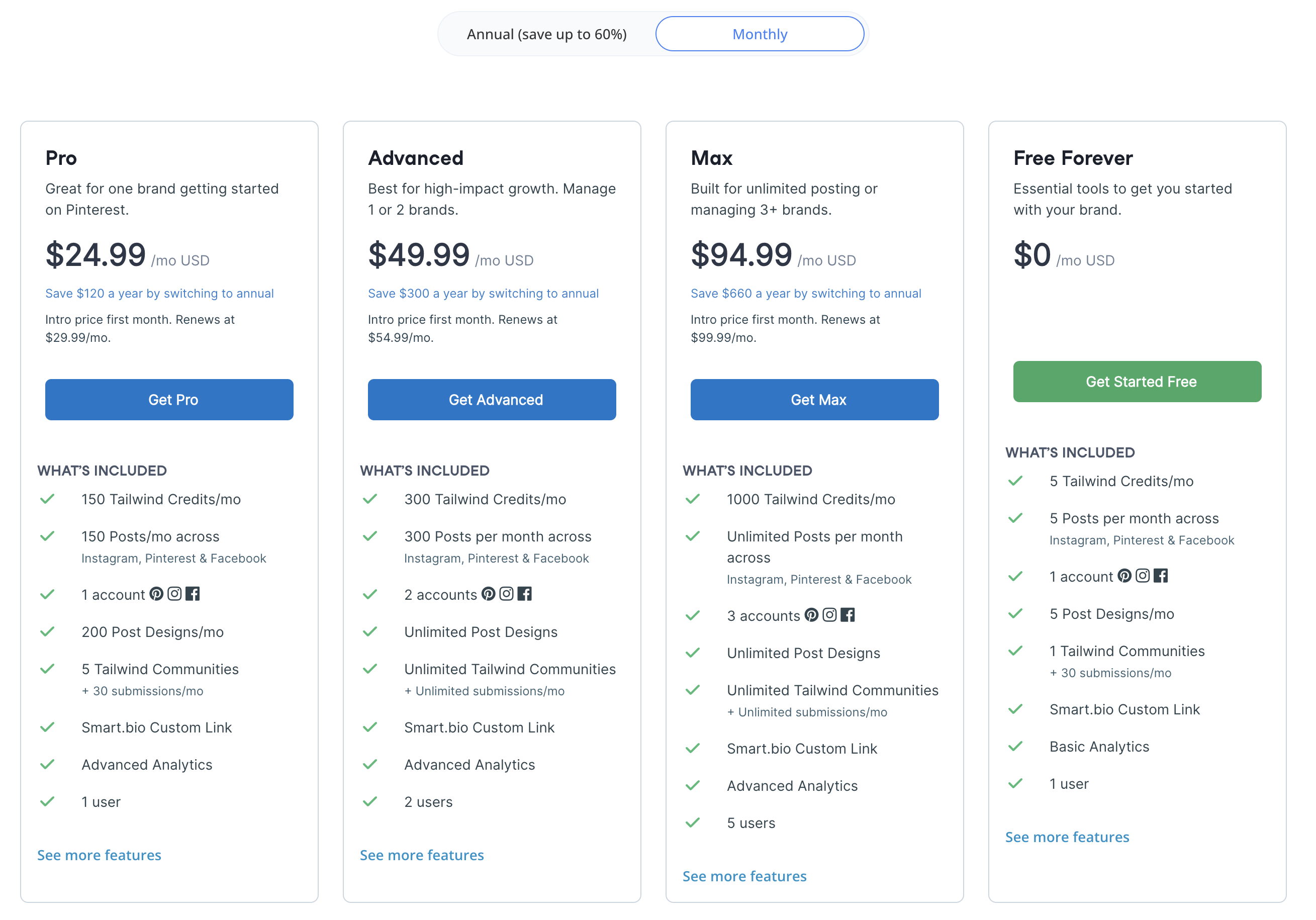
See the full Tailwind pricing breakdown for details.
| Plan | Price | Posts/Month | Accounts | Users |
|---|---|---|---|---|
| Free | $0/mo | 5 | 3 (1 per platform) | 1 |
| Pro | $29.99/mo | 150 | 3 | 1 |
| Advanced | $54.99/mo | 300 | 6 | 2 |
| Max | $99.99/mo | Unlimited | 9 | 5 |
Tailwind offers introductory pricing ($24.99, $49.99, $94.99) that renews at the rates shown above. Post limits apply on all plans except Max. The free plan is extremely restricted at just 5 posts per month total.
All Tailwind plans are limited to Pinterest, Instagram, and Facebook — no additional platforms are available regardless of plan tier.
Price Verdict
Buffer is cheaper and more flexible for general social media management. A freelancer managing 5 channels on Buffer Essentials pays $30/month with unlimited posts. On Tailwind Pro at $29.99/month, you get 150 posts across just 3 accounts on 3 platforms. Buffer's per-channel model gives you access to 11 platforms, while Tailwind locks you into Pinterest, Instagram, and Facebook. However, if Pinterest is your primary channel and you value Tailwind Create's design tools, the $29.99/month Pro plan includes features Buffer cannot match on that platform.
What You'll Actually Pay
Here are three real-world scenarios showing what each tool costs when the math is done:
Scenario 1: Solo blogger managing Pinterest, Instagram, and Facebook. On Tailwind Pro, you pay $29.99/month for 150 posts across 3 accounts. On Buffer Essentials, those same 3 channels cost $18/month ($6 x 3) with unlimited posts. Buffer saves you $12/month and removes the post cap, but you lose SmartSchedule, SmartLoop, and Tailwind Create. If Pinterest drives your traffic, Tailwind's specialized tools may justify the extra cost.
Scenario 2: Freelancer managing 7 channels (Instagram, Facebook, Pinterest, X, LinkedIn, TikTok, YouTube). Buffer Essentials costs $42/month ($6 x 7 channels) with unlimited posts across all 11 supported platforms. Tailwind cannot serve this scenario at all — it only covers 3 of those 7 platforms. You would need Tailwind Pro ($29.99) plus a second tool for the remaining 4 channels, easily exceeding $50-60/month combined.
Scenario 3: Small agency managing 3 brands across multiple platforms with team review. Buffer Team at $12/month per channel for, say, 10 channels costs $120/month with approval workflows. Tailwind Max at $99.99/month gives you unlimited posts on 9 accounts but only 3 platforms, no approval workflows, and a 5-user cap. For cross-platform agency work, Buffer offers more platform coverage but the per-channel cost adds up fast. Neither tool offers an ideal agency solution at these price points.
 PostPlanify
Manage All Your Social Accounts Without the Chaos
Schedule posts, track performance, and collaborate with your team.


Feature Comparison
We tested both tools across five core categories. Here is how they compare feature by feature.
Scheduling & Publishing
| Feature | Buffer | Tailwind |
|---|---|---|
| Unlimited Scheduling | Essentials+ | Max plan only ($99.99/mo) |
| Bulk Scheduling | CSV import | Bulk uploads |
| Content Calendar | Yes | Yes |
| Smart Scheduling | No | SmartSchedule (optimal times) |
| Post Recycling | No | SmartLoop (evergreen resharing) |
| First Comment | Yes | No |
| Link in Bio | Start Page | Smart.bio |
Winner: Tailwind for Pinterest-specific workflows. SmartSchedule uses audience engagement data to find optimal posting windows, and SmartLoop automatically reshares evergreen content on a schedule you set — two features that are purpose-built for Pinterest growth and have no equivalent in Buffer. Buffer wins for cross-platform scheduling with unlimited posts on more platforms at a lower price, plus first-comment support that Tailwind lacks entirely. For tips on finding the right posting cadence, read our guide on the best time to post on social media.
AI Tools
| Feature | Buffer | Tailwind |
|---|---|---|
| AI Caption Generation | AI Assistant | Ghostwriter AI |
| AI Design Tool | No | Tailwind Create (templates) |
| AI Image Generation | No | No |
| AI-Powered Analytics | No | No |
| Included On | All plans | Pro+ (limited on Free) |
Winner: Tailwind. Ghostwriter AI handles captions, pin descriptions, email subject lines, and hashtag suggestions, while Tailwind Create generates on-brand visual designs from customizable templates — a combination Buffer cannot match. Buffer's AI Assistant covers caption generation but offers no design or visual content creation capabilities. Neither tool offers AI image generation from text prompts. See our roundup of AI social media tools for more AI-powered options.
Analytics & Reporting
| Feature | Buffer | Tailwind |
|---|---|---|
| Post Analytics | Essentials+ | Paid plans |
| Report Modules | Basic | Basic |
| Competitor Benchmarking | No | No |
| Custom Reports | Limited | No |
| Export Options | CSV | No |
Winner: Buffer. Buffer offers analytics starting at $6/month per channel with CSV export and engagement metrics across all 11 supported platforms, giving you a broader view of content performance. Tailwind's analytics are limited to Pinterest, Instagram, and Facebook with no export options and no custom reporting. Neither tool offers competitor benchmarking or advanced report building, but Buffer gives you data across 11 platforms versus Tailwind's 3 — a meaningful difference for cross-platform strategies. For a broader look at analytics options, check out our guide to social media analytics tools.
Team Collaboration
| Feature | Buffer | Tailwind |
|---|---|---|
| Multi-User Access | Team plan | Advanced+ (2 users), Max (5 users) |
| Approval Workflows | Team plan | No |
| Content Communities | No | Tailwind Communities |
| Max Team Size | Unlimited | 5 users (Max plan) |
| Unified Inbox | No | No |
Winner: Buffer. Approval workflows on the Team plan give Buffer a structured content review process that Tailwind lacks entirely — you can assign posts for review and require sign-off before publishing. Tailwind caps users at 5 on the Max plan and offers no approval workflows, permission roles, or client review links. Tailwind Communities offer collaborative content sharing with other creators, which is useful for organic reach but is not a substitute for internal team workflows and content governance.
Platform Support
| Platform | Buffer | Tailwind |
|---|---|---|
| Yes | Yes | |
| Yes | Yes | |
| Yes | Yes | |
| X/Twitter | Yes | No |
| Yes | No | |
| TikTok | Yes | No |
| YouTube | Yes | No |
| Threads | Yes | No |
| Bluesky | Yes | No |
| Google Business | Yes | No |
| Mastodon | Yes | No |
Winner: Buffer. Buffer supports 11 platforms versus Tailwind's 3, and this gap is the single largest differentiator in this comparison. If your strategy extends beyond Pinterest, Instagram, and Facebook — and most social strategies do — Tailwind simply cannot serve those channels. You would need a second scheduling tool for everything else, adding cost and fragmenting your workflow.
What Real Users Say
We looked at both G2 (a professional review platform) and Trustpilot (a consumer review platform) to get a balanced picture of user sentiment for each tool.
Buffer Reviews
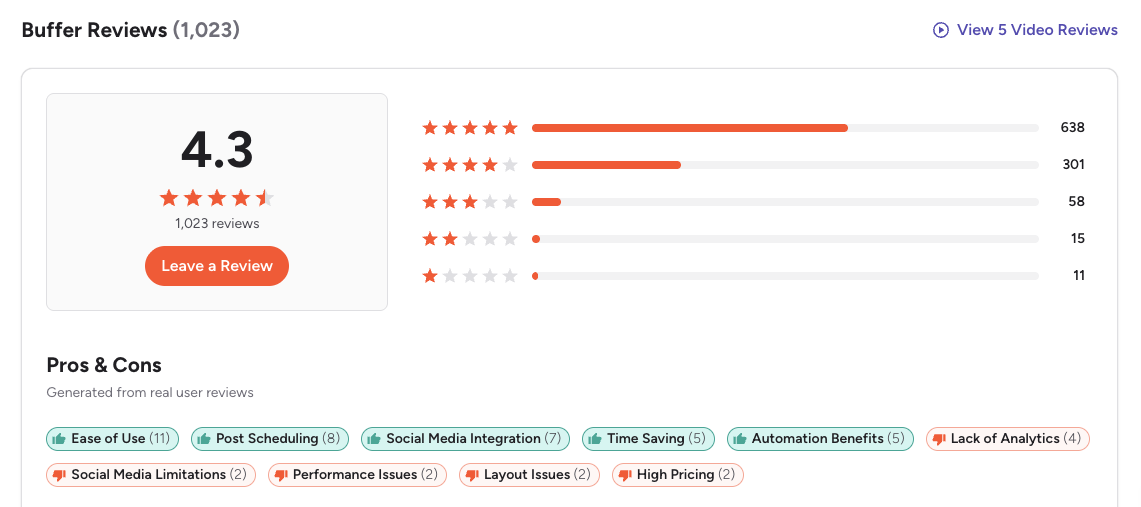
G2: 4.3/5 (1,023 reviews) — Users consistently praise Buffer's simplicity and clean interface. The most common themes are ease of setup, efficient bulk scheduling, and a time-saving workflow for managing multiple channels. However, reviewers frequently note limited engagement and listening capabilities, basic analytics compared to competitors, and pricing that increases quickly as accounts scale. One featured review highlights that while Buffer is powerful for simplifying social management, its simplicity becomes a drawback when you need advanced features found in other platforms.
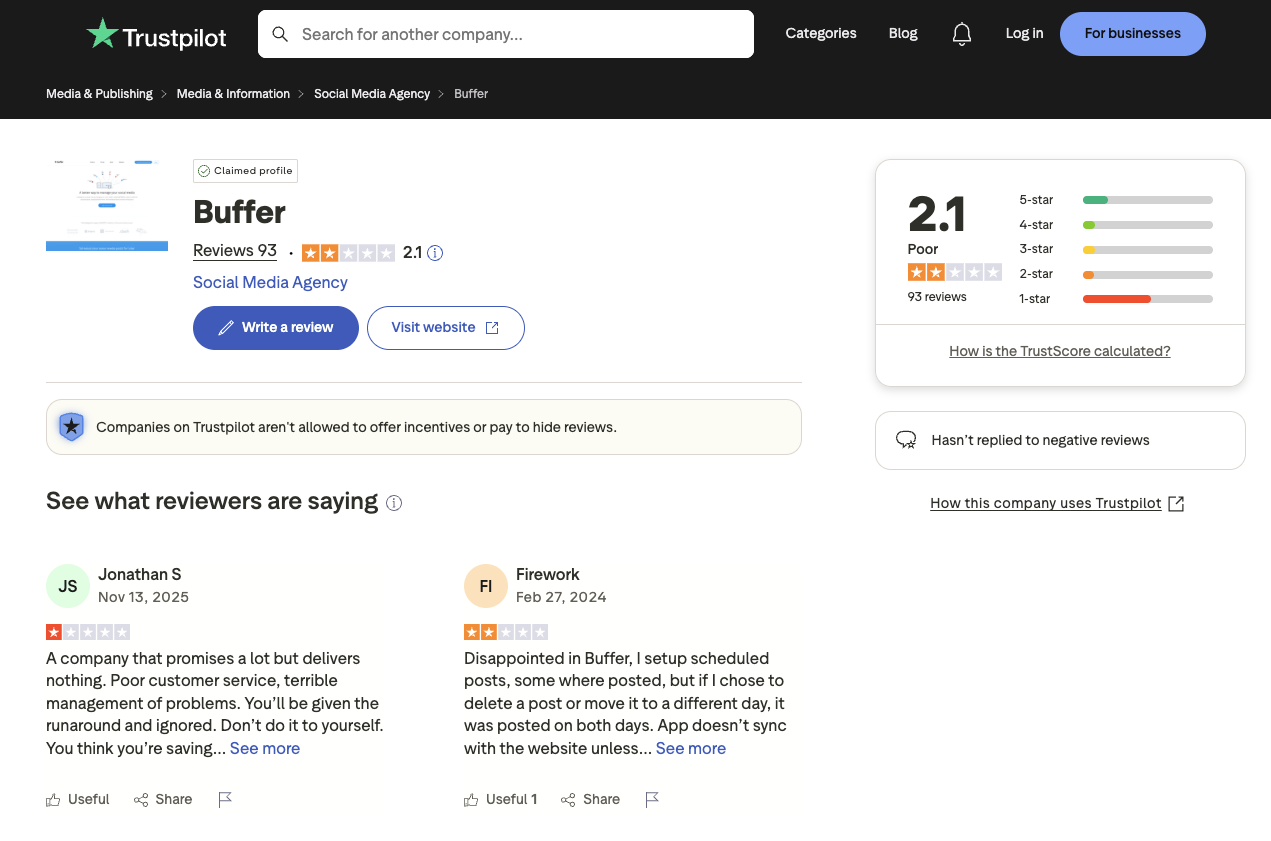
Trustpilot: 2.1/5 (93 reviews) — The Trustpilot score is notably lower, with recurring complaints about customer support responsiveness, scheduled posts failing to publish or duplicating, and sync issues with connected social accounts. Multiple reviewers report that "support does not respond in a timely manner" and that the platform "does not sync correctly with connected social accounts." The gap between G2 and Trustpilot scores suggests that users who encounter technical issues find resolution difficult.
Tailwind Reviews
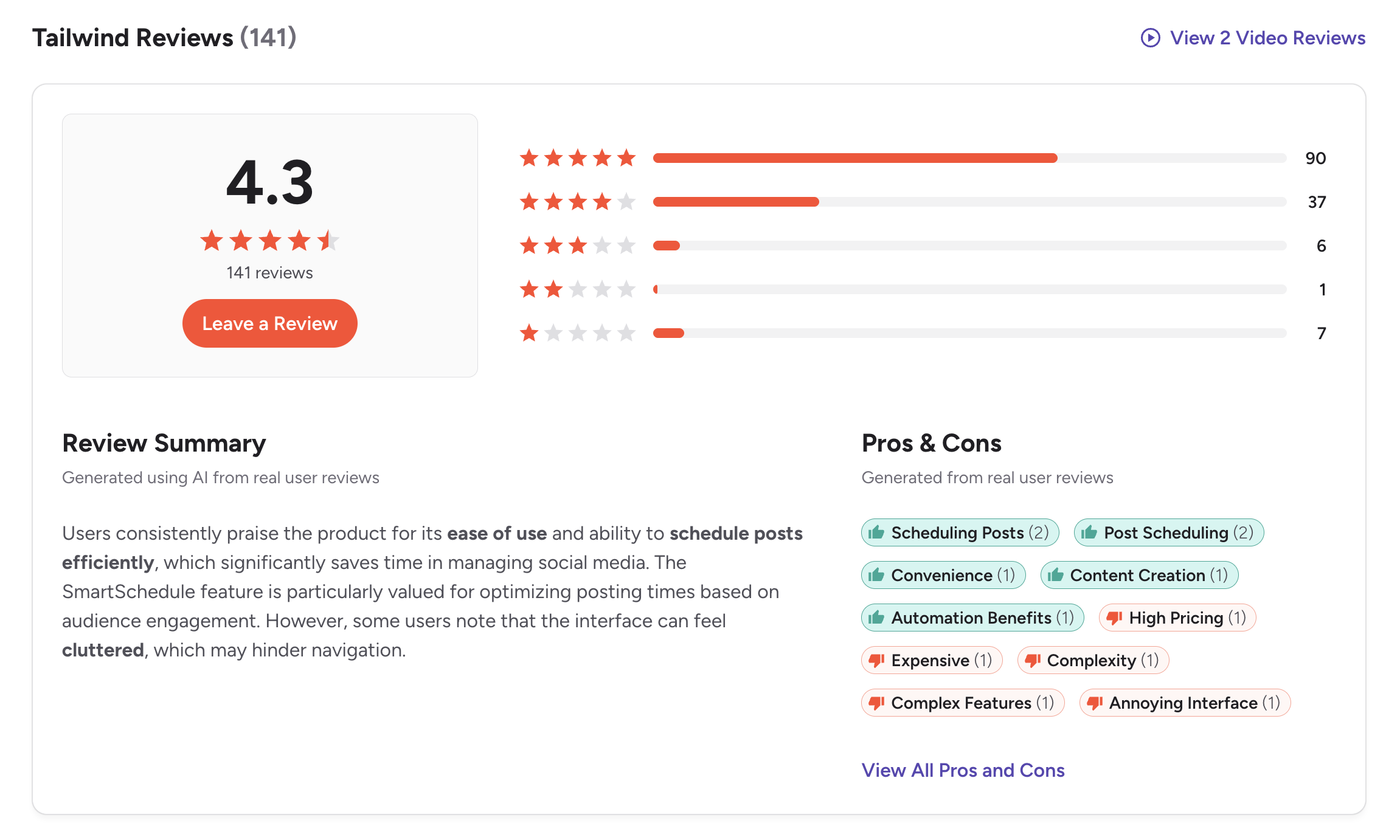
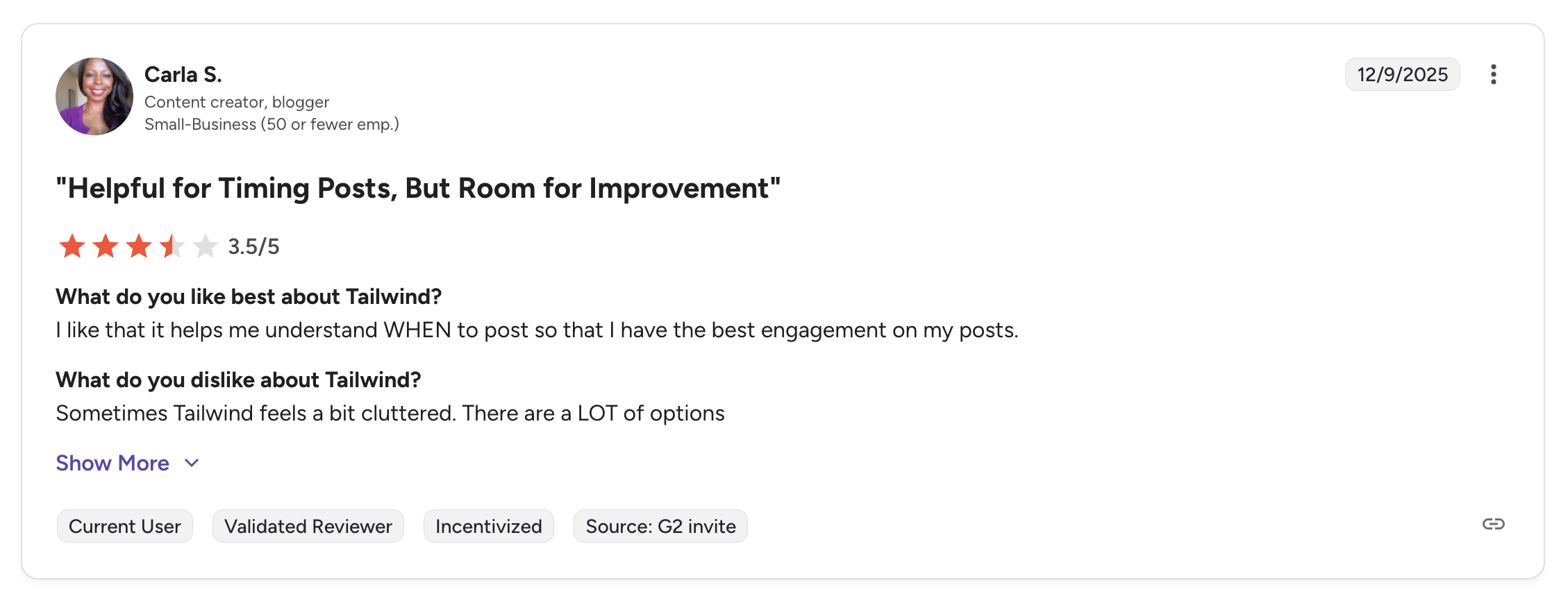
G2: 4.3/5 (141 reviews) — Users praise Tailwind's scheduling efficiency and SmartSchedule timing optimization. The G2 review summary notes that users value the product for its "ease of use" and ability to "schedule posts efficiently." A featured review titled "Helpful for Timing Posts, But Room for Improvement" gave Tailwind 3.5/5, noting: "I like that it helps me understand WHEN to post so that I have the best engagement on my posts." However, the same reviewer cautioned: "Sometimes Tailwind feels a bit cluttered. There are a LOT of options." Common cons include high pricing, interface complexity, and the 3-platform limitation.
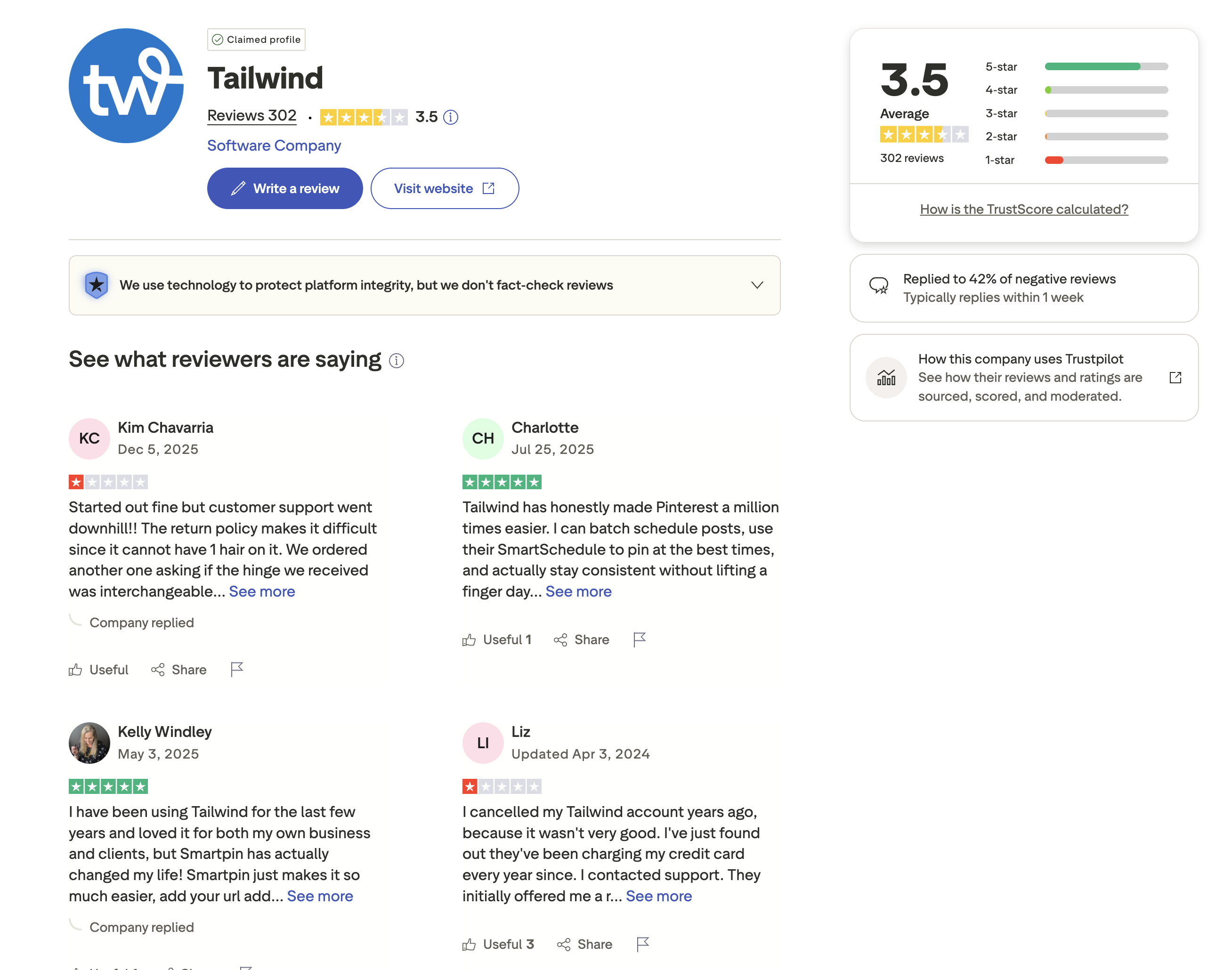
Trustpilot: 3.5/5 (302 reviews) — The review distribution is polarized — a large portion of reviews are 5-star from satisfied Pinterest users, but there is also a significant number of 1-star and 2-star reviews. Positive reviewers praise Tailwind's Pinterest capabilities: one user said, "Tailwind has honestly made Pinterest a million times easier. I can batch schedule posts, use their SmartSchedule to pin at the best times, and actually stay consistent without lifting a finger." Another noted: "Smartpin has actually changed my life!" Negative reviews cite declining customer support quality and billing concerns — one user reported that after cancelling, Tailwind had been "charging my credit card every year since." Tailwind has replied to only 42% of negative reviews, typically within 1 week.
Review Verdict
Both tools share an identical 4.3/5 G2 rating, though Buffer has a much larger review sample (1,023 vs 141). On Trustpilot, Tailwind scores noticeably higher at 3.5/5 (302 reviews) versus Buffer's 2.1/5 (93 reviews). Tailwind users tend to be satisfied Pinterest marketers, while Buffer's lower Trustpilot score reflects frustrations with support and feature limitations. Overall, Tailwind has a slight edge in user satisfaction, but its smaller G2 sample limits the comparison.
It is worth noting that these tools attract very different user bases. Buffer reviews come from general social media managers and solo creators across many platforms, while Tailwind reviews come primarily from Pinterest-focused marketers and e-commerce sellers. The context behind each review matters as much as the score itself.
Combined review count: 1,559 reviews across G2 and Trustpilot (Buffer: 1,023 + 93 = 1,116; Tailwind: 141 + 302 = 443). Ratings and review counts are as of February 2026 and are updated periodically.
PostPlanifyManage All Your Social Accounts Without the Chaos
Schedule posts, track performance, and collaborate with your team.
Who Should Use Buffer?
Buffer works best when your social media strategy spans many platforms and your team values simplicity over specialization. If you post across X/Twitter, LinkedIn, TikTok, YouTube, and other channels that Tailwind does not support, Buffer is one of the few tools that covers all of them from a single dashboard without per-platform add-ons. Its per-channel pricing keeps the entry point low for anyone managing just a few accounts, and the clean interface means minimal onboarding time.
If you are considering Buffer, also explore our Buffer alternatives page and see how Buffer stacks up against Hootsuite, Later, Metricool, Sendible, and Planable. Small business owners should also check our guide to social media management for small business.
- Solo creators who need to publish across many platforms from one tool
- Freelancers managing clients on X/Twitter, LinkedIn, TikTok, or YouTube
- Users who need approval workflows for team content review
- Small businesses on a tight budget who can start with the free plan
- Content marketers who value a clean, distraction-free scheduling interface
- Anyone who needs Bluesky, Mastodon, or Threads support
- Users who prioritize broad platform coverage over niche optimization in a Buffer or Tailwind decision
Who Should Use Tailwind?
Tailwind is the right choice when Pinterest or Instagram is the primary revenue driver for your business and you want a tool built from the ground up for those platforms. SmartSchedule, SmartLoop, SmartPin, and Tailwind Communities are features that no general-purpose scheduler replicates at the same depth. E-commerce sellers who connect Shopify or WooCommerce to Pinterest will find Tailwind's product pin workflows particularly valuable, and Tailwind Create eliminates the need for a separate design tool if your content is primarily visual.
If you are considering Tailwind, also explore our Tailwind alternatives page and see how Tailwind compares to Hootsuite, Later, Metricool, Sprout Social, and Loomly. For Canva users pairing design with scheduling, read our post on Canva for social media.
- Pinterest-first creators who need SmartSchedule and SmartLoop
- E-commerce sellers using Shopify, WooCommerce, or Squarespace with Pinterest
- Visual content marketers who want built-in design tools (Tailwind Create)
- Instagram creators who value community-based content sharing
- Small businesses that only post on Pinterest, Instagram, and Facebook
- Users who want a link-in-bio tool paired with Pinterest scheduling
- Marketers who prioritize Pinterest-specific optimization over cross-platform reach in this Tailwind vs Buffer comparison
Final Verdict
Buffer is the better choice if you need a simple, affordable scheduler that covers 11 platforms and scales with per-channel pricing for solo creators and small teams.
Tailwind is the better choice if Pinterest and Instagram drive your traffic and you want specialized scheduling, SmartLoop evergreen resharing, and built-in design tools.
For most social media marketers, the decision hinges on platform strategy. If your content lives across many channels, Buffer delivers better value and broader reach. If Pinterest is your primary growth engine, Tailwind's specialized features justify the narrower platform support.
There is a notable gap that neither tool fills well: cross-platform scheduling with built-in design integrations, AI image generation, advanced analytics, and team approval workflows at a predictable flat rate. Buffer offers breadth but lacks design tools and charges per channel. Tailwind offers depth on Pinterest but caps you at 3 platforms and 5 users with no approval workflows. If your workflow requires elements from both — broad platform coverage, AI-generated visuals, analytics across all channels, and structured team review — PostPlanify bridges that gap with 10 platforms, AI image generation, analytics on Growth+ ($49/mo), and approval workflows on Premium+ ($99/mo), with plans starting at $29/month.
Cross-Platform Scheduling With Built-In AI and Team Tools
Buffer covers many platforms but charges per channel. Tailwind has powerful Pinterest tools but only supports 3 platforms. PostPlanify gives you unlimited scheduling across 10 platforms with AI tools, analytics, and team collaboration at a flat monthly rate — no per-channel fees, no platform restrictions.

| Feature | Details | Link |
|---|---|---|
| Analytics | Cross-platform analytics for all 10 platforms, best time to post suggestions, engagement tracking | Growth plan ($49/mo) |
| Social Inbox | Unified inbox with AI-assisted reply suggestions across platforms | Growth plan ($49/mo) |
| AI Caption Generation | Unlimited AI-generated captions with tone and length controls | All paid plans |
| AI Image Generation | Vision-powered AI with 7 image generation models | All paid plans |
| Content Calendar | Visual drag-and-drop calendar with multi-brand views | All paid plans |
| Team Collaboration | 5 team members (Premium $99/mo), unlimited (Enterprise custom pricing) | Premium plan ($99/mo) |
| Approval Workflows | Multi-approver workflows with sequential approval chains | Premium plan ($99/mo) |
| White-Label PDF Reports | Branded PDF reports for client reporting | Premium plan ($99/mo) |
| Canva Integration | Import designs directly from Canva into posts | All paid plans |
| Google Drive Import | Pull media from Google Drive without downloading | All paid plans |
| Link in Bio | Customizable link-in-bio pages with 8 pre-built themes and click analytics | All paid plans |
| Media Library | Centralized asset storage with search and tagging | All paid plans |
| Bulk Scheduling | Upload and schedule multiple posts via CSV or bulk composer | Growth+ ($49/mo) |
| Multi-Brand Organization | Manage multiple brands from a single dashboard | All paid plans |
| Platform Support | Instagram, Facebook, X/Twitter, LinkedIn, TikTok, YouTube, Pinterest, Google Business, Bluesky | All paid plans |
PostPlanify offers four plans designed around team size and feature depth. The Starter plan at $29/month includes 5 social accounts with 200 posts/mo, AI captions, AI image generation (7 models), Canva and Google Drive integration, content calendar, link in bio, and media library. The Growth plan at $49/month scales to 10 social accounts and adds unlimited scheduled posts, cross-platform analytics with best time to post suggestions, social inbox with AI-assisted replies, 1st comments & threads, and bulk scheduling. The Premium plan at $99/month supports 25 social accounts and 5 team members with white-label PDF reports, multi-approver approval workflows, shared calendars, and roles & permissions. The **Enterprise plan (custom pricing) unlocks custom social accounts, unlimited team members, and 1:1 onboarding. All plans include a 7-day free trial.
Whether you need Buffer's broad platform reach or Tailwind's visual tools, PostPlanify bridges the gap with 10 platforms and built-in design integrations at a predictable monthly cost. See all plans on the PostPlanify pricing page. Start your free trial today.
Try PostPlanify free for 7 days

Making the Switch
Switching from Buffer or Tailwind to a new scheduling platform does not have to disrupt your content calendar. Here is how to make the transition smoothly:
- Export your data first. Buffer allows CSV export of your post history and analytics. Tailwind does not offer a built-in export, so screenshot or manually save any analytics you want to keep before cancelling.
- Reconnect your social accounts. Most schedulers use the same OAuth connections (Facebook, Instagram, Pinterest, etc.), so reconnecting takes a few minutes per account. Your existing posts on the platforms themselves are not affected.
- Recreate your posting schedule. If you used Buffer's queue times or Tailwind's SmartSchedule, note your optimal posting times before switching so you can replicate them in your new tool.
- Move your content assets. Upload your media library to the new platform. If you use Canva or Google Drive, tools like PostPlanify let you import directly without re-downloading files.
- Test before you fully commit. Run both tools in parallel for a week to confirm your new workflow covers everything. Most tools offer free trials — PostPlanify includes a 7-day free trial so you can verify the fit before cancelling your existing subscription.
- Cancel at the right time. Buffer bills per channel monthly. Tailwind uses introductory pricing that renews at a higher rate — check your billing cycle to avoid paying for an extra month.
Related Guides
- Best Buffer Alternatives for Social Media Scheduling
- Best Tailwind Alternatives for Social Media Scheduling
- Buffer Pricing Breakdown
- Tailwind Pricing Breakdown
- Buffer Reviews from Real Users
- Tailwind Reviews from Real Users
- Best Social Media Management Platform in 2026
- Social Media Scheduling Tools Compared
- How to Measure Social Media ROI
- How to Automate Social Media Posts
- Social Media Analytics for Business
- Best Time to Post on Social Media
- Instagram Post Scheduler Tools
PostPlanifyManage All Your Social Accounts Without the Chaos
Schedule posts, track performance, and collaborate with your team.
FAQ
Is Buffer or Tailwind better for Pinterest marketing?
Tailwind is significantly better for Pinterest. SmartSchedule analyzes your audience to find optimal posting times, SmartLoop automatically reshares evergreen content, SmartPin optimizes pin descriptions, and Tailwind Communities let you collaborate with other creators for broader reach. These features are purpose-built for Pinterest growth. Buffer supports Pinterest but treats it like any other channel without Pinterest-specific optimization, making it adequate for occasional pinning but not for a Pinterest-driven strategy.
Does Tailwind support X/Twitter or LinkedIn?
No. Tailwind only supports Pinterest, Instagram, and Facebook — regardless of which plan you choose. If your strategy requires posting to X/Twitter, LinkedIn, TikTok, YouTube, Threads, Bluesky, or Google Business, you will need a different tool. Buffer covers all 11 of these platforms, and PostPlanify supports 9. This limited platform support is Tailwind's biggest drawback for marketers who need cross-channel coverage.
Which tool has better design features?
Tailwind wins on design with Tailwind Create, a built-in tool that generates social media graphics from customizable templates tailored to Pinterest, Instagram, and Facebook formats. You can produce branded visuals without leaving the platform. Buffer has no native design capabilities whatsoever — you would need an external tool like Canva or Adobe Express. If creating visuals is part of your daily workflow and you do not already use a dedicated design tool, Tailwind has a clear and meaningful advantage.
Can Buffer replace Tailwind for Pinterest scheduling?
Buffer can schedule Pinterest pins, but it lacks SmartSchedule, SmartLoop, SmartPin, and Tailwind Communities. If Pinterest is a secondary channel in your strategy, Buffer covers it adequately. If Pinterest drives your traffic and revenue, Tailwind's specialized features are hard to replace.
Which is cheaper for small businesses?
Buffer is cheaper for businesses using multiple platforms. Its free plan covers 3 channels with 10 posts each, and Essentials starts at $6/month per channel. Tailwind's free plan allows only 5 posts per month total. For Pinterest-only businesses, Tailwind Pro at $29.99/month may justify its cost through specialized features.
Does Tailwind have approval workflows?
No. Tailwind does not offer approval workflows on any plan. The Max plan supports up to 5 users collaborating on content, but there are no structured approval chains, permission roles, or client review links. If your team needs formal content review and sign-off before publishing, Buffer's Team plan ($12/month per channel) provides basic approvals, and tools like PostPlanify offer multi-approver approval workflows alongside unlimited scheduling for a flat monthly rate.
What if I need both AI image generation and Pinterest scheduling?
Neither Buffer nor Tailwind offers AI image generation. If you need to generate images from text prompts alongside scheduling, you would need a separate design tool or a platform that includes it natively. PostPlanify includes AI image generation with 7 models on all paid plans starting at $29/month, along with scheduling across 10 platforms including Pinterest.
Can I use both Buffer and Tailwind together?
Yes. Some marketers use Tailwind for Pinterest-specific scheduling and optimization while using Buffer for all other platforms. This adds cost but lets you leverage Tailwind's Pinterest strengths without giving up cross-platform coverage. If Pinterest is a significant traffic source alongside other platforms, this dual-tool approach can make sense.
Does Tailwind have a Canva integration?
Yes, on paid plans. Tailwind integrates with Canva on the Pro plan and above, letting you pull in Canva designs without leaving the platform. Buffer does not currently offer Canva integration. If you use Canva for social media visuals, this is a point in Tailwind's favor. PostPlanify also includes Canva integration on all paid plans.
Is Tailwind worth it in 2026?
Tailwind is worth it in 2026 if Pinterest or Instagram is a primary traffic and revenue driver for your business. The SmartSchedule, SmartLoop, and Tailwind Create features provide genuine value that general-purpose schedulers cannot replicate for those platforms. However, if you post across more than three platforms, Tailwind's limited support for only Pinterest, Instagram, and Facebook means you will need a second tool for the rest of your channels, which adds cost and complexity.
What if I need cross-platform analytics and team collaboration?
Neither Buffer nor Tailwind excels at both. Buffer offers basic analytics across 11 platforms but lacks advanced reporting and charges per channel for team features. Tailwind's analytics are limited to 3 platforms with no export options and a 5-user cap. If you need cross-platform analytics, white-label reporting, and team collaboration with approval workflows, PostPlanify covers all three -- analytics and social inbox from the Growth plan ($49/month), white-label PDF reports, team collaboration, and approval workflows from the Premium plan ($99/month), and unlimited team members on Enterprise (custom pricing).
Does Tailwind offer a free trial?
Tailwind offers a free plan rather than a time-limited trial. The free plan includes 5 posts per month, 5 AI credits, 5 Tailwind Create designs, and 3 accounts (one per platform). This is extremely limited and functions more as a product demo than a usable plan. If you need to test Tailwind's premium features like SmartLoop or higher post volumes, you will need to upgrade to the Pro plan at $29.99/month — there is no free trial of paid tiers.







