
Loomly and SocialPilot both serve marketing teams, but with fundamentally different workflows. Loomly is built around a visual content calendar and team approval processes. SocialPilot is built around bulk scheduling, client management, and white-label reporting for agencies.
Visual content calendar versus bulk scheduling engine. Loomly and SocialPilot both serve teams but with fundamentally different workflows — one built around approvals, the other around scale. We compare every angle. Browse all social media scheduling alternatives.
Loomly vs SocialPilot at a Glance
Here's a quick side-by-side overview before we dive deeper:
| Category | Loomly | SocialPilot |
|---|---|---|
| Starting Price | $0/mo (Free) / $65/mo (Starter) | $30/mo (1 user) |
| Free Plan | Yes (3 accounts, 1 user, 5 posts/mo) | No (14-day trial) |
| Platforms Supported | 11 | 11 |
| Unlimited Scheduling | Yes (paid plans) | Yes (all plans) |
| AI Tools | AI caption suggestions | AI Pilot (captions, multi-language) |
| AI Image Generation | No | No |
| Bulk Scheduling | Yes | Yes (500 posts via CSV) |
| Team Collaboration | Starter plan ($65/mo, 3 users) | Standard plan ($50/mo, 3 users) |
| Approval Workflows | Yes (all paid plans) | Yes (all plans) |
| Social Inbox | Yes | Yes (Standard+) |
| White Label Reports | No | Yes (Premium+) |
| Content Integrations | Canva, Google Drive, Unsplash | Canva |
| G2 Rating | 4.6/5 (1,793 reviews) | 4.5/5 (841 reviews) |
| Trustpilot Rating | 1.7/5 (26 reviews) | 2.4/5 (33 reviews) |
| Best For | Teams needing approval workflows | Agencies managing client accounts |
Loomly Overview

Loomly is a social media management platform designed around a visual content calendar and team approval workflows. It helps marketing teams plan, create, approve, and publish content with built-in collaboration tools and post inspiration features.
Loomly supports 11 platforms: Facebook, Instagram, X/Twitter, LinkedIn, Pinterest, Google Business, YouTube, TikTok, Snapchat, Threads, and Bluesky.
Key features:
- Visual content calendar with drag-and-drop scheduling
- Approval workflows on all paid plans
- AI caption suggestions
- Bulk scheduling
- Social inbox for engagement management
- Canva, Google Drive, and Unsplash integration
- Link shortener with analytics
- Best time to post suggestions
- Hashtag manager and post ideas
Loomly is popular among small-to-mid size marketing teams that need structured approval processes and a visual way to plan content. For more details, see what users say about Loomly on G2 and Trustpilot.
SocialPilot Overview

SocialPilot is a social media scheduling and management platform built for agencies and teams managing large volumes of content across many client accounts. It focuses on bulk publishing, white-label reporting, and scalable client workflows.
SocialPilot supports 11 platforms: Facebook, Instagram, X/Twitter, LinkedIn, Pinterest, TikTok, YouTube, Google Business, Threads, Bluesky, and VK.
Key features:
- Bulk scheduling up to 500 posts via CSV
- AI Pilot for caption generation (multi-language)
- Content library, RSS automation, and URL shortener
- White label reports (Premium+) and client approval workflows
- Social inbox (Standard+), first comment scheduling
- Canva integration and review management
SocialPilot is designed for agencies that prioritize content volume, client management, and cost-effective scaling. Read real user reviews of SocialPilot from G2 and Trustpilot.
Pricing Comparison
Both tools use tiered pricing, but their structures and entry points differ. Loomly has a free tier; SocialPilot starts at $30/month but offers more accounts and users per dollar.
Loomly Pricing
Loomly uses tiered pricing based on social accounts and team size. See the full Loomly pricing breakdown for details.
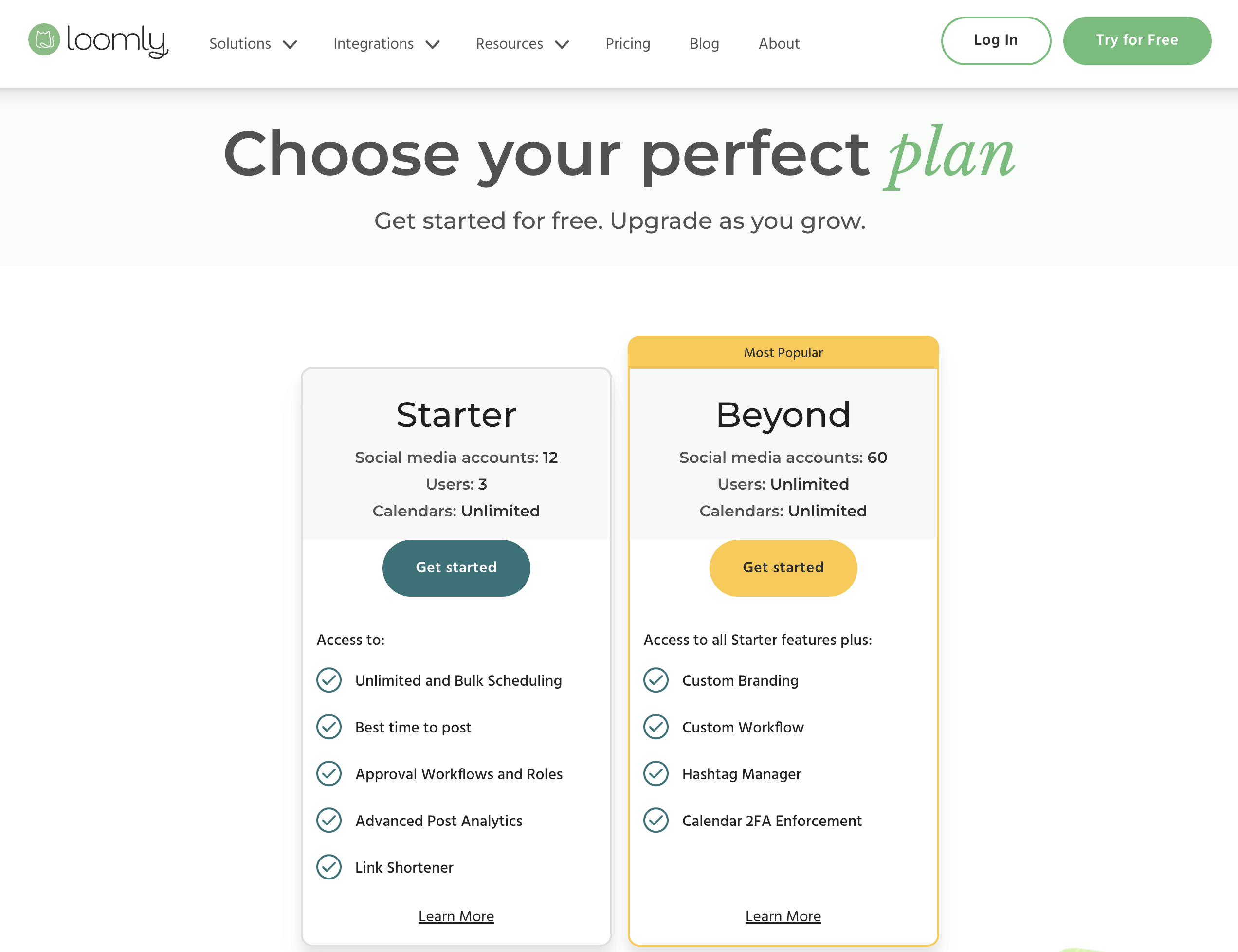
| Plan | Price | Accounts | Users | Key Features |
|---|---|---|---|---|
| Free | $0/mo | 3 | 1 | 5 posts/month, basic calendar |
| Starter | $65/mo | 12 | 3 | Unlimited posts, approval workflows, social inbox |
| Beyond | $332/mo | 60 | Unlimited | Advanced features, custom roles, priority support |
| Enterprise | Custom | Custom | Custom | Custom integrations, dedicated support |
Example costs:
- Solo user testing the platform = $0/month (Free)
- Small team with 12 accounts = $65/month
- Large team with 60 accounts = $332/month
SocialPilot Pricing
SocialPilot uses tiered pricing with add-on options for extra accounts ($4/mo each) and extra users ($5/mo each). See the full SocialPilot pricing breakdown for details.
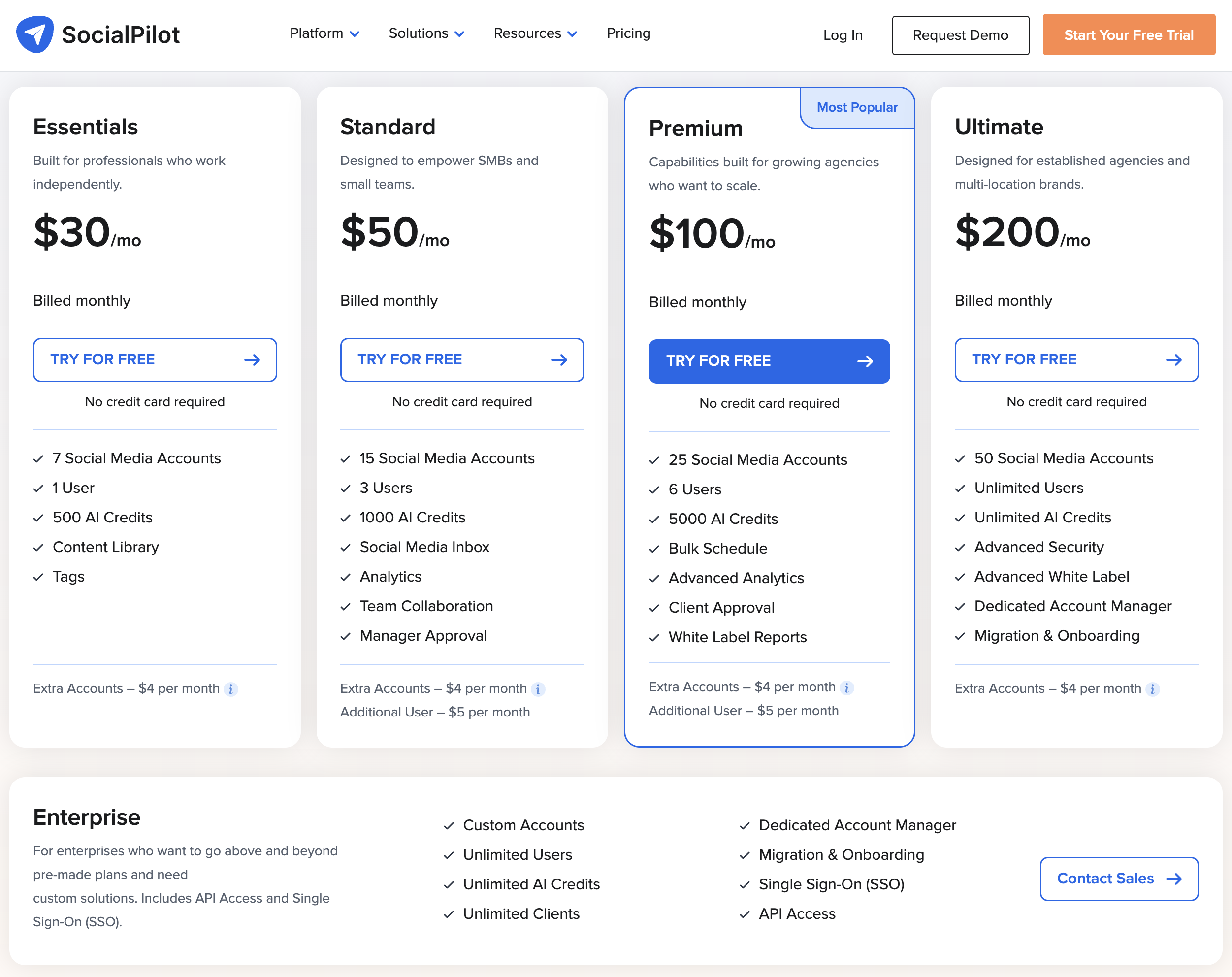
| Plan | Price | Accounts | Users | AI Credits | Key Features |
|---|---|---|---|---|---|
| Essentials | $30/mo | 7 | 1 | 500 | Scheduling, content library, RSS automation |
| Standard | $50/mo | 15 | 3 | 1,000 | Social inbox, client approval, first comment |
| Premium | $100/mo | 25 | 6 | 5,000 | White label reports, review management |
| Ultimate | $200/mo | 50 | Unlimited | Unlimited | All features, priority support |
| Enterprise | Custom | Custom | Custom | Custom | Dedicated account manager |
Example costs:
- 1 user with 7 accounts = $30/month
- 3 users with 15 accounts = $50/month
- 6 users with 25 accounts = $100/month
Price Verdict
SocialPilot is cheaper at every comparable tier. For 3 users with team features, SocialPilot Standard costs $50/month vs Loomly Starter at $65/month — and SocialPilot includes 15 accounts vs Loomly's 12. The gap widens at scale: SocialPilot Ultimate offers 50 accounts with unlimited users for $200/month, while Loomly Beyond costs $332/month for 60 accounts. Loomly's free plan is an advantage for solo users testing the waters, but SocialPilot delivers more value once you start paying.
 PostPlanify
Manage All Your Social Accounts Without the Chaos
Schedule posts, track performance, and collaborate with your team.


Feature Comparison
Scheduling & Publishing
Both tools offer solid scheduling, but SocialPilot is built for volume while Loomly focuses on visual planning.
| Feature | Loomly | SocialPilot |
|---|---|---|
| Unlimited scheduling | Yes (paid plans) | Yes (all plans) |
| Bulk scheduling | Yes | Yes (500 posts via CSV) |
| Best time to post | Yes | No |
| First comment scheduling | No | Yes |
| Content calendar | Yes (visual, drag-and-drop) | Yes |
| Content library | No | Yes |
| RSS automation | No | Yes |
| URL shortener | Yes (with analytics) | Yes |
| Post ideas | Yes | No |
Winner: Tie — with different strengths. Loomly wins for visual content planning with best-time-to-post, post ideas, and a drag-and-drop calendar. SocialPilot wins for volume with 500-post bulk uploads, RSS automation, first comment scheduling, and a content library.
AI Tools
| Feature | Loomly | SocialPilot |
|---|---|---|
| AI caption generation | Yes (AI caption suggestions) | Yes (AI Pilot) |
| AI image generation | No | No |
| Multi-language AI | No | Yes |
| Hashtag suggestions | Yes (hashtag manager) | No |
| Post idea inspiration | Yes | No |
Winner: Tie. Loomly offers hashtag suggestions and post inspiration. SocialPilot offers multi-language caption generation. Neither has AI image generation. The winner depends on whether you value content ideation (Loomly) or multilingual support (SocialPilot).
Analytics & Reporting
| Feature | Loomly | SocialPilot |
|---|---|---|
| Basic analytics | Paid plans | All plans |
| White label reports | No | Yes (Premium+) |
| Link click tracking | Yes (link shortener) | Yes (URL shortener) |
| Client-facing reports | No | Yes (Premium+) |
| Export reports | Yes | Yes (PDF) |
| Review management | No | Yes |
Winner: SocialPilot. White-label reports and client-facing PDF exports give SocialPilot a clear edge for agencies. Loomly's analytics are basic with no white-label option at any tier.
Team Collaboration
| Feature | Loomly | SocialPilot |
|---|---|---|
| Multiple users | Starter (3), Beyond (unlimited) | Standard (3), Ultimate (unlimited) |
| Approval workflows | All paid plans | All plans |
| Custom roles | Beyond plan ($332/mo) | No |
| Client approval | Yes | Yes |
| Per-user cost | Tiered plans | $5/mo per extra user |
| Unlimited users | $332/mo (Beyond) | $200/mo (Ultimate) |
Winner: Tie. Both include approvals on all plans. Loomly offers custom roles on Beyond. SocialPilot offers cheaper unlimited users ($200/mo vs $332/mo). The right choice depends on whether you need role customization (Loomly) or cost-effective scaling (SocialPilot).
Content & Creative Tools
| Feature | Loomly | SocialPilot |
|---|---|---|
| Canva integration | Yes | Yes |
| Google Drive integration | Yes | No |
| Unsplash integration | Yes | No |
| AI image generation | No | No |
| Hashtag manager | Yes | No |
| Content library | No | Yes |
| RSS feeds | No | Yes |
Winner: Loomly for creative integrations. Canva, Google Drive, and Unsplash give Loomly a stronger creative workflow. SocialPilot wins for content sourcing with RSS feeds and a built-in content library.
Platform Support
| Platform | Loomly | SocialPilot |
|---|---|---|
| Yes | Yes | |
| Yes | Yes | |
| X/Twitter | Yes | Yes |
| Yes | Yes | |
| TikTok | Yes | Yes |
| YouTube | Yes | Yes |
| Yes | Yes | |
| Threads | Yes | Yes |
| Google Business | Yes | Yes |
| Bluesky | Yes | Yes |
| Snapchat | Yes | No |
| VK | No | Yes |
Winner: Tie. Both support 11 platforms. Loomly covers Snapchat; SocialPilot covers VK. For most teams, the overlap on major platforms makes this a non-factor.
What Real Users Say
Loomly Reviews
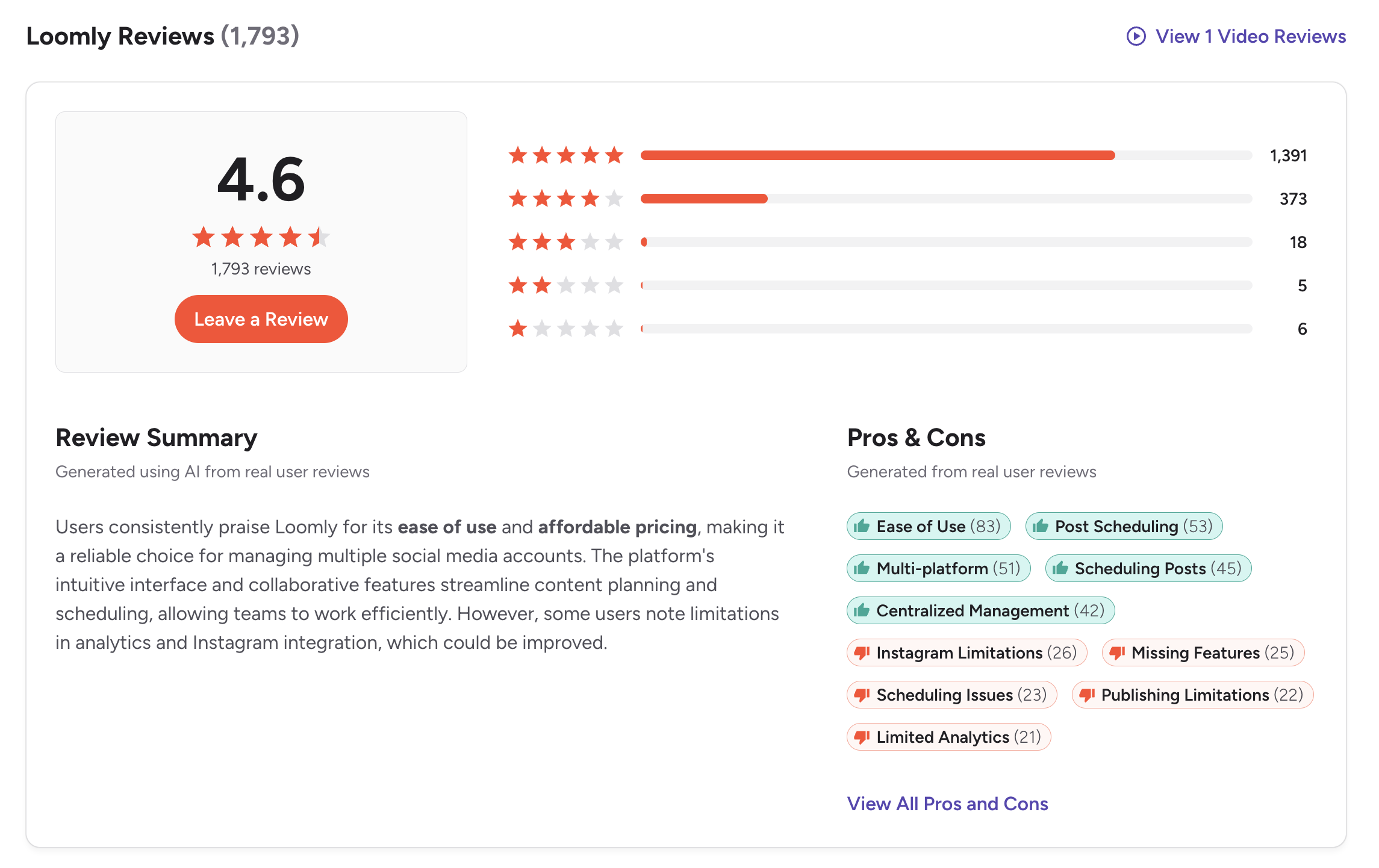
G2: 4.6/5 (1,793 reviews) — A strong G2 rating with a very large review base. Users praise the visual calendar, approval workflows, ease of use, and content organization. Common complaints include the pricing gap between plans and basic analytics.
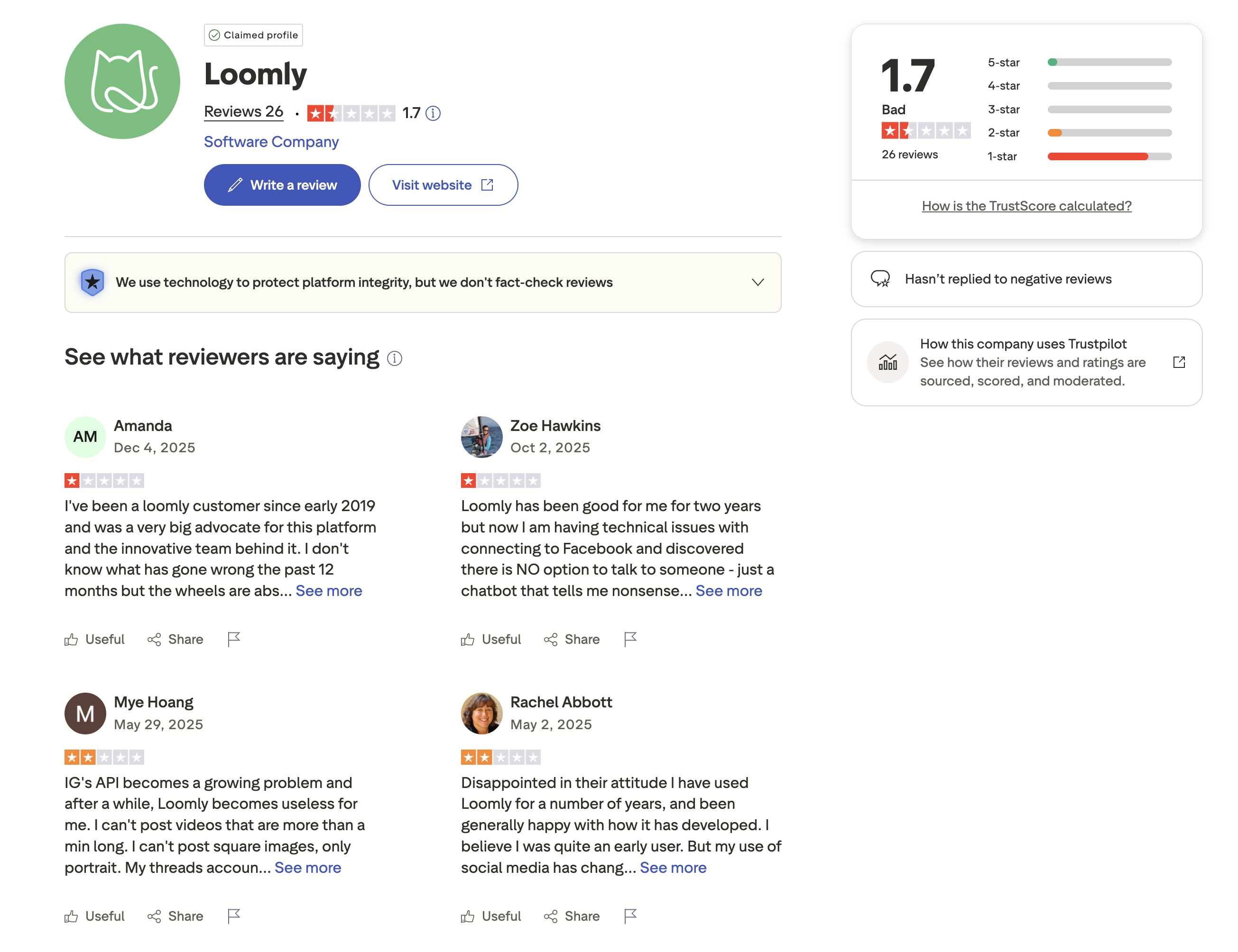
Trustpilot: 1.7/5 (26 reviews) — A concerning Trustpilot score. Negative reviewers report billing issues, difficult cancellation processes, and unresponsive customer support.
SocialPilot Reviews
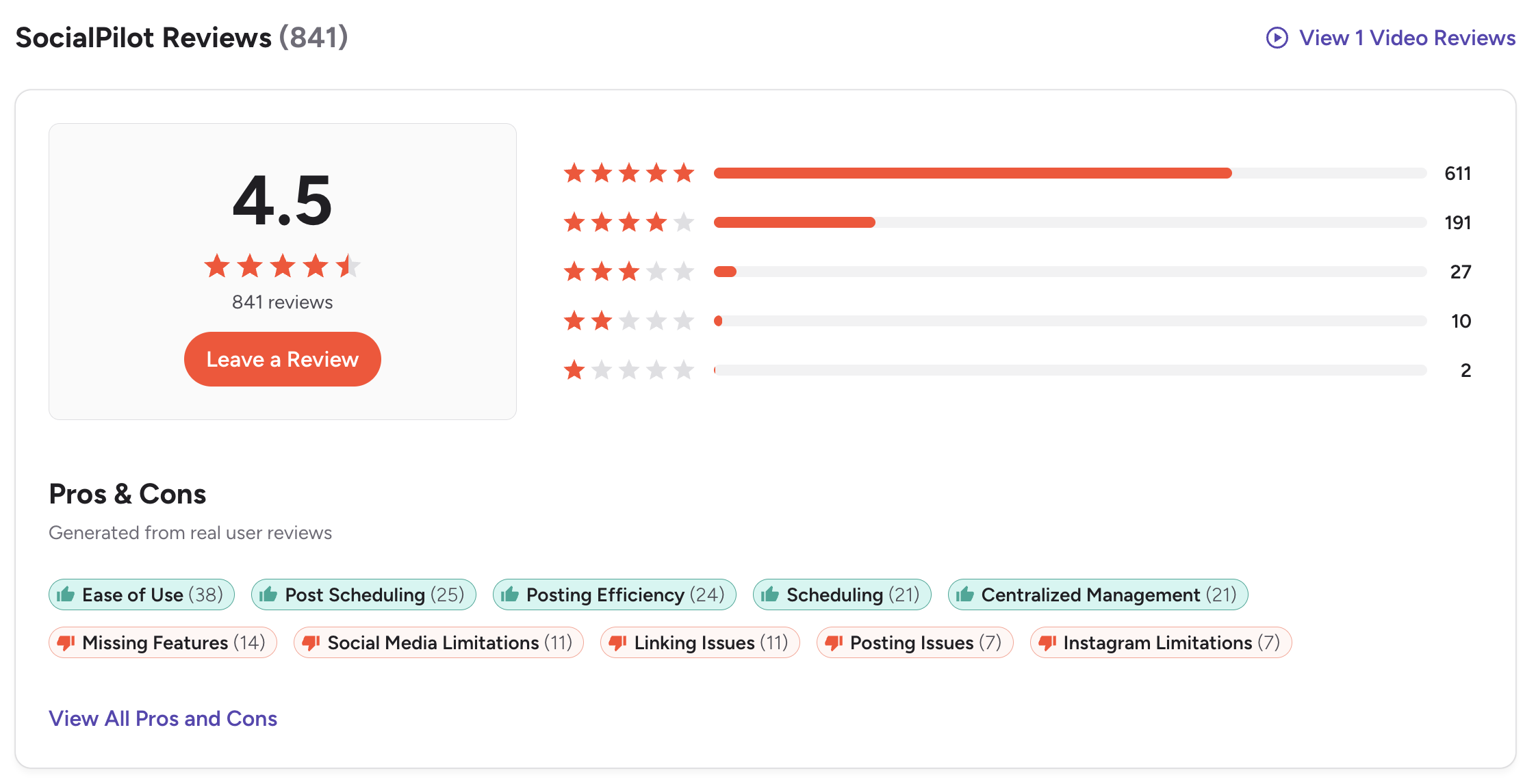
G2: 4.5/5 (841 reviews) — Users highlight the affordable pricing, bulk scheduling power, and easy client management. Complaints focus on limited analytics depth and occasional UI quirks.
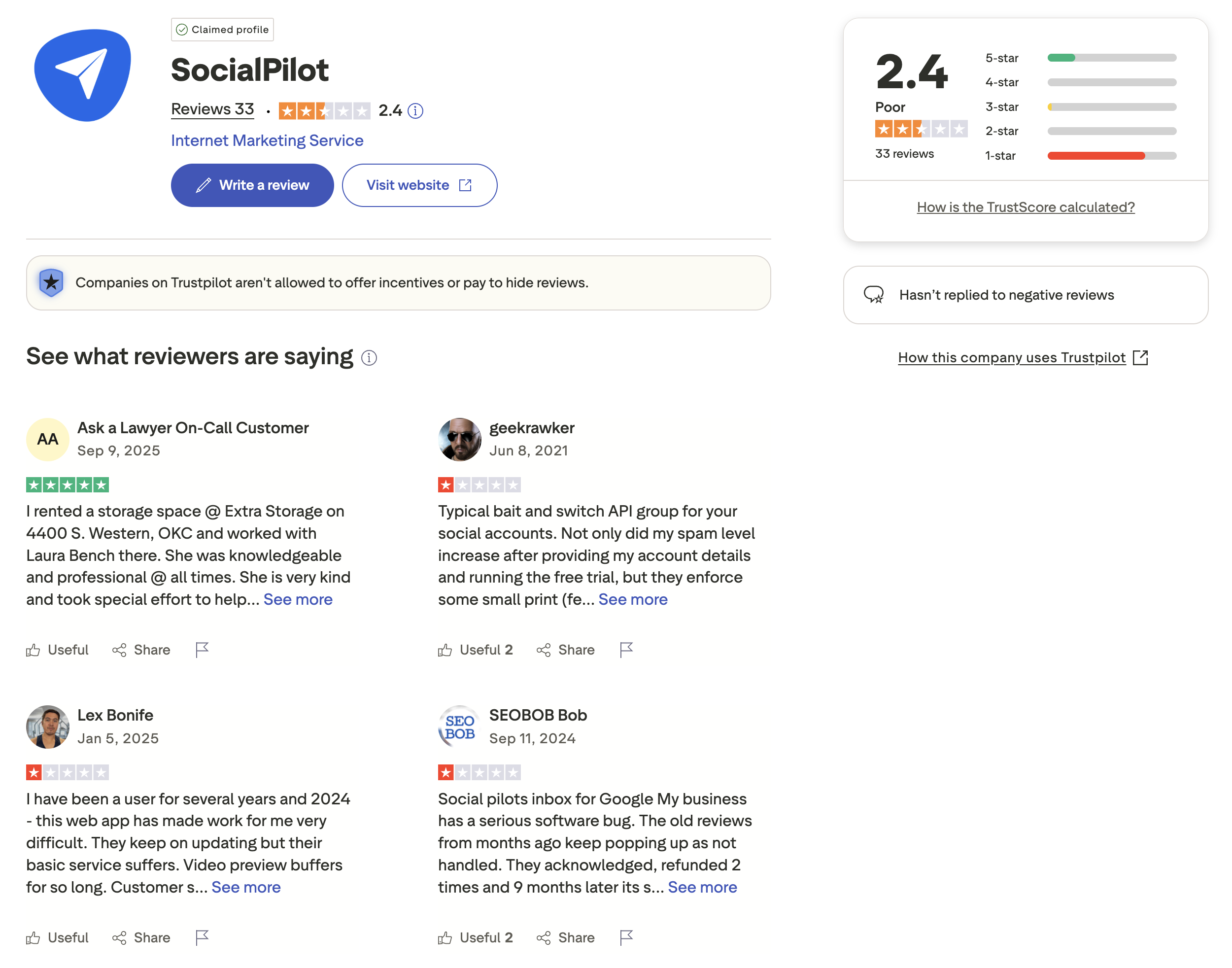
Trustpilot: 2.4/5 (33 reviews) — Mixed Trustpilot rating with complaints about customer support and feature limitations on lower plans.
Review Verdict
Loomly leads on G2 with 4.6/5 (1,793 reviews) vs SocialPilot's 4.5/5 (841 reviews), backed by over 2x the review volume. On Trustpilot, SocialPilot scores slightly higher at 2.4/5 (33 reviews) vs Loomly's 1.7/5 (26 reviews) — though both scores are low. The G2/Trustpilot gap on both tools suggests that satisfied users leave G2 reviews while frustrated users turn to Trustpilot. Loomly's larger G2 base gives it a slight edge in overall user confidence.
PostPlanifyManage All Your Social Accounts Without the Chaos
Schedule posts, track performance, and collaborate with your team.
Who Should Use Loomly?
If Loomly is on your shortlist, you may also want to see our top alternatives to Loomly before committing. Also compare Loomly with Buffer, Hootsuite, Sprout Social, and CoSchedule.
Loomly is the better choice if you:
- Need approval workflows on every paid plan with a visual calendar interface
- Want Canva, Google Drive, and Unsplash integrations for creative content creation
- Prefer post idea suggestions and a hashtag manager for content inspiration
- Need Snapchat support (SocialPilot does not cover it)
- Want a free plan to test the platform before committing
- Are a small-to-mid size marketing team that values visual planning over bulk volume
Who Should Use SocialPilot?
If SocialPilot is on your shortlist, you may also want to see our top alternatives to SocialPilot before committing. Also compare SocialPilot with Buffer, Hootsuite, and Agorapulse.
SocialPilot is the better choice if you:
- Are an agency managing dozens of client accounts on a budget
- Need bulk scheduling of 500+ posts via CSV upload
- Want white-label reports to deliver branded analytics to clients
- Need multi-language AI for global content creation
- Want RSS automation and a content library for sourcing and organizing posts
- Need affordable unlimited users at $200/month (vs Loomly's $332/month)
Team Approvals and Agency Power Combined
Loomly's approval workflows and SocialPilot's agency tools — you shouldn't have to choose. PostPlanify includes approvals, AI tools, and 25 accounts at $99/mo flat.

| Feature | Loomly | SocialPilot | PostPlanify |
|---|---|---|---|
| Starting Price | $65/mo (Starter) | $30/mo | $29/mo flat |
| Max Accounts | $332/mo (60 accounts) | $200/mo (50 accounts) | 25 accounts ($99/mo Premium) |
| Max Team Members | $332/mo (Beyond) | $200/mo (Ultimate) | 5 members ($99/mo Premium) |
| AI Caption Generation | Yes | Yes (AI Pilot) | Yes |
| AI Image Generation | No | No | Yes |
| Canva Integration | Yes | Yes | Yes |
| Google Drive Import | Yes | No | Yes |
| Approval Workflows | All paid plans | All plans | $99/mo (Premium) |
| White Label Reports | No | $100/mo (Premium) | Planned |
| First Comment Scheduling | No | Yes | Yes (Growth+) |
| Social Inbox | Yes | Yes (Standard+) | Yes |
| Platforms Supported | 11 | 11 | 10 |
| Unlimited Scheduling | Paid plans | All plans | All paid plans |
PostPlanify starts at $29/month for 5 accounts with unlimited scheduling and AI tools included. Analytics are included from the Growth plan ($49/month). The Premium plan at $99/month adds 25 accounts, 5 team members, and approval workflows — features that cost $332/month on Loomly Beyond or $200/month on SocialPilot Ultimate. See all plans on the PostPlanify pricing page.
Approvals + agency tools, one price — try free

Related Guides
- Manage Multiple Social Media Accounts
- Content Batching Guide
- How to Automate Social Media Posts
- Best Loomly Alternatives
- Best SocialPilot Alternatives
FAQ
Is SocialPilot cheaper than Loomly?
Yes. SocialPilot starts at $30/month for 1 user and 7 accounts, while Loomly's first paid plan (Starter) costs $65/month for 3 users and 12 accounts. At scale, SocialPilot Ultimate offers unlimited users and 50 accounts for $200/month, while Loomly Beyond costs $332/month for 60 accounts with unlimited users.
Does Loomly have a free plan?
Yes. Loomly offers a free plan with 3 social accounts, 1 user, and 5 posts per month. SocialPilot does not have a free plan but offers a 14-day free trial with access to all features.
Which has better approval workflows?
Both include approval workflows on all paid plans — a rarity among social media tools. Loomly offers custom roles on the Beyond plan ($332/month). SocialPilot includes client approval workflows with white-label reports on Premium ($100/month). For budget-conscious teams, SocialPilot provides more collaboration value per dollar.
Does SocialPilot support Snapchat?
No. SocialPilot does not support Snapchat. Loomly supports Snapchat along with 10 other platforms. If Snapchat is part of your strategy, Loomly is the better choice.
Which has better white-label features?
SocialPilot wins for white-label capabilities. It offers white-label reports on the Premium plan ($100/month) with branded PDF exports for client delivery. Loomly does not offer white-label reporting at any tier.
Which has more AI features?
Both tools have basic AI caption generation, but SocialPilot's AI Pilot offers multi-language support with a credit-based system (500 to unlimited credits depending on plan). Loomly focuses on hashtag suggestions and post idea inspiration. Neither offers AI image generation — for that, consider PostPlanify.
Can I switch from Loomly to SocialPilot?
Yes. Reconnect your social accounts to SocialPilot and begin scheduling. SocialPilot's 14-day free trial lets you test before committing. You will lose Loomly's Google Drive/Unsplash integrations and Snapchat support.
Which has better user reviews?
Loomly leads on G2 with 4.6/5 (1,793 reviews) vs SocialPilot's 4.5/5 (841 reviews). On Trustpilot, SocialPilot scores higher at 2.4/5 vs Loomly's 1.7/5. Loomly's larger G2 base suggests broader satisfaction.







