
Buffer and Loomly both target simplicity-minded social media managers, but their pricing models and team features pull them in different directions. Buffer charges per channel and is built for solo creators. Loomly bundles accounts and users into flat tiers and adds approval workflows for teams. If you're choosing between Buffer or Loomly for your social media workflow, the right pick depends on your team size and budget.
Two tools built for simplicity — but at very different price points and with very different team features. In this 2026 comparison, we break down what each actually delivers for creators, small teams, and growing brands. Need a wider view? Browse all social media scheduling alternatives.
This comparison is based on 2,935 combined user reviews across G2 and Trustpilot, current pricing pages, and hands-on testing of both platforms as of February 2026.
Buffer vs Loomly at a Glance
Here's a quick side-by-side overview before we dive deeper:
| Category | Buffer | Loomly |
|---|---|---|
| Starting Price | $6/mo per channel | $65/mo (Starter) |
| Free Plan | Yes (3 channels) | Yes (3 accounts, 5 posts/mo) |
| Platforms Supported | 11 | 11 |
| Unlimited Scheduling | Yes (paid plans) | Yes (paid plans) |
| AI Tools | AI Assistant (captions) | AI caption suggestions |
| AI Image Generation | No | No |
| Bulk Scheduling | CSV import | Yes |
| Team Collaboration | Team plan ($12/mo/channel) | Starter+ (3 users) |
| Approval Workflows | Team plan only | Starter+ |
| Analytics | Basic to Advanced | Basic |
| G2 Rating | 4.3/5 (1,023 reviews) | 4.6/5 (1,793 reviews) |
| Trustpilot Rating | 2.1/5 (93 reviews) | 1.7/5 (26 reviews) |
| Best For | Solo creators, freelancers | Small-mid teams needing approval workflows |
Buffer Overview

Buffer is one of the longest-running social media scheduling tools, launched in 2010. It focuses on a clean, minimal interface for scheduling posts, managing a content calendar, and viewing analytics.
Buffer supports 11 platforms: Instagram, Facebook, LinkedIn, Pinterest, X/Twitter, TikTok, YouTube, Google Business Profile, Threads, Bluesky, and Mastodon.
Key features:
- Post scheduling with queue management
- AI Assistant for generating captions and post ideas
- Hashtag manager and first comment scheduling
- Basic community inbox
- Start Page (link-in-bio builder)
- Content calendar
Buffer is popular among solo creators and freelancers who want a no-frills scheduling experience without a steep learning curve. For a deeper look, see what users say about Buffer on G2 and Trustpilot.
Loomly Overview

Loomly is a social media management platform designed around visual content calendars and team approval workflows. It positions itself as a collaborative content planning tool for marketing teams.
Loomly supports 11 platforms: Facebook, Instagram, X/Twitter, LinkedIn, Pinterest, Google Business Profile, YouTube, TikTok, Snapchat, Threads, and Bluesky.
Key features:
- Visual content calendar with drag-and-drop
- Approval workflows with custom roles
- AI caption suggestions
- Bulk scheduling
- Social inbox
- Canva, Google Drive, and Unsplash integration
- Link shortener with analytics
- Best time to post recommendations
- Post ideas and trending content suggestions
- Hashtag manager
Loomly is best suited for small to mid-size businesses and marketing teams that need structured content planning with built-in approval workflows. For more details, see what users say about Loomly.
Pricing Comparison
Pricing is where Buffer and Loomly diverge most. They use completely different pricing models — per-channel vs tiered flat pricing. For context on how these models compare across the industry, see our best social media scheduler guide.
Buffer Pricing
Buffer uses per-channel pricing. Each social account you connect adds to your monthly cost. We break this down further in our Buffer pricing guide.
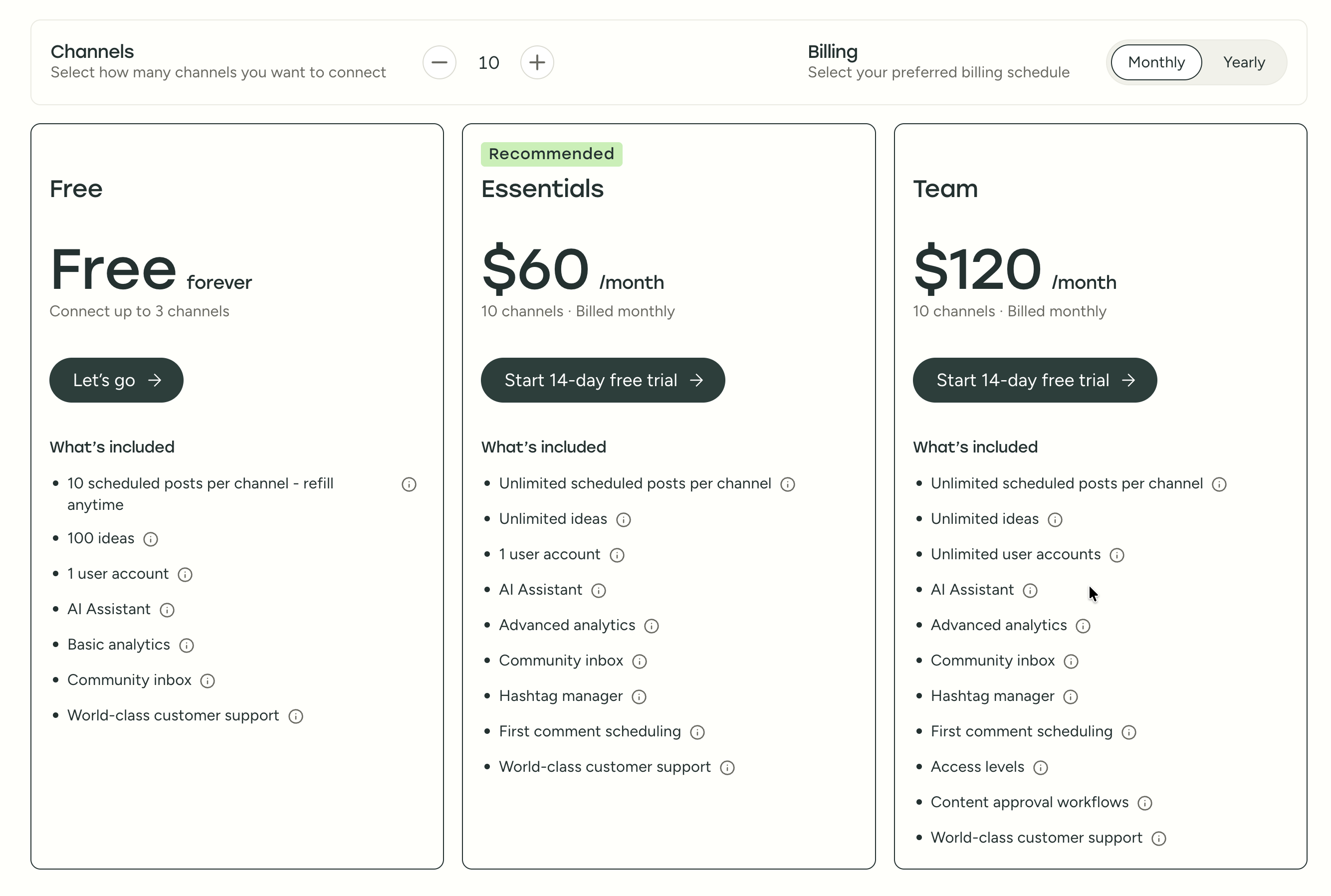
| Plan | Price | Channels | Users | Key Features |
|---|---|---|---|---|
| Free | $0/mo | 3 | 1 | 10 posts/channel, basic analytics |
| Essentials | $6/mo per channel | Unlimited | 1 | Unlimited posts, advanced analytics, hashtag manager |
| Team | $12/mo per channel | Unlimited | Unlimited | Approval workflows, permissions, team collaboration |
Example costs:
- 5 channels on Essentials = $30/month
- 10 channels on Team = $120/month
- 25 channels on Team = $300/month
Loomly Pricing
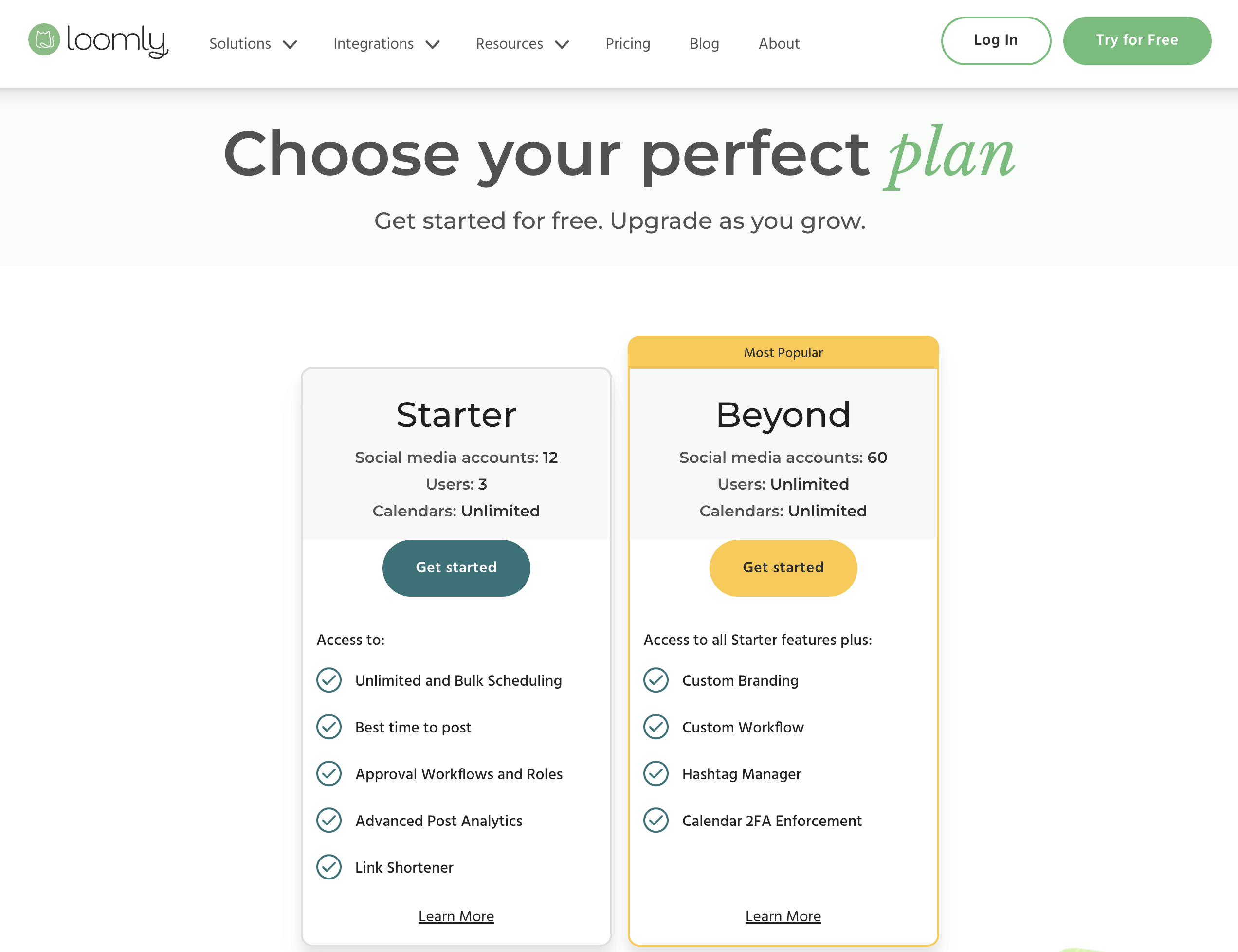
Loomly uses tiered flat pricing that bundles accounts and users together. Annual billing saves roughly 25%.
| Plan | Price (Monthly) | Social Accounts | Users | Key Features |
|---|---|---|---|---|
| Free | $0/mo | 3 | 1 | 5 posts/month |
| Starter | $65/mo | 12 | 3 | Unlimited posts, approval workflows, AI captions |
| Beyond | $332/mo | 60 | Unlimited | Advanced features, custom roles, branded reports |
| Enterprise | Custom | Custom | Custom | Dedicated support, SSO, custom integrations |
Example costs:
- Small team (12 accounts) = $65/month (Starter)
- Growing team (60 accounts) = $332/month (Beyond)
- The jump from Starter to Beyond is a $267/month cliff
Price Verdict
It depends on your scale. Buffer starts cheaper for solo users — $6/month per channel vs Loomly's $65/month Starter. At 10 channels on Buffer's Team plan ($120/month), you're still paying less than Loomly's Starter, but without the same team features. However, Loomly's biggest pricing problem is the $267 gap between Starter ($65) and Beyond ($332) — there's no middle option. Buffer's per-channel model scales more gradually, but costs pile up quickly past 15-20 channels.
What You'll Actually Pay
Three real-world scenarios to cut through the pricing math:
Freelancer managing 5 client accounts: Buffer Essentials at $6/channel = $30/month. Loomly forces you into the $65/month Starter plan, which covers 12 accounts but only 1 user slot is useful for a solo freelancer. Buffer is 54% cheaper in this scenario, and if you only need scheduling without approval workflows, it's the clear pick.
Small marketing team (3 people, 10 accounts): Buffer Team at $12/channel = $120/month. Loomly Starter covers 12 accounts and 3 users for $65/month — nearly half the cost with approval workflows included. Loomly wins on value here, but the ceiling is low: adding a fourth team member forces the jump to $332/month.
Growing agency (5+ people, 20 accounts): Buffer Team = $240/month. Loomly Beyond = $332/month (Starter's 3-user cap doesn't work for 5 people). Both are expensive, and neither includes AI image generation or advanced analytics. This is where flat-rate tools like PostPlanify — which covers 25 accounts with 5 team members and multi-approver workflows at $99/month — start to make sense.
 PostPlanify
Manage All Your Social Accounts Without the Chaos
Schedule posts, track performance, and collaborate with your team.


Feature Comparison
Scheduling & Publishing
| Feature | Buffer | Loomly |
|---|---|---|
| Unlimited scheduling | Yes (paid plans) | Yes (paid plans) |
| Bulk scheduling | CSV import | Yes |
| Best time to post | No | Yes |
| First comment scheduling | Yes (Essentials+) | No |
| Content calendar | Yes | Yes (visual, drag-and-drop) |
| Post queue management | Yes | No |
| Draft saving | Yes | Yes |
| Post ideas/trends | No | Yes |
Winner: Loomly. Loomly offers best-time-to-post recommendations, post ideas, and a more visual content calendar with drag-and-drop reordering. Buffer counters with first comment scheduling (useful for Instagram hashtag strategies) and queue management, but Loomly's scheduling toolkit is broader overall. For a deeper dive into scheduling workflows, see our guide on how to schedule social media posts effectively.
AI Tools
| Feature | Buffer | Loomly |
|---|---|---|
| AI caption generation | Yes (AI Assistant) | Yes (AI suggestions) |
| AI image generation | No | No |
| AI post ideas | Yes | No |
| AI content rewriting | Yes | No |
Winner: Buffer. Buffer's AI Assistant covers caption generation, post idea brainstorming, and content rewriting — three distinct use cases from a single tool. Loomly's AI is limited to caption suggestions with no rewriting or idea generation capabilities. Neither tool offers AI image generation, which is a significant gap for teams that want to create visuals without leaving their scheduling platform.
Analytics & Reporting
| Feature | Buffer | Loomly |
|---|---|---|
| Basic analytics | All plans | All paid plans |
| Advanced analytics | Essentials+ | Beyond only |
| Custom reports | No | No |
| Export reports | Yes | Beyond only |
| Competitor benchmarking | No | No |
Winner: Buffer. Buffer provides analytics starting from the Essentials plan at $6/channel, making performance data accessible without a large upfront cost. Loomly gates advanced reporting and report exports behind the $332/month Beyond plan — a steep ask for teams that just want to track post performance and engagement trends. Neither tool offers competitor benchmarking.
Team Collaboration
| Feature | Buffer | Loomly |
|---|---|---|
| Multiple users | Team plan | Starter+ (3 users) |
| Approval workflows | Team plan | Starter+ |
| Custom roles | Team plan | Beyond only |
| User permissions | Team plan | Starter+ |
| Saved replies | No | No |
Winner: Loomly. Loomly includes approval workflows, user permissions, and team collaboration on its $65/month Starter plan for up to 3 users — no per-channel math required. Buffer requires the Team plan at $12/channel/month, which costs $120/month for just 10 channels. For teams where content review and sign-off is non-negotiable, Loomly's approach is more accessible at a lower entry point. Learn more about setting up an efficient social media approval workflow.
Content & Creative Tools
| Feature | Buffer | Loomly |
|---|---|---|
| Canva integration | No | Yes |
| Google Drive import | No | Yes |
| Unsplash integration | No | Yes |
| Link shortener | No | Yes (with analytics) |
| Hashtag manager | Yes | Yes |
| Link-in-bio builder | Yes (Start Page) | No |
Winner: Loomly. Loomly integrates with Canva, Google Drive, and Unsplash directly in the post composer, which keeps your creative workflow inside one tool. It also includes a link shortener with click analytics for tracking traffic from social posts. Buffer has a link-in-bio builder (Start Page) and a hashtag manager, but lacks the creative integrations that Loomly offers. If Canva is central to your design workflow, see our guide on using Canva for social media.
Platform Support
| Platform | Buffer | Loomly |
|---|---|---|
| Yes | Yes | |
| Yes | Yes | |
| X/Twitter | Yes | Yes |
| Yes | Yes | |
| TikTok | Yes | Yes |
| YouTube | Yes | Yes |
| Yes | Yes | |
| Threads | Yes | Yes |
| Bluesky | Yes | Yes |
| Google Business | Yes | Yes |
| Mastodon | Yes | No |
| Snapchat | No | Yes |
Winner: Tie. Both support 11 platforms with significant overlap. Buffer covers Mastodon; Loomly covers Snapchat. The remaining 10 platforms are shared by both. Choose based on which niche platform matters to you.
What Real Users Say
Buffer Reviews
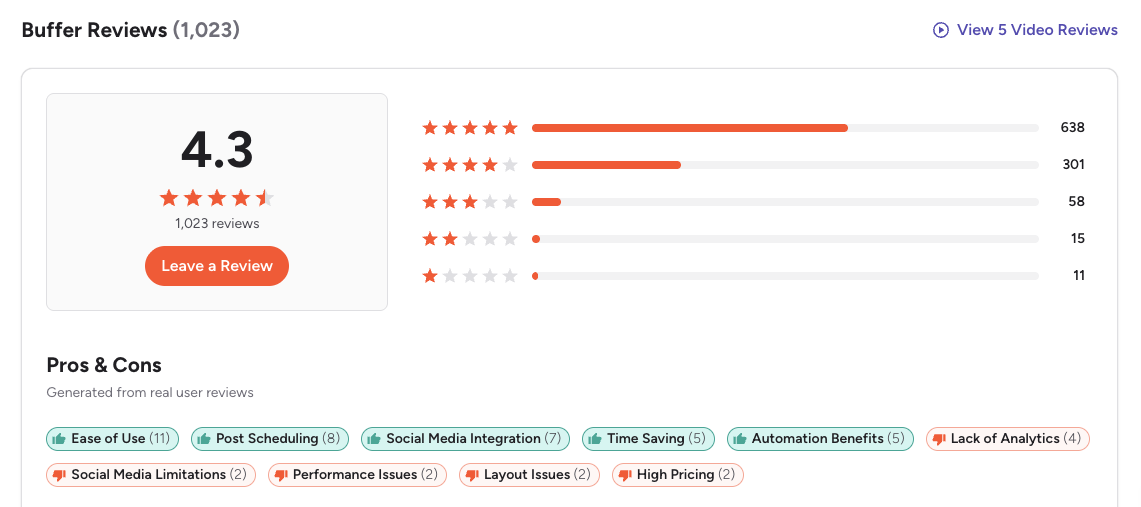
G2: 4.3/5 (1,023 reviews) — Users consistently praise Buffer for being the easiest scheduling tool to learn. The most common positive themes are the clean interface, simple queue-based workflow, and reliable publishing. On the negative side, G2 reviewers frequently mention that analytics feel basic compared to competitors, per-channel pricing adds up quickly for agencies, and the UI hasn't evolved much in recent years.
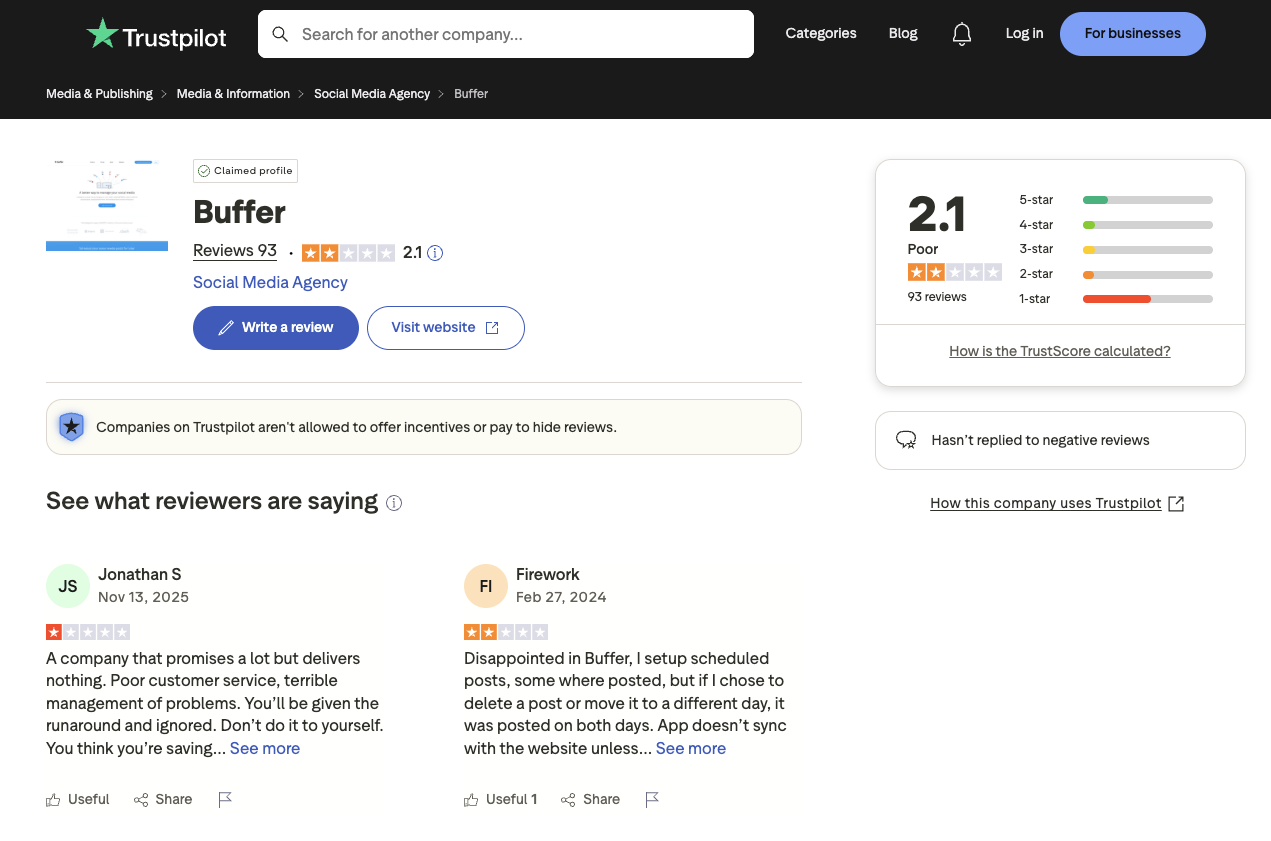
Trustpilot: 2.1/5 (93 reviews) — A notably lower rating, driven by complaints about customer support response times, scheduled posts failing to publish or duplicating, and sync issues with connected social accounts.
Loomly Reviews
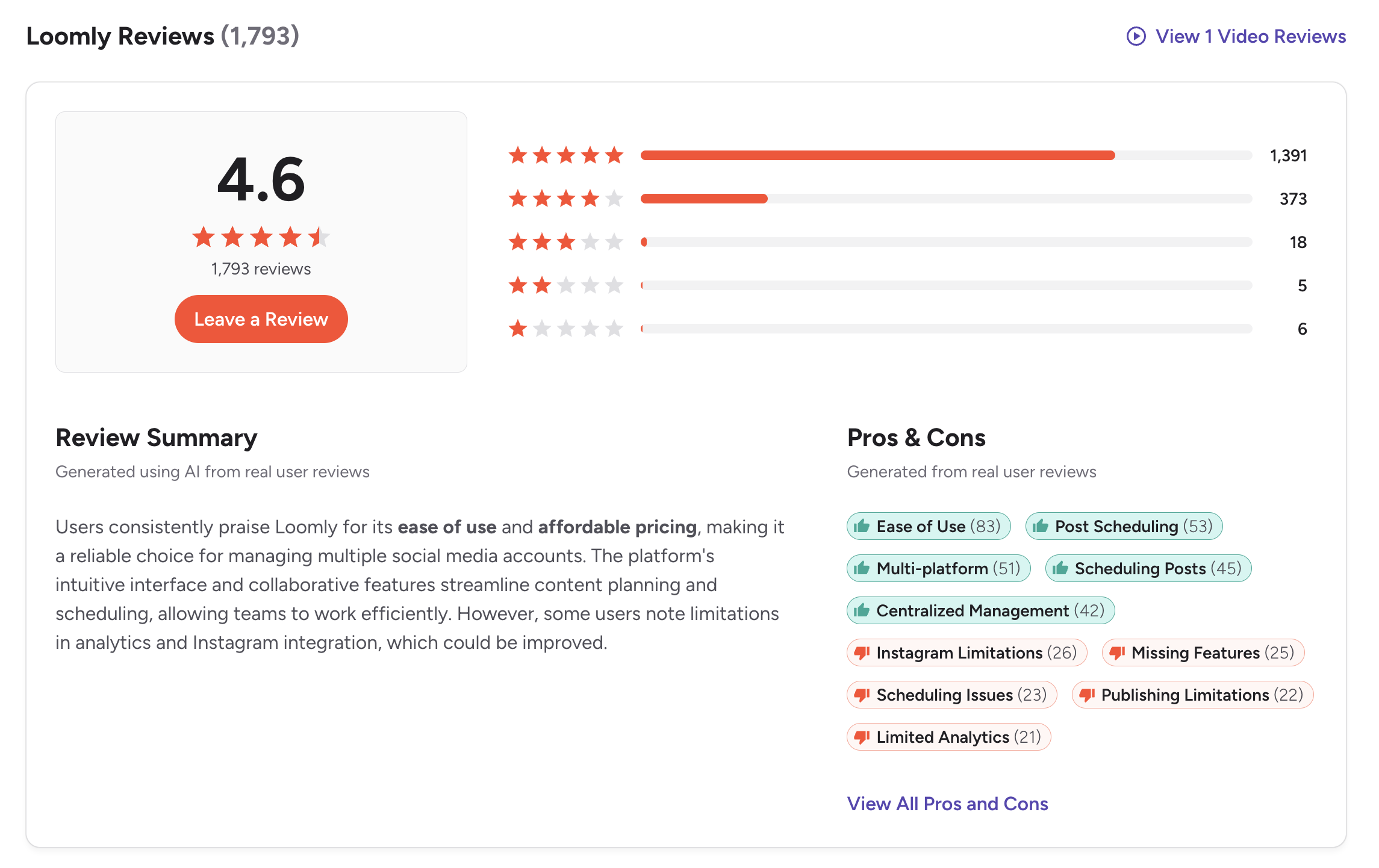
G2: 4.6/5 (1,793 reviews) — Users consistently praise Loomly for ease of use (83 mentions), post scheduling (53 mentions), multi-platform support (51 mentions), and centralized management (42 mentions). The most commonly cited cons include Instagram limitations (26 mentions), missing features (25 mentions), scheduling issues (23 mentions), and limited analytics (21 mentions). One featured reviewer titled their review "Great Tagging Feature, But Clunky Editor and Poor Management Led Me to Leave," criticizing the clunky editor, media manager, and analytics.
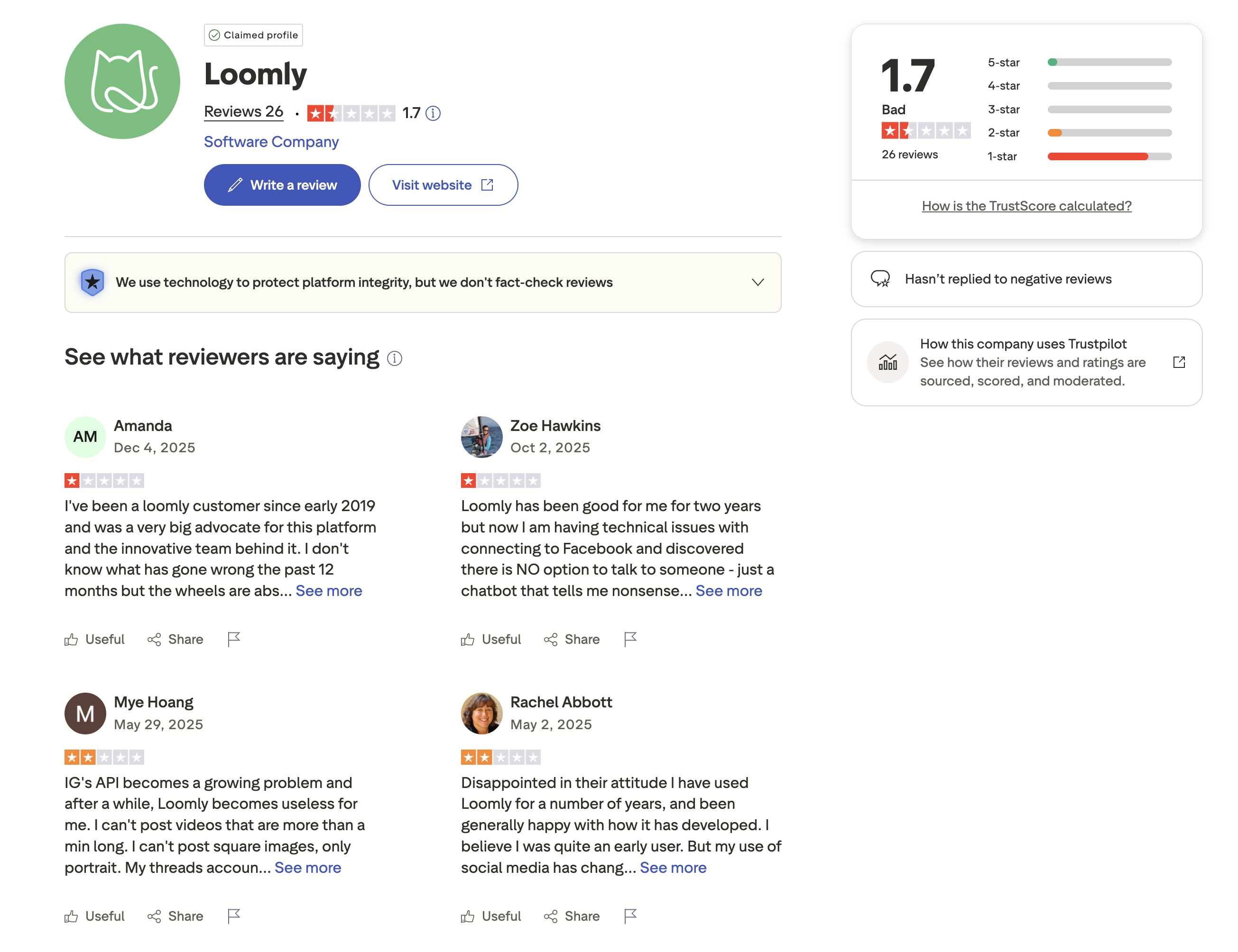
Trustpilot: 1.7/5 (26 reviews) — Very negative, driven almost entirely by backlash from Loomly's 2025 pricing restructure. Multiple reviewers describe being long-time advocates who experienced declining quality. One customer since 2019 noted that "the wheels are absolutely falling off," while another wrote that "there is NO option to talk to someone — just a chatbot that tells me nonsense." Recurring themes include technical issues with Facebook and Instagram connections, Instagram API limitations preventing video and image uploads, and the inability to reach a human support agent.
Review Verdict
Loomly leads on G2 with a 4.6/5 rating from a larger review base (1,793 vs 1,023) compared to Buffer's 4.3/5. However, Loomly's Trustpilot score is alarmingly low at 1.7/5 — worse than Buffer's already-poor 2.1/5. The Trustpilot gap reflects Loomly's controversial 2025 pricing restructure, which angered long-time customers. The small sample size (26 reviews) means this may not represent the full picture, but it's a red flag worth noting.
Review counts and ratings are based on 2,935 combined reviews across G2 and Trustpilot as of February 2026 and are updated periodically. For deeper analysis, see our full Buffer reviews and Loomly reviews breakdowns.
PostPlanifyManage All Your Social Accounts Without the Chaos
Schedule posts, track performance, and collaborate with your team.
Who Should Use Buffer?
Buffer works best when you value simplicity over depth. If you manage a personal brand or a handful of social accounts and just want to queue posts without learning a complex dashboard, Buffer's clean interface gets you publishing in minutes. Its per-channel pricing keeps costs low when you only manage 3-5 accounts, and the free plan is genuinely useful for light publishing. If Buffer sounds right for you but you want to explore other options first, check out our best alternatives to Buffer. You can also see how Buffer compares to Hootsuite, Later, Publer, SocialPilot, and Metricool.
In this Buffer vs Loomly breakdown, Buffer is the better choice if you:
- Are a solo creator or freelancer on a tight budget
- Need a simple, clean interface with minimal learning curve
- Want per-channel pricing that starts at $6/month
- Value first comment scheduling and queue management
- Don't need team approval workflows or visual content calendars
- Want support for Mastodon (which Loomly doesn't cover)
If you're a small business evaluating your options, our guide to social media management for small business can help you decide what features matter most.
Who Should Use Loomly?
Loomly shines when your workflow depends on team review and sign-off. If you run a marketing team where every post needs approval before it goes live, Loomly's built-in approval workflows on the $65/month Starter plan eliminate the need for separate review tools or email chains. Its visual content calendar, creative integrations, and post idea suggestions make it a genuine content planning hub — not just a scheduler. If Loomly is on your shortlist, you may also want to see our top alternatives to Loomly before committing. Also compare Loomly with Hootsuite, Sprout Social, SocialBee, and Later.
When weighing Buffer or Loomly for team use, Loomly is the better choice if you:
- Are a small to mid-size marketing team that needs content approvals
- Want a visual content calendar with drag-and-drop scheduling
- Need Canva, Google Drive, and Unsplash integrations in your workflow
- Value best-time-to-post suggestions and post idea inspiration
- Can work within the Starter plan's limits (12 accounts, 3 users)
- Need support for Snapchat (which Buffer doesn't cover)
For tips on building a structured content plan, check out our guide to creating a social media content calendar.
Final Verdict
Buffer is the better choice if you are a solo creator or freelancer who wants no-frills scheduling with a clean interface and per-channel pricing that starts low.
Loomly is the better choice if you run a small to mid-size marketing team that relies on visual content calendars, built-in approval workflows, and creative integrations like Canva and Unsplash.
The gap between them is less about quality and more about who they were built for. Buffer was designed for individual publishers who want to queue content and move on. Loomly was designed for teams that need structure — calendars, approvals, roles. The problem is that both have scaling pain points: Buffer's per-channel costs multiply past 10 accounts, and Loomly's $267 pricing cliff between Starter and Beyond punishes teams that outgrow 3 users. Neither includes AI image generation, and both have limited analytics compared to newer platforms. That's the gap where flat-rate tools like PostPlanify fit — combining intuitive scheduling with analytics, AI-powered content creation, and team collaboration in one plan.
For most small teams and growing brands, Loomly offers stronger collaboration features, but its pricing cliff between Starter and Beyond is a serious concern. Buffer scales more gradually but lacks team depth. If neither tool fully meets your needs, PostPlanify offers flat pricing with unlimited scheduling, AI image generation, and no per-channel fees — see how it compares.
Flat Pricing That Scales Without the Math
Buffer charges per channel — manageable at first, but costs multiply fast. Loomly's Starter plan is $65/month, and the next step up is $332/month — a $267 cliff. PostPlanify avoids both traps with flat monthly pricing and no per-channel or per-seat fees.

| Feature | Buffer | Loomly | PostPlanify |
|---|---|---|---|
| Starting Price | $6/mo/channel | $65/mo | $29/mo flat |
| Analytics | Basic to Advanced | Basic | Advanced (10 platforms, best time to post) |
| Social Inbox | Basic | Yes | Yes (AI-assisted replies) |
| AI Caption Generation | Yes | Yes | Yes (vision-powered) |
| AI Image Generation | No | No | Yes (7 models) |
| Content Calendar | Yes | Yes (visual) | Yes (drag-and-drop, bulk scheduling) |
| Team Collaboration | $12/mo/channel | $65/mo (3 users) | 5 members (Premium), unlimited (Enterprise) |
| Approval Workflows | Team plan | Starter+ | Premium $99/mo (multi-approver) |
| White-Label PDF Reports | No | Beyond only | Yes (Premium+ $99/mo) |
| Canva Integration | No | Yes | Yes |
| Google Drive Import | No | Yes | Yes |
| Link in Bio | Yes (Start Page) | No | Yes (8 themes, click analytics) |
| Best Time to Post | No | Yes | Yes |
| Platforms Supported | 11 | 11 | 10 |
| Unlimited Scheduling | Paid plans | Paid plans | Growth+ ($49/mo) |
PostPlanify starts at $29/month (Starter, 5 social accounts) with 200 posts/mo and AI tools included. The Growth plan ($49/month, 10 accounts) adds analytics across all 10 platforms, social inbox with AI-assisted replies, best time to post suggestions, 1st comments & threads, bulk scheduling, and unlimited scheduled posts. The Premium plan ($99/month, 25 accounts) includes white-label PDF reports, multi-approver workflows, 5 team members, shared calendars, and roles & permissions. The Enterprise plan (custom pricing) adds custom social accounts, unlimited team members, and 1:1 onboarding. All plans include a 7-day free trial (credit card required). See all plans on the PostPlanify pricing page.
Skip the pricing math — try PostPlanify free

Making the Switch
Switching from Buffer to Loomly (or vice versa) is straightforward — reconnect your social accounts, set up your posting schedule, and you're live. Neither tool locks you in with long-term contracts, and both offer monthly billing. Loomly's visual calendar and drag-and-drop interface help you reorganize content quickly after migrating, and its post idea suggestions can fill any scheduling gaps during the transition. If you're moving to PostPlanify, the process is the same: connect your accounts, import your content calendar, and start scheduling. PostPlanify's 7-day free trial lets you test the full platform before committing.
Related Guides
- PostPlanify Pricing Breakdown
- Buffer Pricing Guide
- Loomly Pricing Guide
- Buffer Reviews
- Loomly Reviews
- Best Buffer Alternatives
- Best Loomly Alternatives
- Best Social Media Management Platform
- Social Media Scheduling Tools
- Social Media Analytics for Business
- How to Automate Social Media Posts
- How to Schedule Social Media Posts
- Social Media Content Calendar Examples
PostPlanifyManage All Your Social Accounts Without the Chaos
Schedule posts, track performance, and collaborate with your team.
FAQ
Is Buffer cheaper than Loomly?
For solo users, yes. Buffer's free plan offers 3 channels with 10 posts each, and paid plans start at $6/month per channel. Loomly's free plan is more limited (5 posts/month total), and the first paid tier is $65/month. For a single user managing 5 channels, Buffer costs $30/month vs Loomly's $65/month.
Does Loomly have a free plan?
Yes. Loomly offers a free plan with 3 social accounts, 1 user, and 5 posts per month. While it is useful for exploring the platform's interface and approval workflows, the 5-post cap makes it impractical for any real publishing. Buffer's free plan is slightly more generous with 3 channels and 10 posts per channel. If you need a truly usable free tier for day-to-day scheduling, Buffer is the better starting point.
Which has better AI tools — Buffer or Loomly?
Buffer's AI Assistant is more versatile, offering caption generation, post ideas, and content rewriting. Loomly's AI is limited to caption suggestions. Neither tool offers AI image generation. If AI is a priority, both are behind more advanced tools like PostPlanify.
Can I switch from Buffer to Loomly?
Yes. You can disconnect your social profiles from Buffer and reconnect them to Loomly without losing access to those accounts. Loomly's visual calendar and post idea features make the transition straightforward, and its drag-and-drop interface helps you organize content quickly. The main adjustment is moving from per-channel pricing to tiered pricing, so make sure Loomly's Starter plan covers your account count and team size before committing.
Which supports more social media platforms?
Both support 11 platforms with near-identical coverage. Buffer covers Mastodon but not Snapchat. Loomly covers Snapchat but not Mastodon. The remaining 10 platforms — Instagram, Facebook, X/Twitter, LinkedIn, TikTok, YouTube, Pinterest, Threads, Bluesky, and Google Business Profile — are shared by both. Choose based on which niche platform your target audience actively uses.
Which is better for small business teams?
Loomly edges ahead for teams thanks to built-in approval workflows on the $65/month Starter plan (up to 3 users). Buffer requires the Team plan at $12/channel/month for approvals, which can cost more depending on channel count. However, if your team has more than 3 members, Loomly forces a jump to the $332/month Beyond plan.
Does Loomly have a social inbox?
Yes. Loomly includes a social inbox for managing comments and messages across your connected platforms. However, it is more basic than dedicated inbox tools and lacks features like saved replies or advanced filtering. Buffer also offers a basic community inbox with similar limitations. If engagement management is a priority, neither tool fully replaces a dedicated social inbox — but both cover lightweight comment monitoring.
Why is Loomly's Trustpilot score so low?
Loomly's 1.7/5 Trustpilot rating (from 26 reviews) is largely driven by backlash from a 2025 pricing restructure. Long-time users reported significant price increases and reduced features on existing plans. Multiple reviewers also cite poor customer support — chatbot-only responses with no option to speak to a human agent. The small review count means this may not reflect the broader user experience, but it signals concerns about Loomly's pricing direction and support quality.
Is Loomly worth it in 2026?
Loomly remains a solid option for small marketing teams that need built-in approval workflows and a visual content calendar at a reasonable price. The $65/month Starter plan covers 12 accounts and 3 users, which is competitive for teams. However, the steep jump to $332/month for the Beyond plan and the backlash over its 2025 pricing restructure are worth considering. If your team is small and fits within Starter limits, Loomly delivers good value. If you anticipate growth, evaluate whether the pricing cliff will become a problem.
What is the best alternative to Buffer?
The best alternative depends on your needs. For teams needing approval workflows, Loomly and PostPlanify are strong options. For agencies managing many client accounts, SocialPilot offers bulk scheduling and white-label reports. For creators who want AI-powered content generation including image creation, PostPlanify stands out with unlimited AI tools starting at $29/month. See our full list of Buffer alternatives for more options.
Does Loomly offer a free trial?
Yes. In addition to its limited free plan (3 accounts, 5 posts/month), Loomly offers a 15-day free trial of its paid plans so you can test approval workflows, the full content calendar, and AI caption suggestions before committing. No credit card is required to start the trial. Buffer also offers a free plan that serves as a permanent trial with 3 channels and basic features, though it lacks the team collaboration tools available in Loomly's paid tiers.







