
Buffer and Zoho Social both offer free plans and solid scheduling capabilities, but they come from completely different philosophies. Buffer is built for creators and small teams who want a clean, focused publishing tool across as many platforms as possible. Zoho Social is designed for businesses that already live inside the Zoho ecosystem and want their social media management tightly integrated with CRM, helpdesk, and marketing automation. The pricing models reflect this split: Buffer charges per channel, while Zoho Social charges per brand.
We compared current published pricing, tested both platforms, and analyzed 9,764+ user reviews across G2 and Trustpilot to give you an unbiased breakdown.
If you are deciding between these two, the choice often comes down to whether you need ecosystem depth or platform breadth. Jump to pricing comparison to see how costs scale, or skip to feature comparison for a detailed breakdown. You can also explore our full list of social media management alternatives if neither tool fits your needs.
Buffer vs Zoho Social at a Glance
| Feature | Buffer | Zoho Social |
|---|---|---|
| Starting Price | $0/mo (Free) | $0/mo (Free) |
| Free Plan | Yes (3 channels) | Yes (1 brand, 1 member) |
| Paid Starting Price | $6/mo per channel | $15/mo (1 brand) |
| Platforms Supported | 11 | 9 |
| Unlimited Scheduling | On paid plans | On paid plans |
| AI Caption Generation | Yes (AI Assistant) | Basic AI suggestions |
| AI Image Generation | No | No |
| Bulk Scheduling | CSV import | Via publishing calendar |
| Team Collaboration | Team plan ($12/mo/channel) | Premium plan ($65/mo) |
| Approval Workflows | Team plan only | Premium plan only |
| Analytics | Basic on Essentials, advanced on Team | Standard plan and above |
| Social Inbox | Community Inbox (basic) | Unified inbox with CRM context |
| Link in Bio | Start Page | No |
| CRM Integration | No | Native Zoho CRM integration |
| G2 Rating | 4.3/5 (1,023 reviews) | 4.6/5 (2,870 reviews) |
| Trustpilot Rating | 2.1/5 (93 reviews) | 4.0/5 (~5,778 reviews) |
| Best For | Solo creators, small teams | Businesses in the Zoho ecosystem |
Buffer Overview

Buffer has been a staple in the social media scheduling space since 2010, and its appeal has always been simplicity. The platform supports 11 social networks, making it one of the most broadly compatible tools available. You connect your channels, queue up posts, and Buffer handles the rest. The AI Assistant helps generate captions, and CSV import enables bulk scheduling when you need to plan content in batches. The Start Page feature provides a basic link-in-bio builder, which is a nice addition for creators who want everything in one place.
Pricing is straightforward: the free plan covers 3 channels with limited features, Essentials runs $6/mo per channel with analytics and engagement tools, and the Team plan at $12/mo per channel adds collaboration features and approval workflows. This per-channel model is easy to understand but can add up quickly if you manage many accounts. For a deeper look at user experiences, check out our Buffer reviews roundup.
Zoho Social Overview
Zoho Social is the social media arm of the broader Zoho suite, which includes CRM, helpdesk, email marketing, and dozens of other business tools. This ecosystem integration is its defining advantage. When a lead comments on your social post, you can see their CRM history. When a customer sends a complaint via social, it can flow directly into Zoho Desk. The SmartQ feature analyzes your audience engagement patterns and suggests optimal posting times, which is genuinely useful for teams that want data-driven scheduling without manual analysis.
The platform supports 9 social networks and offers a per-brand pricing model. The free plan covers 1 brand with 1 team member. Standard ($15/mo) adds scheduling depth, Professional ($40/mo) unlocks the bulk scheduler and CRM integration, and Premium ($65/mo) introduces team collaboration for up to 3 members. The zShare browser extension lets you share content directly from any webpage. Read more in our Zoho Social reviews analysis.
Pricing Comparison
Buffer Pricing
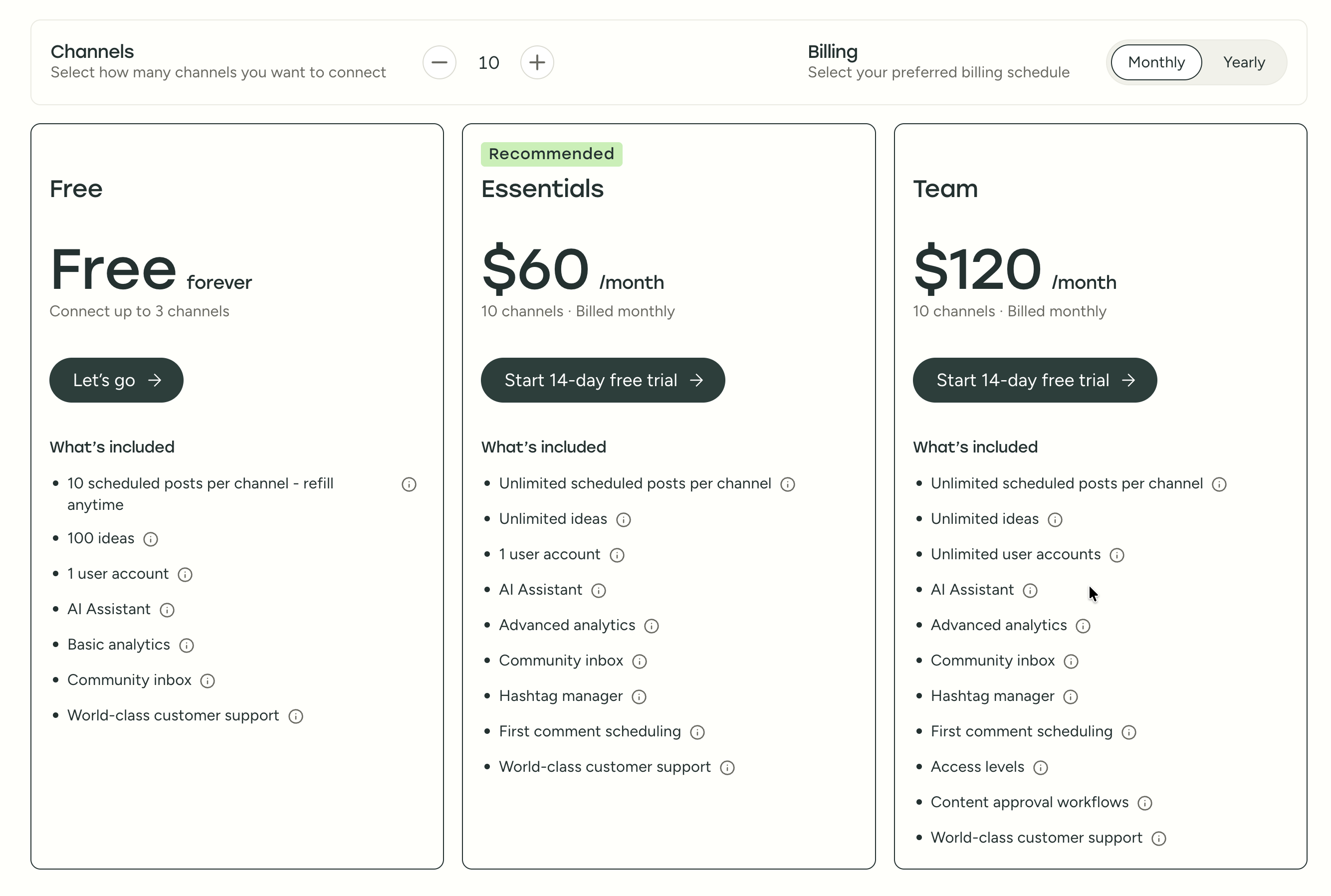
For a full breakdown, see our Buffer pricing guide.
| Plan | Price | Channels | Key Features |
|---|---|---|---|
| Free | $0/mo | 3 | Basic scheduling, landing page |
| Essentials | $6/mo/channel | Unlimited | AI Assistant, analytics, engagement |
| Team | $12/mo/channel | Unlimited | Collaboration, approvals, reports |
Cost at scale examples:
- 5 channels on Essentials: $30/mo
- 5 channels on Team: $60/mo
- 10 channels on Essentials: $60/mo
- 10 channels on Team: $120/mo
- 20 channels on Essentials: $120/mo
- 20 channels on Team: $240/mo
Zoho Social Pricing
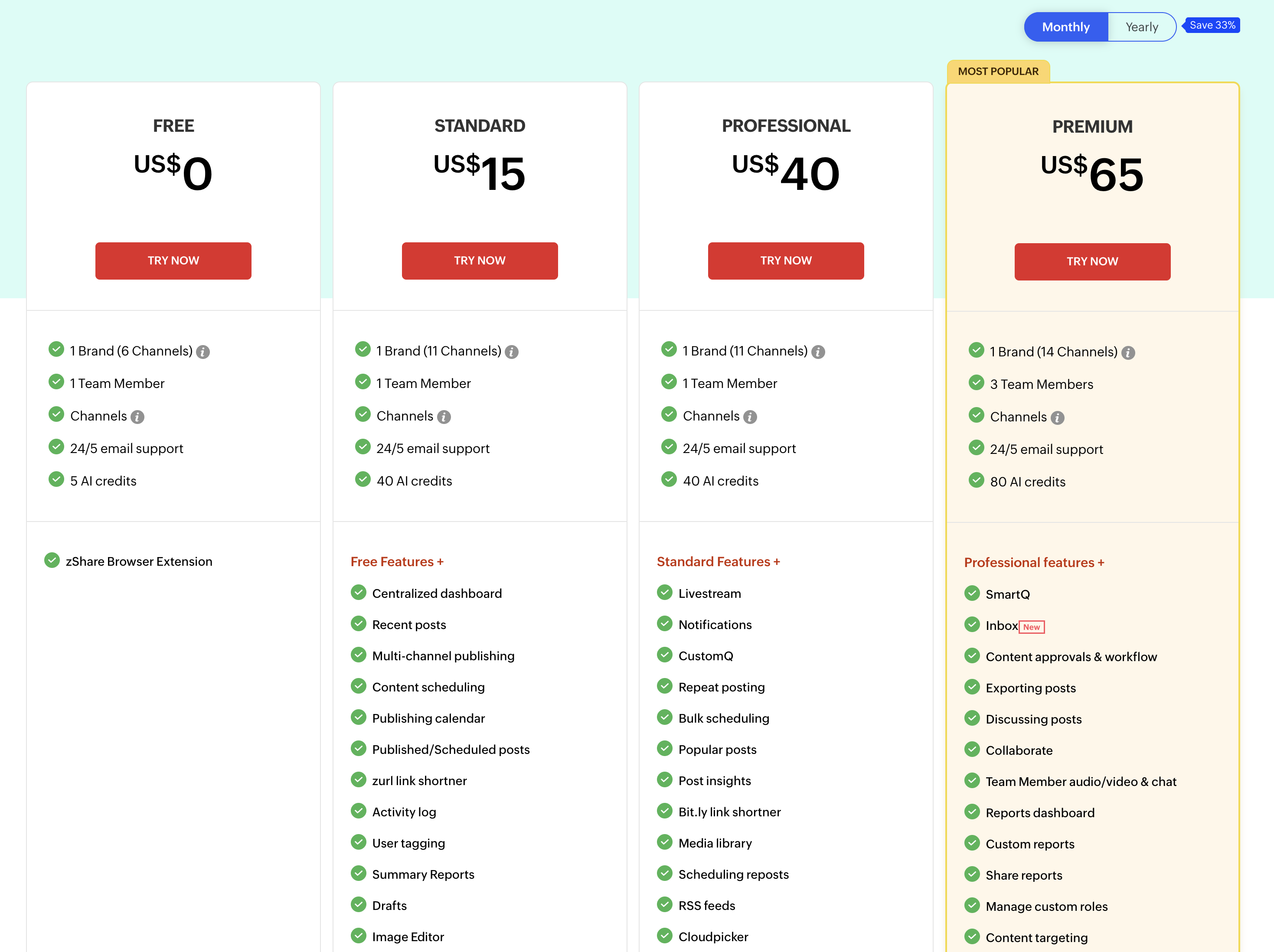
For a full breakdown, see our Zoho Social pricing guide.
| Plan | Price | Brands | Members | Key Features |
|---|---|---|---|---|
| Free | $0/mo | 1 | 1 | Basic publishing |
| Standard | $15/mo | 1 | 1 | SmartQ, analytics |
| Professional | $40/mo | 1 | 1 | CRM integration, bulk scheduler |
| Premium | $65/mo | 1 | 3 | Team collaboration, approvals |
Cost at scale examples:
- 1 brand, 1 member on Standard: $15/mo
- 1 brand, 1 member on Professional: $40/mo
- 1 brand, 3 members on Premium: $65/mo
- Multiple brands require separate subscriptions or agency pricing
What You'll Actually Pay: Real-World Scenarios
Buffer charges per channel, Zoho Social charges per brand — but the pricing philosophies create very different costs depending on your setup. Here's how real costs compare:
Solo creator managing 5 social accounts (1 brand):
- Buffer Essentials: 5 x $6 = $30/month
- Zoho Social Standard: $15/month (1 brand, 1 member)
- Zoho Social is cheaper here, but you miss out on Buffer's broader platform support (11 vs 9 networks) and Start Page link-in-bio.
Marketing team managing 1 brand across 8 channels with 3 team members:
- Buffer Team: 8 x $12 = $96/month (unlimited users included)
- Zoho Social Premium: $65/month (1 brand, 3 members included)
- Zoho Social saves $31/month and includes CRM integration and SmartQ. However, adding a 4th team member on Zoho costs $10-13 extra per seat.
Agency managing 5 brands (25 total channels) with approval workflows:
- Buffer Team: 25 x $12 = $300/month
- Zoho Social Agency: $275/month (10 brands, 5 members, all Premium features)
- Costs converge at agency scale, but Zoho Social's Agency plan includes white-label reports and multi-brand dashboards that Buffer lacks entirely.
Price Verdict
For a single creator managing a few channels, Buffer's free plan or Essentials tier is hard to beat on flexibility. You only pay for what you use. Zoho Social becomes more compelling when you factor in the ecosystem value -- if you are already paying for Zoho CRM or Zoho Desk, adding Social at $15-65/mo gives you integrations that would cost significantly more to replicate with Buffer plus third-party connectors. For teams managing a single brand with deep business integration needs, Zoho Social offers stronger value. For multi-channel creators who need platform breadth, Buffer's per-channel model is more predictable.
 PostPlanify
Manage All Your Social Accounts Without the Chaos
Schedule posts, track performance, and collaborate with your team.


Feature Comparison
Scheduling & Publishing
| Capability | Buffer | Zoho Social |
|---|---|---|
| Visual calendar | Yes | Yes |
| Queue-based scheduling | Yes | Yes |
| Optimal time suggestions | Limited | SmartQ (data-driven) |
| Bulk scheduling | CSV import | Built-in bulk scheduler |
| Browser extension | Yes | zShare extension |
| RSS feed scheduling | No | Yes (Professional+) |
| First comment scheduling | Yes | Yes |
Winner: Zoho Social. SmartQ is a genuinely useful feature that uses your audience data to suggest the best posting times, and the built-in bulk scheduler is more polished than Buffer's CSV import approach. The addition of RSS feed scheduling on the Professional plan also gives content-heavy teams a way to automate sharing from blogs and news sources, which Buffer does not support at all.
AI Tools
| Capability | Buffer | Zoho Social |
|---|---|---|
| AI caption generation | AI Assistant | Basic AI suggestions (Zia, credit-limited) |
| AI hashtag suggestions | Yes | Limited |
| AI image generation | No | No |
| AI repurposing | No | No |
Winner: Buffer. Buffer's AI Assistant is more developed and provides better caption suggestions with unlimited usage on paid plans. Zoho Social's AI assistant (Zia) is capped at 40-80 credits per month depending on the plan, which regular users can exhaust within days. Neither platform offers AI image generation or AI-powered content repurposing.
Analytics & Reporting
| Capability | Buffer | Zoho Social |
|---|---|---|
| Post-level analytics | Yes | Yes |
| Channel analytics | Essentials+ | Standard+ |
| Custom reports | Team plan | Premium plan |
| Exportable reports | Yes | Yes |
| CRM-linked analytics | No | Yes (Professional+) |
Winner: Zoho Social. The CRM integration means you can connect social engagement to actual business outcomes, which is a level of reporting depth that Buffer simply does not offer. For marketers who need to prove ROI beyond vanity metrics, this is significant. Zoho Social's Premium plan also includes a reports dashboard with custom reports and sharing capabilities, whereas Buffer's reporting is limited to basic post and channel metrics.
Team Collaboration
| Capability | Buffer | Zoho Social |
|---|---|---|
| Multi-user access | Team plan ($12/channel) | Premium ($65/mo) |
| Approval workflows | Team plan | Premium plan |
| Role-based permissions | Yes | Yes |
| Content calendar sharing | Yes | Yes |
| Client management | Limited | Via Zoho ecosystem |
Winner: Tie. Buffer makes collaboration accessible at a lower price point for small teams, while Zoho Social's collaboration is more powerful when paired with the broader Zoho suite. Zoho Social's Premium plan includes custom roles, internal post discussions, and team audio/video chat — features Buffer does not offer. But Buffer includes unlimited users on its Team plan, while Zoho Social caps the Premium plan at 3 members and charges $10-13 per additional seat.
Platform Support
| Platform | Buffer | Zoho Social |
|---|---|---|
| Yes | Yes | |
| Yes | Yes | |
| X (Twitter) | Yes | Yes |
| Yes | Yes | |
| Yes | Yes | |
| TikTok | Yes | Yes |
| YouTube | Yes | Yes |
| Mastodon | Yes | No |
| Bluesky | Yes | No |
| Google Business | Yes | Yes |
| Threads | Yes | Yes |
Winner: Buffer. With 11 platforms versus Zoho Social's 9, Buffer covers more ground. The inclusion of Mastodon and Bluesky matters for creators who are building audiences on newer, decentralized platforms. If your strategy includes emerging social networks alongside the established ones, Buffer gives you more room to grow without switching tools.
What Real Users Say
Buffer Reviews
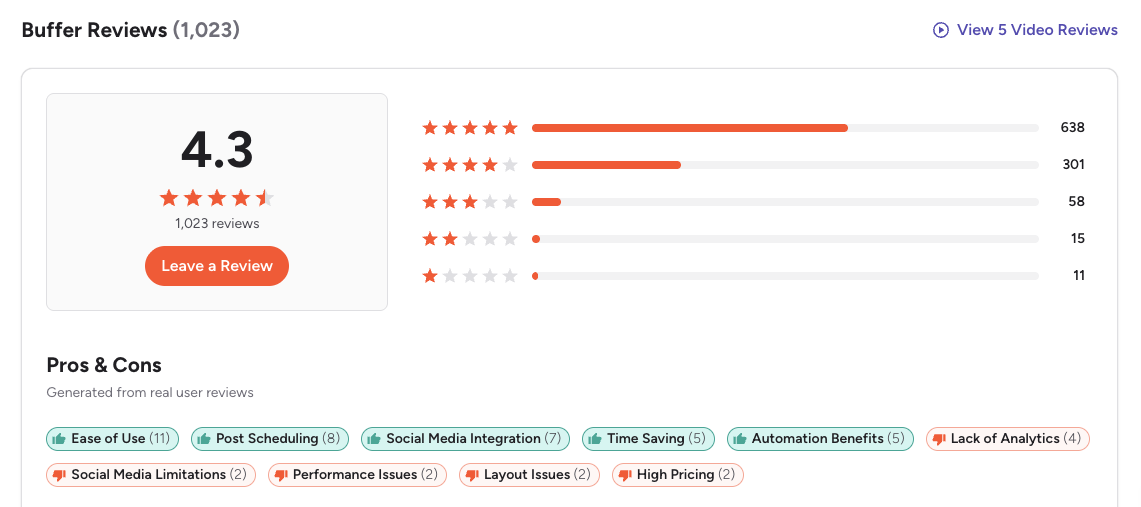
G2: 4.3/5 (1,023 reviews) — Users consistently praise the clean interface, ease of setup, and reliability of the scheduling queue. The most common positive themes are efficient bulk scheduling, an intuitive layout, and time-saving workflow. The most common complaint is that analytics feel basic compared to dedicated analytics tools, and the per-channel pricing can get expensive for agencies. A featured reviewer notes that while Buffer is powerful for simplifying social management, its simplicity becomes a drawback due to missing advanced features found in other platforms.
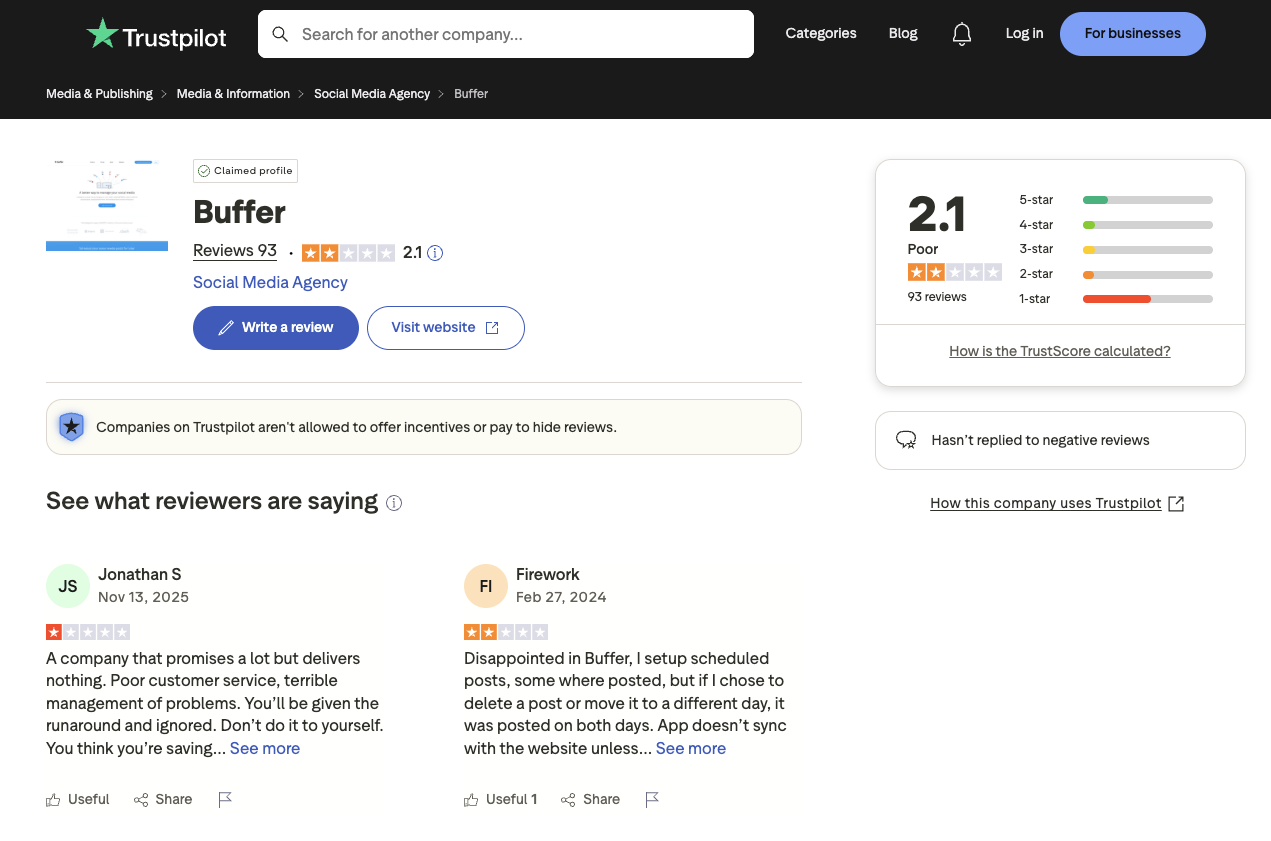
Trustpilot: 2.1/5 (93 reviews) — The lower score here reflects frustrations with billing issues and customer support response times. Multiple reviewers report that support does not respond in a timely manner, scheduled posts fail or duplicate, and the platform often does not sync correctly with connected social accounts. The small review sample is skewed toward billing complaints, but the pattern of unresolved technical issues is a recurring concern.
Zoho Social Reviews
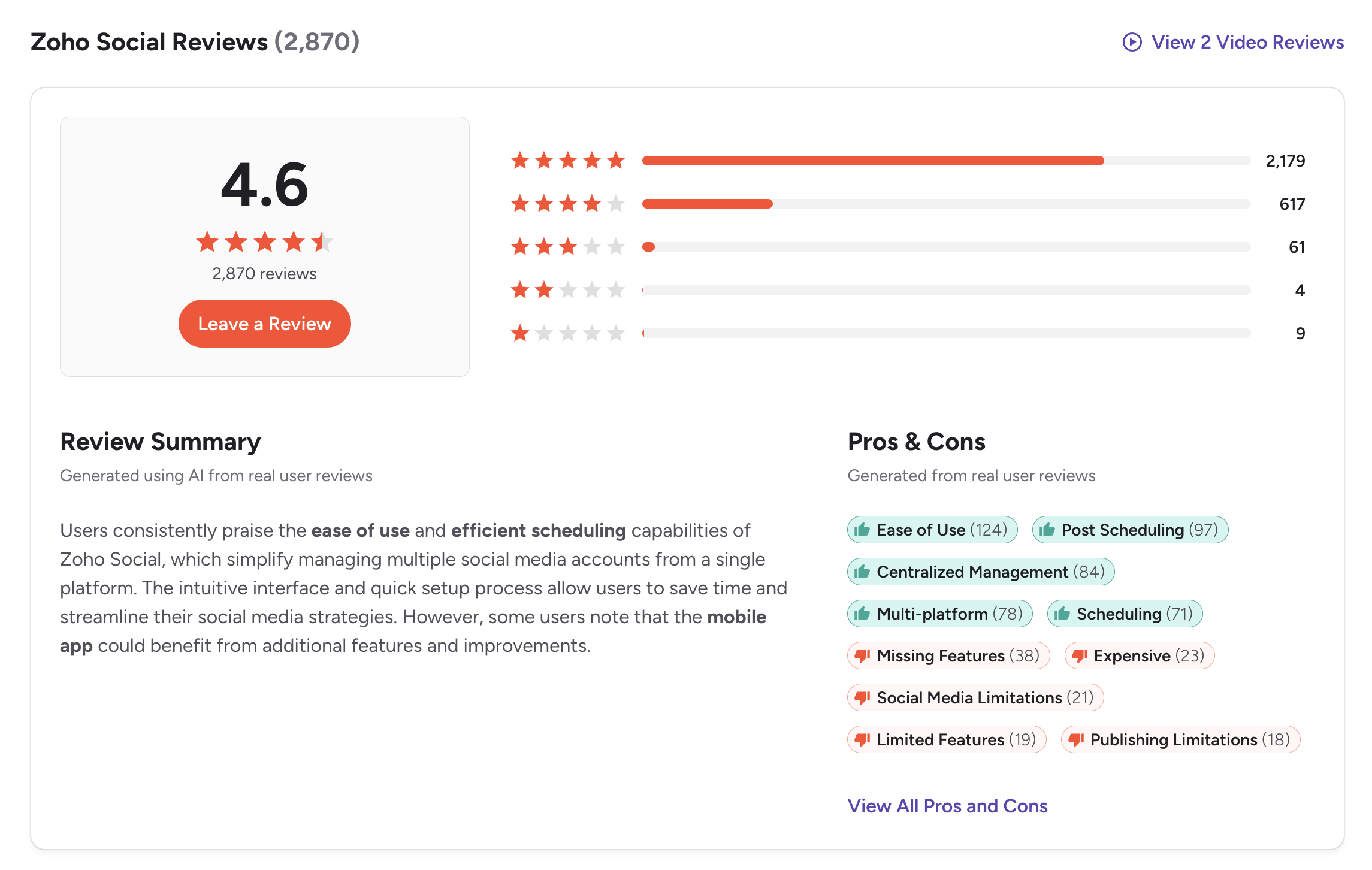
G2: 4.6/5 (2,870 reviews) — Notably higher than Buffer, with the top positive themes being ease of use (124 mentions), post scheduling (97 mentions), centralized management (84 mentions), multi-platform support (78 mentions), and scheduling reliability (71 mentions). Users highlight the CRM integration, SmartQ scheduling, and the value of having social media management within the broader Zoho ecosystem. On the negative side, reviewers cite missing features (38 mentions), cost concerns (23 mentions), and publishing limitations (18 mentions). A featured review titled "Simple, efficient, and great value for money" praises the centralized dashboard but notes that analytics could be deeper and managing high volumes can feel cluttered.
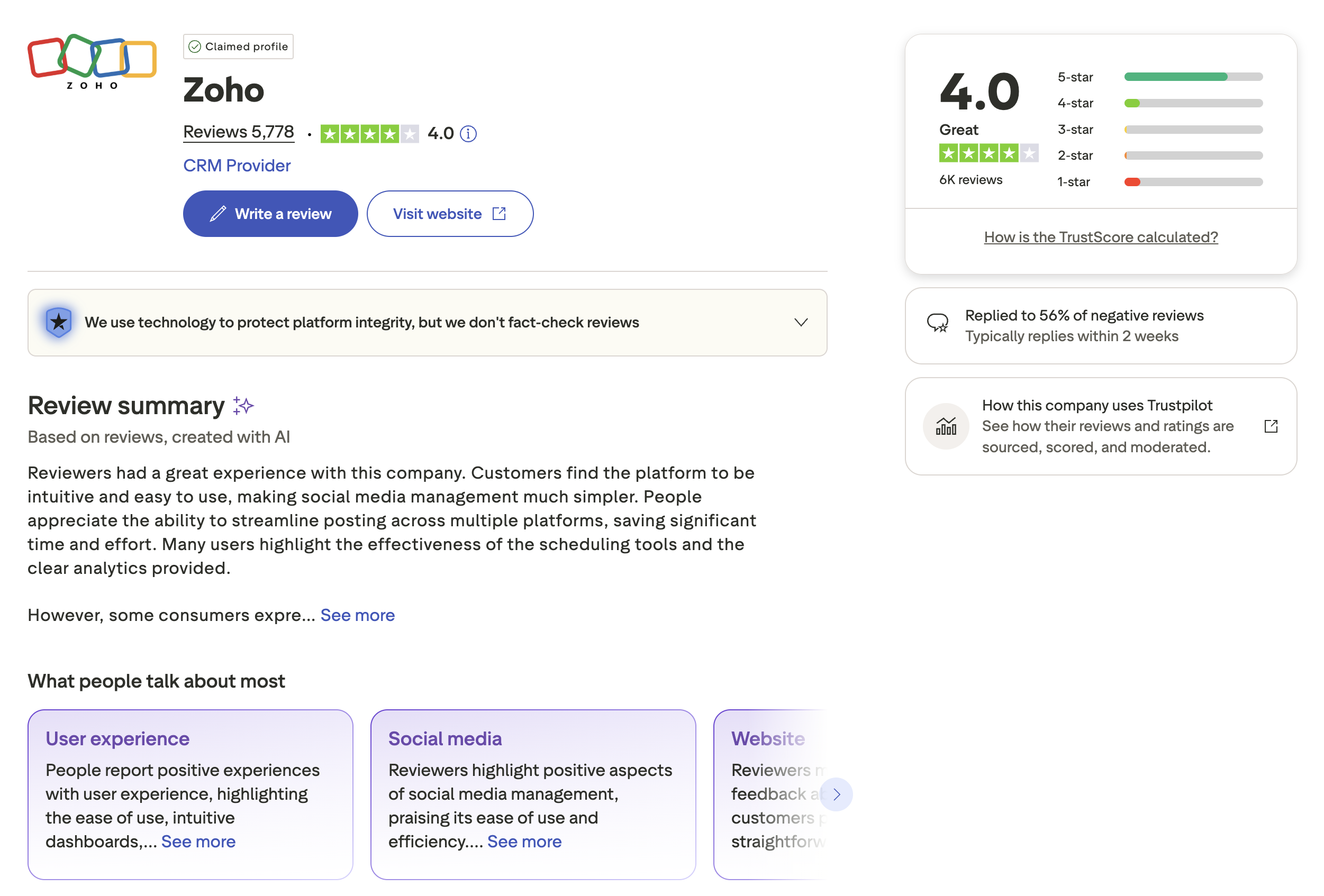
Trustpilot: 4.0/5 (~5,778 reviews across Zoho products) — Users appreciate the breadth of the ecosystem and find the platform intuitive and easy to use. Reviewers highlight effective scheduling tools and clear analytics. Some reviews note occasional platform sync issues and room for improvement in support response times.
Review Verdict
Zoho Social wins on aggregate review scores across both platforms. The G2 difference (4.6 vs 4.3) reflects genuine user satisfaction with the ecosystem integration. The Trustpilot gap is even more pronounced (4.0 vs 2.1), though Buffer's low Trustpilot score is partly driven by a small review sample skewed toward billing complaints. If community trust matters to your decision, Zoho Social has the stronger track record.
Review counts are as of February 2026 and are updated periodically. For deeper analysis, see our full Buffer reviews and Zoho Social reviews breakdowns.
PostPlanifyManage All Your Social Accounts Without the Chaos
Schedule posts, track performance, and collaborate with your team.
Who Should Use Buffer?
Buffer works best when you value simplicity over depth. If you manage a personal brand or a handful of social accounts and just want to queue posts without learning a complex dashboard, Buffer's clean interface gets you publishing in minutes. Its per-channel pricing keeps costs low when you only manage 3-5 accounts, and the free plan is genuinely useful for light publishing. If Buffer sounds right but you want to explore other options first, check out our best alternatives to Buffer. You can also see how Buffer compares to Hootsuite, Later, Iconosquare, and Vista Social.
Buffer is the better choice if you:
- Solo creators who need a simple tool to schedule across many platforms
- Small teams that want a clean, intuitive interface without a learning curve
- Multi-platform publishers who need support for 11+ networks including Mastodon and Bluesky
- Content creators who want a built-in link-in-bio page (Start Page)
- Budget-conscious users who want to start free and scale incrementally per channel
- Freelancers managing their own social presence without complex workflows
Who Should Use Zoho Social?
Zoho Social is the right fit when your business already relies on Zoho products and you want social media data flowing directly into your CRM and support workflows. The native integration with Zoho CRM and Zoho Desk creates a unified view of customer interactions that standalone scheduling tools cannot replicate. If Zoho Social is on your shortlist, check out our Zoho Social alternatives roundup and browse other comparison guides.
Zoho Social is the better choice if you:
- Businesses already using Zoho CRM who want social data flowing into their sales pipeline
- Support teams that need social inbox messages linked to Zoho Desk tickets
- Marketing teams who want SmartQ to optimize posting schedules automatically
- Companies with a single brand that want deep integration over broad platform support
- B2B businesses that care about connecting social engagement to CRM contacts
- Teams that value ecosystem consolidation over using multiple disconnected tools
Scheduling, AI, and Team Tools Without the Trade-Offs
Both Buffer and Zoho Social are solid tools for their respective audiences, but neither offers unlimited AI caption generation or AI image generation on any plan. Buffer lacks CRM integration and deep analytics. Zoho Social locks collaboration behind its $65/mo Premium plan and caps AI usage at 40-80 credits per month. PostPlanify bridges that gap with full-featured scheduling, unlimited AI tools, and team collaboration without per-user fees or ecosystem lock-in.

| Feature | Buffer (Essentials) | Zoho Social (Standard) | PostPlanify |
|---|---|---|---|
| Starting Price | $6/mo/channel | $15/mo | $29/mo flat |
| Analytics | Basic | Standard reports | Advanced (10 platforms, best time to post) |
| Social Inbox | Basic | Yes (Monitor) | Yes (AI-assisted replies) |
| AI Caption Generation | AI Assistant | Basic AI (credit-limited) | Yes (vision-powered, unlimited) |
| AI Image Generation | No | No | Yes (7 models) |
| Content Calendar | Yes | Yes | Yes (drag-and-drop, bulk scheduling) |
| Team Collaboration | $12/mo/channel | $65/mo (3 members) | 5 members (Premium), unlimited (Enterprise) |
| Approval Workflows | Team plan | Premium plan | Premium $99/mo (multi-approver) |
| White-Label PDF Reports | No | Premium plan | Yes (Premium+ $99/mo) |
| Canva Integration | No | No | Yes |
| Google Drive Import | No | No | Yes |
| Link in Bio | Start Page | No | Yes (8 themes, click analytics) |
| CRM Integration | No | Native Zoho CRM | No |
| Platforms Supported | 11 | 9 | 10 |
| Unlimited Scheduling | Paid plans | Paid plans | Growth+ ($49/mo) |
PostPlanify pricing — all plans include AI tools:
| Plan | Price | Accounts | Key Features |
|---|---|---|---|
| Starter | $29/mo | 5 | 200 posts/mo, AI captions, AI image generation (7 models), content calendar, media library, link in bio |
| Growth | $49/mo | 10 | Unlimited scheduled posts, analytics (10 platforms), social inbox (AI-assisted replies), best time to post, 1st comments & threads, bulk scheduling |
| Premium | $99/mo | 25 | White-label PDF reports, multi-approver workflows, 5 team members, shared calendars, roles & permissions |
| Enterprise | Custom | Custom | Unlimited team members, 1:1 onboarding, priority support |
PostPlanify starts at $29/month for 5 social accounts with 200 posts/mo and AI tools included. The Growth plan ($49/month, 10 accounts) adds unlimited scheduled posts, analytics across all 10 platforms, social inbox with AI-assisted replies, best time to post suggestions, 1st comments & threads, and bulk scheduling. The Premium plan ($99/month, 25 accounts) includes white-label PDF reports, multi-approver workflows, 5 team members, shared calendars, and roles & permissions. The Enterprise plan (custom pricing) adds custom social accounts, unlimited team members, and 1:1 onboarding. See all plans on the PostPlanify pricing page.
Try PostPlanify free for 7 days

Final Verdict: Buffer vs Zoho Social in 2026
So, should you choose Buffer or Zoho Social? It comes down to whether you need platform breadth or ecosystem depth.
Buffer wins on: simple scheduling UX, wider platform support (11 platforms including Bluesky and Mastodon), Start Page link-in-bio, unlimited AI usage on paid plans, and per-channel pricing that starts low for solo creators.
Zoho Social wins on: CRM and helpdesk integration, SmartQ optimal time scheduling, team collaboration with custom roles, and consistently higher user satisfaction scores (4.6 vs 4.3 on G2, 4.0 vs 2.1 on Trustpilot).
The gap between these two tools is not about quality — it is about context. Buffer assumes you want a standalone publishing tool. Zoho Social assumes you want social media woven into a broader business platform. The challenge is when you need a standalone tool with depth: Buffer's analytics are too basic for teams that need reporting, and Zoho Social's per-seat pricing and credit-limited AI make it expensive as you scale. Neither offers AI image generation, and both require paid upgrades for features like approval workflows and advanced analytics. That is the gap where tools like PostPlanify fit — combining intuitive scheduling with [analytics across 10 platforms]/features/analytics), AI-powered content creation including image generation, and team collaboration with no per-seat fees.
The bottom line: For solo creators and freelancers who want the simplest scheduling tool with the widest platform support, Buffer delivers. For businesses embedded in the Zoho ecosystem who need CRM-linked social media management, Zoho Social is the clear choice. If neither fits your workflow, explore our full list of social media management alternatives to find a tool that matches your needs and budget.
Making the Switch
Switching from Buffer to Zoho Social (or vice versa) is straightforward — reconnect your social accounts, set up your posting schedule, and you are live. Neither tool locks you in with long-term contracts, and both offer monthly billing. Your historical analytics and engagement data will not transfer between platforms, so export any reports you need before cancelling. Plan for a 1-2 week overlap to avoid gaps in your publishing schedule. If you are moving to PostPlanify, the process is the same: connect your accounts, import your content calendar, and start scheduling. PostPlanify's 7-day free trial lets you test the full platform before committing.
Related Guides
- PostPlanify Pricing Breakdown
- Buffer Pricing Guide
- Zoho Social Pricing Guide
- Buffer Reviews
- Zoho Social Reviews
- Best Buffer Alternatives
- Best Zoho Social Alternatives
- Best Social Media Management Platform
- Social Media Scheduling Tools
- Best Time to Post on Social Media
- How to Automate Social Media Posts
- Content Batching Guide
- Social Media Analytics and Reporting
PostPlanifyManage All Your Social Accounts Without the Chaos
Schedule posts, track performance, and collaborate with your team.
FAQ
Is Buffer or Zoho Social better for small businesses?
It depends on your existing tools. If you use Zoho CRM or Zoho Desk, Zoho Social is the clear winner because the native integration provides value that Buffer cannot replicate. If you do not use Zoho products, Buffer's simplicity and broader platform support make it easier to get started and maintain.
Can I use Buffer and Zoho Social together?
Technically yes, but there is little practical reason to do so. Both handle scheduling and publishing, so running them simultaneously would create confusion. If you need Zoho's CRM integration for some channels and Buffer's broader platform support for others, consider whether a single tool like PostPlanify could cover both needs instead.
Which tool has better analytics?
Zoho Social has more powerful analytics when combined with Zoho CRM, allowing you to track social interactions through the sales funnel. Buffer's analytics are adequate for tracking post performance and engagement trends but lack the business context that Zoho provides. For dedicated analytics depth beyond either tool, consider a platform like Iconosquare -- see our Buffer vs Iconosquare comparison.
Does Buffer or Zoho Social support AI image generation?
Neither tool offers AI image generation. Both provide some level of AI caption assistance, with Buffer's AI Assistant being more developed and unlimited on paid plans, while Zoho Social's Zia is capped at 40-80 credits per month. If AI image generation is important to your workflow, PostPlanify includes 7 AI image models on all plans.
Which tool is better for agencies managing multiple clients?
Buffer's per-channel pricing can become expensive at scale but offers flexibility. Zoho Social's per-brand model requires separate subscriptions for each client unless you upgrade to the Agency plan ($275/mo for 10 brands). Neither is ideal for large agency use cases. For agencies, consider tools specifically designed for multi-client management or explore our social media management alternatives.
How do Buffer and Zoho Social handle team approvals?
Buffer offers approval workflows on the Team plan ($12/mo per channel), where team members can submit posts for review before publishing. Zoho Social includes approvals on the Premium plan ($65/mo) with tighter integration into team roles, custom roles, and internal post discussions. Both approaches work well for small teams, but neither scales gracefully for organizations with complex multi-level approval needs.
Can I migrate from Buffer to Zoho Social or vice versa?
There is no direct migration tool between the two platforms. You would need to manually recreate your posting schedule and reconnect your social accounts. Your historical analytics and engagement data will not transfer. Plan for a 1-2 week transition period where you run both tools in parallel to avoid gaps in your publishing schedule.
Which tool has better customer support?
Zoho has the stronger support reputation, with a comprehensive knowledge base, community forums, and responsive ticket-based support. Buffer offers email support and a detailed help center, but Trustpilot reviews suggest slower response times and unresolved technical issues. Based on user feedback across review platforms (4.0 vs 2.1 on Trustpilot), Zoho Social has the edge.
Does Zoho Social work without other Zoho products?
Yes, Zoho Social functions as a standalone social media management tool. You can use it without Zoho CRM, Zoho Desk, or any other Zoho product. However, much of Zoho Social's competitive advantage comes from those integrations. Without them, you are paying for a capable but less differentiated scheduling and analytics platform. If you do not plan to use the broader Zoho ecosystem, Buffer or another tool like PostPlanify may offer a better feature-to-price ratio for standalone social media management.
How do the free plans compare?
Buffer's free plan supports 3 channels with basic scheduling and the Start Page link-in-bio feature. Zoho Social's free plan covers 1 brand with 1 team member but does not include scheduling, a content calendar, or analytics — it only allows manual same-day posting. Buffer's free tier is significantly more functional, making it the better option for users who want to manage multiple platforms without paying.







