
Buffer and SocialPilot represent two very different approaches to social media scheduling. Buffer is a clean, simple tool for solo creators. SocialPilot is an agency-grade platform built for managing dozens of accounts with bulk scheduling and white-label reports. If you're deciding between Buffer or SocialPilot, the right choice comes down to whether you need simplicity or scale.
Buffer's per-channel simplicity versus SocialPilot's agency-grade toolkit — two approaches to the same problem. In this 2026 comparison, we break down real costs, feature depth, and what fits your team size. See all options at social media scheduling alternatives.
This comparison draws on 1,990 verified reviews across G2 and Trustpilot for both tools (Buffer: 1,023 G2 + 93 Trustpilot; SocialPilot: 841 G2 + 33 Trustpilot). Pricing and features verified as of March 2026.
Buffer vs SocialPilot at a Glance
Here's a quick side-by-side overview before we dive deeper:
| Category | Buffer | SocialPilot |
|---|---|---|
| Starting Price | $6/mo per channel | $30/mo (7 accounts, 1 user) |
| Free Plan | Yes (3 channels) | No (14-day trial) |
| Platforms Supported | 11 | 11 |
| Unlimited Scheduling | Yes (paid plans) | Yes (all plans) |
| AI Tools | AI Assistant (captions) | AI Pilot (captions, multi-language) |
| Bulk Scheduling | CSV import | Yes (500 posts via CSV) |
| Team Collaboration | Team plan ($12/mo/channel) | Standard+ ($50/mo, 3 users) |
| Approval Workflows | Team plan only | All plans (client approvals) |
| Social Inbox | Basic (Community Inbox) | Standard+ |
| White Label Reports | No | Premium+ ($100/mo) |
| Analytics | Basic to Advanced | Standard analytics |
| G2 Rating | 4.3/5 (1,023 reviews) | 4.5/5 (841 reviews) |
| Trustpilot Rating | 2.1/5 (93 reviews) | 2.4/5 (33 reviews) |
| Best For | Solo creators, freelancers | Agencies, multi-client teams |
Buffer Overview

Buffer is one of the oldest social media scheduling tools, launched in 2010. It focuses on simplicity — a clean interface for scheduling posts, managing a basic content calendar, and viewing analytics.
Buffer supports 11 platforms: Instagram, Facebook, LinkedIn, Pinterest, X/Twitter, TikTok, YouTube, Google Business Profile, Threads, Bluesky, and Mastodon.
Key features:
- Post scheduling with queue management
- AI Assistant for generating captions and post ideas
- Hashtag manager and first comment scheduling
- Basic community inbox
- Start Page (link-in-bio builder)
- Content calendar
Buffer is popular among solo creators and freelancers who want a no-frills scheduling experience across many platforms. For a deeper look, see what users say about Buffer on G2 and Trustpilot.
SocialPilot Overview

SocialPilot is an agency-focused social media management platform designed for teams handling multiple client accounts. It combines bulk scheduling, white-label reporting, and client approval workflows into one tool.
SocialPilot supports 11 platforms: Facebook, Instagram, X/Twitter, LinkedIn, Pinterest, TikTok, YouTube, Google Business Profile, Threads, Bluesky, and VK.
Key features:
- Bulk scheduling up to 500 posts via CSV
- AI Pilot for caption generation in multiple languages
- Content library and RSS automation
- White label reports (Premium+)
- Client approval workflows
- Social inbox (Standard+)
- First comment scheduling and Canva integration
SocialPilot targets agencies and multi-client teams that need volume scheduling and branded reporting. Read real user reviews of SocialPilot from G2 and Trustpilot.
Pricing Comparison
Buffer charges per channel while SocialPilot bundles accounts into tiered plans. The cost difference depends entirely on how many profiles you manage. For a broader comparison, see our best social media scheduler guide.
Buffer Pricing
Buffer uses per-channel pricing. Each social account you connect adds to your monthly cost. We break this down further in our Buffer pricing guide.
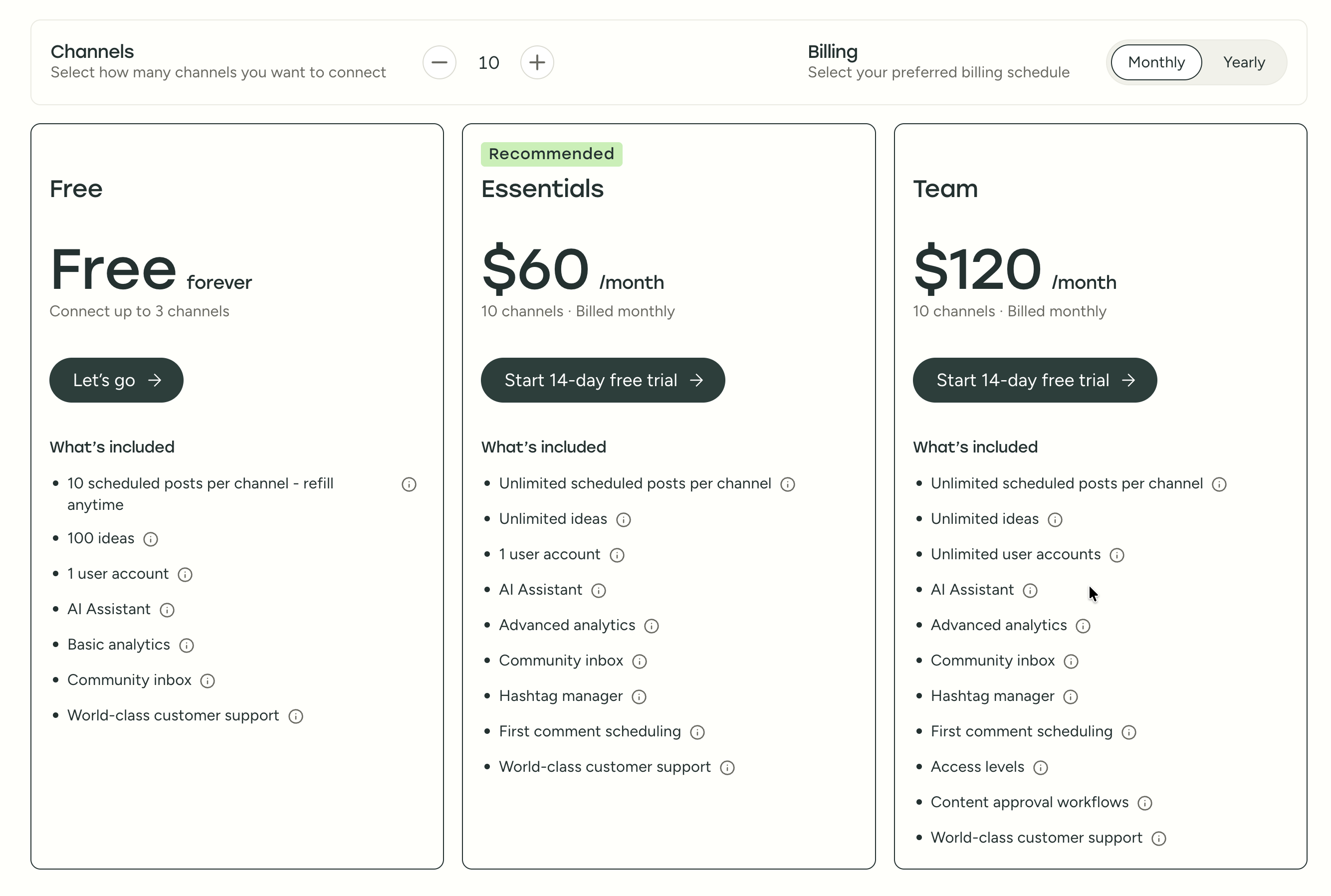
| Plan | Price | Channels | Users | Key Features |
|---|---|---|---|---|
| Free | $0/mo | 3 | 1 | 10 posts/channel, basic analytics |
| Essentials | $6/mo per channel | Unlimited | 1 | Unlimited posts, advanced analytics, hashtag manager |
| Team | $12/mo per channel | Unlimited | Unlimited | Approval workflows, permissions, team collaboration |
Example costs:
- 5 channels on Essentials = $30/month
- 10 channels on Team = $120/month
- 15 channels on Team = $180/month
SocialPilot Pricing
SocialPilot uses tiered pricing with account and user limits per plan. See the full SocialPilot pricing breakdown for details.
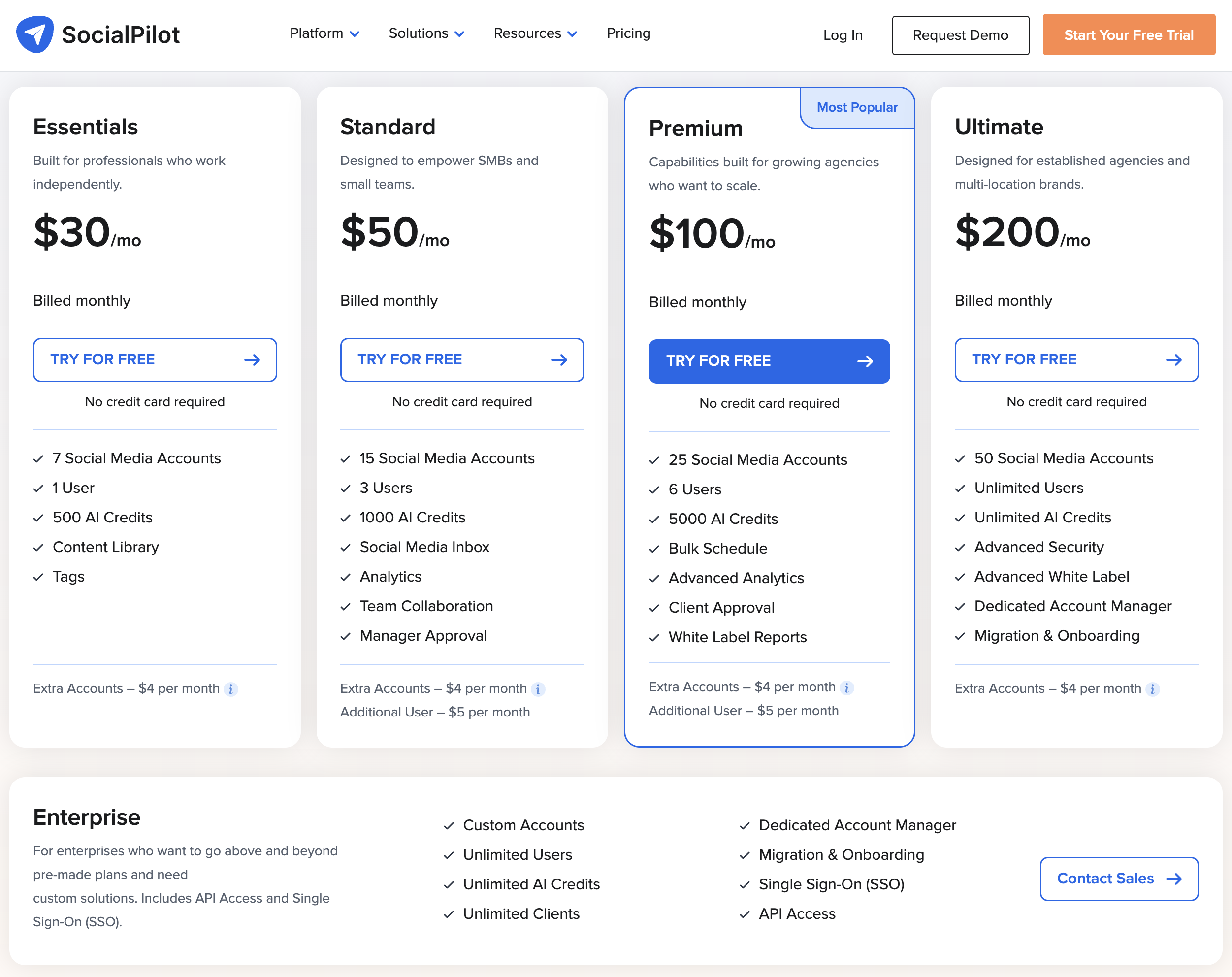
| Plan | Price | Accounts | Users | AI Credits | Key Features |
|---|---|---|---|---|---|
| Essentials | $30/mo | 7 | 1 | 500 | Scheduling, content library, analytics |
| Standard | $50/mo | 15 | 3 | 1,000 | Social inbox, RSS automation |
| Premium | $100/mo | 25 | 6 | 5,000 | White label reports, client approvals |
| Ultimate | $200/mo | 50 | Unlimited | Unlimited | Full feature access |
| Enterprise | Custom | Custom | Custom | Custom | Dedicated support |
Extra costs: Additional accounts at $4/month each, additional users at $5/month each.
Price Verdict
Buffer is cheaper for solo creators; SocialPilot is cheaper for agencies. A solo creator managing 3 accounts pays $0/month on Buffer's free plan vs $30/month on SocialPilot. But an agency managing 15 accounts with 3 team members pays $180/month on Buffer Team vs $50/month on SocialPilot Standard — a massive difference.
SocialPilot's tiered pricing wins at scale. Buffer's per-channel model becomes expensive fast once you pass 10 channels.
What You'll Actually Pay
Abstract pricing tables hide the real cost. Here's what three common scenarios look like on each platform:
Solo creator managing 5 accounts:
- Buffer: $30/mo (5 channels on Essentials) — gets unlimited posts, advanced analytics, hashtag manager, but no team features or approval workflows.
- SocialPilot: $30/mo (Essentials, 7 accounts, 1 user) — gets content library, basic analytics, 500 AI credits, but no social inbox or team collaboration.
- PostPlanify: $29/mo (Starter, 5 accounts) or $49/mo (Growth, 10 accounts) — Growth includes analytics across 10 platforms, social inbox with AI-assisted replies, best time to post suggestions, and unlimited AI captions. See all plans.
Small team managing 10 accounts with approval workflows:
- Buffer: $120/mo (10 channels on Team) — gets approval workflows and unlimited users, but no white-label reports, no content library, and no AI image generation.
- SocialPilot: $50/mo (Standard, 15 accounts, 3 users) — gets social inbox, RSS automation, and manager approval, but no white-label reports and only 1,000 AI credits.
- PostPlanify: $99/mo (Premium, 25 accounts, 5 team members) — includes multi-approver workflows, shared calendars, analytics across 10 platforms, social inbox, AI assistant with 7 image generation models, and white-label PDF reports. No per-seat fees. Compare plans.
Agency managing 25 accounts across clients:
- Buffer: $300/mo (25 channels on Team) — gets team collaboration but no white-label reports, no bulk scheduling workflow, and no client approval system.
- SocialPilot: $100/mo (Premium, 25 accounts, 6 users) — gets white-label reports, client approvals, 5,000 AI credits, but additional users cost $5/mo each.
- PostPlanify: Custom pricing (Enterprise, custom accounts, unlimited team members) — includes everything in Premium plus 1:1 onboarding, custom accounts, and no per-user or per-account fees. See Enterprise details.
 PostPlanify
Manage All Your Social Accounts Without the Chaos
Schedule posts, track performance, and collaborate with your team.


Feature Comparison
Scheduling & Publishing
| Feature | Buffer | SocialPilot |
|---|---|---|
| Unlimited scheduling | Yes (paid plans) | Yes (all plans) |
| Bulk scheduling | CSV import | 500 posts via CSV |
| Best time to post | No | No |
| First comment scheduling | Yes (Essentials+) | Yes |
| Content calendar | Yes | Yes |
| RSS automation | No | Yes |
| Content library | No | Yes |
Winner: SocialPilot. Bulk scheduling up to 500 posts, RSS automation, and a content library give agencies far more publishing power than Buffer's basic CSV import. For teams posting dozens of times per day across multiple client accounts, SocialPilot's volume tools save hours of manual work. Buffer covers the fundamentals well for individual creators but lacks the throughput tools agencies need. For tips on streamlining your publishing workflow, see our guide on social media automation.
AI Tools
| Feature | Buffer | SocialPilot |
|---|---|---|
| AI caption generation | Yes (AI Assistant) | Yes (AI Pilot) |
| AI image generation | No | No |
| Multi-language AI | No | Yes |
| AI credits system | No (unlimited on paid) | 500-unlimited credits/month |
Winner: Buffer for simplicity; SocialPilot for multilingual teams. Buffer offers unlimited AI caption generation on all paid plans with no credit tracking or usage caps, which is ideal if you produce high volumes of English-language content. SocialPilot's AI Pilot supports multi-language generation — a clear advantage for agencies with international clients — but lower-tier plans cap credits at 500-1,000 per month, which can run out quickly during busy content weeks. Neither tool offers AI image generation, which is a notable gap for teams that want to create visuals directly inside their scheduler.
Analytics & Reporting
| Feature | Buffer | SocialPilot |
|---|---|---|
| Basic analytics | All plans | All plans |
| White label reports | No | Premium+ ($100/mo) |
| Custom reports | No | No |
| Export reports | Yes | Yes |
| Client-ready reports | No | Yes (Premium+) |
Winner: SocialPilot. White-label reporting on the Premium plan ($100/mo) makes SocialPilot the clear choice for agencies that need branded, client-ready deliverables. This is a feature Buffer simply does not offer at any price. However, both tools have relatively shallow analytics compared to dedicated reporting platforms — neither offers sentiment analysis, competitive benchmarking, or deep audience demographics. For more on tracking and measuring performance, see our social media reporting guide.
Team Collaboration
| Feature | Buffer | SocialPilot |
|---|---|---|
| Multiple users | Team plan | Standard+ (3-unlimited) |
| Approval workflows | Team plan | All plans |
| Client approvals | No | Yes |
| Custom roles | Team plan | Premium+ |
| User limit | Unlimited (Team) | 1-unlimited by plan |
Winner: SocialPilot. Client approval workflows are available on all SocialPilot plans, and the platform is purpose-built for agency-client collaboration with external review links that don't require clients to create accounts. Buffer's team features require the more expensive Team plan ($12/channel), and it lacks a dedicated client approval flow entirely. For agencies juggling multiple client relationships, SocialPilot's collaboration model is more practical out of the box. If approval processes are critical to your workflow, read our guide on social media approval workflows.
Content & Creative Tools
| Feature | Buffer | SocialPilot |
|---|---|---|
| Link in Bio | Yes (Start Page) | No |
| Content library | No | Yes |
| Canva integration | No | Yes |
| URL shortener | No | Yes |
| Review management | No | Yes |
Winner: SocialPilot. The content library, Canva integration, URL shortener, and review management give SocialPilot significantly more creative and management tools for teams producing content at volume. Buffer wins on link-in-bio with Start Page — a feature SocialPilot lacks entirely — which matters for creators who drive traffic from their social bios. The choice depends on whether you prioritize content production tools (SocialPilot) or bio-link functionality (Buffer).
Platform Support
| Platform | Buffer | SocialPilot |
|---|---|---|
| Yes | Yes | |
| Yes | Yes | |
| X/Twitter | Yes | Yes |
| Yes | Yes | |
| TikTok | Yes | Yes |
| YouTube | Yes | Yes |
| Yes | Yes | |
| Threads | Yes | Yes |
| Bluesky | Yes | Yes |
| Google Business | Yes | Yes |
| Mastodon | Yes | No |
| VK | No | Yes |
Winner: Tie. Both support 11 platforms. Buffer includes Mastodon; SocialPilot includes VK. Coverage is nearly identical otherwise.
What Real Users Say
Buffer Reviews
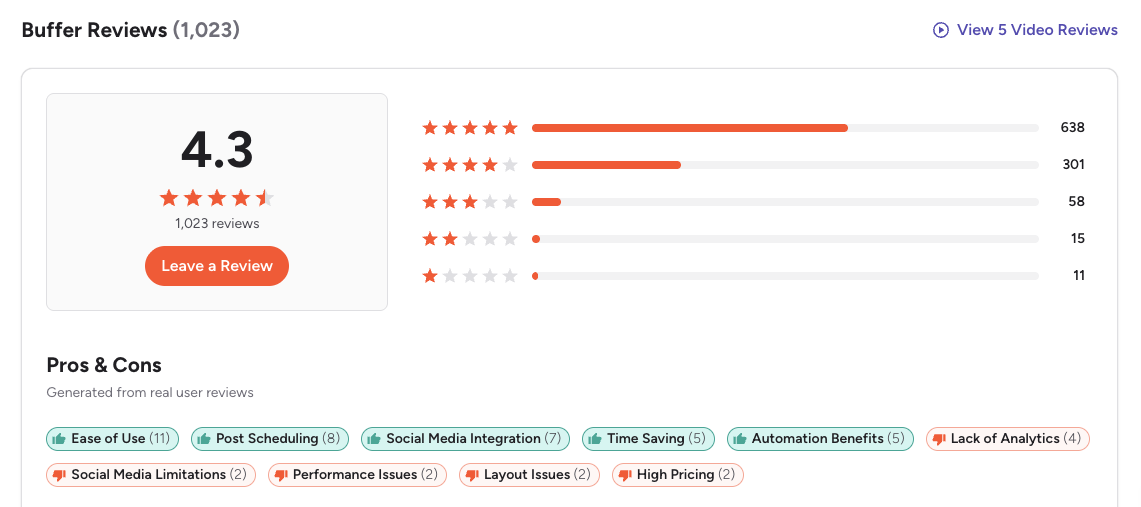
G2: 4.3/5 (1,023 reviews) — Users consistently praise Buffer's clean interface, simple scheduling calendar, and time-saving workflow. A featured review describes it as "powerful for simplifying social management," though the same reviewer notes that "its simplicity becomes a drawback due to missing advanced features found in other platforms." Common complaint tags on G2 include limited engagement and listening capabilities, basic analytics, and pricing that increases quickly as accounts scale.
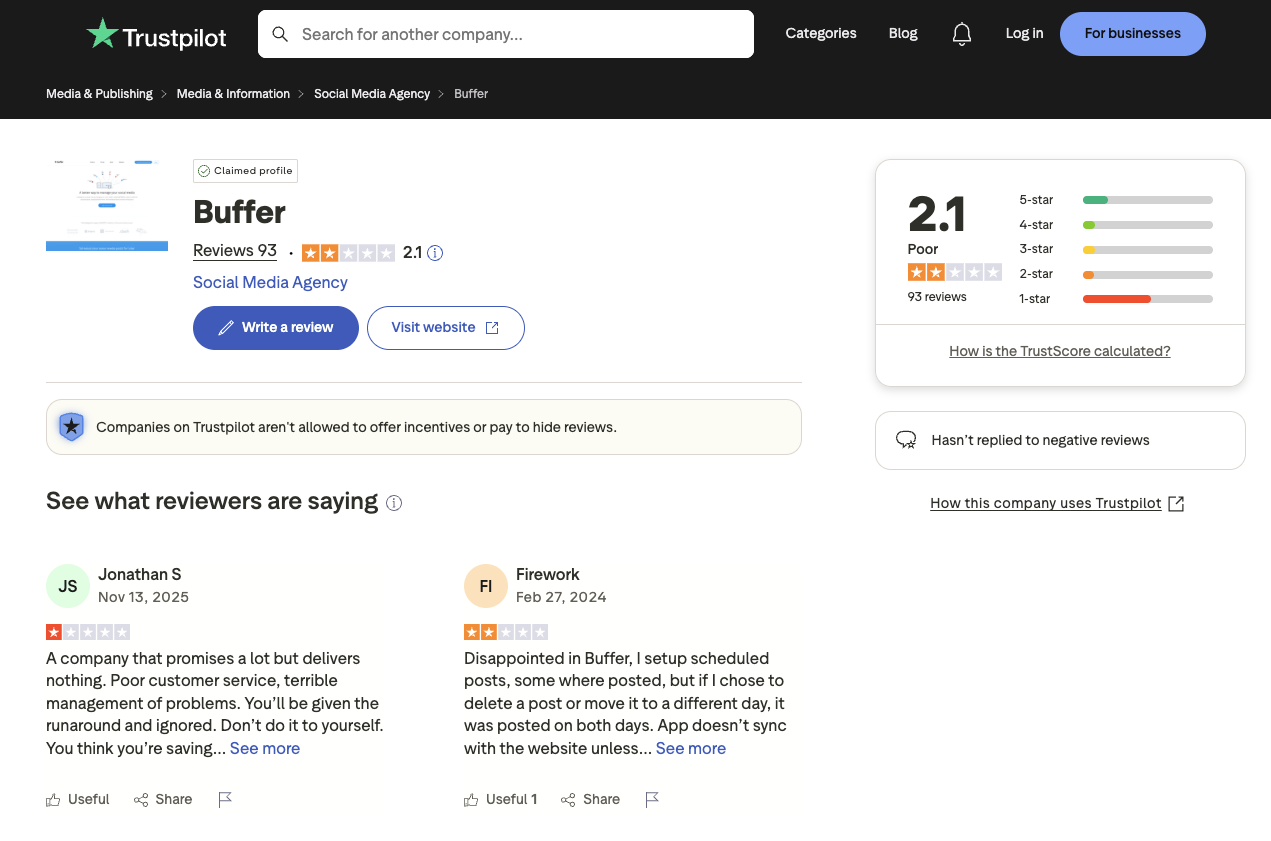
Trustpilot: 2.1/5 (93 reviews) — The significantly lower rating is driven by recurring complaints about customer support response times, scheduled posts failing or duplicating, and sync issues with connected social accounts. Multiple reviewers report that support does not respond in a timely manner, and posts sometimes fail to publish without warning.
Key themes across Buffer reviews: Loved for ease of use and clean UI. Criticized for shallow analytics, lack of listening tools, rising per-channel costs, and inconsistent customer support.
SocialPilot Reviews
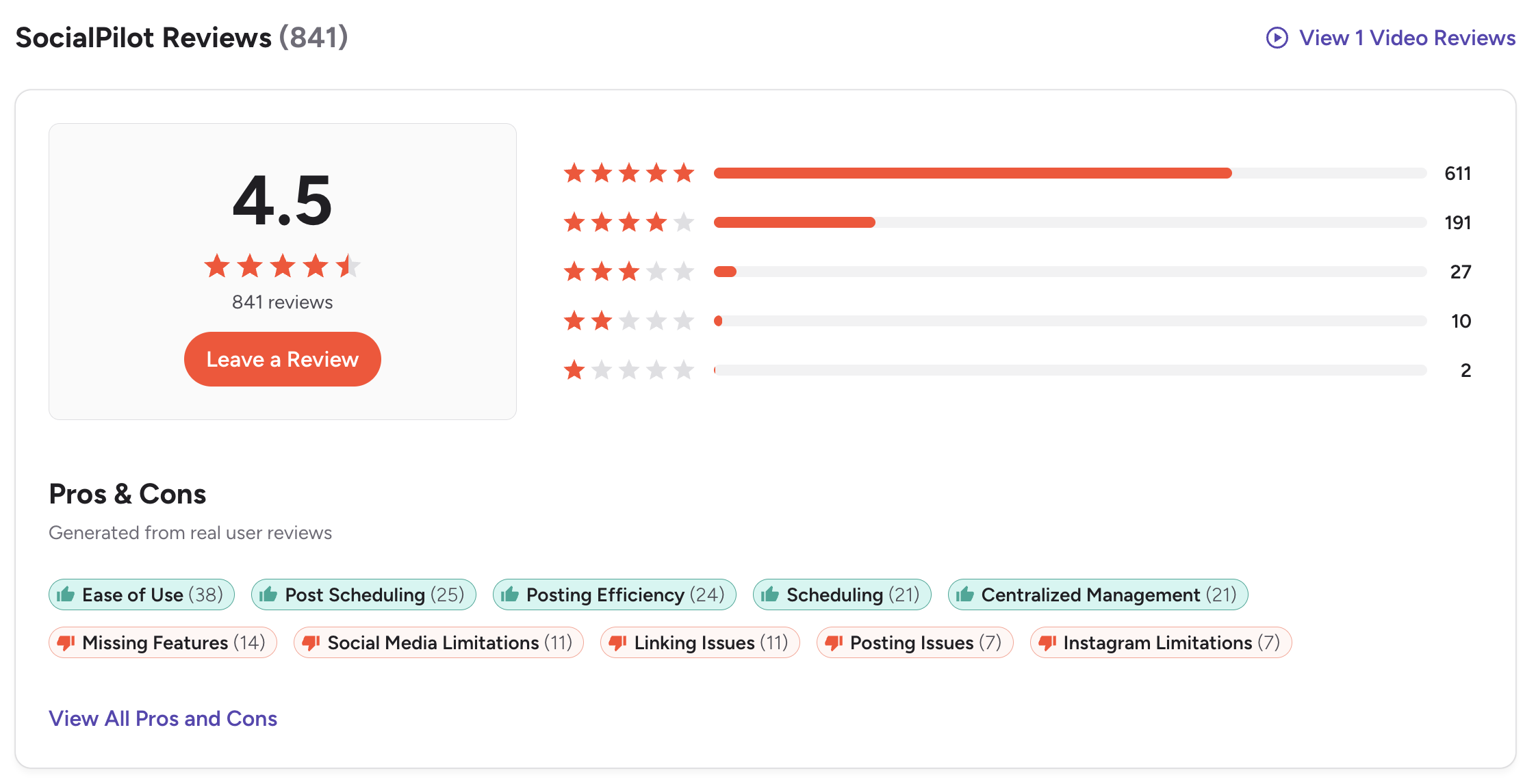
G2: 4.5/5 (841 reviews) — Users appreciate the bulk scheduling, multi-account management, and agency-friendly features. A featured review from an IT Manager in Financial Services titled "Effortless Social Management and Powerful Scheduling" praised the "robust time-saving features and clean scheduling solution," while noting the tool "lacks deep social media functionalities like sentiment analysis" and that the "interface is cluttered and less updated." Common complaint tags include Missing Features (14), Social Media Limitations (11), Linking Issues (11), and Posting Issues (7).
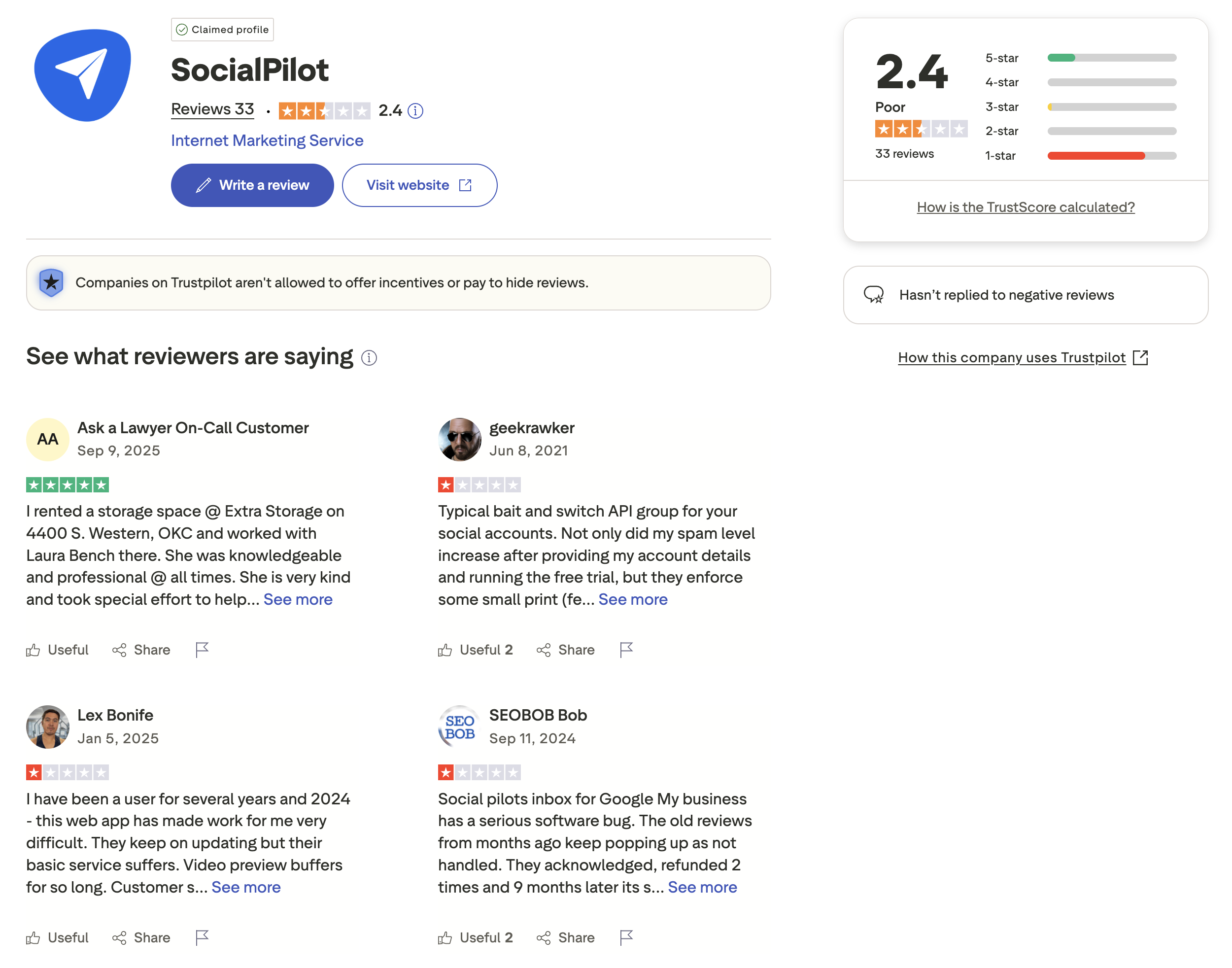
Trustpilot: 2.4/5 (33 reviews) — The low review count shows significant polarization, with some users giving 5-star ratings alongside a concerning number of 1-star reviews. Multiple reviewers mention poor customer service responsiveness, software bugs affecting video previews and posting, and billing concerns. Notably, the Trustpilot page states that SocialPilot "hasn't replied to negative reviews," which raises questions about support responsiveness.
Key themes across SocialPilot reviews: Valued for bulk scheduling and agency workflow tools. Criticized for cluttered interface, limited analytics depth, Instagram-specific limitations, and unresponsive support on Trustpilot.
Review Verdict
SocialPilot scores higher on G2 (4.5 vs 4.3) and Trustpilot (2.4 vs 2.1), but with fewer reviews on both platforms. Buffer has a larger review base on G2 (1,023 vs 841), giving its rating more statistical weight. Neither tool impresses on Trustpilot — both fall below 2.5/5, with users on both sides reporting customer support and reliability issues.
Combined review count: 1,990 reviews across both platforms (Buffer: 1,116 total; SocialPilot: 874 total). Ratings as of March 2026 and updated periodically.
PostPlanifyManage All Your Social Accounts Without the Chaos
Schedule posts, track performance, and collaborate with your team.
Who Should Use Buffer?
Buffer works best for people who want social media scheduling to feel invisible — set it up, queue your posts, and move on. It was built for individual workflows, not team complexity, and that shows in every part of the product. If your daily routine involves writing a few posts, scheduling them across platforms, and checking basic performance numbers, Buffer does that with minimal friction. The free plan makes it genuinely risk-free to start, and the AI Assistant generates unlimited captions on paid plans without any credit tracking.
If Buffer sounds right but you want to explore other options first, check out our best alternatives to Buffer. You can also see how Buffer compares to Hootsuite, Later, Metricool, Loomly, and Publer.
In this Buffer or SocialPilot comparison, Buffer is the better choice if you:
- Are a solo creator or freelancer who wants the simplest scheduling tool
- Need a free plan to get started without commitment
- Want unlimited AI usage without a credit system
- Prefer per-channel pricing that starts at $6/month
- Need link-in-bio functionality with Start Page
- Value a clean, minimal interface over feature depth
For solo creators and small businesses, our guide to social media management for small business can help you evaluate what features you truly need.
Who Should Use SocialPilot?
SocialPilot is built for the operational complexity of managing many clients simultaneously. If your workday involves uploading batches of content across 15+ accounts, routing posts through client approval chains, and generating branded reports at the end of each month, SocialPilot's toolset is designed around that workflow. The bulk scheduling alone — 500 posts via CSV — eliminates hours of manual work that Buffer simply cannot match. The trade-off is a steeper learning curve and an interface that can feel cluttered if you only manage a handful of accounts.
If SocialPilot is on your shortlist, you may also want to see our top alternatives to SocialPilot before committing. Also compare SocialPilot with Hootsuite, Sprout Social, Later, and Loomly.
When comparing Buffer or SocialPilot for agency use, SocialPilot is the better choice if you:
- Run an agency managing 10+ client accounts
- Need bulk scheduling for high-volume content operations (up to 500 posts)
- Want white label reports for client-facing deliverables
- Need client approval workflows built into the platform
- Prefer tiered pricing that includes multiple users per plan
Agencies evaluating their options should also read our guide to social media management for agencies for a broader perspective on tool selection.
Final Verdict
Buffer is the better choice if you are a solo creator or freelancer who values simplicity, a free plan to get started, and unlimited AI usage without credit limits.
SocialPilot is the better choice if you run an agency or multi-client operation that needs bulk scheduling, white-label reports, and client approval workflows at a competitive price.
The gap between them is narrower than it looks. Buffer's per-channel costs escalate quickly past 5-10 accounts, while SocialPilot's account caps and per-user add-ons ($4/account, $5/user) quietly inflate agency bills beyond the sticker price. Neither tool offers AI image generation, best-time-to-post suggestions across all platforms, or a social inbox with AI-assisted replies on its entry-level plans. If you find yourself priced out of Buffer's Team plan or hitting SocialPilot's account caps, PostPlanify fills that middle ground with flat pricing starting at $29/mo, analytics across 10 platforms, a vision-powered AI assistant with 7 image generation models, and no per-seat fees — compare all plans.
PostPlanify: Flat Pricing, No Per-Channel Math
Buffer charges per channel. SocialPilot charges per account tier. Both scale costs with every profile you add. PostPlanify takes a different approach: flat monthly pricing with no per-channel or per-account fees, plus features neither Buffer nor SocialPilot include at any price point.

| Feature | Buffer | SocialPilot | PostPlanify |
|---|---|---|---|
| Analytics | Basic to Advanced | Standard analytics | 10 platforms, best time to post |
| Social Inbox | Basic (Community Inbox) | Standard+ ($50/mo) | AI-assisted replies (Growth+) |
| AI Caption Generation | Yes (unlimited on paid) | Yes (credit-based) | Unlimited, vision-powered |
| AI Image Generation | No | No | Yes (7 models) |
| Content Calendar | Yes | Yes | Yes |
| Team Collaboration | Team plan ($12/ch) | Standard+ ($50/mo) | 5 members (Premium), no per-seat fees |
| Approval Workflows | Team plan only | All plans | Multi-approver (Premium+) |
| White-Label PDF Reports | No | Premium ($100/mo) | Yes (Premium+ $99/mo) |
| Canva Integration | No | Yes | Yes |
| Google Drive Import | No | No | Yes |
| Link in Bio | Yes (Start Page) | No | Yes (8 themes) |
| Media Library | No | Yes (Content Library) | Yes |
| Bulk Scheduling | CSV import | 500 posts via CSV | Yes |
| Platforms Supported | 11 | 11 | 10 |
| Starting Price | $6/mo/channel | $30/mo (7 accounts) | $29/mo (5 accounts) |
PostPlanify pricing at a glance: Starter at $29/mo covers 5 social accounts with 200 posts/mo, AI captions, and a content calendar. Growth at $49/mo adds 10 accounts, analytics across all 10 platforms, social inbox with AI-assisted replies, best time to post suggestions, 1st comments & threads, bulk scheduling, and unlimited scheduled posts. Premium at $99/mo includes 25 accounts, 5 team members, white-label PDF reports, multi-approver approval workflows, shared calendars, and roles & permissions. Enterprise (custom pricing) unlocks custom accounts, unlimited team members, and 1:1 onboarding. All plans include a 7-day free trial. See the full breakdown on the PostPlanify pricing page.
Stop counting channels — try PostPlanify free

Making the Switch
Switching from Buffer or SocialPilot to a new platform is simpler than most teams expect. Social media tools connect via official platform APIs, so disconnecting your accounts from one tool and reconnecting them to another takes minutes — you won't lose followers, post history, or account access.
If you're coming from Buffer: Export your scheduled posts and analytics data first. Buffer's per-channel setup means you'll reconnect each profile individually in your new tool. Any queued posts that haven't published will need to be recreated.
If you're coming from SocialPilot: Download your content library assets and any white-label report templates you want to preserve. If you use SocialPilot's client approval links, update those URLs with your clients once you've set up approval workflows in your new platform.
Moving to PostPlanify: Connect your social accounts, invite team members (unlimited on all plans, no per-seat fees), and set up your brand workspaces. The AI assistant can help regenerate captions for any content you're migrating, and the media library supports direct Canva and Google Drive imports so you can rebuild your asset library quickly. Start with the 7-day free trial to test your workflow before committing.
PostPlanifyManage All Your Social Accounts Without the Chaos
Schedule posts, track performance, and collaborate with your team.
Related Guides
- PostPlanify Pricing — Full Plan Breakdown
- Best Buffer Alternatives
- Best SocialPilot Alternatives
- Buffer Pricing Breakdown
- Buffer Reviews — G2 & Trustpilot
- SocialPilot Pricing Breakdown
- SocialPilot Reviews — G2 & Trustpilot
- Best Social Media Management Platform
- Social Media Scheduling Tools Worth Trying
- How to Schedule Social Media Posts
- Manage Multiple Social Media Accounts
- Social Media Content Calendar Examples
- Social Media Analytics and Reporting Guide
FAQ
Is Buffer or SocialPilot cheaper?
It depends on your scale. Buffer is cheaper for 1-5 channels with its free plan and $6/channel pricing. SocialPilot is cheaper once you manage 10+ accounts — its $50/month Standard plan covers 15 accounts and 3 users, which would cost $60-180/month on Buffer.
Does SocialPilot have a free plan?
No. SocialPilot does not offer a permanent free plan. It provides a 14-day free trial that gives you access to paid features so you can evaluate the platform before committing. After the trial ends, the cheapest option is the Essentials plan at $30/month for 7 accounts and 1 user. Buffer, by contrast, offers a free plan with 3 channels and 10 posts per channel that you can use indefinitely — making it a better option if you need a no-cost starting point.
Which has better analytics — Buffer or SocialPilot?
Neither tool is known for deep analytics. SocialPilot offers white label reports on Premium ($100/mo), which is valuable for agencies. Buffer's analytics are simpler but accessible on cheaper plans. For advanced analytics, both fall short of enterprise tools.
Can I switch from Buffer to SocialPilot?
Yes. You can disconnect your social profiles from Buffer and reconnect them to SocialPilot without losing access to those accounts. SocialPilot supports bulk importing up to 500 posts via CSV, which makes migration significantly easier for high-volume accounts. The content library feature also lets you organize and reuse assets after the switch. The main adjustment is moving from per-channel pricing to tiered pricing, so verify that SocialPilot's plan tiers cover your account and user needs.
Which supports more social media platforms?
Both support 11 platforms. Buffer includes Mastodon while SocialPilot includes VK. The core platform coverage (Instagram, Facebook, X/Twitter, LinkedIn, TikTok, YouTube, Pinterest, Threads, Bluesky, Google Business) is identical.
Is SocialPilot good for agencies?
Yes. SocialPilot is specifically built for agencies with features like bulk scheduling (500 posts), white label reports, client approval workflows, and tiered pricing that includes multiple users. It is one of the more established agency-focused tools on the market.
Does Buffer have bulk scheduling?
Buffer supports CSV import for scheduling multiple posts, but it lacks the dedicated bulk scheduling workflow that SocialPilot offers. SocialPilot lets you upload and schedule up to 500 posts at once via CSV, complete with image attachments and platform targeting. Buffer's CSV import is more basic and better suited for smaller batches. If your workflow demands high-volume content publishing across many accounts, SocialPilot is the stronger choice by a significant margin.
Which is easier to use — Buffer or SocialPilot?
Buffer is generally considered easier to use due to its minimal, focused interface. SocialPilot has more features and a steeper learning curve, but agencies typically find the extra complexity worthwhile for the multi-account management tools. If you value getting started quickly with minimal setup, Buffer wins on simplicity. If you need powerful multi-client workflows and don't mind a short onboarding period, SocialPilot's learning curve pays off fast.
Is SocialPilot worth it in 2026?
SocialPilot remains one of the more established agency-focused social media management tools in 2026. Its Standard plan at $50/month covers 15 accounts and 3 users, which is a strong value compared to competitors like Hootsuite or Sprout Social. The bulk scheduling (500 posts via CSV), client approval workflows, and white-label reporting on Premium make it well-suited for agencies managing multiple clients. The main drawbacks are limited analytics depth and a dated interface compared to newer tools, but the price-to-feature ratio is competitive for agency use cases.
What if I need both bulk scheduling and AI image generation?
Neither Buffer nor SocialPilot offers AI image generation. If your workflow requires creating visuals directly inside your scheduling tool alongside bulk content management, you'll need a platform that combines both. PostPlanify includes a vision-powered AI assistant with 7 image generation models on all plans, plus unlimited scheduling and team collaboration without per-seat fees — see how it compares.
What if I need white-label reports without paying $100/month?
SocialPilot locks white-label reports behind its Premium plan at $100/month, and Buffer doesn't offer them at all. If branded client reports are essential but $100/month feels steep for your current account count, PostPlanify includes white-label PDF reports starting on the Premium plan at $99/month, along with analytics across 10 platforms and best time to post suggestions on Growth+ ($49/month) — view all plans.
Does SocialPilot offer a free trial?
Yes. SocialPilot offers a 14-day free trial with access to paid features, so you can test bulk scheduling, the content library, and client approval workflows before subscribing. No credit card is required to start the trial. However, unlike Buffer, SocialPilot does not offer a permanent free plan. After the trial, you must choose a paid plan starting at $30/month for the Essentials tier. If you need an indefinite free option, Buffer's free plan with 3 channels is the better starting point.







