


If you are managing social media for several clients and your process still depends on shared spreadsheets, native app notifications, Canva exports, and approval threads buried in email, you are already feeling the limit. The work itself is not the only problem. The primary problem is operational drag.
It usually shows up the same way. Instagram content is ready, but the client has not approved the caption. A Facebook post goes live with the wrong image version. TikTok drafts sit in a creator’s phone because the tool you use cannot push the final step cleanly. LinkedIn reports get assembled by hand at the end of the month. X replies come in over the weekend and nobody owns them.
That is the point where white label social media management starts to matter. Not as a buzzword. As an agency operating system.
What Is White Label Social Media Management
White label social media management means you use a platform built by another company, but your agency presents it as part of your own service experience. Your client sees your logo, your colors, your reporting, your process, and in some setups even your domain.
That is different from using a standard scheduler.
A normal scheduler helps you publish content. A white label setup helps you run a client service business. It gives clients a cleaner place to review content, approve posts, read reports, and understand what your team is doing without exposing the underlying software vendor.
For agencies, that distinction matters.
When you manage one brand, free or low-cost tools can be enough. When you manage multiple brands across Instagram, Facebook, TikTok, X, and LinkedIn, the job becomes less about posting and more about coordination. You need account separation, permission controls, client-specific dashboards, approval workflows, and reporting that does not make your agency look like it stitched the service together with unrelated apps.
What clients experience
A proper white label workflow usually includes:
- Branded client access where the dashboard looks like your agency owns the process
- Content approval flows so clients can review posts before they go live
- Multi-account publishing across the major social platforms from one place
- Reporting under your brand instead of forwarded screenshots and exported CSV files
- Team collaboration controls so junior staff, freelancers, account managers, and clients do not all have the same level of access
That last point is often missed. White labeling is not only about appearances. It is also about control.
The category is not small or slowing down. The global social media management market, which includes white-label solutions, was valued at USD 32.48 billion in 2025 and is projected to reach USD 164.52 billion by 2034 at a 19.70% CAGR, reflecting agency demand for scalable tools without building internal infrastructure from scratch, according to EvergreenFeed’s white-label social media management market overview.
If you are looking at agency-ready workflows specifically, social media management for agencies is the category to think in, not just “content scheduling tools.”
Practical test: If a client logs in and immediately feels they are using your agency’s system, you are close to a real white label setup. If they receive screenshots, PDFs from mixed tools, and approval requests in email, you are not.
 PostPlanify
All your social media in one simple dashboard
Schedule posts, track analytics, and reply to comments/DMs without switching tabs.

Engagement
+18%
Views
52.8k
The Business Case for White Labeling Your Services
White labeling makes sense when you stop viewing social media management as a set of tasks and start viewing it as a delivery model. Agencies do not scale because they can schedule more posts. They scale because they can standardize delivery without making the service feel generic.

Why margins improve first
The first win is usually margin protection.
If your team is manually building reports, chasing approvals, and copying captions from docs into platform-native schedulers, you are burning labor on work the client rarely values directly. White label systems reduce that invisible labor. You keep your team focused on strategy, creative direction, audience insights, and account management.
That is why agencies lean into this model. Agencies adopting white-label social media management report 42% higher client retention rates and 37% faster overall business growth, according to Cloud Campaign’s analysis of why agencies adopt white-label social media services.
A related move many agencies make is pairing social with other resellable services. If local search is part of your client mix, white label local SEO solutions can fit naturally beside social management because the same client usually wants visibility across more than one channel.
Scalability gets easier when delivery becomes repeatable
The second win is capacity.
Agencies often hit a wall when each new client requires a new patchwork of tools. One client wants weekly LinkedIn approvals. Another wants TikTok drafts reviewed in batches. Another wants Facebook and Instagram reporting split by campaign type. Free tools do not fail only because they lack features. They fail because they create too many one-off processes.
White label systems help you standardize:
- Onboarding workflows for new client accounts
- Approval rules by client, brand, or platform
- Reporting cadences for monthly or campaign-based reviews
- Team responsibilities between strategist, creator, editor, and account manager
That repeatability makes it easier to take on more accounts without rebuilding your operation every time.
Client retention improves when the service feels owned
Retention is not only about results. It is also about perceived control and professionalism.
Clients are less likely to question your value when they log into a branded portal, review content in one place, and receive reports that look like they came from your agency rather than a stack of disconnected exports. The experience reinforces that they hired a system, not just a person.
A commonly cited case in the same Cloud Campaign piece describes a boutique agency that secured three new enterprise clients within the first month and saw a 40% revenue increase after integrating white-label services.
Later in the sales cycle, that kind of delivery system also helps you defend pricing. You are not selling “posts per month.” You are selling managed execution, visibility, consistency, and a more accountable process. If you need to tie that work back to business outcomes, this guide on how to measure social media ROI is the more useful conversation to have with clients.
A quick visual explainer is helpful here:
What does not work
Some agencies try to mimic white labeling by renaming folders, customizing PDF covers, and using generic portal tools. That can work for a short time, but it usually breaks in three places:
- Approvals stay messy
- Reporting stays manual
- Client access stays fragmented
Those three problems are expensive because they create rework. White label platforms are not magic, but they remove a category of recurring friction that agencies should not be paying for with staff time.
Free Social Media Tools You Can Use To Start
You can start without a paid white label platform. You just need to be honest about what you are building.
Free tools can help you publish content, collect basic analytics, draft visuals, and coordinate a very small team. They do not give you a true branded client experience. At best, they let you create a pseudo white label workflow while you validate your offer. If you are at this stage, content batching can help you produce a month of client content in a single focused session.
That is useful if you have one or two clients and you are still figuring out your process.

The best use of free tools
Use free tools for three things:
- Proof of process. Can your agency reliably plan, approve, publish, and report on a monthly cycle?
- Offer validation. Will clients pay you for ongoing social management?
- Workflow discovery. Where do approvals stall, where do assets get lost, and where do team members duplicate work?
If you approach free tools this way, they are useful. If you expect them to support agency-grade delivery long term, they will become a bottleneck.
Practical free tool stack by function
Here is the stack many small teams use before upgrading.
Native scheduling first
For Meta properties, Meta Business Suite is the obvious starting point for Facebook and Instagram. It is free, direct, and usually the least confusing way to publish basic content and review lightweight performance data for those two platforms.
For X, LinkedIn, or TikTok, the experience is more fragmented. You often end up relying on each platform’s own native publishing flow, especially when account permissions or media formats differ.
This works best when:
- You manage very few client profiles
- Each client only needs a limited posting cadence
- The client is comfortable giving direct platform access
- Reporting is simple and mostly qualitative
It starts breaking when the same team member has to jump between multiple native dashboards all day.
Free schedulers next
Tools like Buffer’s free plan can be useful for testing a centralized posting workflow. The benefit is convenience. You get one place to draft and queue content across several platforms instead of bouncing between native apps.
The downside is that free scheduler plans almost always restrict either connected accounts, publishing volume, collaboration, or reporting depth. Those limits hit agencies much sooner than solo creators.
Design and asset handling
A free design tool can cover basic post graphics, simple resize work, and template reuse. That is enough for early-stage agencies, especially if one person handles creative.
The catch is brand consistency. Once you have multiple clients with different design rules, free design workflows become chaotic fast. Assets live in personal folders. Final versions are mislabeled. Nobody knows which square, story, or reel cover file is approved.
If your team is still assembling content from scattered folders, it helps to review stronger options for asset production too. This roundup of best tools for social media content creation is a useful companion when your bottleneck is not just scheduling, but producing content quickly.
Basic collaboration
A shared doc, spreadsheet, or task board can work for approvals in the beginning. One tab for caption drafts. One column for image links. One status field for “approved.”
That setup is fragile. It depends on disciplined humans. Most agencies outgrow it because clients do not always comment in the right place, team members forget to update status, and approval history becomes hard to verify.
Free Social Media Management Tool Comparison 2026
| Tool | Free Plan Highlights | Platforms Supported | Post Limit | User Limit | Key Limitation for Agencies |
|---|---|---|---|---|---|
| Meta Business Suite | Native publishing, inbox, and basic insights for Meta accounts | Facebook, Instagram | Varies by native platform usage | Typically tied to Meta permissions rather than agency workflow | No true white label experience, limited for non-Meta client operations |
| Buffer free plan | Centralized scheduling for a small setup | Commonly used for Instagram, Facebook, X, LinkedIn and others depending on current plan terms | Limited on free tier | Limited on free tier | Collaboration and reporting limits appear quickly for client work |
| Canva free plan | Basic social design templates and asset creation | Content creation tool, not a publisher | Not applicable | Small team use is workable, but restricted | Brand controls and approval handoff are weak for multi-client teams |
| Google Sheets and Docs | Editorial calendar, approval tracking, caption storage | Platform-agnostic | Not applicable | Share-based | No publishing, no permissions hierarchy, easy to break with scale |
| Native platform tools | Direct posting and analytics inside each network | Instagram, Facebook, TikTok, X, LinkedIn and others in their own apps | Based on native platform rules | Based on direct account access | Fragmented workflow and inconsistent reporting across clients |
For a fuller breakdown of starting options, best free social media management tools is a practical shortlist.
How to build a usable starter workflow
If you are not ready to pay yet, use this setup intentionally.
-
Assign one source of truth Keep captions, media links, platform notes, and approval status in one shared location. Do not split this across email, chat, and separate spreadsheets.
-
Separate content by client and platform Instagram reel copy, LinkedIn thought leadership, TikTok draft notes, and Facebook event posts should not live in the same undifferentiated queue.
-
Use native tools where they are strongest Meta Business Suite is usually the easiest free place to handle Facebook and Instagram together. Do not force a third-party workaround if the native route is cleaner for that client.
-
Define approval rules early Decide who approves what, where, and by when. If clients can leave comments in four different places, they will.
-
Limit access aggressively Do not give freelancers publishing rights unless they need them. In a free-tool stack, mistakes are usually permission mistakes.
Tip: Free tools work best when the service you sell is narrow. One or two platforms, simple content cadence, no complex approvals, and lightweight reporting.
Where free tools still struggle by platform
-
Instagram Reel workflows, story handling, collaborator posts, and account permission issues can add friction quickly.
-
Facebook Page roles, asset ownership, and Business Manager access can slow onboarding more than posting itself.
-
TikTok Drafting and posting often involve extra manual steps. Approval flows are rarely smooth in a free stack.
-
X Fast-moving engagement expectations make X hard to manage if your team lacks a shared inbox or clear ownership.
-
LinkedIn Approval matters more here because posts often represent a founder, executive, or employer brand. Casual workflows create avoidable errors.
Free tools are a fine starting point. Just do not confuse “possible” with “scalable.”
The Breaking Points of Free Management Tools
Free tools do not usually fail all at once. They fail one friction point at a time, until your team is doing more operations work than client work.

The hidden cost is workflow fragmentation
A free stack often looks cheap on paper because the software price is low or zero. The actual cost shows up in labor.
One person checks Instagram comments in a native app. Another pulls Facebook metrics manually. A freelancer drafts LinkedIn copy in a doc. The account manager builds a report from screenshots. The client asks for one revision, and now the whole chain has to be updated in three places.
That is not a software issue anymore. It is an operating issue.
A 2025 report on 200 agencies found that 60% face unexpected overages from per-client API throttling on supposedly free or low-cost tools. The same report notes that constant API changes from platforms like TikTok and Instagram can cause up to 25% downtime in cross-platform posting for users, according to DashClicks’ guide to white-label services for agencies.
Real failure scenarios agencies run into
Wrong account, wrong post
This happens more than people admit.
A team member is moving quickly, jumps between tabs, and publishes a client A asset to client B’s profile. Free tools rarely give agencies the level of workspace separation and approval controls needed to reduce that risk.
Reporting becomes a monthly fire drill
If your reports are assembled from native screenshots, exported CSV files, and slide decks, every month ends the same way. A strategist or account manager spends hours formatting information the client expects to receive routinely.
That time is rarely billable in a meaningful way.
Permissions are too broad
Free tools often force an all-or-nothing access model. That is fine when it is just you. It is a problem when you add a junior coordinator, a contractor, a community manager, and a client contact who should review content but not publish it.
Platform changes break your process
Instagram and TikTok are frequent sources of friction because format requirements, posting rules, and API behavior change. A workflow that worked last quarter suddenly needs a workaround, and now your team is back to manual posting for specific content types.
Key takeaway: The breaking point is not “we need more features.” It is “our current process creates avoidable risk and rework.”
Signs you have already outgrown free tools
- Clients need approvals inside the workflow, not in email
- Your team handles more than a few brands and access is getting messy
- Reports take too long to produce
- Platform-specific quirks are forcing manual fixes every week
- You cannot tell who changed what and when
- Your social operation depends on one organized person holding everything together
Once those symptoms show up, staying on free tools is often the more expensive choice.
If you are unsure what to charge clients for this kind of work, how much to charge for social media management covers pricing models, retainer structures, and package tiers used by agencies at different stages.
PostPlanifyAll your social media in one simple dashboard
Schedule posts, track analytics, and reply to comments/DMs without switching tabs.
Engagement
+18%
Views
52.8k
Core Features of a True White Label Platform
A true white label platform should solve operational problems directly. If a feature looks impressive in a demo but does not reduce risk, speed up execution, or improve the client experience, it is not core.
Branded client environment
Clients should be able to log into a dashboard that reflects your agency, not the software vendor. That includes your logo, your visual identity, and ideally a branded domain or client portal.
This integration is important because the platform becomes part of your service delivery. It should reinforce your process every time a client reviews content or checks performance.
Role-based permissions and client separation
This is one of the most practical features, not the flashiest.
Your strategist may need full access. A designer may only need asset and draft access. A freelancer may need limited workspace visibility. A client may need approval access without publishing power.
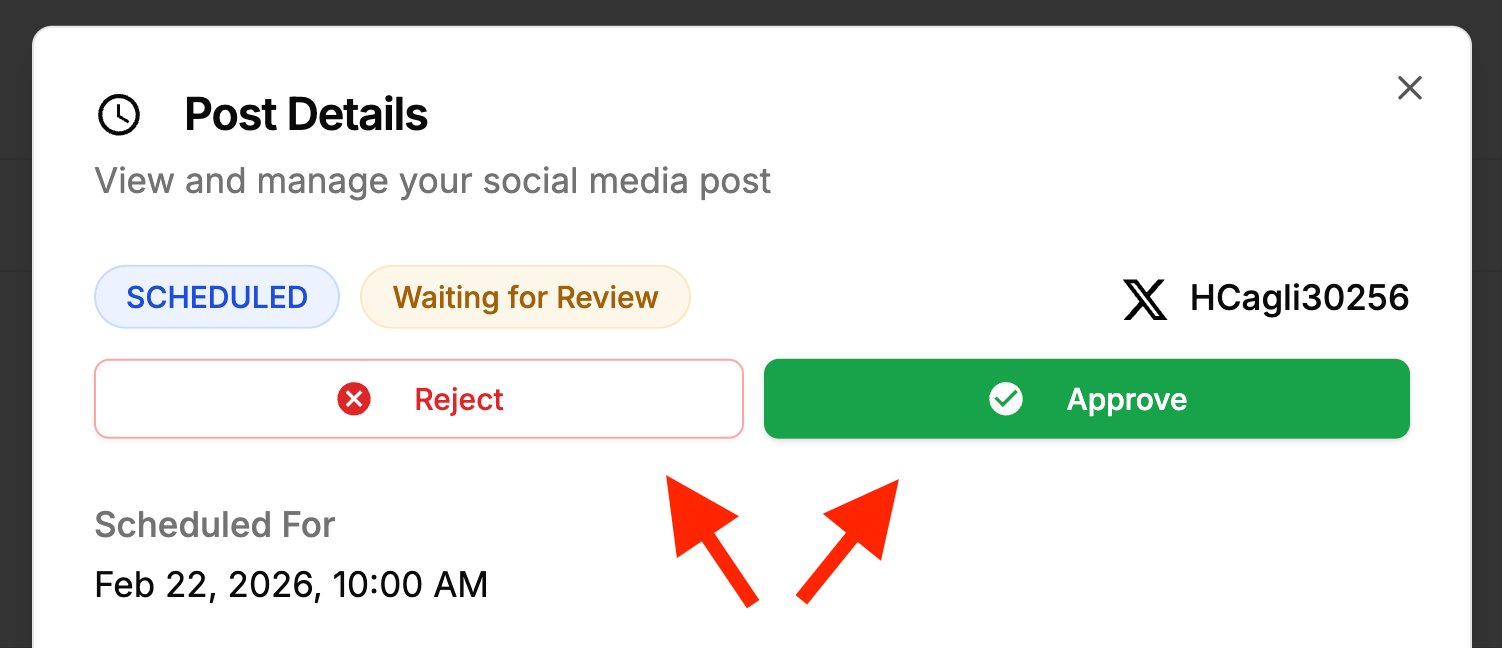
That structure helps prevent posting mistakes and access confusion across Instagram, Facebook, TikTok, X, and LinkedIn accounts. For a deeper look at how teams structure permissions in practice, see best social media tools with approval workflows.
Automated reporting under your brand
Reporting is where many agencies either look polished or improvised.
White-labeled reporting dashboards drive 25-30% higher client retention by delivering branded, real-time metrics on engagement and ROI. Agencies using ad-hoc email reports see 40% churn, while those using branded dashboards see 15%, according to ALM Corp’s breakdown of white-labeled digital agency dashboards.
That is why automated branded reporting belongs on the must-have list, not the nice-to-have list.
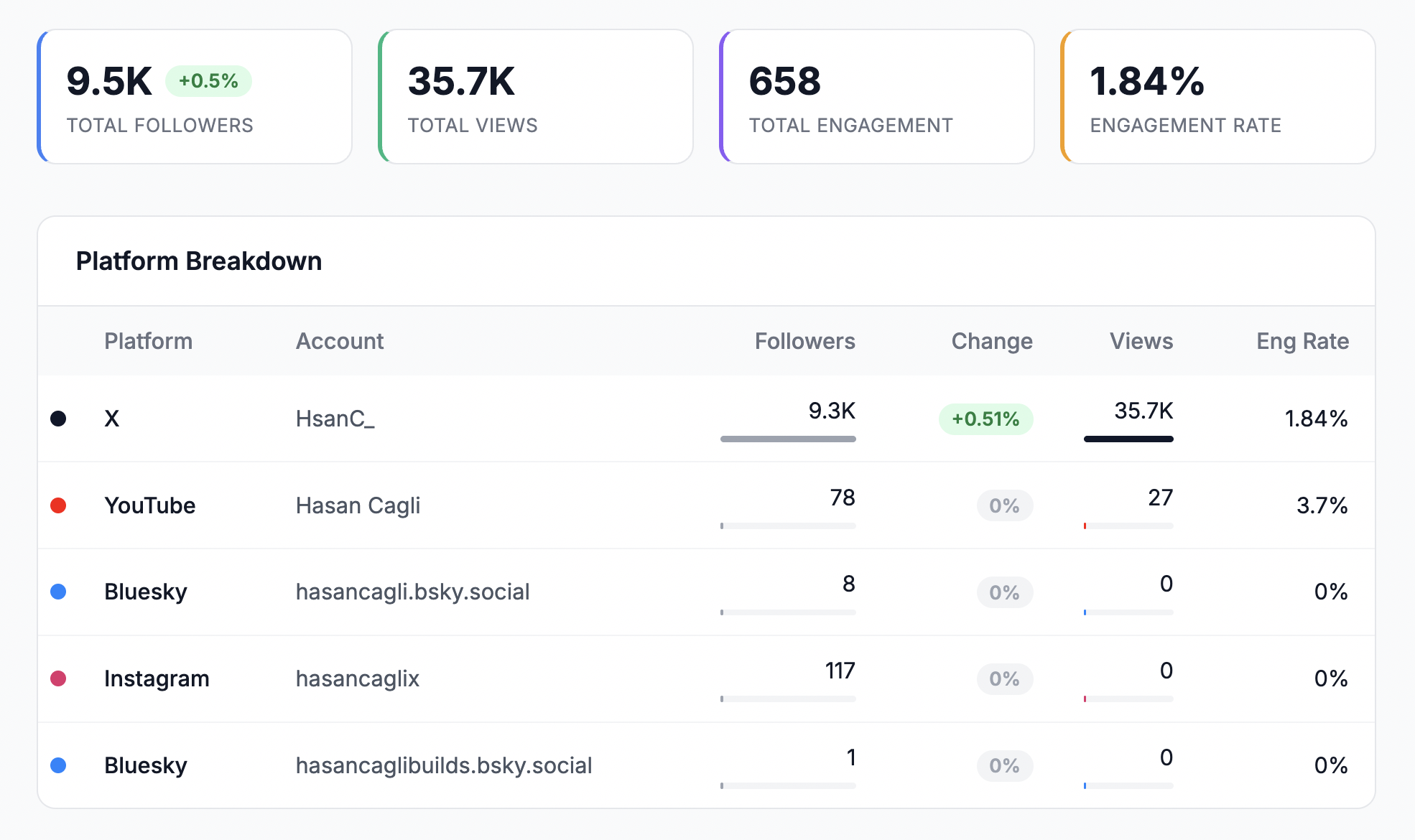
If reporting is a major part of your client communication, white-label reporting features for agencies are the kind of capability to evaluate closely. For a step-by-step walkthrough of what a strong client report should include, see our guide on how to create a social media report.
Approval workflows that match agency reality
Approvals need to happen where the content lives.
A solid white label system should let you route drafts for review, gather feedback on the post itself, and track status clearly. If your client still has to open a PDF, find the relevant post, and reply in email, your workflow is still weak.
Look for workflows that support:
- Internal review before client review
- Platform-specific copy checks
- Easy revision handling
- Clear approval status
- Auditability when clients change direction late
Unified collaboration
The best agency setups reduce tool switching.
You want content planning, media handling, approvals, publishing, reporting, and communication close enough together that work does not scatter. Some agencies also need a social inbox for comments and messages, especially when response ownership is split between the client and the agency.

Integration and extensibility
A true platform should fit into your existing operation.
That means practical integrations with asset libraries, design tools, drives, and internal workflows. It also means the provider should not trap you in a brittle setup that becomes hard to extend later.
Practical buying rule: If the platform only improves appearance but does not improve controls, approvals, and reporting, it is not enough for agency use.
When To Upgrade To a Paid White Label Solution
The right time to upgrade is usually earlier than agencies think. Agencies often wait until the workflow is already causing client frustration. That is late.

Upgrade when process risk is higher than software cost
The decision is simple in practice. If your current stack causes repeated manual work, approval confusion, permission issues, or reporting delays, a paid system is no longer a luxury.
Use this checklist.
-
You manage multiple client brands at once Once account switching becomes part of daily work, the chance of mistakes rises and context gets lost fast.
-
Clients expect a more professional reporting experience If your monthly report still depends on screenshots or hand-built decks, your process is too dependent on staff time.
-
You need a team, not just a solo workflow The moment you involve account managers, freelancers, designers, or community managers, access control matters.
-
Approvals are delaying publishing If content is done but not moving because clients approve by email, text, or comments in random docs, your bottleneck is workflow design.
-
You want to add clients without hiring immediately Paid white label tools make the service more repeatable. That is the actual upgrade, not just the software itself.
What paid tools should change immediately
A good upgrade should remove three recurring pain points in the first month:
- Less manual reporting
- Cleaner approval routing
- Safer team collaboration
If those do not improve, the tool is not solving the right problem.
Among agency-focused options, some teams look for platforms that combine multi-platform publishing, approvals, analytics, and white-label reporting in one place. PostPlanify is one example in that category. It supports scheduling across 10 platforms (Instagram, Facebook, TikTok, X, LinkedIn, YouTube, Threads, Pinterest, Google Business, and Bluesky), includes analytics with best-time-to-post suggestions, a social inbox for centralized comment management, role-based permissions with approval workflows, and white-label PDF reports — starting at $99/month for a team of 5 with 25 connected accounts. Its white-label social media management features — branded dashboard, branded client notifications, and white-label reports — are included on the Scale plan with no add-on fees. For a full market comparison, see best white label social media management tools.

For a broader comparison of platforms built for this use case, see best social media management tools for agencies and best social media management tools for teams.
Paid becomes necessary, not premature
Agencies sometimes resist paying because they compare software cost to free alternatives. The better comparison is software cost versus recurring operational waste.
If your team is spending hours every month fixing process problems that a paid platform is designed to prevent, you are already paying. You are just paying in labor, missed capacity, and a shakier client experience.
Agency Best Practices for White Label Management
White label social media management works best when the software supports a disciplined service model. The tool does not replace your standards. It exposes them.
Be transparent about how the service is delivered
Clients do not need a lecture about your tech stack, but they do need confidence that your agency controls the work. That matters even more now because concern around undisclosed subcontracting is rising. Forum discussions on Reddit about “white-label agency fraud” spiked 40% in 2025, according to Outstand’s discussion of ethics and transparency in white-label social media.
That does not mean you need to frame your platform as third-party software every time. It means you should avoid deceptive positioning.
A clean way to say it is:
- “You will receive access to our branded client portal for approvals, content review, and monthly reporting.”
- “Our agency manages strategy, publishing, and reporting through our internal platform.”
That is accurate, professional, and trust-preserving.
Package the service, not the software
Do not price based on tool access alone. Price based on the service layer around it.
A practical packaging structure often includes:
- Starter package for limited platform coverage and scheduled content
- Growth package for approvals, community management, and recurring reporting
- Higher-touch package for faster turnaround, deeper collaboration, and more strategic review
Clients buy reliability and clarity. The platform supports that. It is not the headline offer.
Set rules early during onboarding
Agencies get into trouble when they leave workflow assumptions unstated.
Define these before publishing starts:
- Who approves content
- How long approvals stay open
- Which messages the agency replies to
- Which platforms are fully managed versus monitored
- What happens when a client misses an approval window
Those rules matter more on LinkedIn and Instagram, where brand voice and timing often carry higher stakes than on lower-priority channels.
Keep reporting tied to decisions
Do not send dashboards without interpretation.
Use your reporting process to answer a few client questions consistently:
- What content themes performed best?
- Which platforms deserve more attention next month?
- What should change in posting cadence, creative, or targeting?
- Where did engagement translate into real business value?
If you are refining that client-facing reporting process, white-label social media reports for clients is a useful reference point for what agencies should deliver. For the underlying data strategy, social media analytics and reporting covers what to measure and how to present it.

Tip: The more polished your delivery system becomes, the more important it is that your communication stays clear and honest. Better software should increase trust, not mask weak service.
White Label Platform Comparison: What Agencies Actually Pay
Choosing the right platform is partly about features and partly about cost at scale. The table below compares what a 5-person agency team would actually pay across popular options.
| Feature | PostPlanify (Premium) | Hootsuite (Advanced) | Sprout Social (Professional) | Sendible (White Label+) |
|---|---|---|---|---|
| Monthly cost (team of 5) | $99/mo (flat) | $2,495/mo ($499/user) | $1,495/mo ($299/user) | $750/mo ($150 x 5 seats) |
| Social accounts included | 25 | 50 | 5 per user | Varies by plan |
| Platforms supported | 10 (incl. TikTok, Threads, Bluesky, Google Business) | 10+ | 10+ | 10 (incl. Google Business) |
| White-label reports | Yes (PDF, shareable link) | Yes (higher tiers) | Yes (higher tiers) | Yes (core feature) |
| Approval workflows | Yes (multi-approver) | Yes | Yes | Yes |
| Social inbox | Yes (Instagram, Facebook, LinkedIn) | Yes | Yes | Yes (Priority Inbox) |
| Analytics | All 10 platforms + best time to post | Yes | Yes | Yes |
| AI assistant | Yes (captions + image generation) | Yes (limited) | Yes (limited) | No |
| Content calendar | Yes (drag-and-drop) | Yes | Yes | Yes |
| Bulk scheduling | Yes (up to 20 posts) | Yes | Yes | Yes |
| Per-seat pricing | No (flat rate) | Yes ($499/user) | Yes ($299/user) | Yes |
The cost difference is significant at scale. A 5-person team on PostPlanify pays $99/month. The same team on Hootsuite pays $2,495/month, and on Sprout Social $1,495/month. That gap widens further as you add team members, which is why flat-rate pricing matters for growing agencies.
For a broader look at the landscape, best social media management platform compares tools across more categories.
PostPlanifyAll your social media in one simple dashboard
Schedule posts, track analytics, and reply to comments/DMs without switching tabs.
Engagement
+18%
Views
52.8k
Making the Switch to White Label Management
Transitioning from a patchwork of free tools to a unified white-label platform does not have to be a disruptive, all-at-once migration. Most agencies that make the switch successfully follow a phased approach.
Phase 1: Start with one client
Pick your most organized client — someone with clear approval expectations and regular posting. Connect their social accounts, set up their workspace, configure roles and permissions, and run one full content cycle through the new platform. This gives you a controlled environment to test workflows before scaling.
Phase 2: Standardize your onboarding template
Once the first client is running smoothly, document the setup as a repeatable process: which accounts to connect, what approval rules to configure, which team members get which roles, and what the reporting cadence looks like. This template becomes the foundation for every new client onboard.
Phase 3: Migrate remaining clients
Move clients over in small batches rather than all at once. Prioritize clients who are already frustrated with the current process — slow approvals, messy reports, or missed posts. They will see the improvement fastest and be the most forgiving during the transition.
Phase 4: Activate reporting and analytics
Once publishing is stable, turn on branded reporting. Set up automated report generation on a monthly cadence so clients receive performance summaries without your team assembling them manually. This is where white-label social media reports become a genuine time saver — and a client retention tool.
What to watch for
- Reconnection prompts: Some platforms require periodic re-authentication, especially for Instagram and Facebook. Build a monthly check into your workflow.
- Approval bottlenecks: If clients are slow to approve, set clear SLAs during onboarding. Define what happens when approval windows expire.
- Team adoption: The tool only works if your team uses it consistently. Run a short onboarding session and assign one person to be the internal champion.
For agencies managing multiple social media accounts, the switch typically pays for itself within the first month through reduced labor on reporting, approvals, and cross-platform coordination.
Frequently Asked Questions About White Labeling
Is it legal to rebrand software and sell it as my own?
Yes, if the provider’s terms allow white labeling. The key issue is the agreement you have with the software vendor. Check branding rights, reseller terms, data ownership, and support responsibilities before you offer it to clients.
How should I handle support requests from clients?
Keep the client relationship with your agency. Clients should contact your team, not the software vendor directly, unless your setup explicitly says otherwise. Internally, assign one person to triage platform issues, publishing issues, and account-access problems so support does not get lost between account management and operations.
Can I move existing clients into a white label platform?
Usually, yes, but migrations need planning. Audit connected social accounts, approval rules, asset libraries, reporting expectations, and user permissions first. Instagram and Facebook access can be slowed by Meta permissions. LinkedIn often needs tighter review rules. TikTok may require extra care for posting workflows and account ownership.
What is the difference between white label and affiliate programs?
White label means you deliver the service under your brand. An affiliate arrangement means you refer people to another company and they buy directly from that company. In white labeling, your agency owns the client experience. In affiliate models, you do not.
Do clients need to know I use a white label platform?
They do not need a technical breakdown, but they should not feel misled. Present the platform as part of your agency’s delivery system and be clear about who owns strategy, execution, and communication.
Can free tools ever be enough?
Yes, for very small client loads and simple workflows. No, if you need consistent approvals, reliable multi-client management, stronger permissions, and branded reporting.
How much does white label social media management cost?
It varies widely. Enterprise platforms like Hootsuite and Sprout Social charge $249–$499+ per user per month, which adds up fast for teams. Mid-market tools like Sendible and PostPlanify range from $99–$150/month for team plans with white-label features included. Free tools exist but do not offer true white labeling. The right comparison is not software cost versus free — it is software cost versus the labor hours you currently spend on manual reporting, scattered approvals, and client communication.
What social media platforms should a white label tool support?
At minimum, the tool should cover the platforms your clients actively use. For most agencies in 2026, that means Instagram, Facebook, LinkedIn, TikTok, and X. Broader coverage — including YouTube, Pinterest, Threads, Google Business, and Bluesky — reduces the need for supplementary tools and gives clients a single dashboard experience. Check whether the tool supports platform-specific features like Instagram Stories, Facebook Reels, and LinkedIn carousels, not just basic feed posts.
What is the difference between white label and reseller programs?
White label means you use the platform under your own brand identity — clients interact with your dashboard, your reports, and your process. A reseller program means you sell access to the vendor’s product, often at a discount, but the client typically sees the vendor’s branding. White labeling gives you more control over the client experience; reselling is simpler to set up but harder to differentiate.
How do I set up approval workflows for multiple clients?
Start by defining approval rules per workspace or client account. Assign roles — who drafts, who reviews internally, and who gives final client approval. The best white-label platforms let you configure multi-step approval chains, so a post moves from creator to internal reviewer to client before publishing. Set clear turnaround expectations during onboarding to avoid content sitting in limbo.
Key Takeaways
- White label social media management is not just rebranding — it is an operating system for agencies that standardizes content delivery, client approvals, reporting, and team collaboration under one roof
- Free tools work for validating your offer with 1–2 clients, but they break down at scale due to fragmented workflows, weak permissions, and manual reporting
- The real cost of free tools is not the software — it is the labor spent on rework, scattered approvals, and monthly report assembly
- Core features to evaluate: branded client dashboards, role-based permissions, approval workflows, automated white-label reporting, unified social inbox, and multi-platform analytics
- Pricing matters at scale — per-seat platforms cost $1,500–$2,500/month for a 5-person team, while flat-rate options like PostPlanify cover the same team for $99/month
- Migrate in phases: start with one client, build a repeatable onboarding template, then scale to remaining accounts
- Transparency builds trust — present the platform as your agency’s delivery system, not as a third-party tool
If your agency is feeling the strain of scattered approvals, manual reports, and too many client accounts across too many platforms, PostPlanify is worth reviewing as part of your upgrade shortlist. It is built for teams that need one dashboard for planning, scheduling, collaboration, analytics, and white-label client reporting without turning the workflow into a patchwork of separate tools.
Related Reading
- How to Start a Social Media Marketing Agency
- White-Label Social Media Reports: Step-by-Step Guide
- Best Social Media Tools with White-Label Reports
- 10 Best Social Media Management Tools for Agencies
- 10 Best Social Media Management Tools for Teams
- 10 Best Social Media Tools with Approval Workflows
- How to Create a Social Media Report
- Social Media Analytics and Reporting: Full Guide
- How Much to Charge for Social Media Management
- How to Manage Multiple Social Media Accounts
- Best Social Media Management Platform for Your Business
- How to Measure Social Media ROI
- 8 Ways to Save 10+ Hours a Week on Social Media Management
- Content Batching: Create 30 Days of Posts in 3 Hours
- Social Media Community Management: Full Guide
- Best Free Social Media Management Tools
- Best Social Media Platforms for Business
- Best Social Media Scheduling Tools
- Best Social Media Tools for Franchises and Multi-Location Brands
PostPlanifyAll your social media in one simple dashboard
Schedule posts, track analytics, and reply to comments/DMs without switching tabs.
Engagement
+18%
Views
52.8k
About the Author

Hasan Cagli
Founder of PostPlanify, a content and social media scheduling platform. He focuses on building systems that help businesses, agencies, and teams plan, publish, and manage content and social media more efficiently across platforms.


