


Most social media managers spend 20-30 hours a week on content. Not 20-30 hours being strategic — 20-30 hours switching between apps, rewriting the same caption for different platforms, manually posting at "the right time," and copy-pasting analytics into spreadsheets.
If you manage 3-5 platforms for a brand or client, you know the breakdown: ideation, creation, publishing, engagement, reporting — repeated across every platform, every day.
Most of that time goes to repetitive logistics, not creative work. And repetitive logistics can be systematically eliminated.
This guide breaks down 8 specific strategies that, when combined, cut 10-15 hours from your weekly workload. Each one works on its own, but they compound when stacked. Pick one this week, add another next week, and by the end of the month you'll have a fundamentally different workflow.
1. Batch-Create All Your Content in Focused Sessions
The single biggest time drain in social media isn't the posting — it's the context switching. Research by Gloria Mark at UC Irvine found that after an interruption, it takes roughly 23 minutes to fully refocus on the original task. If you stop twice a day to brainstorm, create, and publish a post, you're losing nearly an hour just to switching — before you've even started creating.

Content batching flips that entirely. Instead of creating one post at a time throughout the week, you dedicate one focused session to producing all your content in bulk.
What a batching session looks like:
- Brainstorm (20 min) — List 15-20 post ideas based on your content pillars
- Write (40 min) — Draft all captions in one flow, platform by platform
- Design (60 min) — Create all visuals using templates in Canva or your design tool
- Schedule (20 min) — Upload everything to your scheduler and set dates/times
Total time: 2-3 hours for an entire week of content.
Without batching: The same 15 posts take 6-8 hours spread across the week, once you factor in brainstorming, context switching, and "what should I post today?" decision fatigue.
Real example — a fitness coach's Monday batching session:
9:00 AM: Opens a doc and lists 12 post ideas for the week — 3 workout tips, 2 client transformation stories, 2 nutrition quick-takes, 2 motivational quotes, 2 behind-the-scenes clips, 1 product mention.
9:20 AM: Writes all 12 captions back-to-back. The first few take 5 minutes each; by the 8th, they're flowing in 2-3 minutes because the creative momentum is rolling.
10:00 AM: Opens Canva, duplicates her templates for each format, swaps text and images. No design decisions — the templates handle layout.
11:00 AM: Uploads everything to her scheduler, assigns dates and times.
11:30 AM: Done for the week. Social media runs on autopilot until next Monday.
The key is to batch by task, not by post. Write ALL captions first, then design ALL graphics, then schedule everything. This keeps your brain in one mode and lets you build momentum.
Time saved: 2-4 hours per week
For a detailed step-by-step workflow (including templates and real examples), read our full guide on content batching. If you're still in the planning stage, start with how to plan social media content.
2. Use AI to Draft Captions and Generate Hashtags
Writing a single social media caption from scratch takes most people 10-20 minutes. Multiply that by 5 posts a day across 3 platforms, and you're spending 4-6 hours a week just on writing.
AI cuts that to minutes. Not by replacing your voice, but by eliminating the blank-page problem. You get a first draft in seconds, then spend 2-3 minutes editing it to sound like you.
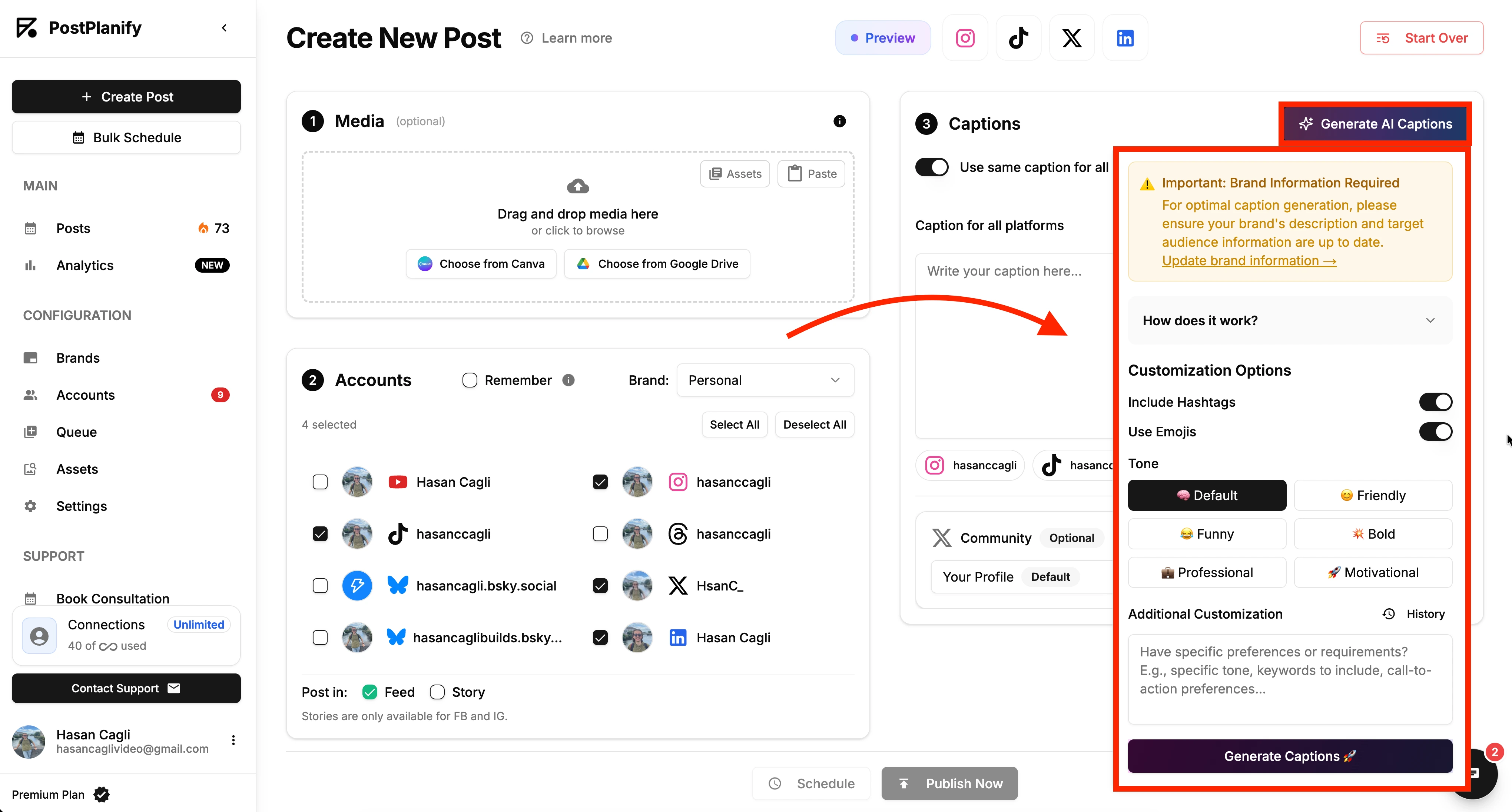
How to use AI effectively:
- Step 1: Give the AI your topic, platform, and tone (e.g., "Instagram carousel about meal prepping, friendly and practical")
- Step 2: Get 2-3 caption variations in seconds
- Step 3: Edit for your voice — add personal anecdotes, remove generic phrases, adjust the CTA
Before and after — what AI editing actually looks like:
AI draft:
"Meal prepping doesn't have to be complicated! Here are 5 simple meals you can prepare in under 30 minutes. Save time, eat healthy, and stay on track with your goals. Which one will you try first?"
After 2 minutes of editing:
"I used to spend $60/week on takeout because I 'didn't have time to cook.' Then I started prepping these 5 meals on Sunday — each one takes under 30 minutes and costs about $4 per serving. Swipe for recipes I actually eat every week."
The AI gave you the structure. You added the personal detail that makes people stop scrolling. Total time: 3 minutes instead of 15.
Tools for this: ChatGPT and Claude work well for raw caption drafts. PostPlanify has a built-in AI caption generator that adapts output per platform — casual for TikTok, professional for LinkedIn, hashtag-optimized for Instagram. For hashtags specifically, AI eliminates the research step entirely — check out the hashtag generator guide.
Pro tip: Create a brand voice cheat sheet — a short doc with your tone words, banned phrases, emoji rules, and CTA patterns. This makes editing AI drafts twice as fast because you're not second-guessing every word choice.
Time saved: 1-3 hours per week
3. Schedule Everything in Advance Across All Platforms
If you're still logging into Instagram, then TikTok, then LinkedIn, then X, then Facebook to manually publish each post — you're doing the most time-consuming version of social media management possible.
Every platform login costs 3-5 minutes of navigation, uploading, captioning, and tagging. Do that 4 times a day across 4 platforms and you've burned over an hour on logistics alone.
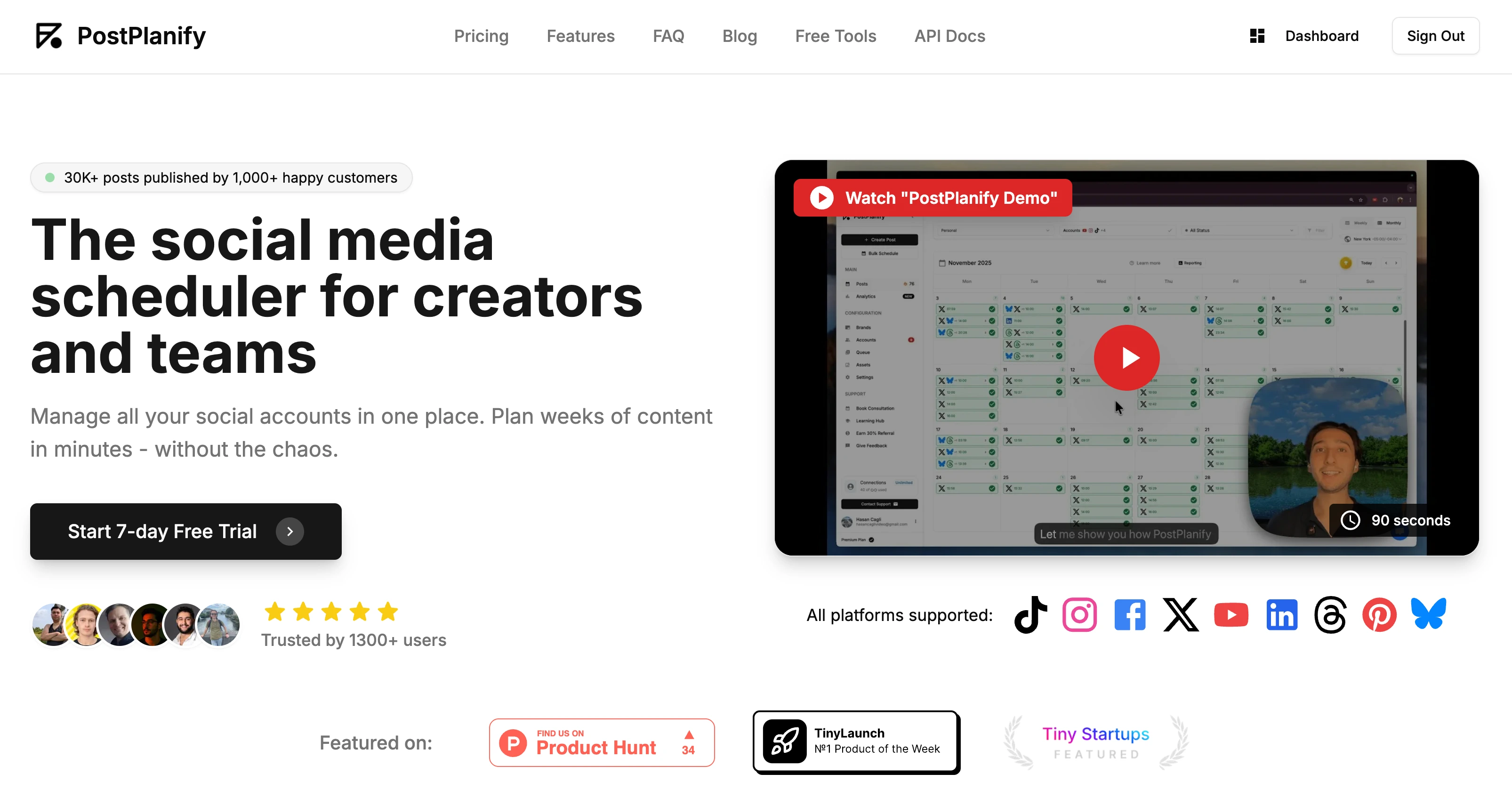
A scheduling tool reduces that to one session per week. You connect all your accounts once, then create and schedule posts from a single dashboard. One upload, one caption, multiple platforms. For a complete breakdown of how to cross-post across all platforms efficiently, we've got a dedicated guide.
The real difference — a side-by-side comparison:
| Manual posting | Scheduled posting | |
|---|---|---|
| Monday | 45 min across 4 platforms | 0 min (already scheduled) |
| Tuesday | 45 min | 0 min |
| Wednesday | 45 min | 0 min |
| Thursday | 45 min | 0 min |
| Friday | 45 min | 0 min |
| Sunday (batch) | 0 min | 90 min scheduling session |
| Weekly total | 3 hrs 45 min | 1 hr 30 min |
Pair this with batching (Way 1): Your Sunday scheduling session IS your batching session. Create everything and schedule it in one 2-3 hour block. Then close the app and don't think about posting until next week.
For platform-specific scheduling guides:
- How to schedule social media posts (general guide)
- How to automate social media posts (automation deep dive)
- Best time to post on social media (timing optimization)
Platform schedulers: Instagram | TikTok | LinkedIn | Facebook | YouTube | X/Twitter | Threads | Pinterest | Bluesky
Time saved: 1-2 hours per week
 PostPlanify
All your social media in one simple dashboard
Schedule posts, track analytics, and reply to comments/DMs without switching tabs.

Engagement
+18%
Views
52.8k
4. Repurpose One Piece of Content Into 5+ Posts
Most creators treat every post as a blank canvas. They start from zero every single time — and it eats hours.
The smarter approach: Create one substantial piece of content, then systematically break it into platform-native formats.
Concrete example — turning one blog post about "5 Email Subject Line Mistakes" into 7 social posts:
| Format | Platform | What you create | Time |
|---|---|---|---|
| Key stat as a quote graphic | Instagram, Facebook | "47% of people open emails based on the subject line alone" on a branded background | 5 min |
| Carousel with all 5 mistakes | Instagram, LinkedIn | One slide per mistake, with the fix | 10 min |
| Thread breaking down each mistake | X | 6 tweets: hook + 5 mistakes + CTA | 8 min |
| 45-second video listing the mistakes | TikTok, Reels | Talking head or text-on-screen format | 15 min |
| Infographic of the 5 mistakes | Visual checklist format | 10 min | |
| Personal take on the worst mistake | "I used to make mistake #3 every single day..." | 5 min | |
| Poll: which mistake do you make most? | X, Stories | Multiple choice with the 5 options | 3 min |
Total creation time for 7 posts: ~56 minutes Creating 7 posts from scratch: 3-5 hours
That's a 75-80% reduction, and the content is often higher quality because every piece is rooted in a well-researched source.
The repurposing checklist (run this for every substantial piece you create):
- Pull 2-3 key stats or quotes → graphics
- Extract the step-by-step framework → carousel or thread
- Record yourself summarizing the key point in 60 seconds → Reel/TikTok
- Write a personal take or hot take → LinkedIn text post
- Visualize the data or framework → Pinterest infographic
For 10 detailed repurposing strategies with examples, read our content repurposing strategies guide. Also helpful: how to create engaging social media content and scheduling Instagram Reels vs TikTok videos.
Time saved: 2-3 hours per week
5. Build a Content Calendar With Reusable Templates
Decision fatigue is real. If every morning starts with "what should I post today?", you're burning mental energy before you even open your design tool.
The fix: a content calendar built on repeating pillars and templates. When your weekly structure is predefined, creating content becomes fill-in-the-blank instead of blank-canvas brainstorming.
Step 1 — Define 4-5 content pillars:
For example, a SaaS company might use:
- Educational (tips, tutorials, how-tos) — 40% of posts
- Social proof (testimonials, results, case studies) — 20%
- Behind-the-scenes (process, team, culture) — 15%
- Industry insights (trends, data, hot takes) — 15%
- Engagement (questions, polls, UGC) — 10%
Step 2 — Create a weekly rhythm:
| Day | Pillar | Format | Template |
|---|---|---|---|
| Monday | Educational | Carousel / how-to | 5-slide Canva template |
| Tuesday | Social proof | Quote graphic / screenshot | Client quote template |
| Wednesday | Industry insight | Text post / data share | No template needed |
| Thursday | Educational | Quick tips / list | Single-image tip template |
| Friday | Engagement | Poll / question / UGC | Story template |
| Saturday | Behind-the-scenes | Photo / short video | No template needed |
Step 3 — Build the templates once, reuse forever:
Create reusable Canva templates (or Figma, or whatever you use) for each recurring format. Once your carousel template exists, creating a new carousel means swapping text and maybe one image. No design decisions, no font hunting, no color matching.
What this looks like in practice for a marketing agency:
Week 1: Monday carousel = "5 Facebook Ad Mistakes." Week 2: Same template, same format = "5 Instagram Story Mistakes." The structure is identical. Only the content changes. Creation time drops from 30 minutes to 10.
Why this saves time: You never face "what should I post today?" again. Open your calendar, see that it's Tuesday, grab your social proof template, plug in this week's testimonial. Done in 10 minutes.
For calendar examples and templates, check out social media content calendar examples and how to create a social media content calendar. Need post ideas to fill those slots? Here are social media post ideas to get you started.
Time saved: 1-2 hours per week
6. Automate Your Analytics and Reporting
A huge chunk of social media time isn't spent creating — it's spent pulling numbers.
The manual reporting workflow:
- Log into Instagram → screenshot insights → copy key metrics
- Log into TikTok → screenshot analytics → copy numbers
- Log into LinkedIn → pull engagement data
- Open spreadsheet → paste everything → format it
- Write summary → share with team/client
Time per reporting cycle: 1-3 hours. Do this weekly and you're spending 4-12 hours a month on spreadsheets that nobody reads carefully anyway.
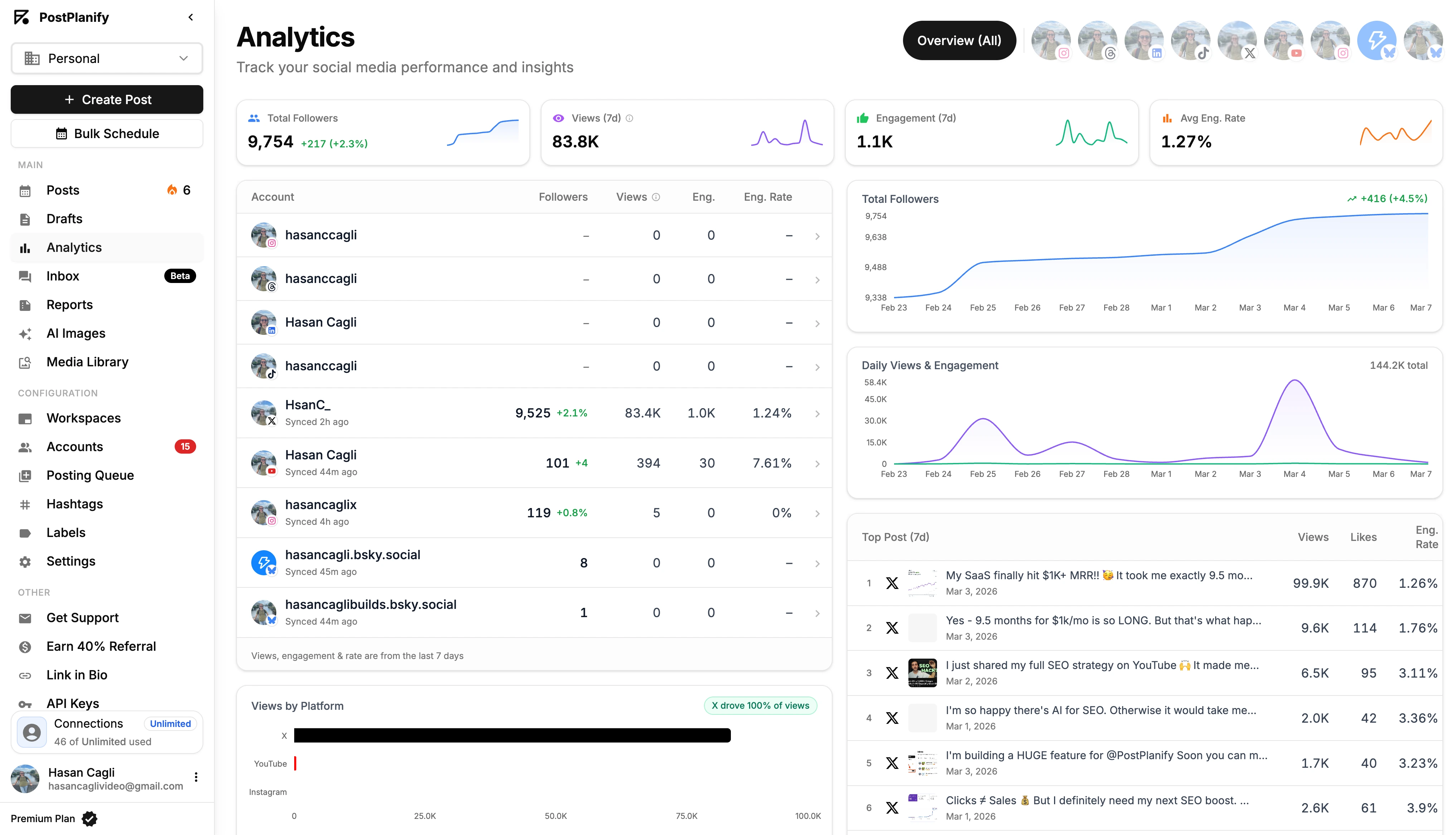
A unified analytics dashboard cuts this to minutes. Tools like PostPlanify, Google's Looker Studio (free), or native platform business suites pull data from all connected platforms into one view. No platform-hopping, no copy-pasting.
What a streamlined analytics workflow looks like:
Weekly (10 min): Open your dashboard. Glance at top 3 posts by engagement. Note what format and topic they share. Done.
Monthly (20 min): Review follower growth trends and engagement rate across platforms. Identify which content pillar performed best. Write 3 bullet points for your team or client.
Quarterly (1 hour): Deep analysis of what content types, formats, and posting times drove the most results. Adjust your content pillars and calendar accordingly.
Pro tip: Stop checking analytics daily. Daily numbers fluctuate so much that they create anxiety without providing actionable insight. Weekly and monthly trends are what actually inform strategy.
For more on building a reporting system, read social media analytics and reporting, how to measure social media ROI, and social media analytics for business.
Time saved: 1-2 hours per week
PostPlanifyAll your social media in one simple dashboard
Schedule posts, track analytics, and reply to comments/DMs without switching tabs.
Engagement
+18%
Views
52.8k
7. Batch Your Engagement Instead of Being "Always On"
Content creation gets all the optimization advice, but community management is the silent time killer. Responding to comments, answering DMs, engaging with other accounts, replying to story mentions — it never stops. And if you respond to every notification as it comes in, you're in permanent reactive mode.
The "always on" trap:
- Phone buzzes → open app → read comment → reply → get distracted by the feed → 15 minutes gone
- Repeat 8-12 times per day → 2-3 hours lost to reactive engagement
The fix: designated engagement windows.
- Set 2-3 fixed times per day — e.g., 9 AM, 1 PM, 5 PM
- Each window is 15-20 minutes max — respond to all comments, DMs, and mentions in one focused sweep
- Turn off notifications between windows — this is the hard part, and the most important part
- Use saved replies for common questions — "What's your pricing?" "Where can I buy this?" "What camera do you use?" — don't retype the same answer 50 times
What this looks like for a DTC brand manager:
9:00 AM (15 min): Open all platforms. Reply to overnight comments — mostly "Love this!" (heart reaction or short thanks), 2 product questions (saved reply + link), 1 collaboration DM (quick template response).
1:00 PM (15 min): Check for new comments on today's post. Reply to the first 5-10 to boost early engagement. Respond to 3 DMs.
5:00 PM (10 min): Final sweep. Reply to remaining comments. Flag anything that needs a longer response for tomorrow.
Total: 40 minutes of focused engagement vs. 2-3 hours of scattered, reactive checking throughout the day.
Why this works: Engagement quality doesn't drop when you batch it. A thoughtful reply at 1 PM is just as valuable as an instant reply at 11:47 AM. But the time you save from eliminating the context-switching and feed-scrolling between replies is significant.
Time saved: 1-2 hours per week
8. Centralize Multi-Account Management
If you manage more than one brand or client, the platform-hopping tax multiplies fast.
Every switch between accounts costs:
- 2-3 minutes logging in or switching profiles
- Lost context as you shift between brand voices
- Higher error risk (posting to the wrong account — and yes, it happens to everyone)
Across a day of managing 3 clients on 4 platforms each, that's easily 30-60 minutes burned on navigation alone.
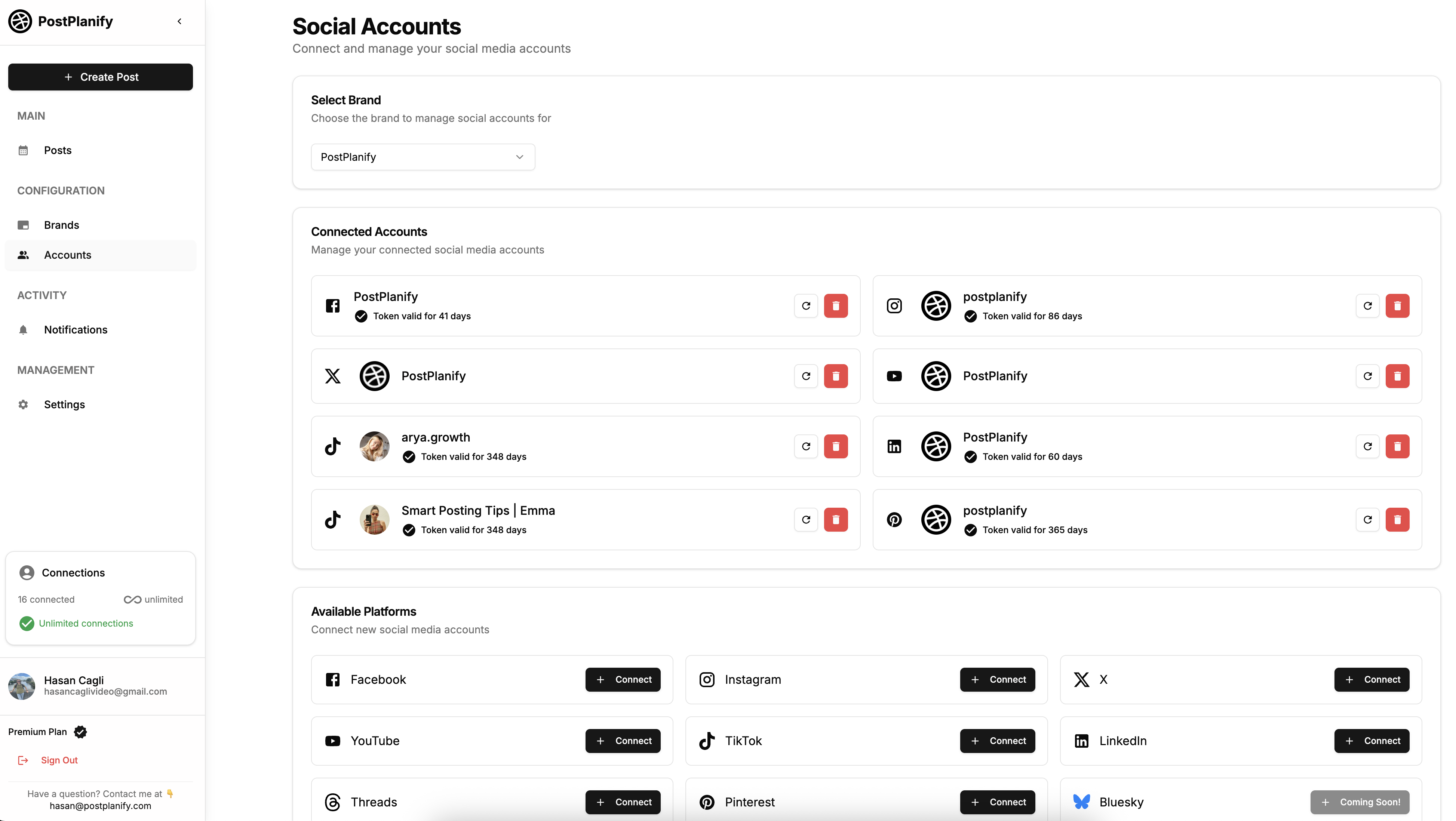
Centralized management tools solve this by putting everything in one dashboard:
- All accounts visible — Switch between brands with one click
- Workspace separation — Group accounts by client or brand
- Single content creation flow — Write once, select which accounts to post to
- Unified inbox — See comments and messages across platforms in one view
What this looks like for a freelance social media manager:
Sarah manages 3 clients: a bakery, a fitness studio, and a SaaS startup. Without centralized management, she logs into 12 separate platform accounts every day (3 clients x 4 platforms). That's roughly 36 minutes just on logins and switching.
With a centralized tool, she opens one dashboard, switches between client workspaces with one click, and creates all content in the same interface. Her daily "platform navigation time" drops from 36 minutes to about 5.
The real efficiency gain: When you combine centralized management with batching and scheduling, your entire week of social media work can happen in one or two focused sessions. No more "let me quickly post this" interruptions scattered throughout the day.
For strategies on managing multiple accounts efficiently, read how to manage multiple social media accounts. Looking for the right tool? Check out best social media management platform and social media management software for small business.
Time saved: 1-2 hours per week (for multi-account managers)
The Compound Effect: How These 8 Strategies Stack Up
Each strategy saves meaningful time on its own. Combined, they reshape your entire workflow:
| Strategy | Weekly Time Saved |
|---|---|
| Content batching | 2-4 hours |
| AI captions & hashtags | 1-3 hours |
| Scheduling in advance | 1-2 hours |
| Content repurposing | 2-3 hours |
| Content calendar templates | 1-2 hours |
| Automated analytics | 1-2 hours |
| Batched engagement | 1-2 hours |
| Centralized management | 1-2 hours |
| Total range | 10-20 hours |
There's natural overlap — your batching session includes scheduling, and repurposing feeds into your calendar. So the realistic estimate is 10-15 hours saved per week if you currently manage 3-5 platforms manually.
That's the difference between social media being a 25-hour-a-week grind and a 10-hour-a-week system.
Where to start: Don't implement all 8 at once. Pick the one that addresses your biggest pain point:
- Drowning in daily posting? → Start with batching + scheduling (Ways 1 & 3)
- Spending too long writing? → Start with AI-assisted content (Way 2)
- Constantly checking notifications? → Start with engagement batching (Way 7)
- Creating from scratch every time? → Start with repurposing + templates (Ways 4 & 5)
- Managing multiple clients? → Start with centralized management (Way 8)
PostPlanifyAll your social media in one simple dashboard
Schedule posts, track analytics, and reply to comments/DMs without switching tabs.
Engagement
+18%
Views
52.8k
Save Time on Social Media FAQ
How do I maintain my brand voice when using AI for captions?
AI works best as a first-draft tool, not a ghost writer. Create a brand voice document — a simple one-page cheat sheet listing your tone (casual? professional? witty?), banned phrases, emoji rules, and 3-4 example captions that nail your voice. Feed this to the AI as context, then spend 2-3 minutes editing every output. Over time, you'll get faster at spotting what sounds "off." The AI handles structure and ideas; you handle personality and authenticity.
Should I still engage with followers in real-time?
For most brands, no. Batched engagement (2-3 focused windows per day) delivers the same results as real-time responding, without the constant context switching. The exceptions: live events, product launches, or situations where real-time interaction is genuinely expected. Outside of those moments, a thoughtful reply at 2 PM is just as valuable as one at 11:43 AM.
What if I manage social media for multiple clients — does batching still work?
It works even better. Instead of switching between clients all day (which multiplies context-switching costs), dedicate specific days or time blocks to each client. For example: Client A's content on Monday morning, Client B on Monday afternoon, Client C on Tuesday morning. You stay in one brand voice per session, which is faster and reduces the risk of posting the wrong content to the wrong account.
How long does it take to see results from these workflow changes?
Most people notice the time savings within the first week — especially from scheduling and batching. You'll feel it immediately when you wake up on a Tuesday and don't have to create a post from scratch. The compounding effect kicks in around week 3-4, when your templates are built, your calendar rhythm is established, and creating content shifts from a daily chore to a weekly system.
What's the minimum I can do this week to start saving time?
One tool and one habit. Pick a scheduling tool (PostPlanify, Buffer, Later — whatever fits your budget), connect your accounts, and block 2 hours this weekend to create and schedule next week's content. That single change eliminates daily posting and immediately frees up 1-2 hours per day. Everything else in this guide builds on that foundation.
Can I use AI agents like Claude or ChatGPT to run my social media?
Yes — and it's becoming the fastest workflow for time-strapped teams. Tools that ship an MCP (Model Context Protocol) server let you schedule posts, pull analytics, and triage comments directly from your AI chat, no dashboard clicking. See our roundup of the best MCP servers for social media management for setup and tool comparisons.
Wrapping Up
Social media doesn't have to eat your entire week. The difference between managers who spend 25+ hours and those who spend 8-10 hours isn't talent or team size — it's systems.
Batch your content so you're not starting from scratch every morning. Let AI handle the first draft so you can focus on voice and strategy. Schedule everything in advance so publishing runs on autopilot. Repurpose your best work instead of reinventing the wheel. Build a calendar with templates so you never face a blank page. Automate your reporting so numbers come to you. Batch your engagement so you're not glued to notifications. And centralize everything so you stop wasting time switching between platforms and accounts.
Pick one strategy. Try it this week. Once you feel the difference, add another. By next month, you'll have a workflow that runs in a fraction of the time — and the results will be better, not worse, because your energy goes to strategy instead of logistics.
Try PostPlanify free for 7 days and see how much time you get back.
PostPlanifyAll your social media in one simple dashboard
Schedule posts, track analytics, and reply to comments/DMs without switching tabs.
Engagement
+18%
Views
52.8k
About the Author

Hasan Cagli
Founder of PostPlanify, a content and social media scheduling platform. He focuses on building systems that help businesses, agencies, and teams plan, publish, and manage content and social media more efficiently across platforms.


