


Here's the thing nobody selling YouTube analytics tools wants to lead with: YouTube Studio is the best native analytics in social media, and it isn't close. Lifetime data that never expires, audience retention curves, click-through rates, traffic sources, even revenue reporting. Instagram deletes your account data after 90 days and TikTok after 60; YouTube keeps everything from your channel's first day.
So the buying question here is different from every other platform. You don't buy a YouTube analytics tool to replace Studio. You buy it for the jobs Studio refuses to do: keyword and SEO research, competitor intelligence, thumbnail testing, multi-channel and multi-platform reporting, and anything a client is supposed to read. This guide sorts 9 tools by which of those gaps they fill, plus first-party data from 872 YouTube videos on how Shorts and long-form actually trade views for engagement (the pattern will look familiar if you've read our Instagram analytics guide).
Quick Answer: What Is the Best YouTube Analytics Tool in 2026?
For agencies and marketing teams, the best YouTube analytics tool is PostPlanify: YouTube channel and video analytics tracked alongside your other 9 platforms, with historical trends, benchmarking, and white-label client reports, priced per client workspace from $39/mo, so YouTube's numbers finally live in the same report as everything else you manage.
For growing a channel, the specialists win their lanes: vidIQ for keyword research and AI-assisted optimization, TubeBuddy for thumbnail A/B testing inside Studio. For competitor benchmarking, Socialinsider covers YouTube alongside five other networks.
What YouTube Studio Gives You Free (and What It Still Can't Do)
YouTube Studio's analytics deserves its reputation. Free, for every channel: views, watch time, audience retention curves per video, impressions click-through rate, traffic sources, audience demographics and activity times, and lifetime data with no expiry. Advanced Mode adds custom date ranges, comparisons, and exports. If your question is "how is my content performing?", Studio answers it better than any paid tool.
What it still can't do is everything around that question:
- No keyword or SEO research. Studio tells you which search terms found you, not which ones could (our YouTube SEO guide covers the discipline itself).
- No competitor view. You can't benchmark retention, upload cadence, or growth against anyone.
- No A/B testing for thumbnails beyond the limited native "Test & Compare" slots.
- Comparison friction. Most Studio views default to 90-day windows, Advanced Mode lives on desktop only, and nothing rolls multiple channels into one view. It also won't tell you when to upload based on anything but your own history.
- No client-ready reporting. Studio exports CSVs, not branded reports, and it will never sit in the same dashboard as your Instagram and LinkedIn numbers.
That list is the actual shopping list. Here's how I scored the tools against it.
How I Evaluated These YouTube Analytics Tools
- Which Studio gap it fills: research, testing, benchmarking, or reporting; "prettier version of Studio" doesn't count
- Data history and multi-channel roll-up: one view across channels (and platforms), stored from connection
- YouTube-specific depth: Shorts vs long-form awareness, not just blended totals
- Reporting: client-ready and brandable, or CSV archaeology
- Price honesty: what the advertised tier includes at real usage
- Track record: review volume and how long the tool has survived YouTube's API changes
Every price below comes from the vendor's own pricing page, verified in October 2026, quoted monthly unless an annual rate is named.
Quick Picks: Best YouTube Analytics Tools at a Glance
| Tool | Starting Price | Free Option | Studio Gap It Fills | Best For |
|---|---|---|---|---|
| PostPlanify | From $39/mo per workspace | Trial + guarantee | Cross-platform reporting | Agencies & marketing teams |
| vidIQ | Free / $16.58/mo yearly | ✅ | SEO & research | Creators growing via search |
| TubeBuddy | $12/mo yearly | Not listed | Testing & optimization | Hands-on channel operators |
| Socialinsider | $82/mo | 14-day trial | Competitor benchmarks | Competitive reporting |
| Metricool | $25/mo | ✅ (1 brand) | Multi-platform on a budget | Small teams |
| Sprout Social | $99/seat/mo | 30-day trial | Enterprise reporting | Enterprise teams |
| Hootsuite | $99/user/mo | 14-day trial | One-vendor breadth | Enterprise breadth |
| AgencyAnalytics | $20/client/mo | 14-day trial | Client dashboards | Agencies reporting many clients |
| Whatagraph | From €699/mo yearly | Demo only | High-volume reporting | Large reporting operations |
1. PostPlanify: Best for Agencies and Marketing Teams
PostPlanify is a social media management platform built for agencies serving local businesses, and it solves the Studio gap that costs agencies the most hours: YouTube data that has to appear next to everything else. It tracks your YouTube channel and video performance (views, likes, comments, engagement trends) with history stored from the day you connect, period comparison, and benchmarking, in the same dashboard as your Instagram, TikTok, LinkedIn, and 6 other platforms, and turns the combined picture into client reports that carry your agency's brand instead of nine separate CSV exports.
Publishing is built in too: the YouTube scheduler handles long-form videos and Shorts with direct upload and custom thumbnails (our best YouTube scheduling tools guide compares the options), alongside the social inbox, approval workflows, and AI content tools. Pricing is per client workspace, and team members and client approvers are never billed as seats.
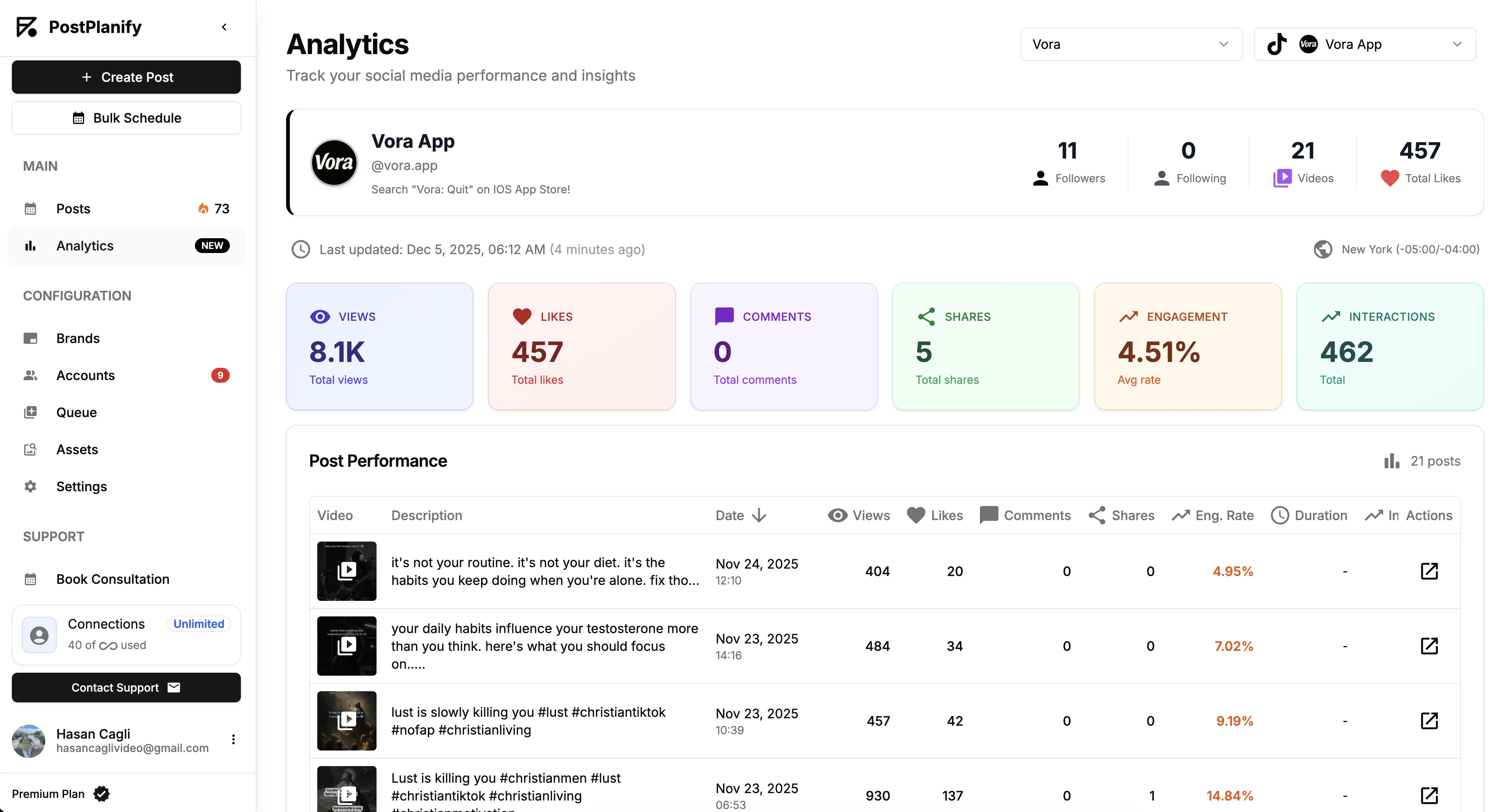
At a glance: PostPlanify
- Pricing: Per client workspace on a graduated scale: $39/mo for the first workspace on Growth, $155/mo for 5, $250/mo for 10, up to 100 workspaces. Premium from $99/mo and Scale from $199/mo per workspace. Unlimited team members on every plan, with yearly billing about 20% cheaper ($31/mo for the first workspace)
- Free option: 7-day free trial + 14-day money-back guarantee
- Data history: Stored from the day you connect, across all 10 supported platforms
- Accounts per workspace: 4 on Growth, 6 on Premium, 8 on Scale, so a client's YouTube channel sits with its other accounts in one workspace
- Best for: Agencies serving local businesses that need YouTube reported alongside every other channel they manage
Key features:
- Full analytics with historical trends: channel growth and video performance with period comparison and benchmarking, included on every plan
- One dashboard for 10 platforms, so YouTube stops being the channel that lives in a separate tab
- Client reports on Premium with scheduled delivery and shareable links, and fully white-labeled dashboards, client emails, and reports on Scale
- YouTube scheduling for videos and Shorts with direct publishing
- Social inbox and bulk scheduling on every plan, approval workflows on Premium, with AI captions and image generation alongside
The honest drawback: PostPlanify doesn't replicate Studio's deepest YouTube-native metrics: no retention curves, no CTR, no traffic-source breakdowns. Those stay in Studio (where they're free and excellent). What you're buying is everything Studio can't put in one place.
Pricing
| Plan | Starts at | Includes | Each extra workspace | Social accounts |
|---|---|---|---|---|
| Growth | $39/mo | 1 workspace | from $29, cheaper as you add more | 4 per workspace |
| Premium | $99/mo | 3 workspaces | from $39, cheaper as you add more | 6 per workspace |
| Scale | $199/mo | 5 workspaces | from $39, cheaper as you add more | 8 per workspace |
Unlimited team members on every plan, no per-seat fees. Yearly billing saves 20%. All plans include a 7-day free trial with a 14-day money-back guarantee.
Verdict: The pick when YouTube is one channel among several and its numbers need to reach clients or leadership looking like a report, not an export. Channel-growth specialists are the next two entries.
 PostPlanify
All your social media in one simple dashboard
Schedule posts, track analytics, and reply to comments/DMs without switching tabs.

Engagement
+18%
Views
52.8k
2. vidIQ: Best for YouTube SEO and Research
vidIQ attacks the biggest Studio gap: knowing what to make next. Its core is research: personalized keyword ideas, search volume and competition scoring, trend discovery, competitor intel, and an AI coach layered over all of it, with optimization suggestions and subscriber insights per video. For channels that grow through search and suggested traffic, this is the toolset Studio simply doesn't have.
The free plan is genuinely usable (150 AI credits monthly plus core research), with Boost at $16.58/month billed yearly (about $19 month-to-month) unlocking the full research and optimization stack, and Max at $39/month billed yearly (about $49 month-to-month) adding heavier AI allowances. Everything is metered in AI credits: 150 a month on Free, 2,000 on Boost, 6,000 on Max.
At a glance: vidIQ
- Pricing: Free (150 AI credits/mo) → Boost $16.58/mo billed yearly, about $19 month-to-month (2,000 credits) → Max $39/mo billed yearly, about $49 month-to-month (6,000 credits) → custom Enterprise for 3+ channels or multi-seat teams
- Free option: Yes, permanent free plan
- Data history: Channel and competitor tracking with trend history
- Best for: Creators and channel managers who grow through search, suggested traffic, and topic selection
Key features:
- Keyword research with volume and competition scoring
- Competitor tracking and trend discovery
- Per-video optimization suggestions and AI coaching
- Thumbnail generation and content ideation on paid tiers
The honest drawback: it's a single-channel creator tool at heart; agencies wanting roll-ups need the Enterprise tier, and none of it produces client-facing reports.
Verdict: The strongest answer to "what should I publish next?", which is the question that actually grows channels.
3. TubeBuddy: Best In-Studio Toolkit and A/B Testing
TubeBuddy lives inside YouTube as a browser extension, adding tools directly where you already work: bulk metadata editing, SEO scoring, tag research, and its signature feature, real thumbnail A/B testing that rotates variants and reports the winner, well beyond YouTube's limited native Test & Compare.
TubeBuddy simplified its lineup in 2026: the old Star tier is gone from the pricing page, leaving Pro at $12/month billed yearly ($144 for the year, or about $15 month-to-month) and Legend, where the A/B testing and advanced tools live, at $26.39/month billed yearly ($316.68 for the year, or about $33 month-to-month). Enterprise is custom, for brands running 3+ channels.
At a glance: TubeBuddy
- Pricing: Pro $12/mo billed yearly ($144/year, about $15 month-to-month) → Legend $26.39/mo billed yearly ($316.68/year, about $33 month-to-month) → custom Enterprise. Yearly saves 20%
- Free option: A free plan exists (cancelled channels downgrade to it) but is no longer listed on the pricing page
- Seats: Pro is single-user, Legend includes 2 seats, Enterprise is unlimited
- Data history: Works on top of Studio's own lifetime data
- Best for: Hands-on channel operators who want testing and bulk tools inside the Studio workflow
Key features:
- Thumbnail A/B testing with automatic winner detection (Legend)
- Bulk editing for titles, descriptions, tags, and end screens
- SEO score, tag suggestions, and keyword explorer
- Browser-extension workflow, no separate dashboard to check
The honest drawback: it's an optimizer, not an analyzer; there's no meaningful reporting layer, and the extension-based UX stands or falls with your browser.
Verdict: The cheapest meaningful upgrade to a YouTube workflow, and the only serious thumbnail testing in this price universe.
4. Socialinsider: Best for Competitor Benchmarking
Socialinsider fills the gap Studio guards most tightly: everyone else's numbers. It benchmarks YouTube channels against competitors on followers, engagement, and content mix, alongside Instagram, TikTok, LinkedIn, Facebook, and X, with automated reports and unlimited exports. Their industry studies are among the most-cited benchmarks in the field (we reference them in our engagement benchmarks guide).
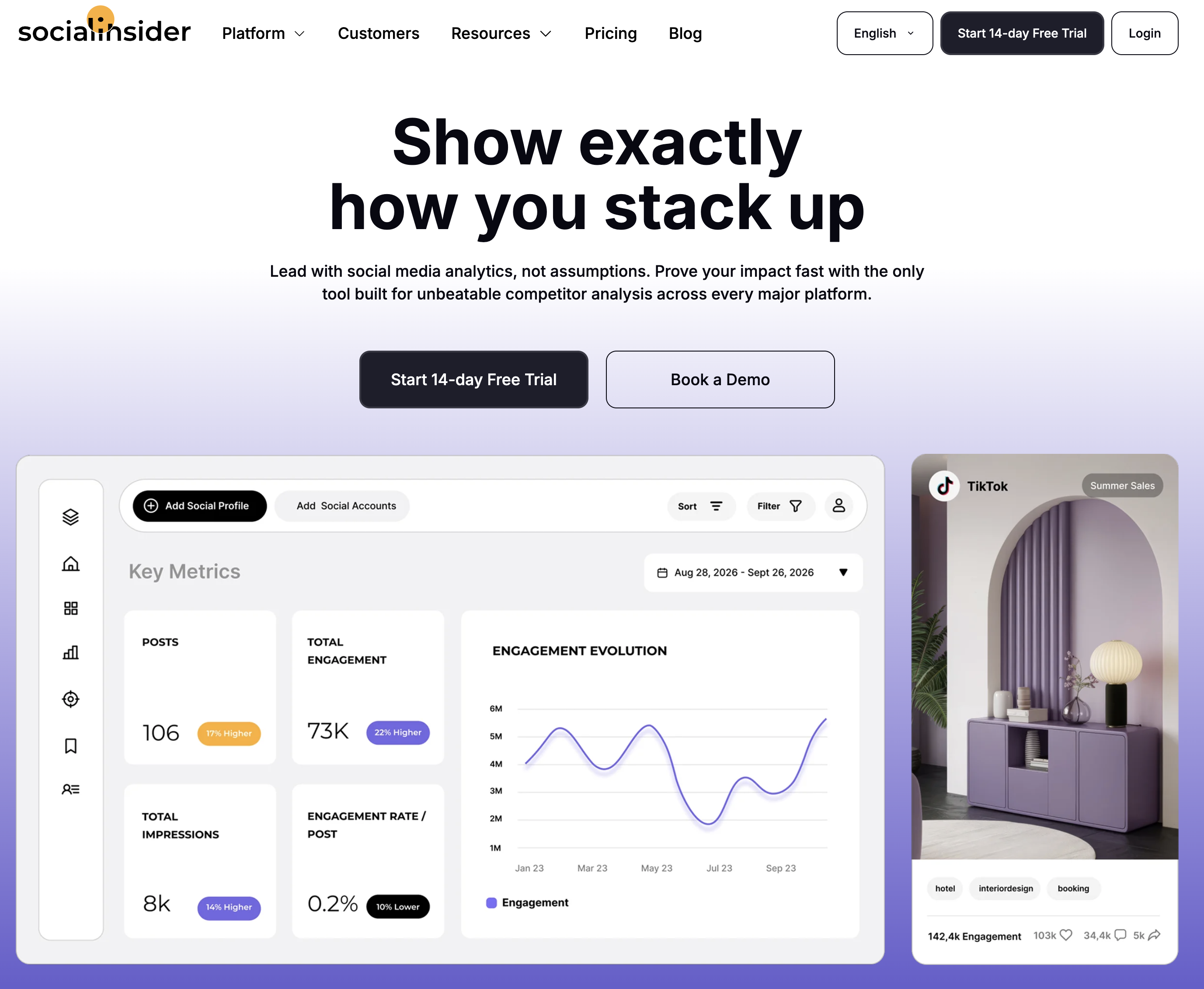
At a glance: Socialinsider
- Pricing: Adapt $82/mo (20 accounts, 3-month history, 1 seat) → Optimize $124/mo (30 accounts, 6 months, 2 seats) → Predict $199/mo (40 accounts, 12 months, 5 seats) → custom Enterprise. Yearly billing is 2 months free, about 16% off
- Free option: 14-day trial, no card required
- Data history: 3 to 12 months depending on plan
- Best for: Marketers whose YouTube reporting needs competitive context
Key features:
- Competitor benchmarking across YouTube and five other networks
- Automated reports with unlimited exports
- Industry benchmark datasets from their own research
- API and Looker Studio add-ons
The honest drawback: analytics-only, no publishing or optimization tools, and the per-account caps reward careful plan-reading.
Verdict: If your monthly report's first question is "versus who?", this is the specialist.
5. Metricool: Best Budget Multi-Platform Analytics
Metricool gives YouTube the generalist treatment: solid channel and video analytics with unlimited history on paid plans, competitor tracking, and client reports, inside the cheapest serious multi-platform tool on the market. The free plan covers one full brand.
At a glance: Metricool
- Pricing: Free (1 brand, 30-day history, 20 posts/mo, no LinkedIn or X) → Starter from $25/mo (5 brands $25, 10 brands $45) → Advanced from $67/mo (15 brands $67, 25 brands $107, 50 brands $210) → Custom. Billed yearly, Starter is from $20 and Advanced from $53, saving up to 24%
- Free option: Yes, 1 full brand
- Data history: Unlimited on paid plans
- User ratings: 4.5/5 on G2 (83 reviews); 4.2/5 on Trustpilot
- Best for: Small teams measuring YouTube as one platform among many, cheaply
Key features:
- Unlimited analytics history on paid plans
- YouTube among 11 supported platforms including Twitch
- Competitor tracking and client reports (Advanced)
- Planner and publishing included
The honest drawback: YouTube-specific depth is thin; no retention or CTR context, no SEO tools, and the interface favors breadth over polish.
Verdict: The best data-per-dollar route to YouTube-plus-everything reporting. Learn more in our Metricool pricing breakdown, Metricool reviews roundup, and best Metricool alternatives guide.
6. Sprout Social: Best Enterprise Analytics
Sprout Social brings YouTube into the most polished enterprise reporting suite in the industry: cross-network dashboards, deep audience analysis, and stakeholder-grade reports, priced per seat for organizations that treat social data as business intelligence.
At a glance: Sprout Social
- Pricing: Essentials $99/seat/mo ($79 billed annually, 5 profiles) → Standard $199/seat/mo (5 profiles) → Professional $299/seat/mo (unlimited profiles) → Advanced $399/seat/mo; custom Enterprise
- Free option: 30-day trial
- Data history: Deep, with premium reporting
- User ratings: 4.4/5 on G2 (5,731 reviews); 2.2/5 on Trustpilot
- Best for: Mid-market and enterprise teams with formal reporting obligations
Key features:
- Best-in-class cross-network reports including YouTube
- Deep audience and post analytics
- Social listening add-on
- Enterprise workflows and permissions
The honest drawback: per-seat pricing ($597/month for a 3-person team) buys reporting machinery, not YouTube-specialist depth.
Verdict: The enterprise standard when YouTube is one governed channel among many. Learn more in our Sprout Social pricing breakdown, Sprout Social reviews roundup, and best Sprout Social alternatives guide.
7. Hootsuite: Best Enterprise Breadth
Hootsuite closes the list with YouTube analytics inside the longest-running social management platform, plus listening, monitoring, and a custom report builder, for organizations standardizing on one vendor across every network.

At a glance: Hootsuite
- Pricing: Per user, billed annually: Standard $99/user/mo (10 accounts) → Professional $199/user/mo (unlimited) → Advanced $399/user/mo → custom Enterprise. Hootsuite moved to per-seat pricing in August 2026 and does not publish month-to-month rates
- Free option: 14-day trial, no credit card required
- Data history: Deep, with custom reports
- User ratings: 4.3/5 on G2 (6,615 reviews); 1.8/5 on Trustpilot
- Best for: Enterprise teams wanting one vendor for YouTube plus everything else
Key features:
- Comprehensive YouTube and cross-network analytics
- Social listening and brand monitoring
- Custom report builder
- Enterprise approvals and compliance
The honest drawback: per-seat pricing means smaller teams fund governance they never use, and every extra person is another $99 to $399/mo; the value only lands at organizational scale.
Verdict: Enterprise requirements only. Learn more in our Hootsuite pricing breakdown, Hootsuite reviews roundup, and best Hootsuite alternatives guide.
8. AgencyAnalytics: Best for Client Dashboards and Roll-Up Reporting
AgencyAnalytics is the tool agencies reach for when the deliverable is the report itself. It pulls YouTube alongside 85+ other integrations (Google Ads, Meta, GA4, Search Console, call tracking) into one white-labeled client dashboard, with scheduled email delivery and a drag-and-drop report builder. If your YouTube numbers need to sit in the same PDF as paid search and website traffic, this is the category that does it.
The pricing model is the thing to understand: it is per client, per month, not per seat or per channel. That scales cleanly if every client pays you more than the dashboard costs, and badly if you report on a long tail of small accounts.
At a glance: AgencyAnalytics
- Pricing: From $20 per client per month on the Core plan, billed monthly or annually; higher tiers add integrations and automation
- Free option: 14-day free trial
- Data history: Depends on each connected source's own retention
- Best for: Agencies whose YouTube reporting has to arrive in a branded dashboard next to every other channel
Key features:
- 85+ integrations, so YouTube reports beside ads, search, and website data
- Fully white-labeled dashboards and scheduled PDF delivery
- Drag-and-drop report builder with reusable templates
- Per-client billing, so cost tracks your roster rather than your team size
- Client login access to live dashboards instead of static exports
The honest drawback: it reports, and that is all it does. There is no publishing, no scheduling, no social inbox, and no YouTube-specific research or testing. It reads the numbers other tools create, so it is a second subscription on top of whatever you actually publish with.
Verdict: The strongest pure reporting layer here, and a genuine alternative if client-facing dashboards are the only job. Compare the total cost honestly: at 10 clients it is $200/month for reporting alone, where a per-workspace tool covers publishing and reporting together.
9. Whatagraph: Best for High-Volume Multi-Client Reporting
Whatagraph solves the same problem as AgencyAnalytics at a larger scale and a much higher price. It blends YouTube with 60+ other sources, supports custom metrics and data transformations, and can pipe everything into BigQuery or Looker on its top tier. Teams buy it when reporting volume has outgrown what a person can assemble by hand.
At a glance: Whatagraph
- Pricing: Max from €699/month billed annually; Prime is custom. No self-serve entry tier
- Free option: Demo only
- Data history: Depends on each connected source
- Best for: In-house teams and larger agencies running reporting at a volume that justifies four figures a month
Key features:
- 60+ data sources with data groups and blends across them
- White-label reports, custom metrics, dimensions, and source tags
- KPI overviews with alerting
- Public API, custom report domain, and BigQuery or Looker transfer on Prime
- Dedicated success manager
The honest drawback: the entry price is the drawback. €699/month billed annually is more than most agencies spend on their entire social stack, and like AgencyAnalytics it only reports: nothing is published, scheduled, or answered from inside it.
Verdict: Right for high-volume reporting operations, wrong for almost everyone else reading this. Listed because it is the other name that comes up for agency YouTube reporting, and because knowing the ceiling makes the rest of the field easier to price.
YouTube Analytics Tools Comparison Table
| Tool | Entry Price | Free Option | SEO/Research | A/B Testing | Competitor Benchmarks | White-Label Reports | Multi-Platform |
|---|---|---|---|---|---|---|---|
| PostPlanify | From $39/mo per workspace | Trial + guarantee | ❌ | ❌ | Benchmarks ✅ | ✅ Scale | ✅ 10 platforms |
| vidIQ | Free / $16.58/mo yearly | ✅ | ✅ Core focus | ❌ | ✅ | ❌ | ❌ |
| TubeBuddy | $12/mo yearly | Not listed | ✅ | ✅ Core focus | Limited | ❌ | ❌ |
| Socialinsider | $82/mo | 14-day trial | ❌ | ❌ | ✅ Core focus | Exports | ✅ 6 networks |
| Metricool | $25/mo ($20 yearly) | ✅ (1 brand) | ❌ | ❌ | ✅ | ✅ Advanced | ✅ 11 platforms |
| Sprout Social | $99/seat/mo | 30-day trial | ❌ | ❌ | Benchmarking | ✅ | ✅ |
| Hootsuite | $99/user/mo | 14-day trial | ❌ | ❌ | ✅ (listening) | ✅ | ✅ |
| AgencyAnalytics | $20/client/mo | 14-day trial | ❌ | ❌ | ❌ | ✅ Core focus | ✅ 85+ sources |
| Whatagraph | From €699/mo yearly | Demo only | ❌ | ❌ | ❌ | ✅ | ✅ 60+ sources |
YouTube Shorts Analytics: What 872 Videos Say About Length
If you read our Instagram analytics guide, you already know where this is going. (For the publishing side of Shorts, see how to schedule YouTube Shorts.) In PostPlanify's analysis of 872 YouTube videos from 39 channels (April to July 2026), video length traded views for engagement in a clean ladder. Shorts (60 seconds or under) earned a median of 245 views per video but only a 1.05% median engagement rate. Videos over 3 minutes flipped it: 97 median views, 5.08% median engagement rate. The 1-to-3-minute middle ground sat exactly between on both measures (110 views, 2.05%).
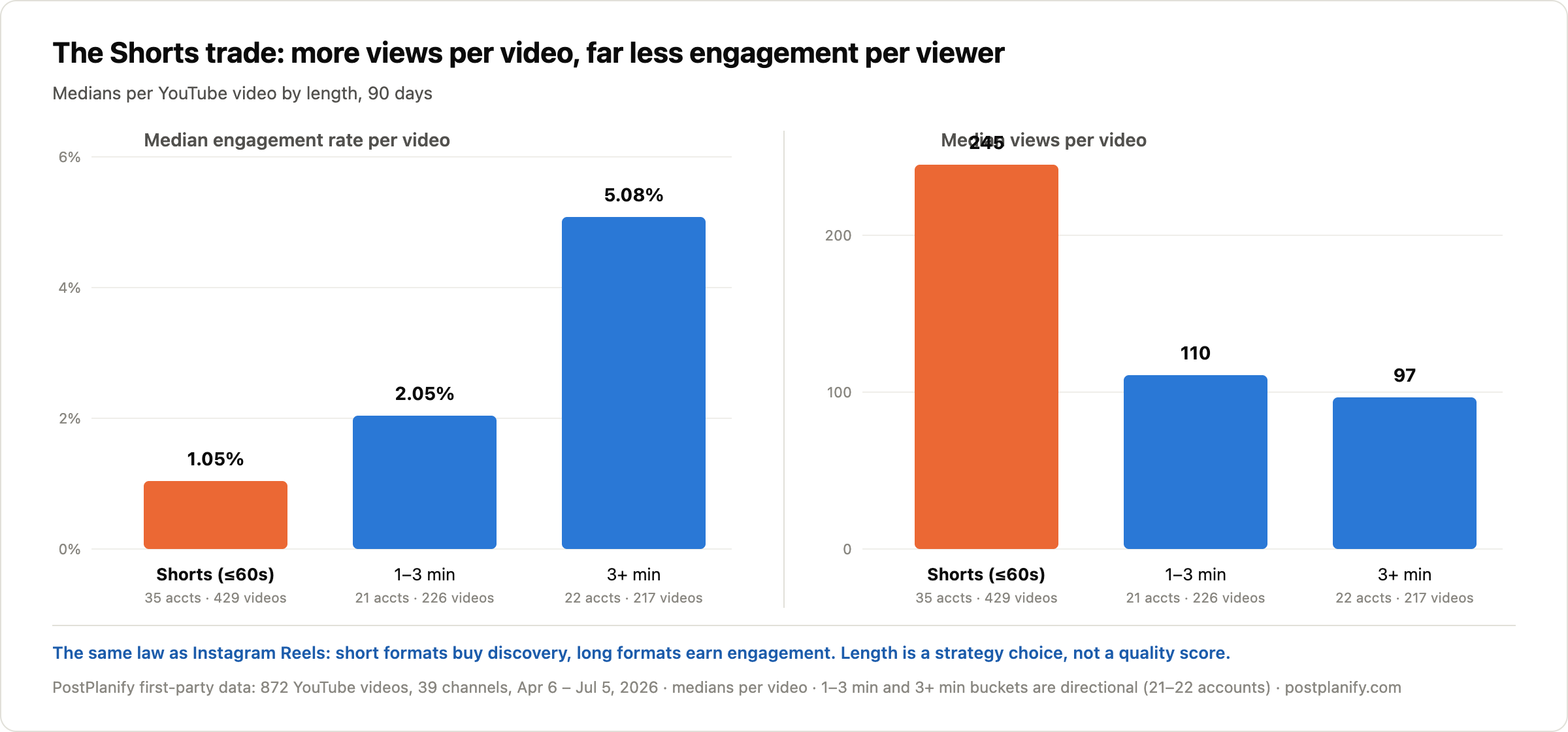
That's the same law we measured on Instagram, where Reels reach 10× more accounts than images at a lower engagement rate. Short formats buy discovery from non-subscribers; long formats earn engagement from people who chose to be there. Neither number is a quality score, and a channel "declining" in engagement rate after leaning into Shorts is usually just executing the trade.
The analytics takeaway: split your reporting by format before judging anything. Studio can filter Shorts from long-form; whichever third-party tool you pick should keep that split visible instead of blending both into one engagement line.
Methodology: 90-day window (April 6 to July 5, 2026), videos at least 7 days old at measurement, engagement rate = (likes + comments) / views per video, medians throughout. Shorts bucket: 429 videos across 35 channels. The 1 to 3 minute (226 videos, 21 channels) and 3+ minute (217 videos, 22 channels) buckets are directional. Correlation, not causation.
For the prior question of whether YouTube earns its production cost next to lighter platforms, see our comparison of which platforms are worth your effort in the first place.
How to Choose the Right YouTube Analytics Tool
Match the tool to the Studio gap that's actually costing you:
- "YouTube's numbers need to reach clients or leadership" → PostPlanify, or Sprout Social at enterprise budgets
- "I don't know what to publish next" → vidIQ
- "My thumbnails and metadata need testing" → TubeBuddy
- "I need to know how we compare" → Socialinsider
- "All of it, cheaply, across platforms" → Metricool
- "The report is the deliverable, and it has to carry other channels too" → AgencyAnalytics at $20/client, or Whatagraph if volume justifies four figures a month
Before any of them, wring Studio dry; it's free and deeper than most paid dashboards. Our guides on YouTube SEO and the best time to upload cover the growth side, the YouTube engagement calculator gives you an instant benchmark check, and the engagement benchmarks guide puts your numbers in context. The full cross-platform picture lives in the social media analytics tools comparison, with sibling guides for Instagram, TikTok, LinkedIn, and Facebook.
Frequently Asked Questions
What is the best YouTube analytics tool in 2026?
For agencies and marketing teams, PostPlanify is the best YouTube analytics tool in 2026: it tracks YouTube channel and video analytics alongside 9 other platforms with history stored from connection, benchmarking, and white-label client reports, priced per client workspace from $39/month ($31/month billed yearly) with unlimited team members. For growing a single channel, vidIQ (keyword research and AI optimization, free plan available) and TubeBuddy (thumbnail A/B testing, from $12/month billed yearly) are the strongest specialists, filling gaps YouTube Studio doesn't cover.
Does YouTube Studio delete old analytics data?
No, and that makes YouTube unique among major platforms. YouTube Studio keeps lifetime channel and video data with no expiry, while Instagram's native insights cover only a rolling 90 days and TikTok's stop at 60. The reasons to add a third-party YouTube tool are the jobs Studio doesn't do: keyword research, competitor benchmarking, thumbnail A/B testing, and multi-channel or client-facing reporting.
Do YouTube Shorts get more views than regular videos?
Typically yes, at the cost of engagement rate. In PostPlanify's analysis of 872 YouTube videos (July 2026), Shorts earned a median of 245 views per video versus 97 for videos over 3 minutes, while median engagement rate ran the other way: 1.05% for Shorts versus 5.08% for 3-minute-plus videos. Short formats buy discovery, long formats earn deeper engagement, so compare each format against itself, not against the other.
What is a good engagement rate on YouTube?
In PostPlanify's cross-platform analysis (July 2026), YouTube's median engagement rate was 1.69% per view, measured as likes plus comments divided by views. Video length changes it dramatically: the same dataset shows a 1.05% median for Shorts and 5.08% for videos over 3 minutes, so always benchmark by format. By comparison, Instagram's per-view median was 3.87% and TikTok's 1.62%.
Is vidIQ or TubeBuddy better?
They fill different Studio gaps. vidIQ is stronger for research: keyword ideas, search volume, trends, and AI coaching to decide what to make next. TubeBuddy is stronger for optimization: thumbnail A/B testing (its Legend plan's signature feature), bulk metadata editing, and SEO scoring inside the Studio interface. Research-driven channels usually pick vidIQ; test-and-iterate channels pick TubeBuddy; some run both, since TubeBuddy's entry tier is $12/month billed yearly.
Is there a free YouTube analytics tool?
YouTube Studio itself is the best free option on any platform, with lifetime data, retention curves, and traffic sources built in. Beyond it, vidIQ offers a permanent free plan for research basics (150 AI credits a month), and Metricool's free plan adds cross-platform tracking for one brand. TubeBuddy still has a free tier that cancelled channels fall back to, but it no longer lists one on its pricing page. For a quick engagement check on any channel, our free YouTube engagement calculator works instantly.
Related Reading
- Best YouTube Scheduling Tools: The publishing side of the same stack
- What Is YouTube SEO: The research discipline vidIQ and TubeBuddy are built around
- Best Time to Upload a YouTube Video: Timing data to pair with your analytics
- How to Schedule YouTube Shorts: Publishing the format our 872-video study measured
- How to See Your YouTube Subscribers: Subscriber tracking inside and outside Studio
- When Does YouTube Start Paying You: The monetization thresholds your analytics are chasing
- Social Media Engagement Rate Benchmarks: How YouTube's 1.69% median compares across platforms
- Best Social Media Analytics Tools: The cross-platform field, not just YouTube
- Best Instagram Analytics Tools, TikTok, LinkedIn, and Facebook: The rest of the per-platform set
- YouTube Engagement Calculator: Free instant benchmark check for any channel
Bottom line: YouTube gives you the best free analytics in social media and locks everything around it. vidIQ answers what to make, TubeBuddy tests how to package it, Socialinsider shows how you compare, the reporting platforms turn it into a client deliverable, and the enterprise suites feed the board deck. PostPlanify covers the job agencies and marketing teams actually get judged on: YouTube tracked next to every other channel, benchmarked, and delivered as a report that carries your brand. Try it free for 7 days, backed by a 14-day money-back guarantee.
PostPlanifyAll your social media in one simple dashboard
Schedule posts, track analytics, and reply to comments/DMs without switching tabs.
Engagement
+18%
Views
52.8k
About the Author

Hasan Cagli
Founder of PostPlanify, a content and social media scheduling platform. He focuses on building systems that help businesses, agencies, and teams plan, publish, and manage content and social media more efficiently across platforms.


