


Facebook analytics has a churn problem, and it's not the one you think. Yes, organic engagement is brutal (our own data below puts a number on exactly how brutal). But the more practical problem is that Meta keeps deleting its own analytics products: Facebook Analytics died in 2021, Creator Studio followed in 2022, and everything now lives in Meta Business Suite, where detailed post metrics and reach data run on 90-day windows. Whatever native workflow you learned three years ago no longer exists.
Meanwhile, Facebook pages still matter more than the discourse suggests. It remains the platform where local businesses, communities, and service brands actually get found, and it was the largest platform in our own dataset: 3,253 page posts from 106 pages, which is exactly why we can tell you precisely how silent the average page's comment section really is, further down this guide.
So this comparison covers 11 tools that measure Facebook properly: what each one fixes about the Business Suite experience, what it costs, and one honest drawback each.
Quick Answer: What Is the Best Facebook Analytics Tool in 2026?
For agencies and marketing teams, the best Facebook analytics tool is PostPlanify: Facebook page analytics with historical trends, period comparison, and benchmarking, stored from the day you connect (no more 90-day windows), priced per client workspace from $39/mo, plus Facebook scheduling, a social inbox, and white-labeled client reports in the same platform.
For pure Facebook benchmarking, Fanpage Karma has the deepest competitor analysis in the category (it's named after Facebook fan pages for a reason), with Rival IQ as the premium alternative. Agorapulse leads when comment moderation is the job, Metricool is the budget pick from $25/month, and Meta Business Suite stays the free baseline.
What Meta Business Suite Gives You Free (and Where It Stops)
Every Facebook page gets free Facebook Page Insights through Meta Business Suite (and the professional dashboard): reach, visits, follower growth, per-post impressions and engagement, audience demographics, and Instagram in the same view. It's genuinely capable when it cooperates.
The catches:
- Detailed post metrics and unique metrics like reach run on 90-day windows. Some account-level views reach back 13 months or more, but the granular data you'd actually analyze expires unless you export it manually first.
- The ground keeps moving. Facebook Analytics (2021) and Creator Studio (2022) were both retired; saved workflows and historical exports died with them. Betting your reporting archive on Meta's native tools has a poor track record.
- No benchmarks or competitor view. Business Suite will tell you engagement fell 12% and never whether that's you or the platform.
- No multi-page roll-ups or client reports. Agencies get one dashboard per page and CSVs.
For a quick read on any page right now, our free Facebook engagement calculator works instantly, and our guide to what engagement means on Facebook covers the metric definitions. For everything past that, the tools.
How I Evaluated These Facebook Analytics Tools
- Data history: does your record survive Meta's 90-day windows and product retirements, and from when?
- Benchmarks and competitors: the context Business Suite refuses to give
- Engagement workflow: on Facebook, analytics and moderation are the same job more than on any platform
- Reporting: client-ready and brandable, or export archaeology
- Multi-page and multi-platform roll-ups: one view of the whole book of business
- Price honesty: what the advertised tier includes at real page counts
Quick Picks: Best Facebook Analytics Tools at a Glance
| Tool | Starting Price | Free Option | Competitor Benchmarks | Best For |
|---|---|---|---|---|
| PostPlanify | From $39/mo per workspace | Trial + guarantee | Benchmarks ✅ | Agencies & marketing teams |
| Meta Business Suite | Free | ✅ Always free | ❌ None | Single-page owners |
| Fanpage Karma | $49/mo ($35 yearly) | ✅ (5 profiles) | ✅ Core focus | Facebook-first benchmarking |
| Rival IQ | $239/mo | 14-day trial | ✅ Core focus | Competitor sets |
| Agorapulse | $99/user/mo | 30-day trial | ✅ (Advanced) | Moderation-heavy pages |
| Socialinsider | $83/mo | 14-day trial | ✅ Core focus | Cross-network reporting |
| Metricool | $25/mo | ✅ (1 brand) | ✅ | Budget data depth |
| Iconosquare | $12/mo | ✅ (2 profiles) | ✅ | Multi-platform analysts |
| Social Status | $9/mo | ✅ (1 profile) | ✅ Core focus | Organic + paid reporting |
| Sprout Social | $99/seat/mo | 30-day trial | Benchmarking | Enterprise teams |
| Hootsuite | $99/user/mo | 14-day trial | ✅ (listening) | Enterprise breadth |
Pricing and ratings verified against each vendor's own pricing page and current review platforms in October 2026.
1. PostPlanify: Best for Agencies and Marketing Teams
PostPlanify is a social media management platform that fixes the two Facebook problems costing teams the most: expiring data and scattered workflow. Your Facebook page analytics (reach, engagement, post performance, growth trends) are stored from the day you connect, with period comparison and benchmarking, so Meta's 90-day windows and product retirements stop being your archiving problem. And the numbers live next to the work: a Facebook scheduler with direct publishing for posts and Reels, a social inbox with AI replies for comments and messages, approval workflows, and white-labeled reports for client delivery.
Facebook rarely travels alone, and that's the deeper pitch: the same dashboard covers Instagram (which shares Meta's audience anyway) plus 8 more platforms, priced per client workspace with unlimited team members.
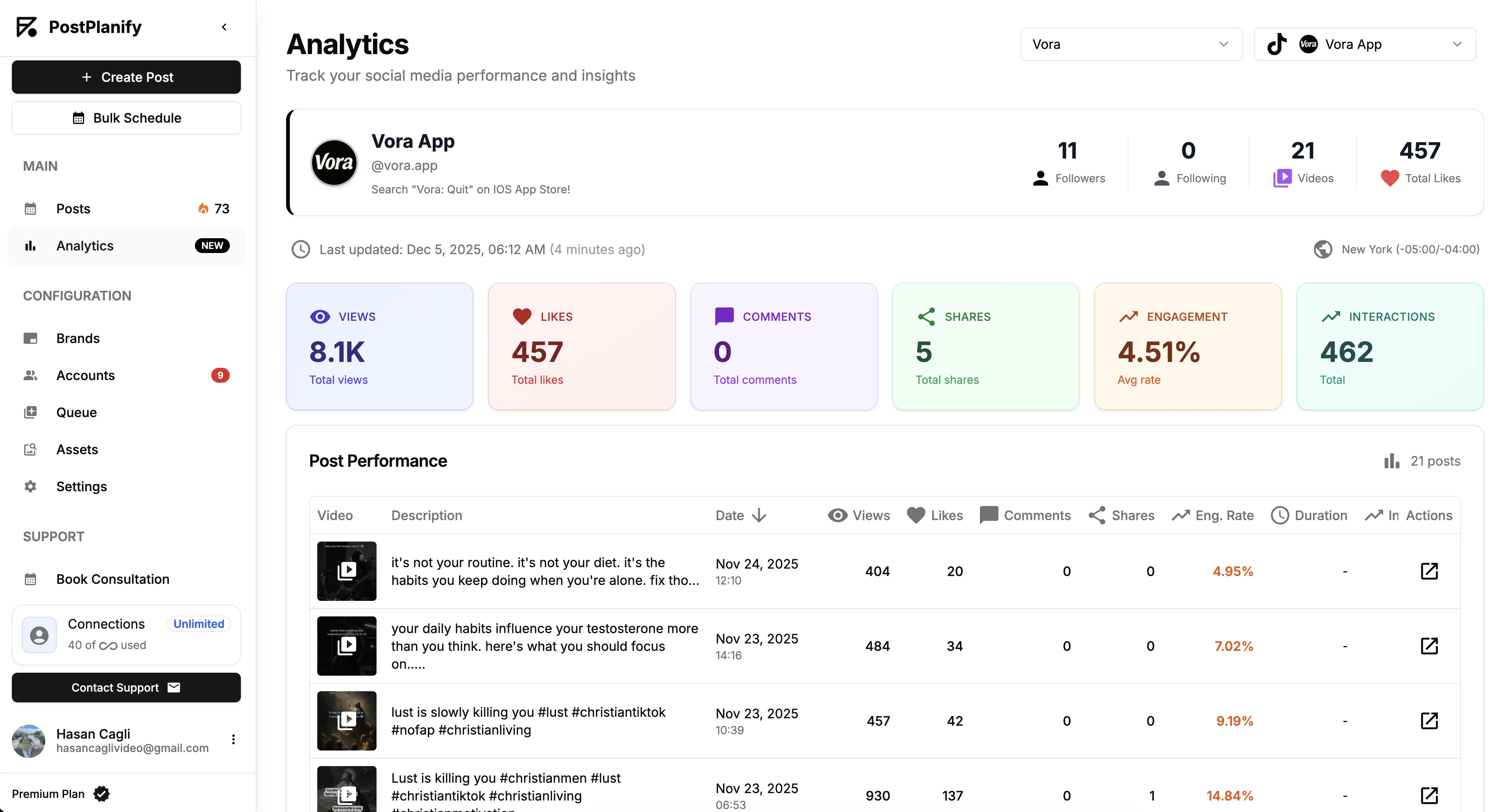
At a glance: PostPlanify
- Pricing: Per client workspace on a graduated scale: $39/mo for the first on Growth ($31/mo billed yearly), $155/mo for 5, $250/mo for 10, up to 100. Premium from $99/mo and Scale from $199/mo per workspace. Unlimited team members on every plan
- Free option: 7-day free trial + 14-day money-back guarantee
- Data history: Stored from the day you connect, across all 10 supported platforms
- Accounts per workspace: 4 on Growth, 6 on Premium, 8 on Scale
- Best for: Agencies and marketing teams that need Facebook tracked, benchmarked, and reported alongside every other channel
Key features:
- Full analytics on every plan, with historical trends: page growth and post performance with period comparison, immune to Meta's 90-day windows
- Benchmarking so a 0.9% engagement rate reads as "median for Facebook" instead of "crisis"
- Client reports on Premium with scheduled delivery and shareable links, and fully white-labeled dashboards, emails, and reports on Scale
- Social inbox with AI replies for Facebook comments and messages, included on every plan
- Facebook scheduling with best-time suggestions from your own audience data
- 10 platforms in one dashboard, with approval workflows on Premium and AI content tools
The honest drawback: PostPlanify covers organic pages, not ad accounts. If most of your Facebook activity is paid, you'll still live in Ads Manager for campaign analytics; PostPlanify is where the organic side gets measured and reported.
Pricing
| Plan | Starts at | Includes | Each extra workspace | Social accounts |
|---|---|---|---|---|
| Growth | $39/mo | 1 workspace | from $29, cheaper as you add more | 4 per workspace |
| Premium | $99/mo | 3 workspaces | from $39, cheaper as you add more | 6 per workspace |
| Scale | $199/mo | 5 workspaces | from $39, cheaper as you add more | 8 per workspace |
Unlimited team members on every plan, no per-seat fees. Yearly billing saves 20%. All plans include a 7-day free trial with a 14-day money-back guarantee.
Every workspace carries the same features, and the per-workspace rate falls as you add them, so 10 client pages and their other channels cost $250/mo rather than ten times the first.
Verdict: The pick when Facebook is one accountable channel among several and its numbers need to survive, get context, and reach clients. Facebook-only specialists come next.
 PostPlanify
All your social media in one simple dashboard
Schedule posts, track analytics, and reply to comments/DMs without switching tabs.

Engagement
+18%
Views
52.8k
2. Meta Business Suite: Best Free Native Analytics
Meta Business Suite is where Facebook analytics officially lives now, and for a single page it is often enough. Reach, visits, follower growth, per-post impressions and engagement, audience demographics, and Instagram in the same view, at no cost and with nothing between you and the source. It is the baseline every tool on this list is measured against, which is why its limits (covered above) matter so much.
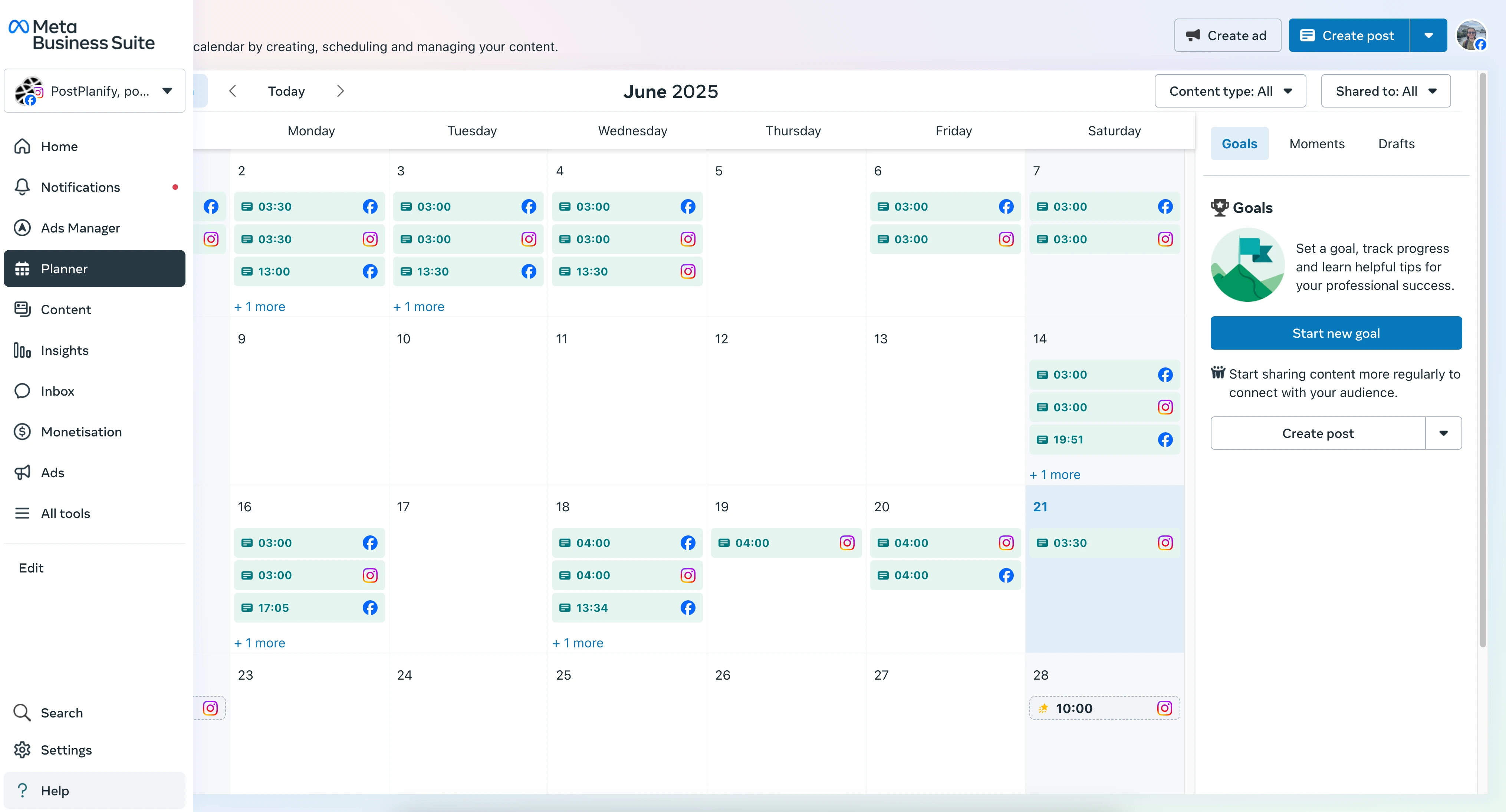
At a glance: Meta Business Suite
- Pricing: Free for every Facebook page
- Free option: It is the free option
- Data history: Roughly 90 days for detailed post metrics and unique metrics like reach; some account-level views reach 13 months or more
- Best for: Single-page owners and anyone who needs Facebook numbers without paying for them
Key features:
- First-party data straight from Meta, with no connector to break
- Reach, engagement, impressions, and follower growth per page and per post
- Audience demographics and when your fans are online
- Instagram in the same dashboard, with Ads Manager next door
- Post and Reel scheduling, roughly 30 days out
The honest drawback: no benchmarks, no competitor view, no client-ready reports, and the granular data expires unless you export it first. Meta has also retired two analytics products in four years, so a workflow you build here may not exist in three.
Verdict: Start here. Move when expiring data, competitors, or client reporting becomes the problem, which for anyone running more than one page happens quickly.
3. Fanpage Karma: Best Facebook Benchmarking Specialist
Fanpage Karma is what it sounds like: a tool whose name literally refers to Facebook fan pages, from the era when analyzing them was its whole business. Today it covers other networks too, but its depth is still benchmarking: analyzing hundreds of competitor or peer profiles at once, with 500+ metrics and multi-month data history, now on a single flat base price for the whole account.
Fanpage Karma rebuilt its plans around that base price. The free tier covers 1 brand with 5 owned and 5 competitor profiles and 30 days of history. Professional is $49/month ($35/month billed yearly) for unlimited brands and profiles, 3 users, and 12 months of history, with up to 20 profiles per dashboard. Deeper benchmarking is then unlocked per brand: Analytics Plus at $32/month takes a dashboard to 50 competitors, and a Research Dashboard at $109/month takes it to 500 competitor profiles with unlimited history.
At a glance: Fanpage Karma
- Pricing: Free (1 brand, 5 owned plus 5 competitor profiles, 30-day history) → Professional $49/mo ($35/mo billed yearly) for unlimited brands and profiles with 3 users; per-brand add-ons from $16/mo, with Analytics Plus at $32/mo and a Research Dashboard at $109/mo
- Free option: Yes, 5 owned profiles plus 5 competitors
- Data history: 30 days free, 12 months on Professional, unlimited with the Research Dashboard add-on
- Best for: Facebook-first marketers who want deep competitive benchmarking without enterprise pricing
Key features:
- Unlimited brands and profiles on one base price
- 500+ metrics, with up to 50 competitors per dashboard on Analytics Plus and 500 on a Research Dashboard
- Editorial calendar and scheduling included
- Monitoring, research, and API access
The honest drawback: the base price is only the base. The deep competitor work Fanpage Karma is known for sits behind per-brand add-ons, so a benchmarking-heavy setup lands well above $49/month, and white-labeling the whole account is another $189/month. The interface also shows its benchmarking-first heritage; it's an analyst's tool, not a manager's daily driver.
Verdict: The strongest pure-Facebook benchmarking play, and the free tier covers 5 owned profiles plus 5 competitors, so trying it costs nothing.
4. Rival IQ: Best for Competitive Benchmarking at Scale
Rival IQ sells benchmarking on an unusual unit: you pay for tracked companies, not connected pages. Ten competitor or client Facebook pages on the entry plan, analyzed on the same metrics as your own, with head-to-head reports, content analysis by topic, post type, and timing, and alerts when a competitor's post outperforms. Its annual industry benchmark reports are among the most quoted numbers in social media.
At a glance: Rival IQ
- Pricing: Drive $239/mo (10 tracked companies, 6 months of history, 1 user) → Engage $349/mo (20 companies, 12 months, 2 users, Facebook Ads reporting) → Engage Pro $559/mo (40 companies, 24 months, 5 users); annual saves 15%, extra companies $50/mo per 5, extra users $10/mo
- Free option: 14-day trial, no credit card required
- Data history: 6 to 24 months depending on plan
- Best for: Teams whose main Facebook question is how they rank against named competitors
Key features:
- Competitive benchmarking across Facebook and every major network
- Content analysis by hashtag, topic, post type, and time of day
- Scheduled reports, email alerts, and a Looker Studio connector
- Social listening saved searches from the Engage tier
The honest drawback: it's the most expensive entry here by a wide margin, there's no publishing or inbox, and the $239 plan gives you one user and 6 months of history, which is a shorter record than Metricool keeps on a $25 plan.
Verdict: The benchmarking standard when competitor sets, not your own pages, are the point of the exercise.
5. Agorapulse: Best for Community Management and Moderation
Agorapulse built its reputation on Facebook community management, and it shows: a unified inbox that captures comments, messages, and crucially ad comments (the ones brands most often miss), automated moderation rules, and analytics with ROI tracking layered on top. On Facebook more than anywhere, engagement data and engagement work are the same job, and this is the tool built around that fact.
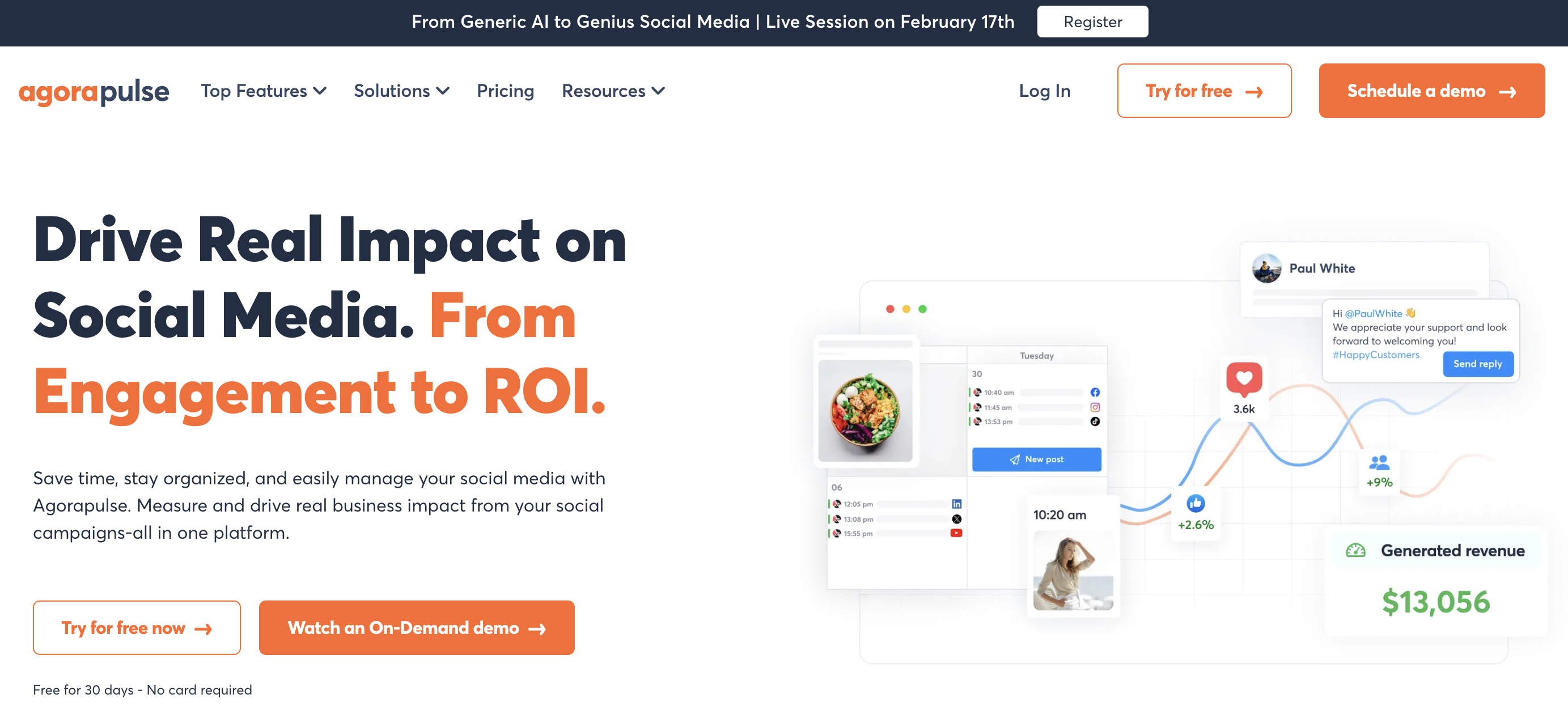
At a glance: Agorapulse
- Pricing: Standard $99/user/mo → Professional $149/user/mo → Advanced $199/user/mo (annual: $79/$119/$149); 10 profiles per user
- Free option: 30-day trial
- Data history: Reporting with ROI tracking
- User ratings: 4.5/5 on G2 (967 reviews); 4.0/5 on Trustpilot
- Best for: Pages where comments, messages, and ad-comment moderation are the daily workload
Key features:
- Unified inbox including Facebook ad comments
- Automated moderation rules and team assignments
- Analytics with ROI tracking and exportable reports
- 11 networks covered
The honest drawback: per-user pricing scales painfully (a 3-person team on Standard is $297/month), and the analytics is inbox-first rather than benchmark-first.
Verdict: If your Facebook problem is volume in the comments, this is the category leader. Learn more in our Agorapulse pricing breakdown, Agorapulse reviews roundup, and best Agorapulse alternatives guide.
6. Socialinsider: Best for Cross-Network Benchmarking
Socialinsider benchmarks your Facebook pages against competitors on followers, engagement, and content mix, across Facebook, Instagram, TikTok, LinkedIn, X, and YouTube, with automated reports and unlimited exports. Their industry studies are among the most-cited engagement benchmarks in the field (we cite them ourselves in our benchmarks guide).
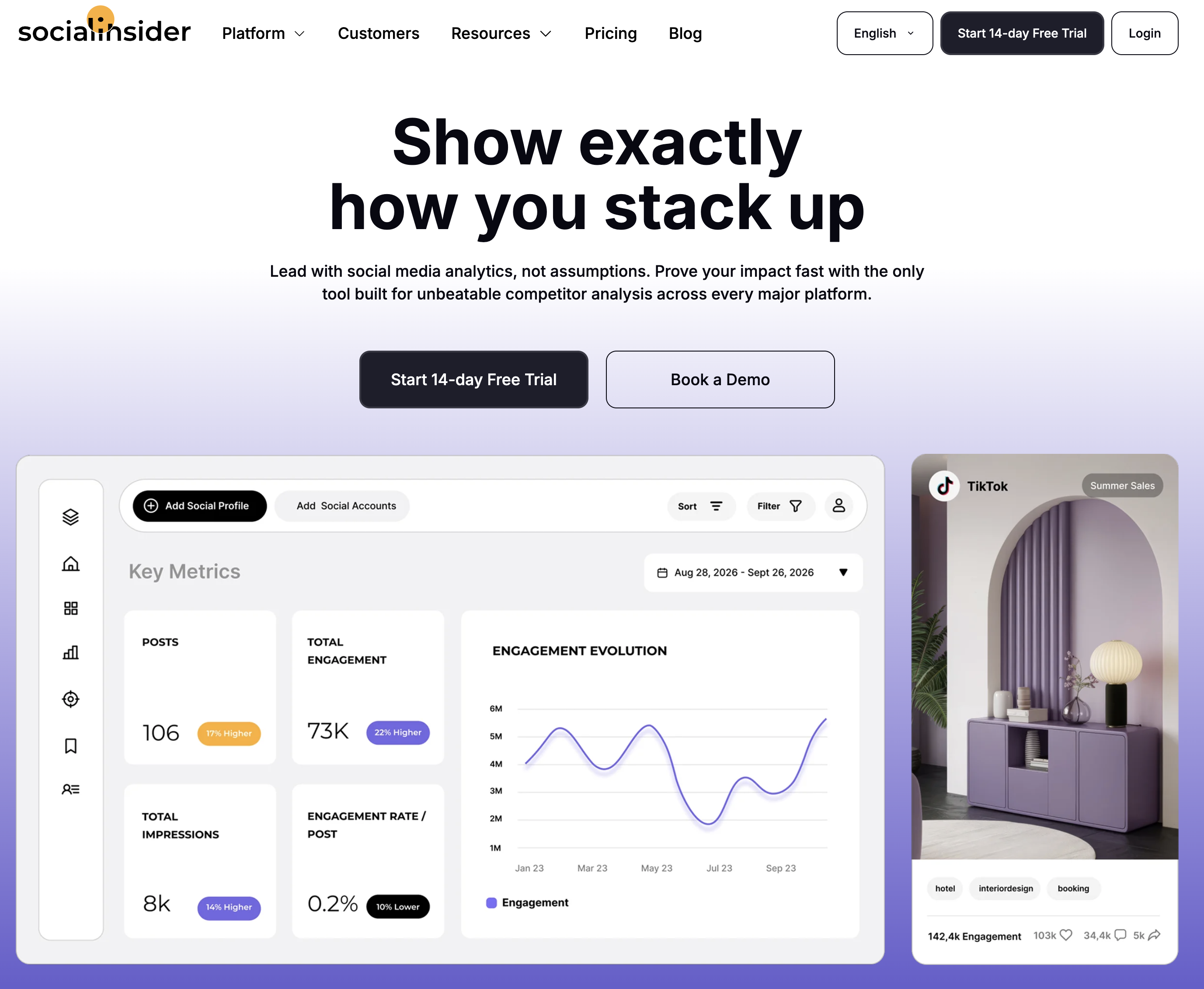
At a glance: Socialinsider
- Pricing: Adapt $83/mo (20 accounts, 3-month history) → Optimize $124/mo (30 accounts, 6 months) → Predict $199/mo (40 accounts, 12 months); ~2 months free on annual (~15%)
- Free option: 14-day trial, no card required
- Data history: 3 to 12 months depending on plan
- Best for: Marketers reporting Facebook performance in competitive context across networks
Key features:
- Competitor benchmarking across 6 networks
- Automated reports with unlimited exports
- Industry benchmark datasets from their own research
- API and Looker Studio add-ons
The honest drawback: analytics-only (no publishing, no inbox), and account caps with monthly replacement limits reward careful plan-reading.
Verdict: The cross-network answer to "how do we compare?", with Fanpage Karma as the deeper Facebook-only alternative.
7. Metricool: Best Budget Analytics With Unlimited History
Metricool solves Meta's 90-day problem with the cheapest unlimited history on the market: paid plans from $25/month store everything, the free plan covers one full brand, and competitor tracking plus client reports come along. For small teams that need Facebook measured alongside ten other platforms, it remains the value benchmark.
At a glance: Metricool
- Pricing: Free (1 brand, 30-day history) → Starter $25/mo (5 brands) or $45/mo (10 brands) → Advanced $67/mo (15 brands), $107/mo (25), $210/mo (50); yearly billing cuts each by roughly 20%
- Free option: Yes, 1 full brand
- Data history: Unlimited on paid plans
- User ratings: 4.5/5 on G2 (83 reviews); 4.1/5 on Trustpilot
- Best for: Budget-conscious teams that want Facebook data depth without specialist pricing
Key features:
- Unlimited analytics history on paid plans
- Facebook among 11 supported platforms
- Competitor tracking and client reports, with best time to post on Advanced
- Planner and publishing included
The honest drawback: Facebook-specific depth is generalist-grade, and the interface favors breadth over polish.
Verdict: The best data-per-dollar route. Learn more in our Metricool pricing breakdown, Metricool reviews roundup, and best Metricool alternatives guide.
8. Iconosquare: Best Multi-Platform Analytics Specialist
Iconosquare brings its analytics-first depth to Facebook alongside Instagram, TikTok, and 5 more platforms: advanced metrics, competitor tracking, industry benchmarks, and scheduled exportable reports, in a tool used by 10,000+ brands.
At a glance: Iconosquare
- Pricing: Free (2 profiles, 10 posts/profile/mo) → Starter $12/mo (5 profiles, 30 posts) → Launch $39/mo (5 profiles, 100 posts) → Scale $83/mo (20 profiles, 3 users, 1 group) → Custom from $139/mo; yearly billing saves roughly 15-17%
- Free option: Yes, 2 profiles with limited features
- Data history: 1 month on Free, 1 year on Starter, 2 years on Scale
- User ratings: 4.5/5 on G2 (135 reviews)
- Best for: Analysts covering Facebook plus Instagram in one specialist tool
Key features:
- Advanced Facebook metrics with stored history
- Competitor tracking and industry benchmarks
- Scheduled PDF/Excel reports
- Custom dashboards across 8 platforms
The honest drawback: publishing and engagement are secondary, the per-profile slider raises prices fast for multi-page agencies (Scale runs $83/mo for 5 profiles and $219/mo for 20), and X/Twitter is locked out of the two cheapest tiers.
Verdict: The right specialist when Facebook and Instagram are your two deep-analysis platforms. Learn more in our Iconosquare pricing breakdown, Iconosquare reviews roundup, and best Iconosquare alternatives guide.
9. Social Status: Best Dedicated Analytics Tool With a Free Tier
Social Status does analytics and nothing else, across four modules: your own pages, competitors, Facebook ad accounts, and influencers, all drawing from one shared profile quota. It's also the rare specialist with a permanent free plan rather than a trial, and one of the few tools here that reports organic and paid Facebook performance in the same account.
At a glance: Social Status
- Pricing: Small Business: Free (1 profile) → Micro $9/mo (3) → Basic $29/mo (10) → Essential $49/mo (40). Professional, for agencies: Bronze $99/mo (100 profiles) → Silver $199/mo (200) → Gold $399/mo (500) → Platinum $799/mo (1,000) → Enterprise $1,499/mo
- Free option: Yes, a permanent free plan for 1 profile
- Data history: Stored from when you add a profile
- Best for: Analysts and agencies who want organic, paid, competitor, and influencer reporting from one quota
Key features:
- Profile, competitor, ads, and influencer analytics in one account
- Facebook ad account reporting next to organic page performance
- Exports to CSV, XLSX, PDF, and PowerPoint on Professional plans
- Custom report templates built for you on the upper tiers
The honest drawback: the Small Business plans cover Facebook, Instagram, and YouTube only (Essential adds TikTok, LinkedIn, and X), there's no publishing or inbox, and the quota counts every page, competitor, ad account, and influencer you add, so a modest competitor set burns through a cheap plan fast.
Verdict: The cheapest honest way to measure Facebook properly, and a serious agency reporting tool once the profile count climbs.
10. Sprout Social: Best Enterprise Analytics
Sprout Social delivers Facebook analytics inside the most polished enterprise reporting suite in the industry, with cross-network dashboards, deep audience analysis, and listening add-ons, priced per seat for organizations with formal reporting obligations.
At a glance: Sprout Social
- Pricing: Essentials $99/seat/mo ($79 billed yearly, 5 profiles) → Standard $199/seat/mo (5 profiles) → Professional $299/seat/mo (unlimited profiles) → Advanced $399/seat/mo; custom Enterprise
- Free option: 30-day trial
- Data history: Deep, with premium reporting
- User ratings: 4.4/5 on G2 (5,731 reviews); 1.9/5 on Trustpilot
- Best for: Mid-market and enterprise teams reporting Facebook to stakeholders
Key features:
- Best-in-class cross-network reports including Facebook
- Deep audience and post analytics
- Social listening add-on
- Enterprise workflows and permissions
The honest drawback: $597/month for a 3-person team on Standard before add-ons, and the $99 Essentials tier drops competitor and paid reporting, which is most of why you'd buy Sprout for analytics in the first place.
Verdict: The enterprise standard. Learn more in our Sprout Social pricing breakdown, Sprout Social reviews roundup, and best Sprout Social alternatives guide.
11. Hootsuite: Best Enterprise Breadth
Hootsuite closes the list with Facebook analytics inside the longest-running social management platform, plus listening, monitoring, and a custom report builder, for organizations standardizing every network on one vendor.
At a glance: Hootsuite
- Pricing: Standard $99/user/mo (10 accounts) → Professional $199/user/mo (unlimited accounts) → Advanced $399/user/mo → custom Enterprise; prices shown are per seat on annual billing
- Free option: 14-day trial, no card required
- Data history: Deep, with custom reports
- User ratings: 4.3/5 on G2 (6,615 reviews); 1.3/5 on Trustpilot
- Best for: Enterprise teams wanting one vendor across all networks
Key features:
- Comprehensive Facebook and cross-network analytics
- Social listening and brand monitoring
- Custom report builder
- Enterprise approvals and compliance (approvals from the Advanced tier)
The honest drawback: the $99 entry looks reasonable until you count seats and gates. Every extra user is another $99, and approval workflows don't appear until Advanced at $399/user, so a 3-person team that needs approvals pays $1,197/month.
Verdict: Enterprise requirements only. Learn more in our Hootsuite pricing breakdown, Hootsuite reviews roundup, and best Hootsuite alternatives guide.
Facebook Analytics Tools Comparison Table
| Tool | Entry Price | Free Option | Competitor Benchmarks | Inbox/Moderation | White-Label Reports | Multi-Platform |
|---|---|---|---|---|---|---|
| PostPlanify | From $39/mo per workspace | Trial + guarantee | Benchmarks ✅ | ✅ AI replies | ✅ Scale | ✅ 10 platforms |
| Meta Business Suite | Free | ✅ Always free | ❌ None | ✅ Native | ❌ | Facebook + Instagram |
| Fanpage Karma | $49/mo | ✅ (5 profiles) | ✅ Core focus | Limited | Add-on | ✅ |
| Rival IQ | $239/mo | 14-day trial | ✅ Core focus | ❌ | Exports | ✅ All major networks |
| Agorapulse | $99/user/mo | 30-day trial | ✅ (Advanced) | ✅ Core focus | ✅ Branded | ✅ 11 networks |
| Socialinsider | $83/mo | 14-day trial | ✅ Core focus | ❌ | Exports | ✅ 6 networks |
| Metricool | $25/mo | ✅ (1 brand) | ✅ | Limited | ✅ Advanced | ✅ 11 platforms |
| Iconosquare | $12/mo | ✅ (2 profiles) | ✅ | ❌ | Exports | ✅ 8 platforms |
| Social Status | $9/mo | ✅ (1 profile) | ✅ Core focus | ❌ | Exports | 3, or 6 on Professional |
| Sprout Social | $99/seat/mo | 30-day trial | Benchmarking | ✅ | ✅ | ✅ |
| Hootsuite | $99/user/mo | 14-day trial | ✅ (listening) | ✅ | ✅ | ✅ |
AI and Facebook Analytics: Ask Questions Instead of Building Reports
The newest shift in Facebook analytics is conversational: asking a question in plain English instead of opening three views and comparing them by hand.
PostPlanify does this through an MCP server that connects your account to Claude, ChatGPT, Cursor, Gemini, Perplexity, and any other assistant that speaks MCP. Your Facebook page analytics come with it, alongside the other nine platforms, so you can ask "which post formats earned the most interactions on Facebook over the last 90 days" or "give me reach, engagement, and follower change for every page" and get the answer in the assistant you already use. Reporting, publishing, and the inbox run from the same connection, so you act on the answer where you found it.
That's a wider surface than a built-in chatbot. A few tools here ship their own in-app assistants, usually on upper tiers, but those only answer inside their own dashboard. One caution either way: an assistant can only answer what the history holds, so a tool that stores 90 days cannot tell you how this year compares to last.
The Silence Rate: What 3,253 Facebook Posts Say About Engagement
Facebook was the largest platform in our dataset, so these numbers are the firmest we publish. In PostPlanify's analysis of 3,253 Facebook page posts from 106 pages (April to July 2026), 25.7% of posts received zero interactions: no reactions, no comments, no shares. Another 16.5% got exactly one, meaning 42.2% of all posts earned one interaction or fewer. The median post earned exactly 2 interactions, and the median Facebook engagement rate was 0.87% per view, the lowest of any major platform we measure.
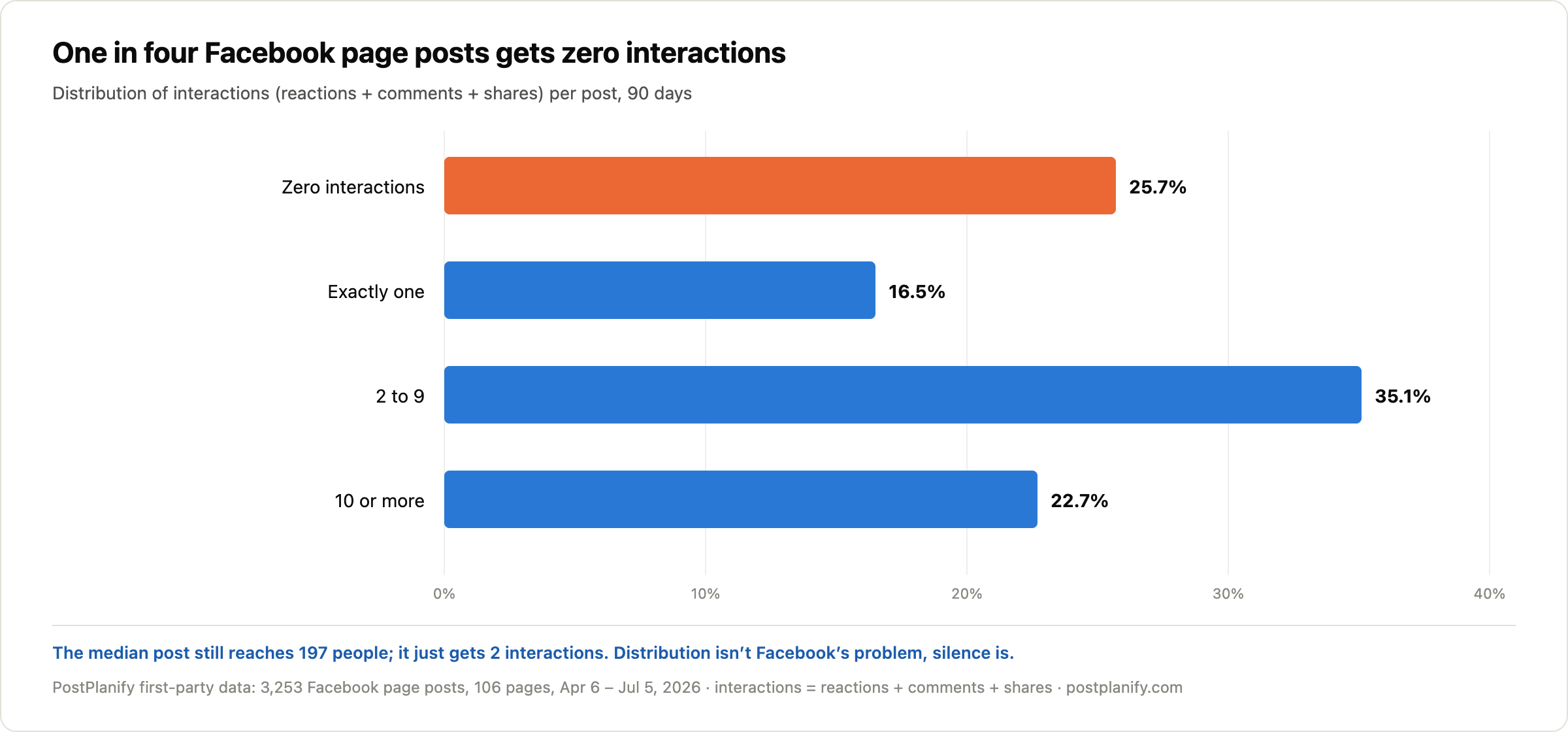
Here's the part the "Facebook is dead" discourse gets wrong: the median post still reached 197 views. That's real distribution, more than six times the median reach of an Instagram image post in the same dataset. Facebook's problem isn't that nobody sees your posts. It's that the people who see them stay silent, which is exactly what a 0.87% median engagement rate on 197 views looks like.
The analytics takeaway: averages hide this completely. A monthly average engagement number blends the 25.7% of posts that died silently with the 22.7% that earned 10+ interactions, and tells you nothing about either. Whatever tool you pick, look at per-post distributions before averages, and benchmark against Facebook's actual median (0.87%), not against your Instagram numbers.
Methodology: 90-day window (April 6 to July 5, 2026), posts at least 7 days old at measurement, interactions = reactions + comments + shares, engagement rate = interactions / views per post (views > 0 only), medians throughout, 3,253 posts across 106 pages. Correlation, not causation.
If the bigger question is whether Facebook deserves the hours at all, we compare which platforms are worth your effort in the first place using this same dataset.
How to Choose the Right Facebook Analytics Tool
Match the tool to your actual Facebook problem:
- "The data expires and clients need reports" → PostPlanify, or Metricool on a tighter budget
- "I need to know how competitors' pages perform" → Fanpage Karma (Facebook-deep), Rival IQ (named competitor sets), or Socialinsider (cross-network)
- "The comments and messages are drowning us" → Agorapulse
- "Facebook and Instagram, analyzed deeply" → Iconosquare
- "I need organic and Facebook ad performance together" → Social Status
- "I just need the free numbers" → Meta Business Suite
- "Enterprise reporting and governance" → Sprout Social or Hootsuite
Whichever you pick, calibrate expectations to Facebook's reality first: our engagement benchmarks cover what normal looks like by platform and formula, and our best time to post on Facebook guide covers timing. If the comment load is the real bottleneck, our Facebook comments guide covers the moderation side, and social media analytics and reporting covers turning any of these dashboards into a client deliverable. The full cross-platform picture lives in the social media analytics tools comparison, with sibling guides for Instagram, TikTok, LinkedIn, and YouTube.
Frequently Asked Questions
What is the best Facebook analytics tool in 2026?
For agencies and marketing teams, PostPlanify is the best Facebook analytics tool in 2026: it stores Facebook page analytics from the day you connect (immune to Meta Business Suite's 90-day windows), adds trends, period comparison, and benchmarking, priced per client workspace from $39/mo with unlimited team members, and includes Facebook scheduling, a social inbox with AI replies, and white-labeled client reports on Scale. For pure Facebook benchmarking, Fanpage Karma is the strongest specialist, with a free tier covering 5 profiles plus 5 competitors.
What happened to Facebook Analytics?
Meta retired the standalone Facebook Analytics tool in 2021 and Creator Studio in 2022, moving everything into Meta Business Suite and the page-level professional dashboard. Business Suite covers reach, engagement, and audience data, but detailed post metrics and unique metrics like reach run on 90-day windows, and there are no benchmarks, competitor views, or client-ready reports, which is why third-party Facebook analytics tools remain a category.
How far back does Facebook page data go?
In Meta Business Suite, detailed post-level metrics and unique metrics such as reach are limited to roughly 90-day windows, while some account-level views reach back 13 months or more. Older granular data is only recoverable if you exported it before it expired. Third-party tools solve this by storing your page data continuously from the day you connect.
What is a good engagement rate on Facebook?
In PostPlanify's analysis of 3,253 Facebook page posts from 106 pages (July 2026), the median engagement rate was 0.87% per view, the lowest of the major platforms (Instagram ran 3.87%, LinkedIn 2.55%, TikTok 1.62% in the same dataset). In the same analysis, 25.7% of Facebook posts received zero interactions and the median post earned just 2. If your page beats 1% consistently, you're above the typical page.
Why is my Facebook reach declining?
It may be less about reach than you think. In PostPlanify's July 2026 data, the median Facebook page post still reached 197 views, more than six times the median reach of an Instagram image post in the same dataset; the bigger issue is silence, with 25.7% of posts earning zero interactions. Before diagnosing a reach problem, split the question: check per-post view counts against your own history (a real distribution change) versus engagement per view (audience behavior). A tool with stored history makes that distinction visible; a 90-day native window usually doesn't.
Is there a free Facebook analytics tool?
Meta Business Suite is free for every page and covers the basics within its 90-day windows. Beyond that, Fanpage Karma's free tier covers 5 owned profiles plus 5 competitors with 30 days of history, Social Status has a permanent free plan for 1 profile, Metricool's free plan tracks 1 brand, and Iconosquare's covers 2 profiles. For an instant engagement check on any page, our free Facebook engagement calculator works in seconds.
Bottom line: Facebook hands you 90-day windows, retired tools, and the quietest audience in social media, on the platform where local businesses still get found. Fanpage Karma owns the deep benchmarks, Agorapulse owns the inbox, Socialinsider owns cross-network comparison, and the enterprise suites own the board deck. PostPlanify covers what agencies and marketing teams actually need: Facebook tracked permanently, benchmarked honestly, and reported under your own brand next to every other channel. Try it free for 7 days, backed by a 14-day money-back guarantee.
PostPlanifyAll your social media in one simple dashboard
Schedule posts, track analytics, and reply to comments/DMs without switching tabs.
Engagement
+18%
Views
52.8k
About the Author

Hasan Cagli
Founder of PostPlanify, a content and social media scheduling platform. He focuses on building systems that help businesses, agencies, and teams plan, publish, and manage content and social media more efficiently across platforms.


