


Are you posting on X (formerly Twitter) only to see your view count stay frustratingly low? You’ve crafted the perfect message, but it feels like you’re sending it into an empty void. This is a common problem, and the solution isn't about finding a magic "hack," but understanding why it happens and making targeted fixes.
First, let’s clarify what a "view" is. On X, a view is an impression. The platform counts a view every single time your post is displayed on a logged-in user’s screen, whether it’s in their main timeline, the "For You" feed, on a search results page, or on your profile. This is true even if they scroll past it without reading. Importantly, views are only counted from logged-in users — your view count isn’t inflated by search engine bots or link previews in other apps. Understanding this is the first step to diagnosing why your numbers might be low.
Why Your X Views Are Low (And What to Do About It)
Seeing a low view count can make you question your content, your timing, and even your audience. The truth is, it's rarely one single thing. More often, it's a combination of how the X algorithm works and how your content strategy aligns (or doesn't align) with it.
Let's break down the common causes and get straight to the actionable fixes.
Common Cause #1: Your Timing is Off
- The Problem: You're posting when your audience is asleep or offline. A post published at 3 AM for a US-based audience will be buried under hundreds of newer posts by the time they start their day. The X timeline moves fast, and old content gets left behind.
- The Fix:
- Check Your Analytics: Go to your X Analytics dashboard (
analytics.twitter.com) or use a third-party tool. - Identify Peak Hours: Look for the days and times when your posts historically receive the most impressions and engagement. This is your audience's "prime time."
- Schedule Your Content: Use a scheduling tool to plan your posts to go live during these peak windows. This ensures you're always hitting the mark, even if you're in a different timezone or busy with other tasks. For a complete walkthrough, see our guide on how to schedule posts on X. PostPlanify lets you queue up content for optimal times across all your platforms, so you don't have to be online 24/7.
- Check Your Analytics: Go to your X Analytics dashboard (
Common Cause #2: Your Content is Too Plain
- The Problem: In a fast-scrolling feed, text-only posts are easy to ignore. The X algorithm prioritizes content that captures attention and sparks interaction. If your posts lack a visual hook, they're more likely to be scrolled past, resulting in a view but zero engagement.
- The Fix:
- Add Visuals: Make it a rule to attach a relevant image, GIF, or short video to most of your posts. Posts with videos get significantly more views and engagement.
- Use Polls: X Polls are a low-effort way to get people to interact. Every vote counts as an engagement, signaling to the algorithm that your content is valuable.
- Ask Questions: Directly ask your audience for their opinion. This prompts replies, which are a powerful signal of high-quality, conversational content.
Common Cause #3: You're Broadcasting, Not Engaging
- The Problem: You only post your own content and never interact with others. X is a social network, and its algorithm favors accounts that participate in conversations. If you're not replying, Quote Tweeting, or joining discussions, you're seen as a broadcaster, and your reach will be limited.
- The Fix:
- Set Aside 15 Minutes a Day: Dedicate a small chunk of time to replying to others in your niche. Offer helpful advice, share your perspective, or simply engage in a friendly chat.
- Use Quote Tweets with Commentary: Instead of just retweeting, use the "Quote" feature to add your own thoughts. This turns a simple share into a new piece of content and shows you're an active participant.
Common Cause #4: Your Account Has Limited Visibility
- The Problem: In some cases, consistently low views across all posts, especially after a sudden drop, could indicate an account-level issue. This can happen if your account has been flagged for spammy behavior or policy violations.
- The Limitation: X doesn't officially notify you of a "shadowban," but you can diagnose it by looking for symptoms like your posts not appearing in search results or your replies being hidden.
- The Fix:
- Review X's Rules: Ensure your activity doesn't violate any platform policies (e.g., aggressive following, spammy automation).
- Check Your Visibility: Search for your username or a unique phrase from a recent tweet while logged out to see if it appears.
- Learn More: If you suspect a problem, our detailed guide on how to tell if you are shadowbanned on Twitter provides step-by-step checks and solutions.
Key Takeaway: Low views are usually a symptom of a mismatch between your content strategy and what the X algorithm wants to show users. It’s less about a single "broken" number and more about learning to play the game.
 PostPlanify
All your social media in one simple dashboard
Schedule posts, track analytics, and reply to comments/DMs without switching tabs.

Engagement
+18%
Views
52.8k
Views vs. Impressions vs. Engagements: What Really Matters?
To build a successful strategy on X, you need to look beyond the single "view" metric. It's easy to get fixated on views, but they don't tell the whole story. Understanding how they relate to other key metrics is crucial for growth.
Think of your X content like billboards on a highway:
- Reach: The total number of unique cars (people) that drove past your billboard.
- Views (or Impressions): The total number of times your billboard was seen. If one car drives past it five times, that’s 5 views but only 1 person reached. On X, views and impressions are the exact same thing.
- Engagements: The number of people who actually acted on the billboard—they called the number, visited the website, or took the next exit.

A view simply means your content was served. The real magic happens when that view converts into an action.
The Metrics That Drive Your Strategy
| Metric | What It Measures | Why It Matters for Your Strategy |
|---|---|---|
| Views (Impressions) | The total number of times your post was displayed on a screen. This includes your own views. | This is your top-of-funnel metric for brand awareness. It tells you how far the algorithm is pushing your content. |
| Engagements | The number of times users interacted with your post (likes, replies, link clicks, profile clicks, media views, etc.). | This measures how resonant your content is. High engagement tells the algorithm your content is valuable and should be shown to more people. |
| Reach | The number of unique accounts that saw your post. | This measures the true size of your audience for a given post. It shows if you're successfully breaking out of your follower bubble. |
Engagements: The Actions That Fuel the Algorithm
With around 500 million posts sent every day, just getting seen is a challenge. An engagement is what tells the X algorithm that your content stood out from the noise.
X counts many actions as an engagement:
- Likes and Reposts: Classic signals of approval.
- Replies: Shows your content sparked a conversation.
- Link Clicks: A clear indicator your call-to-action worked.
- Profile Clicks: Signals your content made someone curious to learn more about you.
- Hashtag, Media, and Detail Clicks: Any interaction with the post's content itself.
Why a High View Count Can Be "Fool's Gold"
Here's a hard truth: a post with a massive view count but almost no engagement is a negative signal. It tells the algorithm that even though your content was shown to many people, it wasn't compelling enough to make them stop scrolling.
Conversely, a post with a moderate view count but a high engagement rate (lots of likes, replies, and reposts) is a huge win. It tells X that the people who did see your post found it valuable. The algorithm will then reward you by showing that content—and future content—to a wider audience.
To dive deeper into this key metric, check out our guide on what are impressions on Twitter. Getting these fundamentals right is the first step toward making data-backed decisions.
How the X Algorithm Decides Who Sees Your Posts
Understanding how views are distributed helps you reverse-engineer more of them. The X algorithm doesn't treat all posts equally — it uses a ranking system that determines whether your content is shown to 50 people or 50,000.
Early Engagement Velocity Is Everything
The single biggest factor in how many views your post gets is engagement in the first 30 minutes. If your post receives likes, replies, and reposts quickly after publishing, the algorithm interprets this as a signal that the content is valuable and pushes it to a much wider audience.
Not all engagements carry the same weight:
- Reposts carry approximately 20x the algorithmic weight of a like.
- Replies carry approximately 13.5x the weight of a like.
- Likes are the baseline signal — helpful, but not nearly as powerful as reposts or replies.
This is why timing matters so much. Publishing when your audience is active gives your post the best chance of hitting that critical early engagement threshold.
The "For You" Feed vs. the "Following" Feed
Your views come from two main places:
- The "For You" feed: This is the algorithmic feed where X recommends content from accounts a user may not follow. This is where viral growth happens, and it's driven almost entirely by engagement signals.
- The "Following" feed: This is the chronological feed showing posts from accounts a user follows. It provides more predictable, steady views.
Most of your growth potential lies in the "For You" feed. Posts that generate strong early engagement are the ones the algorithm selects for wider distribution there.
X Premium and Visibility
X Premium (formerly Twitter Blue) subscribers receive a boost in the algorithmic ranking of their replies. This prioritized placement can lead to more visibility in conversations and, consequently, more views. However, this boost is a small advantage — not a replacement for quality content and genuine engagement.
How to Check and Track Your Views on X
If you want to increase your views, you first need a reliable way to measure them. X provides several ways to track your performance, from a quick glance to a deep-dive analysis.
The Quick Check: Right on the Post
The fastest way to see your view count is directly on the post itself. Below every post you publish, you’ll see a small bar graph icon next to a number. That’s your real-time view count. This is perfect for monitoring the initial performance of a new post in its first few hours. For the latest details on how X counts views, you can review X’s official help page on view counts.
The Deep Dive: Native X Analytics
For a more comprehensive look, you need to use the X Analytics dashboard. You can access it by going to analytics.twitter.com and logging in.
The dashboard's home screen gives you a 28-day summary of your account's performance, showing the overall trend for your total views (which X labels as "impressions"). This is great for a quick, high-level check: are your views trending up or down this month?

To see how individual posts are performing, click on the "Tweets" tab. Here, you can sort your content by top impressions to quickly identify what’s resonating with your audience and what’s falling flat.
The Expert Analysis: Data Exports
For those who want to dig even deeper, the "Export data" function is your best friend. This allows you to download a CSV file of your performance data for a specific date range.
How to export your data:
- Go to the "Tweets" page within X Analytics.
- Select the date range you want to analyze.
- Click the "Export data" button in the top right corner.
This raw data is perfect for long-term trend analysis, like tracking your quarterly growth or identifying your all-time best-performing content. The main limitation is that it's a manual process. If you manage multiple accounts or need to report regularly, this can become very time-consuming.
The Efficient Solution: Third-Party Analytics Tools
This is where a dedicated social media management platform becomes invaluable. Instead of juggling multiple logins and spreadsheets, a tool like PostPlanify integrates all your key metrics into a single, clean dashboard.
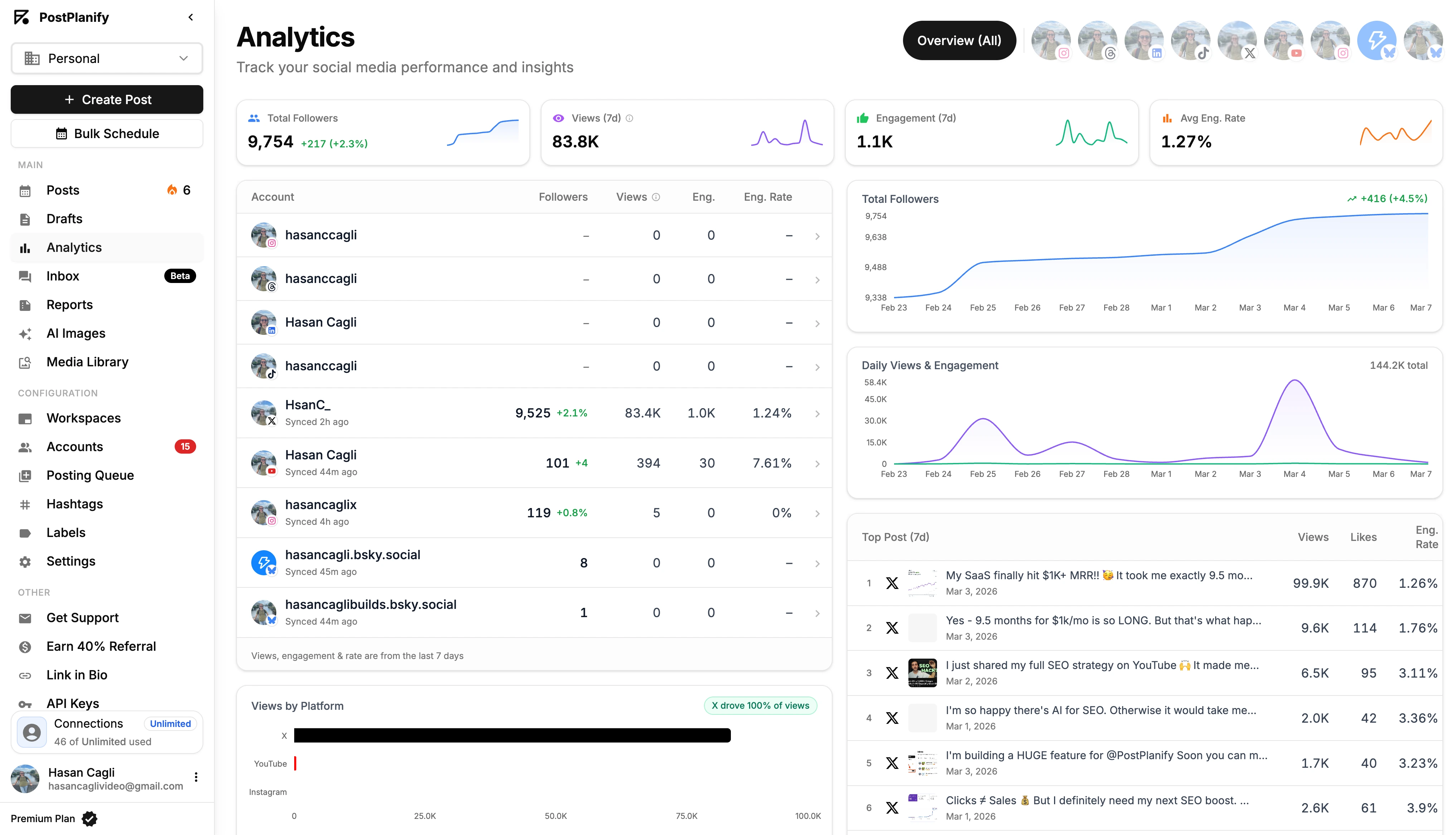
You can track your view trends over any period, compare X performance against your other social channels (like Instagram, Facebook, and LinkedIn), and instantly spot your winning content without any manual data pulling. This turns analytics from a chore into a quick, actionable part of your workflow. For more on this, explore our complete guide to social media analytics and reporting.
PostPlanifyAll your social media in one simple dashboard
Schedule posts, track analytics, and reply to comments/DMs without switching tabs.
Engagement
+18%
Views
52.8k
7 Actionable Strategies to Increase Your X Views

You know how to track your views. Now, let’s focus on making that number grow. Getting more views on X is not about a single trick; it's about consistently implementing best practices that signal to the algorithm that your content is worth showing to more people.
1. Master Your Hashtag Strategy
Hashtags are signposts that guide users and the algorithm to your content. A common mistake is using only broad, generic tags like #marketing or #business. This is like shouting into a hurricane—you'll get lost in the noise.
A better approach is to use a mix of hashtag types. Our hashtag generator tool can help you find the right tags for your niche:
- Niche Hashtags: These are hyper-specific to your community (e.g.,
#SaaSMarketing,#B2BContent). They attract a smaller but more relevant and engaged audience. - Trending Hashtags: If a topic is currently popular, joining the conversation can give you a significant (though often short-lived) boost in views. Make sure your contribution is relevant.
- Evergreen Hashtags: These are standard, consistently searched terms in your field (e.g.,
#ContentStrategy,#SocialMediaTips). They provide a steady, long-term stream of views.
Actionable Step: Use 2-3 well-researched hashtags per post. More than that can look spammy and reduce the post's readability.
2. Leverage Multimedia to Stop the Scroll
In a visual, fast-moving feed, a text-only post is easy to miss. To get more views on X, you need to make people physically pause their scrolling. Multimedia is the most effective way to do this.
Videos are especially powerful. They can earn up to 6 times more retweets and significantly more impressions than text-only posts, which directly translates to more views.
Pro-Tip: Always upload videos directly to X instead of linking to YouTube. Native videos autoplay in the feed, which is far more effective at grabbing attention and securing that initial view.
3. Post Consistently at Peak Times
The X algorithm rewards consistency. Sporadic posting at random times kills your momentum. To maximize your views, you need to be active when your audience is most likely to see and interact with your content.
Actionable Step:
- Use your X Analytics or a tool like PostPlanify to find your audience's most active hours.
- Schedule your most important content to go live during these peak windows. For platform-specific timing data, check our best time to post on social media guide. This ensures maximum visibility, even when you're offline.
4. Pin Your Best Post
Your pinned post is the first thing users see when they visit your profile. It's premium digital real estate. Leaving it empty or pinning a low-performing post is a wasted opportunity.
Actionable Step: Find a post that has already generated strong engagement or has a clear call-to-action (like a link to your newsletter or a popular blog post). Pin it to your profile. Every new profile visitor will contribute another view, creating a snowball effect that maximizes the lifespan of your best content. If your pinned post highlights your expertise, it also helps you gain Twitter followers from those profile visits.
5. Spark Conversation with Questions and Polls
The algorithm is designed to promote conversation. Posts that generate replies are shown to more people. Instead of just broadcasting information, invite your audience to participate.
Actionable Step:
- Ask open-ended questions related to your industry.
- Run an X Poll to get a quick pulse on a topic. Every vote is an engagement that boosts your post's visibility.
This not only increases views but also helps build a community around your account. A strong community is a key part of sustainable growth, as we cover in how to gain Twitter followers.
6. Engage Proactively in Your Niche
Don't wait for the conversation to come to you. Actively seek out and participate in discussions relevant to your industry.
Actionable Step:
- Create an X List of key influencers, customers, and competitors in your space.
- Spend 10-15 minutes each day reviewing the list and leaving thoughtful replies.
- This not only gets your name and profile in front of a targeted audience but also signals to the algorithm that you're an active, valuable member of the community.
7. Format Your Posts for Readability
Long, unbroken walls of text are intimidating and get skipped. Make your content easy to skim and digest.
Actionable Step:
- Use short sentences and paragraphs.
- Use bullet points or numbered lists to break up information.
- Use emojis to add visual interest and convey tone.
A post that is easy to read is more likely to be read, liked, and shared, all of which contribute to more views. Use our free Twitter formatting tool to make sure your line breaks display correctly. For more tips on creating engaging content, see our guide on how to improve social media engagement.
Unique Views vs. Total Views: What's the Difference?
X tracks two different view metrics, and understanding the distinction helps you measure your true reach more accurately.
- Total Views (Impressions): The number displayed publicly beneath your post. This counts every time the post appears on any screen. If one person sees your post three times (once in their feed, once on your profile, once via a repost), that's 3 total views.
- Unique Views: The number of distinct users who saw your post. That same person seeing it three times counts as 1 unique view. Unique views are currently only visible in the analytics for posts with attached videos.
How Video Views Are Counted Differently
Video views on X follow a stricter standard than regular post views. For a video view to count:
- The video must be watched for at least 2 seconds.
- At least 50% of the video player must be visible on screen.
- The viewer must be a logged-in user.
This means your video view count will always be lower than your post's total impression count — and that's normal. A regular post view is counted the moment it appears on screen, while a video view requires active attention.
Using Threads to Multiply Your Views
Threads are one of the most effective content formats on X for generating views. When you post a thread, each individual tweet in the chain can generate its own impressions. A 5-tweet thread has five separate opportunities to appear in feeds, effectively multiplying your visibility from a single piece of content.
Threads also keep users engaged longer. X shows thread previews in feeds with a "Show more" prompt, which encourages clicks and extended reading time — both positive signals to the algorithm.
Best practices for threads:
- Lead with a killer hook. The first tweet determines whether anyone reads the rest. Make it a bold claim, a surprising stat, or a compelling question.
- Keep each tweet self-contained. Every tweet in the thread should deliver value on its own, in case someone sees it out of context.
- End with a CTA. Ask for a repost, a follow, or direct readers to a resource.
For a consistent thread publishing cadence, learn how to automatically post tweets so you can batch-create and schedule your threads in advance.
Troubleshooting & FAQs About X Views
Even with a clear strategy, you might still have questions about the nuances of X's view count. Here are direct answers to the most common ones.
Do my own views count on my tweets?
Yes, they do. Every time you view your own post, X counts it as a view (or impression). The system doesn't differentiate between you and another user; it only registers that the post was displayed on a screen. While this might feel like you're inflating your own metrics, the handful of views you add is insignificant in the grand scheme. Don't worry about it.
What is the difference between views and impressions on X?
There is no difference. "Views" and "impressions" are two names for the same metric. In late 2022, X (then Twitter) made the "impressions" metric, which was previously only visible in your private analytics, public for everyone to see. They simply relabeled it as "views." One view equals one impression. For a deeper dive, see our full guide on what are impressions on Twitter.
Why did my old post suddenly get more views?
Seeing a post from weeks or months ago suddenly gain traction can be surprising. This usually happens for one of three reasons:
- An Influential Account Shared It: If an account with a large following retweets or Quote Tweets your old post, it's exposed to a massive new audience, causing a spike in views.
- A Keyword Started Trending: Your post might contain a word or hashtag that suddenly becomes relevant due to a news event or viral trend. People searching for that term can discover your old content.
- It Was Linked Externally: Someone may have included your post in a blog post, newsletter, or online article, driving referral traffic and views from outside the X platform.
Can I see exactly who viewed my post?
No, you cannot. The view count is an anonymous metric. X does not provide a list of the specific users who have seen your post. This is to protect user privacy. You can see who liked, replied, or reposted your content, but the larger group of people who simply saw it in their feed (the "lurkers") remains anonymous.
How many views is considered viral on X?
There's no official threshold, but in general terms: a post from an account with under 10,000 followers that receives 500,000+ views is widely considered to have gone viral. For larger accounts, the bar is proportionally higher. What matters more than a specific number is the ratio — a post that receives 10-50x your typical view count has effectively gone viral for your audience, regardless of the raw number.
Do views from the "For You" tab count differently?
No. A view is a view, regardless of where it occurs. Whether someone sees your post in the "For You" algorithmic feed, the "Following" chronological feed, search results, or on your profile page, each instance is counted equally as one view. However, the "For You" feed is typically where the majority of views come from for posts that break out beyond your existing followers.
Does X Premium affect my view count?
X Premium subscribers receive a boost in the algorithmic ranking of their replies, which can lead to more visibility in conversations. This means your replies may appear higher in threads under popular posts, exposing your profile to a larger audience. However, X Premium does not directly inflate the view count on your original posts — the boost applies primarily to reply visibility and comes with longer post limits (up to 25,000 characters).
Why does my view count seem inflated?
X counts every time your post appears on a screen, including your own views, repeat views from the same user, and views from people who scroll past without reading. This means 10,000 views does not mean 10,000 people saw your post. It could be 3,000 unique people who saw it an average of ~3 times each. To get a more accurate picture of your actual audience size, look at the "reach" metric in your analytics rather than the public view count.
How many times should I post per day to maximize views?
Research and platform data suggest 3-5 high-quality posts per day is the sweet spot for most accounts. The X feed moves extremely fast — a single daily post will be buried within hours. Spreading your content throughout the day (hitting morning, midday, and evening windows) gives you multiple chances to appear in your audience's feed. Use a scheduling tool to maintain this cadence without being glued to your phone.
Can scheduling posts hurt my views?
No. X treats scheduled posts identically to manually published posts. The algorithm does not penalize content based on how it was posted. In fact, scheduling often improves views because you're more likely to hit optimal posting times consistently. Both X's native scheduler and third-party tools like PostPlanify publish through official APIs, so there's no difference in how the content is distributed.
Key Takeaway: To understand who your content is reaching, analyze the profiles of the users who engage with it. They are your most valuable audience members, and their profiles will tell you if you're successfully reaching your target demographic.
Summary Checklist for Increasing X Views
Struggling with low views on X comes down to a few key areas. Use this checklist to diagnose and fix your strategy:
- [ ] Are you posting at peak times? Check your analytics and schedule your content for when your audience is most active.
- [ ] Is your content visually engaging? Add images, videos, GIFs, or polls to stop the scroll.
- [ ] Are you joining the conversation? Dedicate time to replying and engaging with others in your niche.
- [ ] Are you using targeted hashtags? Use a mix of 2-3 niche, trending, and evergreen hashtags.
- [ ] Is your best content pinned? Pin a high-performing post to your profile to maximize its visibility.
- [ ] Are you asking questions? Prompt replies to signal to the algorithm that your content is valuable.
- [ ] Is your formatting easy to read? Use short paragraphs and lists to make your content skimmable.
PostPlanifyAll your social media in one simple dashboard
Schedule posts, track analytics, and reply to comments/DMs without switching tabs.
Engagement
+18%
Views
52.8k
Key Takeaways
- A view on X is an impression — it's counted every time your post appears on a logged-in user's screen, whether they read it or scroll past
- Views and impressions are the same metric — X made the previously private "impressions" number public and relabeled it as "views"
- Early engagement velocity is critical — reposts carry 20x and replies carry 13.5x the algorithmic weight of likes in the first 30 minutes
- Views only count from logged-in users — bots, search engine crawlers, and link previews don't inflate your count
- Video views are counted differently — they require at least 2 seconds of watch time with 50% of the player visible on screen
- A high view count with low engagement is a negative signal — focus on engagement rate, not raw view numbers
- Consistency beats volume — posting 3-5 times daily at peak times is more effective than sporadic bursts of content
- Threads multiply your views — each tweet in a thread generates its own impressions, giving you multiple opportunities to appear in feeds
Related Reading
- What Are Impressions on Twitter?
- How to Gain Twitter Followers
- Am I Shadowbanned on Twitter? How to Check & Fix It
- How to Schedule Posts on X
- How to Automatically Post Tweets
- Best Time to Post on Social Media
- How to Improve Social Media Engagement
- Social Media Analytics and Reporting
- Social Media Scheduling Tools
- Twitter Hashtag Generator
- Free Twitter Line Break Generator
- Twitter Bio Generator
Managing content across platforms and tracking your performance shouldn't be a chore. PostPlanify brings all your social media scheduling, analytics, and team collaboration into one unified dashboard, so you can focus on creating content that gets views. Start your free 7-day trial today!
PostPlanifyAll your social media in one simple dashboard
Schedule posts, track analytics, and reply to comments/DMs without switching tabs.
Engagement
+18%
Views
52.8k
About the Author

Hasan Cagli
Founder of PostPlanify, a content and social media scheduling platform. He focuses on building systems that help businesses, agencies, and teams plan, publish, and manage content and social media more efficiently across platforms.


