


Most agencies stopped asking "should we use AI?" by early 2025. By 2026, 96% of social media professionals now use AI in their workflow, per Metricool's 2025 State of AI in Social Media Report — with 72.5% using AI tools daily and only 3.6% reporting no AI use at all. The question that matters now is operational: which workflows actually deliver results, which tools handle them best, and where is human review still non-negotiable?
This guide documents 15 real AI workflows social media agencies use in production in 2026. Each workflow includes the problem it solves, the step-by-step execution, the specific tools agencies use, measurable time savings where data exists, the limitations (where it still breaks), and who on the agency team owns the workflow day-to-day. Every tool name is verified as active in 2026. Where PostPlanify covers a workflow natively, we say so. Where it doesn't, we point to the specialist tools that do — positioning integrity matters more than forcing PostPlanify into every slot.
One important framing note. This article is about AI workflows, not AI tools. If you're comparing which AI-enabled social platform to buy, see our guides on best AI tools for social media marketing and best AI social media management tools. This article assumes you already have a scheduling platform and shows you the 15 AI workflows agencies layer on top of it.
Why Most Agency AI Deployments Fail
Before the 15 workflows, a quick look at the patterns that sink AI initiatives inside agencies.
No named owner per workflow. "Anyone can use the AI tool" becomes "nobody owns the output quality." Every workflow needs one person accountable for the input prompt library, the review checkpoints, and the quality metrics.
Skipping the quality-review checkpoint. 44.7% of social marketers report AI-assisted content actually outperforms manual content (Metricool 2025) — but that's with human review. AI output published without review is how agencies lose clients to off-brand captions and hallucinated stats.
Picking one AI tool and forcing it into every workflow. ChatGPT is strong at caption writing and weak at pattern detection. Midjourney is strong at image generation and weak at inbox responses. Each workflow needs its own tool fit.
No documented prompt library. If the copywriter's "good" prompt lives in their browser history, every new hire reinvents the wheel. Prompt libraries belong in Notion, a shared drive, or inside your scheduling tool's asset library.
Treating AI as cost cutting vs. capacity expansion. 54% of marketing leaders say AI will enable teams to grow, not shrink (Sprout Social Index 2025). Agencies that use AI to do more work per client grow faster than agencies that use it to fire junior staff. Some take this capacity-expansion model further by packaging repeatable automations as client-facing services, using platforms like Botsify to resell AI agents for content support, lead handling, reporting, or inbox management.
Over-claiming AI in client pitches. "Our AI does everything" is a promise you can't keep. Under-promising AI capability and delivering on specific workflows builds trust that lasts past month three.
The 15 workflows below assume you're avoiding these failure modes.
Quick Answer: The 15 AI Workflows Agencies Actually Run in 2026
Organized into four categories:
Content creation (5):
- Caption generation at brand voice
- Visual-aware caption generation (AI reads the image)
- Content repurposing across platforms
- AI image generation for social posts
- Short-form video with AI
Analytics & insights (3): 6. Pattern detection across client performance 7. Auto-generated executive summaries for monthly reports 8. Competitor content analysis
Client operations & team (4): 9. RFP / proposal response drafting 10. Automated social inbox response drafts 11. Meeting notes to action items 12. Training / onboarding / SOP generation
Paid media & competitive intelligence (3): 13. Ad creative variation at scale 14. Audience research via AI 15. Competitive intelligence monitoring
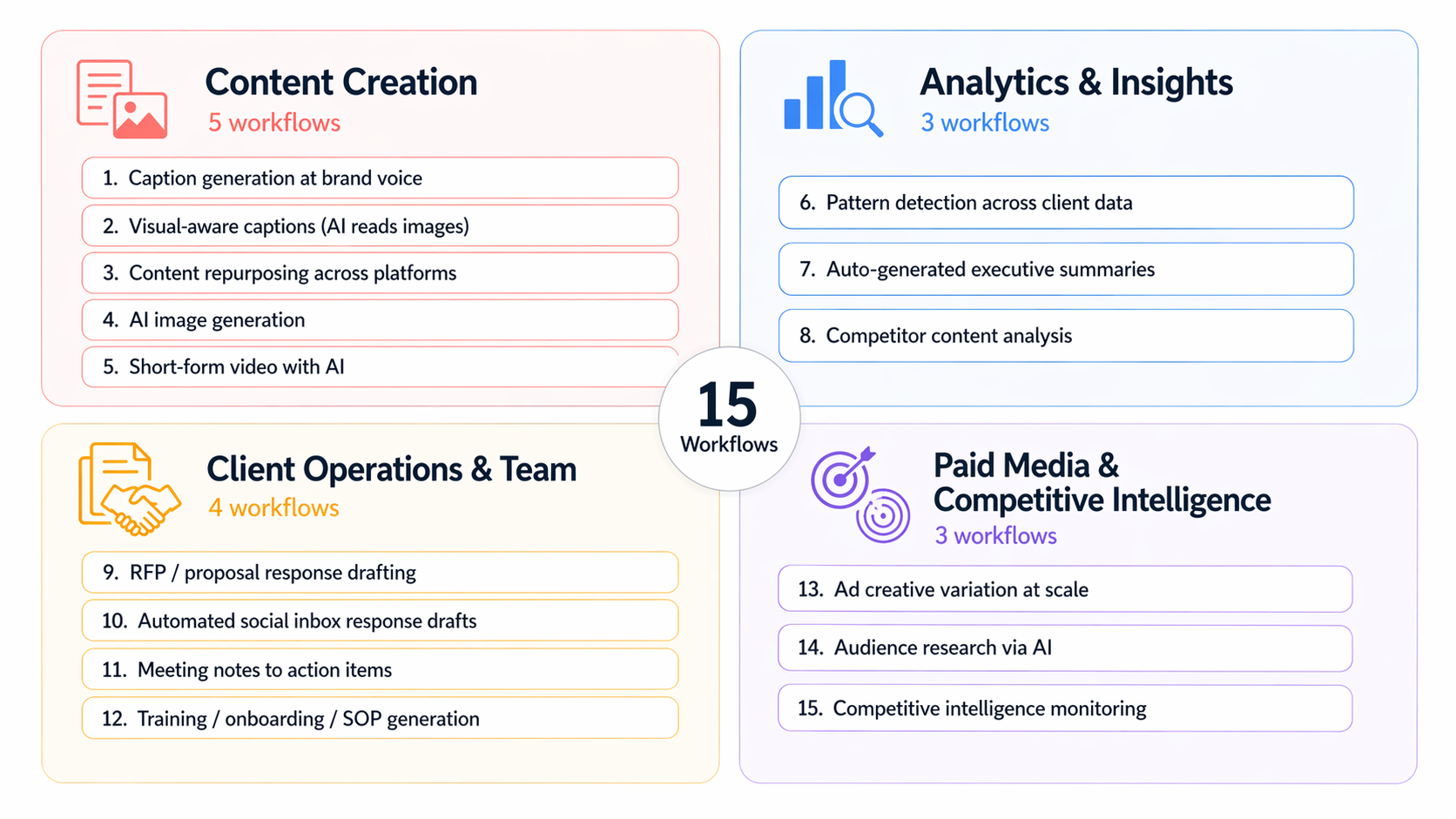
At a Glance: The 15 Workflows
| # | Workflow | Primary Tools | Time Saved | PostPlanify Native? |
|---|---|---|---|---|
| 1 | Caption generation at brand voice | GPT-4, Claude, PostPlanify AI | 5–10 hrs/week | ✅ |
| 2 | Visual-aware caption generation | GPT-4o, Claude (vision), PostPlanify vision-powered AI | 3–8 hrs/week | ✅ |
| 3 | Content repurposing across platforms | Opus Clip, Munch, Repurpose.io, ChatGPT | 4–8 hrs/week | Partial |
| 4 | AI image generation for social posts | Midjourney, Flux, DALL-E, Canva AI, PostPlanify | $500–$2,000/mo | ✅ |
| 5 | Short-form video with AI | Opus Clip, Descript, Runway, Veo | 6–12 hrs/week | ❌ |
| 6 | Pattern detection across client performance | Sprout Trellis, Hootsuite Analytics, Claude/GPT on CSV | 2–5 hrs/week | Partial |
| 7 | Auto-generated executive summaries | Sprout AI Insights, Brandwatch Iris, Claude/GPT | 3–6 hrs/month | ✅ |
| 8 | Competitor content analysis | Rival IQ, Socialinsider, Brandwatch | 2–4 hrs/week | ❌ |
| 9 | RFP / proposal response drafting | Loopio, Responsive, Claude, ChatGPT | 10–20 hrs/RFP | ❌ |
| 10 | Automated social inbox response drafts | PostPlanify, Sprout AI Assist, Agorapulse AI | 5–10 hrs/week | ✅ |
| 11 | Meeting notes to action items | Fireflies, Otter, Fathom, Granola | 3–5 hrs/week | ❌ |
| 12 | Training / SOP generation | Claude, ChatGPT, Notion AI, Scribe | One-off + reusable | ❌ |
| 13 | Ad creative variation at scale | AdCreative.ai, Pencil, Omneky, Celtra | 6–10 hrs/campaign | ❌ |
| 14 | Audience research via AI | Sparktoro, Audiense, Brandwatch, Claude/GPT | 5–15 hrs/research sprint | ❌ |
| 15 | Competitive intelligence monitoring | Kompyte, Crayon, Klue, Brandwatch, Mention | 2–4 hrs/week | ❌ |
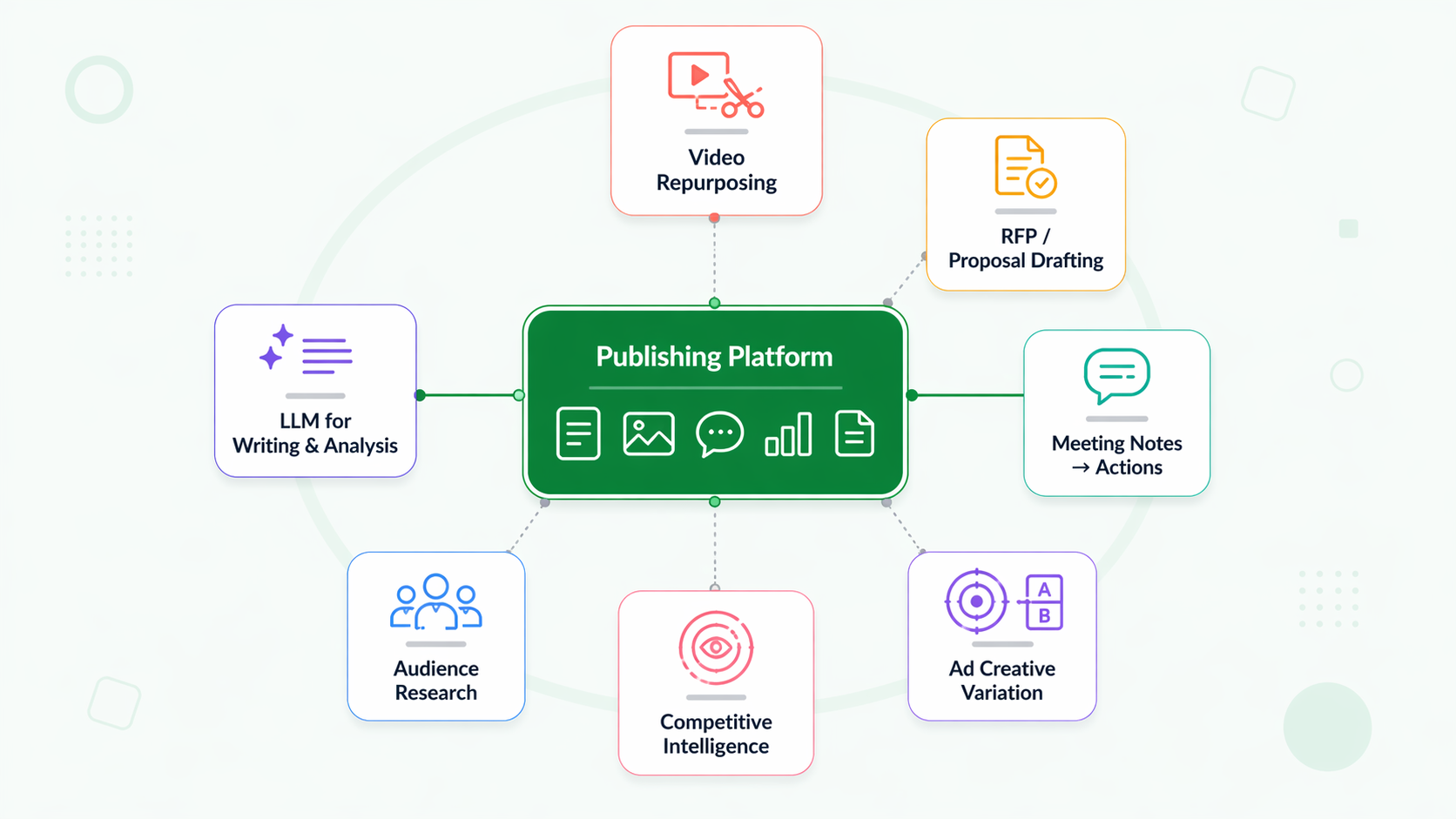
Ten workflows draw on specialist tools outside the publishing platform. Six map to features inside PostPlanify. This is the realistic agency AI stack — no single vendor covers everything.
 PostPlanify
All your social media in one simple dashboard
Schedule posts, track analytics, and reply to comments/DMs without switching tabs.

Engagement
+18%
Views
52.8k
Category 1: Content Creation (5 Workflows)
Workflow 1: Caption Generation at Brand Voice

What it is. Generate platform-specific captions — Instagram, LinkedIn, X, TikTok, Facebook — from a brief, product description, or visual asset. The hardest part isn't generating captions; it's generating captions that sound like the client's brand voice, not generic AI voice.
Why agencies need it. Caption writing is the single most-repeated task in a social media agency. A retainer agency with 15 clients × 20 posts per client per month = 300 captions monthly. Across 5 platforms each with different voice and length requirements, that's ~1,500 caption variants per month. AI-assisted caption generation saves reported 5–10 hours per week per content team member.
How the workflow runs.
- Build a brand voice library per client — 5 voice adjectives, 3 sample phrases that sound like the client, 3 that don't, content pillar definitions, emoji policy, forbidden topics.
- Store the voice library in your prompt template (pinned in the AI tool) or inside your publishing platform's content brief.
- For each new post: paste the brief + voice library + desired platform into the AI prompt.
- Generate 3 variants.
- Human review: the content creator picks one, edits 10–20% for nuance, publishes.
- Flag weak outputs back into the voice library so the next generation improves.
Tools commonly used. ChatGPT / GPT-4, Claude, Jasper, Copy.ai, Writer, PostPlanify's AI Assistant (vision-powered), Sprout Social Trellis, Hootsuite OwlyGPT. PostPlanify's caption generator is built into the publishing tool, which matters operationally — the caption lives alongside the scheduled post, not in a separate chat window.
Time saved. 5–10 hours per week per content team member.
Limitations. AI captions that skip the voice-library step read generic. Watch for: (1) hallucinated product claims, (2) over-use of emoji (AI defaults heavy), (3) repeated sentence structures across posts, (4) AI-signature phrases ("dive deep," "elevate your," "unlock"). Quality review is non-negotiable.
Who owns it. The copywriter or content creator on each client account. Not the account manager.
Workflow 2: Visual-Aware Caption Generation (AI Reads the Image)
What it is. The AI model doesn't just generate a caption from a text brief — it actually looks at the uploaded image or video and generates a caption that references what's actually in the visual. This sounds trivial. It isn't. Early AI caption tools generated from text alone, which meant captions often described what the brief said rather than what the image showed.
Why agencies need it. Scaling caption generation without losing visual-creative alignment. A product-launch carousel with 10 slides needs 10 captions that each reference a specific slide's visual. Without visual-aware AI, the copywriter still writes each one manually.
How the workflow runs.
- Upload the image or video to the vision-enabled AI tool.
- Add the brief + voice library + platform.
- The AI describes what it sees, then generates a caption grounded in the visual.
- Human review confirms the AI "saw" the image correctly — occasional misreads occur (e.g., AI confuses a product photo with a generic stock-photo subject).
- Batch-process an entire shoot or campaign asset set in one sitting.
Tools commonly used. GPT-4o (vision), Claude with vision, Google Gemini, PostPlanify's vision-powered AI Assistant. PostPlanify extracts frames from videos and transcribes audio as additional context — relevant for Reels and TikTok content where the visual alone undersells the content.
Time saved. 3–8 hours per week for teams doing high-volume visual content. Largest impact for brands producing 20+ image posts per week.
Limitations. AI misidentifies niche products or industry-specific imagery. Medical, legal, or technical-product visuals often need manual caption override. For these cases, treat visual-aware AI as a first-draft accelerator, not a final-draft generator.
Who owns it. Copywriter + designer jointly. The designer uploads; the copywriter refines.
Workflow 3: Content Repurposing Across Platforms
What it is. Turn one long-form content asset — a podcast episode, webinar, blog post, YouTube video — into platform-specific short-form outputs: Reels clips, TikTok videos, X threads, LinkedIn carousels, newsletter excerpts. Historically this required a dedicated editor for each platform. AI-assisted repurposing turns one 60-minute video into 8–15 platform-ready clips in under an hour.
Why agencies need it. Content production cost is the single largest variable expense for most agencies. Repurposing multiplies the output of every original asset by 5–10×.
How the workflow runs.
- Upload the long-form asset (podcast, webinar, video) to the repurposing tool.
- AI transcribes and identifies "viral moments" — high-engagement segments based on pacing, keyword density, and emotional arc.
- AI cuts clips to platform-native lengths (Reels: <60 sec, TikTok: <90 sec, YouTube Shorts: <60 sec) with captions burned in.
- Human editor reviews clips, picks the 5–8 strongest, adjusts captions and branding.
- AI generates platform-specific written posts (X thread, LinkedIn carousel outline, newsletter copy) from the same transcript.
- Schedule the full repurposed package across platforms.
Tools commonly used. Opus Clip (highest-adoption among agencies for video repurposing), Munch, Vizard, Repurpose.io, Descript (editing + repurposing), Castmagic (podcast-to-text), and ChatGPT/Claude for written repurposing. We compare them side by side in our best content repurposing tools guide. PostPlanify handles the publishing side across 10 platforms once content is repurposed.
Time saved. 4–8 hours per week for agencies doing weekly long-form content. Larger impact for clients producing podcasts or webinar series.
Limitations. Repurposing tools over-clip — they'll suggest 15 clips when only 3 are genuinely good. Human curation is still necessary. Also: repurposing a video without rights clearance (especially with licensed music) creates platform takedown risk.
Who owns it. Video editor or content producer. Account manager QA's the final clips before scheduling.
Workflow 4: AI Image Generation for Social Posts
What it is. Generate on-brand images for social posts using text prompts or visual references. Quality in 2026 is strong enough that AI-generated images regularly pass client review for campaign work, not just internal drafts.
Why agencies need it. Stock photography costs 30–50% of design budgets at most agencies. AI generation replaces stock imagery, produces brand-specific visuals that stock libraries can't (abstract concepts, hypothetical scenarios, niche product contexts), and shortens campaign concept-to-visual cycles.
How the workflow runs.
- Build a visual reference library per client — brand colors, typography rules, composition style, forbidden imagery.
- Write detailed prompts: subject, style, lighting, composition, mood, negative prompts.
- Generate 4–8 variations.
- Human designer selects the strongest, refines in Canva or Photoshop for brand-layout alignment.
- Fall back to stock or custom photography for compliance-sensitive clients (legal, financial, healthcare).
Tools commonly used. Midjourney (highest creative quality, subscription pricing), Flux (open-source, fast, multiple providers), DALL-E 3 (GPT Plus / ChatGPT), Adobe Firefly (integrated with Creative Cloud, commercial-use licensing clear), Leonardo.ai, Recraft, Canva Magic Studio, Ideogram. PostPlanify integrates image generation directly inside the publishing tool — 100 AI images per month on Growth, 400 on Premium, 800 on Scale, unlimited on Enterprise.
Cost / budget saved. $500–$2,000 per month in stock-photo and illustration spend for typical mid-market agencies.
Limitations. AI image generation struggles with: (1) real people (IP and identity risk), (2) precise product shots (AI can't replicate a specific client product accurately without fine-tuning), (3) text overlays (AI-generated text is frequently garbled — overlay text separately). For branded product photography, stick with traditional shoots.
Who owns it. Designer or visual content lead.
Workflow 5: Short-Form Video with AI
What it is. Produce short-form video — Reels, TikToks, YouTube Shorts — with AI handling one or more of: script generation, voiceover synthesis, AI avatar presentation, auto-editing, caption burning, B-roll suggestion.
Why agencies need it. Short-form video has become the format with the highest reported ROI. 85% of marketers call it the most effective social format; 77% say it delivers the highest ROI (HubSpot / Wyzowl 2026 aggregate data). Yet video production is still the highest-cost deliverable in most agency retainers. AI-assisted video production reduces cost per clip dramatically.
How the workflow runs.
- Script. Draft script in ChatGPT/Claude using brand voice library + CTA goal.
- Voiceover. Use ElevenLabs or Descript for AI voiceover (or keep human voice for founder content).
- Visuals. Record talking-head video, OR use Synthesia / HeyGen for AI avatar presentation, OR generate B-roll with AI video tools (Runway, Veo).
- Editing. Auto-editor in Descript, Opus Clip, or CapCut handles cuts, pacing, and caption burning.
- Caption overlays. Auto-generated captions synced to voice.
- Publish. Schedule across TikTok, Reels, Shorts from a multi-platform scheduler.
Tools commonly used. Opus Clip (agency favorite for auto-repurposing), Descript (editing + voice synthesis), Synthesia (AI avatar), HeyGen (AI avatar + voice), Runway (AI video generation), Pictory (slideshow + voiceover), ElevenLabs (voice synthesis), Veo (Google's text-to-video). PostPlanify schedules the output but doesn't generate video.
Time saved. 6–12 hours per week for agencies doing high-volume video. Per-clip cost drops from 4–8 hours of production to 30–90 minutes.
Limitations. AI avatars (Synthesia, HeyGen) still read as AI to most viewers — acceptable for internal training videos, less so for brand-forward consumer content. AI-generated B-roll has weaker continuity than filmed B-roll. Audience trust on AI-voice content is mixed — disclose in creator credits where platform rules require.
Who owns it. Video editor or creator-content specialist.
Category 2: Analytics & Insights (3 Workflows)
Workflow 6: Pattern Detection Across Client Performance
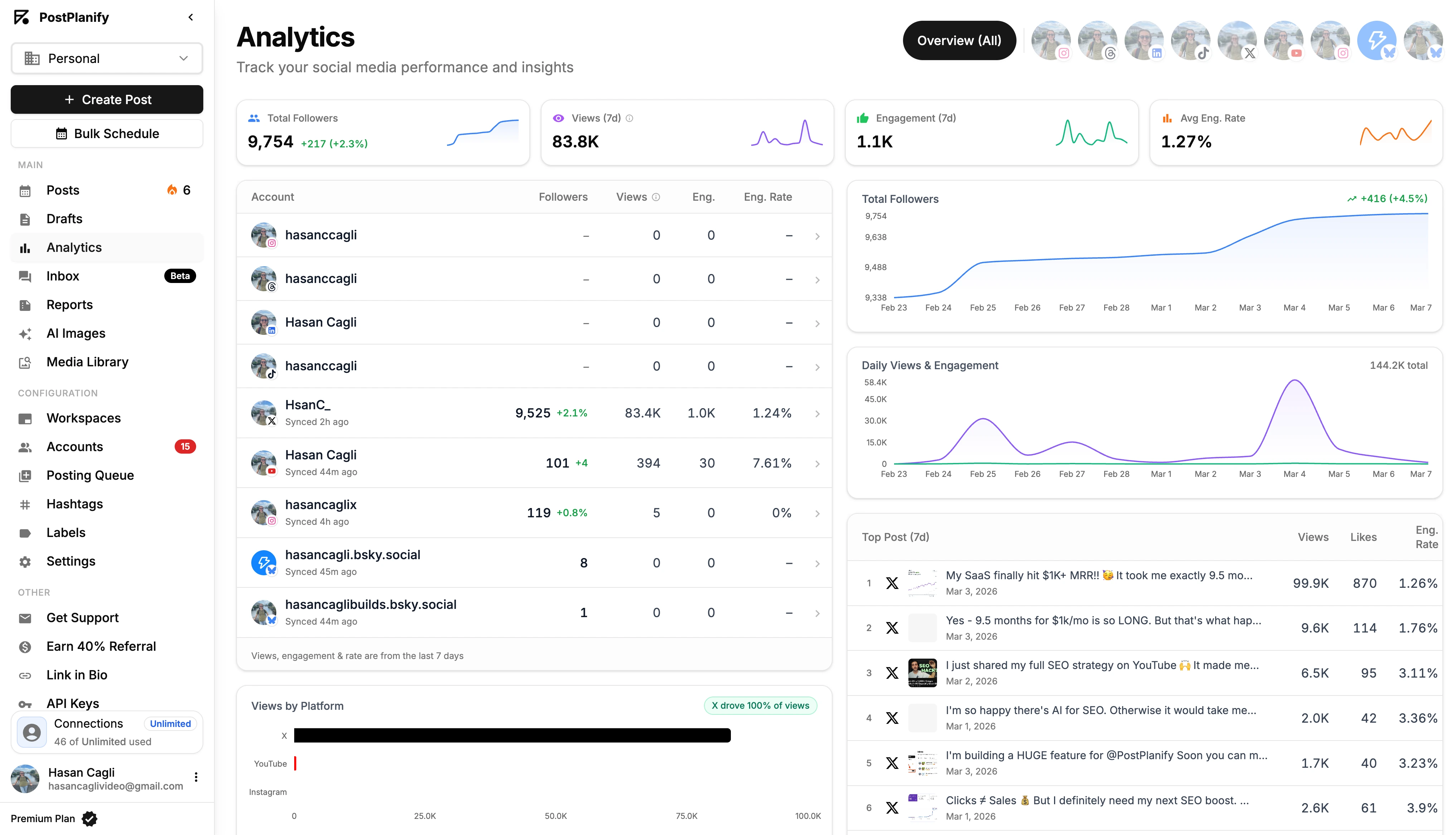
What it is. Instead of manually reviewing 90 days of post data for each client, use AI to surface patterns — which topics, formats, timings, or hooks drove the top 20% of performance. This is where AI replaces hours of pivot-table wrestling.
Why agencies need it. A mid-size agency managing 10 clients has 10 × 90-day analytics datasets to mine monthly. Manual analysis takes 1–3 hours per client. AI-assisted pattern detection drops this to 10–20 minutes per client, with higher pattern-match quality than a human under time pressure.
How the workflow runs.
- Export 90-day post performance from your publishing platform or native analytics (Meta Business Suite, TikTok Analytics).
- Clean the CSV — add content-pillar tags, format tags (Reel / carousel / single image), and hook-type tags.
- Paste the CSV into Claude or ChatGPT with a structured prompt: "Identify the top 10% of posts by engagement rate. Cluster by pillar, format, day, and hook. Surface 5 patterns."
- Review the AI-surfaced patterns for sanity-check. AI occasionally finds spurious correlations.
- Update next month's content plan based on the confirmed patterns.
Tools commonly used. Sprout Social Trellis (native pattern detection in Sprout Premium+), Hootsuite Analytics with OwlyGPT, Brandwatch Iris (narrative summaries), Talkwalker Blue Silk (trend forecasting), Claude Pro / ChatGPT Plus for CSV analysis. PostPlanify's analytics provides per-platform trends and best-time-to-post suggestions — pair with GPT/Claude CSV analysis for deeper pattern work.
Time saved. 2–5 hours per week per analyst across a full client portfolio.
Limitations. AI pattern detection is only as good as the input tags. Garbage tags = garbage patterns. Always sanity-check against known-good performers — if the AI surfaces a "pattern" your senior strategist knows is a statistical fluke, ignore it.
Who owns it. Strategist or analytics lead.
Workflow 7: Auto-Generated Executive Summaries for Monthly Reports
What it is. At the end of each month, feed the client's performance data into an AI model that generates a 3–5 sentence executive summary explaining what happened, why, and what to do next month. The writing task that used to eat 2–3 hours per client per month.
Why agencies need it. Client reports succeed or fail on the executive summary. If the first paragraph makes the client nod, the rest of the report reinforces. If the first paragraph is bland or confusing, the client doesn't read the rest. AI-assisted summaries raise the quality floor while cutting writing time.
How the workflow runs.
- Pull the month's KPIs from your analytics dashboard.
- Feed KPIs + context (campaigns run, algorithm changes, seasonal factors) into Claude or GPT-4.
- Use a structured prompt: "Write a 4-sentence executive summary. Sentence 1: what changed. Sentence 2: what drove it. Sentence 3: what underperformed. Sentence 4: what we'll test next month."
- Account manager reviews, edits for client-specific nuance, attaches to the monthly report.
Tools commonly used. Sprout AI Insights (auto-summaries inside Sprout reports), Brandwatch Iris (narrative summary generation), Talkwalker Yeti (trend explanations), Claude, GPT-4. PostPlanify's white-label PDF reports generate the branded report surface; pair with Claude or GPT for the written executive summary.
Time saved. 3–6 hours per month per account manager across their full client portfolio.
Limitations. AI summaries can miss client-specific context (a recent exec change, a product launch delay). The account manager review step is non-negotiable. Also: AI occasionally smooths over negative months with softening language. If the month was bad, the summary should say so plainly.
Who owns it. Account manager or client lead. Strategist reviews for accuracy.
Workflow 8: Competitor Content Analysis
What it is. Track 3–5 competitor brands' social output, identify their content patterns (topics, formats, cadence, engagement), and surface opportunities your client should act on. Replaces 3–4 hours of weekly manual scrolling.
Why agencies need it. Competitive intelligence is one of the three things most client QBRs care about (own performance, industry benchmarks, competitor moves). Doing it manually is tedious and drops in priority when deliverables pile up.
How the workflow runs.
- In Rival IQ, Socialinsider, or Brandwatch, define the competitive set (3–5 brands).
- Pull 30-day content performance data.
- AI or built-in analytics identifies: content pillars competitors emphasize, format mix, posting cadence, engagement relative to follower size.
- Feed findings into ChatGPT / Claude for a "what should we do about this" synthesis.
- Include in monthly client report or strategy session.
Tools commonly used. Rival IQ (best-in-class for benchmarking), Socialinsider (cheaper, Instagram / TikTok focus), Brandwatch, Talkwalker, Sprout Social Groups (aggregated view). PostPlanify does not offer native competitor tracking — this is a workflow you'll run in a specialist tool and pair with PostPlanify for publishing.
Time saved. 2–4 hours per week per analyst.
Limitations. AI competitive analysis surfaces patterns, not reasons. "Competitor X is posting more video" is the pattern; "because they hired a new video lead" is the context AI can't infer. Pair AI output with analyst judgment.
Who owns it. Strategist.
PostPlanifyAll your social media in one simple dashboard
Schedule posts, track analytics, and reply to comments/DMs without switching tabs.
Engagement
+18%
Views
52.8k
Category 3: Client Operations & Team (4 Workflows)
Workflow 9: RFP / Proposal Response Drafting
What it is. When a new client RFP lands, AI drafts the structured response — answering capability questions, pricing matrix rows, case-study inserts — while the strategist handles custom positioning. 68% of proposal teams now use AI in their response process (Loopio 2026 RFP Trends Report).
Why agencies need it. A quality RFP response takes 20–40 hours. Many agencies decline RFPs purely because the response cost doesn't pencil out against the win rate. AI-drafted responses cut that to 10–20 hours with equal or better quality.
How the workflow runs.
- Upload the RFP PDF to a proposal management tool (Loopio, Responsive) or AI tool (Claude, ChatGPT).
- AI extracts all questions and matches them against your response library — pre-written answers for capabilities, team bios, process descriptions.
- AI drafts first-pass responses to each section.
- Strategist rewrites client-specific positioning sections (understanding of the brief, proposed approach, custom KPIs).
- Account lead reviews and signs off.
- The updated response feeds back into the library for future RFPs.
Tools commonly used. Loopio (best-in-class for proposal teams), Responsive (formerly RFPIO), Notion AI, Claude, ChatGPT. The Loopio 2026 data notes that win rates rose from 43% to 45% year over year among teams using AI in the proposal process.
Time saved. 10–20 hours per RFP. At higher volume, the win-rate lift matters more than time saved.
Limitations. AI-drafted RFP responses can read generic if you skip the strategist customization step. Clients know the difference between a tailored response and a templated one. Treat AI as the first 60% of the work; reserve human attention for the last 40%.
Who owns it. New business lead or sales director, with strategist input on positioning.
Workflow 10: Automated Social Inbox Response Drafts
What it is. When a comment or DM lands in the client's social inbox, AI drafts a suggested reply the team can approve with one click. Not fully automated posting — drafted, reviewed, sent.
Why agencies need it. 73% of consumers expect a response within 24 hours; 42% within 60 minutes (Sprout Social Index 2025). For agencies managing multiple clients with active communities, maintaining <60-minute response time without an inbox automation layer is nearly impossible.
How the workflow runs.
- Connect the client's social accounts to a unified social inbox.
- AI categorizes incoming messages — support question, sales inquiry, spam, troll, influencer pitch.
- For common categories, AI drafts a response using the brand's tone-of-voice guide.
- The inbox manager reviews the draft in under 10 seconds, clicks send, or edits first.
- Escalate complex or sensitive messages to the account manager.
- Track response time SLAs and message volume over time.
Tools commonly used. PostPlanify's social inbox (Instagram, Facebook, LinkedIn — AI-assisted replies), Sprout Social (AI Assist), Agorapulse (AI Writing Assistant), Hootsuite Inbox, Zendesk AI (for ticketed support). PostPlanify's AI inbox replies are one-click and respect brand voice configured per workspace.
Time saved. 5–10 hours per week for a multi-client community manager.
Limitations. AI drafts well for FAQ-type responses ("When does the sale end?" "Do you ship internationally?"). AI drafts poorly for emotionally charged, ambiguous, or PR-sensitive messages — route those to humans immediately. Also: automated replies without review quickly feel robotic and damage brand trust.
Who owns it. Community manager or dedicated inbox lead.
Workflow 11: Meeting Notes to Action Items
What it is. Record client meetings (with consent), auto-transcribe, auto-summarize, and extract action items assigned to named owners. The workflow that kills follow-up ambiguity.
Why agencies need it. Action-item tracking is the #1 source of client-agency friction after pricing. "You said you'd do X" vs. "We said we'd evaluate X" is the kind of dispute that kills retainers. AI-assisted meeting capture creates an immutable record.
How the workflow runs.
- Before the meeting starts, confirm consent to record. Start the recording tool (Fireflies, Otter, Fathom, Granola, tl;dv).
- The tool joins as a bot attendee, transcribes in real-time.
- After the meeting, AI generates: summary (3–5 sentences), action items with named owners, key decisions.
- The account manager reviews and edits the output within 24 hours.
- Action items sync to the project management tool (Asana, ClickUp, Notion).
- Next meeting starts with a review of last meeting's action-item status.
Tools commonly used. Fireflies, Otter, Fathom, Granola, tl;dv, Read.ai, Notion AI for synthesis. Many of these integrate with Zoom, Google Meet, and Teams natively.
Time saved. 3–5 hours per week per account manager.
Limitations. Transcription accuracy on industry jargon (pharma, legal, technical product names) is imperfect. Speakers who talk over each other create messy transcripts. Also: recording without explicit consent creates legal exposure in some jurisdictions — confirm each meeting.
Who owns it. Account manager.
Workflow 12: Training / Onboarding / SOP Generation
What it is. Turn the senior team's tacit knowledge into written SOPs, training materials, and onboarding decks — scale institutional knowledge across new hires and junior staff.
Why agencies need it. Agency margin compression comes from two forces: tool costs and training cost. AI dramatically reduces training cost by letting senior staff record a Loom once, auto-generate a written SOP, and hand it to new hires without rewriting.
How the workflow runs.
- Senior staff records a Loom or voice memo walking through a process (e.g., "How we run a monthly client QBR").
- AI transcribes, then generates a structured SOP with steps, inputs, outputs, and quality checks.
- Junior staff reviews the AI SOP, flags ambiguities, senior edits.
- Store the SOP in a shared knowledge base (Notion, Guru, internal wiki).
- Reference in onboarding and as a hiring-interview artifact.
- Update quarterly.
Tools commonly used. Claude, ChatGPT, Notion AI (best for in-workspace generation), Scribe (auto-generates SOPs from screen recordings), Guidde, Loom AI, Tango.
Time saved. One-off investment, reusable forever. New-hire onboarding time drops from 3–6 weeks to 1–2 weeks when SOPs are strong.
Limitations. AI-generated SOPs are only as good as the source material. Rushed voice memos produce shallow SOPs. Invest 30–60 minutes of senior time per critical workflow upfront; it compounds across every future hire.
Who owns it. Operations lead or senior strategist. Knowledge-base curator if you have one.
Category 4: Paid Media & Competitive Intelligence (3 Workflows)
Workflow 13: Ad Creative Variation at Scale
What it is. For paid social campaigns, generate dozens of creative variations — headline, body copy, CTA, image — and A/B test at scale. Replaces the "make 3 ads and hope" pattern with "make 30 ads and let the algorithm pick."
Why agencies need it. Paid social performance lives and dies on creative variation. Campaigns that test 20+ variations outperform campaigns that test 3, holding all else equal. Manual variation creation is too slow to support this scale. AI automation makes it feasible.
How the workflow runs.
- Brief the AI tool with campaign objective, audience, brand voice, offer, CTA.
- AI generates 10–30 variations of headlines, body copy, and images.
- Human selects the 10–15 strongest based on brand-fit and strategy.
- Launch in Meta Ads Manager, LinkedIn Campaign Manager, or TikTok Ads with all variations rotating.
- After 7–14 days, analyze which variations won by CPM, CTR, or conversion.
- Feed winning variations back into AI to generate next-wave variations.
Tools commonly used. AdCreative.ai (highest-adoption among performance agencies), Pencil (AI creative platform by Brandtech), Omneky, Celtra, Canva Magic Studio, Smartly. For the publishing and organic side, PostPlanify is not an ads-management tool — pair with dedicated ad platforms.
Time saved. 6–10 hours per campaign launch.
Limitations. AI-generated ad creative can produce on-brand but strategically hollow content. The first filter (human selection of the best 10–15) is the critical quality gate. Also: platform ad policies evolve faster than AI tool guardrails — human review catches compliance issues AI misses.
Who owns it. Paid media specialist or ads manager.
Workflow 14: Audience Research via AI
What it is. Before pitching or building strategy for a new client, use AI to synthesize audience behavior — who they are, what they consume, where they spend time — from disparate sources that would take weeks to read manually.
Why agencies need it. Audience research is the work clients assume is happening but rarely see. AI dramatically reduces the cost of doing it well, which improves strategy quality without raising retainer cost.
How the workflow runs.
- Define the audience segment (persona, industry, geography, life stage).
- Run AI-assisted audience research across data sources: Sparktoro (what they read / watch / follow), Audiense (Twitter/X audience clusters), Brandwatch (sentiment and conversation themes), GWI (demographic and behavioral data).
- Feed insights into Claude/GPT with a prompt: "Summarize this audience's media diet, 5 content themes they engage with, 3 messaging hooks that would resonate."
- Strategist reviews and adds first-hand brand context.
- Include in the strategy doc or new-business pitch.
Tools commonly used. Sparktoro (best for discovering where an audience spends attention online), Audiense (X/Twitter audience clustering), Brandwatch (sentiment and theme extraction), GWI (primary survey data access), Claude / GPT for synthesis.
Time saved. 5–15 hours per audience research sprint.
Limitations. AI-assisted audience research synthesizes existing data; it doesn't replace primary research (customer interviews, surveys). For high-stakes positioning decisions, AI is the first 70% of the work. Validate with first-hand data for the last 30%.
Who owns it. Strategist or planner.
PostPlanifyAll your social media in one simple dashboard
Schedule posts, track analytics, and reply to comments/DMs without switching tabs.
Engagement
+18%
Views
52.8k
Workflow 15: Competitive Intelligence Monitoring
What it is. Auto-monitor competitor brand launches, pricing changes, executive hires, partnership announcements, and marketing campaigns. Get alerted when something material happens instead of discovering it weeks later.
Why agencies need it. Client QBRs improve when you can say "Competitor X announced Y last Tuesday, and here's how we respond." Without automation, competitive intelligence lives in Google Alerts (shallow) or analyst head-scrolling (slow).
How the workflow runs.
- Define competitive set (3–5 competitors) and tracking dimensions (product launches, pricing, exec moves, marketing campaigns, social announcements).
- Set up monitoring in a dedicated competitive intelligence tool (Kompyte, Crayon, Klue) or a listening tool (Brandwatch, Mention).
- AI aggregates signals across sources — press releases, news articles, LinkedIn posts, product-update logs, social accounts.
- Daily or weekly digest of material changes arrives in email or Slack.
- Strategist reviews and surfaces relevant findings in client QBRs.
Tools commonly used. Kompyte (sales-focused competitive enablement), Crayon (marketing-focused competitive intelligence), Klue, Brandwatch, Talkwalker, Mention. Not covered by any generalist social media tool — this is specialist territory.
Time saved. 2–4 hours per week per strategist.
Limitations. Over-alerting is real — "Competitor launched a new feature" might be irrelevant noise 9 times out of 10. Tune the signal filters monthly to avoid alert fatigue. Also: AI can't evaluate strategic importance — it surfaces the fact; the strategist decides whether to act.
Who owns it. Strategist or head of strategy.
How to Prioritize Which Workflows to Adopt First
You can't pilot 15 workflows simultaneously. Sequence them by impact and risk:
Phase 1 — Week 1–4 (safe, high-impact):
- Workflow 1 (caption generation) — easiest to pilot; measurable time savings in 2 weeks.
- Workflow 10 (inbox response drafts) — pair with existing inbox tool.
- Workflow 12 (training / SOP generation) — internal use only; zero client risk.
Phase 2 — Month 2–3 (medium risk, high reward):
- Workflow 2 (visual-aware captions) — builds on workflow 1.
- Workflow 4 (AI image generation) — requires brand visual library.
- Workflow 7 (auto-generated executive summaries) — adds client-facing polish.
- Workflow 11 (meeting notes to action items) — transformative for client relationships.
Phase 3 — Month 4–6 (strategic):
- Workflow 3 (content repurposing).
- Workflow 5 (short-form video with AI).
- Workflow 6 (pattern detection).
- Workflow 13 (ad creative variation).
Phase 4 — Ongoing specialist:
- Workflow 8 (competitor content analysis).
- Workflow 9 (RFP response drafting) — driven by RFP volume.
- Workflow 14 (audience research) — project-based.
- Workflow 15 (competitive intelligence) — requires tool investment.
Common AI Workflow Mistakes
1. Using one AI tool for everything. ChatGPT is strong at caption writing and weak at pattern detection. Each workflow needs its own tool fit.
2. Skipping the quality-review checkpoint. The 44.7% "AI-assisted content outperforms manual" stat is measured with human review. Without it, output degrades fast.
3. No documented prompt library. Institutional knowledge of "what prompts work" belongs in Notion, not in browser histories.
4. Treating AI as cost reduction instead of capacity expansion. The agencies growing fastest with AI are using it to do more per client, not fewer staff.
5. Over-claiming AI in client pitches. Under-promise specific workflows; deliver them well.
6. Not naming an owner per workflow. "Anyone can do it" means nobody owns quality.
7. Auto-publishing inbox responses. Route to human review. AI-written inbox replies without review erode brand trust within weeks.
8. Forgetting platform rules. Some platforms (TikTok, Meta) have disclosure requirements for AI-generated content. Compliance matters.
9. Using AI on compliance-sensitive clients without legal review. Financial services, healthcare, legal — AI-drafted content needs extra compliance checks.
10. Failing to update prompt libraries quarterly. AI tools improve; your prompts should too.
FAQ: AI Workflows at Social Media Agencies
How much time does the average agency save with AI workflows?
Aggregate across workflows: 6–15 hours per team member per week for agencies that have adopted 5+ workflows. Caption generation alone saves 5–10 hours per week per content creator (Metricool 2025 State of AI in Social Media). AI image generation saves $500–$2,000/month in design spend. Time savings compound as workflows stack.
Which workflow should I adopt first?
Caption generation (Workflow 1). It has the highest volume, the clearest time savings, and the lowest quality risk if you require human review. Most agencies pilot this first and expand from there.
Do clients know we use AI?
Some do, some don't. Industry consensus in 2026: disclose in your agency's methodology overview during sales, but don't label each AI-assisted caption individually. Platform rules (especially TikTok's AI disclosure requirements) may require explicit labeling on the content itself.
Will AI replace junior social media staff?
Not in 2026. AI replaces the easiest 30–50% of junior work, which lets junior staff focus on higher-value tasks (strategy contribution, client communication, account learning). The 54% of marketing leaders who expect AI to grow teams are betting on this dynamic. (Sprout Social Index 2025)
What's the single biggest ROI workflow?
Depends on agency type. For content-heavy agencies: Workflow 3 (content repurposing) or Workflow 5 (short-form video with AI). For analytics-focused agencies: Workflow 7 (executive summaries). For new-business-driven agencies: Workflow 9 (RFP drafting), where the 68% of teams using AI in proposals saw win-rate lifts.
How do I measure whether AI workflows are working?
Four metrics: (1) hours saved per workflow, tracked weekly; (2) quality delta — does AI-assisted output outperform manual? 44.7% report yes per Metricool 2025; (3) client satisfaction — measured via QBR feedback; (4) margin impact — hours freed up should translate to higher margin or more capacity, not just dead air.
Do I need to build custom AI tools?
No. In 2026 the market of SaaS AI tools is mature enough that most agencies can assemble a workflow stack from off-the-shelf products. Custom AI builds make sense only for specific competitive moats — proprietary data pipelines, client-specific fine-tuned models, or integration points a SaaS tool won't provide.
Which AI tools are worth paying for vs. free?
Depends on volume. Free tiers (ChatGPT, Claude, Canva Magic Studio basic) work for low-volume agencies or pilots. Paid tools become worth it when: (1) you need commercial-use licensing clarity, (2) you need team-level usage dashboards, (3) volume exceeds free-tier limits. Most mid-market agencies end up on $50–$300/month per tool × 5–8 tools = $500–$2,000/month in AI tooling total.
What's the biggest AI risk for agencies?
Hallucinated stats and false claims in published content. An AI caption that fabricates a product spec or invents a statistic creates legal and brand exposure. Every AI-drafted output that contains factual claims needs human verification before publishing.
How do compliance-heavy clients (healthcare, financial services, legal) fit?
Carefully. AI-drafted content for regulated industries needs a compliance review step before publishing. Many compliance teams already mandate this. For these clients, treat AI as an accelerator for internal drafts only; final content always goes through compliance.
Can AI write our client's entire content strategy?
No. AI is a pattern-detection and drafting layer. Strategy — the "why" behind content choices, the competitive positioning, the voice of the brand — still requires senior human judgment. Agencies that skip the strategy layer produce content that performs poorly despite AI-assisted efficiency.
What's the ideal team structure for AI-enabled agency operations?
Small agencies: every team member runs their own AI stack with shared prompt libraries. Mid-market: one operations lead owns the AI tool stack and prompt library; each specialist runs their workflow. Enterprise agencies: dedicated "AI operations" role responsible for tool procurement, workflow documentation, quality metrics, and training.
How often do I update my AI workflow stack?
Quarterly review. AI tools evolve fast — every 90 days, audit whether your current stack still outperforms alternatives. Replace tools that haven't shipped meaningful updates; pilot new entrants; retire workflows that underdeliver. For the broader stats context, see our 40 social media agency statistics roundup.
Does PostPlanify replace all these AI workflows?
No — and we won't claim it does. PostPlanify natively covers 6 of the 15 workflows: caption generation (including vision-powered), AI image generation, content calendar and approvals, social inbox with AI reply drafts, analytics with best-time-to-post, and white-label reports. The other 9 workflows use specialist tools (Opus Clip for video repurposing, Loopio for RFPs, Fireflies for meetings, AdCreative.ai for ad variation, Kompyte for competitive intel, etc.). Realistic agency AI stacks are multi-tool.
Where do I document my agency's AI workflows?
Start with a shared Notion or Google Doc with one page per workflow. Include: purpose, tools, prompt templates, step-by-step process, quality checks, owner, last-updated date. Graduate to a proper knowledge base (Notion, Guru, or internal wiki) once you exceed 8–10 active workflows. Revisit quarterly.
Key Takeaways
- AI workflows, not AI tools. The market has a dozen "best AI tools" listicles. What agencies actually need is a documented workflow stack. One tool per workflow beats one AI-for-everything platform.
- 96% of social pros use AI; the question is which workflows, not whether. Adoption is not the issue anymore. Workflow quality and governance are.
- Name an owner per workflow. Quality drifts the moment "anyone" owns AI output. Named owners + documented prompt libraries + human review checkpoints = workflows that hold.
- Specialist tools beat generalist ones per workflow. Caption generation → ChatGPT or Claude. Video repurposing → Opus Clip. RFP drafting → Loopio. Inbox automation → PostPlanify, Sprout AI Assist, Agorapulse. Don't force one tool to do all 15 jobs.
- Human review is non-negotiable. 44.7% of AI-assisted content outperforms manual with review. Skipping review is how agencies publish off-brand captions, hallucinated stats, and compliance violations.
- Prioritize workflows by risk + impact. Captions and inbox replies first (safe, high-volume). Executive summaries and pattern detection in month 2. Video AI and ad creative variation once the foundation is solid.
- PostPlanify covers 6 of 15 workflows natively; the other 9 require specialist tools. Honest positioning. Realistic agency stacks combine PostPlanify (or similar publishing platform) with Loopio, Opus Clip, Fireflies, AdCreative.ai, Kompyte, and Claude/GPT for custom work.
- Measure four metrics per workflow. Hours saved, quality delta, client satisfaction, margin impact. Without measurement, AI deployments drift into theater.
PostPlanifyAll your social media in one simple dashboard
Schedule posts, track analytics, and reply to comments/DMs without switching tabs.
Engagement
+18%
Views
52.8k
The agencies winning in 2026 aren't the ones with the flashiest AI tools. They're the ones whose 15 workflows are documented, owned, measured, and reviewed. The tools change every 90 days. The operational discipline is what compounds.
Related Reading
- How to Start a Social Media Marketing Agency
- Best ChatGPT Plugins for Social Media
- 40 Social Media Agency Statistics to Know in 2026
- The 15 Social Media KPIs Every Agency Should Report to Clients
- The 15-Step Social Media Agency Client Onboarding Checklist
- Social Media Agency Pricing Models Compared
- Best Social Media Tools for Managing Multiple Brands
- Best Social Media Tools for B2B Companies
- Best Social Media Tools for Multi-Location Brands
- Best AI Tools for Social Media Marketing
- Best AI Social Media Management Tools
- Best MCP Servers for Social Media Management
- How to Manage Social Media with Claude & ChatGPT (MCP Guide + 20 Prompts)
- AI Caption Generator for Instagram
- Best Social Media Analytics Tools
- Best Social Media Management Tools for Agencies
- White-Label Social Media Reports for Clients
- Social Media Analytics and Reporting
- Social Media Audit Template
- How Much to Charge for Social Media Management
- Save Time on Social Media Management
- Best Social Media Tools with White-Label Reports
PostPlanifyAll your social media in one simple dashboard
Schedule posts, track analytics, and reply to comments/DMs without switching tabs.
Engagement
+18%
Views
52.8k
About the Author

Hasan Cagli
Founder of PostPlanify, a content and social media scheduling platform. He focuses on building systems that help businesses, agencies, and teams plan, publish, and manage content and social media more efficiently across platforms.


