


Managing one brand on social media is already a full workflow. Managing five, twenty, or fifty brands in parallel is a different problem entirely, and most social media management tools are built for the first job, not the second.
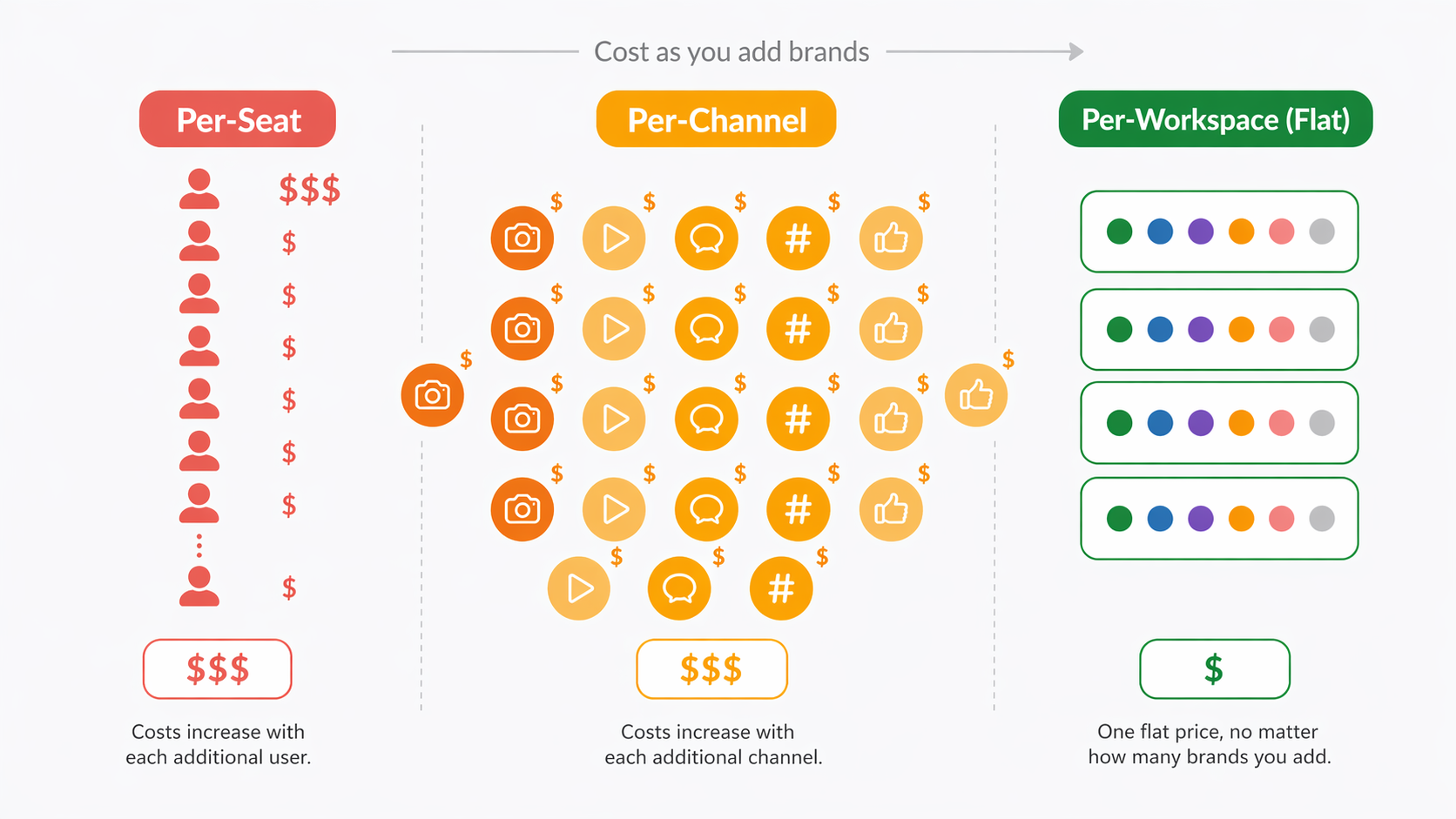
The difference shows up everywhere. Calendars collide. Client logins get muddled. A post meant for Client A lands on Client B's feed. Approvals sit in email. Reports take half a Friday to assemble. Every extra brand multiplies the operational tax, and by the time a tool starts charging per-user or per-channel, growth stops being profitable.
I tested 11 tools specifically against the multi-brand use case. Not "can it schedule a post," but "can a three-person team run 15 clients without losing their minds." Every pricing figure here is cross-referenced against vendor pricing pages. G2 and Trustpilot ratings are pulled from the live platforms and verified in September 2026.
If you're an agency, a franchise marketer, an in-house team at a holding company, or a consultant juggling multiple accounts, this is the shortlist.
Quick Answer: What Is the Best Tool for Managing Multiple Brands in 2026?
For most multi-brand teams, the best social media tool is PostPlanify, which prices per client workspace rather than per seat or per channel: $39/mo for your first workspace and less for each one after, with 4 social accounts and unlimited team members in every workspace, approval workflows, client-ready reports, and unified analytics across all 10 supported platforms.
If you need deep agency-grade permissions and larger client rosters, Sendible (100 profiles at $199/mo Advanced) and Vista Social (70 profiles at $379/mo Scale) are the specialized agency alternatives. Agorapulse is the inbox-led pick for community-heavy brands. SocialPilot is the best mid-market agency tool with transparent flat pricing. For enterprise multi-brand governance, Hootsuite ($249/user/mo Standard) and Sprout Social ($199/seat/mo Standard) remain the established picks. Both use per-user or per-seat pricing that scales aggressively.
For visual approval flows across brand teams, Planable wins on review-and-sign-off UX. For brand-count-based pricing, Metricool keeps things clear. For calendar-first planning per brand, Loomly is an option if you avoid its mid-tier pricing cliff. And if you're scaling from 1 to 3 brands, Buffer can still make sense on its free plan, though per-channel pricing makes it a weak fit past that point.
How I Tested These Multi-Brand Tools
I looked at all 11 tools against the things that decide the outcome for a team running many client accounts.
| What I checked | What I was looking for |
|---|---|
| Pricing model at scale | What the bill looks like at 3, 10 and 25 brands, and whether it moves with clients or with headcount |
| Workspace isolation | Whether each brand gets its own calendar, assets, team, approval chain and reporting with nothing leaking between them |
| Client access and approvals | Whether a client can review and approve without taking a paid seat, and whether approval chains run more than one step |
| White label | Whether branded reports and dashboards are reachable below an enterprise contract |
| Analytics depth | Whether reporting is equally deep on every connected platform, not just the popular three |
| Platform coverage | How many of the 10 major networks publish natively rather than through a reminder |
Each tool was connected to a real multi-brand setup of at least 3 brands with distinct team members, approval roles and reporting audiences, including edge cases like adding a 26th brand to a 25-brand plan. All pricing comes from each vendor's public pricing page, checked in September 2026. Ratings and complaints come from verified user reviews on G2, Capterra and Trustpilot.
At a Glance: Best Multi-Brand Social Media Tools Compared
| Tool | Best For | Starting Price | Max Brands (Top Tier) | Free Trial |
|---|---|---|---|---|
| PostPlanify | Per-workspace pricing, unlimited seats | $39/mo (first workspace) | 100 workspaces self-serve / Unlimited (Enterprise) | 7 days |
| Sendible | Agencies with large client rosters | $29/mo | 400 profiles (Enterprise) | 14 days |
| Vista Social | Multi-brand + review site management | $79/mo | 70 profiles (Scale) | 14 days |
| Agorapulse | Community-heavy multi-brand teams | $99/user/mo | Custom (Enterprise) | 30 days |
| SocialPilot | Mid-market agencies on flat pricing | $30/mo | 50 accounts (Ultimate) | 14 days |
| Planable | Approval-led workflows per brand | $39/workspace/mo | Unlimited (per workspace) | Free plan |
| Hootsuite | Enterprise multi-brand governance | $249/user/mo | Unlimited (Advanced) | 30 days |
| Sprout Social | Enterprise analytics at scale | $199/seat/mo | Unlimited (Professional+) | 30 days |
| Metricool | Brand-count-based pricing | $25/mo (5 brands) | 50 brands (Advanced) | Free plan |
| Loomly | Calendar-first brand planning | $65/mo | 60 accounts (Beyond) | 15 days |
| Buffer | Small setups under 5 channels | $6/channel/mo | Per-channel only | Free plan |
Why Managing Multiple Brands Breaks Most Tools
Most social media tools were designed for a single brand or a small team. When you add a second brand, they tolerate it. When you add a tenth, they creak. The breakpoints are predictable:
- The per-seat trap. Tools like Hootsuite ($249/user/mo) and Sprout Social ($199/seat/mo) charge per user. If your agency has 5 internal stakeholders plus a client reviewer per brand, the math compounds fast. Twenty clients × one reviewer each = 20 extra seats. On Sprout Professional that's $5,980/month just for reviewers.
- The per-channel trap. Buffer bills per connected channel. Fifteen clients × 3 platforms each = 45 channels. On Essentials that's $270/month. On Team it's $540/month. The more brands you add, the less sense the model makes.
- The tier-cliff trap. Loomly has no middle plan between Starter ($65/mo, 12 accounts) and Beyond ($332/mo, 60 accounts), a $267/month jump with nothing between. Teams hit the 13th-brand wall and have to leap straight to enterprise-tier pricing.
- The client-access trap. Many tools technically support client review but treat every client login as a billable seat. Agencies end up creating "shared" client logins that defeat the audit trail.
- The approval trap. Agencies need chains, not a single yes/no: copywriter, then editor, then account manager, then client. Single-step approval is table stakes and usually free. Multi-approver chains are frequently locked to the top tier, which is where agencies discover the real price of the tool.
- The coverage trap. A tool that lists 10 platforms is not the same as a tool that is equally deep on all 10. Shallow support usually means publishing works but analytics is a post counter, so two of your clients get real reporting and the rest get a screenshot.
- The reporting trap. Native platform analytics cap history at 60–90 days per account. Multi-brand teams pulling quarterly or annual reports lose visibility. White-label PDF reports, essential for client-facing work, are often locked behind the top tier.
The fix is to match the pricing model to the workflow. Tools that bill by brand, whether per workspace (PostPlanify, Planable) or by account tier (Sendible, SocialPilot, Vista Social), usually win on total cost of ownership once you are past three brands, because the bill only moves when your client count does. Per-seat and per-channel tools win only at the extremes: either solo operators with one brand, or enterprises with unlimited budgets.
Test one full client workflow inside the free trial before committing. Schedule a post, run an approval, export a report, and see how long it takes. That single test surfaces more friction than any demo.
1. PostPlanify: Best Overall for Multi-Brand Teams

PostPlanify is an all-in-one social media management platform built around a workspace model that scales cleanly from 5 brands up to unlimited, without per-seat fees at any tier. Where most tools treat multi-brand as an upsell, PostPlanify treats it as the default architecture.
The pricing model is the clearest expression of that. You buy workspaces, one per client or brand, and the rate drops as you add them: $39 for the first, then a lower rate for each workspace after. Ten client workspaces cost $250/mo and carry 40 social accounts. Each workspace gets its own calendar, social accounts, team members, approval rules, and branded reporting. Nothing leaks between them. A team member invited to Workspace A cannot accidentally see Workspace B's content.
That architecture matters because multi-brand chaos almost always starts with shared-state mistakes. The wrong asset attached to the wrong post. The wrong client CC'd on the wrong email. The wrong analytics chart in the wrong deck. Isolated workspaces eliminate the category.
At a glance: PostPlanify
- Pricing model: Per client workspace, from $39/mo, with the rate per workspace falling as you add more
- Max brands (workspaces): 100 self-serve, unlimited on Enterprise
- Platforms: 10 including Instagram, TikTok, Facebook, X, LinkedIn, YouTube, Threads, Pinterest, Bluesky, and Google Business
- Free trial: 7 days
- Best for: Agencies, franchise marketing teams, in-house teams at holding companies, and consultants managing multiple accounts who want workspace isolation, per-client pricing, and white-label reporting without per-seat fees
Key features:
- Advanced analytics across all 10 platforms: post-level, profile-level, and audience-level reporting with historical daily snapshots for 12-month trend analysis across every connected brand
- Team collaboration with no per-seat pricing: invite team members and clients into any workspace without paying extra seat fees
- Social inbox for Instagram, Facebook, and LinkedIn: reply, label, assign to teammates, and track response times across brands from one unified inbox
- AI assistant (vision-powered): generates captions that match each brand's voice and reads uploaded images so suggestions reflect the actual content
- Client reports in every workspace: PDF reports and shareable links are included at every size, with the white-label add-on removing PostPlanify branding from PDFs, shared report pages, the client dashboard and emails
- Approval workflows with multi-approver chains: build copywriter, manager and client review flows per workspace, with role-based permissions, on every account
- Roles and permissions: Owner, Editor, Client, and Guest roles with granular access control, with client reviewers never consuming a paid seat
- Content calendar with drag-and-drop rescheduling and shared per-workspace views
- Best-time-to-post suggestions based on each brand's actual audience engagement patterns
- Bulk scheduling (up to 20 posts per batch) for campaigns and content batches
- Media library per workspace with Canva, Google Drive and Dropbox imports
- Link-in-bio builder per brand with click analytics
- REST API and MCP support for custom BI pipelines and automation, including Claude and ChatGPT
Pricing:
| Plan | Starts at | Includes | Each extra workspace | Social accounts |
|---|---|---|---|---|
| Growth | $39/mo | 1 workspace | from $29, cheaper as you add more | 4 per workspace |
| Premium | $99/mo | 3 workspaces | from $39, cheaper as you add more | 6 per workspace |
| Scale | $199/mo | 5 workspaces | from $39, cheaper as you add more | 8 per workspace |
Unlimited team members on every plan, no per-seat fees. Yearly billing saves 20%. All plans include a 7-day free trial with a 14-day money-back guarantee.
There is one plan and you scale it by workspace, so there is no tier to upgrade into when you win a client. Team members and posts are unlimited in every workspace. White label is included in the Scale plan, and every account carries a 14-day money-back guarantee on top of the trial.
Pros:
- Priced per client workspace with no per-user or per-channel fees, so extra stakeholders and client reviewers never change the bill
- Clean workspace isolation: every brand gets its own calendar, team, assets, approval chain, and reports
- Nothing is tier-gated: approvals, reports, analytics and the social inbox are on every account, not held back for an upgrade
- Analytics depth equal across all 10 platforms, not just the popular three
- Transparent, published pricing with no "contact sales" for anything below Enterprise
Cons:
- No dedicated social listening engine, not built to replace Brandwatch-level consumer intelligence
- No native mobile app yet (web-first workflow)
- Social inbox currently covers Instagram, Facebook, and LinkedIn, not X, TikTok, or YouTube
- Newer platform than Sprout or Hootsuite with a smaller public customer base than the 10-year-old incumbents
- Bulk scheduling caps at 20 posts per batch, so large campaign loads take several passes
- White label is included on the Scale plan rather than bundled, so a small agency needing branded reports pays less on SocialPilot
Best for: Agencies managing 5–50 client brands, franchise marketing teams running multi-location accounts, including car dealerships, hotels and dental clinics, holding companies with sister brands, and in-house teams where multiple product lines need isolated workflows. Particularly strong when you want pricing that scales with brand count rather than seat count.
How it compares to per-seat and per-channel tools:
Consider a six-person agency managing 15 client brands.
- Sprout Social Professional ($299/seat/mo): Unlimited profiles per seat, but 6 seats = $1,794/mo. Add one client reviewer per brand and you're past $6,000/mo.
- Hootsuite Advanced ($499/user/mo): Unlimited accounts per user. 6 users = $2,994/mo. No included client-access model, so clients either consume a seat or get a one-way report.
- Buffer Team ($12/channel/mo): 15 brands × 4 platforms each = 60 channels = $720/mo, and community inbox is limited to Instagram, Facebook, and LinkedIn.
- PostPlanify (15 workspaces, $325/mo): 60 social accounts, unlimited team members, reports, multi-approver workflows, social inbox, and analytics across all connected brands. The six people cost nothing extra, and neither do the 15 client reviewers.
- The trade-off: Sprout and Hootsuite go deeper on enterprise listening and paid-ads integration. PostPlanify covers the operational surface that multi-brand teams live in, meaning workspaces, approvals, client access and reporting, at a price that moves only when you add a client, never when you add a person.

Used by 2,600+ users across 30+ countries. Explore the platform at PostPlanify or see the full feature set on the analytics page and reporting page.
 PostPlanify
All your social media in one simple dashboard
Schedule posts, track analytics, and reply to comments/DMs without switching tabs.

Engagement
+18%
Views
52.8k
2. Sendible: Best for Agencies with 100+ Profiles

Sendible is one of the few tools that was purpose-built for agencies from day one. Its core abstraction, Profile Groups, lets you cluster client accounts under a shared structure while maintaining separate reporting, approval flows, and permission sets. If your agency is past 10 clients and still growing, Sendible's upper tiers are one of the few places where a 100-profile or 400-profile setup is genuinely supported.
The catch is pricing structure. White-label, the feature most agencies actually buy Sendible for, is an add-on. That $240/month fee pushes an already-expensive Advanced plan past $500/month total.
At a glance: Sendible
- Pricing model: Tiered by profile count, from $29/mo
- Max brands (profiles): 6 (Creator) / 24 (Traction) / 49 (Scale) / 100 scalable to 175 (Advanced) / 400 scalable to 475 (Enterprise)
- Platforms: 10 including Facebook, Instagram, TikTok, X, LinkedIn, Google Business, YouTube, WordPress, Threads, Bluesky
- Free trial: 14 days, no credit card required
- User ratings: 4.5/5 on G2 (899 reviews), 2.3/5 on Trustpilot (8 reviews)
- Best for: Established agencies with 25+ clients that need deep profile groupings, client dashboards, and white-label options
Key features:
- Profile Groups for client organization and permission isolation
- Priority Inbox with sentiment analysis
- Client dashboards (Traction+)
- Approval workflows (Traction+) with custom workflows on Scale+
- White-label as a paid add-on ($240/mo, Advanced+ only)
- Built-in media editor
- Content queue and bulk publishing
Pricing:
| Plan | Monthly | Annually (est.) | Profiles | Users |
|---|---|---|---|---|
| Creator | $29 | ~$25 | 6 | 1 |
| Traction | $89 | ~$76 | 24 | 4 |
| Scale | $199 | ~$170 | 49 | 7 |
| Advanced | $299 | ~$255 | 100 (→175) | 20 (→35) |
| Enterprise | $750 | ~$638 | 400 (→475) | 80 (→95) |
White-label is an add-on at $240/month for Advanced tier and above. Daily sending limits range from 100 to 500 posts/day depending on plan.
Pros:
- Built for agencies from the ground up: Profile Groups are first-class, not bolted on
- 10-platform coverage including WordPress and Bluesky
- Client dashboards from Traction plan upward
- 14-day free trial without a credit card
- Advanced tier supports up to 175 profiles with 35 users
Cons:
- White-label costs $240/month extra on top of a $299+/month plan, so the total is closer to $540/mo
- Creator plan is extremely restrictive (1 user, 6 profiles)
- Daily sending limits can cap high-volume campaigns
- AI is caption-only (no native image generation)
- Custom reporting locked behind Scale tier
Best for: Mid-to-large agencies that have already outgrown SMB tools, need 50–400 profiles in one place, and are comfortable with the add-on pricing for white-label.
"It's easy to manage multiple social media accounts on Sendible. It's easy for several members of the team to access what they need. We particularly like the functionality around custom tags and being able to group the accounts using profile groups. There is room for improvement in the reporting." Verified G2 reviewer, 4.5/5
For more details, see our Sendible pricing breakdown, Sendible reviews, and our roundup of the best Sendible alternatives.
3. Vista Social: Best for Multi-Brand and Reviews Management

Vista Social is an increasingly popular choice for agencies that need broad platform coverage plus integrated review-site management. Its Scale tier handles 70 profiles with 10 users, multi-step approval workflows, and white-label reporting, all included in the base price. That's unusual in this category, where white-label is typically an add-on or top-tier-only feature.
The main caveat: X (Twitter) publishing is a paid add-on with undisclosed pricing. If X is central to any client's content mix, factor that into the decision.
At a glance: Vista Social
- Pricing model: Tiered by profile count, from $79/mo
- Max brands (profiles): 15 (Professional) / 30 (Advanced) / 70 (Scale) / Custom (Enterprise)
- Platforms: 12+ social platforms plus 5 review sites (X requires paid add-on)
- Free trial: 14 days, no credit card required
- User ratings: 4.8/5 on G2 (1,071 reviews), 4.1/5 on Trustpilot (62 reviews)
- Best for: Multi-brand agencies that also manage Google, Yelp, or Tripadvisor review responses alongside social
Key features:
- 12+ social platforms including Reddit, Snapchat, Tumblr
- 5 review-site integrations (Google Business, Yelp, Tripadvisor, Trustpilot, others)
- Multi-step approval workflows on all tiers
- AI-powered DM automation
- Unified inbox with sentiment analysis
- White-label on Scale tier ($379/mo) and Enterprise
- Employee advocacy add-on ($199/mo for 25 employees)
- Social listening add-on ($75/mo)
Pricing:
| Plan | Monthly | Profiles | Users | AI Credits |
|---|---|---|---|---|
| Professional | $79 | 15 | 3 | 500 |
| Advanced | $149 | 30 | 6 | 1,000 |
| Scale | $379 | 70 | 10 | Unlimited |
| Enterprise | Custom | Custom | Custom | Unlimited |
Annual billing saves 20%.
Pros:
- Highest platform breadth in the roundup (12+ social + 5 review sites)
- Multi-step approvals included on all tiers
- White-label included on Scale (not an add-on)
- 4.8/5 G2 rating from 1,071 reviews, ranked #1 Easiest to Use in 2026
- AI-powered DM automations
- Review-site management is rare in this category
Cons:
- X/Twitter requires a paid add-on with undisclosed pricing
- AI credits capped below Scale (500 on Professional, 1,000 on Advanced)
- No native AI image generation (requires Canva Pro)
- Scale tier at $379/mo is priced above many mid-market budgets
- Bulk scheduling limited to CSV upload
Best for: Multi-brand agencies where clients also care about Google and Yelp review responses, where X isn't the core platform, and where approval workflows need to be available across all tiers, not locked behind upgrades.
For more details, see our Vista Social pricing breakdown, Vista Social reviews, and best Vista Social alternatives.
Honorable mention: Munch Studio is for multi brand teams whose bottleneck is content rather than calendars. Each client gets a separate workspace with its own strategy, tone, connected accounts, and posting calendar, and Munch learns each brand from its website, photos, and videos to draft that brand's posts and short clips for approval. Worth a look if writing for every brand, not scheduling, is what slows your team down.
4. Agorapulse: Best for Inbox-Led Multi-Brand Teams
Agorapulse has one of the strongest unified social inboxes in this category. For teams where community management drives revenue, not just posting, Agorapulse is frequently the first tool people mention. It offers a 30-day no-credit-card trial (it no longer has a permanent free plan), which lets consultants evaluate it before spinning up small brand portfolios.
The limitation for multi-brand teams is the pricing model. Agorapulse bills per user, and every plan caps at 10 profiles. Scaling means buying more seats and purchasing additional profiles as add-ons, and the math gets uncomfortable past 3–4 brands.
At a glance: Agorapulse
- Pricing model: Per user, from $99/user/mo ($79 annually), free plan discontinued
- Max brands (profiles): 3 (Free) / 10 (paid plans) / Custom (Custom plan)
- Platforms: 11 including Facebook, Instagram, X, LinkedIn, YouTube, Pinterest, TikTok, Google Business, Threads, Bluesky, Reddit
- Free trial: 30 days, no credit card required
- User ratings: 4.5/5 on G2 (967 reviews), 4.0/5 on Trustpilot (57 reviews)
- Best for: Community-led agencies and brands where inbox response times drive client retention
Key features:
- Unified social inbox with automated moderation rules
- ROI reporting: tie social activity to revenue via UTM tracking
- Team performance analytics (inbox response time, resolution rate)
- Competitor analysis
- Scheduled report emails
- Content queue and bulk publishing
- Approval workflows on Professional+ (multi-step on Custom only)
Pricing:
| Plan | Monthly / Annual (per user) | Profiles |
|---|---|---|
| Standard | $99 / $79 | 10 |
| Professional | $149 / $119 | 10 |
| Advanced | $199 / $149 | 10 |
| Custom | Contact sales | Unlimited |
Additional profiles available as pay-per-profile add-ons (~$10–15/profile/month).
Pros:
- Strong social inbox analytics (response time, SLA tracking)
- Clear client-friendly reports
- ROI tracking tied to business outcomes
- Clean UI and approachable onboarding
- Free plan for 3 profiles, 1 user
Cons:
- Per-user pricing scales fast: a 3-person team on Standard is $297/mo before add-ons
- Paid plans cap at 10 profiles
- Approval workflows only on Professional+
- Multi-step approvals only on Custom tier
- Instagram Stories reporting bugs reported on G2 recently (billing continued through documented issue)
Best for: Community managers and small-to-mid agencies focused on engagement and inbox SLAs, where inbox performance drives revenue.
For more details, see our Agorapulse pricing breakdown, Agorapulse reviews, and best Agorapulse alternatives.
5. SocialPilot: Best Mid-Market Agency Pricing

SocialPilot sits in an underpopulated middle ground: transparent flat pricing, agency-friendly tier structure, white-label on Premium and above, and a 50-account ceiling on Ultimate. For mid-market agencies that want predictable costs without per-seat compounding, it's one of the cleanest options in the category.
The limitation is that extra accounts and extra users both cost money. $4/month per account over the tier limit and $5/month per extra user on Standard/Premium plans. These costs stay manageable, but they do add up at scale.
At a glance: SocialPilot
- Pricing model: Tiered by account count, from $30/mo
- Max brands (accounts): 7 (Essentials) / 15 (Standard) / 25 (Premium) / 50 (Ultimate)
- Free trial: 14 days on all plans
- User ratings: 4.5/5 on G2 (841 reviews), 2.4/5 on Trustpilot (33 reviews, 73% are 1-star)
- Best for: Mid-market agencies that want flat pricing and white-label without enterprise contracts
Key features:
- White-label reporting on Premium and above
- Client approvals on Standard and above
- Bulk scheduling
- AI content assistant (500–unlimited credits depending on tier)
- Custom workflow management
- Team collaboration and role permissions
Pricing:
| Plan | Monthly | Annual (est.) | Accounts | Users | AI Credits |
|---|---|---|---|---|---|
| Essentials | $30 | $25.50 | 7 | 1 | 500 |
| Standard | $50 | $42.50 | 15 | 3 | 1,000 |
| Premium | $100 | $85 | 25 | 6 | 5,000 |
| Ultimate | $200 | $170 | 50 | Unlimited | Unlimited |
Extra accounts: $4/month. Extra users (Standard/Premium): $5/month. Annual billing saves 15%.
Pros:
- Flat pricing that stays predictable at scale
- White-label on Premium (not locked to Enterprise)
- Ultimate tier allows unlimited users, rare at this price
- Transparent pricing published publicly
- Better value than Hootsuite or Sprout for agencies with flat budgets
Cons:
- Essentials only allows 1 user
- Extra accounts and users add up past the tier limit
- Trustpilot ratings skew heavily negative (73% 1-star), suggests post-purchase friction
- Interface can feel dated compared to Vista Social or Planable
- Some documented publishing issues with Instagram video
Best for: Mid-market agencies managing 15–50 client accounts that want flat pricing, white-label reporting included on Premium, and unlimited users on the top tier.
For more details, see our SocialPilot pricing breakdown, SocialPilot reviews, and best SocialPilot alternatives.
6. Planable: Best for Approval-First Multi-Brand Workflows

Planable treats approval and collaboration as the primary job, and publishing as the secondary one. For agencies where client review cycles drive the work (visual preview, comment-and-sign-off, revision threads), Planable is one of the cleanest UX experiences in the category.
The model is unusual: you pay per workspace. Each brand or client gets its own workspace at $39/month (Basic) or $59/month (Pro), and you add workspaces as you add clients. This is clean for small portfolios and gets expensive at scale.
At a glance: Planable
- Pricing model: Per workspace, from $39/workspace/mo, with a free tier
- Max brands: 1 (Free) / Unlimited (paid, per workspace)
- Platforms: 9 including Facebook, Instagram, X, LinkedIn, Pinterest, TikTok, YouTube, Snapchat, Google Business (no Threads or Bluesky)
- Free trial: Free plan available (50-post lifetime cap)
- User ratings: 4.6/5 on G2 (937 reviews), 4.5/5 on Trustpilot (69 reviews, one of the smallest G2/Trustpilot gaps in the category)
- Best for: Agencies where visual approval and client sign-off drive the workflow
Key features:
- Industry-best post previews (see content exactly as it will appear per platform)
- Multiple approval flow types (2 on Basic, 3 on Pro)
- Unlimited users on paid plans
- Visual comment threads per post
- Analytics add-on ($9/workspace/month)
- Engagement add-on ($5/workspace/month)
Pricing:
| Plan | Monthly | Posts | Social Pages | Approval Types |
|---|---|---|---|---|
| Free | $0 | 50 lifetime | None | 1 |
| Basic | $39/workspace | 60/month | 4 | 2 |
| Pro | $59/workspace | 150/month | 10 | 3 |
| Enterprise | Custom | Unlimited | Unlimited | Custom |
Annual billing saves ~25%.
Pros:
- Cleanest visual approval and preview experience in the category
- Unlimited users on paid plans
- Very consistent G2 and Trustpilot ratings (4.6 / 4.5), suggests authentic product quality
- Free plan available
- Multiple approval flow types (copywriter → editor → client chains)
Cons:
- Posting limits per workspace (60 on Basic, 150 on Pro)
- Analytics and engagement cost extra as add-ons
- X/Twitter not supported on Free plan
- Limited approval flows on Basic (2 types)
- No AI captions
- No Threads or Bluesky support
- Billing is per-workspace: costs multiply linearly with brand count
Best for: Agencies where visual client approvals, sign-off audit trails, and platform-accurate previews are non-negotiable, and where post volumes per brand are moderate.
For more details, see our Planable pricing breakdown, Planable reviews, and best Planable alternatives.
PostPlanifyAll your social media in one simple dashboard
Schedule posts, track analytics, and reply to comments/DMs without switching tabs.
Engagement
+18%
Views
52.8k
7. Hootsuite: Best for Enterprise Multi-Brand Governance

Hootsuite is the enterprise veteran. It's been iterating since 2008, supports organic and paid advertising from one dashboard, includes OwlyGPT for AI-assisted captions, and covers 10+ platforms including Google Business Profile. For large multi-brand organizations where governance, compliance, and audit trails matter as much as posting, Hootsuite is often the incumbent.
The cost structure is brutal for growing teams. Per-user pricing starts at $249/month on Standard, and features agencies actually need (bulk scheduling, approval workflows, custom reports) are locked behind the $499/user/month Advanced plan. Client access is effectively a billable seat.
At a glance: Hootsuite
- Pricing model: Per user, from $249/user/mo, no free plan since 2023
- Max brands (accounts): 10 (Standard) / Unlimited (Advanced) / Custom (Enterprise)
- Platforms: 10+ including Google Business Profile
- Free trial: 30 days, no credit card required
- User ratings: 4.3/5 on G2 (6,615 reviews), 1.8/5 on Trustpilot (511 reviews)
- Best for: Enterprise multi-brand teams with governance, ad management, and organic/paid unification needs
Key features:
- OwlyGPT AI assistant for captions and summaries
- Organic and paid advertising in one dashboard
- Competitor benchmarking (Standard+)
- Social listening via Talkwalker integration
- Employee advocacy (Amplify)
- Multi-user approval workflows (Advanced+)
- Ad management for paid social
Pricing:
| Plan | Monthly | Annual (est.) | Accounts | Users |
|---|---|---|---|---|
| Standard | $249/user | ~$199/user | 10 | 1 (add per seat) |
| Advanced | $499/user | ~$399/user | Unlimited | 1 (add per seat) |
| Enterprise | Custom | Custom | Custom | Custom |
Pros:
- Broadest platform maturity, 18 years of iteration
- Organic and paid views in one system
- OwlyGPT for caption and summary generation
- Competitor benchmarking included on Standard+
- Strong integration ecosystem
Cons:
- Per-user pricing is brutal at scale: 3 users on Advanced = $1,497/mo
- Complex dashboard that feels heavy for SMB teams
- Free plan was removed in 2023
- Listening requires Talkwalker add-on
- Trustpilot rating (1.8/5, 511 reviews) reflects consistent billing and support complaints
Best for: Enterprise marketing teams that want organic + paid in one system, ad management alongside content, and multi-department governance, and where the budget justifies per-seat pricing at scale.
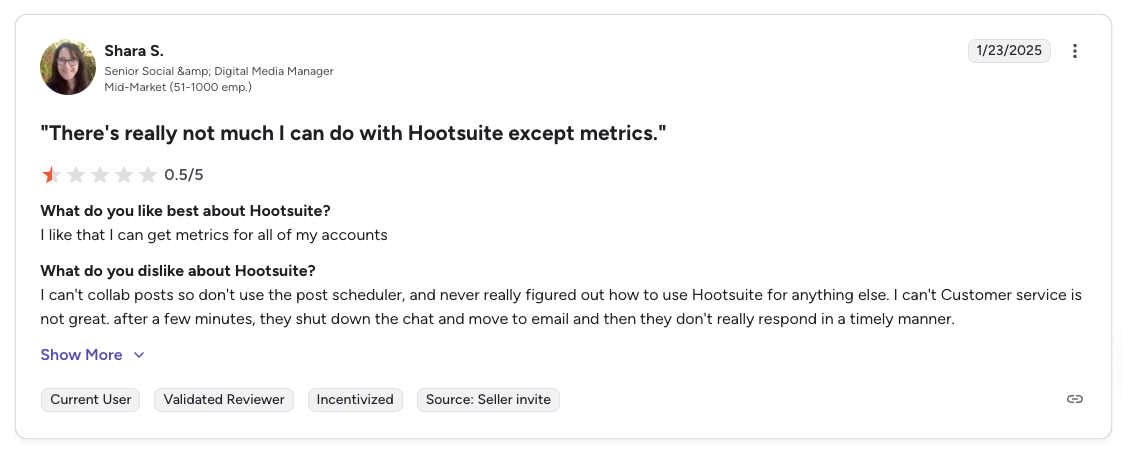
"There's really not much I can do with Hootsuite except metrics. Customer service is not great." Shara S., Senior Social & Digital Media Manager (Mid-Market), 0.5/5 on G2, Jan 2025
For more details, see our Hootsuite pricing breakdown, Hootsuite reviews, and best Hootsuite alternatives.
8. Sprout Social: Best for Enterprise Analytics at Scale

Sprout Social is the analytics-depth pick. Its Premium Analytics module adds 150+ pre-built reports, Trellis AI drives pattern detection and content scoring, and its Groups feature allows multi-brand rollups with separate reporting and access controls. For large enterprises where analytics and reporting depth justify the seat price, Sprout is frequently the short-list pick.
The per-seat pricing scales aggressively. A 5-seat agency on Professional is $1,495/month minimum, and social listening is an expensive add-on rather than a core feature.
At a glance: Sprout Social
- Pricing model: Per seat, from $199/seat/mo
- Max brands (profiles): 5 (Standard) / Unlimited (Professional+)
- Platforms: 10+ including Reddit and WhatsApp
- Free trial: 30 days, no credit card required
- User ratings: 4.4/5 on G2 (5,731 reviews), 2.2/5 on Trustpilot (75 reviews)
- Best for: Mid-to-large enterprise teams that need the deepest analytics and presentation-ready reporting in the category
Key features:
- 150+ pre-built reports on Premium tiers
- Trellis AI for content performance and pattern detection
- Customizable dashboards by team, campaign, or KPI
- Social listening (paid add-on) with sentiment analysis
- Tag-based campaign reporting
- Groups feature for multi-brand rollups
- Multi-step approval workflows with audit trails
- Employee advocacy tools
Pricing:
| Plan | Monthly (per seat, annual) | Profiles |
|---|---|---|
| Standard | $199 | 5 |
| Professional | $299 | Unlimited |
| Advanced | $399 | Unlimited |
| Enterprise | Custom | Unlimited |
Social listening is a separate add-on.
Pros:
- Deepest pre-built report library in the category
- Clean, modern UI despite enterprise depth
- Trellis AI for pattern recognition
- Strong customer-care workflows
- Presentation-ready reports that pass executive review
Cons:
- Per-seat pricing scales fast: 5 seats = $995/mo minimum on Standard
- Social listening and advanced analytics are add-ons, not included
- No flat-rate option for agencies with shifting stakeholders
- Overkill for SMB teams
- Long contracts and reported difficulty canceling on Trustpilot
Best for: Mid-to-large enterprise teams where analytics depth justifies seat pricing, and where marketing, customer care, and executive stakeholders all consume the same reports.
For more details, see our Sprout Social pricing breakdown, Sprout Social reviews, and best Sprout Social alternatives.
9. Metricool: Best for Brand-Based Pricing Transparency
Metricool is the rare tool that prices by brand count rather than user or channel. Its Starter plan scales from 5 brands ($25/mo) to 10 brands ($38/mo), and Advanced runs from 15 brands ($54/mo) up to 50 brands ($172/mo). For teams that know exactly how many brands they'll manage and don't want per-user surprises, it's one of the most transparent pricing models in the category.
The trade-offs: X (Twitter) publishing requires a $5/month per-account add-on on every plan, the "Unlimited" posts on Starter has a 600-posts-per-month fair-use cap, and approval workflows only appear on the Advanced tier.
At a glance: Metricool
- Pricing model: Per brand count, from $25/mo, with a free tier
- Max brands: 1 (Free) / 10 (Starter) / 50 (Advanced) / Custom (Enterprise)
- Platforms: 11 including Instagram, Facebook, TikTok, YouTube, Pinterest, Threads, Bluesky, Twitch, Google Business, LinkedIn (Starter+), and X ($5/account add-on)
- Free trial: Free plan available
- User ratings: 4.5/5 on G2 (83 reviews), 4.2/5 on Trustpilot (519 reviews), 4.8/5 on Capterra (115 reviews)
- Best for: Teams that want transparent brand-count pricing and strong analytics without per-user compounding
Key features:
- Brand-count-based pricing (scales linearly)
- 11-platform support with generous free plan
- Unlimited analytics history on Starter+
- Looker Studio integration (Advanced)
- API access (Advanced)
- Team management (Advanced)
- Approval workflows (Advanced)
- White-label (Custom tier only)
Pricing:
| Plan | Monthly (est.) | Brands | Users | Notes |
|---|---|---|---|---|
| Free | $0 | 1 | 1 | 20 posts/mo, 30-day analytics |
| Starter | $25–$38 | 5–10 | 1 | "Unlimited" posts (600/mo fair use) |
| Advanced | $54–$172 | 15–50 | Unlimited | Approvals, API, Looker |
| Custom | Contact sales | Custom | Custom | White-label |
X/Twitter add-on: $5/month per account on all plans. Annual billing saves ~18%.
Pros:
- Most transparent brand-count pricing in the category
- Generous free plan
- Unlimited users on Advanced
- Strong analytics (4.8/5 Capterra rating)
- Looker Studio integration (Advanced)
- 11-platform support including less-covered networks like Twitch and Bluesky
Cons:
- "Unlimited" posts on Starter has a 600/month fair-use cap
- X costs extra ($5/account/mo) on all plans
- Approval workflows only on Advanced
- White-label only on Custom
- Social inbox is basic compared to Agorapulse or Vista Social
- Interface leans analytical, not creative
Best for: Mid-market teams and agencies that want transparent brand-count pricing, strong analytics, and aren't reliant on X as a primary channel.
For more details, see our Metricool pricing breakdown, Metricool reviews, and best Metricool alternatives.
10. Loomly: Best for Calendar-First Brand Planning

Loomly organizes around the calendar. Each brand gets its own calendar view, each post moves through a defined workflow state (idea → approval → scheduled → published), and teams with a visual-planning-first culture often prefer Loomly's UX over analytics-heavy competitors.
The serious caveat: Loomly's 2025 pricing restructure eliminated mid-tier plans. You either pay $65/mo for Starter (12 accounts, 3 users) or jump to $332/mo for Beyond (60 accounts, unlimited users). There's no mid-tier option, a $267/month cliff that catches teams outgrowing Starter.
At a glance: Loomly
- Pricing model: Tiered by account and user count, from $65/mo ($49 annually), with a free tier
- Max brands (accounts): 3 (Free) / 12 (Starter) / 60 (Beyond) / Custom (Enterprise)
- Platforms: 9 including Facebook, Instagram, X, LinkedIn, Pinterest, TikTok, YouTube, Snapchat, Google Business (no Threads or Bluesky)
- Free trial: 15 days on paid plans
- User ratings: 4.6/5 on G2 (1,793 reviews), 1.7/5 on Trustpilot (26 reviews)
- Best for: Calendar-first teams that fit neatly into either the 12-account Starter or the 60-account Beyond tier
Key features:
- Visual content calendar with workflow states
- Post idea suggestions
- Approval workflows on all paid plans
- Integrations: Canva, Google Drive, Slack
- Custom workflow management (Beyond+)
- White-label on Beyond
- Branded content templates
Pricing:
| Plan | Monthly / Annual | Accounts | Users | Posts |
|---|---|---|---|---|
| Free | $0 | 3 | 1 | 5/mo |
| Starter | $65 / $49 | 12 | 3 | Unlimited |
| Beyond | $332 / $249 | 60 | Unlimited | Unlimited |
| Enterprise | Custom | Custom | Custom | Unlimited |
Annual billing saves ~25%.
Pros:
- Clean content calendar and visual workflow
- Approval workflows on all paid plans (rare at entry tier)
- 9-platform support
- Useful integrations (Canva, Google Drive)
- Post idea suggestions
Cons:
- $267/month pricing cliff between Starter and Beyond (no mid-tier)
- Free plan very restrictive (5 posts/month)
- No social inbox
- No Threads or Bluesky support
- Limited AI (captions only)
- Customer support is chatbot-only (no human agents)
- Trustpilot heavily negative (1.7/5), common complaint is unresponsive support
Best for: Teams that fit cleanly inside either Starter's 12-account ceiling or Beyond's 60-account offering, and that value calendar-first planning over inbox or analytics depth.
For more details, see our Loomly pricing breakdown, Loomly reviews, and best Loomly alternatives.
11. Buffer: Honorable Mention for Small Multi-Brand Starts

Buffer has one of the cleanest interfaces in the category and a genuinely useful free plan (3 channels, 10 posts each). For consultants spinning up a first brand or two, it's a fast on-ramp. For teams managing 5+ brands, the per-channel pricing model makes Buffer one of the worst-fit options in this roundup.
The math is unforgiving. Ten clients with 3 channels each is 30 channels. On Essentials at $6/channel/mo, that's $180/mo. On Team at $12/channel/mo, that's $360/mo. And all channels must be on the same plan, so you can't mix tiers per client.
At a glance: Buffer
- Pricing model: Per channel, from $6/channel/mo, free for 3 channels
- Max brands (channels): 3 (Free) / Unlimited (paid, per channel)
- Platforms: 11 including Instagram, Facebook, LinkedIn, X, Pinterest, TikTok, Threads, Mastodon, Bluesky, YouTube, Google Business
- Free trial: Free plan available
- User ratings: 4.3/5 on G2 (1,023 reviews), 2.1/5 on Trustpilot (93 reviews)
- Best for: Solo operators and consultants managing 1–3 brands where the free plan covers the whole setup
Key features:
- Per-channel pricing starting at $6/channel/mo
- Basic post-level analytics across 11 platforms
- Buffer AI Assistant for caption suggestions
- Start Page (link-in-bio)
- Community inbox (Instagram, Facebook, LinkedIn on paid plans)
- Approval workflows on Team plan
- CSV export for raw data
Pricing:
| Plan | Monthly (est.) | Details |
|---|---|---|
| Free | $0 | 3 channels, 10 posts each |
| Essentials | $6/channel | Per-channel analytics |
| Team | $12/channel | Unlimited users, approvals |
Pros:
- Free plan with 3 channels
- Clean, minimal interface
- 11 platforms including Bluesky, Mastodon, Google Business
- Unlimited users on Team plan
- Nonprofit discounts available (50% off)
Cons:
- Per-channel pricing multiplies fast for multi-brand teams: 30 channels = $180–$360/mo
- Analytics stay surface-level even on paid plans
- No historical trend data beyond recent windows
- No workspace isolation, channels aren't grouped by brand by default
- Limited competitor benchmarking
- Community inbox is limited to Instagram, Facebook, and LinkedIn
Best for: Solo consultants starting with 1–3 brands or small teams whose entire portfolio fits inside the free plan. Not recommended for scaling past 5 brands.
For more details, see our Buffer pricing breakdown, Buffer reviews, Buffer vs PostPlanify comparison, and best Buffer alternatives.
How Pricing Models Compare for Multi-Brand Teams
There are five pricing models in this roundup, and the one a tool uses will predict most of its total cost as you scale.
- Per workspace (PostPlanify, Planable). You pay for each workspace or brand you run. Predictable, no seat surprises, and the bill only moves when your client count does. PostPlanify's rate per workspace falls as you add more; Planable charges a flat rate per workspace. Best for agencies and multi-brand teams past 3 brands.
- Flat-rate, account-based (Sendible, SocialPilot, Vista Social, Loomly). You pay per tier for a set number of profiles or accounts. Slightly less clean than workspace-based because accounts don't always group by brand, but still predictable.
- Per-user or per-seat (Hootsuite, Sprout Social, Agorapulse). You pay per team member. Brutal at scale, especially when client reviewers count as seats. A 10-client agency with one reviewer per client pays for 10 extra seats.
- Per-channel (Buffer). You pay per connected platform. Multiplies fast: 10 clients × 3 platforms = 30 channels, and the line items don't reduce with plan upgrades.
- Per-brand (Metricool). You pay based on brand count directly. The most transparent model if you know your brand count exactly.
Real-World Cost Comparison: 3 Scenarios
Here's what each pricing model actually costs at three realistic multi-brand scales.
Scenario 1: Solo consultant, 3 brands, 1 user, 9 total channels
| Tool | Plan | Monthly Cost |
|---|---|---|
| PostPlanify | 3 workspaces | $97/mo |
| Buffer | Essentials ($6 × 9) | $54/mo |
| Planable | Basic ($39 × 3) | $117/mo |
| Metricool | Starter | ~$25–38/mo |
| Vista Social | Professional | $79/mo |
| Agorapulse | Standard | $99/user/mo |
Winner at 3 brands: Buffer or Metricool for raw price. PostPlanify wins on workspace isolation and on not reshaping as you grow, since adding a fourth client adds one workspace rather than moving you to a new tier.
Scenario 2: Small agency, 10 brands, 3 users, 30 total channels, needs approvals + white-label
| Tool | Plan | Monthly Cost |
|---|---|---|
| PostPlanify | 10 workspaces + white label | $250 + $200 = $550/mo |
| SocialPilot | Premium | $100/mo |
| Sendible | Scale | $199/mo |
| Planable | Pro ($59 × 10) | $590/mo |
| Hootsuite | Standard ($249 × 3) | $747/mo |
| Sprout Social | Standard ($199 × 3) | $597/mo |
| Buffer | Team ($12 × 30) | $360/mo |
Winner at 10 brands: SocialPilot, on price. It bundles white label at $100/mo, where PostPlanify includes it on the Scale plan. Both crush the per-seat tools: Hootsuite is $747/mo and Sprout $597/mo for the same three users, and both climb again with every stakeholder you add. Choose PostPlanify here for workspace isolation, the social inbox and unlimited seats, not for the lowest sticker price.
Scenario 3: Mid-market agency, 25 brands, 6 users, 75 total channels, needs white-label + client approvals
| Tool | Plan | Monthly Cost |
|---|---|---|
| PostPlanify | 25 workspaces + white label | $475 + $200 = $835/mo |
| SocialPilot | Premium | $100/mo + extra accounts |
| Sendible | Advanced + white-label | $539/mo |
| Vista Social | Scale | $379/mo |
| Metricool | Advanced | ~$120–172/mo |
| Planable | Pro ($59 × 25) | $1,475/mo |
| Hootsuite | Advanced ($499 × 6) | $2,994/mo |
| Sprout Social | Professional ($299 × 6) | $1,794/mo |
Winner at 25 brands: SocialPilot or Metricool on price, Vista Social if review management matters. PostPlanify at $835/mo sits above them and well below the per-seat tools, which reach $1,794/mo (Sprout) and $2,994/mo (Hootsuite) for the same six users. The gap widens with every client reviewer you invite, since those cost nothing on PostPlanify and a seat everywhere else.
Winner by Category for Multi-Brand Teams
| Use Case | Winner | Why |
|---|---|---|
| Predictable growth from 3 to 50 brands | PostPlanify | Priced per workspace with a falling rate, unlimited team members at every size, reports included, white label as a flat add-on |
| Max profile ceiling (100+ brands) | Sendible | Advanced tier supports up to 175 profiles; Enterprise up to 475 |
| Platform breadth + review sites | Vista Social | 12+ social + 5 review-site platforms |
| Inbox-led multi-brand ops | Agorapulse | Best unified social inbox with SLA tracking |
| Mid-market agencies on flat pricing | SocialPilot | White-label on Premium, 50 accounts on Ultimate |
| Approval-first visual workflow | Planable | Industry-best post previews and multi-step approval UX |
| Enterprise governance + paid ads | Hootsuite | Organic + paid in one dashboard, mature governance |
| Enterprise analytics + listening | Sprout Social | 150+ pre-built reports, Trellis AI, Groups for rollups |
| Transparent brand-count pricing | Metricool | Direct per-brand scaling with generous free plan |
| Calendar-first small team | Loomly | Clean calendar UX if you fit Starter or Beyond cleanly |
| Starting with 1–3 brands on free | Buffer | Free plan covers 3 channels |
What Breaks When You Connect 50 Accounts
Tool comparisons stop at features and price. The problems that actually surface in month two are connection-level, and they scale with account count rather than with brand count.
- Publishing caps are per account, not per tool. Instagram limits an account to 100 API-published posts in a rolling 24 hours, and a carousel counts as one post. One client will never hit that. A campaign batch-scheduled across many accounts on the same day can, and the failure shows up as posts that silently do not publish.
- Some accounts cannot be scheduled to at all until the client changes a setting. Instagram API publishing requires a professional account connected to a Page. If a client is still on a personal account, no tool can fix that for you, and it is better to find out during onboarding than the night before a launch.
- "Supports 10 platforms" can mean two different things. Native publishing goes out through the platform's own API with no human in the loop. Reminder-based publishing sends someone a notification to post manually. For a team running 50 accounts, a reminder is not automation, it is a task. Check which platforms are native publish on any tool you are evaluating.
- Reconnection is recurring work at scale. Platform authorizations lapse and have to be renewed. With one brand that is a minor annoyance. With 50 it is a standing operational task, so the question is whether the tool warns you before a connection expires or whether you learn about it from a client asking why nothing posted.
- Check the tool's standing with each platform. Publishing through official APIs means the platform reviewed and approved the tool, and posts behave the way manual posts do. PostPlanify is verified by Meta, LinkedIn, TikTok and X, and publishes natively on all 10 supported platforms.
Making the Switch
Most multi-brand teams are migrating from a per-seat tool they've outgrown. The switch is less painful than it looks if you sequence it:
- Audit your current state. How many brands, channels, team members, approvers, and clients do you have? Export your last 90 days of scheduled content from your current tool as a CSV.
- Map your brands to workspaces. In your new tool, create one workspace per brand. Don't shortcut by dumping everything into one shared workspace. That is the mistake that drove you off the old tool.
- Invite team members and set roles. Assign roles per workspace, not globally. A copywriter on one brand shouldn't see another client's calendar.
- Reconnect social accounts and import content. Most tools support CSV import. Verify the first 10 posts published correctly before importing the rest.
- Test one full approval cycle and one report per brand. Run a real sign-off workflow and export a white-label PDF before letting a client rely on it. Fix anything you find before going live.
- Run parallel for two weeks. Keep your old tool live for a 14-day overlap so you don't lose scheduled content mid-transition.
For help planning the switch across your content pipeline, see our guides on how to plan social media content, managing multiple social media accounts, and how much to charge for social media management.
PostPlanifyAll your social media in one simple dashboard
Schedule posts, track analytics, and reply to comments/DMs without switching tabs.
Engagement
+18%
Views
52.8k
FAQ: Social Media Tools for Managing Multiple Brands
What's the best social media tool for managing multiple brands in 2026?
For most multi-brand teams, PostPlanify is the strongest pick because it prices per client workspace at a falling rate, includes client reports and approval workflows on every account, and never charges per seat, so team members and client reviewers are unlimited. Sendible and Vista Social are strong alternatives for larger agencies that need 100+ profile ceilings or review-site management. SocialPilot is a good mid-market option with transparent flat pricing.
How many brands should I manage in one workspace versus separate workspaces?
One workspace per brand is the safest rule. Shared workspaces create cross-brand mistakes: wrong asset attached, wrong client tagged, wrong calendar updated. Tools like PostPlanify, Planable, and Metricool are built around brand-level isolation. Tools like Buffer and Agorapulse treat accounts as a flat list, which scales badly once you're managing more than a handful of brands.
Do I need white-label reports for my agency?
If you're billing clients, yes. White-label PDF reports with your agency's logo, accent color, and custom footer dramatically shorten the time it takes to close monthly reviews. Most tools lock white-label behind $300+/mo tiers or add-ons. PostPlanify includes client reports on every account and sells white label on the Scale plan that covers PDFs, shared report pages, the client dashboard and emails; Vista Social includes white-label on Scale at $379/mo; SocialPilot includes it on Premium at $100/mo; Sendible charges a $240/mo add-on.
What's the difference between workspaces, profiles, accounts, and channels?
The terms aren't interchangeable. Workspaces (PostPlanify, Planable) are brand-level containers with their own calendar, team, assets, and approval chain. Profiles (Sendible, Agorapulse, Vista Social) are individual social accounts connected to the tool. Accounts (SocialPilot, Hootsuite, Loomly) usually means the same as profiles. Channels (Buffer) means individual platform connections billed separately. Workspace-based tools isolate brand workflows; profile/account-based tools group them.
Can clients review and approve posts without paying for a seat?
Depends on the tool. PostPlanify, SocialPilot, Vista Social, Planable, and Metricool support client review roles that don't consume billable seats. Hootsuite, Sprout Social, and Agorapulse effectively make client access a billable seat, which compounds costs at scale. Confirm client-access pricing before signing any contract.
How do multi-step approval workflows work?
Multi-step flows route a post through a chain like copywriter → editor → account manager → client before it's approved for publishing. PostPlanify supports multi-approver flows on every account. Planable supports 2–3 approval types depending on tier. Sprout Social supports multi-step with audit trails on all tiers. Agorapulse requires its Custom plan for multi-step. Single-step approvals are table stakes across the category.
What's the most expensive pricing model for multi-brand teams?
Per-seat and per-channel. Hootsuite and Sprout Social use per-seat ($249–$499/user/mo on paid plans), which scales brutally when you add stakeholders and client reviewers. Buffer uses per-channel ($6–$12/channel/mo), which multiplies quickly: 30 channels on Team is $360/mo. Flat per-tier pricing (PostPlanify, SocialPilot, Sendible, Vista Social) is almost always cheaper past 3–5 brands.
Can I use free tools to manage multiple brands?
For 1–3 brands, yes. Buffer's free plan covers 3 channels with 10 posts each. Metricool's free plan covers 1 brand with 20 posts per month. Publer's free plan covers 3 accounts. Planable's free plan caps at 50 lifetime posts. (Agorapulse no longer offers a free plan, it's trial-only.) For 4+ brands, free plans stop being viable.
Do multi-brand tools support paid social (ads)?
Hootsuite integrates organic and paid ads in one dashboard on Standard+. Sprout Social supports paid via integrations. Most other tools in this roundup focus on organic publishing and management. If you run paid campaigns alongside organic content, confirm ad-management features specifically.
What happens when I exceed my workspace or account limit?
Varies per tool, and it depends on whether the tool has tiers at all. PostPlanify has no limit to exceed: you add a workspace and the per-workspace rate drops as you add more, so there is no upgrade step. SocialPilot lets you buy extra accounts at $4/mo each. Sendible scales up additional profiles at the top of each tier (Advanced goes from 100 to 175 profiles as you grow). Loomly forces a leap from Starter (12 accounts) to Beyond (60 accounts) with no mid-tier, a $267/month jump.
Is there one tool that works for both in-house multi-brand teams and agencies?
Yes. PostPlanify, Sendible, Vista Social, and SocialPilot all work for both models. The core requirements are the same, meaning workspace isolation, approval workflows, brand-level reporting and pricing that does not scale with headcount, whether you're an agency serving external clients or an in-house team managing sister brands under a holding company.
How much should I budget for a multi-brand tool?
Solo consultants (1 to 3 brands): $0 to $130/mo (Buffer free, Metricool Starter, PostPlanify at $97/mo for 3 workspaces). Small agency (5 to 15 brands): $100 to $450/mo (SocialPilot Premium, Vista Social Advanced, PostPlanify at $155/mo for 5 or $325/mo for 15). Mid-market agency (15 to 50 brands): $200 to $900/mo (SocialPilot Ultimate, Sendible Scale, Vista Social Scale, PostPlanify at $475/mo for 25 before the white-label add-on). Enterprise multi-brand (50+): $500/mo+ (Sendible Enterprise, Hootsuite Advanced, Sprout Social Professional, custom contracts).
Key Takeaways
- Pick your pricing model before the tool. Flat per-tier pricing wins for multi-brand teams past 3 brands. Per-seat and per-channel models look cheap at entry and get expensive quickly.
- Workspace isolation matters more than feature count. One workspace per brand prevents cross-brand mistakes that damage client trust. Shared-state tools create expensive errors.
- Client access should not cost a seat. Confirm client-reviewer roles are free on your chosen tool. Hootsuite, Sprout Social, and Agorapulse effectively charge for client access at scale.
- White-label shouldn't require enterprise pricing. SocialPilot Premium at $100/mo and Vista Social Scale at $379/mo bundle it, and PostPlanify includes it in the Scale plan rather than gating it behind a tier.
- Multi-step approvals should be available without jumping to the top tier. PostPlanify (every account), Planable (Pro), and Sprout Social (all tiers) all support them. Agorapulse requires Custom. Buffer requires Team.
- "Unlimited" often has fine print. Check fair-use caps (Metricool's 600 posts/mo on "unlimited" Starter), seat requirements, and add-on fees before committing.
- Test one full client workflow in the trial. Schedule, approve, publish, and export a report before signing anything. Most friction surfaces in the export step.
- For most multi-brand teams, PostPlanify delivers the best cost-to-value. One workspace per client at a rate that falls as you add them, unlimited team members and client reviewers, reports and approval workflows on every account, white label as a flat add-on, and unified analytics across 10 platforms. The bill moves when you add a client, not when you add a person.
PostPlanifyAll your social media in one simple dashboard
Schedule posts, track analytics, and reply to comments/DMs without switching tabs.
Engagement
+18%
Views
52.8k
If you're managing 5, 15, or 50 brands and your current tool is billing per user or per channel, the math almost always favors switching. PostPlanify was built for that workflow: workspaces, approvals, white-label reports, and per-workspace pricing that does not reshape when you add the sixth client or the tenth stakeholder.
Sources and Further Reading
Platform behaviour cited in this guide comes from primary documentation rather than secondary summaries:
- Instagram Content Publishing API, Meta for Developers, for publishing limits and account requirements
- LinkedIn Marketing API, Microsoft Learn
- TikTok Content Posting API, TikTok for Developers
- X API documentation, X Developer Platform
- Pinterest API v5, Pinterest Developers
Pricing figures come from each vendor's public pricing page, and ratings from the live G2, Capterra and Trustpilot listings linked throughout.
Related Reading
- Best Social Media Management Tools for Agencies
- Best Social Media Management Tools for Teams
- Best Social Media Management Platform
- Best Social Media Tools with Approval Workflows
- Social Media Tools with No Per-Seat Fees
- White-Label Social Media Management
- White-Label Social Media Reports for Clients
- Managing Multiple Social Media Accounts
- How Much to Charge for Social Media Management
- Best Social Media Analytics Tools
- Best Social Media Scheduling Tools
- Social Media Analytics and Reporting
- How to Create a Social Media Report
- Social Media Audit Template
- Best Sendible Alternatives
- Best Hootsuite Alternatives
- Best Sprout Social Alternatives
- Best Agorapulse Alternatives
- Best Vista Social Alternatives
- Best SocialPilot Alternatives
- Best Planable Alternatives
- Best Metricool Alternatives
- Best Loomly Alternatives
- Best Buffer Alternatives
- Buffer vs PostPlanify
- Hootsuite vs PostPlanify
Head-to-head comparisons between the tools in this guide
- Hootsuite vs Sprout Social
- Buffer vs Hootsuite
- Agorapulse vs Sendible
- Loomly vs Planable
- Hootsuite vs Metricool
- Buffer vs SocialPilot
- Agorapulse vs Vista Social
- Buffer vs Planable
- Best Social Media Tools for Franchises and Multi-Location Brands
- Best Social Media Management Tools for Marketing Teams: If the brands sit inside one in-house marketing team rather than an agency
PostPlanifyAll your social media in one simple dashboard
Schedule posts, track analytics, and reply to comments/DMs without switching tabs.
Engagement
+18%
Views
52.8k
About the Author

Hasan Cagli
Founder of PostPlanify, a content and social media scheduling platform. He focuses on building systems that help businesses, agencies, and teams plan, publish, and manage content and social media more efficiently across platforms.


