
Before choosing a social media management tool, it's worth looking at genuine user feedback. In this article, we break down Statusbrew reviews across G2, Capterra, Trustpilot, and the wider community to assess the unified inbox, multi-location review management, automation rules, learning curve, and whether Statusbrew is the right fit for your team in 2026.
If you're debating whether to stick with Statusbrew or explore alternatives, this overview will help.
Statusbrew Overview
Statusbrew is a multi-office social media management platform with teams in London, Prague, Tokyo, and Amritsar. It's built for enterprises, agencies, and SMBs with a focus on unified engagement — covering both organic and paid social interactions in one inbox — plus multi-location review management across hundreds of locations.
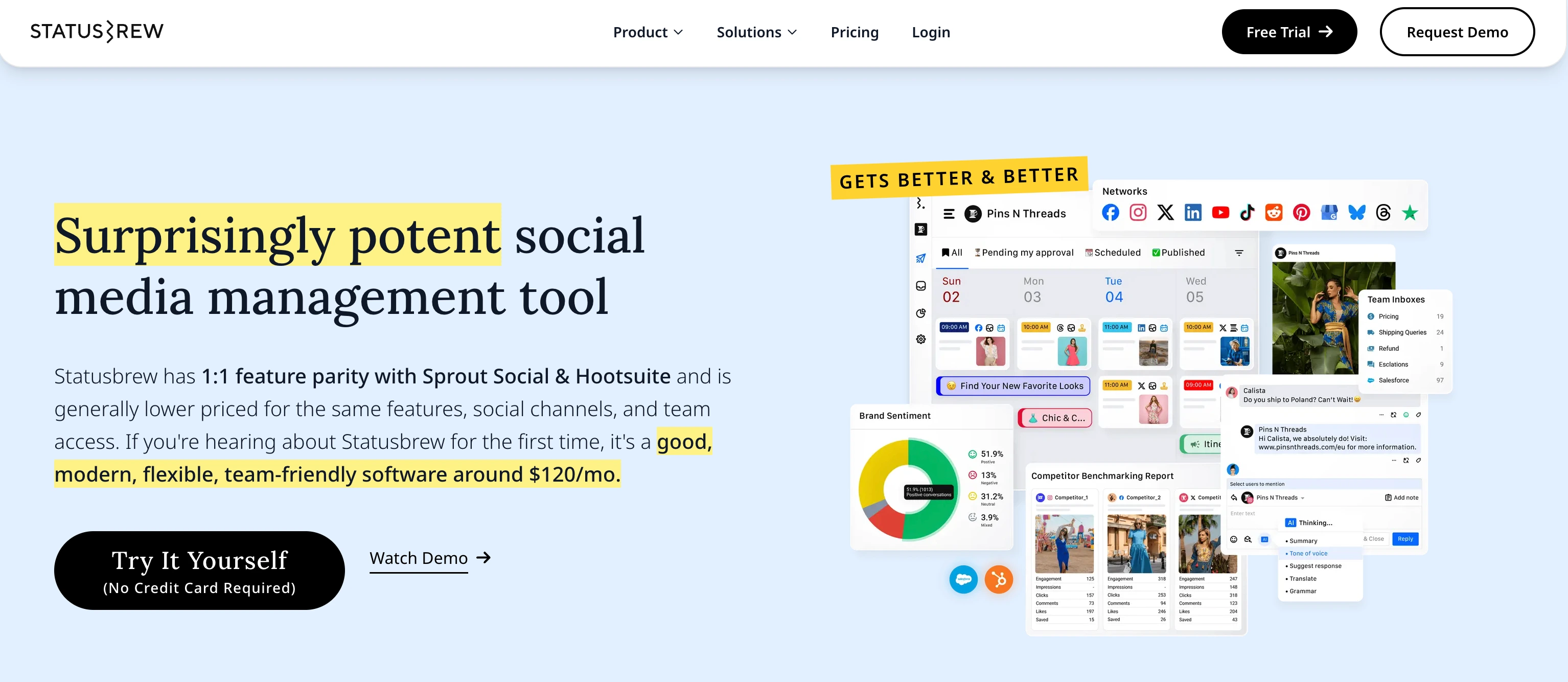
Highlighted features include:
- Unified Inbox for organic and paid social interactions
- Multi-location review management across hundreds of locations
- Automation rules — auto-route messages by intent, auto-moderate negative comments
- Approval Workflows for team and client collaboration
- Smart AI Composer for captions, hashtags, and content ideas
- AI translation and response rephrasing
- Publishing across Instagram, Facebook, LinkedIn, X, YouTube, Google Business, and TikTok
- 14-day free trial with no credit card required
Despite Statusbrew's strong position with enterprise and agency buyers, user reviews reveal important insights about pricing transparency, the learning curve, and feature coverage.
User Reviews and Ratings
On G2
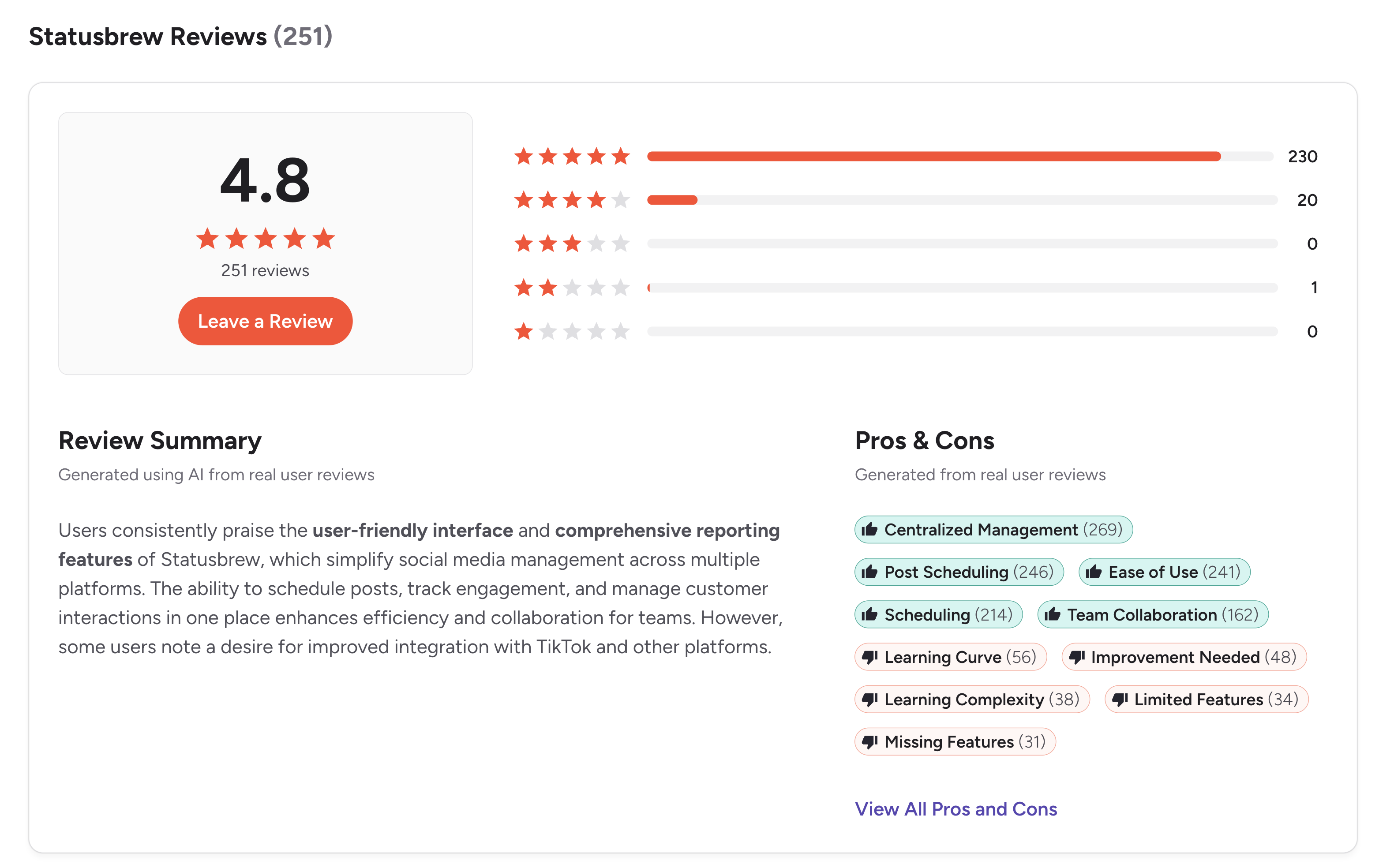
On G2, Statusbrew has an exceptional rating of 4.8 out of 5 based on 251 reviews. The star distribution is overwhelmingly positive — 230 five-star, 20 four-star, 0 three-star, 1 two-star, and 0 one-star reviews.
The G2 review summary highlights that "users consistently praise the user-friendly interface and comprehensive reporting features of Statusbrew, which simplify social media management across multiple platforms. The ability to schedule posts, track engagement, and manage customer interactions in one place enhances efficiency and collaboration for teams. However, some users note a desire for improved integration with TikTok and other platforms."
Rating: 4.8/5 (251 reviews)
Top pros from G2 review tags:
- Centralized Management (269 mentions) — the #1 tagged strength
- Post Scheduling (246 mentions)
- Ease of Use (241 mentions)
- Scheduling (214 mentions)
- Team Collaboration (162 mentions)
Top cons from G2 review tags:
- Learning Curve (56 mentions)
- Improvement Needed (48 mentions)
- Learning Complexity (38 mentions)
- Limited Features (34 mentions)
- Missing Features (31 mentions)
The cons tags tell a coherent story: Statusbrew is feature-rich enough to require time to learn (Learning Curve + Learning Complexity), and some reviewers report missing features for specific workflows. The positive scoring overall (4.8/5) and the heavy concentration of 5-star reviews suggest most users overcome the learning curve and stay long-term.
(credit: G2)
A representative review on Statusbrew's all-in-one breadth comes from a Verified User in Consumer Electronics (Small-Business, 50 or fewer emp., October 8, 2018), titled "Statusbrew is a social media specialist" (4/5). The reviewer writes: "Statusbrew is one of the easiest social media management tools to operate. It has all features such as publishing, reporting, listening and audience feature that make it one of the most complete social media management tool. It has made it quite easy for me to manage my social media accounts." The reviewer's dislike at the time was "I want them to add Pinterest scheduling feature in their tool" — note this review is dated 2018 and Statusbrew's product has evolved since.
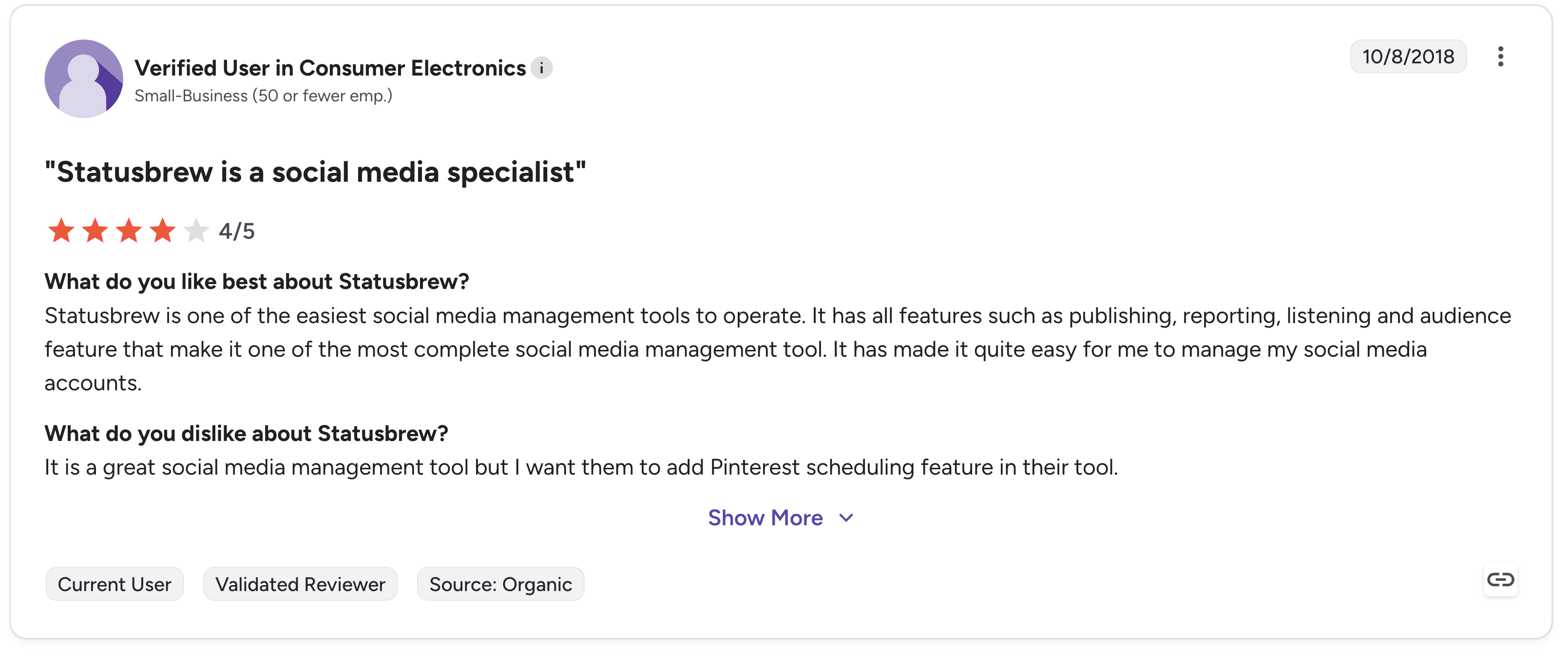
That review captures the all-in-one breadth angle. The 2018 Pinterest complaint also illustrates how Statusbrew's platform coverage has been a moving target over the years.
On Capterra
Statusbrew holds a 4.8 out of 5 rating on Capterra, based on 86 reviews. Sub-scores reflect a tool that is strong on customer experience and ease of use:
- Ease of Use: 4.7
- Customer Service: 4.8
- Features: 4.7
- Value for Money: 4.6
Reviewers consistently praise the publishing features, engagement tools, ease of scheduling posts across multiple platforms, and customer support responsiveness. Capterra cites Statusbrew's starting price at "$179 per month with a flat-rate pricing model" — which corresponds to the Standard plan; Statusbrew's pricing page also shows Lite at $89/mo and Premium at $299/mo.
Rating: 4.8/5 (86 reviews)
(credit: Capterra)
On Trustpilot
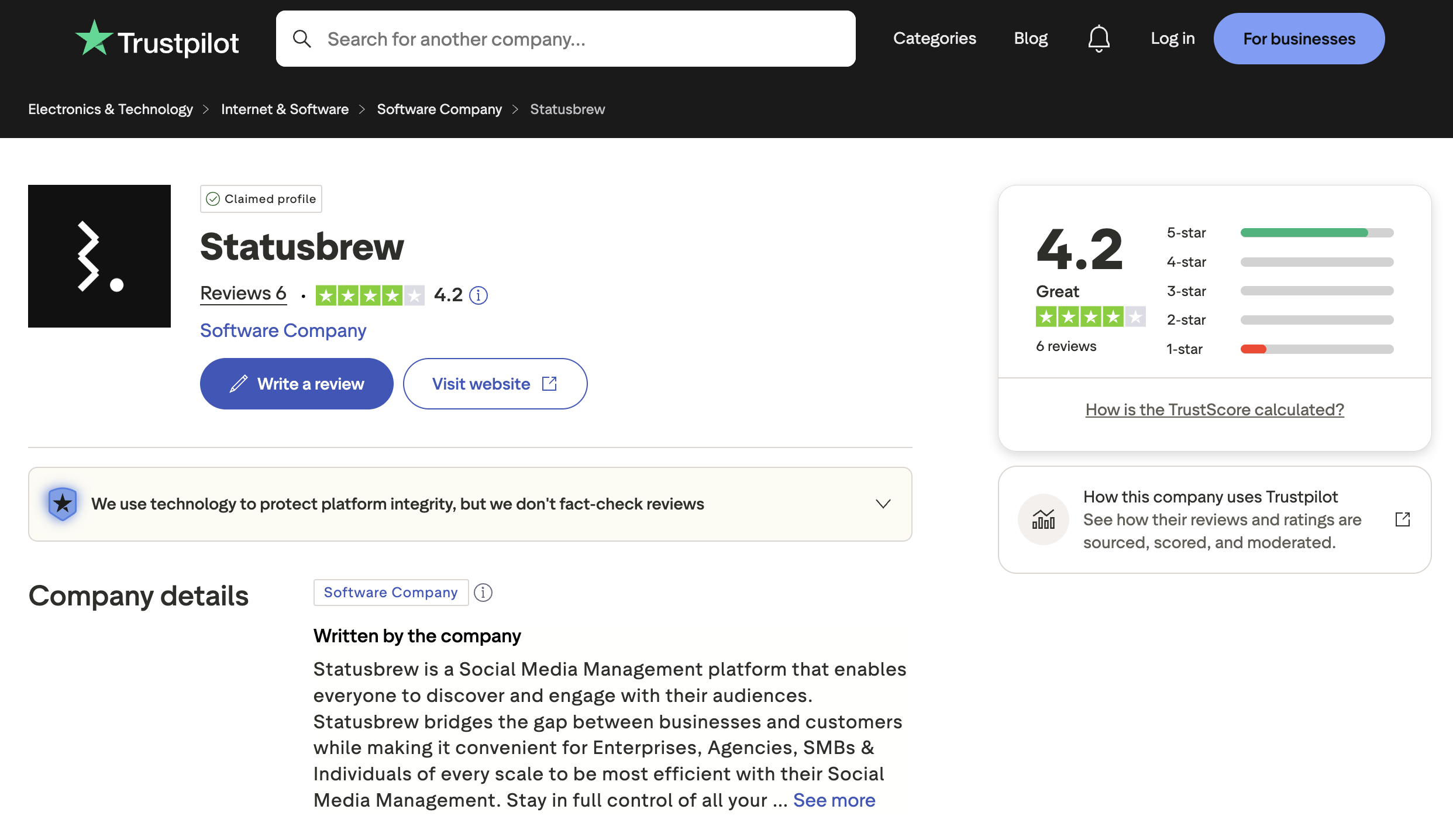
Statusbrew holds a 4.2 out of 5 rating on Trustpilot ("Great") based on only 6 reviews. The low review volume makes Trustpilot a much weaker signal than G2 or Capterra for Statusbrew specifically — we don't recommend leaning on this score for buying decisions.
For a confidence-weighted read on Statusbrew, lean on G2 (251 reviews, 4.8/5) and Capterra (86 reviews, 4.8/5). Treat Trustpilot as background context.
(credit: Trustpilot)
What Community Users Say About Statusbrew
Statusbrew is discussed across r/socialmedia, r/marketing, agency-focused LinkedIn threads, and SaaS comparison forums. The pattern is consistent:
-
Multi-location review management is the most-cited reason to choose Statusbrew. Community discussions specifically call out the ability to aggregate Google Business and other location-based reviews across hundreds of locations as a workflow most competitors don't match.
-
Automation rules are praised by high-volume teams. Auto-routing messages by intent and auto-moderating negative comments resonate with brands that handle large conversation volume.
-
The price-to-Sprout/Hootsuite comparison comes up often. Multiple community threads reference Statusbrew's pitch of "1:1 feature parity with Sprout Social & Hootsuite at lower price" — Premium at $299/mo for 6 users genuinely undercuts Sprout Social ($249+/user) and Hootsuite ($249+/user) for the same kind of depth.
-
Learning curve comes up consistently. G2's auto-generated cons tags (Learning Curve 56, Learning Complexity 38) align with community feedback that Statusbrew takes longer to onboard than simpler all-in-one tools.
-
Approval workflow gating is a common complaint. Reviewers note that approval workflows wait on the Premium plan ($299/mo) — not available on Lite ($89) or Standard ($179). For agencies that need approvals as a core workflow, this forces the higher tier.
-
Statusbrew is frequently compared to alternatives. In threads asking "what should we use instead of Statusbrew?", users most often recommend Sprout Social and Hootsuite for similar enterprise inbox depth (at higher prices), Sendible for agency reporting, and PostPlanify for teams that want more users + profiles per dollar and AI image generation at flat tiers.
Feature-by-Feature User Feedback
Drawing from G2, Capterra, and community discussions, here's how Statusbrew performs across key feature categories:
-
Unified Inbox (Engage) — strong on covering both organic and paid interactions in one queue. Per-platform feature matrix isn't itemized publicly, but reviewers describe functional coverage of IG/FB/LinkedIn/X at minimum.
-
Multi-Location Review Management — the standout differentiator. Aggregating reviews from "hundreds of locations" in one dashboard is rare in the category and is the most-cited reason multi-location brands choose Statusbrew.
-
Automation Rules — auto-route messages by intent and auto-moderate negative comments work well for high-volume teams. Genuine workflow saver.
-
Smart AI Composer — generates captions, hashtags, and content ideas. AI translation and response rephrasing also included. No AI image generation.
-
Approval Workflows — available across plans, with team and client collaboration directly beside each post. Tier-gating not publicly disclosed.
-
Scheduling & Publishing — strong for the visibly-supported platforms (IG, FB, LinkedIn, X, YouTube, Google Business, TikTok). Pinterest, Threads, and Bluesky not visibly listed on publishing pages.
-
Analytics & Reporting — Capterra reviewers praise comprehensive reporting. White-label reports likely Premium+, exact tier-gating not publicly disclosed.
-
Pricing & Value — polarizing. Capterra Value for Money score is 4.6/5 (the lowest of the four sub-scores). Lite at $89/mo is a 1-user, 5-profile plan; most teams jump to Standard ($179) or Premium ($299) to get realistic capacity, and approvals only unlock on Premium.
-
Customer Support — consistently a strength. Capterra Customer Service 4.8/5; G2 reviewers cite responsive support as a reason they stay.
-
Learning Curve — the single biggest tagged concern in G2 reviews. 56 reviewers tagged "Learning Curve" and 38 tagged "Learning Complexity." Statusbrew is feature-rich, and depth takes time to fully use.
Review Authenticity
The G2 (251 reviews, 4.8/5) and Capterra (86 reviews, 4.8/5) review pools are among the larger samples in the social media management category. The matching 4.8 averages across both platforms — and the heavy concentration of 5-star reviews on G2 (230 of 251 are five-star) — make Statusbrew one of the most highly-rated tools in the segment.
-
Why are the ratings so consistent? Most reviewers are buyers who specifically wanted enterprise-grade inbox automation, multi-location review management, or automation rules. They evaluate Statusbrew on its strongest dimensions, where it consistently delivers.
-
What patterns appear in the negative reviews? The cons cluster around three themes that align across platforms: learning curve (Statusbrew's depth takes time to master), missing or limited features (no AI image generation, MCP gated to Enterprise), and tier gating (approvals on Premium only at $299/mo, listening + sentiment + benchmarking all on Premium together).
Who Statusbrew Works Best For (Based on Reviews)
Users who are happiest with Statusbrew:
- Multi-location brands and franchises that need to manage reviews across hundreds of physical locations
- High-volume conversation teams that need auto-routing and auto-moderation in the inbox
- Enterprises comfortable with sales-driven pricing and longer onboarding for deeper features
- Agencies with many small clients that fit the $49/mo/client Agency plan structure
- Teams that handle paid + organic interactions in the same inbox queue
Users who should consider alternatives:
- Solo creators and small teams whose 1-user / 5-profile Lite cap ($89/mo) feels tight
- Agencies that need approval workflows at a lower tier than Premium ($299/mo)
- Buyers who want AI image generation as a built-in feature
- Teams that want MCP support for Claude/ChatGPT/Gemini/Copilot without an Enterprise contract
- Teams that prefer a 14-day money-back guarantee rather than only a free trial
- Smaller teams that want a faster onboarding curve than Statusbrew's depth allows
Compare Statusbrew with Other Tools
See how Statusbrew stacks up against other social media management platforms: Best Statusbrew Alternative for Agencies & Teams, Best NapoleonCat Alternative, Best eClincher Alternative, Best Sprinklr Alternative, Best Sprout Social Alternative, Best Hootsuite Alternative, Best Sendible Alternative, and Best Agorapulse Alternative. Browse all alternatives on our alternatives hub.
Before choosing a social media management tool...
Consider the following tips:
- Check multiple review platforms (G2, Capterra, Trustpilot) to confirm consistent user feedback.
- Pay attention to which features are gated to higher tiers — approvals, AI sentiment, listening, benchmarking, and Team & SLA reporting all sit on Premium ($299/mo) for Statusbrew.
- Map your team size and profile count to the tier — Lite at $89/mo caps at 1 user / 5 profiles.
- Read community threads on Reddit, LinkedIn, and SaaS forums for unbiased opinion.
Ultimately, the best social media management tool is the one that fits your workflow and your team economics — not just the one with the strongest single feature.
Statusbrew is a strong choice for multi-location brands, listening-heavy teams (Premium $299/mo), and enterprises needing HubSpot/Salesforce/SAML SSO/MCP integrations. For teams that want more users + profiles per dollar, approvals at $199/mo instead of $299/mo, AI image generation, and MCP on every paid plan — there are better-fit options.
You might want to consider PostPlanify — built for creators, marketing teams, agencies, and brands who want to streamline their content workflow across all 10 major social platforms.

Starting at $79/month billed yearly ($99/month monthly), PostPlanify uses flat, transparent pricing. Here's what each plan includes:
- Growth ($99/mo or $79/mo billed yearly): 15 social accounts, 5 workspaces, 3 team members, unlimited posts, vision-powered AI assistant with 200 AI images/mo, full analytics across all 10 platforms, social inbox (Instagram, Facebook, LinkedIn, Google Business, YouTube), bulk scheduling, link in bio, Canva & Google Drive, API + MCP access
- Premium ($199/mo or $159/mo billed yearly) — Most Popular: 30 social accounts, 15 workspaces, 6 team members, 400 AI images/mo, multi-approver approval workflows included, advanced analytics, PDF reports, shared calendar, roles & permissions
- Scale ($299/mo or $239/mo billed yearly): 100 social accounts, 50 workspaces, 12 team members, 800 AI images/mo, white-label PDF reports, priority human support, dedicated onboarding & migration
- Enterprise (custom pricing, demo-only): Unlimited social accounts/workspaces/team members, unlimited AI images, 1:1 onboarding call, priority feature requests, private WhatsApp support
Where Statusbrew gates approvals to its $299 Premium plan and MCP to Enterprise, PostPlanify includes approvals at $199/mo Premium and MCP on every paid plan starting at Growth ($99/mo) — with a 14-day money-back guarantee.
FAQ on Statusbrew Reviews
Is Statusbrew a good social media management tool?
Yes — Statusbrew scores 4.8/5 on G2 (251 reviews) and 4.8/5 on Capterra (86 reviews), making it one of the highest-rated tools in the social media management category. It is widely regarded as a credible enterprise and agency platform, especially for multi-location review management, the Rule Engine on Standard, and the Premium-tier listening + benchmarking + sentiment layer. The main critiques are the learning curve flagged by 56 G2 reviewers, approval workflows being gated to Premium ($299/mo), and MCP/HubSpot/Salesforce all being Enterprise-only.
What is Statusbrew best known for?
Statusbrew is best known for multi-location review management (aggregating reviews from hundreds of locations in one dashboard), automation rules for inbox routing and moderation, a unified inbox covering both organic and paid interactions, and approval workflows for team and client collaboration.
What are the main complaints about Statusbrew?
The most common complaints surface as G2's auto-tagged cons themes: Learning Curve (56 mentions), Improvement Needed (48), Learning Complexity (38), Limited Features (34), and Missing Features (31). Community threads also frequently cite tier gating — approvals are Premium-only ($299/mo), MCP is Enterprise-only, and AI image generation isn't on any tier.
Does Statusbrew have a mobile app?
Yes. Statusbrew offers a mobile app, though specific feature parity with the web dashboard varies.
How long is the Statusbrew free trial?
Statusbrew offers a 14-day free trial with no credit card required.
Is Statusbrew better than Hootsuite, Sprout Social, or Sendible?
For multi-location review management and automation rules, Statusbrew is among the strongest in the category. For enterprise inbox scale, Sprout Social is a closer competitor. For established team workflows, Hootsuite has the larger install base. For agency reporting, Sendible is a peer. For transparent flat pricing with bundled approvals, AI image generation, and 10-platform coverage including Bluesky, PostPlanify is a credible alternative.
What's the best Statusbrew alternative?
For teams that want more users + profiles per dollar at every tier, AI captions and image generation, approval workflows at $199/mo Premium instead of $299/mo, MCP support for Claude/ChatGPT/Gemini/Copilot on every paid plan, and white-label reports on Scale — PostPlanify is the closest direct alternative.










