
Before choosing a social media management tool, it's worth looking at genuine user feedback. In this article, we break down HeyOrca reviews across G2 and Capterra to assess the no-login client approval workflow, unlimited users model, AI tool gating, analytics depth, and whether HeyOrca is the right fit for your team in 2026.
If you're debating whether to stick with HeyOrca or explore alternatives, this overview will help.
HeyOrca Overview
HeyOrca is an agency-focused social media management platform founded in 2015 by Joe Teo in St. John's, Newfoundland, Canada. It's used by 46,000+ social media managers and explicitly positions itself for agencies, in-house marketing teams, non-profits, and faith-based organizations.
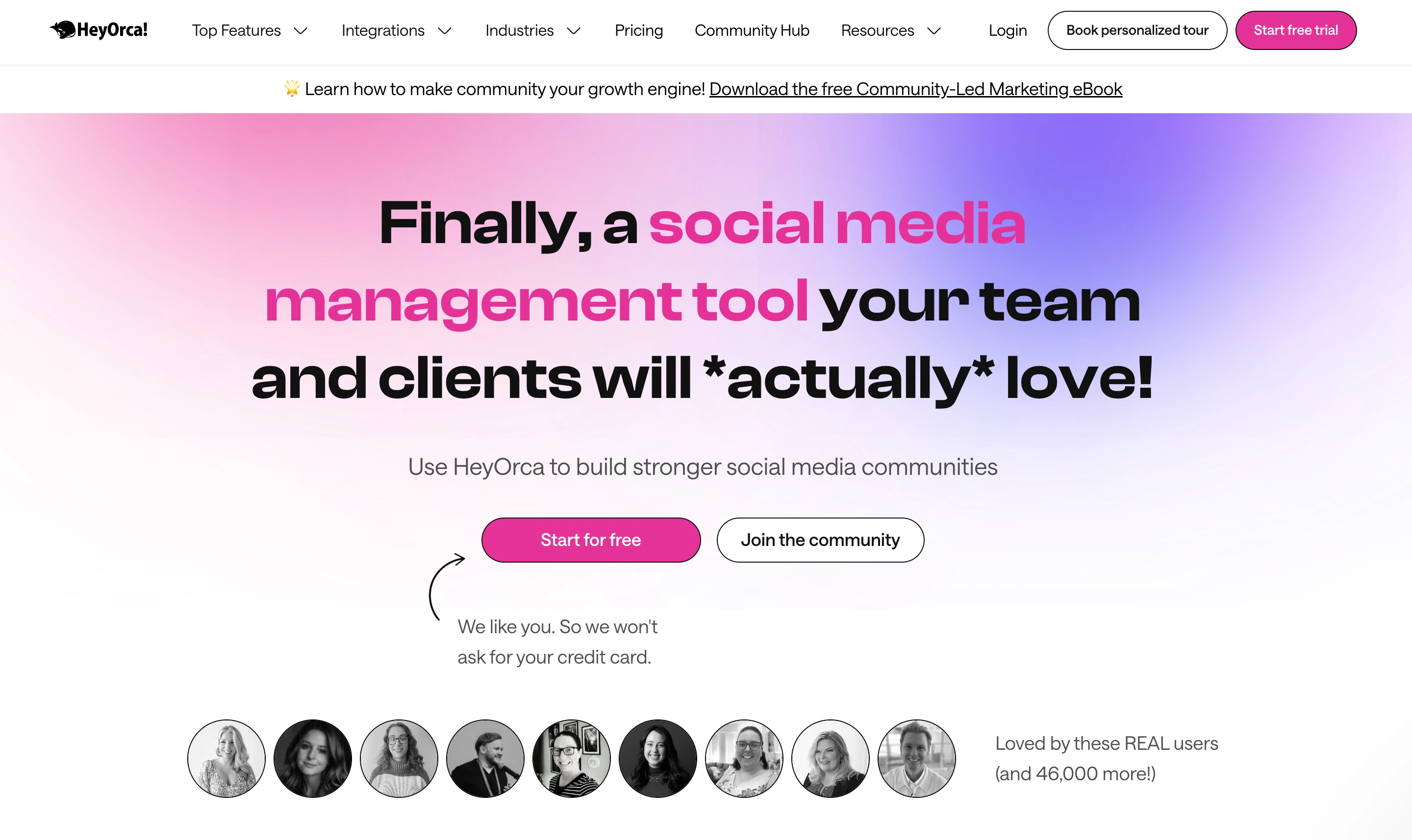
Highlighted features include:
- No-login client approval workflows — clients approve/reject posts from email without a login
- Unlimited users on every paid plan (Basic and Pro)
- Per-calendar (per-client) pricing structure built for agencies
- Auto-publishing to 9 platforms (Facebook, Instagram, LinkedIn, X, TikTok, YouTube, Pinterest, Threads, Google Business Profile)
- Canva, Dropbox, and Mailchimp integrations
- AI caption generator and hashtag library (Pro+)
- Social Inbox (Pro plan or Basic add-on at $39/mo)
- Custom + automated reports (Pro plan or Basic add-on at $59/mo)
- Mobile apps for iOS and Android
- 14-day free trial with no credit card required
Despite HeyOrca's strong agency positioning, user reviews reveal important insights about pricing, analytics depth, and tier-gating.
User Reviews and Ratings
On G2
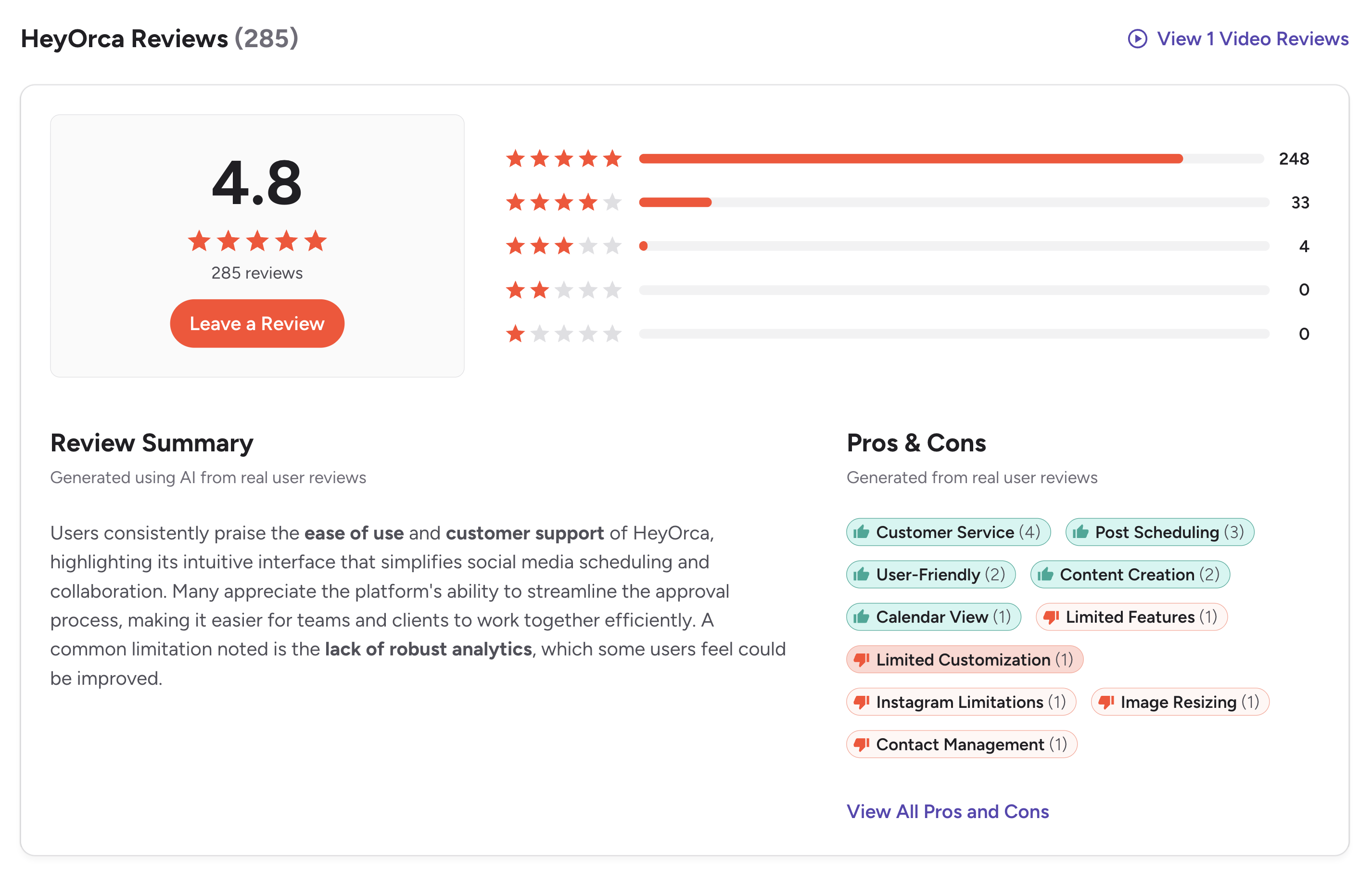
On G2, HeyOrca has an exceptional rating of 4.8 out of 5 based on 284 reviews. The star distribution is heavily positive — 248 five-star, 33 four-star, 4 three-star, 0 two-star, and 0 one-star reviews.
The G2 review summary highlights that "users consistently praise the ease of use and customer support of HeyOrca, highlighting its intuitive interface that simplifies social media scheduling and collaboration. Many appreciate the platform's ability to streamline the approval process, making it easier for teams and clients to work together efficiently. A common limitation noted is the lack of robust analytics, which some users feel could be improved."
Rating: 4.8/5 (284 reviews)
Top pros from G2 review tags:
- Customer Service (4 mentions)
- Post Scheduling (3)
- User-Friendly (2)
- Content Creation (2)
- Calendar View (1)
Top cons from G2 review tags:
- Limited Features (1)
- Limited Customization (1)
- Instagram Limitations (1)
- Image Resizing (1)
- Contact Management (1)
The pros tags confirm what users come for — responsive customer service, post scheduling that just works, and a user-friendly interface for content creation. The cons tags surface a consistent pattern: analytics depth is the dominant critique, with Instagram-specific limitations and image-resizing friction as secondary themes.
(credit: G2)
A representative recent G2 review comes from Blythe C., Social Media Strategist at a Small-Business (April 8, 2026, rating updated April 27, 2026), titled "Internal Notes, Calendar, and Canva Integration Make Scheduling Easy" (4/5):
What the reviewer likes:
- "I like the ability to leave internal to external notes on the calendar & the Canva integration"
What the reviewer dislikes:
- "I don't like the analytics, I feel like they could be more fleshed out"
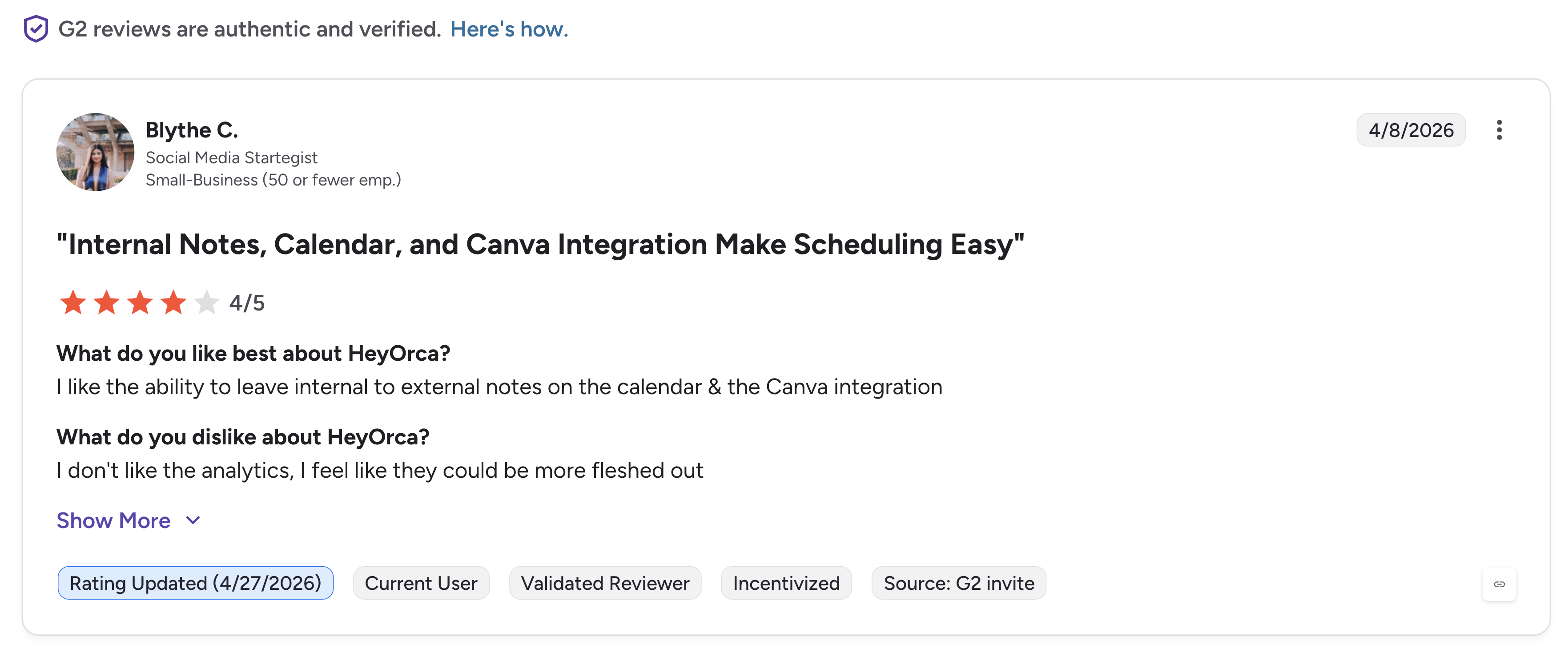
That review captures the exact pattern surfaced in G2's auto-generated review summary: the calendar workflow, internal notes, and Canva integration are praised; the analytics are flagged as the area users want improved.
On Capterra
HeyOrca holds a 4.5 out of 5 rating on Capterra, based on 22 reviews. Sub-scores reflect a tool that's strong on customer experience:
- Ease of Use: 4.5
- Customer Service: 4.7
- Features: 4.3
- Value for Money: 4.6
The Capterra sample is smaller than G2's (22 vs 284 reviews), but the patterns are consistent — strongest sub-score is Customer Service (4.7), and the lowest is Features (4.3), aligning with G2's cons themes around limited features and customization.
Rating: 4.5/5 (22 reviews)
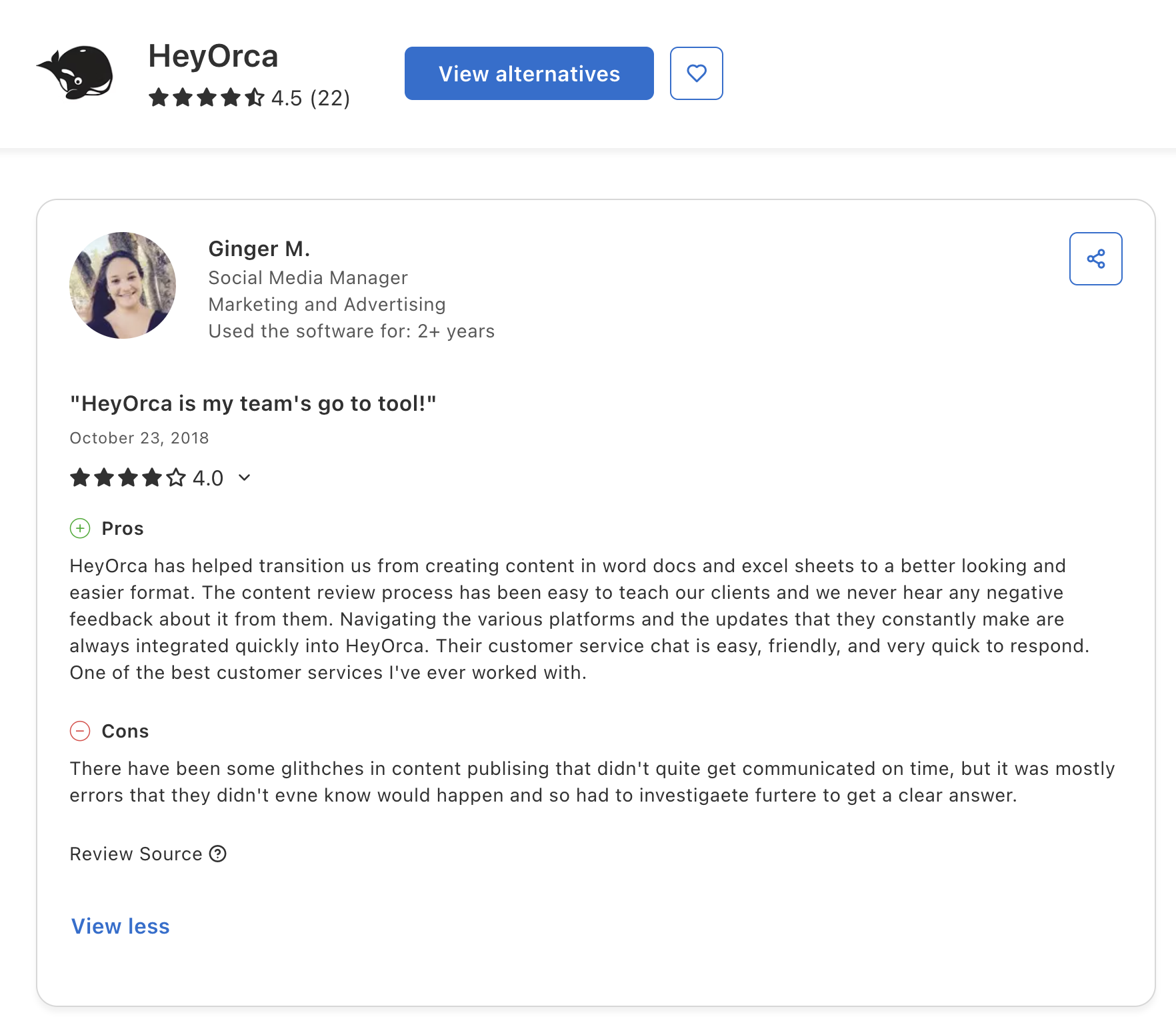
A long-tenured Capterra review from Ginger M., Social Media Manager in Marketing and Advertising (used HeyOrca for 2+ years, October 23, 2018, 4.0/5) titled "HeyOrca is my team's go to tool!":
What the reviewer likes:
- "HeyOrca has helped transition us from creating content in word docs and excel sheets to a better looking and easier format. The content review process has been easy to teach our clients and we never hear any negative feedback about it from them. Navigating the various platforms and the tools that constantly make are always integrated quickly into HeyOrca. Their customer service chat is easy, friendly, and very quick to respond. One of the best customer services I've ever worked with."
What the reviewer dislikes:
- "There have been some glitches in content publishing that didn't quite get communicated on time, but it was mostly errors that they didn't even know would happen and so had to investigate furtere to get a clear answer."
(credit: Capterra)
Ginger's review captures HeyOrca's standout strength — replacing client review workflows that used to live in Word and Excel with a purpose-built tool — along with the secondary concern about publishing reliability when issues do occur.
On Trustpilot
HeyOrca has minimal Trustpilot presence, making it a low-signal source for buying decisions on this specific tool. For a confidence-weighted read on HeyOrca, lean on G2 (284 reviews, 4.8/5) and Capterra (22 reviews, 4.5/5) — both of which are among the highest-rated scores in the social media management category.
What Community Users Say About HeyOrca
HeyOrca is discussed across r/socialmedia, r/marketing, agency-focused LinkedIn threads, and SaaS comparison forums. The pattern is consistent:
-
The no-login client approval workflow is the most-cited reason to choose HeyOrca. Community discussions repeatedly call out the ability to send clients an email link to approve/reject posts without forcing them to create an account — a workflow most competitors don't match this cleanly.
-
Customer service is repeatedly praised. "9.8/10 customer satisfaction" is HeyOrca's own claim, and it aligns with G2's #1 pros tag (Customer Service, 4 mentions) and Capterra's strongest sub-score (Customer Service 4.7).
-
Per-calendar pricing comes up as both a pro and con. Agencies managing many client brands love that each client has its own isolated workspace; in-house teams running a single brand sometimes find the model awkward since they're paying for capacity built around multi-client workflows.
-
Analytics depth is the most-cited weakness. G2's review summary explicitly notes "the lack of robust analytics, which some users feel could be improved." Recent reviewer Blythe C. (April 2026) echoes this: "I don't like the analytics, I feel like they could be more fleshed out."
-
AI tools gated to Pro is mentioned in pricing discussions. Basic ($59/mo) doesn't include AI tools, Instagram auto DMs, best time to post, or any of the engagement/intelligence features. Pro ($149/mo) is where those unlock. Some community threads describe this as "Basic is for scheduling only."
-
HeyOrca is frequently compared to alternatives. In threads asking "what should we use instead of HeyOrca?", users most often recommend Planable for similar visual approval workflows, Sendible for agency white-label, Loomly for visual workflow + Interactions inbox, and PostPlanify for teams that want a more polished UI with link-in-bio, Google Drive integration, AI image generation, and MCP support across all 10 platforms including Bluesky.
Feature-by-Feature User Feedback
Drawing from G2, Capterra, and community discussions, here's how HeyOrca performs across key feature categories:
-
Client Approval Workflows — flagship feature, consistently the most-praised. No-login client approvals (clients approve/reject from email without creating an account) is a genuine differentiator vs Planable, Sendible, and most competitors.
-
Internal Notes on Calendar — explicitly praised in Blythe C.'s April 2026 G2 review. Teams use these for internal collaboration alongside client-facing approval threads.
-
Canva Integration — included on Basic and Pro. Mentioned consistently in pros across G2 and Capterra.
-
Customer Support — strongest area. Capterra Customer Service sub-score is 4.7/5; G2 pros tag Customer Service ranks #1 (4 mentions). HeyOrca's own claim of 9.8/10 customer satisfaction aligns.
-
Per-Calendar Pricing Structure — built for agencies managing 5+ clients with the 40% volume discount. Single-team users sometimes find it awkward.
-
AI Tools (Captions + Hashtag Library) — Pro plan only ($149/mo). Basic doesn't include AI tools. No AI image generation on any tier.
-
Social Inbox — Pro plan or Basic add-on at $39/mo. Not as deep as Agorapulse, Sprout Social, or NapoleonCat — covers comments, mentions, and DMs across the 9 supported platforms.
-
Reports & Analytics — the consistent weak spot. G2 review summary explicitly flags this. Pro plan includes custom + automated + competitor reports; Basic requires the $59/mo Social Reports add-on.
-
Mobile Apps — iOS and Android available. Reviewers don't flag mobile-specific issues.
-
Platforms Supported — 9 platforms (FB, IG, LinkedIn, X, TikTok, YouTube, Pinterest, Threads, Google Business Profile). No Bluesky on any tier, despite HeyOrca publishing blog content about Bluesky updates.
-
Custom Branding / White-Label — Enterprise only. Basic and Pro don't include custom branding for client-facing dashboards.
Review Authenticity
The G2 (284 reviews, 4.8/5) and Capterra (22 reviews, 4.5/5) review pools tell a consistent story. The 4.8/5 G2 average is among the highest in the social media management category, and the 248-of-284 five-star concentration is remarkable.
-
Why are the ratings so high? HeyOrca's audience is overwhelmingly agencies and in-house marketing teams who chose the tool specifically for the no-login client approval workflow. They evaluate on the strength HeyOrca is built around, where it consistently delivers. The customer support quality reinforces sentiment across both review platforms.
-
What patterns appear in the negative reviews? The cons cluster around three themes: analytics depth (the dominant critique, explicitly flagged in G2's auto-generated summary and confirmed in Blythe C.'s April 2026 review), tier gating (AI tools on Pro only, Custom Branding on Enterprise only), and Instagram-specific limitations (G2 cons tag).
Who HeyOrca Works Best For (Based on Reviews)
Users who are happiest with HeyOrca:
- Digital agencies managing 5+ client brands who benefit from the 40% volume discount
- Teams whose primary workflow is client content approval — the no-login email-based approval flow is a genuine differentiator
- Brands that value responsive customer support (consistently the strongest area in reviews)
- Agencies that need unlimited users on every paid plan (no per-seat fees)
- Teams comfortable with the per-calendar pricing model for client isolation
- Buyers who want a 14-day free trial without entering a credit card
Users who should consider alternatives:
- Single in-house teams managing one brand whose per-calendar pricing model doesn't scale efficiently
- Teams that need deep analytics — explicitly flagged as a weakness in G2's review summary and recent reviewer feedback
- Buyers who need AI image generation (HeyOrca has none on any tier)
- Brands publishing to Bluesky (not supported)
- Agencies that need white-label client dashboards at a tier below Enterprise
- Teams that want MCP support for Claude/ChatGPT/Gemini/Copilot
Compare HeyOrca with Other Tools
See how HeyOrca stacks up against other social media management platforms: Best HeyOrca Alternative for Agencies & Teams, Best Planable Alternative, Best Sendible Alternative, Best Loomly Alternative, Best Statusbrew Alternative, Best Sprout Social Alternative, Best Hootsuite Alternative, and Best Agorapulse Alternative. Browse all alternatives on our alternatives hub.
Before choosing a social media management tool...
Consider the following tips:
- Check multiple review platforms (G2, Capterra, Trustpilot) — HeyOrca scores 4.8 G2 and 4.5 Capterra, among the highest in the category.
- Pay attention to which features are gated to higher tiers — HeyOrca's AI tools, Instagram auto DMs, best time to post, social inbox, and social listening all sit on Pro ($149/mo) or as Basic add-ons.
- Map your team structure to HeyOrca's per-calendar model — multi-client agencies benefit; single-team buyers may overpay.
- Verify Bluesky needs — HeyOrca does not currently support Bluesky publishing on any tier.
Ultimately, the best social media management tool is the one that fits your workflow and team economics — not just the one with the highest review score.
HeyOrca is a strong choice for agencies that live in multi-client approval workflows. For teams that need deeper analytics, AI image generation, white-label at a lower tier, Bluesky support, or MCP integration with Claude/ChatGPT — there are better-fit options.
You might want to consider PostPlanify — built for creators, marketing teams, agencies, and brands who want to streamline their content workflow across all 10 major social platforms.

Starting at $79/month billed yearly ($99/month monthly), PostPlanify uses flat, transparent pricing. Here's what each plan includes:
- Growth ($99/mo or $79/mo billed yearly): 15 social accounts, 5 workspaces, 3 team members, unlimited posts, vision-powered AI assistant with 200 AI images/mo, full analytics across all 10 platforms, social inbox (Instagram, Facebook, LinkedIn, Google Business, YouTube), bulk scheduling, link in bio, Canva & Google Drive, API + MCP access
- Premium ($199/mo or $159/mo billed yearly) — Most Popular: 30 social accounts, 15 workspaces, 6 team members, 400 AI images/mo, multi-approver approval workflows, advanced analytics, PDF reports, shared calendar, roles & permissions
- Scale ($299/mo or $239/mo billed yearly): 100 social accounts, 50 workspaces, 12 team members, 800 AI images/mo, white-label PDF reports, priority human support, dedicated onboarding & migration
- Enterprise (custom pricing, demo-only): Unlimited social accounts/workspaces/team members, unlimited AI images, 1:1 onboarding call, priority feature requests, private WhatsApp support
Where HeyOrca is built around multi-client agency calendars with no-login client approvals, PostPlanify is a full-SMM platform with deeper analytics, AI image generation, link-in-bio, MCP support, Bluesky publishing, and white-label PDF reports on Scale ($299/mo) — backed by a 14-day money-back guarantee.
FAQ on HeyOrca Reviews
Is HeyOrca a good social media management tool?
Yes — HeyOrca scores 4.8/5 on G2 (284 reviews) and 4.5/5 on Capterra (22 reviews), among the highest ratings in the social media management category. The strongest praise themes are no-login client approval workflows, responsive customer support, and the calendar-based content workflow. The most common critique is that analytics could be more fleshed out.
What is HeyOrca best known for?
HeyOrca is best known for its no-login client approval workflow — clients receive an email link and can approve or reject posts without creating an account or logging in. Combined with unlimited users on every paid plan and per-calendar pricing built for agencies, it's a workflow specifically designed for digital agencies managing multiple client brands.
What are the main complaints about HeyOrca?
The most common complaint is analytics depth — G2's auto-generated review summary explicitly notes "the lack of robust analytics, which some users feel could be improved." Recent reviewer Blythe C. (April 2026) confirms: "I don't like the analytics, I feel like they could be more fleshed out." Secondary themes include Limited Features (1 G2 con tag), Limited Customization (1), Instagram Limitations (1), and Image Resizing (1).
Does HeyOrca have a mobile app?
Yes. HeyOrca offers both iOS and Android mobile apps.
How long is the HeyOrca free trial?
HeyOrca offers a 14-day free trial on Basic and Pro plans with no credit card required.
Is HeyOrca better than Planable, Sendible, or Loomly?
For the specific workflow of no-login client approvals + unlimited users + per-calendar pricing, HeyOrca is the most agency-purpose-built option. Planable has unlimited users and visual approvals but requires logins. Sendible offers white-label client dashboards (something HeyOrca only includes on Enterprise). Loomly includes visual workflow + Interactions inbox at flat pricing. For a full SMM platform with deeper analytics, AI image generation, MCP support, and Bluesky publishing, PostPlanify is a credible alternative.
What's the best HeyOrca alternative?
For teams that want a more modern UI, deeper analytics, AI image generation, link-in-bio, Google Drive + Dropbox integrations, MCP support for AI assistants, Bluesky publishing, and white-label PDF reports at a tier below Enterprise — PostPlanify is the closest direct alternative. For agencies running 10+ client brands where per-calendar isolation matters more than anything else, HeyOrca's structural fit remains strong.










