


Managing separate logins, different post formats, and platform-specific scheduling for every social network eats hours out of your week. That's why tools that let you post to all social media at once from a single dashboard have become essential, whether you're a solo creator, an agency, or a marketing team.
But not every tool does it the same way. Some support 5 platforms, others support 12. Some charge per channel, others per seat. Some have analytics built in, others make you pay extra. And the difference between the right and wrong choice can mean hundreds of dollars a month wasted on features you don't use, or don't have.
I tested and compared 11 of the most popular social media management apps in 2026, looking at platform support, pricing structure, features, and real user feedback from G2 and Trustpilot. Here's what I found.
How I Evaluated Each Tool
Every tool on this list was scored on five criteria:
- Platform support: how many networks it covers and what it can actually publish to each one.
- Pricing transparency: the billing model, how cost scales, and which fees only appear later.
- Feature depth: analytics, social inbox, AI, and collaboration.
- User feedback: verified G2 and Trustpilot ratings, with review counts so you can judge the sample.
- Real-world scalability: what happens to the bill when you add 5 more accounts or 3 more team members.
Pricing and ratings were verified against each tool's official site and third-party review platforms in September 2026.
TL;DR: Quick Comparison
| Tool | Starting Price | Platforms | G2 Rating | Best For |
|---|---|---|---|---|
| PostPlanify | From $39/mo per workspace | 10 | 5/5 | All-in-one scheduling + analytics |
| Buffer | $6/channel/mo | 11 | 4.3/5 | Simple scheduling on a budget |
| Hootsuite | $99/user/mo | 10+ | 4.3/5 | Enterprise teams |
| Sprout Social | $99/seat/mo | 10+ | 4.4/5 | Enterprise analytics + listening |
| Later | $25/mo | 8 | 4.5/5 | Visual-first Instagram planning |
| SocialBee | $29/mo | 10 | 4.8/5 | Category-based content recycling |
| SocialPilot | $30/mo | 11 | 4.5/5 | Agencies managing many clients |
| Publer | $12/mo | 12+ | 4.7/5 | Budget multi-platform posting |
| Loomly | $65/mo | 9 | 4.6/5 | Team content approvals |
| Planable | $39/workspace/mo | 9 | 4.6/5 | Content collaboration + approvals |
| Sendible | $35/mo | 10 | 4.5/5 | White-label agency reporting |
What to Look for in a Multi-Platform Posting App
Before diving into the list, here's what actually matters when choosing a tool to post across all your social accounts:
- Platform coverage: Does it support the platforms you actually use? Some tools skip X (Twitter), Pinterest, or YouTube. If YouTube is a key channel for you, see our dedicated guide to the best YouTube scheduling tools.
- True multi-platform posting: Can you customize captions, hashtags, and media per platform from one composer, or does it just copy-paste the same post?
- Pricing model: Per channel, per user, per workspace, or flat rate? This dramatically affects cost as you scale.
- Analytics depth: Basic post metrics vs. cross-platform reporting vs. audience insights. Some tools charge extra for analytics.
- Team features: Approval workflows, role-based access, and collaboration tools matter for teams.
- Extras that save time: AI captions, content calendars, social inbox, media libraries, and link in bio pages.
 PostPlanify
All your social media in one simple dashboard
Schedule posts, track analytics, and reply to comments/DMs without switching tabs.

Engagement
+18%
Views
52.8k
1. PostPlanify

PostPlanify is a social media management platform built for agencies serving local businesses: restaurants, clinics, salons, trades, and the like. It supports 10 platforms: Instagram, Facebook, TikTok, X (Twitter), LinkedIn, YouTube, Pinterest, Threads, Bluesky, and Google Business, with per-platform content customization, post previews, and built-in analytics for all connected accounts. Each client gets its own workspace, and you are billed per workspace rather than per seat.
Key Features
- Multi-platform composer: write once, then customize captions, hashtags, and media for each platform individually. Preview how every post looks before publishing.
- Analytics for all 10 platforms: track engagement, reach, impressions, and follower growth across every connected account, with best time to post suggestions.
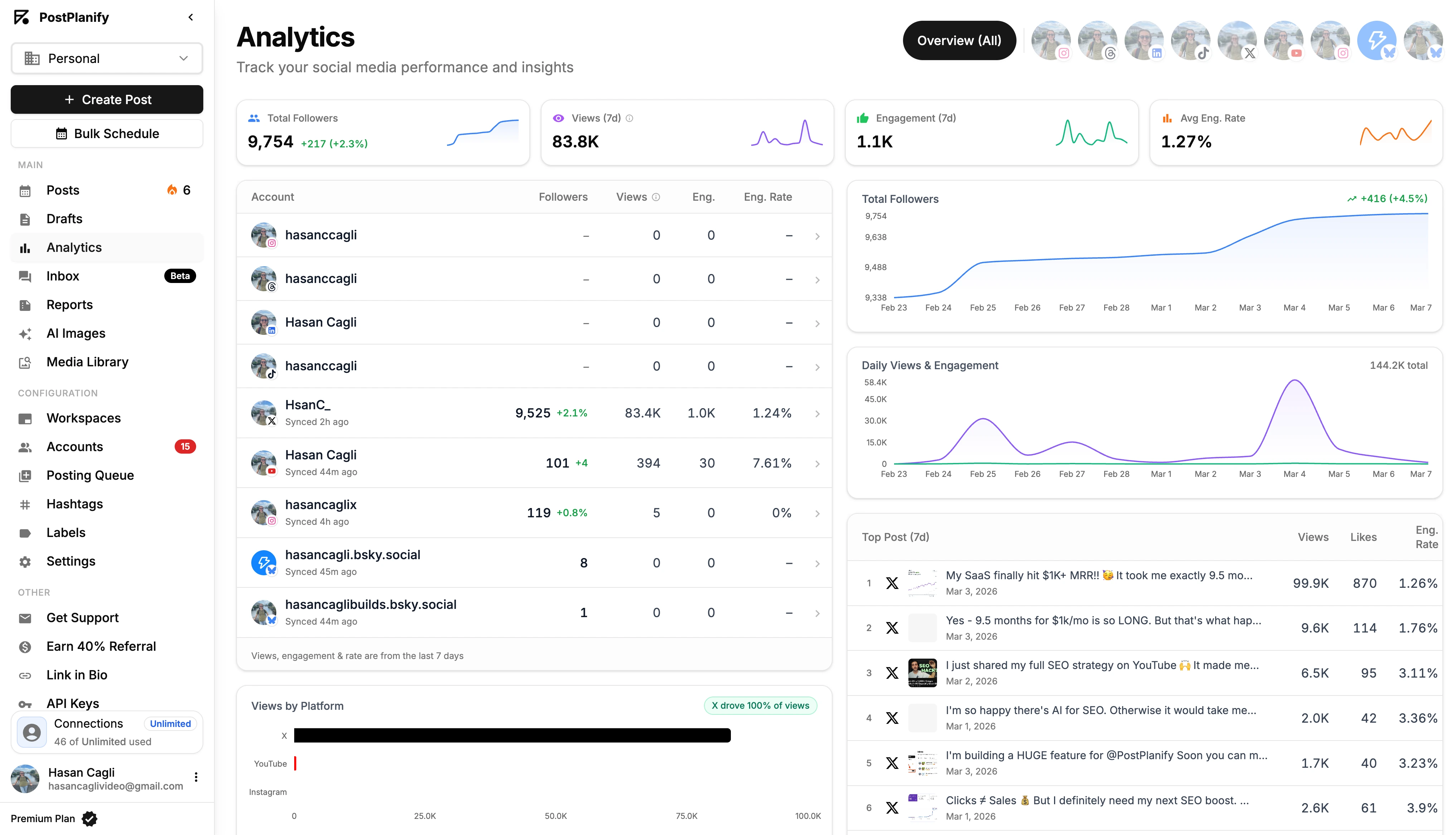
- Social inbox: manage comments and messages from 7 platforms (Instagram, Facebook, LinkedIn, Google Business, YouTube, Threads, and Bluesky) in one place.

- AI assistant: vision-powered caption generation, hashtag suggestions, and content ideas.
- Content calendar: drag-and-drop scheduling calendar with day, week, and month views, plus bulk scheduling.
- Team collaboration: unlimited team members and client approvers on every plan, with single and multi-step approval workflows and role-based access included from the entry plan.
- Media library: store and organize images, videos, and brand assets, with Canva and Google Drive imports.
- Link in bio: customizable landing pages with click analytics.
- Client reporting: branded analytics reports on Premium, with full white labeling of the dashboard, client emails, and reports on Scale.
Platform-Specific Schedulers
PostPlanify has dedicated scheduling tools for each platform: Instagram scheduler, Facebook scheduler, TikTok scheduler, X/Twitter scheduler, LinkedIn scheduler, YouTube scheduler, Pinterest scheduler, Threads scheduler, and Bluesky scheduler.
Pricing
| Plan | Starts at | Includes | Each extra workspace | Social accounts |
|---|---|---|---|---|
| Growth | $39/mo | 1 workspace | from $29, cheaper as you add more | 4 per workspace |
| Premium | $99/mo | 3 workspaces | from $39, cheaper as you add more | 6 per workspace |
| Scale | $199/mo | 5 workspaces | from $39, cheaper as you add more | 8 per workspace |
Unlimited team members on every plan, no per-seat fees. Yearly billing saves 20%. All plans include a 7-day free trial with a 14-day money-back guarantee.
You pay per client workspace, and each one after the first costs less: $39/mo for one, $97/mo for three, $250/mo for ten.
- Growth (from $39/mo, 4 accounts per workspace): unlimited posts, analytics, social inbox, approval workflows, bulk scheduling
- Premium (from $99/mo, 6 accounts): adds client reports, team comments, AI brand voice, and API access
- Scale (from $199/mo, 8 accounts): adds full white labeling, dedicated onboarding, and priority support
Pros
- Analytics across all 10 platforms on every plan, not just scheduling
- Unlimited team members and client approvers on every plan
- Per-platform post customization with live previews
- AI-powered captions and hashtag suggestions
- Billed per client workspace, so neither channels nor seats inflate the price
Cons
- Newer platform, smaller community compared to legacy tools
- No free plan (7-day trial available)
Best For
Agencies and freelancers running social for local-business clients, where each client needs its own calendar, inbox, approvals, and report, without per-seat or per-channel pricing surprises.
2. Buffer

Buffer is one of the longest-running social media scheduling tools, known for its clean interface and straightforward approach. It supports posting to Instagram, Facebook, TikTok, X, LinkedIn, Pinterest, YouTube, Threads, Bluesky, Mastodon, and Google Business Profile.
Key Features
- Simple, clean scheduling interface
- AI Assistant for caption generation
- Start Page (link in bio tool)
- Engagement tools for comments
- Basic analytics and reporting
- Browser extension for quick sharing
Pricing
- Free: $0 (3 channels, basic tools)
- Essentials: $6/channel/mo
- Team: $12/channel/mo
The per-channel model means costs increase as you add accounts. Managing 10 channels on the Essentials plan costs $60/mo; on Team, $120/mo.
Pros
- Very easy to learn and use
- Free plan available for basic needs
- Supports 11 platforms
- Clean, distraction-free interface
Cons
- Per-channel pricing scales up fast
- Limited engagement and listening tools
- Basic analytics compared to alternatives
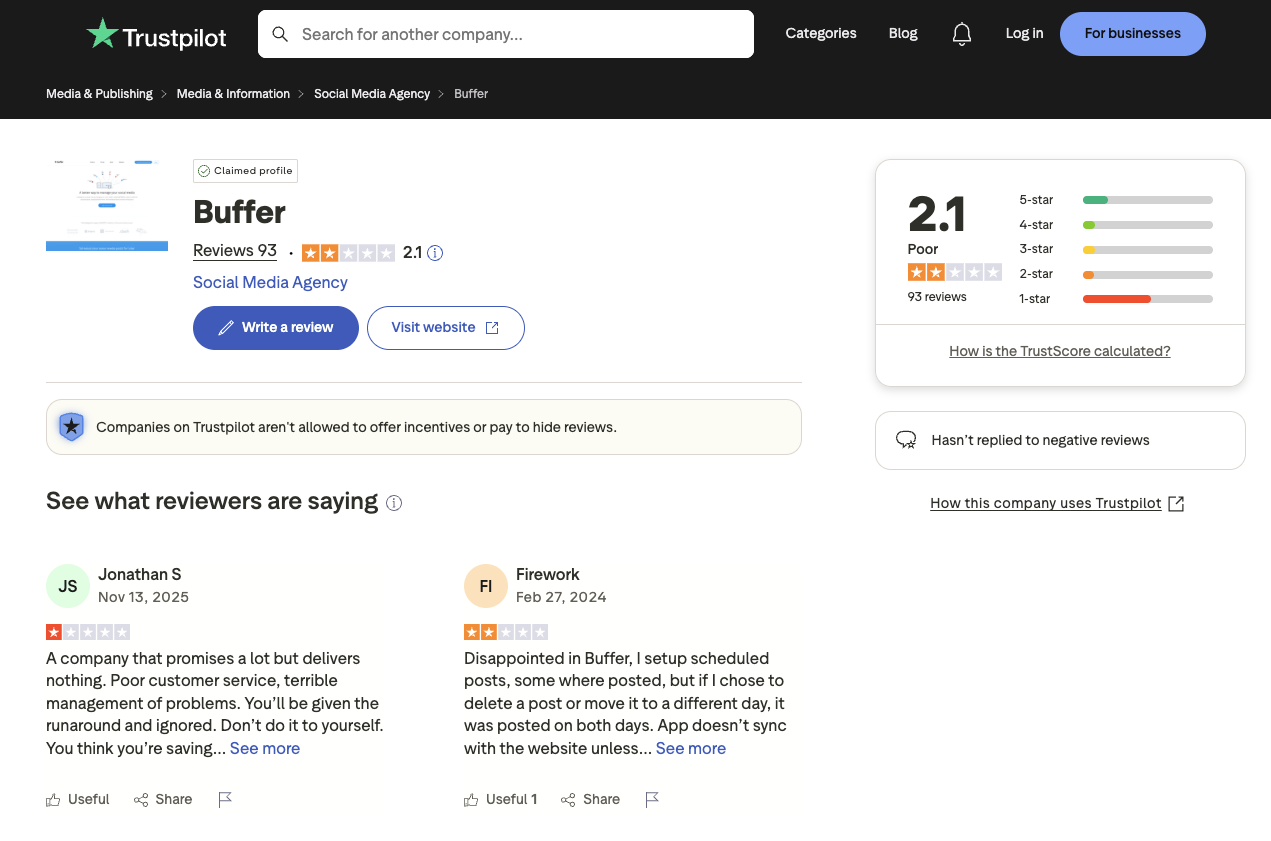
- Trustpilot rating of 2.1/5 (93 reviews) suggests some user frustration
User Ratings
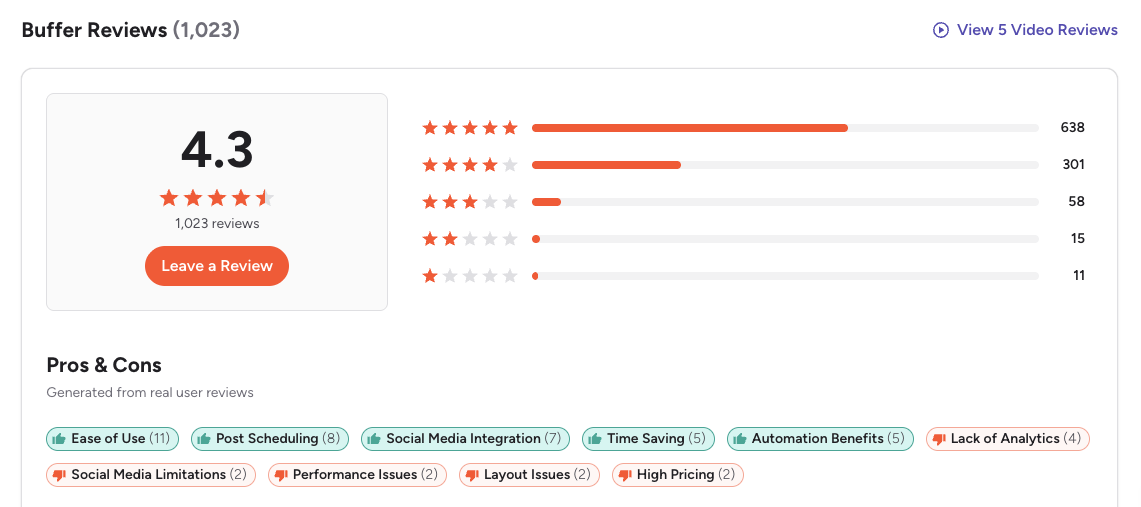
- G2: 4.3/5 (1,023 reviews)
- Trustpilot: 2.1/5 (93 reviews)
How It Compares
- Free plan available but limited to 3 channels with basic features
- Essentials at $6/channel/mo is affordable for 1-3 accounts, but managing 10+ channels costs more than most flat-rate alternatives
- Team at $12/channel/mo adds approval workflows and collaboration, though per-channel pricing makes team plans expensive at scale
- Buffer's simplicity is its strength, but if you need analytics depth, a social inbox, or advanced team features, you'll need to look elsewhere
Dig deeper: Buffer pricing breakdown, Buffer reviews, best Buffer alternatives, and Buffer vs PostPlanify.
3. Hootsuite

Hootsuite is one of the most recognized names in social media management, serving enterprise-level organizations with broad platform support and a large feature set. It supports Instagram, Facebook, TikTok, X, LinkedIn, Pinterest, YouTube, and Threads.
Key Features
- Bulk scheduling and content calendar
- Social listening and monitoring
- Ad management integration
- Team collaboration with approval workflows
- Custom analytics and reporting
- AI-powered content suggestions
Pricing
- Standard: $99/user/mo (up to 10 social accounts)
- Professional: $199/user/mo (unlimited accounts)
- Advanced: $399/user/mo (unlimited accounts, approval workflows, bulk scheduling)
- Enterprise: Custom pricing
Hootsuite's per-user pricing adds up fast. A 3-person team on Standard pays $297/mo, and $1,197/mo if they need approval workflows, which only start on Advanced.
Pros
- Strong brand recognition and enterprise trust
- Comprehensive social listening tools
- Large integration ecosystem
- Helpful for managing metrics at scale
Cons
- Extremely expensive per-user pricing
- Users report posting issues and scheduler bugs
- Customer support delays noted in reviews
- Trustpilot rating of 1.8/5 (511 reviews), the lowest on this list
User Ratings
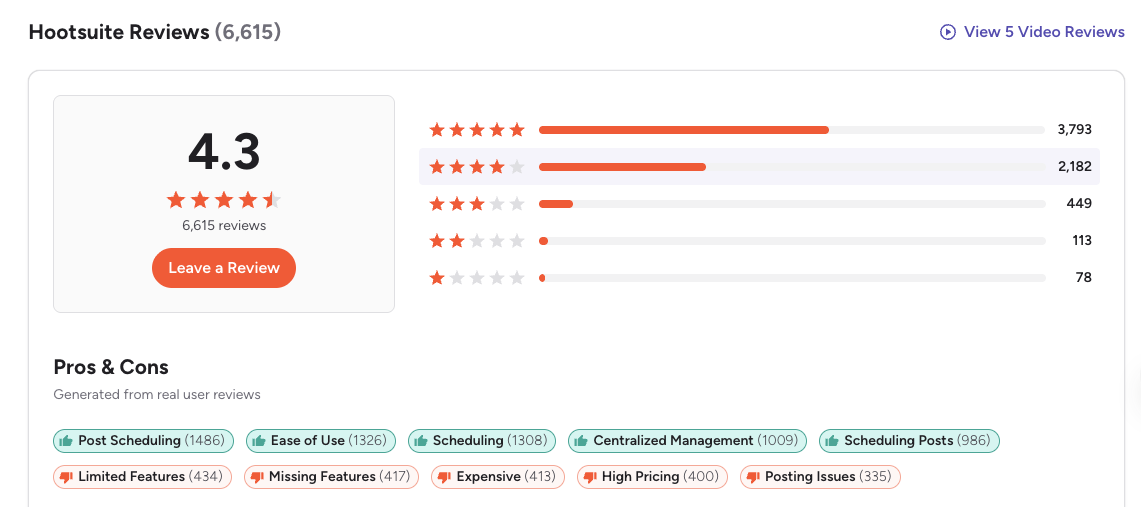
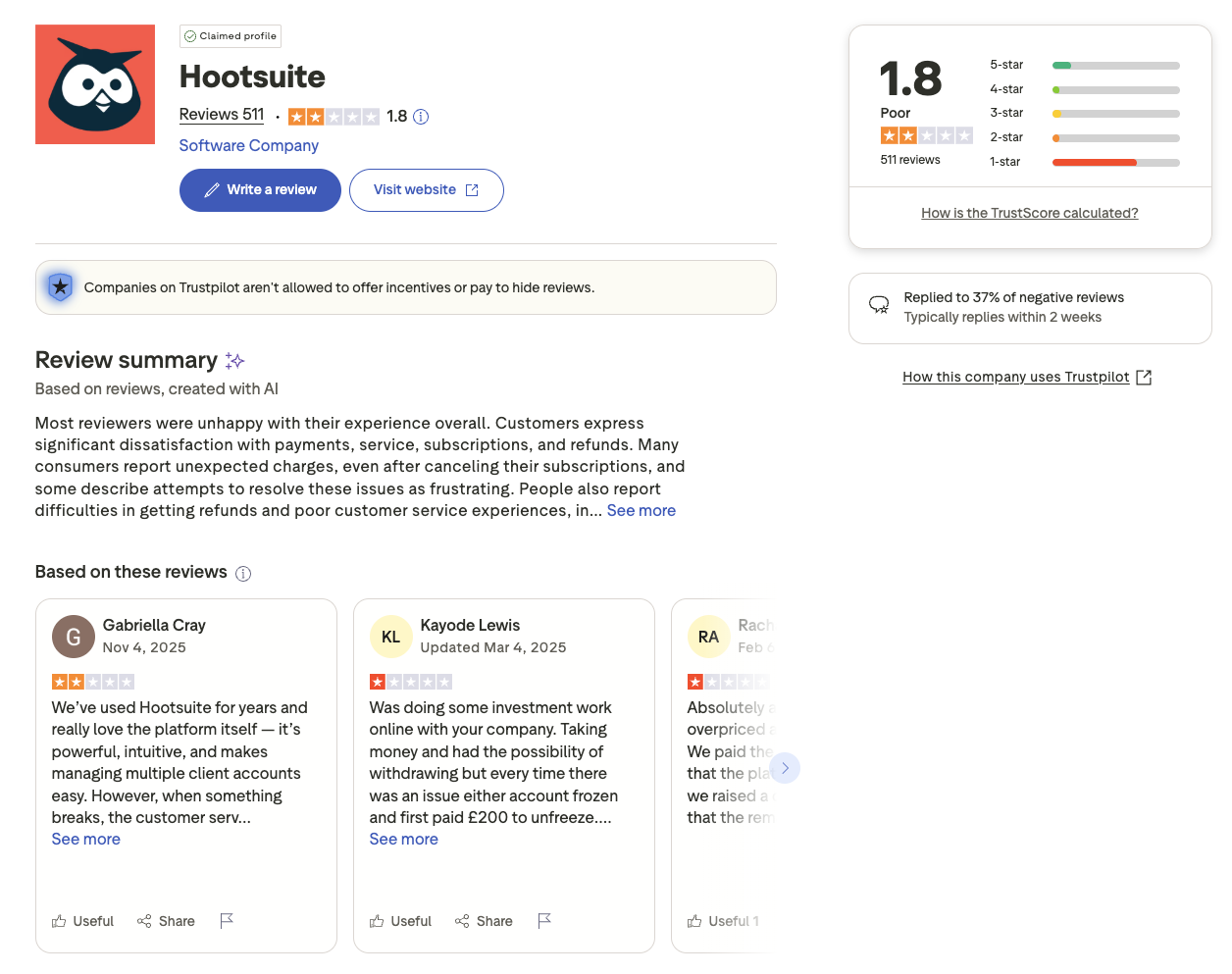
- G2: 4.3/5 (6,615 reviews)
- Trustpilot: 1.8/5 (511 reviews)
How It Compares
- Standard at $99/user/mo looks reasonable until you multiply it by every seat
- Advanced at $399/user/mo is the only tier with approval workflows, which puts basic team review out of reach for small budgets
- Enterprise pricing is custom and typically requires an annual commitment
- Hootsuite offers deep functionality, but the price-to-value ratio has drawn significant criticism from users migrating to more affordable alternatives
Dig deeper: Hootsuite pricing breakdown, Hootsuite reviews, best Hootsuite alternatives, and Hootsuite vs PostPlanify.
PostPlanifyAll your social media in one simple dashboard
Schedule posts, track analytics, and reply to comments/DMs without switching tabs.
Engagement
+18%
Views
52.8k
4. Sprout Social

Sprout Social is an enterprise-grade social media management platform focused on analytics, social listening, and CRM-level customer engagement. It supports Instagram, Facebook, TikTok, X, LinkedIn, Pinterest, YouTube, and Threads, among others.
Key Features
- Advanced analytics with custom report builder
- Social listening and sentiment analysis
- Smart Inbox for unified message management
- CRM-style contact management
- Employee advocacy tools
- Publishing calendar with approval workflows
Pricing
- Essentials: $99/seat/mo, or $79 billed annually (up to 5 social profiles)
- Standard: $199/seat/mo (up to 5 social profiles)
- Professional: $299/seat/mo (unlimited profiles)
- Advanced: $399/seat/mo (adds listening and automation)
- Enterprise: Custom pricing
Per-seat pricing means costs multiply with each team member. A 5-person team on Standard pays $995/mo.
Pros
- Industry-leading analytics and reporting (720+ G2 mentions)
- Powerful social listening capabilities
- CRM-level engagement tracking
- Intuitive scheduling workflow (789+ G2 mentions)
Cons
- Per-seat pricing is prohibitively expensive for most teams
- Users report price increases without corresponding feature improvements
- Missing features noted by 498 G2 reviewers
- Overkill for creators and small businesses
User Ratings
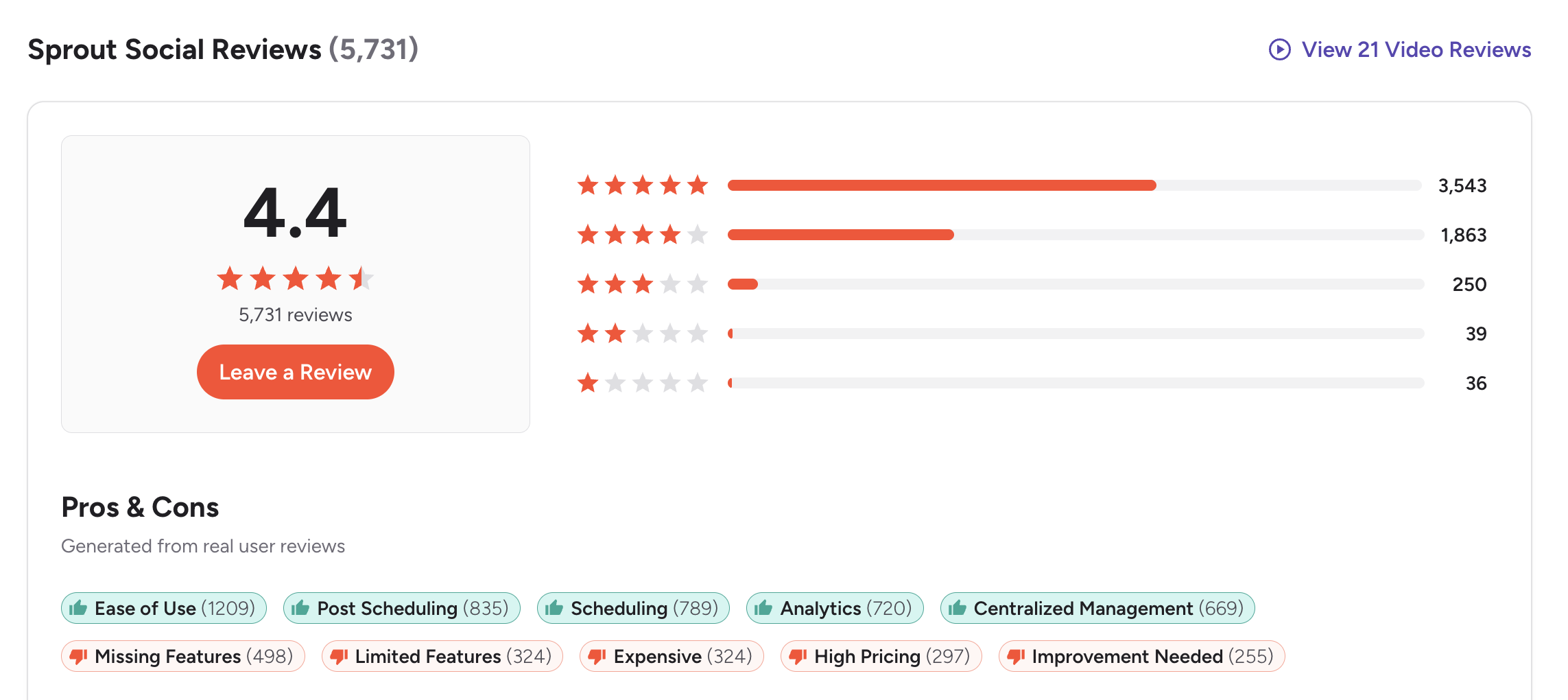
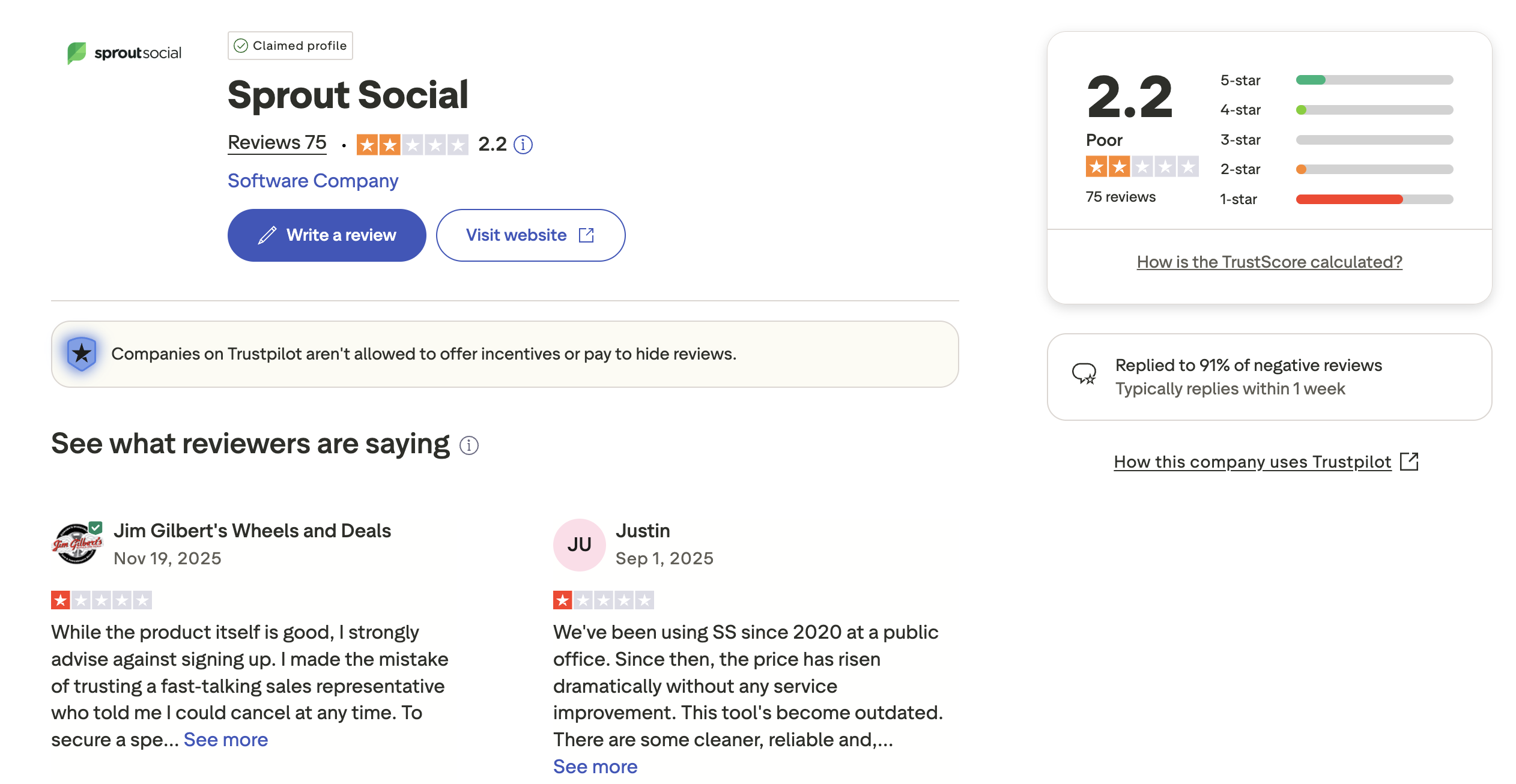
- G2: 4.4/5 (5,731 reviews)
- Trustpilot: 2.2/5 (75 reviews)
How It Compares
- Standard at $199/seat/mo offers solid scheduling and analytics but limits you to 5 profiles
- Professional at $299/seat/mo unlocks unlimited profiles and competitive reports
- Advanced at $399/seat/mo adds social listening and automation, features included free or at lower cost by other tools
- Sprout Social excels in enterprise analytics and customer care, but most teams neither need nor can afford that depth
Dig deeper: Sprout Social pricing breakdown, Sprout Social reviews, and best Sprout Social alternatives.
5. Later

Later started as an Instagram-first visual planner and has expanded to support Facebook, TikTok, LinkedIn, Pinterest, YouTube, Threads, and Snapchat. Notably, Later dropped X (Twitter) support, which is worth considering if X is part of your strategy.
Key Features
- Visual content calendar with drag-and-drop
- Linkin.bio (link in bio tool)
- Best time to post suggestions
- User-generated content tools
- Instagram Story and Reel scheduling
- Media library with labels and search
Pricing
- Starter: $25/mo (1 social set, 8 profiles, 30 posts per profile)
- Growth: $50/mo (2 social sets, 2 users)
- Scale: $110/mo (6 social sets, 4 users, unlimited posts)
Later uses a "social set" model, where one set typically includes one account per platform.
Pros
- Strong visual planning interface
- Good Instagram and Pinterest scheduling
- Linkin.bio page builder
- AI caption writing
Cons
- Dropped X (Twitter) support entirely
- Analytics limited on lower plans
- Social set model can be confusing
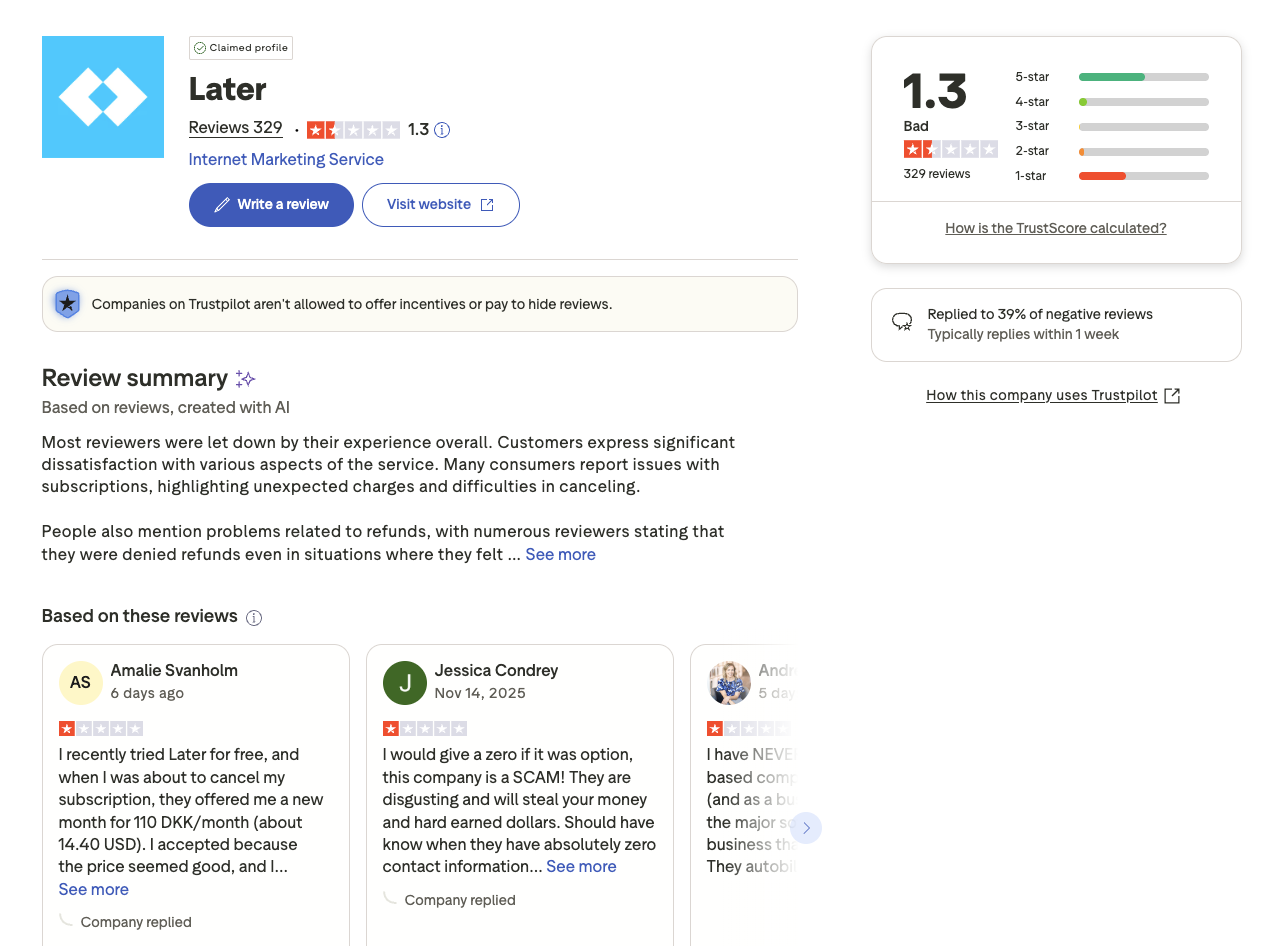
- Trustpilot rating of 1.3/5 (329 reviews), signalling significant user dissatisfaction
User Ratings
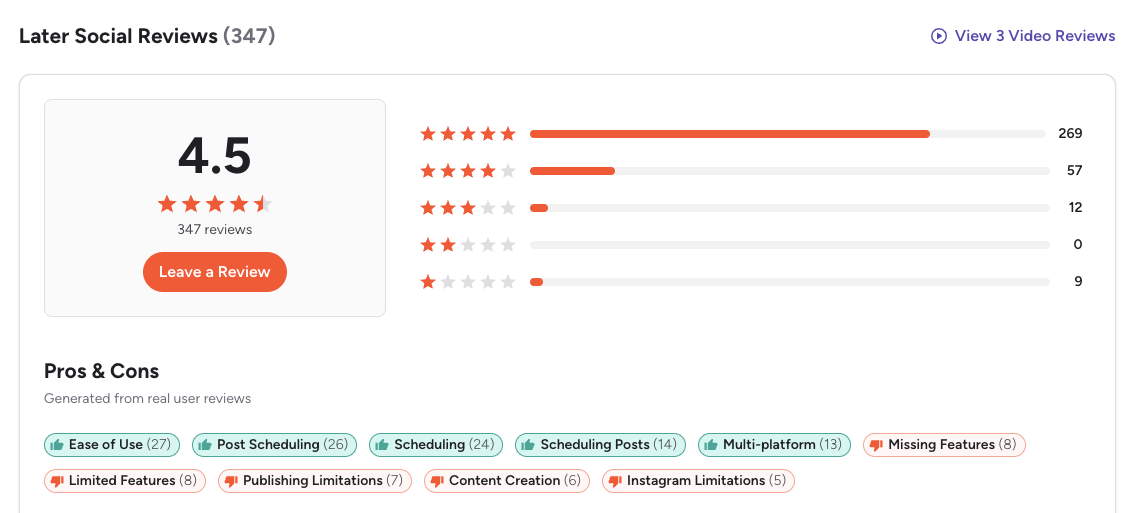
- G2: 4.5/5 (347 reviews)
- Trustpilot: 1.3/5 (329 reviews)
How It Compares
- Starter at $25/mo is limited to 1 social set, so you'll need Growth ($50/mo) for multiple brand accounts
- Growth at $50/mo unlocks 2 social sets, a second user, and more analytics
- Scale at $110/mo adds 6 social sets and advanced analytics, but still lacks X support
- Later works well for visual-first brands focused on Instagram and Pinterest, but the lack of X support and limited analytics on starter plans make it restrictive for broader multi-platform strategies
Dig deeper: Later pricing breakdown, Later reviews, and best Later alternatives.
6. SocialBee

SocialBee differentiates itself through category-based content scheduling and content recycling. It supports Instagram, Facebook, TikTok, X, LinkedIn, Pinterest, YouTube, Threads, Bluesky, and Google Business Profile.
Key Features
- Category-based content scheduling
- Content recycling and evergreen posting
- AI content generation (Copilot)
- Canva and Unsplash integration
- RSS feed automation
- Workspace-based organization
Pricing
- Bootstrap: $29/mo (5 social profiles, 1 workspace)
- Accelerate: $49/mo (10 social profiles, 1 workspace)
- Pro: $99/mo (25 social profiles, 5 workspaces)
Pros
- Category-based scheduling is unique and effective for content variety
- Strong customer service (33+ G2 mentions)
- 10 platform support including Bluesky
- Content recycling saves time for evergreen content
Cons
- Layout and interface can feel complex for new users
- Scheduling issues reported by some users
- Limited advanced analytics
- Category system has a learning curve
User Ratings
- G2: 4.8/5 (472 reviews), the highest G2 rating on this list
- Trustpilot: 4.0/5 (43 reviews)
How It Compares
- Bootstrap at $29/mo covers 5 profiles with core scheduling and recycling features
- Accelerate at $49/mo doubles profiles to 10 and adds more content categories
- Pro at $99/mo unlocks 25 profiles and 5 workspaces for agencies
- SocialBee's category-based scheduling and content recycling are genuinely unique features, but if you need deep analytics, a social inbox, or team approval workflows, you'll need to pair it with other tools
Dig deeper: SocialBee pricing breakdown, SocialBee reviews, and best SocialBee alternatives.
7. SocialPilot
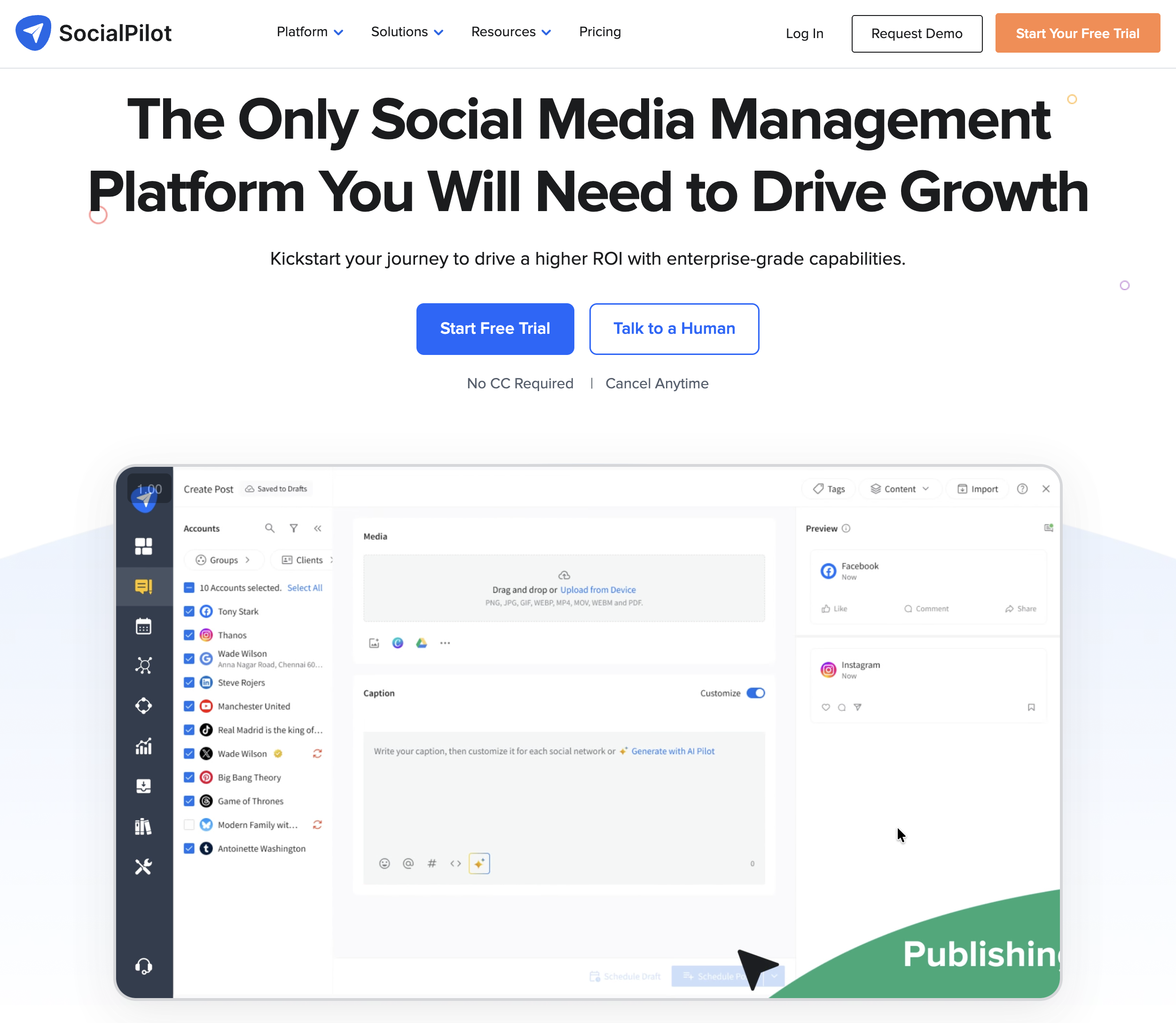
SocialPilot is built with agencies in mind, offering client management, white-label reports, and bulk scheduling. It supports Instagram, Facebook, TikTok, X, LinkedIn, Pinterest, YouTube, Threads, Bluesky, Tumblr, and Google Business Profile.
Key Features
- Bulk scheduling (up to 500 posts)
- Client management and white-label branding
- Content curation and RSS feeds
- Social inbox for engagement
- Team collaboration with approval workflows
- Analytics and PDF reporting
Pricing
- Essentials: $30/mo (7 social accounts)
- Standard: $50/mo (15 social accounts)
- Premium: $100/mo (25 social accounts)
- Ultimate: $200/mo (50 social accounts)
- Enterprise: Custom pricing
Pros
- Agency-friendly with client management tools
- Supports 11 platforms
- Bulk scheduling for up to 500 posts
- Reasonable pricing for the account limits
Cons
- Interface can feel cluttered
- Platform-specific limitations (especially Instagram direct publishing)
- Limited deep social analytics
- Loading issues with large posts reported by users
User Ratings
- G2: 4.5/5 (841 reviews)
- Trustpilot: 2.4/5 (33 reviews)
How It Compares
- Essentials at $30/mo covers 7 accounts, a solid entry point for small agencies
- Standard at $50/mo adds 15 accounts and more team features
- Premium at $100/mo unlocks 25 accounts with advanced analytics
- Ultimate at $200/mo scales to 50 accounts for larger agencies
- SocialPilot offers good value for agencies managing many client accounts, but the interface and analytics depth don't match enterprise tools
Dig deeper: SocialPilot pricing breakdown, SocialPilot reviews, and best SocialPilot alternatives.
PostPlanifyAll your social media in one simple dashboard
Schedule posts, track analytics, and reply to comments/DMs without switching tabs.
Engagement
+18%
Views
52.8k
8. Publer
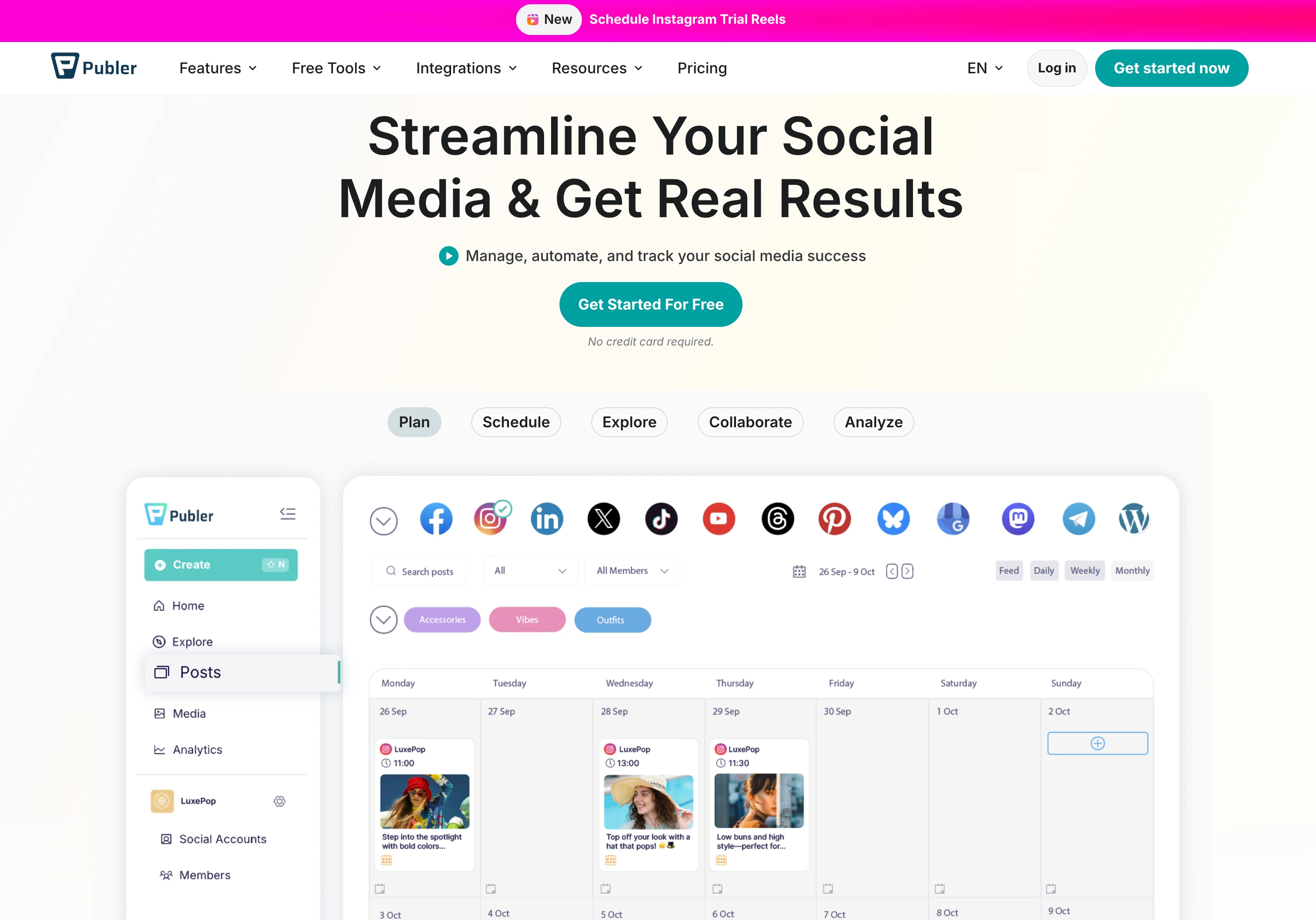
Publer supports one of the widest platform ranges on this list, 12+ platforms, with a straightforward pricing model. It covers Instagram, Facebook, TikTok, X, LinkedIn, Pinterest, YouTube, Threads, Google Business Profile, WordPress, Telegram, and Mastodon.
Key Features
- Auto-scheduling and recurring posts
- Bulk scheduling with CSV import
- Content recycling
- Built-in photo and video editor
- Link in bio page
- Browser extension
Pricing
- Free: $0 (3 social accounts, basic features)
- Professional: $12/mo (varies by accounts)
- Business: $21/mo (more accounts and features)
- Enterprise: Custom pricing
Pros
- 12+ platform support, the broadest on this list
- Free plan available
- Affordable Professional plan starting at $12/mo
- Strong Trustpilot rating of 4.8/5 (863 reviews)
Cons
- Per-account pricing gets expensive at scale
- Analytics could be more comprehensive
- Less advanced team collaboration features
- Content recycling is simpler than SocialBee's category system
User Ratings
- G2: 4.7/5 (486 reviews)
- Trustpilot: 4.8/5 (863 reviews), the highest Trustpilot rating on this list
How It Compares
- Free plan gives you 3 accounts with basic scheduling
- Professional at $12/mo is one of the cheapest paid plans available
- Business at $21/mo adds team features and more accounts
- Publer offers excellent value for creators who need wide platform support at a low price, but it lacks the analytics depth, social inbox, and team collaboration tools that growing teams need
Dig deeper: Publer pricing breakdown, Publer reviews, and best Publer alternatives.
9. Loomly

Loomly markets itself as a "brand success platform" with a focus on content creation workflows and approval processes. It supports Instagram, Facebook, TikTok, X, LinkedIn, Pinterest, YouTube, Threads, Snapchat, Google Business Profile, and custom channels.
Key Features
- Post ideas and optimization tips
- Content calendar with approval workflows
- Automated publishing and scheduling
- Interaction tracking
- Advanced analytics on higher plans
- Custom channel support via Zapier
Pricing
- Starter: $65/mo, or $49 billed annually (12 accounts, 3 users)
- Beyond: $332/mo, or $249 annually (60 accounts, unlimited users)
- Enterprise: custom pricing
There is no free plan, only a 15-day trial, and no mid-tier between Starter and Beyond.
- Enterprise: Custom pricing
The $267 gap between Starter and Beyond is one of the biggest price jumps on this list.
Pros
- Content idea suggestions and optimization tips
- Good approval workflow system
- Clean calendar interface
- Supports 11 platforms including Snapchat
Cons
- Massive pricing gap between Starter ($65) and Beyond ($332)
- Instagram publishing limitations reported by users
- Limited analytics on lower plans
- Customer support concerns, with a Trustpilot score of 1.7/5
User Ratings
- G2: 4.6/5 (1,793 reviews)
- Trustpilot: 1.7/5 (26 reviews)
How It Compares
- No free plan, only a 15-day trial
- Starter at $65/mo covers 12 accounts and 3 users, which is reasonable for small teams
- Beyond at $332/mo is a dramatic jump that prices out most mid-size teams
- Loomly's content workflow tools are solid, but the pricing gap and Instagram limitations make scaling difficult without a big budget increase
Dig deeper: Loomly pricing breakdown, Loomly reviews, and best Loomly alternatives.
10. Planable

Planable focuses heavily on content collaboration and visual approval workflows. It supports Instagram, Facebook, TikTok, X, LinkedIn, Pinterest, YouTube, Threads, and Google Business Profile.
Key Features
- Visual approval workflows (4 approval types)
- Real-time collaboration and comments
- Content calendar with multiple views
- Mock-up previews for each platform
- Custom labels and filtering
- Role-based permissions
Pricing
- Basic: $39/workspace/mo (60 posts/mo, 4 social pages, unlimited users)
- Pro: $59/workspace/mo (150 posts/mo, 10 social pages, unlimited users)
- Enterprise: custom pricing
There is no free plan, but your first 50 posts are free with no time limit. Analytics ($14/workspace/mo), the social inbox ($9) and social listening ($99) are paid add-ons on Basic and Pro.
- Enterprise: Custom pricing
Planable charges per workspace, so managing multiple brands means multiplying the cost.
Pros
- Best-in-class approval workflows
- Real-time collaboration and comments on posts
- Clean, visual interface (104+ G2 ease-of-use mentions)
- Strong Trustpilot rating of 4.5/5
Cons
- Per-workspace pricing scales quickly for multi-brand management
- Analytics ($14/workspace/mo) and the social inbox ($9) are paid add-ons rather than included features
- Limited scheduling depth compared to dedicated scheduling tools
- Monthly post caps of 60 on Basic and 150 on Pro
User Ratings
- G2: 4.6/5 (937 reviews)
- Trustpilot: 4.5/5 (69 reviews)
How It Compares
- No free plan: the first 50 posts are free with no time limit, which works as a trial rather than a tier
- Basic at $39/workspace/mo limits you to 1 user per workspace
- Pro at $59/workspace/mo unlocks unlimited users and more advanced features
- Planable is the strongest option for teams that prioritize content approval and collaboration, but it's not a full social media management tool, so you'll likely need additional tools for analytics and engagement
Dig deeper: Planable pricing breakdown, Planable reviews, and best Planable alternatives.
11. Sendible

Sendible is an agency-focused platform with white-label capabilities and a wide tier structure. It supports Instagram, Facebook, TikTok, X, LinkedIn, YouTube, Google Business Profile, WordPress, Canva, and more.
Key Features
- White-label dashboard and reports
- Smart Compose Box with platform-specific previews
- Content suggestions and RSS integration
- Priority inbox for engagement
- Client management tools
- Custom report builder
Pricing
- Core: $35/mo (6 profiles, 1 workspace)
- Plus: $99/mo (18 profiles, 3 workspaces)
- Premium: $199/mo (42 profiles, 7 workspaces)
- Elite: $299/mo (90 profiles, 15 workspaces)
- Enterprise: $750/mo (300 profiles, 50 workspaces)
Users are unlimited on every tier, and white label is a paid add-on on Elite and above.
- Enterprise: $750/mo (400+ profiles)
Pros
- Strong white-label and agency features
- Wide pricing tier range for different agency sizes
- Priority inbox for engagement management
- Custom report builder
Cons
- $64 gap between Core ($35) and Plus ($99)
- Small Trustpilot sample of only 8 reviews
- Scheduling and publishing limitations reported
- Instagram connectivity issues mentioned by users
User Ratings
- G2: 4.5/5 (899 reviews)
- Trustpilot: 2.3/5 (8 reviews)
How It Compares
- Core at $35/mo covers 6 profiles and one workspace, a competitive entry point
- Plus at $99/mo triples profiles to 18 and adds client dashboards and approvals
- Scale at $199/mo and Advanced at $299/mo target mid-size agencies
- Enterprise at $750/mo handles 400+ profiles for large agencies
- Sendible's white-label capabilities and tiered pricing make it practical for agencies at various sizes, but the reported scheduling issues and small Trustpilot sample make it worth testing thoroughly before committing
Dig deeper: Sendible pricing breakdown, Sendible reviews, and best Sendible alternatives.
How to Choose the Right App
With 11 options on the table, here's a framework for narrowing it down:
By Budget
- Under $30/mo: Buffer (free or $6/channel), Publer ($12/mo), SocialBee ($29/mo), Sendible ($29/mo)
- $30-$100/mo: PostPlanify Growth (from $39/mo per workspace), SocialPilot ($30-$100/mo), Later ($25-$110/mo)
- $100+/mo: PostPlanify Premium/Scale, Hootsuite (from $99/user/mo), Sprout Social (from $99/seat/mo), Loomly ($65-$332/mo)
By Use Case
- Solo creators: Buffer (simplicity), PostPlanify (analytics + scheduling), Publer (wide platform support)
- Small teams: PostPlanify (unlimited users and approvals on every plan), SocialBee (content recycling), Planable (approvals)
- Agencies: SocialPilot (client management), Sendible (white-label), PostPlanify (one workspace per client, unlimited users)
- Enterprise: Sprout Social (listening + CRM), Hootsuite (brand recognition), Loomly (content workflows)
By Platform Needs
- Broadest support (12+): Publer
- All major platforms + Bluesky + Google Business: PostPlanify, SocialBee, SocialPilot
- No X (Twitter): Later, so if X is important, look elsewhere
Real Cost of Managing 10 Social Accounts
Pricing pages can be misleading. Here's what each tool actually costs when you're managing 10 social accounts with a team of 3:
| Tool | Pricing Model | Cost for 10 Accounts (3 Users) | Notes |
|---|---|---|---|
| PostPlanify | Per workspace | $97/mo (3 workspaces) | 12 accounts across 3 client workspaces, unlimited users, approvals included |
| Buffer | Per channel | $60-$120/mo | $6-$12 per channel × 10 |
| Hootsuite | Per user | $297/mo | $99/user × 3 users, and $1,197 if you need approvals on Advanced |
| Sprout Social | Per seat | $297-$897/mo | $99-$299/seat × 3 seats |
| Later | Social sets | $50-$110/mo | Need Growth ($50) or Scale ($110) |
| SocialBee | Flat rate | $49/mo (Accelerate) | 10 profiles, 1 workspace |
| SocialPilot | Flat rate | $50/mo (Standard) | 15 accounts, 3 users |
| Publer | Per account | $21+/mo | Business plan; scales with accounts |
| Loomly | Flat rate | $65/mo (Starter) | 12 accounts and 3 users; a 4th user forces Beyond at $332 |
| Planable | Per workspace | $39-$59/mo | Per workspace; 1 brand = 1 workspace |
| Sendible | Flat rate | $99/mo (Plus) | 18 profiles across 3 workspaces, unlimited users |
The biggest takeaway: per-user and per-seat models (Hootsuite, Sprout Social) multiply with every person you add, so a 3-person team pays roughly 3x what one person does. Tools billed per workspace or per tier charge the same whether the team is one person or ten.
Watch Out For
- Per-channel pricing (Buffer): affordable at 3 accounts, expensive at 10+
- Per-seat pricing (Hootsuite, Sprout Social): costs multiply with each team member
- Per-workspace pricing (Planable): managing multiple brands gets costly
- Pricing gaps (Loomly's $267 jump, Sendible's $64 jump from Core to Plus): make sure the next tier up fits your budget
- Limited analytics on lower plans (Later, Loomly, Buffer): you may need to upgrade just for reporting
Multi-Platform Posting: Frequently Asked Questions
What is the best app to post to all social media at once?
It depends on your needs and budget. For an all-in-one solution with scheduling, analytics, a social inbox, and team collaboration, PostPlanify covers 10 platforms from $39/mo per client workspace, with unlimited users on every plan. For the widest platform support, Publer covers 12+. For enterprise-level analytics and listening, Sprout Social leads the space.
Can I post to all social media platforms for free?
Buffer and Publer both offer free plans, but they're limited: Buffer's free plan covers 3 channels with basic tools, and Publer's free plan covers 3 accounts. For serious multi-platform posting, a paid plan is generally necessary.
Is it better to post the same content on all platforms?
No. While cross-posting saves time, you should adapt your content for each platform, since caption lengths, hashtag strategies, aspect ratios, and posting times. Tools like PostPlanify let you customize each post per platform from a single composer.
How much do social media management tools cost?
Prices range from free (Buffer, Publer) to $750/mo (Sendible Enterprise) or custom enterprise pricing (Hootsuite, Sprout Social). Many mid-tier tools cost $25-$200/mo, while agency tiers with reporting and approvals often run higher. Watch out for per-channel, per-seat, or per-workspace pricing models that can significantly increase costs as you scale.
Which tool supports the most social media platforms?
Publer supports 12+ platforms including WordPress, Telegram, and Mastodon. SocialPilot and Buffer both support 11 platforms. PostPlanify supports 10 platforms and SocialBee supports 10, both including Bluesky.
Do I need a social media management tool, or can I just use native scheduling?
Most platforms now offer native scheduling (Instagram, Facebook, TikTok, YouTube, LinkedIn, Pinterest, X). But native tools don't let you manage everything from one dashboard, compare analytics across platforms, or collaborate with a team. If you manage more than 2-3 platforms, a scheduling tool saves significant time.
What's the difference between a scheduler and a social media management tool?
A scheduler focuses on publishing: queue posts, set times, publish. A full management tool adds analytics, engagement tracking, social inbox, team collaboration, content calendars, and reporting. Most tools on this list are full management platforms, not just schedulers.
Can I manage client accounts with these tools?
Yes. SocialPilot, Sendible, PostPlanify, and Hootsuite all offer client management features. SocialPilot and Sendible are specifically built for agencies with white-label reports and client dashboards. PostPlanify offers flat-rate pricing with 6 users on Premium, 12 on Scale, and unlimited team members on Enterprise; Scale adds white-label PDF reports for agencies managing multiple brands.
Which tool has the best analytics?
For enterprise-grade analytics with social listening and sentiment analysis, Sprout Social is the industry leader. For comprehensive analytics across all supported platforms at a lower price point, PostPlanify includes analytics for all 10 platforms on every plan. Buffer and Later offer basic analytics, with more detailed reporting locked behind higher tiers.
Making the Switch
If you're currently managing social media natively or using a tool that's not meeting your needs, switching is straightforward with most platforms:
- Export your content calendar from your current tool (most support CSV export)
- Connect your social accounts to the new platform, which takes minutes, not hours
- Import or recreate your scheduled posts, since tools like SocialPilot and Publer support bulk CSV import
- Set up your team: invite members and configure approval workflows
- Run both tools in parallel for 1-2 weeks to ensure nothing falls through the cracks
Most tools offer free trials (PostPlanify offers a 7-day trial, Buffer has a free plan, Publer has a free tier), so you can test before fully committing.
Bottom Line
There's no single "best" app for posting to all social media at once: it depends on how many platforms you use, how large your team is, and what you need beyond scheduling. If analytics, social inbox, and team collaboration matter as much as posting, look for tools that include those without per-seat or per-channel upcharges. If you just need to schedule posts across a few accounts, a simpler tool with a free plan may be enough. Whatever you choose, test it with your actual workflow before committing, since most tools offer free trials or free tiers for exactly that reason.
Related Reading
- Best Social Media Management Platform (2026): In-depth comparison of top platforms
- Social Media Scheduling Tools: Complete guide to scheduling tools
- Social Media Cross-Posting: Complete Guide: How to cross-post the right way
- How to Schedule Social Media Posts: Step-by-step scheduling guide
- How to Create a Social Media Content Calendar: Calendar planning strategies
- Social Media Analytics and Reporting: Measuring what matters
- Best Buffer Alternatives: Top Buffer competitors
- Best Hootsuite Alternatives: Hootsuite alternatives compared
- Best Sprout Social Alternatives: Sprout Social alternatives ranked
- Best Later Alternatives: Later alternatives for visual scheduling
- Best SocialBee Alternatives: SocialBee alternatives reviewed
- Best Publer Alternatives: Publer alternatives breakdown
- Best YouTube Scheduling Tools: Top tools for scheduling YouTube videos and Shorts
- Content Repurposing Strategies: Maximize content across platforms
- How to Build a Social Media Presence: Growing your brand online
- Best MCP Servers for Social Media Management: Post to everything from Claude or ChatGPT
- Best Social Media APIs for Developers: Programmatic posting, scheduling, and analytics
- Best Social Media Management Tools for Teams
PostPlanifyAll your social media in one simple dashboard
Schedule posts, track analytics, and reply to comments/DMs without switching tabs.
Engagement
+18%
Views
52.8k
About the Author

Hasan Cagli
Founder of PostPlanify, a content and social media scheduling platform. He focuses on building systems that help businesses, agencies, and teams plan, publish, and manage content and social media more efficiently across platforms.


