


To add a link to your TikTok bio, go to your Profile, tap Edit profile, tap Add next to Links (or Website), paste your URL and save. There's one catch: TikTok only shows this option if you have at least 1,000 followers or a Verified Business Account.
If you don't see the Links option, your account isn't eligible yet. Below you'll find exactly who qualifies, how to add the link, what to do if you're under 1,000 followers, and how to fit several links into one spot.
Who Can Add a Link to Their TikTok Bio?
According to TikTok Support, you can add a clickable website link to your TikTok profile if you have:
- At least 1,000 followers on a personal account, or
- A Verified Business Account.
If you meet one of these two rules, the Links field appears in Edit profile.
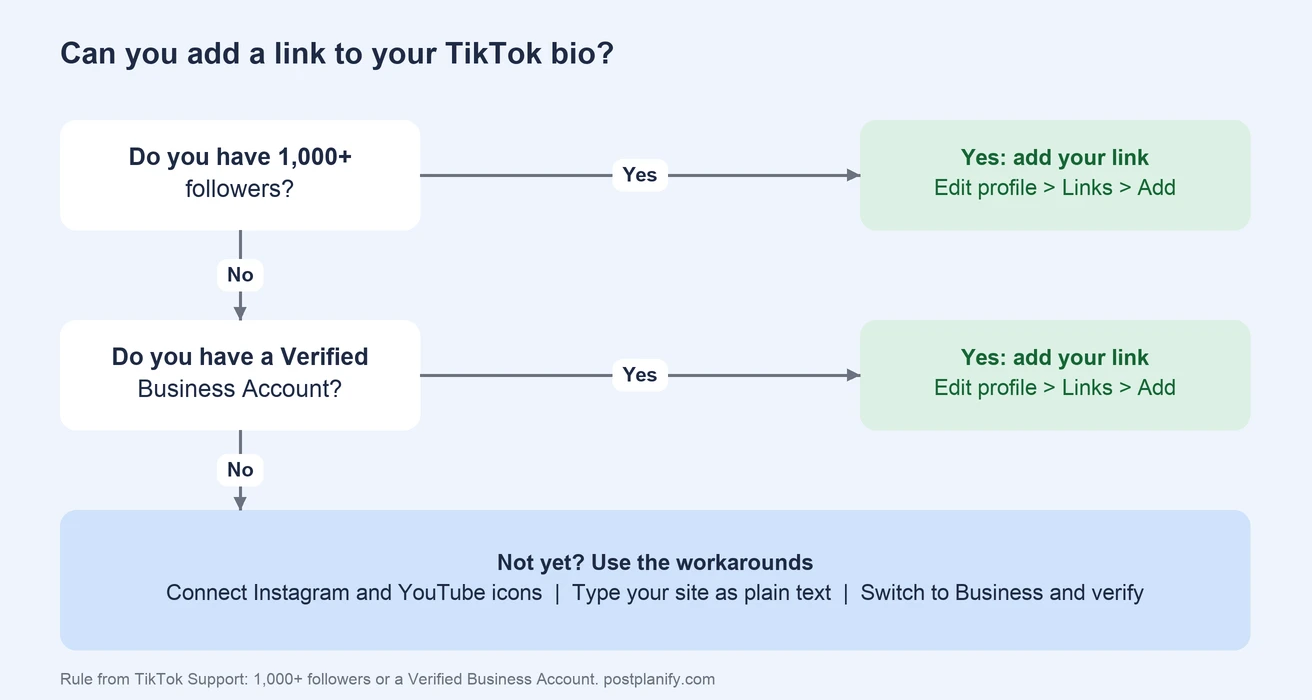
A few things can still get in the way, which we cover in the troubleshooting section below.
How to Add a Link to Your TikTok Bio (Step by Step)
- Open TikTok and tap Profile in the bottom-right corner.
- Tap Edit profile below your username.
- Find Links (on some accounts it says Website) and tap Add.
- Paste your full link, including
https://. - Tap Save.
- Go back to your profile and tap the link to make sure it works as a clickable link in your TikTok bio.
The link appears just below your bio text, and anyone who visits your profile can tap it.
A tip that saves a lot of edits: instead of linking straight to one page, link to a link in bio page that holds all your links. Then you can change where your bio points without touching TikTok at all.
How to Put a Link in Your TikTok Bio Without 1,000 Followers
If you're under 1,000 followers, you have three real options.
Option 1: Switch to a Business Account and Get Verified
A Verified Business Account can add a link no matter how many followers it has. To switch:
- Go to your Profile and tap the menu (three lines) in the top-right corner.
- Tap Settings and privacy, then Account.
- Tap Switch to Business Account and follow the steps.
Switching is free, but the link needs the account to be verified as a business, which means giving TikTok details about your business. If you're a real business, this is the fastest route.
One trade-off to know: business accounts can't use some of the popular music that personal accounts can, because of licensing. If trending sounds are central to your content, weigh that before switching.
Option 2: Connect Your Instagram and YouTube
Even without a website link, you can connect your Instagram and YouTube accounts so they show as icons on your profile. People can tap them to reach you there, and from your Instagram bio they can reach your website.
In Edit profile, look for the Instagram and YouTube fields and connect your accounts. Our guide on how to link Instagram to TikTok walks through it.
Option 3: Write the Link in Your Bio as Text
You can type your website into your bio text, like yourbrand.com. It won't be clickable, but people can still find you. Keep it short and easy to remember, and say it in your videos too.
What doesn't work: links in comments and video captions aren't clickable on TikTok either, so they're not a workaround.
How to Add More Than One Link to Your TikTok Bio
TikTok gives you one website link. If you want to send people to your shop, your newest video, a booking page and a newsletter, you need a TikTok link in bio page: a simple mobile page that lists all your links, which you then put in that one spot.
Any good link in bio tool for TikTok should:
- Load fast on phones, since almost all TikTok traffic is mobile.
- Let you reorder links so the most important one is on top.
- Track clicks, so you know which links people actually use.
- Match your brand, with your colors and photo.
PostPlanify includes a link in bio page with unlimited links and click tracking, so the same tool that schedules your TikToks also manages where your bio sends people. If you're comparing options, our roundup of the best link in bio tools covers Linktree and the main alternatives.
Managing TikTok Bio Links for Clients
If you run TikTok for several clients, every client needs their own bio link, and every campaign means updating it. In PostPlanify, each client workspace gets its own link in bio page with its own click tracking. You update a client's links in one place, and the link in their TikTok bio never has to change. When a client asks whether TikTok is sending traffic, the click data answers it.
 PostPlanify
All your social media in one simple dashboard
Schedule posts, track analytics, and reply to comments/DMs without switching tabs.

Engagement
+18%
Views
52.8k
TikTok Bio Link Not Showing? Common Fixes
If you can't add a link or it isn't showing up, check these:
| Problem | Fix |
|---|---|
| No Links or Website field in Edit profile | You're under 1,000 followers and don't have a Verified Business Account yet |
| Just passed 1,000 followers but still no option | Give it a little time, update the app, then close and reopen it |
| Switched to a business account but no link | Business accounts need to be verified before the link appears |
| Link saved but not clickable | Make sure you pasted the full URL including https:// |
| Link rejected | TikTok blocks some links, such as ones it considers unsafe or spammy. Try linking to your own website or link in bio page |
| Option is missing in your country | Features can roll out differently by region. Check that your app is up to date |
If none of these work, TikTok Support can check your account through Settings and privacy > Report a problem.
What Link Should You Put in Your TikTok Bio?
The best link depends on what you want people to do after watching:
| Goal | Link to |
|---|---|
| Sell products | Your shop or a best-sellers page |
| Get bookings | Your booking page |
| Grow an email list | A simple signup page with one clear offer |
| Send people to several places | A link in bio page |
| Promote a launch | The launch page, then switch it back after |
Mention the link in your videos. "Link in my bio" works best when the video gives people a reason to tap it, like a free guide, a discount or the full version of what they just watched.
Make Your TikTok Bio Work Harder
The link is only one part of your profile. Your bio text has 80 characters to explain who you are and why someone should follow. If you're stuck, our free TikTok bio generator can draft options in seconds.
Then keep the profile active. A link in your bio only gets clicks when people visit your profile, and they visit when you post consistently. You can schedule TikTok posts ahead of time in PostPlanify, and our guide to the best time to post on TikTok helps with timing.
PostPlanifyAll your social media in one simple dashboard
Schedule posts, track analytics, and reply to comments/DMs without switching tabs.
Engagement
+18%
Views
52.8k
Frequently Asked Questions
Can you put a link in your TikTok bio?
Yes, once your account has at least 1,000 followers or a Verified Business Account. Then you can add a clickable website link from Edit profile. Below that, you can still connect Instagram and YouTube or type your website as plain text.
How many followers do you need to put a link in your TikTok bio?
You need at least 1,000 followers on a personal account. A Verified Business Account can add a link with any number of followers.
How do I put a link in my TikTok bio without a business account?
Without a business account, you need 1,000 followers to get a clickable link. Until then, connect your Instagram and YouTube accounts, which show as tappable icons on your profile, and type your website into your bio as text.
Can I put more than one link in my TikTok bio?
TikTok gives you one website link. To share several, use a link in bio page that lists all your links, and put that page's URL in your bio.
Why can't I add a link to my TikTok bio?
Usually because your account has fewer than 1,000 followers and isn't a Verified Business Account. If you meet the rules and still don't see the option, update the app, restart it, and check that your business account has finished verification.
How do I put my Instagram link in my TikTok bio?
Connect your Instagram account in Edit profile. It shows as an Instagram icon on your profile that people can tap, and it works even if you don't have the website link yet.
Related: Best Link in Bio Tools | How to Link Instagram to TikTok | How to Schedule TikTok Posts | Best Time to Post on TikTok | TikTok Bio Generator | Link in Bio
PostPlanifyAll your social media in one simple dashboard
Schedule posts, track analytics, and reply to comments/DMs without switching tabs.
Engagement
+18%
Views
52.8k
About the Author

Hasan Cagli
Founder of PostPlanify, a social media management platform for agencies and teams. He focuses on building systems that help businesses, agencies, and teams plan, publish, and manage content and social media more efficiently across platforms.


