


The best Facebook image size for a post is 1080 x 1350 pixels (4:5 portrait), or 1440 x 1800 if you want the extra sharpness Meta recommends. For a Facebook cover photo, design at 1920 x 1080 and keep text in the middle, because Facebook shows the cover at a different shape on computers and phones. A profile picture should be 320 x 320.
Those three cover most of what you'll post. Below is every Facebook image size, including events, groups, Stories and link previews, plus the one cover photo detail most guides get wrong. All numbers were checked against Facebook's Help Center and Meta's ad specs in November 2026.
Facebook Image Size Cheat Sheet
| Image | Recommended size | Aspect ratio | Notes |
|---|---|---|---|
| Post (portrait) | 1080 x 1350 or 1440 x 1800 | 4:5 | Takes the most space in the feed |
| Post (square) | 1080 x 1080 | 1:1 | Safe all-rounder |
| Post (landscape) | 1200 x 630 | 1.91:1 | Wide photos, screenshots |
| Cover photo | Design at 1920 x 1080 | 16:9 on computers, 2.4:1 on phones | Keep text in the middle band |
| Profile picture | 320 x 320 | 1:1, shown as a circle | Displays at 176 x 176 on computers |
| Event cover | 1920 x 1005 | About 1.91:1 | Standard size, not published by Facebook |
| Group cover | 1640 x 856 | About 1.91:1 | Standard size, not published by Facebook |
| Stories and Reels | 1080 x 1920 or 1440 x 2560 | 9:16 | Keep text away from the edges |
| Link preview image | At least 1200 x 630 | 1.91:1 | Pulled from your website |
The sections below explain each one and what happens when you get it wrong.
Facebook Cover Photo Size
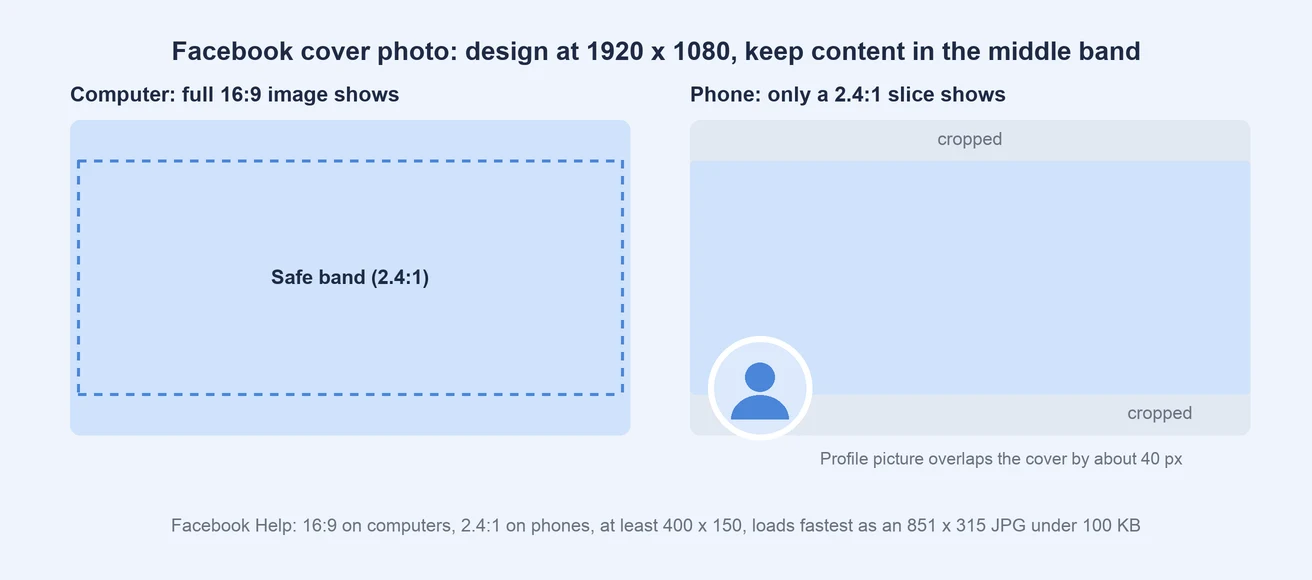
The short answer: design your Facebook cover photo at 1920 x 1080 pixels and keep text, logos and faces in the middle 1920 x 800 area. The rest of the image is background that may be cropped.
Here's why. According to Facebook's Help Center, a Page cover photo:
- Shows full width at a 16:9 ratio on computers.
- Shows full width at a wider 2.4:1 ratio on phones.
- Must be at least 400 x 150 pixels.
- "Loads fastest" as an sRGB JPG that's 851 x 315 pixels and under 100 KB.
Notice the problem. 851 x 315 is a different shape from both 16:9 and 2.4:1, so no single file fits every screen perfectly. That's why covers that look great on a laptop often lose their top and bottom on a phone. It's also why guides online disagree, listing 851 x 315, 820 x 312 or 820 x 360.
The fix is to design for both shapes at once. A 16:9 image fills the computer view. On phones, Facebook shows a wider, shorter slice of the same image, so anything you put near the top or bottom edge can be cut off. Keeping the important parts in the middle band makes the cover work on both.
Two more things to plan around:
- The profile picture covers part of the cover. Facebook says it overlaps the cover photo by about 40 pixels on phones, at the bottom left. Leave that corner free of text.
- Small text disappears on phones. Use large, simple text, or no text at all.
This guidance applies to Facebook Page covers, which is what most businesses and agencies use. Personal profile covers follow the same idea: keep the important parts in the middle.
Facebook Banner Size
"Facebook banner" is another name for the cover photo, so the Facebook banner size is the same: design at 1920 x 1080 with your key content in the middle band.
Cover Photo File Tips
- Use JPG for photos. Facebook says an sRGB JPG loads fastest.
- Keep the file small. Under 100 KB loads fastest, according to Facebook. Most design tools can compress a 1920 x 1080 JPG to a few hundred KB without visible loss. Smaller is better for load speed, but don't compress until it looks blurry.
- Check on your phone after uploading. The phone view is where most cover photos break.
Facebook Post Size
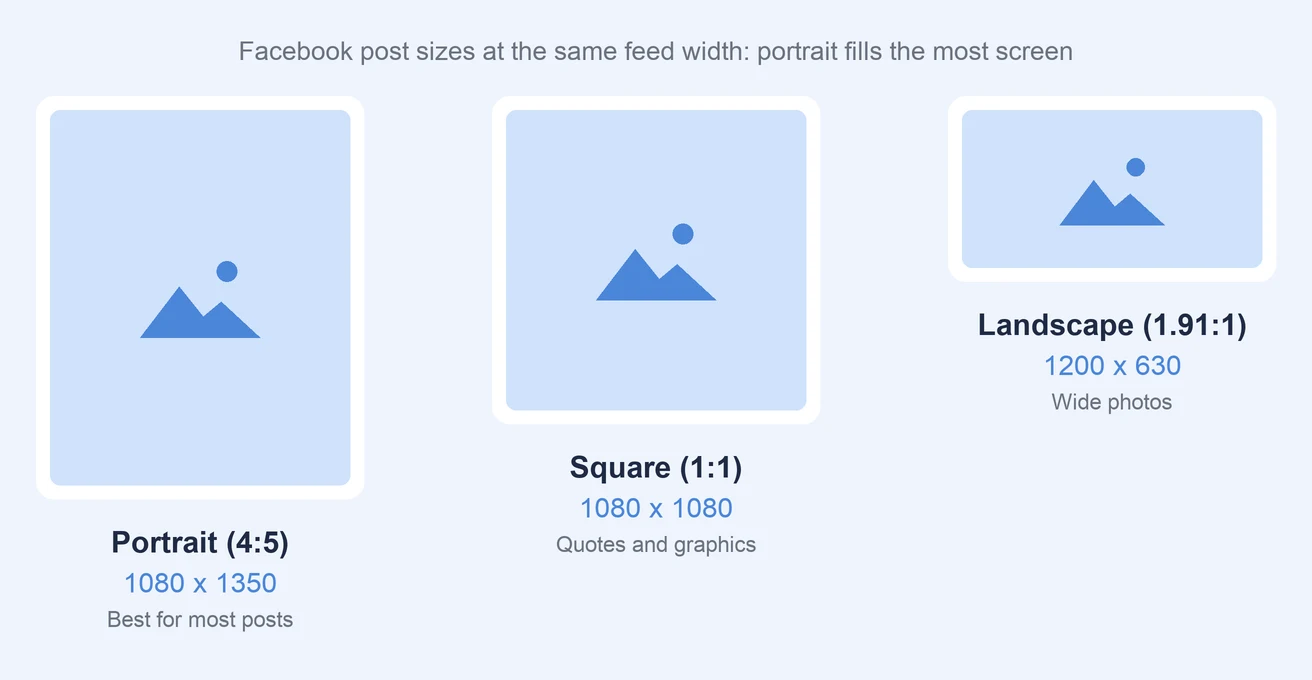
The best Facebook post size is 1080 x 1350 pixels at a 4:5 ratio. Meta's ad specifications recommend the same 4:5 shape at 1440 x 1800 pixels for feed images, with a minimum width of 600 pixels and a maximum file size of 30 MB. Both sizes have the same shape, so either works. The larger file looks a little sharper on high-resolution phones.
Here are the three Facebook post sizes worth using:
| Format | Size | Best for |
|---|---|---|
| Portrait | 1080 x 1350 (4:5) | Most posts. Fills the most screen space on phones. |
| Square | 1080 x 1080 (1:1) | Quotes, simple graphics, posts reused on other platforms |
| Landscape | 1200 x 630 (1.91:1) | Wide photos, screenshots, charts |
Why Portrait Works Best
Most people scroll Facebook on their phones, where a 4:5 image takes up more of the screen than a square or landscape one. More screen space means more time in front of the reader before they scroll on. It's the same reason portrait wins on Instagram and LinkedIn.
Posts With Several Photos
When you add several photos to one post, Facebook arranges them into a grid automatically, and it crops each photo to fit. Use the same shape for every photo so the grid looks tidy, and keep important details away from the edges. If you want full control over the layout, our guide on how to make a Facebook photo collage shows how to design the collage yourself.
Facebook Profile Picture Size
The Facebook profile picture size is 320 x 320 pixels, according to Facebook. The picture:
- Shows at 176 x 176 pixels on computers and 196 x 196 pixels on phones.
- Is cropped to a circle, so the corners are cut off.
Center your logo or face, and leave space around it so nothing important sits in the corners. For a business Page, a simple logo on a solid background reads best at small sizes.
Facebook Event Cover Photo Size
The standard Facebook event cover photo size is 1920 x 1005 pixels, an aspect ratio of about 1.91:1. Facebook doesn't publish an official event size, but this is the size design tools and most guides use, and it fills the event header without cropping on most screens.
On phones, the event title, date and buttons sit over the bottom part of the image. Keep text and key details in the upper and middle part of the cover.
Facebook Group Cover Photo Size
The standard Facebook group cover photo size is 1640 x 856 pixels. Like event covers, this isn't an official Facebook number, but it's the size most design tools use. Keep the important parts in the center, because group covers are cropped differently on computers and phones.
Facebook Story Size (and Reels)
Facebook Stories and Reels use a vertical 9:16 shape. Use 1080 x 1920 pixels, or 1440 x 2560 for Meta's recommended resolution for Story ads.
Meta also gives clear safe margins for Stories. To keep text and logos from being covered by buttons and profile details, leave empty:
- The top 14% of the image.
- The bottom 35%.
- 6% on the left and right.
Those margins come from Meta's Stories ad specs, but they're a good rule for organic Stories and Reels too. Our social media safe zones guide has the same zones for every platform, and our guide on how to post a story on Facebook covers the posting side.
 PostPlanify
All your social media in one simple dashboard
Schedule posts, track analytics, and reply to comments/DMs without switching tabs.

Engagement
+18%
Views
52.8k
Facebook Link Preview Image Size
When you share a link on Facebook, it pulls a preview image from the page. According to Meta's sharing guidelines, the image should be:
- At least 1200 x 630 pixels for the best display.
- As close to 1.91:1 as possible, so it isn't cropped in the feed.
- At least 600 x 315 pixels to get the large preview. Smaller images still show, but much smaller.
- No bigger than 8 MB.
If a link shows the wrong image, or none at all, the fix is on the website, not in Facebook. The page needs an og:image tag pointing to an image that meets these sizes. After fixing it, you can refresh how Facebook sees the page with Meta's Sharing Debugger.
Why Facebook Images Look Blurry or Cropped
Most Facebook image problems come from one of these:
- The image is too small. Facebook stretches small images to fill the space, which makes them soft. Export at the sizes above, or larger.
- The shape doesn't match. Facebook crops anything that doesn't fit the slot, especially cover photos on phones. Design for the shape, not just the pixels.
- Text is too close to the edges. Covers, Stories and event images all have edges that get covered or cropped.
- Heavy compression. Very small files can look blocky. For photos, a good-quality JPG is usually best.
If an image looks sharp on your computer but blurry on Facebook, re-export it at the right size and shape and upload it again.
One Image Size for Facebook, Instagram and LinkedIn
If you post the same graphics on several networks, there's an easy rule: design feed images at 1080 x 1350 (4:5). That shape works best on Facebook, Instagram and LinkedIn, so one export covers all three feeds. Squares at 1080 x 1080 work everywhere too.
What doesn't carry over is covers and banners, which are a different shape on every platform. Our Instagram image size guide and LinkedIn image size guide list the sizes for those networks.
For agencies managing several client Pages, this is the simplest way to keep production fast: one 4:5 master image per post, plus platform-specific covers made once and reused. When you schedule Facebook posts in PostPlanify, you can attach the same 4:5 image to Facebook, Instagram and LinkedIn and preview how it looks on each before it goes live. Our guide to the best time to post on Facebook covers the timing side.
PostPlanifyAll your social media in one simple dashboard
Schedule posts, track analytics, and reply to comments/DMs without switching tabs.
Engagement
+18%
Views
52.8k
Frequently Asked Questions
What size are Facebook cover photos in 2026?
Facebook says a Page cover photo shows at 16:9 on computers and 2.4:1 on phones, and loads fastest as an 851 x 315 JPG under 100 KB. Because those shapes differ, the safest approach is to design at 1920 x 1080 and keep text and logos in the middle 1920 x 800 area.
What is the best size for a Facebook post?
The best Facebook post size is 1080 x 1350 pixels (4:5), which takes up the most space in the feed on phones. Meta's ad specs recommend the same shape at 1440 x 1800. Square 1080 x 1080 and landscape 1200 x 630 also work.
What size should a Facebook profile picture be?
Upload your Facebook profile picture at 320 x 320 pixels. It displays at 176 x 176 on computers and 196 x 196 on phones, and it's cropped to a circle, so keep your logo or face in the center.
What is the Facebook event cover photo size?
The standard Facebook event cover photo size is 1920 x 1005 pixels (about 1.91:1). Keep text in the upper and middle part, because the event details cover the bottom on phones.
Why is my Facebook cover photo cropped on mobile?
Facebook shows the cover at a wider, shorter 2.4:1 shape on phones than the 16:9 shape it uses on computers, so the top and bottom get cut off. Keep important content in the middle of the image, and leave the bottom left free, where the profile picture overlaps by about 40 pixels.
What size is a Facebook story?
Facebook Stories use a 9:16 shape at 1080 x 1920 pixels, or 1440 x 2560 for Meta's recommended ad resolution. Keep text out of the top 14% and bottom 35% of the image.
Related: Instagram Image Size Guide | LinkedIn Image Size Guide | How to Schedule Facebook Posts | Best Time to Post on Facebook | How to Post a Story on Facebook | Social Media Safe Zones Guide | Facebook Caption Generator | Facebook Scheduler
PostPlanifyAll your social media in one simple dashboard
Schedule posts, track analytics, and reply to comments/DMs without switching tabs.
Engagement
+18%
Views
52.8k
About the Author

Hasan Cagli
Founder of PostPlanify, a social media management platform for agencies and teams. He focuses on building systems that help businesses, agencies, and teams plan, publish, and manage content and social media more efficiently across platforms.


