


Knowing how to respond to Google reviews comes down to three things: reply to every review, keep each reply short and specific, and never argue in public. Google shows your reply right under the review, sends the reviewer a notification, and lets every future customer read it.
This guide covers the exact steps, the rules Google applies to replies, and 15 copy-paste templates for positive, negative, and fake reviews. It also includes findings from 2,153 real Google reviews left on business locations managed in PostPlanify, including one pattern most businesses miss: their happiest customers are the ones most likely to be ignored.
Quick answer: To respond to a Google review, open your Business Profile, select Read reviews, then Reply next to the review. Thank the customer by name, mention one specific detail, own or explain any problem, offer a next step offline if it's a complaint, and sign off with your name. Reply within 24 to 48 hours, and never share private details about the customer.
Jump to: Step-by-step · Should you reply to every review · Reply formula · Positive review templates · Negative review templates · Fake reviews · Special cases · Using AI · For agencies · FAQ
How to Reply to a Google Review (Step by Step)
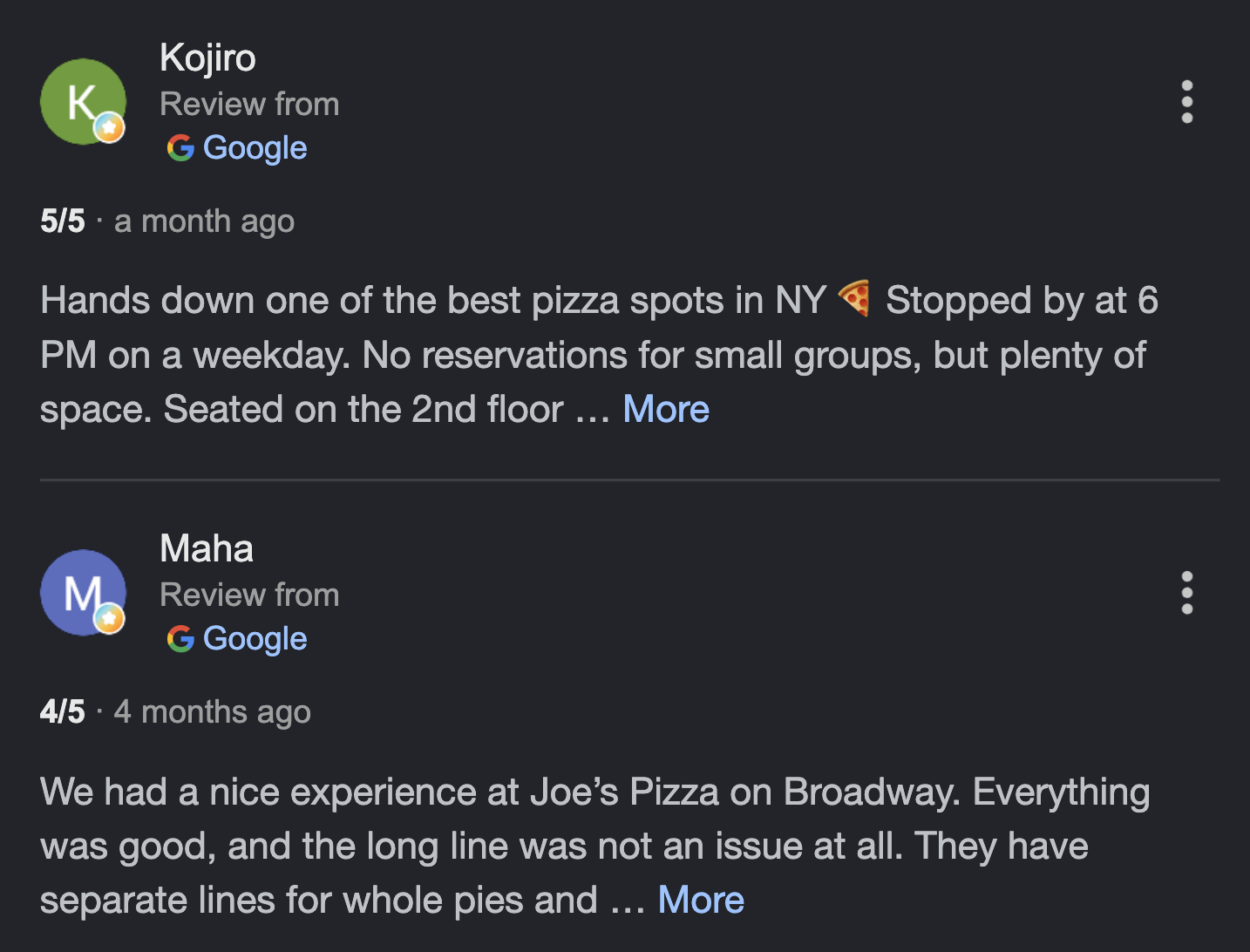
Here's how to reply to Google reviews from a computer or a phone. You can only do it once your Business Profile is verified. Google doesn't allow replies from unverified profiles, and reviews themselves are only available in certain countries and business categories.
On a computer
- Sign in to the Google account that owns or manages the Business Profile.
- Search for your business name on Google, or open it in Google Maps.
- Select Read reviews.
- Next to the review, select Reply.
- Type your reply and select Reply again.
On a phone
- Open the Google Maps app and sign in with the account that manages the profile.
- Tap Business at the bottom right.
- Tap Reviews, find the review, and tap Reply.
You can also search for your business name in your phone's browser and follow the desktop steps.
What happens after you post a reply
According to Google's help page on managing reviews, four things happen once you hit Reply:
- Google checks it first. Replies must follow Google's content policies. The check usually takes up to 10 minutes, but it can take up to 30 days. If a reply isn't approved, Google asks you to edit it.
- It's posted publicly under the review. It shows as a reply from the business. Your personal name isn't displayed.
- The reviewer is notified. They can still edit their review after reading your reply, and the review date updates if they do.
- You can edit or delete it later. Open Read reviews, then select Edit or Delete under your reply.
Each review can only have one reply from the business, so editing replaces your earlier answer. Replies can be up to 4,096 bytes long, which is roughly 4,000 characters in English (emoji and non-Latin characters use more). You'll rarely need anything close to that, and the Google Business character counter is handy if you want to check.
Should You Respond to Every Google Review?
Yes. Customers expect it, and they notice when you only answer some reviews. In BrightLocal's 2026 Local Consumer Review Survey of 1,002 US adults, 89% of consumers said they expect business owners to respond to reviews, and 80% said they're likely to use a business that responds to all of its reviews. That drops to 45% for businesses that only reply to positive reviews and 47% for those that only reply to negative ones.
There's one caveat from Google itself. Its tips for writing better review replies warn against sending the same "thank you" to everyone. Replying to every review is right. Pasting the identical reply under every review isn't. BrightLocal found that generic or templated replies put off 50% of consumers, which is why every template below includes a spot for one real detail.
The five-star blind spot
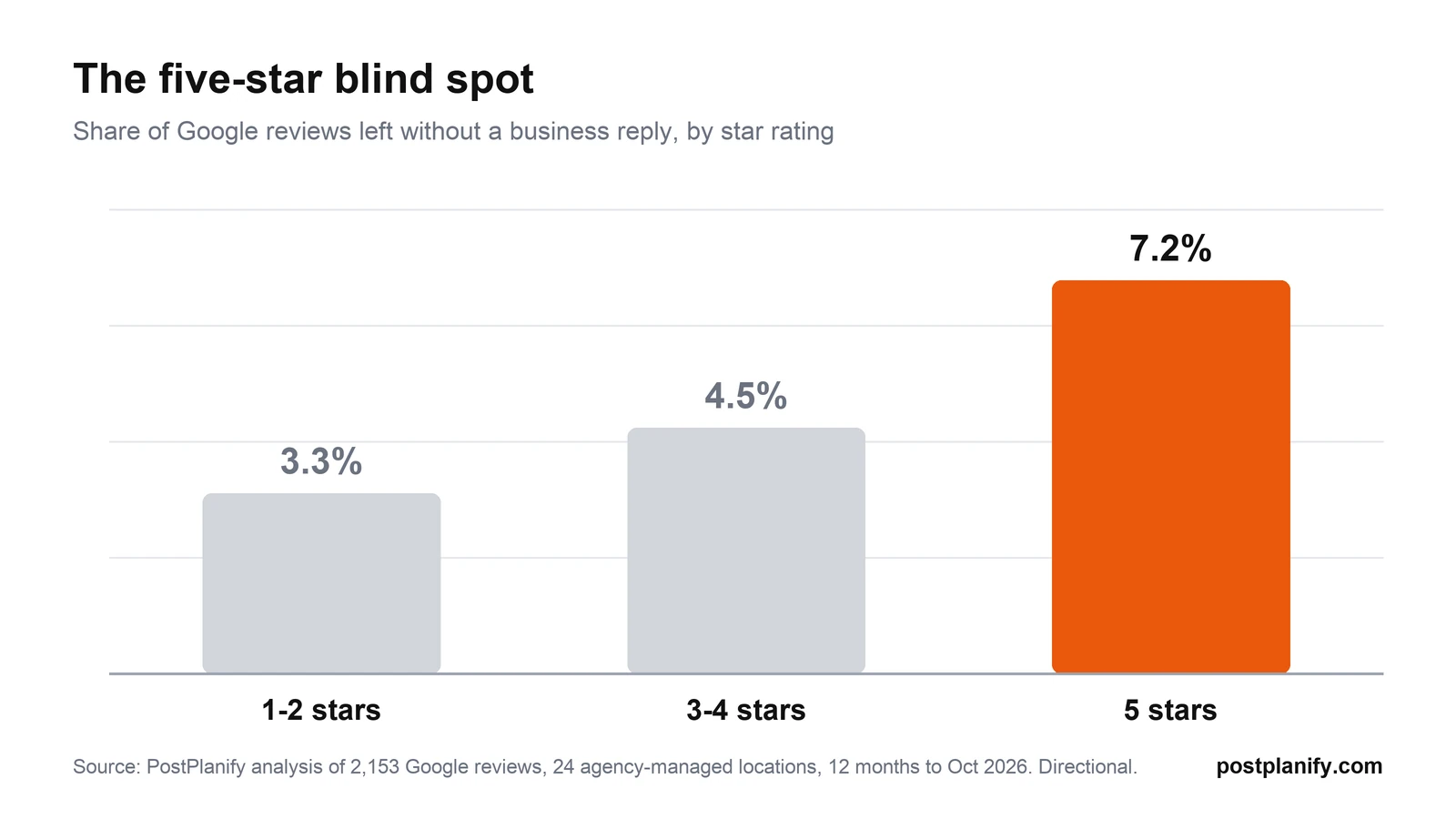
Most businesses worry about the bad reviews and quietly skip the good ones. In PostPlanify's analysis of 2,153 Google reviews across 24 agency-managed business locations (12 months to October 2026), 5-star reviews were about twice as likely to go unanswered as 1- and 2-star reviews: 7.2% versus 3.3%. That's the five-star blind spot. Your happiest customers took the time to praise you, and they're the ones most likely to hear nothing back.
The same data shows how lopsided a typical review profile is. 82% of the reviews were 5-star and only 8% were 1 or 2 stars. If you only reply to complaints, most of your profile looks unattended.
Review replies and your Google ranking
Google hasn't said that replies improve your ranking. Its guide on improving your local ranking says local results are based on relevance, distance, and prominence, and that "positive reviews and helpful replies can help your business stand out." The honest version: replies help you win the customer who's already comparing you with a competitor. Treat any ranking benefit as a bonus, not the reason.
How fast to respond
Aim for 24 to 48 hours, and faster for complaints. Expectations are rising quickly. In the same BrightLocal survey, 19% of consumers expect a response the same day they post a review (up from 6% in 2025), 32% expect one by the next day, and 81% expect to hear back within a week.
The 5-Part Reply Formula
Every good reply to a Google review, positive or negative, follows the same five parts. Use this as the checklist behind every template in this guide.
| Part | What to write | Example |
|---|---|---|
| 1. Thank | Use the reviewer's first name | "Thanks, Maria." |
| 2. Specific | Mention one detail from their review | "Glad the gluten-free crust worked for you." |
| 3. Own or explain | Apologize for real mistakes, explain what you can't control | "The 40-minute wait wasn't okay." |
| 4. Next step | Invite them back, or move the problem offline | "Call me at [phone] so I can fix this." |
| 5. Sign off | Your name and role | "Dan, Owner" |
Positive reviews usually only need parts 1, 2, and 5. Negative reviews need all five. Keep the whole reply to two to four sentences. Google's own advice is to keep replies short and simple, because people stop reading long ones.
How to Respond to Positive Reviews
To respond to a positive review, thank the customer by name, mention something specific they said, and keep it short. The templates below double as Google review response examples you can adapt in a minute. Don't use the reply to push a discount or promotion: Google recommends keeping replies "conversational, not promotional", since the reviewer is already a customer.
Template 1: 5-star review with details
Thanks so much, [first name]! We're really happy the [specific thing they mentioned] made your [visit/order/project] easier. [One sentence of personal detail, e.g. "Our team loved working on your kitchen."] Hope to see you again soon. [Your name], [role]
Why it works: it proves a person read the review, which is exactly what generic replies fail to do. Use it as your default 5-star review reply example and change the detail every time.
Template 2: 5-star rating with no text
Thank you for the 5 stars, [first name]! It means a lot to our team. If there's ever anything we can do better, just let us know. [Your name]
Star-only reviews are common. In PostPlanify's review data, 15% of all Google reviews had no written text, and so did 38% of 4-star reviews. Reply to them anyway, but keep it to two sentences, since there's nothing specific to reference.
Template 3: Review that names a staff member
Thanks, [first name]! I've passed your kind words on to [staff name], and it made their day. [Detail from the review, e.g. "Taking the time to explain the warranty is exactly what we want every customer to get."] See you next time. [Your name], [role]
Why it works: it rewards the employee publicly and tells future customers who to ask for.
Template 4: 4-star review with a small complaint
Thanks for the great review, [first name]. Glad you enjoyed [positive detail]. You're right about [small issue], and we've [what you changed, e.g. "added a second person at the counter during lunch"]. Hope that earns us the fifth star next time! [Your name]
Why it works: a 4-star review often contains your most useful feedback. Acknowledging the small issue shows you read past the stars.
Template 5: Regular customer
[First name], thank you for coming back again and again. Seeing you [detail, e.g. "every Saturday morning"] is one of the best parts of our week. Thanks for taking the time to write this. [Your name]
How to Respond to Negative Google Reviews
To respond to a negative Google review, stay calm, check what actually happened, reply briefly in public, and move the details to a private conversation. Your reply is written for the next hundred people who read it as much as for the reviewer.
Templates 6 to 13 below are negative review response examples for the complaints businesses get most. First, here's the process that works:
- Wait an hour. Never reply while you're angry. A defensive reply does more damage than the review.
- Check the facts. Look up the order, booking, or job. Talk to the staff involved.
- Reply publicly, briefly. Acknowledge the experience, apologize if you got something wrong, and say what you've done about it.
- Take it offline. Give a direct phone number or email for a named person. Google itself recommends this for complex situations.
- Follow up. If you fix the problem, the customer may update their review on their own. Google notes that constructive replies "may even encourage the customer to update their review."
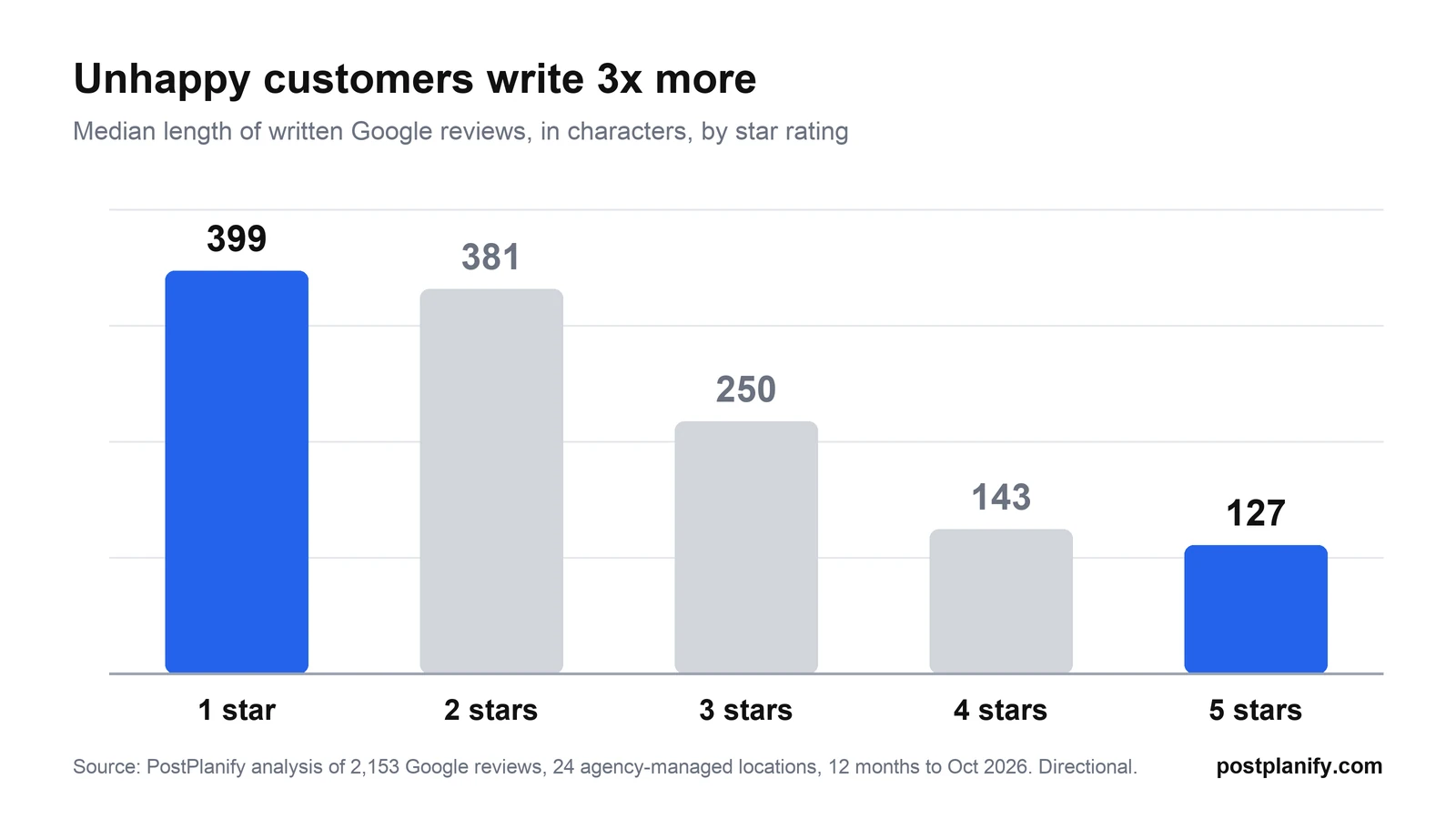
Expect negative reviews to be longer and more detailed. In PostPlanify's review data, the median 1-star review was 399 characters long, about three times the median 5-star review (127 characters). An angry customer has usually written several specific complaints. Pick out the main one and respond to it directly, rather than replying to everything point by point.
Template 6: Mixed 3-star review
Thanks for the honest feedback, [first name]. Glad [positive detail] worked for you, and I'm sorry [negative detail] let you down. We've [specific change]. I'd love the chance to show you the better version of us. [Your name], [role]
Template 7: Fair complaint, you got it wrong
[First name], you're right, and I'm sorry. [Specific issue] isn't the standard we hold ourselves to. We've [what you did to fix it]. Please contact me directly at [phone/email] so I can make this right for you. [Your name], [role]
Why it works: no excuses, a clear fix, and a named person to contact. Future readers see a business that owns its mistakes.
Template 8: Rude or unhelpful staff
[First name], I'm sorry about how you were treated. That's not how anyone on our team should talk to a customer, and I've addressed it directly with the person involved. I'd like to hear the full story: you can reach me at [phone/email]. [Your name], [role]
Never name or blame the employee in public. Handle that internally.
Template 9: Long wait or slow service
Thanks for letting us know, [first name], and I'm sorry about the wait on [day]. We were [honest reason, e.g. "short two staff members"], but that's our problem to solve, not yours. We've [change, e.g. "added online booking so you can skip the line"]. Hope you'll give us another try. [Your name]
Template 10: Price complaint
Thanks for the feedback, [first name]. I understand [price/fee] felt high. Our prices reflect [honest reason, e.g. "certified technicians and a 12-month guarantee on every repair"]. If anything on your invoice was unclear, I'm happy to walk you through it at [phone/email]. [Your name], [role]
Why it works: it explains without arguing. Don't offer a discount in the public reply, since Google discourages promotional replies and it invites more price complaints.
Template 11: Something outside your control
I'm sorry your [event/order/appointment] didn't go as planned, [first name]. [Honest explanation, e.g. "The storm closed the venue's road access on Saturday"], which we couldn't control. What we can do is [your policy, e.g. "move your booking to any date this month at no charge"]. Message me at [email] and I'll set it up. [Your name]
Google's own guidance says to be honest and explain limitations, but not to take responsibility for things outside your control.
Template 12: 1-star rating with no text
Hi [first name], we're sorry your experience fell short. We'd really like to understand what happened so we can fix it. Could you reach out to [phone/email] and ask for [your name]? [Your name], [role]
Keep it short and neutral. You don't know what went wrong yet, so don't guess.
Template 13: Customer updated their review after you fixed the problem
Thank you for updating your review, [first name], and for giving us the chance to fix [issue]. We really appreciate it. [Your name]
Never offer anything in exchange for changing or removing a review. Offering incentives for reviews breaks Google's policies.
Which template to use
Use this table to pick the right one of the 15 Google review reply templates in this guide.
| Review type | Use template |
|---|---|
| 5-star with details | 1 |
| 5 stars, no text | 2 |
| Praises a staff member | 3 |
| 4-star with a small complaint | 4 |
| Loyal regular | 5 |
| 3-star mixed | 6 |
| Fair complaint | 7 |
| Rude staff | 8 |
| Long wait | 9 |
| Price complaint | 10 |
| Outside your control | 11 |
| 1 star, no text | 12 |
| Updated review | 13 |
| Fake or not a customer | 14 |
| Healthcare or confidential service | 15 |
 PostPlanify
All your social media in one simple dashboard
Schedule posts, track analytics, and reply to comments/DMs without switching tabs.

Engagement
+18%
Views
52.8k
Fake, Spam, and Extortion Reviews
If a review breaks Google's policies, report it. If it's just unfair, reply to it. Google is clear that you can report any review, but only reviews that violate its policies get removed, and it asks businesses not to report a review "just because you disagree with it."
Reviews that can be removed include spam, fake engagement (for example, from people who were never customers or reviews written by competitors), off-topic content, harassment, hate speech, and conflicts of interest like reviews from current or former employees.
How to report a Google review
From Google's guide to reporting reviews:
- Go to your Business Profile and select Read reviews.
- Next to the review, select Report.
- Choose the reason, such as "Spam" or "Profanity", and select Send report.
Google says evaluation usually takes several days. You can track the status in Google's Reviews Management Tool, and if a review you reported isn't removed, you can submit a one-time appeal for up to 10 reviews. If someone is threatening negative reviews unless you pay, Google has a separate process for reporting extortion.
Template 14: Fake review or not a customer
Hi [name], we take every review seriously, but we can't find any record of a [visit/order/booking] matching this description. If we've missed something, please contact us at [phone/email] so we can look into it. [Your name], [role]
Post this while your report is pending. It stays calm, signals to readers that something is off, and doesn't accuse anyone.
Can you remove a Google review?
You can't delete a customer's Google review yourself, and you can't pay to have it removed. The only route is reporting a review that breaks Google's policies. Reviews Google removes for policy violations aren't restored, and Google's automated spam filters sometimes remove reviews on their own.
Special Cases: Healthcare, Legal, and More
Healthcare and HIPAA
Replying to a review isn't a HIPAA violation by itself, but revealing anything about the patient is. The US Department of Health and Human Services has fined dental practices for exactly this: Elite Dental Associates paid $10,000 after a Yelp reply disclosed a patient's details, New Vision Dental paid $23,000 over replies to online reviews, and a North Carolina practice was hit with a $50,000 penalty for disclosing patient information in a reply to a negative review.
The safe approach: don't confirm the person is a patient, don't mention any treatment, dates, or results, and move everything offline.
Template 15: Healthcare or confidential service
Thank you for your feedback. Privacy rules prevent us from discussing anyone's care or account online, but we take every concern seriously. Please call our office manager, [name], at [phone] so we can talk it through. [Practice name]
The same template works for law firms, financial advisors, and anyone else with confidentiality obligations. If you run social media for clinics, our roundup of social media tools for dental clinics covers how to set up approvals so replies get checked before they go live.
Reviews in another language
Reply in the reviewer's language if you or someone on your team can do it properly. If you're using a translation tool, keep the reply simple and have a native speaker check it when you can.
A review meant for a different business
It happens more than you'd think, especially with similar names. Reply politely that you think they meant another business, then report the review as off topic.
Mistakes That Make Review Replies Worse
- Arguing or correcting the customer in public. Even if you're right, you look defensive to everyone else reading.
- Pasting the same reply everywhere. Half of consumers are put off by templated replies, per BrightLocal. Always add one real detail.
- Promotions and discount codes. Google recommends against them in replies.
- Sharing private details. Order numbers, appointment details, health or legal information. Never.
- Stuffing keywords into replies. "Thanks for choosing the best plumber in Austin" reads like spam.
- Offering anything in exchange for a changed review. It breaks Google's policies.
- Ignoring old reviews. Unanswered reviews from last year still sit on your profile. Work back through them in batches.
Using AI to Draft Review Replies
AI can draft a decent reply in seconds, which is useful once you're handling dozens of reviews a week. The risk is that AI replies sound generic, and that's the exact thing half of consumers dislike. Use AI for the first draft, not the final word:
- Let AI draft the reply from the review text.
- Add one real detail that only your business would know.
- Check every fact (dates, names, what was fixed).
- Read negative replies out loud before posting.
- Never auto-post replies to negative reviews without a human checking them.
Many social inbox tools now offer AI drafts. PostPlanify's social inbox works this way: it drafts a reply to a Google review in one click, and you edit it before sending.
Managing Review Replies for Multiple Clients
For agencies, the hard part of review replies isn't writing them. It's making sure nothing falls through the cracks across 10, 20, or 50 client locations. The agencies that handle this well settle four things with each client during onboarding:
| Decision | Recommended default |
|---|---|
| Who replies | The agency replies to 4 and 5-star reviews; negative reviews get drafted by the agency and approved by the client |
| Response time | Within 24 hours on weekdays, 48 hours on weekends |
| Escalation | 1 and 2-star reviews, legal threats, and health or safety complaints go to a named client contact the same day |
| Voice | A short tone guide per client: formal or casual, first names or not, who signs off |
Agency-managed profiles can hit these numbers. In PostPlanify's review data, the agency-managed locations replied to 93% of their Google reviews overall and 97% of their 1 and 2-star reviews. Reply rate and response time are also worth adding to the KPIs you report to clients.
For more on structuring this as a service, see the review section of our Google Business Profile management playbook and our guide to a social media approval process.
How PostPlanify helps
PostPlanify is a social media management platform built for agencies serving local businesses. Its social inbox brings Google reviews into the same place as comments from Instagram, Facebook, LinkedIn, YouTube, Threads, and Bluesky, plus Instagram and Facebook DMs, with a separate workspace for each client.
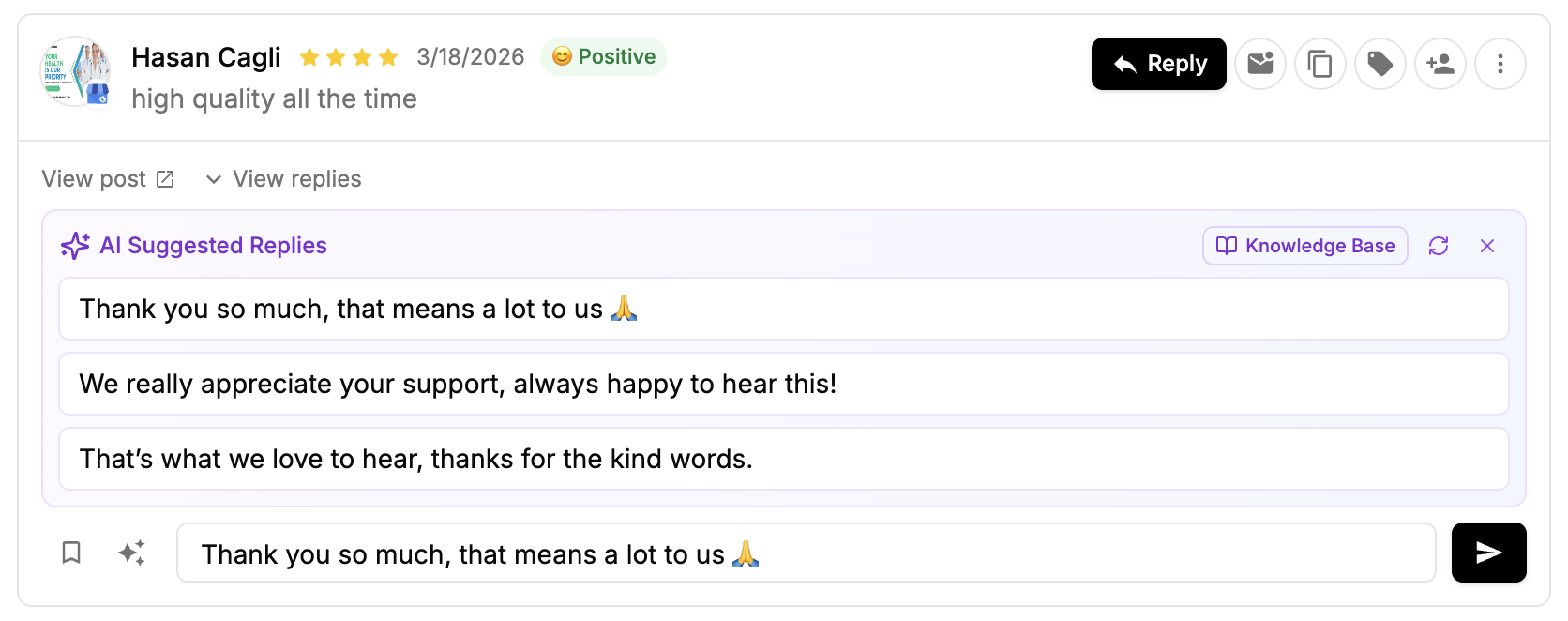
- Reply, edit, or delete your reply to any Google review without logging in to each client's profile. You can't remove customer reviews, since Google doesn't allow that from any tool.
- AI-drafted replies you review and edit before sending. On Premium, each client gets their own AI brand voice, so replies sound like that client.
- Inbox alerts by email and in-app when new reviews need a reply, grouped about every 20 minutes.
- Auto-assign on Premium sends new reviews to the right teammate, or rotates them across your team.
The same workspace also handles Google Business Profile post scheduling alongside your other platforms. The social inbox is included on every plan, starting at $39/month for the first workspace. Compare plans on the pricing page.
Get More Reviews to Reply To
The easiest way to get more Google reviews is to make leaving one effortless. Our free Google review link generator creates a direct review link and QR code for any business, with ready-to-send text, email, and WhatsApp messages. Ask every customer, not only the happy ones: asking selectively breaks Google's policies.
Google Review Reply FAQ
Can I reply to a business's response to my review as a customer?
No. Google doesn't have a reply option for customers under a business's response. If you want to add something, edit your original review instead.
Will the customer see my name when I reply?
No. Google shows replies as coming from the business, and your personal name isn't displayed. Signing off with your first name is still a good idea, because it makes the reply feel personal.
How long does it take for a reply to appear?
Usually up to 10 minutes. Google checks every reply against its content policies first, and occasionally that check takes up to 30 days. If a reply is rejected, Google asks you to edit it.
Can I edit or delete my reply to a Google review?
Yes. Open your Business Profile, select Read reviews, and choose Edit or Delete under your reply. Each review can only have one reply from the business, so an edit replaces the original.
Should I reply to reviews that only have a star rating?
Yes, with a short thank-you. Star-only reviews are common: in PostPlanify's analysis of 2,153 Google reviews, 15% had no text at all, including 38% of 4-star reviews. A two-sentence reply is enough.
Should I reply to old Google reviews?
Yes. A thoughtful reply to an old review still shows future customers that you're listening. Start with the most recent and the most negative, then work back in batches.
Is it a HIPAA violation to respond to a Google review?
Responding isn't a violation, but disclosing anything about the patient is. HHS has fined dental practices between $10,000 and $50,000 for review replies that revealed patient information. Don't confirm the person is a patient, and move the conversation offline.
Does responding to Google reviews improve SEO?
Google hasn't said that replies improve rankings. It says positive reviews and helpful replies can help your business stand out. Reply because it wins customers, and treat any ranking benefit as a bonus.
What's the best way to respond to negative Google reviews?
Wait until you're calm, check what happened, and reply in two to four sentences: acknowledge the experience, apologize if you got it wrong, say what you changed, and give a direct contact to resolve it privately. Templates 6 to 12 above cover the most common complaints.
How many Google reviews should a business reply to?
All of them. In BrightLocal's 2026 survey, 80% of consumers said they're likely to use a business that responds to all of its reviews, compared with 45% for businesses that only reply to positive ones.
Key Takeaways
- Only verified Business Profiles can reply. Use Read reviews, then Reply, on desktop or in the Google Maps app.
- Replies are public, checked by Google first, shown under the business name, and the reviewer gets notified.
- Reply to every review within 24 to 48 hours, but never paste the same reply twice.
- Watch the five-star blind spot: in PostPlanify's data, 5-star reviews went unanswered twice as often as 1 and 2-star reviews.
- For complaints: thank, own it, fix it, take it offline, sign off.
- Report reviews that break Google's policies, and reply calmly to the ones that are just unfair.
- In healthcare and other confidential services, never confirm someone is a client.
Methodology: PostPlanify analyzed 2,153 Google reviews left on 24 business locations managed through PostPlanify, posted in the 12 months to October 2026. A review counts as replied if it had a business reply on Google, whether it was posted from PostPlanify or directly on Google. The sample is small and made up of agency-managed profiles, so treat the figures as directional, not as a market benchmark.
Related Reading
- Free Google Review Link Generator
- Google Business Profile Management: Agency Playbook
- 13 Best Google My Business Tools
- Best Social Inbox Tools
- Social Media Community Management
- How to Build a Social Media Approval Process
- Best Social Media Management Tools for Restaurants
- Best Social Media Management Tools for Hotels
- Best Social Media Tools for Franchises and Multi-Location Brands
PostPlanifyAll your social media in one simple dashboard
Schedule posts, track analytics, and reply to comments/DMs without switching tabs.
Engagement
+18%
Views
52.8k
About the Author

Hasan Cagli
Founder of PostPlanify, a social media management platform for agencies and teams. He focuses on building systems that help businesses, agencies, and teams plan, publish, and manage content and social media more efficiently across platforms.


