


Instagram marketing is no longer one job done in one tool. You're scheduling Reels, replying to DMs, designing carousels, researching hashtags, tracking story performance, sending traffic from your bio link, and reporting it all back to a client or boss. No single product covers every layer well, and the brands winning on Instagram in 2026 stitch together a small stack that does.
What I look for in an Instagram marketing tool:
- Native scheduling for Reels, Stories, carousels, and grid posts without "send a phone notification at 9am" workarounds
- Per-post analytics that distinguish Reels reach from feed reach instead of one rolled-up engagement number
- A unified inbox that captures comments, DMs, mentions, and tagged photos so nothing falls through the cracks
- Hashtag research that uses Instagram-specific reach data, not generic SEO keyword volume
- A link-in-bio tool that tracks clicks per link, not just total page views
- Design and Reels editing that produces 9:16 vertical content sized for Reels and Stories without re-cropping
Where most tools fall short:
- Scheduler-only tools have analytics but no design, no hashtag research, and a basic bio link
- Design tools (Canva, CapCut) have no scheduling, no inbox, and no analytics
- Analytics specialists have publishing as an afterthought
- Free tools (Meta Business Suite) cover the basics on Instagram + Facebook but stop there
The 9 Instagram tools below are the ones I'd actually pay for in 2026, organized by what they do best, not by who has the loudest marketing. The lens throughout is Instagram for business, not personal accounts.
Quick Answer: Best Instagram Marketing Tools in 2026
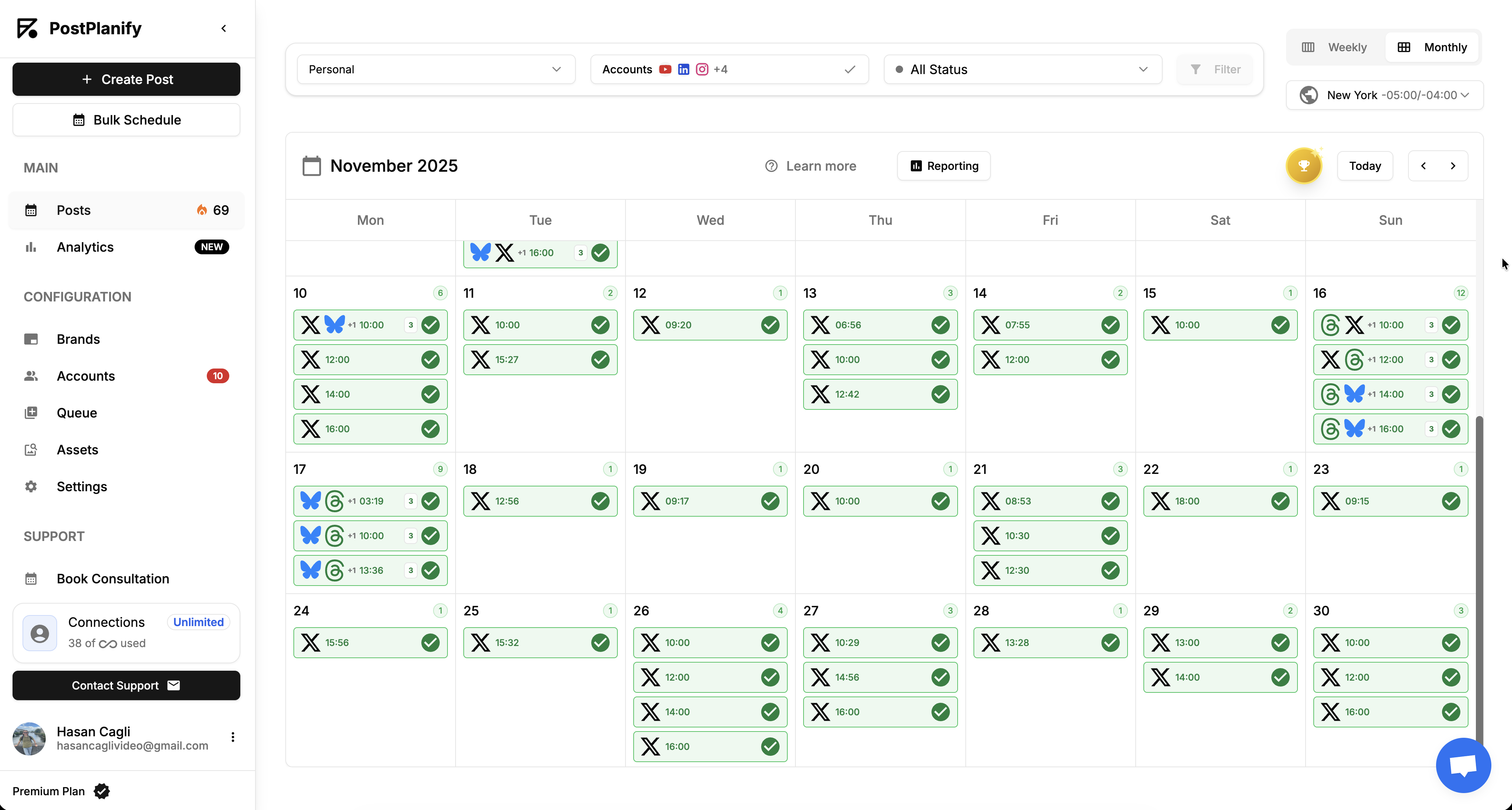
For most teams and agencies, PostPlanify is the best all-in-one Instagram marketing tool: Reels and Story scheduling, native analytics, comment + DM inbox, vision-powered AI captions, white-labeled client reports, and approval workflows across 10 platforms, priced per client workspace from $39/mo with unlimited team members.
Quick picks by job:
- PostPlanify (from $39/mo per client workspace): Best all-in-one Instagram marketing platform (scheduling + analytics + inbox + AI + reports)
- Later ($25/mo): Best visual-first Instagram planner with drag-and-drop grid preview
- Buffer (Free / $6 per channel/mo): Best simple Instagram scheduler, billed per channel
- Meta Business Suite (Free): Best free official tool for Instagram + Facebook baseline
- Iconosquare (Free / $12/mo): Best Instagram analytics depth with competitor benchmarking
- Canva (Free / $15/mo): Best design tool for Instagram posts, carousels, and Stories
- CapCut (Free / $7.99/mo): Best Reels and short-form video editor
- Flick (~$14/mo): Best Instagram hashtag research tool with AI captioning
- Linktree (Free / $8/mo): Best link-in-bio for sending Instagram traffic anywhere
You don't need all 9. Most teams run a stack of 2-4: a scheduler with analytics + a design tool + a hashtag tool or link-in-bio.
How I Tested These Instagram Marketing Tools
- Pricing verified at the source. Every price came from each vendor's own pricing page in October 2026, except CapCut, which publishes no pricing page I could read. Where a vendor headlines a yearly rate, I give the monthly one too rather than quoting the number that hides the commitment.
- Instagram-specific feature scoring. I scored each tool on what actually matters on Instagram: Reels scheduling (not reminder workarounds), Story scheduling, carousel support, first comment scheduling, IG-native analytics (Reels reach + Story metrics), and bio-link traffic.
- Honest category placement. PostPlanify leads because it's the only tool here that bundles publishing, analytics, inbox, AI, and reporting into one Instagram workflow. Later, Iconosquare, Canva, Flick, Linktree, and CapCut are recognized for their specialty, not stretched into roles they don't play.
- G2 ratings from product pages. Every rating + review count came from each tool's G2 product page (not seller-aggregate pages that combine all vendor products and inflate counts).
- Real Instagram users in mind. The lens is "would I run this on a real Instagram account for 6 months", not feature-list bingo.
Quick Comparison: Instagram Marketing Tools at a Glance
| Tool | Best For | Starting Price | Key Instagram Strength | G2 Rating |
|---|---|---|---|---|
| PostPlanify | All-in-one IG marketing | From $39/mo per workspace | Reels + Stories + inbox + AI + reports | 5/5 |
| Later | Visual-first planners | $25/mo | Drag-and-drop IG grid preview | 4.5/5 (347) |
| Buffer | Simple scheduling | Free / $6 per channel/mo | Per-channel billing + Hashtag Manager | 4.3/5 (1,023) |
| Meta Business Suite | Free official baseline | Free | Native IG + FB management | N/A |
| Iconosquare | Analytics depth | Free / $12/mo | IG analytics + competitor benchmarks | 4.5/5 (135) |
| Canva | DIY designers | Free / $15/mo | IG templates + Magic Studio AI | 4.7/5 (6,833) |
| CapCut | Reels editing | Free / $7.99/mo | Mobile + desktop video editor with AI | N/A |
| Flick | Hashtag research | ~$14/mo | AI hashtag finder + IG analytics | 4.7/5 (137) |
| Linktree | Link-in-bio | Free / $8/mo | Bio link landing pages + click analytics | 4.6/5 (97) |
The Instagram Marketing Stack: What Each Layer Actually Does
If you're new to building a stack, the trap is buying one big tool and expecting it to do everything. Instagram marketing in 2026 has six functional layers, and most tools are strong in one or two, not all.
- Publishing layer. Schedule Reels, Stories, carousels, and feed posts. Tools: PostPlanify, Later, Buffer, Meta Business Suite. Our Instagram content strategy guide covers what to put in the queue.
- Analytics layer. Track follower growth, Reels reach, Story completion, hashtag performance, and competitor benchmarks. Tools: PostPlanify (built-in), Iconosquare (specialist).
- Engagement layer. Reply to comments and DMs across one inbox without losing your mind. Tools: PostPlanify, Meta Business Suite.
- Creative layer. Design carousels, Stories, and templates. Tools: Canva.
- Video layer. Edit Reels and short-form clips. Tools: CapCut.
- Distribution layer. Hashtag research + link-in-bio for driving traffic. Tools: Flick (hashtags), Linktree (bio link).
A solid starter stack: PostPlanify (publishing + analytics + inbox + AI captions) + Canva (design) + CapCut (Reels editing) + Linktree (bio link). Add Flick if hashtag research is core to your strategy. Add Iconosquare if you need deeper analytics or competitor tracking than your scheduler provides.
 PostPlanify
All your social media in one simple dashboard
Schedule posts, track analytics, and reply to comments/DMs without switching tabs.

Engagement
+18%
Views
52.8k
Instagram Scheduler Tools
1. PostPlanify: Best All-in-One Instagram Marketing Tool
At a glance:
- Best for: Teams and agencies running Instagram alongside other social platforms
- Starting price: From $39/mo per client workspace, with unlimited team members
- Key strength: Bundles publishing + analytics + inbox + AI + reports into one Instagram workflow
- G2 rating: 5/5
PostPlanify is the only tool on this list that covers the full Instagram marketing workflow in one platform. I built PostPlanify after running social for years and getting tired of paying for a scheduler, a separate analytics tool, a separate inbox tool, and a separate reporting tool, all of which had different login states, different brand kits, and no shared data. PostPlanify ships the whole thing as one product across 10 platforms (Instagram, Facebook, X, LinkedIn, TikTok, YouTube, Pinterest, Threads, Bluesky, Google Business).
For Instagram specifically: you can schedule Reels, Stories, carousels, and feed posts natively, run vision-powered AI captions that read your image and write context-aware copy, reply to comments and DMs from a unified social inbox, publish a built-in link-in-bio page tied to your account, and export branded white-label PDF reports for clients, all without leaving the dashboard.
Key Instagram features:
- Native Instagram scheduling for Reels, Stories, carousels, and feed posts: no phone notifications, no manual posting
- Vision-powered AI captions that read the image and write captions matched to its content
- Social inbox for Instagram comments and DMs (also covers Facebook, LinkedIn, Google Business, YouTube, Threads, Bluesky)
- Best time to post suggestions calculated from your account's actual Instagram engagement data
- Instagram analytics with Reels reach, Story completion, hashtag performance, and follower growth
- AI image generation (200 / 400 / 800 per month on Growth / Premium / Scale) for thumbnail and feed visuals
- Approval workflows on Premium, single or multi-step: nothing publishes until a client or manager signs off
- Client reports on Premium, fully white-labeled on Scale for branded client deliverables
- Built-in link-in-bio builder with click analytics per link
- Bulk scheduling for batch-uploaded Reels and posts
- Team collaboration with role-based access and unlimited team members on every plan
Pricing
| Workspaces | Growth | Premium | Scale |
|---|---|---|---|
| 1 workspace | $39/mo | $49/mo | $59/mo |
| 3 workspaces | $97/mo | $127/mo | $157/mo |
| 5 workspaces | $155/mo | $205/mo | $255/mo |
| 10 workspaces | $250/mo | $350/mo | $450/mo |
| Social accounts per workspace | 4 | 6 | 8 |
Unlimited team members on every plan, no per-seat fees. Yearly billing saves 20%. All plans include a 7-day free trial with a 14-day money-back guarantee.
Pros:
- Bundles publishing, analytics, inbox, AI captions, and reports in one workflow, priced per client workspace rather than per seat
- Vision-powered AI captions actually read the image, not just keyword spam
- Unlimited team members on every plan, so adding people never changes the bill
- 14-day money-back guarantee (no risk to try)
Cons:
- No mobile app yet, the dashboard is web-only
- No native design tool, you still need Canva or similar for visual creation
- No native video editor, pair with CapCut for Reels editing
User ratings: 5/5 on G2
2. Later: Best Visual-First Instagram Planner
At a glance:
- Best for: Creators and small brands who plan Instagram feeds visually first
- Starting price: $25/mo (Starter)
- Key strength: Drag-and-drop visual grid preview before posts go live
- G2 rating: 4.5/5 (347 reviews)
Later started life as an Instagram-only scheduler in 2014 and the heritage still shows. The drag-and-drop visual planner, where you arrange your next 9 grid posts before they publish, is the cleanest implementation of "preview the feed first" I've used. If your Instagram strategy is built around a curated grid aesthetic, Later was built for you.
The trade-off: Later's analytics are basic compared to Iconosquare, the inbox is missing (you reply in the Instagram app), and pricing climbs fast once you add social sets, users, or post volume. The Starter plan is one social set (one Instagram, one Facebook, one TikTok, etc.) with 30 posts per profile per month, fine for a single creator, restrictive for an active brand.
Key Instagram features:
- Drag-and-drop visual feed planner for grid preview
- Reels, Stories, carousels, and feed scheduling
- AI Caption Writer (5 to unlimited credits by plan)
- Link in Bio page (Linkin.bio) with click tracking
- Hashtag suggestions and saved hashtag groups
- Best time to publish based on past performance
Pricing
| Plan | Monthly Price | Social Sets | Users | Post Limit |
|---|---|---|---|---|
| Starter | $25/mo | 1 | 1 | 30/profile |
| Growth | $50/mo | 2 | 2 | 180/profile |
| Scale | $110/mo | 6 | 4 | Unlimited |
A social set is one profile from each supported platform, so 1 set is 8 profiles. Yearly billing is 25% off, and extra social sets are $15/mo each.
Pros:
- Visual feed planner is genuinely the best in the category for Instagram-first creators
- Built-in Linkin.bio page saves a separate Linktree subscription
- AI Caption Writer is solid for content briefs
Cons:
- No social inbox, comments and DMs handled in the Instagram app
- Starter plan post limits (30/profile/month) are tight for active accounts
- Analytics lag behind Iconosquare and PostPlanify on Instagram-specific depth
User ratings: 4.5/5 on G2 (347 reviews) · 1.3/5 on Trustpilot (1,000+ reviews)
For more details: Best Later Alternatives · Later Pricing · Later Reviews
3. Buffer: Best Simple Instagram Scheduler
At a glance:
- Best for: Solo creators and small teams who want Instagram scheduled well enough to act on, not analyzed
- Starting price: Free, then $6/channel/mo on Essentials ($5 billed yearly)
- Key strength: Per-channel billing, so one Instagram account costs the price of one channel
- G2 rating: 4.3/5 (1,023 reviews)
Buffer is the simplest way to get Instagram on a schedule. It bills per channel rather than per plan, so a creator running one Instagram account pays for one channel, and an agency adding a client's account pays for one more. Instagram business and creator accounts publish automatically; only personal profiles fall back to phone reminders.
The trade-off is depth. Analytics history caps at 30 days on the free plan, there is no competitor benchmarking, and engagement is a comment feed rather than a full inbox. Buffer is the tool you pick when you want the publishing layer solved and nothing else.
Key Instagram features:
- Automatic publishing for Instagram business and creator accounts, including Reels and carousels
- Hashtag Manager to store reusable hashtag sets and measure performance per set
- Unlimited analytics history on paid plans, with custom analytics by tag or channel
- Start Page, a built-in bio-link page, so you may not need Linktree alongside it
- Branded reports with your own logo on the Team plan
- Comment engagement for Instagram, with AI-assisted reply suggestions
Pricing
| Plan | Monthly Price | Channels | Key Features |
|---|---|---|---|
| Free | $0 | 3 | 10 scheduled posts per channel, 30-day analytics history |
| Essentials | $6/channel/mo ($5 yearly) | Unlimited | Unlimited scheduling and history, custom analytics, exports |
| Team | $12/channel/mo ($10 yearly) | Unlimited | Unlimited users, branded reports, approval-style drafts |
Pros:
- Genuinely free tier that schedules Instagram without a trial clock
- Per-channel pricing is the fairest model here for a single Instagram account
- Shortest learning curve on this list
Cons:
- Analytics are shallow next to Iconosquare or PostPlanify
- Per-channel billing adds up fast across clients: five clients on three networks is 15 channels
- No approval workflows and no unified DM inbox
User ratings: 4.3/5 on G2 (1,023 reviews) · 2.1/5 on Trustpilot
Learn more in our Buffer pricing breakdown, Buffer reviews roundup, and best Buffer alternatives guide.
4. Meta Business Suite: Best Free Official Tool
At a glance:
- Best for: Anyone running a business or creator Instagram account (free baseline)
- Starting price: Free
- Key strength: Native Instagram + Facebook scheduling, inbox, and analytics from Meta
- G2 rating: N/A
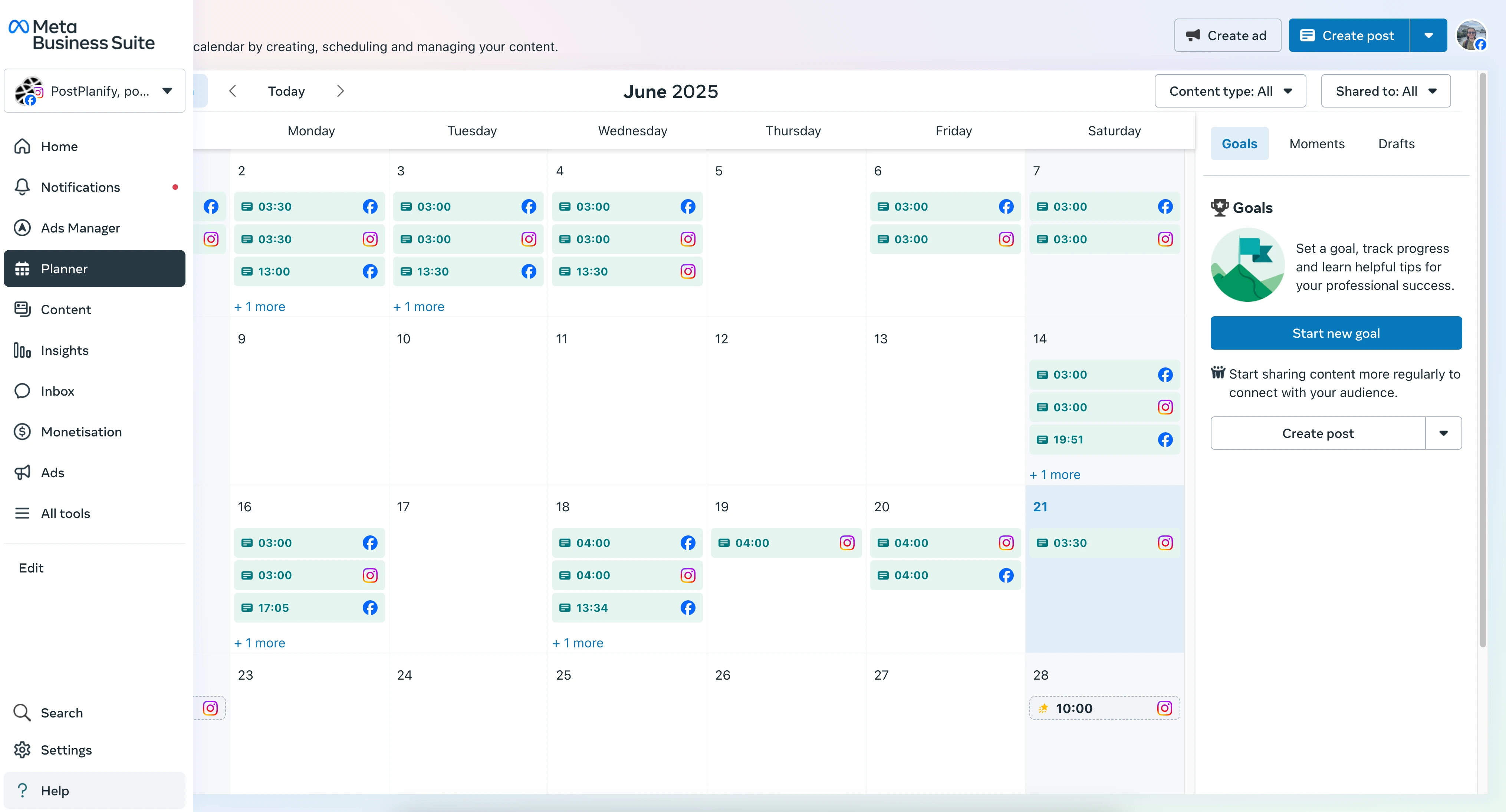
Meta Business Suite is the official Meta tool for managing your Instagram + Facebook business presence in one place. It's free, native, and supports Reels, Stories, carousels, and feed scheduling, plus an inbox for Messenger, Instagram DMs, and Facebook comments, basic analytics, ad management, and saved replies.
The catch: Meta Business Suite stops at Meta. You can't schedule LinkedIn, X, TikTok, Pinterest, YouTube, Threads, or any other platform from inside it. There's no white-label reporting, no approval workflows, no team role permissions worth using, no link-in-bio, and the analytics depth is limited compared to Iconosquare or PostPlanify. As a free baseline for an Instagram-only or Instagram + Facebook account, it's hard to beat. As a stack for a real marketing team, it's not enough.
Key Instagram features:
- Schedule Instagram Reels, Stories, carousels, and feed posts
- Unified inbox for Instagram DMs, Messenger, and Facebook comments
- Saved replies and automated responses
- Instagram + Facebook ad creation and boosting
- Native analytics for Instagram (reach, engagement, follower growth)
- Free, no subscription required
Pricing
| Plan | Price | Best For |
|---|---|---|
| Meta Business Suite | Free | All Instagram business accounts |
Pros:
- Free, native, and reliable
- Direct from Meta, no third-party API limits or breakages
- Inbox unifies Instagram DMs, Facebook comments, and Messenger
Cons:
- Instagram + Facebook only, no LinkedIn, X, TikTok, Pinterest, YouTube, Threads, etc.
- No white-label reporting for client work
- No team role permissions worth using for agencies
- Analytics depth is limited vs specialists
User ratings: N/A on G2 (not listed as a standalone product)
Instagram Analytics Tools
5. Iconosquare: Best Instagram Analytics Tool
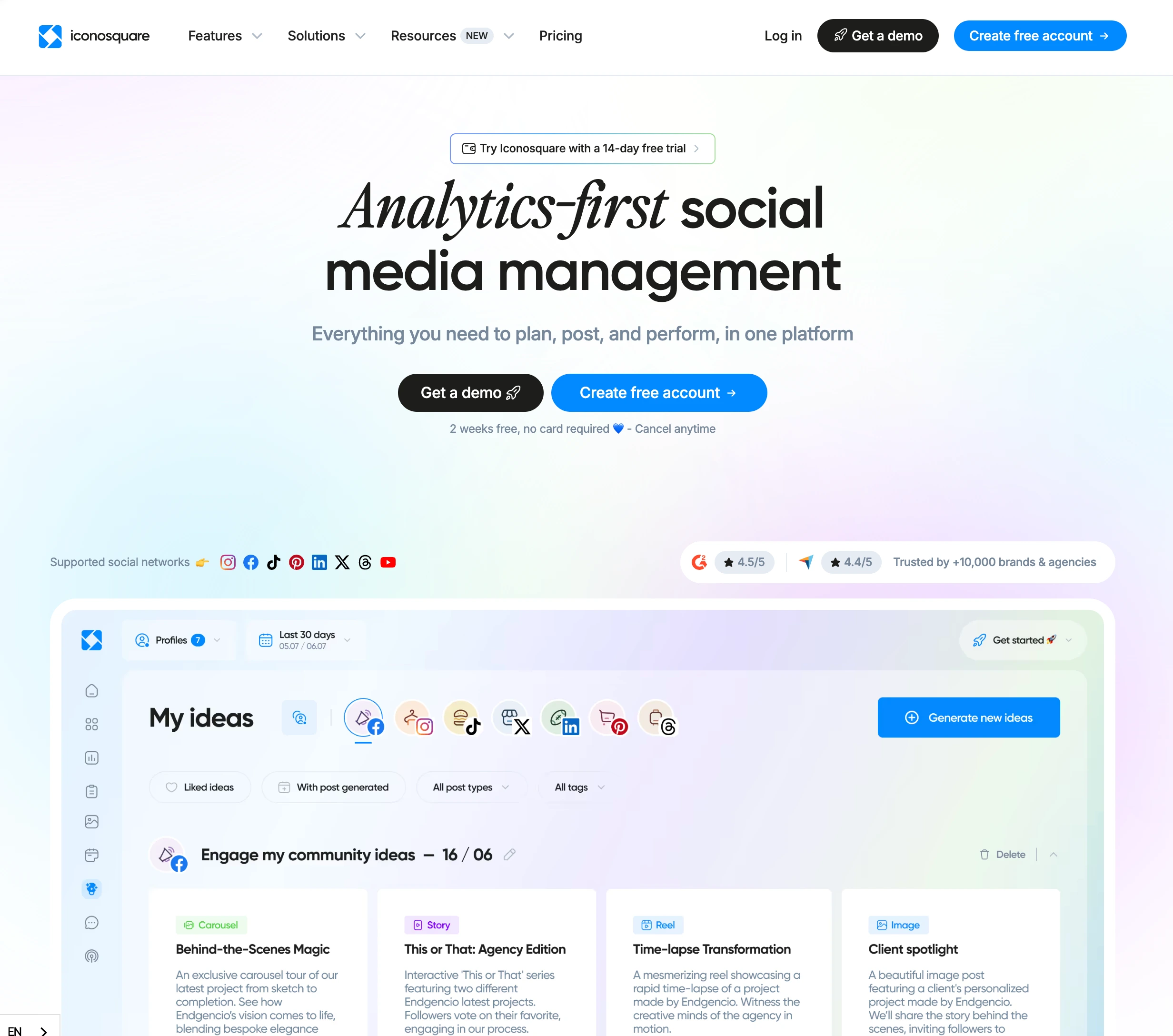
At a glance:
- Best for: Analytics-heavy brands and agencies that need deep Instagram data
- Starting price: Free, then $12/mo (Starter) or $39/mo (Launch)
- Key strength: Deep Instagram analytics with competitor benchmarking
- G2 rating: 4.5/5 (135 reviews)
Iconosquare is the analytics specialist on this list. Where most schedulers give you reach, likes, and follower count rolled into one dashboard, Iconosquare goes deep: Story completion rates, Reels watch time, hashtag-level performance, audience demographics, industry benchmarks against your category, and competitor tracking so you can see where you sit against three or four direct rivals.
The trade-off: scheduling, AI captions, and inbox are present but secondary to the analytics product. If you don't need analytics this deep, you're paying for capability you won't use. If you do, particularly for agency reporting on Instagram performance, there's no real substitute on this list.
Key Instagram features:
- Industry benchmarks for Instagram by sector
- Competitor tracking on Instagram (up to 100 competitors on higher plans)
- Story analytics with completion rate and exit point data
- Reels analytics with view duration
- Hashtag performance tracking
- Custom reports with white-label branding (higher plans)
- AI-powered caption generation
Pricing
| Plan | Monthly Price | Social Profiles | Users | Posts |
|---|---|---|---|---|
| Free | $0 | 2 | 1 | 10/profile/mo |
| Starter | $12/mo | 5 | 1 | 30/mo |
| Launch | $39/mo | 5 | 1 | 100/mo |
| Scale | $83/mo | 20 | 3 | Unlimited |
| Custom | From $139/mo | 5+ | 1+ | Unlimited |
Pros:
- Deepest Instagram analytics on this list, Story and Reels metrics rivals miss
- Competitor benchmarking is genuinely useful for brand strategy reviews
- White-label custom reports on higher plans
Cons:
- Per-user pricing climbs fast for agencies with multiple team members
- Scheduling and inbox features are functional but not best-in-class
- Free plan (10 posts/profile/month) is too restrictive to actually use
User ratings: 4.5/5 on G2 (135 reviews)
For more details: Iconosquare Pricing · Iconosquare Reviews
Instagram Content Tools: Design and Video
6. Canva: Best Design Tool for Instagram
At a glance:
- Best for: DIY designers, marketers, and creators making Instagram visuals without a designer
- Starting price: Free (Pro from $15/mo)
- Key strength: Massive Instagram template library + Magic Studio AI design tools
- G2 rating: 4.7/5 (6,833 reviews)
Canva is the design layer of nearly every Instagram marketing stack I've seen, and for good reason. The Instagram-sized templates (1080×1080 feed posts, 1080×1920 Stories and Reels covers, carousel pages) cover almost any visual style (minimal, bold, retro, magazine, meme), and the Magic Studio AI tools (Magic Design, Magic Edit, Magic Write, background remover, text-to-image) have matured enough to be production-useful rather than a gimmick.
Canva is not a scheduler in any serious sense: it has a basic Content Planner but the analytics, inbox, hashtag research, and Reels scheduling features are bare. Treat it as your design tool, not your publishing tool.
Key Instagram features:
- Instagram-sized templates (feed, Stories, Reels, carousels)
- Magic Studio AI: Magic Design, Magic Edit, Magic Write, background remover, text-to-image
- Brand Kit (Pro+) for consistent colors, fonts, and logos across posts
- Resize one design across all Instagram formats (Pro+)
- Video editing for Reels (basic but workable)
- Content Planner with limited scheduling
Pricing
| Plan | Monthly Price | Users | Key Features |
|---|---|---|---|
| Free | $0 | 1 | Templates, basic editing |
| Pro | $15/mo, or $144/year | 1 | Magic Studio AI, Brand Kit, Premium content, 10x the AI allowance of Free |
| Teams | $250/year per person | 3+ | Team Brand Kit, role permissions, approvals, 20x the AI allowance of Free |
| Enterprise | Custom | Custom | SSO, advanced security, dedicated support |
Pros:
- Largest Instagram template library on the market
- Magic Studio AI is genuinely production-useful in 2026
- Brand Kit (Pro) keeps team-made designs on-brand
Cons:
- Not a real scheduler, pair with PostPlanify or Later for publishing
- No Instagram analytics worth using
- Pro features paywall important tools (Brand Kit, background remover)
User ratings: 4.7/5 on G2 (6,833 reviews)
7. CapCut: Best Reels and Video Editor for Instagram
At a glance:
- Best for: Creators editing Reels and short-form vertical video for Instagram
- Starting price: Free (Pro from $7.99/mo)
- Key strength: Mobile + desktop video editor with AI captions, templates, and effects
- G2 rating: N/A (Trustpilot 1.2/5, see Cons)
CapCut is the Instagram Reels editor most creators use in 2026, full stop. The Free plan handles the core jobs: multi-track timeline editing, auto-captions, transitions, audio sync, background removal, basic AI effects, and exports without a watermark for personal use. Templates pulled from trending Reels and TikToks give you a fast on-ramp for trend-following content.
The catch: CapCut's Trustpilot rating is genuinely poor (~1.2/5), driven by billing complaints (auto-renewals, cancellation difficulties, charges during free trials) and aggressive paywalling of features that were previously free. The product itself is excellent for Reels editing: the company practices around billing are not. Use the Free plan or watch your subscription carefully.
Key Instagram features:
- Multi-track timeline editing for vertical (9:16) video
- AI auto-captions in multiple languages
- Trending Reels templates
- Background removal (no green screen needed)
- Audio sync to beat detection
- AI voice-over and text-to-speech
- Direct export to Instagram Reels
Pricing
| Plan | Monthly Price | Best For |
|---|---|---|
| Free | $0 | Personal Reels editing |
| Pro | $7.99/mo (or $49.99/year) | Creators wanting Pro effects + AI features |
| Commercial | $24.99/mo | Brands using CapCut content commercially |
| Team | $12.99/user/mo | Teams sharing brand kits and assets |
Pros:
- Best free Reels editor for mobile-first creators
- AI auto-captions and effects are production-ready
- Templates accelerate trend-jacking content
Cons:
- Trustpilot 1.2/5, billing complaints are widespread (watch auto-renewals)
- Features that were free have moved behind the Pro paywall
- No social scheduling, you still need PostPlanify or another tool to publish
User ratings: N/A on G2 · 1.2/5 on Trustpilot (29+ pages of reviews, primarily billing complaints)
PostPlanifyAll your social media in one simple dashboard
Schedule posts, track analytics, and reply to comments/DMs without switching tabs.
Engagement
+18%
Views
52.8k
Instagram Hashtag and Link in Bio Tools
8. Flick: Best Instagram Hashtag Research Tool
At a glance:
- Best for: Creators and brands that build Instagram reach through hashtag strategy
- Starting price: £11/mo billed yearly on Solo (roughly $14), 7-day free trial
- Key strength: AI-powered Instagram hashtag finder with reach data
- G2 rating: 4.7/5 (137 reviews)
Flick is the rare Instagram tool that was built from day one for hashtag research and never lost that focus. Its Instagram hashtag tools pull Instagram-specific reach data: average impressions, post volume, competition score, banned/restricted flags, and the AI-powered hashtag suggestions match real Instagram engagement patterns rather than generic SEO volume. Reviewers call them "genuinely the strongest hashtag tool on the market" and I'd agree after a year of testing alternatives.
Flick has expanded into scheduling, AI captions, and basic analytics in recent updates, but hashtags are still why people pay. Scheduling supports Instagram, Facebook, TikTok, and LinkedIn but the analytics product is limited to Instagram.
Key Instagram features:
- AI hashtag finder with Instagram reach data
- Hashtag collections and saved sets
- Banned and restricted hashtag detection
- AI caption writer
- Instagram post scheduling
- Instagram analytics with hashtag performance
Pricing (USD approximation, billed yearly in GBP)
| Plan | Monthly Price (yearly) | Social Profiles | Users | Posts |
|---|---|---|---|---|
| Solo | ~$14/mo (£11) | 4 | 1 | 30/mo |
| Pro | £24/mo (~$31) | 8 | 2 | Unlimited |
| Agency | £55/mo (~$71) | 20 | 5 | Unlimited |
| Agency | ~$71/mo (£55) | 20 | 5 | Unlimited |
Pros:
- Best-in-class Instagram hashtag research data
- AI hashtag finder produces genuinely relevant suggestions
- Pricing is reasonable for a specialist tool
Cons:
- Analytics limited to Instagram only (no cross-platform reporting)
- Scheduling supports 4 platforms (no TikTok in some plans, no Pinterest, no Threads)
- GBP pricing creates exchange-rate exposure for non-UK teams
User ratings: 4.7/5 on G2 (137 reviews)
9. Linktree: Best Instagram Link in Bio Tool
At a glance:
- Best for: Creators and brands sending Instagram bio traffic to multiple destinations
- Starting price: Free, then $8/mo on Starter ($6 billed yearly)
- Key strength: Industry-default bio link landing page with click analytics
- G2 rating: 4.6/5 (97 reviews)
Linktree is the category-defining bio-link tool, to the point that "Linktree" is used as a generic noun for any bio-link page. The Free plan is functional and covers most creator use cases; paid plans add custom branding (no Linktree footer), advanced analytics, monetization features, and integrations with email tools and e-commerce platforms.
Linktree's pricing went up significantly in late 2025 (Starter rose 60%, Pro 67%, Premium 46%), and selling digital products on Free or Starter carries a platform fee on top of Stripe's processing cut. Worth pricing alternatives if you're considering paid tiers.
Key Instagram features:
- Bio-link landing page with unlimited links (paid plans)
- Click analytics per link
- Custom themes and branding (paid)
- Email capture and lead forms
- Sell digital products directly (with transaction fees)
- Integrations with Mailchimp, Shopify, Spotify, YouTube
Pricing
| Plan | Monthly Price | Branding | Transaction Fees |
|---|---|---|---|
| Free | $0 | Linktree footer | Platform fee on digital sales |
| Starter | $8/mo ($6 yearly) | Custom theme | Platform fee on digital sales |
| Pro | $15/mo ($12 yearly) | Full branding | 0% on digital sales |
| Premium | $35/mo ($30 yearly) | Full branding + concierge | 0% on digital sales |
Linktree charges 0% platform fees on digital sales from Pro upward; Free and Starter take a percentage it doesn't publish on the pricing page. Stripe's processing fees apply on every plan (2.9% + $0.30 per purchase, plus $0.25 per payout). Premium now also includes basic social media scheduling and Instagram auto-replies, which overlaps with your scheduler.
Pros:
- Free plan is functional for most creators
- Industry-default tool, your audience knows what it is
- Solid click analytics per link
Cons:
- Late-2025 price hike made paid tiers feel expensive vs alternatives
- Selling digital products on Free or Starter carries a platform fee that Pro removes
- Most schedulers (PostPlanify, Later) include a bio-link page on paid plans, Linktree may be redundant
User ratings: 4.6/5 on G2 (97 reviews)
AI and Instagram Marketing: Ask Questions Instead of Opening Five Tabs
The newest shift in this stack is conversational: asking a question in plain English instead of opening the scheduler, the analytics view, and the inbox and reconciling them yourself.
PostPlanify does this through an MCP server that connects your account to Claude, ChatGPT, Cursor, Gemini, Perplexity, and any other assistant that speaks MCP. Your Instagram data comes with it, alongside the other nine platforms, so you can ask "which Reels formats held attention longest last month" or "draft next week's carousel captions in our brand voice" and act on the answer in the same place. Scheduling, reporting, and comment replies all run through that one connection.
On the creative side the AI is in the composer rather than a chat window: vision-powered captions read the image and write to what is actually in it, and AI image generation covers 200 to 800 visuals a month depending on plan. That is a different job from a design tool's AI, which is why Canva still sits in the creative layer of this stack.
One caution whichever route you take: an assistant can only answer what the history holds, so a tool that stores 30 days of Instagram analytics cannot tell you how this quarter compares to last.
What to Look for in an Instagram Marketing Tool
If you're picking just one or two tools to start with, use this lens:
- Native Reels and Stories scheduling. Tools that say "schedule Reels" but send a phone notification at the chosen time aren't really scheduling, they're alarms. PostPlanify, Later, and Meta Business Suite publish natively.
- Real Instagram analytics, not vanity metrics. Reach, Reels watch time, Story completion rate, and hashtag performance matter more than follower count. Iconosquare and PostPlanify go deepest here.
- A unified inbox if engagement is your strategy. If you reply to >20 comments and DMs a day, you need PostPlanify or Meta Business Suite. The Instagram app alone won't scale.
- AI captions that actually read the image. Most "AI caption" features in 2026 just rewrite a template. PostPlanify's vision-powered captions actually parse what's in the image and write context-aware copy.
- A bio-link tool that tracks clicks per link. Total page views is a vanity metric. Click-through to each link is the real signal.
- Approval workflows if you're an agency. Client sign-off before publish is the single biggest agency pain point. PostPlanify (Premium), Later (Scale), and Iconosquare (higher plans) handle this.
- Watch how the tool charges for people. Per-user pricing punishes growth. PostPlanify bills per client workspace with unlimited team members; per-user tools (Iconosquare, Sprout Social, Hootsuite) get expensive fast.
PostPlanifyAll your social media in one simple dashboard
Schedule posts, track analytics, and reply to comments/DMs without switching tabs.
Engagement
+18%
Views
52.8k
Making the Switch
If you're piecing together your Instagram marketing stack from scratch (or replacing a tool that isn't working), here's the lowest-friction path I'd take in 2026:
- Start with the publishing + analytics + inbox layer. This is the layer you'll use every single day. Start with PostPlanify, which bundles all three from $39/mo per client workspace across 10 platforms, including Instagram. Run it for the 14-day money-back window. If it doesn't fit, you owe nothing.
- Add Canva for design. Free plan is plenty if you're a single creator; Pro ($15/mo) once you want Brand Kit consistency or the Magic Studio AI tools.
- Add CapCut for Reels editing. Free plan covers 90% of creator needs. Only upgrade if you commercially monetize CapCut-edited content (use Commercial plan to stay compliant), and watch the billing.
- Add Linktree only if you outgrow your scheduler's built-in bio link. PostPlanify includes a bio-link page, so most teams won't need Linktree.
- Add Flick if hashtag strategy is core. Worth it for creators chasing reach via hashtag distribution.
- Add Iconosquare if you need analytics deeper than your scheduler provides, especially for agency reporting with competitor benchmarks.
The mistake I see most often: paying for 5 separate tools (scheduler + analytics + inbox + reports + bio link) when one platform like PostPlanify covers all five. Cancel the redundant subscriptions and put the saved budget into ad spend or content.
Frequently Asked Questions
What are Instagram marketing tools?
Instagram marketing tools, also sold as Instagram marketing software or Instagram management tools, are products that help you plan, publish, analyze, and grow your Instagram presence. They cover scheduling Reels and posts, replying to comments and DMs, researching hashtags, designing visuals, editing video, building a bio-link page, and reporting performance. Most marketers run a small stack of 2-4 tools rather than one tool for everything.
What's the best free Instagram marketing tool?
For native scheduling and inbox management, Meta Business Suite is the best free tool: it's official, reliable, and covers Instagram + Facebook. For design, Canva's free plan is the best free Instagram visual designer. For Reels editing, CapCut's free plan is the standard. For a bio-link, Linktree's free plan works for most creators.
Do I really need an Instagram marketing tool beyond Meta Business Suite?
If you only manage Instagram + Facebook and don't need analytics depth, white-label reports, AI captions, approval workflows, or cross-platform scheduling, then no. Meta Business Suite is enough. As soon as you add LinkedIn, X, TikTok, or any other platform, run an agency with client sign-off requirements, or need PDF reports for clients, you'll outgrow Meta Business Suite. That's where PostPlanify, Later, and Iconosquare come in.
What's the best Instagram marketing tool for agencies?
For agencies managing multiple client Instagram accounts, PostPlanify on Scale ($255/mo for five client workspaces) is the most cost-effective all-in-one: 8 social accounts per workspace, unlimited team members, white-labeled dashboards and reports, and approval workflows. Iconosquare and Sprout Social are alternatives for analytics-heavy agencies, but per-user pricing makes them expensive at scale.
What's the best Instagram analytics tool?
Iconosquare for analytics specialists: Story completion rates, Reels watch time, hashtag performance, industry benchmarks, and competitor tracking go deeper than any scheduler. PostPlanify if you want analytics that are good (not specialist-grade) bundled with publishing, inbox, AI, and reporting at a flat price.
What's the best Instagram scheduler in 2026?
PostPlanify for teams running Instagram alongside other platforms. Later for creators planning Instagram feeds visually. Meta Business Suite for free native Instagram + Facebook scheduling. See the full Instagram post scheduler tools roundup for a deeper scheduler-specific comparison.
Is Linktree worth paying for?
If your scheduler (PostPlanify, Later) already includes a bio-link page with click analytics, no: you'd be paying for redundant capability. If you need a standalone bio-link tool with deep integrations (Shopify, Mailchimp, Spotify) or you sell digital products directly through the bio link, Linktree Pro ($15/mo) or Premium ($35/mo, 0% transaction fees) makes sense.
How many Instagram marketing tools do I actually need?
Most teams run 2-4 tools: a scheduler with analytics and inbox (PostPlanify, Later, or Meta Business Suite), a design tool (Canva), a Reels editor (CapCut), and optionally a hashtag tool (Flick), a bio link (Linktree), or a deep analytics tool (Iconosquare). Adding more than 4 usually means paying for overlap.
What's the best AI tool for Instagram captions?
PostPlanify's AI assistant is vision-powered: it reads your image and writes context-aware captions matched to the visual content, not generic templates. Flick has a strong AI caption writer paired with hashtag research. Canva's Magic Write is solid for short Instagram copy.
Does PostPlanify schedule Instagram Reels and Stories natively?
Yes. PostPlanify publishes Instagram Reels, Stories, carousels, and feed posts natively via the official Instagram Graph API, no phone notifications or workarounds. You also get vision-powered AI captions, a unified inbox for Instagram comments and DMs, native analytics (Reels reach, Story completion, hashtag performance), a built-in link-in-bio page, and white-label PDF reports on the Scale plan.
Related Reading
-
7 Best Instagram Analytics Tools: The analytics layer of the same stack, including what native Insights can't do
-
8 Best Threads Scheduling Tools: The sister platform, where cross-posting from Instagram costs you topic tags and reply targeting
-
12 Best Instagram Post Scheduler Tools (2026), scheduler-focused deep dive
-
Best Time to Post on Instagram, research-backed timing recommendations
-
How to Schedule Instagram Posts (Mobile and Desktop), step-by-step guide
-
AI Caption Generator for Instagram, how vision-powered AI captions work
-
Best Social Media Management Platform, broader multi-platform tool comparison
-
Best Social Media Engagement Tools, inbox and engagement-focused stack
-
Alternative to Later · Alternative to Iconosquare · Alternative to Hootsuite · Alternative to Buffer
PostPlanifyAll your social media in one simple dashboard
Schedule posts, track analytics, and reply to comments/DMs without switching tabs.
Engagement
+18%
Views
52.8k
About the Author

Hasan Cagli
Founder of PostPlanify, a content and social media scheduling platform. He focuses on building systems that help businesses, agencies, and teams plan, publish, and manage content and social media more efficiently across platforms.


