


Social media management for charities runs into the same wall every time: the need is real, the budget is not. Nonprofits need a social media presence, but the budget reality is unforgiving. A small charity running on $200K annual operating expenses can't justify $200/mo on social media tooling, yet the same organization needs to publish across multiple platforms, coordinate volunteers, present results to a board, and steward donors who increasingly find them through Instagram and LinkedIn.
The good news: social media tools with nonprofit discounts are the norm rather than the exception, and most established platforms publish a real, well-documented nonprofit social media discount, typically 20-60% off paid plans. The bad news: discount eligibility, plan restrictions, and verification processes vary enough that a tool that looks affordable in marketing copy can still cost more than it should once you read the fine print.
This guide compares 12 social media management tools through the nonprofit lens, pulling verified discount percentages from each vendor's official documentation, mapping which plans the discount applies to (some tools restrict discounts to mid-tier plans only), and outlining how to apply. Every nonprofit-discount claim in this article is sourced from the vendor's official pricing page or help center.
Quick Answer: Best Social Media Management Tool for Nonprofits in 2026
For most nonprofits, the best social media management tool depends on the budget and team shape:
- Tiny nonprofits (1-2 staff, 1-3 channels): Buffer. Free plan covers 3 channels, and the verified 50% nonprofit discount brings paid plans to ~$2.50/channel/month on Essentials. The lowest total cost in the category.
- Small-to-mid nonprofits (3-8 staff + volunteers): PostPlanify. Unlimited team members on every plan means volunteers and board reviewers cost nothing to add, with pricing per client workspace from $39/mo, or around $20/mo with the up-to-50% nonprofit discount ($31/mo billed yearly before the discount). Multi-approver workflows fit board/exec director/comms coordinator review chains, and Scale adds white-label PDF reports for board meetings and donor stewardship.
- Established nonprofits wanting one vendor for everything: Hootsuite. The HootGiving Program offers up to 60% off Standard, Professional, or Advanced plans, which is $39/user/mo instead of $99 at the entry tier.
- Storytelling-heavy nonprofits (arts, culture, advocacy): Later. 50% off the annual Growth plan for organizations actively combating racism. Visual planning fits image-led mission storytelling.
- Multi-stakeholder nonprofits with formal approval needs: Loomly. Verified 50% lifetime nonprofit discount with approval workflows on every paid plan, including the entry-level Starter at $32.50/month after discount.
For analytics-focused nonprofit reporting, Metricool (40% off) ships Looker Studio integration. For nonprofit chapters or affiliates managing distinct programs, Sendible (25% off annual) supports client-style dashboards. Agorapulse (20% lifetime NGO discount) is strongest when community management drives the work. For a fully donated software stack, start with TechSoup: it's the verification gateway most major social tools rely on.
How I Evaluated These Tools for Nonprofits
I evaluated 10 candidates for nonprofit social media management software through a nonprofit-specific lens. For each tool, I looked at:
- Nonprofit discount depth & plan restrictions: how deep the discount is, and which plans it actually applies to (some lock it to mid-tier plans only).
- Free-plan usefulness: whether the free tier is genuinely usable for a tiny nonprofit, or just a demo.
- Total cost at nonprofit team sizes: what it really costs once staff, volunteers, and board reviewers all need access.
- Ease of cross-team approval: how cleanly content moves through staff → exec director → board review.
- Donor & board reporting quality: whether exports are board-ready (branded or white-label PDFs).
- Multi-program / chapter support: separate workspaces for distinct programs, chapters, or fiscal-sponsor structures.
- Integration with nonprofit tooling: CRM, design (Canva for Nonprofits), and donor management.
On sourcing: every discount percentage was checked against the vendor's official help center, nonprofit page, or current pricing page in October 2026 (where it isn't public, I say so); every price comes from the vendor's public pricing page, with discounted prices applying the verified discount to the listed price; and ratings are aggregated from G2, Capterra, and Trustpilot.
At a Glance: Best Social Media Tools for Nonprofits Compared
| Tool | Best For | Standard Price | Nonprofit Discount | Effective Price | Free Plan |
|---|---|---|---|---|---|
| PostPlanify | Nonprofits with volunteers and board access | From $39/mo per workspace | Up to 50% off | ~$20/mo (1 workspace) | 7-day trial |
| Buffer | Tiny nonprofits | $5/channel/mo (yearly) | 50% off all plans | ~$2.50/channel/mo | Yes (3 channels) |
| Hootsuite | Established nonprofits wanting one vendor | $99/user/mo Standard | Up to 60% off Standard/Professional/Advanced | $39/user/mo Standard | No |
| Later | Storytelling / arts / advocacy | $50/mo Growth | 50% off annual Growth only | ~$21/mo Growth (annual) | Limited free |
| Loomly | Multi-stakeholder approval needs | $65/mo Starter | 50% lifetime | $32.50/mo Starter | No |
| Metricool | Analytics-focused | $25/mo Starter | 40% off | $15/mo Starter | Yes (1 brand) |
| Sendible | Multi-chapter / affiliate orgs | $99/mo Plus | 15% monthly / 25% annual, any plan | ~$74/mo Plus (annual) | No |
| Vista Social | Cross-functional review | $99/mo Professional ($79 yearly) | Professional/Advanced, % not published | Ask before budgeting | No |
| Agorapulse | Community management | $99/user/mo Standard | 20% lifetime NGO | ~$79/user/mo Standard | 30-day trial |
| Planable | Visual approval workflows | $39/workspace/mo Basic | 30% off | ~$27/workspace/mo Basic | No (first 50 posts free) |
| SocialBee | Evergreen content recycling | $29/mo Bootstrap | 50% off all tool plans | ~$15/mo Bootstrap | No (14-day trial) |
| Meta Business Suite | Facebook and Instagram only | Free | Not applicable | $0 | Yes (free forever) |
Effective prices reflect the verified nonprofit discount applied to the lowest qualifying tier. Some tools restrict discounts to specific plans; see individual sections for details.
1. PostPlanify: Best for Nonprofits With Volunteers and Board Access

PostPlanify is an all-in-one social media management platform combining advanced analytics, social inbox, a brand-aware AI assistant, content calendar, multi-approver workflows, branded and white-label reporting, and team collaboration in one workspace, without per-seat pricing. For nonprofits, the unlimited team members are the headline benefit: giving access to a board member, a volunteer fundraising coordinator, or a contracted designer doesn't change the bill.
Where most enterprise tools quote per seat, and where many "nonprofit-friendly" tools restrict their discount to mid-tier plans, PostPlanify treats the operational shape of a nonprofit team (full-time staff plus part-timers, volunteers, and board reviewers) as the default rather than an exception, because team members and approvers are never billed as seats on any plan. Yearly billing already saves about 20% on every plan, and the multi-approver workflow fits the way nonprofits actually review campaigns (exec director sign-off, comms coordinator brand check, occasional board chair review for major campaigns).
At a glance: PostPlanify
- Pricing: Per client workspace on a graduated scale: $39/mo for the first workspace on Growth, $155/mo for 5, $250/mo for 10, up to 100. Premium from $99/mo and Scale from $199/mo per workspace. Unlimited team members on every plan
- Platforms: 10. Instagram, TikTok, Facebook, X, LinkedIn, YouTube, Threads, Pinterest, Bluesky, and Google Business
- Free trial: 7 days; 14-day money-back guarantee
- Nonprofit discount: Up to 50% off. Contact PostPlanify directly with proof of nonprofit status
- Best for: Nonprofits of 3 to 15 staff plus volunteers and board reviewers, where per-seat billing would punish broad access (see our social media management for nonprofits page for the sector-specific setup)

Key features for nonprofits:
- Unlimited team members on every plan: board members, volunteers, contracted designers, and program staff all cost nothing to add, on Growth as much as on Scale
- Approval workflows from the entry plan, with single-step and multi-step review that fits nonprofit chains: designate exec director + comms coordinator per post, track "2/3 approved" status, capture rejection notes
- Reporting: client reports with scheduled delivery on Premium, and fully white-labeled dashboards, emails, and reports on Scale; useful for board reports, donor stewardship updates, and grant reporting
- Analytics on every plan across all 10 platforms with historical daily snapshots, reach, engagement, follower growth tracked over time for year-end fundraising reports
- Social inbox on every plan for comments on Instagram, Facebook, LinkedIn, Google Business, YouTube, Threads, and Bluesky, plus Instagram and Facebook DMs and Google reviews, so donor and volunteer messages can be assigned to the right person
- Brand-aware AI assistant: generates captions and images tuned to your organization's voice, useful for storytelling-heavy nonprofit content
- AI image generation with monthly credits (200 on Growth, 400 on Premium, 800 on Scale): reduces dependence on stock photo budgets
- Media library with Canva, Google Drive, and Dropbox imports, pairing cleanly with Canva for Nonprofits (free Canva Pro)
- Link in bio builder with click analytics, measure donate-page click-through from Instagram bio
- A workspace per program or chapter, up to 100, supporting multi-program, multi-chapter, or fiscal-sponsor structures
- REST API + MCP (Premium and above) for integration with nonprofit infrastructure (CRM, donor management, BI tools)
- 7-day free trial + 14-day money-back guarantee: de-risks evaluation
Pricing:
| Plan | Starts at | Includes | Each extra workspace | Social accounts |
|---|---|---|---|---|
| Growth | $39/mo | 1 workspace | from $29, cheaper as you add more | 4 per workspace |
| Premium | $99/mo | 3 workspaces | from $39, cheaper as you add more | 6 per workspace |
| Scale | $199/mo | 5 workspaces | from $39, cheaper as you add more | 8 per workspace |
Unlimited team members on every plan, no per-seat fees. Yearly billing saves 20%. All plans include a 14-day free trial with a 14-day money-back guarantee.
Pros for nonprofits:
- Unlimited team members is the standout: unlike per-seat tools (Hootsuite, Sprout, Agorapulse), adding board members, volunteers, and contractors never changes the bill
- The up-to-50% nonprofit discount applies on top of yearly billing, which already saves about 20%
- Approval workflows actually fit nonprofit governance, and they are on the entry plan: parallel sign-off (exec director + comms + board) with status tracking and rejection notes, not just "manager approval"
- Everything's included on every plan: analytics, the social inbox, approvals, and the AI assistant come standard, so there are no add-ons to budget for
- Board- and donor-ready reporting: client reports on Premium and fully white-labeled ones on Scale, for monthly board updates and grant reports
Cons:
- 50% discount matches Buffer and Loomly: Hootsuite's HootGiving goes deeper on percentage (up to 60%), though it discounts per-user pricing, so a team of five still pays $195/mo on Standard
- No mobile app yet: web-first workflow
- No dedicated social listening (pair with Brandwatch or Mention if listening is essential)
- Newer platform than Hootsuite or Sprout: smaller public reference base for nonprofit case studies
Skip this if: your nonprofit is tiny (1 staff, 1-3 channels) and Buffer's free plan covers your needs at $0. Buffer Free + Canva for Nonprofits is the right starting stack until growth pushes past the 3-channel cap; PostPlanify wins as the team grows and approvals, analytics, branded reports, or Scale-level white-label reports become operational requirements.
How to apply for the discount: PostPlanify offers up to 50% off for verified nonprofits. Reach out via PostPlanify directly with proof of nonprofit status (501(c)(3) determination letter for US organizations or local equivalent). The 7-day free trial + 14-day money-back guarantee lets you evaluate the platform during the application process.
 PostPlanify
All your social media in one simple dashboard
Schedule posts, track analytics, and reply to comments/DMs without switching tabs.

Engagement
+18%
Views
52.8k
2. Buffer: Best Free Plan + Lowest Total Cost

Buffer offers the most accessible entry point for nonprofits in the category. The free plan covers 3 channels with 10 scheduled posts per channel, genuinely usable for tiny nonprofits managing a single Instagram, Facebook, and LinkedIn presence. Beyond free, Buffer's verified 50% nonprofit discount applies to all paid plans, bringing Essentials to ~$2.50/channel/month and Team to ~$5/channel/month.
The Buffer nonprofit discount is the easiest to claim in this comparison, and Buffer's interface is the cleanest in the category. For nonprofits with limited technical staff and high volunteer turnover (where new volunteers need to learn the tool fast), the minimal learning curve is a real operational benefit.
At a glance: Buffer
- Pricing: Free (3 channels) → Essentials $5/channel/mo (annual) → Team $10/channel/mo (annual)
- Platforms: 11. Instagram, Facebook, X, LinkedIn, TikTok, YouTube, Pinterest, Google Business, Threads, Bluesky, Mastodon
- Free trial: Free plan available; 14-day trial on paid plans
- Nonprofit discount: 50% off all paid plans for verified nonprofits (source: Buffer Help Center)
- User ratings: 4.3/5 on G2 (1,023 reviews), 2.1/5 on Trustpilot (93 reviews)
- Best for: Tiny nonprofits (1-2 staff) managing 1-5 channels, or larger nonprofits looking for the simplest possible entry-level scheduling tool
Key features for nonprofits:
- Free plan covers 3 channels with 10 scheduled posts each: usable indefinitely for tiny nonprofits
- 50% nonprofit discount on Essentials and Team plans
- Unlimited users on Team plan ($10/channel/mo annual; $5 with discount): generous for volunteer access
- AI Assistant for caption suggestions on all plans
- Best time to post: included on all plans, even free
- Community inbox for Instagram, Facebook, LinkedIn (paid plans)
- Approval workflows on Team plan
- Start Page (link-in-bio): useful for fundraising campaign landing pages
- 14-day free trial on paid plans before discount conversation
Pricing (with 50% nonprofit discount):
| Plan | Standard Price (annual) | After 50% Nonprofit Discount | Channels | Users |
|---|---|---|---|---|
| Free | $0 | $0 | 3 max | 1 |
| Essentials | $5/channel/mo | ~$2.50/channel/mo | Unlimited | 1 |
| Team | $10/channel/mo | ~$5/channel/mo | Unlimited | Unlimited |
Annual billing saves an additional ~17%. The 50% discount applies to all qualifying nonprofits on every plan.
Pros for nonprofits:
- Lowest absolute cost in the category for small nonprofits with the 50% discount
- Free plan is genuinely usable, not a demo
- Unlimited users on Team: fits hybrid staff/volunteer access
- Cleanest interface: minimal training time for new volunteers
- Discount applies to all paid plans (no plan restrictions)
- 11 platforms including newer networks (Bluesky, Mastodon, Threads)
- Approval workflows on Team plan handle basic review chains
Cons:
- Per-channel pricing scales fast even with discount: 10 channels on Team after 50% discount = ~$50/mo
- Analytics stay surface-level on all plans: limited for grant reporting or year-over-year comparisons
- Community inbox covers Instagram, Facebook, LinkedIn only (no X or TikTok inbox)
- No social listening
- 2.1/5 Trustpilot rating reflects sync failures, support delays, and pricing complaints
- No white-label PDF reports: basic exports only
Skip this if: your nonprofit needs board-ready reporting (Buffer's analytics aren't deep enough), manages more than 10 channels (per-channel pricing escalates), or runs formal multi-step approval chains with legal/compliance review.
How to apply for the discount: Complete Buffer's nonprofit discount request form via the Buffer Help Center or Buffer for Nonprofits page. Provide official documentation verifying nonprofit status. Buffer's team reviews submissions and applies the discount within approximately 48 hours.
For more details: Buffer Pricing Breakdown · Buffer Reviews · Best Buffer Alternatives
3. Hootsuite: Biggest Discount via TechSoup

Hootsuite's HootGiving Program offers up to 60% off Standard, Professional, or Advanced plans for eligible nonprofits, which works out to $39, $79, or $159 per user per month on annual billing instead of $99, $199, or $399. Combined with Hootsuite's enterprise feature depth (social listening via Talkwalker, employee advocacy via Amplify, governance for compliance-heavy work), this is the strongest fit for established nonprofits with formal infrastructure.
Two things to confirm before you rely on it. Earlier versions of HootGiving required TechSoup or Goodstack verification and excluded schools, hospitals, healthcare organizations, governmental entities, agencies, and credit unions, with a 1 to 2 week approval window. The current HootGiving page states none of those restrictions and lists all three published tiers as eligible, so ask Hootsuite directly whether your organization type still qualifies. The other thing to model is the unit: the discount cuts the per-user rate, not the total, so a six-person team on Standard still pays $234/mo.
At a glance: Hootsuite
- Pricing (standard): Per user, billed annually: Standard $99/user/mo (10 accounts) → Professional $199/user/mo (unlimited) → Advanced $399/user/mo → Enterprise (custom)
- Platforms: 10+ including Google Business Profile
- Free trial: 30 days (no permanent free plan since 2023)
- Nonprofit discount: Up to 60% off Standard, Professional, or Advanced plans via the HootGiving Program, billed annually: $39/user/mo instead of $99, $79 instead of $199, $159 instead of $399 (source: Hootsuite HootGiving page)
- Eligibility: Registered charity in good standing, not a school/hospital/government entity/credit union, registered with TechSoup
- User ratings: 4.3/5 on G2 (6,615 reviews), 1.8/5 on Trustpilot (511 reviews)
- Best for: Established 501(c)(3) nonprofits with TechSoup eligibility that need broad platform support, social listening, employee advocacy, or compliance-grade governance
Key features for nonprofits:
- HootGiving Program: up to 60% off, the deepest published percentage in the category
- 10+ platforms including Google Business Profile (essential for nonprofits with physical locations)
- OwlyGPT AI assistant for caption and summary generation
- Social listening via Talkwalker integration: useful for tracking mission-related conversations or crisis monitoring
- Employee advocacy (Amplify, Enterprise add-on): turn staff and board members into amplifiers
- Multi-user approval workflows (Advanced+)
- Custom permissions (Advanced+): important when board members or volunteers get scoped access
- Bulk scheduling up to 350 posts at once (Advanced+): useful for campaign-heavy fundraising periods
- Hootsuite Academy: free training and certifications (sometimes included with HootGiving)
- Enterprise add-ons for governance, compliance integrations (Proofpoint), and Salesforce: important for healthcare or finance-adjacent nonprofits
Pricing with HootGiving:
Hootsuite now publishes its post-discount rates directly on the HootGiving page, so no estimation is needed. All figures are per user per month on annual billing, and you can buy as many seats as you need at the same roughly $62-$125/user/mo depending on the tier and exact discount approved. Always confirm the final quoted price during the application process.
| Plan | Standard Price | With HootGiving | Social Accounts |
|---|---|---|---|
| Standard | $99/user/mo | $39/user/mo | 10 |
| Professional | $199/user/mo | $79/user/mo | Unlimited |
| Advanced | $399/user/mo | $159/user/mo | Unlimited |
Pros for nonprofits:
- Deepest verified nonprofit discount percentage (up to 60%) in the category
- Broadest enterprise feature set among nonprofit-eligible tools
- Hootsuite Academy access (training value beyond the tool itself)
- Strong governance and compliance posture for regulated nonprofit sub-sectors
- Talkwalker listening for mission-related conversation tracking
- Salesforce integration for nonprofits using Salesforce Nonprofit Cloud
Cons:
- Eligibility excludes schools, hospitals, healthcare orgs, governmental entities, and credit unions: significant restriction
- 1 to 2 week approval window: slower than Buffer's 48 hours
- Per-user pricing (even discounted) compounds for larger nonprofits
- Listening, advocacy, and compliance integrations are paid add-ons even on Enterprise
- 1.8/5 Trustpilot reflects long-standing billing and support complaints
- No free plan: 30-day trial is the only no-cost option
Skip this if: your nonprofit is a school, hospital, healthcare organization, governmental entity, or credit union. HootGiving explicitly excludes these. Also skip if your team is small enough that a 50%-off Buffer or 50% Loomly Starter would cover the workflow at lower total cost.
How to apply for the discount: Apply through the Hootsuite HootGiving program. Hootsuite partners with TechSoup and Goodstack for nonprofit verification. You'll need 501(c)(3) documentation (or local equivalent) and TechSoup registration. Approval typically takes 1-2 weeks.
For more details: Hootsuite Pricing Breakdown · Hootsuite Reviews · Best Hootsuite Alternatives
4. Later: Best for Storytelling-Heavy Nonprofits

Later is the visual-first scheduler in the category, originally built for Instagram. For nonprofits whose work is storytelling-heavy (arts and culture, advocacy, beneficiary stories, fundraising appeals), the drag-and-drop calendar with grid preview matches the workflow more naturally than text-first tools.
Later's nonprofit program narrowed in 2026. It is now 50% off the annual Growth plan rather than all subscription plans, and the 100% discount it used to advertise for organizations actively engaged in combating racism is no longer listed on the help center page. The remaining discount is a real, documented commitment, not a marketing claim.
At a glance: Later
- Pricing (standard): Starter $25/mo → Growth $50/mo (Most Popular) → Scale $110/mo
- Platforms: 8. Instagram, Facebook, Threads, Pinterest, TikTok, LinkedIn, YouTube, Snapchat (note: X/Twitter was removed in 2025; Google Business not supported)
- Free trial: Limited free plan; 14-day trial on paid plans
- Nonprofit discount: 50% off the annual Growth plan. Later narrowed this in 2026: it no longer applies to all plans, it excludes add-ons such as extra Social Sets and users, and it cannot be combined with another promotion (source: Later Help Center)
- User ratings: 4.5/5 on G2 (347 reviews), 1.3/5 on Trustpilot (329 reviews)
- Best for: Arts, cultural, advocacy, and beneficiary-story-led nonprofits prioritizing visual content workflows on Instagram, TikTok, and Pinterest
Key features for nonprofits:
- Visual content calendar with Instagram grid preview: matches storytelling workflow
- Drag-and-drop scheduling
- Linkin.bio (Later's link-in-bio) for fundraising campaign landing pages
- AI content tools (5-100 credits/month depending on plan)
- Best time to post recommendations
- Social inbox (Growth+) for community management
- Internal collaboration and approval workflows (Growth+)
- External workflow and approvals (Growth+)
- UGC collection (Growth+): useful for nonprofit storytelling featuring community contributions
- Custom roles and permissions (Growth+)
- Smart Scheduling with Future Trends (Growth+)
- Competitive benchmarking (Scale)
Pricing (with 50% nonprofit discount):
| Plan | Standard Price | After 50% Discount | Social Sets | Users |
|---|---|---|---|---|
| Starter | $25/mo | ~$12.50/mo | 1 (8 profiles) | 1 |
| Growth | $50/mo | ~$25/mo (or $0 for anti-racism orgs) | 2 (16 profiles) | 2 |
| Scale | $110/mo | ~$55/mo | 6 (48 profiles) | 4 |
Annual billing saves ~17% on top of the discount.
Pros for nonprofits:
- 50% off all plans applies broadly with no plan restrictions
- The nonprofit discount applies to the Growth plan, which is the tier most nonprofits actually need, rather than only the entry tier
- Visual planning fits storytelling-led nonprofit work
- Strong on Instagram and Pinterest: primary platforms for many arts/culture/advocacy nonprofits
- Linkin.bio supports fundraising campaign hubs
- UGC collection useful for community-contributed storytelling
- Internal + external approval workflows on Growth+
Cons:
- 8 platforms only: no X/Twitter (removed in 2025), no Google Business Profile
- Add-ons (extra Social Sets at $15/mo, extra users at $5/mo) inflate the bill at scale
- 1.3/5 Trustpilot rating with widespread billing-dispute complaints
- Customer support reportedly slow on billing issues
- Analytics adequate but not deep: limited for cross-platform grant reporting
- Starter plan capped at 1 user, 1 social set, 30 posts/profile: restrictive even at the discounted rate
Skip this if: X/Twitter is a primary channel for your advocacy work (removed from Later in 2025), your nonprofit has a Google Business Profile presence to maintain (not supported), or your team needs deep analytics for foundation grant reporting.
How to apply for the discount: Submit the application form on Later's Non-Profit Discount Application page with official documentation verifying nonprofit status (501(c)(3) determination letter for US organizations, or local equivalent). For the 100% anti-racism Growth plan discount, indicate this during the application. Later's team will review and reach out with their decision.
For more details: Later Pricing Breakdown · Later Reviews · Best Later Alternatives
5. Loomly: Best for Multi-Stakeholder Approvals

Loomly ships approval workflows on every paid plan, including the entry-level Starter at $65/mo (or $32.50/mo with the verified 50% lifetime nonprofit discount). For nonprofits with formal review chains: exec director sign-off, comms coordinator brand check, occasional board chair review for major campaigns. Loomly's structured approval system fits naturally.
The 50% lifetime discount is one of the most generous in the category. Unlike some discount programs that require annual reapplication or only apply to specific tiers, Loomly's nonprofit discount applies to every paid plan permanently after verification.
At a glance: Loomly
- Pricing (standard): Starter $65/mo (12 accounts, 3 users) → Beyond $332/mo (60 accounts, unlimited users); Enterprise (custom). No free plan. 15-day trial only
- Platforms: 9. Facebook, Instagram, X, LinkedIn, Pinterest, TikTok, YouTube, Snapchat, and Google Business Profile (no Threads or Bluesky)
- Free trial: 15-day trial on paid plans, no credit card required
- Nonprofit discount: 50% lifetime discount for verified nonprofits (source: Loomly pricing)
- User ratings: 4.6/5 on G2 (1,793 reviews), 1.7/5 on Trustpilot (26 reviews)
- Best for: Nonprofits with formal multi-stakeholder review chains who need approval workflows starting at the entry tier
Key features for nonprofits:
- Approval workflows and roles on every paid plan
- Custom workflows and custom roles on Beyond: fits complex nonprofit governance structures
- Brand kit: logo, colors, font controls for brand consistency across volunteer-managed channels
- Post ideas based on trending topics, holidays, and events: useful for content-strapped nonprofit teams
- AI caption suggestions for content creation
- Interactions inbox: manage comments and DMs alongside team workflows
- Content calendar with drag-and-drop and visual workflow
- Canva, Google Drive, Unsplash, Giphy, and Zapier integrations
- Slack and Microsoft Teams integration (Beyond+): pairs with nonprofit infrastructure
- Calendar 2FA enforcement (Beyond+): important for security-sensitive nonprofits
- 50% lifetime nonprofit discount
Pricing (with 50% nonprofit discount):
| Plan | Standard Price | After 50% Lifetime Discount | Social Accounts | Users |
|---|---|---|---|---|
| Starter | $65/mo | $32.50/mo | 12 | 3 |
| Beyond | $332/mo | $166/mo | 60 | Unlimited |
| Enterprise | Custom | Custom | 61+ | Unlimited |
Loomly no longer offers a free plan: paid plans start at $65/mo ($32.50 after the nonprofit discount), with a 15-day trial.
Annual billing saves ~25% on top of the discount, bringing Starter to ~$24.50/mo annual + 50% discount.
Pros for nonprofits:
- 50% lifetime discount applies to every paid plan permanently
- Approval workflows on the first paid plan: accessible from $32.50/mo after discount
- Custom workflows and custom roles on Beyond fit complex nonprofit governance
- Brand kit enforcement helps when multiple volunteers post on behalf of the org
- Interactions inbox handles engagement alongside approvals
- 4.6/5 G2 rating from 1,793 reviews
- Beyond plan unlimited users at $166/mo after discount is competitive for nonprofit teams of 5+
Cons:
- Starter plan limited to 3 users: most nonprofits with volunteers outgrow this quickly
- $267/mo gap (standard) between Starter and Beyond punishes 4-7 person teams
- No Threads or Bluesky support
- AI capabilities limited to caption suggestions: no AI image generation
- 1.7/5 Trustpilot reflects support and Instagram integration complaints
- No free plan: the entry point is the $65/mo Starter (15-day trial only)
Skip this if: your team is between 4 and 7 active users: the cliff between Starter and Beyond punishes exactly that team size with no mid-tier option. Also skip if Threads or Bluesky are part of your channel mix (Loomly hasn't added them).
How to apply for the discount: Loomly offers a 50% lifetime discount for verified nonprofit organizations. Provide proper nonprofit documentation (501(c)(3) determination letter or local equivalent) to qualify. Contact Loomly support after starting the trial, see Loomly Pricing for current details on the application process.
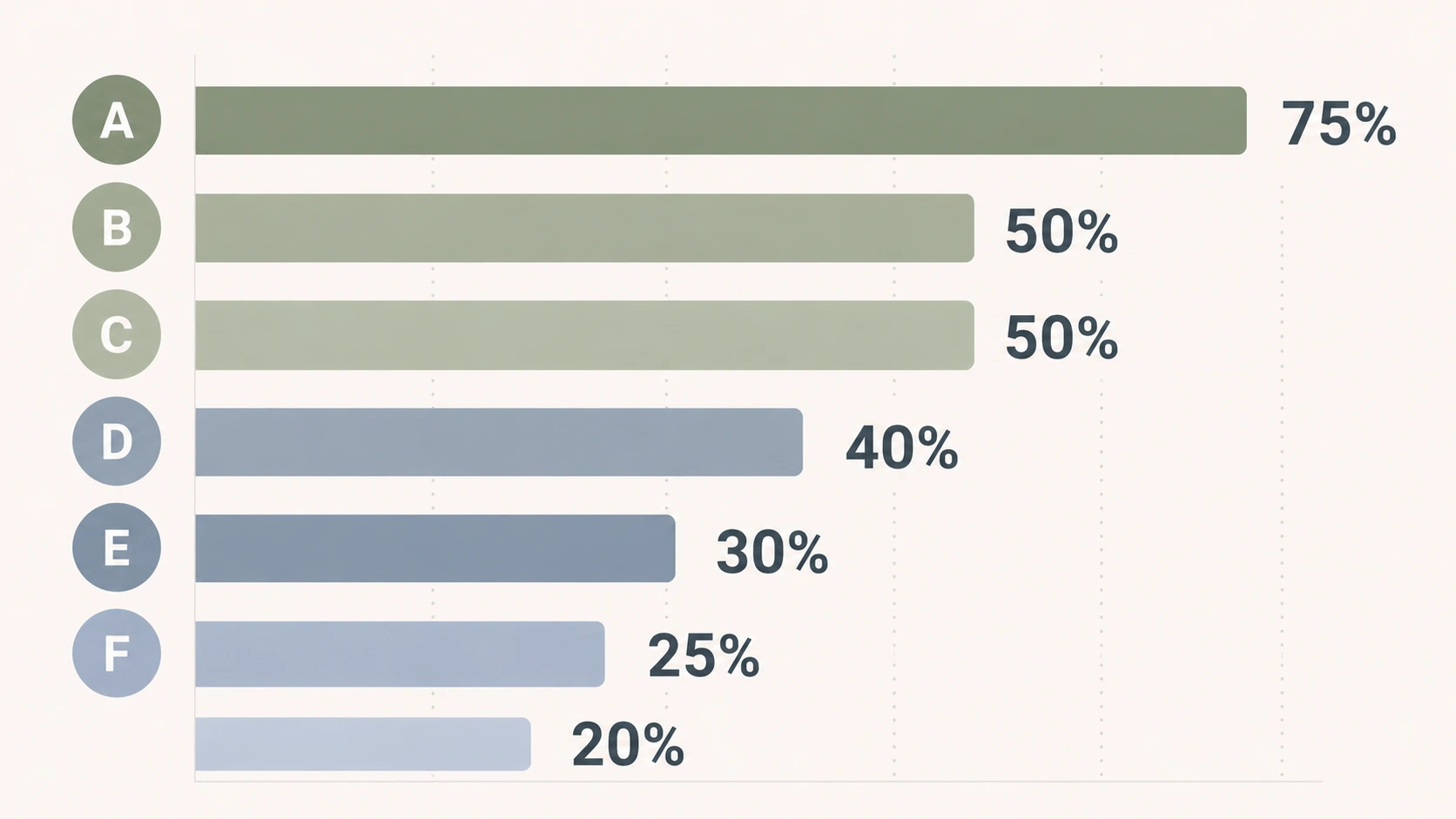
For more details: Loomly Pricing Breakdown · Loomly Reviews · Best Loomly Alternatives
6. Metricool: Best for Analytics-Driven Nonprofits
Metricool is the analytics-first pick for nonprofits whose reporting goes deeper than monthly board updates: foundation grant reporting, year-over-year mission impact analysis, competitive benchmarking against peer organizations. The verified 40% nonprofit discount applies to all paid plans.
Metricool's per-brand pricing model fits nonprofits managing distinct programs (each program as its own "brand"). The Looker Studio connector on the Advanced plan pipes social data into wider organizational dashboards, useful for nonprofits already using Looker, Tableau, or Google Data Studio for fundraising or program data.
At a glance: Metricool
- Pricing (standard): Free (1 brand, 20 posts/mo, no LinkedIn or X) → Starter from $25/mo (5 brands $25, 10 brands $45) → Advanced from $67/mo (15 brands $67, 25 brands $107, 50 brands $210) → Custom. Billed yearly, Starter is from $20 and Advanced from $53
- Platforms: 11. Instagram, Facebook, TikTok, YouTube, Pinterest, Threads, Bluesky, Twitch, Google Business Profile, LinkedIn (Starter+), X ($5/mo add-on, Starter+)
- Free plan: Yes (1 brand, 20 posts/mo)
- Nonprofit discount: 40% off all paid plans (source: Metricool pricing)
- User ratings: 4.5/5 on G2 (83 reviews), 4.2/5 on Trustpilot (519 reviews)
- Best for: Analytics-focused nonprofits with foundation grant reporting needs, multi-program orgs (per-brand pricing), or teams already using Looker Studio for org-wide dashboards
Key features for nonprofits:
- Unlimited analytics history on Starter+: essential for year-over-year impact reporting
- Competitor tracking: up to 100 on Starter, unlimited on Advanced (benchmark against peer nonprofits)
- Looker Studio connector (Advanced+): pipes data into org-wide dashboards
- Metricool API + Zapier + Make + MCP (Advanced+) for stack integration
- AI social media assistant with credits
- PDF and PPT report exports (no watermarks on paid plans): useful for grant reporting
- SmartLinks (link-in-bio) for fundraising hubs
- Customizable report templates (Advanced+)
- Approval workflows and unlimited users (Advanced+)
- Inbox Manager for comments, DMs, and mentions
- Ads management for Google, Meta, and TikTok
- 40% nonprofit discount
Pricing (with 40% nonprofit discount):
| Plan | Standard Price | After 40% Discount | Brands |
|---|---|---|---|
| Free | $0 | $0 | 1 |
| Starter (5 brands) | $25/mo | $15/mo | 5 |
| Starter (10 brands) | $45/mo | ~$27/mo | 10 |
| Advanced (15 brands) | $67/mo | ~$40/mo | 15 |
| Advanced (25 brands) | $107/mo | ~$64/mo | 25 |
| Advanced (50 brands) | $210/mo | ~$126/mo | 50 |
Annual billing saves an additional ~18%. X/Twitter requires a $5/mo per-account add-on on top of the plan price.
Pros for nonprofits:
- 40% nonprofit discount applies to every paid plan
- Strong free plan (1 brand, 20 posts/mo) usable as a long-term solution for tiny single-program nonprofits
- Looker Studio connector closes the BI gap most tools don't address
- Competitor tracking enables peer-organization benchmarking
- Per-brand pricing fits multi-program nonprofits
- 100% reply rate on negative Trustpilot reviews: strong support engagement signal
Cons:
- "Unlimited" publishing capped at 600 posts per brand per month under Fair Use Policy
- X/Twitter costs $5/mo per account on top of plan
- Inbox more basic than Agorapulse or Vista Social
- Approval workflows and team features locked to Advanced ($54+/mo)
- White-label reports only on Custom (Enterprise) plan
- Reported double-posting and scheduling reliability issues in user reviews
- Free plan excludes LinkedIn and X/Twitter
Skip this if: your nonprofit's role is engagement-heavy or community-led (Metricool's inbox is more basic than dedicated engagement tools), or your free-plan needs include LinkedIn or X (both excluded on Free).
How to apply for the discount: Nonprofits can get 40% off all paid plans by contacting Metricool directly with proof of nonprofit status. There's no self-serve discount code: you need to reach out to their team to apply.
For more details: Metricool Pricing Breakdown · Metricool Reviews · Best Metricool Alternatives
7. Sendible: Best for Nonprofits with Chapters or Affiliates

Sendible is most often described as an agency tool, but the same client-dashboard structure that helps agencies manage multiple clients also helps national nonprofits manage chapters, affiliates, or fiscal-sponsor relationships. The verified 25% annual nonprofit discount (or 15% on monthly billing) brings Sendible's tiered pricing into more accessible territory for medium-to-large nonprofit organizations.
For nonprofits with regional chapters or program affiliates that need scoped access to their own social accounts while reporting up to a national org, Sendible's profile grouping and client dashboard features fit naturally.
At a glance: Sendible
- Pricing (standard): Core $35/mo → Plus $99/mo → Premium $199/mo → Elite $299/mo → Enterprise $750/mo. Sendible renamed its tiers in 2026
- Platforms: 10. Facebook, Instagram, TikTok, X, LinkedIn, Google Business, YouTube, WordPress, Threads, Bluesky
- Free trial: 14-day trial, no credit card required
- Nonprofit discount: 15% off monthly billing or 25% off annual billing (source: Sendible pricing)
- User ratings: 4.5/5 on G2 (899 reviews), 2.3/5 on Trustpilot (8 reviews)
- Best for: National nonprofits with regional chapters, fiscal sponsors managing multiple sponsored projects, or mid-sized nonprofits scaling staff from 4 to 20 people
Key features for nonprofits:
- Graduated user tiers: 1 → 4 → 7 → 20 → 80 across plan levels, clear scaling path
- Priority Inbox with color-coded sentiment analysis
- Assignment and approval workflows (Plus and above): route content for chapter or program review
- Custom approval workflows (Scale+) for cross-functional nonprofit teams
- Client dashboards: share results with regional chapters or board committees without giving full platform access
- AI Assist for unlimited caption generation on all plans
- Built-in image and video editor
- Content and hashtag library (Scale+): reusable assets across chapters
- Bulk posting with custom tags (Advanced+)
- White label add-on ($240/mo, Advanced+ only): branded dashboards for chapter reports
- 25% nonprofit discount on annual billing
Pricing (with 25% annual nonprofit discount):
| Plan | Standard Price | After 25% Annual Discount | Social Profiles | Users |
|---|---|---|---|---|
| Core | $35/mo | ~$26/mo | 6 | 1 |
| Plus | $99/mo | ~$74/mo | 24 | 4 |
| Premium | $199/mo | ~$149/mo | 49 | 7 |
| Elite | $299/mo | ~$224/mo | 100 (scalable to 175) | 20 (scalable to 35) |
| Enterprise | $750/mo | ~$563/mo | 400 (scalable to 475) | 80 (scalable to 95) |
Monthly billing receives a 15% discount; annual billing receives 25%.
Pros for nonprofits:
- Tiered structure scales cleanly from 4-person nonprofit team to 80-user multi-chapter operation
- Client dashboards work for chapter/affiliate visibility without granting full access
- Priority Inbox with sentiment helps nonprofit community managers
- 25% annual discount applies to all plans
- AI Assist included on all plans
- Strong on multi-platform (10 networks including Threads and Bluesky)
Cons:
- White label is a $240/mo add-on on top of Advanced ($299/mo): significant cost for branded chapter reporting
- Core plan is solo-only: team features start at $99/mo (Plus)
- Daily sending limits (100-500 sends/day) can throttle high-volume campaigns
- AI capabilities limited to captions: no AI image generation
- Reporting can feel basic until Scale ($199/mo)
- LinkedIn integration issues reported in user reviews
Skip this if: you need white-label reporting on a tight budget: the $240/mo white-label add-on on top of $299/mo Advanced makes the math break against tools that include unlimited users. Also skip if LinkedIn is your primary channel; recurring integration issues are documented.
How to apply for the discount: Sendible offers a 15% discount on monthly billing or 25% discount on annual billing for verified nonprofit organizations. Contact Sendible's sales team via the Sendible website with documentation verifying nonprofit status to apply the discount.
For more details: Sendible Pricing Breakdown · Sendible Reviews · Best Sendible Alternatives
8. Vista Social: Best for Multi-Step Review Chains

Vista Social is the highest-rated tool in the category: 4.8/5 on G2 from 1,071 reviews. The nonprofit discount applies to Professional and Advanced plans, bringing them to ~$40/mo and ~$75/mo respectively. For nonprofits with multi-step approval chains across program staff, exec director, and occasional board review, Vista Social's named workflow stages fit better than tools with single-step approvals.
The trade-off is that X (Twitter) is sold as a paid add-on with undisclosed pricing, a procurement uncertainty for nonprofits whose advocacy work depends on X.
At a glance: Vista Social
- Pricing (standard): Professional $99/mo → Advanced $199/mo → Scale $449/mo; Enterprise (custom). Billed yearly those are $79, $159, and $359/mo
- Platforms: 12+ social platforms plus 5 review sites (X requires paid add-on)
- Free trial: 14-day trial, no credit card required
- Nonprofit discount: Available on Professional and Advanced plans, applied within 48 hours of the request form. Vista Social no longer publishes the percentage, so confirm it before budgeting, and note it covers the base plan only, requires an organization email address, and needs renewing yearly (source: Vista Social Nonprofit Discount help article)
- User ratings: 4.8/5 on G2 (1,071 reviews), 4.1/5 on Trustpilot (62 reviews)
- Best for: Mid-market nonprofits (4-10 person teams) with multi-step approval chains across program, comms, and exec stakeholders
Key features for nonprofits:
- Multi-step approval workflows on every plan: named stages with assigned approvers
- External approval links: board members or exec directors review without an account
- AI-powered DM automations: keyword-triggered replies for high-volume volunteer inquiries
- Review management across Google Reviews, Trustpilot, Yelp, G2, Capterra (useful for nonprofit reputation work)
- AI caption generator with credits (500-unlimited depending on plan)
- Vista Page (link-in-bio)
- Unified social inbox with sentiment analysis
- White-label setup (Scale+)
- Zapier, Make, MCP integrations (Advanced+)
- AI Training and Knowledge: feeds your nonprofit's brand context into AI
Pricing (nonprofit discount applies to Professional and Advanced):
| Plan | Monthly | Billed Yearly | Social Profiles | Users |
|---|---|---|---|---|
| Professional | $99/mo | $79/mo | 15 | 2 |
| Advanced (Most Popular) | $199/mo | $159/mo | 30 | 3 |
| Scale | $449/mo | $359/mo | Not eligible for the nonprofit discount | 4 |
| Enterprise | Custom | Custom | Unlimited | Unlimited |
The discount applies to Professional and Advanced only, not Scale or Enterprise, and Vista Social stopped publishing the percentage, so ask for it in writing before you budget.
Pros for nonprofits:
- Multi-step approval workflows on every plan: rare for the price point
- External approval links keep board members or exec directors in the loop without seat fees
- 50% discount applies to two of the four tiers: meaningful but not universal
- Highest G2 rating in the category (4.8/5)
- Review management across 6 platforms: unifies nonprofit reputation work
- AI DM automations reduce repetitive workload for high-volume orgs
- Strong support: chat, email, helpful turnaround times
Cons:
- X (Twitter) sold as a paid add-on with undisclosed pricing
- Discount excludes Scale and Enterprise plans
- AI credits capped at 500/1,000 on Professional and Advanced
- No native AI image generation (relies on Canva's Magic Media)
- Bulk scheduling limited to CSV upload
- Mobile app reportedly lags behind desktop experience
Skip this if: X (Twitter) is one of your primary advocacy channels (Vista Social charges for X as an add-on with undisclosed pricing), or your team is large enough to need Scale ($449/mo, or $359 billed yearly, with no nonprofit discount applied).
How to apply for the discount: Apply via Vista Social's nonprofit discount form. You'll need either your charity number or 501(c)(3) documentation. Vista Social accepts any official documentation that supports your nonprofit status: this varies by country (US: 501(c)(3) determination letter; UK: registered charity number). Vista Social will be in touch within 48 hours once the discount has been applied.
For more details: Vista Social Pricing Breakdown · Vista Social Reviews · Best Vista Social Alternatives
9. Agorapulse: Best for Community-Led Nonprofits
Agorapulse is built around the social inbox, which makes it a strong fit for nonprofits where community engagement, donor messages, and volunteer coordination drive social media work. The verified 20% lifetime NGO discount applies to all paid plans, the smallest discount on this list, but the unified social inbox is genuinely best-in-class.
Agorapulse offers a 30-day free trial (it no longer has a permanent free plan): usable for tiny nonprofits to evaluate before any paid commitment.
At a glance: Agorapulse
- Pricing (standard): Free (3 profiles, 10 posts/mo) → Standard $99/user/mo ($79 annual) → Professional $149/user/mo ($119 annual) → Advanced $199/user/mo ($149 annual); Custom
- Platforms: 11. Facebook, Instagram, X, LinkedIn, YouTube, Pinterest, TikTok, Google Business, Threads, Bluesky, Reddit (monitoring/listening only)
- Free trial: 30-day trial, no credit card required
- Nonprofit discount: 20% lifetime discount for verified NGOs (source: Agorapulse pricing)
- User ratings: 4.5/5 on G2 (967 reviews), 4.0/5 on Trustpilot (57 reviews)
- Best for: Community-led nonprofits where the social inbox, response time, and donor/volunteer messaging are central to the work
Key features for nonprofits:
- Free plan with 3 profiles and 10 posts/mo
- Unified social inbox across 11 platforms with assignment, labels, and saved replies: strong for donor and volunteer messages
- AI Writing Assistant, AI Alt Text Generator, Organization Context AI
- ROI reporting: tie social activity to revenue via UTM tracking (useful for measuring fundraising-campaign ROI)
- Team performance analytics: inbox response time, resolution rate
- Ad comment monitoring and moderation (Professional+)
- One-step approval workflows (Professional+)
- Inbox Assistant: automated moderation rules (Advanced+)
- Competitor benchmarking (Advanced+)
- 30-day free trial with no credit card
- 20% lifetime NGO discount
Pricing (with 20% lifetime NGO discount):
| Plan | Standard Monthly | Standard Annual | After 20% Discount (annual) | Social Profiles |
|---|---|---|---|---|
| Standard | $99/user/mo | $79/user/mo | ~$63/user/mo | 10 |
| Professional | $149/user/mo | $119/user/mo | ~$95/user/mo | 10 |
| Advanced | $199/user/mo | $149/user/mo | ~$119/user/mo | 10 |
| Custom | Sales-quoted | Sales-quoted | Apply directly | Unlimited |
Pros for nonprofits:
- Free plan covers 3 profiles + 10 posts/mo: usable as a starting point
- Best-in-class unified social inbox: community managers cite it as the primary value
- ROI tracking via UTM tagging: useful for measuring fundraising campaign attribution
- 30-day free trial (longest in the category)
- Strong G2 (4.5) and Trustpilot (4.0): both above category average
- 20% lifetime NGO discount applies to all plans
Cons:
- 20% is the smallest discount on this list
- Per-user pricing scales fast even with discount: 5 users on Professional after 20% = ~$475/mo
- 10 social profile cap on all standard plans regardless of users
- Multi-step approvals require Custom plan (sales-quoted)
- No AI image generation
- Reporting bug complaints surface in recent G2 reviews
Skip this if: your nonprofit team is over 5 people and inbox depth isn't a primary daily workflow: the 20% discount doesn't compensate for per-user pricing at scale. Also skip if you need multi-step approvals on a non-Custom plan.
How to apply for the discount: Agorapulse offers a 20% lifetime discount for verified NGOs and nonprofit organizations. Contact their sales team via the Agorapulse website with proof of nonprofit status to apply the discount.
For more details: Agorapulse Pricing Breakdown · Agorapulse Reviews · Best Agorapulse Alternatives
10. Planable: Best for Content Review Bottlenecks

Planable is the cleanest collaboration UX in the category, designed approvals-first. For nonprofits where content review is the bottleneck, with multiple stakeholders signing off on every fundraising appeal, brand-sensitive advocacy post, or piece of donor-recognition content, Planable's pixel-accurate platform previews and external collaborator links remove friction other tools introduce.
The verified 30% nonprofit discount applies to all paid plans. Combined with unlimited users on every paid plan, Planable can be cost-effective for nonprofit teams where review depth matters more than analytics breadth.
At a glance: Planable
- Pricing (standard): No free plan, but the first 50 posts are free with no time limit → Basic $39/workspace/mo (60 posts/mo, 4 pages) → Pro $59/workspace/mo (150 posts/mo, 10 pages); Enterprise (custom)
- Platforms: 9 major networks
- Free plan: None. The first 50 posts are free with no time limit and no card, which is a trial rather than a renewable tier
- Nonprofit discount: 30% off any plan (source: Planable Help Center)
- User ratings: 4.6/5 on G2 (937 reviews), 4.5/5 on Trustpilot (69 reviews)
- Best for: Nonprofits where content review is the dominant workflow. Multiple sign-offs per post (program lead → comms → exec director → board chair for major campaigns)
Key features for nonprofits:
- Pixel-accurate platform previews: exec directors and board members see exactly what donors will see
- Multi-tier approval workflows: 2 types on Basic, 3 on Pro, multi-level on Enterprise
- External collaborator links: board members, advisors, or legal review without an account
- Unlimited team members on every paid plan
- Workspace organization: separate workspaces for distinct programs or campaigns
- Internal notes: staff-only discussions separated from public-facing comments
- Analytics add-on ($9/workspace/mo): basic performance reporting
- Engagement add-on ($5/workspace/mo): comment management
- 30% nonprofit discount
Pricing (with 30% nonprofit discount):
| Plan | Standard Price | After 30% Discount | Posts/Month | Social Pages |
|---|---|---|---|---|
| Free | $0 | $0 | 50 (lifetime cap) | Limited |
| Basic | $39/workspace/mo | ~$27/workspace/mo | 60 | 4 |
| Pro (Most Popular) | $59/workspace/mo | ~$41/workspace/mo | 150 | 10 |
| Enterprise | Custom | Custom | Unlimited | Custom |
Add-ons: Analytics $9/workspace/mo, Engagement $5/workspace/mo (both required separately if needed).
Pros for nonprofits:
- 30% discount applies to every plan
- Unlimited users on all paid plans removes per-seat anxiety for hybrid staff/volunteer/board access
- External approval links keep board members and advisors in the loop without seat fees
- Best-in-class visual previews
- 4.5/5 Trustpilot: narrowest gap to G2 score in the category
- Multi-tier approvals fit cross-functional review chains
Cons:
- Per-workspace pricing compounds for multi-program nonprofits: 5 program workspaces on Pro = ~$205/mo after discount
- Analytics is a paid add-on, not bundled
- Engagement (inbox) is a paid add-on, not bundled
- 50-post lifetime cap on Free: a demo, not a real free tier
- Multi-platform posts count once per platform: hits caps faster than expected
- No AI captions or image generation
- No social listening
Skip this if: you need analytics or a social inbox in the same workspace: both are paid add-ons per workspace, and managing 5+ program workspaces with add-ons stacks the bill north of $300/mo even after the discount.
How to apply for the discount: Reach out to Planable's team from your Planable account or via [email protected]. Send them a document with confirmation of nonprofit status. Planable will send you a dedicated 30% discount code that applies across all pricing plans. See the Planable nonprofit discount page for details.
For more details: Planable Pricing Breakdown · Planable Reviews · Best Planable Alternatives
PostPlanifyAll your social media in one simple dashboard
Schedule posts, track analytics, and reply to comments/DMs without switching tabs.
Engagement
+18%
Views
52.8k
11. SocialBee: Best for Evergreen Content Recycling

SocialBee organizes posts into content categories and recycles them on a schedule, which maps unusually well to nonprofit content. Mission statements, program explainers, donation appeals, volunteer calls, and impact stats are all evergreen, and a small comms team can load them once and let the queue keep the accounts active between campaigns.
Its nonprofit program is one of the simplest here: 50% off all tool plans, claimed by emailing the team rather than filling in a verification portal, and it applies to annual billing as well as monthly.
At a glance: SocialBee
- Pricing (standard): Bootstrap $29/mo (5 profiles, 1 user) → Accelerate $49/mo (10 profiles, 1 user) → Pro $99/mo (25 profiles, 3 users) → agency tiers Pro50 $179/mo, Pro100 $329/mo, Pro150 $449/mo. Annual billing is about 16% cheaper
- Platforms: 10 including Facebook, Instagram, LinkedIn, X, TikTok, YouTube, Pinterest, Threads, Bluesky, and Google Business
- Free trial: 14 days, no credit card, plus a 30-day money-back guarantee
- Nonprofit discount: 50% off all tool plans, applied to annual plans too. Email [email protected] to claim it (source: SocialBee for Nonprofits)
- Best for: Small nonprofit teams with a library of evergreen content who want the queue to stay full between campaigns
Pricing (with 50% nonprofit discount):
| Plan | Standard Price | After 50% Discount | Social Profiles | Users |
|---|---|---|---|---|
| Bootstrap | $29/mo | ~$15/mo | 5 | 1 |
| Accelerate | $49/mo | ~$25/mo | 10 | 1 |
| Pro | $99/mo | ~$50/mo | 25 | 3 |
| Pro50 | $179/mo | ~$90/mo | 50 | 5 |
Key features for nonprofits:
- Category-based queues that recycle evergreen posts automatically, so quiet weeks still have content
- Content variations per category, which keeps recycled posts from reading identically
- Engage module inbox for comments across six platforms
- Canva and Unsplash integrations for design-light teams
- Approval workflows on Pro and above for exec director sign-off
Pros for nonprofits:
- 50% off is among the deeper discounts here and applies to every tool plan, not just one tier
- Claiming it is an email, not a TechSoup verification cycle
- Recycling genuinely reduces the content treadmill for one-person comms teams
- 30-day money-back guarantee is the longest in this comparison
Cons:
- Bootstrap and Accelerate are single-user, so volunteer and board access needs Pro at $99/mo before the discount
- No white-label reporting for board or grant reports
- Analytics are lighter than Metricool or Vista Social
- Recycling suits evergreen content, not time-sensitive campaign or advocacy posts
Skip this if: your content is mostly time-sensitive (breaking advocacy, live events, urgent appeals) rather than evergreen, or you need multiple staff on the cheapest tier.
How to apply for the discount: Email [email protected] from your organization's address with proof of nonprofit status. The 50% applies to all tool plans including annual billing.
For more details: SocialBee Pricing Breakdown · SocialBee Reviews · Best SocialBee Alternatives
12. Meta Business Suite: Best Free Native Option
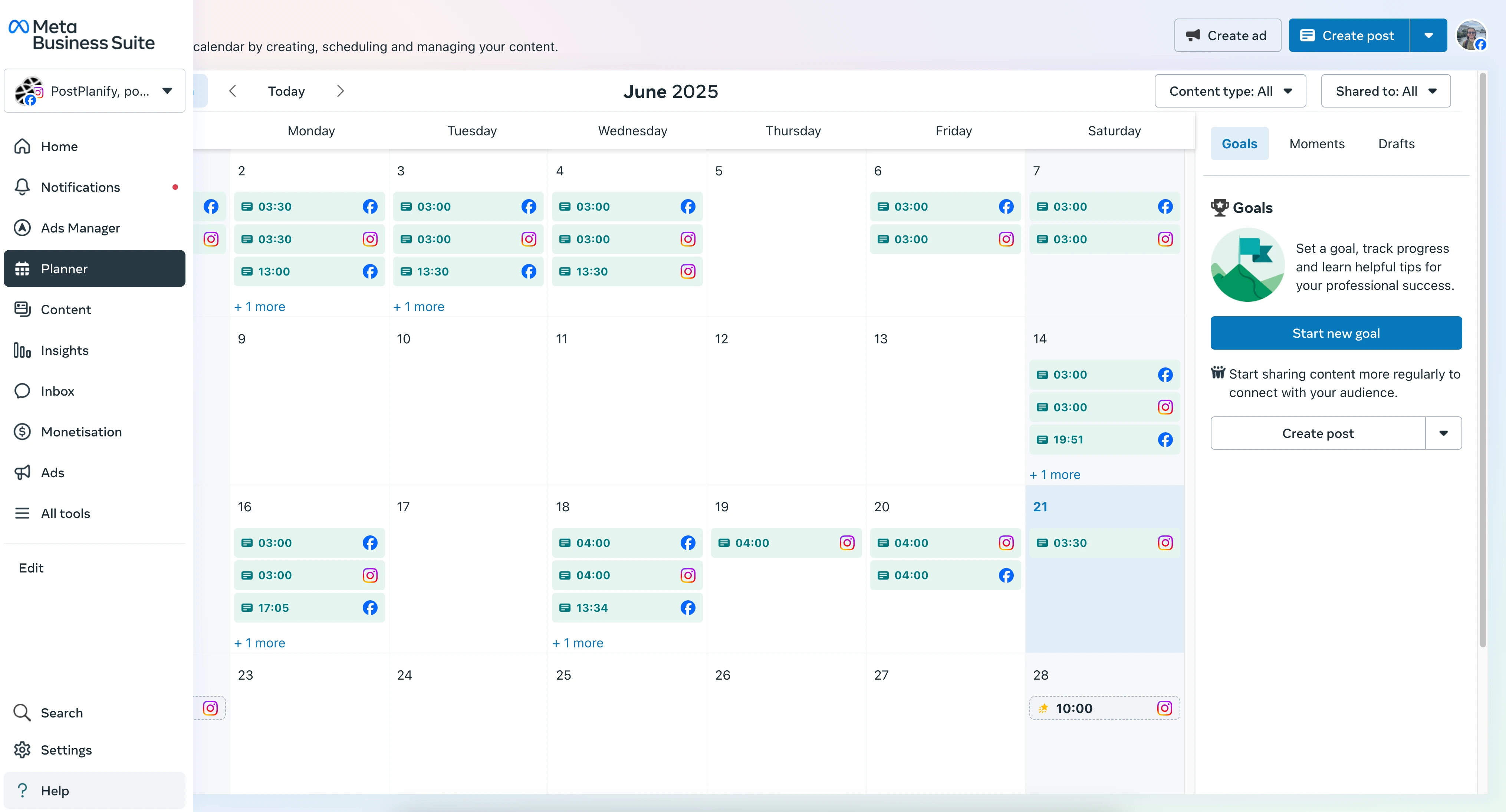
Meta Business Suite is free, permanently, and covers the two platforms most small nonprofits actually rely on: Facebook and Instagram. It schedules posts and Stories, runs a shared inbox for comments and messages across both, and reports native Insights with no plan limits and no verification process. Threads scheduling has been added too.
It is on this list because the honest answer for a lot of nonprofits under $200K in operating expenses is that they do not need a paid tool yet. If Facebook and Instagram are your whole presence, Meta Business Suite plus Canva Nonprofits is a complete $0 stack.
At a glance: Meta Business Suite
- Pricing (standard): Free, with no paid tier
- Platforms: Facebook, Instagram, and Threads
- Free trial: Not applicable, the product is free
- Nonprofit discount: Not applicable
- Best for: Nonprofits whose entire social presence is Facebook and Instagram, and anyone wanting to delay a paid subscription
Pros for nonprofits:
- Genuinely free with no post caps, channel caps, or user caps
- Native Insights are deeper for Facebook and Instagram than most third-party tools expose
- Shared inbox covers comments and DMs across both platforms
- No verification, no application, no renewal cycle
- Granular page roles, so volunteers get access without sharing a login
Cons:
- Facebook, Instagram, and Threads only. No LinkedIn, X, TikTok, YouTube, or Google Business
- No cross-platform reporting, so board reports mean assembling exports by hand
- No approval workflows, which rules it out for multi-stakeholder sign-off
- Interface changes frequently, which is a real cost when volunteers turn over
- No content recycling, bulk CSV upload, or link-in-bio
Skip this if: you publish to more than Facebook, Instagram, and Threads, need an approval chain before posts go live, or have to produce one report covering every channel.
What Makes a Social Media Tool Right for Nonprofits (vs Commercial Buyers)

Nonprofit social media work shares structure with commercial marketing, but the constraints and goals differ in ways that change the tool selection:
- Budget shape is fundamentally different. A nonprofit on $200K-$2M in annual operating expenses can't model software the way a venture-backed company does. Every recurring expense rolls into financial reporting that donors, the board, and (depending on size) the IRS scrutinize: tools that look "cheap" on the marketing page need to look cheap on the audited Form 990 too.
- Volunteer access matters more than seat math. Most nonprofits run a hybrid team: staff, contractor designers, board members reviewing campaigns, and volunteers during fundraising drives. Per-seat tools force a bad choice: pay for everyone (the budget won't support it) or share logins (which kills audit trails). Tools with unlimited users remove that friction.
- The audience and the donor pipeline are the same people. Nonprofits use social to cultivate donors, recruit volunteers, and build community: not just drive traffic. The same Instagram follower might be a $15/month sustaining donor, a recurring volunteer, and a board member's neighbor. The platform needs to support relationship work, not just publishing.
- Storytelling is the work, not the wrapper. Nonprofit content is heavily narrative: beneficiary stories, program impact, donor recognition. Visual planning (Later, PostPlanify) and design integrations (Canva, Google Drive) save more hours per month for nonprofits than for commercial brands.
- Reporting goes to boards and donors, not CMOs. Board reports emphasize mission outcomes (reach to underserved audiences, volunteer engagement, mission alignment) over raw engagement numbers. White-label PDF reports help, but the reporting framework matters more than metric depth.
- Compliance varies by sub-sector. Healthcare nonprofits, religious organizations, advocacy nonprofits with political-activity restrictions, and hospitals all have specific compliance considerations. Larger nonprofits with foundation grants may have donor-data restrictions that affect tool integration.
Every tool above is evaluated through this lens.
What to Look for in a Social Media Tool for Nonprofits
Use these criteria to sanity-check your shortlist from the tools above:
- Verified nonprofit discount with documented eligibility. Watch for tools that advertise discounts but lock them to mid-tier plans only (Sprout Social Standard is excluded; Vista Social and Sprout Social discount only on Professional/Advanced). The headline % matters less than what plan the discount applies to.
- Free plan or low entry price for tiny nonprofits. Organizations under $100K in operating expenses often start on free plans (Buffer, Metricool, Publer) before any paid tooling makes sense.
- Pricing model that doesn't punish multi-stakeholder access. Unlimited-user models (PostPlanify, Loomly Beyond, Buffer Team, Planable) work better than per-seat for nonprofits with diverse staff/volunteer/board access.
- Approval workflows for board/exec/legal review. Nonprofits often have formal sign-off chains. Look for multi-approver or multi-step workflows: not just "manager approval."
- Eligibility process you can actually complete. Some discounts require TechSoup verification (Hootsuite via HootGiving, several others). Some take simple 501(c)(3) documentation (Buffer, Later, Vista Social, Loomly). Some require sales-team conversation (Sprout Social).
- Board-ready reporting. White-label PDF reports save hours preparing monthly board updates. Look for branded exports or shareable links.
- Integration with nonprofit infrastructure. CRM (Salesforce Nonprofit Cloud, Bloomerang, DonorPerfect), design tools (Canva for Nonprofits), and email (Mailchimp Nonprofit) often share data with social tools via Zapier or native APIs.
- Audit trails for accountability. When the board asks "who approved this campaign post?" you should be able to answer in 30 seconds. Approval history matters for institutional memory.
Run a real cross-functional approval inside the trial: staff member writes, exec director approves, board chair reviews. That's the fastest way to surface where a tool's "approval workflow" actually breaks for nonprofit governance.
Canva Nonprofits: The Adjacent Tool Most Nonprofits Already Need
No scheduler on this list replaces design, and for nonprofit teams the design tool is almost always Canva. It is worth its own section because it changes the budget math: Canva Nonprofits is 100% free for registered nonprofits, NGOs, and social impact organizations with up to 50 users, and it includes every Canva Pro premium feature plus team collaboration (source: Canva Nonprofits). Organizations needing more than 50 seats get 50% off Canva Enterprise.
That matters for two reasons. First, premium templates, stock photos, video, and the brand kit remove the single biggest recurring design cost for a small comms team. Second, every tool in this comparison except Meta Business Suite imports directly from Canva, so the free design layer plugs into whichever scheduler you pick rather than forcing a workflow change later.
Eligibility follows the usual shape: registered nonprofit status (501(c)(3) in the US or local equivalent), independent from government, and not a school, political party, or grant-making foundation. Check Canva's eligibility guidelines before applying, since the exclusions are slightly narrower than TechSoup's.
Practical sequence: apply for Canva Nonprofits first. It is free, approval is quick, and it is the one discount that benefits your nonprofit regardless of which scheduler you end up choosing.
Honorable Mentions: Tools and Resources Worth Knowing About
Beyond the 12 tools above, several adjacent tools and resources are essential for nonprofit social media work:
-
Sprout Social: offers reduced nonprofit pricing on Professional and Advanced plans for verified 501(c)(3) organizations on annual subscription. The Standard plan is not eligible. Per the Sprout Social Nonprofit Pricing page, Professional drops from $299 to $239/seat/mo (annual) and Advanced drops from $399 to $299/seat/mo (annual). Roughly 20-25% off. Even at the discounted rate, $239/seat/mo is steep for most nonprofits. Worth evaluating only if your nonprofit needs Sprout's deep enterprise analytics, sentiment, and listening, and operates at a scale where per-seat pricing makes sense.
-
Canva Nonprofits: covered in its own section above. Premium stock photos, brand kit, and team collaboration features are all included. Pairs naturally with PostPlanify's media library, which imports directly from Canva.
-
Adobe Express Premium for Nonprofits: eligible nonprofit organizations can request 10 free Adobe Express Premium memberships per year through TechSoup. Strong fit for design-heavy nonprofit teams already using the Adobe ecosystem.
-
TechSoup: the gateway resource for nonprofit technology discounts. TechSoup verifies nonprofit eligibility and connects organizations with donated and discounted software from Microsoft, Google, Salesforce, Adobe, Canva, Hootsuite, and many more. Most nonprofits should register with TechSoup as a foundational step before applying to individual tool discount programs. Hootsuite's HootGiving Program specifically requires TechSoup or Goodstack verification.
-
Goodstack (formerly Percent), alternative nonprofit verification service used by Hootsuite and other tools. Faster than TechSoup for some organizations; check both depending on your country and tool stack.
-
Mailchimp for Nonprofits: Mailchimp offers a discount program for verified nonprofits via its nonprofit discount help article. Important adjacent tool. Most nonprofits run social and email together, and Mailchimp's Zapier and API support pairs cleanly with the social tools above. Check Mailchimp's nonprofit discount page for current rates.
If your nonprofit hasn't registered with TechSoup yet, that's the first step before applying to any tool-specific discount programs. The verification carries across most major social media tools and saves repeating documentation submissions.
Nonprofit-Specific Feature Comparison: How the 12 Tools Stack Up
Beyond pricing, nonprofits need to evaluate tools on capabilities specific to their work: board-ready reporting, donor and volunteer message routing, fundraising attribution, audit trails for grant accountability, and structures that support multi-program or multi-chapter operations. Here's how the 10 main tools compare on those dimensions:
| Tool | Board-Ready Reports | Donor / Volunteer Inbox | Fundraising Attribution | Audit Trails | Multi-Program / Chapter | Volunteer Access (Pricing Model) |
|---|---|---|---|---|---|---|
| PostPlanify | Client reports (Premium); white-label (Scale) | IG, FB, LinkedIn, GBP, YouTube, Threads, Bluesky (assignable) | Link-in-bio click analytics + REST API for CRM | Multi-approver progress + rejection notes per post | Up to 100 workspaces | Per workspace, unlimited users |
| Buffer | Basic exports | IG, FB, LinkedIn (paid plans) | Basic UTM-based reporting | Access levels (Team plan) | Per-channel scaling | Unlimited users on Team |
| Hootsuite | Custom branded reports (Advanced+) | Centralized inbox + DM automations | UTM + native Salesforce integration (Enterprise) | Custom permissions + audit log (Advanced+) | Per-user pricing scales expensively | Per-user (HootGiving discount helps) |
| Later | Basic exports | Social inbox (Growth+) | Linkin.bio click tracking | Custom roles (Growth+) | Multiple Social Sets per plan | Add-on $5/user |
| Loomly | Export reports (all paid plans) | Interactions inbox | Link shortener analytics | Approval workflows + custom roles (Beyond) | Calendar per brand | Unlimited users on Beyond |
| Metricool | PDF/PPT (no watermark, paid plans) | Inbox Manager (basic) | Looker Studio connector + competitor tracking | Roles + permissions (Advanced+) | Per-brand pricing model | Unlimited users (Advanced+) |
| Sendible | White-label add-on ($240/mo, Advanced+ only) | Priority Inbox with sentiment | UTM + custom reports (Scale+) | User management + approval audit | Profile groups + chapter dashboards | Tiered: 1 → 4 → 7 → 20 → 80 |
| Vista Social | White-label setup (Scale+) | Unified inbox with sentiment | Link analytics | Multi-step workflow logs (all plans) | Brands per workspace | Tiered: 3 / 6 / 10 / Unlimited |
| Agorapulse | Branded reports (paid) | Best-in-class unified inbox | ROI reporting via UTM | Post + inbox assignment audit | 10 profiles cap on standard plans | Per-user pricing |
| Planable | Analytics add-on ($9/workspace/mo) | Engagement add-on ($5/workspace/mo) | Limited (no built-in attribution) | Comment + approval history per post | Per-workspace | Unlimited users on all paid |
How to read this matrix:
- PostPlanify: unlimited team members means volunteer and board access doesn't compound seat fees; multi-approver workflows fit cross-functional review
- Hootsuite Advanced+: strongest enterprise feature set (audit trails, Salesforce integration, branded reports), but per-user pricing requires the HootGiving discount to be feasible
- Agorapulse: deepest social inbox for community-led nonprofits where donor and volunteer messaging drives the work; per-user pricing limits fit at scale
- Sendible Scale+: strongest match for national nonprofits with regional chapters needing client-style dashboards
- Buffer: simplest tool for tiny nonprofits where the free plan already covers needs
- Planable: cleanest content-review UX when multi-stakeholder sign-off is the bottleneck; analytics and inbox cost extra per workspace
Practical rule for evaluation: map your nonprofit's three biggest weekly workflows (e.g., publishing + inbox + monthly board report) to the matrix and score how well each tool covers all three. Tools that ace one workflow but punt on another usually require a second tool: doubling the actual cost and operational overhead.
Real-World Budget Scenarios: What 3 Nonprofit Archetypes Actually Pay
Abstract math obscures what nonprofits actually spend. Here's what three real nonprofit archetypes pay annually after applying the verified discounts above.
Scenario 1: Tiny local animal welfare nonprofit
- Operating budget: ~$250K annual
- Team: 1 executive director + 2 part-time staff + ~15 active volunteers
- Channels: Instagram, Facebook, TikTok (3 channels)
- Workflow: Single-person posts; occasional ED review; native platform analytics for the monthly board update; one major fundraising push (Giving Tuesday)
- Best fit: Buffer Free at $0/year. Covers all 3 channels with 10 scheduled posts each. Pair with Canva for Nonprofits (free Canva Pro) for design. Native platform analytics handle reporting. Total annual social-tool cost: $0.
- Upgrade trigger: When post volume consistently exceeds 10 per channel per week, move to Buffer Essentials with 50% nonprofit discount = ~$2.50/channel/mo × 3 channels = ~$90/year.
Scenario 2: Regional community development nonprofit
- Operating budget: ~$1.2M annual
- Team: 6 full-time staff + ~20 board members (view-only) + occasional volunteers
- Channels: Instagram, Facebook, LinkedIn, X, YouTube (5 channels)
- Programs: 3 distinct programs (housing, youth services, food security) each with its own social presence
- Workflow: Cross-functional approval (program lead → comms coordinator → ED), monthly board reports, semi-annual foundation grant reporting
- Compare annual costs (after applicable discounts):
| Option | Effective Monthly | Annual Cost | Notes |
|---|---|---|---|
| Sprout Social Standard for 6 seats | $1,194/mo | $14,328/year | Standard plan not eligible for Sprout's nonprofit discount |
| Hootsuite Standard for 6 users with HootGiving | $234/mo | $2,808/year | $39/user/mo on annual billing, 10 social accounts |
| PostPlanify Premium, 3 workspaces (one per program) | $79/mo | $948/year billed yearly | Unlimited team members, 18 social accounts, multi-approver workflows, client reports. Up to 50% off on request for verified nonprofits |
- Best fit: PostPlanify Premium. Multi-approver workflows fit the program lead → comms coordinator → ED review chain, branded reports land cleanly in foundation grant reporting, and a workspace per program gives each of the three programs its own organized environment. Unlimited team members mean 20 board members can have view-only access without bumping the bill, and the verified nonprofit discount applies on top.
Scenario 3: National advocacy nonprofit with regional chapters
- Operating budget: ~$15M annual
- Team: 25 national staff + 8 regional chapters (3-5 staff each, ~32 chapter staff) + ~100 volunteers + 30 board members
- Channels: 50+ social accounts (national + regional chapters)
- Workflow: National brand consistency across chapters with regional autonomy, white-label reports for the national board, approval workflows that scale across regional + national stakeholders
- Compare annual costs (after applicable discounts):
| Option | Effective Monthly | Annual Cost | Notes |
|---|---|---|---|
| Sendible Enterprise with 25% annual nonprofit discount | ~$563/mo | ~$6,750/year | 80 users, 400 profiles, chapter dashboards, but white-label is a $240/mo add-on on top |
| PostPlanify Scale, 9 workspaces (8 chapters + national) | $283/mo | $3,396/year billed yearly | 72 social accounts, unlimited team members, white-label dashboards and reports included. Up to 50% off on request for verified nonprofits |
| Hootsuite Enterprise with HootGiving discount | Custom (sales-quoted) | Typically $15K+/year | Strongest enterprise feature set if eligibility clears and budget allows |
- Best fit: PostPlanify Scale. A workspace per chapter plus one for national programs maps cleanly, white-label reports work for the national board, multi-approver workflows scale across regional and national stakeholders, and unlimited team members means every chapter staffer, volunteer, and board member can have view-only access without seat fees). Sendible Enterprise is the alternative if you specifically need the client-dashboard model with scoped access for 80+ active users across regions: chapter dashboards are Sendible's strongest differentiator. Both tools have verified nonprofit discounts; final choice should follow workflow fit rather than price.
Important caveat: these are starting points, not final budgets. Run the math against your actual team shape (active publishers vs occasional reviewers vs view-only board members), realistic channel count, and monthly post volume before signing. Annual contracts with sales-quoted enterprise tools sometimes negotiate further depending on the multi-year commitment.
Giving Tuesday & Year-End Fundraising: Which Tools Handle Campaign Weeks Best
Most nonprofit social media tooling rises and falls around two moments: Giving Tuesday (the Tuesday after Thanksgiving in the US) and the December year-end fundraising push. During those weeks, posting volume can hit 5-10× normal, donor inbox volume spikes, approval cycles need to run faster, and one missed post can mean lost revenue. The same 10 tools that look identical in normal operating months perform very differently during campaign weeks. Here's the tool-by-tool breakdown on the four capabilities that matter most:
1. Bulk scheduling capacity
A typical nonprofit Giving Tuesday push involves 30-80 scheduled posts across platforms in a single week, so bulk scheduling capacity is what decides how much of campaign week is spent in the tool. Tools with high bulk caps reduce manual work dramatically:
- Hootsuite Advanced+: 350 posts via CSV. Highest cap in the category
- Sendible Advanced+: Bulk posting with custom tags
- Loomly (all paid plans): Bulk scheduling included
- Agorapulse Advanced+: Bulk publishing with content queues
- Vista Social: Bulk via CSV upload (no visual bulk interface)
- Metricool: Unlimited publishing on paid plans, but subject to a 600-posts-per-brand-per-month Fair Use Policy. Campaign weeks at multi-brand nonprofits can trigger a manual review that suspends posting
- PostPlanify: 20 posts per batch. Adequate for most nonprofits but requires multiple batches during peak Giving Tuesday volume
- Planable: 60 (Basic) / 150 (Pro) per workspace per month. Giving Tuesday alone can exhaust the Basic tier, since multi-platform posts count once per platform
- Later: Unlimited posts only on Scale ($110/mo standard); Starter capped at 30 posts per profile per month
- Buffer: No bulk scheduling. Manual one-by-one even on Team
2. Approval throughput during campaign weeks
When a viral moment requires same-day pivoting, approval bottlenecks cost real revenue. Tools with multi-approver, notification-driven, or auto-routing workflows respond faster:
- PostPlanify: Multi-approver with email notifications, configurable per post, on every plan from Growth. Flexible for urgent campaign content where the brand-only review chain is faster than full board sign-off
- Vista Social (all plans): Multi-step named workflows with assigned approvers
- Loomly Beyond: Custom workflows + custom roles for fast cross-functional pivot
- Sprout Social Advanced: Multi-step approvals with full audit trails
- Hootsuite Advanced: Approval workflows + custom permissions + auto-routing
- Sendible Scale+: Custom approval workflows
- Planable Pro/Enterprise: Multi-tier approvals. Strongest UX for the review step itself, though slower for bulk same-day pivots
3. Inbox response time during campaigns
Donor questions during Giving Tuesday campaigns convert at notably higher rates if answered within 30 minutes. Inbox tools with assignment, sentiment, and SLA tracking close more donations:
- Agorapulse: Best-in-class for nonprofits. Assignment, sentiment, response-time SLA tracking, automated moderation rules (Advanced+)
- Sprout Social Smart Inbox (Advanced+): Sentiment + helpdesk integrations (Zendesk for nonprofits with formal donor-support workflows)
- Sendible Priority Inbox: Color-coded sentiment analysis
- PostPlanify Social Inbox: Coverage for IG, FB, LinkedIn, GBP, YouTube, Threads, and Bluesky with assignment and label workflows; no sentiment scoring
- Vista Social: Unified inbox with sentiment
- Hootsuite: Centralized inbox with DM automations and auto-routing (Advanced+)
- Buffer Community Inbox: Basic. Covers IG, FB, LinkedIn only
- Metricool Inbox Manager: Basic. No automated moderation, no sentiment
4. Fundraising attribution
Post-campaign reporting needs to tie social activity to donor-page conversions. Tools with strong UTM + analytics + CRM integration close the loop:
- Hootsuite Enterprise: Native Salesforce integration. Direct visibility into donor pipeline for nonprofits using Salesforce Nonprofit Cloud
- Metricool Advanced+: Looker Studio connector pipes social data into broader fundraising dashboards
- Agorapulse Advanced: ROI reporting via UTM tagging tied to donor-page conversions
- PostPlanify: Link-in-bio click analytics + REST API for custom CRM/donor-management integrations
- Sendible Scale+: Custom reports with UTM
- All others: Basic UTM passthrough. Sufficient for tracking source/campaign/medium in Google Analytics 4 but not for direct donor-pipeline visibility
Tactical recommendations for campaign-heavy nonprofits
For nonprofits running serious Giving Tuesday or year-end campaigns:
- Prioritize bulk scheduling, multi-approver throughput, and inbox depth over advanced analytics during campaign weeks. Analytics matter for the post-mortem; bulk scheduling, approvals, and inbox matter during the campaign itself. Most nonprofits realize this only after a campaign fails because they couldn't push the volume of approved posts fast enough.
- Avoid Buffer Free or Planable Basic during campaign months: post caps will hit hard and you'll lose hours scrambling.
- Verify Metricool's 600-post-per-brand Fair Use cap before relying on it for a multi-brand campaign month. The manual review can suspend posting at the worst moment.
- Set up approval flows at least two weeks before campaign launch. Adding approvers mid-campaign loses days as people learn the tool while urgency rises.
- Run a campaign dry-run inside the trial. Schedule a week's worth of mock content across all platforms and verify everything publishes on time. The friction points surface immediately and you have time to fix them before money is on the line.
For nonprofits planning Giving Tuesday for the first time or scaling up year-end campaigns, our guide on how to plan social media content walks through the calendar planning side; the operational tooling side is what this article covers.
How to Verify Your Nonprofit's Eligibility (Step by Step)
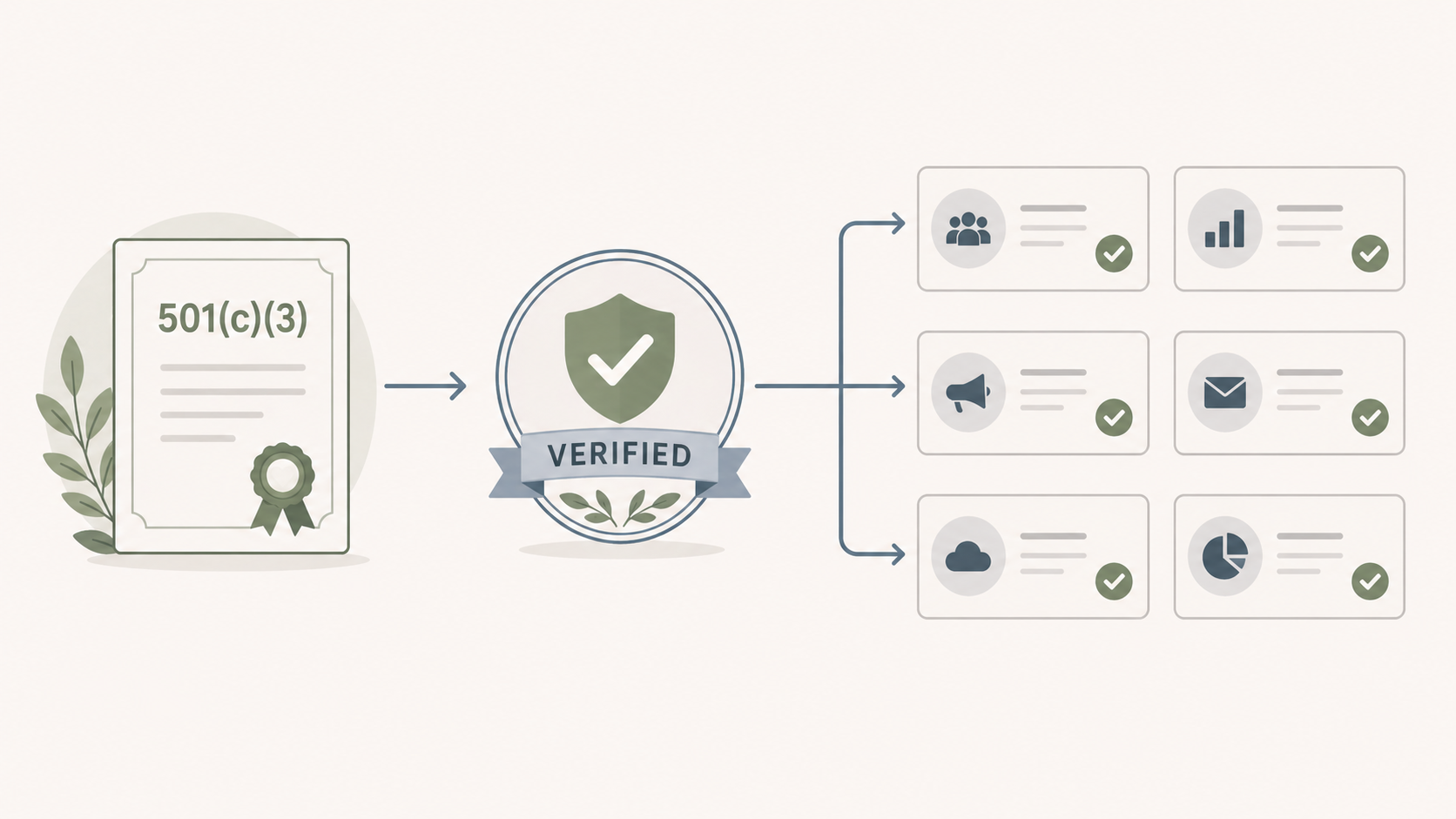
Most nonprofit discount programs require some form of verification before the discount is applied. Here's the practical sequence:
Step 1: Confirm your nonprofit's legal status. US nonprofits need 501(c)(3) status from the IRS. UK organizations need registered charity status. Other countries have local equivalents. If you're not sure, check your IRS Form 990 (for US) or your country's charity register.
Step 2: Register with TechSoup (US) or Goodstack. Both services verify nonprofit status once and let you carry the verification across multiple tool discount programs. TechSoup is more established in the US and partners with major tools (Hootsuite, Microsoft, Adobe, Canva, Salesforce). Goodstack is faster for some applications.
Step 3: Gather standard documentation. Most discount programs accept:
- 501(c)(3) determination letter (US)
- Charity registration number (UK, EU, others)
- Proof of nonprofit status from your country's relevant authority
- Most recent IRS Form 990 (US)
- Letter on org letterhead confirming status (sometimes required)
Step 4: Apply to specific tool programs. Each tool's application process varies:
- PostPlanify: contact directly via PostPlanify with proof of nonprofit status, up to 50% off
- Buffer: 48-hour review via the nonprofit discount form
- Hootsuite: 1 to 2 week review via HootGiving (TechSoup required)
- Sprout Social: contact sales team for nonprofit pricing
- Later: review via the non-profit discount application page
- Vista Social: 48-hour review via Vista Social's Nonprofit Discount form
- Loomly: contact support after starting trial
- Metricool: contact support directly via the Metricool website
- Sendible: contact sales via the Sendible website
- Agorapulse: contact sales via Agorapulse pricing
- Planable: email [email protected] with proof; receive a dedicated discount code
Step 5: Confirm the discount applies to your target plan. Some programs restrict discounts to specific tiers. Sprout Social excludes the Standard plan, Vista Social excludes Scale, Hootsuite's HootGiving covers Standard, Professional, and Advanced. Always confirm before signing.
Step 6: Track renewal dates. Most discounts apply lifetime (Loomly, Agorapulse), but some require periodic re-verification. If you run social media for 501c3 organizations across multiple entities, keep a single shared record of which discount expires when, since TechSoup social media verifications and vendor-direct approvals renew on different cycles. Keep documentation accessible for renewal audits.
Free Social Media Tools for Nonprofits: The Minimum Viable Stack
For nonprofits operating under $200K annually with 1-2 staff, paid social media tooling often isn't viable yet. The minimum viable free stack:
- Buffer Free: 3 channels, 10 posts per channel
- Canva for Nonprofits: free Canva Pro for design and branded templates
- Native platform analytics: Meta Business Suite, LinkedIn Page Analytics, TikTok Analytics
- Google Analytics 4: for tracking donate-page conversions from social
- Linkin.bio (Later free) or Beacons free: for fundraising landing pages
This stack costs $0 indefinitely and handles publishing, design, basic analytics, and link-in-bio for organizations under 1,000 followers per platform. Once growth pushes past these limits, typically when the team is consistently posting 3+ times per week per platform across 4+ channels: paying for a discount tool becomes worthwhile.
Best Tool by Nonprofit Size and Type

Different nonprofit types and sizes have different optimal tools.
Tiny nonprofits (under $200K operating budget, 1-2 staff)
Buffer Free + Canva for Nonprofits + native analytics: $0/month indefinitely. The minimum viable stack until growth justifies a paid tool. Move to Buffer Essentials (~$2.50/channel/mo with 50% discount) when post limits become restrictive.
Small nonprofits ($200K-$1M, 2-5 staff)
PostPlanify Growth (from $39/mo per workspace, $31/mo billed yearly, with up to 50% off on request for verified nonprofits): unlimited team members means board members and volunteers can review without seat fees. Or Buffer Team with 50% discount (~$5/channel/mo) if the budget is tighter and the channel count is low.
Mid-sized nonprofits ($1M-$10M, 5-15 staff)
PostPlanify Premium (from $99/mo per workspace): unlimited team members, 6 social accounts per workspace, multi-approver workflows, and client reports. Or Loomly Beyond ($166/mo with 50% lifetime discount) when unlimited users matters more than analytics depth.
Large nonprofits ($10M+, 15+ staff)
Hootsuite with HootGiving discount (up to 60% off, from $39/user/mo on Standard): strongest enterprise feature set for established nonprofits with TechSoup eligibility. Or PostPlanify Scale (from $199/mo per workspace) for nonprofits prioritizing predictable per-workspace pricing, with unlimited team members and 8 social accounts in each workspace.
Multi-chapter / national nonprofits with regional affiliates
Sendible with 25% annual discount: chapter-friendly tier structure scaling from 4 to 80 users with client dashboards. Or PostPlanify Scale for a workspace per chapter, up to 100, with unlimited team members.
Faith-based and congregational nonprofits
Buffer or PostPlanify, depending on team size. Churches and religious organizations run the same volunteer-heavy shape as other nonprofits, with a weekly service rhythm on top; our churches and religious organizations page covers that calendar specifically.
Arts and cultural nonprofits
Later with 50% discount: visual planning fits the workflow. Add Canva for Nonprofits for design.
Advocacy nonprofits (anti-racism, civil rights, social justice)
Later with the 50% off annual Growth plan, which lands around $21/mo. Pair with email tooling and direct fundraising platforms.
Healthcare, hospital, and education nonprofits
These are excluded from Hootsuite's HootGiving Program. Best alternatives: PostPlanify (per-workspace pricing, unlimited users), Buffer (50% discount, no exclusions), or Loomly (50% lifetime discount, no exclusions).
Community development and policy nonprofits
PostPlanify Premium with multi-approver workflows for policy review chains. Or Vista Social with 50% discount for multi-step approvals.
How to Roll Out a Social Media Tool at Your Nonprofit
A new social media platform inside a nonprofit has more stakeholders than people typically plan for: staff, board, volunteers, and sometimes donors with special access. Here's the rollout sequence that surfaces problems early instead of three months in.
1. Audit current access and tool sprawl. List who currently has access to your social accounts, including shared passwords, third-party apps, native logins, and any analytics or design tools. Nonprofits accumulate access debt fast as volunteers cycle in and out. Resolve this before adding a new platform.
2. Apply for nonprofit discounts before signing. Don't pay full price for the trial conversion. Run the trial, confirm the tool fits, then apply for the discount before the contract signs. Most discount programs (Buffer, Vista Social, Later) take 48 hours; Hootsuite's HootGiving takes 1-2 weeks.
3. Map the approval chain across roles. Different post types get different approval depth. Daily content (single approver: comms manager). Campaign content (program lead + comms + exec director). Major fundraising appeals or sensitive advocacy posts (above + board chair review). Tools with multiple named approvers (PostPlanify, Vista Social) or multi-step workflows (Planable Enterprise, Loomly Beyond) handle this differently. Pick based on your real chain.
4. Set up brand governance before inviting volunteers. Brand kit (logos, colors, approved photos), media library structure, and content tagging. Volunteers post inconsistently if you set up the tool first and add governance later.
5. Decide what gets reported to whom. Board reports get summary-level metrics (reach, engagement growth, donor acquisition from social). Foundation grant reports get program-level metrics. Donors get stewardship reports. Configure templates accordingly: most tools support this once you set it up once.
6. Run a campaign launch as the trial-period acid test. Before signing, run one real campaign (Giving Tuesday, year-end appeal, awareness week) through the tool: multi-platform posts, full approval chain, scheduled publication, and post-campaign report. Friction points surface immediately. A demo never reveals what a real launch does.
7. Train volunteers separately from staff. Volunteers cycle in and out of team roles and permissions: set up a 15-minute video walkthrough specifically for them that lives in your onboarding doc. Staff need 30-45 minutes on the full publishing workflow. Don't combine these sessions; volunteer turnover means you'll re-run their training repeatedly.
8. Document the access policy. Who can connect a new social account? Who can remove a team member? What happens when a volunteer leaves? Write this down, share with the board if needed, and revisit annually. Audit trails in tools like PostPlanify, Loomly, and Sprout Social help here, but they don't replace policy.
FAQ: Social Media Management Tools for Nonprofits
What is the best social media management tool for nonprofits?
For most nonprofits, PostPlanify is the best overall choice: unlimited team members on every plan means board members, volunteers, and contractors all get access without per-seat fees, pricing is per client workspace from $39/mo, and verified nonprofits can ask for up to 50% off on top. Multi-approver workflows fit real nonprofit governance (exec director + comms + board), and white-label PDF reports are board- and donor-ready. From there it depends on your shape: Buffer is best for tiny nonprofits (free plan + 50% off), Hootsuite offers the deepest percentage (up to 60% via HootGiving, though on per-user pricing), Later suits storytelling-heavy orgs, and Loomly is strongest for formal multi-stakeholder approvals.
What's the best free social media management tool for nonprofits in 2026?
Buffer's free plan is the strongest free tier for nonprofits: 3 channels with 10 scheduled posts per channel, indefinite use. Pair it with Canva for Nonprofits (free Canva Pro for verified 501(c)(3) organizations), native platform analytics (Meta Business Suite, LinkedIn Page Analytics), and Google Analytics 4 for a $0 indefinite stack. Once the team grows past these limits, Metricool's free plan (1 brand, 20 posts/mo) is the main alternative, though it excludes LinkedIn and X. Planable has no free plan, only the first 50 posts free with no time limit.
Which social media tool offers the biggest nonprofit discount?
Hootsuite's HootGiving Program offers up to 60% off Standard, Professional, or Advanced plans, which is the deepest percentage in the category but applies to per-user pricing, so the total still climbs with team size. However, eligibility is restricted (no schools, hospitals, healthcare orgs, governmental entities, or credit unions), and the application requires TechSoup or Goodstack verification with a 1 to 2 week approval window. Buffer (50%), Later (50%), Vista Social (50% on Pro/Advanced), and Loomly (50% lifetime) are the next tier. Source verification: each tool's nonprofit page is linked in the individual tool sections above.
Is the nonprofit discount applied to all plans or only specific tiers?
It varies. Buffer (all plans), Loomly (all paid plans), Metricool (all paid plans), Sendible (all plans), Agorapulse (all paid plans), Planable (all plans) apply discounts universally. Sprout Social restricts the discount to Professional and Advanced plans (Standard is excluded). Vista Social discounts only Professional and Advanced (Scale and Enterprise excluded). Hootsuite's HootGiving covers Standard, Professional, and Advanced. Later narrowed its discount in 2026 to the annual Growth plan only. Always confirm before signing.
Do nonprofit social media tools require TechSoup verification?
Some do, some don't. Hootsuite's HootGiving Program explicitly requires TechSoup or Goodstack verification. Other tools (Buffer, Later, Loomly, Vista Social, Sendible, Metricool, Agorapulse, Planable) accept direct documentation, typically 501(c)(3) determination letter (US) or charity registration number (UK and others). Even when not required, registering with TechSoup first is recommended: it carries across multiple tool programs and saves repeating documentation submissions.
Can hospital, school, or healthcare nonprofits use these discount programs?
Mixed. Hootsuite's HootGiving Program explicitly excludes schools, colleges, universities, hospitals, healthcare organizations, governmental entities, agencies, and credit unions. Sprout Social's nonprofit pricing is for 501(c)(3) organizations, which typically includes schools and hospitals. Buffer, Later, Loomly, Vista Social, Sendible, Metricool, Agorapulse, and Planable generally accept any verified nonprofit, including hospitals and schools, though confirm directly before applying.
How long does it take to get approved for a nonprofit discount?
Fastest: Buffer (48 hours), Vista Social (48 hours). Standard: Later, Loomly, Metricool, Sendible, Agorapulse, Planable (typically 24 hours to 1 week, depending on documentation completeness). Slowest: Hootsuite HootGiving (1-2 weeks, due to TechSoup verification step). Sprout Social requires a sales conversation, which typically adds another 1-2 weeks.
What's the cheapest combined social media + design stack for nonprofits?
Buffer Free + Canva for Nonprofits, both completely free for verified nonprofits. Add Linkin.bio (Later free tier) or Beacons free for link-in-bio. This stack costs $0 indefinitely and handles publishing, design, branded templates, basic analytics, and donate-page links. Once the team grows past Buffer's free 3-channel cap, Buffer Essentials with 50% discount (~$2.50/channel/mo) + Canva for Nonprofits (free) is the natural next step.
Should we apply for the nonprofit discount before or after the free trial?
Apply during or near the end of the trial, not before. Most discount programs require active engagement with the tool to verify it fits your needs, and applying too early can complicate the trial experience. The standard sequence: (1) start the free trial, (2) confirm the tool fits, (3) apply for the nonprofit discount, (4) when approved, sign the discounted contract. Buffer, Vista Social, and Later all accept applications during the trial; Hootsuite HootGiving recommends applying once you've confirmed the tool fits.
Can multiple nonprofits share one paid social media account?
No, and you shouldn't try. Each nonprofit needs its own subscription for compliance, audit, and reporting reasons. Sharing accounts across separately-incorporated nonprofits creates problems with brand identity, financial reporting, donor data, and audit trails. The exception is fiscal sponsors managing multiple sponsored projects under one umbrella: tools like Sendible (Scale+, with chapter-style structure) or PostPlanify (a workspace per sponsored project, up to 100) are designed for this multi-program use case under one organizational subscription.
What about nonprofit discounts for X (Twitter) posting?
X (Twitter)'s API access has gotten more expensive in recent years, and several social media tools have responded differently. Buffer, Hootsuite, Sprout Social, Sendible, Agorapulse, and PostPlanify include X on standard plans. Vista Social charges for X as a paid add-on with undisclosed pricing. Metricool charges $5/month per X account as an add-on (Starter+ plans only, Free plan excludes X). Later removed X support entirely in 2025. If X is core to your advocacy or fundraising work, prioritize tools that include it without add-on fees.
Do these tools offer discounts for international nonprofits?
Most do, so social media tools for NGOs outside the US are well covered. Buffer, Hootsuite, Later, Vista Social, Loomly, Metricool, Sendible, Agorapulse, and Planable all accept documentation from international nonprofits: registered charity numbers (UK, EU), local nonprofit registry equivalents (Canada, Australia, etc.). Process and timelines may vary by country. Hootsuite's HootGiving Program specifically partners with TechSoup's global network, which operates in 200+ countries.
How do we measure social media ROI for board reports?
For nonprofits, ROI metrics that matter to boards typically include: (1) donor acquisition from social, tracked via UTM parameters on donate-page links + Google Analytics 4 conversion tracking; (2) engagement quality: saves, shares, comments per post (better signal than raw impressions); (3) list growth: email subscribers acquired via social CTAs; (4) volunteer recruitment: applications received via social-driven traffic; (5) mission reach: followers in target demographics. Tools like Agorapulse (ROI tracking via UTM tagging), Metricool (Looker Studio integration), and PostPlanify (analytics + link-in-bio click tracking) support these workflows. For a deeper framework, see our guide on ROI on social media.
Can these tools integrate with our nonprofit CRM (Salesforce, Bloomerang, DonorPerfect)?
Most major tools support Zapier integration, which connects to Salesforce, Bloomerang, DonorPerfect, and most major nonprofit CRMs. Hootsuite Enterprise has native Salesforce integration. PostPlanify, Metricool, and Sendible offer REST API access for custom integrations. For nonprofits using Salesforce Nonprofit Cloud (NPSP), Hootsuite is the strongest direct integration; for organizations using Bloomerang or DonorPerfect, Zapier is typically the path. Test the specific Zapier connector or API integration during your trial.
Key Takeaways
- Apply for verified nonprofit discounts before paying full price. The tools above offer documented discounts ranging from 20% (Agorapulse) to 60% (Hootsuite HootGiving) for verified nonprofits. Every tool's discount source is linked in the relevant section.
- Start with TechSoup verification. Even when a tool doesn't require TechSoup, the verification carries across multiple programs and saves repeating documentation submissions to each vendor separately.
- Confirm which plan tier the discount applies to before signing. Sprout Social excludes Standard, Vista Social excludes Scale and Enterprise, and Later applies its 50% to the annual Growth plan only. Headline % is meaningless if it doesn't apply to the plan you actually need.
- Prefer unlimited-user or per-workspace pricing for nonprofits with hybrid staff/volunteer/board access. Per-seat tools punish nonprofit team shapes. PostPlanify, Buffer Team, Loomly Beyond, and Planable all include unlimited users and remove the per-seat penalty.
- For tiny nonprofits, the free + discount stack is genuinely viable. Buffer Free + Canva for Nonprofits + native analytics + Google Analytics 4 = $0 indefinite stack. Move to paid tools once growth justifies it.
- Healthcare, hospitals, schools, and government-adjacent nonprofits should skip Hootsuite HootGiving (explicitly excluded) and look at PostPlanify, Buffer, Loomly, or other inclusive programs.
PostPlanifyAll your social media in one simple dashboard
Schedule posts, track analytics, and reply to comments/DMs without switching tabs.
Engagement
+18%
Views
52.8k
If you're choosing a social media platform for your nonprofit, PostPlanify is worth a serious look: unlimited team members mean giving access to staff, volunteers, board members, and contractors doesn't compound your bill, multi-approver workflows fit nonprofit governance review chains, and white-label PDF reports work cleanly for board meetings and donor stewardship. PostPlanify offers up to 50% off for verified nonprofits, reach out directly with proof of nonprofit status to apply the discount.
Related Reading
- 13 Best Google My Business Tools: Managing your Google Business Profile listing and reviews alongside social
- Best Social Media Management Tools for Marketing Teams
- Best Social Media Management Tools for Teams
- Best Social Media Management Tools for Agencies
- How to Start a Social Media Marketing Agency
- Best Free Social Media Management Tools
- Best Social Media Tools with Approval Workflows
- Social Media Tools With No Per-Seat Fees
- Best Social Media Analytics Tools
- Social Media Marketing Strategy for Small Business
- How to Create a Social Media Report
- ROI on Social Media: What Actually Counts
- White-Label Social Media Reports for Clients
- Social Media Audit Template
- Social Media Content Calendar Examples
- 14 Best LinkedIn Scheduling Tools
- Best Social Media Tools with White-Label Reports
PostPlanifyAll your social media in one simple dashboard
Schedule posts, track analytics, and reply to comments/DMs without switching tabs.
Engagement
+18%
Views
52.8k
About the Author

Hasan Cagli
Founder of PostPlanify, a social media management platform for agencies and teams. He focuses on building systems that help businesses, agencies, and teams plan, publish, and manage content and social media more efficiently across platforms.


